The Nintendo Switch 2 promises major storage upgrades, but it’ll cost you

The Nintendo Switch 2 had its big debut on Wednesday, and the new console looks to be a sizable, if mostly straightforward, upgrade over its mega-popular predecessor. Tucked between the new Donkey Kong and (pricier) Mario Kart games, mouse mode and overhauled party chat features, though, was another significant update: The device supports faster microSD Express cards. This may not be the sexiest feature, but it should bring quicker load times and generally improved storage performance to the upcoming handheld. The company briefly showed new 256GB cards from Samsung and SanDisk during its presentation, complete with Mario logos printed on.

However, the news came with a major caveat: The console is only compatible with microSD Express. The cards most people use today — which are based on the older UHS-I bus interface — will only work for loading videos and screenshots from an original Switch, not playing games, according to Nintendo’s support site. Nintendo says this restriction is necessary to preserve the Switch 2’s performance upgrades, and it’s worth noting that the console itself comes with a much more generous 256GB of space by default. But if you ever need to expand the device’s storage, this change will likely make doing so cost extra, while drastically shrinking the options you have to choose from.

A standard UHS-I microSD card and an SD Express card rest face down on a brown wooden board, showing how the latter includes a second row of pins to improve performance.
Unlike traditional UHS-I cards, a microSD Express card like the SanDisk model on the right comes with a second row of pins on the back.
Jeff Dunn for Engadget

What are microSD Express cards?

SD Express is a relatively recent but seldom-used standard that lets SD cards take advantage of the NVMe protocol and PCIe interface, which is the underlying tech used by SSDs. A microSD Express card has a second row of “pins” on its back and can utilize a single lane’s worth of PCIe bandwidth. As a result, it can produce dramatically faster read and write speeds than its UHS-I counterparts. Whereas the latter advertise sequential transfer rates up to 104 megabytes per second (MB/s), microSD Express cards have a theoretical maximum of 985 MB/s.

That’s far behind the NVMe SSDs used by the PlayStation 5 and Xbox Series X, but in theory, it makes Express cards faster than some older SATA-based SSDs when it comes to loading game levels, retrieving saves or copying games to the external storage. It’s worth noting that many UHS-I microSD cards can exceed the 104 MB/s limit with proprietary card readers, but they still fall well short of microSD Express levels even with those. The same goes for speedier UHS-II cards, which are mostly used by professional types with select cameras and PCs and max out at 312 MB/s. (There’s also a UHS-III interface, but nobody uses it. Getting all of this?)

Prior to Wednesday, the only reliably available microSD Express card we could find was this model from SanDisk. We recently tested it for our microSD card buying guide, and the upgrade was pretty dramatic. In the synthetic benchmark CrystalDiskMark, the SanDisk card achieved sequential reads up to 899.12 MB/s and sequential writes up to 650.41 MB/s. For comparison, the absolute fastest UHS-I card we’ve tested (Lexar’s Professional Silver Plus) topped out at 209.25 MB/s for reads and 193.93 MB/s for writes — so, three to four times slower.

In one of our “real-world” tests, the SanDisk Express card took an average of 20 seconds to move a 12GB folder containing various file types and subfolders to a PC and 52 seconds to write the folder back to the card. The Lexar card averaged 67 and 76 seconds, respectively. The gulf in random speeds — which measure how quickly a card can read and write small bits of data scattered throughout a device and tend to be particularly important for gaming — was similarly large, and in some benchmarks even greater.

The SanDisk microSD Express Card rests against a yellow background.
SanDisk’s microSD Express card is one of the (very) few options you can actually buy today.
Jeff Dunn for Engadget

Nintendo has not provided any official transfer speed ratings for the new console just yet, but all of this suggests that the Switch 2’s storage should be much faster than before, even if it’s not on par with the speeds of a PS5 or Xbox Series X. It’s also possible that, like those other consoles, the Switch 2 has hardware dedicated to decompressing files, which could make the real-world improvements over the original Switch’s storage performance even greater. (We’ve reached out to Nintendo and will update this post if we receive any further details.)

The original SD Express standard was released in 2018, but the tech has mostly gone nowhere in the years since. There’s been the SanDisk card noted above, a full-size SD card from ADATA and not much else. Previously, Samsung and Lexar announced microSD Express cards that wound up missing their original release windows — though Samsung’s card may just be the same one unveiled today, and Lexar did release a new “Play Pro” microSD Express card on Wednesday.

Host devices that support the standard, which are required to even see any improved speeds, have been highly uncommon over the same time frame. (If you put a microSD Express card in a device that doesn’t support the underlying tech, such as the original Switch, it’ll be limited to standard UHS-I speeds.) And while compatible card readers can deliver the faster transfer rates on certain PCs, they aren’t cheap, so at that point most people have been better off buying a faster external SSD.

The SD Association pointed us to a LinkedIn page (!) with other compatible devices when reached for comment, but the pickings are still slim, and very few of those support microSD Express cards specifically. The Switch 2 is by far the highest-profile device to embrace the standard, so it could be the thing that finally takes these cards from “cool idea” to “useful niche.”

A screenshot of Samsung and SanDisk microSD Express cards advertised by Nintendo during its Switch 2 reveal video.
The Samsung and SanDisk microSD Express cards Nintendo quickly teased during its Switch 2 unveiling on Wednesday.
Nintendo

Questions of price and heat

That said, there are multiple reasons why SD Express has failed to take off before this week, and it remains to be seen whether the Switch 2 will truly fix them. First and foremost is price. We’ve reached out to SanDisk and Samsung for confirmation, but for now we don’t know how much the microSD Express cards that Nintendo has teased will cost. If the couple other Express models available today are any indication, though, they’re likely to be much more expensive than the conventional cards you may have bought for the previous Switch.

SanDisk’s Express card, for instance, costs $45 for a 128GB model and $60 for the 256GB version. The 256GB Lexar Play Pro is $10 cheaper, but its 512GB and 1TB versions cost a whopping $100 and $200, respectively. For reference, Samsung’s Pro Plus — another UHS-I card we recommend in our buying guide — costs $17 for 128GB, $23 for 256GB, $38 for 512GB and $80 for 1TB as of this writing. That’s a huge difference. 

What’s more, the Play Pro is the only purchasable microSD Express card we’ve seen thus far that even supports capacities greater than 256GB. Nintendo says the console can support up to 2TB of external storage, but no Express card with that capacity appears to exist yet. The Switch 2 will be one of the first mainstream devices to truly push SD Express in earnest, so we’d expect it’ll drive prices down and increase competition over time. But how quickly, and by how much, remains up in the air.

The Nintendo Switch 2 game console being held up in the air, with the Switch 2 logo on its screen.
Nintendo

The other concern relates to thermal management. MicroSD Express cards can pump out significantly faster transfer speeds, but they’re still working with tiny little frames that don’t leave much room to dissipate heat. When we tested SanDisk’s microSD Express model for our guide, we noticed that it slowed down under longer, more sustained loads — not enough to fall behind than UHS-I cards, but still below its peak by a few hundred MB/s.

The SD Express spec does have mechanisms for keeping heat in check, and manufacturers like SanDisk advertise similar protections. Nintendo presumably has come up with ways to further avoid severe throttling with the Switch 2. (We already know that the new dock comes with a cooling fan built in, for instance.) But it’ll be something to keep an eye on once we can move large game files around the device.

In a developer Q&A posted to Nintendo’s website on Wednesday, Switch 2 producer Kouichi Kawamoto notes that the move to microSD Express will help the console’s performance hold up better in the long-term. With the new Mario Kart World, for instance, he says the faster transfer speeds will help make far-off destinations in the game’s open world visible faster. He also notes that Switch 2 games will have larger file sizes, but that he “doubt[s] most people will need a microSD Express card immediately after buying the system” thanks to the Switch 2’s larger built-in capacity.

Hopefully that’s the case. It’d be unfair to call this a PlayStation Vita situation, as that portable console relied solely on proprietary memory cards, and the Switch 2 will support options from several third-party manufacturers. But as it stands now, storage upgrades for the new console look like they’ll be much pricier and more limited to start. And just how much of an advantage the new tech provides is something we won’t know until the console arrives in June.

This article originally appeared on Engadget at https://www.engadget.com/gaming/nintendo/the-nintendo-switch-2-promises-major-storage-upgrades-but-itll-cost-you-193758964.html?src=rss
First-party Switch 2 games—including re-releases—all run either $70 or $80

Nintendo’s Switch 2 presentation gave us pricing for the console ($449 to start) and Nintendo’s product pages have given us pricing information for accessories ($80 for a Pro Controller, $90 for another pair of Joy-Cons, and $110 for a replacement dock, sheesh). But what Nintendo didn’t mention during the presentation was game pricing, either for standalone Switch 2 titles or the Switch 2 Edition upgrades for existing Switch games.

Nintendo announced via its website after the presentation that Mario Kart World, the console’s flagship launch title, will cost $50 when you buy a digital copy as part of a Switch 2 bundle. But the game will cost $80 when you buy it on its own, $30 more than the pack-in version and $20 more than the usual $60 price for first-party Switch games.

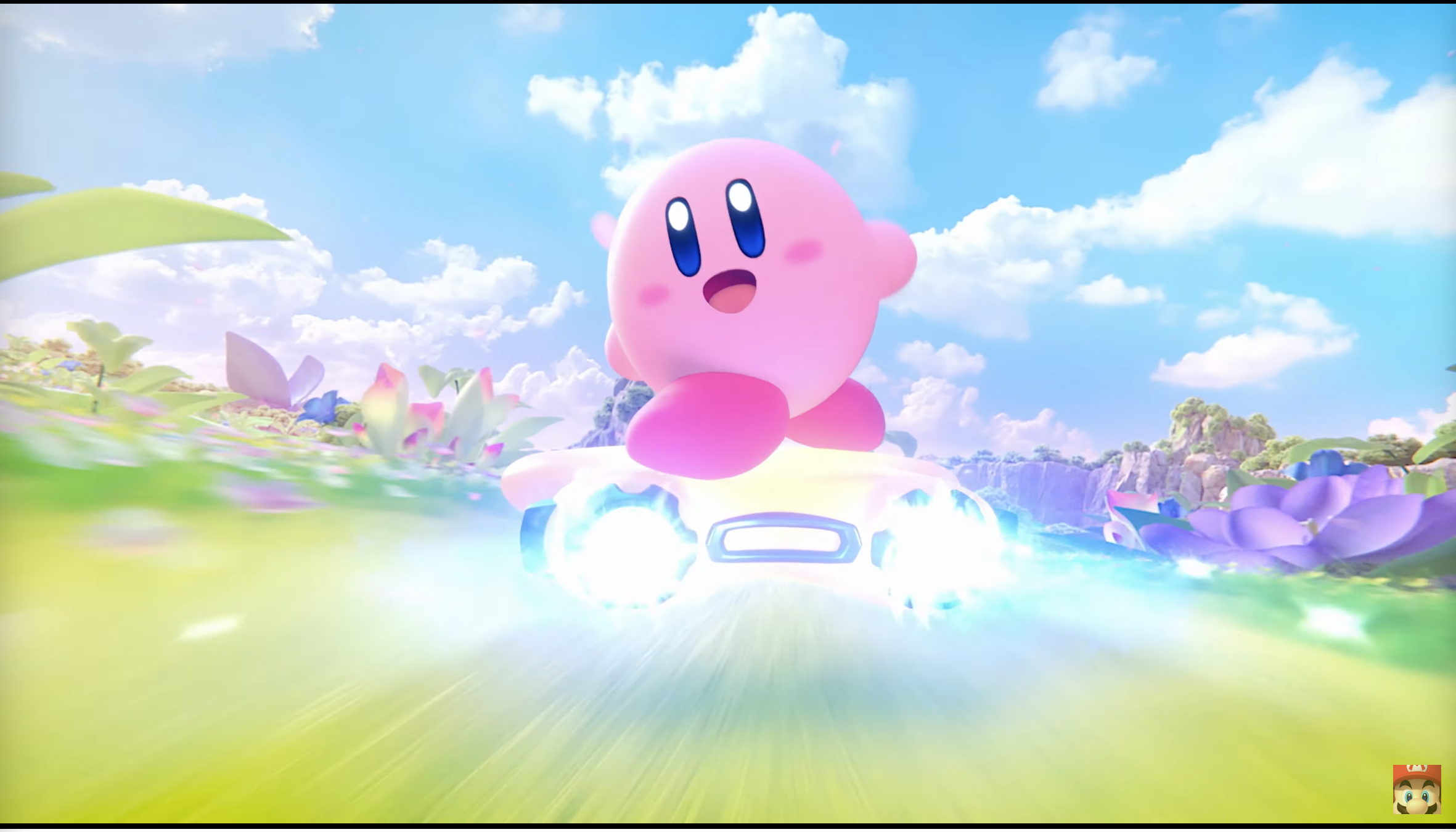
Pre-order listings at US retailers that have gone live since this morning also list several $80 games—we’ll use Wal-Mart’s as an example. The upgraded Switch 2 Editions for a trio of Switch games—2024’s Super Mario Party Jamboree, 2023’s The Legend of Zelda: Tears of the Kingdom, and 2022’s Kirby and the Forgotten Land—are all going for $80, the same as Mario Kart World.

Read full article

Comments

Google shakes up Gemini leadership, Google Labs head taking the reins

On the heels of releasing its most capable AI model yet, Google is making some changes to the Gemini team. A new report from Semafor reveals that longtime Googler Sissie Hsiao will step down from her role leading the Gemini team effective immediately. In her place, Google is appointing Josh Woodward, who currently leads Google Labs.

According to a memo from DeepMind CEO Demis Hassabis, this change is designed to “sharpen our focus on the next evolution of the Gemini app.” This new responsibility won’t take Woodward away from his role at Google Labs—he will remain in charge of that division while leading the Gemini team.

Meanwhile, Hsiao says in a message to employees that she is happy with “Chapter 1” of the Bard story and is optimistic for Woodward’s “Chapter 2.” Hsiao won’t be involved in Google’s AI efforts for now—she’s opted to take some time off before returning to Google in a new role.

Read full article

Comments

A look at the Switch 2’s initial games, both familiar and what-the-heck

I don’t think anybody outside Nintendo or FromSoftware was expecting a spiritual successor to Bloodborne to be one of the titles announced at the Nintendo Switch 2’s launch today. Not just “playable” on the Switch 2, but exclusive to it. But there it was, The Duskbloods, debuting its dread horror action just a few minutes before the luminously pink and puffy Kirby Air Ride 2. 

The Switch 2’s launch titles, and other announced games, are quite the rich stew. Here are some of the AAA ports, exclusives, and unexpectedly gruesome games arriving on the just-announced system.

Switch exclusives, including Nintendo’s own


Riding it like he stole it (in 2003).
Credit:
Nintendo

We’ll get to FromSoftware’s surprising Switch 2 exclusive in a bit. Far less surprising is a new Mario Kart game, as Mario Kart 8 sold more than 67 million copies, covering more than 40 percent of all Switches sold. Mario Kart World goes big, with 24 simultaneous players, and the ability to explore off the course in a kind of open-world setting.

Read full article

Comments

Vast pedophile network shut down in Europol’s largest CSAM operation

Europol has shut down one of the largest dark web pedophile networks in the world, prompting dozens of arrests worldwide and threatening that more are to follow.

Launched in 2021, KidFlix allowed users to join for free to preview low-quality videos depicting child sex abuse materials (CSAM). To see higher-resolution videos, users had to earn credits by sending cryptocurrency payments, uploading CSAM, or “verifying video titles and descriptions and assigning categories to videos.”

Europol seized the servers and found a total of 91,000 unique videos depicting child abuse, “many of which were previously unknown to law enforcement,” the agency said in a press release.

Read full article

Comments

We Finally Know What the Nintendo Switch 2 (and Its Games) Will Cost

Nintendo has never been known for high-performance hardware, but that certainly hasn’t hurt its bottom line—especially in the Switch age. The company’s decision to use more basic components for the Switch back in 2017 helped keep the console cheaper than any of its competitors. It’s tough to get too hung up on the lack of 4K 60fps support when you can play the latest Zelda on a handheld that can cost less than $200.

But lo, a new Switch is here, and with it, a new price. The Switch 2 is, indeed, a more powerful version of the Switch, and comes with a number of advantages: a larger 1080p HDR display with a 120Hz refresh rate, a dock equipped with a fan to support 4K 60fps gameplay, magnetic Joy-Cons with a “mouse mode” for tabletop controls, among other neat perks. Of course, Nintendo isn’t giving those perks away for free, nor is it offering the Switch 2 at the same price as the Switch 1. If you want to order Nintendo’s latest console, you’re going to have to pay more—for everything.

How much does the Switch 2 cost?

The Switch 2 retails for $449.99. If you want the bundle that comes with a digital copy of Mario Kart World, that costs $499.99. That isn’t cheap, especially when you can pick up a Switch OLED right now for $250. The original Switch retailed for $299.99 too, though that’s roughly equal to $390 when adjusting for inflation, so the difference isn’t quite so dramatic.

We’ll likely never know exactly what went into the pricing decision for the new Switch, but it’s certainly possible tariffs played a big role. The Switch 2 sold in Japan, for example, costs 49,980 yen, which is just over $333 today. The Mario Kart bundle is 53,980 yen, or roughly $360—still cheaper than the original Switch’s MSRP in today’s money. Ouch.

How much are Switch 2 games?

There’s a $50 difference between the standalone Switch 2 and the Mario Kart World bundle, so you might imagine that’s what the game costs. Unfortunately, no: Mario Kart World is actually $80. Not all games may cost this much, however. According to Geoff Keighley, Donkey Kong Bananza retails for $70. These are the only two games with retail prices, so we’ll have to see how Nintendo handles MSRPs with future games. (While we don’t know the exact prices, we do know a lot of the games launching for Switch 2.)

However, physical games might actually cost more. Reports show that Nintendo’s European versions of Mario Kart World cost €79.99 for a digital copy, but €89.99 for the physical cart. $90 for a physical game card seems astronomical. We’ll need to wait and see if Nintendo rolls out any other pricing information.

Switch 2 accessories

Nintendo’s official Switch 2 accessories page is live, which means we can see all the MSRPs for the console’s newly-announced add-ons. Here’s what you can expect to pay for each:

  • Switch 2 Pro Controller: $79.99

  • Left and Right Joy-Con 2 controllers: $89.99

  • Joy-Con 2 charging grip: $34.99

  • Joy-Con 2 strap: $12.99

  • Joy-Con 2 wheel (two-pack): $19.99

  • Switch 2 camera: $49.99

  • Switch 2 dock: $109.99

  • Switch 2 carrying case (with screen protector): $34.99

  • Switch 2 all-in-one case: $79.99

  • Switch 2 AC adapter: $29.99

Your Apple Watch Alarm Doesn’t Have to Be Silent

On Monday, Apple released iOS 18.4, iPadOS 18.4, and macOS Sequoia 15.4 for compatible devices. But Apple Watch owners might have noticed watchOS 11.4 curiously missing from the list. Apple pulled the update at the last minute, something of a rarity from the company that likes to release all software updates together.

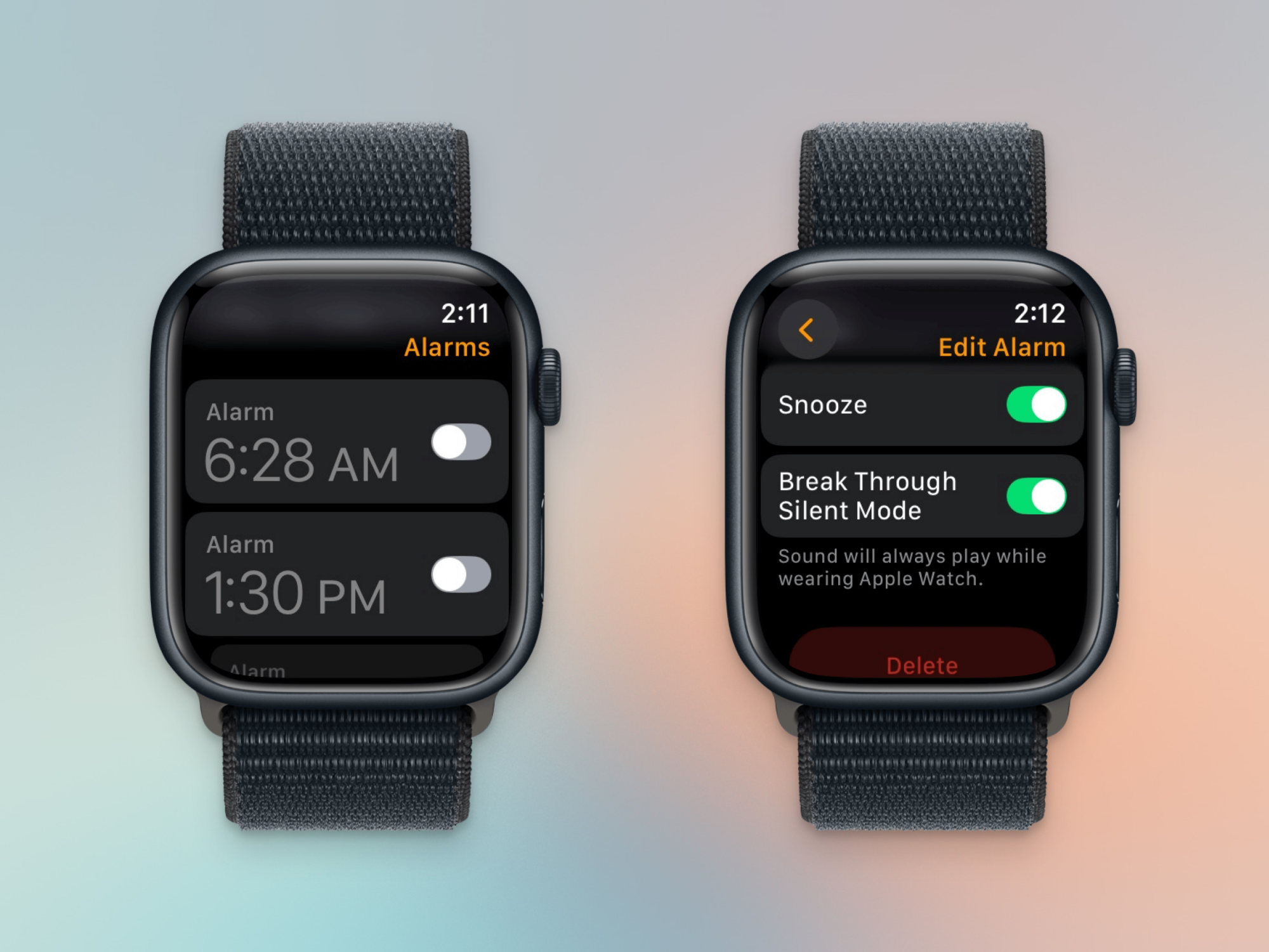
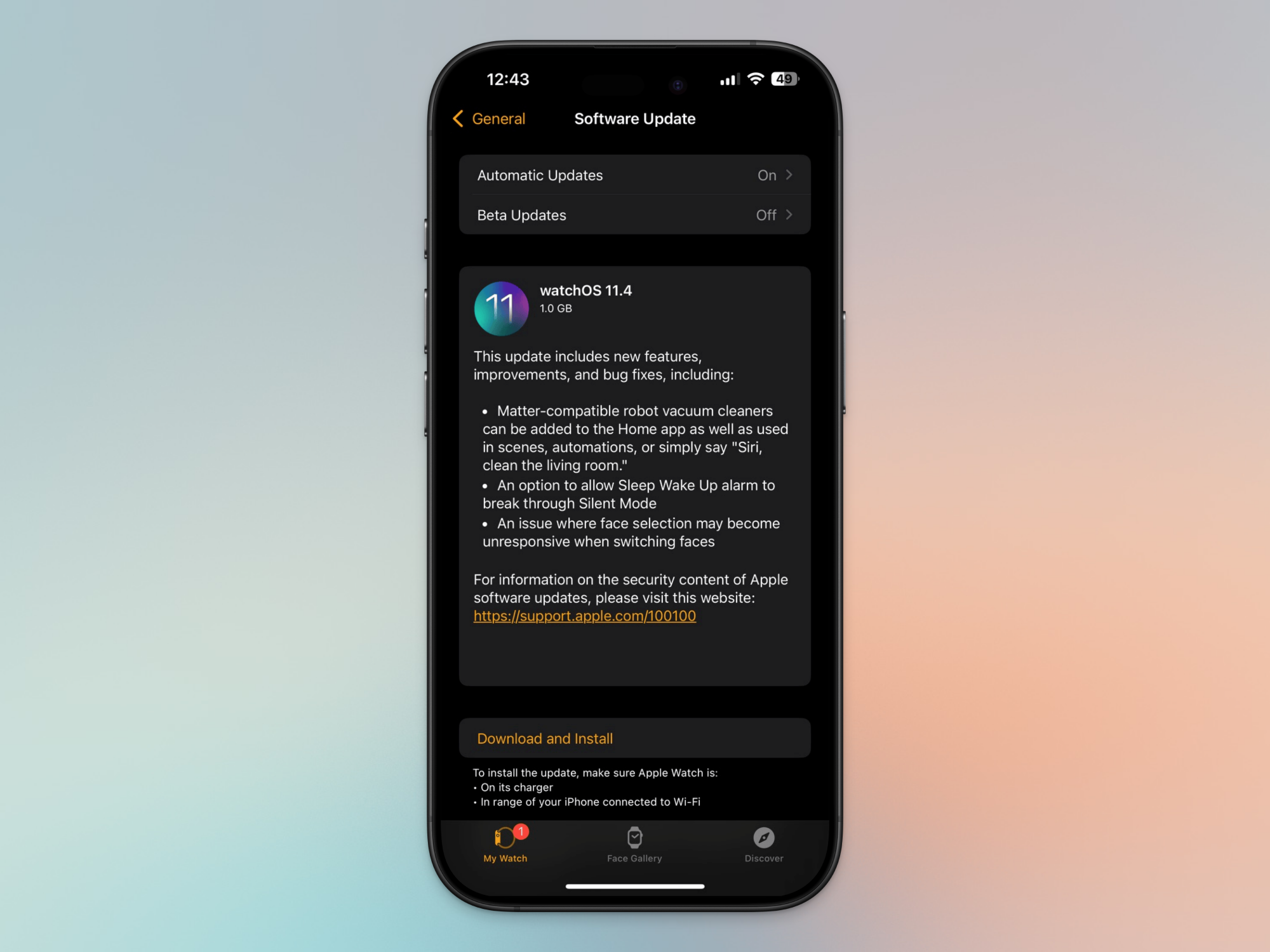
But now, the new watchOS update is finally available to everyone, and the slight delay was worth it. This update enables a feature that many Apple Watch users have wanted for a long time: the ability to break through Silent mode when an alarm goes off.

The iPhone already does this really well. You’re in Silent mode, or you have Do Not Disturb enabled, but your morning alarm still sounds. Apple Watch, on the other hand, had no such option. So if you like using a Silent mode to protect yourself from notifications and other dings, you had to make do with the vibration alarm. Starting with watchOS 11.4, you can keep your notifications at bay, while relying on an audio alarm to sound alongside the gentle vibrations.

Which Apple Watches are supported?

The feature is available only for users who have watchOS 11.4 or newer. That means it’s only available for Apple Watch Series 6 and above, Apple Watch Ultra and above, and the Apple Watch SE 2. If you’re rocking the original Apple Watch SE, or the older Series 5 Apple Watch, you’re left out in the cold here.

watchOS 11.4 Update.

Credit: Khamosh Pathak

If you have one of the supported Apple Watches, first update your iPhone to iOS 18.4, and then head over to the Watch app. In the My Watch tab, go to General > Software Update. Here, download and install the latest watchOS 11.4 update.

How to enable Break Through Silent Mode for any alarm

Break Through Silence in Alarm App.

Credit: Khamosh Pathak

The feature isn’t necessarily ideal, since you need to enable it for every alarm that you set. The news is good if you rely on the same repeating alarm each day, since those settings are preserved, but if you frequently set new alarms, make sure this setting is enabled each time. Hopefully, Apple will create a system-wide toggle for this, or even make this a default option down the line.

Go to the Alarms app on your Apple Watch, and choose the alarm that you want to customize. Here, in the Edit Alarm menu, scroll down and enable Break Through Silent Mode.

How to enable Break Through Silent Mode for Sleep Mode

Break Through Silence in Sleep App

Credit: Khamosh Pathak

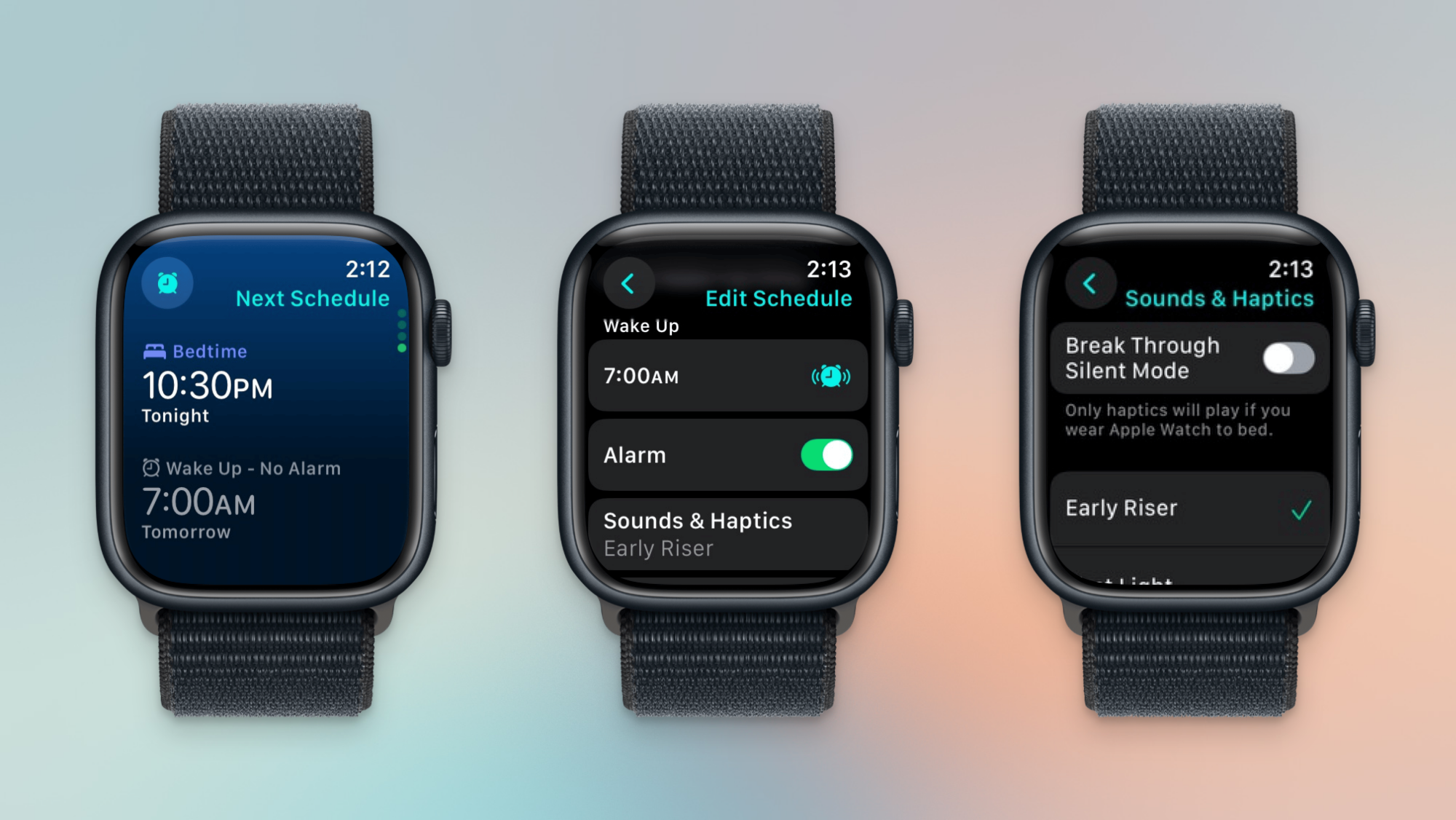
If you wear your Apple Watch in bed, chances are you use Sleep mode, and the alarm associated with your sleep schedule. If you want to break through Silent mode here, you’ll need to enable the feature separately.

On your watch, open the Sleep app and scroll all the way down to your alarm schedule. You’ll see two alarms here—one for setting your Bedtime, and one for Wake Up. Choose one of the alarms, and in the Edit Schedule view, scroll down and choose Sound & Haptics. Here, enable Break Through Silent Mode.

The Four Best Alternatives to Zelle

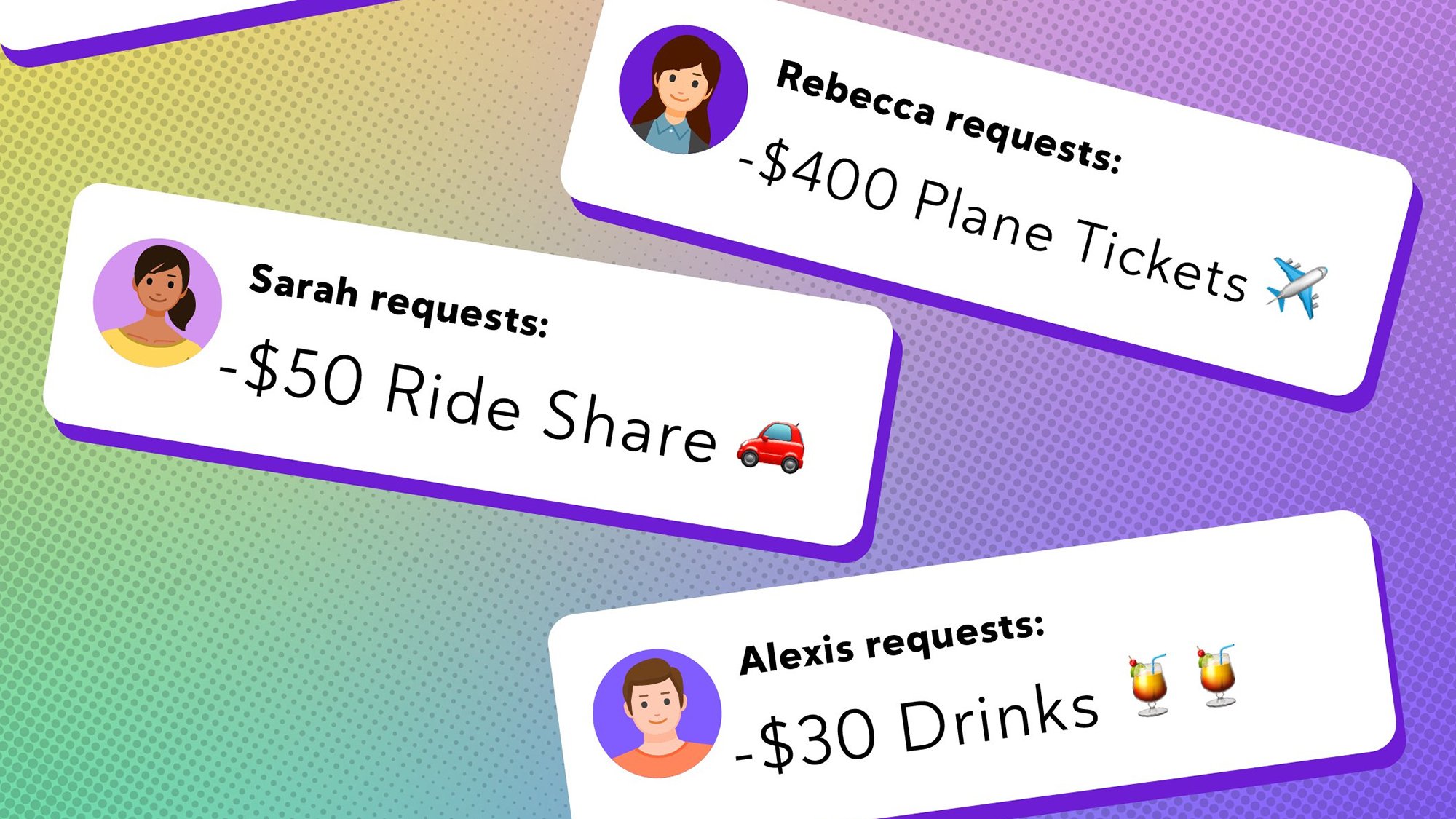
Zelle, the digital payment platform that allows you to send money directly to friends and family, has shuttered its standalone app. But while the Zelle app is no longer, you can likely still send and receive money with Zelle through your bank or credit union—Zelle is already integrated into over 2,200 bank apps, and you can use this search tool to find out if yours is one of them.

Otherwise, you’ll have to send money using another tool. Here are four of the best Zelle alternatives for peer-to-peer payments.

Venmo

Venmo allows you to request money or pay other users and send up to $60,000 a week once you’ve verified your identity within the app. You can transfer funds in your Venmo account to your bank account for free if you’re willing to wait 1–3 days, or instantly for a 1.75% fee. Funds sent from from your Venmo balance or linked bank account/debit card are fee-free, while money sent using your credit card incur a 3% charge.

Note that you should update the default privacy settings on Venmo to ensure your transactions and account information aren’t publicly viewable.

Venmo is available for iOS, Android, and on the web.

PayPal

PayPal is a well-established digital payment service that is useful for sending and receiving money from friends and contacts as well as making purchases online. There’s no fee to send money via the “Friends and Family” function from a linked bank account or using your PayPal balance, and standard withdrawals are also free (like Venmo, instant transfers incur a 1.75% fee).

There are fees for international transactions and currency conversions, as well as personal transactions made with credit cards.

PayPal is available for iOS, Android, and on the web.

Cash App

Cash App is a peer-to-peer platform similar to Venmo. You can send money from a linked bank account or debit card to other Cash App users—if the recipient’s phone number or email isn’t linked to an account, they’ll be prompted to create one to claim the funds—for free. Standard transfers are also free, and instant transfers from Cash App to your bank incur a 0.5%–1.75% fee.

Cash App can also be used to send and receive bitcoin.

It’s available for iOS, Android, and on the web.

Apple Cash

Apple Cash is a built-in payment function for sending money to other iPhone users via Messages, Wallet, or Tap to Cash. Apple Cash is a digital card held in your Apple Wallet, and you can transfer funds out to your linked bank account (standard timing and free) or debit card (instant for a 1.5% fee). Apple Cash allows you to send or receive a maximum of $10,000 per message, with the same limit in a 7-day period. If you have an iPhone, you can pay someone using Apple Cash from within other apps, including Messages.

Apple Cash is integrated into iOS and available on the web.

How to protect your privacy with digital payments

The apps we’ve listed here have various privacy and security protections, like encryption and secure authentication, but peer-to-peer payment platforms are still targets for scammers. Make sure you only send funds to trusted contacts, and enable settings that keep your money safe, like identity verification and limiting who can see your account and request funds from you.

A Minecraft Movie review: It’s good, actually

Hear me out. I too rolled my eyes when A Minecraft Movie was announced. We’re all tired of seeing Jack Black in video game movies — he was fine in Super Mario Bros., but good god Borderlands was a disaster. And the Minecraft film’s trailers did it no favors, another soulless movie produced on a virtual set about a game that’s completely open-ended and plotless. But it turns out A Minecraft Movie is actually good.

Honestly, I’m as surprised as you are.

A Minecraft Movie isn’t exactly groundbreaking, to be clear. It certainly never reaches the heights of The Lego Movie. But it’s surprisingly funny for a children’s movie, and it delivers a decent message about championing creativity in a world that wants to beat down free-thinking non-conformists. And if you were around for the inexplicable Napoleon Dynamite craze of the mid-2000’s, you’ll notice plenty of that film’s quirky sensibility from director Jared Hess.

From the beginning, A Minecraft Movie seems well aware of the ridiculousness of its own existence. The story starts off with Jack Black’s Steve (dressed just like the game’s default skin) retelling his obsession with “the mines,” and his inability to go digging while he was a kid. He later grows up, gets a boring office job and remembers his erstwhile calling to make holes in the earth. Once he makes his way into a cave, he stumbles into a portal that brings him to the blocky “Overworld” of the Minecraft universe. It’s classic isekai stuff — the genre of anime where the main character is transported to another (often digital) world.

And yes, I know all of this sounds incredibly contrived as I write this, but Black’s zaniness really sells the absurdity of the film. It’s as if he’s saying out loud, “Yes, I know the idea of a Minecraft movie is beyond dumb, but at least you get to spend time with me in classic Jack Black mode!” Now if you’re tired of his schtick, that may be a major knock against the film. But for me, it was a nice reminder of his Tenacious D days.

Jack Black in A Minecraft Movie
Warner Bros.

The film eventually focuses on two siblings, Henry (Sebastian Hansen) and Natalie (Emma Myers), who are moving to a small Midwestern town after the death of their mother. Natalie is gearing up for a social media producer role at a local business, while Henry is forced to adapt to a new school. Coincidentally, a former gaming superstar lives in their town, Jason Mamoa’s Garret “The Garbageman” Garrison, who befriends Henry as another outcast. Danielle Brooks’ Dawn, a struggling local realtor/mobile zookeeper, ends up taking Natalie under her wing after seeing how much she’s sacrificing for her brother.

Inevitably, thanks to a glowing MacGuffin, those four characters also stumble into the same portal that sent Steve to the Overworld. They quickly run into Steve, break their glowing MacGuffin and then head off to find a way to fix it and return home. If any of this sounds boring, don’t worry, it’s not really important. What works best in A Minecraft Movie is the humor and personality Hess stuffs in between the trappings of a big budget Hollywood game adaptation.

A Minecraft Movie
Warner Bros.

The majority of the film hinges on Jack Black’s persona, but I also enjoyed seeing Jason Mamoa play an egotistical manchild who’s in love with video games. He’s decked out in an absurd wig and hot pink jacket, and Mamoa hams it up just as well as he did Fast X. He’s a jerk at times, but he’s also kind to Henry and clearly doesn’t care what anyone thinks of his personal style. The rest of the cast mostly plays it straight against the force of Black and Mamoa’s personalities, but they each get a few moments to shine.

Whenever the core story starts to fall flat, A Minecraft Movie veers into more interesting territory, like a hapless Minecraft villager who stumbles into the real world. For those who don’t play the game, villagers are simple NPC who can’t speak, and often find themselves in danger. I got a kick out of seeing him navigate traffic and have a meet-cute with Jennifer Coolidge’s Vice Principal Marlene, a relationship that gets weirder than you’d think. (Again, it’s like something straight out of Napoleon Dynamite.)

A Minecraft Movie
Warner Bros.

I’m no Minecraft devotee, but I wish the film’s interpretation of the game’s blocky graphics were a bit more pixelated. While the characters and animals we see resemble their game counterparts, their over-designed look clashes with the beautiful simplicity of Minecraft’s aesthetics. I’m sure it’s tough to unite the low-poly look with live action, while also delivering polished CG that audiences expect, but the path A Minecraft Movie took just feels over-cooked. That being said, the film’s game world seems more alive than the empty virtual sets in Quantumania. There are tons of characters milling about, and the environments all feel distinctly Minecraft.

The kids in my press screening didn’t seem to mind the shift in visual language. They loved seeing the game’s creatures in any form — a family of pandas got a theater-wide “awww.” And they also loved seeing in-game Minecraft tricks represented on the big screen, like using a water block to cushion a fall.

My daughter Sophia’s verdict? “I liked it, but I don’t think I’d want to see it again,” she said. But I know she’s lying. We’ll likely end up seeing this thing hundreds of times at home, and even more so once her brother jumps aboard the Minecraft bandwagon. I won’t mind, though. As far as kid’s movies go, it’s a world I wouldn’t mind revisiting.

This article originally appeared on Engadget at https://www.engadget.com/entertainment/tv-movies/a-minecraft-movie-review-its-good-actually-190035499.html?src=rss

Cybersecurity Professor Faced China Funding Inquiry Before Disappearing

The FBI searched two homes of Indiana University Bloomington data privacy professor Xiaofeng Wang last week, following months of university inquiries into whether he received unreported research funding from China, WIRED reported Wednesday.

Wang, who leads the Center for Distributed Confidential Computing established with a $3 million National Science Foundation grant, was terminated on March 28 via email from the university provost. The university had contacted Wang in December regarding a 2017-2018 grant in China that listed him as a researcher, questioning whether he properly disclosed the funding to IU and in applications for U.S. federal research grants.

Jason Covert, Wang’s attorney, said Wang and his wife Nianli Ma, whose employee profile was also removed, are “safe” and neither has been arrested. The couple’s legal team has viewed a search warrant but received no affidavit establishing probable cause.


Read more of this story at Slashdot.

The Switch 2 was almost called the ‘Super Nintendo Switch’

Following its big Switch 2 presentation, Nintendo revealed in an interview with the team behind the console that one of the (arguably better) names the company was considering before it landed on Switch 2 was “Super Nintendo Switch.”

“There were a lot of ideas for the name, and we really struggled to find the right one,” Kouichi Kawamato, the producer on the Switch 2, says. “We even considered ideas like ‘Super Nintendo Switch.'” The issue with the name was that even though drawing a parallel to the Nintendo Entertainment System (NES) and Super Nintendo Entertainment System (SNES) was fun, it was also potentially confusing. The SNES was the successor to the NES, but it couldn’t play NES games. “Since Switch 2 can play Switch games, it didn’t feel right to use the same naming convention as Super NES.”

Adding a number to the end of the original console’s name (the general strategy Nintendo’s competitor Sony has taken with the PlayStation) just made things a lot simpler and easier to understand. Nintendo’s caution isn’t totally unfounded. The Wii U was more powerful than the Wii and featured a unique controller in the Wii U GamePad. Because it’s name was so similar to Nintendo’s older console, it was backwards compatible with the Wii and it supported pre-existing accessories like Wii Remotes, though, it was viewed as an add-on rather than a new device worth upgrading to.

There were other problems that helped do the Wii U in, like a steep decline in support from third-party game developers and a failure on Nintendo’s part to explain what made the console distinct, but the name certainly didn’t help. The Switch 2 is much better set up for success than the Wii U, but “sticking to what works” seems like the defining idea of the new console, so the name is following suit.

This article originally appeared on Engadget at https://www.engadget.com/gaming/nintendo/the-switch-2-was-almost-called-the-super-nintendo-switch-184243089.html?src=rss

AI Masters Minecraft: DeepMind Program Finds Diamonds Without Being Taught

An AI system has for the first time figured out how to collect diamonds in the hugely popular video game Minecraft — a difficult task requiring multiple steps — without being shown how to play. Its creators say the system, called Dreamer, is a step towards machines that can generalize knowledge learned in one domain to new situations, a major goal of AI. From a report: “Dreamer marks a significant step towards general AI systems,” says Danijar Hafner, a computer scientist at Google DeepMind in San Francisco, California. “It allows AI to understand its physical environment and also to self-improve over time, without a human having to tell it exactly what to do.” Hafner and his colleagues describe Dreamer in a study in Nature published on 2 April.

In Minecraft, players explore a virtual 3D world containing a variety of terrains, including forests, mountains, deserts and swamps. Players use the world’s resources to create objects, such as chests, fences and swords — and collect items, among the most prized of which are diamonds. Importantly, says Hafner, no two experiences are the same. Every time you play Minecraft, it’s a new, randomly generated world,” he says. This makes it useful for challenging an AI system that researchers want to be able to generalize from one situation to the next. “You have to really understand what’s in front of you; you can’t just memorize a specific strategy,” he says.


Read more of this story at Slashdot.

Wild Raccoon Plays Jazz On A Tiny Piano

This is a video of an allegedly wild raccoon playing jazz on a Pet Piano, a $200 smart pet feeder *spit takes cat kibble* that rewards pets for playing and can be auto-tuned so each key press plays a melody, or performs any song you want. In this case, the raccoon provides some additional piano accompaniment to Dave Brubeck Quartet’s ‘Take Five’, which will remain one of the greatest songs of all time until the end of time, which, judging from the way things are going, should be any minute now.

You can pre-order Framework’s entry-level 2-in-1 touchscreen laptop on April 9

The entry-level laptop from modular computing company Framework, which we first saw in February, is almost ready to roll. Founder and CEO Nirav Patel said on Wednesday that you can reserve the Framework Laptop 12 on April 9 at 11AM ET.

The Framework Laptop 12 is a colorful 12.2-inch notebook with a 360-degree hinge that lets you fold it back into a (chunky) tablet. This zillionth iteration of that form factor stands out because of Framework’s ethos of modular repairability. If you decide it’s time for an upgrade in a couple of years, there’s no need to fork out $1,500 for a new device; you can simply upgrade its modular parts.

The Framework Laptop 12 has a 12.2-inch, 1,920 x 1,200 touchscreen display that, at 400 nits, gets “much brighter than you typically see from an entry-level or lower-cost laptop.” It will be available with a 13th-gen i3 or i5 Core processor and up to 48GB of DDR5 RAM. You can also get up to a 2TB 2 TB M.2 2230 SSD, Wi-Fi 6E and the company’s standard choice of Windows 11 or Linux.

Five Framework Laptop 12 devices in different colors. Overhead view.
Framework

Although it’s helpful to have those general spec guidelines, Framework says it won’t share the modular machine’s full spec breakdown, ship date or pricing until it’s available for pre-order. So, you won’t know how “entry-level” it is until the clock is ticking to reserve one. Although seeing Big Tech marketers weaponizing FOMO to increase sales numbers isn’t exactly a rarity these days, it stands out all the more coming from a startup that, in other ways, is among the most consumer-friendly.

Patel even cautioned in today’s announcement, “We have a hunch that the early batches are going to go very quickly.” In other words, you’d better not take too long scanning that spec sheet and weighing it against pricing before the train pulls out of the station.

Regardless, you can learn more about the Framework Laptop 12 in the video below before checking out its full specs on April 9 at 11AM ET. Patel advises pre-order customers to create an account on the company website in advance.

This article originally appeared on Engadget at https://www.engadget.com/computing/laptops/you-can-pre-order-frameworks-entry-level-2-in-1-touchscreen-laptop-on-april-9-182310021.html?src=rss

Not just Signal: Michael Waltz reportedly used Gmail for government messages

National Security Advisor Michael Waltz and a senior aide used personal Gmail accounts for government communications, according to a Washington Post report published yesterday.

Waltz has been at the center of controversy for weeks because he inadvertently invited The Atlantic Editor-in-Chief Jeffrey Goldberg to a Signal chat in which top Trump administration officials discussed a plan for bombing Houthi targets in Yemen. Yesterday’s report of Gmail use and another recent report on additional Signal chats raise more questions about the security of sensitive government communications in the Trump administration.

A senior Waltz aide used Gmail “for highly technical conversations with colleagues at other government agencies involving sensitive military positions and powerful weapons systems relating to an ongoing conflict,” The Washington Post wrote.

Read full article

Comments

AI bots strain Wikimedia as bandwidth surges 50%

On Tuesday, the Wikimedia Foundation announced that relentless AI scraping is putting strain on Wikipedia’s servers. Automated bots seeking AI model training data for LLMs have been vacuuming up terabytes of data, growing the foundation’s bandwidth used for downloading multimedia content by 50 percent since January 2024. It’s a scenario familiar across the free and open source software (FOSS) community, as we’ve previously detailed.

The Foundation hosts not only Wikipedia but also platforms like Wikimedia Commons, which offers 144 million media files under open licenses. For decades, this content has powered everything from search results to school projects. But since early 2024, AI companies have dramatically increased automated scraping through direct crawling, APIs, and bulk downloads to feed their hungry AI models. This exponential growth in non-human traffic has imposed steep technical and financial costs—often without the attribution that helps sustain Wikimedia’s volunteer ecosystem.

The impact isn’t theoretical. The foundation says that when former US President Jimmy Carter died in December 2024, his Wikipedia page predictably drew millions of views. But the real stress came when users simultaneously streamed a 1.5-hour video of a 1980 debate from Wikimedia Commons. The surge doubled Wikimedia’s normal network traffic, temporarily maxing out several of its Internet connections. Wikimedia engineers quickly rerouted traffic to reduce congestion, but the event revealed a deeper problem: The baseline bandwidth had already been consumed largely by bots scraping media at scale.

Read full article

Comments

DOGE staffer’s YouTube nickname accidentally revealed his teen hacking activity

A SpaceX and X engineer, Christopher Stanley—currently serving as a senior advisor in the Deputy Attorney General’s office at the Department of Justice (DOJ)—was reportedly caught bragging about hacking and distributing pirated e-books, bootleg software, and game cheats.

The boasts appeared on archived versions of websites, of which several, once flagged, were quickly deleted, Reuters reported.

Stanley was assigned to the DOJ by Elon Musk’s Department of Government Efficiency (DOGE). While Musk claims that DOGE operates transparently, not much is known about who the staffers are or what their government roles entail. It remains unclear what Stanley does at DOJ, but Reuters noted that the Deputy Attorney General’s office is in charge of investigations into various crimes, “including hacking and other malicious cyber activity.” Declining to comment further, the DOJ did confirm that as a “special government employee,” like Musk, Stanley does not draw a government salary.

Read full article

Comments

A 32-bit processor made with an atomically thin semiconductor

On Wednesday, a team of researchers from China used a paper published in Nature to describe a 32-bit RISC-V processor built using molybdenum disulfide instead of silicon as the semiconductor. For those not up on their chemistry, molybdenum disulfide is a bit like graphene: a single molecule of MoS2 is a sheet that is only a bit over a single atom thick, due to the angles between its chemical bonds. But unlike graphene, molybdenum disulfide is a semiconductor.

The material has been used in a variety of demonstration electronics, including flash storage and image sensors. But we’ve recently figured out how to generate wafer-scale sheets of MoS2 on a sapphire substrate, and the team took advantage of that to build the processor, which they call RV32-WUJI. It can only add single bits at a time and is limited to kilohertz clock speeds, but it is capable of executing the full RISC-V 32-bit instruction set thanks to nearly 6,000 individual transistors.

Going flat

We’ve identified a wide range of what are termed 2D materials. These all form repeated chemical bonds in more or less a single plane. In the case of graphene, which consists only of carbon, the bonds are all in the same plane, meaning the molecule is as thick as a carbon atom. Molybdenum disulfide is slightly different, as the angle of the chemical bonds is out of plane, resulting in a zig-zag pattern. This means the sheet is slightly thicker than its component atoms.

Read full article

Comments

It Takes 50 Hours to Earn the Right to Preorder a Switch 2 From Nintendo

Nintendo Switch 2 is officially coming to stores on June 5. In just over two months, you might have the opportunity to own Nintendo’s newest (and most expensive) console and play the latest Switch 2 exclusives (Mario Kart World looks ridiculously fun), assuming you can snag one of them.

Because if you want to boot up a Switch 2 on launch day, you’ll almost certainly need to preorder it. Unless you’re lucky enough to find a store that has extra consoles in stock, or there turns out to be exceptionally low demand (unlikely given eight years of building anticipation among the Nintendo faithful), these things are going to be a rare commodity.

One option, of course, is to preorder a system directly through Nintendo—but the company’s requirements to do so are anything but orthodox.

How to “register your interest” for a Switch 2

Nintendo doesn’t consider theirs a “preorder” program, per se. Instead, the company invites you to “register your interest” in buying a Switch 2. Assuming you’re at least 18 years old, you’ll need to head to Nintendo’s official interest registration site, then sign into your Nintendo Account. Once Nintendo has confirmed your eligibility, it will send an invitation to the email address registered with your Nintendo Account. This invitation gives you the option to buy one Switch 2 console—either the standalone unit or the bundle with a digital copy of Mario Kart World. This invite will be good for 72 hours. Easy enough, right?

It’s not that simple.

Only experienced gamers need apply

This is a first come, first served program, so the sooner you are able to register, the better your chance of being selected. On top of that, this…let’s call it a “purchasing opportunity” is only open to registrants who have a Nintendo Switch Online subscription with at least 12 months of paid service.

But the requirement that seems most out of left field to me is this: You also need to have at least 50 hours of gameplay associated with the Nintendo Account you use to register, as of April 2, 2025. If you don’t meet any of these criteria, you’ll be put on an overflow list. Nintendo will only start sending invites to members of this waitlist once the registrants who meet the requirements have all been invited.

Fifty hours of gameplay is a bizarre requirement (can’t I just give you money, Nintendo?) but you can see the company’s reasoning. As a mega-hyped piece of hardware, the Switch 2 is a prime target for scalpers. By setting strict requirements for who can register for an invitation to purchase one (and by limiting each registration to one console purchase) Nintendo is trying to ensure that only true Nintendo fans get first crack. Scalpers won’t even be able to make multiple Nintendo Accounts in order to get around these limits, as the aforementioned 50 hours of gameplay had to be logged before today, April 2. Unless scalpers knew the rules well ahead of time, any dummy accounts they make leading up to the Switch 2 launch will be useless.

Even as someone with well over 50 hours of gameplay on my Nintendo Account, this all feels a bit weird. Perhaps its the data privacy geek in me, but it doesn’t sit well with me that I need to share my gameplay with Nintendo in order to prove that I am, indeed, worthy of buying a Switch 2. Tie the purchase to my Nintendo Account, fine, but I’m not sure I like the precedent here.

Because even if you have those 50 hours, you might not be eligible, since you also need to have opted in to share that data with Nintendo. Nintendo’s language isn’t totally clear here, so it’s not obvious to me if it counts to if you opt in today, or if you had to have already opted in before the program was announced. If you want to maximize your chances of being selected to buy through Nintendo, it’s time to check your Nintendo Account privacy settings and ensure that you are sharing your usage information with Nintendo under Data Usage – Opt-Out Preferences.

When do invitations to buy a Switch 2 go out?

Strange privacy implications aside, here’s what happens after you register: Nintendo says the first round of invites will go out May 8, 2025, with subsequent rounds sending off “periodically” until purchases are available for all. The email will come from no-reply@noa.nintendo.com, so consider adding that to your email whitelist if you have an overzealous spam filter.

If selected, you’ll be able to buy your chosen Switch 2 console or bundle (the standalone system is $449, while the Mario Kart World bundle is $499) as well as a “variety of additional items.” My guess is that will include the new Pro Controller, the retro GameCube controller, and perhaps additional Joy-Cons, as well as any other types of accessories Nintendo dreams up. As with the system itself, you’ll only be able to purchase one of each of these additional items.

Nintendo accepts Visa, Mastercard, Google Pay, and Apple Pay—but not Nintendo eShop gift cards. The company will also only ship products directly to customers, and will not make orders available at its two retail locations.

Of course, Nintendo isn’t the only company you can order a Switch 2 from. You can sign up for similar alerts from other retailers, including Best Buy and GameStop, and I imagine more retailers will add their own opportunities soon enough.

The Zelle App Shut Down, but Zelle Lives On

Zelle has been around as a convenient digital payment platform since 2017, but has now closed down payments inside its standalone apps for Android and iOS, as it promised it would last October—though the move is a sign of Zelle’s success rather than its failure, and most Zelle users aren’t going to need to change anything.

If you’re one of the 150 million or so people who make use of Zelle, you’re no longer going to be able to use the Zelle app to send money to friends, family, and businesses. However, Zelle lives on as a platform: It’s now integrated into the operations of more than 2,200 financial institutions, so you’ll still be able to use it through your banking app.

The Zelle apps are no more because Zelle has expanded its integrations so successfully. The peer-to-peer payment system says less than two percent of transactions were being made through these apps by the end of last year, so it didn’t make sense to keep them going.

Nothing is changing in terms of the links to banks and credit unions—if this is how you already do your Zelle business, you might not even have noticed the standalone app has been pulled. Zelle users shifted $1 trillion in payments over the course of 2024, so as a platform it’s not going anywhere anytime soon.

Another reason for the switch is security. As Zelle’s YouTube page is testament to, users of the app were frequently targeted by scammers—via dating apps, ticketing platforms, rental listings, online marketplaces, job boards, and so on. Having Zelle work through banking systems makes it more secure as well.

How to switch

Zelle payments
Zelle is popular for peer-to-peer payments.
Credit: Zelle

Given that two-percent figure mentioned above, chances are that you’ve already set Zelle up through your bank. If not, you’ll need to register a Zelle account with your bank, or switch to a financial institution that offers Zelle: You can search through this comprehensive list. Until you set up Zelle somewhere else, you won’t be able to make and receive payments.

The specifics will of course depend on your bank and its app, but if you click through from the list then you’ll be taken to the relevant sign-up page—here’s the one for Wells Fargo, for example. You need to provide your registered email address or mobile number, and the bank will do the rest (you can use the existing details already registered with Zelle).

If you know your bank or credit union supports Zelle, you can also dig through the options in the official app or the official website, and you should be able to register that way too: Most of the time it’ll only be a couple of steps to get Zelle set up, and you can then register the people and businesses you want to enable transactions with.

Unfortunately, your payment history isn’t going to move along with you, though it will be available in the Zelle app until August 11, 2025. Although payments are now blocked, the app isn’t going to stop working entirely, so you’ve got a few months to note any records you want to keep.

There are plenty of other payment platforms you can turn to, if you do want to stay out of your banking app, including Venmo, PayPal, Cash App, Google Wallet, and Apple Pay—though they don’t have quite the same tight bank-account integration that you get with Zelle, and which Zelle is now focused on.