How to Play Original Switch Games on the Switch 2

Around November of last year, when readers were certainly not paying attention to anything else, Nintendo briefly shared that the Nintendo Switch 2 would be backwards compatible with games for the original Nintendo Switch. Fast forward to this year, and it turns out that’s not so clear cut. According to Nintendo, the Switch 2 can play the vast majority of Nintendo Switch 1 games, but there are some caveats to keep in mind.

The Switch 2 uses emulation to play Switch 1 games

As Nintendo posted to its site yesterday and confirmed in a developer roundtable I attended, the Switch 2 does not have any Switch 1 hardware inside. This means that, unlike the Nintendo DS did with the Game Boy Advance, it can’t play Switch games “natively,” meaning it’s not able to run them exactly as they might work on original hardware. Instead, it uses what Nintendo said is a mix of hardware compatibility and software emulation to essentially trick these games into thinking they’re running on the original Switch.

This comes with both downsides and upsides. The good is that, because the Switch 2 has more powerful architecture than the original Switch, you might see some slight benefits from simply running your game on the new console, like faster loading times. The issues start to pop up when looking at game compatibility.
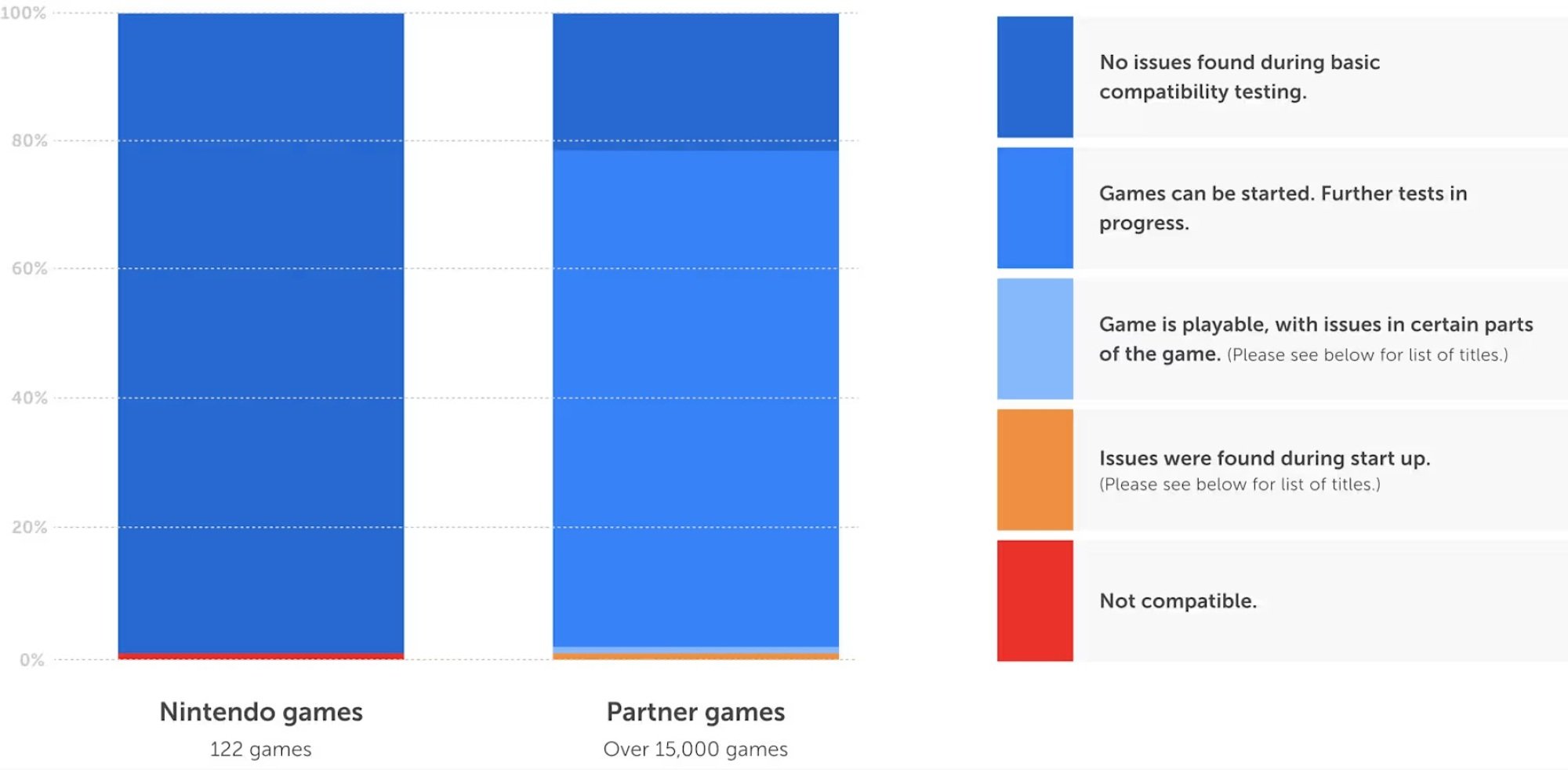
Switch 1 compatibility with Switch 2

Credit: Nintendo

Not every game, it turns out, plays nice with this translation to the new device. According to Nintendo, the vast majority of Switch 1 games should work without issue, with some select games getting free patches to help bring them up to snuff, but the company has encountered problems with over 120 titles, some of which won’t even start up. These include popular games like Doom: Eternal and Rocket League, so if you depend on your Switch to play these, don’t expect the new console to be able to replace your old one right away. It’ll likely take some time for Nintendo to work out all the kinks here.

Nintendo Switch 2 Edition games

So how is Nintendo getting around these problems? Well, aside from painstakingly checking each Nintendo Switch game (more than 10,000) “one-by-one,” it’s also releasing new versions of certain Switch 1 games that are built to run on the Nintendo Switch 2 from the ground up.

These Nintendo Switch 2 Edition games will essentially be enhanced ports of certain Switch 1 titles, including The Legend of Zelda: Breath of the Wild; The Legend of Zelda: Tears of the Kingdom; Kirby and the Forgotten Land; Super Mario Party Jamboree; and even as-yet-unreleased games like Pokémon Legenda: Z-A and Metroid Prime 4: Beyond.

Switch 2 Edition games will come with improved graphics, higher resolutions, and much smoother framerates, as well as new content in the case of Kirby and Mario Party. You’ll also get new control modes when applicable, as Metroid Prime 4 will be able to use the Switch 2’s mouse controls.

The catch: you have to pay for these upgrades. While your Switch 2 should be able to play the above games just fine if you pop your Switch 1 cartridge into it, you won’t get any of the enhancements that let you use its extra power unless you pony up, and will instead be playing via the same emulation as every other Switch 1 game.

Luckily, if you already own the Switch 1 version of a game, you can get an upgrade pack (sold either at select retailers or via the Nintendo eShop) to get the Switch 2 Edition at a discount, as opposed to buying the Switch 2 Edition for full price (which, of course, is also an option). Even better—Nintendo has confirmed that your upgraded game will still be playable on Switch 1, just without the enhancements that come with the Switch 2 Edition. Plus, subscribers to the Nintendo Switch Online Expansion Pack will at least get both Zelda upgrades included with their plan.

Official pricing for these Switch 2 Editions or their upgrade packs has yet to be revealed, but keep in mind that when you’re shopping for a Switch 2, you shouldn’t necessarily bank on the system being able to “play your Switch 1 games, but better.”

How to play a Switch 1 game on Switch 2

Now that I’ve broken down the ins-and-outs of backwards compatibility on the Switch, let’s talk about how to actually play your Switch 1 games on the Switch 2.

The first method is pretty simple. If you own a compatible physical Switch 1 game cartridge, you can just put it into your Switch 2 to start playing it just like on the original console.

Alternatively, if you want to move all of your game saves, wifi details, parental control settings, and digital games over to the Switch 2, you can use a System Transfer to do just that. Specific steps for the transfer system haven’t been published yet, but you’ll be able to use it to conveniently move pretty much everything from your Switch 1 to your Switch 2 all in one fell swoop.
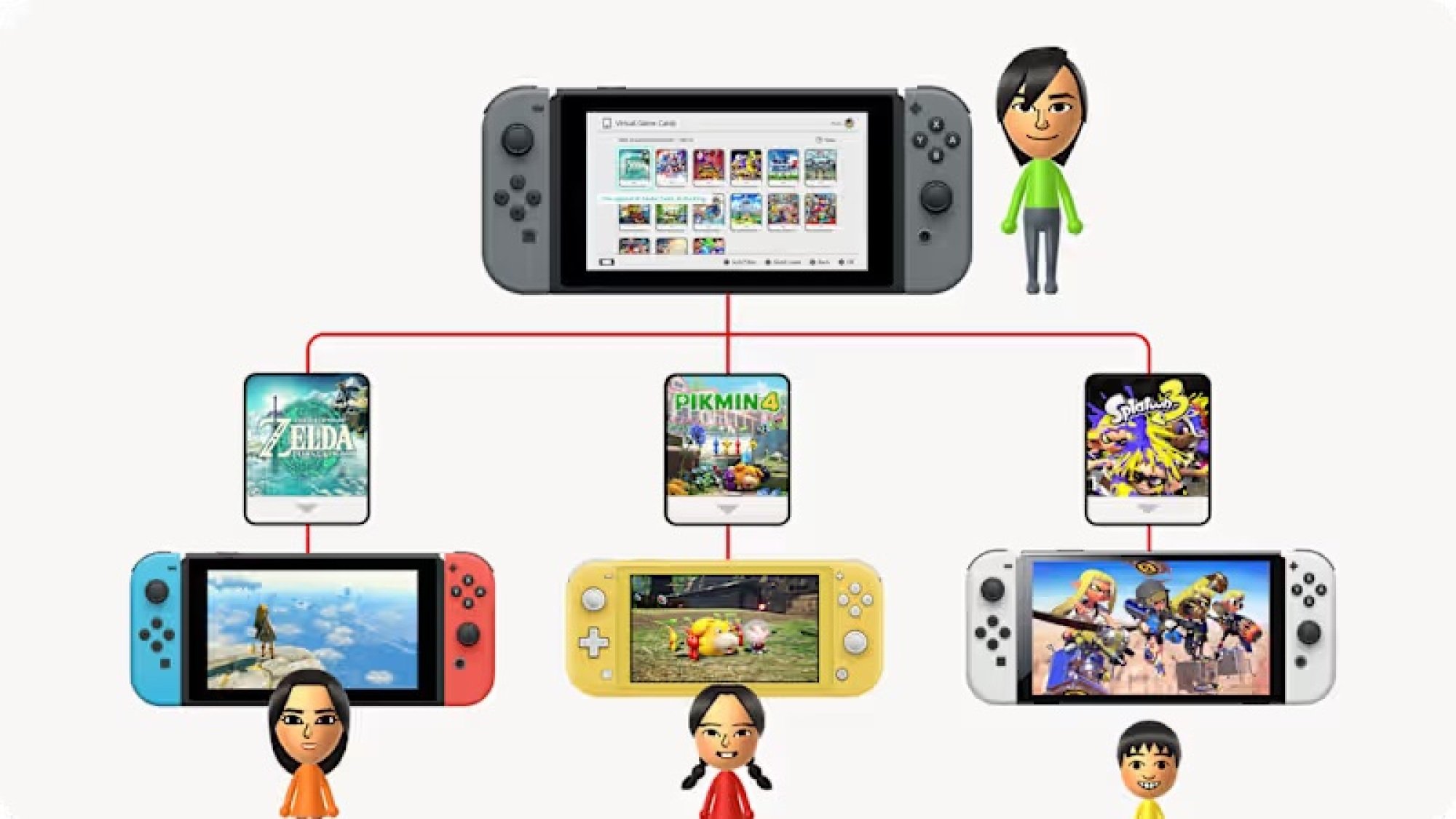
Virtual Game Cards

Credit: Nintendo

Finally, for a more piecemeal approach, there’s Virtual Game Cards. This is a new way of categorizing digital games that’s set for release in April. Essentially, it’ll add a new icon to the Switch’s home screen, where you’ll be able to see your digital games as a series of “virtual game cards.” You’ll then be able to load these cards then and there to play them on the system you’re currently using, or click “Load on Another System” to move them over to another console linked to your Nintendo Account. With that, you can move your Switch 1 games over to Switch 2 on a more case-by-case basis.
Android 16 Beta 3.2 Fixes Battery Drain, Screen Flickers And More Pixel Issues

Android 16 Beta 3.2 Fixes Battery Drain, Screen Flickers And More Pixel Issues
Google just released the Android 16 Beta 3.2 patch to beta testers, which includes fixes for “minor” issues such as battery drain, screen flicker, and more.

If you’ve noticed that your Android battery drains a little faster than normal, especially when it’s not in use, Android 16 Beta 3.2 includes a fix that will address this issue. This

Bonobos’ calls may be the closest thing to animal language we’ve seen

Bonobos, great apes related to us and chimpanzees that live in the Republic of Congo, communicate with vocal calls including peeps, hoots, yelps, grunts, and whistles. Now, a team of Swiss scientists led by Melissa Berthet, an evolutionary anthropologist at the University of Zurich, discovered bonobos can combine these basic sounds into larger semantic structures. In these communications, meaning is something more than just a sum of individual calls—a trait known as non-trivial compositionality, which we once thought was uniquely human.

To do this, Berthet and her colleagues built a database of 700 bonobo calls and deciphered them using methods drawn from distributional semantics, the methodology we’ve relied on in reconstructing long-lost languages like Etruscan or Rongorongo. For the first time, we have a glimpse into what bonobos mean when they call to each other in the wild.

Context is everything

The key idea behind distributional semantics is that when words appear in similar contexts, they tend to have similar meanings. To decipher an unknown language, you need to collect a large corpus of words and turn those words into vectors—mathematical representations that let you place them in a multidimensional semantic space. The second thing you need is context data, which tells you the circumstances in which these words were used (that gets vectorized, too). When you map your word vectors onto context vectors in this multidimensional space, what usually happens is that words with similar meaning end up close to each other. Berthet and her colleagues wanted to apply the same trick to bonobos’ calls. That seemed straightforward at first glance, but proved painfully hard to execute.

Read full article

Comments

Hori’s Piranha Plant Switch 2 camera is a work of art

Yesterday, we learned a lot about the Switch 2 we didn’t know before, including the fact Nintendo that will offer a webcam alongside the new console. As far as accessories go, the $50 Switch 2 Camera looks boring, and judging from the footage the company shared on Wednesday, not particularly great at its intended purpose of, you know, capturing moving pictures. 

The good news? Nintendo is allowing third-party manufacturers to make their own webcams for the new console. Enter the Hori Piranha Plant Camera. 

The Piranha Plant can attach directly to the top of the Switch 2.
Hori

Hori’s Switch 2 camera has a couple of features you won’t find on Nintendo’s first-party offering. First, the pot the Piranha Plant sits in functions as both as a stand and USB extension for the device. The part of the Piranha that houses the webcam can detach from the pot, allowing you to, ahem, plant it directly on the top of the Switch 2. In that way, you can take your new buddy on the road. Want to trash talk your friends over video in GameChat while on a domestic flight? With the Piranha Plant and in-flight Wi-Fi, you can. 

Second, the Piranha Plant camera has a built-in privacy shutter. You can simply close its mouth to obscure the lens. If that’s not clever, functional design, I don’t know what is.

The Piranha Plant Camera features a clever built-in privacy shutter.
Hori

Hori has yet to list the Piranha Plant camera on its US website, but over in Germany, retailer Media Markt has the accessory priced at €40 or €20 less than the official Switch 2 Camera from Nintendo. Practical, stylish and affordable, what’s not to love? 

This article originally appeared on Engadget at https://www.engadget.com/gaming/nintendo/horis-piranha-plant-switch-2-camera-is-a-work-of-art-194430377.html?src=rss

KFC Fried Chicken Flavored Toothpaste

Because who wouldn’t want to go to bed at night with a taste in your mouth that makes you feel like you didn’t brush your teeth, dental care company and novelty toothpaste manufacturer Hismile teamed up with KFC to make a fried chicken flavored toothpaste (not an April Fools’ prank, but currently sold out). That’s…something. Something to make your dogs love your breath. Still, call me old fashioned, but I prefer my toothpaste the same flavor it’s always been: bubble gum.

Nvidia confirms the Switch 2 supports DLSS, G-Sync, and ray tracing

In the wake of the Switch 2 reveal, neither Nintendo nor Nvidia has gone into any detail at all about the exact chip inside the upcoming handheld—technically, we are still not sure what Arm CPU architecture or what GPU architecture it uses, how much RAM we can expect it to have, how fast that memory will be, or exactly how many graphics cores we’re looking at.

But interviews with Nintendo executives and a blog post from Nvidia did at least confirm several of the new chip’s capabilities. The “custom Nvidia processor” has a GPU “with dedicated [Ray-Tracing] Cores and Tensor Cores for stunning visuals and AI-driven enhancements,” writes Nvidia Software Engineering VP Muni Anda.

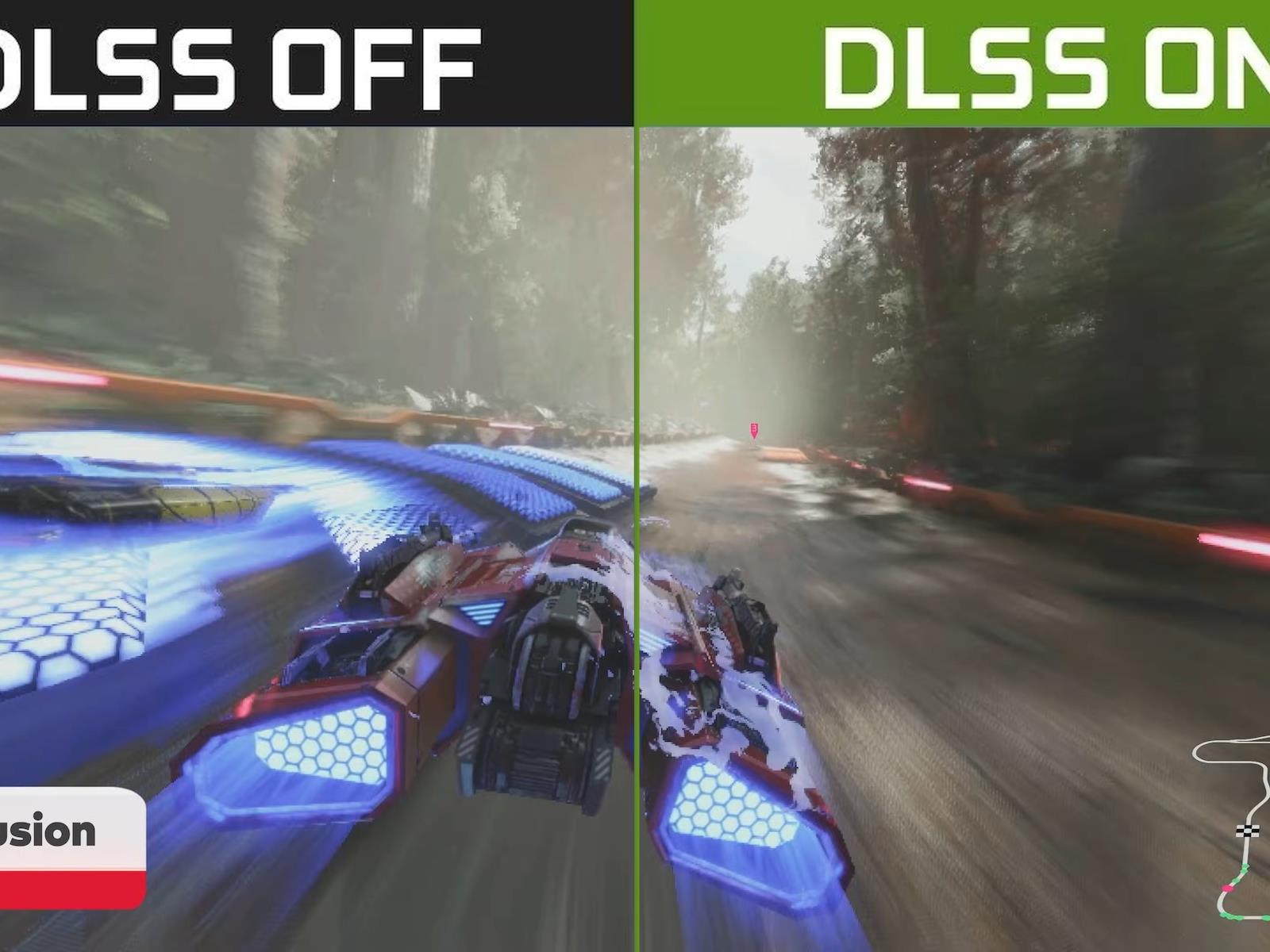
This means that, as rumored, the Switch 2 will support Nvidia’s Deep Learning Super Sampling (DLSS) upscaling technology, which helps to upscale a lower-resolution image into a higher-resolution image with less of a performance impact than native rendering and less loss of quality than traditional upscaling methods. For the Switch games that can render at 4K or at 120 FPS 1080p, DLSS will likely be responsible for making it possible.

Read full article

Comments

The Garmin Instinct 2 Solar Smartwatch Is $170 Off

We may earn a commission from links on this page. Deal pricing and availability subject to change after time of publication.

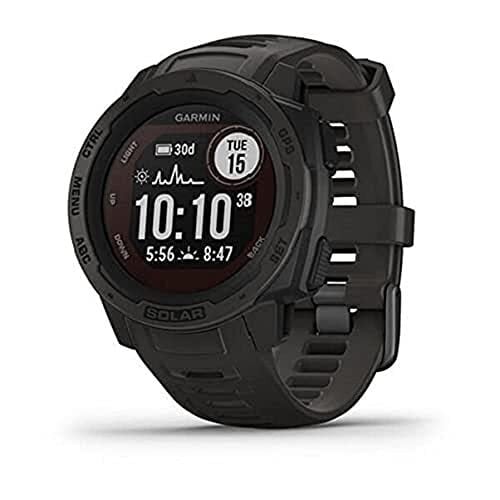
Anytime you’re looking for a good smartwatch, Garmin’s name is bound to come up. The Garmin Instinct 3 came out very recently, and that means the Garmin Instinct 2 has dropped in price—and even though that model is now a generation old, it’s still an incredible fitness and outdoor smartwatch. With this latest price drop, the Garmin Instinct 2 Solar is now $229.99 (originally $399.99), the lowest price it has reached, according to price tracking tools.

The Garmin Instinct 2 Solar is a serious smartwatch, visually represented by its no-nonsense, black-and-white display. It puts all of its chips on functionality over other aspects a health smartwatch might offer. As the name implies, it’s a solar-powered watch. Three hours of being in the sun gives you about 24 hours of juice or one hour of GPS battery life. Even without sun, a full charge gives you 28 days of juice. The GPS and the heart rate feature are very accurate, so if that’s what you care about, the Instinct 2 Solar will not disappoint.

The Instinct 2 Solar has a lot of different sport profiles you can choose to track, making it great for triathlon athletes or people who like to practice many different sports. It also has Connect IQ app support, which opens the doors to many third-party apps for extra features, face watches, and widgets. And if you need some motivation or guidance with your fitness goals Training Status can suggest workouts for running and cycling. The watch also includes helpful tools like a built-in compass, altimeter, and barometer, making it great for hardcore hikers. Finally, since the Instinct 2 Solar has Connect IQ, you can configure your watch with the app instead of painstakingly doing it on the watch.

Monkeys are better yodelers than humans, study finds

Humans have practiced some form of yodeling since at least the 13th century, when Marco Polo encountered Tibetan monks on his travels who used the vocal technique for long-distance communication. It’s since morphed into a distinctive singing style. But can animals also yodel? According to a new paper published in the Philosophical Transactions of the Royal Society B, Biological Sciences, several species of monkey dwelling in the rainforests of Latin America employ “voice breaks” in their calls that acoustically resemble human yodeling—i.e., “ultra-yodels” that boast a much wider frequency range.

Many years ago, I wrote about the bioacoustics of human yodeling for New Scientist. In many respects, yodeling is quite simple. It merely involves singing a long note subjected to repeated rapid sharp shifts in pitch. It’s the unique anatomy of the human vocal tract that makes it possible, notably the larynx (voice box) located just behind the Adam’s apple. The larynx is comprised of cartilage and the hyoid bone that together support the vocal cords, which are attached to muscles on either side of the larynx.

When air flows through the trachea, the vocal cords vibrate at frequencies ranging from 110 to 200 Hz. We have the capability of contracting the muscles to change the shape, position, and tension of our vocal cords, thereby altering the pitch of the sound produced. Stiffer vocal cords result in faster vibrations, which produce higher pitches.

Read full article

Comments

Oracle Tells Clients of Second Recent Hack, Log-In Data Stolen

An anonymous reader shares a report: Oracle has told customers that a hacker broke into a computer system and stole old client log-in credentials, according to two people familiar with the matter. It’s the second cybersecurity breach that the software company has acknowledged to clients in the last month.

Oracle staff informed some clients this week that the attacker gained access to usernames, passkeys and encrypted passwords, according to the people, who spoke on condition that they not be identified because they’re not authorized to discuss the matter. Oracle also told them that the FBI and cybersecurity firm CrowdStrike are investigating the incident, according to the people, who added that the attacker sought an extortion payment from the company. Oracle told customers that the intrusion is separate from another hack that the company flagged to some health-care customers last month, the people said.


Read more of this story at Slashdot.

The Nintendo Switch 2 Might Be Compatible With the Webcam You Already Own

As someone who’s planning to buy the Nintendo Switch 2, I’ve had my eye on the accessories I’d need to get with the console. Since Super Mario Party Jamboree, which is getting some new mini-games in its Switch 2 port, is one of the games I’m very interested in, the Switch 2 Camera accessory caught my eye. After all, who doesn’t want to make dramatic faces while playing with their friends? You can even use it for chat, too. However, I’m not sure I can justify spending $50 on an accessory that’ll probably gather dust after I’m done with Mario Party. Fortunately, it looks like the Switch 2 Camera is not the only way to play camera-based games or video chat with your friends on the Nintendo Switch 2.

How to check if the Nintendo Switch 2 supports your USB-C camera

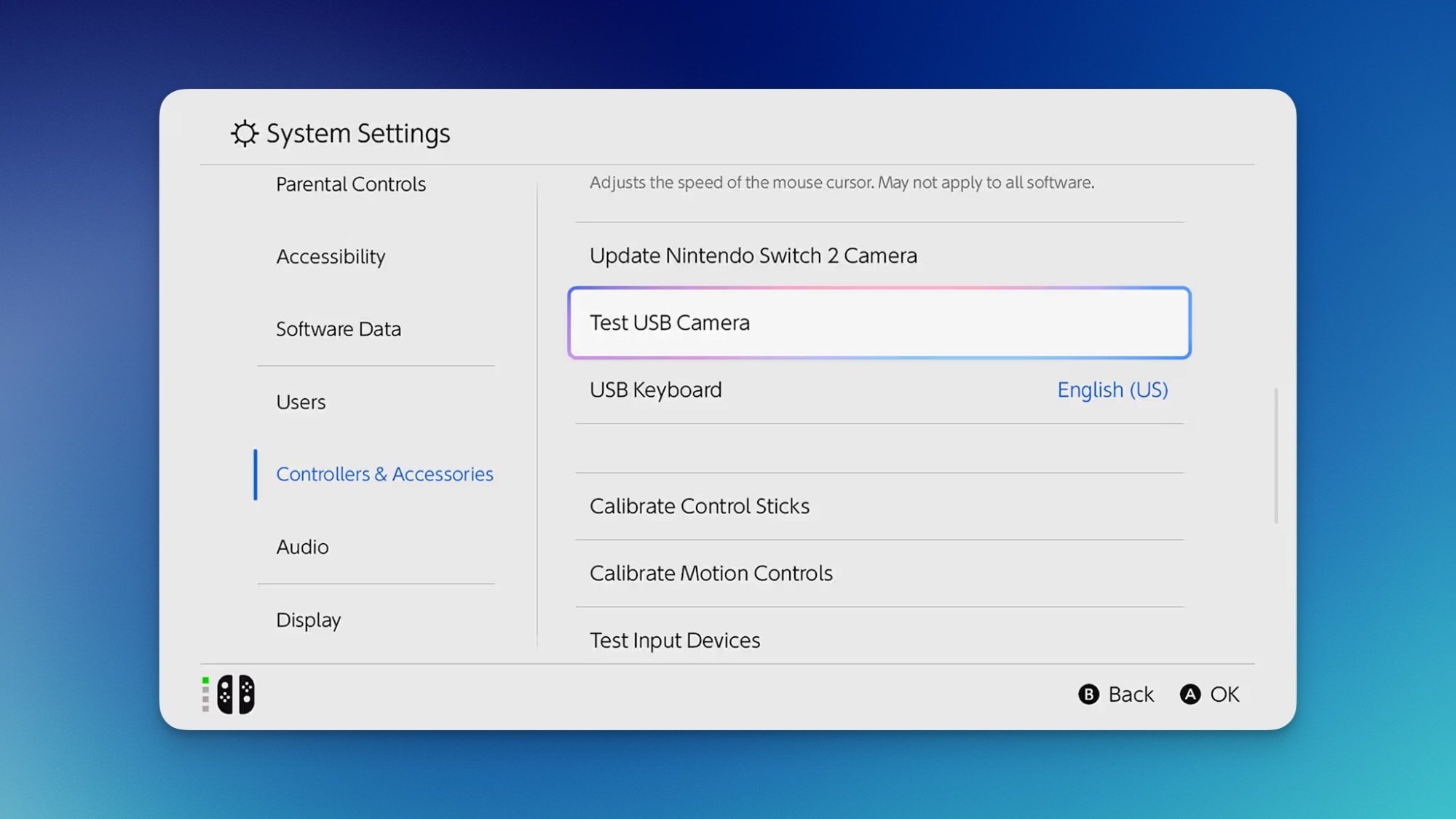
Nintendo Switch 2's accessories settings page, with the Test USB Camera option highlighted.

Credit: Nintendo

A quick look at Nintendo’s Switch 2 Camera webpage reveals that you can use third-party USB-C cameras with the console, even ones that aren’t made with it in mind. Like me, if you already have a USB-C camera lying around, you can plug it into the Switch 2 and the console will tell you if it’s compatible. Whenever you end up getting the Switch 2, just go to the console’s settings and navigate to the Controllers & Accessories section. Once the camera is connected to the Switch 2, select Test USB Camera and the console will let you know if the camera is compatible with the system.

Why you might want to consider an alternative USB camera

I don’t want to discourage people from buying Nintendo’s Switch 2 Camera right away, since I haven’t tried it yet. But I won’t be buying it immediately, because it’s too expensive for me. Yes, you get guaranteed compatibility and a useful stand that lets you place it on any flat surface, but that doesn’t necessarily justify its price. At the time of writing, you can buy good USB-C webcams for as little as $20 each. These cameras ship with a privacy cover and adjustable stands that can be mounted on top of a TV or placed on a flat surface, and there’s a good chance you already own one. If you can use one for the Switch 2 instead, it might be worth opting for that instead of spending extra cash. 

Apple’s Latest Update May Be Installing Previously Deleted Apps on iPhones

It’s not difficult to delete an app off your iPhone. In fact, it only takes a few taps at most. If you’re so inclined, you can even remove purchases from your Apple Account entirely. So it might come as a bit of a surprise if you see that app randomly reappear. As it happens, some users are seeing just that.

MacRumors spotted multiple threads across both Reddit and Apple’s Community Support site, all featuring the same complaint: users noticing apps they did not choose to download appearing on their iPhones. Some of these affected users had previously deleted these apps months or years ago, and didn’t understand why they were back. Others, however, had no memory of ever downloading the app in question in the first place.

The account Someandroiduser started a Community Support thread, claiming a previously deleted app “Last War Survival” ended up on their iPhone again. Redditor dURDENN7 posted the same, without naming the app in question. It’s worth noting some of the commenters on that thread said their iPhones had downloaded “Last War Survival” as well, including one who said they had never downloaded the app before.

Reddit user illyyas posted that they had discovered the game “Ingress” installed on their iPhone, despite the fact they don’t play games at all on their phone. Another commenter said their iPhone downloaded “Cooking Mama” to their Home screen, even though the App Store still showed the option to “Get” the app—implying the user had never actually installed the app before. Another user shared a similar story with the game “Bit City.”

Is iOS 18.4 responsible?

While it isn’t totally clear what is behind these app downloads, one through line does appear to be iOS 18.4. The update officially dropped on Monday, adding new features and security patches for compatible iPhones. Unfortunately, Apple might’ve missed a bug in beta testing, since many of these user complaints note these apps mysteriously appeared after installing the latest iOS update.

MacRumors notes that Automatic Downloads—the feature that installs previously downloaded apps on other connected Apple devices—doesn’t seem to be at fault here, since many of the affected users only have iPhones. In addition, the outlet identified that these devices were not jailbroken and were not using a third-party app marketplace.

To Apple’s credit, this hasn’t been my experience with the newest update. I installed iOS 18.4 on my iPhone, and, as far as I can tell, no new or previously downloaded apps found their way into my App Library. However, it is a problem: You shouldn’t expect to see apps you previously deleted reappear on your device, and you definitely shouldn’t see apps you never downloaded to begin with.

Apple has not made a public statement about this issue, nor is there really much you can do to prevent it. If you happen to notice an app you previously deleted—or never actually downloaded in the first place—your best bet is to simple delete it, and hope it doesn’t show up again.

NVIDIA Confirms 4K And DLSS Support For Nintendo Switch 2 Games

NVIDIA Confirms 4K And DLSS Support For Nintendo Switch 2 Games
Nintendo’s Switch console is based on a now-aged NVIDIA Tegra X1 SoC, and it has been rumored for more than a year that the Switch 2 would make use of an updated NVIDIA chip, likely based on the Tegra processor code-named “Orin”. We still don’t have 100% firm confirmation of that, but there’s a new detail that reinforces that impression: NVIDIA

Nine Ways to Make Your DIY Paint Job Look Professional

Paint is the cheapest, easiest renovation you can do: it makes everything fresh and new, it covers defects, and it’s something almost anyone can do to a reasonable level of quality.

If you just read that last part and started shaking your head because your paint projects always turn out terribly—patchy, or with visible sheen or brush strokes, or a final color that doesn’t seem to match what you chose in the store at all—the cause probably isn’t your work ethic, or an evil spirit inhabiting your house. The problem probably lies in your prep work. If all you’re doing before you start slapping paint on the walls is applying some painter’s tape and covering the furniture, the chances that the final paint job will look terrible are actually pretty high. Here are all the things you should take into account before you dip that brush.

Consider temperature and humidity

The weather can affect the quality of your paint job. Extreme temperature or humidity can have an adverse impact on the drying time. At colder temperatures, paint can thicken, extending its drying time. At hotter temperatures, it can dry too quickly, affecting adhesion. High humidity that leaves moisture on the walls will also result in a sub-par paint job.

Your home is probably climate controlled, so painting inside even during extreme weather is certainly possible—just make sure the temperature is between 50 and 90 degrees and the humidity levels are between 40 and 60%.

Prep the walls

It’s usually a good idea to wash your walls before painting them to ensure there is no dust or dirt that could adversely affect adhesion. While you’re at it, look for cracks, dents, peeling tape, or other defects and patch everything up (including crayon or grease stains that will probably show through your paint unless they’re scrubbed off). A small flaw that isn’t noticeable now might become a glaring problem when a fresh coat of paint brings it to the forefront.

Cleaning walls with a dry microfiber cloth followed by warm water and a sponge is usually sufficient, unless your walls are really dirty. If you’re worried about it, add a small amount of dish washing liquid or trisodium phosphate (if your walls are greasy and very dirty)—but avoid colored soaps that might leave a tint behind.

Choose the right rollers

One big reason paint jobs look like crap? The nap on your roller cover. The nap of your roller describes the thickness of the fibers. Generally speaking, the smoother your wall surface is, the smaller the nap of your roller cover should be. Painting kitchen cabinets? Go with a 1/4-inch nap. Painting a brick wall? An inch or even a 1 1/4-inch nap is best. Smaller fibers pick up less paint, while thicker fibers hold more paint—a too-short nap can result in a patchy finish on rough surfaces, while a too-long nap can add unwanted texture to smooth surfaces. Most interior paint jobs will call for a nap between 3/8 inch (very smooth walls) and 3/4 inch (textured walls, like stucco).

Apply a separate primer coat

These days you can buy paint and primer together, which is a terrific time saver. But if your walls aren’t in great shape, even after cleaning and patching, you will usually get a much better result with a separate primer coat. This step might not be 100% necessary on your walls, but taking the extra time to prime properly will guarantee the best possible outcome.

Identify the paint’s undertones

Almost all paint has an undertone (its base color )and a masstone (its overall hue). The undertone can be subtle and difficult to suss out, which is why it’s so important to paint a few samples on the wall before you commit. The paint’s undertone will interact with everything else in the room in ways that aren’t always obvious in the store. You brought home a beige paint, for example, but it has a green undertone, and suddenly it looks all wrong on your walls because your wood floors have yellow undertones.

You can ask about the paint’s undertone at the store where you’re buying it. You can also use a color wheel to compare it to primary colors to get a sense of the undertones involved.

Combine multiple buckets of paint

If you’re painting a small room and using just one can of paint, you’re good to go. If your project is larger and you’ll be using multiple cans of the same color, you should combine all your paint into a larger bucket and mix it up—a process called “boxing.” This is a good idea because even if you bought your paint from the same store at the same time, there can be subtle variations between cans. Maybe the pigments dispersed incorrectly, or the mixing process was slightly off. Whatever the reason, even the tiniest variation between cans will be incredibly obvious when you switch to the new can. Boxing it eliminates the danger.

Check out your window tint

Your windows can throw a wrench into your paint colors. This is because many windows have a very subtle green tint due to the presence of iron oxide in the glass. This isn’t noticeable in any way to the naked eye, as a rule, but it can cast a greenish tint on your paint that’s just strong enough to make it look inexplicably wrong in the daylight. Putting samples on the wall to judge the color is a great idea—but make sure you paint those samples in a spot where the light from your windows will hit them. Samples that look perfect in a more shadowed area may suddenly look weird when light hits it through the window.

Figure out the color temperature of your lights

Another lighting issue is your light bulbs. All the bulbs you’re using in your light fixtures have a color temperature, and that can affect how your paint looks. Generally speaking, bulbs with higher color temperatures will brighten darker paint and mute lighter colors and vice versa. This means that a paint color that looks terrific in daylight can suddenly look grim or faded at night when the lights come on. It’s best to check your samples in all kinds of light to make sure you’ve chosen wisely—and change your bulbs to support your paint if necessary.

You should also check the color rendering index (CRI) of your bulbs. This is a rating between 50 and 100 that indicates how accurate the color rendering of the bulb will be. A CRI of 90 to 100 will show your paint as accurately as possible, reducing the chances that it will look worse when the sun goes down.

Load your roller up

Finally, when actually painting, don’t be shy with your roller. When initially “loading” paint onto a dry cover, take your time and work paint deep into the nap. This can take a few minutes, so don’t rush—you want a nice, wet roller when you hit the wall. When painting, don’t roll until the roller is exhausted—reload frequently and keep the nap damp. Exhausting your roller will just leave streaks and faint spots that may or may not get covered by a second coat—and may or may not haunt you for years afterward.

YouTube is updating the Shorts video editor to make it a better alternative to TikTok

YouTube is updating the video editor for Shorts to better compete with the likes of TikTok and Instagram Reels, and teasing some AI-powered features that are coming later this year that might make it stand out.

The new and improve editor will let users “make precise adjustments and edits to the timing of each clip with zooming and snapping,” along with the usual option to rearrange and delete your footage. YouTube says you’ll also be able to add music and timed text, and preview your video at any point while you’re editing.

At some point in the future, the editor will gain the ability to automatically sync clips to a song. And “later this spring,” YouTube says the editor will be able to create stickers from photos in your image gallery or with a built-in AI image generator. As part of this update, the process of using templates is also getting simplified. Creators of templates will now be automatically credited when anyone uses their work, and templates themselves can now include things like image overlays and filter effects.

YouTube is clearly trying to reach some kind of parity with the creative tools offered by TikTok and Instagram. TikTok’s editing tools and the standalone CapCut video editor have long been the gold standard for creating videos on your phone. Given the uncertain future of TikTok in the US, making YouTube Shorts a more appealing alternative makes sense. It’s also not the first time YouTube has drawn inspiration from TikTok. YouTube added a robotic, text-to-speech narration feature to Shorts, clearly inspired by TikTok’s popular version, in 2024.

This article originally appeared on Engadget at https://www.engadget.com/apps/youtube-is-updating-the-shorts-video-editor-to-make-it-a-better-alternative-to-tiktok-182932945.html?src=rss

Verizon just announced a three-year price lock plan, but there are caveats

Verizon just revealed a new price lock policy that guarantees certain plans won’t go up in cost for three years. This is for both new and existing customers. It was announced the day after President Trump decided to tariff the entire world, which put markets into a tailspin. Verizon didn’t specifically mention this policy, but did say that the move was intended to give “predictability” to its customer base.

However, there are some caveats. Customers have to be enrolled in one of the company’s newer myPlan subscriptions to be eligible. Also, the guarantee only covers the base charge for the rate plan. It doesn’t do anything regarding those mysterious little fees that carriers use to raise prices on the down low. 

� BIG NEWS! � Verizon is introducing a 3-Year Price Guarantee for ALL new and existing customers on myPlan & myHome, PLUS a FREE phone with trade-in and free satellite messaging!

Learn how to save big:https://t.co/tabDgx5jgZ

— Verizon News (@VerizonNews) April 3, 2025

There’s also nothing in the fine print regarding autopay discounts, so those aren’t locked in. This could force a rate hike if Verizon decides alter the discount. Of course, the company will likely try to persuade consumers to increase the monthly bill of their own accord. This carrot usually takes the shape of a “free” phone.

To that end, Verizon announced it will be giving free phones to new and existing customers. This requires a suitable trade-in device and enrollment in a myPlan subscription. The three-year price lock also covers the company’s myHome 5G internet plans. Current myPlan members don’t have to do anything to start this price lock process. The enrollment is automatic.

This is just the latest promotion to lure customers to its myPlan subscriptions. The company recently started offering cheaper subscriptions for Netflix and Max to members. It did something similar for Google One AI Premium subscriptions. Verizon owns a minority stake in Engadget’s parent company, but this didn’t impact our coverage. 

This article originally appeared on Engadget at https://www.engadget.com/mobile/smartphones/verizon-just-announced-a-three-year-price-lock-plan-but-there-are-caveats-182320983.html?src=rss

Climate Crisis On Track To Destroy Capitalism, Warns Top Insurer

The climate crisis is on track to destroy capitalism, a top insurer has warned, with the vast cost of extreme weather impacts leaving the financial sector unable to operate. From a report: The world is fast approaching temperature levels where insurers will no longer be able to offer cover for many climate risks, said Günther Thallinger, on the board of Allianz SE, one of the world’s biggest insurance companies. He said that without insurance, which is already being pulled in some places, many other financial services become unviable, from mortgages to investments.

Global carbon emissions are still rising and current policies will result in a rise in global temperature between 2.2C and 3.4C above pre-industrial levels. The damage at 3C will be so great that governments will be unable to provide financial bailouts and it will be impossible to adapt to many climate impacts, said Thallinger, who is also the chair of the German company’s investment board and was previously CEO of Allianz Investment Management. The core business of the insurance industry is risk management and it has long taken the dangers of global heating very seriously. In recent reports, Aviva said extreme weather damages for the decade to 2023 hit $2tn, while GallagherRE said the figure was $400bn in 2024. Zurich said it was “essential” to hit net zero by 2050.


Read more of this story at Slashdot.

Microsoft’s Affordable Mini PC To Stream Windows From The Cloud Is Now Available

Microsoft's Affordable Mini PC To Stream Windows From The Cloud Is Now Available
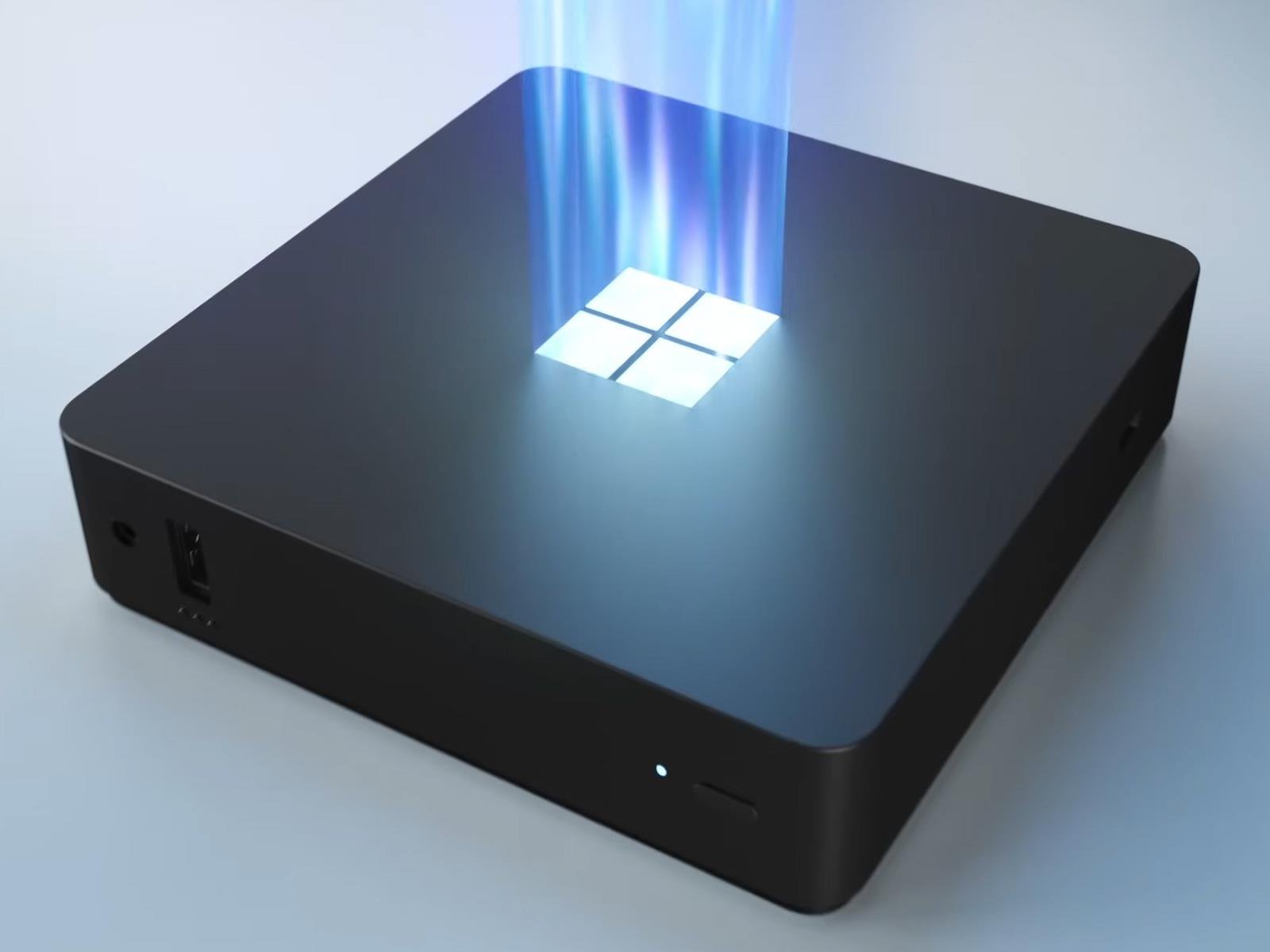
Microsoft is now accepting orders for the Windows 365 Link device it announced at its Ignite conference back in November. The thin client system is Microsoft’s first cloud PC device built specifically to securely connect to Windows 365 in a matter of “seconds,” the company says. It’s also been through a preview period with testing by over

The world’s smallest pacemaker is injectable and powered by light

Engineers at Northwestern University have developed the world’s smallest pacemaker. It’s so small, as a matter of fact, that it fits inside the tip of a syringe. This means that it’s injectable, so patients could potentially avoid a painful surgery.

It safely dissolves into the bloodstream after a time, so it’s a temporary solution. It’s designed for folks who need heart help on a short-term basis, like newborn babies with congenital defects. However, it can work with hearts of all sizes.

It’s also powered by light, which is pretty darned cool. The pacemaker is paired with a wireless wearable device that mounts to a patient’s chest. When that small device detects an irregular heartbeat, it shines a light that activates the pacemaker. These light pulses can penetrate a patient’s skin, bones and muscles.

Even though the pacemaker is tiny, measuring one millimeter in thickness, it still delivers as much stimulation as a full-sized unit. The engineers published their findings in Nature and noted that the device works with both animal and human hearts. The team also reiterated that pediatric care is the primary use case here.

“About one percent of children are born with congenital heart defects,” said Northwestern experimental cardiologist Igor Efimov, who co-led the study. “The good news is that these children only need temporary pacing after a surgery. In about seven days or so, most patients’ hearts will self-repair. But those seven days are absolutely critical. Now, we can place this tiny pacemaker on a child’s heart and stimulate it with a soft, gentle, wearable device. And no additional surgery is necessary to remove it.”

The development of this medical device was co-led by John Rogers, which is a familiar name in biomedical circles. Rogers has been behind a number of astounding innovations throughout the years. He’s advanced technology that could eventually give us invisibility cloaks and health-tracking tattoos. He also built a thumbnail-sized UV sensor and a circuit that dissolves in the body. That last one eventually led to this innovative pacemaker.

Rogers imagines a world in which physicians inject a number of these pacemakers simultaneously, to enable sophisticated synchronization. This could help terminate arrhythmias, as different parts of the heart could be paced at unique rhythms.

“Because it’s so small, this pacemaker can be integrated with almost any kind of implantable device,” Rogers said. “Here, the tiny pacemakers can be activated as necessary to address complications that can occur during a patient’s recovery process.”

This versatility could eventually open up a diverse array of medical possibilities. The tech could be used to help nerves heal, treat wounds and block pain.

This article originally appeared on Engadget at https://www.engadget.com/science/the-worlds-smallest-pacemaker-is-injectable-and-powered-by-light-153302491.html?src=rss

AV1 is Supposed To Make Streaming Better, So Why Isn’t Everyone Using It?

Despite promises of more efficient streaming, the AV1 video codec hasn’t achieved widespread adoption seven years after its 2018 debut, even with backing from tech giants Netflix, Microsoft, Google, Amazon, and Meta. The Alliance for Open Media (AOMedia) claims AV1 is 30% more efficient than standards like HEVC, delivering higher-quality video at lower bandwidth while remaining royalty-free.

Major services including YouTube, Netflix, and Amazon Prime Video have embraced the technology, with Netflix encoding approximately 95% of its content using AV1. However, adoption faces significant hurdles. Many streaming platforms including Max, Peacock, and Paramount Plus haven’t implemented AV1, partly due to hardware limitations. Devices require specific decoders to properly support AV1, though recent products from Apple, Nvidia, AMD, and Intel have begun including them. “In order to get its best features, you have to accept a much higher encoding complexity,” Larry Pearlstein, associate professor at the College of New Jersey, told The Verge. “But there is also higher decoding complexity, and that is on the consumer end.”


Read more of this story at Slashdot.

ESA’s New Documentary Paints Worrying Picture of Earth’s Orbital Junk Problem

The European Space Agency’s short film Space Debris: Is it a Crisis? highlights the growing danger of orbital clutter, warning that “70% of the 20,000 satellites ever launched remain in space today, orbiting alongside hundreds of millions of fragments left behind by collisions, explosions and intentional destruction.” Inkl reports: The approximately eight-minute-long film “Space Debris: Is it a Crisis?” attempts to answer its conjecture with supportive statistics and orbital projections. […] The film also mentions that the kind of Earth orbit matters when discussing whether we’re in a space junk “crisis” — though unfortunately, orbits at risk appear to be those with satellites that help with communication and navigation, as well as our fight against another primarily human-driven crisis: global warming. Still, the film emphasizes that solutions ought to be thought of carefully: “True sustainability is complex, and rushed solutions risk creating the problem of burden-shifting.” You can watch the film on ESA’s website.


Read more of this story at Slashdot.