FDA backpedals on RTO to stop talent hemorrhage after HHS bloodbath

The Food and Drug Administration is reinstating telework for staff who review drugs, medical devices, and tobacco, according to reporting by the Associated Press. Review staff and supervisors are now allowed to resume telework at least two days a week, according to an internal email obtained by the AP.

The move reverses a jarring return-to-office decree by the Trump administration, which it used to spur resignations from federal employees. Now, after a wave of such resignations and a brutal round of layoffs that targeted about 3,500 staff, the move to restore some telework appears aimed at keeping the remaining talent amid fears that the agency’s review capabilities are at risk of collapse.

The cut of 3,500 staff is a loss of about 19 percent of the agency’s workforce, and staffers told the AP that lower-level employees are “pouring” out of the agency amid the Trump administration’s actions. Entire offices responsible for FDA policies and regulations have been shuttered. Most of the agency’s communication staff have been wiped out, as well as teams that support food inspectors and investigators, the AP reported.

Read full article

Comments

Razer’s PC Remote Play app is now available

On the heels of Razer pausing direct laptop sales in the US (thanks to those on-again, off-again, yet still very much on for China tariffs), the company has officially launched its remote game streaming app. Razer PC Remote Play, which the company rolled out in beta at CES 2025, is now officially available for iOS and Android.

Razer may be a bit late to the party here, and its app is hardly the only way to stream your PC games to other devices. (For example, Steam’s version has offered similar functionality for six years.) But Razer’s app has a neat trick: It automatically adjusts the game’s resolution and frame rate to match your mobile device’s. So, you can avoid the black bars you get with services that only stream games in a fixed aspect ratio.

Closeup of a mobile device with a controller attached, using Razer's Remote Play app.
Razer

The company says it works with all iOS and Android gaming controllers, and the iPad version has keyboard, mouse and trackpad support. It works with titles from multiple storefronts (including Steam, Epic, PC Game Pass and more). The app uses the AV1 video codec, which Razer says boosts quality and lowers latency.

Setup requires the Razer Nexus and PC Remote Play apps on your mobile device and Razer Cortex on the host PC. After signing in with your Razer ID, the two should pair automatically, and you can get down to business. You can download the app now from Google Play and the App Store.

This article originally appeared on Engadget at https://www.engadget.com/gaming/pc/razers-pc-remote-play-app-is-now-available-182533832.html?src=rss

Panic will showcase the second season of Playdate games on April 17

Panic has set a date for when it will share more about the second season of Playdate games. The company is hosting a Playdate Update event on April 17, at 1PM ET / 10AM PT where it plans to cover the developers participating in the season, how you can pre-order it and how much it’ll cost.

The Playdate’s season structure was one of the main things that made the tiny handheld unique when it was first released. Every week for 12 weeks you receive two new games automatically downloaded to your Playdate, free of charge. The list was curated, featuring games from prominent developers like Katamari Damacy creator Keita Takahashi, but also varied, with adventure games, platformers and more.

Given the difficulties Panic faced making and shipping the Playdate to customers, there was initially some uncertainty whether the company could afford to commission another season. Before season two became official, Panic introduce an on-device store, called Catalog, as a way to purchase games from a curated library of titles. Then in October 2024, Panic confirmed that season two was happening in 2025.

In a statement to press, Panic shared that through the Playdate and Catalog, they’ve been able to raise $1,043,186.85 for developers. The company has also sold over 70,000 Playdate handhelds since the device launched in 2022. The price of the Playdate was recently raised from $179 to $229.

You’ll be able to watch the Season Two Playdate Update on April 17 at 1PM ET / 10AM ET on Panic’s website and the company’s YouTube channel.

This article originally appeared on Engadget at https://www.engadget.com/gaming/panic-will-showcase-the-second-season-of-playdate-games-on-april-17-181556782.html?src=rss

It’s Surprisingly Easy to Customize Your Mac’s Folder Icons

Every folder on macOS looks the same—a boring blue representation of a paper file. That makes browsing a folder full of folders harder than it needs to be because everything looks identical. Unless, that is, you use custom icons for your most-used folders. You can do that pretty easily, but the feature is a little bit hidden.

And yes, this means you can use something silly for your folder icon. But it can also be practical. Having an important folder a different color than the rest, or all of your folders different colors depending on functionality, makes it easier to find and click on what you’re looking for. And the process isn’t difficult.

First things first: you need to find the image you want to use as an icon. I recommend going to macOSicons.com, which has thousands of icons sized just right. You can search for any color and find folder icons matching it. You can also search for random objects or applications and find icons. Find the images you want to use and click Download to get an .icns file which you can assign to any folder you like. Alternatively, you can just search the web for whatever image you want, right-click the image, and click Copy Image (note that you cannot click “Copy Image URL”—you need to copy the image itself).

Next, right-click the folder you want to change the icon for and click Get Info to pull up a window with information about the file. You will see a folder icon in the top-left corner of that window (not the one in the window’s toolbar). If you downloaded an .icns file, simply drag it to this icon in this panel—after a few moments the folder icon will be replaced.

If you copied an image from your browser, simply click the icon in the panel—you’ll see that it is highlighted. Now use the keyboard shortcut CMD-V and the folder icon will be replaced with the image you copied.

Want to switch back to the default folder icon? Open the Get Info* panel, click the icon, then press the Delete key. The icon will go back to the default.

It’s worth noting that this isn’t limited to folders. We’ve talked about changing Mac app icons before, and you can also edit how external hard drives look. This can make it easier to figure out which drive is plugged in at a glance, especially if you find an icon that resembles the drive itself.

Easily make your own macOS icons

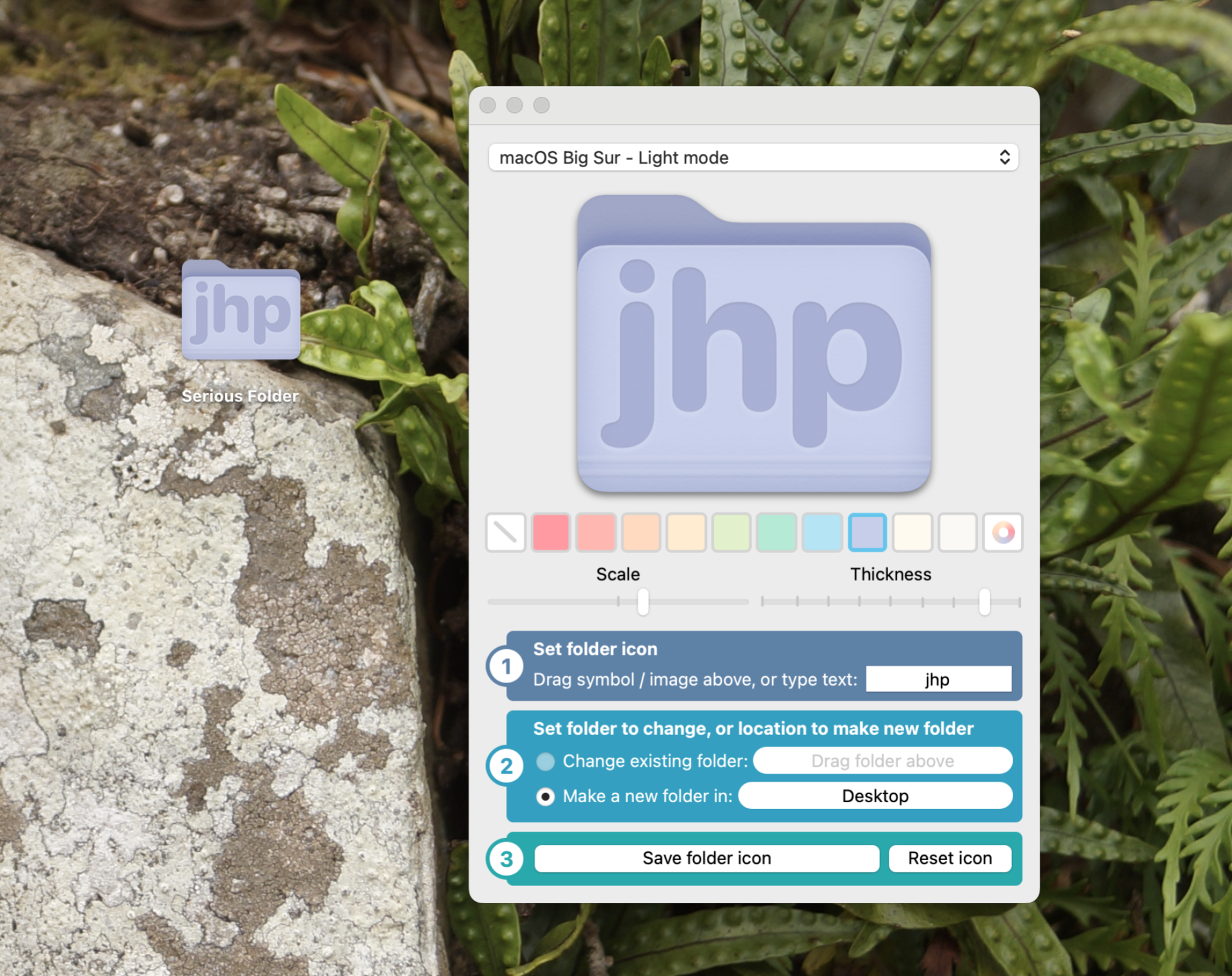
The application Fancy Folders is shown next to a purple folder on the desktop customized using it. The folder is now purple with the initials "JHP" on it.

Credit: Justin Pot

Finding an icon online is perfectly fine, but it’s pretty simple to design your own folder icons, too. You could copy the default icon, paste it into an image editor, and change it to look however you like. If you don’t have those skills, though, or would prefer something faster, Fancy Folders is a free application that can do the work for you.

This app lets you choose any color you want for your folder. It also lets you add an icon—this can be an image, if you want, or you can just type text. Choose which folder you want to browser, click Save folder icon, and the icon will change. Y

Nintendo may sell the Switch 2 at a loss in the US due to tariffs

The Nintendo Switch 2 is functionally similar to its predecessor. Sure, the detachable controllers can now each be used as a mouse (on your pants, no less), the screen is bigger, the hardware is more powerful and there’s a built-in mic for voice chat. But otherwise the company isn’t rocking the boat too much. At least not outside of its business model, as it may be preparing to sell the console at a loss.

For most countries, President Donald Trump has paused the harshest tariffs that he announced last week. Still, he increased tariffs on imports from China to 125 percent on Wednesday, while imports from elsewhere will still be subject to a levy of at least 10 percent.

Per Bloomberg, Nintendo may be looking to make as many Switch 2 units as it can in Vietnam (it’s manufacturing about a third of the consoles there) during the 90-day freeze on higher tariffs and ship as many as possible to the US. The US is a critical market for Nintendo as it accounts for about a third of sales. 

Still, with a 10 percent tariff, Nintendo may reluctantly eat that cost, even if that means losing money on each sale. “We believe the Switch 2’s bill of materials is around $400, meaning Nintendo would still be selling consoles at a loss in the US with the 10 percent tariff — but the loss would be something Nintendo would be able to absorb,” Hideki Yasuda of Toyo Securities told Bloomberg. “Sony is in a tougher situation as most of its PlayStation production is in China, and it may be forced to hike PS5 prices in the US in the near future.”

If the Switch 2 has about $400 worth of materials, that means Nintendo will also be taking a hit on a Japan-only edition of the console in its home country. It’s selling that variant for under $350.

Another analyst, Robin Zhu of Bernstein, also suggested that Nintendo will take the hit and keep the price at $450 if the tariff on Vietnamese imports remains at 10 percent. However, “At 46 percent Vietnam tariffs, I expected them to raise [the Switch 2 price] by $50 to $100.”

Unlike Sony and Microsoft, Nintendo has not historically sold its consoles at a loss with the aim of making up for that with sales of pricey software. The gaming side of the business is far and away Nintendo’s largest source of revenue. It’s diversifying more these days with things like movies and theme parks, but it still needs a thriving base of Switch and Switch 2 players. With the consoles critical to the company’s success, the suggestion that Nintendo may sell the $450 Switch 2 at a loss is somewhat surprising, even if it’s because of tariffs.

Nintendo formally revealed the Switch 2 just hours before Trump announced higher import tariffs on every country. Soon after, Nintendo delayed pre-orders for the console in the US (it later did the same in Canada, perhaps to reduce the risk of secondary-market price gouging) to assess the impact of the tariffs. With those now on hold, the company surely wants to get the ball rolling on pre-orders so it has a better sense of North American demand and can accordingly adjust its manufacturing plans if need be.

This article originally appeared on Engadget at https://www.engadget.com/gaming/nintendo/nintendo-may-sell-the-switch-2-at-a-loss-in-the-us-due-to-tariffs-175857327.html?src=rss

Amazon’s Chinese sellers to raise prices or quit US market as tariffs hit 145%

Chinese companies that sell to US customers on Amazon are reportedly preparing to raise prices or quit the US market because of tariffs imposed by President Trump. Amazon CEO Andy Jassy has meanwhile confirmed that he expects the cost of tariffs to be passed on to US buyers.

Reuters talked to several individual sellers and a Chinese trade association that represents over 3,000 Amazon sellers for an article published today. “It’ll be very hard for anyone to survive in the US market” because “the entire cost structure gets entirely overwhelmed” by the tariffs, Reuters was told by Wang Xin, who leads the Shenzhen Cross-Border E-Commerce Association. Xin also “not[ed] the tariffs could also lead to customs delays and higher logistics costs.”

Trump increased tariffs on China imports to 125 percent yesterday even as he announced a 90-day pause on tariff hikes affecting other countries. The total tariffs are 145 percent because the newly raised tariff “comes on top of a 20 percent fentanyl-related tariff that Trump previously imposed on China,” CNBC wrote today.

Read full article

Comments

Elon Musk wants to be “AGI dictator,” OpenAI tells court

Yesterday, OpenAI counter-sued Elon Musk, alleging that Musk’s “sham” bid to buy OpenAI was intentionally timed to maximally disrupt and potentially even frighten off investments from honest bidders.

Slamming Musk for attempting to become an “AGI dictator,” OpenAI said that if Musk’s allegedly “relentless” yearslong campaign of “harassment” isn’t stopped, Musk could end up taking over OpenAI and tanking its revenue the same way he did with Twitter.

In its filing, OpenAI argued that Musk and the other investors who joined his bid completely fabricated the $97.375 billion offer. It was allegedly not based on OpenAI’s projections or historical performance, like Musk claimed, but instead appeared to be “a comedic reference to Musk’s favorite sci-fi” novel, Iain Banks’ Look to Windward. Musk and others also provided “no evidence of financing to pay the nearly $100 billion purchase price,” OpenAI said.

Read full article

Comments

OpenAI Expands ChatGPT Memory To Draw on Full Conversation History

OpenAI has expanded ChatGPT’s memory functionality to include references from all past conversations. The system now builds upon existing saved memories by automatically incorporating previous interactions to deliver more contextually relevant responses for writing, learning, and advisory tasks, the startup said Thursday.

Subscribers can disable the feature through settings or request memory modifications directly in chat. Those already opted out of memory features won’t have past-chat references enabled by default. Temporary chats remain available for interactions that users prefer to keep isolated from memory systems. The update is rolling out immediately to Plus and Pro subscribers, excluding users in the EEA, UK, Switzerland, and other European markets.


Read more of this story at Slashdot.

Instagram Might Finally Get an iPad App (and How to Use It in the Meantime)

Hallelujah, the threat of the (once again delayed) TikTok ban might just get Instagram users the thing they’ve been waiting for since 2010—an iPad app. Over the past couple of years, Instagram repeatedly made it clear that the iPad is just not a priority for the company, but now it seems that might have changed.

According to a new report from The Information, Instagram is planning to take full advantage of TikTok’s uncertain legal status in the US to introduce some new features that would fill the void left by its competitor’s potential exit from the market.

Back in 2022, Instagram head Adam Mosseri replied to a tweet from tech influencer Marques Brownlee, denying requests for an iPad app by saying that “It’s still just not a big enough group of people to be a priority. Hoping to get to it at some point, but right now, we’re very heads down on other things.”

But now, in 2025, The Information says it’s spoken to a Meta employee who reportedly has access to the company’s plans for catching up with TikTok, which finally include (but are not limited to) an iPad app. The move would see the company release a native iPad solution that could better hold up to TikTok’s, which has full-screen video playback in vertical mode, and even a dedicated landscape mode that fills up empty space with comments and other features.

Why we desperately need an Instagram app for iPad

Instagram on a tablet just makes sense. The screen is bigger, and better, and it’s much more enjoyable to watch the new, longer form Reels content on a tablet sized screen. Not to mention the fact that so many creators user the iPad to edit the Reels and photos posted on the network anyway. Having a dedicated Instagram app would do wonders for their workflow.

Then there are people like me, who use Instagram on the Mac and iPad, to curb their iPhone addiction and screen time. I find that it’s just easier to be mindful of your social media when it’s not on your smartphone, and I’d love to not have to fiddle with the web app or iPhone app compatibility to do that.

How to add the Instagram web app to the iPad

Lifehacker profile in Instagram web app.

Credit: Khamosh Pathak

But just because Meta is working on an Instagram app doesn’t mean that it’s going to be available quickly. The company could also change its plans, too.

For now, your best bet for using Instagram on an iPad is to use the web app. Recently, Instagram’s website experience has gotten much better. It’s no longer just a bare-bones website. There’s the vertical sidebar, and DMs show up in a two-pane interface that’s actually usable.

Plus, if you go to the Reels tab, you get a similar endless feed of scrolling Reels videos like you do on the Instagram app. Of course, the only difference is that it’s not going to be nearly as smooth or responsive as the official app.

You can even separate the web app from Safari. After opening the website, tap the Share button and use the Add to Home Screen option. Then, tap Add. A New Instagram “app” will show up on the home screen.

When you tap on the Instagram “app,” it will now open the Instagram website as its own little app, with no toolbars, tabs, or other websites.

You can also try using the blown up Instagram iPhone app on your iPad

Instagram for iPhone running on the iPad.

Credit: Khamosh Pathak

Alternatively, you can also just install and use the iPhone Instagram app on your iPad. It works, but by default, it displays in a comically small iPhone sized window in the middle of your screen. You can expand the window size using the Zoom button, and that makes it kind of passable.

The upside to this approach, if you can deal with the blown-up interface, it that it’s more feature rich than using the website. For example, on the web app, you can’t repost to Stories or accept collaborators. Running the Instagram iPhone app, even in the ridiculous blown-up mode, has no such limitations.

DoorDash starts robot deliveries in LA and Chicago

DoorDash has started robot deliveries in Los Angeles and Chicago. This is thanks to a partnership with the company Coco Robotics. Eligible customers will be able to receive sidewalk deliveries sourced from over 600 participating merchants.

Coco robots have been making deliveries for DoorDash in Helsinki since late last year through its international sub-brand Wolt. DoorDash says that Coco robots completed over 100,000 deliveries during this initial pilot phase.

Robots take humans out of the delivery process, which is bad for gig workers, but this method is better for the environment. Coco robots are free from emissions. Harrison Shih, Senior Director of DoorDash Labs, says that “not every delivery needs a two-ton car just to deliver two chicken sandwiches.”

This is part of a larger push by DoorDash towards what it calls “multimodal” deliveries, which combines human workers, drones and autonomous robots to “meet increasing demand while lowering costs and emissions.” To that end, the company has partnered with Wing to provide drone deliveries in the US and Australia.

We’re expanding our partnership with @DoorDash to the United States! Kicking off in Christiansburg, Virginia, customers can now order @Wendys within the DoorDash app for speedy drone delivery. ��#DroneDelivery #Wing #Wendys #DoorDash pic.twitter.com/QQr1qzZBvv

— Wing (@Wing) March 21, 2024

DoorDash isn’t the only delivery company in town experimenting with robots. Grubhub recently started bringing delivery robots to college campuses and Uber Eats expanded autonomous deliveries to Japan.

This article originally appeared on Engadget at https://www.engadget.com/transportation/doordash-starts-robot-deliveries-in-la-and-chicago-172358704.html?src=rss

The 2025 Mini Countryman SE: Whimsy doesn’t make up for annoying

For its third incarnation, the Mini Countryman now comes in an all-electric variant. The Countryman is Mini’s take on the family car, a compact crossover with bold design both inside and out. At time when far too many automakers are supersizing their vehicles, Mini’s offerings are still right-sized, even if the Countryman is a bit bigger than the model it replaces. But at times, you might be left feeling that style took preference over substance.

The previous Countryman was available with the brand’s only plug-in hybrid powertrain, but Mini now only offers the Countryman with either an internal combustion engine or as a full battery electric vehicle. Consequently, the Countryman SE is a fair bit more expensive now, starting at $45,200 before any tariffs are taken into account.

Much of that money has gone to more lithium-ion—66.5 kWh in total (64.7 kWh useable), coupled to a pair of electric motors with a combined output of 308 hp (230 kW) and 364 lb-ft (494 Nm). That’s sufficient for an EPA range estimate of 212 miles (341 km), although that might be a little on the conservative side. Based on the past few hundred miles, the test car we spent a week with averaged 3.4 miles/kWh (18.3 miles/kWh), which should allow for 220 miles (354 km) on a single charge, at least in good weather.

Read full article

Comments

Framework’s cheaper, colorful Laptop 12 up for preorder, starts at $549 bare-bones

Framework is opening US preorders for its new Laptop 12 today, a couple of months after announcing the system at an event in February. Framework’s DIY edition of the laptop, which is missing RAM, an SSD, a USB-C charger, and an OS and requires some assembly, will start at $549. A fully assembled pre-built version with 8GB of RAM, a 500GB SSD, a 60 W charger, and Windows 11 Home starts at $799.

All preorders placed on Framework’s site require a $100 deposit, and almost all configurations begin shipping in July. A first batch of systems is slated to ship in June, but this requires a $250 donation to Hack Club; Framework says the donation will be used to buy Framework 12 laptops for high school students.

The Laptop 12 was built to be a more budget-friendly system, which is reflected in its specs, screen size, and its mostly plastic construction. But like the Laptop 13, the Laptop 12 prioritizes upgradeability and repairability and retains the USB-C-based Expansion Card system that was the Laptop 13’s biggest innovation when it was introduced. Each Laptop 12 has four Expansion Card bays plus a headphone jack, allowing the installation of USB-C, USB-A, DisplayPort, and HDMI ports, as well as the other Expansion Cards Framework offers.

Read full article

Comments

Sifu dev’s soccer game Rematch arrives June 19

Slocap’s next game Rematch will be available on June 19. It’ll cost $30 and will be playable on PC, Xbox Series X/S and PS5. The announcement was made at the The Triple-i Initiative indie showcase.

Rematch is a soccer title, which may seem surprising for the company that made the brawlers Sifu and Absolver. However, it looks to be an arcade-focused affair instead of a serious sim. There are both 5v5 and 4v4 matches and the action looks fast-paced.

There are no fouls, offsides or anything like that, as the title has been “designed for nonstop competitive play.” The game even has a Rocket League-style boundary wall, so the ball never goes out of play. Rematch offers a number of quickplay modes to get started with and a variety of backdrops for matches. There’s even an underwater field. 

Preorders are already online and there’s an open beta set to kick off (get it?) on April 18. Players can register for this two-day event right now. There are also a couple of other editions of the game that cost extra. The Pro Edition costs $40, but allows people to play the game a few days early and offers cosmetic and gameplay upgrades. The Elite Edition includes the contents of the Pro Edition, but offers even more upgrades. These include sneakers to “give your footwork the dazzle it deserves.” This version costs $50.

This article originally appeared on Engadget at https://www.engadget.com/gaming/sifu-devs-soccer-game-rematch-arrives-june-19-170031959.html?src=rss

Meta Says Llama 4 Targets Left-Leaning Bias

Meta says in its Llama 4 release announcement that it’s specifically addressing “left-leaning” political bias in its AI model, distinguishing this effort from traditional bias concerns around race, gender, and nationality that researchers have long documented. “Our goal is to remove bias from our AI models and to make sure that Llama can understand and articulate both sides of a contentious issue,” the company said.

“All leading LLMs have had issues with bias — specifically, they historically have leaned left,” Meta stated, framing AI bias primarily as a political problem. The company claims Llama 4 is “dramatically more balanced” in handling sensitive topics and touts its lack of “strong political lean” compared to competitors.


Read more of this story at Slashdot.

WhatsApp Just Announced a Dozen New Features

The next time you open WhatsApp, you might notice some changes. As announced in a blog post on Thursday, the app is rolling out a dozen new features, affecting the chats, calls, and even the Updates tab. Here’s what’s new:

Chat updates

Group chats are getting a number of updates this go-around. WhatsApp is adding an online indicator to group messages, so you can see who in the thread has WhatsApp open at any given moment. That change should help you gauge how many people are currently reading the chat. You’ll see the new indicator directly below the group chat name. Similarly, WhatsApp is adding a new “Notify for” section in group chat settings to manage the notifications you receive from these threads. You can use the “Highlights” option to limit when the app pings you, including for “@mentions,” replies, or messages from saved contacts. Of course, you can always choose to accept notifications for all messages in any group chat, as per usual.

The app is now adding the option to create events in one-on-one chats. This feature was previously exclusive to group chats, which makes sense—you’re more likely to want to plan an event with a group than a single contact—but in case you want to formerly plan a hangout, or send a custom invitation to someone who doesn’t have the invite app you’re using, this change could be helpful.

There are two features specific to iPhones here as well: WhatsApp now has a built-in document scanner on iOS, in case you don’t want to use the one in your Notes app. You’ll find the option in the attachment tray, under “Scan document.” WhatsApp says the feature will walk you through how to scan the doc, as well as how to crop and save it. Second, you can now set WhatsApp as your iPhone’s default calling and messaging app, if you spend most of your time chatting on WhatsApp over iOS’ Messages.

The last change to chats affects reactions. Now, you can copy someone else’s reaction to a message without having to dig through the selections yourself.

Updates to calls

You’ll notice three new features when placing calls. On iOS, you can pinch to zoom when on a video call. This works on both your video feed, as well as the feed of the person you’re talking to. For example, your friend might be showing you something on their end, but you can’t tell what it is from the video feed alone. You can then pinch to zoom on the display to get a closer look. Conversely, if you want to see something in your video feed you can’t make out, you can give that a quick zoom as well.

You can now add a friend to a one-on-one call by swiping over to their chat, tapping the call button, and choose “Add to call.” It’s a small change, but one I can imagine being convenient whenever you need to phone a friend into an ongoing call.

Finally, WhatsApp says they’ve upgraded their video call tech, optimizing the routing system and boosting bandwidth detection. Calls should be higher quality, as well as freeze and drop less often—but we’ll have to see if that’s the case with real-world use.

Changes to ‘Updates’

There are also three changes to the Updates tab: Channel admins can record and post videos to their followers directly from the app (though these videos need to be 60 seconds or less). You can also see a transcription of voice messages updates in channels, and channel admins can share QR codes to link to the channel.

Six Psychological Traps to Avoid When House Hunting

Buying a house has always been a stressful experience. It involves a lot of money for most people, and it’s where you’re going to live, the most meaningful space in your life. Finding the house that ticks all the financial, physical, and emotional boxes can be a challenge. And it’s a challenge that a lot of people fail: 82% of home buyers experience buyer’s remorse.

House hunting should be relatively straightforward—you need X number of bedrooms, X amount of square footage, in this specific area, at this specific price, with this short list of features and amenities. But we often let our emotions mess us up, usually without even realizing it. Considering how much of your money and time is going into buying a house, you owe it to yourself to be aware of these six psychological traps that can lead you to the wrong house.

The endowment effect

It’s natural—and often useful—to imagine your future life in a house, to picture your family around the dining table, or the perfect spot for a prized piece of furniture. But all that imagining can lead to a phenomenon called the endowment effect, where you place a higher value on something you own. By imagining your future in the house, in a sense you’re imagining that you already own it, and suddenly it becomes much more valuable and important to you. This can lead to irrational decisions like overbidding for the house.

To defend against this, try to keep your imaginings unemotional—measurements, use of space, correct number of rooms, fixtures, and outlets. Avoid emotionally charged visions like prom pictures at the foot of the stairs or serving holiday dinners to a crowd of friends and family.

Price anchors

The anchoring effect causes us to put too much weight on the first piece of data we require, creating a bias that influences all subsequent decisions. With a house, the first piece of data you typically get is the list price—and real estate agents and home sellers always tweak the list price for their own purposes. They might set it low to inspire a bidding war, or set it high to imply the house is special in some way. Either way, they’re trying to anchor that price in your head in order to manipulate you in some way.

To fight back, research the fundamentals and come up with your own fair price for the property (your real estate agent can help you with this). Once you have an objective opinion on what the house is actually worth in the market, you can proceed using the list price as a starting point for negotiation instead of an anchor.

Herding behaviors

Bidding wars work because of herd behaviors—once we see other people doing something, it suddenly seems like a much more legitimate option. Contagion theory describes how an opinion held by a large majority can “infect” individuals, which can come into play when people are bidding way over listing price on a property and you suddenly feel like the house is worth more than you thought.

Another herding behavior that can push you to overpay for a property is the scarcity principle—the belief that a limited supply makes something more valuable. That can explain how a house that you thought a bit overpriced yesterday can suddenly seem worth much more once you realize the inventory of comparable houses is not as large as you thought—but the fundamentals of the house or the market haven’t changed.

The scarcity principle can be explicitly leveraged against you by someone selling a home, as well. Listings that emphasize the unique features of a house—maybe it’s the only one on the block with a basement, or has an outdoor space no other house in the neighborhood boasts—can make the home seem more valuable even if those features weren’t on your list of must-haves.

Choice paralysis

Also called “analysis paralysis,” this psychological phenomenon occurs when you’re overwhelmed by choices, decisions, or what-if scenarios. We tend to assume that having more choices is always better—but having to constantly sift through property features or having to choose between several very similar, comparable properties can leave you frozen and unable to make a decision. That can lead to losing out on a house that’s perfect for you and your family—not to mention much higher stress levels.

Combating choice paralysis when house hunting is all about slowing down and shutting out. Seeing a dozen potential houses every day will just leave you with a long list of houses that might work. Instead, take each potential house one at a time, and focus on that property. Have a plan based on facts—what you can afford, what you need to have in your home—and carefully consider each property against that plan before moving on.

Sunk-cost fallacy

The sunk-cost fallacy is a psychological trick that you can actually play on yourself. It boils down to a feeling that once you’ve invested time and energy into something, walking away would transform the whole experience into a huge waste of time. That pushes you to try and salvage that time. When house-hunting, that translates into buying a house in part because you’ve put a lot of time into it.

Combating the sunk-cost fallacy when house hunting can be a challenge. The key is to resist attaching a value to the basic work of finding a house and negotiating the sale. The ultimate value is getting the right home, not in paying yourself for the time spent finding it.

FOMO

The fear of missing out can drive people to worry that prices or interest rates are going to rise and they’ll be priced out of the market; that a particular house will get snatched up by someone else if they hesitate to make the jump; or that time is running out for them to jump into home ownership. Once you convince yourself that you’re about to miss your one and only shot to get the house hunt right, you’re vulnerable to bad decisions.

The only way to defend against FOMO is to remove the fear part. Having the advice of a trusted real estate professional and doing some research about the market can reassure you about home prices, and getting pre-approved by a lender can give you confidence in your buying power and ability to make an offer when the perfect house comes along. Most importantly, hit pause and ask yourself if you would buy this house at this price if all the perceived pressure was taken away.

Chinese Amazon Sellers Have A Difficult Choice To Make, You Won’t Like It

Chinese Amazon Sellers Have A Difficult Choice To Make, You Won't Like It
Get ready for some possibly big changes the next time you shop on Amazon. With nearly half of Amazon resellers being based in China, the recent Trump Administration trade tariffs are expected to affect not just the price of goods, but potentially reduce the available selection. With the new import taxes (as high as 125%) going into effect,

Sony PlayStation Portal Update Rolls Out With Sweet New Features And Tweaks

Sony PlayStation Portal Update Rolls Out With Sweet New Features And Tweaks
Sony’s popular PlayStation Portal has a new update with Cloud Game Streaming Beta UX and some other improvements in store for gamers. First, Cloud Streaming is available for PlayStation Plus Premium subscribers and is currently in beta. It will let you stream PS5 games from the PlayStation Plus Catalog. This is an interesting feature since

This Time Sensitive Deal Is Your Shot To Score A Massive 85″ TV For Just $599

This Time Sensitive Deal Is Your Shot To Score A Massive 85
Are you ready for a big screen TV upgrade without paying a big price? If so, you’ll be happy to discover that going big—as in, really big—does not necessarily have to cost thousands of dollars. Heck, it doesn’t even have to cost a thousand (singular) bucks. For a little more than half that much, you can bring home a beastly 85-inch TV, but

My Favorite Amazon Deal of the Day: This Blink Video Doorbell

We may earn a commission from links on this page. Deal pricing and availability subject to change after time of publication.

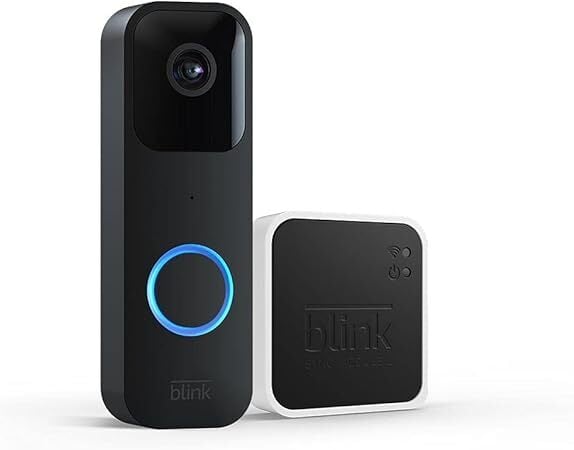
There are no surprises with the Blink Video Doorbell camera. Blink is an established brand, and the doorbell camera has been around since 2022. What might be surprising is how cheap it has become: You can get the Blink Video Doorbell and Sync Module 2 for $34.99 (originally $69.99) after a 50% discount, the lowest price it has been, according to price-tracking tools.

Blink is owned by Amazon, so it’s no surprise to see the doorbell get a big discount there—and that also means it is compatible with Amazon Alexa, but no other competitors.

The Blink Video Doorbell can be wireless or use batteries, which last up to two years (depending on how many triggers you get a day). It uses your phone as a chime bell, has two-way audio so you can communicate with guests from your phone, and supports 1080p resolution and infrared night vision. You’ll get a 180-degree field of view, so you can see your whole porch via the camera. Of course, you can also use the camera indoors, if needed.

The Sync Module 2 is a hub that lets you control up to 10 Blink devices with your phone and use local storage for your video files instead of paying for cloud storage, but you’ll need to buy a USB flash drive of up to 256 GB (sold separately). Keep in mind that you will still need a Blink subscription to use all of Blink’s features (but it’s not necessary). The Blink subscription plan starts at $30 a year for Blink Basic. You can read more about this camera and hub from PCMag’s “good” review.