HP agrees to $4M settlement over claims of “falsely advertising” PCs, keyboards

HP Inc. has agreed to pay a $4 million settlement to customers after being accused of “false advertising” of computers and peripherals on its website.

Earlier this month, Judge P. Casey Pitts for the US District Court of the San Jose Division of the Northern District of California granted preliminary approval [PDF] of a settlement agreement regarding a class-action complaint first filed against HP on October 13, 2021. The complaint accused HP’s website of showing “misleading” original pricing for various computers, mice, and keyboards that was higher than how the products were recently and typically priced.

Per the settlement agreement [PDF], HP will contribute $4 million to a “non-reversionary common fund, which shall be used to pay the (i) Settlement Class members’ claims; (ii) court-approved Notice and Settlement Administration Costs; (iii) court-approved Settlement Class Representatives’ Service Award; and (iv) court-approved Settlement Class Counsel Attorneys’ Fees and Costs Award. All residual funds will be distributed pro rata to Settlement Class members who submitted valid claims and cashed checks.”

Read full article

Comments

Google Is Gifting Gemini Advanced To US College Students

Google is offering all U.S. college students a free year of its Gemini Advanced AI tools through its Google One AI Premium plan, as part of a push to expand Gemini’s user base and compete with ChatGPT. It includes access to the company’s Pro models, Veo 2 video generation, NotebookLM, Gemini Live and 2TB of Drive storage. Ars Technica reports: Google has a new landing page for the deal, allowing eligible students to sign up for their free Google One AI Premium plan. The offer is valid from now until June 30. Anyone who takes Google up on it will enjoy the free plan through spring 2026. The company hasn’t specified an end date, but we would wager it will be June of next year. Google’s intention is to give students an entire school year of Gemini Advanced from now through finals next year. At the end of the term, you can bet Google will try to convert students to paying subscribers.

As for who qualifies as a “student” in this promotion, Google isn’t bothering with a particularly narrow definition. As long as you have a valid .edu email address, you can sign up for the offer. That’s something that plenty of people who are not actively taking classes still have. You probably won’t even be taking undue advantage of Google if you pretend to be a student — the company really, really wants people to use Gemini, and it’s willing to lose money in the short term to make that happen.


Read more of this story at Slashdot.

A Guide to Freezing Practically Any Food

We may earn a commission from links on this page.

Sure, the refrigerator can keep food fresher longer, but for serious life extension, the freezer is where you should focus your attention. Preserving food isn’t just better for reducing food waste, it’s crucial for staying on budget, especially as grocery prices hit new highs. Stop the pattern of bulk buying and bulk tossing spoiled food, and get comfortable with freezing more of your grocery haul. Here are the best ways to pack your freezer, the best things to freeze, and how to do it.

Organized freezers fit more and stay cold

Before we dive into specific foods, it’s important to set a standard for freezer organization. Keeping a tidy freezer (and fridge for that matter) will keep you from having a headache finding lost foods, allow you to fit more in the space, and ensure you’re eating older foods first. Freeze sauces, broths, and other liquids flat in freezer safe zip-top bags, and don’t forget to label them. (You might swear to yourself in the moment that there’s no way you’ll forget when you put that chili in the freezer, but then an unknown number of months passes and suddenly you’re not so sure whether that chili is from June or September.) Once your liquids are frozen flat, then you can stack them like books on a shelf. Read here for more detailed tips on portioning sauces in the freezer.

If you don’t like the idea of freezing in plastic freezer bags (keep in mind that many can be washed and reused up to 10 times) then buy a set of freezer-safe storage containers that can be stacked. The goal is to fit as much as possible in your freezer while still having access to all of the items. You don’t want things getting lost in the back. As an added benefit, more frozen food in the ice box keeps the temperature steady, and your appliance won’t need to draw as much energy. Less money spent on energy is another chicken cutlet in the freezer.

Finally, consider investing in a chest freezer. You’ll be able to freeze larger, irregularly shaped items, like a rack of lamb or a whole turkey, easier in one of these. Plus the storage down at your feet rather than up high makes it a better place for heavy items. My current Brooklyn apartment doesn’t have the space, but you better believe that the first thing I’m buying when I do have more space is a chest freezer.

Carbs

Let’s start with the best thing to freeze: carbs. Breads, cake, choux puffs, cookies, English muffins—they are all freezer champions. I say this because they freeze quickly, freeze for a long time, and revive like nothing ever happened. They’re the best example of what a great time capsule the freezer can be.

Keep any bready item in the freezer. The carbs I always freeze are sliced bread, loaves of bread, pre-split English muffins (it’s less annoying later), pancakes, waffles, cooked rice, cakes, frostings, cookies (as dough or post-bake), burger buns, bagels, and biscuits. Some of these can be frozen in their raw form, but you might run into leavening problems if you try baking them after they’ve been frozen. If you haven’t tried to do it before, I recommend baking the bread, cookies, or biscuits first, cooling them completely and then freezing them on a baking tray. After they’re hard and frozen, consolidate the item into a container or freezer bag. 

Revive breads in a 350°F oven for five to 10 minutes, or in the toaster oven for pancakes and waffles. I’ve revived breads after five months of freezer time and they’ve suffered no degradation in flavor or texture. 

Meats and other proteins

Meats are easy to freeze both raw and cooked. The only thing you really have to be careful of is freezer burn. I recommend portioning your meats when you bring them home from the grocery store. You can cut chicken into slices or form ground meat into patties while it’s thawed, then wrap them securely in freezer-friendly containers or bags to freeze. I’ll sometimes reuse plastic grocery bags just to double bag them and hopefully prevent moisture loss. Other proteins I like to freeze are shrimp and tofu. 

To use frozen proteins, put the portion size of your choice into the fridge overnight. If you’re using the meat in a soup or sauce, you might be able to just toss it into the hot pot of liquid to thaw and cook more quickly. According to this USDA freezing chart, frozen foods stay safe indefinitely—it’s really quality and texture that you’re looking out for. Here are their guidelines on how long different proteins can be frozen before texture or quality starts to suffer.

Cheeses

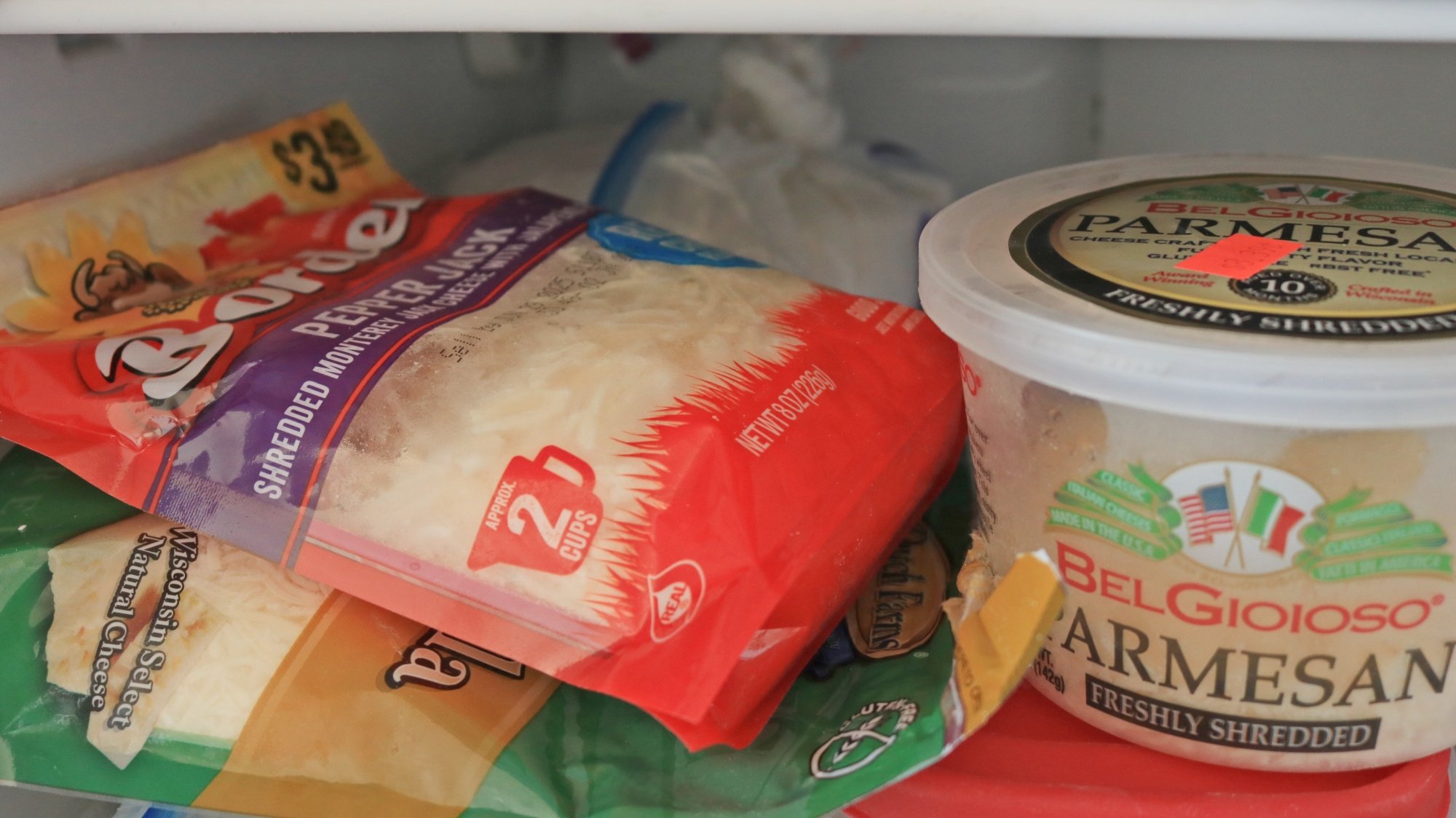
Bags of shredded cheese and a tub of parmesan in the freezer.

Credit: Allie Chanthorn Reinmann

Frozen cheese is a lifesaver when you need to make a boring meal a tad more appealing. Shredded and low-moisture cheeses freeze well. Check here for a more complete guide on great freezing cheeses.

You can easily freeze a block of cheese, like low-moisture mozzarella, cheddar, or swiss, straight in its plastic packaging. When you need to thaw it, leave it in the fridge overnight and it should be ready to go the next day.

If you know that you’ll be using it for particular uses, like pizza toppings or lasagna layers, slice or shred it before freezing and keep it in freezer-safe containers. Then the container can essentially live in the freezer. You can just reach into the bag and pluck out exactly what you need, leaving the rest to stay frozen until next time.

Fruits and vegetables

Fruits, vegetables, and fruits we call vegetables are all freezable. It’s really the thawing that can cause trouble for some produce, but more on that later. When you’re preparing to freeze fruit, slice it into bite sized pieces first, if needed. For example, berries don’t need to be prepped, but pineapple does. Peel fruits and veggies that you’d normally eat peeled—probably not necessary for bell peppers, but you’d do this for bananas. They should be peeled first and then cut into smaller pieces for using later. I’ll usually peel ginger root and julienne it because that’s how I’ll normally use it in soups and curries. 

Lay the pieces out onto a parchment lined baking sheet in a single layer and put it in the freezer for an hour or two until solid. Then consolidate the fruit into a freezer-safe container. When you’re ready to use the produce, drop it straight into the cooking dish—there’s no need to thaw it. In fact, thawing the ingredient first will probably cause it to be mushy. That’s why fruits and veggies that have been frozen are often great for cooking—they transfer all of their flavor beautifully and it doesn’t matter if their cell structure has gotten a little busted up. Try using them in stews, soups, muffins, pies, or smoothies.

Milks and liquids

As I mentioned earlier, freezing liquids in flat planks can help you stack them and conserve space, as opposed to finding spaces for blocks of liquid. However, it’s really a matter of preference. I wasn’t privy to the world of freezing milks until recently when I learned that I could freeze and thaw coconut milk. It turns out you can freeze cow milk equally as well. 

This is a huge boon, since dairy milks tend to spoil rather quickly, but buying a whole gallon is usually more cost effective than the smaller sizes. Now you can buy the bigger size, pour half of it into a freezer-safe container and pop it into the freezer. Use the other half at your normal pace, and when you’re ready, thaw the other portion.

Thaw frozen milk in the fridge overnight and give it a shake to smooth it out. If you’re in a rush, you can put the icy milk block into a pot on the stove and warm it up. Then return it to the fridge in a container to use in cereal, tea, and coffee over the next five days. 

Entire cooked meals

Take it from the freezer aisle of your grocery store: a lot of completely cooked meals can be frozen. While you could meal prep for the freezer (my mom will make three lasagnas just to freeze them for us kids later), I use this as an easy way to save leftovers from the garbage can. If I make soup, a huge batch of chili, a casserole, or a stir fry and find that I have way more left over than I expected, then I’ll portion it out into containers or freezer bags and freeze it. This is especially helpful for when you’re leaving for vacation or you have dinner plans for the next four nights. 

Depending on the meal you’ve frozen, the best way to reheat it is to use the original cooking method. If it’s soup, throw the frozen blocks into a pot, cover it with a lid and heat it over low heat to revive it. If it’s a casserole, gently reheat it in the oven covered with foil so it doesn’t dry out. A stir fry or sautéed meal will reheat best in a lightly-oiled large pan. Start it off on low heat with a lid so the humidity can help thaw the food. After you can break up the pieces easily then you can keep the lid off and bump up the heat to get a nice fry going, and evaporate any excess moisture. 

Tough to freeze items

There are some items that just don’t fare well in the freezer. Whole eggs with their shells on are not recommended for freezing because their shells can crack as the interior expands; this may allow bacteria to potentially contaminate the inside. However, you can crack them and freeze them free from their shells. 

Watery fruits, vegetables, and tender herbs, like lettuce, cilantro, melons, and cucumbers freeze well but lose their structural integrity after thawing. These can be frozen, and as long as your intentions are to use them in something blended (like a soup or smoothie) then you won’t be disappointed. There’s no need to thaw them, just dump them straight in the soup, sauce, or blender.

Apple, Google And Snap Slam Meta’s Egregious Handling Of Redacted Slides In FTC Trial

Apple, Google And Snap Slam Meta's Egregious Handling Of Redacted Slides In FTC Trial
We expected many twists and turns in the ongoing legal tussle between Meta and the Federal Trade Commission (FTC), but today’s news is pretty wild. Google, Apple, and Snap have all ripped Meta for its “egregious” handling of redacted slides in the ongoing trial. The companies have accused Meta of not blurring out or obscuring sensitive information

Federal Judge Declares Google’s Digital Ad Network Is an Illegal Monopoly

Longtime Slashdot reader schwit1 shares a report from the Associated Press: Google has been branded an abusive monopolist by a federal judge for the second time in less than a year, this time for illegally exploiting some of its online marketing technology to boost the profits fueling an internet empire currently worth $1.8 trillion. The ruling issued Thursday by U.S. District Judge Leonie Brinkema in Virginia comes on the heels of a separate decision in August that concluded Google’s namesake search engine has been illegally leveraging its dominance to stifle competition and innovation. […] The next step in the latest case is a penalty phase that will likely begin late this year or early next year. The same so-called remedy hearings in the search monopoly case are scheduled to begin Monday in Washington D.C., where Justice Department lawyers will try to convince U.S. District Judge Amit Mehta to impose a sweeping punishment that includes a proposed requirement for Google to sell its Chrome web browser.

Brinkema’s 115-page decision centers on the marketing machine that Google has spent the past 17 years building around its search engine and other widely used products and services, including its Chrome browser, YouTube video site and digital maps. The system was largely built around a series of acquisitions that started with Google’s $3.2 billion purchase of online ad specialist DoubleClick in 2008. U.S. regulators approved the deals at the time they were made before realizing that they had given the Mountain View, California, company a platform to manipulate the prices in an ecosystem that a wide range of websites depend on for revenue and provides a vital marketing connection to consumers.

The Justice Department lawyers argued that Google built and maintained dominant market positions in a technology trifecta used by website publishers to sell ad space on their webpages, as well as the technology that advertisers use to get their ads in front of consumers, and the ad exchanges that conduct automated auctions in fractions of a second to match buyer and seller. After evaluating the evidence presented during a lengthy trial that concluded just before Thanksgiving last year, Brinkema reached a decision that rejected the Justice Department’s assertions that Google has been mistreating advertisers while concluding the company has been abusing its power to stifle competition to the detriment of online publishers forced to rely on its network for revenue.

“For over a decade, Google has tied its publisher ad server and ad exchange together through contractual policies and technological integration, which enabled the company to establish and protect its monopoly power in these two markets.” Brinkema wrote. “Google further entrenched its monopoly power by imposing anticompetitive policies on its customers and eliminating desirable product features.” Despite that rebuke, Brinkema also concluded that Google didn’t break the law when it snapped Doubleclick nor when it followed up that deal a few years later by buying another service, Admeld. The Justice Department “failed to show that the DoubleClick and Admeld acquisitions were anticompetitive,” Brinkema wrote. “Although these acquisitions helped Google gain monopoly power in two adjacent ad tech markets, they are insufficient, when viewed in isolation, to prove that Google acquired or maintained this monopoly power through exclusionary practices.” That finding may help Google fight off any attempt to force it to sell its advertising technology to stop its monopolistic behavior.


Read more of this story at Slashdot.

Trump’s FCC chair threatens Comcast, demands changes to NBC news coverage

Federal Communications Commission Chairman Brendan Carr accused Comcast of “news distortion” because its subsidiary NBC isn’t parroting the Trump administration narrative on the deportation of Kilmar Abrego Garcia.

“Comcast knows that federal law requires its licensed operations to serve the public interest. News distortion doesn’t cut it,” Carr wrote in a post on X yesterday.

Carr’s use of the phrase “news distortion” is significant because he has been invoking the FCC’s rarely enforced news distortion policy to pressure licensed broadcasters that he perceives as being biased against President Trump. For a detailed look at Carr’s fight against media, read our feature: “The speech police: Chairman Brendan Carr and the FCC’s news distortion policy.”

Read full article

Comments

Vacuum Cleaner Rollerblades

This is a video of professional inline skater Ilia Savosin (previously seen riding office chair wheels like skates) testing the pair of vacuum cleaners he modded into rollerblades. I don’t think they actually vacuum anymore, but I had no intention of doing my chores anyways. Could you even imagine what the kids at the local skatepark would say if I showed up wearing these bad boys? “Who let grandpa out of the home? Somebody go push his Life Alert before he hurts himself.” The truth stings, it really does.

US Interior secretary orders offshore wind project shut down

On Thursday, Norwegian company Equinor announced that it was suspending the construction of a planned 800 MW-capacity offshore wind farm currently being built in the waters off New York. The reason? An order from US Secretary of the Interior Doug Burgum, who alleged that the project was rushed through review.

The move comes as the US’s nascent offshore wind industry is facing uncertainty, with all future leases placed on hold by an executive order issued on the day of Trump’s inauguration. The hold was ostensibly put in place to allow time to review the permitting process. But Burgum’s move comes the same week a report from the Government Accountability Office, done in response to the executive order, found only minor issues with the existing permitting process.

On hold

The Equnior project, termed Empire Wind, is a key part of New York’s plans to meet its climate goals. Combined with a second phase that’s currently in planning, Empire Wind would have a rated capacity of two gigawatts, or over 20 percent of the state’s planned offshore wind capacity. The initial construction, combined with the development of shore facilities, already has an estimated value of $2.5 billion, Equinor estimates, and is currently employing roughly 1,500 people. Construction was expected to be complete in 2027, although energy production from a subset of the 54 planned 15 MW turbines could have begun before then.

Read full article

Comments

ChatGPT Models Are Surprisingly Good At Geoguessing

An anonymous reader quotes a report from TechCrunch: There’s a somewhat concerning new trend going viral: People are using ChatGPT to figure out the location shown in pictures. This week, OpenAI released its newest AI models, o3 and o4-mini, both of which can uniquely “reason” through uploaded images. In practice, the models can crop, rotate, and zoom in on photos — even blurry and distorted ones — to thoroughly analyze them. These image-analyzing capabilities, paired with the models’ ability to search the web, make for a potent location-finding tool. Users on X quickly discovered that o3, in particular, is quite good at deducing cities, landmarks, and even restaurants and bars from subtle visual clues.

In many cases, the models don’t appear to be drawing on “memories” of past ChatGPT conversations, or EXIF data, which is the metadata attached to photos that reveal details such as where the photo was taken. X is filled with examples of users giving ChatGPT restaurant menus, neighborhood snaps, facades, and self-portraits, and instructing o3 to imagine it’s playing “GeoGuessr,” an online game that challenges players to guess locations from Google Street View images. It’s an obvious potential privacy issue. There’s nothing preventing a bad actor from screenshotting, say, a person’s Instagram Story and using ChatGPT to try to doxx them.


Read more of this story at Slashdot.

When to Bring a Problem to HR (and When Not To)

Your company’s human resources (HR) department is often pitched as an employee advocate—the place where you take problems or concerns. But most employees know by now that HR—or, in some start-up environments, “the people team”—isn’t really intended to protect you, the human resource in question. Instead, HR works to protect the company’s interests more than anything. And the way job hunting has become a grueling gauntlet of ghost jobs, endless interviews, and zero responses from HR representatives hasn’t exactly endeared HR to workers. In fact, research shows that more than 70% of employees don’t trust their HR department.

While it’s true that HR departments work for and protect the company, not you, that doesn’t mean they’re useless. First and foremost, the people who make careers in human resources want to do a good job, and often get into the field from a desire to help their coworkers. And your HR department can actually get a lot done for you, and not trusting them doesn’t necessarily mean you don’t utilize them when it makes sense. The trick is knowing when your company’s interests coincide with your own, making it not just safe to work with HR, but advantageous.

When to go to HR

There are several scenarios when human resources is your best bet to resolve a situation:

  • Paperwork. The most obvious time it’s OK to knock on HR’s door is when you’re dealing with the mechanics of being employed—changing tax forms, signing up for optional benefits, taking advantage of career development programs, having programs and benefits explained, etc. That’s one huge part of what HR does, and it’s very unlikely that these kinds of innocuous interactions will have any kind of negative blowback—and you probably don’t have any other option, anyway.

    You’ll also need to go to HR for certain government programs and protections, like signing up for the Family Medical Leave Act if you need to take a leave of absence for an emergency. In those cases you can rely on HR to do exactly what you expect them to do.

  • Harassment, discrimination, or illegal activities. If you’re the victim of sexual harassment, believe you’ve been treated differently by your boss or co-workers because of your race or other personal aspect, or you’ve observed something illegal going on in your job, HR is an appropriate place to go—with the caveat that you should protect yourself first. That means document what’s going on before you head to HR, and consult with outside advisors—like an attorney, if you’re worried about your liability or legal responsibilities.

    HR departments are legally obligated to investigate accusations of sexual harassment and illegal conduct, so you can expect action when you bring these issues to them. Just keep in mind that their overall goal will be to limit the company’s liability and damage, not necessarily yours. In other words, they will take some sort of action, but it might not be as thorough as you hope and may not result in anything drastic.

  • Morale. One crucial way the company’s interests and your interests align is with office culture issues, including overall morale and the company’s ability to attract talent. If you have thoughts on how the office morale could be boosted, or ways that the company could attract better applicants, heading to HR to share them may bear fruit, and there’s likely little downside as long as your suggestions don’t include firing your boss.

Keep in mind that your experience dealing with HR will always be better if you come to them with a solution to your concerns in mind.

When not to go to HR

There are key scenarios when going to HR with your problems or concerns can blow back on you in a very negative way:

  • Confidential issues. If you want something to remain confidential, think twice about going to HR, even if it involves coworkers or your manager. Human resources may have a legal obligation to act on what you tell them—if you’re being harassed, for example—but they also have no legal obligation to keep your secrets.

    If you think bringing a private issue to HR is your best way forward, you should work out the terms of confidentiality with the department ahead of time, if you can—don’t assume that they will keep something private just because you ask.

  • Personality conflicts. Just not getting along with someone you work with? Best to work it out yourself or go through your boss. HR may offer some advice on resolving the situation, but they probably won’t escalate your complaints or take any action for purely personality-based problems. Most likely they will bring your manager into the conversation, and they might be annoyed that you didn’t bring it to them in the first place.

  • A bad boss. On the one hand, yes, if your boss is abusive or crossing legal lines when it comes to you and your career, you may have to go to HR and file a complaint. But be very careful: HR’s goal will be to resolve the situation with as little threat to the company as possible, which may or may not line up with protecting you in any way.

    If your problem with your boss is a personal one, HR will likely advise you to work it out on your own, and they may or may not offer guidance or assistance. And if the manager is very high-level (and you’re not), your chances of HR taking your side are much lower.

  • When it involves your career. If you’re looking to change jobs, don’t tell HR. You might be tempted to get information about rolling over retirement accounts, or about the specific titles you’ve had at the company. But there’s nothing stopping HR from informing your boss that you’re seeking an exit ramp from your job, and that might lead to your boss arranging one for you before you’re ready to make the leap (after all, you probably work at an “at-will” employer).

Intel Open Sources AI Playground, Here’s What You Can Do With It

Intel Open Sources AI Playground, Here's What You Can Do With It
Intel’s been making some interesting moves in the AI space lately, and this week it’s gone one better by open-sourcing its AI Playground software. In a fresh video posted to the Intel Software YouTube channel, Guy Tamir — Intel’s director of oneAPI development and self-described “tech evangelist” — announced that the company is throwing open

Google’s Gemini Live Is Rolling Out To All Android Users, Here’s How It Works

Google's Gemini Live Is Rolling Out To All Android Users, Here's How It Works
The Google Gemini App’s official X handle has recently revealed that the company is rolling out Gemini Live to all Android users, which helps users interact with Gemini via their cameras and screen-sharing. We had reported that this feature was initially available to Google Pixel 9 and Samsung Galaxy S25 users only. However, it will now be

Select Sonos refurbished gear is 25 percent off through April 22

Sonos is offering discounts on its refurbished gear just in time for Earth Day. Select purchases of the audio company’s certified refurbished products are currently 25 percent off. That means you can pick up a pre-owned Arc soundbar for $599, or $120 less than the usual sticker price. The deal is running through April 22 or as long as supplies of the refurb items last, so if you’re considering one of these revitalized audio products, it’s probably best to act quickly. Here’s the list of what’s currently available.

Right now, in addition to the Arc, the Sub subwoofer is $160 off and available for $479, or you can save $90 on the smaller Sub Mini for $259. Ace headphones are $269, which is a savings of $90. There are also versions of the Beam soundbar currently listed on the refurbished page. The newer Beam (Gen 2) speaker costs $299 and the older Beam (Gen 1) costs $191, which is $100 and $128 off their usual prices.

Buying refurbished items is a great option for saving on major tech purchases while also keeping pre-owned products from going into landfills. We’ve got a complete guide on how to approach this sector, but in most cases, it’s a chance for companies to find buyers for products that are like new that were returned. With this promotion, Sonos is upping the environmental impact by donating a portion of refurbished item sales to conservation nonprofits.

Follow @EngadgetDeals on X for the latest tech deals and buying advice.

This article originally appeared on Engadget at https://www.engadget.com/audio/select-sonos-refurbished-gear-is-25-percent-off-through-april-22-194800703.html?src=rss

Synology Locks Key NAS Features Behind Proprietary Drive Requirement

Synology’s upcoming Plus Series NAS systems will restrict full functionality to users who install the company’s self-branded hard drives, Tom’s Hardware is reporting, marking a significant shift in the consumer NAS market. While third-party drives will still work for basic storage, critical features including drive health monitoring, volume-wide deduplication, lifespan analysis, and automatic firmware updates will be disabled, the publication said.

The restriction doesn’t apply to Synology’s 2024 and older models, only affecting new Plus Series devices targeted at SMBs and advanced home users. Synology itself doesn’t manufacture drives but rebrands HDDs from major manufacturers like Seagate, Western Digital, and Toshiba, often with custom firmware that functions as DRM. According to Synology, the change follows successful implementation in their enterprise solutions and will deliver “higher performance, increased reliability, and more efficient support.” A workaround exists: users can initialize a non-Synology drive in an older Synology NAS and then migrate it to a new Plus model without restrictions.


Read more of this story at Slashdot.

Gemini 2.5 Flash comes to the Gemini app as Google seeks improve “dynamic thinking”

Google’s Gemini AI may have had a slow start, but it has been anything but in 2025. Barely a week goes by that another model doesn’t arrive in the Gemini app or developer tools like AI Studio, and there’s a major release coming to the app today. Google has announced that its faster, more efficient Gemini 2.5 Flash model is rolling out widely in preview. At the same time, developers can begin building with 2.5 Flash using the company’s newly announced API pricing, which Google says is much lower than competing products.

A gaggle of Gemini

The model dropdown in the Gemini app is a bit convoluted, particularly as we see products like Veo 2 and Personalization popping up there. Google has been releasing so many preview models and new ways of using Gemini that it can be hard to know which option to choose for a given task. In fairness, Google is far from the only major AI player with this problem.

Tulsee Doshi is Google’s director of product management for Gemini, which means she leads the team building these models. We asked Doshi what version of Gemini she finds herself using, and unsurprisingly, she likes the more powerful option. “Typically right now, I have been using 2.5 Pro,” says Doshi. “I use Gemini throughout the day for my work in a few key areas, like creating documents or slides. That’s either for internal consumption or actually sharing externally, and I’ve found 2.5 Pro to be really helpful for the creative writing element.”

Read full article

Comments

What Strava Buying Runna Will Mean for Both Running Apps

We may earn a commission from links on this page.

The founders of Runna announced today that Strava has bought their company. Runna is a paid running app that provides structured training plans (which I personally loved when I tried it), while Strava is a hugely popular tracking and social app for runners and cyclists, with both a free and a paid tier. 

Runna customers don’t seem to be thrilled, but Runna’s founders say that the app and its team will stay independent, and they’re optimistic for the future. 

What is changing right now? 

Runna’s founders say “no immediate changes [are] planned other than sensible integrations (e.g., the ability to sign in with Strava).” No existing features are going away. New features are reportedly on the way, but so far no details have been released. 

Strava has previously offered training plans (which I honestly didn’t know about until now, despite being a free subscriber for years and having been a paid subscriber in the past). They seem pretty limited in scope and functionality. 

It seems that Strava likes the idea of being able to offer better training plans, or at least owning a company that does even if it’s a separate product. Strava’s news release emphasizes the coaching, with lines like “The world’s biggest team has a new coach.” The Runna founders, meanwhile, say they’re excited to have access to Strava’s much larger customer base. They have also hinted in a Reddit thread that they may try to incorporate some of Strava’s algorithms, like graded pace adjustments, into the Runna app.

Will the apps (or subscription fees) be combined? 

It doesn’t seem so. Strava has both a free and a premium tier, so the Runna founders told their customers that they’re welcome to download Strava for free, and pay for premium should they choose. They won’t be getting a deal on Strava membership. 

Runna costs $19.99/month, or $119.99/year. Strava‘s free tier lets you post your runs, interact with other users, and track some basic statistics about your performance. The premium tier, at $11.99/month or $79.99/year, gives you extra performance tracking and mapping tools.

“Our plan is to keep the apps separate for the foreseeable future,” Strava’s CEO said in the news release. There is, likewise, no plan at this point for Strava users to get a discount on Runna membership. 

Will this be good or bad for Runna?

Products don’t always fare well after their companies are bought by bigger companies. Strava has a specific stain on its reputation here: Not long ago, they bought a terrain mapping product called Fatmap, beloved by skiiers and other adventurers. In 2023, they excitedly told Strava members “you now have access to Fatmap!” and talked up the features that it has that Strava didn’t. But in 2024, Strava shut down Fatmap, having integrated some but not all of its features into the main Strava app. Skiiers are still mad. 

I hope that Runna’s founders are right, and that they’ll get to keep building their product and making it better and better (for example, Runna just introduced an option to train for a “B” priority race alongside your main race goal). If the plan proceeds according to what both companies are now saying, it does sound like good stuff is on the way. I’m rooting for them.

The Xbox Spring Sale is live

Xbox’s Spring Sale is live, with big discounts on old and new classics and plenty of forgotten gems. But the deals aren’t limited to Xbox console games; there’s plenty on tap for PC, too. (You can filter by platform under the “Play with” option in the sidebar.)

Some of the standouts in the Xbox sale include 75 percent off Red Dead Redemption 2 (a mere $15 for the 2018 masterpiece), Elden Ring ($36) and 20 percent off Baldur’s Gate 3 ($56). Also available are Subnautica ($9.89), the feline adventure Stray ($18) and Alan Wake 2 Deluxe Edition ($40).

If you’re one of the two gamers who don’t already own it, you can even snag Grand Theft Auto V for a mere $20. (Even if you have the 2013 mega-hit on another platform, this is the enhanced version for Xbox Series X/S.)

Gameplay screen from Cuphead
Cuphead
StudioMDHR

A few more worth checking out include the Cuphead & The Delicious Last Course bundle ($18.89), Borderlands 3 ($6), Hogwarts Legacy: Digital Deluxe Edition ($20) and the stealth sandbox Hitman World of Assassination ($28).

You can check out the entire Xbox Spring Sale for much more. It lasts until April 30, so you have time for a deep dive before it ends.

This article originally appeared on Engadget at https://www.engadget.com/gaming/xbox/the-xbox-spring-sale-is-live-185646088.html?src=rss

Discord Tests Facial Scans For Age Verification Raising Privacy Concerns

Discord Tests Facial Scans For Age Verification Raising Privacy Concerns
Discord users in the United Kingdom and Australia may soon have to navigate through a new age verification process. The company is currently listing the new process as an “experimental” feature, and for now, it’s only available in those countries. It’s a response to governments in the UK and Australia passing laws meant to restrict under aged

New Jersey AG sues Discord over alleged child safety failures

New Jersey’s Attorney General Matthew Platkin is suing Discord over the chat company’s child safety features. The lawsuit claims that Discord has “misled parents about the efficacy of its safety controls and obscured the risks children faced when using the application.”

The Office of the Attorney General and the state’s Division of Consumer Affairs concluded that Discord violated New Jersey’s Consumer Fraud Act after a multiyear investigation into the company. The details of the lawsuit are currently sealed, but Platkin’s announcement suggests a few ways he plans to argue Discord’s approach may have endangered children. He says the app uses default settings that “allow users to receive friend requests from anyone on the app” and that it makes it simple to create an account when you’re under 13. According to Platkin, Discord “only requires individuals to enter their date of birth to establish their age when creating an account.”

When ask for comment, Discord offered the following statement:

Discord is proud of our continuous efforts and investments in features and tools that help make Discord safer. Given our engagement with the Attorney General’s office, we are surprised by the announcement that New Jersey has filed an action against Discord today. We dispute the claims in the lawsuit and look forward to defending the action in court.

Discord has introduced multiple features over the years with the express purpose of protecting younger users. Following a report that detailed 35 cases involving Discord in which adults were prosecuted on charges like “kidnapping, grooming or sexual assault,” the company introduced its Family Center tool, which lets adults track what their children do on the app. Teen Safety Assist, also introduced in 2023, added automatic content filters and a new warning system for people who violate the apps guidelines. In 2025, Discord launched a nonprofit coalition called Roost with the express purpose of developing open-source child safety tools.

Discord, like other social platforms, has faced scrutiny before, and the pressure seems like it’s only going to increase. Back in 2024, California lawmakers proposed the idea of blocking children’s access to algorithmic social feeds, and just this year Utah passed an age verification law for app stores, a decidedly blunt way to try and guarantee child safety.

This article originally appeared on Engadget at https://www.engadget.com/apps/new-jersey-ag-sues-discord-over-alleged-child-safety-failures-184501604.html?src=rss

Google, Apple, and Snap Aren’t Happy About Meta’s Poorly-redacted Slides

During Meta’s antitrust trial this week, lawyers representing Apple, Google, and Snap each expressed irritation with Meta over the slides it presented on Monday that The Verge found to contain easy-to-remove redactions. From a report: Attorneys for both Apple and Snap called the errors “egregious,” with Apple’s representative indicating that it may not be able to trust Meta with its internal information in the future. Google’s attorney also blamed Meta for jeopardizing the search giant’s data with the mistake.

Details about the attorneys’ comments come from The Verge’s Lauren Feiner, who is currently in the courtroom where proceedings are taking place today. Apple, Google, and Meta did not immediately respond to The Verge’s request for comment. Snap declined to comment. Snap’s attorney maligned Meta’s “cavalier approach and casual disregard” of other companies swept into the case, and wondered if “Meta would have applied meaningful redactions if it were its own information that was at stake.”


Read more of this story at Slashdot.