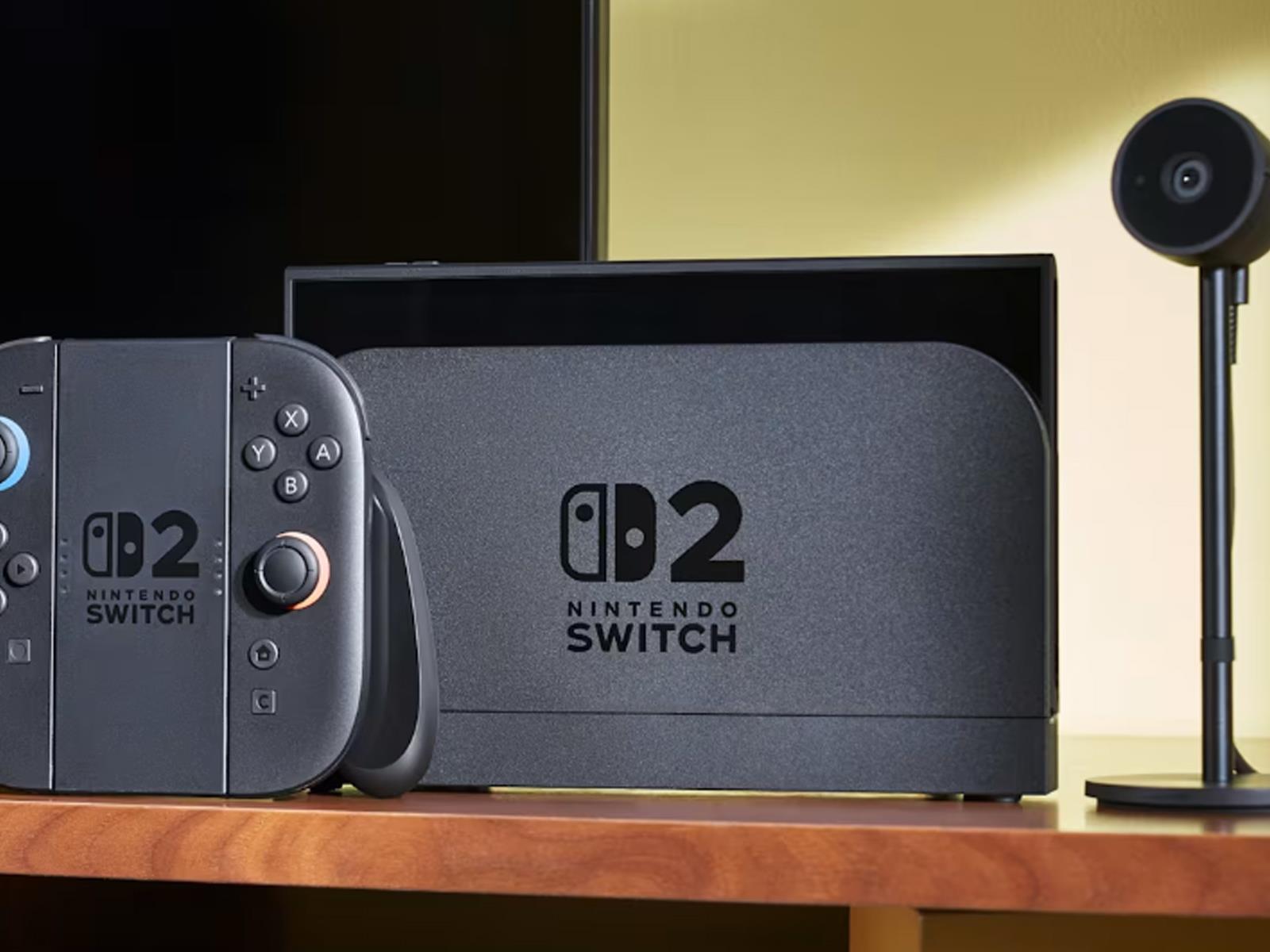
Whatever preparations Nintendo made to bolster the number of Switch 2 consoles that will be available at launch, it’s not enough to meet demand. In a post on X from the official Nintendo account, company president Shuntaro Furukawa issued a lengthy apology for an expected shortfall of available units to satiate all of the lottery applications
The seemingly sudden (but not really all that sudden) rise of AI has led to an industry-wide refresh of hardware and software solutions to ride the lucrative wave. We’ve seen new chips from the likes of AMD, Intel, and NVIDIA with dedicated neural processing units (NPUs), clever software tools, and upgraded desktop and laptop lineups from
Google is rolling out a new Ultra HDR feature in the Google Photos app, that gives users the ability to convert standard images to Ultra HDR with just a few clicks. While Google did not officially announce this feature, server-side rollouts to some users confirm that it exists.
The Ultra HDR format enhances brightness, contrast, and color.
It seems as if Nintendo is aggressively going after its enemies these days. In the last few months, the company has gone after developers of popular Switch emulators and launched legal proceedings against the studio behind the smash hit Palworld. Now the company has set its sights on finding the party responsible for leaking stolen information
MSI Claw 8 AI+ Windows Gaming Handheld: $899 at Amazon, 7″ Model for $799 MSI’s second-gen Claw 8 uses an efficient Lunar Lake CPU to deliver better gaming performance and battery life on a gorgeous 8-inch display. Excellent Gaming Performance Hall-Effect Sticks And Durable Chassis Versatile Thunderbolt 4 Connectivity Large And Vibrant…
An anonymous reader shares a report: In a shocking development, Google won’t roll out a new standalone prompt for third-party cookies in Chrome. It’s a move that amounts to a U-turn on the Chrome team’s earlier updated approach to deprecating third-party cookies, announced in July last year, with the latest development bound to cause ructions across the ad tech ecosystem.
“We’ve made the decision to maintain our current approach to offering users third-party cookie choice in Chrome, and will not be rolling out a new standalone prompt for third-party cookies,” wrote Anthony Chavez, vp Privacy Sandbox at Google, in a blog post published earlier today (April 22). “Users can continue to choose the best option for themselves in Chrome’s Privacy and Security Settings.” However, it’s not the end of Privacy Sandbox, according to Google, as certain initiatives incubated within the project are set to continue, such as its IP Protection for Chrome Incognito users, which will be rolled out in Q3.
Pinterest is testing a new prompt that warns kids to get off the app during school hours, as reported by The Verge. The pop-up warning encourages minors in the US and Canada to stop using the app and turn off notifications until the end of the day. “Focus is a beautiful thing,” the prompt says. “Stay in the moment by putting Pinterest down.”
This prompt only appears to kids aged 13 to 17 and only between 8AM and 3PM on weekdays. It’s a large-scale test, so Pinterest says the prompt will reach “millions” of minors. The platform says it’s the first tech company to institute this kind of “proactive” feature to help kids build healthy online habits. That may be true in the world of social media, but any rabid Nintendo fan will remember the incessant prompts to take breaks in the Wii, DS and 3DS eras.
To go along with this initiative, Pinterest is providing a $1 million grant to the International Society for Technology in Education (ISTE) to “support school leaders in creating a healthy digital culture in their schools.” This money will fund task forces across a dozen states to help develop policies that “improve students’ digital wellbeing.”
This article originally appeared on Engadget at https://www.engadget.com/apps/pinterest-will-warn-kids-not-to-use-its-app-during-school-hours-171512379.html?src=rss
Fellow has been slowly growing its collection of coffee gadgets with its brewers, scale, grinders and more. But up until now, there’s always been a big hole in its lineup. That changes today with the arrival of the company’s first espresso machine: the Espresso Series 1.
When I got to try it out a couple weeks ago prior to launch, Fellow CEO Jake Miller said the goal was to make a device that “baristas would be excited to use and that they could actually afford.” That said, at $1,500, it certainly isn’t cheap. However, when you start comparing the Espresso Series 1 capabilities to competing machines, that price quickly begins to make a lot of sense. That’s because unlike a lot of similarly priced rivals, Fellow’s offering offers a ton of ways to customize and adjust the brewing process, which includes control over not just temperature, but also pressure, extraction time, steaming and the ability to create or download profiles for specific beans.
Sam Rutherford for Engadget
When compared to other modern machines, competitors like the $1,350 Meticulous support custom profiles and pressure settings, but it doesn’t have a built-in steamer for milk like the Series 1. And if you want a ton of control over everything, espresso enthusiasts often look to even more complex and expensive options like the Decent, which goes for well over $3,000. So while Fellow’s latest product might seem pricey, it feels very reasonable in context.
Now, I will admit that when I saw the Series 1 in its cherry red hero color, I thought Fellow had departed from its previous design language. But after closer inspection, it’s clear the company still retains its focus on clean lines while still making the device easy-to-use. It just has a bit more character now thanks to elements like the polished stainless metal brewer and the wood accents on the included 58mm portafilter’s handle. The Series 1’s base kit comes with both a single-wall double-shot basket and a pressurized double-shot basket. Fellow even went out of its way to create a rear housing made from a single sheet of metal with curvy corners, because the company wanted the back to look just as good as the front.
Similar to the Aiden, the Series 1 features a circular screen, except this time it’s slightly larger. And while you can adjust everything using the espresso machine’s single control dial, for more complex tasks like creating custom profiles, it’ll probably be easier to use Fellow’s free companion app (iOS and Android) instead.
When it comes to brewing, I really appreciate that if you just want a cup of espresso, the Series 1 streamlines things and makes it easy to bust out a cup quickly. There are three rather self-explanatory buttons on top for espresso, steaming and dispensing hot water. Plus, there are a ton of small but handy features like a temperature-sensing wand (with auto-purge) that helps take a lot of the guesswork out of making perfectly frothy milk. Fellow even thought about stuff like someone’s daily workflow, which is why there’s a small rubberized mat on top of the machine for storing demitasse cups.
Sam Rutherford for Engadget
Of course, the proof is in espresso. The Series 1 produced a cup with a surprising amount of crema that highlighted the beans’ fruity notes. It was rich and smooth and pretty much everything I want in a shot of java. It also made the brewing process very approachable, because for people who might not have a ton of experience, there are guided brew settings as well.
Normally, when I want espresso, I go out to a coffee shop because I’ve yet to find a machine that hits the right balance between modern styling and ease of use while still having the ability to adjust and tinker with settings. But with the Espresso Series 1, it feels like Fellow has made a machine that delivers on everything that all levels of enthusiasts can get into.
Sam Rutherford for Engadget
The Espresso Series 1 will be available for $1,500 in three colors: cherry red, malted chocolate and black. However, Fellow says early buyers can get a special launch price of $1,200, which includes a $100 credit for the company’s Drops program that offers a curated selection of coffee beans for purchase.
This article originally appeared on Engadget at https://www.engadget.com/home/kitchen-tech/the-espresso-series-1-is-the-new-crown-jewel-in-fellows-coffee-gadget-lineup-170008473.html?src=rss
Whether it’s your starter home or just the latest move up the property ladder, buying a house is a huge investment—financially and emotionally. Despite the stakes, house hunting can be a rushed, stressful experience pushed along by tight timetables, precarious financing, and unpredictable market forces. So it’s not actually surprising to learn that more than 80% of Americans experience some level of regret after buying a house.
But buyer’s remorse when house hunting isn’t a given. Most of those regrets are due to a few common mistakes people make when buying a new house, and they can be prevented—or at least minimized—by following some simple advice. Here are the most common reasons for house hunting buyer’s remorse and how to protect yourself against it.
High maintenance
Realizing that your new home is going to be a pit of endless—and expensive—maintenance is one of the most common reasons people experience house buyer’s remorse. A house that seemed ideal when you were walking through it on a sunny day can feel like a prison when you realize it’s difficult to keep clean and functional.
There are two easy ways to avoid this regret:
Inspections. Almost a quarter of home buyers waive the inspection contingency when they buy a house—but this is a bad idea, according to real estate attorney William London of Kimura London & White LLP. “Always conduct your inspections, and do not waive contingencies to have your offer be accepted,” he says. “Remorse is frequently emotional, not legal. After escrow closes, it is too costly or impossible to turn back.”
Asking questions. The easiest way to avoid this kind of regret is to ask a lot of detailed questions about how frequently aspects of the house need maintenance, what the costs are, and repair histories.
Another aspect of home maintenance comes with fees associated with homeowners association (HOA) fees, which are used to maintain common aspects of a property. Brandon Blakeley, co-founder at Mirador Living, notes that HOA fees are often kept artificially low due to deferred maintenance. “Florida recently passed a bill (SB 4-D), which exposed just how widespread this problem was,” he says. “Once buildings were forced to catch up on repairs, HOA fees skyrocketed and property values plummeted.” Always ask to see the fee and maintenance records for any property you’re considering that belongs to an HOA.
Unknown infrastructure
When touring a potential home, it’s easy to be distracted by the finishes, the fresh paint, and the smell of cookies in the oven. But nothing causes homebuying remorse faster than a series of expensive breakdowns right after you move in—the washing machine breaks down, the water heater leaks, and your HVAC stops blowing cool air, all within a few months.
To avoid that kind of regret, it’s important to not only check maintenance schedules, but to find out how old different aspects of the home are. Ask for installation dates and warranty information for a list of the home’s infrastructure, including appliances, HVAC systems, roof systems, windows, and sump pumps. Even if they don’t need to be replaced immediately, an estimate of how much time you have before you have to start splashing out will stave off regret.
Succumbing to bidding wars
Real estate agents and home sellers love a good bidding war—but they lead to a lot of regret when the dust settles and you realize you overpaid for the home. There are several psychological factors that goad you into a bidding war, but defending against this kind of regret requires just one thing: a plan.
“Start with a good understanding of your price constraints and adhere to them,” London says. “Even in the heat of a market.”
If you have a hard line in terms of how much you’re willing to pay for a house (and thus how big a monthly mortgage payment you’re willing to take on, you’ll be a lot less susceptible to being swept up in the hysteria of a bidding war.
Wrong-sizing
More house is not always better—and compromising on a smaller house than you really need (so you can squeeze into a specific area, or because the aesthetics of the house appeal to you) is an easy way to become mired in regret. One factor that complicates these decisions: time. If you plan to stay in the house for a long time, you need to consider where your life might be years from now.
“The key to the house is, what items can you not live without?” says Jeff Lichtenstein, CEO of Echo Fine Properties in Palm Beach Gardens, Fla. “If you have three kids, does only having three bedrooms mean you need to make a second move? In my own case, I bought a home with a two-car garage and a short driveway. Once both kids got cars, there was a lot of ‘musical cars’ that we were constantly moving around.”
Lifestyle mismatch
A house isn’t just a place to store your stuff and sleep. It’s an intrinsic part of your life. When it comes to specific features or the location that you want, it’s often a mistake to compromise. “I have heard of a story of a family that desperately wanted to live by the coast, but could not afford it, so they purchased a home inland and immediately regretted it,” says Heather Myers, co-owner of the Snyder Real Estate Group in San Diego.
Another easy way to regret a home purchase is to overlook the neighborhood. When you’ve narrowed your house hunt down to a specific property, take the time to thoroughly check out the area to ensure it’s got the vibe, amenities, and access you need in your everyday life. “We always advise our clients to take multiple trips over to their new neighborhood at different times of the day and on weekends and weekdays,” Myers says. “We tell them to get out of their car and walk around their new block multiple times.”
You also have to match your lifestyle to the house itself. If you work from home and need a quiet, specific office space to be happy, buying a house without that spare bedroom will be something you will probably come to regret. If you love throwing parties, buying a house that lacks an open floor plan and comfortable outdoor area like a patio or deck means you’ll probably wish you’d held out for a different house.
The best way to deal with buyer’s remorse when house hunting is to avoid it entirely. Myers is blunt about your options if you don’t: “If buyers regret their decision, they typically have two options: They can immediately sell or they can rent out their new home and go rent somewhere else.”
It shouldn’t be a surprise to anyone who keeps up with gaming news, and yet your author here is a bit surprised himself to tell you that the Elder Scrolls Part IV: Oblivion remake is indeed real—and you can buy it right now. If that’s all you need to know, scroll down and click on the last link to go to the store page.
I try to play as broad a swathe of games as I can, including as many of the major releases as I am able to get to. Baldur’s Gate 3 garnered near-universal praise when it arrived in 2023, and I was interested in trying it. But when I watched gameplay videos, the user interface seemed distressingly busy. There were far too many icons at the bottom of the screen and my brain crumbled at the sight of them. I am yet to try Baldur’s Gate 3.
Two years later, I had similar feelings ahead of checking out Overwatch 2‘s Stadium, a major new mode for a game I play nearly every single day. Blizzard gave members of the press a spreadsheet that detailed all of the possible upgrades and powers for each hero, as well as a list of modifiers that any character can use. With two dozen or so unlockables for each of the 17 heroes that will be in Stadium at the jump and about 70 general upgrades, that’s hundreds of different options Blizzard is adding to the game all at once.
As I scrolled through the list, I was surprised that a feeling of dismay washed over me. I started to worry that Stadium might not be for me.
Figuring out how to combine the items and powers in effective ways for so many different characters seemed completely daunting. It doesn’t help that I’m growing tired of more and more major games having RPG elements with deeper character customization. Taking some of the decision making out of my hands by giving a character a defined set of abilities and weapons with no stat or gear upgrades to worry about is more my speed.
Thankfully, Blizzard has some good ideas on how to welcome players into this new mode. And, as it turns out, once I actually started playing Stadium, my anxious feelings swiftly melted away and I had a great time with it.
Blizzard bills Stadium, which will go live for all players as part of season 16 on April 22, as the third pillar of Overwatch 2. It will nestle alongside the Competitive and Unranked modes and only be available in a ranked format.
Stadium is a very different take on Overwatch 2. For instance, it has a more sports-like presentation. Thanks to some tweaks to maps that seem a little out of the Apex Legends playbook and a new, looser announcer, it feels a bit more like a spectator sport than the lore-infused Competitive and Unranked formats. The maps in Stadium are either new stages or condensed versions of existing ones, with rounds typically lasting just a few minutes each.
On paper, Stadium is a more tactical spin on Overwatch 2, though with a vastly different approach than the likes of Valorant or CS:GO. Neither of those games really landed for me (I retired from Valorant with a very modest undefeated record), adding to my concern that I wouldn’t gel with Stadium.
This is a best-of-seven, 5v5 format built around customizing your hero during a match with various upgrades. What’s more, this is the first time players can opt for a third-person view at all times. The first-person view is still there if you prefer it.
It’s a little redundant to think of Stadium as Blizzard’s answer to Marvel Rivals. It’s been in development for over two years — it was conceived before Overwatch 2 even debuted and long before Marvel Rivals siphoned away a chunk of the player base. Still, it’s hard not to make the comparison.
Blizzard Entertainment
There’s a lot to drink in here. Ahead of my hands-on time with Stadium, I asked game director Aaron Keller how the Overwatch 2 team designed the mode to avoid making it feel too overwhelming and how the developers hoped to ease players into Stadium.
The team has done a few things with the aim of making the transition “a little less intimidating” for both long-time players and newcomers to the game, such as having a tab with example builds in the Armory, the pre-round shop where you select your upgrades. “If you want to, when you’re playing a hero for the first time, you can just click through a custom, designer-built set of powers and items that you can unlock over the course of that match,” Keller said. “It takes a little bit of what can be an overwhelming decision-making process out of your first-time experience, but you’ll still be able to feel yourself grow in power.”
Restricting the initial roster of heroes to 17 out of 43 can help players get to grips with Stadium, Keller suggested, though Blizzard will add more characters to the mode each season (newcomer Freja will join Stadium after the midseason update). The lack of hero swapping could also be a boon here. “All you’re really gonna have to focus on is what your hero, your team’s heroes and the enemy team can do over the course of that match,” Keller said.
The lack of hero swaps did seem odd at first. One of the things that initially drew me to Overwatch was that each character had a defined set of abilities. The idea of being able to switch to a different hero to counter a particular menace on the enemy team was such a core part of the Overwatch experience for so long, but that faded over time. The switch to role locks (which restricts each player to only picking a hero in a certain class) and the new perks system, which incentivizes sticking with one character over the course of a match to unlock useful upgrades, have diminished the freedom of swapping to any other hero at any time.
In Stadium, rather than hero swaps, the answer to countering a pesky opponent is optimizing your build. “A lot of Stadium takes place during combat, but it’s just as important to be able to put a strategy together around what you’re unlocking in the Armory,” Keller said. “It becomes much, much harder to do that if you can’t predict what the heroes are going to be on the enemy team from round to round.”
To help players from feeling like they’re unable to deal with a certain enemy (such as having a D.Va that couldn’t normally block a Zarya’s beam), players will be able to put together counter builds in the Armory.
“We’ve got anti-barrier builds you can use. We’ve even got anti-beam builds that are available to different heroes,” Keller said. “If you’re going up against a Zarya, there are some things that you, or people on your team, are going to be able to do to counter that.”
Through the Armory, you can unlock up to four powers. These are powerful and/or ridiculous abilities that you can pick from every other round. These are locked in for the duration of a match.
One power sees Ashe’s ultimate cost slashed in half, but when she deploys B.O.B., he’s just a little guy with lower attack speed and durability. Mini B.O.B. is just far too adorable for words. Another power lets Kiriko players spawn an AI-controlled clone of the support for a few seconds after she teleports.
Along with powers, there are items. These are purchased with earnable currency and can be swapped out before each round. You get some currency at the beginning of a match and earn more by playing well — dealing damage, scoring eliminations, healing allies, collecting a bounty by taking out an enemy who’s crushing it and so on. Common and rare items boost your stats, but epic items are the ones you want. These are the more expensive upgrades that you unlock more of the longer a Stadium match goes.
Mei has some really great tweaks, such as the ability to move faster if on ground that she freezes, being able to remove a burn effect with her chilling primary fire and turning into a rolling ice ball that damages opponents. One enemy I faced used a combo of Mei’s ice ball and ice wall to trap me, with both abilities damaging my hero at the same time. I’m stealing that strategy.
Blizzard Entertainment
Orisa, meanwhile, can use her javelin spin to fly a short distance. Ana (the best hero in the game) can cast her powerful Nano Boost through walls and to multiple allies. Soldier: 76 can get a short burst of his auto-aiming ultimate after damaging an enemy with his Helix Rockets. This is just scratching the surface of the items on offer, and the options can compound on each other to make abilities wildly powerful.
“I mostly just want to present a space for players where they feel like they can take the elements they really love about the other core modes that we have and just push them. Find that character that speaks to them and just push it as far as they can,” senior game designer Dylan Snyder said when asked what would make the team’s work on Stadium feel like it paid off.
“If we start seeing people sharing builds around and saying ‘guys, I found this, this is the answer in this scenario, check this out.’ They do write-ups on that, to me that’s a win. Any numbers or metrics aside, to me, that’s the mark of something that has landed with people.”
Overwatch 2’s practice range is there for a reason
I’m glad I took some time to play around with all of the heroes in the Stadium version of the practice range before hopping into a match. I started to get a feel for what each hero could do with maxed-out example builds. Certain abilities can quickly become very powerful if you pick powers and items that complement each other. When I hopped into matches, I made a conscious choice to stop worrying about understanding everything and to embrace the side of Overwatch 2 that I love the most: full-blown chaos.
Relying on the example builds was a big help at the outset. By focusing on those — and selecting the items that I felt would be the most effective at any given time — I didn’t have to overthink anything. Just quickly pick a power and some items and try to enjoy myself, before switching to more powerful items as soon as I had a chance. That was my strategy.
Because of that, I’ve been having an absolute blast with Stadium so far. Playing around with all the new stuff you can do as all of the heroes is far more engaging than I’ve expected. Piling every resource into survivability as a tank or weapon upgrades as a damage hero makes sense, but each hero has a ton of flexibility.
For instance, I could have gone all in on upgrading Ashe’s Dynamite. But having a second Coach Gun charge to simultaneously blow up a trio of additional sticky explosives that can spawn when Ashe’s Dynamite detonates was very impactful. I picked up quite a few kills with that trick.
Blizzard Entertainment
My favorite upgraded ability so far is being able to fly while using Reinhardt’s charge. He can soar across nearly half a map in a few seconds. It’s absurd. Not even flying heroes are safe from Reinhardt barreling them into a wall.
I’m a bit more mixed on the third-person view. It does have a lot of advantages, such as a wider field of view and peeking around walls. Until now, I’ve often had to use a dance emote to secretly peer around a corner. A lot of players will also appreciate being able to get a better look at the skins they’ve worked so hard (or spent so much) to unlock.
But I think some of the game’s tactility is lost in third-person mode. In that perspective, Reinhardt feels a little slower and the satisfying smack of his hammer when it clatters an enemy feels less impactful. It’s also a little jarring to switch from a third-person view to aiming down a rifle’s sights with Ashe or Ana. So, although the third-person perspective works well for heroes like D.Va, Kiriko and Lucio, I’m glad the first-person mode is still an option.
Meanwhile, Soldier: 76 feels completely overpowered as things stand. He’s been an ever-present in my matches and those playing as him usually ended up with the most currency out of everyone in the lobby. But that’s the kind of thing the developers will be keeping a close eye on. It’ll be even tougher to balance Stadium than the other modes, and doing so will be an ongoing process.
When I first started playing Overwatch in 2016, it took me several weeks to get my head around all of the heroes’ abilities and how they could be combined or countered. It’s going to take me a while to fully understand all of the new stuff here given the multiple layers of complexity, but I’m happy to just relax and have fun, and passively absorb all of the information instead of poring over it like I’m studying for a test.
Despite my initial reservations, I can see myself sticking with Stadium for a while. I’ve seen some wild stuff already, and things are going to get more bananas in the coming months as Blizzard folds more heroes into the mode. Plus, the Overwatch 2 I know and love is still there. If I ever feel too overwhelmed in Stadium, I can always retreat to the comfort of my beloved Mystery Heroes.
This article originally appeared on Engadget at https://www.engadget.com/gaming/overwatch-2s-frenetic-stadium-mode-is-a-new-lease-on-life-for-my-go-to-game-165053113.html?src=rss
Abstract of a paper on National Bureau of Economic Research: We estimate the effect of social media deactivation on users’ emotional state in two large randomized experiments before the 2020 U.S. election. People who deactivated Facebook for the six weeks before the election reported a 0.060 standard deviation improvement in an index of happiness, depression, and anxiety, relative to controls who deactivated for just the first of those six weeks. People who deactivated Instagram for those six weeks reported a 0.041 standard deviation improvement relative to controls. Exploratory analysis suggests the Facebook effect is driven by people over 35, while the Instagram effect is driven by women under 25.
Earlier this year, right as TikTok and other ByteDance apps were temporarily pulled from Apple and Google’s app stores, Meta announced that it was working on a new video editing app tailored to Instagram creators. That app, called Edits, is now finally rolling out as Meta continues to try to leverage the uncertainty surrounding TikTok’s future to draw more creators to its apps.
As previewed in its earlier app store listings, Edits promises much more advanced editing tools than what’s been available in Meta’s apps. The in-app camera allows creators to capture up to 10 minutes of video and publish to Instagram in “enhanced quality.” It also features popular editing effects like green screen and Instagram’s extensive music catalog.
In keeping with Meta’s current focus on AI, Edits comes with a couple AI-powered features as well. The “animate” feature allows users to create a video from a static image, while “cutouts” enables video makers to “isolate specific people or objects with precision tracking.” And unlike ByteDance’s popular editor CapCut, Edits doesn’t export videos with a watermark of any kind (Instagram downranks videos with visible watermarks).
While Edits is launching months after CapCut came back online in the US, Meta is adding some Instagram-specific features to lure Reels creators. This includes in-app post analytics, as well as the ability to import audio tracks they’ve previously saved in the app. And it sounds like Instagram creators can look forward to more specialized features in the future. In a blog post, the company notes that the current version of the app is merely “the first step” for Edits, and that it plans to collaborate with creators on more functionality going forward.
This article originally appeared on Engadget at https://www.engadget.com/social-media/instagram-is-rolling-out-edits-its-capcut-competitor-163045930.html?src=rss
Instagram is officially launching Edits, the company’s take on mobile video editors. The launch comes three months after Instagram announced the app, and two months after Edits’ original launch date in February.
Instagram is coming for TikTok
It makes sense for Instagram to have a video editor of its own for many reasons. The company is no longer just the app you open to check out the photos and videos people and companies post on their page: Instagram reels are a huge part of the experience now. Short-form videos have taken off everywhere (even LinkedIn has them), and Instagram is no exception. There’s a good chance it’s your platform of choice for these bite-size clips, especially if you live in the United States—even if TikTok users scoff at the idea of using Reels at all.
But it’s not just the friendly competition that is fueling this push for Edits to take off. You might recall that back in January, TikTok and its associated apps went dark. Not only did Americans lose access to the most popular short form video app in the world, but also other popular apps like CapCut.
While TikTok and many of its apps returned, the situation is ongoing, and these apps’ future in the U.S. is anything but guaranteed. There’s a real opportunity for Meta to solidify Instagram as the one-stop shop for both consumers and creators of short form videos, both to compete with TikTok and to take its crown should the apps be banned again.
What can you do with Edits?
Instagram itself has an editing tool you can use when creating a reel, but the Edits app appears to be a more complete experience. I haven’t had a chance to try out Edits yet, but from Meta’s promotional materials, the app seems like a standard mobile video editor. You can import video files, or shoot directly within the app (up to 10 minutes), and edit on a non-linear timeline. Like other apps, you can access various editing tools, like a chrome key tool for green screening, a caption editor, and a cutout feature to isolate subjects and objects.
You can check out reels with trending audio, and use a track if you find one you like, or access a greater audio library to add music and sounds to your video. While there’s a general project manager, there’s also an “Ideas” section. Here, you can write down concepts for future videos; it looks to be more than a glorified notes app, as it seems you can create vision board-like stickers for these ideas. You can also keep tabs on how any video performs from an “Insights” tab.
Credit: Images courtesy of Meta
Of course, it’s 2025, so Instagram is incorporating AI into Edits. That manifests as the Animate feature, which lets you animate static images with generative AI. It sounds similar to features offered by other companies, like Google’s Veo 2 video model, but we’ll have to see how it performs before passing judgment. Meta says there’s also a “Modify” feature that changes the “look and feel” of your videos using AI, but hasn’t specified much about how that really works. Again, we’ll need to test out the app to see what that’s all about.
You can download Edits starting today from the iOS App Store and Google Play Store. You’ll need to log in with your Instagram account to use it, which makes sense: Meta wants you to use this for Instagram reels. However, as long as you have an Instagram account, you can use Edits to make videos for any platform. The company says all exports come without watermarks, so you can, in theory, use Edits to post videos on platforms like TikTok and YouTube Shorts, not just Instagram.
Again, the big question is how the app performs when compared to established mobile video editor apps. If you use Instagram already, it might makes sense to use Edits, too. But if you’re used to another mobile video editor, especially one that isn’t at risk of being banned, will Edits be enticing enough to make the switch? Only time (and edits) will tell.
Engadget’s pick for the best security camera for newbies is on sale for 30 percent off. The Google Nest Security Cam has an easy setup, wide-ranging compatibility and 1080p HD video. It also doesn’t hurt that it’s pretty dang cute. Typically ringing up for $100, you can get the camera today on Amazon for $69.98.
We found the wired security camera to have the most true-to-life video of the models we tested. Its colors hit a Goldilocks zone — neither too cold nor too warm — with subtle, accurate hues. It also supports night vision, with smoother and less grainy results than competing cams.
The camera covers about a 90-degree vertical range and 360 degrees horizontally. Its recordings’ 135-degree diagonal field of view isn’t the widest, but it should be plenty for anything you need to see.
Part of what makes it accessible to smart home security newcomers is the Google Home app. First, the odds are high that you already have an account with the company, making signing in a breeze. In addition, adding your device to the app is an easy process with clear labels and easy-to-follow instructions. It also offers full functionality for iPhones, not just Android handsets.
The Nest Cam has a friendly-looking design composed of two half orbs connected by a little arm. The device has a matte finish and is available in several colors: white, foggy gray and charming “linen.”
Although the camera’s subscription plan is optional, using it without one severely limits your options, with only three hours of recent event history and people, animal and vehicle detection. Otherwise, you’ll need to plunk down $8 monthly for a Nest Aware subscription that saves the past 30 days of activity. Or, if you want to go all in, a $15 monthly Plus plan lets you rewind up to 90 days of history and supports up to 10 days of 24/7 recording. Unfortunately, the camera doesn’t have a local storage option. So, you’ll want to consider the (nearly mandatory) subscription cost before pulling the trigger.
This article originally appeared on Engadget at https://www.engadget.com/home/smart-home/our-favorite-google-nest-security-camera-is-on-sale-for-30-percent-off-161756687.html?src=rss
The worst-kept secret in the gaming industry in 2025 is no longer a secret: Bethesda Game Studios’ 2006 RPG The Elder Scrolls IV: Oblivion has been remastered, and that remaster has already been released on all supported platforms today.
A livestream featuring developer sound bites and gameplay footage ran on Twitch and YouTube today, making it all official after years of leaks.
Oblivion was the immediate precursor to The Elder Scrolls V: Skryim, which became one of the most popular games of all time—but Oblivion was pretty popular in its time, too, and it was the first game in the franchise that would end up feeling at all modern by today’s standards. (I personally will always love The Elder Scrolls III: Morrowind, though.)
Because nothing screams the future like robotic food, researchers at École Polytechnique Fédérale de Lausanne (EPFL) and the Istituto Italiano di Tecnologia have created a wedding cake with pneumatic-powered edible robotic dancing gummi bears on top, and electronic candles powered by edible dark chocolate batteries. Welcome…to Jurassic Park the future of wedding cakes. Me? I’d be happy with a Funfetti cake on my special day. But, you know, mostly thrilled that a woman loves me enough to marry. Although…she might just be in it for all the money I lied about.
Apple has quietly removed the “available now” designation from its Apple Intelligence marketing page following a National Advertising Division review. The change came after the NAD recommended Apple “discontinue or modify” the claim, which “reasonably conveyed the message” that all promoted AI features were immediately available with iPhone 16 devices.
The NAD, part of the Better Business Bureau, determined Apple’s footnote explaining feature availability was “neither sufficiently clear and conspicuous nor close to the triggering claims.”
Further reading:
Apple Delays ‘More Personalized Siri’ Apple Intelligence Features;
‘Something Is Rotten in the State of Cupertino’;
Apple Shakes Up AI Executive Ranks in Bid to Turn Around Siri.
One of the worst-kept secrets in games is now completely out in the open. It’s true, Bethesda has been shepherding along a remaster of The Elder Scrolls 4: Oblivion with the help of external developer Virtuos. The publisher formally revealed the remaster on Tuesday. Never mind that screenshots leaked on Virtuous’ website last week.
You can play it right now as the game has landed on PC (via Steam and the Xbox App for Windows PC), Xbox Series X/S and PS5. Since this is a project from Microsoft-owned Bethesda, Oblivion Remastered is on Game Pass. The base Oblivion Remastered game includes the the Knights of the Nine and Shivering Isles expansions. There are extras available, such as bonus quests, of course, horse armor DLC (that was a whole thing, trust me). A deluxe edition has these, and other gear, bundled in.
As you might expect, Bethesda and Virtuos (a long-time partner of the publisher) have given the 2006 original a huge visual overhaul, updating the look of the RPG for modern systems. The remaster, which was built using Unreal Engine 5, has 4K Ultra HD graphics and it can run at framerates of 60 fps. Virtuos says it used the same base mesh system for for every race of characters. As such, the developers say they were able to make the lip-sync system more effective regardless of the characters’ facial features. There’s plenty of new dialogue too, including unique voice lines for all races.
The user interface, lighting effects, landscapes, audio and, of course, gameplay have all been refined here. The levelling system has been given an overhaul too, with the developers taking cues from both the original game and Skyrim. Fans of third-person adventuring will be please to learn that perspective has been upgraded too — there’s now a crosshair, for one thing. Bethesda is also promising additional autosaves, enhanced accessibility features and improvements to enemy scaling.
Bethesda is currently working on The Elder Scrolls 6, but that doesn’t mean the studio has left the past behind entirely. Bethesda Game Studios head Todd Howard said in the announcement video that each chapter of The Elder Scrolls “tried to define role-playing games and open-world games for their generation.” Oblivion, in particular, “was a real defining moment in the series and for how we make games as a studio,” he added. “Every time we think about Oblivion, it’s ‘what if we could give that moment to everybody again?'”
This article originally appeared on Engadget at https://www.engadget.com/gaming/the-elder-scrolls-4-oblivion-remastered-is-out-right-now-and-yes-theres-horse-armor-dlc-154801655.html?src=rss
Google announced last year that it would deploy safety tools in Google Messages to help users avoid unwanted nudes by automatically blurring the content. Now, that feature is finally beginning to roll out. Spicy image-blurring may be enabled by default on some devices, but others will need to turn it on manually. If you don’t see the option yet, don’t fret. Sensitive Content Warnings will arrive on most of the world’s Android phones soon enough.
If you’re an adult using an unrestricted phone, Sensitive Content Warnings will be disabled by default. For teenagers using unsupervised phones, the feature is enabled but can be disabled in the Messages settings. On supervised kids’ phones, the feature is enabled and cannot be disabled on-device. Only the Family Link administrator can do that. For everyone else, the settings are available in the Messages app settings under Protection and Safety.
To make the feature sufficiently private, all the detection happens on the device. As a result, there was some consternation among Android users when the necessary components began rolling out over the last few months. For people who carefully control the software installed on their mobile devices, the sudden appearance of a package called SafetyCore was an affront to the sanctity of their phones. While you can remove the app (it’s listed under “Android System SafetyCore”), it doesn’t take up much space and won’t be active unless you enable Sensitive Content Warnings.