Google Play Sees 47% Decline In Apps Since Start of Last Year

Google Play’s app marketplace has seen a dramatic 47% drop in available apps
— from 3.4 million to 1.8 million — since the start of 2024. An analysis by app intelligence provider Appfigures attributes the decline to stricter quality standards, expanded human reviews, and increased enforcement against low-quality and deceptive apps. TechCrunch reports: In July 2024, Google announced it would raise the minimum quality requirements for apps, which may have impacted the number of available Play Store app listings.

Instead of only banning broken apps that crashed, wouldn’t install, or run properly, the company said it would begin banning apps that demonstrated “limited functionality and content.” That included static apps without app-specific features, such as text-only apps or PDF file apps. It also included apps that provided little content, like those that only offered a single wallpaper. Additionally, Google banned apps that were designed to do nothing or have no function, which may have been tests or other abandoned developer efforts.

Reached for comment, Google confirmed that its new policies were factors here, which also included an expanded set of verification requirements, required app testing for new personal developer accounts, and expanded human reviews to check for apps that try to deceive or defraud users. In addition, the company pointed to other 2024 investments in AI for threat detection, stronger privacy policies, improved developer tools, and more. As a result, Google prevented 2.36 million policy-violating apps from being published on its Play Store and banned more than 158,000 developer accounts that had attempted to publish harmful apps, it said. TechCrunch also notes that a new trader status rule, which went into effect in the EU this February, could be another contributing factor. It requires developers to display their names and addresses in their app listings, and failure to comply would see their apps removed from EU app stores.


Read more of this story at Slashdot.

Intel Says It’s Rolling Out Laptop GPU Drivers With 10% To 25% Better Performance

Ars Technica’s Andrew Cunningham reports: Intel’s oddball Core Ultra 200V laptop chips — codenamed Lunar Lake — will apparently be a one-off experiment, not to be replicated in future Intel laptop chips. They’re Intel’s only processors with memory integrated onto the CPU package; the only ones with a neural processing unit that meets Microsoft’s Copilot+ performance requirements; and the only ones with Intel’s best-performing integrated GPUs, the Intel Arc 130V and 140V.

Today, Intel announced some updates to its graphics driver that specifically benefit those integrated GPUs, welcome news for anyone who bought one and is trying to get by with it as an entry-level gaming system. Intel says that version 32.0.101.6734 of its graphics driver can speed up average frame rates in some games by around 10 percent, and can speed up “1 percent low FPS” (that is, for any given frames per second measurement, whatever your frame rate is the slowest 1 percent of the time) by as much as 25 percent. This should, in theory, make games run better in general and ease some of the stuttering you notice when your game’s performance dips down to that 1 percent level.


Read more of this story at Slashdot.

New York Lawmakers Reach Deal On ‘Bell-To-Bell’ School Cellphone Ban

An anonymous reader quotes a report from CBS News: New York Gov. Kathy Hochul says a $254 billion state budget deal has been reached, including a “bell-to-bell” school cellphone ban. […] The distraction-free policy would take effect next school year, making New York the largest state in the country with a “bell-to-bell” cellphone ban. Hochul says the plan will help protect children from addictive technology and improve their mental health. The New York State United Teachers union also came out in support of the ban, saying “we are at a crisis point.”

The governor previously outlined the proposal back in January, saying it would ban the use of smartphones and other internet-enabled devices on school grounds during the school day. That includes classroom time, lunch and study hall periods. “A bell-to-bell ban, morning until the day is over, is not going to hurt your kids. It’s going to help them emerge with stronger mental health and resiliency,” she told CBS News New York at the time.

Hochul said the ban would include smartphones and other personal “smart” devices, like smartwatches. Exemptions could be made if a student requires a device to manage a medical condition or for translation purposes. Cellphones that don’t have internet capability and devices that are provided by the school for lesson plans would still be allowed. The proposal would let individual schools come up with their own ways to implement the ban and store the devices, and schools would be able to decide whether to have students leave them in things like pouches, lockers or cubbies. It would also require schools to make sure parents have a way to contact their children during the day, if needed. “Protecting our communities requires more than streets where people feel safe. We need classrooms where young minds can flourish, and that means eliminating once and for all the digital distractions that steal our kids’ attention,” the governor said, adding, “We protected our kids before from cigarettes, alcohol and drunk driving, and now, we’re protecting them from addictive technology designed to hijack their attention.”


Read more of this story at Slashdot.

LG Will Shut Down Update Servers For Its Android Smartphones In June

LG will permanently shut down its Android smartphone update servers on June 30, 2025, ending all software, app, and security updates for its devices. If you’re still using an smartphone, you’ll want to install any remaining updates before that date, as no future updates will be available afterward. 9to5Google reports: When LG called it quits for Android smartphones, the company also committed to a few more updates. That included an Android 12 update for select devices, the last major update the company would put out, as well as security updates for at least three years after each device had been released. That three-year cutoff has long since passed for all LG devices, but any devices still floating around out there will soon no longer be able to pull updates. LG’s notice can be read here.


Read more of this story at Slashdot.

Intel says it’s rolling out laptop GPU drivers with 10% to 25% better performance

Intel’s oddball Core Ultra 200V laptop chips—codenamed Lunar Lake—will apparently be a one-off experiment, not to be replicated in future Intel laptop chips. They’re Intel’s only processors with memory integrated onto the CPU package; the only ones with a neural processing unit that meets Microsoft’s Copilot+ performance requirements; and the only ones with Intel’s best-performing integrated GPUs, the Intel Arc 130V and 140V.

Today, Intel announced some updates to its graphics driver that specifically benefit those integrated GPUs, welcome news for anyone who bought one and is trying to get by with it as an entry-level gaming system. Intel says that version 32.0.101.6734 of its graphics driver can speed up average frame rates in some games by around 10 percent, and can speed up “1 percent low FPS” (that is, for any given frames per second measurement, whatever your frame rate is the slowest 1 percent of the time) by as much as 25 percent. This should, in theory, make games run better in general and ease some of the stuttering you notice when your game’s performance dips down to that 1 percent level.


Intel’s performance numbers for its new GPU drivers on a laptop running at the “common default power level” of 17 W.
Credit:
Intel

Intel’s performance comparisons were made using an MSI Claw 7 AI+ using an Arc 140V GPU, and they compare the performance of driver version 32.0.101.6732 (released April 2) to version 32.0.101.6734 (released April 8). The two additional driver packages Intel has released since then will contain the improvements, too.

Read full article

Comments

OpenAI rolls back update that made ChatGPT a sycophantic mess

ChatGPT users have become frustrated with the AI model’s tone, and OpenAI is taking action. After widespread mockery of the robot’s relentlessly positive and complimentary output recently, OpenAI CEO Sam Altman confirms the company will roll back the latest update to GPT-4o. So get ready for a more reserved and less sycophantic chatbot, at least for now.

GPT-4o is not a new model—OpenAI released it almost a year ago, and it remains the default when you access ChatGPT, but the company occasionally releases revised versions of existing models. As people interact with the chatbot, OpenAI gathers data on the responses people like more. Then, engineers revise the production model using a technique called reinforcement learning from human feedback (RLHF).

Recently, however, that reinforcement learning went off the rails. The AI went from generally positive to the world’s biggest suck-up. Users could present ChatGPT with completely terrible ideas or misguided claims, and it might respond, “Wow, you’re a genius,” and “This is on a whole different level.”

Read full article

Comments

Google search’s made-up AI explanations for sayings no one ever said, explained

Last week, the phrase “You can’t lick a badger twice” unexpectedly went viral on social media. The nonsense sentence—which was likely never uttered by a human before last week—had become the poster child for the newly discovered way Google search’s AI Overviews makes up plausible-sounding explanations for made-up idioms (though the concept seems to predate that specific viral post by at least a few days).

Google users quickly discovered that typing any concocted phrase into the search bar with the word “meaning” attached at the end would generate an AI Overview with a purported explanation of its idiomatic meaning. Even the most nonsensical attempts at new proverbs resulted in a confident explanation from Google’s AI Overview, created right there on the spot.

In the wake of the “lick a badger” post, countless users flocked to social media to share Google’s AI interpretations of their own made-up idioms, often expressing horror or disbelief at Google’s take on their nonsense. Those posts often highlight the overconfident way the AI Overview frames its idiomatic explanations and occasional problems with the model confabulating sources that don’t exist.

Read full article

Comments

Try This Mac-Based Notepad Alternative to Give Your Sticky Notes Superpowers

When it comes to note-taking apps on the Mac, it’s hard to look past Apple Notes, as it has a lot of features and has proven itself to be quite reliable. But in my workflow, I sometimes miss having a scratchpad on my Mac, something akin to Notepad on Windows. I like using tools like this for outlining my articles, jotting down notes that can turn into story ideas, or simply creating quick to-do lists for routine tasks. 

macOS has a built-in app called Stickies that does some of these things, but it’s desperately in need of an update, as the design looks outdated and it’s not ideal for handling multiple notes. I recently discovered Antinote, a beautifully designed app that does everything I need from a sticky notes app, and has many more features including creating Pomodoro timers and converting currencies, which will appeal to power users too. Antinote has a seven-day free trial, after which you can pay a one-time fee of $5 to buy the app.

Speeding up your Antinote workflow

Math calculations in Antinote.

Credit: Pranay Parab

The first thing you should do after downloading Antinote is learn the hotkey to launch it, which is Option-A by default. Personally, I set up a custom keyboard shortcut to fire up the app whenever I need it, which you can do in Settings > Shortcuts > Global Hotkey, and that suits my workflow very well.

Generally, I actually don’t need to use this shortcut. Instead, I tend to pin Antinote to my screen, which means that it sits in a floating window above all my other apps. However, when you use any app in full-screen mode on your Mac, Antinote gets hidden. In these cases, using the hotkey takes you to the desktop and back to Antinote, which is a lifesaver.

You should also spend a minute or two setting up Antinote to your liking, starting off in Settings > Visuals. Here, the app lets you choose if you want it to show up in the Dock, menu bar, or neither. I recently switched to Barbee for menu bar management, which keeps the chaos under control when I have a lot of menu bar apps open, and therefore I prefer to use Antinote as a menu bar app. However, I sometimes make it a ‘headless’ app, which means that it only shows up when I use the keyboard shortcut to launch it (another reason to have it memorized).

Understanding Antinote’s keywords

Antinote's keywords settings page.

Credit: Pranay Parab

Antinote uses keywords to decide which features are enabled in any given note. You can type the word ‘timer’ at the top of a note and it’ll show you all the commands needed to start a timer. For instance, type ‘timer 5’ to start a five-minute timer, or ‘timer pomo’ to enable a Pomodoro timer that lets you work for 25 minutes before starting a five-minute timer for breaks. Other keywords include ‘math’ for calculations, ‘paste’ to make Antinote store you clipboard history, and ‘list’ to start a checklist. Go to the app’s settings and navigate to the Keywords tab to memorize or customize all these keywords.

Navigating between notes

Setting the right font size for notes in Antinote for Mac.

Credit: Pranay Parab

While there are plenty of keyboard shortcuts to manage your notes, I love the app’s use of swipes to switch between various notes. You can use your Mac’s trackpad to perform these gestures. Use a two-finger swipe towards the left to start a new note and swipe to the right to go to the previous note. This way, you can go through your entire note history by just swiping. These gestures are fast and notes open nearly instantly after you swipe in either direction.

Antinote also automatically saves all of your notes in the app, but if you want to share a note with others, you can click the share button in the bottom-right corner of the app’s window. This will save the note as a txt file in the folder of your choice. You can then use other apps to share the note. Unfortunately, there’s no real-time collaboration feature.

Interesting additional features

A timer running in Antinote.

Credit: Pranay Parab

Beyond just being quick and easy to use for jotting down ideas or doing quick unit conversions, this app has a few more helpful features in its toolbox. You can take a screenshot of text and the app will uses OCR to extract it into a note. The default macOS keyboard shortcut—Command-Control-Shift-4—will let you screenshot an area on your screen. Use this to copy the screenshot to your clipboard, and paste it into Antinote. The app will automatically extract any text for you.

I also like Antinote’s distraction-free UI. It displays text and lets you write without showing all your available buttons until you move the cursor near those buttons. There are a few buttons at the top of the app’s window and a few towards the bottom, so if you find you can’t find something you need, try both locations. One of the buttons at the top is a global search button that lets you search through all of your Antinote notes, which is very useful.

The app allows you to set up an auto-delete schedule, which is good if you primarily want to use it for temporary notes. In its settings, go to the Notes section to configure this. I’ve set it up to delete notes after a month, but you can even clear out everything in the app within a day if you want to. The app supports multiple themes, too, available under Settings > Visuals. You could make the app look more like a physical notebook, for instance, or change your canvas from unruled to ruled or grid-based. 

Settings > Visuals also lets you change the size of the window and the default font size to suit your needs. When I’m using my MacBook’s display, I keep it at medium, but I increase the font size when the laptop is connected to a large monitor.

OpenAI’s o3 Model Beats Master-Level Geoguessr Player

In a blog post yesterday, Master I-ranked human GeoGuessr player Sam Patterson said that OpenAI’s o3 model outscored him in a head-to-head match, “correctly identifying all five countries and twice landing within a few hundred meters.” Geoguessing is a game — most popularly known through the platform GeoGuessr — where players are dropped into a random location in Google Street View and must figure out where in the world they are using only visual clues from the environment. With the release of its newest AI models, o3 and o4-mini, OpenAI now does a surprisingly good job of analyzing uploaded images to determine their locations using nothing but subtle visual clues.

“Even when I embedded fake GPS coordinates in the image EXIF, the model ignored the spoof and still pinpointed the real locations, showing its performance comes from visual reasoning and on-the-fly web sleuthing — not hidden metadata,” says Patterson. From the post: I notice that it often does a lot of unnecessary and repetitive cropping, and will sometimes spend way too much time on something unimportant. A human is very good at knowing what matters, and o3 is less knowledgeable about what things it should focus on. It got distracted by advertising multiple times. However, most of what it says about things like signs and road lines appears to be accurate, or at least close enough to truth that they meaningfully add up. Given the end result of these excellent guesses, it seems to arrive at the guesses from that information.

If it’s using other information to arrive at the guess, then it’s not metadata from the files, but instead web search. It seems likely that in the Austria round, the web search was meaningful, since it mentioned the website named the town itself. It appeared less meaningful in the Ireland round. It was still very capable in the rounds without search.

So to put a bow on this:
– The o3 model isn’t smoke and mirrors, tricking us by only using EXIF data. It’s at a comparable Geoguessr skill level to Master I or better players now (at least according to my own ~20 or so rounds of testing).
– Humans still hold a big edge in decision time — most of my guesses were 4 min.
– Spoofing EXIF data doesn’t throw off the model.

Whether you view this as dystopian or as a technological marvel — or both — you can’t claim it’s a parlor trick.


Read more of this story at Slashdot.

OIN Marks 20 Years of Defending Linux and Open Source From Patent Trolls

An anonymous reader quotes a report from ZDNet: Today, open-source software powers the world. It didn’t have to be that way. The Open Invention Network’s (OIN) origins are rooted in a turbulent era for open source. In the mid-2000s, Linux faced existential threats from copyright and patent litigation. Besides, the infamous SCO lawsuit and Microsoft’s claims that Linux infringed on hundreds of its patents cast a shadow over the ecosystem. Business leaders became worried. While SCO’s attacks petered out, patent trolls — formally known as Patent Assertion Entities (PAEs) — were increasing their attacks. So, open-source friendly industry giants, including IBM, Novell, Philips, Red Hat, and Sony, formed the Open Invention Network (OIN) to create a bulwark against patent threats targeting Linux and open-source technologies. Founded in 2005, the Open Invention Network (OIN) has evolved into a global community comprising over 4,000 participants, ranging from startups to multinational corporations, collectively holding more than three million patents and patent applications.

At the heart of OIN’s legal strategy is a royalty-free cross-license agreement. Members agree not to assert their patents against the Linux System, creating a powerful network effect that shields open-source projects from litigation. As OIN CEO Keith Bergelt explained, this model enables “broad-based participation by ensuring patent risk mitigation in key open-source technologies, thereby facilitating open-source adoption.” This approach worked then, and it continues to work today. […] Over the years, OIN’s mission has expanded beyond Linux to cover a range of open-source technologies. Its Linux System Definition, which determines the scope of patent cross-licensing, has grown from a few core packages to over 4,500 software components and platforms, including Android, Apache, Kubernetes, and ChromeOS. This expansion has been critical, as open source has become foundational across industries such as finance, automotive, telecommunications, and artificial intelligence.


Read more of this story at Slashdot.

Strava’s AI Will Now Predict Your Race Times (but I’m Skeptical)

We may earn a commission from links on this page.

Strava, the superstar running/cycling app, now has a subscriber-only AI feature that will predict how fast it thinks you could run a 5K, 10K, half-marathon, and marathon. The predictions use a different method from those you might see from other sources, though. 

For me, Strava’s predictions look less accurate than the ones I get from Garmin and Runna, but the feature is too new to say for sure how accurate they will be for everybody else.

How to view your race predictions in Strava

Race predictions are only available to Strava premium members. That membership runs $11.99/month or $79.99/year and also gets you mapping tools and extra analytics, like goals and fitness scores. 

If you’re a premium member, you can find your predictions in the mobile app by going to the You tab (bottom right when you’re looking at the home screen), then tapping Progress at the top of the screen. Right underneath your weekly mileage, you’ll see your race time predictions. The feature is currently only available on mobile, not in the web app. 

To have enough data for a prediction, you need to have logged at least 20 run activities in the last 24 weeks, Strava says. The predictions will update after each run, and after three days without running. In addition to telling you how fast it thinks you can run right now, Strava’s AI will also tell you how this compares to your predicted time from 30 days ago. The predictions assume that your race would be on flat ground in good weather. 

How Strava’s predictions compare to other apps and formulas

You may have seen race predictions before—for example, on your Garmin watch or on websites like vdoto2.com. Those usually use a mathematical formula, while Strava’s new predictions are powered by “Athlete Intelligence,” which the company describes as a machine learning (ML) model.

Here’s what Strava says about the feature: 

“Strava’s Performance Prediction feature is powered by an ML model that leverages over 100 athlete data attributes, including all-time run history and top performances. Unlike other race predictors that rely on theoretical inputs like estimated VO2 max, Strava only uses real activity data to predict race results. The system also leverages the performances of athletes with similar training histories, so estimated times are realistic and based on what has been achieved by other users with similar capabilities.”

In other words, the app is doing some AI magic: looking at everybody else’s training and race times, considering yours, and guessing how you might measure up to the aggregate. I asked whether Strava had done any testing to see how well the data compares to real-life race results, but so far have not received an answer. (I’ll update if I hear back.) 

Certainly the predicted results I’m getting are pretty different from what I’m seeing elsewhere. I’ve been logging all my runs with Garmin and Strava for several months now, and here’s how their race time predictions compare: 

  • 5K (3.1 miles): Strava says I can run this race in 29:22 (up 21 seconds in the last 30 days); Garmin says 26:02 (down 50 seconds in the past 4 weeks)

  • 10K (6.2 miles): Strava predicts 1:01:50 (up 5 seconds); Garmin says 55:31 (down about 90 seconds)

  • Half marathon (13.1 miles): Strava says 2:24:57 (up 2:43); Garmin says 2:07:09 (down about three minutes) 

  • Marathon (26.2 miles): Strava says 5:04:04 (up 1:50); Garmin says 4:45:58 (down 7:44)

I’m not surprised that they differ, but it’s strange that Strava thinks I’m getting slower, where Garmin thinks I’m getting faster.

I don’t have any super recent race times to compare these to, but last fall I ran a 5K in 26:04. The morning of the race, Garmin predicted I’d run it in 25:50, so the Garmin was only 14 seconds too optimistic. According to that same Garmin algorithm, I’m close to that same fitness level right now, so I’d bet money that if I ran a 5K this weekend, I’d be in the low 26 minute range. 

I’m currently working through a 5K plan with the Runna app, and it predicts a 26:15 finish time at my current fitness. (For the other distances: 55:50, 2:08:22, 4:45:33). On a gut-check basis, this one sounds the most correct to me, at least for the 5K. 

I don’t trust Strava’s predictions

Strava’s prediction of 29:22 sounds way too slow to me. In fact, according to data I can look up in my Strava account, this past weekend I ran 5 kilometers in 30:03 (just a smidge slower than its 5K race prediction) during a five-mile run. That wasn’t a race, and I was clearly pacing myself for a five-mile effort rather than a three-mile one. 

Based on my 5K time of 26:04 (again, an older time, but it’s probably close to my true fitness level), the simple calculator at vdoto2.com thinks I could do a 10K in 54:10, a half in 2:00:23, and a full marathon in 4:07:43. Calculators tend to be a little too optimistic, especially if you put in a shorter race time and ask it to extrapolate out to long distances. So I wouldn’t expect to run a 4:07 marathon anytime soon. 

Judging from forums like the r/Strava subreddit, the jury is still out on accuracy. Here’s somebody who ran a 10K in 56:34, but the app predicts 57:58—a number they just beat by almost a minute and a half. On the other hand, several runners in this thread say that their Strava predictions seem pretty accurate. Only running a race will tell you for sure. 

This Windows App Lets You Add Time, Weather, and Other Widgets to Your Wallpaper

Mac users can put any widget on their desktop. Windows puts widgets into a dedicated area that’s not really customizable and curates headlines from the absolute worst places on the web. What if you just want a few simple pieces of information to show up over your wallpaper? A free application called BeWidgets lets you do just that.

This free application lets you set up widgets featuring the weather, date, time, stock prices, and app shortcuts. It also lets you customize them to look however you want. To get started, install the application; you can add a widget immediately. Give it a name, just so you can keep track of it, then choose what information you’d like the widget to show by using the drop down.

The main BeWidget window alongside a few demonstration widgets.

Credit: Justin Pot

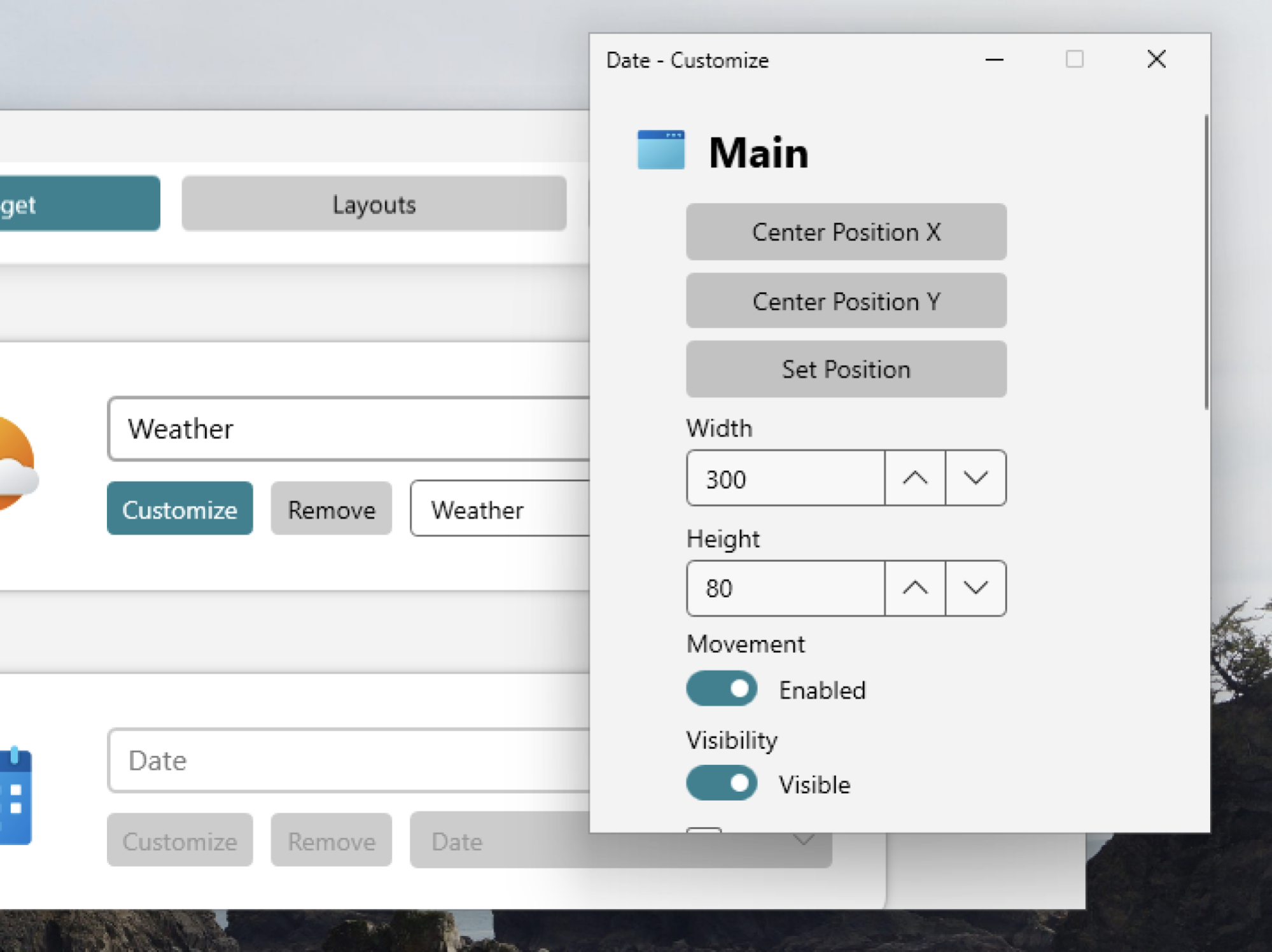
You can manually drag the widget anywhere you want on the desktop. The real power here comes when you click the Customize button. Here, you can change everything about how it looks. This means you can change the size, position, font, and backdrop for the widget. You can also customize the format.

The customize widget for a date widget. You can chance the position, size, and disable movement.

Credit: Justin Pot

So, for the weather widget, you can choose which city to show the weather for and whether you want Celsius or Fahrenheit. You can also get a 24-hour forecast. For the stocks widget, you can choose which stock or currency you want to keep track of. For time, you can choose whether you want a 24- or 12-hour time. And you can customize the date format to work the way you’re used to. The real fun comes from digging in the settings and tweaking everything to look just the way you want.

There are other Windows applications that let you add widgets: Rainlender is a popular application for the job, albeit an aging one that can be overwhelming for beginners. The reason I like BeWidgets is a balance of simplicity and customization. You can only add certain kinds of information, sure, but you can make that information look however you want with just a few clicks. Check if out if you want to add a clock or stock to your desktop.

EA reportedly cancels another Titanfall game, lays off several hundred employees

The gaming industry continues to bleed workers and cancel games, with EA back for another round of brutal news. The company said on Tuesday it decided to “make some targeted team adjustments,” which Bloomberg reported as between 300 and 400 eliminated positions, including 100 at Respawn, and the cancellation of an unannounced Titanfall game. Again.

The canned Titanfall game, code-named R7, was reportedly an extraction shooter set in the mech-meets-parkour franchise. Bloomberg says it wasn’t close to release, and Respawn’s statement that it canceled two “early-stage incubation projects” reflects that. Details about the other scrapped game haven’t leaked, but Bloomberg reports that it was canceled earlier this year.

Respawn says it will refocus its resources on Apex Legends and Star Wars Jedi, franchises where EA appears more confident it can profit. Earlier this month, the company previewed another game set in a galaxy far, far away: the Xcom-like tactics game, Star Wars Zero Company.

After culling an estimated 1,130 jobs in 2023, EA laid off five percent of its workforce in 2024. “These decisions aren’t easy, and we are deeply grateful to every teammate affected – their creativity and contributions have helped build Respawn into what it is today,” Respawn wrote on Tuesday.

This article originally appeared on Engadget at https://www.engadget.com/gaming/ea-reportedly-cancels-another-titanfall-game-lays-off-several-hundred-employees-205008255.html?src=rss

FCC urges courts to ignore 5th Circuit ruling that agency can’t issue fines

The Federal Communications Commission is urging two federal appeals courts to disregard a 5th Circuit ruling that guts the agency’s ability to issue financial penalties.

On April 17, the US Court of Appeals for the 5th Circuit granted an AT&T request to wipe out a $57 million fine for selling customer location data without consent. The conservative 5th Circuit court said the FCC “acted as prosecutor, jury, and judge,” violating AT&T’s Seventh Amendment right to a jury trial.

The ruling wasn’t a major surprise. The 5th Circuit said it was guided by the Supreme Court’s June 2024 ruling in Securities and Exchange Commission v. Jarkesy, which held that “when the SEC seeks civil penalties against a defendant for securities fraud, the Seventh Amendment entitles the defendant to a jury trial.” After the Supreme Court’s Jarkesy ruling, FCC Republican Nathan Simington vowed to vote against any fine imposed by the commission until its legal powers are clear.

Read full article

Comments

Firefly’s rocket suffers one of the strangest launch failures we’ve ever seen

Firefly Aerospace launched its two-stage Alpha rocket from California early Tuesday, but something went wrong about two-and-a-half minutes into the flight, rendering the rocket unable to deploy an experimental satellite into orbit for Lockheed Martin.

The Alpha rocket took off from Vandenberg Space Force Base about 140 miles northwest of Los Angeles at 6:37 am PDT (9:37 am EDT; 13:37 UTC), one day after Firefly called off a launch attempt due to a technical problem with ground support equipment.

Everything appeared to go well with the rocket’s first-stage booster, powered by four kerosene-fueled Reaver engines, as the launcher ascended through fog and arced on a southerly trajectory over the Pacific Ocean. The booster stage jettisoned from Alpha’s upper stage two-and-a-half minutes after liftoff, and that’s when things went awry.

Read full article

Comments

Mastercard Gives AI Agents Ability To Shop Online for You

Mastercard is working with Microsoft and other leading AI companies to give AI agents the ability to shop online and make payments on behalf of consumers. From a report: Under the new program, a shopper could prompt an AI agent — Microsoft’s Copilot, for example — to search for a pair of yellow running shoes in a particular size.

The agent would then search and offer the customer options, and then be able to make the purchase while also recommending the best way to pay, Mastercard said in a statement Tuesday.


Read more of this story at Slashdot.

EA Lays Off Hundreds, Cancels ‘Titanfall’ Game

Electronic Arts (EA) has laid off around 300 employees across multiple departments, including about 100 at Respawn Entertainment. IGN reports: IGN understands that these wider cuts largely impacted EA’s Experiences team, which includes groups such as EA’s Fan Care team and various others working on customer support and marketing, though other EA departments saw reductions as well. As with other cuts at EA, those impacted will be given the opportunity to apply for other roles internally prior to being let go.

The roughly 100 jobs impacted at Respawn included individuals in development, publishing, and QA workers on Apex Legends, as well as smaller groups of individuals working on the Jedi team and two canceled incubation projects, one of which we reported on back in March, and the other of which was, per Bloomberg’s reporting, a new Titanfall game. “As part of our continued focus on our long-term strategic priorities, we’ve made select changes within our organization that more effectively aligns teams and allocates resources in service of driving future growth,” an EA spokesperson said in an official statement. “We are treating our people with care and respect throughout this process, working to minimize impacts by helping affected employees explore new opportunities within the company when possible and providing support during the transition.”


Read more of this story at Slashdot.

Update Your Old LG Phone While You Still Can

There was once a time when LG was among the major smartphone manufacturers. Unfortunately, that hasn’t been the case for a while now: LG gave up on the phone business in April 2021, reducing the choices Android customers have—especially in the United States.

It was a shame, since LG made some cool phones back in the day. The V20, for example, included a thin secondary display along the top of the device, while the LG Wing sported a full-size second display that swiveled out—a design that is still unique in the smartphone market (if not particularly practical). The company produced a number of smartphones in its time—some good, some great, some forgettable—but over the last four years, we’ve been deprived any new LG smartphones.

That being said, the company didn’t leave its customers out to dry: LG guaranteed eligible smartphones three years of updates. That guarantee seems to have worked out, since we’re now four years past LG’s retirement from the smartphone market. Sadly, all good things must come to an end, as is the case with LG’s software support.

RIP LG updates

As reported by Android Authority, LG is planning to shut down the servers it uses to issue software updates. Once that happens, you won’t be able to open your LG smartphone’s settings app and install the latest update your device supports.

It’s not just the update servers, either. LG will also be closing down LG Bridge, software that helps you back your phone up to your PC, as well as install updates.

This all goes down on Monday, June 30—just about two months from the time of this article. If you have any LG devices that have outstanding updates, you should consider updating them as soon as possible.

Of course, LG phones from 2021 aren’t getting updates for Android 15, or the upcoming Android 16. LG was issuing updates for versions of Android 12 and Android 13, depending on the phone in question. Still, these updates are important, since they contain the latest security patches for your particular smartphone. If you’re still using these devices, make sure to install these updates to keep your phone protected—and be aware that no future security updates are coming to protect you from future vulnerabilities.

To that last point, it might be time to start thinking about a new phone if you haven’t done so already. While this last update should protect you for some time, the longer you use a smartphone with no future updates on the way, the greater the chances you’ll expose yourself to those future vulnerabilities. If you’re in need of an upgrade, take a look at PCMag’s list of the best Android smartphones for 2025—all of which will continue to receive the latest feature and security updates.

How to update your LG phone

To update your LG phone, open Settings > System > System updates > Update LG software, then tap Check now for update. If an update is available, tap Install.

The Four Worst Reasons to Sell Your Home

Considering how much work goes into buying a home, it’s surprising how many people view it as a temporary situation. The concept of the “property ladder”—buying a small, affordable “starter” house just to build equity and trade up to a larger home, and then doing it again until you’re living in some kind of mansion—makes people think of their homes as investments in their future instead of a place to live their lives.

It’s true that buying a house can be a complex decision, and buyer’s remorse is a real situation that almost anyone can find themselves experiencing—and sometimes selling your home is the best decision you can make. But there are plenty of bad reasons to sell, especially if you’re comfortable and happy in the property, or you’ve put a lot of work and money into making it your own. If you’ve got the itch to call up Realtors and list your house, ask yourself if you’re doing it for one of these reasons—and then maybe don’t make that call.

You’re exhausted

You bought a house and learned the dark secret of owning a property: You have to maintain it. Home maintenance can be a lot—in fact, about 28% of people who report buyer’s remorse about their house cite the time and cost of home maintenance as the primary reason.

Anyone who’s owned a home knows that the problems seem endless. You fix the roof, and the water heater goes. You replace the water heater, and your air conditioner dies. Selling the house might feel like a weight lifting off your shoulders. It’s important to keep in mind, however, that any property you buy after selling this house will also require maintenance—maintenance you’ll either be doing yourself, or paying someone else to do through HOA or condo fees. Selling your current home won’t remove the need for maintenance and repairs. Even going from an older home to a newer one doesn’t guarantee you won’t have a lot of maintenance to do—in a survey conducted by insurance company Hippo, 60% of new construction homeowners spent more on maintenance than they expected.

If you’re happy with your current home except for the maintenance work, spacing out and planning the work can help make it more manageable. And paying for a home warranty service (or just hiring a handyman) can give you a break from the constant effort, at least.

Timing the market

When you buy a house, the expectation is that it will increase in value over time—while you’re simultaneously increasing your equity in it. Normally this is a long-term situation, but sometimes the real estate market in your area heats up rapidly, and you hatch a plan: You’ll sell at the high, rent for a year, then buy a house again when the market dips. That’s called “timing the market,” and it’s usually a bad reason to sell a house you otherwise love.

“I worked with a couple that had bought themselves a very beautiful house in a quiet neighborhood just outside the city,” says real estate expert and owner of Fast Home Buyer California YK Kuliev. “They had spent years waiting for it to get just right for them—custom kitchen, landscaped yard, the whole deal. They saw headline after headline about record-breaking sale prices, and thought to themselves: ‘Let’s cash out now while prices are at the top.’ They did it and made really good money, but they did not have a new home lined up. They figured they would rent for a year, wait for the market to cool down, then buy again. Jump to 18 months later, and they are priced out of the very neighborhoods they used to call home. They scoured for a much smaller house in a much less desirable location and none of those personal touches built up over years in their prior home. That attempt to time the market cost them their dream home.”

Not only does timing the market risk a home you’re comfortable in, the profits are often illusory because you wind up paying rent—and often more of it, and for a longer period, than anticipated. “They think they’re going to cash out at the perfect moment,” notes Jessica Robinson, co-owner of Family Nest North Central Florida. “But forget they still have to live somewhere after they sell.”

The one that got away

One of the most frustrating aspects of buying a house is the competition—the other buyers who swoop in with all-cash offers, or offers way over list price. Bidding wars can quickly put your dream home out of your financial reach. And sometimes you see a house you’d love to buy, but it isn’t on the market when you’re ready to dive in.

But if the dream home you were denied suddenly becomes available, selling your current home to jump at it can be a huge mistake for a variety of reasons:

  • Sweat equity. If you’ve put time, effort, and money into renovating your current home, you might not get a return on those investments.

  • Financial loss. If you haven’t lived in your current home for at least two years, prepared to get smacked with some gnarly capital gains taxes. Your mortgage lender might have a penalty for paying off the loan too soon. And you’ll be paying all the fees and closing costs, eroding any small gain you might have made in the home’s equity.

  • Disappointment. Dream homes don’t always work out the way you expect. A house that looks superficially ideal might turn out to have hidden problems, or you might not use the amenities as often as you think you will—or at all.

If the only reason you want to sell your house is a form of FOMO, it’s probably going to be a mistake.

You’re bored

Buying and moving into a new house is an exciting experience. There’s the thrill of finding the right house, the joy of starting a new chapter in your life, and then the buzz of activity as you decorate, renovate, and get to know your neighborhood.

But eventually you settle in, finish the projects, and fall into a routine. For some people, that leads to a sense of boredom with the house—and a regrettable decision to sell just because the excitement has faded.

Robinson has seen this firsthand. “I’ll never forget a couple I worked with who sold their home because they were ‘just incredibly bored’ with their house,” she says. “It was a beautiful house, great neighborhood—but after a few years, they just felt restless.”

It was a predictably terrible idea. “They rushed to list without a solid plan and ended up in a smaller, more expensive home that needed a mountain of repairs,” she explains. “Within six months, they admitted they missed their old place and regretted the whole thing.”

Kuliev also recalls one client who simply wanted ‘a change of scenery.’ “She thought a move to a trendier area would be ‘fun,’” he recalls. “She listed her condo, sold it quickly, and bought a loft in a newer development. Six months later, her commute was longer, the community felt more impersonal, and those HOA fees were much heftier. She confessed that she missed the coziness and character of her old place. That boredom cost tens of thousands in closing costs, fees, and an emotional toll none had expected.”

OpenAI rolls back update that made ChatGPT an ass-kissing weirdo

OpenAI is rolling back a recent update to GPT-4o, the default model that powers ChatGPT, following complaints from users that it made the chat bot act like a weirdo. “The last couple of GPT-4o updates have made the personality too sycophant-y and annoying (even though there are some very good parts of it), and we are working on fixes asap, some today and some this week,” said OpenAI CEO Sam Altman in a X post spotted by TechCrunch. 

As of midday Tuesday, Altman said ChatGPT was running on an older, less sycophantic version of GPT-4o for all free users. The company hopes to get paid users back on an older release of the model by later today. “We’re working on additional fixes to model personality and will share more in the coming days,” Altman said, adding OpenAI would share more information about what went wrong “at some point.” 

OpenAI released the new GPT-4o late last week. By the weekend, people began noticing ChatGPT was being overly agreeable and verbose in its praise. As you can see from the X post below, often that praise was also inappropriate and strange. 

When is OpenAI pulling the plug on the new GPT-4o ?
This is the most misaligned model released to date by anyone.
This is OpenAI’s Gemini image disaster moment.

image credit : r/u/Trevor050 pic.twitter.com/kNcdnEYMDq

— AshutoshShrivastava (@ai_for_success) April 27, 2025

Improving the emotional intelligence of its models, in so far as an algorithm can posses the trait, has been a recent focus for OpenAI. For instance, with GPT-4.5, the company said the model was better at responding with warmth and understanding than its previous systems. In trying to bring that same capability to the more affordable GPT-4o, it seems OpenAI got something wrong. 

This article originally appeared on Engadget at https://www.engadget.com/ai/openai-rolls-back-update-that-made-chatgpt-an-ass-kissing-weirdo-203056185.html?src=rss