Electronic Arts Lays Off Hundreds, Cancels ‘Titanfall’ Game

Electronic Arts is laying off hundreds of workers and canceling a Titanfall game that was in development at its Respawn Entertainment subsidiary. From a report: Between 300 and 400 positions were eliminated, including around 100 at Respawn, according to a person familiar with the cuts. The company had about 13,700 employees at the end of March 2024.

“As part of our continued focus on our long-term strategic priorities, we’ve made select changes within our organization that more effectively aligns teams and allocates resources in service of driving future growth,” Justin Higgs, a spokesman for the Redwood City, California-based company, said in a statement.

The canceled project, code-named R7, was an extraction shooter set in the Titanfall universe, according to people familiar with its development. It was not close to being released.


Read more of this story at Slashdot.

This One-Year Subscription to Adobe Lightroom Is on Sale for $120 Right Now

We may earn a commission from links on this page. Deal pricing and availability subject to change after time of publication.

If your photo library lives across five devices and looks like digital chaos, Lightroom can help, and this $119.88 deal on a one-year Adobe Lightroom subscription gives you access to a full suite of tools that work just as well on a phone as on a desktop. The cloud-based platform comes with 1TB of storage, so even if you’re editing a vacation album on your tablet in transit, the edits sync seamlessly everywhere. You can start on your phone, tweak more on your laptop, and finish on your desktop—without exporting or juggling file versions.

Adobe’s AI additions make Lightroom feel smarter with features like Generative Remove, which lets you clean up background distractions with a click, and Lens Blur, which adds that soft, DSLR-style bokeh effect if your phone didn’t quite nail the depth. The new Quick Actions are especially helpful if you’re not looking to deep dive into sliders—Lightroom now suggests edits automatically, tailored to each photo. That said, it’s not just for beginners. Lightroom Classic still lives on for power users who need the old-school tools like Map or Develop modules for bulk editing or geotagging.

This subscription includes both the modern Lightroom and Lightroom Classic, which is a solid deal for anyone wanting flexibility. Just keep in mind the system requirements—macOS Ventura 13.1 or later, or Windows 10 and up—and it’s limited to one device at a time. Whether organizing decades’ worth of photos or just trying to make your social posts pop a little more, this bundle offers a streamlined way to edit, store, and sync everything. But this might feel like overkill if you don’t care about editing on mobile or prefer offline-only workflows. It’s built for the cloud, so you’ll want to be, too.

Mango Languages Is an Alternative to ‘AI-First’ Duolingo, and It’s Free at Libraries

Duolingo is now phasing out contract workers as it switches to using artificial intelligence for some tasks, a move that’s part of the company going “AI-first”.

“AI isn’t just a productivity boost,” said Duolingo co-founder and CEO Luis von Ahn in a press release. “It helps us get closer to our mission.” From what von Ahn says, it sounds as though AI will be used to scale up content, build out the Duolingo codebase, and power features such as video calls with AI avatars.

If that reliance on AI leaves you a little cold—perhaps over concerns around ethics, energy use, copyright infringement, or accuracy—then one of the alternatives worth checking out is Mango Languages. You can usually access it for free through your local public library and other institutions such as schools, but if you can’t find a free option you’re eligible for, it costs from $12 a month (or less, if you pay a year at a time).

Getting started with Mango Languages

Even if you can’t get free access to Mango Languages through your library or another institution, you can try out a free lesson to see if it suits you, before having to pay (or even register an account). There are more than 70 languages to choose from, and your first task is to pick the one you’d like to start learning.

There’s a simple slide-based approach here, so you can move at your own pace and move backwards and forwards as you like. The app also tries to explain fundamentals about a language as you go, including the way that pronunciations might change as you put more words and phrases together, and the patterns of speech involved.

Mango Languages

Credit: Lifehacker

You really do get to start with the basics, with straightforward lessons covering greetings and how to make yourself understood. Alongside vocabulary learning, Mango Languages also tries to get you to understand the grammar of the sentences you’re saying as you progress, and the goals of each lesson are set out ahead of time.

As well as being available on the web, Mango Languages also offers dedicated apps for Android and iOS, so you can learn on the go as well as when you’re sitting at a desk. There are the usual configuration settings you’d expect, including timings on the slides you see and whether or not you want each slide narrated to you.

Progressing with your language learning

As you move through the Mango Languages course, you can review your progress each day and go back to any previous lessons, as well as seeing what’s further ahead. You get tests on your reading, writing, speaking, and pronunciation, and there’s also the option to compare your speaking with that of a native speaker.

Something Mango Languages does well is provide little cultural notes to explain how different terms are used—essential if you don’t want to be offending any of the locals on your next vacation. The app also encourages critical thinking, and will sometimes ask you to work out how something should be said, rather than just telling you.

Mango Languages
You get cultural notes to go with your language learning.
Credit: Lifehacker

Further down the line, you’ll come across special lessons too: For my chosen language of German, one of them is the annual booze-up that is Oktoberfest. These can help put your language learning into more context, so you’re learning about a country and its customs as well as the native tongue.

You get a clean interface, lots of flexibility, and an interesting mix of exercises and challenges to help you stay engaged with learning a language—which for most of us, isn’t an easy ask. Both the basics of vocabulary and the more advanced ways that words are put together are well-handled, and if you’re able to access it for free, so much the better.

Spotify lets EA Sports FC players stream music during gameplay

Spotify is getting into gameplay — kind of — through a partnership with EA Sports. The music streaming platform has teamed up with the sports video game maker to give users integrated streaming access while playing EA Sports FC 25. 

This partnership should allow players on the PS5 and Xbox Series X or S to access Spotify music, podcasts and audiobooks. The only catch? It’s currently a pilot program and only available to users in Australia and Saudi Arabia. Oh and it’s exclusive to Spotify Premium subscribers. 

Applicable players will see a new Spotify tab in the main menu section and can log into their accounts there. They can then access Spotify from the set-up or pause menus — so they will have to interrupt gameplay to choose a song. The latter is also where gamers can skip or pick a new track. These tracks will show up as a small icon at the top of the screen. 

Players can opt out of the game’s default audio in favor of their Spotify playlist. However, Spotify cautions that “certain music” won’t be available right now. 

This article originally appeared on Engadget at https://www.engadget.com/entertainment/music/spotify-lets-ea-sports-fc-players-stream-music-during-gameplay-140733183.html?src=rss

The upcoming Sea of Stars expansion Throes of the Watchmaker arrives on May 20

The free story DLC for Sea of Stars, the excellent Chrono Trigger-inspired indie RPG, will be available to download starting May 20. You might fear that a free expansion is going to be light on content, but the new Throes of the Watchmaker quest clocks in at eight hours. It’s a substantial add-on for those who have rolled credits on the main campaign, which you’ll need to do before the quest unlocks.

The DLC reunites the main game’s protagonists Zale and Valere, who journey into a miniature clockwork world designed by the titular Watchmaker. His magical invention is threatened by an ominous cursed carnival, and it’s up to the now experienced Solstice Warriors to save the day.

As well as a brand new area to explore, the expansion introduces a new playable character in Artificer, a laser-wielding robotic sharpshooter who joins the party on their quest to save the land of Horloge. And to really drive home the circus theme of the piece, Zale swaps his sword for juggling balls, while Valere becomes an acrobat. There are new combat abilities and combos to master for each character, tied together by a progression loop that is separate from the main game.

Sea of Stars composer Eric W. Brown returns for the DLC with an all-new score that includes additional original songs from co-composer Yasunori Mitsuda of Chrono Trigger fame.

Sea of Stars made a huge splash when it arrived back in August 2023. Heavily inspired by SNES-era RPGs, it cleverly takes the best bits of the genre — gorgeous pixel art, a proper overworld map, memorable music — while doing away with the more controversial ‘90s tropes, like grinding and random battles. The turn-based combat system incorporates Mario & Luigi-style timed button inputs, and allows you to reduce the damage received from incoming attacks by breaking “locks” with specific attacks of your own.

Throes of the Watchmaker is the second Sea of Stars DLC add-on, following the (also free) Dawn of Equinox update, which added local co-op and combat refinements. The full game is available on PC, Nintendo Switch, PlayStation 5, PlayStation 4, Xbox Series X/S and Xbox One, and costs $35.

This article originally appeared on Engadget at https://www.engadget.com/gaming/the-upcoming-sea-of-stars-expansion-throes-of-the-watchmaker-arrives-on-may-20-140025090.html?src=rss

Microsoft Vows Legal Fight Against US To Protect European Cloud Customers

Microsoft has pledged to take the US government to court if necessary [alternative source] to protect European customers’ access to its cloud services, as concerns mount over potential technology disruptions under President Donald Trump. Brad Smith, Microsoft’s president and vice-chair, announced five “digital commitments” to Europe on Wednesday, responding to regional anxieties following Trump’s temporary suspension of military support to Ukraine.

“We as a company need to be a source of digital stability during a period of geopolitical volatility,” Smith said. The commitments include contesting any government order to cease European cloud services through legal channels and establishing European oversight of its continental operations. Microsoft will increase its European data center capacity by 40% over the next two years, expanding in 16 countries with investments of “tens of billions of dollars” annually. The Seattle-based company, which derives more than a quarter of its business from Europe, becomes the first major American tech firm to proactively address European concerns amid escalating trade tensions.


Read more of this story at Slashdot.

Republicans want to tax EV drivers $200/year in new transport bill

WASHINGTON, DC—The House Transportation and Infrastructure Committee will meet today to discuss its proposed budget legislation, and there’s a doozy in there for drivers of electric vehicles and hybrids. As part of the Republican Party’s ongoing war against science and the environment under President Trump, committee chairperson Sam Graves (R-Mo.) has included some new annual fees that will cost all drivers some, but some drivers more.

Republicans plan to use the budget reconciliation process to pass this legislation, which is an expedited process that removes some of the US Senate’s ability to stall. They’re proposing a new annual federal motor vehicle registration fee, which state DMVs would have to collect and pass back to the federal government.

If it passes, all battery EVs would be subject to a new $200 tax. Hybrids—defined as vehicles that are propelled by both an electric motor and an internal combustion engine or other power source (which would include fuel cell EVs)—will pay $100. But someone who commutes 90 miles a day in a particulate-belching Ford F-350 Duramax diesel pickup truck gets away with a mere $20 a year, and only from October 1, 2030; until then they get to drive for free.

Read full article

Comments

These Pixel Earbuds Are $60 Right Now

We may earn a commission from links on this page. Deal pricing and availability subject to change after time of publication.

When Google first dropped the Pixel Buds A-Series, they packed a lot into a pretty small price tag. Now that they’re down to $59.99 (from the original $99.99), they feel even more approachable if you’re looking for simple wireless earbuds that get the basics right at a low price point.

Available in sea and dark olive colorways, these buds sport a minimalist design and fit snugly, too, thanks to the built-in rubber stabilization fins. You don’t have to worry about swapping those out—they’re permanently attached—but you do get three sizes of silicone tips to fine-tune the comfort. As for durability, they’re rated IPX4, which means they’re sweat-resistant enough for workouts but not built for full-on water exposure.

The controls on these buds are fairly basic, which can either be a plus or a dealbreaker depending on how you like your tech. You can tap to play, pause, skip tracks, and summon your voice assistant, but adjusting the volume has to happen from your phone. On the upside, the touch surfaces are easy to find without jabbing around blindly, and they’re not overly sensitive, according to this PCMag review. The compact, egg-shaped case (with a USB-C port) holds about 24 hours of battery life, while the buds themselves are estimated to give you around five hours per charge—not the longest out there, but pretty standard for this price point.

Where the Pixel Buds A-Series really settle into their lane is in audio and everyday usability. Bass hits come through clean even at full blast, but if you’re someone who craves heavy low-end rumble, you might find them a little tame. They’re better suited for casual pop, podcasts, or anything that doesn’t lean too bass-heavy. Pairing them with an Android phone is seamless, and once you install the Pixel Buds app, you can use hands-free Google Assistant commands like checking the weather or controlling smart home devices. iPhone users can still connect them via Bluetooth, but they’ll miss out on the Assistant features.

Trump temporarily eases car tariffs following automaker complaints

US automakers will get some relief from US President Donald Trump’s tariffs, according to a new White House fact sheet. Prior to his new executive order, manufacturers had to pay a 25 percent tariff on any parts used in any US-assembled vehicles. Now, they’ll be able to deduct up to an amount equal to 3.75 percent of the price of a new US made car until April 30, 2026, and 2.5 percent until April 30, 2027. In addition, automakers will only be required to pay tariffs on steel or auto parts (not both as before), depending on which is higher. 

The new rules reportedly came at the request of manufacturers, who said they need time to move parts production to the US. “We just wanted to help them during this little transition, short term. We didn’t want to penalize them,” Trump told reporters. 

The 3.75 percent figures was reached by multiplying 15 percent of imported parts that make up a vehicle’s sale price by the current 25 percent import tax. So if a $40,000 car had $6,000 or 15 percent of imported parts, the manufacturer would effectively pay no tariffs, but any higher percentage of foreign parts would result in some tariff being paid. The White House said the rebates wouldn’t cost taxpayers anything since they’d come out of tariffs collected.

The White House pointed out that the US trade deficit on auto parts was $93.5 billion in 2024. A large chunk of those ($19.5 billion worth) came from Canada, and large numbers of US vehicles are also built in that country. However, the reason that US automakers manufacture cars and car parts in Canada is because it’s cheaper, largely because of the high cost of employee healthcare in the US. So, even if automakers manufacture more parts in the US, car prices are still likely to go up. 

The average price for a new vehicle in the US was $47,462 last month, according to The Associated Press. One noted analyst predicted that the original 25 percent tariffs could add $4,711 to the cost of a vehicle, while also boosting the cost of ownership and maintenance. 

This article originally appeared on Engadget at https://www.engadget.com/transportation/trump-temporarily-eases-car-tariffs-following-automaker-complaints-130011086.html?src=rss

Android’s Default Keyboard Is Hiding a Secret Superpower

You’ve probably heard you can use your phone’s personal dictionary to save time typing. It’s one of our favorite time-saving tricks. However, there’s an even easier way on Android to save whole blocks of text, and you’ve been using it without realizing it: your clipboard’s history.

This feature may vary depending on your model of phone, so we’ll focus on Google’s Gboard. By default, the keyboard will keep a history of what you copy, so you can paste multiple blocks of text without bouncing back and forth between apps. You can see this history by tapping the Clipboard icon on your keyboard (in some contexts, you may have to press the four-square apps button to pull it up).

The real magic, however, is pinning items you use constantly. For example, since Gmail still doesn’t have email templates, you could write a form response, copy it like normal, then pin it to your clipboard’s history. This will stick it to the top of your history, and won’t delete it over time like the rest of your clipboard.

Having a few form responses saved feels like a superpower when dealing with email. For the emails that only require a quick form response, I can hammer those out in a couple of quick taps and be done with it. Then, when I get back to my desk, the only emails left are the ones that require more thought or research.

It’s a powerful feature that’s quietly tucked away on your phone. Just remember not to store highly sensitive information like passwords—there are better tools for that, anyway. 

Gen AI Is Not Replacing Jobs Or Hurting Wages At All, Say Economists

An anonymous reader quotes a report from The Register: Instead of depressing wages or taking jobs, generative AI chatbots like ChatGPT, Claude, and Gemini have had almost no wage or labor impact so far — a finding that calls into question the huge capital expenditures required to create and run AI models. In a working paper released earlier this month, economists Anders Humlum and Emilie Vestergaard looked at the labor market impact of AI chatbots on 11 occupations, covering 25,000 workers and 7,000 workplaces in Denmark in 2023 and 2024.

Many of these occupations have been described as being vulnerable to AI: accountants, customer support specialists, financial advisors, HR professionals, IT support specialists, journalists, legal professionals, marketing professionals, office clerks, software developers, and teachers. Yet after Humlum, assistant professor of economics at the Booth School of Business, University of Chicago, and Vestergaard, a PhD student at the University of Copenhagen, analyzed the data, they found the labor and wage impact of chatbots to be minimal. “AI chatbots have had no significant impact on earnings or recorded hours in any occupation,” the authors state in their paper.

The report should concern the tech industry, which has hyped AI’s economic potential while plowing billions into infrastructure meant to support it. Early this year, OpenAI admitted that it loses money per query even on its most expensive enterprise SKU, while companies like Microsoft and Amazon are starting to pull back on their AI infrastructure spending in light of low business adoption past a few pilots. The problem isn’t that workers are avoiding generative AI chatbots — quite the contrary. But they simply aren’t yet equating to actual economic benefits. “The adoption of these chatbots has been remarkably fast,” Humlum told The Register. “Most workers in the exposed occupations have now adopted these chatbots. Employers are also shifting gears and actively encouraging it. But then when we look at the economic outcomes, it really has not moved the needle.”

Humlum said while there are gains and time savings to be had, “there’s definitely a question of who they really accrue to. And some of it could be the firms — we cannot directly look at firm profitability. Some of it could also just be that you save some time on existing tasks, but you’re not really able to expand your output and therefore earn more. So it’s like it saves you time writing emails. But if you cannot really take on more work or do something else that is really valuable, then that will put a damper on how much we should actually expect those time savings to affect your earning ability, your total hours, your wages.”

“In terms of economic outcomes, when we’re looking at hard metrics — in the administrative labor market data on earnings, wages — these tools have really not made a difference so far,” said Humlum. “So I think that that puts in some sense an upper bound on what return we should expect from these tools, at least in the short run. My general conclusion is that any story that you want to tell about these tools being very transformative, needs to contend with the fact that at least two years after [the introduction of AI chatbots], they’ve not made a difference for economic outcomes.”


Read more of this story at Slashdot.

The end of an AI that shocked the world: OpenAI retires GPT-4

One of the most influential—and by some counts, notorious—AI models yet released will soon fade into history. OpenAI announced on April 10 that GPT-4 will be “fully replaced” by GPT-4o in ChatGPT at the end of April, bringing a public-facing end to the model that accelerated a global AI race when it launched in March 2023.

“Effective April 30, 2025, GPT-4 will be retired from ChatGPT and fully replaced by GPT-4o,” OpenAI wrote in its April 10 changelog for ChatGPT. While ChatGPT users will no longer be able to chat with the older AI model, the company added that “GPT-4 will still be available in the API,” providing some reassurance to developers who might still be using the older model for various tasks.

The retirement marks the end of an era that began on March 14, 2023, when GPT-4 demonstrated capabilities that shocked some observers: reportedly scoring at the 90th percentile on the Uniform Bar Exam, acing AP tests, and solving complex reasoning problems that stumped previous models. Its release created a wave of immense hype—and existential panic—about AI’s ability to imitate human communication and composition.

Read full article

Comments

Redditor accidentally reinvents discarded ’90s tool to escape today’s age gates

Back in the mid-1990s, when The Net was among the top box office draws and Americans were just starting to flock online in droves, kids had to swipe their parents’ credit cards or find a fraudulent number online to access adult content on the web. But today’s kids—even in states with the strictest age verification laws—know they can just use Google.

Last month, a study analyzing the relative popularity of Google search terms found that age verification laws shift users’ search behavior. It’s impossible to tell if the shift represents young users attempting to circumvent the child-focused law or adult users who aren’t the actual target of the laws. But overall, enforcement causes nearly half of users to stop searching for popular adult sites complying with laws and instead search for a noncompliant rival (48 percent) or virtual private network (VPN) services (34 percent), which are used to mask a location and circumvent age checks on preferred sites, the study found.

“Individuals adapt primarily by moving to content providers that do not require age verification,” the study concluded.

Read full article

Comments

Samsung says US tariffs will affect prices and demand for smartphones and memory chips

During an earnings call, Samsung’s chief financial officer Soon-cheol Park told reporters that “ongoing uncertainty surrounding US tariff policies continues to pose a potential risk of demand slowdown.” According to Financial Times, Park said that US tariff policies and stronger export controls against artificial intelligence products are expected to have an impact on product demand in the second half of the year. In addition to a downward trend on sales, the company also expects tariffs to raise prices for the components it uses on its mobile phones, which will have further impact on its revenue. 

Samsung’s call discussed its results for the first quarter of 2025, which ended on March 31. The company posted KRW 79.14 trillion in revenue ($55.6 billion), an all-time quarterly high mostly due to strong Galaxy S25 sales. It also posted KRW 6.7 trillion ($4.7 billion) in profit, which is slightly lower than the previous quarter’s KRW 6.5 trillion ($4.6 billion). 

Despite the record revenue, Samsung’s chip business already took a hit due to tougher US export controls to China on chips used in hardware for artificial intelligence. The division posted KRW 1.1 trillion ($774 million) in operating profit, down from KRW 2.9 trillion ($2 billion) last quarter. Financial Times previously reported that Samsung had a boost in profit in the first quarter of the year thanks to Chinese customers stockpiling memory chips ahead of US tariffs, but the impact of US export restrictions overshadowed the increase in orders. The publication has also noted that the tariffs the US will be imposing on semiconductors and consumer electronics will lead to an increase in prices of its smartphones and TVs, which are mostly made in Vietnam and Mexico, respectively. 

This article originally appeared on Engadget at https://www.engadget.com/big-tech/samsung-says-us-tariffs-will-affect-prices-and-demand-for-smartphones-and-memory-chips-124537214.html?src=rss

Toyota and Waymo pledge to team up on a new autonomous vehicle platform

Toyota and Waymo have announced that they’ve entered a preliminary agreement, along with the former’s mobility tech subsidiary, Woven by Toyota, Inc. To be clear, they’re not in the midst of developing anything yet — they’re still exploring a potential collaboration between them. Ultimately, however, the goal is to develop a new autonomous vehicle platform together, presumably for robotaxies. They’re also aiming to “leverage Waymo’s autonomous technology and Toyota’s vehicle expertise” for future personal vehicles. 

In their announcement, the companies said they’re looking to incorporate aspects of Waymo’s technology into Toyota vehicles meant for sale to consumers, as well as to accelerate the development and adoption of driver assistance and automated driving technologies. Waymo’s work, so far, has been focused on developing robotaxis that riders can hail through an app. The Alphabet-owned company currently operates Waymo One, a fully autonomous ride-hailing service, in San Francisco, Phoenix and Los Angeles. It deploys Waymo One vehicles through Uber in Austin, and it’s planning to expand the service to Las Vegas, San Diego, Miami and Atlanta sometime this year. This potential partnership could expand the reach of Waymo’s tech.

“Waymo’s mission is to be the world’s most trusted driver. This requires global partners like Toyota that share our commitment to improving road safety and expanding accessible transportation. We look forward to exploring this strategic partnership, incorporating their vehicles into our ride-hailing fleet and bringing the magic of Waymo’s autonomous driving technology to Toyota customers,” said Tekedra Mawakana, the co-CEO of Waymo. 

This article originally appeared on Engadget at https://www.engadget.com/transportation/toyota-and-waymo-pledge-to-team-up-on-a-new-autonomous-vehicle-platform-123032289.html?src=rss

Google Wallet adds support for UK passports

Google Wallet has supported copies of US passports since December and now its UK residents’ turn. The company has announced that UK passports will soon be available as digital passes in Google Wallets on Android devices. 

To start, Google is partnering with Rail Delivery Group, which provides Railcards — or discount passes — for a range of travelers. Applying for a Railcard requires identity verification (some of them are also age-based) and individuals should be able to use their digital ID for proof. 

Google also announced further updates and features to its Wallet. More states, including Montana and Arkansas, will soon have the ability to put their government IDs in their Google Wallet, and places like Georgia and Maryland will be able to use their digital IDs at the DMV. While travelers can use US passports stored on Google Wallet at select airports, Google cautions that ID passes for UK passports won’t work at TSA for now. 

The company is also bringing Zero Knowledge Proof (ZKP) technology to Google Wallet. It should also for quick age verification while “ensuring there is no way to link the age back to your identity.” Google might use it with its own products or when verifying a person’s age on partner apps. 

This article originally appeared on Engadget at https://www.engadget.com/mobile/smartphones/google-wallet-adds-support-for-uk-passports-123019945.html?src=rss

X is bringing 4K video uploads to premium subscribers

X (formerly Twitter) has been leaning into video content more and more since Elon Musk took over. The latest shift, announced by X’s engineering account, sees the platform rolling out 4K video uploads to some of its creators. 

The new video resolution should soon be available for all premium subscribers. Currently, they can share videos in 1080p that are a max of 8GB in size and about three hours in length. X has also taken steps such as creating a vertical videos feed a la TikTok and Instagram Reels. 

We’re starting to roll out 4k video uploads for some creators.

Coming soon for all @Premium subscribers!

— Engineering (@XEng) April 29, 2025

If you’re one of the many people done with the platform — and want nothing to do with Musk — then you can delete your X account. We have a step-by-step guide on how to fully deactivate your profile and clear most of your tweets (posts?) from X. 

This article originally appeared on Engadget at https://www.engadget.com/big-tech/x-is-bringing-4k-video-uploads-to-premium-subscribers-120044356.html?src=rss

Firefly Aerospace’s Alpha Rocket Fails, Sends Satellite Falling Into Ocean

Firefly Aerospace’s sixth Alpha rocket launch failed on April 29, 2025, after an upper-stage anomaly prevented a Lockheed Martin satellite demo from reaching orbit. Both the stage and payload fell into the Pacific Ocean near Antarctica. Space.com reports: The two-stage, 96.7-foot-tall (29.6 meters) Alpha lifted off from California’s Vandenberg Space Force Base this morning (April 29), carrying a technology demonstration for aerospace giant Lockheed Martin toward low Earth orbit (LEO). But the payload never got there. Alpha suffered an anomaly shortly after its two stages separated, which led to the loss of the nozzle extension for the upper stage’s single Lightning engine. This significantly reduced the engine’s thrust, dooming the mission, Firefly said in an update several hours after launch.

Today’s mission, which Firefly called “Message in a Booster,” was the first of up to 25 that the company will conduct for Lockheed Martin over the next five years. The flight aimed to send a satellite technology demonstrator to LEO. This demo payload “was specifically built to showcase the company’s pathfinding efforts for its LM 400 mid-sized, multi-mission satellite bus, and to demonstrate the space vehicle’s operational capabilities on orbit for potential customers,” Firefly wrote in a prelaunch mission description. “Initial indications showed Alpha’s upper stage reached 320 km [199 miles] in altitude. However, upon further assessment, the team learned the upper stage did not reach orbital velocity, and the stage and payload have now safely impacted the Pacific Ocean in a cleared zone north of Antarctica,” an update reads.

“Firefly recognizes the hard work that went into payload development and would like to thank our mission partners at Lockheed Martin for their continued support,” it continues. “The team is working closely with our customers and the FAA [Federal Aviation Administration] to conduct an investigation and determine root cause of the anomaly. We will provide more information on our mission page after the investigation is completed.”


Read more of this story at Slashdot.

New Atomic Fountain Clock Joins Elite Group That Keeps the World on Time

NIST: Clocks on Earth are ticking a bit more regularly thanks to NIST-F4, a new atomic clock at the National Institute of Standards and Technology (NIST) campus in Boulder, Colorado. This month, NIST researchers published a journal article establishing NIST-F4 as one of the world’s most accurate timekeepers. NIST has also submitted the clock for acceptance as a primary frequency standard by the International Bureau of Weights and Measures (BIPM), the body that oversees the world’s time.

NIST-F4 measures an unchanging frequency in the heart of cesium atoms, the internationally agreed-upon basis for defining the second since 1967. The clock is based on a “fountain” design that represents the gold standard of accuracy in timekeeping. NIST-F4 ticks at such a steady rate that if it had started running 100 million years ago, when dinosaurs roamed, it would be off by less than a second today.

By joining a small group of similarly elite time pieces run by just 10 countries around the world, NIST-F4 makes the foundation of global time more stable and secure. At the same time, it is helping to steer the clocks NIST uses to keep official U.S. time. Distributed via radio and the internet, official U.S. time is critical for telecommunications and transportation systems, financial trading platforms, data center operations and more.


Read more of this story at Slashdot.

I Started Customizing My Steam Deck Controls, and It Was a Literal Game Changer

Valve’s Steam Deck has quickly become my go-to gaming handheld. I’ve clocked—oh god—500 hours just in Hades II on the Steam Deck. Yet I spent full weeks of my life using this device without diving into its most powerful feature: its customizable controls. Here’s why you should be using them, even if you think you don’t need to.

At first, I avoided customizing my controls because I usually like to play the way the developer intended. That ended when I sprained my left wrist while in the middle of replaying Chrono Trigger. I wanted to keep playing, but I needed to rest my wrist. What could I do?

That’s correct: Obviously, I should remap the in-game controls so I could access almost every function in the game with just one hand, prop up the Steam Deck, and keep playing. Once I’d done that successfully, though, I started experimenting with every game to see what I could do.

Get started by trying out community layouts

Almost every game that’s playable on the Steam Deck has its own controller layout ready to go, but you can always edit it. Simply press the Steam button while playing the game, then scroll to Controller Settings. You’ll see a layout that shows which inputs each of the Steam Deck’s buttons, control sticks, and touchpads are mapped to. At the bottom, you’ll see a button labeled Controller Settings. Click that to start editing.

Your first option is to change your entire layout. If you click “Edit Layout,” you’ll create a copy of the existing layout with your own changes (which you can always reset), but you can also browse community-made layouts to see if someone made something that’s more comfortable for you. If you try a community layout and don’t like it, your original layout will always be available to swap back.

Make games designed for a mouse feel more natural

One of the most slept-on superpowers of the Steam Deck—and what, in my opinion, makes it superior to most Windows-based handhelds—is its dual trackpads. These small squares just under each joystick work similarly to your laptop’s trackpad. They have haptic feedback, and you can even click them. The Steam Deck has a touchscreen for entering text, but for my money, the trackpads are a better analog for mouse input.

For example, Stardew Valley is a game that was initially designed for PC, and while its controller support is stellar, there are still a few menus where it would be handy to have a mouse. The default controller input maps the right trackpad to be seen as a joystick input. However, I swapped mine so that it reads like a mouse instead. This lets me quickly click on menus, or hover over items more easily than I would with controller inputs.

You can change this behavior under the Trackpads section while editing your controller layout. You can pick from a few types of behavior (the nuance between “Joystick” and “As Joystick” can be, uh, confusing) so experiment with what works best for you. You can also add custom inputs for just touching the pad, and for clicking it.

Boost your ergonomics with rear grip buttons

The four back grip buttons (labeled L4, L5, R4, and R5) are quickly becoming my best friends. Depending on your hand size, they might be a little tough to reach, but they’re what let me play Chrono Trigger with just one hand while the other was wrapped in a cold compress. These are so simple to enable, you don’t even need to customize the controller layout.

Each back grip button can be assigned to any existing input, but you can take it further by tweaking their settings. Click the gear icon next to each input and you can set each button to register as a single press, double press, long press, or a range of other options. You can even set one rear button to register as starting to press a key, then a different rear button to register as releasing that key. So, for example, if I want to buy thousands of pieces of wood from Robin’s shop in Stardew Valley, I could start hitting the buy button, then walk away to get a snack while the numbers tick up. (Or I could install a bulk buy with gamepads mod, but still.)

There’s also a robust Turbo mode settings menu, though it’s worth mentioning you should probably be wary of using this in any multiplayer games if you don’t want your account banned. You can set a button to rapidly repeat an input while holding it down, adjust the interval between inputs, or even set it as a toggle.

Create your own input menu overlays

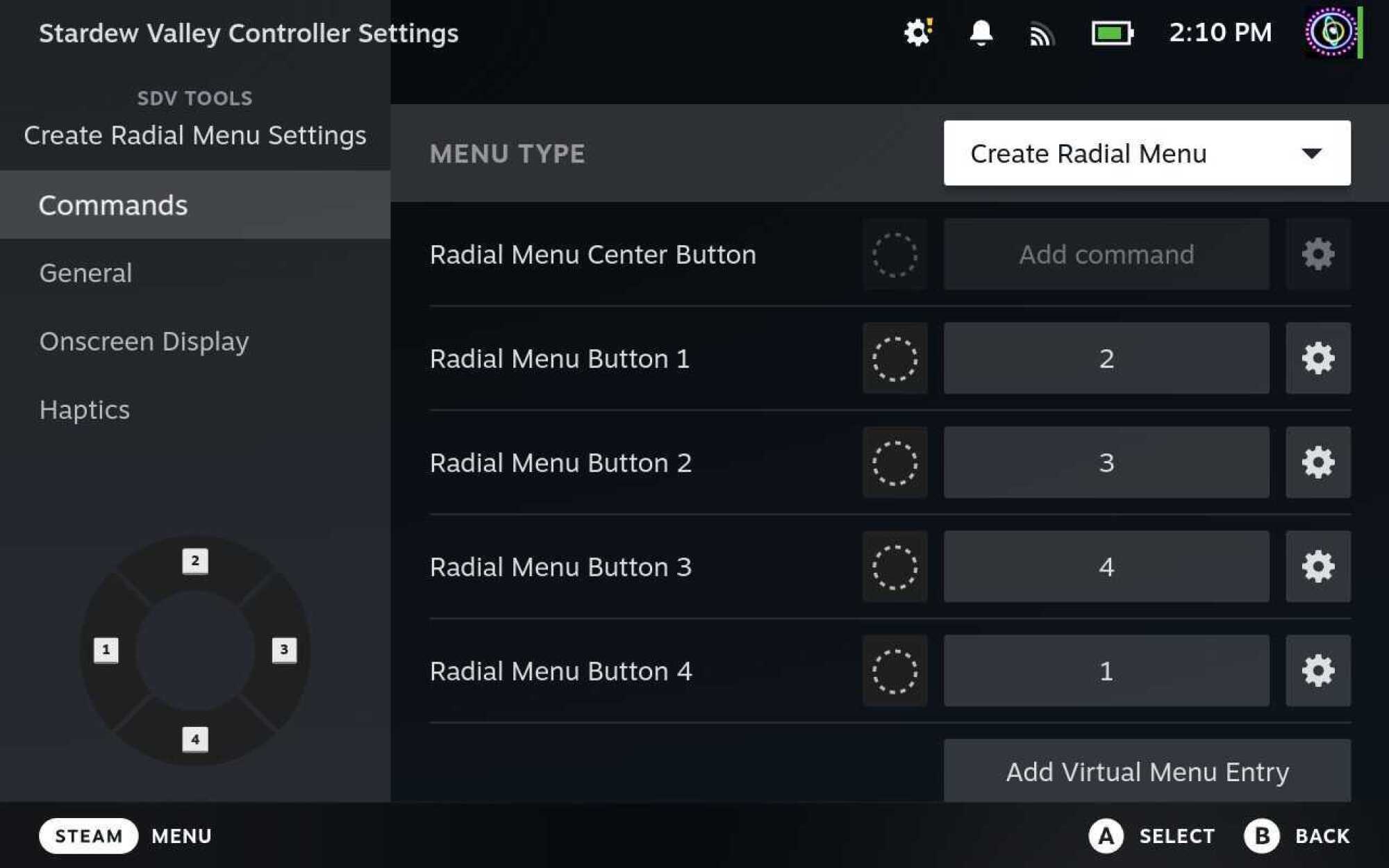
By far, one of the coolest tools on the Steam Deck is the ability to create your own input menus. My favorite is the Radial Menu. This creates an overlay on top of your game that lets you assign different inputs to a wheel for easy access. While editing your layout, go to Trackpads and from the behavior dropdown, choose Create Radial Menu. This will let you generate a radial overlay that appears whenever you touch this touchpad. 

This has been a lifesaver for me in games like Stardew Valley, where cycling through the toolbar is more cumbersome than on a desktop. The default configuration has you press the left and right triggers to move through the toolbar one step at a time. Nah; my custom radial menu lets me jump to the slot I want quickly with a single gesture.

You can create radial menu layouts and apply them to the touchpads, joysticks, or even gyro controls (more on that below). It’s one of the best ways to augment your game inputs, especially for games that aren’t purposely designed with gamepad controls in mind.

A screenshot of the Radial Menu creation interface, shows how the user can add multiple options to the menu, and even an extra input for the center.
The Radial Menu creation interface
Credit: Eric Ravenscraft

Get precision aiming with gyro controls

It gets overlooked a lot, but the Steam Deck has built-in gyro capabilities, and you can turn them on for any game in your library. Sort of. The Steam Deck will try to map gyro movements to inputs the game can comprehend, which usually works pretty well, but might be finicky depending on the game. Expect to do a little experimentation here.

By default, Gyro controls will be off, but you can enable them with a simple toggle in the controller settings. After that, you can activate gyro movement by placing your thumb on the right control stick. The top of this stick is touch sensitive, so you don’t need to move it, just come in contact with it. It also works by touching the right touchpad, but you can change this behavior in the controller settings.

While you’re activating gyro controls, tilting the Steam Deck will send corresponding mouse inputs to your game. In my experience, this worked great in first-person games like Doom Eternal, where you use the right control stick to point your camera. The gyro movements will give you a little extra precision control while tilting your Deck, while your thumb is where it would normally be on the control stick anyway.


The amount of effort that’s already gone into making sure most Steam games play well on the Steam Deck is already pretty incredible. Before it came out, I was skeptical it would work, and I’ve never been more happy to be proven wrong. Between official developer support and community layouts, almost every game I’ve played on the Steam Deck felt like it was made to be there.

But that doesn’t mean the customization has to stop. Even if you’ve never had a problem with any of the controls on your Steam Deck, it’s worth diving into the customization tools to see if you can make your games feel more comfortable for you.