Phone notifications are tricky to balance: too many of them, and you’re constantly distracted by buzzes and pings. Too few of them, and you risk missing something important, from a relative in trouble to a great deal on headphones (two ends of the importance scale there, but you get the idea).
Over the years, Apple and Google have tweaked and refined the notification systems built into iOS and Android, but there’s still room for improvement. The native features that are currently in place work fine, but lack the sort of granular control you need to properly manage the alerts you want and the alerts you don’t want.
Enter BuzzKill: It’s Android only (sorry, iPhone users), and it’ll cost you $4, but it does a fine job of managing notifications for you. It hits the sweet spot to give you a powerful set of options to manage without feeling overwhelming or cluttered, and it just might be the notification solution you’ve been looking for.
Unfortunately there’s no free trial to take advantage of, though the developer does promise to refund you your money if you’re not happy with the app—and as I take you through some of the features it offers here, you should get a good idea of whether or not this is an app you’re going to find useful on your own phone.
Creating rules in BuzzKill
Rules have certain criteria attached to them. Credit: Lifehacker
Load up BuzzKill for the first time, and once you’ve given it the necessary permissions to run in the background and access your notifications, you’re ready to add your first rule: Tap on Create rule to do this. That then leads you to a rule builder that will look familiar if you’ve ever attempted to set up filters for your email.
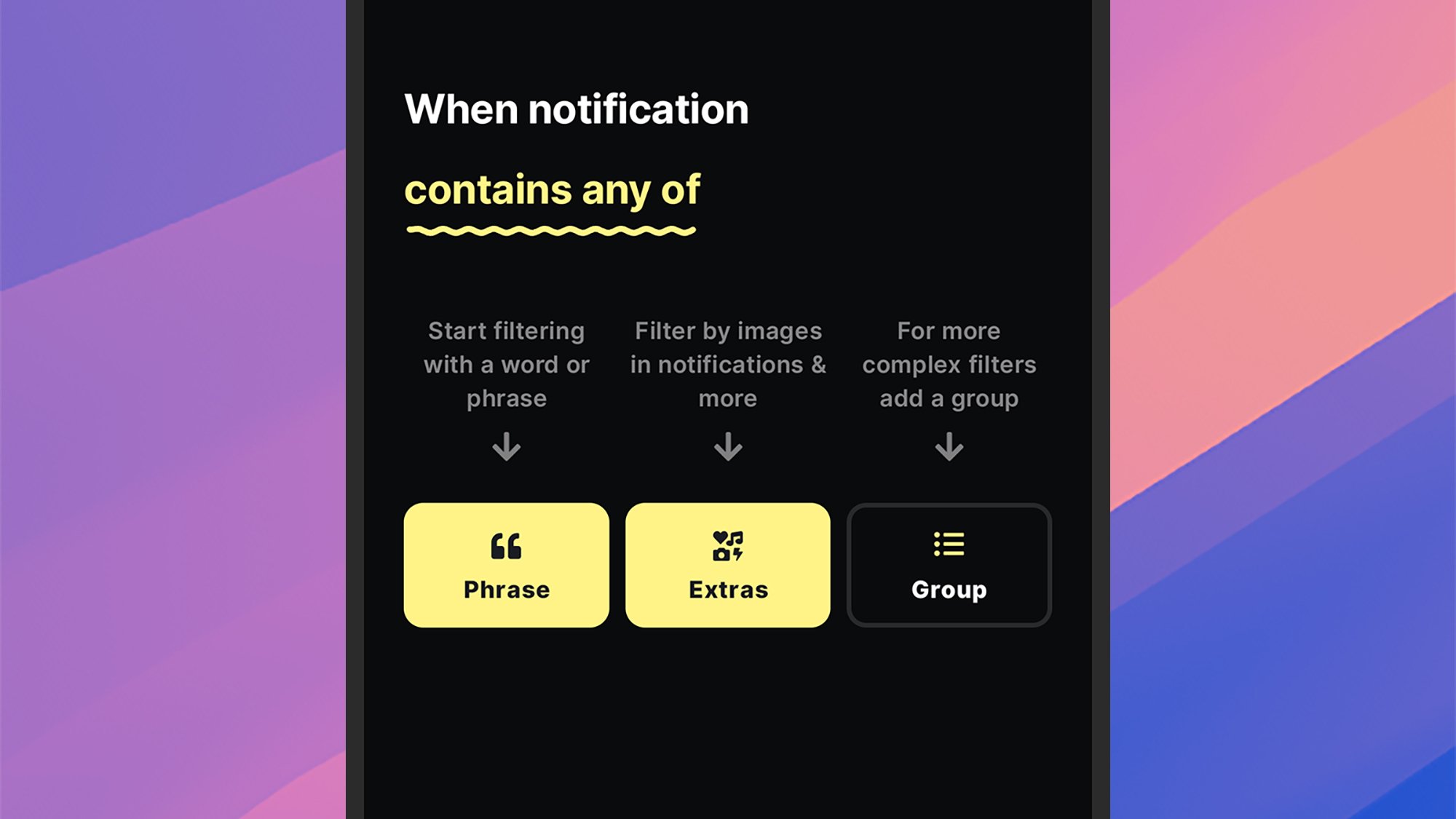
There are two parts to each rule: how to identify the notifications that qualify it (tap any app and contains anything to specify the criteria), and then the action to take for matching alerts (tap do nothing to set an action). To begin with, you’ll need to pick a specific app— whether it’s Uber, WhatsApp, or anything else you’ve got installed—and you can select multiple apps per rule.
You can leave a rule to apply to all notifications from your chosen app(s), or you can specify further filters. BuzzKill is able to look for words or phrases inside notifications, plus certain notification attributes for the notification—such as whether or not it has an image in it, or whether it’s from a group conversation (handy for those group chats).
You can build up some quite complex filters this way, and it’s even possible to nest certain criteria in sub-groups. You can ask BuzzKill to match all the filter rules you’ve listed, or just some of them (so a rule might be applied to messages from group chats or with images in them, or only when both of those criteria are met, for example).
All you then need to do is specify the action that BuzzKill needs to take, and it’s here that the app really proves its value. You can do everything from mute an alert, to make sure it’s unmuted even if your phone is silenced—so BuzzKill is useful for getting your attention for important notifications as well as reducing distractions from more minor ones. You can also invoke popular automation tool Tasker from BuzzKill for even more control.
Managing rules in BuzzKill
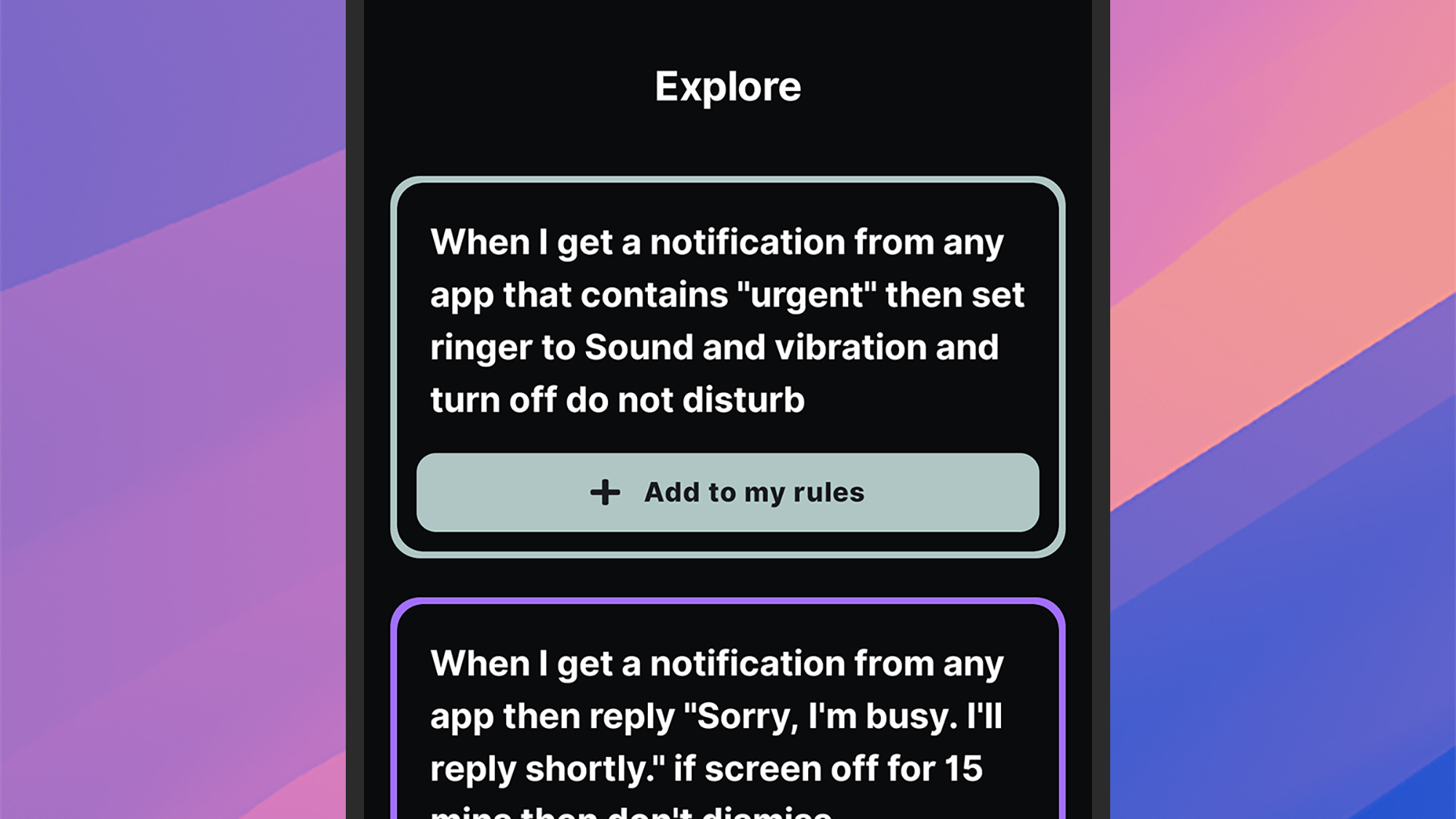
Head to the Explore tab for inspiration for your rules. Credit: Lifehacker
Once you’ve started creating rules in the app, they can be managed from the Rules tab: Simple toggle switches let you enable or disable them, and you can also delete and duplicate rules by tapping the three dots in the top left corner of the rule box.
Over on the History tab, you can see stats relating to all the notifications that have come in on your phone, with filters and summaries available if you need them. One handy feature on this screen is the option to create a new rule based on a notification you’ve already received: Just tap on the notification and pick Create rule.
The Explore tab gives you some examples of what BuzzKill can do, and it’s a great resource for finding inspiration. For example, you can set up automatic replies to incoming messages, or snooze alerts that arrive together in quick succession, or create a custom vibration for communications from a particular contact.
Head to the Settings tab and you can play around with some of the app options. From here you’re able to give BuzzKill control over persistent notifications that stick around in the status bar, and create shortcuts for quickly triggering rules from the home screen or the quick settings panel on Android.
I’ve found BuzzKill most useful for shushing apps that I don’t particularly want to hear from during the day, without losing those notifications altogether—above and beyond the features that you get with Android itself. Creating and managing rules is also straightforward, and there’s an export tool for moving them to another device (BuzzKill is particularly privacy-conscious, and doesn’t connect to the web).
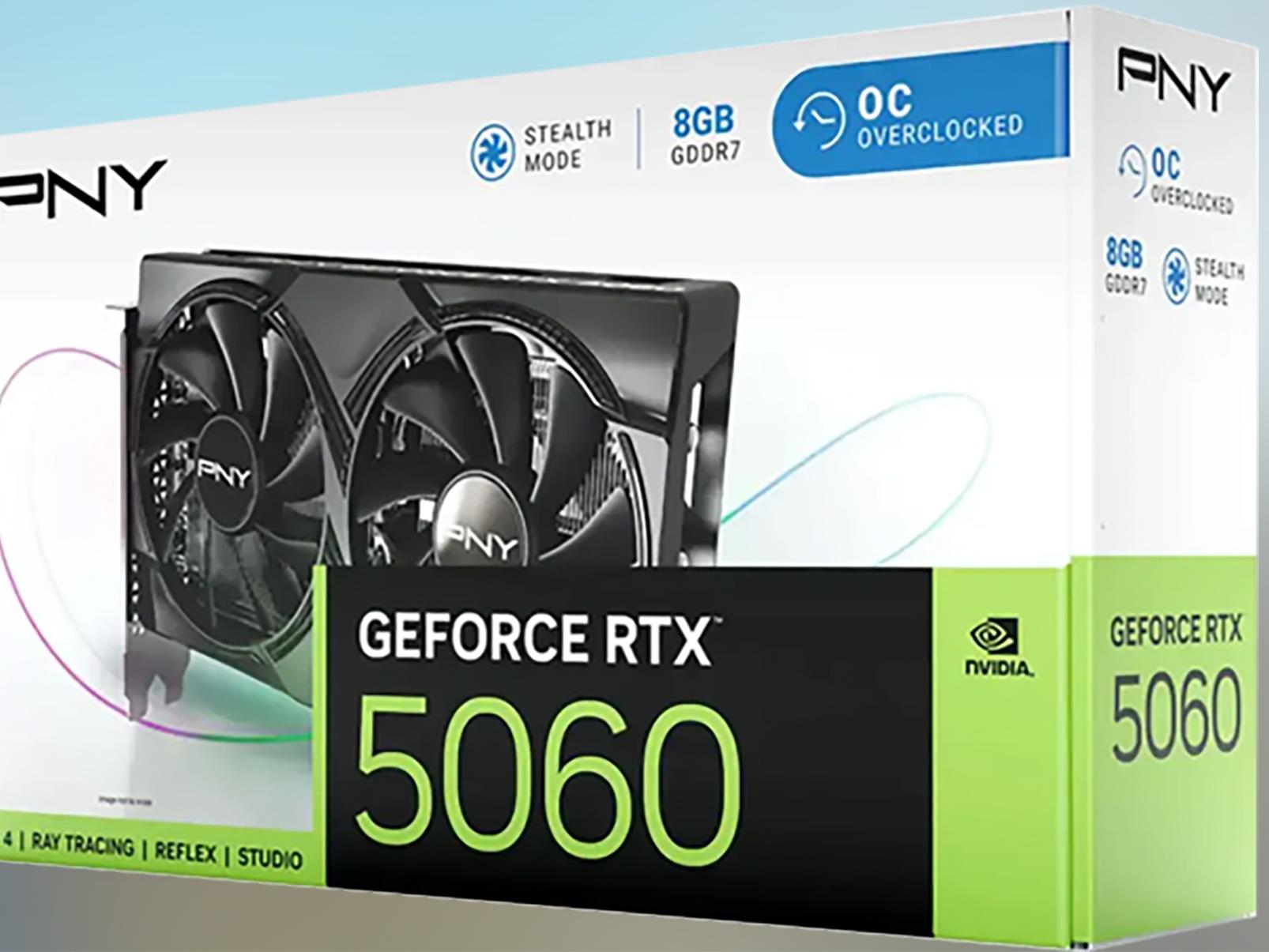
On paper, the launch of NVIDIA’s GeForce RTX 5060 family brought the price of Blackwell to below $500. In practice, the GPU situation is what it is—’frustrating’, if summing it up in a single word—but there is reason to be a bit optimistic. We’re seeing more models listed at MSRP, availability be damned, and there’s already a retail listing
In April, a US District Court ruled that Google monopolized open-web digital ad markets. Now, the tech giant and the US Justice Department are at odds about what Google must do about it. The DOJ argues that Google should sell AdX, or Ad Exchange, a platform for publishers to sell unused ad space in real-time. It also wants the company to offload Google Ad Manager, previously DoubleClick for Publishers (Google DFP).
The DOJ claims that both platforms minimize competition and contribute to Google’s monopoly in the advertising space. The executive department has also pushed Google to sell Chrome due to a separate ruling that the company held a monopoly on search engines.
Unsurprisingly, Google has no interest in getting rid of its products — it also plans to appeal the Court’s ruling on Google Ad Manager. Google has announced “a proposal that fully addresses the Court’s findings.” These changes include allowing all rival publisher ad servers to make real-time bids on AdX and letting publishers set different price floors for each bidder.
“In contrast, the DOJ is seeking remedies that go significantly beyond the Court’s narrow ruling by forcing a divestiture of Google Ad Manager,” Google stated in its announcement. “This would risk breaking a tool advertisers use to connect with publishers and efficiently reach their customers, and that app and video publishers use to monetize their content — businesses that aren’t even part of the narrow market of ‘open web display ads’ at issue in this case.”
This article originally appeared on Engadget at https://www.engadget.com/big-tech/doj-pushes-for-google-to-sell-its-advertising-platforms-134250436.html?src=rss
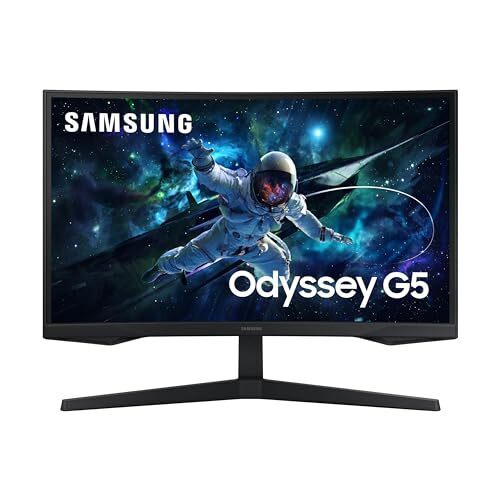
It’s got a 1440p resolution, a 1000R curve that pulls you into the action, a 165Hz refresh rate with FreeSync and G-SYNC compatibility to keep screen tearing to a minimum, and features like Samsung’s Virtual Aim Point and Contrast Enhancer adding a little extra gaming flair without overcomplicating the experience. On paper, that’s more than enough for casual and mid-tier gamers.
That said, it’s not without its issues. If you’re sensitive to input lag or picky about motion clarity, the G55C might leave you wanting more. Fast-paced games show noticeable blur and smearing, especially with dark transitions, and the input lag at 165Hz and 60Hz can reportedly feel sluggish (oddly enough, gameplay feels snappier at 120Hz). Additionally, the backlight strobing feature, meant to reduce motion blur, introduces ghosting and can’t be used with VRR on. HDR is supported, but you’ll want to keep expectations in check—it gets bright enough to fight off some glare, but not enough to deliver meaningful HDR performance.
It works decently with consoles like the PS5 and Xbox Series X|S, but you’ll have to tweak settings to avoid compatibility hiccups with 4K and HDR signals. You also won’t find any USB-C ports or a USB hub here, and there are no built-in speakers either. Plus, its narrow viewing angles mean once you move off to the side or stand up, the picture quality takes a hit—so it’s not ideal for couch co-op or multitasking with someone else. But for solo gaming on a budget, especially if you’re playing slower-paced or story-driven games, it delivers a big screen with immersive visuals and decent contrast. If you’re considering alternatives, the Dell G2724D Gaming Monitor makes a good case for itself with similar specs, but it comes at a higher price point of $314.
The US data center industry has warned that the Trump administration’s crackdown on renewable energy could slow its growth and undermine Washington’s goal to win the global artificial intelligence race.
Renewables have become a flashpoint since Donald Trump re-entered the White House, with his administration suspending clean energy developments on federal land, pausing federal loans, and last month canceling high-profile projects such as Equinor’s $5 billion Empire Wind site.
For tech companies struggling to secure reliable energy supplies to power and train AI, a clampdown on renewables could create power bottlenecks, drive up costs, and push operators towards dirtier energy, experts said.
Roku has been catching heat for its decision to inject ads over HDMI to TVs and other streaming clients when a user presses the pause button, an unpopular (among its users) feature that began rolling out recently. Adding insult to injury, however, some users are reporting that the latest Roku update is washing out colors on HDR and/or 4K streaming
Roku’s streaming player lineup is a little easier to understand in 2025 than ever — but it’s still a bit confusing. With the release of the Roku Streaming Stick and the Roku Streaming Stick Plus, there are now three streaming sticks and one set-top box in the company’s streaming player family. Express models and ones with the plus symbols are no longer in the mix. The Roku Ultra set-top box is the most expensive at $100. The 2021 Streaming Stick 4K goes for $50, while the Streaming Stick and the Streaming Stick Plus cost $30 and $40, respectively. After reviewing the Streaming Stick Plus and comparing it to other streamers, I think it packs a decent amount of power (and Roku’s convenient interface) into a small dongle.
The Roku Streaming Stick Plus vs the Roku Streaming Stick 4K
Arguably the Streaming Stick Plus’ biggest competition comes from within its family. The Streaming Stick 4K and the Streaming Stick Plus both support 4K image quality, despite the Plus not having the term in its name. The Stick 4K also supports Dolby Vision and has a longer-range Wi-Fi connection. Both connect through the Wi-Fi 5 standard, but the “4K” model has a built-in Wi-Fi extender within its USB power cable.
At this point, the Stick 4K is four years older than the Plus, and the new stick benefits from a few technological upgrades. For one, the Plus streamier is smaller thanks to the lack of Wi-Fi extender and power adapter. Roku’s math claims the dongle itself is 35 percent smaller than the competition — but honestly none of these sticks are particularly large. I found that it was indeed smaller than the Amazon Fire TV Stick I tested. But the size reduction doesn’t make a huge difference in everyday use — especially since they hide behind most TVs.
The Roku Streaming Stick 4K (left) with it’s cable, Wi-Fi extender and dongle. The Roku Streaming Stick Plus (right) with it’s cable and dongle.
Amy Skorheim for Engadget
Another upgrade is a little more significant: better power efficiency. Now you can use your TV’s USB port to power the device instead of a wall adapter. The Plus doesn’t even come with an adapter in the box, making it a more travel-ready package. Older Roku sticks allowed you to do this (and the 4K model can use USB power on some TVs) but this is the first 4K-enabled device that Roku actually recommends using without a power adapter. Since you don’t need an open wall outlet nearby, the dongle will prove more flexible. It certainly would have come in handy during a recent trip in which my hotel room’s TV was about 12 feet from the nearest available plug.
Both Sticks support Apple AirPlay and are compatible with Siri, Alexa and Google Assistant. They come with the same remote, which packs features like voice input and the ability to control the power and volume of your TV. They both showcase the same OS, with Roku’s playful, purple interface, which I particularly like for live and free programming — as I outlined in our streaming devices guide.
Performance
Amy Skorheim for Engadget
The Streaming Stick Plus is pretty fast for a $40 device. I have a Roku Ultra hooked up to another TV in my house and, when I performed the same actions on both, the Streaming Stick Plus was only a bit slower than the Ultra. For instance, Disney+ took a second or two to start on the Ultra, and just a half second or so longer on the Plus. Yes, there was a time difference, but the Streaming Stick Plus was never frustratingly slow.
I don’t think anyone honestly expects a streaming stick to perform at the same level as most recent smart TVs. My set is relatively new and side-by-side comparisons showed a minor disparity between a dongle and a bigger, built-in CPU. Take the Netflix menu, for example. It’s clear and crisp and vibrant via my TV’s native Netflix app, but the same page was markedly fuzzier and more pixelated when I opened it on the Roku device.
That said, I only noted a slight difference in quality between the two when a show was actually playing. Sweeping shots of the sumptuous-yet-blood-stained White House interiors in The Residence were only the slightest bit grainier on the Roku. True video connoisseurs may note the disparity, but those who are just here to see Detective Cupp unnerve all the suspects won’t likely notice.
Should you get the Roku Streaming Stick Plus?
Amy Skorheim for Engadget
Something the size of a tube of squashed lipstick can’t rival a good smart TV. But if you have an older screen or a cheaper set with a tedious interface, the Roku Streaming Stick Plus could make TV time more enjoyable. Comparable streaming sticks include Amazon’s Fire TV Stick 4K, which is $10 more at full price (though it’s often on sale). Between the two, I’d go with Roku’s Streaming Stick Plus, as Roku’s interface is far more helpful. This is also the stick I want to take with me on my next trip. I can plug it in at the Airbnb and, instead of logging in to whatever random apps the TV happens to have, I can watch more Doctor Who. I won’t have to worry about where the nearest outlet is and I’ll be spared the effort of typing in my stupidly long Disney+ password.
As for whether you should get this or Roku’s other 4K-enabled streaming stick, I’d go with this one. The Roku Streaming Stick Plus is $10 cheaper and four years newer. The fact that it’s powered by the TV means the dongle and the USB power cable fit out of sight so if you, like me, are opposed to the look of snaking wires everywhere, you’ll be pleased. Of course, if you have a TV that supports Dolby Vision or your Wi-Fi router is really far away from your TV, then you can go with the Streaming Stick 4K — that’s really the only major advantage that model has. Otherwise, the Streaming Stick Plus is a good pick for a cheap but modern streaming player.
This article originally appeared on Engadget at https://www.engadget.com/home/home-theater/roku-streaming-stick-plus-review-powered-by-the-tv-and-perfect-for-travel-130047601.html?src=rss
Since arriving in 2020, the Backbone One has helped popularize dedicated mobile game controllers, the kind you might use for streaming services like Xbox Cloud Gaming and NVIDIA GeForce Now, remote play apps, emulators or any smartphone game you’d rather play with buttons and joysticks instead of your fingers. While you can always clip your phone to a PlayStation or Xbox controller paired over Bluetooth, telescopic gamepads like the One tend to be more ergonomic, creating a Nintendo Switch-style shape by clamping around your device at both ends. Backbone is far from the only company making these things now, but the One is still among the most frequently recommended options on the market — Engadget’s own Mat Smith gave it a favorable review back in 2022.
After releasingseveraliterations of the One, Backbone is now unveiling its first real follow-up: the Backbone Pro. The new device comes with many of the design upgrades you might expect, from comfier grips and smoother joysticks to larger triggers and quieter face buttons. But it also supports Bluetooth, which means it can unhook from your phone entirely and work with PCs, iPads, smart TVs and the like. Backbone has built a few new features for its companion app as well, including one called “FlowState” that lets you quickly connect to previously paired devices from one menu.
“[The Pro] is meant to be a premium device for anyone who wants to play games on any screen,” Backbone CEO Maneet Khaira said during a briefing in New York City last month. “Our idea was really, we want to make one device for all of gaming.”
After using the Backbone Pro for the past few days, I can squint and see the future Khaira has in mind, and the controller itself clearly feels more premium than its predecessor (which will remain available). But at $170, the device will be prohibitively expensive for some. That’s Xbox Elite territory for a controller still mainly aimed at smartphones. Plus, as with the One, some the gamepad’s perks are locked behind a Backbone+ subscription, which tacks on another $40 per year.
A better Backbone
Jeff Dunn for Engadget
You really need to buy the Backbone Pro as a multi-device controller for it to make the most sense as a purchase. Used strictly with a phone, however, it’s a definitive upgrade over the Backbone One. This is most obvious in the grips, which are considerably thicker and more grooved than before. They fill out and hug your palms much more naturally as a result, which keeps the design comfier to hold over time. They’re also coated in a soft, lightly textured matte plastic that seems better at fending off sweat.
The concave joysticks are significantly taller and have a grippier “ring” around the top. They don’t use magnetic Hall effect sensors to resist drift long-term, which is annoying at this price, but they’re tight and tangibly smoother. Khaira says the Pro uses the same joystick component as Microsoft’s Xbox Elite controller and Sony’s DualSense Edge; indeed, the sticks don’t feel all that different than the ones on a full-size gamepad. Like other “pro” controllers, you can also remap buttons and fine-tune the joysticks’ and triggers’ dead zones in the Backbone app, then assign those tweaks to different profiles.
Backbone
The face buttons still aren’t super quiet but feel distinctly less clicky and stiff, with a smoother finish and deeper sense of travel. Along those lines, the triggers are wider and fuller — my large-ish fingers can rest on them without hanging off, which wasn’t the case with the One. The shoulder buttons are longer as well, while the menu buttons are less flush and easier to reach. The D-pad is similarly firm and precise but now has a glossier coating. There’s also a pair of customizable back buttons, which rest right against your ring fingers but haven’t caused any accidental presses in my testing.
The fatter grips make the design taller than the One, but not much wider, and it’s still about 80 grams lighter than a typical Xbox or PlayStation pad at 199g. As before, the Pro comes with adapters that hold different-sized phones steady in place, with or without a case. I’ve experienced no wobbling using an iPhone 15 Plus with Apple’s Clear Case on. There’s still a built-in headphone jack and pass-through charging port, though the actual connector is USB-C only, so the controller won’t work with older Lightning-based iPhones. Since the Pro needs its own battery to play wirelessly, it sips a small amount of power to recharge whenever you top up a connected phone. Overall, Backbone says the Pro can last up to 40 hours; I haven’t been able to perform a full rundown test, but the battery hasn’t given me reason to doubt that estimate in the few days I’ve spent with the device.
Looking past the phone
You can quickly connect the Backbone Pro to new devices from this menu in Backbone’s app.
Jeff Dunn for Engadget / Backbone
Pairing the Backbone Pro with other devices wirelessly is largely straightforward. There’s a dedicated button at the bottom of the controller that puts it into pairing mode, and the app prompts you to connect to all your other screens upon setup. Once you connect to a new device for the first time, the Pro remembers it, and that information is relayed in the app. When you want to play on one of those devices again, you simply tap a menu in the app, select the device and hit “connect.” As long as that device has Bluetooth active, it’ll immediately reconnect. You need to have your phone hooked into the Pro’s USB-C port to swap devices via the app, but I’ve had few hiccups bouncing from screen to screen otherwise.
You can see how the Pro lines up with the multi-screen vision brands like Xbox are pushing. I can launch a Game Pass stream of Clair Obscur on my phone while my wife has the TV, then move it to the Fire TV Stick when she’s all set. I can start a Balatrosession on my PC and carry it to my iPad through Steam Link. I don’t have to change my controller at any point. I don’t have to fiddle with any buttons to pair with the next thing I want to use — I just pop in my phone, select the device and go. I can even pick up right where I left off in a cloud stream, provided I swap devices within a few minutes. The Pro isn’t the only controller that lets you game like this, of course, but its phone-friendly design and fast pairing tech make it especially inviting to this sort of “play anywhere” approach.
Top to bottom: an Xbox Series X/S controller, the Backbone Pro and the Backbone One.
Jeff Dunn for Engadget
There are a few issues once you look closer, though. One is simply that the Pro lacks the proprietary tech needed to pair with an Xbox, PS5 or Switch. That’s not necessarily Backbone’s fault, but when it pitches the Pro as a controller for “all of gaming,” it has to ignore the main way tons of people actually play games.
Second, for as much as I like the Pro compared to other mobile gamepads, it still can’t help but feel cramped next to more traditional alternatives. The right joystick constantly brushes up against the bottom of my thumb, for instance, because it has to sit right below the face buttons. The triggers may be deeper, but they don’t have the same travel as a standard console pad. The Pro is still comfy, still capital-N Nice, and it’s great if you use your phone for gaming often. But an Xbox or PlayStation controller just has more room to work with.
Third, all of this can get expensive in a hurry. The Pro’s price tag is already steep. To take full advantage of cloud services like Xbox Cloud Gaming or GeForce Now, you have to pay a subscription fee. Same goes for Apple Arcade. You can’t remote play without owning a console or gaming PC. And Backbone restricts some app features to its own membership program, most notably the ability to launch cloud-based games directly from the app. So there are questions of what the market for a device like this actually is: Just how much do hardcore gamers, the people who’d buy a $170 controller, play on their phone? How much do they need a multi-device controller when they likely own an Xbox or PS5 pad already? Who really wants a subscription for a video game controller?
You can organize and start up games from the Backbone app, but the ability to launch games from cloud services like Xbox Cloud Gaming and NVIDIA GeForce Now directly in the app (annoyingly) requires a subscription fee.
Jeff Dunn for Engadget / Backbone
That aside, the app still looks clean, and it still lets you organize your games or streaming apps in one central hub. The search function works well, allowing you to filter games by different platforms. When you select a game, it helpfully shows you which platforms you can play it through.
Backbone is also adding a new built-in emulator with its next update. It can run NES, SNES, Game Boy, Game Boy Advance and Nintendo 64 games today, though the company says it’s testing PlayStation 1 and PlayStation Portable cores as well. Opening a ROM in the app is simple enough, and once you do, it’ll appear in your hub alongside the rest of your library. That said, you need a Backbone+ subscription to use the emulator, and it’s fairly barebones compared to an app like RetroArch, with no way to rewind, adjust resolution or manage multiple save states. I also experienced a few bugs with certain games, with one title not loading entirely. This is still a neat idea, but given that other more featured emulators are available for free, I can’t say it’s worth paying for today.
In an ideal world, the Backbone Pro would be a next-gen version of One rather than a step-up model priced $70 higher. The hardware is better in meaningful ways, and being able to use it across devices is genuinely convenient. But it’s certainly not cheap. There’s a decent chance the price was influenced by the looming effects of President Trump’s tariff policy, but that still leaves the device well above other capable mobile gamepads today. If you’ve got the cash and spend hours gaming across your phone and other screens, the Pro is still well worth a look. It’s one of the best in its niche. It’s just hard to call it a great value.
This article originally appeared on Engadget at https://www.engadget.com/gaming/backbone-pro-hands-on-a-pricey-controller-for-more-than-just-your-phone-130034399.html?src=rss
Last year was a major one for Microsoft’s Surface lineup, thanks to the launch of Copilot+ AI PC initiative, as well as surprisingly capable Arm-powered Surface Pro and Surface Laptop models. But aside from the addition of OLED and Qualcomm’s new Snapdragon chips, the overall design for those Surface machines didn’t really evolve much. That changes this year, as Microsoft has announced smaller versions of its Surface family: A 12-inch Surface Pro hybrid tablet and a 13-inch Surface Laptop. To be clear, they won’t be replacing the existing Surface devices, instead they’re more like compact siblings.
While they may sound only a bit smaller than the existing 13-inch Surface Pro and 13.8-inch Surface Laptop, Microsoft managed to cut off plenty of excess weight. The new 12-inch Surface Pro is a half-pound lighter than the 13-inch model, clocking in at 1.5 pounds, and the revised Surface Laptop is 0.3 pounds lighter (2.7 pounds). Notably, the Surface Pro is coming in 0.2 pounds lighter than the Surface Pro X, a device we praised for having “gorgeous” hardware that was betrayed by Windows’ terrible Arm support in 2019.
Microsoft
Both new Surface devices are powered by an eight-core version of the Snapdragon X Plus chip, which includes a 45 TOPS NPU and Adreno GPU, as well as 16GB RAM. As for storage, you can choose from either 256GB of 512GB UFS (Universal Flash Storage) options. Unlike the SSDs in other Surface devices, you won’t be able to upgrade the UFS storage down the line.
That’s not the only downgrade, either: The smaller screens of both devices are a significant step down from their larger siblings. The Surface Pro’s 12-inch LCD sports a 2,196 by 1,464 resolution, which is only slightly better than 1080p, and maxes out at a 90Hz refresh rate. The 13-inch Surface Pro, meanwhile, offers more pixels per inch with a 2,880 by 1,920 resolution, up to 120Hz refresh rate, and an optional OLED upgrade. As for the smaller Surface Laptop, it sports a simple 1080p 60Hz LCD. The 13.8-inch Surface Laptop has a sharper 2,304 by 1,536 LCD that can hit up to 120Hz.
Microsoft
Microsoft has also given up on using the Surface Connect port with these devices, opting instead to rely on USB-C charging alone. The Surface Pro and Surface Laptop both have two USB-C/USB 3.2 ports, which support 45W and 60W fast charging, respectively. There’s no USB power adapter bundled with the Surface Pro, unfortunately, but the Surface Laptop still comes with a 45W charger of its own. Similarly, the Laptop is the only new machine with a USB Type-A connection and a headphone jack.
The 12-inch Surface Pro starts at $800, which is technically $200 less than the retail price of the 13-inch model, but oddly enough that version is currently on sale for $800 as well. As usual, you’ll have to buy the Surface Keyboard separately, which tacks on another $149 to your Surface Pro purchase. Microsoft says it’s reimagined the Surface Keyboard for the 12-inch tablet, so its typing experience may be different this time around.
The 13-inch Surface Laptop starts at $900, but in another curious twist the larger model is also currently on sale for $800 (down from $1,000). Perhaps Microsoft is betting some people will opt for the new hardware simply because it’s more compact. We’ll have to test both machines to see if their spec downgrades are worth the lighter weight.
This article originally appeared on Engadget at https://www.engadget.com/computing/laptops/microsoft-unveils-smaller-surfaces-a-12-inch-surface-pro-tablet-and-a-13-inch-surface-laptop-130030983.html?src=rss
Microsoft is releasing a pair of new Surface devices today, both models that undercut last year’s Surface Laptop and Surface Pro on price but also take a pretty big step down in specs. One of the devices is a new 12-inch Surface Pro tablet, which we’ve covered in more detail here. The other is a new 13-inch Surface Laptop, whose specs and price straddle the narrow gap between the current seventh-generation Surface Laptop and the original price of the aging Surface Laptop Go 3.
The new Surface Laptop starts at $899, and preorders open today. It will be available on May 20.
The new laptop shares many specs in common with last year’s entry-level seventh-generation Surface Laptop, including an Arm-based Qualcomm Snapdragon X Plus processor, 16GB of RAM, and support for Windows 11’s expanded Copilot+ capabilities. It’s also smaller and lighter than the 13.8-inch Surface Laptop. But the CPU has eight cores instead of 10 or 12, the screen is smaller and lower resolution, and you’re more limited in your upgrade options; we’ve outlined the key differences in the table below.
Microsoft is introducing a pair of new Surface devices today, both aimed slightly down-market from the 11th-generation Surface Pro tablet and 7th-generation Surface Laptop that the company released last spring. One is a 13-inch Surface Laptop, which we’ve covered in more detail here. The second (and more notably changed) device is a new 12-inch Surface Pro tablet, which is the first significant design change we’ve seen in the Surface Pro lineup since the first ARM-based Surface Pro X was released in 2019.
Preorders for both new Surface devices begin today, and they begin shipping on May 20. The 12-inch Surface Pro starts at $799, and the keyboard cover remains a separate purchase, available for $149.
The 12-inch Surface Pro is a cheaper alternative to the $939-and-up 13-inch Surface Pro (which Microsoft is continuing to sell), and the smallest Surface Microsoft has tried since the 10.5-inch underspecced Surface Go series. In addition to the smaller screen, the base model includes a bunch of other minor downgrades from the flagship 13-inch tablet, as outlined in the table below. But it’s also nearly half a pound lighter, and its 8-core Qualcomm Snapdragon X Plus processor should still deliver solid performance and compatibility with the extra Windows 11 features available on Copilot+ PCs.
Hot on the heels of Oura’s AI Advisor, another app feature from the smart ring company is leaving beta and becoming available to all users: meal logging. But this isn’t just another calorie tracking app—Oura’s Meals feature provides feedback on what you’re eating and when, without judging you for how much.
Glucose tracking is also coming to the app, and Oura has announced a partnership with Dexcom to sell the Stelo continuous glucose monitor, which can be purchased without a prescription. If you use the Stelo monitor, you can view some glucose statistics in the Oura app, including how your blood glucose responds to the meals you track.
How Oura’s meal tracking works
Once you have the Meals feature enabled (it’s rolling out to everyone today, the company says), just tap the plus sign in the lower right corner and select “Log a meal.”
The simplest way to log a meal is to take a photo of your food, but don’t worry if you forget until your plate is clean. You can tap “Text input” at the bottom to type in a description of what you ate, or select one of your recent meals if you’re repeating something you ate within the past few days.
The app takes a few seconds to think, and then it tells you what it believes you ate. (You can correct it if it’s wrong—more about that below.) Then it gives you some text feedback about your meal and a little section of statistics judging whether the meal was high or low in protein, fiber, and other factors—mostly macronutrients, but also how “processed” the meal was.
The feedback encourages you to eat more protein and vegetables, without getting negative about your choices, and I appreciate that. Oura says in its press release: “Oura’s guidance avoids penalizing food choices, instead presenting non-judgmental insights that help members make informed choices based on their health objectives, whether that’s improving energy levels, maintaining metabolic health, or enhancing dietary balance.”
The advice is gentle and the results are usually correct
Credit: Beth Skwarecki
Oura’s conclusions about what’s in a food photo have usually been correct for me, but sometimes it misses an ingredient—for example, it might log a “rice and beans bowl” but not notice that there was also chicken in the mix. The description might suggest that I could include protein next time. As I said earlier, this is no big deal, because you can correct this at the bottom of the screen.
Scroll down and you’ll see a list of the ingredients or components of your meal. You can remove components that weren’t actually there and add anything that the AI missed. I found this process quick and easy. In a few taps, the app would then tell me that I did a great job getting both protein and fiber in my meal, and the stats would look correct.
The text feedback on the meals is sometimes helpful, but at other times is too vague and generic to be of any real use. The few shreds of cabbage in my rice bowl contain anthocyanins? I don’t actually care. Garlic was valued in ancient civilizations for its medicinal properties? Great, that’s super important to know when I’m logging some garlic bread as a snack.
I do sometimes enjoy that it suggests a way I could improve the meal next time—usually by adding some veggies or protein—but when I do log a meal with veggies and protein, it then just suggests that I might want to have the meal with “extra veggies” next time.
I loved seeing a graphic of my meal timing
Credit: Beth Skwarecki
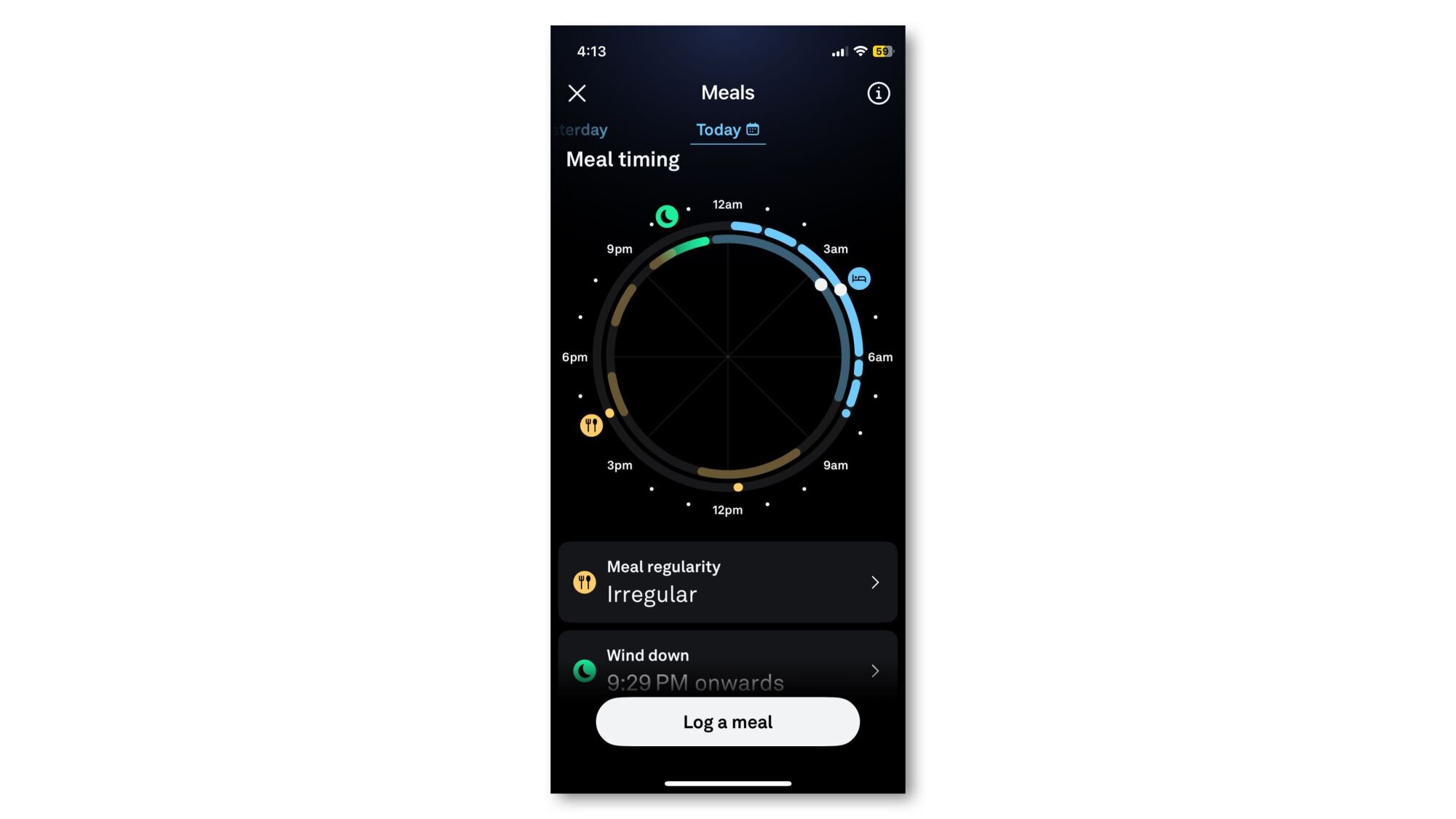
I’ve been disorganized with my eating lately, sometimes snarfing down snacks throughout the day and not sitting down to a real dinner until late in the evening. I know that late meals can affect my sleep, and that mealtimes are important for setting your body’s clock. So I was delighted to see that Oura tracks the time of meals as well as their content.
Each meal I log is shown on a circle that represents my day. My sleep times and wind-down (bedtime) hours are shown in blue and green, respectively. There’s a yellow dot for each meal I logged today, and a yellowish area showing the times I normally eat. Right now, the app judges my mealtimes as “irregular.” Harsh, but true. I can see on the circular graphic just how late I’ve been eating.
Where Oura’s Meals feature falls short
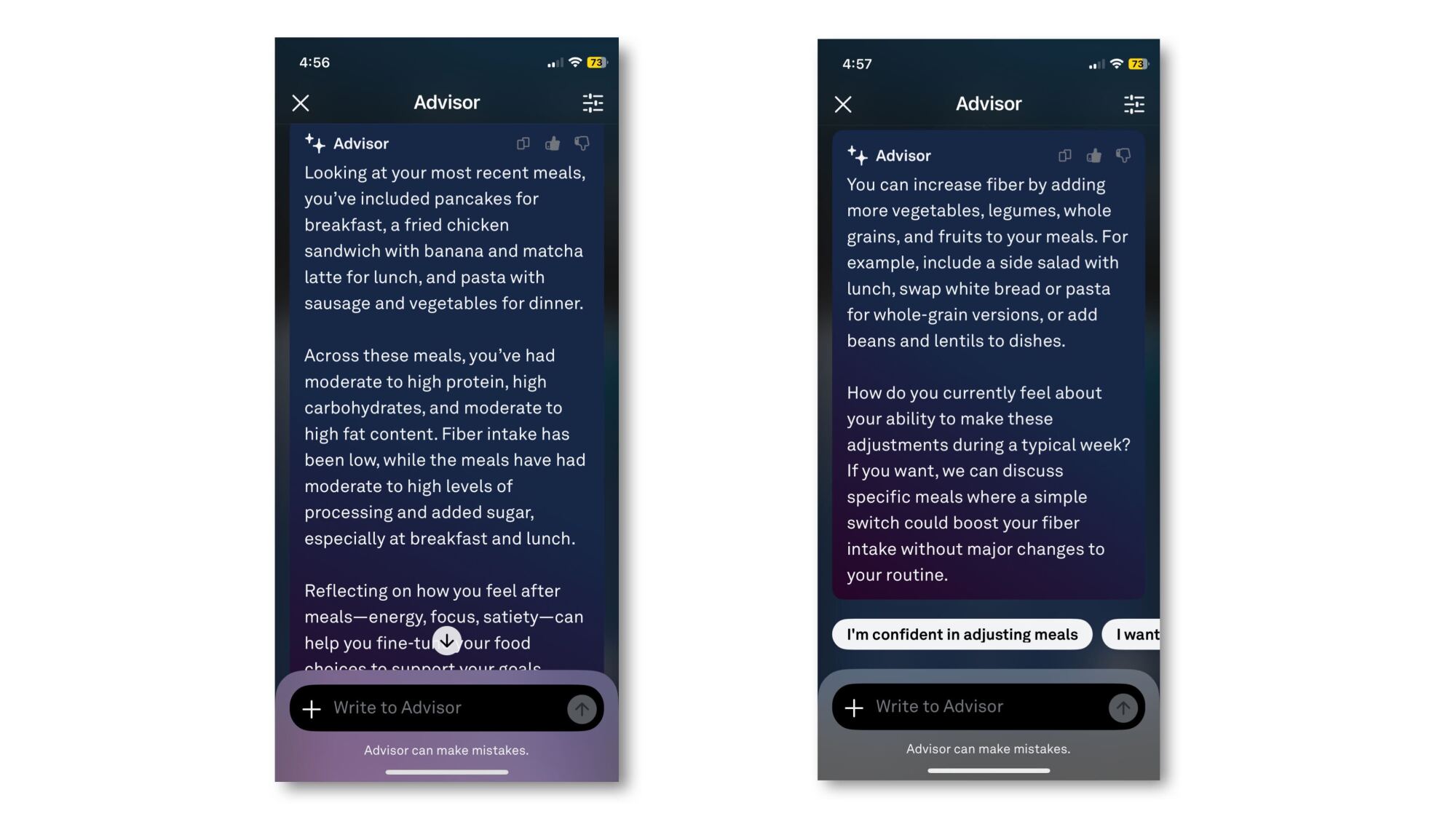
The functions of the Meals feature seem to work quite well, but so many functions are missing. For example, I can only see that nice graph of meal timing after I log a meal! There’s no way to access it just to take a peek. I tried asking the AI Advisor about my meal patterns, and it describes them to me in text, but says it can’t generate graphs or images to share with me.
I also wish I could see a summary of how I’m doing on protein, fiber, level of processing, and the other factors Oura tracks. But again, these only show up when you log a meal, and aren’t available otherwise. The Advisor will describe them to me in broad terms (“Your meals show balance, but your fiber and added sugar trends stand out”) but I hoped for better.
Another feature it’s missing—which I’m actually OK with—is that it doesn’t seem to care how much food you’re eating. It doesn’t know how many grams of protein I’ve eaten, and certainly has no clue about the number of calories. On the one hand: excellent. I don’t need another app assuming that I want to lose weight or making me measure everything as I log it. “Yes, that’s rice” is so much easier to tell the app than “I ate exactly 205 grams of rice.”
But on the other hand, the recommendations would make more sense if the app had a sense of balance. Did I eat a lot of chicken breast and a small amount of candy today, or the other way around? Those would be drastically different eating patterns, worth giving drastically different advice.
An anonymous reader quotes a report from Reuters: OpenAI has agreed to buy artificial intelligence-assisted coding tool Windsurf for about $3 billion, Bloomberg News reported on Monday, citing people familiar with the matter. The deal has not yet closed, the report added. Windsurf, formerly known as Codeium, had recently been in talks with investors including General Catalyst and Kleiner Perkins to raise funding at a $3 billion valuation, according to Bloomberg News. The report notes that the deal “would be OpenAI’s largest acquisition to date,” further complementing ChatGPT’s coding capabilities.
DoorDash has agreed to purchase British food and grocery delivery service Deliveroo for $3.9 billion, the companies have revealed in a filing with the London Stock Exchange. The acquisition will “strengthen DoorDash’s position as a leading global platform,” the filing said. Deliveroo operates in nine regions, namely Belgium, France, Italy, Ireland, Kuwait, Qatar, Singapore, United Arab Emirates and the United Kingdom. All those regions are new for DoorDash and will give the combined companies access to a total population that exceeds 1 billion people.
It doesn’t sound like DoorDash is erasing Deliveroo’s brand after it takes over. Instead, they’ll both be part of an “Enlarged Group” operating in multiple regions around the world, giving DoorDash an expanded presence in Europe and giving it an entry into the Middle Eastern market. “Both companies are highly complementary, whether in their geographic footprints or their missions, and I am confident that being part of the Enlarged Group will accelerate the realisation of Deliveroo’s full potential,” Deliveroo chair Claudia Arney said in a statement.
The acquisition is still subject to regulatory and antitrust approvals. As CNBC noted, though, this marks the end of Deliveroo’s problems as a public company. It has faced a lot of competition and legal challenges after a period of abundance for food delivery services during the COVID-19 lockdowns, and its share prices have plummeted since it went public in 2021. Before the company went public, Amazon took on the UK’s Competition and Markets Authority to become a major investor in Deliveroo. The e-commerce company was the leading investor in a funding round worth $575 million and owned a 16 percent stake in the food delivery service.
This article originally appeared on Engadget at https://www.engadget.com/apps/doordash-is-buying-british-rival-deliveroo-for-39-billion-123005055.html?src=rss
If you receive an email about your Social Security statement, proceed with caution: According to a new report from Malwarebytes Labs, hackers are impersonating the Social Security Administration (SSA) to trick people into installing a remote access tool and handing over full control of their devices.
The SSA is no stranger to phishing scams—the Office of the Inspector General put out an alert last month warning the public of fraudulent emails purporting to include Social Security statements that in reality led to fake websites.
How the Social Security phishing scam works
The current attack is the work of a phishing group known as Molatori. It begins with an email that appears to come from the SSA with the message, “Your Social Security Statement is now available” and a prompt to download an attached document. The supposed statement is actually a ScreenConnect client, which grants remote control of the affected device.
ScreenConnect is a legitimate remote support platform for IT pros to help users configure systems and resolve technical issues by allowing the same access as if they had your device in hand. Once hackers have control of your computer via ScreenConnect, they can use it for anything from installing malware to transferring files to accessing sensitive data, like bank and financial account information, all without your knowledge.
Financial fraud is believed to be the main objective for this campaign, but as always, stolen data can be used for identity theft or sold to other malicious groups.
As Malwarebytes Labs describes, this scheme is hard to identify in part because the phishing emails originate from compromised WordPress sites with legitimate domains. The email body may also be sent as an image rather than text, making it harder for filters to detect it as malicious.
How to protect yourself
All of the common cautions for avoiding phishing scams apply here. Do not click on links or download or open files or attachments sent via email, especially if the message is unsolicited. Go directly to the company’s or organization’s website to locate important documents and verify communication. Attacks that come from compromised (but legitimate) domains can be trickier to catch, so be especially wary of anything you’re instructed to download, click, or fill out from an email.
If you are unsure whether an email or message is real and safe, Malwarebytes also suggests copying some of the text into a search engine to determine if it is part of a known phishing campaign.
Apple may see further fallout over its failure to comply with a court order that led to last week’s contempt ruling. A class action suit filed on behalf of developers claims that Apple’s actions cost Pure Sweat Basketball (and other developers) revenue during the period it was found to have violated the original court order. “Had Apple complied with the injunction, as required, Pure Sweat would have been able to sell subscriptions to its app directly to its customers,” the law firm, Hagens Berman, alleges.
The original 2021 court ruling forced Apple to allow App Store developers to direct user to other payments systems so that they could bypass the 30 percent of of in-app payments taken by Apple. The App Store was supposed to stop preventing developers from including buttons or links in their apps and metadata that would allow allow users to make purchases outside the App Store environment.
However, developer Epic Games accused Apple of “malicious compliance” with the ruling because it still charged a commission of up to 27 percent on any sales made through links to external payment systems. It also said Apple came up with onerous restrictions on external buttons, among other violations.
In her ruling last week, Judge Yvonne Gonzalez Rogers said Apple “chose the most anticompetitive option” at every turn. She even alleged that Apple lied under oath to hide the truth about its actions and referred the case to a US attorney for a criminal contempt investigation.
“The court ultimately held that Apple willfully violated the injunction to protect its revenues, and then ‘reverse engineered’ justifications to proffer to the court, often with ‘lies on the witness stand,” the class action lawsuit states. “The evidence showed that while one senior Apple executive [Phil Schiller] ‘advocated that Apple comply with the injunction,’ Mr. Cook ignored this advice and allowed others in his finance team to convince him otherwise. Cook chose poorly.”
The class action seeks to recover lost revenue for up to 100,000 or more developers forced to pay Apple commissions that shouldn’t have existed. Hagens Berman obtained a $100 million settlement for iOS developers in a previous App Store class action suit.
This article originally appeared on Engadget at https://www.engadget.com/apps/apple-hit-with-class-action-suit-from-developers-after-app-store-ruling-120058208.html?src=rss
Most astronauts these days are fairly anonymous, and chances are you have never heard of Nichole Ayers. And that’s OK.
But sometimes it’s worth pausing for a moment to reflect on just how accomplished these people are. Ayers, 36, flew the supersonic F-22 stealth aircraft in the international war against the Islamic State and rose to become a major in the US Air Force before being selected as a NASA astronaut in 2021. Oh, yeah, she also completed a master’s degree in computational and applied mathematics at Rice University.
For her first spaceflight, Ayers launched on the Crew-10 mission to the International Space Station in March. This flight got a fair amount of media attention, but that was largely because the arrival of Crew-10 allowed the Crew Dragon spacecraft to which Butch Wilmore and Suni Williams were assigned to return home. Since then, Ayers has spent 50 days in space, astronauting. This included a spacewalk last week, her first, alongside veteran astronaut Anne McClain.
If you’re sensing the world right now is becoming more and more unhinged, you’re not alone. Fortunately there’s a podcast poking holes in your subject of choice, whether that be diet culture, science journals, airport books, or Bill Maher specifically. With research and often a sense of humor, these shows break down some of the messages we are getting online, in the news, and across all sorts of media, explaining why you’re not crazy, it isn’t you, and why some of the systems we have right now (looking at you, capitalism) are broken.
Normal Curves
Credit: Normal Curves
Normal Curves is kind of like a science book club—on every episode, stat-savvy friends (and professors) Regina Nuzzo and Kristin Sainani help make sense of academic journals that have made their way to mainstream and pop culture. Examples include The Sweaty T-Shirt Study, which said you could find a perfect mate by smelling their sweat, and the The Red Dress Effect, which said that women in red were sexier. They’re the ones you can count on to dissect the data, challenge the claims, and arm you with tools to assess scientific studies on your own.
Diabolical Lies
Credit: Diabolical Lies
Is tradwife TikTok confusing the heck out of you? Wondering why capitalism feels like a scam wrapped in a vibe? Allow me to introduce you to Diabolical Lies, your new favorite rabbit hole. Hosted by Katie Gatti Tassin and Caro Claire Burke, this long-form (episodes are upwards of three hours long) podcast is part cultural critique, part political roast, and fully addictive. Katie and Caro named their show Diabolical Lies to poke fun at something Kansas City Chiefs kicker Harrison Butker in a speech, that “it’s the women who have had the most diabolical lies told to you,” suggesting that feminism is the source of our unhappiness. Katie and Caro point their fingers at capitalism, patriarchy, and white supremacy, instead. They hold everything, from the yassification of Christian nationalism to the myth of the girl boss, all to the fire while making you laugh, think, and maybe (probably) get a little mad.
Corporate Gossip
Credit: Corporate Gossip
If you think the best true-crime is white collar crime, you might want to tune into Corporate Gossip, which is all about the shady stuff that happens in board rooms and business deals. Hosts (and siblings) Becca and Adam Platsky use tons of research and storytelling to tell the truth behind eBay, the WWE and Vince McMahon, Sam Bankman-Fried and FTX, Enron, and more. The topics are serious, but the vibe is casual and often hilarious.
Oddly Specific
Credit: Oddly Specific
Meredith Lynch (who you may recognize from TikTok) has one foot in pop culture and the other in politics—and her show represents that. Oddly Specific features a bit of everything, from the problem with dollar stores to the prison industrial complex. Experts come on to cover things they’re passionate about, and Meredith has a good way of explaining the basics of the subject at hand, exposing its problems, and helping you understand why it matters to you, your wallet, and your everyday life.
Bad Therapist
Credit: Bad Therapist
If you’ve ever side-eyed an Instagram carousel telling you to “cut off anyone who drains your energy,” there’s a chance you’ve been served some therapy speak. Fortunately, the podcast Bad Therapist is here to help. Psychotherapist Ash Compton and journalist Rachel Monroe are pro-therapy, but they are also pro-skewering the bad actors who use pop psych cliches and weaponize wellness to make a living from it, usually taking advantage of people who actually need real help. Whether they’re dissecting therapeutic communes, conversion therapy, or life coaches, all roads lead to grifting. Along the way, you’re always in for some history, cultural analysis, and humor.
If Books Could Kill
Credit: If Books Could Kill
You know those best-selling books—the ones that often promote miracle diets, pop psychology, pseudo-science, and reskinned versions of The Secret—sold at the airport that seem to take the country by storm, one book at a time? Michael Hobbes (original co-host of You’re Wrong About and co-host of Maintenance Phase) and Peter Shamshiri host If Books Could Kill, a podcast about those books and how they shape our culture and ruin our minds. (There is actually an entire episode dedicated to The Secret.) Together they point out the lack of citations, vague references, and fear-based marketing you find in every page. Episodes swing from hefty (the episode on Liberal Facism) to lighter and silly (there’s a great one on Who Moved My Cheese?).
The Dream
Credit: The Dream
Seasons one and two ofThe Dream are about multilevel marketing schemes and fraud in the wellness industry, but the show has since been turned into a weekly interview show. Its episodes now focus on a myriad of subjects, but they’re all generally about critiquing the people, industries, and concepts that make “the American Dream” unmanageable. Hosted by This American Life alum Jane Marie, episodes cover the MAHA movement, abortion bans, cults, divorce, and more. Jane Marie is a top-notch storyteller and interviewer—even episodes that feel heavy have a lightness to them.
5-4
Credit: 5-4
Hosted by Peter Routhier (If Books Could Kill), Rhiannon Brown, and Michael F. Vecchione,5-4provides a funny, liberal perspective on the rulings of the U.S. Supreme Court, often illustrating how much SCOTUS totally sucks. Always from a progressive point of view, each episode analyzes and discusses a single Supreme Court decision, providing an accessible and engaging way for listeners to learn about the high court’s biases surrounding hot-button issues like affirmative action, gun rights, and campaign finance. It clears the fog from our court system and clarifies how often the Supreme Court perpetuates unjust outcomes for marginalized groups.
Knowledge Fight
Credit: Knowledge Fight
Dan Friesen and Jordan Holmes keep close tabs on Alex Jones so you don’t have to. Each week on Knowledge Fight they review recent clips from Jones’ Infowars programming and try to make sense of it all. They go deep (and some of the content is dark) but Dan and Jordan are funny enough to make it both a wild ride and an enjoyable listen. There’s no better way to learn about conspiracy theories than to study the people steeped in them, and this show is like Cliff’s Notes for the source of many of the wildest theories taking hold of America.
Maintenance Phase
Credit: Maintenance Phase
When Michael Hobbes left You’re Wrong About, he put his energy into Maintenance Phase, a show he co-hosts with Aubrey Gordon that explores and critiques popular health and wellness trends and products. With tons of notes and a lot of rage-laughter, Michael and Aubrey run through the the worst diets, exercise trends, supplements and beauty products, and “nutrition” books, and evaluate whether they are actually effective or if they are based on misleading or harmful information. (It’s almost always the latter.) If you hate the BMI, were led astray by the food pyramid in the ‘90s, or roll your eyes every time your friend goes on and on about their latest cleanse, you’ll appreciate their myth-busting efforts.
I Hate Bill Maher
Credit: I Hate Bill Maher
Comedian Will Weldon hates Bill Maher so much that he created an entire podcast about it. Every episode of his show, I Hate Bill Maher, is a takedown of Bill Maher in general, but specifically his TV show Real Time and his podcast Club Random, episode by episode. Will is dead set on pointing out some of the superficial, misogynistic, and transphobic things Bill has said, as well as how lazy some of his comedy can be. He’ll even dip back into old episodes of Real Time to prove how much Bill’s opinions have changed over the years. (Not much.) Some call it petty, some call it a public service. Listen to the Emma Arnold episode—Will interviews her about the time she got to tag along on Bill’s annual New Year trip to Hawaii.
It’s been eight years since Nintendo released its revolutionary hybrid console, and while many have spent the last couple of those itching for sequel hardware, it’s a good time to recall how Nintendo smashed expectations and continued to forge its own path in gaming, graphical fidelity be damned.
Whether it was its core conceit — a handheld and a TV-connected console — or Nintendo’s continued production line of hit games, which included arguably the best game of the decade, we have a lot to say. And let’s not forget the Switch came before the Steam Deck and the tidal wave of handheld gaming PCs that have appeared in recent years. Nintendo proved people would play triple-A games without being tethered to their TV.
We’ve pulled together some of the Engadget team’s reflections. I love to say “reflections”.
A judge’s ruling this week may have finally ended Apple’s anti-competitive app commissions.
Judge Yvonne Gonzalez Rogers ruled that Apple was using loopholes to circumvent her own ruling against the company from 2021. Companies are wasting no time streamlining payments outside of Apple’s walled garden, and Spotify is the latest to make these changes.
With the latest update available in the App Store, the Spotify app has added external links, so it can advertise lower prices and different tiers without giving nearly a third of its revenue generated back to Apple.
This could be a major change for the App Store ecosystem and Apple’s business if it comes into effect. Developers would no longer have to fork over 30 percent of iOS app revenue to Apple, which could cost the company billions. Spotify and Netflix are among the major companies that don’t allow users to sign up for a subscription through their iOS apps, due to the cut Apple takes.
Netflix has released a teaser trailer for the final season of Squid Game. It suggests that the games restart after a failed uprising led by the show’s protagonist, Seong Gi-hun, or Player 456.
In the teaser, Player 456 is brought back into a room full of players — inside a coffin. When he wakes up, the games resume, players are segregated into groups, mother and son are separated and, curiously, there’s a baby crying by the end of the teaser.
For the first time, Google is breaking out some Android updates into a separate event.
Google’s annual I/O developer conference is coming on May 20, but for the first time, there are two events. The classic I/O 2025 kicks off on May 20, and a week earlier, on May 13, there’s also The Android Show: I/O Edition, a dedicated showcase for, you guessed it, Android.
Google’s I/O keynote will be available to watch on Google’s YouTube channel and right here once the livestream is up on May 20 at 1PM ET. The Android Show: I/O Edition will also go up on Google’s Android YouTube channel on May 13 at 1PM ET — we’ve already embedded it above. Oh, and here’s what we’re expecting to see.
“Another year, yet another Hugo Awards-adjacent controversy?” writes Gizmodo’s Cheryl Eddy, reporting that three key organizers of the 2025 Seattle Worldcon resigned after backlash over the use of ChatGPT to vet program participants. From the report: In a post on Bluesky co-signed by Hugo administrator Nicholas Whyte, deputy Hugo administrator Esther MacCallum-Stewart, and World Science Fiction Society division head Cassidy, the trio announced they were resigning from their roles ahead of the Seattle event, which takes place in August. “We want to reaffirm that no LLMs or generative AI have been used in the Hugo Awards process at any stage,” the statement read in part, which might turn the heads of anyone who is a) interested in the Hugos, but b) not up on the latest controversy.
However, plenty of people in the community are well aware of what’s been going on. A quick journey to the blog File 770 will bring you up to speed, as will a visit to Seattle Worldcon 2025’s own site, which on April 30 shared a post clarifying exactly what role AI played in the upcoming event. […] However, as File 770 pointed out, the damage has apparently already been done: the use of ChatGPT in any capacity in connection to Worldcon created a furor on social media. It also inspired at least one Hugo nominee to remove their book from contention: Yoon Ha Lee, whose Moonstorm was named a Lodestar Award finalist, which honors YA releases. In a May 1 post on Bluesky, the author linked to the April 30 Worldcon blog post noted above, and noted he was withdrawing the title from consideration.
Then, in a post shared today responding to File 770’s latest post announcing the resignations, the author wrote âoeAll respect and I’m grateful to them for their work, sorry [things] came to this pass.” Seattle Worldcon 2025 takes place August 13-17; the Hugo Awards will be handed out August 16.