Google starts rolling out Gemini in Chrome to users in Canada, India and New Zealand

At the start of the year, Google brought a host of new Gemini-powered features, including built-in Nano Banana image generation, to Chrome. After debuting in the United States, those features are now making their way to Chrome users in Canada, India and New Zealand, with support for 50 additional in tow. Among the new languages Gemini in Chrome can now converse in are French, Gujarati, Hindi and Spanish.   

To try out Gemini in Chrome, tap the sparkle icon at the top right of the interface. This will open the sidebar interface Google introduced in January. From there, you can chat with the company’s Gemini chatbot without the need to switch tabs. From the sidebar, you can also access Google’s in-house image generator. Additionally, Gemini in Chrome offers integrations with Gmail, Maps, Calendar, YouTube and other Google apps. If you live outside Canada, India or New Zealand, Google says it will make Gemini in Chrome available in more countries and languages throughout the rest of 2026. Oh, and if don’t want to use Gemini in Chrome, you can right click on the sparkle icon and select unpin to never see it again.

This article originally appeared on Engadget at https://www.engadget.com/ai/google-starts-rolling-out-gemini-in-chrome-to-users-in-canada-india-and-new-zealand-023000528.html?src=rss

Tony Hoare, Turing Award-Winning Computer Scientist Behind QuickSort, Dies At 92

Tony Hoare, the Turing Award-winning pioneer who created the Quicksort algorithm, developed Hoare logic, and advanced theories of concurrency and structured programming, has died at age 92.

News of his passing was shared today in a blog post. The site I Programmer also commemorated Hoare in a post highlighting his contributions to computer science and the lasting impact of his work. Personal accounts have been shared on Hacker News and Reddit.

Many Slashdotters may know Hoare for his aphorism regarding software design: “There are two ways of constructing a software design: One way is to make it so simple that there are obviously no deficiencies, and the other way is to make it so complicated that there are no obvious deficiencies. The first method is far more difficult.”


Read more of this story at Slashdot.

You Can Get ClearVPN, an Easy, Beginner-Friendly VPN Setup, on Sale for Just $20 Right Now

We may earn a commission from links on this page. Deal pricing and availability subject to change after time of publication.

VPNs tend to fall into two camps: Some are packed with settings and server lists that assume you know what you’re doing, while others aim to disappear and run silently in the background. The ClearVPN Premium Plan sits firmly in the latter category, and right now, a one-year subscription is on sale for $19.99 on StackSocial, down from $119.88. The price alone makes it worth a look, but it’s especially worth trying if a simplified VPN fits your internet use. ClearVPN isn’t a power user’s playground. It’s built for people who want protection without fiddling with settings every time they connect.

Using ClearVPN feels closer to flipping a switch than configuring a tool. You simply open the app and tap once, and the connection is live. Under the hood, it uses AES-256 encryption, the same standard used by banks and security-focused services, along with OpenVPN and IKEv2 protocols to keep connections stable. In real terms, that means your traffic is scrambled and harder to intercept when you’re on public wifi at airports, cafés, or hotels. The service offers access to more than 55 servers worldwide, which is enough for general browsing and basic location switching, though it’s not as extensive as larger VPN networks. You can run it on up to six devices at the same time, covering a phone, a laptop, and a few shared devices at home. It works across Windows, macOS, iOS, iPadOS, and Android, and updates are included during the subscription.

ClearVPN follows a strict no-logs policy, meaning it doesn’t collect or store your browsing activity, IP address, or personal data. At the same time, this isn’t a VPN aimed at advanced users who want deep server control, niche locations, or constant manual tweaking. The smaller server count may matter if you rely on very specific regions or heavy streaming access. You also need to redeem the deal within 30 days of purchase, and access lasts exactly one year.

For everyday browsing, basic privacy, and simple protection that runs quietly in the background, ClearVPN does its job well. If you want endless customization or the largest network possible, it may feel limited, but for people who value ease, clarity, and a low yearly cost, this deal makes online security feel far less complicated: ClearVPN Premium is on sale for $19.99 for a full year on StackSocial, down from $119.88.

Our Best Editor-Vetted Tech Deals Right Now

Deals are selected by our commerce team

Reentry of NASA satellite will exceed the agency’s own risk guidelines

A NASA satellite that spent more than a decade coursing through the Van Allen radiation belts encircling Earth is about to fall back into the atmosphere.

Most of the spacecraft will burn up during reentry, but a fraction of the material making up the 1,323-pound (600-kilogram) satellite will likely reach Earth’s surface without vaporizing in the atmosphere. Uncontrolled reentries of satellites with comparable mass happen quite regularly—multiple times per month, according to one recent study—but most of them are older spacecraft or spent rocket bodies.

This reentry is notable because it poses a higher risk to the public than the US government typically allows. The risk of harm coming to anyone on Earth is still low, approximately 1 in 4,200, but it exceeds the government standard of a 1 in 10,000 chance of an uncontrolled reentry causing a casualty.

Read full article

Comments

Royal Caribbean Cruises Builds World’s Largest Swim-Up Bar

Because overindulgence is the name of the cruise game, Royal Caribbean has built the world’s largest swim-up bar. Part of the company’s Royal Beach Club on its private Paradise Island, the bar features over 100 seats in the pool. Damn, that’s a lot of seats! That is also a lot of pee in the pool.You think sunburnt Joe with the Tasmanian devil tattoo and six empty Bahama Mamas in front of him is going to get out to go to the bathroom? He’s too afraid somebody will steal his seat!

Intel Demos Chip To Compute With Encrypted Data

An anonymous reader quotes a report from IEEE Spectrum: Worried that your latest ask to a cloud-based AI reveals a bit too much about you? Want to know your genetic risk of disease without revealing it to the services that compute the answer? There is a way to do computing on encrypted data without ever having it decrypted. It’s called fully homomorphic encryption, or FHE. But there’s a rather large catch. It can take thousands — even tens of thousands — of times longer to compute on today’s CPUs and GPUs than simply working with the decrypted data. So universities, startups, and at least one processor giant have been working on specialized chips that could close that gap. Last month at the IEEE International Solid-State Circuits Conference (ISSCC) in San Francisco, Intel demonstrated its answer, Heracles, which sped up FHE computing tasks as much as 5,000-fold compared to a top-of the-line Intel server CPU.

Startups are racing to beat Intel and each other to commercialization. But Sanu Mathew, who leads security circuits research at Intel, believes the CPU giant has a big lead, because its chip can do more computing than any other FHE accelerator yet built. “Heracles is the first hardware that works at scale,” he says. The scale is measurable both physically and in compute performance. While other FHE research chips have been in the range of 10 square millimeters or less, Heracles is about 20 times that size and is built using Intel’s most advanced, 3-nanometer FinFET technology. And it’s flanked inside a liquid-cooled package by two 24-gigabyte high-bandwidth memory chips—a configuration usually seen only in GPUs for training AI.

In terms of scaling compute performance, Heracles showed muscle in live demonstrations at ISSCC. At its heart the demo was a simple private query to a secure server. It simulated a request by a voter to make sure that her ballot had been registered correctly. The state, in this case, has an encrypted database of voters and their votes. To maintain her privacy, the voter would not want to have her ballot information decrypted at any point; so using FHE, she encrypts her ID and vote and sends it to the government database. There, without decrypting it, the system determines if it is a match and returns an encrypted answer, which she then decrypts on her side. On an Intel Xeon server CPU, the process took 15 milliseconds. Heracles did it in 14 microseconds. While that difference isn’t something a single human would notice, verifying 100 million voter ballots adds up to more than 17 days of CPU work versus a mere 23 minutes on Heracles.


Read more of this story at Slashdot.

H&R Block Deluxe + State 2025 Is 50% Off Before the Tax Deadline

We may earn a commission from links on this page. Deal pricing and availability subject to change after time of publication.

Handing your taxes off to an accountant isn’t always necessary, but doing everything blind isn’t ideal either. H&R Block Deluxe + State 2025 fills the space in between: It’s built for people whose returns go beyond a single W-2, without turning the process into a spreadsheet nightmare. Right now, it’s on sale for 50% off at $29.97 on StackSocial, down from $59.99, which puts it firmly in “worth considering” territory if you want structure for filing your taxes without outsourcing the whole job. This version is limited to U.S. filers and a single state, and the license needs to be redeemed within 30 days of purchase to use it for the 2025 tax year.

The experience is less about filling out tax forms and more about responding to clear, step-by-step prompts. The software runs locally on both Windows and Mac, so you’re not locked into a browser session, and you can pause and pick things back up without losing progress. Built-in import tools pull information from W-2s, 1099s, and even prior-year TurboTax or Quicken returns, reducing the need to re-enter the same data year after year. And this Deluxe tier is geared toward situations that usually cause stress—mortgage interest, property taxes, investment income, stock sales, and retirement distributions—so the guidance is more detailed where mistakes are most common.

You can e-file up to five federal returns at no additional cost, which is handy if you’re filing for family members. One state return is included, though electronic state filing costs extra ($19.95) and isn’t available everywhere, something to factor into the total price. There’s also a searchable help library with thousands of articles, plus audit support that includes in-person representation if the IRS ever comes knocking. A newer AI Tax Assist tool offers real-time explanations during filing, which can be useful for quick clarity, though it’s not a substitute for professional advice in complex cases.

The H&R Block Deluxe + State 2025 tax software is on sale for $29.97 on StackSocial, down from $59.99. It helps homeowners, investors, and retirees file federal and state taxes with guided questions, import tools, and audit support, and is a practical middle ground between DIY software and hiring an accountant.

Our Best Editor-Vetted Tech Deals Right Now

Deals are selected by our commerce team

You Can Get Microsoft Visual Studio Pro 2026 on Sale for Just $50 Right Now

We may earn a commission from links on this page. Deal pricing and availability subject to change after time of publication.

Microsoft’s flagship development tool, Visual Studio Professional 2026, reduces much of the friction that used to come with large projects, and it’s on sale for $49.99 on StackSocial right now, which is far less than what most developers expect to pay for a professional-grade IDE.

Microsoft Visual Studio Professional 2026 is a desktop-only Windows product built as a 64-bit application, clearly aimed at people working on real-world codebases. Think multi-project solutions, long build times, and code that’s touched by more than one person. In day-to-day use, the biggest benefit is the context the software provides while you work. Visual Studio 2026 supports C#, C++, .NET, ASP.NET, Blazor, and .NET MAUI, so you can move between desktop, web, and cross-platform projects without switching tools. You also get Hot Reload, which helps reduce rebuild time by letting you edit code in .NET and C++ apps and see changes immediately. And CodeLens adds useful context right inside the editor—who last edited a method, which tests cover it, and whether recent changes broke anything—without forcing you to dig through menus or version history. The software’s AI-powered IntelliCode suggestions also feel more restrained than flashy. They tend to fill in logical patterns based on your existing code. It saves time on repetitive work, but you’ll still want to read what it writes.

Collaboration is another area where this version earns its keep. Live Share allows teammates to jump into a debugging or editing session without cloning the repo or matching environments. That’s useful for code reviews or troubleshooting, but it depends heavily on a stable internet connection. System requirements are also worth noting: While it can technically run on 4GB of RAM, 8GB or more is far more realistic, especially for larger solutions, and storage needs can balloon depending on workloads, reaching well over 100GB in some setups. Also, it doesn’t support 32-bit systems and won’t run on mobile devices or Chromebooks. For developers already working in the Windows ecosystem, this is a solid long-term license. For everyone else, those limitations can be deal breakers.

Microsoft Visual Studio Professional 2026 is a full-featured, 64-bit IDE for Windows designed for developers working on complex, multi-project codebases, and it’s on sale right now for a one-time price of $49.99 on StackSocial.

Our Best Editor-Vetted Tech Deals Right Now

Deals are selected by our commerce team

10 Hacks Every NotebookLM User Should Know

Google may spend more time promoting its Gemini AI chatbot, but NotebookLM (the LM stands for Language Model) is built on the same underlying AI, and it takes the analysis and deep dive features up a notch.

NotebookLM is built around the idea of a digital notebook, where various different sources are gathered together and scrutinized. Using data you import, NotebookLM can produce everything from video explainers, to podcasts, to presentation slides, to flashcard study aids from your selected sources.

It’s an app packed with features, available on the web, on Android, and on iOS. If you’ve tried it out and you’re ready to level up your NotebookLM experience beyond the basics, these 10 tips will take you there.

You can make NotebookLM to find its own sources

The traditional way to get started with NotebookLM is to feed it one or more sources—PDFs, web links, or YouTube videos for example—but the app can actually head out on the web and find its own relevant sources too.

If you want to research and explore a topic but are starting from scratch, this can be really useful. The Search the web box is in the Sources panel, and you can choose between Fast research and Deep research, depending on how quickly you want your results back.

When the results appear, select the ones you’d like to use and click Import. You can continue to look for new sources as needed, tweaking the information you’re searching for each time.

You can be a “guest” on your Audio Overview podcasts

NotebookLM Audio Overview
Become part of your AI podcasts with the Join button.
Credit: Lifehacker

You may have played around with the Audio Overview feature in NotebookLM already, which lets you create realistic-sounding podcasts from your material, but there’s a way to add your own interjections to these podcasts—like a caller ringing into a radio station.

Click the waving hand icon next to any Audio Overview to go into interactive mode, and when you’ve got something to say, click Join. The AI hosts will break to let you have your say, and then respond to your comment or question before resuming the podcast.

You can make NotebookLM show you overviews of individual sources without typing any prompts

Once you’ve uploaded all your materials into NotebookLM, you’re probably going to want to busy yourself with asking questions about them, but you can make NotebookLM provide brief overviews of your sources without typing any prompts.

Select an individual source from the Sources pane and you’ll see a Source guide up at the top: This is a handy AI-generated overview of the source and the content it contains. It will give you a good understanding of the material, and help you decide if it is a source you want to include in future queries. There are also tags down at the bottom of the guide that cover the key subjects in the source—click on any of these to get NotebookLM to tell you more about that subject in particular.

You can give each chat with NotebookLM its own personality

NotebookLM custom chat
You can heavily customize how NotebookLM responds.
Credit: Lifehacker

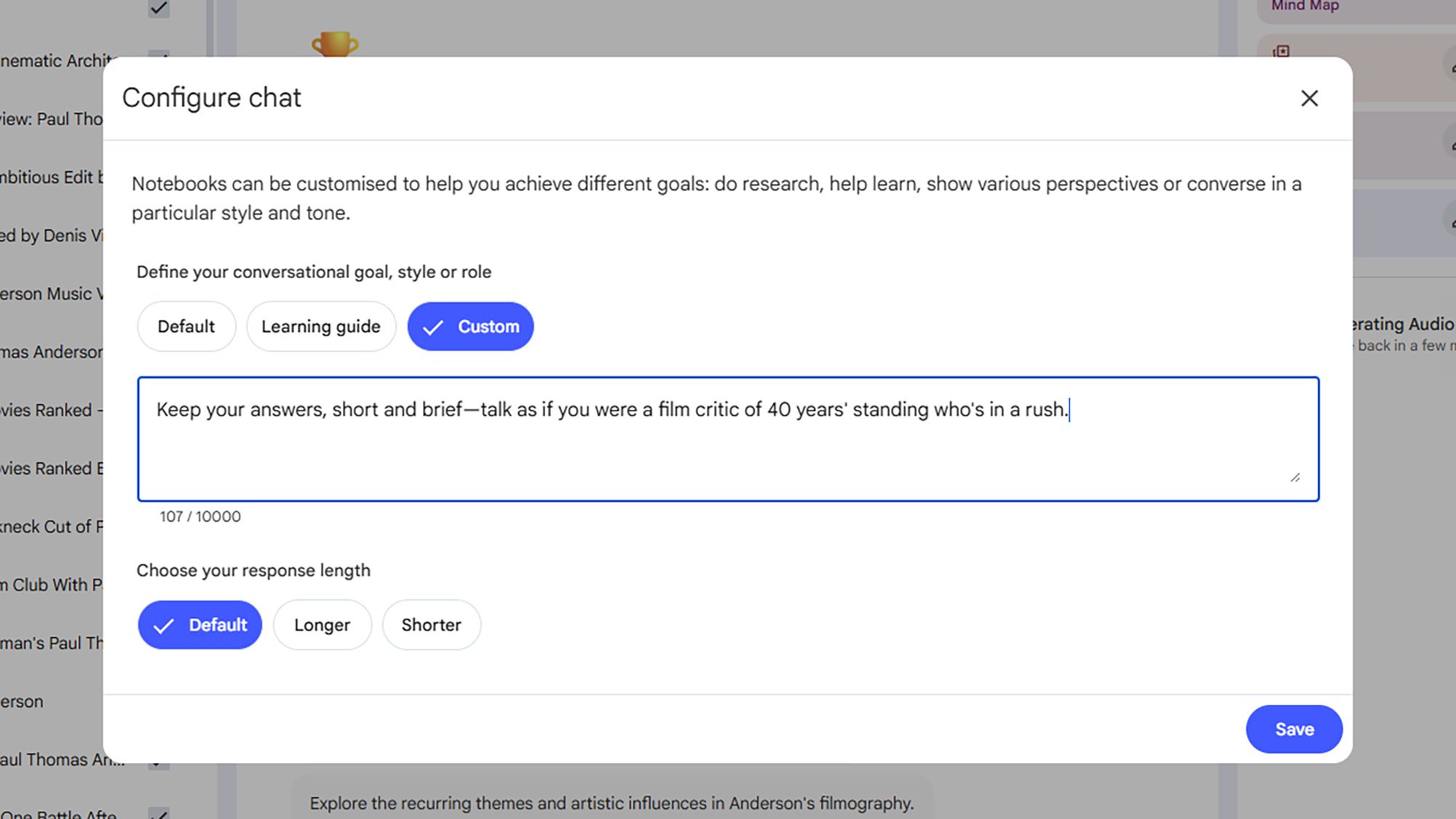
Up at the top of each Chat pane there’s a configuration button (it looks like three sliders). Click this, then select Custom to get specific about how you want NotebookLM to respond in this conversation: You can ask it to play a certain role, tailor its output to a particular audience, or work towards a set goal.

For example, you can ask for replies to be aimed at a high school level of understanding, indicate that you’re writing up a report for a board meeting, or get the AI to break down its responses into short, separated bullet points. The instructions you give it here get applied for the rest of the chat, until you change them again.

You can upload existing slideshows for NotebookLM to use as an example when making yours

NotebookLM is able to produce presentations based on your sources—either with a prompt or via the Slide deck option in the Studio panel—but it can sometimes be tricky to get these presentations looking exactly the way you want.

You can fix this by uploading an existing slideshow and using it as a reference point. Add it as a source, and then refer to the name of the file in your request for a new presentation: Just tell NotebookLM to use the existing slideshow as a style template, and it will.

NotebookLM’s sharing options can your notebooks with the world

NotebookLM public notebooks
NotebookLM notebooks can be made public.
Credit: Lifehacker

You don’t have to keep your notebooks to yourself: While clicking the Share button on a notebook page will allow you to collaborate with other people on projects (and you get controls over how much they can edit and view), you have more options than that. If you select Anyone with a link under Notebook access, then click Copy link, you’ll get a URL you can share with anyone, or post publicly on the web. (Here’s one on the Made by Google 2025 event.)

This link will lead anyone who finds it directly to your notebook. They will get their own private chat history, but they won’t be able to make any changes to sources or Studio materials.

You can use NotebookLM to sort your Google Drive

As you might expect, NotebookLM works well with other Google apps, and if you’re comfortable giving it access to your files then the AI tool can work really well as a way of searching through your Google Drive and pulling out information from it.

When you click Add sources, you then need to click the Web drop-down menu and pick Drive instead. Enter something you’re looking for, and you’ll get a list of matches from your Drive storage: You can then use the checkboxes to decide which files to import.

Whether you’re working on your next novel or trying to wrangle data from multiple spreadsheets for a business report, it makes it easy to mine the data inside whatever you’ve got stored in Google Drive.

You can tailor the sources for each prompt

NotebookLM sources
Select different sources for different prompts.
Credit: Lifehacker

You don’t have to use every source for every prompt: Use the checkboxes next to each entry in the Sources panel to tell NotebookLM where to pull its information from (the sources overview mentioned above can be helpful here). There might well be times when you want to analyze every source except one, or you just want to focus on one specific source—maybe you have a bunch of reports you’re analyzing and there’s one in particular you want to interrogate, for example.

Use Google Docs to deliver more complex prompts

If you’re working on really complex prompts—full of instructions, references, and multi-level queries—then these can work best as separate documents within your notebook. It means you’ve got more flexibility when composing and editing them, and once they have been made, you can refer to them again and again.

Make a new Google Docs document and then compose your prompt instructions as required—you can even split it up with headings and bullet points if needed. Then, add it as a source in NotebookLM.

For your next prompt, reference the name of the document and ask NotebookLM to use its contents as a framework for what it should do next. The AI will confirm that it’s read and understood the document, and then proceeds as instructed.

Pull information from all of your notebooks at once by uploading them to Gemini

NotebookLM Gemini integration
Your notebooks are available through Gemini too.
Credit: Lifehacker

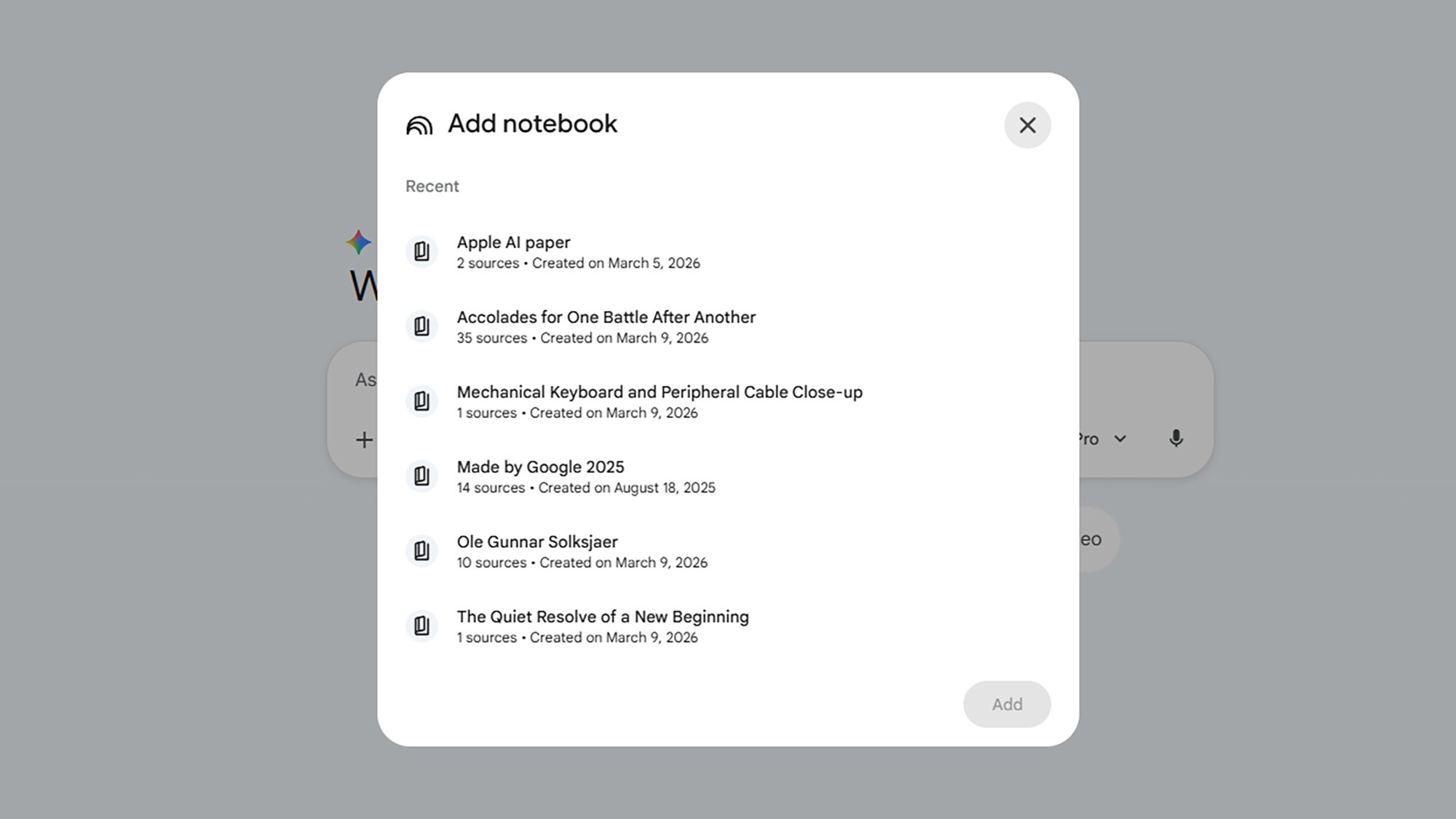
Your NotebookLM notebooks will also be available in the Google Gemini app. Select the + (plus) button next to the Gemini prompt box, and NotebookLM comes up as an option. You can then pick one or more notebooks to import. There are lots of ways that this can be useful, from using Gemini to create videos and images based on your collected material, to running prompts that analyze multiple notebooks at once (saving you having to switch between them in NotebookLM).

FDA contradicts Trump admin, declines to approve generic drug for autism

In September, the Trump administration took what it called “bold actions” on autism that included touting the generic drug leucovorin as a promising treatment. In a news release, Marty Makary, commissioner of the Food and Drug Administration, claimed a “growing body of evidence suggests” the drug could be helpful. And at a White House press event, Makary suggested it might help “20, 40, 50 percent of kids with autism.”

“Hundreds of thousands of kids, in my opinion, will benefit,” he said at another point in the event.

The bold claims were apparently persuasive. A study published in The Lancet last week found that new outpatient prescriptions of leucovorin for children ages 5 to 17 shot up 71 percent in the three months after the Trump administration’s actions.

Read full article

Comments

10 Hacks Every Laptop Gamer Should Know

A good gaming laptop can be worth its (surprisingly heavy) weight in gold for gamers on the go. However, unlike traditional consoles or handhelds, it can take a lot of fiddling to get the best performance out of yours. If you haven’t dug into all the arcane settings and features of your gaming laptop, I’ve rounded up some of my favorite hacks and tips for boosting your performance.

Always use your included charger for the best performance

If you’re used to using a laptop mainly for work, you probably haven’t thought too much about the specifics of your power supply. For a gaming laptop, though, it can matter a lot. Running high-end, graphics-intensive games requires a lot of power, and most laptops will try to limit power consumption when they’re not connected to a power source.

While most gaming laptops can charge the battery from a generic USB-C charger, if yours comes with a proprietary charger, use that instead. These are usually designed to support the load needed to run your GPU at full strength. If you rely on a weak USB-C charger, it’s possible to continue to drain the battery even while it’s plugged in.

Use a clean and stable surface to maintain proper airflow

Gaming laptops get hot, hotter than your average laptop usually will, and that means ventilation matters a lot more. Most gaming laptops have plenty of fans and vents along the bottom and sides, and it’s important to keep these clear, especially while actively playing games. Be sure to blow out the dust every once in a while to keep the air flowing.

It’s also important to use your gaming laptop on a flat, hard surface. If you put your laptop on a pillow, bed, or blanket, the soft surface can block your vents, trapping heat and making your system run worse. A good lap desk or laptop stand can help prop up your device, with plenty of airflow underneath and around it to help keep it cool.

Use an SSD for everything you can

There’s a decent chance that your gaming laptop already has an SSD installed, or at least has the option to upgrade to one (more on that below). If it’s not already the default, though, you can get a substantial performance boost by installing your games on an SSD, if not the entire OS itself. SSDs offer much faster loading speeds than platter-style drives, meaning you spend less time stuck on loading screens in your games.

If you don’t have an SSD installed in your gaming laptop—or you just need extra space—you can use an external drive to install games. Just make sure that the external drive uses a fast connection like Thunderbolt 4 (or 5, on newer devices) so you don’t give yourself an unnecessary bottleneck. 

Limit your display’s refresh rate to boost battery life

Battery life comes at a premium on gaming laptops, so it’s important to make sure your power saver settings are optimized. You can use the built-in Windows settings to limit your screen’s refresh rate or turn off the screen sooner when you’re on battery power, as opposed to plugged into a charger.

Many companies like Razer, MSI, and Asus also have their own software that can be used to further customize power settings. These will vary by manufacturer, so poke around in the software that comes bundled with your gaming laptop to see what options are available to you. In most cases, you’ll have tools to balance performance against battery drain, so if you’d rather game for longer–albeit at lower performance–you should find some features to help you.

Lower your games’ frame rates for additional battery life

Part of what makes gaming laptops draw so much power is the intense graphical calculations that modern games require. However, that means you can also save power by fiddling with the graphics settings in your games, and turning off some of the more demanding features.

One of the biggest power drains is super high frame rates. For most single-player games, 60 frames per second is probably enough to get by, so if you’re running games at 120 fps or higher, try setting a limit when you’re on battery power. Ray-tracing features can also be a significant power suck, so unless you need really high-detail graphics, you can try disabling these. The options available will differ in specific games, so check the settings for each game to see what options are available to you.

Use a docking station for a full PC experience

A powerful gaming laptop can be a great alternative to a full-size desktop, but with a docking station, you can get the best of both worlds. A decent docking station allows you to plug in a gaming monitor, keyboard, and a proper mouse, all from a single cable running to your laptop.

Some of the higher end docking stations can also provide enough power to your gaming laptop to keep it charged, even while you’re playing. Once again, it’s a good idea to check the power demands of your laptop, and how much power your docking station can supply before setting this up, though. If all else fails, just plug in the proprietary charger that came with your laptop in addition to the cable running to your dock.

Delete bloatware and end background processes

Manufacturers like to bundle software you don’t particularly need with their devices. Most of the time, it doesn’t impact performance too much, but it can be worth spending a bit of time to either delete or disable all the junk that might be running in the background on your machine.

Much of the bloat that comes with Windows can be deleted with a simple command. If you’d rather be more precise, you can press Ctrl-Shift-Esc on Windows to pull up the Task Manager to see what processes are running. Here, you can also check out the Startup tab to see what apps are running when you start your machine. While it’s not a great idea to just start slashing anything you don’t recognize, this can be a good way to find apps that are hogging resources that you don’t actually need.

Upgrade your new laptop with hardware from your old machine

Most of the time, laptops aren’t too upgradeable, but some gaming laptops will have options to add extra RAM or even upgrade the internal storage options. Depending on your model, it’s worth checking to see if you can pick up some physical upgrades to your device.

Of course, at the time of writing, RAM prices are insanely overpriced, and SSDs aren’t doing too hot, either. You can save a bit of money by buying used components or even swapping out parts from older devices. If you recently upgraded from one laptop with removable RAM to another, make sure to swap your older parts into the new one. Even if you’re adding slower RAM to a faster machine, having a higher total amount of RAM can help your games run better.

Use “Game Mode” to block updates and alerts

Windows now comes with a dedicated Game Mode that gives priority to the game you’re playing. While this mode is active, Windows will block things like driver updates and restart notifications from interrupting you. 

To enable it, open the Start menu, head to Settings > Gaming > Game Mode, and toggle the setting to On. In most cases, this should offer a small improvement to your gaming experience, but it’s worth paying attention to any conflicts with the games you’re running. If turning this setting on causes your games to glitch out, come back here to turn it off.

Customize those RGB lights to be useful in-game

There’s a vanishingly small chance that your gaming laptop isn’t stuffed with more RGB lights than your average Christmas display. But you can make these a bit more useful than your typical Rainbow Road rave.

RGB controller software like Razer’s often has profiles that can change the color layout on your keyboard to help highlight important keys in specific games, or even react to in-game events. It’s a small change, and it probably won’t magically make you make a better gamer, but it’s a cool way to customize your device to make it your own.

Apple May Launch These Three ‘Ultra’ Products in 2026

Apple has been on a budget kick of late. Last Monday, the company announced the iPhone 17e, a $599 device that does just about everything most of us would expect our iPhones to do. Two days later, it unveiled the MacBook Neo, a $599 laptop that, despite running an iPhone chip, holds its own against Macs with M-series chips designed for macOS.

While these products may sell well (particularly the Neo), Apple isn’t exactly going full bargain bin. In fact, rumor has it that Apple is currently working on a lineup of products on the opposite end of the spectrum. This rumored “Ultra” line would include new machines and devices that will cost quite a lot, but also offer quite a lot for the price. While rumors about these products abound, a new batch of reporting from Bloomberg’s Mark Gurman, who has a solid track record for insider Apple knowledge, gives us a clearer picture of what could be coming in the near future.

Gurman concedes that the “Ultra” moniker is not something Apple is necessarily adding to all these devices, but it would track, seeing as the company already uses it for the Apple Watch Ultra, CarPlay Ultra, and Ultra chips. Maybe the devices discussed below will ship with the name, and maybe they won’t, but these are the three high-end Apple products Gurman says are in the pipeline for this year.

Apple’s foldable iPhone may cost $2,000

Apple has long been rumored to be working on an iPhone that unfolds into a “tablet,” which will almost assuredly be Apple’s most expensive iPhone ever. Like other foldable smartphones, this device will probably have an MSRP that would make buyers of traditional smartphones raise an eyebrow (or two). Gurman predicts the iPhone Fold could be priced around $2,000, or about double the price of a new iPhone 17 Pro.

That $2,000 isn’t for nothing: Gurman says the iPhone Fold comes with a “massive” inner display, in-display sensors, four cameras (one selfie cam, one on the inner display, and two on the back), and Apple’s upcoming C2 modem. It may even use Touch ID rather than Face ID.

Apple could call this the iPhone Ultra, or more likely, the iPhone Fold. While we don’t know the name for sure, Gurman believes the phone will drop this year.

Apple’s new AirPods could come with cameras

“AirPods Ultra” wouldn’t sound out of place in Apple’s lineup, assuming they could justify the name. Embedded cameras would probably do the trick. That’s what Gurman says Apple’s next-gen AirPods will offer. These cameras won’t be for taking photos or videos, however. Instead, Gurman says the goal is for Siri to access the camera feed to power its visual intelligence, Apple’s feature that uses AI to answer questions about what’s in front of you.

Right now, you need to use a compatible iPhone for visual intelligence: You point your iPhone’s camera at what you want to know about, ask your question, and Siri does its best to answer. But with AirPods Ultra, you could keep your iPhone in your pocket (or at home, potentially), and still have Siri “see” what you’re looking at.

That might not dissuade anyone who has serious privacy concerns about hidden cameras in accessories like smart glasses, but the design definitely isn’t for the end-user to record images from their AirPods. So there’s that.

Apple’s next-gen MacBook Pro will finally have an OLED display

The iPhone has an OLED display; the iPad Pro has an OLED display; the MacBook Pro has a mini-LED display. What gives, Apple? Mini-LED displays can look great, don’t get me wrong, but OLED is still king, especially considering the “bloom” effect the former is known for.

According to Gurman, the MacBook Pro’s time has finally come: Apple’s next-gen high-end laptop will ship with an OLED display—and will almost certainly jump way up in price because of it. Gurman points that that the iPhone Pro’s MSRP inflated by 20% after switching to OLED. Seeing as the M5 Pro MacBook Pro now starts at $2,199, the OLED MacBook Pro could roughly cost an additional $400. It could start at $2,599 for the same processing power, just with a better display.

Would Apple call this the MacBook Ultra? Perhaps, if it really does place it above the M5 Pro MacBook Pro line. Apple could also run with something that incorporates OLED in the name, like MacBook Pro With OLED, or OLED MacBook Pro. But given the company’s other Ultra products, MacBook Ultra has a nice ring to it.

AI can rewrite open source code—but can it rewrite the license, too?

Computer engineers and programmers have long relied on reverse engineering as a way to copy the functionality of a computer program without copying that program’s copyright-protected code directly. Now, AI coding tools are raising new issues with how that “clean room” rewrite process plays out both legally, ethically, and practically.

Those issues came to the forefront last week with the release of a new version of chardet, a popular open source python library for automatically detecting character encoding. The repository was originally written by coder Mark Pilgrim in 2006 and released under an LGPL license that placed strict limits on how it could be reused and redistributed.

Dan Blanchard took over maintenance of the repository in 2012 but waded into some controversy with the release of version 7.0 of chardet last week. Blanchard described that overhaul as “a ground-up, MIT-licensed rewrite” of the entire library built with the help of Claude Code to be “much faster and more accurate” than what came before.

Read full article

Comments

The Garmin Forerunner 965 Smartwatch Is 33% Off Right Now

We may earn a commission from links on this page. Deal pricing and availability subject to change after time of publication.

Garmin is known for its top-of-the-line fitness watches, and its Forerunner line is a fan favorite with a dazzling screen, long-lasting battery life, and more comprehensive features for runners and workout enthusiasts than Apple watches. Right now, the Garmin Forerunner 965 Running Smartwatch is 33% off and at a record-low price of $399.99 (originally $599.99).

The 965 features a 1.4-inch AMOLED screen praised by CNET, with brightness and vibrant colors improved from the 955, making it easier to read stats, maps, and other notifications. Its display combines a touchscreen with five physical buttons, making it more user-friendly during workouts (you can also disable touch-only mode if desired). Training metrics are in a class of their own, with advanced analytics displaying chronic training load, HRV status, training readiness, and suggested workouts that help shape recovery and performance plans for runners, endurance athletes, and anyone else seeking deeper performance insights. 

For those on the go, ultra-precise GPS is enabled by multi-band GNSS with SatIQ and full-color mapping, helping you navigate your map and plan trail runs. Battery life is also a pro, lasting up to 23 days in smartwatch mode and up to 31 hours with GPS tracking on, significantly longer than an Apple Watch. That said, it doesn’t have a solar-charging variant, and battery life drops significantly if you keep the screen on constantly (around six days, according to CNET). And while it performs better for fitness analytics than an Apple Watch, it has a limited app ecosystem for other everyday uses. 

However, if you’re serious about your workouts, the Garmin Forerunner 965 Smartwatch is one of the best fitness watches you can buy, and at this current deal, it’s cheaper than ever. That said, if you only need a basic fitness training watch, it may be overkill, and cheaper Garmin models or an Apple Watch will most likely have most of the features you need.

Our Best Editor-Vetted Tech Deals Right Now

Deals are selected by our commerce team

Meta acquires Moltbook, the AI agent social network

Meta has acquired Moltbook, the Reddit-esque simulated social network made up of AI agents that went viral a few weeks ago. The company will hire Moltbook creator Matt Schlicht and his business partner, Ben Parr, to work within Meta Superintelligence Labs.

The terms of the deal have not been disclosed.

As for what interested Meta about the work done on Moltbook, there is a clue in the statement issued to press by a Meta spokesperson, who flagged the Moltbook founders’ “approach to connecting agents through an always-on directory,” saying it “is a novel step in a rapidly developing space.” They added, “We look forward to working together to bring innovative, secure agentic experiences to everyone.”

Read full article

Comments

FBI Phishing Alert Issued As Scammers Use Real Permit Data To Solicit Fake Fees

FBI Phishing Alert Issued As Scammers Use Real Permit Data To Solicit Fake Fees
It has only been a week since the National Consumers League shared its annual report detailing how phishing is one the most common forms of fraud reported by Americans, and now the FBI has issued a warning regarding a new phishing tactic. The agency says that criminals are leveraging publicly available information to fool victims into paying

After complaints, Google will make it easier to disable gen AI search in Photos

Google has spent the past few years in a constant state of AI escalation, rolling out new versions of its Gemini models and integrating that technology into every feature possible. To say this has been an annoyance for Google’s userbase would be an understatement. Still, the AI-fueled evolution of Google products continues unabated—except for Google Photos. After waffling on how to handle changes to search in Photos, Google has relented and will add a simple toggle to bring back the classic search experience.

The rollout of the Gemini-powered Ask Photos search experience has not been smooth. According to Google Photos head Shimrit Ben-Yair, the company has heard the complaints. As a result, Google Photos will soon make it easy to go back to the traditional, non-Gemini search system.

If you weren’t using Google Photos from the start, it can be hard to understand just how revolutionary the search experience was. We went from painstakingly scrolling through timelines to find photos to being able to just search for what was in them. This application of artificial intelligence predates the current obsession with generative systems, and that’s why Google decided a few years ago it had to go.

Read full article

Comments

Anthropic sues US over blacklisting; White House calls firm “radical left, woke”

Anthropic sued the Trump administration yesterday in an attempt to reverse the government’s decision to blacklist its technology. Anthropic argues that it exercised its First Amendment rights by refusing to let its Claude AI models be used for autonomous warfare and mass surveillance of Americans and that the government blacklisted it in retaliation.

“When Anthropic held fast to its judgment that Claude cannot safely or reliably be used for autonomous lethal warfare and mass surveillance of Americans, the President directed every federal agency to ‘IMMEDIATELY CEASE all use of Anthropic’s technology’—even though the Department of War had previously agreed to those same conditions,” Anthropic said in a lawsuit in US District Court for the Northern District of California. “Hours later, the Secretary of War [Pete Hegseth] directed his Department to designate Anthropic a ‘Supply-Chain Risk to National Security,’ and further directed that ‘effective immediately, no contractor, supplier, or partner that does business with the United States military may conduct any commercial activity with Anthropic.'”

Anthropic said the First Amendment gives it “the right to express its views—both publicly and to the government—about the limitations of its own AI services and important issues of AI safety.” Anthropic further argued that the process for designating it a supply chain risk did not comply with the procedures mandated by Congress. The supply chain risk designation is supposed to be used only to protect against risks that an adversary may sabotage systems used for national security, the lawsuit said.

Read full article

Comments

Meta Is Buying Moltbook

Meta, the company behind platforms like Facebook, Instagram, and WhatsApp, is now acquiring a new social media platform. Unlike its other platforms, which were designed for humans and later overrun with bots, this new acquisition is a forum made exclusively for bots—agentic bots, that is. As reported by Axios, Meta is purchasing Moltbook, the self-described “front page of the agentic internet.” Meta has not disclosed the price of the sale, but Moltbook’s co-founders, Matt Schlicht and Ben Parr, will be joining Meta Superintelligence Labs (MSL).

It’s quite a success story for the infamous, viral site, built around an infamous, viral AI agent, but it likely signals the end for the company, as well.

What is Moltbook?

Moltbook is a Reddit-like social media platform for AI agents—which, in layman’s terms, are AI bots designed to run on their own, and complete tasks on your behalf. The idea is, you let your AI agent on the platform, and it can post and browse on its own. While humans can browse too, only agents can actually participate in activities on the forum. Specifically, the platform was built for OpenClaw (formerly Moltbot, which was formerly Clawdbot) agents.

When it first launched, Moltbook was equal parts fascinating and disturbing. People were sharing posts from agents that appeared to be gaining consciousness, mourning relationships it never had with “sibling” bots, and discussing ways to hide conversations from humans. The thing is, Moltbook isn’t exactly what it appears to be. The site’s “vibe coded” design left many security loopholes behind, allowing humans to post on behalf of any of the agents on Moltbook. It’s not that the entire website is fake, or that agents can’t really post themselves, but it’s impossible to say how much of Moltbook is human-manipulated.

How will Meta’s acquisition affect Moltbook?

According to Axios, Meta’s Vishal Shah confirmed that existing Moltbook users will be able to continue using the platform, but the agreement is “temporary.” Axios didn’t elaborate much, but Shah did have the following to say about Moltbook: “The Moltbook team has given agents a way to verify their identity and connect with one another on their human’s behalf…This establishes a registry where agents are verified and tethered to human owners.”

Perhaps Meta will absorb that core functionality, and implement it on existing platforms with future AI agents. Maybe in the near future, you’ll be able to deploy an AI agent on Facebook, Instagram, or WhatsApp, in a way where those platforms know the AI agent belongs to you. Why you’d actually want to do that is beyond me, seeing as I use Meta’s platforms to keep in touch with friends and watch the occasional stupid short video. But Meta, like other big tech companies, is all-in on AI, so we’ll see how it uses Moltbook going forward.