‘FBC: Firebreak’ preview: Controlled chaos

A successful co-op shooter feels like a bottomless tub of popcorn, hot and smothered in golden butter, built for bite-sized consumption and impossible to resist. Smooth mechanics and a satisfying, repeatable loop should draw you in for one more bite, one more round, over and over again. FBC: Firebreak, Remedy Entertainment’s co-op shooter set in the universe of Control, almost hits these marks. It just needs a little more salt.

Remedy is a AA studio best known for crafting single-player games like Alan Wake and Control, which feature Lynchian mysteries and hellish twists, and Firebreak is the studio’s first attempt at crafting an online, cooperative, first-person shooter. Firebreak supports up to three players at a time, and it pits your team against hordes of otherworldly Hiss monsters in the bowels of The Oldest House, the headquarters of the Federal Bureau of Control. The building was locked up with a bunch of Hiss inside at the end of Control, and Firebreak takes place six years later. You’re a government employee who’s volunteered to eradicate the Hiss in The Oldest House — or try to, at least — and you’re sent inside with some improvised weapons, no extra training and a hearty pat on the back.

FBC: Firebreak
Remedy Entertainment

We broke down the specifics of Firebreak’s gameplay loop and upgrade cycles after the developer walkthrough in March, but here are the basics:

Before the match begins, each player gets to select one of three Crisis Kits, loadouts designed with specific playstyles in mind. Crisis Kits come with a tool and an item each. The Jump Kit is based around electricity and it has the Electro-Kinectic Charge Impactor, a portable jackhammer kind of device with a conductive metal plate on the end, capable of slamming into enemies or propelling yourself into the air. It also has the BOOMbox, which plays music to attract enemies before exploding. The Fix Kit gives you a big wrench that’s able to repair machinery and stagger Hiss, and it also includes a turret that you have to smack with the wrench to assemble. The Splash Kit is for all the water signs out there — it features the Crank-Operated Fluidic Injector, an industrial water cannon that can extinguish fires and soak enemies so they’re primed for extra damage, plus a Humidifier, which sprays healing water in a wide area.

The game is broken down by Jobs, which are essentially custom-built missions in specific regions of The Oldest House. All Jobs have three zones, but otherwise each one has a unique objective, crisis, and environment. After selecting a Job, you get to customize your run by setting the Threat Level and Clearance Level — Threat Level determines combat difficulty and the number of rewards up for grabs, while Clearance Level sets the number of zones you have to clear and the type of rewards.

I spent roughly two and a half hours playing Firebreak with two strangers who quickly became the best Hiss-fighting friends I’ve ever had, and we messed around with three different Jobs, and various combinations of Threat and Clearance levels. I stuck with one loadout, the Fix Kit with the big wrench, and was able to purchase upgrades to add the turret, grenades, upgraded guns and an exploding piggy bank accessory to my loadout. The piggy bank slots into the wrench and creates a thunderous AOE tornado when you hit Hiss with it. While I don’t fully understand the science at play with the pig, I immensely enjoy slamming it into monsters.

We ran through three Jobs — Hot Fix, Ground Control and Paper Chase. Hot fix is an industrial level where you have to repair giant fans and eventually fill up barrels with fuel before sending them down a zipline. In Ground Control, you shoot these nasty, wriggling pustules that look like giant botfly larvae to retrieve radioactive leech pearls and throw them in a mining cart. Paper Chase features an office filled with sentient sticky notes, and you have to shoot them off the walls and floors before they consume you or turn into big yellow monsters. Throughout all of these tasks, waves of Hiss appear, demanding your attention and gunfire. There are ammo refill stations and healing showers positioned around the maps, though their positions change with each tweak to the Threat and Clearance levels. You’ll also have to repair some of the environmental features in order to fully take advantage of them — for instance, the shower initially spews out cold water, which can freeze players while they’re trying to heal, but you can send in someone with the Fix Kit (me!) to quickly mend the hot water. This, and fixing the ammo station, were generally the first two things my teammates and I did in each run.

And then, chaos. While each Job has its own goal, there’s a shared cadence to the missions, with moments of calm preparation and exploration violently interrupted by hordes of Hiss. Out of the pistol, shotgun and submachine gun, the SMG was my weapon of choice, and it tore through groups of enemies, spurred along by my teammates’ fire and, every now and then, a grenade. Ammo and health were constant considerations, but it was easy enough to note the locations of refill stations and showers, and or to ask my Splash Kit teammate to throw some healing water my way.

Firebreak does a great job of rewarding teams that stick together — you get an extra shield when you’re near your friends, and a bright visual cue accompanies this bonus, consistently reminding you to stay as a group. Of course, friendly fire is also a thing in this game, and errant explosions and bullets brought down everyone on my team a few times. We laughed and revived our way through it, but this highlighted my main issue with the game: It’s often difficult to discern where any attack is coming from, making it tricky to reposition or avoid damage.

FBC: Firebreak
Remedy Entertainment

Overall, I craved a bit more feedback. Firing the SMG was effective, but it also felt imprecise, and this vibe extended to the rest of the gameplay. Gathering ammo, collecting currency, healing, repairing things, using special abilities, taking damage and identifying objectives — all of these actions could be clarified and made more tactile. Remedy isn’t exactly known for its gunplay, but some small tweaks could make the core experience in Firebreak far more coherent.

While we played the most rounds of Paper Chase, Ground Control was my favorite level, featuring wide-open spaces for fighting Hiss and a clear objective in shooting all those gross pustules. The clarity in Ground Control was refreshing, especially when compared with the slight but constant confusion hovering over the rest of the experience.

Once we all unlocked our special abilities, Firebreak really started to flow. Even when we weren’t exactly sure where to go or what to do, my teammates and I grouped up and stood against the Hiss, healing each other, laying down crowd control and, in my case, smashing piggy banks in enemies’ faces. We laughed, we strategized, we accidentally shot each other and we screamed, “Where the hell is the safe room?” into our headsets. We had a fabulous time.

FBC: Firebreak
Remedy Entertainment

And this is the highest praise I can lay at Firebreak’s feet: I spent nearly three hours playing Firebreak with two strangers and it felt like the most natural thing in the world. When our session ended, I wanted to keep playing. Though there’s room to clarify some mechanics and add feedback to some functions, Firebreak lays a solid foundation for the modern Left 4 Dead of our collective dreams. I know that’s an outdated reference, but I’m also confident I’m not the only one who’s still chasing the high of the Left 4 Dead series — it was a running point of comparison among my Firebreak crew.

All of the issues I have with Firebreak can be fine-tuned before the game launches this summer, and I have faith in Remedy to do so. Firebreak is poised to be a thoughtful and focused entry in the co-op shooter genre, and it’s already an inviting extension of Remedy’s darkest and silliest sensibilities.

FBC: Firebreak is due to hit the Epic Games Store, Steam, PlayStation 5 and Xbox Series X/S on June 17 for $50. It’s coming to the PlayStation Plus Game Catalog and Xbox Game Pass day-one.

This article originally appeared on Engadget at https://www.engadget.com/gaming/fbc-firebreak-preview-controlled-chaos-183106500.html?src=rss
Marvel drops Ironheart trailer ahead of June release

Dominique Thorne is back as Riri Williams in Ironheart.

Ryan Coogler is riding high as his new film Sinners lights up the box office, and he’s got another major TV project waiting in the wings: the Marvel limited series Ironheart. And the studio has dropped a shiny new trailer ahead of the show’s June release. The six-episode series stars Dominique Thorne as Riri Williams, aka the titular Ironheart, a teen tech genius who is a protégé of Tony Stark in the comics. It’s the final TV series in Marvel Cinematic Universe’s Phase Five.

(Some spoilers for Black Panther: Wakanda Forever below.)

The series was first announced in December 2020 and originally slated for a 2023 release. But then Marvel began rethinking its long-term strategy and decided to scale back on content to counter suggestions of market saturation, and Ironheart was delayed until now. It has been described as “a crime show with an Iron Man twist at the center,” based on footage revealed at 2024’s D23 convention.

Read full article

Comments

An $8.4 billion money launderer has been operating for years on US soil

As the underground industry of crypto investment scams has grown into one of the world’s most lucrative forms of cybercrime, the secondary market of money launderers for those scammers has grown to match it. Amid that black market, one such Chinese-language service on the messaging platform Telegram blossomed into an all-purpose underground bazaar: It has offered not only cash-out services to scammers but also money laundering for North Korean hackers, stolen data, targeted harassment-for-hire, and even what appears to be sex trafficking. And somehow, it’s all overseen by a company legally registered in the United States.

According to new research released today by crypto-tracing firm Elliptic, a company called Xinbi Guarantee has since 2022 facilitated no less than $8.4 billion in transactions via its Telegram-based marketplace prior to Telegram’s actions in recent days to remove its accounts from the platform. Money stolen from scam victims likely represents the “vast majority” of that sum, according to Elliptic’s cofounder Tom Robinson. Yet even as the market serves Chinese-speaking scammers, it also boasts on the top of its website—in Mandarin—that it’s registered in Colorado.

“Xinbi Guarantee has served as a giant, purportedly US-incorporated illicit online marketplace for online scams that primarily offers money laundering services,” says Robinson. He adds, though, that Elliptic has also found a remarkable variety of other criminal offerings on the market: child-bearing surrogacy and egg donors, harassment services that offer to threaten or throw feces at any chosen victim, and even sex workers in their teens who are likely trafficking victims.

Read full article

Comments

You Don’t Need to Panic Over the Latest Steam ‘Leak’

If you’ve seen news stories claiming that more than 89 million Steam user records leaked, don’t panic. Social media posts currently circulating suggest that Steam credentials are up for sale on the dark web, but those claims appear to be untrue. Of course, even if your data hasn’t actually been compromised, it’s a good idea to have additional authentication set up on your Steam account.

What happened with Steam?

Short answer: Probably nothing. As XDA reported, X user MellowOnline1, a games journalist, called attention to a post on LinkedIn from Underdark.ai alleging that 89 million Steam user records were up for sale on a dark web forum for $5,000 via a threat actor known as Machine1337. MellowOnline1 suggested that the leak came not from Valve Corporation—Steam’s owner—itself, but from Twilio, a platform that provides two-factor authentication (2FA) for apps like Steam via methods like SMS, voice, email, WhatsApp, passkeys, push notifications, and time-based one-time passwords.

Upon further investigation, Bleeping Computer received a statement from Twilio denying involvement in any breach (and according to an update from MellowOnline1, Valve has indicated that it does not use Twilio anyway). The data allegedly included SMS messages with one-time Steam passcodes and user phone numbers, but Bleeping Computer could not verify the source, nor could it confirm the threat actor’s claims.

What Steam users need to do

While this supposed threat doesn’t actually necessitate alarm, it doesn’t hurt to ensure you have additional security set up on your Steam account. You can change your Steam password (found under Settings or Preferences) and enable Steam Guard Mobile Authenticator, Steam’s 2FA feature. You should also be on the lookout for unauthorized login attempts and use caution when engaging with any messages about your account that appear to come from Steam support, as these may actually be phishing attempts capitalizing on user panic.

Google Might Be Removing the ‘I’m Feeling Lucky’ Button

“I’m Feeling Lucky” has been a core feature of Google Search since the company launched in 1998. Most of us, of course, choose the typical Search experience, scrolling through the various links until we find the URL we’re looking for. But when you’re feeling confident that your search query has a clear destination, I’m Feeling Lucky can direct you straight there.

I admit, I haven’t used the button much through all my years of googling. Truth be told, I hardly ever go to google.com—once browsers integrated Google Search with the address bar, I began searching directly from there. But whenever I do find myself on Google’s homepage, it’s nice to see I always have the option—if I am, indeed, feeling lucky.

That might not be the case for much longer, however. As reported by The Verge, some Google users are missing the “I’m Feeling Lucky” button. In its place is something else entirely: AI Mode.

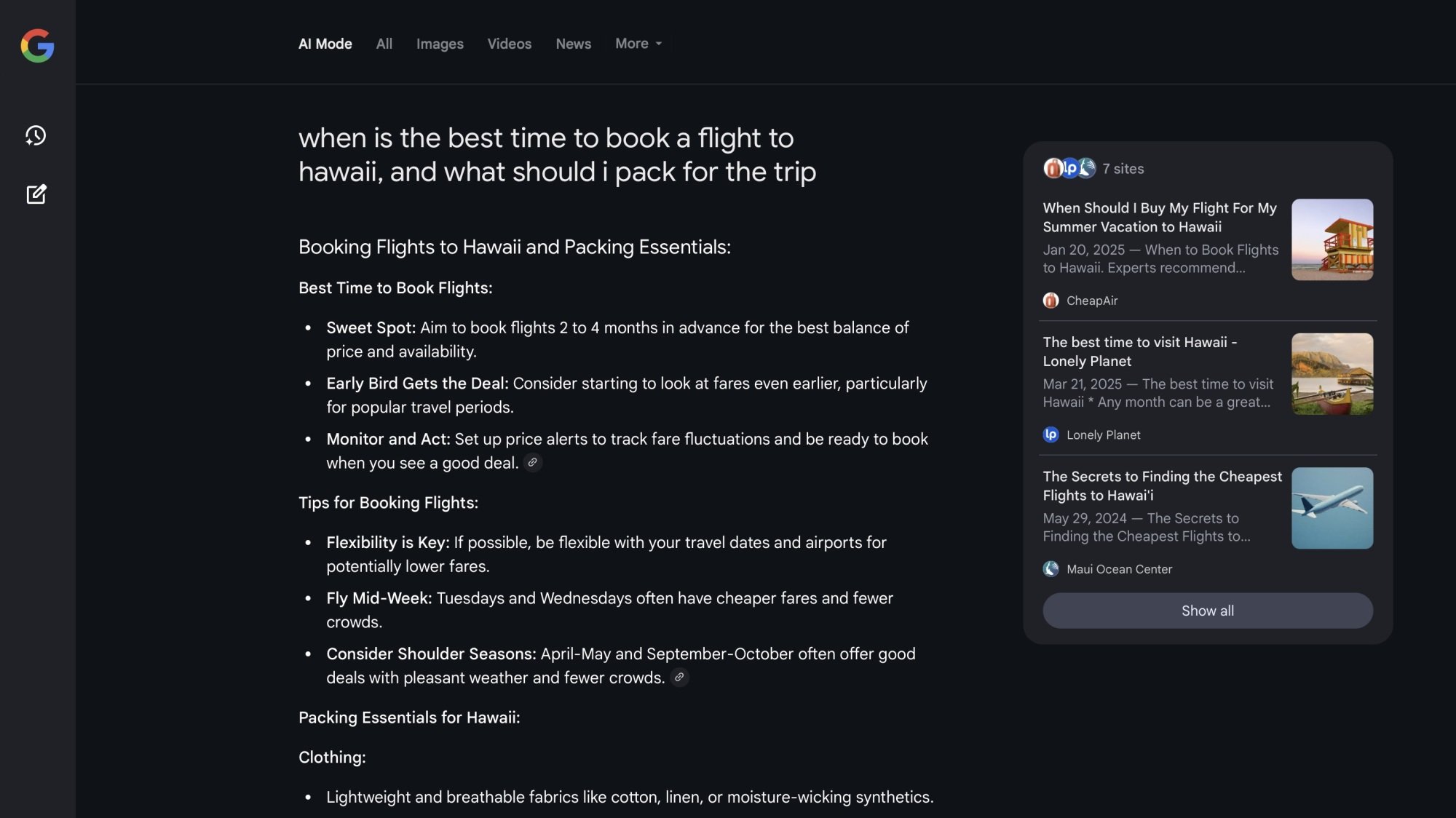
Google first introduced AI Mode back in March. Don’t confuse this for AI Overviews, the AI-generated summary that appears at the top of some Google searches. Instead, AI Mode turns Google Search into a bit of a chatbot, allowing the user to ask multi-part questions in one go. The feature is meant to combine multiple searches into a single, complex query.

For example, you could ask AI Mode something like, “when is the best time to book a flight to Hawaii, and what should I pack for the trip?” You then get breakdowns of each question in your query—”Best Time to Book Flights,” “Tips for Booking Flights,” “Packing Essentials for Hawaii,” with links to sources you can check yourself. If you’ve ever used an AI chatbot like Gemini or ChatGPT for web search, it’s remarkably similar—down to the warning that “AI responses may include mistakes.”

ai mode in action

Credit: Lifehacker

AI Mode is not rolling out in full yet (it seems to be available to Google Labs testers first) nor is it replacing I’m Feeling Lucky for all users who see it. On my personal Google Account, for example, I still see I’m Feeling Lucky. AI Mode just happens to be situated on the right-end of the search bar. But the fact that Google is experimenting with swapping the legacy button with yet another AI feature is disappointing.

There is some irony in replacing an I’m Feeling Lucky button with AI Mode: If you’re relying on AI to do your search, you probably are feeling lucky, as AI systems can either make mistakes or make up facts altogether—as Google’s disastrous AI Overviews rollout proved. In fact, as AI models advance, they’re “hallucinating” more than ever, and no one really knows why.

Use AI to assist your web searches as you wish—just understand what you’re getting yourself into.

PS Plus Game Catalog additions for May include Sand Land and Battlefield V

The PlayStation Plus Game Catalog for May includes some heavy hitters like Sand Land and Battlefield V. All of the following games will be available to play on May 20.

First up, there’s the gorgeous Sand Land. This is an adaptation of an Akira Toriyama manga, the guy who created the Dragon Ball franchise. He also designed many of the monsters and characters in Chrono Trigger and the Dragon Quest series. The game is, more or less, a beat-for-beat recreation of the manga, wrapped up in a fast-paced action RPG package. There’s also an emphasis on vehicular combat. The game will be playable on PS4 and PS5.

Battlefield V brought the long-standing franchise back to WWII. The FPS also features a battle royale mode that can handle up to 64 simultaneous players. It’s a fun time, particularly for those sick of Call of Duty. It’s only available for PS4.

Soul Hackers 2 is a turn-based RPG developed by Atlus, who most recently made the absolutely fantastic Metaphor: ReFantazio. If you’ve played that, along with every Persona and Shin Megami Tensei game, this could scratch a very particular dungeon-crawling itch. It’s just for PS5.

The S.T.A.L.K.E.R. trilogy is also getting a remaster that drops on May 20, so this will be a day one release for PS Plus. The trilogy features updated graphics, keyboard and mouse support and gameplay modes specifically for PS5 Pro. The games will be playable on both PS4 and PS5.

Other titles for the month include Five Nights at Freddy’s: Help Wanted, Granblue Fantasy Versus: Rising, Humankind, Gloomhaven and Story of Seasons: A Wonderful Life. That’s a pretty stacked lineup. Again, these will all be available on May 20.

This article originally appeared on Engadget at https://www.engadget.com/gaming/playstation/ps-plus-game-catalog-additions-for-may-include-sand-land-and-battlefield-v-180504708.html?src=rss

18 Netflix Settings Everyone Should Know About

Love watching Netflix for hours on end? There’s a lot more you can do with it if you spend just a few quick minutes in the settings section. You can improve your binge-watching weekend by customizing subtitles, home screen previews, download settings, and more. Here are 18 of the best Netflix tips and tricks.

Download your shows and movies offline

Downlaading movies and tv shows on Netflix app on iPhone.

Credit: Khamosh Pathak

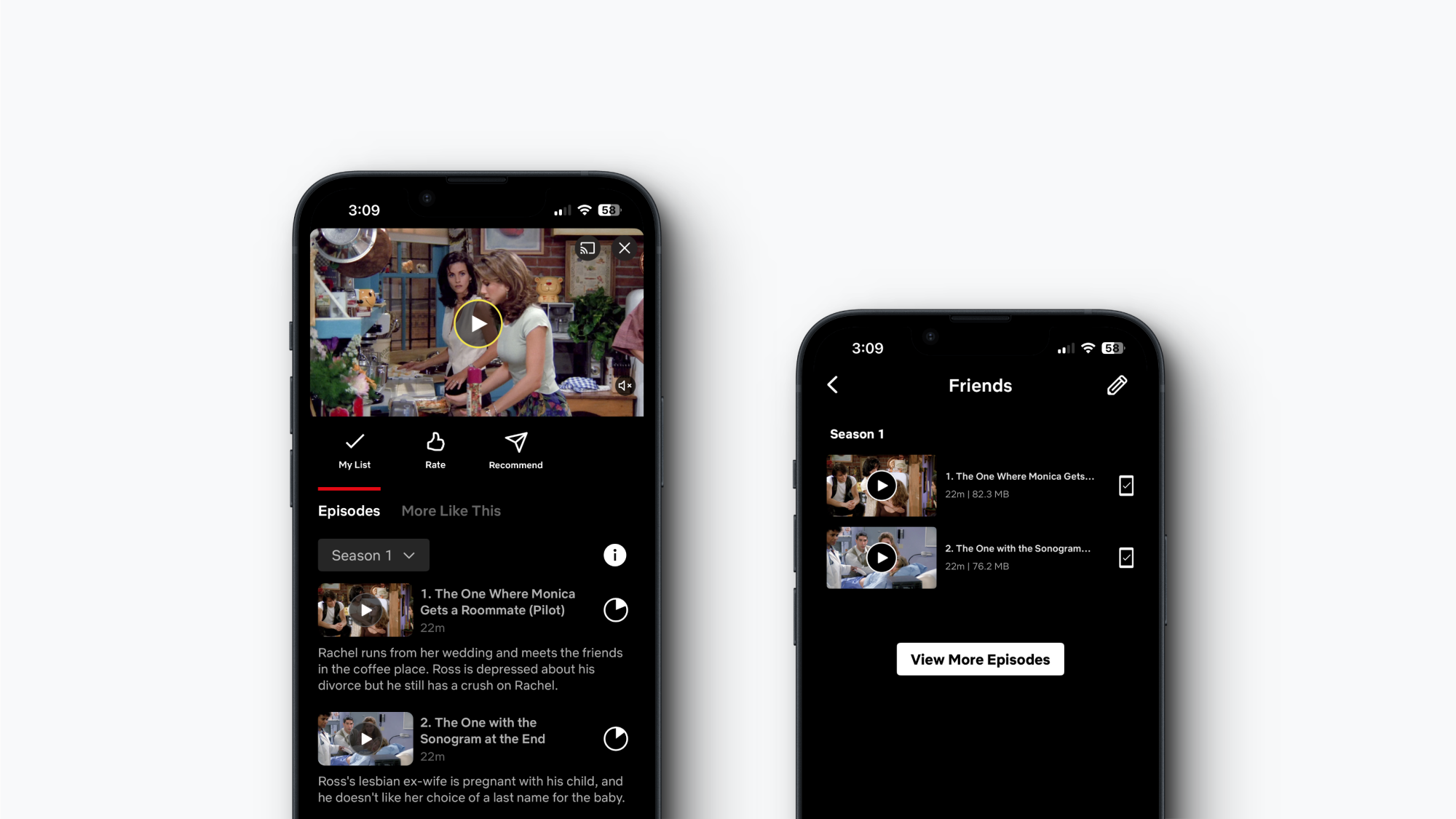
Like every other popular streaming service, Netflix lets you download movies and TV shows for offline viewing. Ad-free plans can download up to 100 items per device, while ad-supported plans can download 15 items. And as long as you go online once every 30 days, you can keep that media on your device.

To adjust quality, open the Netflix app, go to your Profile, tap the Menu button at the top (the three horizontal lines), then go to App Settings > Downloads > Video Quality. Here, choose between Standard or Higher based on your storage space or network.

Now, just tap the Download button next to an episode, season, or movie to download it. You’ll find downloaded media in the Downloads section in your Profile tab, where you can watch and delete shows.

Sign out of one, or every other device

Sign out of devices in Netflix.

Credit: Khamosh Pathak

Netflix has an option that lets you log out of any device from the website. This includes every device that all members of your account are using. So if you want to knock off TV access for a friend, or someone who’s not part of your shared plan, this is the place to go.

Click the Profile icon and go to Account. Here, switch to the Devices tab and choose Access and devices. Then, find a device you want to log out from and click Sign Out. You can also click the Sign Out of All Devices button to log out all devices together.

Stop Netflix from sharing your private data to third parties

Disable third-party data sharing on Netflix.

Credit: Khamosh Pathak

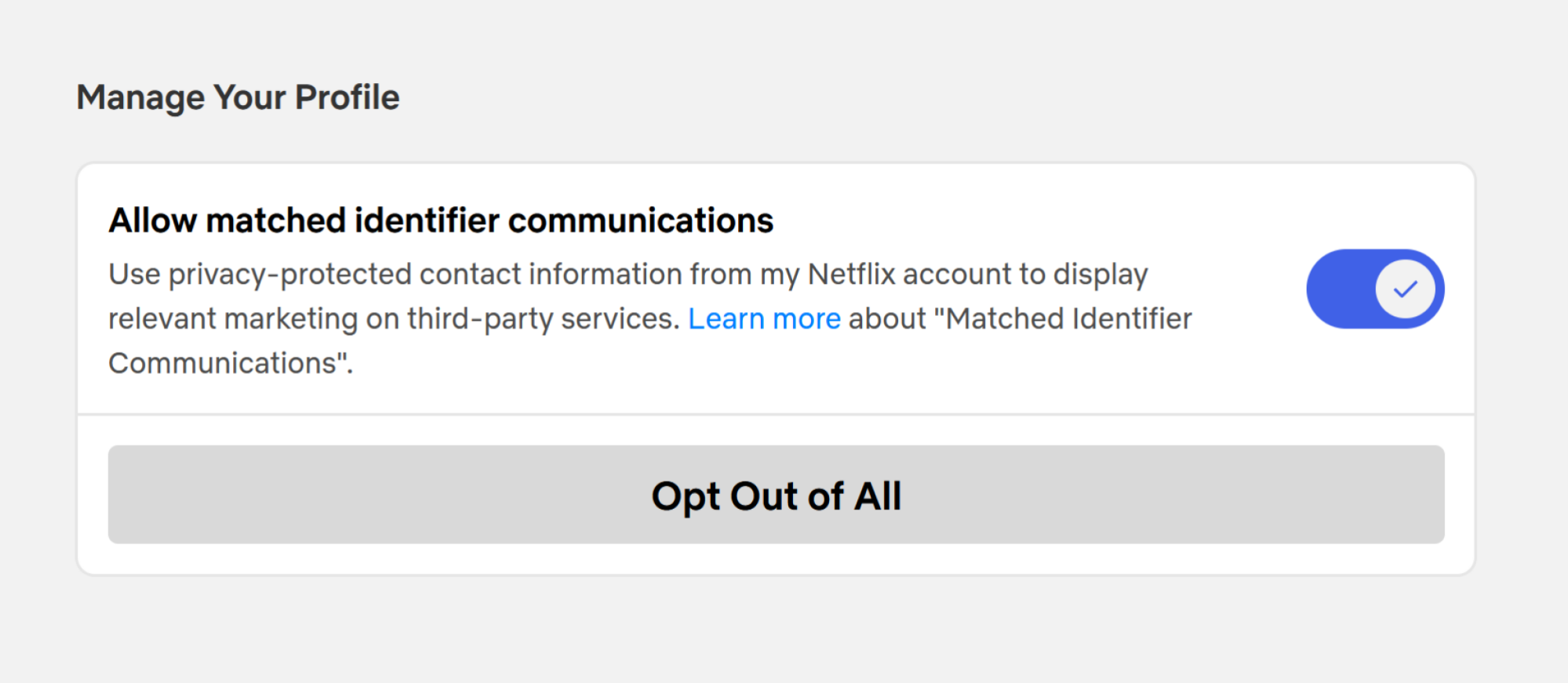
Netflix has an obscure setting that’s so weirdly worded that you’d never take it to be about data collection. Netflix, by default, shares your privacy-protected contact information with third parties to display ads on third-party services. That is something you should disable, and it’s done on a per-profile basis.

Click the Profile icon, go to Account, switch to the Profiles tab, choose your profile, and go to the Privacy and data settings option. Finally, disable the Allow matched identifier communications feature. Repeat this for all the profiles on your account.

Transfer your profile to a new account

Transfer profile in Netflix.

Credit: Khamosh Pathak

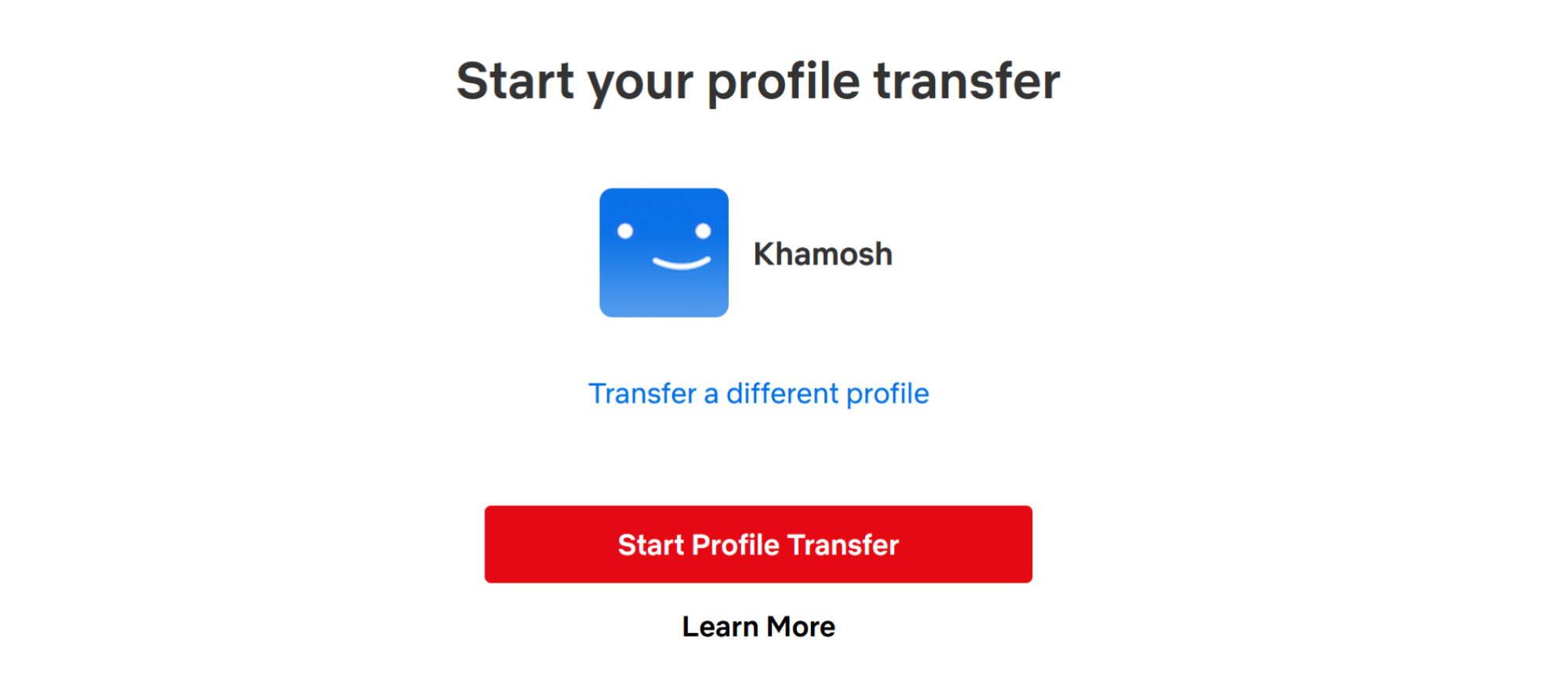
Netflix’s password sharing crack down is in full swing. If you cannot get around it, it might be time to create your own account. But that doesn’t mean you need to start fresh with the algorithm. Netflix has a feature called Transfer Profiles that can help you take all your data from an old account to a new one.

Open the Netflix website and choose your profile. Then, click the Profile icon at the top and go to Transfer Profile. This will open up a wizard that’ll walk you through the next steps. Click Start Profile Transfer and choose if you want to transfer to a brand-new account or to an existing one. Netflix will help you set up a new account with all your data. If you’re transferring to an existing account, you’ll need to know the email and the password for the account. Follow the instructions to transfer your profile to a new account.

Get rid of unwanted content from your watch history and recommendations

Hide from viewing activity on Netflix.

Credit: Khamosh Pathak

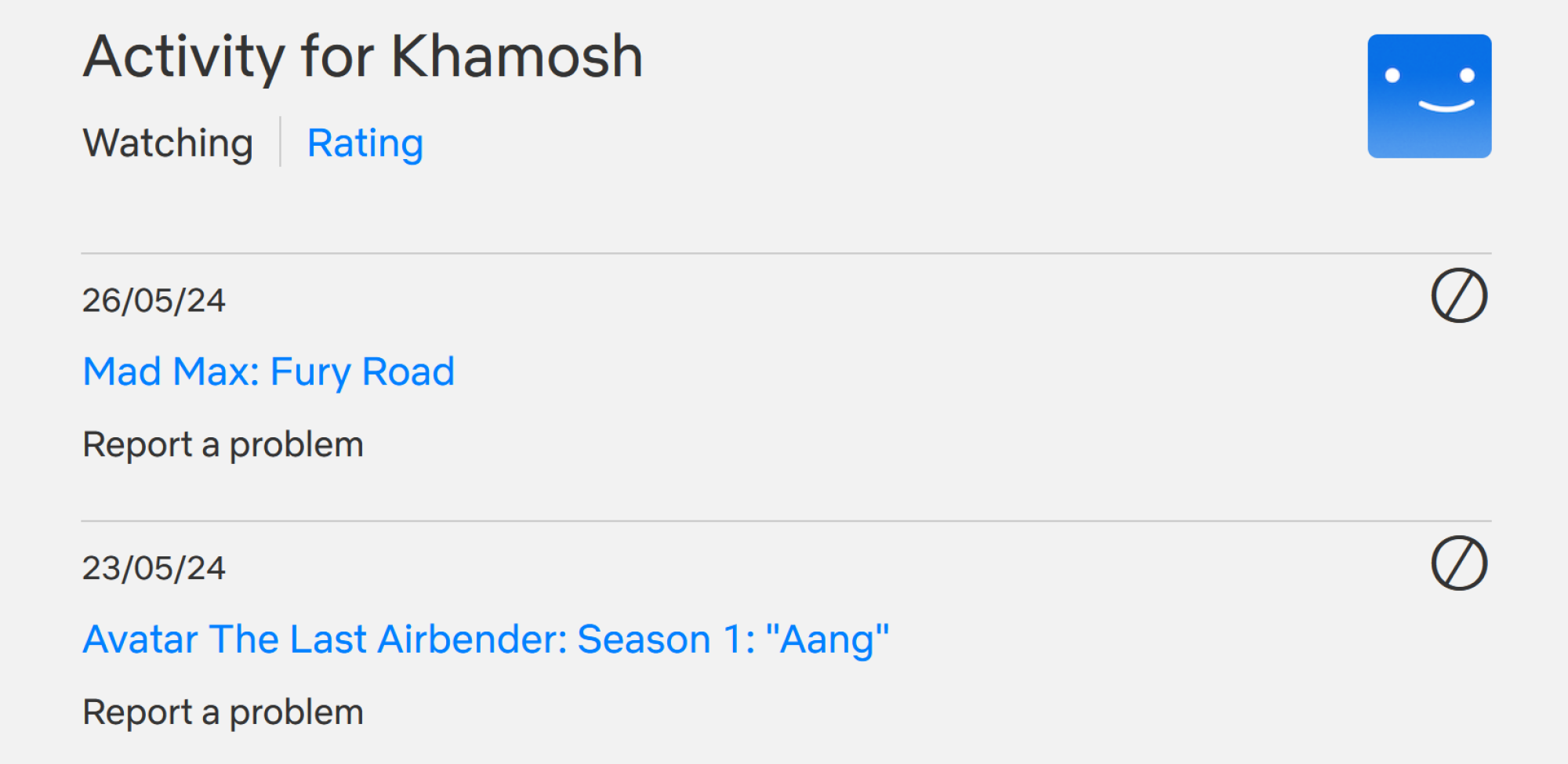
Want to get rid of an embarrassing title from your watch list? Or perhaps a title that you’re never going to finish? The only way to clear your Watch List (and the subsequent recommendations) is by removing a title from your Viewing Activity.

Go to Netflix’s Viewing Activity page (you can also get there from Account > Profiles > Your Profile > Viewing Activity).

Click the little Hide button next to the title that you want to remove. Confirm in the next step, and the title will disappear from your watch list.

Enable smart downloads for your mobile devices

Smart downloads in Netflix app.

Credit: Khamosh Pathak

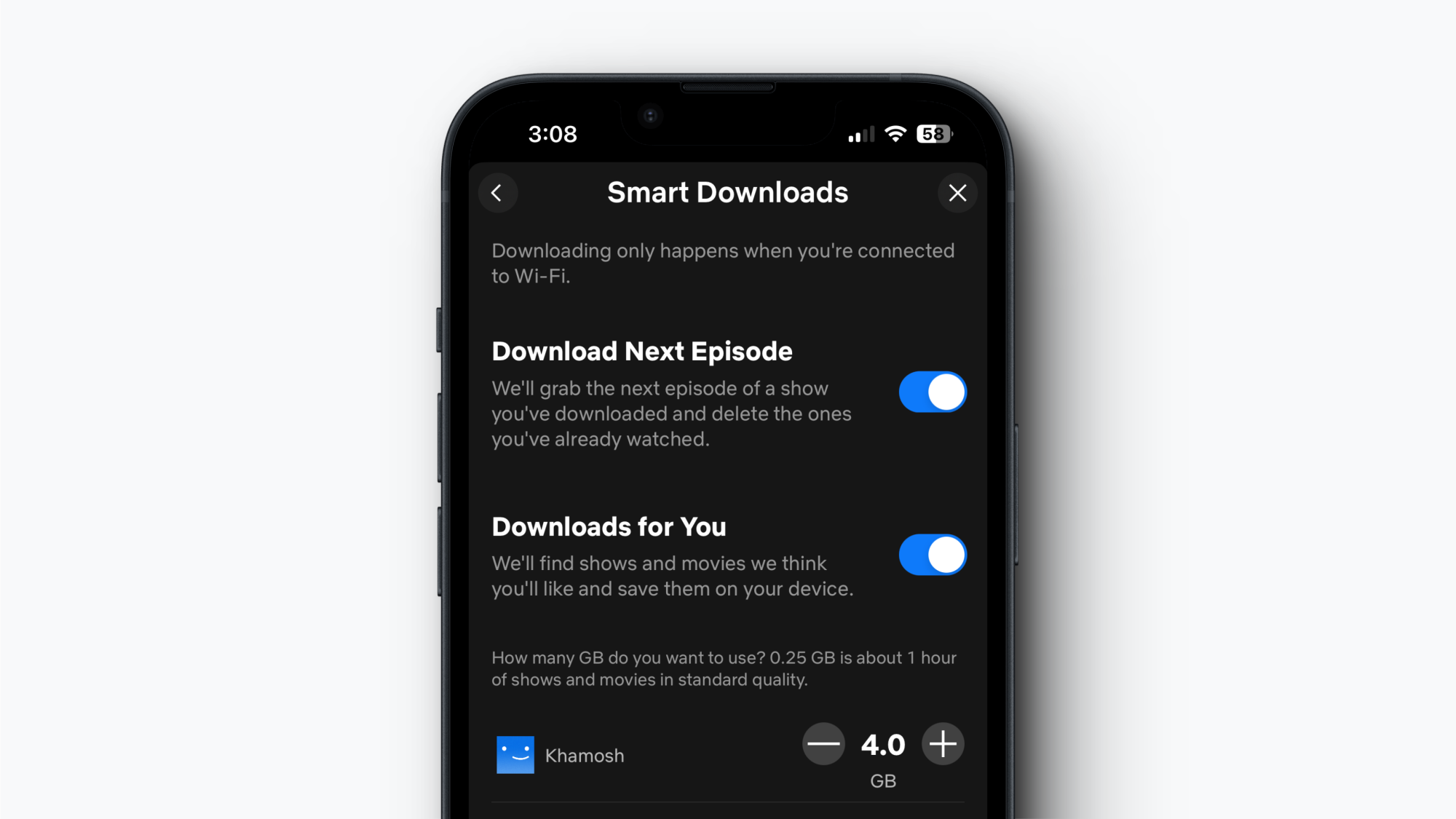
If you watch Netflix on the way to work, or if you have a spotty internet connection, the Smart Downloads feature definitely helps. Once enabled, this will automatically delete completed episodes and replace them with subsequent episodes when you’re back on Wi-Fi. You can also turn on “Downloads for you,” which automatically downloads content Netflix thinks you’ll like. You can enable these features on the iOS and Android apps from Profile > Menu > App Settings > Smart Downloads.

Stop Netflix from using too much of your mobile data plan

Save data in Netflix streaming.

Credit: Khamosh Pathak

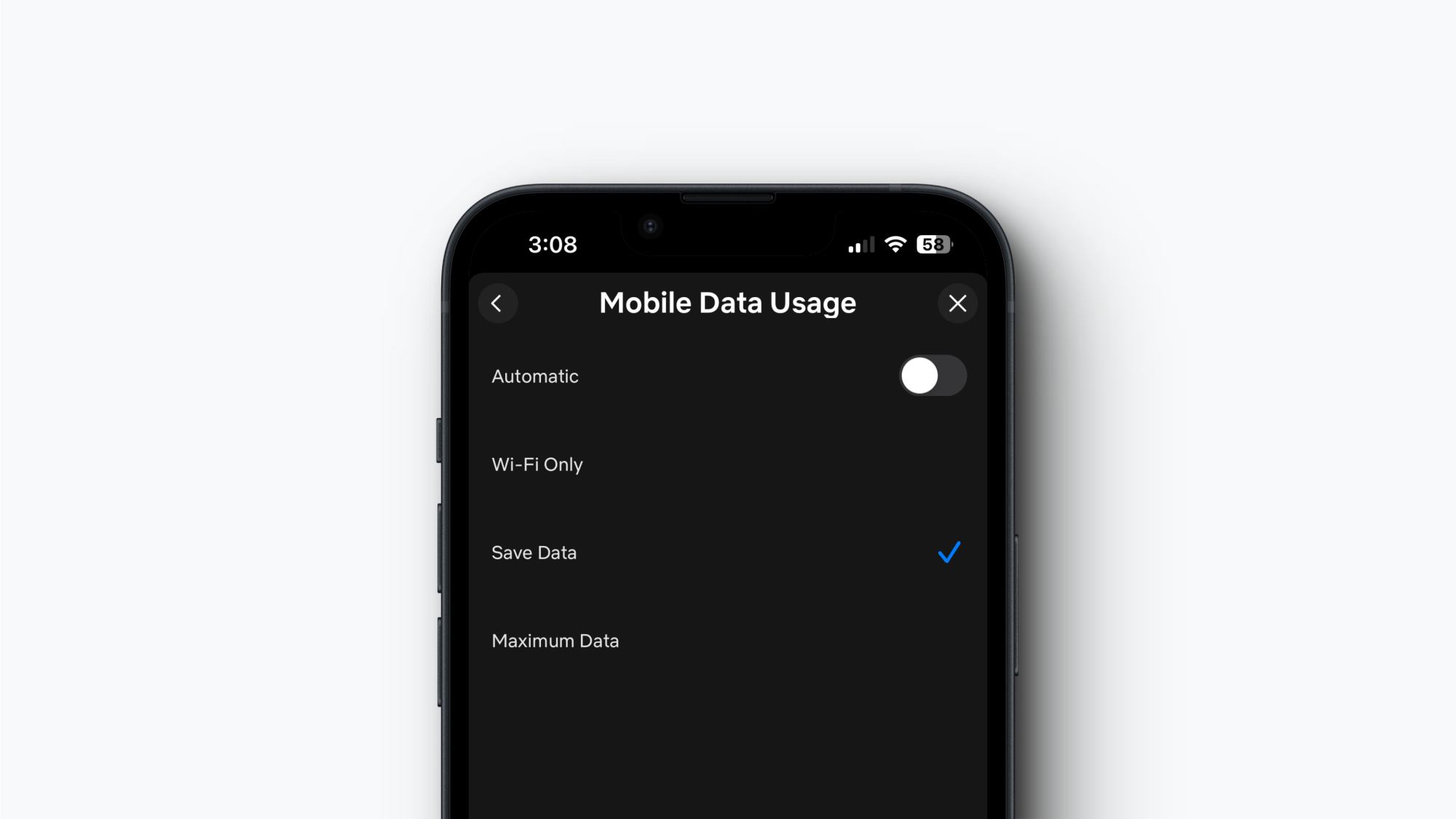
If you like watching Netflix when you’re out and about, it can eat into your mobile data plan pretty easily. Netflix’s data saver mode can help with that. In the Netflix app, go to Profile > Menu > App Settings > Cellular Data Usage. Here, disable the Automatic feature and switch to the Save Data option. This will adjust quality while off wifi to allow for about six hours of playback per GB of data.

Make sure you’re watching in HD or 4K

Data usage on Netflix.

Credit: Khamosh Pathak

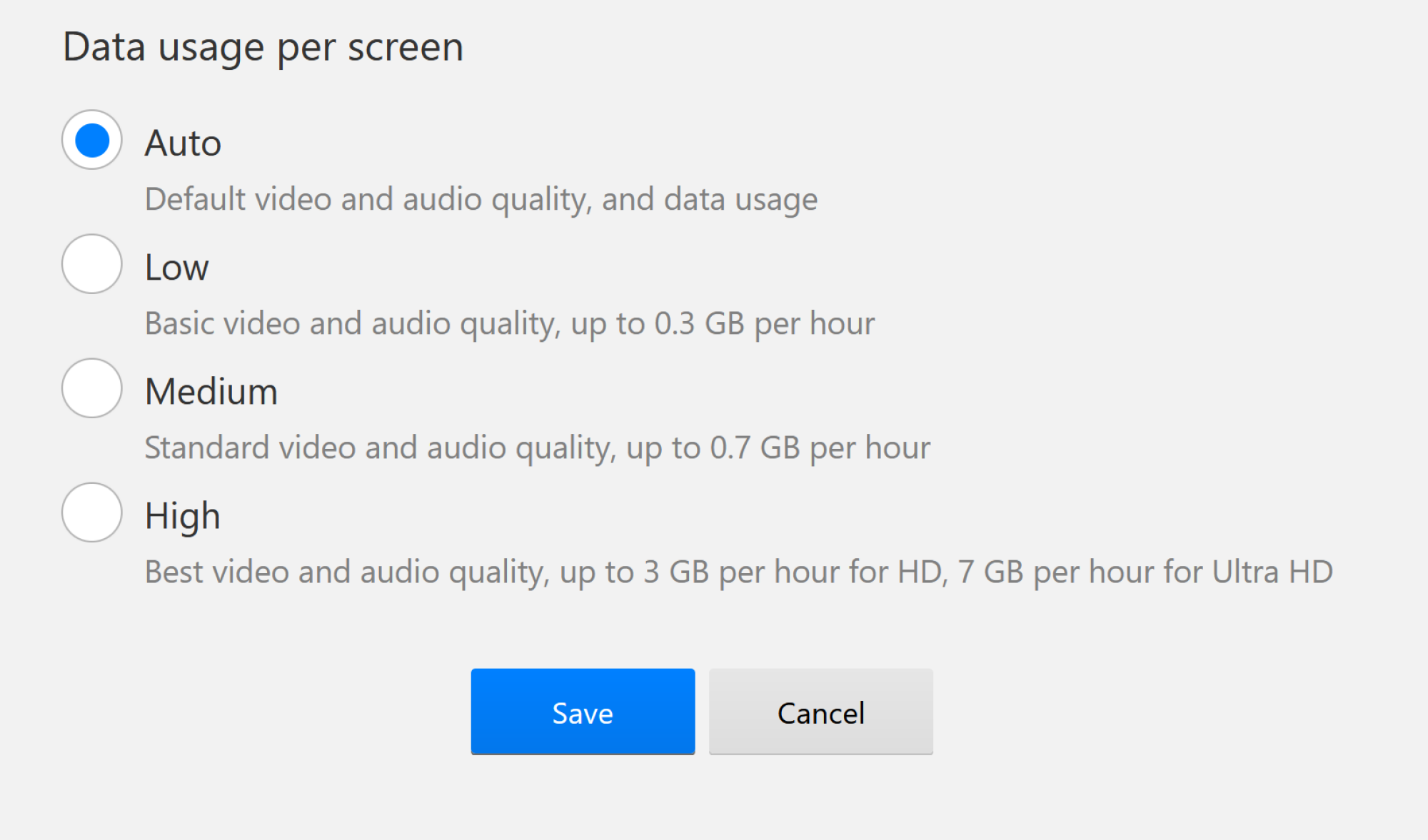
It would be a shame to pay the 4K plan but only watch in 720p because you didn’t adjust your settings. Go to Netflix’s playback settings page, and from the Data Usage Per Screen option, switch to the High option. Now you’ll get the best quality for the device or screen that you’re on.

Stop Netflix from automatically playing next episodes and previews

Disable autoplaying videos on Netflix.

Credit: Khamosh Pathak

Netflix loves autoplay. Whether it’s playing the next episode or movie right after you’re done watching something, or playing previews on the home screen, it can get pretty annoying.

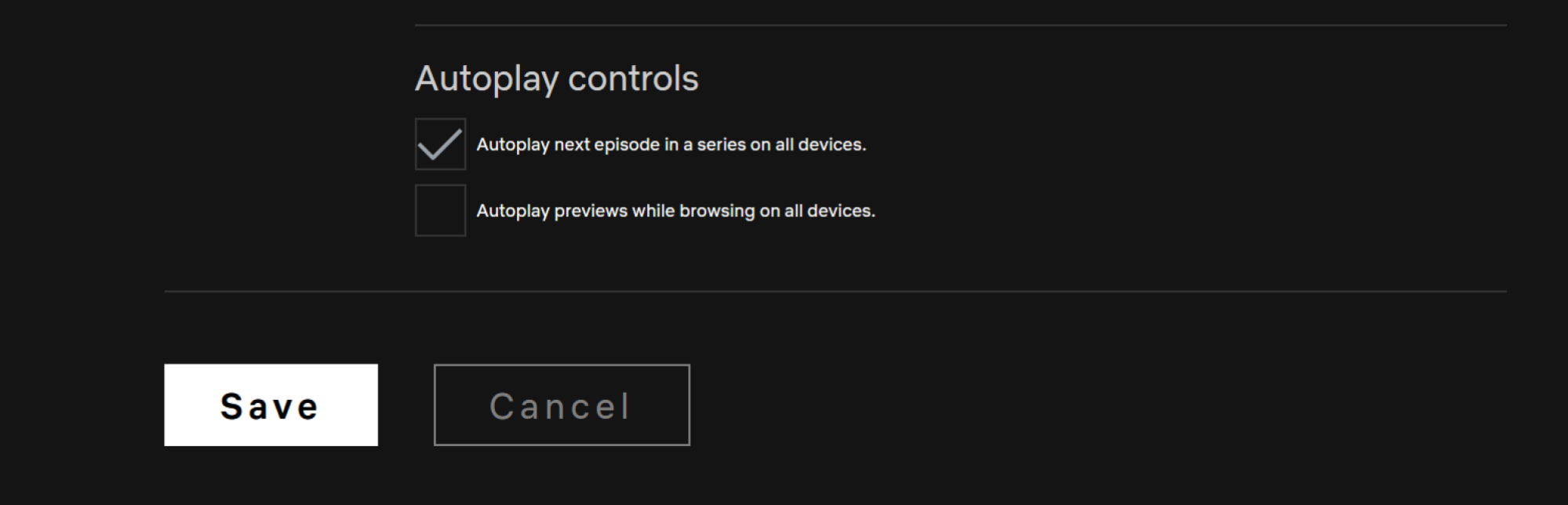
You can disable both features on a profile-by-profile basis. After opening the Netflix website, go to the Profiles screen. Here, click the Manage Profiles button and choose the profile where you want to disable these features.

Now, uncheck Autoplay next episode in a series on all devices and Autoplay previews while browsing on all devices. Click the Save button to save your preferences.

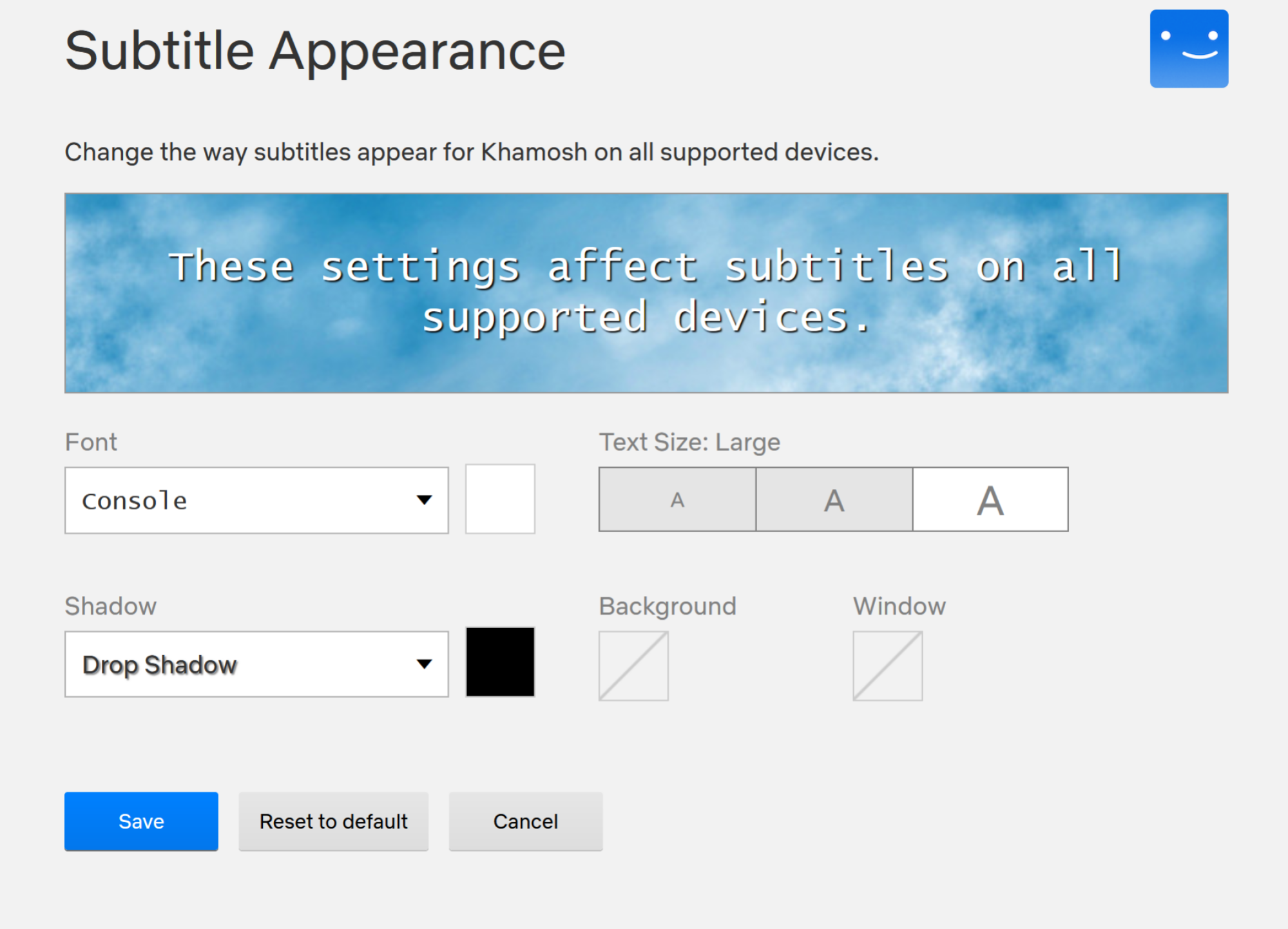
Customize your subtitles to be way better

Customize subtitles on Netflix.

Credit: Khamosh Pathak

Finding the default subtitles too hard to read? You can change the subtitle font, color, and size. From the Netflix website, click the Profile icon and choose Account. Here, switch to the Profiles tab and select your profile. Now, choose the Subtitle Appearance option.

From here, you can change the subtitle font, text size, shadow, background color, and window color. Once you’re done, tap the Save button to save your settings.

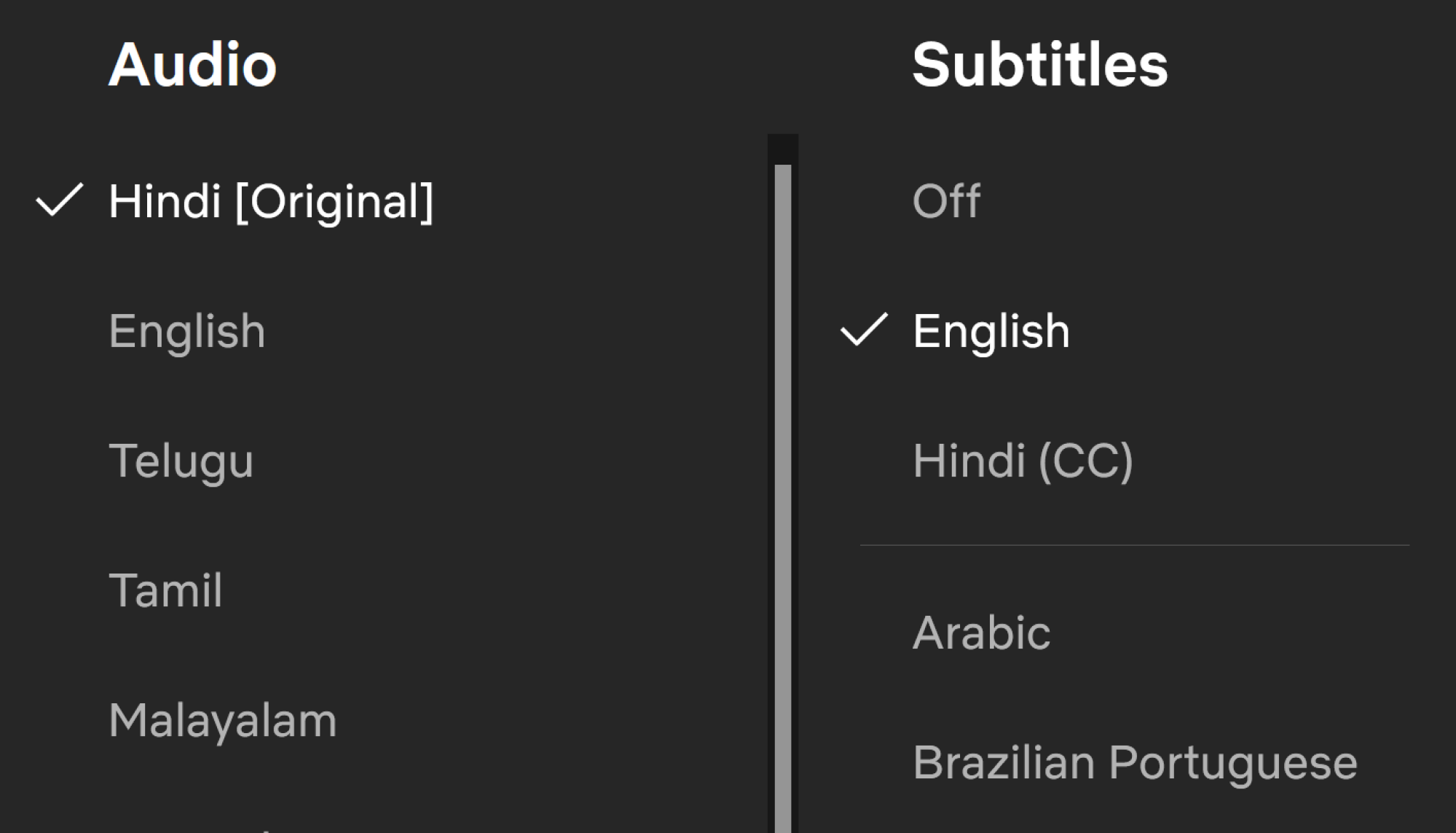
Choose original dubs in your shows and movies

Language settings in Netflix.

Credit: Khamosh Pathak

When you’re watching a foreign language film, Netflix has a habit of defaulting to English language dubbing. Sadly, there’s no setting to stop Netflix from doing that, but there’s always a way to switch to the original audio in the Netflix player. When you’re watching something, go to the Subtitles menu, and from the Audio section, switch to the Original audio.

Lock your profile to keep it private from other users

Profile lock in Netfllix.

Credit: Khamosh Pathak

If you share your Netflix account with your friends or family members, your profile isn’t exactly private. Others can see what you’re watching, and they can also use your profile and mess up your recommendations.

If you want to protect your profile (especially if you share your account with your kids), click the Profiles icon and choose the Account option. Switch to the Profiles tab, choose your profile, and go to the Profile Lock section. Enter your account password, and from the next page, enable the Require a pin to access (user) account option. Then enter the four-digit pin and click the Save button. The next time you open Netflix, you’ll need to enter this pin to access your profile.

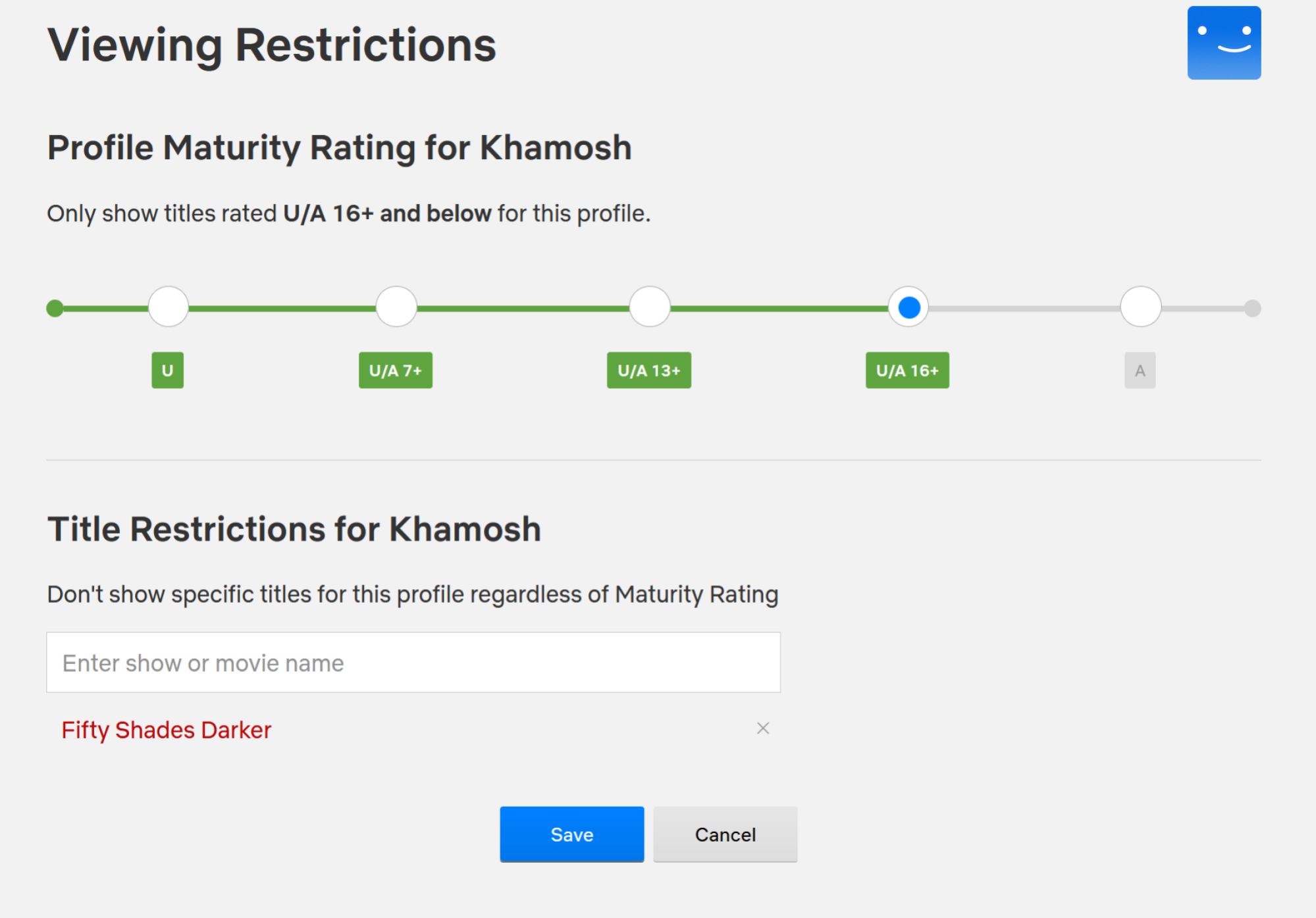
Block adult content, if you want

Blocking adult content and titles in Netflix.

Credit: Khamosh Pathak

If you’re sharing your Netflix account with your kids or teenagers, you might want to block adult content. To do this, go to the Profiles tab in your Account and choose your profile. Here, go to the Viewing Restrictions section and enter your account password.

From the top, you can change the profile’s maturity rating (7+ to 18+). If you want, you can also turn the current profile into a children’s profile, only showing content suitable for children. From the bottom, you can even choose to block a particular TV show or movie. Once you’re done, click the Save button.

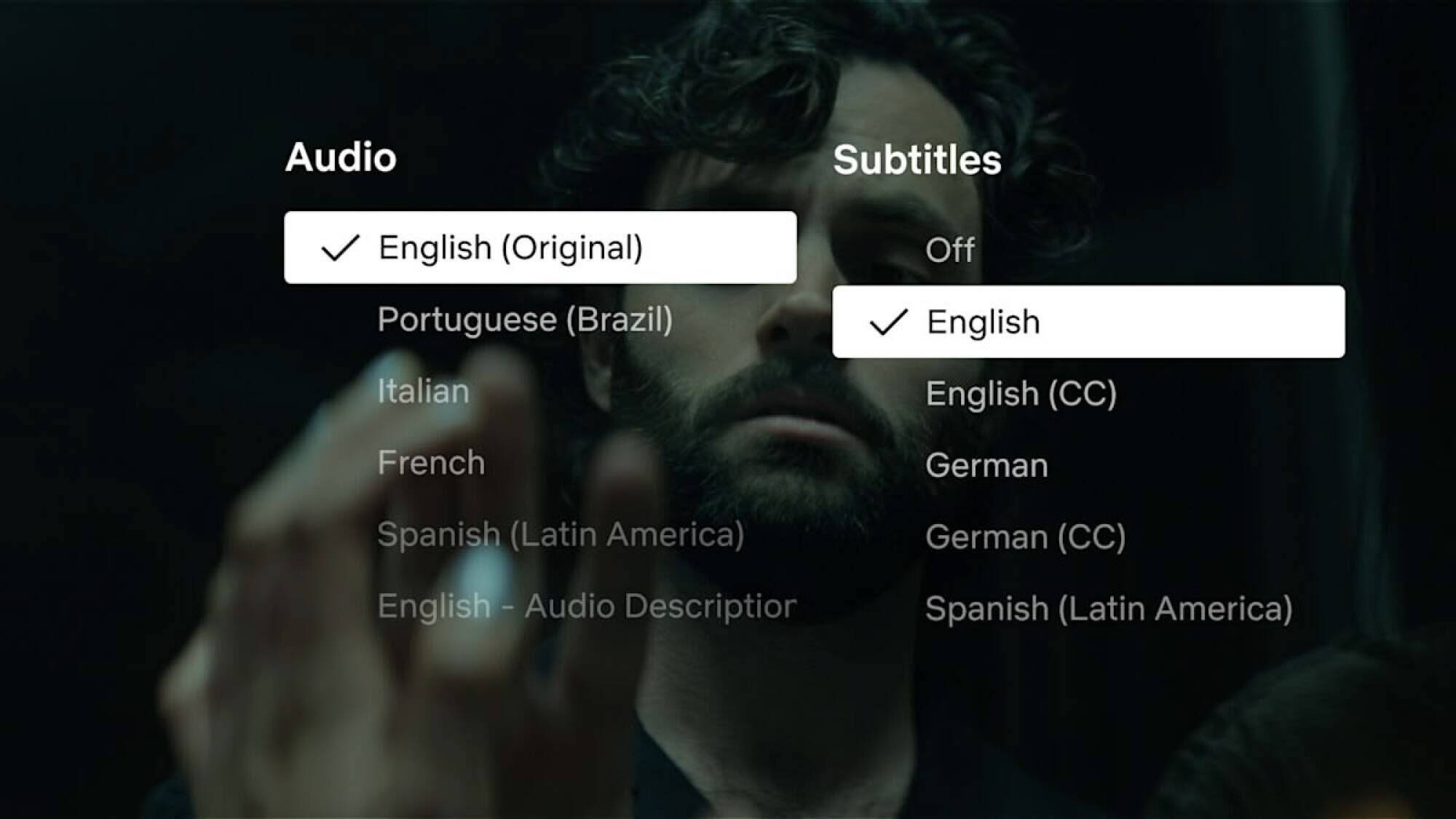
Switch to dialogue-only subtitles

New subtitles option for Netflix.

Credit: Netflix

Netflix has finally added a dialogue-only subtitles option. They’re starting out with Netflix original series like the latest season of You. But they’ll be supported on every new Netflix Original going forward.

This new subtitle option removes commentary and stage directions from the subtitles. So you won’t see details about the background music or heavy breathing. You’ll just see character dialogue.

To switch to this option, start streaming a compatible show or movie on Netflix and head to the Subtitles section. Here, choose English (or any language of your choice) in the Audio section, and English in the Subtitles section as well. If you want to revert to the classic subtitles style, switch to the English (CC) option.

Browse better using Netflix’s secret codes

Netflix’s search feature is pretty great, but its organization kind of sucks. On the home screen, you might keep seeing the same popular content repeated in different sections. If you want to discover new content in a particular genre, style, or language, there is a better way. And that’s to use Netflix’s secret codes.

Netflix has codes for every kind of movie category and subcategory that you can imagine. There are 20 broad categories to start with, but there are 267 categories in total, each with their own unique code. You can find a list of all the secret codes at Netflix-Codes.com. Then, just enter the code in the Netflix search bar. Alternatively, you can also use URL to go directly to the category page.

An example: In the following URL, replace (xx) with the desired Netflix code: https://netflix.com/browse/genre/xx. So, to view “Asian action movies”, you’d navigate to https://netflix.com/browse/genre/77232.

A workaround for downloading movies and TV shows on Windows

Netflix’s Windows app used to let you download movies and TV shows for offline use. But now, Netflix has deprecated the old dedicated Windows app, replacing it with a web wrapper that’s nothing more than a glorified website in app form. A side effect of this change is that you can no longer download content like you can on mobile devices.

But there is a workaround, which is to downgrade to the older version. Because this is Windows, where you can install apps from outside of the Windows Store, this is easy and safe to do.

To download the old app directly from Microsoft, go to this Adguard store page and paste Netflix’s app link. After the download is completed, open the Terminal app on your PC and paste in the following command:

Add-AppxPackage .Downloads4DF9E0F8.Netflix_6.99.5.0_neutral_~_mcm4njqhnhss8.AppxBundle

That should do the trick. For detailed instructions, check out our guide on the topic.

Clean up your Continue Watching row

We all have a tendency to start a movie or a TV show, only to get tired of it halfway through. Though, Netflix keeps reminding us of our lack of commitment with its Continue Watching feature. I usually end up ignoring this, while a show from three years ago keeps crowding my Continue Watching list. But if you’re annoyed by this, there is a way out. If you don’t plan to go back to a movie or TV show, simply hover over the thumbnail and click the “X” button to remove it from the list.

Get notifications for upcoming content

If you like watching the latest season of hit Netflix shows the day they come out, this feature is for you. Head over to the Coming Soon section in the Netflix app, find an upcoming movie or TV show that you want to watch, and click the “Remind Me” button. Netflix will now send you a handy reminder when the content launches.

Judge Slams Lawyers For ‘Bogus AI-Generated Research’

A California judge slammed a pair of law firms for the undisclosed use of AI after he received a supplemental brief with “numerous false, inaccurate, and misleading legal citations and quotations.” From a report: In a ruling submitted last week, Judge Michael Wilner imposed $31,000 in sanctions against the law firms involved, saying “no reasonably competent attorney should out-source research and writing” to AI, as pointed out by law professors Eric Goldman and Blake Reid on Bluesky.

“I read their brief, was persuaded (or at least intrigued) by the authorities that they cited, and looked up the decisions to learn more about them — only to find that they didn’t exist,” Judge Milner writes. “That’s scary. It almost led to the scarier outcome (from my perspective) of including those bogus materials in a judicial order.”


Read more of this story at Slashdot.

You Can Safely Remove All These Preinstalled Apps From Your iPhone

Unbox and power up a brand new iPhone and you’ll find there are plenty of apps already on there—which, broadly speaking, is good! You can start browsing the web, checking your email, streaming music, making notes and much more without visiting the App Store.

However, you’re not necessarily going to make a lot of use of all of these apps. Uninstalling the ones you don’t actually need means they won’t take up space on your phone and won’t take up bandwidth with app updates.

In recent years Apple has made more and more apps optional, and you can now get rid of more apps than you may have realized. If you find you do need them again, you can easily grab them from the App Store.

To remove an app from your iPhone, tap and hold on its home screen icon, then choose Remove App > Delete App > Delete. You can also uninstall apps from the App Library: Tap and hold on an icon, then choose Delete App > Delete.

Here are the preinstalled iOS apps you can get rid of (it’s almost all of them, in fact):

Books: Apple’s depository of e-books can be uninstalled from your iPhone if you’re not interested in any digital reading. It’s been bundled with iOS since iOS 8 in 2014.

Calculator: If you prefer an alternative calculator app or you’re just great at math, you can say goodbye to the Calculator app. It’s been around since the first iPhone in 2007.

Calendar: The built-in Apple Calendar app may feel pretty essential to iOS, but it isn’t, and you can get rid of it. It’s been preinstalled on iPhones since the 2007 original.

Clock: The Clock app has been around since day one on the iPhone, back in 2007, but iOS can run fine without it. You might need to find an alternative alarm app, however.

Compass: One of the lesser-known apps, Compass can be safely removed if you’re confident you won’t need it. The app was introduced with iPhone OS 3 in 2009.

Contacts: Surprisingly, you can delete Contacts, an app that debuted in 2008, from iOS. However, your contacts will still show up in the Phone app, which can’t be removed.

Phone app
If you remove FaceTime, you can still make calls via the Phone app.
Credit: Lifehacker

FaceTime: FaceTime, on the iPhone since iOS 4 in 2010, can be safely removed from your iPhone—you’ll still be able to make calls through the Phone or Contacts apps.

Files: A files app may seem pretty fundamental to a phone, but you can remove the iPhone’s built-in option. This app was introduced with the launch of iOS 11 in 2017.

Find My: A core app you’d assume can’t be uninstalled, but in fact it can be. Find My has come preinstalled since iOS 13 in 2019, combining Find My iPhone and Find My Friends.

Freeform: The virtual brainstorming app developed by Apple first made its appearance on iOS late in 2022, and you can safely take it off your iPhone without breaking anything.

Health: If you don’t need the Health app, introduced in 2014, you can delete it. However, your existing health data will remain on your phone, under Health in iOS Settings.

Home: Apple’s smart home platform hasn’t been its biggest success, and you can get rid of this app without any issue. The Home app was first added to iPhones back in 2016.

iTunes Store app
The iTunes Store app is still going.
Credit: Lifehacker

iTunes Store: Did you forget about the iTunes Store? It predates the iPhone, and showed up in iOS in 2008. If you don’t want to buy any digital goods, you can remove it.

Journal: We’ve had Journal on our iPhones since 2023, letting you record memories day by day. If journaling isn’t for you, or you’ve found a better option, this app can be deleted.

Magnifier: You might have never noticed the Magnifier app on iOS, but it has been a standalone app preinstalled on iPhones since 2020—and you can remove it without issue.

Mail: There are plenty of good email clients for iOS, and if you’re not using the default one that has been preinstalled since 2007 on every iOS version, you can delete Mail.

Maps: Apple Maps has been with us since 2012, and while it’s improved a lot in that time, you might decide you prefer an alternative option—in which case, you can delete it.

Apple Maps app
If you’re not keen on Apple Maps, you can remove it.
Credit: Lifehacker

Measure: One of the minor utilities that comes free with every iPhone since 2018 and iOS 12. If you don’t need to do any measuring on your iPhone, it can be removed.

Music: This is an app category where there are lots of alternatives—and if you’re using one, you can remove this. The app first appeared in 2011, replacing the earlier iPod app.

News: If you’re not getting your news fix through Apple’s own News app, this can be uninstalled without a problem. It first made an appearance in 2015.

Notes: For many of us, Notes is an essential app, but if that’s not the case for you then you can remove it from iOS. It’s been around since the first iPhone back in 2007.

Playground: If you’ve enabled Apple Intelligence when setting up your iPhone, you’ll have the Playground app for making AI images, launched in 2024—but you can uninstall it.

Playground app
No need for AI imagery? Remove the Playground app.
Credit: Lifehacker

Passwords: This is one of the newer Apple apps, launched in 2024. If you don’t need this for managing your logins and other data on your iPhone, then it can be safely uninstalled.

Podcasts: There are a host of great podcast players out there, so if Apple Podcasts isn’t your app of choice for this, get rid of it. Podcasts launched as an app in 2012 with iOS 6.

Reminders: If you’re using a different app for this job (or you’re just great at remembering everything), you can remove Reminders, which has been included with the iOS software since 2011.

Shortcuts: Some people find Shortcuts indispensable, but if you’re not one of them, this app can be safely uninstalled from your iPhone. It became a preinstalled app in 2019.

Stocks: Stocks has been on iPhones since the very beginning, the first iPhone in 2007. If you don’t need it to keep up with current stock prices, you may safely delete it.

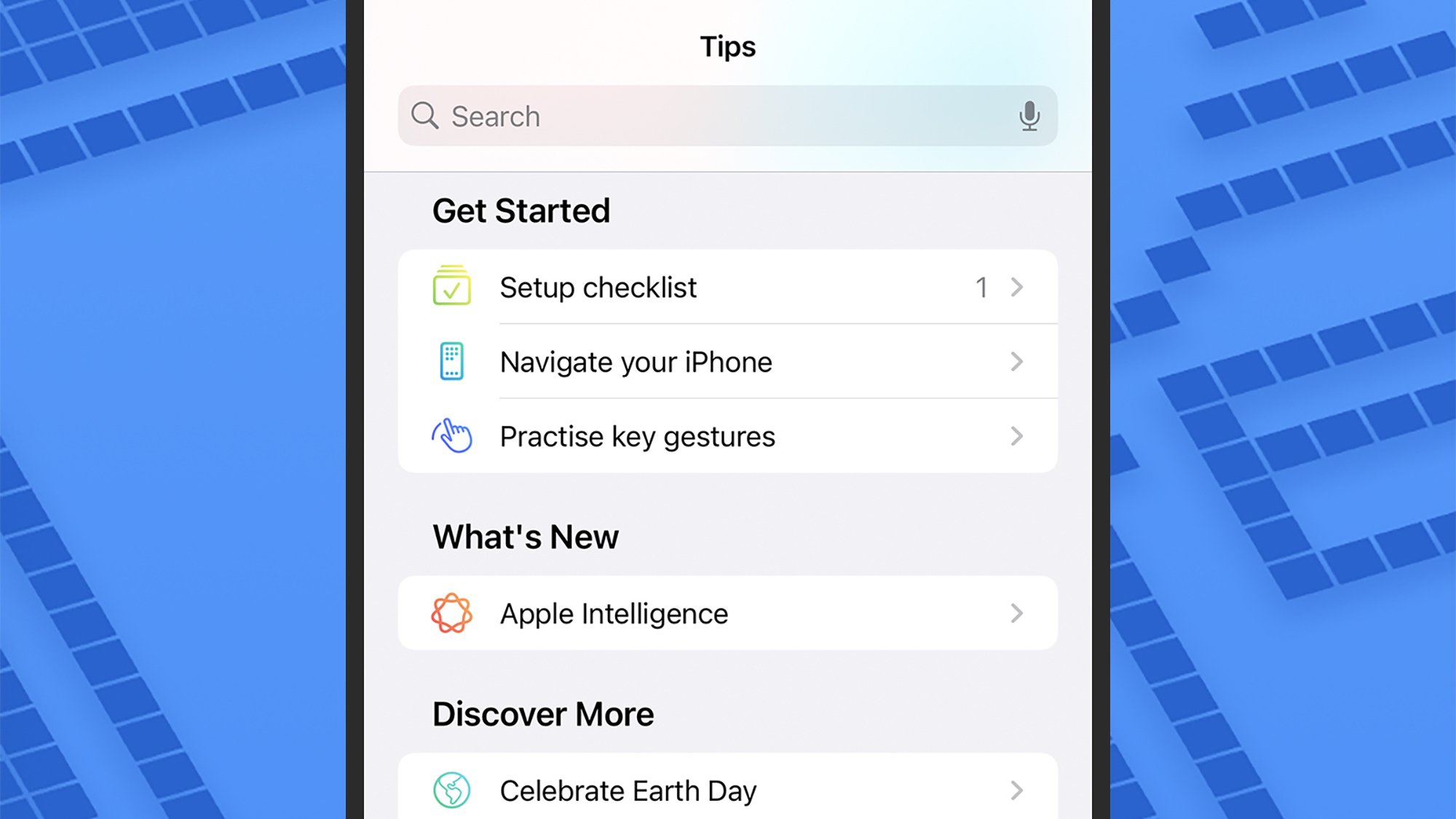
Tips: Ever since iOS 8 in 2014, Tips has been there, ready to serve up tips and tricks for using your iPhone. If you feel you don’t need the app, there’s no problem with deleting it.

Tips app
The Tips app gives you … tips.
Credit: Lifehacker

Translate: Apple Translate has been around on iPhones since 2020, and it’s definitely improved since then—but it’s also possible to safely uninstall it.

TV: The Apple TV app is where you get all your movies and shows from Apple, and it’s been a standalone app since 2016. If you source your content from elsewhere, you can delete it.

Voice Memos: There’s no doubt this can be a useful app, but it’s not for everyone, and can be uninstalled. Voice Memos made its debut on the iPhone all the way back in 2009.

Wallet: You can uninstall the Wallet app from iOS, which is something of a surprise. The app for payments, cards, and tickets arrived on iOS under its current name in 2012.

Watch: If you’re not an Apple Watch user, feel free to uninstall the Watch app, available since 2015. If you have a connected Apple Watch, you’ll be asked to unpair it first.

Weather: Finally, the trusty Weather app, on iPhones since the very first one in 2007, can also be deleted from your iPhone, if you’re sourcing your forecasts from elsewhere.

Toyota is bringing the C-HR back to the US as an all-electric crossover

Toyota has announced the return of the C-HR to the United States, but this time as an all-electric model built on its e-TNGA platform. The crossover electric vehicle will now be the second Battery Electric Vehicle (BEV) model sold by Toyota in the United States, along with the new bZ, which was also announced this week.

The reimagined C-HR will offer up to 290 miles of range and will offer crossover utility with 60/40-fold-flat seats and over 25 cubic feet of cargo space behind the rear seats.

The C-HR will lean toward performance in some aspects, sporting 338 horsepower, standard all-wheel drive, and a 0 to 60 time of around five seconds. The wheel will also feature paddle shifters that control the regenerative braking.

Like the recently announced bZ, the C-HR will come equipped with the North American Charging Standard (NACS) plug type, first developed at Tesla and now open source to other EV manufacturers. In the press release for the vehicle, Toyota said the NACS-equipped vehicle would allow it “access to thousands of DC charging stations nationwide,” though it does not specify if this means access to Tesla’s Supercharger network.

The C-HR will be available in SE and XSE trims, though both will feature a 14-inch touchscreen, a digital gauge cluster, power liftgate, wireless phone chargers, and Toyota’s Safety Sense 3.0 driver assistance system.

Toyota expects the C-HR to arrive at US dealerships in 2026, though further specifics, including pricing, have not been announced.

This article originally appeared on Engadget at https://www.engadget.com/transportation/evs/toyota-is-bringing-the-c-hr-back-to-the-us-as-an-all-electric-crossover-170728601.html?src=rss

Rogue Communication Devices Found in Chinese Solar Power Inverters

Gilmoure shares a report: U.S. energy officials are reassessing the risk posed by Chinese-made devices that play a critical role in renewable energy infrastructure after unexplained communication equipment was found inside some of them, two people familiar with the matter said. Power inverters, which are predominantly produced in China, are used throughout the world to connect solar panels and wind turbines to electricity grids. They are also found in batteries, heat pumps and electric vehicle chargers.

[…] Using the rogue communication devices to skirt firewalls and switch off inverters remotely, or change their settings, could destabilise power grids, damage energy infrastructure, and trigger widespread blackouts, experts said. “That effectively means there is a built-in way to physically destroy the grid,” one of the people said, The two people declined to name the Chinese manufacturers of the inverters and batteries with extra communication devices, nor say how many they had found in total.


Read more of this story at Slashdot.

New Switch 2 specs show large performance dip in undocked mode

While Nintendo offered an official spec sheet for the Switch 2 last month, neither it nor an accompanying blog post from chip-making partner Nvidia provided many specific numbers for the upcoming console’s raw CPU and GPU horsepower. Today, though, Digital Foundry is offering what it calls “rock-solid confirmation” of the system’s final tech specs, adding detail and clarity to years-old leaks and educated speculation on the system’s internals (which turned out to be largely reliable in the end).

Unlike the Switch—which basically used an off-the-shelf Nvidia Tegra T1 chip—Digital Foundry says the Switch 2 is using “very much custom silicon designed specifically for Nintendo and for mobile gaming.” You can see what that means in terms of raw hardware performance in the tables below.

Switch 2 Switch
Docked
(Quality)
Undocked
(Performance)
Docked
(Quality)
Undocked
(Performance)
CPU clock 998 Mhz 1101 Mhz 1020 Mhz 1020 Mhz
GPU clock 1007 Mhz 561 Mhz 768 Mhz 460 Mhz
Ray-tracing 20 gigarays/sec 10 gigarays/sec N/A N/A
Memory bandwidth 102GB/s 68GB/s 25.6GB/s 21.3GB/s
Switch 2 Switch
Total System
(reserved)
Total System
(reserved)
CPU cores 8 2 4 1
Memory 12GB (LPDDR5X) 3GB 4GB 0.8GB
Switch 2 Switch
CPU architecture 8x ARM Cortex A78C 4x ARM Cortex A57
GPU architecture Ampere Maxwell
CUDA Cores 1536 256
Memory interface 128-bit/LPDDR5 64-bit/LPDDR4

Glancing at those numbers, it’s easy to pick out a large difference between the system’s performance in docked and undocked modes; its GPU clock and memory bandwidth both increase substantially when plugged into a TV. Those differences could help explain why the Switch 2 dock uses an active cooling fan, unlike the much simpler TV-connection dock on the original Switch.

Read full article

Comments

Max pivots back to HBO Max as WBD rethinks ability to compete with Netflix

Warner Bros. Discovery’s (WBD) streaming service Max will be called HBO Max starting this summer, bringing back a name that WBD curiously ditched a couple of years ago.

In May 2020, the company then known as WarnerMedia Group launched its flagship streaming service, HBO Max. The successor to the HBO Now subscription-based streaming service that launched in 2014, and not to be confused with the now-defunct HBO Go (which was a video-on-demand streaming service accessible to those with subscriptions to the HBO cable channel), HBO Max offered “the entire HBO service,” per WarnerMedia’s announcement. HBO Max also combined content from other titles WarnerMedia owned, including titles from DC Comics and Cartoon Network. But the main draw continued to be the ability to stream HBO’s prestigious library via a Netflix-like streaming subscription.

When WarnerMedia acquired Discovery in 2022 and became WBD, it sought to combine the libraries of HBO Max and the Discovery+ streaming service. WBD landed on Max as the name for the combined app. The name seemed to suggest access to a maximum amount of streaming content with maximum appeal. However, it questionably distanced itself from the legacy of high-budget, award-winning TV shows and recent popular movies that the HBO brand had been building since 1972.

Read full article

Comments

Federal agencies continue terminating all funding to Harvard

On Tuesday, the federal government’s Joint Task Force to Combat Anti-Semitism announced that it had terminated research grants to Harvard totalling $450 million, spread out across eight federal agencies. The move comes on the heels of $2.2 billion in earlier cuts and an announcement that the university will be prevented from receiving any future grants. The ongoing campaign appears to be heading toward a point where no researchers at Harvard will receive federal funding.

The announcement reiterates accusations that are familiar from earlier federal funding terminations. It references antisemitic incidents during earlier protests about Israel’s actions in Gaza and the fact that the Harvard Law Review has taken steps to diversify the authors it publishes, which the government considers illegal discrimination. Notably, the letter does not mention any more recent events, nor Harvard’s efforts to address antisemitism on campus, saying:

Harvard’s campus, once a symbol of academic prestige, has become a breeding ground for virtue signaling and discrimination. This is not leadership; it is cowardice. And it’s not academic freedom; it’s institutional disenfranchisement. There is a dark problem on Harvard’s campus, and by prioritizing appeasement over accountability, institutional leaders have forfeited the school’s claim to taxpayer support.

It’s generally difficult to understand the big picture of these cuts and the reasons for them from this announcement. Instead, it has to be pieced together from the multitude of letters that individual agencies have sent Harvard.

Read full article

Comments

Microsoft’s ‘Patch Tuesday’ Update Fixes Seven Zero-Day Exploits

Microsoft has released its latest monthly Patch Tuesday update, this time offering fixes for 72 security vulnerabilities across its systems. Five of the malicious bugs addressed are zero-days that have been actively exploited, and two have been publicly disclosed.

As Bleeping Computer reports, the May update addresses 17 elevation of privilege flaws, two security feature bypass flaws, 28 remote code execution flaws, 15 information disclosure flaws, seven denial of service flaws, and two spoofing flaws. In addition to the zero-day exploits, six of the remote code execution vulnerabilities are labeled “critical” along with one information disclosure flaw.

If you’re a Windows or Microsoft user, you should ensure your systems are up to date.

Patch Tuesday updates for May 2025

While all of Microsoft’s security updates are important to maintain the integrity of your devices and data, this Patch Tuesday is particularly heavy on zero-days—flaws that are actively exploited or publicly disclosed before the developer issues an official fix.

Four of the five actively exploited zero-days fixed with this update are elevation of privilege flaws. CVE-2025-32701 and CVE-2025-32706 both affect Windows Common Log File System Driver, while CVE-2025-30400 affects Microsoft DWM Core Library, and CVE-2025-32709 Windows Ancillary Function Driver for WinSock. All allow attackers SYSTEM privileges locally.

The fifth active exploit is a remote code execution vulnerability (labeled CVE-2025-30397) in Microsoft Scripting Engine. The flaw can be exploited if an authenticated user clicks a fraudulent link in Microsoft Edge or Internet Explorer, allowing attackers to execute code over a network.

CVE-2025-30397, CVE-2025-32701, and CVE-2025-30400 were discovered by the Microsoft Threat Intelligence Center. CVE-2025-32706 was disclosed by the Google Threat Intelligence Group and the CrowdStrike Advanced Research Team, while CVE-2025-32709 came from an “anonymous” researcher. Microsoft has not disclosed how these flaws were exploited.

One of the publicly disclosed zero-days patched this month is a spoofing flaw in Microsoft Defender (CVE-2025-26685) that allows unauthenticated attackers with LAN access to spoof another account. This was discovered by Joshua Murrell with NetSPI. The final zero-day (CVE-2025-32702) is a remote code execution vulnerability in Visual Studio—Microsoft has not revealed any additional details.

How to protect your PC

You should always install security updates as soon as they become available to minimize the risk to your system. Windows and Microsoft patches are usually downloaded and installed automatically, but you can make sure your PC is good to go via Start > Settings > Windows Update and selecting Check for Windows updates.

One year of Peacock Premium is on sale for only $25

A full year of Peacock Premium is on sale right now for $25 as part of a Memorial Day promotion. This is $55 off the typical price of $80. Just enter SPRINGSAVINGS at checkout. The promotion is live until May 30. This is the ad-supported version.

Peacock is a decent platform and made our list of the best streaming services. It doesn’t get the attention of Netflix or Disney+, but it’s home to several nifty original shows. There’s the AI-adjacent tomfoolery of Mrs. Davis and the Rian Johnson-made whodunnit Poker Face. It also airs several video game adaptations, like Knuckles and the surprisingly-decent Twisted Metal.

The big draw here, however, is likely the long-awaited spinoff of The Office, which is called The Paper. That one premieres in September and is a Peacock exclusive. The platform also signed an 11-year agreement with the NBA and that goes into effect this fall. The mobile app could be getting minigames and short-form vertical videos (like TikTok) in the near future.

There’s one caveat. This subscription will automatically renew for $80 after the year runs out. Stay on top of scheduling if you want to cancel before then.

The Scranton documentary crew is heading to Toledo. #ThePaper arrives this September on Peacock. pic.twitter.com/Mzmbw7TBzF

— Peacock (@peacock) May 12, 2025

Check out our coverage of the best streaming deals for more discounts, and follow @EngadgetDeals on X for the latest tech deals and buying advice.

This article originally appeared on Engadget at https://www.engadget.com/deals/one-year-of-peacock-premium-is-on-sale-for-only-25-163231474.html?src=rss

HBO Maxes Out on Rebranding

Warner Bros. Discovery said Wednesday it will revert its streaming service name from Max back to HBO Max this summer, just two years after dropping the HBO branding.

The decision, revealed at the company’s upfront presentation to advertisers in New York, represents an admission that HBO’s premium brand equity remains valuable in the streaming landscape. “Returning the HBO brand into HBO Max will further drive the service forward and amplify the uniqueness that subscribers can expect,” WBD stated in a press release.


Read more of this story at Slashdot.

Uber introduces Route Share, a rush hour version of Pool

Uber is introducing a few new options for riders that it claims will save you money. These choices include Route Share, which can only be described as if Uber Pool and buses had a love child (though Uber has already tried to reinvent shuttle buses a few times). It offers pickups in certain spots “along busy corridors” every 20 minutes — though only during weekday rush hours. 

Basically, you can save “up to” 50 percent off UberX by treating Uber like a bus, walking to a pickup location and then getting dropped off at another designated spot near your destination. The Pool bit is that there might be up to two other riders with you. 

Route Share will let you book a seat between seven days and 10 minutes before you need it. The option is now available from 6AM to 10AM and 4PM to 8PM on weekdays in New York City, Philadelphia, Chicago, San Francisco, Dallas, and Baltimore, with more cities coming. 

Uber Ride Shares feature.
Uber

Uber is also rolling out two different ride passes, a price lock and a prepaid option. The price lock pass lets you pay $3 to reserve a set cost for a specific ride. It seems to be pretty low risk, as if the ride ends up being cheaper when you use it, Uber won’t charge you the difference. You can use a price lock pass on up to 10 different routes each month. This pass is now available in cities like Chicago, Dallas, Las Vegas, Miami and San Francisco — but should roll out to the rest of the US soon. 

Then there’s the prepaid pass, which lets you pay for multiple trips at a time. So, say you take an Uber to work or your partners place regularly, you can buy a set of trips along that route. The passes will work for 30 days or up to $50 in savings, whichever you hit first. You do have to buy either five, 10, 15 or 20 rides at a time, so Uber gets a guarantee you’ll use their service and you get a discount in return. Both types of passes will also be available on teen accounts this fall. 

Update, May 14 2025, 2:17PM ET: An earlier version of this article’s headline referred to Uber’s new offering as “Ride Shares” instead of “Route Share.” 

This article originally appeared on Engadget at https://www.engadget.com/transportation/uber-introduces-route-share-a-rush-hour-version-of-pool-161059274.html?src=rss

Famed Polyglot Gives Speech To High Schoolers In Their Own Gen Alpha Language

This is a video of famed multi-language speaker (polyglot) Xiaomanyc discussing the important of learning different languages to a group of high school students, using their own Generation Alpha vernacular to connect with them (but mostly be laughed at). Thank goodness for the subtitles, because I did not understand what he was saying. I’m old. Like, undead warlock old. “Not the undead warlock thing again.” It’s true, the last language I learned was Old English in the 600’s. Now? I just let my black magic do the talking. You want someone to have a really bad day? $40.

Max, which was once HBO, reverts to HBO Max

Warner Bros. Discovery announced today that its streaming service is undergoing yet another branding change. This would mark its second name change in three years, and even more if you count the days of HBO’s subscriber-exclusive streamer. The streamer previously known as HBO Max (2018–2022), then as Max (2022–2025), will henceforth be known as… checks notes …HBO Max, again.

The rebrand will take place this summer and is part of a push by Warner Bros. Discovery to grow subscriber counts globally. The company’s statement shares its belief that returning the HBO branding to the Max streaming service will help signal to its customers the type of quality content they can expect from their subscription. The new (see: old) name makes more pointed use of the brand’s iconic name. It reads in part: “This evolution has also been influenced by changing consumer needs, and the fact that no consumer today is saying they want more content, but most consumers are saying they want better content.”

Bullish on the brand power of HBO, Zaslav said, “The powerful growth we have seen in our global streaming service is built around the quality of our programming. Today, we are bringing back HBO, the brand that represents the highest quality in media, to further accelerate that growth in the years ahead.”

Warner Bros. Discovery reported earnings last week and mentioned the Max platform nearly 30 times in its nine-page letter to shareholders, touting subscriber and profitability milestones. The company clearly sees HBO Max as a core component to future growth, and HBO as the most valuable branding asset in its expanded portfolio since AT&T’s merger with Discovery, Inc. in 2022. Look, as long as you keep making White Lotus, I don’t care what you call it.

This article originally appeared on Engadget at https://www.engadget.com/entertainment/streaming/max-which-was-once-hbo-reverts-to-hbo-max-154149241.html?src=rss