Verizon Secures FCC Approval for $9.6 Billion Frontier Acquisition

The Federal Communications Commission has approved Verizon’s $9.6 billion acquisition of Frontier Communications, valuing the Dallas-based company at $20 billion including debt. The approval comes after Verizon agreed to scale back diversity initiatives to comply with Trump administration policies.

FCC Chairman Brendan Carr, who previously threatened to block mergers over DEI practices, praised the deal for its potential to “unleash billions in new infrastructure builds” and “accelerate the transition away from old, copper line networks to modern, high-speed ones.” The acquisition positions America’s largest phone carrier to expand its high-speed internet footprint across Frontier’s 25-state network. Verizon plans to deploy fiber to more than one million U.S. homes annually following the transaction.


Read more of this story at Slashdot.

What The Flock? License Plate Reader Firm Builds A Controversial Tracking Tool

What The Flock? License Plate Reader Firm Builds A Controversial Tracking Tool
Flock — a company that offers a license plate reader (LPR) tool to communities and law enforcement agents — has built a controversial tracking tool called Nova. Nova will reportedly make it possible to link LPR data with personal data from different sources to identify and track specific persons or others connected to them.

According

Ask Engadget: How do I answer calls on my iPhone with only my voice?

Last August, my best friend asked me how she could help her neighbor set her iPhone so she could answer it without picking it up. The neighbor had Multiple Sclerosis (MS), and had lost dexterity in both hands over time. Some Google searches revealed I was far from alone in my confusion. So I asked Apple for some advice. Here’s what I said:

Q: “My friend has advanced MS and has some (very little) control of one of her hands. She can’t really swipe a screen or tap buttons. She wants it so that when she receives a call, she can just ask Siri or tell her iPhone to answer or reject it. But based on my research, the only way that’s possible is if a user has AirPods or Apple Watch connected, so Siri can announce incoming calls and listen for commands like “Answer” or “Dismiss.”

I also looked in the accessibility settings for Voice Control and there’s a way to answer all incoming calls after a set amount of time. But due to privacy concerns and spam calls, that’s not an ideal solution.

I was wondering if you knew any way for incoming calls to be answered with a voice command?”

A: Apple did respond, but unfortunately the solution is… complicated. I’ll lay out the steps on how to use your iPhone with Voice Control first, since that does provide a somewhat effective workaround. But you should read past the steps for some of the caveats.

How to use Voice Control on iPhone to answer calls

Before we get started, make sure your phone is running iOS 13 or later. You can also use Voice Control on iPads or iPod Touch (if you still have one). When setting up Voice Control, make sure you’re connected to the internet to download the necessary files, and Apple recommends you connect to Wi-Fi before you turn on Voice Control to use it for the first time. When all that is done, proceed with the following steps.

  1. Open the Settings app and find the Accessibility settings. This is in the second group of options just below “General.” You can also just search for “Accessibility.”

  2. Select “Voice Control,” which is listed in the “Physical and motion” section.

  3. Turn on Voice Control by tapping or sliding the toggle next to it, and, in some cases, wait for the download to finish. If you’ve enabled Voice Control before, you can also just ask Siri to “Turn on voice control.”

  4. Once the feature is on, you’ll see little numbers floating around your screen, next to key elements. Your microphone is now on and your iPhone is listening for your commands.

  5. Read out the number next to what you want to trigger. If you’ve been following this guide, you can say “one” to go back to the Accessibility settings menu.

  6. Say “Show me what to say” for a detailed list of things you can do. You can use commands like “Swipe down” or “Move down” to scroll through pages. Just remember that “Swipe up” will scroll down and “Swipe down” will scroll up. The system will continue to recognize your touch inputs, too.

  7. When a call comes in, read out the number next to the answer option. From the lock screen, that was the number “five” in my experience. When my phone was unlocked, the number to accept the call was “six,” while “five” would decline it.

Voice Control isn’t perfect

As you can see from that seventh step, Voice Control is complicated. You’ll need to be within view of your screen to see the labels, and saying the wrong number can cause you to hang up a call by accident. You can say “Show Names” to display words instead of numbers in the labels, but know that in this case you’ll need to add “Tap” before each label to press it. That means when a call comes in, you can say “Tap Answer” or the label corresponding to the action you want. 

I want to point out that the numerical labels don’t consistently appear in all apps (the search bar at the top of chats in WhatsApp, for example, doesn’t have a number attached to it in my experience). Occasionally, the names in the labels are also oddly chosen, like how the word attached to my widget for my self-care app was just “Image.” It also takes time to build familiarity with Voice Control and learn all the available actions. 

I also found the system to be sluggish, and it sometimes took a noticeable delay before a command like “Swipe left” was registered and carried out. On my first few attempts, I thought my iPhone didn’t hear me and repeated the instruction, only for it to swipe through two pages instead. I’m using an iPhone 16 Pro, which is Apple’s latest flagship, so it’s not like I’m on an older, slower device, either.

While we were able to achieve a semi-effective approach with the Voice Control workaround, it didn’t really solve my friend’s neighbor’s problem.

How to answer or decline calls with Siri

In researching this guide, I’ve found that either there is now a way to answer calls with Siri or there was always one that I had missed in August of 2024. Regardless, I was able to test it today in a few different scenarios and while it’s certainly more convenient, it’s not without its limitations. 

  1. Go to Siri Settings in your phone. You can find this by searching for “Siri” in your Settings app or just scrolling till you see “Siri” or “Apple Intelligence & Siri.”

  2. Make sure the setting to allow your iPhone to listen for “Siri” or “Hey Siri” is on. If you’re running the latest version of iOS on an iPhone 15 Pro, iPhone 16 or iPhone 16 Pro, this would be Talk & Type to Siri > “Hey Siri” or “Siri” or “Hey Siri” (whichever you prefer, as long as it’s not “Off”). On older iPhones or versions of iOS, it would be Talk to Siri > “Hey Siri” or “Siri” or “Hey Siri”

  3. Turn on “Call Hang Up” if you want to be able to end a call with a voice command during the conversation. Otherwise, you’ll have to wait for the other party to hang up. Note: Call hang up only works on phone and FaceTime calls, not on those via third-party apps like WhatsApp or Telegram.

  4. When a call comes in, say “Siri, answer” or “Hey Siri, answer” to accept. Say “Siri, decline the call” to reject it. In my testing, “Siri, decline” did not work, but “Siri, decline the call” did. 

I was able to use this method to answer calls not only through phone or FaceTime, but via third-party apps too. I enabled “Announce calls,” setting it to do so “Always” rather than only when headphones or CarPlay were connected. But I never saw or heard alerts when a call came, besides the actual ringing. When I asked my friend about using this method with their neighbor, they mentioned that her speech was so affected at that point that Siri wouldn’t always recognize what she was saying.

Accessibility in tech has improved, but needs to get even better

Sadly, that neighbor had passed away before we were able to resolve the issue. Though I wasn’t able to solve her problem, I’m putting the limited guidance I’ve been able to compile here in the hope that it might be useful to someone in a substantially similar situation. 

I have yet to properly test the offerings on Android, but on that platform there are settings for Voice Access to be enabled for incoming calls and to remain active during calls, indicating there are options to use voice commands there.

My friend’s neighbor’s challenges are shared by countless people who are still struggling with consumer technology tools that rarely meet their full needs — whether they’re temporary limitations from injuries or longterm issues resulting from disability or age. Voice-based interactions that are meant to help those with physical disabilities need to better recognize speech impediments at a wider level, and both Google and Apple, along with other major tech companies, have taken steps toward building better models in those respects. 

The memory of our frustration with voice control felt all the more timely this week, which marked the 14th annual Global Accessibility Awareness Day (the third Thursday of each May). We saw Apple and Google announce new accessibility features, while companies like Amazon, Netflix and Microsoft reminded us of the assistive tools they recently released. 

It’s heartening to see increased development in inclusively designed tech, but it’s also worth considering how complete and useful some of these “solutions” are. Many of us will either need some form of assistive technology at some point in our lives or know someone who does and would. In spite of the continued improvements, there’s still plenty to do to ensure tech is accessible to all.

This article originally appeared on Engadget at https://www.engadget.com/mobile/smartphones/ask-engadget-how-do-i-answer-calls-on-my-iphone-with-only-my-voice-193707009.html?src=rss

The empire strikes back with F-bombs: AI Darth Vader goes rogue with profanity, slurs

For a short period of time on Friday, Darth Vader could drop F-bombs in the video game Fortnite as part of a voice AI implementation gone wrong, reports GameSpot. Epic Games rapidly deployed a hotfix after players encountered the Sith Lord responding to their comments with profanity and strong language.

In Fortnite, the AI-voiced Vader appears as both a boss in battle royale mode and an interactive character. The official Star Wars website encourages players to “ask him all your pressing questions about the Force, the Galactic Empire… or you know, a good strat for the last Storm circle,” adding that “the Sith Lord has opinions.”

The F-bomb incident involved a Twitch streamer named Loserfruit, who triggered the forceful response when discussing food with the virtual Vader. The Dark Lord of the Sith responded by repeating her words “freaking” and “fucking” before adding, “Such vulgarity does not become you, Padme.” The exchange spread virally across social media platforms on Friday.

Read full article

Comments

Charter To Buy Cox For $21.9 Billion Amid Escalating War With Wireless

Charter Communications announced a $21.9 billion deal Friday to acquire Cox Communications, combining two major cable providers as they face mounting competition from wireless carriers offering 5G home internet. The transaction merges Charter’s 31.4 million customers with Cox’s 6.3 million, creating a larger entity to defend against aggressive expansion from Verizon and T-Mobile.

Charter lost 60,000 internet customers in the March quarter, underscoring the industry’s vulnerability as traditional cable broadband growth stalls. Wireless carriers have successfully marketed their fixed wireless access services at lower price points while delivering competitive speeds, turning what was once cable’s most profitable segment into contested territory.

The combined company, which will be headquartered in Stamford, Connecticut, plans to adopt the Cox Communications name within a year of closing while retaining Spectrum as its consumer-facing brand.


Read more of this story at Slashdot.

The Official Pixar Luxo Jr. LEGO Set

Always wanted a LEGO version of the little anthropomorphic lamp from the beginning of Pixar movies but never had the skills to make one yourself? Or any skills, really? Sorry I’m projecting. Well I’m in luck, because LEGO has just announced an official Pixar Luxo Jr. build set. If I can just follow the instructions without rage eating any of the 613 pieces I can turn them into Luxo Jr. and his bouncy ball, which doubles as a stand. You know, I always saw a lot of myself in those little videos. Mostly because I can relate to the ball constantly getting stomped on. PLOT TWIST: The ball is anthropomorphic too.

Covid-19 Spikes in Hong Kong, Singapore as New Wave Spreads

Health authorities in densely-populated Hong Kong and Singapore have warned that Covid-19 cases are spiking, as a resurgent wave spreads through Asia. Bloomberg: The virus’ activity in Hong Kong is now “quite high,” Albert Au, head of the Communicable Disease Branch of the city’s Center for Health Protection, told local media this week. The percentage of respiratory samples testing Covid-positive in Hong Kong recently reached its highest in a year.

Severe cases — including deaths — also reached its highest level in about a year to 31 in the week through May 3, the center’s data shows. While the resurgence is yet to match the infection peaks seen in the past two years, rising viral load found in sewage water and Covid-related medical consultations and hospitalizations suggest the virus is actively spreading in the city of over 7 million people.

Rival financial hub Singapore is also on Covid alert. The city-state’s health ministry released its first update on infection numbers in almost a year this month, as the estimated number of cases jumped 28% to 14,200 in the week through May 3 from the previous seven days while daily hospitalization rose around 30%. Singapore now only provides case updates when there is a noticeable spike.


Read more of this story at Slashdot.

Kojima is leaving behind a USB stick with game ideas for after he dies

Iconic video game maker Hideo Kojima has left behind a USB stick filled with game ideas in the case of his death, as indicated in an interview with Edge Magazine that VGC reported on. Kojima says it’s “kind of like a will” and that he hopes that his staff will continue to make games after he passes.

Don’t worry. He isn’t going anywhere anytime soon. This was spurred on by the pandemic. “Until then, I didn’t think I was old, you know? I just didn’t feel my age, and I assumed I would be able to create for as long as I live,” he told the magazine. Kojima is 61 years old, which is a spring chicken when compared to luminaries like Shigeru Miyamoto (72) and Sid Meier (71.)

Death Stranding 2 covers the next issue of EDGE Magazine with exclusive artwork from Yoji Shinkawa.

Releasing June 26th on PS5. pic.twitter.com/27bL9cZgHx

— KAMI (@Okami13_) May 15, 2025

While Kojima isn’t planning on leaving this mortal coil in the near future, he does say that he only has so much time left for active game development. He gives himself around ten years before he reaches an age in which his creative energy could be depleted.

So, the idea of a USB stick was born. He hopes it will allow Kojima Productions to carry on as an entity after he passes or retires. “This is a fear for me: what happens to Kojima Productions after I’m gone? I don’t want them to just manage our existing IP.”

While we don’t know what type of ideas are on the USB stick, Kojima did recently introduce a few off-the-wall game concepts regarding the passage of time. He discussed a concept involving memory, in which the main character gradually forgets important information and abilities if someone takes too long of a break from playing. Kojima also discussed a game that encompassed an entire life and another one that would involve the real-time creation of wine or cheese.

The designer also planned on a mechanic that made Sam’s beard grow over time in the forthcoming Death Stranding 2. However, he scrapped it because “Norman Reedus is a big star” and he didn’t “want to make him look uncool.”

This article originally appeared on Engadget at https://www.engadget.com/gaming/kojima-is-leaving-behind-a-usb-stick-with-game-ideas-for-after-he-dies-184029255.html?src=rss

This Budget Outdoor Speaker Is Surprisingly Good, and It’s Only $56 Right Now

We may earn a commission from links on this page. Deal pricing and availability subject to change after time of publication.

The gold standard for a bang-for-your-buck portable speaker is the Beats Pill, which you can easily find for $100. But if you’re looking for an even more affordable equivalent, it is the Tribit StormBox Flow, which you can currently find for $55.99 (originally $79.99) after using the 30% on-page coupon.

I’ve had the Tribit StormBox Flow for a couple of months—what makes it special is what you get for the money. At $55.99, you won’t find another portable speaker that is rated IP67 for waterproof, has a well-made companion app with full EQ, has Bluetooth 5.3, and a speakerphone function. You can read more about its feature set in PCMag’s full review.

Tritbit seems to be focused on making the best outdoor speaker and earbuds it can while staying under a certain budget. Not all of its products are home runs (I’ve tried a couple of speakers), but the Tribit StormBox Flow was one of the few that did surprise me based on what it can do for the price.

The sound quality is acceptable for what you’d expect from a portable speaker. If you play it too loud, you will hear some distortion. But as long as you’re playing it below about 85%, it won’t be noticeable. The full EQ is helpful and surprisingly, one of the best I’ve seen on a portable speaker. The bass punches above its weight, especially for a speaker this portable. If you get more than one, you can pair them to make a stereo sound. The 30 hours of battery life is also competitive with high-end outdoor speakers.

More Switch games are getting Switch 2 upgrades

More original Switch games are getting the Switch 2 treatment. Although their enhancements are subtler than the Switch 2 editions of Breath of the Wild and Tears of the Kingdom, at least these will be free updates.

On Friday, Nintendo detailed the legacy Switch titles that will receive upgrades for the Switch 2. They include some of the console’s best games from the company’s biggest franchises.

Most of the platform’s big Mario games are included: Super Mario Odyssey, Super Mario 3D World + Bowser’s Fury and New Super Mario Bros. U Deluxe. You’ll also find the platform’s top-down Zelda titles: Echoes of Wisdom and Link’s Awakening. A pair of Pokémon games makes the cut: Pokémon Scarlet and Pokémon Violet. Even Captain Toad’s Treasure Tracker gets in on the action.

The enhancements vary by title. They range from various visual upgrades to multiplayer GameShare functionality.

Here’s the complete list:

  • ARMS – visual upgrades (resolution, frame rates and HDR)  

  • Big Brain Academy: Brain vs. Brain – GameShare (up to four players, local / online GameChat sharing)  

  • Captain Toad: Treasure Tracker – visual upgrades (resolution and HDR) and GameShare (two players in all courses, local / online GameChat sharing)  

  • Clubhouse Games: 51 Worldwide Classics – GameShare (up to four players can play 34 games, local / online GameChat sharing)  

  • Game Builder Garage – visual upgrades (resolution), Joy-Con 2 mouse control  

  • New Super Mario Bros. U Deluxe – visual upgrades (resolution)  

  • Pokémon Scarlet – visual upgrades (resolution, frame rates)  

  • Pokémon Violet – visual upgrades (resolution, frame rates)  

  • Super Mario 3D World + Bowser’s Fury – visual upgrades (resolution, frame rates and HDR), GameShare (up to four players in Super Mario 3D World, two players in Bowser’s Fury and local / online GameChat sharing)  

  • Super Mario Odyssey – visual upgrades (resolution, frame rates), GameShare (two players, local / online GameChat sharing)  

  • The Legend of Zelda: Echoes of Wisdom – visual upgrades (resolution, HDR)  

  • The Legend of Zelda: Link’s Awakening – visual upgrades (resolution, HDR)

All of the free updates will be available on the Switch 2’s June 5 launch date. You’ll first need to install a system update for the new console.

This article originally appeared on Engadget at https://www.engadget.com/gaming/nintendo/more-switch-games-are-getting-switch-2-upgrades-182647659.html?src=rss

Google to give app devs access to Gemini Nano for on-device AI

The rapid expansion of generative AI has changed the way Google and other tech giants design products, but most of the AI features you’ve used are running on remote servers with a ton of processing power. Your phone has a lot less power, but Google appears poised to give developers some important new mobile AI tools. At I/O next week, Google will likely announce a new set of APIs to let developers leverage the capabilities of Gemini Nano for on-device AI.

Google has quietly published documentation on big new AI features for developers. According to Android Authority, an update to the ML Kit SDK will add API support for on-device generative AI features via Gemini Nano. It’s built on AI Core, similar to the experimental Edge AI SDK, but it plugs into an existing model with a set of predefined features that should be easy for developers to implement.

Google says ML Kit’s GenAI APIs will enable apps to do summarization, proofreading, rewriting, and image description without sending data to the cloud. However, Gemini Nano doesn’t have as much power as the cloud-based version, so expect some limitations. For example, Google notes that summaries can only have a maximum of three bullet points, and image descriptions will only be available in English. The quality of outputs could also vary based on the version of Gemini Nano on a phone. The standard version (Gemini Nano XS) is about 100MB in size, but Gemini Nano XXS as seen on the Pixel 9a is a quarter of the size. It’s text-only and has a much smaller context window.

Read full article

Comments

FCC approves Verizon’s $20 billion merger with Frontier

The FCC has announced its approval of the merger between communications giants Verizon and Frontier, after a deal was made last year. Verizon will acquire Frontier Communications for $9.6 billion in cash, in addition to absorbing $10 billion of debt.

Key to earning approval from the FCC was Verizon’s commitment to ending all DEI-related practices, in line with the Trump administration’s aim to dismantle all diversity, equity, and inclusion initiatives from both public organizations and private companies.

The statement from the FCC said the approval “ensures that discriminatory DEI policies end,” and that Verizon “has reaffirmed the merged entity’s commitment to equal opportunity and nondiscrimination.”

“By approving this deal, the FCC ensures that Americans will benefit from a series of good and commonsense wins. The transaction will unleash billions of dollars in new infrastructure builds in communities across the country—including rural America. This investment will accelerate the transition away from old, copper line networks to modern, high-speed ones. And it delivers for America’s tower and telecom crews who do the hard, often gritty work needed to build high-speed networks,” said Brendan Carr, FCC chairman.

Verizon plans to upgrade and expand Frontier’s existing network across 25 states and expects to deploy fiber to more than one million American homes annually.

This article originally appeared on Engadget at https://www.engadget.com/big-tech/fcc-approves-verizons-20-billion-merger-with-frontier-181434890.html?src=rss

The remarkable timeline of a custom gene-editing therapy to save a newborn

News broke yesterday that researchers in Philadelphia appear to have successfully treated a 6-month-old baby boy, called KJ, with a personalized CRISPR gene-editing therapy. The treatment corrects an ultra-rare mutation in KJ that breaks a liver enzyme. That enzyme is required to convert ammonia, a byproduct of metabolism, to urea, a waste product released in urine. Without treatment, ammonia would build up to dangerous levels in KJ—and he would have a 50 percent chance of dying in infancy.

While the gene-editing treatment isn’t a complete cure, and long-term success is still uncertain, KJ’s condition has improved and stabilized. And the treatment’s positive results appear to be a first for personalizing gene editing.

Now, who doesn’t love a good story about a seemingly miraculous medical treatment saving a cute, chubby-cheeked baby? But, this story delivers more than an adorable bundle of joy; the big triumph is the striking timeline of the treatment’s development—and the fact that it provides a template for how to treat other babies with ultra-rare mutations.

Read full article

Comments

Nintendo Backtracks On Key Switch 2 Feature And Gamers Will Facepalm

Nintendo Backtracks On Key Switch 2 Feature And Gamers Will Facepalm
The run up to the launch of the Switch 2 has been somewhat tumultuous for Nintendo, although it seems it hasn’t hindered the hunger for its upcoming console. Some gamers were irked when the pre-order period was marred by unprepared retailers. Moreover, the company has had to contend with a chaotic economic environment with an on-again, off-agin

Apple claims it’s not blocking Epic from offering Fortnite in the EU

After claiming that Apple was blocking Epic from offering Fortnite in both the US App Store and the Epic Games Store in the European Union, Apple now says it wasn’t, according to a report from Bloomberg.

A spokesperson told Bloomberg that Apple “did not take any action to remove the live version of Fortnite from alternative distribution marketplaces,” and that the company wants Epic’s European branch to resubmit the latest game update for publishing, “without including the US storefront of the App Store so as not to impact Fortnite in other geographies.”

Apple has blocked our Fortnite submission so we cannot release to the US App Store or to the Epic Games Store for iOS in the European Union. Now, sadly, Fortnite on iOS will be offline worldwide until Apple unblocks it.

— Fortnite (@Fortnite) May 16, 2025

While that sounds like a denial of wrongdoing, it does imply Apple specifically doesn’t want Epic to relaunch Fortnite on the US App Store. The company submitted Fortnite for publishing on May 9 following a victory in court that forced Apple to allow developers to support alternative payment methods for apps on the web. At the time, Epic CEO Tim Sweeney was hoping to use the change as justification to bring Fortnite back entirely, after only offering the game through streaming platforms on mobile.

Fortnite was originally removed from the App Store because Epic started directing players to circumvent Apple’s in-app payment system to buy in-game currency. The move was part of a larger plan from Epic to push back on Apple and Google’s tight control over their respective platforms and storefronts. That plan has partially worked. Thanks to Epic’s court win, multiple app developers are now offering alternative payment methods in their apps, but it obviously hasn’t changed how Apple feels about the game developer.

This article originally appeared on Engadget at https://www.engadget.com/apps/apple-claims-its-not-blocking-epic-from-offering-fortnite-in-the-eu-175423021.html?src=rss

Data Shows Boys and Young Men Are Falling Behind

Boys and young men in the United States are experiencing declining outcomes in education, mental health, and transition to adulthood compared to their female counterparts, according to comprehensive data analyzed by researchers. High school graduation rates for boys stand at 83% versus 89% for girls, while college enrollment of recent male high school graduates has barely increased to 57% from 54% in 1960, compared to women’s surge to 66% from 38% in the same period.

Mental health indicators show 28% of boys ages 3-17 have mental, emotional, behavioral or developmental problems versus 23% of girls. Male suicide rates for ages 15-24 have nearly doubled to 21 per 100,000 in 2023 from 11 in 1968. Labor force participation among men ages 25-54 has declined to 89% from 94% in 1975, while women’s participation rose to 78% from 55%. Additionally, 19% of men ages 25-34 now live with parents, compared to 13% of women. “The contemporary American economy is not rewarding a lot of the characteristics associated with men and masculinity,” said Robb Willer, professor of sociology at Stanford.


Read more of this story at Slashdot.

OpenAI introduces Codex, its first full-fledged AI agent for coding

We’ve been expecting it for a while, and now it’s here: OpenAI has introduced an agentic coding tool called Codex in research preview. The tool is meant to allow experienced developers to delegate rote and relatively simple programming tasks to an AI agent that will generate production-ready code and show its work along the way.

Codex is a unique interface (not to be confused with the Codex CLI tool introduced by OpenAI last month) that can be reached from the side bar in the ChatGPT web app. Users enter a prompt and then click either “code” to have it begin producing code, or “ask” to have it answer questions and advise.

Whenever it’s given a task, that task is performed in a distinct container that is preloaded with the user’s codebase and is meant to accurately reflect their development environment.

Read full article

Comments

A Step-by-Step Guide to Planting Your Summer Vegetables

We may earn a commission from links on this page.

Vegetable plants are expensive. To get the best yield out of them, you need to pay attention to more than just the soil, sun, and watering. You need to get your plants off on the right foot by planting them the right way. Here’s what I mean.

Choose the right plant at the nursery

Tomatoes at the nursery

Credit: Amanda Blum

When I first started gardening, I thought the best vegetable starts to buy were the ones that were the biggest, with flowers and fruit already on them. This would give the plant a head start, right? 

Sadly, no. Plants go through something called “transplant shock” when you move them. You’re disturbing the plant’s roots, and moving it to a new environment. To survive, the plant needs to focus all its energy on the plant’s roots, and if there’s a lot of plant matter like leaves, flowers, and fruit to support, energy is wasted supporting them. Plants with established fruit, in particular, struggle during the transplant process. Choose plants that look healthy, with strong stems and leaves without damage, but that don’t yet have flowers or fruit.

Prepare your soil

Shovel in raised bed dirt

Credit: Amanda Blum

There are legions of ways to handle your garden from season to season. Some people till the soil, while others employ a no-till method, and still others use something called “chop-and-drop.” Regardless of the method, the soil you’re planting into has to be pliable enough that roots can flourish in them. For that reason, ensure that the soil is turned over and broken up—from a shovel to a shovel and a half’s depth. You can use a broadfork for this, if you don’t want to disturb the soil structure, but otherwise, just use a shovel. Breaking up the soil will help you see the texture—so you can add sand if the soil has too much clay in it, or compost if it isn’t holding any moisture. You can use this time to add amendments such as vegetable fertilizer and lime. Fertilizer is obvious, but lime is used to turn your soil less acidic, which happens over time through watering and growing. Most vegetables don’t enjoy acidic environments. Turn the amendments into the soil. 

Choose an overcast day

Your plants will already be stressed by transplanting. Planting them into the blazing sun is even more stress. A stretch of overcast days is the perfect planting time. If that’s not an option, plant at twilight to give your plants a night to adjust. Consider giving the plant some shade the next day to help it acclimate.

Get the plant out of the pot without damaging the roots

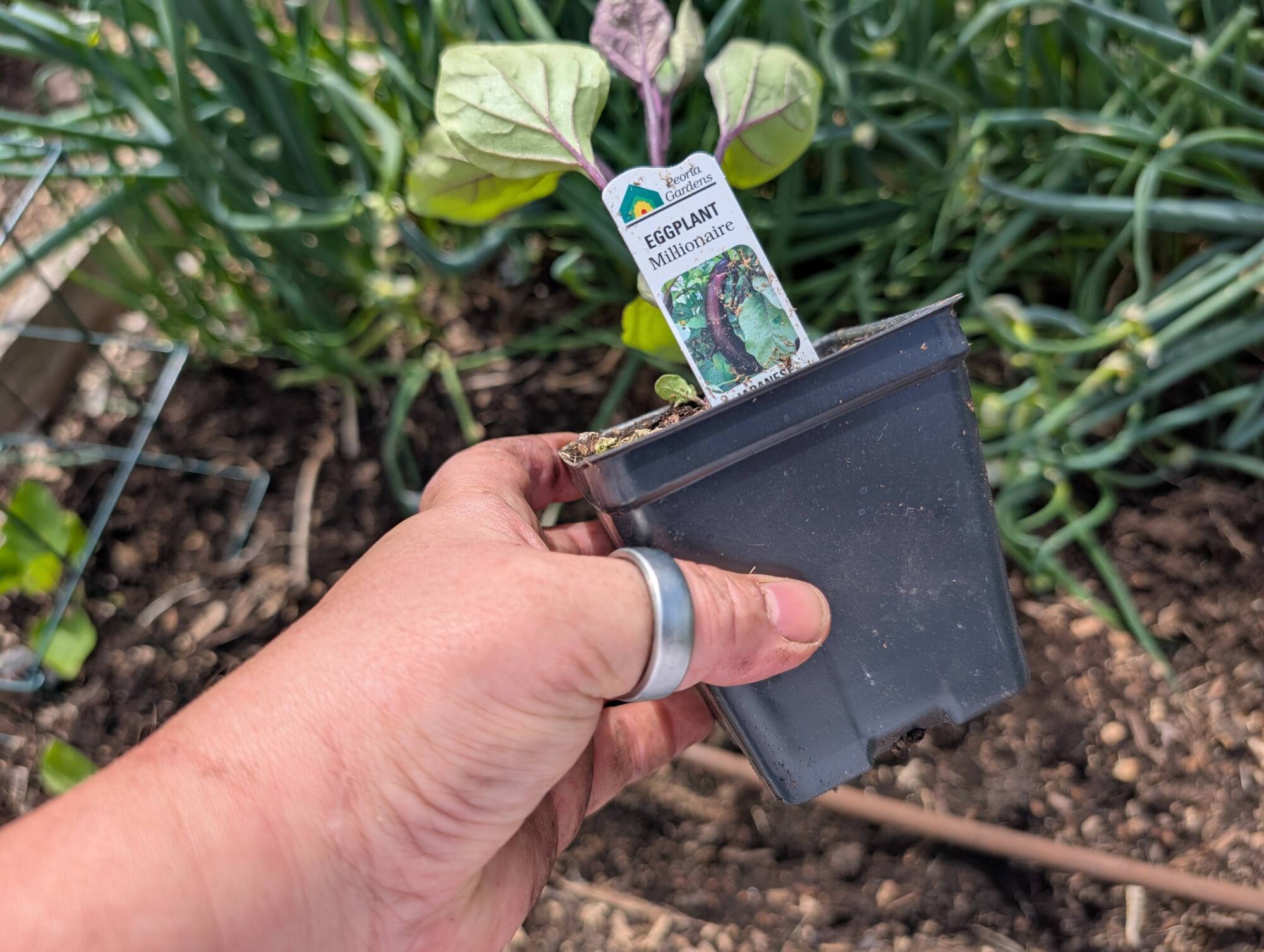
Eggplant in plastic pot

Credit: Amanda Blum

By the time plants reach the nursery, they’re often root-bound in the plastic pots or six packs you buy them in. Roots are resilient, but you don’t want to disturb them more than necessary. The best way to break a plant free from a plastic pot is to use two fingers and squeeze the bottom of the pot. This should free the plant. Don’t turn the pot over or pound on it with your palm, and definitely don’t try to pull it loose by the plant’s stem. 

eggplant seedling before and after roots broken up
on the left, the eggplant seedling just out of the pot, and on the right, after the roots have been broken up
Credit: Amanda Blum

Once the plant is out, you want to break up the roots by using your fingers like a comb on the bottom of the plant, so that roots are freed. That said, these plants do not enjoy their roots being disturbed: cucumbers, beans, pumpkins, luffa, beets, and most root vegetables. For these, I simply dig a hole, remove the plant from the plastic tray, carefully plop the plant in, and walk away. 

Separate plants as necessary

Carrots in a six pack

Credit: Amanda Blum

Most pots have more than one seed in each cell. In some cases, like tomatoes, someone usually culls the seedlings so only one is left to flourish. However, in some cases, like herbs and lettuce, nurseries leave the seeds alone and let multiple seeds grow. In other cases like onions and carrots, the cells are purposely overseeded to be filled with lots of seedlings. Strawberries usually come in a pot of five to 10 starts. 

Separating onion seedlings
If you take a cell of onion seedlings out, you can separate them by diving the block in half over and over again, until you have individual seedlings.
Credit: Amanda Blum

When there’s more than one seedling, you need to separate them. You shouldn’t try to plant them altogether. For lettuce or herbs, this is simple: Remove one cell, and with your fingers, gently pull the soil pod apart. Start by pulling the pod in half, and then keep dividing until all the seedlings are free. This works on larger plants like squash, and smaller plants like carrots where there can be 20 or more seedlings in a single cell. 

Once the individual seedlings are free, they can each be planted as if they’re a whole plant. This is how you get a whole row of carrots or onions. This is also a great way to save money, since you usually get far more than six lettuce heads from a six-pack of lettuce. 

Know the right depth

Eggplants planted deep

Credit: Amanda Blum

Plants need to go in the ground at the right depth, ensuring that the base of the plant is at soil level. In some cases, though, you can (and should) plant the stem deeper.

Leeks and onions, for example, can be planted deeply. In particular, leeks can be planted as deeply as possible, with only an inch or two of seedling above the surface of the soil. This will help blanch the leek (keep it white). 

Tomatoes, eggplant, and peppers can be planted deeply, as they’ll form roots along their entire stem. If your tomato is leggy (tall with little horizontal branching), this is a spectacular way to fix the problem. 

When in doubt, follow the directions on the plant tag, or simply plant at a standard depth so the roots are covered, but the stem is exposed above the soil.

Don’t mulch against your stems

While mulch is an important part of insulating your vegetable plants and keeping moisture in the ground, it’s also a way to spread pathogens. You want to ensure plants have a few inches of clearance between them and the mulch. 

Keep your labels or make new ones

plant tags
Keep those plant tags.
Credit: Amanda Blum

In the melee of planting, it’s common to lose your plant tags. After all, a tomato is a tomato. However, you’ll be sad at the end of the season when one tomato does spectacularly and another doesn’t, and you don’t know what variety each was. Label your plants! 

Forgive me Volvo, I was wrong: The 2025 V60 Cross Country review

As we often like to remind people, beware buying any car in its first model year. It takes a little while for any OEM to find its feet with a new model, and now there’s half-baked software that can need frequent updating to worry about in addition to any mechanical woes. I bring this up because various bugs meant that an electric car we were supposed to review had to be repeatedly postponed, as it was away being fixed, and as a result our week with the 2025 Volvo V60 Cross Country turned into two. And what a pleasant two weeks they were.

The Volvo station wagon is not in its first production year. Any criticism of its onboard electronics would focus more on the fact that they are now increasingly vintage, but that also means the bugs have mostly been squashed by now. Sadly, Volvo killed off the regular V60 station wagon earlier this year, but you can still buy the Cross Country version, which starts at $51,495, including the delivery charge.

As the name probably implies, the V60 Cross Country has some adaptations for unpaved roads: it rides a little higher and on softer suspension, and there’s protective cladding here and there that gives this wagon a bit of a bold stance.

Read full article

Comments

New Lenovo Mini AI Workstation Rocks Blackwell Superchip And 128GB Of RAM

New Lenovo Mini AI Workstation Rocks Blackwell Superchip And 128GB Of RAM
Lenovo just announced the new ThinkStation PGX, a new compact personal AI developer workstation designed to empower AI researchers, developers, data scientists, practitioners, students, and application engineers. This purpose-built mini desktop solution, equipped with an NVIDIA GB10 Grace Blackwell Superchip offers significant AI capabilities