This Phone-Sized E-Reader Helped Me Smash My 2025 Reading Goal

We may earn a commission from links on this page.

I used to regularly read more than 125 books a year, each meticulously logged on my Goodreads profile. I read during my commute and to wind down at night. I always had a paperback in my bag or an audiobook in my ears.

Then I got a smartphone. Then I got on Twitter. Then the 2016 presidential election happened. Then there was a pandemic, and for a while I stopped commuting altogether.

With every year, it seemed like there were more things to spiral about online, and less hours in the day to relax with a novel or read some stimulating non-fiction. Suddenly I found it hard to meet my much more modest reading goals, which dropped to 75, then 50, then 30 books a year. In 2023 and 2024, I set my sights on finishing just 20 books (including graphic novels and stuff I read aloud to my kids). I still had to cram at the end of the year to manage even that comparatively sluggish pace.

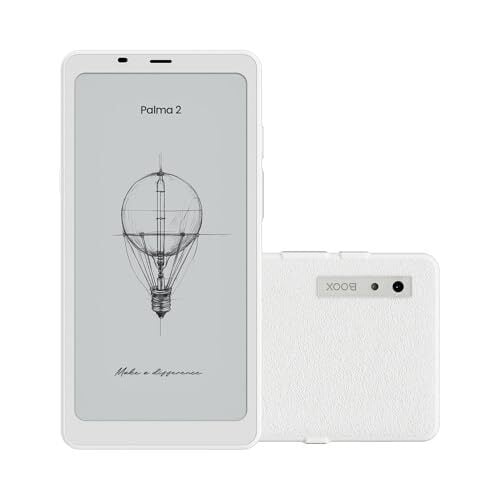
But things are different in 2025. It’s May, and I’ve already met my 20-book reading goal (which I’ll soon be increasing), and I owe it all to my Boox Palma 2, a phone-shaped e-reader I can easily carry with m3 wherever I go.

A device so good it has a cult following

As I noted in my review of the Boox Palma—the now discontinued, nearly identical predecessor to the Palma 2—it’s one of the most lovable electronic devices I have ever owned. It’s a near perfect marriage of form (the easy-on-the-eyes e-ink screen popularized by Amazon’s Kindle, a compact size) and function—with an open Android operating system and access to the Google Play store, you can use it to run reading apps from a variety of retailers, listen to audiobooks with Bluetooth headphones, or get a little work done on productivity apps like Gmail and Google Docs.

At a time when increasing numbers of people are opting to make the switch to a “dumb phone” to escape the pull of their screen addictions, the Palma occupies a rather unique spot in the market: While it can do a great deal more than your standard Kindle, it still feels clunky and slow in comparison to your smartphone, but in the best way. It doesn’t have a cellular connection, so if you aren’t on wifi, you’ll be unable to use the internet or update your social feeds. The black and white display means using it is soothing instead of stimulating, while still scratching that “gotta pull out my device” itch. Its quirky qualities have garnered it a cult following of sorts (ironically, adherents gather to discuss the device on Reddit and TikTok, two places to avoid if you want to get any reading done).

The perfect form factor

Leaving aside all the things social media and app developers do to make their products addictive, I struggle with regulating my phone use for the sole reason that my phone is always with me. It’s how I keep in touch with my spouse and kids and it has effectively replaced my wallet, therefore it must be in my pocket at all times and hey, I might as well pull it out at every idle moment to check my notifications. Yes, I could carry a book or a standard-sized e-reader to look at instead, but that requires carrying a bag of some kind (or large pockets), and it’s hard to beat the convenience of something you can shove into any pair of jeans.

Well, the Palma 2 can be shoved into any pair of jeans. It has basically the identical form factor to a most smartphones, and can even occupy the same pocket as my iPhone 14. This means that when I’m standing in line at the post office, or waiting for the train, or trying to maintain my balance on the train, I can effortlessly pull out my e-reader instead of my phone, and absorb a few pages rather than frantically trying to refresh my Bluesky feed at subway stops.

Slow and kinda clunky (in a good way)

If the Palma 2 can access the Google Play store, what’s to keep you from loading it up with all of the apps that already make your smartphone so addictive? Nothing! Go for it—stick Bluesky on there. Add Facebook and Instagram if you’ve yet to flee Meta’s ecosystem. You can even load up video-based apps like YouTube and Netflix and time-wasting games like Subway Surfers.

If you do, though, you’ll quickly find that none of them are that enjoyable to use. Though Boox readers’ e-ink displays employ variable refresh rate tech that makes them infinitely faster than early generation Kindles (where you could pause for a heartbeat between pressing a key on the virtual keyboard and actually seeing the text appear on the screen), even in the fastest modes they are only a fraction as responsive as a phone or tablet’s LED screen.

So while you certainly can use your Palma 2 to scroll social media or watch a few TikToks, you won’t particularly want to, because it’s kind of bad at them, but in a way I love: The device is optimized for reading text or comics (particularly black and white manga), and it presents that material so well, and so conveniently, that I want to carry it around with me everywhere so I can read on it all the time.

So far, it’s going well: As I said, I’ve already hit my 20-book reading goal for the year. In the meantime, if you’re looking for a series you can binge to get you out of a doomscrolling funk, I recommend the Dungeon Crawler Carl series by Matt Dinniman. After picking up the first one in February, I blew through its seven thus released books (ranging in length from 400 to 800 pages) in about six week. And yes, I read every word of them on my Palma 2.

A Brazilian Hillbilly Cover Of Rage Against The Machine’s ‘Killing In The Name Of’

This is a clip of Brazilian hillbilly band (that’s a thing — I was surprised, but I know I shouldn’t have been) Tião e os Bravos covering Rage Against The Machine’s 1992 ‘Killing In The Name Of’ atop a dirty mattress stage. Admittedly, not the worst stage I’ve ever seen. Would I pay to see Tião e os Bravos in concert? Absolutely, AND bring my own homebrew moonshine. “Why is it black?” Oh I use shoe polish to give it some color.

Android Devices Are Getting Big Gemini Upgrades That Leave Siri In The Dust

Android Devices Are Getting Big Gemini Upgrades That Leave Siri In The Dust
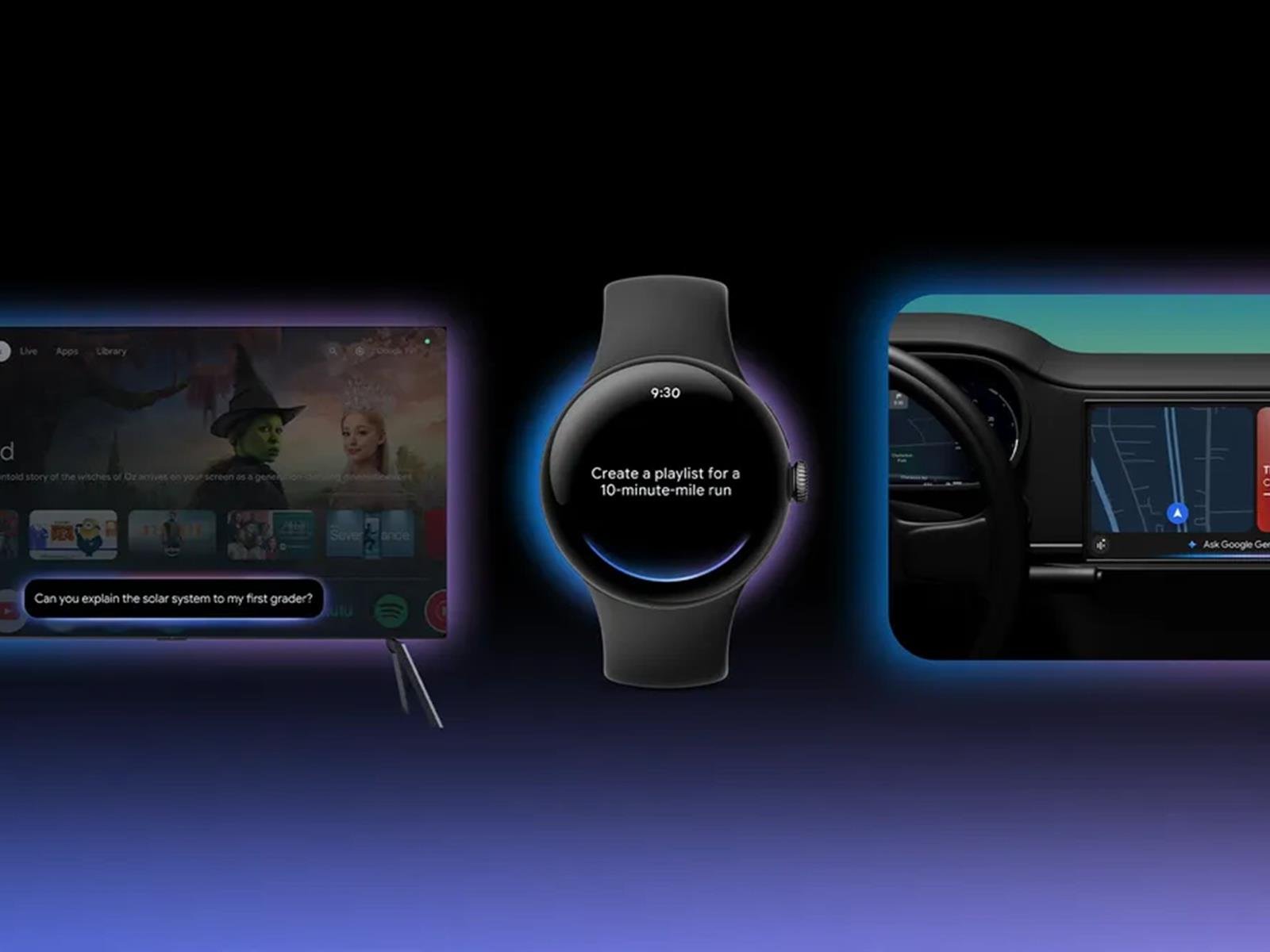
Google has recently announced that it is bringing Gemini to smartwatches, cars, TVs, and, in collaboration with Samsung, headsets and glasses too.

A fascinating part of this upgrade is that Gemini will be able to understand natural conversations. With Gemini in cars (“Android Auto and cars with Google Built-in”), users can converse naturally

I Love These Sony ANC Headphones, and They Just Dropped in Price by $150

We may earn a commission from links on this page. Deal pricing and availability subject to change after time of publication.

Audio enthusiasts need no introduction to Sony’s 1000X series. They’ve been around since 2016, improving on the previous iteration to eventually land on the latest Sony WH-1000XM6, the best over-ear headphones for ANC your money can buy in 2025. As you can imagine, that means the still excellent 1000XM5 is dropping in price. If you’re willing to splurge, it’s a good time to do so during Amazon’s Memorial Day Sale. The WH-1000XM5 are currently $298 (originally $399.99), matching Black Friday and Christmas prices, according to price-tracking tools.

I have been a loyal customer of the 1000X line for many years as my go-to headphones for most activities. The WH-1000XM5 came out in May of 2022 to an “outstanding” review from PCMag for their top-notch audio quality, but also for their exceptional audio when using its best-in-class active-noise cancelling (ANC) (most headphones lose their audio quality when using ANC). The headphones are also well-designed to be comfortable for long sessions.

The ear controls use tapping and swiping, which aren’t my favorite, but it’s what all the modern headphones are moving toward. There’s an app that comes with the headphones that lets you adjust your EQ settings to your liking, including what the swiping and tapping functions do on your headphones.

A great touch on these headphones that is often neglected is a Stereo 3.5mm connection, perfect for those who want to use a wired cable without worrying about battery life. Speaking of battery life, Sony says you can expect about 30 hours, but it will vary depending on your usage of ANC. They are compatible with AAC, LDAC and SBC codecs and have multipoint connection (you can pair them with more than one device at the same time).

If you’re looking for excellent ANC headphones with great audio quality at a good price, the WH-1000XM5 are a great deal right now.

European ‘Green’ Investments Hold Billions in Fossil Fuel Majors

An anonymous reader shares a report: European “green” funds holding more than $33 billion of investments in major oil and gas companies have been revealed by an investigation, despite fossil fuels being the root cause of the climate crisis. Some of these investment funds used branding such as Sustainable Global Stars and Europe Climate Pathway.

Over $18 billion was invested in the five biggest polluters: TotalEnergies, Shell, ExxonMobil, Chevron and BP. These topped a 2023 Carbon Majors ranking for oil and gas production among shareholder-owned firms. Other investments by funds following EU sustainable finance disclosure regulations (SFDR) included those in US fracking company Devon Energy and Canadian tar sands company Suncor, the investigation by Voxeurop and the Guardian found.

Investors claim that holding a stake in a company allows them to influence the firm’s pursuit of climate goals. However, no major oil and gas producer has plans consistent with international climate targets and many companies have weakened their plans in the last year, according to a report from Carbon Tracker in April. The investment firms with the biggest stakes in fossil companies in their green funds were JP Morgan, BlackRock and DWS in Germany.


Read more of this story at Slashdot.

Why We’re Not Getting That AI-Powered Siri Anytime Soon

If you were under the assumption that Siri was soon going to be supercharged with AI, you wouldn’t be alone. In fact, Apple has advertised as much since last WWDC, showing off its ChatGPT-like assistant in commercials and promotional materials.

It’s been nearly a year since WWDC 2024, and that new Siri is still not here. The thing is, it likely won’t be for a long time. How long is anyone’s guess (I’ve been tracking the delays here), but one thing seems for certain: Apple is not showing off AI Siri at next month’s WWDC 2025.

Apple’s AI program is a mess

In Mark Gurman’s latest piece for Bloomberg, he describes a chaotic situation regrading Apple’s AI department. The piece is a fascinating and in-depth look at Apple’s AI woes, and I won’t give a detailed summary of the entire article. However, I will briefly discuss what’s going on, and how it related to AI Siri:

Executive leadership at Apple, including senior vice president of Software Engineering Craig Federighi, didn’t believe AI was worth the investment, and didn’t want to allocate resources away from Apple’s core software components in order to develop the technology. But once Federighi used ChatGPT following its late 2022 launch, he did a 180. He and other Apple executives began meeting with the big AI companies to learn everything they could, and pushed for iOS 18 to have “as many AI-powered features as possible.”

While Apple’s AI department already existed before this scramble (the company had poached Google’s artificial intelligence chief John Giannandrea), the engineers simply couldn’t match the quality or accuracy of the tools provided by other companies like OpenAI, Anthropic, or Google, who had a huge head start on generative AI. That lag manifested in two ways: First, many of the AI features that Apple did bring to market were half-baked. Apple Intelligence’s notification summaries feature, for example, infamously made some major mistakes, such as “summarizing” a BBC news alert to say that United Healthcare shooting suspect Luigi Mangione had shot himself. (Apple later disabled the feature for news alerts.)

Second, because Apple couldn’t rely on its own tech to carry Apple Intelligence, they outsourced some tech to another AI company. While there was much debate about which company they should work with (Giannandrea wanted to work with Google and bring Gemini to iOS), Apple eventually settled for ChatGPT—which is why OpenAI’s bot is built into your iPhone today.

Apple’s lack of AI focus meant they missed the rush to acquire GPUs—the main processing unit used for training and running AI models. They also have strict privacy policies when it comes to user data, which severely limits what data they can use to train their models. (Some might say that’s actually a good thing, and take a pause to think about the companies that do have a plethora of data to train with.)

Siri

While Apple was able to get some AI features working “well” enough to ship, Siri was never among them. In order to bring AI to Siri, the company had to split Siri’s “brain” in two—one featuring the existing code, used for traditional Siri tasks like setting timers and making calls, and the other for AI. While the AI-side in a vacuum can work, integrating it with the other half of Siri’s brain is problematic, and is the cause of much of the delay.

But rather than wait until Apple figured out how to get AI Siri working to actually show off its new features, the company went ahead and marketed them heavily. During WWDC 2024, we saw prerecorded demos of Siri taking complex requests, and generating helpful answers by accessing both a knowledge base about the user in question, as well as an awareness of what was happening on-screen. A prime example was an Apple employee asking Siri about their mom’s travel itinerary: Siri dove through the employee’s messages with their mom to draw up the plans.

Apple even hired Bella Ramsey of The Last of Us to promote AI Siri features: In the commercial, Ramsey sees someone at a party they recognize but don’t remember the name of. Ramsey then asks Siri “What’s the name of the guy I had a meeting with a couple of months ago at Cafe Granel?” Siri immediately responds with the acquaintance’s name, pulling from a calendar entry. Ramsey doesn’t need to say the exact date or where to pull the information from, since AI Siri is presumably contextually aware, and can understand vague responses. (Apple has since deleted the ad from its YouTube account

Since then, AI features have trickled in on various iOS 18 updates, but not AI Siri. We’ve been following reports (mostly from Gurman) that Apple’s engineers were having trouble getting it to work, and each delay pushed AI Siri’s release to the next major iOS 18 update. At one point, we thought it could come with iOS 18.4: As Gurman reports in this latest piece, that was the plan, but Federighi himself was surprised to see that the AI Siri features didn’t work on a beta for 18.4.

Siri’s big AI upgrade was delayed again, and now “indefinitely.” There are no plans to announce Siri’s new features alongside iOS 19 next month. While the goal is to get AI Siri out for iOS 19 at some point, the situation is dire—Siri’s features reportedly don’t work a third of the time, and every time you fix one of Siri’s major bugs, “three more crop up.”

Gurman’s sources say Apple has an AI department in Zurich working on a new LLM-based Siri that scraps the two-sided brain of the current assistant. Siri also has a new leader, Mike Rockwell, who replaced Giannandrea this spring. Some sources even say that Apple’s internal chatbot is now rivaling ChatGPT, which could prove useful if integrated with Siri.

There are reasons to be mildly optimistic about Siri’s long-term future, but there’s no denying the last year has been a disaster. If you’re excited for Siri’s next big development, lower your expectations for the short-term.

Razer’s new Blade 14 laptops are outfitted with RTX 5000 series cards

Razer is back with a refresh of the Blade 14 laptop and it’s the thinnest 14-inch model in the company’s history. It measures just 15.7mm at its slimmest point and weighs just over three pounds. This makes it an ideal computer for on-the-go gaming.

To that end, these laptops feature the new NVIDIA GeForce RTX 5000 series GPUs. Buyers can spec the Blade 14 out with up to the RTX 5070. This pairs with NVIDIA DLSS 4 tech to provide “the highest quality gaming experience possible in a 14-inch” laptop.

They are also outfitted with the AMD Ryzen AI 9 365 processor that can achieve up to 50 TOPS. It comes with a bunch of AI applications that take advantage of that processor, like Copilot+, Recall, Live Captions and Cocreate.

The Blade 14 goes up to 64GB of RAM and includes a 72 WHr battery that should last around 11 hours before requiring a charge. That’s a pretty decent metric for a laptop this powerful. The 3K OLED display offers a 120Hz refresh rate and a 0.2ms response time.

A laptop on a desk.
Razer

There’s a MicroSD slot, two USB-C ports and a traditional HDMI 2.1 port. The Razer 14 integrates with wireless standards like Bluetooth 5.4 and Wi-Fi 7. The laptop even includes a newly designed ventilation system for better performance. The exterior is made from T6-grade aluminum and features a sand-blasted texture and an anodized matte finish.

It’s available for purchase right now and comes in black and gray colorways. Pricing starts at $2,300, but that one comes with just 16GB of RAM and the RTX 5060 GPU.

A strange laptop in a strange land.
Razer

The Blade 16 laptop is now available in a new configuration that features the RTX 5060 GPU. The company also recently revealed the biggest sibling of the bunch, the Blade 18. That one goes all the way up to the RTX 5090.

This article originally appeared on Engadget at https://www.engadget.com/computing/laptops/razers-new-blade-14-laptops-are-outfitted-with-rtx-5000-series-cards-185517669.html?src=rss

Microsoft’s Edit on Windows is a New Command-Line Text Editor

Microsoft unveiled “Edit on Windows,” a new command-line text editor, at its Build conference today. The open-source tool allows developers to edit files directly in the command line without switching to another app, similar to vim but designed to be more user-friendly.

Accessible by typing “edit” in a command prompt, the lightweight editor (less than 250KB) includes features like multiple file support via ctrl + P shortcuts, find and replace functionality, and regular expression support. “What motivated us to build Edit was the need for a default CLI text editor in 64-bit versions of Windows,” said Christopher Nguyen, product manager of Windows Terminal, noting that 32-bit Windows versions already ship with MS-DOS Edit.

Microsoft also wanted to avoid the notorious “how do I exit vim?” problem by creating a modeless editor, The Verge writes. The tool will be available to Windows Insiders in the coming months.


Read more of this story at Slashdot.

Trump will sign the Take It Down Act criminalizing AI deepfakes today

President Donald Trump is set to sign the Take It Down Act today, according to CNN. The act is a piece of bipartisan legislation that criminalizes the publication of “nonconsensual intimate visual depictions,” including AI deepfakes. The law made it through the US House of Representatives in April 2025, prompting concern from free speech advocates that believe parts of the law could be easily abused to curtail speech.

The Take It Down Act was created to address the spread of nonconsensual, sexually exploitative images online. Laws exist addressing the issue at the state level, and some online platforms already have methods for requesting a nonconsensual image or video be taken down. This new law would set a federal standard, though, making taking down posts mandatory and directing companies to create a system for requesting images or videos be removed, under the supervision of the Federal Trade Commission.

The issue with the law as written, according to the Electronic Frontier Foundation, is that its takedown provision “applies to a much broader category of content…than the narrower NCII [nonconsensual intimate image] definitions found elsewhere in the bill.” The EFF also suggests that the short time-frame of 48 hours that the Take It Down Act requires means that smaller online platforms will probably just remove posts when they receive a complaint rather than verify that the post actually violates the law.

Trump has expressed interest in taking advantage of the new law, as well. “I’m going to use that bill for myself, too, if you don’t mind. There’s nobody gets treated worse than I do online. Nobody,” Trump said during a joint session of Congress in March. Given the lopsided composition of the current FTC and the Trump administration’s already loose interpretation of existing laws, it’s not hard to imagine how the original intentions of the Take It Down Act could be twisted.

This article originally appeared on Engadget at https://www.engadget.com/big-tech/trump-will-sign-the-take-it-down-act-criminalizing-ai-deepfakes-today-184358916.html?src=rss

Trump to sign law forcing platforms to remove revenge porn in 48 hours

After dragging its feet for years, America is finally taking its first big step toward shielding victims of non-consensual intimate imagery (NCII)—also known as revenge porn—from constantly being retraumatized online.

On Monday afternoon, Donald Trump is scheduled to sign the Take It Down Act into law. That means that within one year, every online platform will be required to remove both actual NCII and fake nudes generated by artificial intelligence within 48 hours of victims’ reports or face steep penalties.

Supporters have touted the 48-hour timeline as remarkably fast, empowering victims to promptly stop revenge porn from spreading widely online. The law’s passing comes at a time when AI-generated revenge porn is increasingly harming a wider pool of victims—including some who may have never shared a compromising photo, like dozens of kids in middle and high schools nationwide. Acknowledging the substantial harm to kids already, the law includes steeper penalties for NCII targeting minor victims, a threat lawmakers hope will help minors get harmful images removed “as soon as possible.”

Read full article

Comments

Wild Study Claims Gravity Is Proof The Universe Is A Big Computer Simulation

Wild Study Claims Gravity Is Proof The Universe Is A Big Computer Simulation
File this one under “fun to think about, probably not changing your day job”: a new study just dropped that suggests gravity itself might be the smoking gun that our entire universe is one big computational simulation. Yep, we’re talking simulation theory again — the idea that reality is just a very elaborate piece of code running on some

Seven Ways to Turn Your Entryway Into a More Functional Space

If you’re like most folks, you use your home’s entryway to hang a few coats, store an unruly pile of shoes, and give you a place to drop your keys and the mail when you walk in. If you have the space, you might use it as a full-fledged mud room—a space to shed your wet coats, boots, and umbrellas before stepping into the house proper.

But your entryway could be a lot more than that—especially if you live in a small space and need to make use of every inch of square footage. Just because it’s a space you and your guests pass through on the way to somewhere else doesn’t mean you can’t use it for other purposes. And you can enhance the space for the guest experience as well, turning a transitional room no one remembers into a multi-functional space. Here are seven options for getting more out of your entryway.

Use it as an office space

If you ever work from home or just need a space to do household paperwork or to noddle away at your hobbies, your entryway can easily be transformed into a tiny office. A fold-down desk that compresses into an unobtrusive wall unit when not in use, combined with an adjustable stool or other mobile seating that can be used for putting on and taking off shoes when you’re not working, is all you need. If you have the wall space, throw in extra shelving or a narrow filing cabinet (or combination piece like this filing cabinet/printer stand/shelving unit) for maximum office storage in a minimal footprint. When you’re not working, you can fold everything up and instantly have a clear entryway again.

Turn it into a library

Need a place to store your books and set up a cozy reading nook? The entryway could be that spot. A row of shelves (or other book storage) along one wall, a small but comfy chair (with a slim console table for cups of tea or literary cocktails), and a floor lamp that’s great for reading, and you’re all set. When not in use, this area can also set a warm, comfortable vibe for visitors.

Assemble a gallery display

If you have lots of art pieces, collectibles, or mementos to display, your entryway is an ideal place to put them all. Hanging pictures or installing floating shelves to display your items not only beautifies the space, giving it a cohesive and personal style, it also makes it a lot more inviting for guests. Instead of moving through a chaotic or antiseptic place that pushes them to kick off their shoes and get into the main part of the house as quickly as possible, your entryway could be a place people want to linger.

Build a conversation nook

If your home lacks a space to sit and chat without distractions, your entryway might be the ideal spot. If you have room for a shallow sofa like this one, or a pair of small accent chairs like these, you can set up a spot where you can visit with guests. Having a space like this in your entryway also makes it ideal for those casual encounters with neighbors—instead of standing awkwardly in the doorway for fifteen minutes, invite them in to sit.

Add storage

If you’re hurting for storage space, consider all that underused wall and floor space in your entryway. You can store anything there, after all—it doesn’t have to be entryway-related, and no one will ever know what’s in those drawers and cabinets unless you tell them. Even a small foyer can be made into a storage paradise with some shelving, a shallow wardrobe or armoire, or a dual-purpose storage bench.

Use it as a bar

You want to host sophisticated gatherings fueled by social lubricants, but your bar is currently also your kitchen counter? Look to your entryway. A narrow bar cart against one wall could be the answer. If you want to make it a space people will linger in after securing their cocktails, add some floating shelves at counter heights (typically 36-48 inches high) to set down glasses. To really commit, a slim beverage refrigerator for beer, wine, and mixers next to the bar cart is a great addition.

Turn it into your family information center

Your entryway can be the place where everyone in the house knows to look for daily information. A cork board or chalkboard (or a combination) mounted in the entryway makes it easy for everyone coming and going to check the day’s schedule, look for reminders, or pick up and drop off items for later retrieval. This can be a better option than the kitchen because it will be the last and first place people see when leaving or entering the house, increasing the chances that you’ll actually remember the things you’re reminding one another about. (When you have guests staying over, it’s also a perfect spot to mark down things like the WiFi password or important phone numbers.)

Star Citizen Dev Responds To Angry Backlash Over Pay-To-Win Ship Upgrades

Star Citizen Dev Responds To Angry Backlash Over Pay-To-Win Ship Upgrades
Star Citizen has defied the odds, remaining in an alpha release state for over a decade without losing support from its community, while managing to raise several hundreds of millions of dollars in that time. While the game is no stranger to controversial moments, the latest decision from developer Cloud Imperium Games has started a backlash

LinkedIn Executive Warns AI Threatens Entry-Level Jobs as Graduate Unemployment Rises

AI is eroding entry-level positions across multiple industries, threatening the traditional career ladder for young professionals, LinkedIn’s chief economic opportunity officer warned Monday. College graduate unemployment has risen 30% since September 2022, compared to 18% for workers overall, according to LinkedIn data. The company’s research shows Generation Z workers expressing greater pessimism about their futures than any other age group.

“Breaking first is the bottom rung of the career ladder,” wrote Aneesh Raman in a New York Times column, citing examples across technology, law, and retail where AI is replacing tasks traditionally assigned to junior workers. A LinkedIn survey of 3,000 executives found 63% believe AI will eventually handle mundane entry-level tasks, with professionals holding advanced degrees likely facing greater disruption than those without.

Some firms are adapting by redesigning roles. KPMG now assigns recent graduates tax work previously reserved for more experienced employees, while Macfarlanes has early-career lawyers interpreting complex contracts once handled by senior colleagues. Though economic uncertainty also impacts hiring, Raman warned that delayed career entry can cost young workers approximately $22,000 in earnings over a decade.


Read more of this story at Slashdot.

Microsoft closes 9-year-old feature request, open-sources Windows Subsystem for Linux

Microsoft’s Windows Subsystem for Linux has become an important tool for developers and power users since it was introduced in the Windows 10 Anniversary Update back in 2016, giving them access to a built-in Linux command line and Linux applications from within Windows.

The company has steadily improved WSL since then, improving performance, making it easier to install and use, and adding features like GPU and audio support. But today as part of its Build developer conference, Microsoft announced that it would be making almost all of WSL open source, closing the very first issue that the then-new WSL project attracted on Github in 2016.

“WSL could never have been what it is today without its community,” writes Microsoft Senior Software Engineer Pierre Boulay in the company’s blog post. “We’ve seen how much the community has contributed to WSL without access to the source code, and we can’t wait to see how WSL will evolve now that the community can make direct code contributions to the project.”

Read full article

Comments

Bluesky is testing a ‘live now’ feature with streamers and the NBA

Bluesky doesn’t have its own live streaming capabilities, but the service testing out a new feature to boost users’ streams off the platform. The company is allowing “select” accounts to link their Twitch or YouTube accounts to their profiles, which will display a red indicator and “live” badge when they’re actively streaming.

In an update, Bluesky described the feature as an “early test” that will initially only be available to a “handful of accounts” before it’s ready for a wider launch. “Bluesky is the place for breaking news and real-time updates,” the company said. “This tool supports streamers, journalists, and anyone sharing live moments as they happen.”

The update comes one day after the service showed off a similar badge for the NBA’s official Bluesky account. The league will apparently direct fans on Bluesky to “live content they are promoting,” Bluesky COO Rose Wang said. Partnering with the NBA on the feature is an interesting move for Bluesky. Sports fans, and NBA fans in particular, have had an outsized impact on Twitter’s culture. And the company now known as X has inked several high-profile deals with the NBA and other major sports leagues over the years to promote their content.

Notably, Bluesky doesn’t have advertising. It’s using the “live” indicators to direct users to off-platform content, so it’s unclear if there are any business opportunities for the upstart platform that come with this feature. But it shows that Bluesky wants to play a bigger role in the kinds of conversations that once shaped Twitter’s culture, and make a name for itself as a destination to follow live events.

This article originally appeared on Engadget at https://www.engadget.com/social-media/bluesky-is-testing-a-live-now-feature-with-streamers-and-the-nba-174443865.html?src=rss

23andMe bought by Regeneron in court auction

It has been nearly two months since 23andMe declared bankruptcy and the company has officially been sold. The US biotech company Regeneron has agreed to buy 23andMe and all of its assets for $256 million (even though it was valued at $50 million in March). This purchase marks the end of former 23andMe CEO Anne Wojcicki’s bid to buy the company, which included resigning in order to make an independent offer. 

According to Mark Jensen, Chair and member of the Special Committee of the Board of Directors of 23andMe, Regeneron is offering to keep all of the former company’s employees. This decision, “will allow us to continue our mission of helping people access, understand and gain health benefits through greater understanding of the human genome,” he said in a release. 

The announcement also tries to emphasize data protection following 23andMe users’ concerns about where their information might end up and, in some cases, deleting their data from the site. “We are pleased to have reached a transaction that maximizes the value of the business and enables the mission of 23andMe to live on, while maintaining critical protections around customer privacy, choice and consent with respect to their genetic data,” said Jensen. 

The sentiment was echoed by its soon to be new owner. “Through our Regeneron Genetics Center, we have a proven track record of safeguarding personal genetic data, and we assure 23andMe customers that we will apply our high standards for safety and integrity to their data and ongoing consumer genetic services,” said George D. Yancopoulos, MD, PhD, co-founder, board co-chair, president and chief scientific officer of Regeneron in a statement. “We believe we can help 23andMe deliver and build upon its mission to help people learn about their own DNA and how to improve their personal health, while furthering Regeneron’s efforts to improve the health and wellness of many.”

How exactly 23andMe will shake out after the Regeneron purchase is to be seen. The company has taken a dramatic fall in recent years, since going public. Hackers accessed the information of 6.9 million people in 2023 and 23andMe laid off over 200 people last year. 

This article originally appeared on Engadget at https://www.engadget.com/big-tech/23andme-bought-by-regeneron-in-court-auction-174003286.html?src=rss

Here’s the Oura Ring Data You Can Access Without a Subscription

We may earn a commission from links on this page.

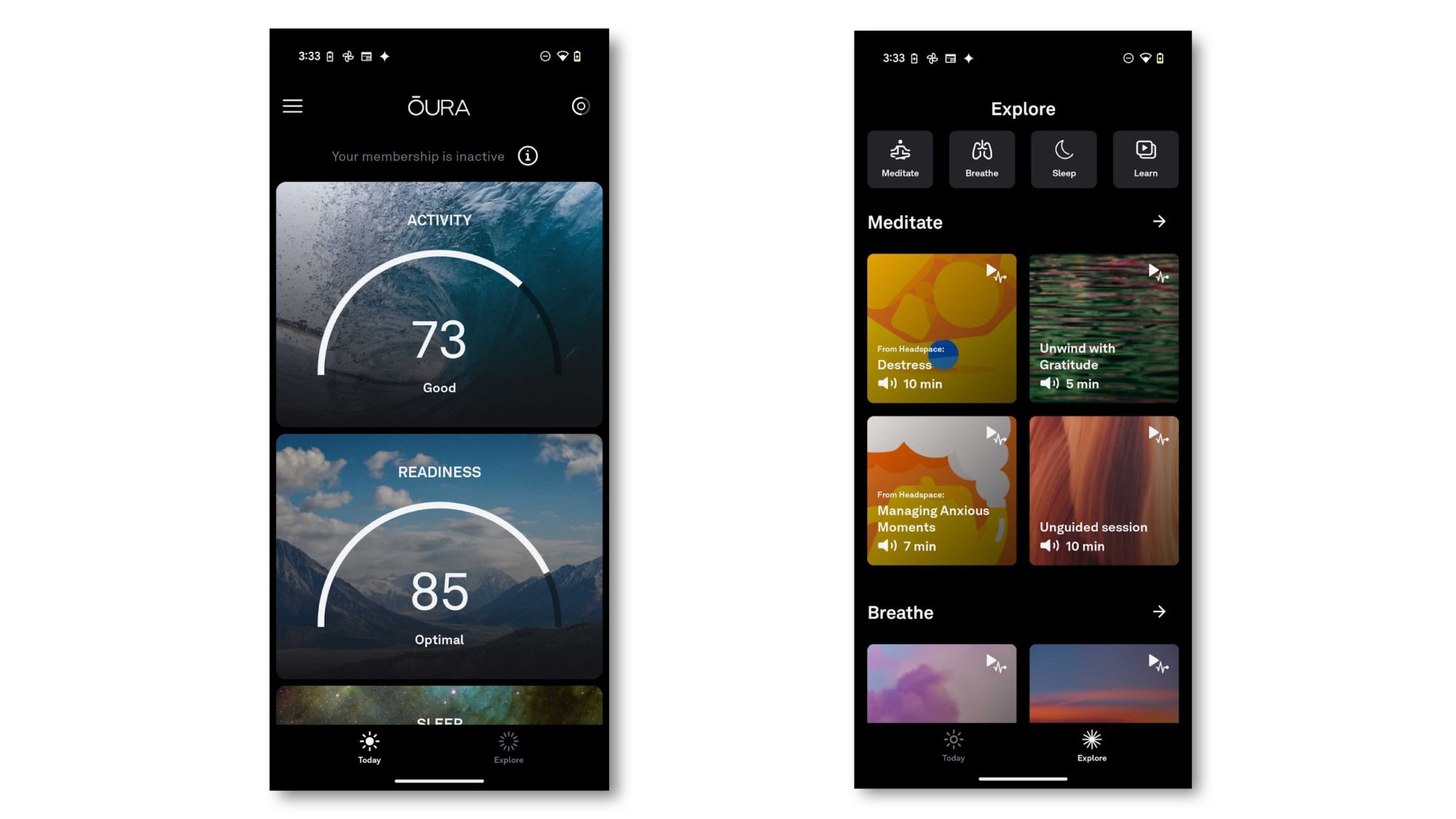
The Oura ring can give you a ton of data on your sleep, health, and fitness, but you need to pay for a $5.99/month subscription to see all of it. So what happens if you get an Oura ring but don’t pony up for the subscription? Here’s the full rundown, with screenshots of exactly what you’ll see—and a little-known way of getting data the app doesn’t show you.. 

As I explain in my review of the Oura ring 4, you should budget for both the ring and its ongoing subscription if you want to get the data and analysis the Oura ring is famous for offering. The subscription isn’t for premium extras; it’s for the basic functionality of the app, without which there isn’t much point to wearing the ring.

But! There is a way to get the data the ring collects, without going through the app. It comes as a spreadsheet download, so it’s not useful for casual “how did I sleep last night?” use, but it’s fine if what you really want is to do some data analysis. I’ll explain how to get that below, but first, let’s see what the app looks like sans subscription.

The app only shows scores and meditations (mostly)

Two screenshots: scores, and meditations.
The two screens you get without a subscription.
Credit: Beth Skwarecki/Oura

Here’s what you’ll see in the Oura app: not much. You’ll get a score for each of Activity, Readiness, and Sleep. Each score is out of 100—higher is better—and comes with a label like “good” or “optimal.” That’s it. No heart rate, HRV, hours of sleep, stress timeline, Advisor chatbot, meal tracking, none of that. Just three somewhat inscrutable numbers. Without raw data, I don’t consider these scores useful at all. (Imagine somebody asking “how did you sleep?” and you answer “82,” like they’re supposed to know what that means.) 

You do still get an Explore tab, which contains guided meditations and a few Oura tutorials, such as a one-minute video explaining what your readiness score is supposed to mean. Interestingly, after doing a meditation on my no-subscription account, I don’t see my heart rate or HRV during the session, but I do see some text giving my “baseline” for each of those measures. That’s not my most recent night’s reading, though. For that, you need to go download a spreadsheet. 

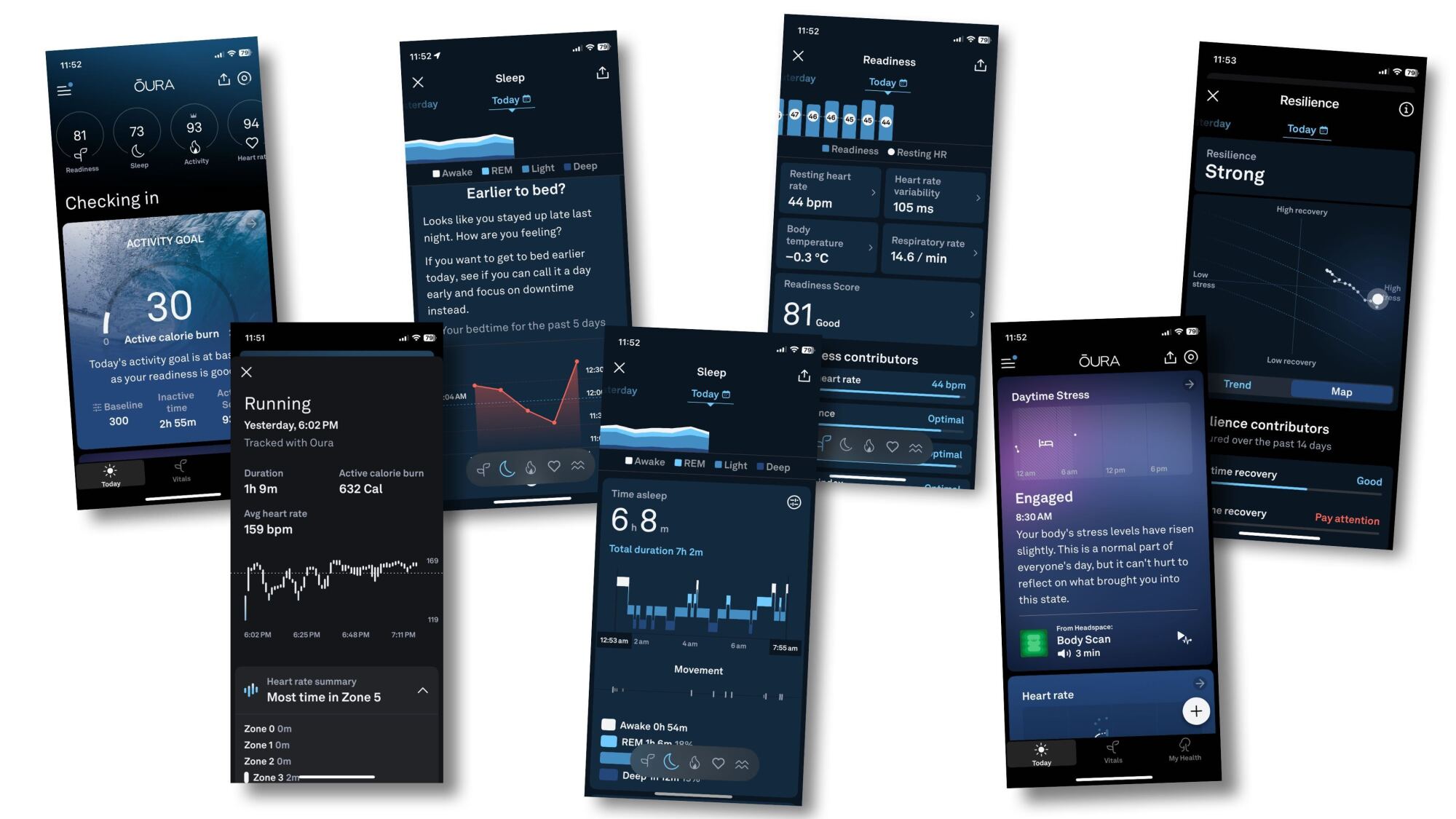
Scores, insights, sleep stages, bedtime analysis, stress resilience, etc.
For comparison, a sampling of what you get with a subscription.
Credit: Beth Skwarecki/Oura

You can download your data from Oura’s website, even without a subscription

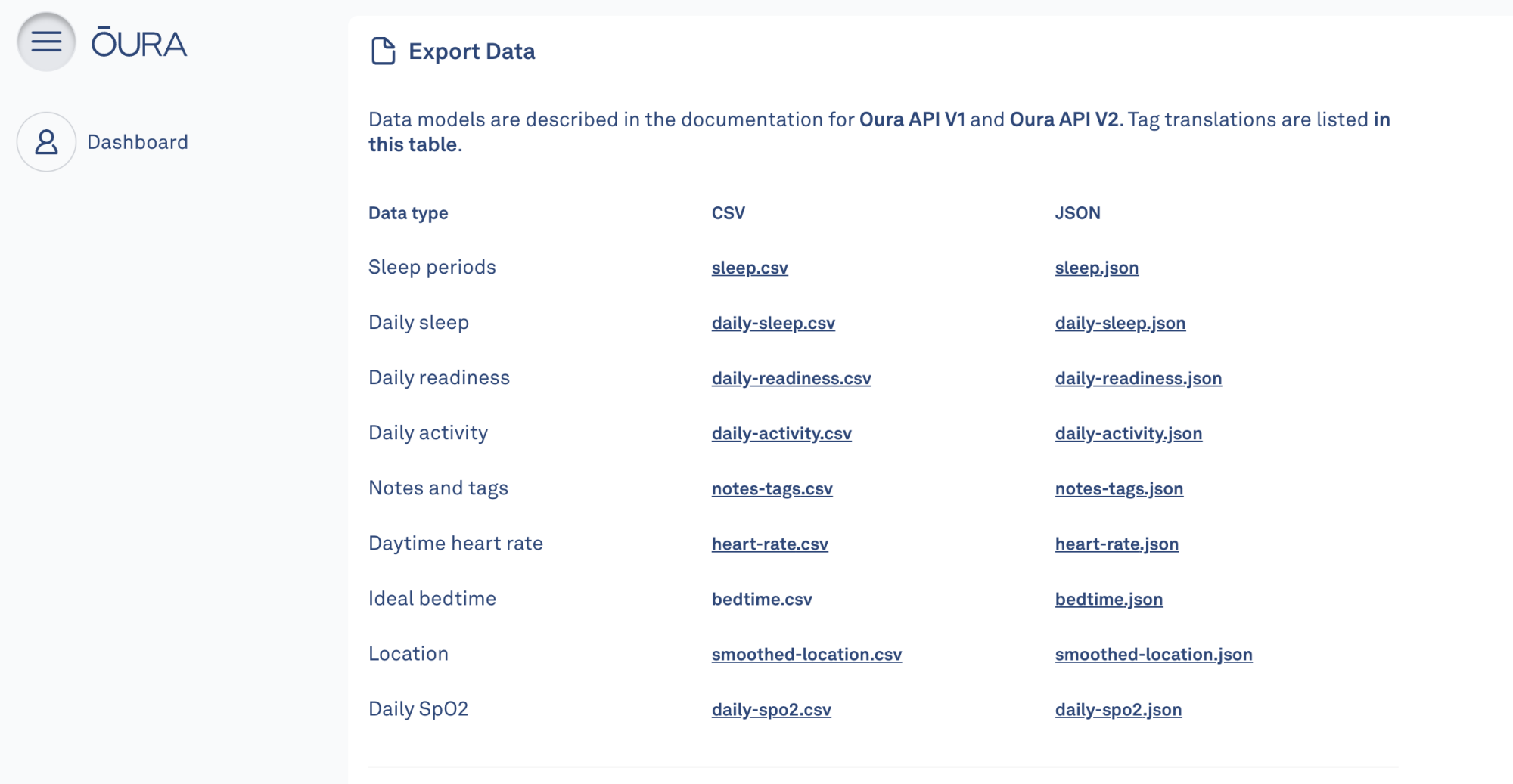
Alright, here’s the fun stuff. If you are OK with getting your data in spreadsheet form, you can download it directly from the Oura website. Go to cloud.ouraring.com. If you had a subscription, you’d be able to view some cool graphs on your dashboard, but you don’t, so the page is mostly blank. Tap on My Account and scroll down to Export Data. You’ll see a list of .csv and .json files. The very first one, sleep.csv (I think that link will work for you if you have an Oura account) is probably the most useful. Go ahead and bookmark that link on your phone, and you can check it in lieu of checking the app.

Screenshot of the spreadsheet from Oura
A partial view of sleep.csv (there are tons more columns than I can show in one screenshot).
Credit: Beth Skwarecki

From this spreadsheet, you can see your resting heart rate, HRV, and pretty much everything else that Oura logs every night. Your total sleep duration, for example, is in the 21st column, and it’s recorded in seconds. (28,410 seconds is about 7 hours and 54 minutes, if I’m doing my math right.) Explore the other files to see which ones have the data you’re most interested in. 

Oura screenshot showing other spreadsheets you can download
These are the downloads available without a subscription.
Credit: Beth Skwarecki/Oura

You need to give Oura a payment card to set up your ring in the first place

If you want nothing to do with the subscription at all, there’s an important caveat: The only way to set up your Oura ring (when it first arrives) is to sign up for a free trial that rolls into a regular subscription. So if you want to avoid giving Oura any payment information at all, you’re out of luck. You can cancel the subscription renewal immediately after signing up, though, which will mean you won’t be charged.

Microsoft’s Plan To Fix the Web: Letting Every Website Run AI Search for Cheap

Microsoft has announced NLWeb, an open protocol designed to democratize AI-powered search capabilities for websites and apps. Developed by Microsoft technical fellow Ramanathan V. Guha, who previously created RSS and Schema.org, NLWeb allows site owners to implement ChatGPT-style natural language search with minimal code. The protocol enables websites to process complex queries like “spicy and crunchy appetizers for Diwali” or “jackets warm enough for Quebec,” requiring only an AI model, some code, and the site’s own data.

During his demonstration to news outlet The Verge, Guha showed how NLWeb remembers user preferences, such as dietary restrictions, for future interactions. “It’s a protocol, and the protocol is a way of asking a natural-language question, and the answer comes back in structured form,” explained Guha, who argues the approach is significantly cheaper than traditional search methods that require extensive web crawling and indexing. Microsoft is partnering with publishers and companies including TripAdvisor, Eventbrite, and Shopify to implement NLWeb, though Guha acknowledges the challenge of achieving widespread adoption in a web that historically tends toward centralization.


Read more of this story at Slashdot.

FCC Chair Brendan Carr is letting ISPs merge—as long as they end DEI programs

It’s shaping up to be a big year for telecom mergers, and it appears the Federal Communications Commission is eager to approve the deals—as long as companies involved drop any DEI (Diversity, Equity, and Inclusion) policies criticized by FCC Chairman Brendan Carr. Verizon just got a big merger approved, and cable giant Charter is seeking permission to buy Cox.

The FCC on Friday announced approval of Verizon’s purchase of Frontier, one day after Verizon committed to end DEI policies in a filing with the commission. Carr previously sent letters to Verizon and other companies alleging that their diversity policies are “invidious forms of discrimination” that violate federal law and threatened to block mergers pursued by firms that enforce such policies.

“Verizon has now agreed to end its DEI policies as specified in a new FCC filing,” Carr wrote in a post on X. “These changes are effective immediately. A good step forward for equal opportunity, nondiscrimination, and the public interest.”

Read full article

Comments