This App Brings the iPhone’s Dynamic Island to Your Mac

I really like the iPhone’s Dynamic Island, the pill-shaped cutout near the top of the device’s screen. It’s an aesthetically pleasing way to check your battery percentage, record voice notes, and control music playback, among many other things. Since many MacBooks have a display notch too, you can use an app to bring an iPhone-like Dynamic Island to your laptop. Doing this makes the cutout look like a useful design feature rather than an abrupt gap in the screen, and some apps even let you move the giant volume and brightness adjustment popups to the Dynamic Island.

Alcove brings the Dynamic Island to your Mac

The volume slider in Alcove's notch app.

Credit: Pranay Parab

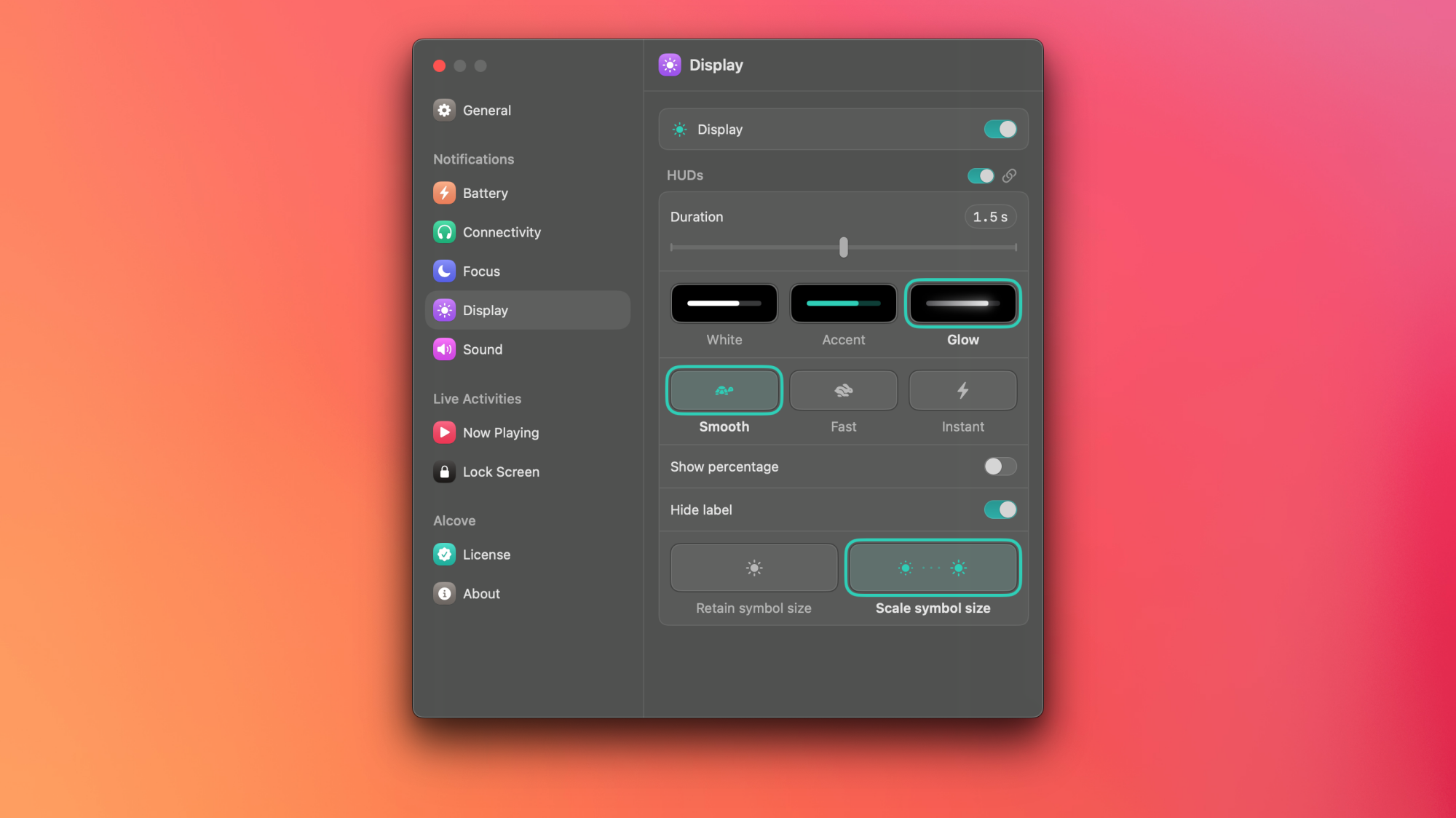
I’ve been using Alcove on a MacBook without a notch and I’m still finding it pretty useful. This app’s developer is known to focus on design, just as they did with Klack—an app that makes your Mac’s keyboard sound vintage. Alcove’s neat status updates highlight useful information in a slick interface. It takes over your Mac’s volume and brightness adjustment popups and moves those to the notch. This is a better implementation than Apple’s giant popups, which hide a significant part of the screen temporarily—a problem they’ve since fixed on iOS.

You can also use Alcove to keep a tab on Focuses, changes in songs, and access playback controls. The app can even show some of these changes on your Mac’s lock screen. I also like the app’s animations, from the small visualizer that shows up when you play music to the different themes of the brightness and volume sliders. If you choose the Glow theme for the volume slider, the color of the slider changes from green to red when you exceed 80% volume. 

Alcove's settings window.

Credit: Pranay Parab

This app supports gestures, so you can use horizontal two-finger swipes on your MacBook to skip to the next song or go back to the previous song. You can use vertical swipes to expand playback controls or to dismiss live activities that show up in the notch. 

You can try all of the app’s features for a couple days without paying, and once the free trial is over, you’ll have to pay $17 to continue using the app. The price may be a bit steep for someone who just wants music playback controls and nothing else, but Alcove is among the few apps that truly recreates the iPhone’s Dynamic Island on your Mac, right down to all the delightful animations.

Other useful notch apps

There are lots of other apps that make good use of the MacBook’s notch, but these are my favorites:

  • Notchnook ($25): This is another well-designed app and offers a few more features than Alcove and costs a bit more. You get more widgets, shortcuts, and even a mirror that lets you check your frame before a video call. Notchnook’s file tray lets you quickly AirDrop files or store them in a temporary shelf, which makes it easy to move files around.

  • Mediamate (€7): You can use this app for music controls, to slim down the massive brightness and volume controls, and to choose where to place those control sliders. You can place them in the notch or use slimmer sliders in the middle of the screen.

  • Tuneful ($4): This one is a music-focused notch app, which lets you connect to both Apple Music and Spotify. You can use it to show playback controls and the currently playing song in the notch, but it also includes gesture-based playback controls. In case you don’t want it in the notch, you can enable its mini player to show the album art and playback controls in other areas of the display.

OnlyFans is in talks to sell for $8 billion

OnlyFans is on the selling block, according to a report by Reuters. The current owner of the adult entertainment platform, Fenix International Ltd, is in talks to sell to an investor group at a valuation of around $8 billion. This group is being led by an entity called the Forest Road Company, which is an investment firm based in Los Angeles.

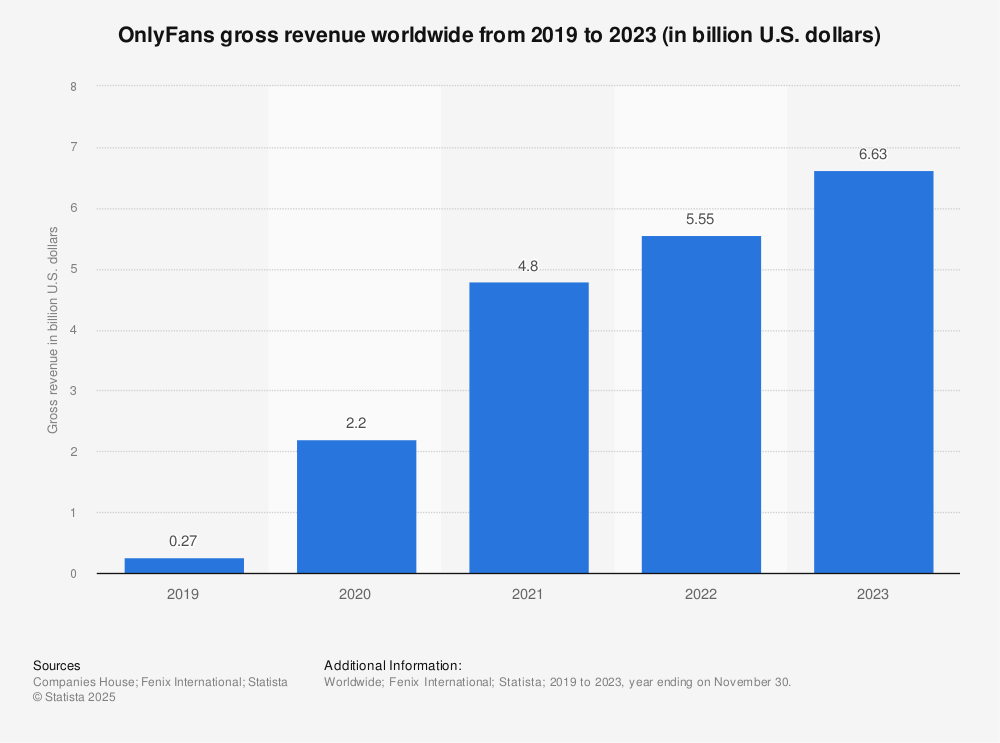
The platform generated $6.6 billion in revenue just in 2023, so the idea of an $8 billion payout doesn’t seem that far-fetched. OnlyFans became a global phenomenon during the COVID-19 pandemic and it takes 20 percent of all creator earnings.

Investor interest has peaked over the past several months as impressive earning statements became public. It has managed to triple its revenue since 2020, which is something many companies that experienced pandemic-related boosts cannot say.

Statistic: OnlyFans gross revenue worldwide from 2019 to 2023 (in billion U.S. dollars) | Statista

Sources have stated that a deal could be reached within the next week or two. However, Fenix International Ltd have also been in talks with other potential buyers. An IPO is also being considered, an idea that’s been floating around since 2022.

However, an outright purchase is more likely than a public offering. This is due to the porn of it all. The company tried to get around this by announcing a ban on sexually explicit content in 2021, but reversed course before the ban even went into place. OnlyFans is, after all, primarily for sexually explicit content.

This article originally appeared on Engadget at https://www.engadget.com/big-tech/onlyfans-is-in-talks-to-sell-for-8-billion-165318788.html?src=rss

Desktop Survivors 98 is more than just a retro Windows nostalgia trip

Is it weird to have nostalgia for an operating system? I don’t mean missing a particular feature that’s been removed from modern versions or a specific productivity setting that’s no longer supported. I mean a sense of longing for the vibes of the computer interface you grew up with, an ache for the aesthetics of user interfaces past.

I would have thought I was immune to this particular brand of nostalgia. Then I happened upon Desktop Survivors 98, a new Vampire Survivors-style “bullet heaven” autoshooter that leans hard into the aesthetics of the late ’90s Windows machines I grew up with. And while that low-res, 256-color presentation is what drew me in, it was the intriguing mouse-controlled gameplay underneath that has kept me coming back for more retro-styled action all week.

Start me up

When it comes to capturing the feel of the ’90s computer environment, Desktop Survivors 98 gets everything just right. This is in large part due to rampant theft of familiar old-school icons; items like My Computer, Calculator, Minesweeper, Search, and more look like they were taken directly from a classic Microsoft tile set. The game’s low-res desktop backgrounds and Windows also look like they came out of a years-old Microsoft style book.

Read full article

Comments

Glitch is Basically Shutting Down

Glitch, the coding platform where developers can share and remix projects, will soon no longer offer its core feature: hosting apps on the web. From a report: In an update on Thursday, Glitch CEO Anil Dash said it will stop hosting projects and close user profiles on July 8th, 2025 — but stopped short of saying that it’s shutting down completely.

Users will be able to access their dashboard and download code for their projects through the end of 2025, and Glitch is working on a new feature that allows users to redirect their project subdomains. The platform has also stopped taking new Pro subscriptions, but it will continue to honor existing subscriptions until July 8th.


Read more of this story at Slashdot.

You Are Not Prepared for This Terrifying New Wave of AI-Generated Videos

I don’t mean to be alarmist, but I do think it’s time to start assuming everything you see online is fake.

The internet is full of content produced by real people, of course (this article included). But AI-generated media is getting so realistic, that it almost puts you at a disadvantage to presume the content you’re scrolling past on your feeds is legitimate.

Don’t skip this article because you know what AI content looks like—the current stuff your algorithm delivers to your social media feeds is easy to spot if you know what you’re looking for. But even if you can identify AI slop the second it hits your eyeballs, you need to know you’re not ready for the next wave of AI-generated videos. That wave isn’t just on its way—it’s already here.

AI content is already fooling people

Most of us are acutely aware of the “AI video” look: This “tragic” video of a cat parent saving their kitten by throwing it out of a burning airplane is obvious AI slop to most who watch it. You probably know Trump isn’t working this construction site, and you most assuredly can understand this family of cat farmers is, in fact, AI-generated.

But there are the videos that aren’t so obvious, especially to those of us not quite so in tune with AI, or technology in general. You might know this video of babies dancing in a circle is AI, but plenty of the people in the comments didn’t (assuming they aren’t bots, either). You might also be able to tell that this family of pets isn’t really watching a bird investigate a toy alligator, but, again, plenty can’t. And there is no end to the America’s Got Talent videos that feature “realistic” yet impossible visuals—that still capture the hearts of hundreds of thousands, if not millions of people. (I weep.)

But I’m not writing this piece today because I’m concerned about how many of these “believable” AI videos are tricking way too many people into thinking they’re real. I am worried about that, but those worries pale in comparison to my new fears.

So far, most of the AI videos taking over social media feeds rely mainly on their visuals and background sounds to sell their alleged authenticity. You’ll notice none of the characters in any of these videos actually speak. If they do, it’s immediately off-putting, with out of sync lip movements and, typically, robotic voices. It’s been easier for AI creators to put the emphasis on the realism of the people and animals in their videos, and hope you’re wowed enough by a baby dancing with a lion to not think, “this is bullshit, right?”

Even OpenAI’s Sora video model, which shocked me with its quality in February of last year, was working off of its realistic visuals. A video of woman “filming” her reflection through a train window too real for comfort, but Sora wasn’t spitting out fully-rendered conversations. If you see such a scene on your feeds, you probably assume, of course, it’s a real video—or at least one generated by humans.

AI video is about to change completely

Something happened this week that only made me more pessimistic about the future of truth on the internet. During this week’s Google I/O event, Google unveiled Veo 3, its latest AI video model. Like other competitive models out there, Veo 3 can generate highly realistic sequences, which Google showed off throughout the presentation. Sure, not great, but also, nothing really new there.

But Veo 3 isn’t just capable of generating video that might trick your eye into thinking its real: Veo 3 can also generate audio to go alongside the video. That includes sound effects, but also dialogue—lip-synced dialogue.

In order to demonstrate Veo 3’s audio/video capabilities, Google showed off a clip of an old sailor at sea. The video quality is sharp and realistic, and the words the man speaks are synced to his lip movements. Of course, knowing the video is AI, you notice quirks that give away the game (to my eye, this looks like a high quality animation more than a live action shot) but I am quite confident this video would fool a lot of fans of fake AGT videos.

But even this clip wasn’t what inspired my newfound fears—it was the videos that users started making once they got their hands on Veo 3. PetaPixel has a great roundup of some of the “best” Veo 3 videos people have made so far, but I’ll highlight some of the ones that should scare you most.

This clip shows a streamer playing Fortnite. Everything, including the game footage, was generated with Google’s AI:


This Tweet is currently unavailable. It might be loading or has been removed.

This clip shows three concerts that never happened, featuring musicians and crowds that do not exist. The music isn’t good, but that’s not the point. The music, from the vocals to the instrumentals, was generated entirely by the AI, and then synced to lips, drums, guitars, and strings:


This Tweet is currently unavailable. It might be loading or has been removed.

But this clip is, without a doubt, the one that should sound the alarm for each and every one of us. Someone generated a fake video of a fake car show, featuring fake interviews with fake attendees. It’s far from perfect, but any AI quirks are totally overshadowed by the surface-level realism here. Not only would the AI’s Got Talent fans buy this, I would buy this, especially if I wasn’t looking out for it:


This Tweet is currently unavailable. It might be loading or has been removed.

It’s the visuals; it’s the dialogue; it’s the crowds; it’s the lighting; it’s the candid laughter at “mistakes;” it’s the sound of the mic being “bumped” into. Congratulations on noticing the dialogue often doesn’t make sense, or that the people in the background defy the laws of physics—you won’t notice it when it hits mid-scroll on TikTok or Instagram.

Even Veo 2, which isn’t as powerful as Veo 3, now offers tools for realism, like the ability to dictate how you want the camera to move. And both models are available in Flow, Google’s AI video editor of sorts. Creators now have the ability to generate highly realistic AI content that feels like it was filmed in-person, and the tech is only getting better.


This Tweet is currently unavailable. It might be loading or has been removed.

Google’s best AI video generator tools cost $250 a month through its new AI Ultra subscription plan. That’s expensive, but not out of reach for plenty of people interested in making AI-generated content. But the $20 per month plan, AI Pro, still comes with Veo 2 and Flow access. The rate limits are lower, but I wouldn’t be shocked to see some realistic slop come out of those limitations, too.

It’s time to be a full-time skeptic

None of this tech is perfect. I’m not here to tell you that everything Veo 3 spits out is indistinguishable from real content, or that the videos are absent any of the usual AI tells. In fact, there’s clearly something up with Veo 3’s training data: As 404 Media reports, the model continuously generates the same weird “dad joke” whenever you ask for a generation of a comedian performing standup.

What I’m saying is, it’s time to turn on your bullshit detectors and keep them active full time. When engaging with videos on the internet—especially short-form algorithmic clips—you might be safer operating under the assumption the content is fake from the jump, and require proof beyond a reasonable doubt that what you’re seeing wasn’t generated with a simple prompt and a $250 budget. That feels extreme, but after what I’ve seen this week, I don’t really see another way to engage with this content going forward.

We’re in scary territory now. Today, it’s demos of musicians and streamers. Tomorrow, it’s a politician saying something they didn’t; a suspect committing the crime they’re accused of; a “reporter” feeding you lies through the “news.”

I hope this is as good as the technology gets. I hope AI companies run out of training data to improve their models, and that governments take some action to regulate this technology. But seeing as the Republicans in the United States passed a bill that included a ban on state-enforced AI regulations for ten years, I’m pretty pessimistic on that latter point.

In all likelihood, this tech is going to get better, with zero guardrails to ensure it advances safely. I’m left wondering how many of those politicians who voted yes on that bill watched an AI-generated video on their phone this week and thought nothing of it.


Dyson Memorial Day deals include $200 off the 360 Vis Nav robot vacuum

This Memorial Day deal sucks… in a good way. The Dyson 360 Vis Nav may have the best suction of any robot vacuum. This purple dirt eater usually retails for $1,000. But you can get it for a mere $800 this holiday weekend. That’s a record low.

The deal is featured on Dyson’s website, Amazon and Best Buy. Even the world-famous Ginsu knife Mecca, QVC, got in on the action.

Dyson says the 360 Vis Nav sucks debris as well as its cordless stick vacuums. The company claims it’s twice as powerful as any of its competitors. For the technically minded, it offers 22,000 Pa/pascals of suction pressure. In short, that’s a lot. Your dirty, pet-hair-infested floor won’t stand a chance.

The D-shaped robovac has a little actuator protruding from its sides. It’s an alternative to the side sweepers on competing models. The little duct only opens when cleaning edges and corners.

Top-down photo of the purple robovac, cleaning a floor next to a cat post.
Valentina Palladino for Engadget

In addition to its suction, the vacuum’s most impressive feature is its obstacle avoidance. Engadget’s Valentina Palladino tested it with small objects left on the floor, but the Dyson never got stuck. Many competitors run into all sorts of obstacles on a typical run.

There are a few drawbacks. The 360 Vis Nav doesn’t mop. It also lacks an auto-emptying dust bin. (Although doing it manually is quick and easy.) It also lacks LiDAR. That means mapping your home can be slower and vacuuming at night won’t be as smooth. What this model offers is the best suction possible and top-notch obstacle avoidance. And for $200 off its retail price, that’s not too shabby.

Follow @EngadgetDeals on X for the latest tech deals and buying advice.

This article originally appeared on Engadget at https://www.engadget.com/deals/dyson-memorial-day-deals-include-200-off-the-360-vis-nav-robot-vacuum-162737610.html?src=rss

Apple’s First Smart Glasses Come Into View But Can It Compete With Meta?

Apple's First Smart Glasses Come Into View But Can It Compete With Meta?
Apple has some smart glasses coming, after dabbling in the augmented reality space, according to the folks at Bloomberg. The question of how it will fare against Meta and its own Ray-Ban smart glasses will be interesting to witness in this new field. Furthermore, Apple’s own complicated history with its Vision Pro may leave some early adopters

Sharp Knives Reduce Onion-Induced Tears By Limiting Droplet Spray, Study Finds

Cornell University researchers have solved a kitchen mystery by demonstrating that sharp knives produce fewer and slower-moving droplets when cutting onions compared to dull blades. The findings used high-speed cameras and particle tracking to analyze droplet formation during onion cutting at speeds up to 20,000 frames per second.

The team discovered that onion droplets form through a two-stage process: an initial violent ejection driven by internal pressure, followed by slower fragmentation of liquid streams in air. Blunter blades create up to 40 times more droplets because the onion’s tough outer skin acts as a barrier, allowing the softer interior tissue to compress significantly before rupturing and releasing pressurized liquid.

The research reveals that droplets are ejected at speeds between 1 and 40 meters per second, with the fastest ones posing the greatest risk of reaching a cook’s eyes. Beyond tear reduction, the study suggests sharp knives may also limit the spread of foodborne pathogens, since atomized droplets can carry bacteria like Salmonella from contaminated cutting boards.


Read more of this story at Slashdot.

Trump threatens 25 percent tariff on iPhones manufactured overseas

President Donald Trump has escalated pressure on Apple to manufacture iPhones for the American market domestically. In a post on Truth Social Friday morning, the president explicitly warned that he would recommend a 25 percent tariff be applied to any iPhones sold in the United States that were manufactured outside the country.

“I have long ago informed Tim Cook of Apple that I expect their iPhone’s that will be sold in the United States of America will be manufactured and built in the United States, not India, or anyplace else. If that is not the case, a Tariff of at least 25% must be paid by Apple to the U.S.,” the president wrote.

His reference to India was in response to continued reporting that Apple has been considering shifting all US-bound iPhone production to India in order to avoid trade instability with China brought on by tariffs.

Apple trialed low-volume production of iPhones in India in 2017 with the iPhone SE. The company began ramping up production in India throughout subsequent years, and now plans to accelerate that expansion. CEO Tim Cook clarified during the company’s most recent earnings call that the majority of iPhones sold in the US during the coming quarter would be sourced from India.

Apple has been careful in managing its relationship with the Trump administration, pledging investments in the United States that align with the president’s goals, and inviting Trump to “open” a manufacturing facility in Texas that had actually been producing Mac Pros for years. Apple CEO Tim Cook also donated $1 million to the president’s inauguration fund and attended the event. 

Analysts have said that an iPhone made in America could cost upwards of 25 percent more from increased labor costs alone. Labeling a product as “Made in the USA” requires meeting standards set by the FTC, and it’s uncertain whether Apple could meet that standard without drastically increasing the cost of its products.

This article originally appeared on Engadget at https://www.engadget.com/big-tech/trump-threatens-25-percent-tariff-on-iphones-manufactured-overseas-155728995.html?src=rss

CDC can no longer help prevent lead poisoning in children, state officials say

Amid the brutal cuts across the federal government under the Trump administration, perhaps one of the most gutting is the loss of experts at the Centers for Disease Control and Prevention who respond to lead poisoning in children.

On April 1, the staff of the CDC’s Childhood Lead Poisoning Prevention Program was terminated as part of the agency’s reduction in force, according to NPR. The staff included epidemiologists, statisticians, and advisors who specialized in lead exposures and responses.

The cuts were immediately consequential to health officials in Milwaukee, who are currently dealing with a lead exposure crisis in public schools. Six schools have had to close, displacing 1,800 students. In April, the city requested help from the CDC’s lead experts, but the request was denied—there was no one left to help.

Read full article

Comments

US solar keeps surging, generating more power than hydro in 2025

In the US, many newly constructed generating facilities are brought online at the end of the year to qualify for tax incentives. Since much of the US’s new generating capacity is solar power, that has led to a boom in solar production to start the year in recent years. With the first three months of data in for 2025, it’s clear this year is no exception: Solar power is up a staggering 44 percent compared to the prior year.

That’s the good news. The bad news is that, in contrast to China, solar’s growth hasn’t been enough to offset rising demand. Instead, the US also saw significant growth in coal use, which rose by 23 percent compared to the year prior, after years of steady decline.

Short-term fluctuations in demand are normal, generally driven by weather-induced demand for heating or cooling. Despite those changes, demand for electricity in the US has been largely flat for over a decade, largely thanks to gains in efficiency. But 2024 saw demand go up by nearly three percent, and the first quarter of 2025 saw another rise, this time of nearly five percent. It’s a bit too early to say that we’re seeing a shift to a period of rising demand, but one has been predicted for some time due to rising data center use and the increased electrification of transportation and appliances.

Read full article

Comments

How Surveillance Pricing Is Making Your Life More Expensive (and What to Do About It)

Shopping has always been a battle. Companies work hard to convince you that their product is better, while also trying to ensure you pay the highest possible price for your purchase. That’s fair enough, and most of us are accustomed to researching everything we buy to make sure we’re not being ripped off.

But modern technology has changed the game. Companies have been hoovering up information about us for years now, and that means they have a pretty good idea about our shopping habits—including what we’re willing to pay for specific products and services, something called Individualized Consumer Data (ICD). New tools like artificial intelligence are now making it very, very easy for companies to engage in what’s known as surveillance pricing.

What is surveillance pricing?

As its most basic, surveillance pricing is when companies put together a profile of you and your shopping habits, then adjust prices specifically for you. A basic example would be shopping for a television: Two people go to Amazon to look at the same television. One person sees a price of $499, while the other sees $599—for the exact same television, at the exact same moment. The discrepancy is due to their different spending habits and other information that Amazon has gathered about them—their ICD—that tells the company that one person would be willing to spend that extra $100, and the other wouldn’t.

Companies create those profiles by scraping an incredibly large volume of information about you from a wide variety of sources. Internet cookies, your shopping history, your IP address (and the geographic and demographic information it provides), are just the basics—the profiling goes much deeper. Even behaviors like how far you scroll when searching for products or what you leave in your shopping cart and never buy contribute to a detailed picture of who you are as a consumer.

You might be thinking that most of your personal and financial information is protected to some extent by privacy laws and policies, and you would be right. A lot of this stuff is anonymized. But the sheer amount of information that you leak when you go online—not just cookies and IP addresses, but the browser you use, the plugins you have installed, your time zone, screen size, devices, even system fonts on your computer—can be collected to create a detailed “fingerprint” of your online life.

Combined with data gathered from loyalty apps and other sources, this means that an “anonymous” profile of you can be reliably created and identified. In other words, companies may not know that it’s you shopping for that TV, but they know that a unique consumer with specific habits is shopping for one, and thus they can tweak their pricing as needed very effectively.

The signs to look out for

What’s fun about surveillance pricing is how hard it is to tell it’s happening. After all, you surf to a site to buy something, you see a price, you assume that’s just the price that’s been calculated. How can you know that someone else will see a higher or lower price?

It’s not easy. You can look for a few subtle signs and try a few experiments if you suspect you’re running into surveillance pricing:

  • Changed prices. If you go back to a specific website regularly and notice that the price changes, it might be because you’re using a different device or because some other aspect of your online fingerprint has changed. Or it might be because your ICD tells the company that you always visit multiple times looking for a lower price.

  • Inconsistent pricing. If you know someone who is shopping for the same item on the same platform and they’re getting different pricing, that’s a potential clue.

  • Reactive advertising. Even if you haven’t noticed price changes, seeing ads that are narrowly targeted to you can be a sign that ICD is being collected and used on you. For example, if web searches or comments on your social media channels seem to inspire related ads, there’s a good chance that your online fingerprint is specific enough to be used for surveillance pricing.

Defending against surveillance pricing

Surveillance pricing is harmful to consumers because it means you wind up paying more for items simply because of where you live or other extraneous factors—it’s inherently unfair. Defending against it, however, can be challenging—there are basically four strategies you can employ against surveillance pricing, and none of them are magic bullets.

Comparison shop

The simplest way to combat suspected surveillance pricing is to shop around for items at different stores—including physical locations, if possible—to get a clear idea of what the “normal” price should be. This can be time-consuming and not always effective, as different online platforms may all use similar surveillance techniques against you.

Another aspect of this is to engage your friends and family who live in different areas and use different devices (Android phones versus iPhones, for example). A news station recently had several people from around the country check the prices of different products online, and found prices swung by several hundred dollars depending on location and other factors. If you can ask people who live in different areas to check prices, you can at least determine if you’re getting an okay deal, comparatively.

Use a VPN

One of the most common pieces of advice whenever pricing issues come up is to use a Virtual Private Network (VPN) to mask your location—you’ve probably seen this advice in conjunction with finding the lowest airline prices for trips. It seems to make sense: If retailers are charging more for people living in affluent zip codes, changing your reported location should defend against that.

I tried this, using a VPN to change my IP address to locations in Mexico, the Netherlands, Japan, and different areas of the U.S., and actually saw no price changes whatsoever. One reason this might not work is because your IP address and associated location are just one piece of your online fingerprint, and companies can still track you when you mask it (your browser gives away a lot of information—you can see just how much at this site). Another reason this might not work as well as you expect is because companies can pretty easily tell that you’re using a VPN because the IP addresses they assign their users are used over and over again, often by several people at the same time. This creates patterns that allow companies to flag those IP addresses as VPNs.

However, that doesn’t mean that using a VPN is pointless in the fight against surveillance pricing. If you routinely surf the net behind a VPN and combine that with other steps like incognito browsing, regularly clearing cookies from your browser, and deleting your internet history, you deny trackers a wealth of information about you, which can help cloak your identity, making it harder to create that online fingerprint.

Avoid loyalty apps

Loyalty apps that offer coupons and discounts to regular shoppers are, of course, data vacuums that make it very easy to create a profile about you and your shopping habits. For a few measly discounts, you’re basically giving companies everything they could possibly need to track and profile you—and they can (and do) sell that information to other retailers. If you want to make it harder for them to use surveillance pricing against you, giving up those little perks is probably necessary.

Use different devices

The final piece of advice for defeating surveillance pricing is the one thing that did actually make a difference when I tested it. I randomly searched Amazon for a 65-inch TV made by TCL. On my desktop browser, it was listed at $469.95. When I switched to my phone, it was suddenly $479.00. Less than $10 isn’t a huge difference, but changing devices was the only strategy that yielded any results at all for me, and indicates that checking prices on different devices is an effective strategy for ensuring you’re getting the best possible price despite what your profile might say about your shopping habits.

Of course, all of this checking and device-swapping takes time and effort, so you have to consider whether the money you might save by getting around surveillance pricing is worth the time you put into it. Using a VPN with an incognito browser regularly is probably the best passive strategy you can employ to frustrate attempts to profile you without making it into a second job.

Last year the Federal Trade Commission opened an investigation into surveillance pricing, which could lead to new rules and enforcement to end the practice, and several states have some kind of legislation to regulate or ban the practice in the works. But until those become reality, keep your eyes open.

SteamOS 3.7 brings Valve’s gaming OS to other handhelds and generic AMD PCs

Valve is releasing version 3.7 of SteamOS to the general public, and among the routine updates and changes is a big one: This is the SteamOS release that finally adds official support for some kinds of PC hardware other than Valve’s own Steam Deck.

Valve mentions certain specific handhelds as having either “official” or “improved support,” including the Asus ROG Ally, the Lenovo Legion Go, and the Lenovo Legion Go S. It also includes directions for configuring the original Legion Go and ROG Ally for SteamOS installation. But Valve says that only the Steam Deck and Legion Go S have fully baked SteamOS support.

The release claims to run on “other AMD powered handhelds” more broadly, implying that most third-party handheld PCs with Ryzen Z1 or Z2-series processors ought to support at least some basic functionality. Other all-AMD desktops and laptops have a decent shot at being supported, too.

Read full article

Comments

Windows Is Getting An AI-Powered Notepad Upgrade And More Nifty Features

Windows Is Getting An AI-Powered Notepad Upgrade And More Nifty Features
Microsoft is rolling out an exciting wave of updates to its core Windows 11 applications – Paint, Snipping Tool, and Notepad – available now for Windows Insiders in the Canary and Dev channels using Copilot+ PCs. These enhancements, focusing on generative AI (naturally) and streamlined workflows, promise to bring greater creativity and efficiency

Nike comes back to Amazon following a six year absence

Nike is heading back to Amazon. The sneaker company will soon begin selling products directly through the platform, according to reporting by The Information. This hasn’t happened since 2019, when Nike left Amazon to move toward a “more direct, personal” retail experience.

That’s not the only reason Nike abandoned the online retail giant after just two years on the platform. The shoe manufacturer partly blamed the decision on Amazon’s inability to curb counterfeit goods and unlicensed sellers.

Nike’s direct-to-consumer pivot was working well, for a while. Sales spiked during the pandemic, as did all online shopping, but has gone downhill in the years since. CEO Elliott Hill, who started in October, has prioritized building back Nike’s wholesale business.

Nike products have been available on Amazon throughout these past six years, but in a roundabout way. Third-party sellers were allowed to hawk its wares, though Amazon is putting the kibosh on that. The Information reports that these merchants have been told that they have until July 19 to stop selling certain Nike items.

So Nike shoes will soon be easier to buy online. That’s the good news. The bad news is that they are likely to be more expensive. CNBC has reported that the company plans on raising prices on all of its products, which goes into effect on June 1.

�President Trump‘s Tariff Timeline: winding, bumpy and under daily construction.

We distilled a timeline of the major Tariff announcements since President Trump took office.#tariffs #supplychain #tradewar #scrm pic.twitter.com/7U0qQxYC3o

— interos.ai (@interos_ai) May 19, 2025

This is likely in response to the on-again, off-again, on-again, off-again (on-again) tariffs mandated by President Trump via his poison pen. The price of adult clothing and shoes will rise by $2 to $10 per item. Some items won’t be impacted, like cheaper goods and children’s products.

This article originally appeared on Engadget at https://www.engadget.com/big-tech/nike-comes-back-to-amazon-following-a-six-year-absence-152621298.html?src=rss

Japan and the Birth of Modern Shipbuilding

An interesting piece on Construction Physics that examines how Japan transformed discarded American wartime shipbuilding techniques into a revolutionary manufacturing system that captured nearly half the global market by 1970. The story reveals the essential ingredients for industrial dominance: government backing, organizational alignment, relentless will to improve, and the systematic coordination needed to turn existing technologies into something entirely new. A few excerpts: During WWII, the US constructed an unprecedented shipbuilding machine. By assembling ships from welded, prefabricated blocks, the US built a huge number of cargo ships incredibly quickly, overwhelming Germany’s u-boats and helping to win the war. But when the war was over, this shipbuilding machine was dismantled. Industrialists like Henry Kaiser and Stephen Bechtel, who operated some of the US’s most efficient wartime shipyards, left the shipbuilding business. Prior to the war, the US had been an uncompetitive commercial shipbuilder producing a small fraction of commercial oceangoing ships, and that’s what it became again. At the height of the war the US was producing nearly 90% of the world’s ships. By the 1950s, it produced just over 2%.

But the lessons from the US’s shipbuilding machine weren’t forgotten. After the war, practitioners brought them to Japan, where they would continue to evolve, eventually allowing Japan to build ships faster and cheaper than almost anyone else in the world.

[…] The third strategy that formed the core of modern shipbuilding methods was statistical process control. The basic idea behind process control is that it’s impossible to make an industrial process perfectly reliable. There will always be some variation in what it produces: differences in part dimensions, material strength, chemical composition, and so on. But while some variation is inherent to the process (and must be accepted), much of the variation is from specific causes that can be hunted down and eliminated. By analyzing the variation in a process, undesirable sources of variation can be removed. This makes a process work more reliably and predictably, reducing waste and rework from parts that are outside acceptable tolerances.


Read more of this story at Slashdot.

Uncertainty loomed as FDA advisors met to discuss this year’s COVID shot

Expert advisors for the Food and Drug Administration met Thursday to discuss which virus strain this year’s updated COVID-19 vaccines should target. The advisors have been meeting around this time each year for such a strain selection, a routine decision in the process of updating the life-saving vaccines.

But this year’s meeting was awkward and even a little tense. Earlier this week, new FDA leaders under health secretary and anti-vaccine advocate Robert F. Kennedy Jr. announced a sweeping new framework that would restrict access to the shots, making them available only to people 65 and older and those with medical conditions that put them at risk of severe illness. For updated COVID-19 vaccines to be approved for healthy children and adults, vaccine makers would need to repeat large, randomized, placebo-controlled trials, which are expensive, ethically debatable at this point, and could easily take too much time to complete before the shots would need to be ready for fall vaccinations. The advisors weren’t consulting on the new framework, and there is much uncertainty about its implementation.

Just thirty minutes into yesterday’s nearly seven-hour meeting, one committee member broached one of the largest looming questions, saying, “If a different strain was selected for this season, would that require additional clinical trials, etc.?”

Read full article

Comments

You Can Get Microsoft Visual Studio Pro 2022 and a Full Coding Course for Under $60

We may earn a commission from links on this page. Deal pricing and availability subject to change after time of publication.

If you want to begin coding—either for a career shift, a hobby, or just to better understand your favorite apps—this bundle is worth a look. You can get Microsoft Visual Studio Professional 2022 bundled with the Learn to Code Certification course pack currently on sale for $55.97—a steep markdown from its original $1,999 price tag. The standout here is that you’re not just getting a license for Visual Studio, which is already a powerhouse development environment, but also lifetime access to more than 60 hours of beginner-to-advanced coding instruction.

Visual Studio Pro 2022 itself is widely used in professional environments. It’s built for serious dev work—think C#, Python, .NET, and more. You get tools like IntelliCode for AI-assisted coding suggestions, built-in Git support, debugging, and advanced testing features useful whether you’re building a small app or working on enterprise-level projects. Normally, licenses for just the IDE can get expensive, so getting it bundled with a full curriculum covering JavaScript, React, Python, CSS, and more is the kind of package that feels designed for someone starting out with ambition or a side hustle in mind.

That said, this is a very Microsoft-centric deal. If you’re aiming to become a Mac-based developer or work heavily with Xcode and iOS projects, this probably won’t be your best fit. The same goes if you’re already deep into development and just looking for a few advanced certifications—some of the coursework may feel too foundational. But if you’ve been stuck in tutorial limbo, this bundle provides structure, software, and real-world tools at a reasonable price. For under $60, it’s hard to beat the value, especially for learners who want both a development platform and a guided roadmap in one place.