Four Strategies for Getting Better Sleep Away From Home

Sleep can be a mysterious process even under ideal conditions, but when you’re in a completely alien environment like a hotel room or other temporary lodging it can become seemingly impossible. But if you take a little control over your environment, you can get more—and better—sleep no matter where you find yourself at night.

Make the space feel more like home

Studies have shown that aspects of our home environment like sound and smell can help us be more relaxed and and happy when we’re away, so replicating those aspects of your life in an unfamiliar spot can help you sleep:

  • Sound. If you normally sleep with a white noise machine, bring it with you when you travel, or find a travel-size model or phone app that simulates it.

  • Smell. Everyone’s home has a unique scent map. Bringing those scents with you can trick your brain into feeling “at home” in a strange place. Using the same lotions, shampoos, and soaps on the road can recreate that scent matrix. Bringing an item of clothing that smells like the dryer sheets or detergent you use at home into bed with you can also help make an unfamiliar bed seem inviting.

  • Routine. Another way to make an unfamiliar place seem more like home is to keep to your usual routine. However you approach bedtime at home—whether it’s reading a book, meditating for a few moments, or watching a little mindless television—do it as much as possible in your temporary digs. Try to hit the sack around the same time as usual, if you can, and keep to the same bathroom routine as well.

Control the environment

As much as possible, you want to control the physical environment that you’re sleeping in. If you’re used to sleeping in a pitch-black room, block light sources as much as possible by clipping curtains shut (binder clips work well for this), putting tape or Post-It notes over incidental light sources like alarms and thermostats, and blocking gaps under doors that allow light to leak in.

If you prefer some light while you’re sleeping, bring a nightlight with you that you can plug in to make sure even the darkest room is illuminated. And adjust the temperature, if you can—most people sleep better when the room is a little on the cool side, about 60 to 65 degrees. But if you’re used to sleeping in a warmer or even colder environment, try to get as close to that as you can.

Select a strategic location

If you have control over the location of your room (when staying at a hotel, for example), use that control to select a spot that’s conducive to a good night’s sleep. That starts with the location of the building itself—if you have a choice of guest rooms or hotels to spend the night, choose one far away from busy streets or other sources of noise. Then look for a spot that’s far from common areas like elevators or lobbies—or your friend’s living room where everyone stays up all night chatting.

Get out of bed (for a little while)

Finally, if you’re struggling to fall asleep in a strange place despite all of these efforts, give up and get out of bed. Forcing yourself to lie there and count the minutes as they slip past you just reinforces the connection between stress and anxiety and that bed, making it even less likely that you’ll fall asleep. Instead, after about 20 minutes it’s best to get up and do something relaxing for a short period of time. This resets your body and mind and breaks the association between frustration and the bed, making it easier to relax when you try again.

Texas Bill Introduces A Big Policy Change Affecting Apple And Google App Stores

Texas Bill Introduces A Big Policy Change Affecting Apple And Google App Stores
Texas is on the cusp of enacting one of the nation’s most stringent social media regulations, with House Bill 186 (also referred to as HB 18) set to prohibit individuals under the age of 18 from creating and maintaining accounts on platforms like TikTok, Facebook, and Snapchat. This sweepingly restrictive legislation, driven by concerns over

The Samsung Galaxy S25 is cheaper than ever right now

Memorial Day weekend might be over but the sales have kept coming. Current deals include an all-new low price on the Samsung Galaxy S25, which is down to $685 from $860. The 20 percent discount is available on the 256GB model in either Silver Shadow or Mint. 

Samsung released the Galaxy S25 smartphone early this year alongside the S25+, Edge and Ultra. We gave it an 82 in our review thanks to its improved Gemini AI experience and new high-powered processor. It also offers 28 hours of battery life, a four hour improvement from its predecessor. 

Our biggest quip with the Samsung Galaxy S25 is that many things mirror the specs of its predecessor. The device offers the same display and camera sensors as the Galaxy S24. It’s also almost the exact same thickness, with just 0.4 millimeters shaved off. 

Follow @EngadgetDeals on X for the latest tech deals and buying advice.

This article originally appeared on Engadget at https://www.engadget.com/deals/the-samsung-galaxy-s25-is-cheaper-than-ever-right-now-133851668.html?src=rss

Your Samsung Phone Has a Secret Desktop Interface

If you’ve got a Samsung phone, you’ve got an alternative, lightweight option for computing on the go: Galaxy handsets come with a desktop interface called DeX built right in, and depending on what you need to do, you might be able to use this mode in place of a laptop while on your travels.

Essentially, you plug your Samsung phone into a TV or monitor, and Android shifts to look more like Windows or macOS. You’re still using the same software and the same apps, but you get floating windows and easier multitasking.

While a lot of the apps will stick to their mobile views, you can make use of apps such as Google Docs or Google Chrome to get work done while you’re away from home (or just in a different room). And of course you’ve got access to all your movie and music streaming apps too, on a bigger screen.

How to set up Samsung DeX

You’ve got a few different connection options when it comes to Samsung DeX. It actually works wirelessly if you have a TV or monitor with Miracast technology built into it—or a streaming box or dongle with Miracast support. That includes most Samsung TVs made in the last few years, for example, so if you’re heavily invested in the Samsung ecosystem then you’re already a step ahead.

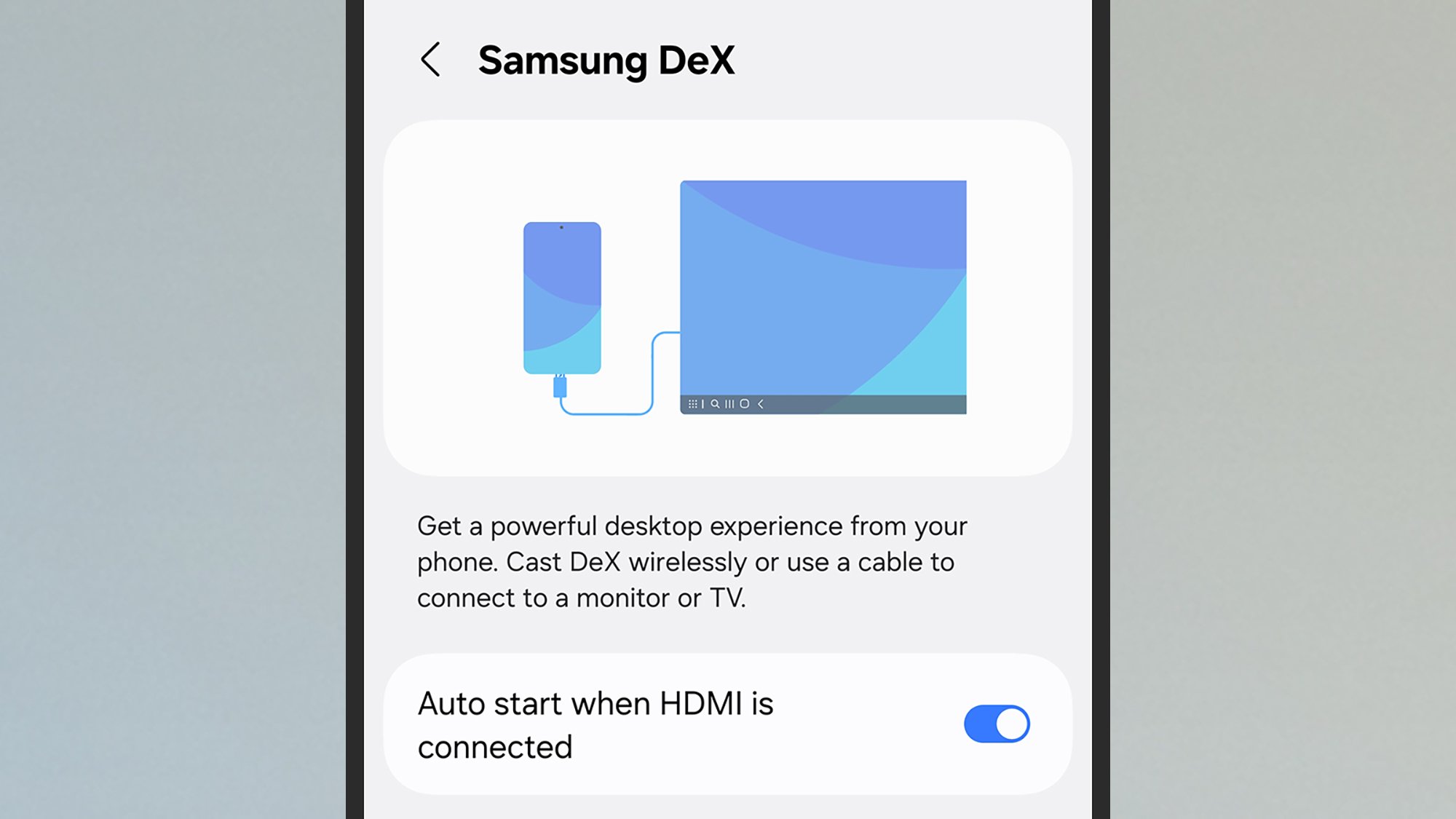
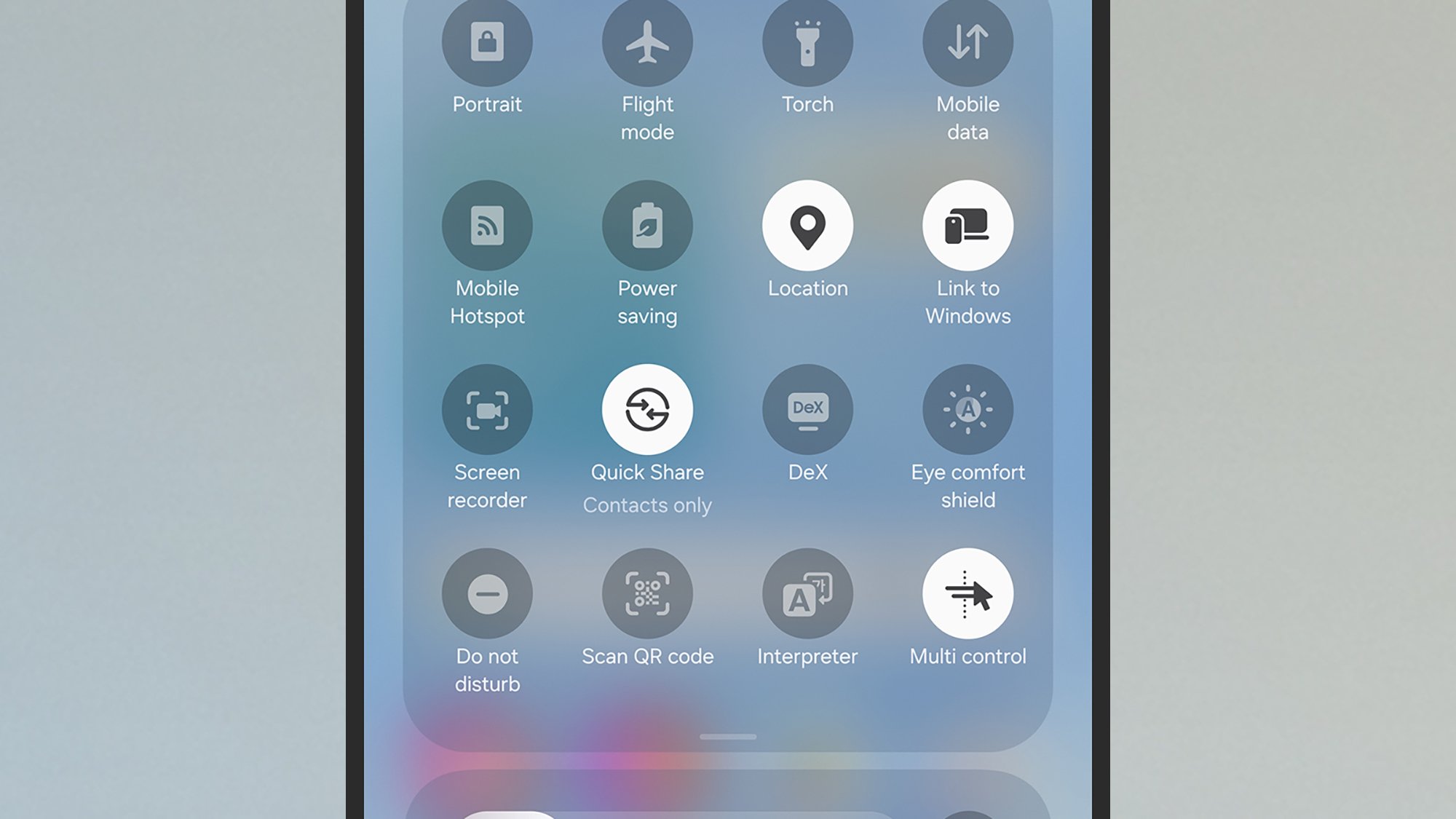
To launch Samsung DeX wirelessly, open Settings on your Galaxy phone, then choose Connected devices > Samsung DeX. Alternatively open the Quick Settings panel (swipe down from the top right of the screen), then tap the DeX button—if you can’t see it, swipe down on the panel of tiles to see the full selection. Your phone will scan your wifi network for compatible hardware, and you can tap on a device to connect.

Samsung DeX button
DeX in Quick Settings.
Credit: Lifehacker

If you can configure Samsung DeX with a wired connection, it’s usually easier and more reliable. The cable you’re going to need will depend on the external monitor or television you’re connecting to: You might need a USB-C to USB-C cable, for example, or a USB-C to HDMI cable. Most cables should work with the right connectors, but I’d advise searching for ones that specifically mention DeX in the listing.

You can use USB-C hubs and docking stations too, which is handy if you want to plug a mouse and keyboard in as well. Again, most models should work, but they won’t necessarily all work—a bit of internet research should guide you towards products people are already using with DeX. This $12 Ugreen hub is the one I’ve been using for Samsung DeX, so you can see you don’t necessarily need to spend a lot of money here.

Samsung DeX screen
DeX can be set to launch automatically.
Credit: Lifehacker

You don’t have to use a keyboard and mouse with DeX, because you can use your phone’s keyboard, and turn it into a makeshift trackpad (you can even use an S Pen to control DeX). However, if you need to get some serious work done, from essay writing to emailing, then you’ll probably want to hook up a mouse and keyboard. That’s what I’ve done: The Galaxy phone, HDMI cable, and keyboard and mouse all plug into the hub.

Launching DeX in a wired configuration is the same as launching it in a wireless configuration, though if you’re using cables and hubs then as soon as you connect an external monitor to your Galaxy device, you should see a prompt to connect. Future connections can be launched automatically (to manage this open Settings on your phone, then choose Connected devices > Samsung DeX).

How to use Samsung DeX

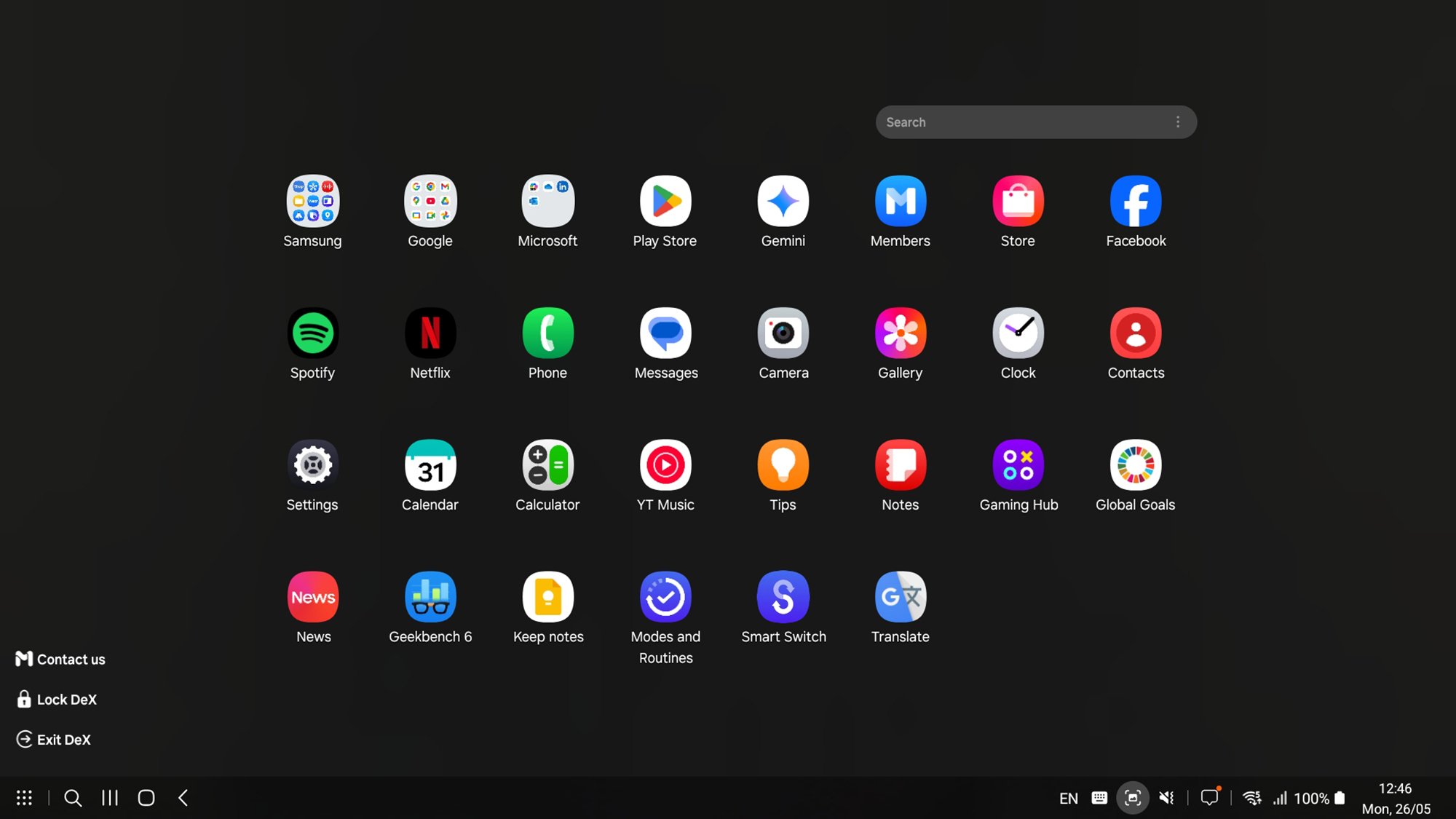
With DeX launched, you should see the desktop interface up on the external screen. It’s a bit like having a second monitor for your phone, because you can carry on using apps on your Galaxy device the same as you normally would. You’ll find a few app shortcuts already on the DeX desktop, which you can double-click to launch, and a taskbar showing open apps along the bottom.

In the lower left corner, you’ve got the standard Android buttons: the recent apps button, the home button, and the back button. To the left of those is a search button and an all apps button, which brings up shortcuts to every app installed on your phone. Over on the right of the taskbar, you’ve got an array of buttons, including ones for checking notifications, taking screenshots, and checking battery and signal level.

Samsung DeX app drawer
The app drawer view in DeX.
Credit: Lifehacker

To customize DeX further, double-click the Settings shortcut on the desktop, then pick Samsung DeX. You’ve got a host of options here, covering font size, wallpaper, the shortcuts available on the taskbar, how the keyboard and mouse work, and whether to play audio through your phone or through the speakers attached to the bigger screen.

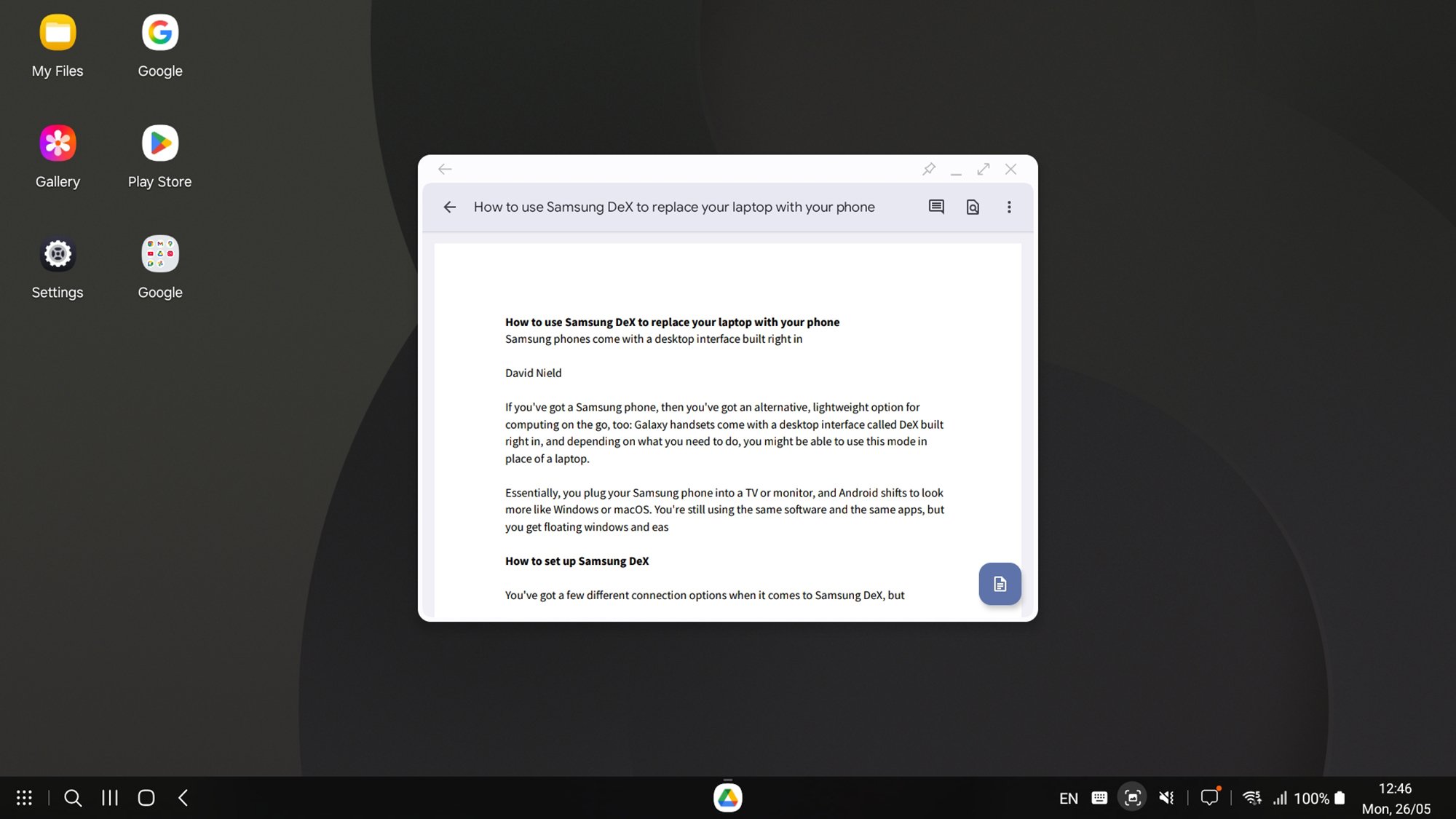
Operating DeX is fairly straightforward. Apps appear in Windows, with shortcut buttons in the top right corner. They will (from left to right) pin an app window (keep it on top of other apps), minimize an app window, put an app window full screen, or close the app. You’re able to resize windows using their edges and move them about using their title bars much as you would on Windows or macOS.

Samsung DeX app
DeX means you can get work done on the go.
Credit: Lifehacker

There are a bunch of keyboard shortcuts you can make use of too, which make it a little easier to get around the interface: Ctrl+Enter (Windows keyboard) or Cmd+Enter (Mac keyboard) will take you to the home screen desktop. To see all of the shortcuts you can use, press Ctrl+/ (Windows) or Cmd+/ (Mac).

It all works slickly and quickly, and while Samsung DeX isn’t something I use a lot, it occasionally comes in handy—especially in moving between home and the office when I only need to carry a Galaxy phone in my pocket. It’s actually such a good idea that Google is expected to include its own version of DeX in Android 16.

War Declared On Nintendo Switch 2 Scalpers With Strict Auction Ban

War Declared On Nintendo Switch 2 Scalpers With Strict Auction Ban
It should come as no surprise that scalpers are already flooding auction sites with listings for Nintendo’s upcoming Switch 2 console, which releases to retail on June 5, 2025 (a week from this Thursday). It happens with every new piece of highly anticipated hardware, and it only adds to the issue of there not being enough supply to meet demand.

Europe Warns Giant E-tailer To Stop Cheating Consumers or Face Its Wrath

The European Commission warned Chinese e-tailer SHEIN on Monday that it must address multiple consumer law violations or face fines across EU member states. Regulators found SHEIN’s website displayed fake discounts not based on actual prior prices, used pressure-selling tactics with false purchase deadlines, provided misleading information about consumer return rights, made deceptive sustainability claims, and hid contact details from customers. SHEIN has one month to respond to the findings and propose corrective measures, adding regulatory pressure to a company already facing US tariff challenges despite generating an estimated $38 billion in revenue last year.


Read more of this story at Slashdot.

OnePlus is replacing its Alert Slider with, yes, an AI button

OnePlus has revealed its artificial intelligence plans for its devices, starting with the introduction of the Plus Key, which will replace the Alert Slider. The Plus Key, like its predecessor, is a physical button that users can customize to launch the camera, to initiate translations or to start recording. More importantly, it launches the new AI Plus Mind feature, which can record and recall information found on screen. When a user wants to take note of important information such as schedules, event details, reservations or listings, for instance, they can press the Plus Key to activate AI Plus Mind and save those details. (Take note that the feature can extract details from both images and texts.) Alternatively, they can swipe up on the screen with three fingers. 

What AI Plus Mind does is save relevant content to a dedicated Mind Space, where users can browse various information that they’ve saved. Users can then search for the detail they want to find using natural language queries. Both the Plus Key and the AI Plus Mind will debut on the OnePlus 13s in Asia. AI Plus Mind will roll out to the rest of the OnePlus 13 Series devices through a future software update, while all future OnePlus phone will come with the new physical key. Notably, the new button and feature bear similarities to Nothing’s physical Essential Key that can also save information inside the Essential Space app. Nothing was founded by Carl Pei who co-founded OnePlus.

The company is also developing several tools for the OnePlus AI, including AI VoiceScribe that enables users to “record, summarize and translate calls and meetings directly within popular messaging, video, and online meeting applications.” AI Translation will consolidate the brand’s translation capabilities via text, live voice, camera and screen into one app, sort of like Google Translate. AI Search will enable natural language queries to search for local files and notes. Meanwhile, AI Best Face 2.0, which is coming this summer, can correct issues like closed eyes in group photos. 

OnePlus
OnePlus

This article originally appeared on Engadget at https://www.engadget.com/ai/oneplus-is-replacing-its-alert-slider-with-yes-an-ai-button-130026087.html?src=rss

What’s New on Prime Video in June 2025

Amazon hasn’t yet released a full list of what’s coming to Prime Video in June, but we do know what original titles are slated to premiere throughout the month.

Prime original action comedy Deep Cover (June 12) has a stacked cast that includes Bryce Dallas Howard, Orlando Bloom, Nick Mohammed, and Sean Bean. In the film, Howard plays an improv comedy teacher who recruits two of her students (played by Bloom and Mohammed) to infiltrate London’s gangs by pretending to be criminals.

Countdown (June 25) is a new crime thriller series from Chicago Fire showrunner Derek Haas. An LAPD detective is recruited to a secret task force to investigate the murder of a Department of Homeland Security officer. And We Were Liars (June 18) is a psychological thriller series based on the titular novel by E. Lockhart, the plot of which follows the wealthy Sinclair family and the events of summer on their private island.

Finally, there’s sports doc American Thunder: NASCAR to Le Mans (June 12), which chronicles the journey to bring the American stock car Chevrolet Camaro to the 24 Hours of Le Mans.

Here are the originals coming to Prime Video in June.

What’s coming to Prime Video in June 2025

Available June 12

  • American Thunder: NASCAR to Le Mans

  • Deep Cover

Available June 15

  • The Chosen: Last Supper

Available June 18

  • We Were Liars

Available June 23

  • Head Over Heels

Available June 25

  • Countdown

Available June 27

  • Marry My Husband

Dragon Quest 1 and 2 HD-2D Remake arrives on October 30

Square Enix is following up last year’s release of Dragon Quest 3 HD-2D Remake with the remade versions of the first two games in the franchise. In celebration of the original game’s release on May 27, 1986, the company has announced that the Dragon Quest 1 and 2 HD-2D Remake set is arriving on October 30 on the Nintendo Switch and Switch 2, the PlayStation 5, the Xbox Series X|S and the PC via Steam. Chronologically, the first two games in the franchise take place after the events in the third game. It revolves around the hero who went on a journey to complete the quest started by their father, a legendary warrior, to defeat the demon lord Baramos. 

Dragon Quest 1 and 2 revolve around the descendants of that hero, who received the title of “Erdrick” after the events of the third game. Both games are turn-based RPGs, wherein players can control the actions of all the members of a party. They, like the other games in the franchise, feature character designs by Akira Toriyama, who’s mostly known for creating Dragon Ball. Players can expect high-definition 2D graphics, brand new major story additions, a refined battle system and other quality-of-life updates with the remake set.

The digital and physical versions of the Dragon Quest 1 and 2 HD-2D Remake set are now available for pre-order for $60, except for the digital Switch and Switch 2 games that will be available at a later date. Pre-orders will come with free in-game items, but the Collector’s Edition will also come with digital wallpapers, six characters, a dog and two boss monsters. And for those who didn’t get the third game’s remake last year, Square Enix is releasing a digital-only Erdrick Trilogy Collection with all three games on the same day. 

This article originally appeared on Engadget at https://www.engadget.com/gaming/dragon-quest-1-and-2-hd-2d-remake-arrives-on-october-30-124540701.html?src=rss

PopSockets finally launches a vertical grip stand

Vertical videos have been a part of most people’s every day lives for years now. TikTok, YouTube Shorts, Instagram Reels and more are all in portrait mode, as is a typical video call off a smartphone. But it’s only now that PopSockets has caught up, releasing the Kick-Out Grip and Stand that can balance a phone vertically. 

The new model is part of PopSockets’ MagSafe line but, as the name suggests, includes a kick stand that folds out of the traditional socket. All a person needs to do is flatten the grip and then pop out the top bit. It will fold down and serve as a light stand for the phone to rest on. 

PopSockets has launched the Kick-Out Grip and Stand in Black, Latte, Dusk and Putty, along with two Aluminum Radial options, French Navy and Silver. It retails for $40 and should work with any MagSafe compatible case, swappable PopTop or PopMount currently sold. However, it also comes with an adapter ring so it should work with almost any case. 

The new Kick-Out Grip and Stand feels like a small update but, if you’re anything like me, it will stop water bottles, cups and other rogue phone props from constantly fall down. 

This article originally appeared on Engadget at https://www.engadget.com/mobile/popsockets-finally-launches-a-vertical-grip-stand-123027346.html?src=rss

These Five Scams Are Targeting Recent College Grads

After the celebration ends, college graduates typically face numerous transitions, from moving to a new city and/or starting a new job to taking on student loan payments and other financial responsibilities. College students are often targeted for job scams, but the Better Business Bureau is alerting recent grads about schemes being employed specifically to steal their personal information and money during this transition period.

Unpaid tuition scam

Imagine getting a call after graduation that you have an outstanding tuition payment, and unless you pay the bill immediately, your diploma will be rescinded. Scammers are using this threat to con recent grads—who have, in fact, paid their full tuition—into sending money via wire transfer or prepaid debit card, which cannot be tracked or recovered. Another version of this scam attempts to convince college students (and/or their parents) that they owe tuition and need to pay immediately to ensure they remain enrolled.

If you receive an email, text, or call about an unpaid bill, do not engage—instead, contact your school’s bursar or financial services office directly. You will typically receive communication from higher education institutions by mail or via a secure student portal—not as an urgent message demanding money.

Student loan scams

Student loans have been targets for scammers for years—made easier by the starting and stopping of loan forgiveness programs—and recent college grads who are getting ready to make their first payments are common victims. You may get an unsolicited call, text, or email from a company offering debt relief or debt forgiveness services for a fee. In some cases, the company is legit but making false claims, and in others, the whole thing is a scam. They may ask for upfront payment, usually via gift card or wire transfer, and never deliver, or gather a bunch of personal information that can be used to steal your identity.

While the status of loan forgiveness can be difficult to follow, you should know the details of your loan, including when payments are due to begin, and look for official sources regarding loan forgiveness options.

Job scams

Employment scams range from fake job listings to unsolicited texts from “recruiters” offering a position while demanding personal information and payment for “training.” Recent grads may be promised an entry-level remote role at a completely unrealistic salary, and scammers collect everything from your Social Security number to your bank account information in exchange for the offer. Other schemes have you pay upfront for training or equipment you never receive (because the job isn’t real) or pay you too much with a fake check and ask for reimbursement via app or wire transfer.

No one is getting too-good-to-be-true jobs in this market. Always do your due diligence on companies before applying for a position or accepting an offer: Review the official website for contact information and job postings, and consider reaching out to HR or employees you locate independently to confirm that a position is legit. Don’t ever pay for anything up front.

Moving scams

The moving industry seems to be rife with scams, and recent grads who need to move across town or out of state are not immune. Moving companies may charge more money than was quoted and, in the worst cases, hold your stuff hostage unless you pay. Or they may simply not show after you’ve paid a deposit for the move.

Red flags for moving companies include estimates delivered quickly and with little information collected about your move, full payments demanded before the move, and non-refundable deposits paid via peer-to-peer apps and bank transfers (negating the protection of credit cards). Thoroughly research the company to understand how moving brokers operate, and make sure you get everything in writing.

Rental scams

If you make it through the actual move unscathed, you could still encounter a rental scam. As with job scams, these involve listings that sound too good to be true, with lots of amenities in a desired location at an affordable price. (Like job scams, most renters aren’t getting these deals in this market.) Fraudsters may even use real properties in their listings to lure you in. Once they have you, they collect a deposit, first month’s rent, and a bunch of personal information while leaving you with nowhere to live.

While you may pay your actual rent via Zelle, PayPal, or Venmo, you shouldn’t use these services to send a deposit for a rental you haven’t seen to a landlord you haven’t met. Search the listing on Zillow, Redfin, and other rental sites to look for inconsistencies that could indicate a scam. Verify the address, look at Google street view, and visit (or send someone you trust in your place) before paying any money if you can.

25% iPhone Tariff Insufficient To Drive US Production Shift, Morgan Stanley Says

President Trump’s threat of a 25% tariff on smartphone imports including iPhones would not provide enough economic incentive for Apple to relocate US-bound iPhone production to domestic facilities, according to a new Morgan Stanley note viewed by Slashdot. The tariff threat, announced Friday via social media, appeared to target Apple’s recent shift of iPhone production from China to India through its contract manufacturing partners.

Morgan Stanley analysts estimate that establishing US iPhone production would require a minimum of two years and several billion dollars to build multiple greenfield assembly facilities, with a trained workforce exceeding 100,000 workers during peak seasons. More significantly, the firm calculates that a US-produced iPhone would cost 35% more than current China or India production, primarily due to higher labor costs and the need to import 25% of iPhone components from China under existing 30% tariffs. By contrast, Apple could offset a 25% import tariff by raising global iPhone prices just 4-6%, making domestic production economically unviable.


Read more of this story at Slashdot.

Nikon joins other camera manufacturers in raising prices due to tariffs

Nikon has announced that it will increase prices on its photography products in the US due to tariffs, joining other camera manufacturers including Canon, Blackmagic Design and Leica in doing so. It hasn’t yet shared which products will be affected, but several outlets have received word from dealers that the changes will mostly affect lenses and accessories manufactured in China. 

“Due to the recent tariffs, a necessary price adjustment for products will take effect on June 23, 2025,” the company wrote last week. “We will be carefully monitoring any tariff developments and may adjust pricing as necessary to reflect the evolving market conditions. We wish to thank our customers for their understanding and know that we are taking every possible step to minimize the impact on our community.”

The development comes from Trump‘s recent tariffs affecting electronic goods, with Nikon noting that the increase could cut its operating profit by around $68 million. Canon, the worldwide leader in camera sales, said in its earnings report last month that it would raise prices soon. Fujifilm recently paused US preorders for several models including the X-M5 and X100 VI. 

Other electronics companies, including Acer and DJI, also recently announced US-only price hikes. In its latest earnings report, Sony said it expects to seller fewer PS5s and expects a $700 million tariff-related revenue hit.

These increases could just be the beginning. Nikon builds its products in multiple countries affected by US tariffs, including China, Thailand and its home country, Japan. Unless those nations can negotiate new tariff terms before the end of Trump’s 90-day pause, they could be subject to drastically higher rates by July — which would in turn prices for Nikon and many other camera manufacturers. 

This article originally appeared on Engadget at https://www.engadget.com/cameras/nikon-joins-other-camera-manufacturers-in-raising-prices-due-to-tariffs-120011854.html?src=rss

The Morning After: Our verdict on the Galaxy S25 Edge

When I got an early look at Samsung’s Galaxy S25 Edge, the first of a new supposed wave of thinner smartphones, it was easy to spot what I’d take issue with. But you know what? Those issues may not matter as much as I thought.

Engadget’s Sam Rutherford has put the device through its paces, and thankfully, the impressive battery life of the S25 series continues. Our rundown test lasted a minute shy of 26 hours. That’s less than other S25 phones with bigger batteries but roughly equal to Google’s Pixel 9 Pro.

TMA
Engadget

And while there’s no optical zoom, the substantial 200-megapixel main camera sensor can crop in a lot, offering some kind of zoom, even if image quality doesn’t match true telephoto cameras.

I’ve got the S25 Edge with me, and these compromises are fine. I also like it thinner. And lighter. I’ve suffered enough with Ultras and Pro Max phones. If anything, I wish the S25 Edge had a smaller screen, closer to the base S25, Pixel 9 Pro or iPhone 16 Pro.

The biggest weakness I didn’t note with the S25 Edge? The perennial curse of measuring devices in millimeters and fractions of an inch means your protective case will almost certainly add those millimeters back on.

— Mat Smith

Get Engadget’s newsletter delivered direct to your inbox. Subscribe right here!

The news you might have missed


Summer Game Fest 2025 is almost here

What to expect and how to watch game reveals live.

TMA
SGF 2025

Sure, the Nintendo Switch 2 is almost here, but early June also means a whole host of gaming showcases as part of Summer Game Fest. Along with the two big events — Summer Game Fest Live and the Xbox Games Showcase — there are many others in store, including the always-delightful Day of the Devs. We’ll be there in person, and I’ll be flying out on Switch 2 launch day. So I won’t get to touch my Switch 2 until a week later. Bah.

We’ve pulled together all the livestream details revealed so far.

Continue reading.


Texas is getting ready to ban social media for anyone under 18

The bill still needs to pass a Senate vote.

TMA
Engadget

A bill banning social media for anyone under 18 recently moved past the Senate committee and is due for a vote in the Texas State Senate. If made into law, the bill would force social media platforms to verify the age of anyone setting up an account, like how Texas passed legislation requiring porn websites to implement an age verification system.

Texas’ social media ban also proposes letting parents delete their child’s social media account, which definitely won’t start blazing arguments in households across the state.

Continue reading.


What to expect at WWDC 2025

A new look, Apple Intelligence and more.

TMA
Apple

On June 9, the Worldwide Developers Conference (WWDC) keynote will showcase the changes coming with its 2025 software. What can we expect besides new numbers after every flavor of Apple software? Apparently, a platform-wide visual overhaul. The revamp is said to be a dramatic change, drawing inspiration from Apple’s mixed reality headset. The aim is to integrate all the OSes to a singular design, so jumping from iPhone to iPad to Mac feels like different screens showing the same thing.

We could also see the iPad get even more Mac-like (thanks to those powerful M-series chips), Apple Intelligence delivering on those promises (Siri?) and more health coaching.

Continue reading.

This article originally appeared on Engadget at https://www.engadget.com/general/the-morning-after-engadget-newsletter-111525140.html?src=rss

What Do People Want?

Abstract of a paper on NBER: We elicited over a million stated preference choices over 126 dimensions or “aspects” of well-being from a sample of 3,358 respondents on Amazon’s Mechanical Turk (MTurk). Our surveys also collected self-reported well-being (SWB) questions about respondents’ current levels of the aspects of well-being. From the stated preference data, we estimate relative log marginal utilities per point on our 0-100 response scale for each aspect. We validate these estimates by comparing them to alternative methods for estimating preferences. Our findings provide empirical evidence that both complements and challenges philosophical perspectives on human desires and values. Our results support Aristotelian notions of eudaimonia through family relationships and Maslow’s emphasis on basic security needs, yet also suggest that contemporary theories of well-being may overemphasize abstract concepts such as happiness and life satisfaction, while undervaluing concrete aspects such as family well-being, financial security, and health, that respondents place the highest marginal utilities on. We document substantial heterogeneity in preferences across respondents within (but not between) demographic groups, with current SWB levels explaining a significant portion of the variation.


Read more of this story at Slashdot.

Immigration Is the Only Thing Propping Up California’s Population

California’s population grew 0.6% in 2024, adding nearly 250,000 residents to reach 39.43 million, according to Census Bureau estimates. The growth came entirely from a rebound in international immigration, which surged to over 300,000 people after plunging to 44,000 during the pandemic’s worst year.

Without immigration, the state would have shrunk significantly as domestic migration remained negative. The H-1B visa program alone brought nearly 79,000 skilled workers to California in 2024. Since 2010, California has added 2.7 million immigrants, with half coming from Asia and slightly more than a third from Latin America. The immigration-dependent growth model puts California at particular risk from potential federal policy changes, as more than a quarter of its population is foreign-born — the highest share nationwide.


Read more of this story at Slashdot.

Nikon To Raise Camera Prices in the US Because of Tariffs

Nikon will raise prices on its cameras and imaging products in the United States starting June 23, citing President Donald Trump’s tariffs on Chinese-made goods as the reason for what the company calls a “necessary price adjustment.” The Japanese camera maker joins a growing list of photography equipment manufacturers implementing price increases, including Canon, Sony, Leica, and lens maker Sigma. Nikon told investors the tariffs could slash its profits by 10 billion yen ($70 million) in the upcoming fiscal year, though the company has not disclosed which specific products will see increases or by how much prices will rise.


Read more of this story at Slashdot.

Remembering John Young, Co-founder of Web Archive Cryptome

New submitter zuki shares an obit published at The Register: John Young, the co-founder of the legendary internet archive Cryptome, died at the age of 89 on March 28. The Register talked to friends and peers who gave tribute to a bright, pugnacious man who was devoted to the public’s right to know.

Before WikiLeaks, OpenLeaks, BayFiles, or Transparency Toolkit, there was Cryptome – an open internet archive that inspired them all, helped ignite the first digital crypto war, and even gave Julian Assange his start before falling out with him on principle.


Read more of this story at Slashdot.

Nick Clegg Says Asking Artists For Use Permission Would ‘Kill’ the AI Industry

As policy makers in the UK weigh how to regulate the AI industry, Nick Clegg, former UK deputy prime minister and former Meta executive, claimed a push for artist consent would “basically kill” the AI industry. From a report: Speaking at an event promoting his new book, Clegg said the creative community should have the right to opt out of having their work used to train AI models. But he claimed it wasn’t feasible to ask for consent before ingesting their work first.

“I think the creative community wants to go a step further,” Clegg said according to The Times. “Quite a lot of voices say, ‘You can only train on my content, [if you] first ask.’ And I have to say that strikes me as somewhat implausible because these systems train on vast amounts of data.”

“I just don’t know how you go around, asking everyone first. I just don’t see how that would work,” Clegg said. “And by the way if you did it in Britain and no one else did it, you would basically kill the AI industry in this country overnight.”


Read more of this story at Slashdot.