Trump reportedly plans to extend the pause on the TikTok ban yet again

President Donald Trump plans to extend the pause on enforcing the TikTok ban once again, The Wall Street Journal reports. Trump previously extended the pause on April 4 to give TikTok, its potential US buyers and the Chinese government more time to reach an agreement, but the deal has made little progress since then.

The current pause on enforcement is supposed to end on June 19. Given the state of the negotiations between the US and China, the odds of a deal being reached before then seem highly unlikely. The issue hasn’t been helped by the fluctuating tariffs the Trump administration has attempted to levy on goods manufactured outside of the US, which started on April 2 and at one point included a 125 percent tariff on everything shipped from China.

The two countries are expected to restart trade negotiations at some point in the near-future, according to The New York Times, but there’s been no public mention of a TikTok sale being a key part of the discussion. A number of investors are still looking to own a piece of the US version of the app, including the software company Oracle, which has a pre-existing relationship with TikTok as a cloud provider.

The TikTok ban went into effect on January 19. TikTok tried to appeal the ban beforehand, but the Supreme Court ultimately decided to uphold it, prompting Trump’s first executive order pausing the ban on January 20, 2025.

This article originally appeared on Engadget at https://www.engadget.com/apps/trump-reportedly-plans-to-extend-the-pause-on-the-tiktok-ban-yet-again-200408397.html?src=rss

Four Things I Wish I Knew Before Training With the Garmin Forerunner 265

We may earn a commission from links on this page.

Garmin’s Forerunner 265 was the first modern running watch I spent a lot of time with—you can read my review here about how it drew me back into tracking all my run data, for better or for worse. But there are some things that, in hindsight, I wish I had understood better at the start of the journey. Here are the biggest ones that you might like to know about.

Why it has so many dang buttons

The 265 (and other recent Forerunners) seem to have too many buttons. What do we need five of them for, when we’re doing most things from the touchscreen anyway? Garmin’s Vivoactive line gets away with having just two, as do the Coros Pace 3 and Pace Pro, which have all the same main functions as the 265. 

But as soon as I saw the previous generation—the Forerunner 255—I understood. The 265 stands on the shoulders of giants, as the Forerunner 2xx series has long been beloved by runners—before the 265 was the 255, and before that the 245, and before that the 235. (Remember when Strava reported that the 235, then an eight-year-old watch, was the most popular running watch worldwide?) 

The 255 and its ancestors did not have a touchscreen, nor did they have AMOLED displays. They used a “light” button in the top left to turn on the backlight so you could read the screen in the dark, and two buttons below that (“up” and “down”) to scroll through menu options. And once you have five buttons, why not use them for more? Long pressing the light button now brings up a shortcut menu, long pressing the “up” button brings up settings, and long pressing the bottom button can bring up your music controls. 

Once you know what the buttons are used for—or assign your own shortcuts, which you can do in settings—they’re pretty handy.

Why it thinks I need so much “recovery” time

After each workout, the 265 (and many other Garmins) will tell you how many hours of recovery it thinks you need. That makes it sound like you should rest until time is up—so if I have a 24-hour recovery time, I should wait until tomorrow for my next workout. Makes sense, since I was probably going to do that anyway. 

But sometimes, after a hard effort, the watch will give me a recovery time of, say, 78 hours. I’m really not supposed to run again for that long? Not even an easy run? 

That’s not what it means, of course. As Garmin explains, recovery time is the amount of time until you will maximally benefit from another similarly hard workout. So if I just did an hour’s worth of brutal track intervals, I won’t get much benefit from doing the same workout tomorrow. I could go ahead and do an easy run tomorrow, and schedule another track session a few days from now. 

In other words, the “recovery” time is just how long you should wait before doing another very hard workout, not until you can work out at all.

The daily suggested workouts should only be taken as suggestions

Daily suggested workouts are a great feature of the Forerunner 265 and several other Garmin watches. DSW, as I call them, live on the watch and can’t be accessed directly from the Garmin Connect app—at least in theory. 

There is a “Garmin coach” feature that you can set up in the app, which works the same way as the DSW, giving you a workout each day based on what it thinks you need. The factors that go into this include how recovered you are, and what races you have on your calendar. 

I love the DSW when I’m not sure what run to do on a given day, or if I know I want a certain type of workout but don’t want to have to design it myself. But I don’t follow them slavishly, for two reasons. 

One is that you can’t plan for DSW. You might see that tomorrow is a seven-mile long run, but then you wake up to find it’s been switched to a two-mile recovery run because you didn’t sleep so well. On these days, just go run the seven-miler anyway, and don’t worry about what Garmin says. Or preview the upcoming workouts (under Training > Workouts > Daily Suggestions) and pick a future workout that speaks to you. 

The other problem is that, without long-term planning, you don’t know if the DSW will actually get you ready for the race you’re training for. Garmin forums and subreddits are full of people who are getting unsettlingly close to their marathon date and haven’t yet had any seriously long runs. You need mileage to be ready for a long-distance race, both in terms of your long runs and your total weekly workload. 

If you want to use Garmin workouts to train you for a long race, do yourself a favor and grab a tried-and-true marathon plan, like one of these from Hal Higdon. Make sure you get in a similar amount of mileage each week, whether your Garmin tells you to or not.

You can download some pretty sweet watch faces

I’m not sure why I spent so long using the stock watch faces, even though I found them kind of boring. The 265 doesn’t have as many color options for them as later watches like the 570, so there are only a handful of designs and a handful of (mostly neon) color options to choose from. 

But if you’re willing to venture into the Connect IQ store, you have more options. It feels a bit sketchy if you’re purchasing a watch face—payment isn’t handled through the platform directly—but there are some real gems in there, including some that are made by Garmin and some that are free or have a free version. Around Christmas time I went for this cheesy wreath, and my everyday favorite is Big Easy with the blue theme. It’s the one you can see in the photo above, and unlike most third-party faces, it can show all my favorite complications, including weekly running mileage, which I have at the bottom.

Chinese Student Enrollment in US Universities Continues Multi-Year Decline

Chinese student enrollment at American universities has dropped to 277,000 in the 2023-24 academic year, down from a peak of 372,000 in 2019-20, according to data in a new report examining shifting global education patterns. The decline accelerated following the State Department’s May 28th announcement of an “aggressive” campaign to revoke visas for Chinese students in “critical fields” of science and engineering, as well as those with unspecified Communist Party “connections.”

The trend reflects broader economic and geopolitical pressures beyond visa restrictions. Chinese families increasingly view American education as too expensive amid China’s economic downturn and property market decline, while domestic employers have grown suspicious of foreign-educated graduates. Meanwhile, Chinese students are choosing alternatives including Britain, which hosted nearly 150,000 Chinese students in 2023-24, and regional destinations like Japan, where Chinese enrollment increased to 115,000 in 2023 from under 100,000 in 2019.


Read more of this story at Slashdot.

‘Saved Info’ Is Gemini’s Hidden Superpower

In Gemini’s settings, you’ll find an option called “Saved Info.” Google describes this as a place where you can store information “about your life and preferences” to get better results from its chatbot. I’m here to tell you that might be the least useful way to use this feature. It’s much more powerful as a way to build your own shortcuts right into Gemini.

You can find this feature by selecting Settings in your Gemini app or on the web. Click “Saved info” and you’ll find an empty page and an Add button. Click this and you’ll be given an empty box, where you can write a sort of pre-prompt instruction. Each block seems to have a limit of around 1,500 characters, though there doesn’t seem to be a limit on how many of these blocks you can store.

Google shows examples that include simple instructions, like “I prefer short, concise responses” or only recommending vegetarian recipes. But this space is a lot more powerful than that.

How Gemini uses the “Saved Info” prompts

I first noticed this when I was trying out Gemini’s Canvas for drafting documents. Typing (or saying) “Convert all the subheadings in this document to H2s” is often more cumbersome than just doing it myself. But with Saved Info, I can write a variation of that instruction that tells Gemini to carry out that action if I simply type “H2s”. 

This works because every chat you start with Gemini will reference anything stored here as a set of universal context blocks. Before processing whatever prompt you give, Gemini will read your Saved Info first and treat it as instructions that come before anything in the conversation itself.

Using “Saved Info” to tweak document templates

This trick also works for more complex instructions. For example, let’s imagine you need to write a lot of cover letters and want to tailor them to each job you’re applying to. You could add this block to Saved Info:

“If a prompt begins with ‘cover letter’, create a draft of a cover letter in the Canvas. A cover letter should be no more than 3 paragraphs. If the prompt includes a person’s name, address the letter to that person. If the prompt includes ‘skills:’ then incorporate the skills mentioned after that into the context of the letter. Sign all cover letters as [YOUR NAME].”

With these instructions, you could invoke Gemini to create a draft of a cover letter for you with just a few words. You could even expand this further by providing an entire cover letter template (as long as it’s under the character limit) and instruct Gemini to only make simple changes based on the criteria you provide.

One of the biggest problems with using generative AI to write for you is that it can be a bit dicey for anything other than first drafts. And if you have to babysit it every step of the way, you might as well write the whole thing yourself. This approach, however, gives you more leeway to write for yourself, while still automating the more tedious aspects of tweaking a document for every person you’re sending it to.

Customize your smart home instructions

Another handy example, if you have smart home gadgets connected through Google Home, is that you can turn simple commands into more complex ones. For example, when I sit down to watch a movie, I usually want to turn off the overhead lights, but turn on the LED backlight strip behind my TV. It’s not a huge pain to say “Turn off overhead living room lights and turn on TV backlight” but it’s a bit of a mouthful.

Since Gemini is the default smart assistant on my phone, though, I can add the following prompt to “Saved Info”:

If a prompt consists solely of ‘movie time,’ then turn off overhead lights in the living room, and turn on TV backlight.

Now, I pull up Gemini on my phone, say “movie time” and it translates the instructions and passes it to Google Home. Note: This requires enabling and connecting the Google Home Gemini app (which is, confusingly, not the Google Home mobile app, but an extension inside Gemini itself).

Automate commands in plain English, no code required

We’re pretty big fans of automating tasks, especially with services like IFTTT, but the downside is that sometimes they can get a bit tech-y or complicated. What’s so appealing about this particular trick with Gemini is that you can write instructions in plain, human-readable language.

One of the most interesting use cases I tried was the following prompt:

If a prompt consists of ‘grammar check,’ then read the document at the included link. Check it for grammatical errors. Then, in the Gemini Canvas, create a draft of an email with a brief summary of any issues found. Keep the summary brief.

While this doesn’t work 100% of the time on all links (mainly due to how Gemini filters external text for security concerns), I didn’t need to do any additional coding or messing with settings to make this command work. I wrote two words, “grammar check,” and pasted a link to one of my recent articles. The result was a report that said there were no grammatical issues. (Thanks, Lifehacker editors.)

Be careful with how much you leave in Gemini’s hands

It should go without saying, but I’ll say it anyway: Gemini successfully parsing instructions is not the same as successfully carrying out instructions. In the grammar check example above, I was impressed that Gemini understood how to reference longer instructions from shorthand, but that doesn’t necessarily mean it would successfully catch every grammatical issue.

The Saved Info trick is incredibly handy for automating repetitive prompts, but if there’s a task you wouldn’t trust Gemini with before, this won’t make it more trustworthy now. Maybe you don’t trust Gemini to catch grammatical errors to your standards, but think it’s fine for summarizing the contents of a link. With a couple simple tweaks, you can adjust the above command to that task, no coding required.

Millions of low-cost Android devices turn home networks into crime platforms

Millions of low-cost devices for media streaming, in-vehicle entertainment, and video projection are infected with malware that turns consumer networks into platforms for distributing malware, concealing nefarious communications, and performing other illicit activities, the FBI has warned.

The malware infecting these devices, known as BadBox, is based on Triada, a malware strain discovered in 2016 by Kaspersky Lab, which called it “one of the most advanced mobile Trojans” the security firm’s analysts had ever encountered. It employed an impressive kit of tools, including rooting exploits that bypassed security protections built into Android and functions for modifying the Android OS’s all-powerful Zygote process. Google eventually updated Android to block the methods Triada used to infect devices.

The threat remains

A year later, Triada returned, only this time, devices came pre-infected before they reached consumers’ hands. In 2019, Google confirmed that the supply-chain attack affected thousands of devices and that the company had once again taken measures to thwart it.

Read full article

Comments

Sinister BADBOX Malware Infected Over 1M Android Devices, Is Yours One?

Sinister BADBOX Malware Infected Over 1M Android Devices, Is Yours One?
A new variant of the BADBOX malware campaign has taken root in over a million Android-based devices worldwide, and if you’ve picked up a cheap smart TV box or projector off Amazon or AliExpress lately, you might be part of the problem. BADBOX 2.0 is a sprawling botnet targeting Android Open Source Project (AOSP) devices—not certified Android

Doom: The Dark Ages Gets Its First Major Patch, Here’s What To Expect

Doom: The Dark Ages Gets Its First Major Patch, Here’s What To Expect
Doom The Dark Ages quickly became one of the most played entries in franchise history, as gamers were intrigued by several of the changes and enhancements the new sequel brings to the Doom formula. Now, a little over two weeks after its initial release, Bethesda is pushing out the game’s first big update. Players can look forward to tweaks

Our first impressions after 48 hours with the Switch 2

As consumers around the world have gotten their hands on the Switch 2 in the last day or so, we’re still working hard to fully test the system here at the Ars Orbiting HQ. As we do, we thought we’d share some initial impressions after having Nintendo’s new console in hand for 48 hours or so. Consider these first thoughts an extended version of our notes from a review in progress and a starting point for discussion of the first completely new Nintendo platform in over eight years.

The Switch 2 Joy-Cons feel great

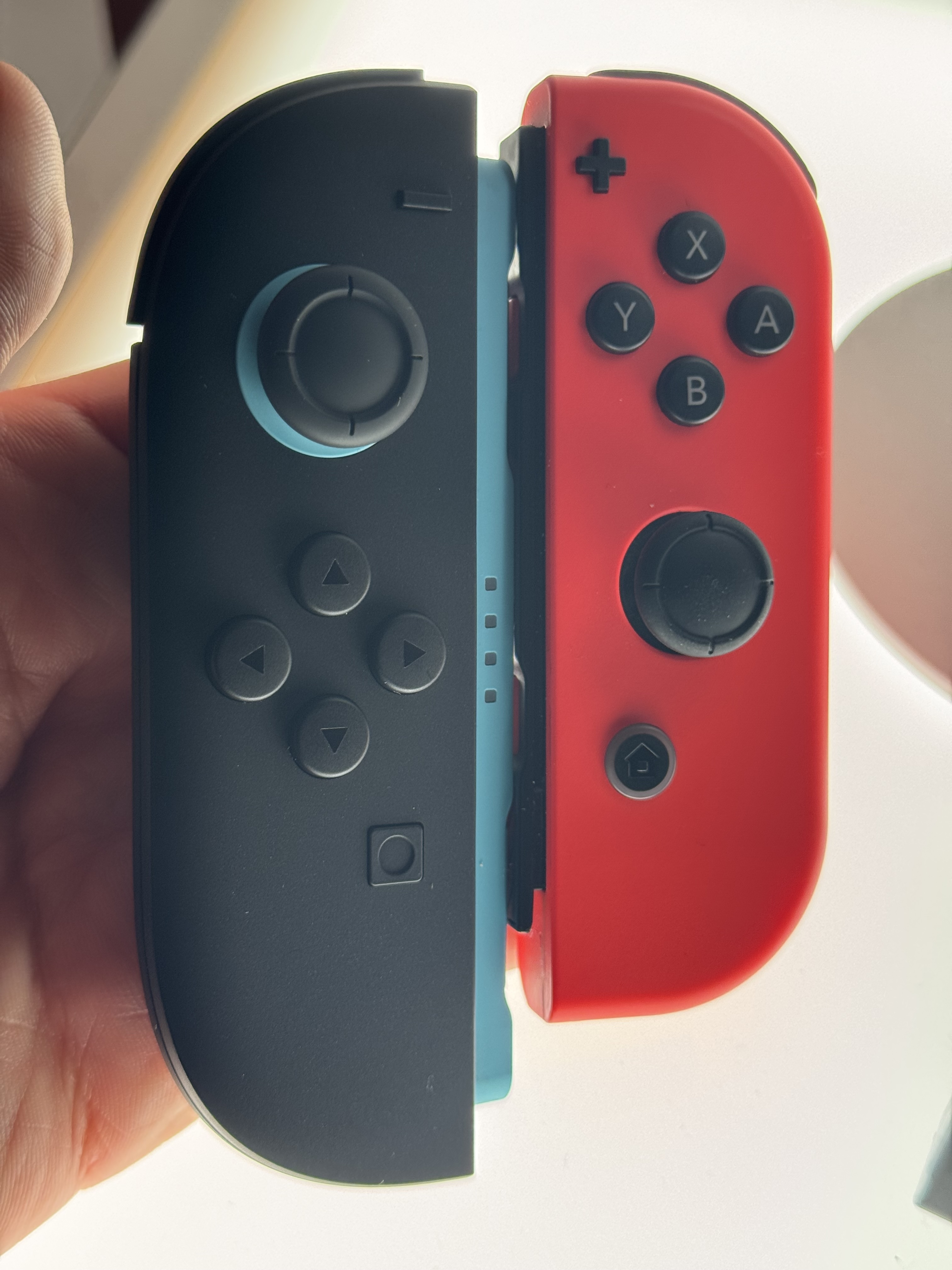
There’s something incredibly satisfying about the magnetic “snap” when you plug the new Joy-Cons into the Switch 2 horizontally, and the handy release lever makes it much easier to disconnect the controllers from the tablet with one hand. Even without a physical rail holding the Joy-Cons to the system (as on the Switch), the magnetic connection feels remarkably sturdy in portable mode.


The Switch 2 Joy-Con (left) and a right-side original Switch Joy-Con.

Though the Switch 2’s expanded Joy-Cons generally feel more comfortable for adult hands, I have noticed that the analog stick encroaches a little more on the space for the face buttons on the right Joy-Con. I’ve found myself accidentally nudging that analog stick with the bottom of my thumb when pressing the lower “B” button on the Joy-Con, a problem I never recall encountering on the original Switch.

Read full article

Comments

You probably won’t be fixing your own Nintendo Switch 2

The techs over at iFixit have completed their teardown of the Nintendo Switch 2, which launched this week. After completing a thorough analysis of the newest Nintendo console, it appears this generation of Switch is even harder to repair than its predecessor. iFixit has assigned the Switch 2 a repairability score of three out of 10. This represents an even lower score than the retroactive four out of 10 they awarded to the original model.

A substantial consideration in iFixit’s scoring system is the availability of repair parts from the manufacturer for the device in question. While there was some hope that Nintendo would have to comply with Right to Repair laws, sufficiently stringent versions of these regulations have yet to materialize, and OEM parts are almost impossible to come by.

Further complicating the repairability is that the charge ports, main storage and a game card reader that are all soldered to the board. The USB-C charge ports are a particular pain point here, as disconnecting and reconnecting the charging cable wears on the charge port over time. A bad yank on the charging cable or a fall while it’s connected could damage the charge port, which would require re-soldering a new one.

iFixit found that the battery was also frustratingly difficult to remove — another major detractor to repairability, as batteries by their nature degrade over time. Beyond being difficult to access without the proper tools, it’s held down with strong adhesive that requires a lot of effort (and isopropyl alcohol) to remove.

So if you happen to get your hands on a Switch 2, buy a case and baby that battery, because if it needs any repairs you’ll likely be shipping it to Nintendo and paying a pretty penny.

This article originally appeared on Engadget at https://www.engadget.com/gaming/nintendo/you-probably-wont-be-fixing-your-own-nintendo-switch-2-180833765.html?src=rss

Strava Is Publicly Sharing Data From Your Garmin Workouts Without Telling You

In the past week, users across Reddit have been raising alarms about a significant shift in how Strava is pulling workout data from your Garmin, Runna, or TrainingPeaks entries. What once appeared as generic activity titles like “Morning Run” are now showing detailed workout descriptions, pacing notes, and even personal coach comments that users never intended to share publicly. And if you’ve been on Strava for a minute, you know it can be a pretty competitive place. It’s social media, after all.

If you wanted your Garmin and Strava titles to be in sync, that’s great. However, for those of us who would prefer to keep our easy days or workout flubs private, here’s what to know about your data being shared for all your Strava friends to see.

The perfect storm of acquisitions and integration

Strava has made two major acquisitions in recent months—first purchasing running training app Runna in April, followed by cycling app The Breakaway in May. And the integration of these apps appears to be happening rapidly and without clear user notification. Runna recently began pushing through workout images and detailed training data to Strava, while Garmin users are seeing their custom workout titles and descriptions automatically imported into their Strava activities.

“Definitely feels like a violation of privacy and also intellectual property as a coach,” wrote one TrainingPeaks user on Reddit. “Pulling through the descriptions of the workouts, where sometimes I write personal notes for athletes, and now it’s showing on Strava for the world to see. I’m going to have to change how I set workouts up in TrainingPeaks.”

Sadly, this sort of privacy concern is nothing new for Strava users. The company has been at the center of several data privacy controversies, including the famous heatmap incident that exposed the location of numerous secret military facilities. The network’s global heatmap showed the locations of sensitive military bases because personnel at those facilities did not switch on privacy settings.

Beyond the military base controversy, users have always called out the app’s “creepy” privacy settings, which can automatically add other runners’ data onto your phone unless changed. As a longtime fan of Strava, I’ve personally watched the company face ongoing criticism about how users can track each other and the default visibility of personal fitness data.

And now, the Runna integration reveals how these acquisitions are creating unexpected data flows. Runna users can now access routes saved in Strava—even all those little nonsense routes created for planning purposes that were never intended for actual use or sharing.

What’s being shared (and what wasn’t before)

If you use a Garmin device, you may find that workouts with specific pacing instructions, training notes from coaches, and personalized workout descriptions are now appearing in your public Strava feeds. This includes:

  • Custom workout titles from Garmin devices

  • Detailed training descriptions from TrainingPeaks

  • Coach notes and pacing guidance

  • Personal performance targets and training phases

The change appears to affect data that was technically always present in activity files but was previously filtered out by Strava’s display logic. Now, that data is being surfaced automatically, catching users off guard.

The frustrating aspect of this situation is that enhanced workout data integration could be genuinely valuable. Seeing detailed training information, coach notes, and structured workout data in Strava could help athletes better track their progress and share meaningful training details with their community.

“This is a very cool feature that I think we would all love if it weren’t implemented by surprise,” captures the sentiment of many users. The technology exists to make fitness data more useful and connected—but only when users understand and consent to what’s being shared.

Plus, for coaches and trainers, this represents a professional concern. Training plans and workout descriptions often contain proprietary methodologies and personalized guidance that coaches consider intellectual property. When these details suddenly become public without warning, it affects how they can do their work.

The bottom line

As a loyal Strava user, the core issue isn’t just about privacy settings or data visibility—it’s about trust and communication. When platforms make significant changes to data-sharing without clear notification, they erode the trust that users need to feel comfortable sharing their fitness activities.

Stay tuned for how exactly to opt out of this data sharing, or whether Strava plans to make a formal announcement. When you log a support ticket with the Strava help desk, you get redirected to this thread as the place where they are currently “collecting feedback.”

Until then, it looks like us athletes are left checking privacy settings more frequently and wondering what other personal details might appear in our public feeds tomorrow.

Simulations find ghostly whirls of dark matter trailing galaxy arms

Galaxies are far more than the sum of their stars. Long before stars even formed, dark matter clumped up and drew regular matter together with its gravity, providing the invisible scaffolding upon which stars and galaxies eventually grew.

Today, nearly all galaxies are still embedded in giant “halos” of dark matter that extend far beyond their visible borders and hold them together, anchoring stars that move so quickly they would otherwise break out of their galaxy’s gravitational grip and spend their lives adrift in intergalactic space.

The way dark matter and stars interact influences how galaxies change over time. But until recently, scientists had mainly only examined one side of that relationship, exploring the way dark matter pulls on normal matter.

Read full article

Comments

Reddit Slams AI Firm Anthropic In Privacy Lawsuit Alleging Mass Data Scraping

Reddit Slams AI Firm Anthropic In Privacy Lawsuit Alleging Mass Data Scraping
The number of lawsuits filed against AI companies training their models on data posted to the internet continues to grow. The ongoing legal battle between Meta and a group of authors over copyright infringement is perhaps the most prominent, but Reddit has also filed a lawsuit against Anthropic (an AI firm), accusing it of training its Claude

A Japanese lander crashed on the Moon after losing track of its location

A robotic lander developed by a Japanese company named ispace plummeted to the Moon’s surface Thursday, destroying a small rover and several experiments intended to demonstrate how future missions could mine and harvest lunar resources.

Ground teams at ispace’s mission control center in Tokyo lost contact with the Resilience lunar lander moments before it was supposed to touch down in a region called Mare Frigoris, or the Sea of Cold, a basaltic plain in the Moon’s northern hemisphere.

A few hours later, ispace officials confirmed what many observers suspected. The mission was lost. It’s the second time ispace has failed to land on the Moon in as many tries.

Read full article

Comments

The latest iPad mini drops to a record-low price

The latest Apple iPad Mini is on sale via Amazon, bringing the 128GB model down to a record-low price. Each Wi-Fi-only model has been discounted by $100, so the 128GB version is $399, the 256GB tablet is $499 and the beefy 512GB model is $699. This deal applies to multiple colorways. 

This is one of the best Apple tablets, and the only choice for those looking for a compact iPad. It’s the company’s most powerful tablet in this size, as the A17 Pro chip is plenty capable. An M-series chip would have been nice, but it’s not in the cards just yet. Having said that, this is still a full-featured iPad that can hang with its larger cousins.

It offers support for the Apple Pencil Pro, which is handy, and the 12-megapixel camera on the rear takes decent shots, even in low light. The camera is also a decent choice for scanning documents and QR codes, as noted in our official review. The speakers sound much better than one would expect, though this has become the norm with recent Apple products.

The display looks nice, but it is just a standard LCD with a 60Hz refresh rate. Apple tends to reserve its best screen technology for the higher-end tablets. There’s no Face ID here, but that’s not a deal breaker for me, as I actually prefer Touch ID or just quickly typing in a four digit security code.

Check out our coverage of the best Apple deals for more discounts, and follow @EngadgetDeals on X for the latest tech deals and buying advice.

This article originally appeared on Engadget at https://www.engadget.com/deals/the-latest-ipad-mini-drops-to-a-record-low-price-170558317.html?src=rss

What to expect from Apple’s Worldwide Developers Conference next week

Apple’s Worldwide Developers Conference kicks off on Monday with the company’s standard keynote presentation—a combination of PR about how great Apple and its existing products are and a first look at the next-generation versions of iOS, iPadOS, macOS, and the company’s other operating systems.

Reporting before the keynote rarely captures everything that Apple has planned at its presentations, but the reliable information we’ve seen so far is that Apple will keep the focus on its software this year rather than using the keynote to demo splashy new hardware like the Vision Pro and Apple Silicon Mac Pro, which the company introduced at WWDC a couple years back.

If you haven’t been keeping track, here are a few of the things that are most likely to happen when the pre-recorded announcement videos start rolling next week.

Read full article

Comments

The Utilities Questions No One Thinks to Ask Before Buying a House

Once they’ve found a place they love, most home shoppers shift to considering the hard numbers: The selling price or the monthly rent, the estimated taxes, the square footage, their mortgage rate, etc. Often lost in the shuffle are questions about the utilities—the gas, electricity, water, and internet services that power a home and make it comfortable and livable.

Utilities exist in the background of our lives, and if you previously rented, some may have been folded into your monthly payment, so many buyers don’t think about them much before moving in. After all, it’s not like your new home just won’t have gas and water, right? But there’s a lot more to your utilities than simply having them. Here are the questions you should be asking about the utilities in any home you’re thinking of buying.

How much will my bills be every month?

The most obvious question that a lot of homebuyers neglect to consider is what the average bill will be for each utility. The cost of natural gas, electricity, water, and internet varies considerably from place to place—often just within a few miles or based on time of usage. If your utility costs have previously been hidden in your rent payments, you might not even be aware of what you’ve been paying for these services, because the landlord is definitely passing the costs along to you. Even if you know very well what your utilities cost you in your old place, there’s no guarantee those bills will be similar in the new house.

The best way to know what you’re getting yourself into, budget-wise, is to ask the current owners what their monthly bills are on average. Better yet, ask to see a year’s worth of utility bills for each relevant service so you can get an idea of what you’ll be paying. The average overall cost for electricity, water, gas, and internet around the U.S. is about $330 per month, so if the number you hear is significantly higher than that, you might need to dig in deeper to find out why.

Does the home share resources with another?

Something few think to ask is whether the home they’re considering shares any gas or electric supply (or any other utility you might have to pay for, like sewage or water) with a neighboring property. When my own next-door neighbor launched a major renovation of his house, he discovered (to his dismay) that he shared a gas supply pipe with his neighbor on the other side, which the local utility then insisted had to be separated. This significantly delayed the project as he struggled to coordinate with the city and the utility company to get the work done.

It’s not uncommon for attached row homes or homes that were originally built as duplexes (or twin homes) to have at least one shared electric meter, often in the garage. One homeowner on Reddit posted a worry about charging an electric car in the future because his garage shared electricity with his next-door neighbor in what is essentially a two-owner condominium situation. Making sure your utilities are wholly separate from your neighbors’ can spare you trouble down the line—or at least prepare you for future problems.

What type of meters does it have?

Smart meters now make up more than 70% of utility meters in the U.S.—but that leaves a lot of old-fashioned meters out there that need to be read manually. That means someone will come to your house once a month, physically enter it to read your meters if they are located inside, or you’ll be stuck reading and self-reporting your meters. And if you forget or the utility workers can’t gain access for a while, the utility will estimate your bills, which can lead to unexpected balloon payments later.

The kind of smart meter matters, too. Some smart meters must be read from outside your home via a wireless signal, which means a utility worker may still need limited access to your property in order to get close enough, while others send the information directly to the utility with no interaction necessary. Knowing all this will prepare you for a small but important aspect of living in that home.

Is the home eligible for any subsidies?

If you’re buying a house, your finances are probably in order—today. But none of us know what’s coming tomorrow, and you wouldn’t be the first person to become house poor after the fact. Asking about the availability of subsidies or utility bill assistance programs in your area is good due diligence. You may never need to worry about paying the power bill, but if you find yourself struggling after a layoff, medical procedure, or other financial emergency, having that information on hand can make things a lot less stressful.

Is the service reliable?

It’s almost a cliche for house hunters to run the water in every bathroom and the kitchen to judge the water pressure—but this isn’t really an effective way to test that aspect of your new home. Bringing a water pressure gauge as part of your house hunting tool kit will give you a better idea, but you should also ask the current owners whether the water pressure is consistent.

Getting a good reading when you’re touring the place is just a single data point. Other things to ask about in terms of the quality of the utilities include:

  • Does the water pressure plunge when more than one appliance is running?

  • How are the internet speeds? Are there slowdowns during heavy-usage periods, or dead spots in the house that might require you to buy a mesh router system?

  • Does the electricity ever flicker, or does the home experience frequent brownouts or blackouts?

  • Is the water hard? Will you need a softener?

  • How often does the area experience water main breaks?

  • How quickly do the local utility companies respond to problems (especially emergencies)?

Where are the mechanicals located?

The location of your appliances is important, but is often overlooked. Some questions you should ask about the placement of the water heater, furnace, and other aspects of your potential new home’s utilities. Check out the mechanical area if you can, and consider whether it’s easily accessible—will workers (or you) be able to get in there to make repairs or perform maintenance? Will there be difficulties getting replacement units in and old units out?

Another consideration is the level your appliance will be located on. If they’re in the basement or crawl space, does the area flood? Will their air filters have to work overtime due to dust and other environmental factors? And if utility workers will need to read your meters—where are they located? Will you have to give someone a tour of your messy house every time the meters are read?

Porsche’s Street-Legal 963 RSP V8 Hybrid Pays Homage To Its Le Mans Hypercar

Porsche's Street-Legal 963 RSP V8 Hybrid Pays Homage To Its Le Mans Hypercar
In a nod to its past, Porsche has unveiled the 963 RSP, a one-off, road-legal version of its championship-winning 963 LMDh race car. Launched on the streets near the iconic Circuit de la Sarthe, this unique machine was also created to celebrate the 50th anniversary of the company’s creation of the legendary Count Rossi 917. And since this

Apple Faces Billions in Losses as EU Comma Interpretation Ends External Purchase Fees

Apple will lose the ability to collect commissions on external iOS purchases in Europe starting June 23, following a European Commission ruling that hinges on the grammatical interpretation of a single comma in the Digital Markets Act. The dispute centers on Article 5.4, which requires gatekeepers to allow business users “free of charge, to communicate and promote offers, including under different conditions […], and to conclude contracts with those end users.”

Apple contends that “free of charge” applies only to communication and promotion activities, not contract conclusion, allowing the company to maintain its commission structure on external transactions. The European Commission interprets the comma before “and to conclude contracts” as creating an enumeration where the free-of-charge requirement applies to all listed activities, including purchases made outside Apple’s payment system.

Under the new ruling, Apple can collect commissions only on the first external transaction between users and developers, with all subsequent purchases and auto-renewed subscriptions exempt from fees. The company faces daily penalties of up to $53.5 million for non-compliance and has already been fined $570 million. Apple’s internal forecasts estimate potential annual losses of “hundreds of millions or even billions of dollars” in the US alone, though Europe demands stricter changes than those projections assumed.


Read more of this story at Slashdot.

Cambridge mapping project solves a medieval murder

In 2019, we told you about a new interactive digital “murder map” of London compiled by University of Cambridge criminologist Manuel Eisner. Drawing on data catalogued in the city coroners’ rolls, the map showed the approximate location of 142 homicide cases in late medieval London. The Medieval Murder Maps project has since expanded to include maps of York and Oxford homicides, as well as podcast episodes focusing on individual cases.

It’s easy to lose oneself down the rabbit hole of medieval murder for hours, filtering the killings by year, choice of weapon, and location. Think of it as a kind of 14th-century version of Clue: It was the noblewoman’s hired assassins armed with daggers in the streets of Cheapside near St. Paul’s Cathedral. And that’s just the juiciest of the various cases described in a new paper published in the journal Criminal Law Forum.

The noblewoman was Ela Fitzpayne, wife of a knight named Sir Robert Fitzpayne, lord of Stogursey. The priest was her erstwhile lover, John Forde, who was stabbed to death in the streets of Cheapside on May 3, 1337. “We are looking at a murder commissioned by a leading figure of the English aristocracy,” said University of Cambridge criminologist Manuel Eisner, who heads the Medieval Murder Maps project. “It is planned and cold-blooded, with a family member and close associates carrying it out, all of which suggests a revenge motive.”

Read full article

Comments