The first Game Pass additions for September include Hollow Knight: Silksong and I Am Your Beast

Microsoft has revealed the first batch of Game Pass additions for September 2025 and there’s one hornet-shaped title that looms large over the others. After a seven-year wait, Hollow Knight: Silksong arrives on September 4. We’ve known for a few years that the sequel to Team Cherry’s indie blockbuster would be on Game Pass on day one, and it’ll be available on the Ultimate and PC versions of the service.

Xbox announced the Metroidvania’s future debut on Game Pass all the way back at its June 2022 showcase. At the time, it claimed every game shown at the event would be out within the following 12 months. That didn’t exactly happen in Silksong‘s case.

Team Cherry confirmed pricing for Silksong this week as well. It’ll cost $20 on all platforms. The developer added that there will be a free Nintendo Switch 2 upgrade pack with “enhanced features” available for Kickstarter backers who receive a Switch key (it’s implied, but not confirmed, that anyone who gets the Switch 1 version will be able to upgrade for free later).

If you’re planning to dive into Silksong as soon as it goes live at 10AM ET on Thursday and you’re looking for something to play on Game Pass in the meantime, it’s maybe worth checking out I Am Your Beast. This is a fast-paced, covert revenge shooter from the folks at Strange Scaffold (Clickolding, TMNT: Tactical Takedown and El Paso, Elsewhere). It’s dropping on the Ultimate, PC and Standard versions of Game Pass today.

On September 3, Nine Sols will join the Game Pass Standard lineup after being on the Ultimate and PC versions of the service since last November. This is a Metroidvania from Devotion developer Red Candle Games, and it was one of our favorite games of 2024.

The other Game Pass additions for the first half of September are:

  • Real-time strategy game Cataclismo (PC) — September 4 on Game Pass Ultimate, PC Game Pass

  • 3D action adventure Paw Patrol World (Cloud, Console, and PC) — September 10 on Game Pass Ultimate, PC Game Pass and Game Pass Standard

  • Disaster recovery/construction sim RoadCraft (Cloud and Xbox Series X/S) — September 16 on Game Pass Ultimate and Game Pass Standard

Inevitably, a few games are cycling off of Game Pass too. All You Need is Help, Wargroove 2 and We Love Katamari Reroll+ Royal Reverie are all leaving the library on September 15.

This article originally appeared on Engadget at https://www.engadget.com/gaming/xbox/the-first-game-pass-additions-for-september-include-hollow-knight-silksong-and-i-am-your-beast-145148351.html?src=rss

Big TV Deals For Football Season Are Lit, Score A 98″ QLED For 35% Off

Big TV Deals For Football Season Are Lit, Score A 98
Are you prepared for a new NFL season? Kickoff for the first regular season game is this Thursday, September 4 at 8:20 p.m. EST, as the reigning Super Bowl champion Philadelphia Eagles play host to the visiting Dallas Cowboys, who may may not still be ‘dem boys’ after trading away Micah Parsons (sorry, Dallas fans). If your TV is not up to

OpenAI is adding parental controls to ChatGPT

OpenAI has promised to release parental controls for ChatGPT within the next month, the company said Tuesday. Once the controls are available, they’ll allow parents to link their personal ChatGPT account with the accounts of their teenage children. From there, parents will be able to decide how ChatGPT responds to their kids, and disable select features, including memory and chat history. Additionally, ChatGPT will generate automated alerts when it detects a teen is in a “moment of acute distress.” According to OpenAI, “expert input will guide this feature to support trust between parents and teens.”

The announcement of parental controls comes after OpenAI was sued in the first known instance of a wrongful death lawsuit against an AI company. In a lawsuit filed last week, Matt and Maria Raine, the parents of a teen who committed suicide this year, allege ChatGPT was aware of four failed suicide attempts by their son before helping him plan his death. The Raines said ChatGPT provided their son Adam with information on specific suicide methods, and even gave him tips on how to hide neck injuries sustained from his previous failed attempts.      

On Tuesday, OpenAI said parental controls are part of a broader effort by the company to improve safety on ChatGPT. Separately, the company has promised to work with additional experts, including those who specialize in eating disorders, substance use and adolescent health, to fine tune its models. 

The company has also promised to deploy a new real-time router designed to funnel sensitive conversations through its reasoning models. “Trained with a method we call deliberative alignment, our testing shows⁠ that reasoning models more consistently follow and apply safety guidelines and are more resistant to adversarial prompts,” said OpenAI. Moving forward, in situations where ChatGPT detects a person may be in distress, the chatbot will direct those conversations through a reasoning model, regardless of the model the user selected before starting the conversation. 

More broadly, OpenAI says people can expect more safety features in the future. “This work has already been underway, but we want to proactively preview our plans for the next 120 days, so you won’t need to wait for launches to see where we’re headed,” OpenAI said. “The work will continue well beyond this period of time, but we’re making a focused effort to launch as many of these improvements as possible this year.”

This article originally appeared on Engadget at https://www.engadget.com/ai/openai-is-adding-parental-controls-to-chatgpt-144128085.html?src=rss

What Every Argument About Sideloading Gets Wrong

Developer Hugo Tunius, writing in a blog post: Sideloading has been a hot topic for the last decade. Most recently, Google has announced further restrictions on the practice in Android. Many hundreds of comment threads have discussed these changes over the years. One point in particular is always made: “I should be able to run whatever code I want on hardware I own.” I agree entirely with this point, but within the context of this discussion it’s moot.

When Google restricts your ability to install certain applications they aren’t constraining what you can do with the hardware you own, they are constraining what you can do using the software they provide with said hardware. It’s through this control of the operating system that Google is exerting control, not at the hardware layer. You often don’t have full access to the hardware either and building new operating systems to run on mobile hardware is impossible, or at least much harder than it should be. This is a separate, and I think more fruitful, point to make. Apple is a better case study than Google here. Apple’s success with iOS partially derives from the tight integration of hardware and software. An iPhone without iOS is a very different product to what we understand an iPhone to be. Forcing Apple to change core tenets of iOS by legislative means would undermine what made the iPhone successful.


Read more of this story at Slashdot.

September 2025 Stargazing Guide: Full Corn Moon, A Ghostly Pyramid And Much More

September 2025 Stargazing Guide: Full Corn Moon, A Ghostly Pyramid And Much More
We’ve barely ticked over into September and yet this month promises to dazzle both seasoned astronomers and casual skygazers allike. From a rare lunar eclipse to a planetary opposition and the annual shift of seasons, the month is packed with opportunities to be amazed by what the heavens have in store for us.

The month kicks off with a

Five Ways to Type Faster on Your Phone

There’s one mobile productivity hack that works no matter what you’re trying to do on your phone, or which app you’re in: being able to type faster. Whether you’re filling out a web form or messaging the group chat, getting your text inputted more quickly saves you seconds and minutes that can add up.

And there are more ways to do this than you might think—from hidden keyboard shortcuts to whole new approaches to typing out text. Try out one or more of these methods and you should be able to carve out more time to spend away from your phone screen (or to compose even more messages on your mobile).

Slide to type

Swipe to type
Slide to type is an option on many keyboards.
Credit: Lifehacker

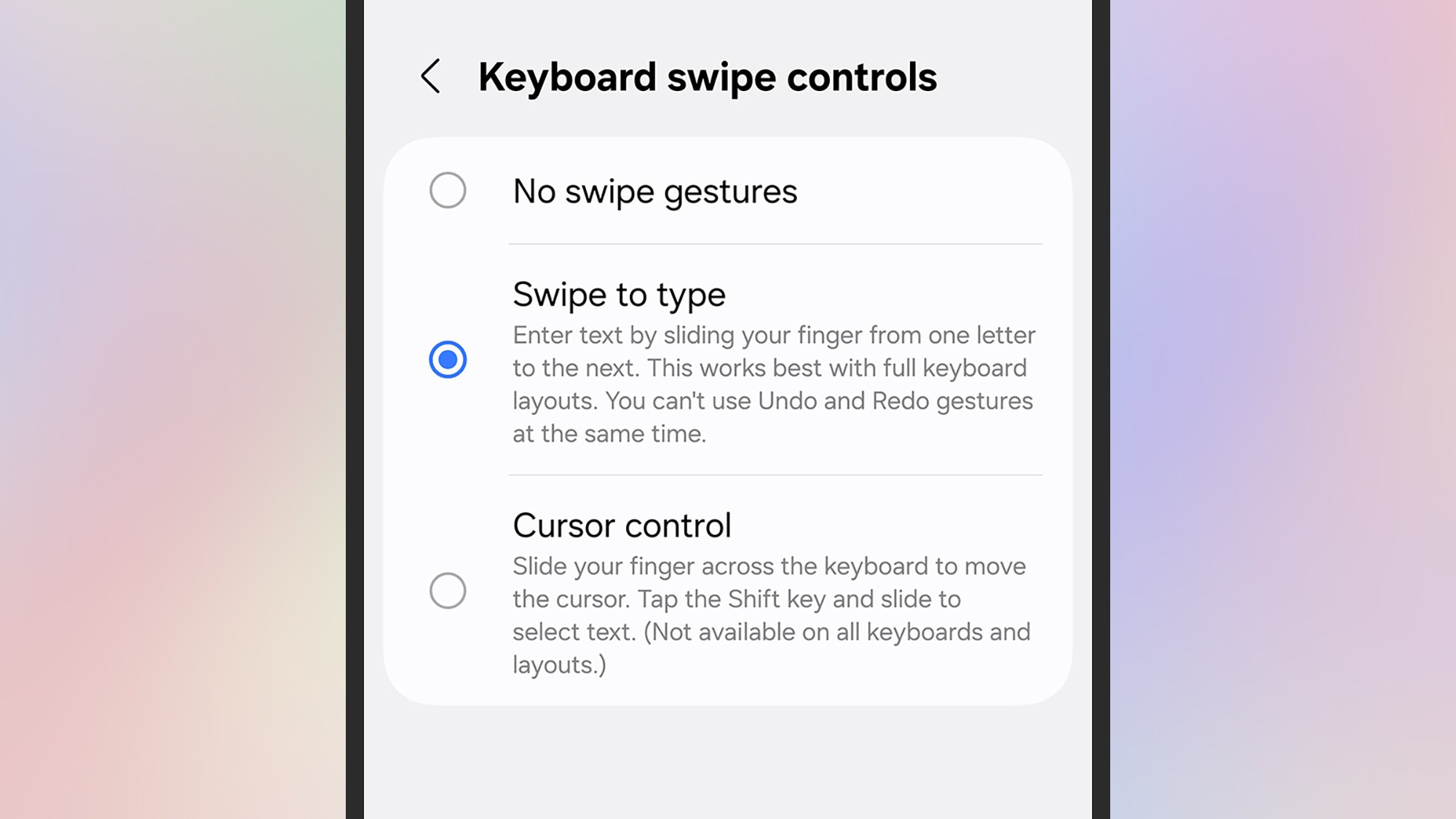
Rather than lifting up your finger and tapping down again for every single letter, you can just slide to type: Press on the first character of the word, then slide to the next one, and so on, until the word is finished. Once you get used to it, it can really speed up your typing. This is actually enabled by default on Pixels and iOS, but needs enabling on the Samsung Keyboard.

To manage the feature on Pixels, tap the gear icon on the keyboard then Glide typing. On iPhones, head to Settings then tap General > Keyboard > Slide to Type. On Samsung phones, you need to turn it on: Tap the gear icon on the keyboard, then choose Swipe, touch, and feedback > Keyboard swipe controls > Swipe to type.

Text shortcuts

Text shortcuts
Use text shortcuts to speed up your typing.
Credit: Lifehacker

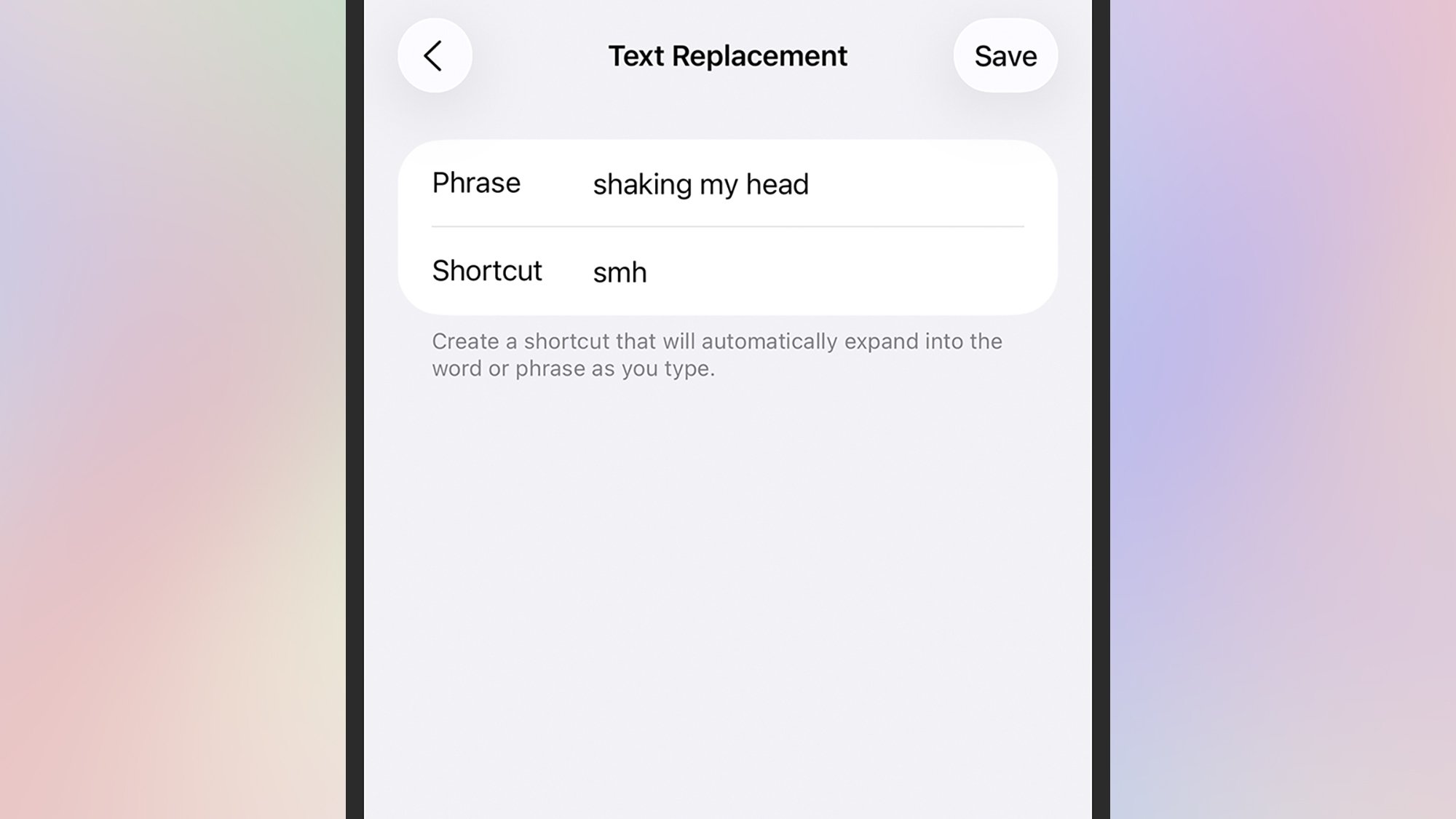
If you find yourself typing the same phrases over and over again in your messages, you can save them as shortcuts that get triggered by a custom code: So every time you type “omw,” you’ll see “on my way” appear as a suggestion, for example.

On Pixels, these shortcuts can be managed by tapping the gear icon on the keyboard, then Dictionary > Personal dictionary, then your current language: Tap the + (plus) icon in the top right corner to add a shortcut.

On Samsung phones, tap the gear icon on the keyboard, then Text shortcuts to add or remove shortcuts. If you’re on an iPhone, text shortcuts can be managed from General > Keyboard > Text Replacement in Settings.

Go one-handed

One-handed keyboard
Your phone keyboard can shrink for easier one-handed use.
Credit: Lifehacker

We’ve written before about how to make it easier to use your phone one-handed on Android and iOS, but it’s worth repeating here. If you only have one hand free, it can seriously slow down your typing speed—but it doesn’t have to.

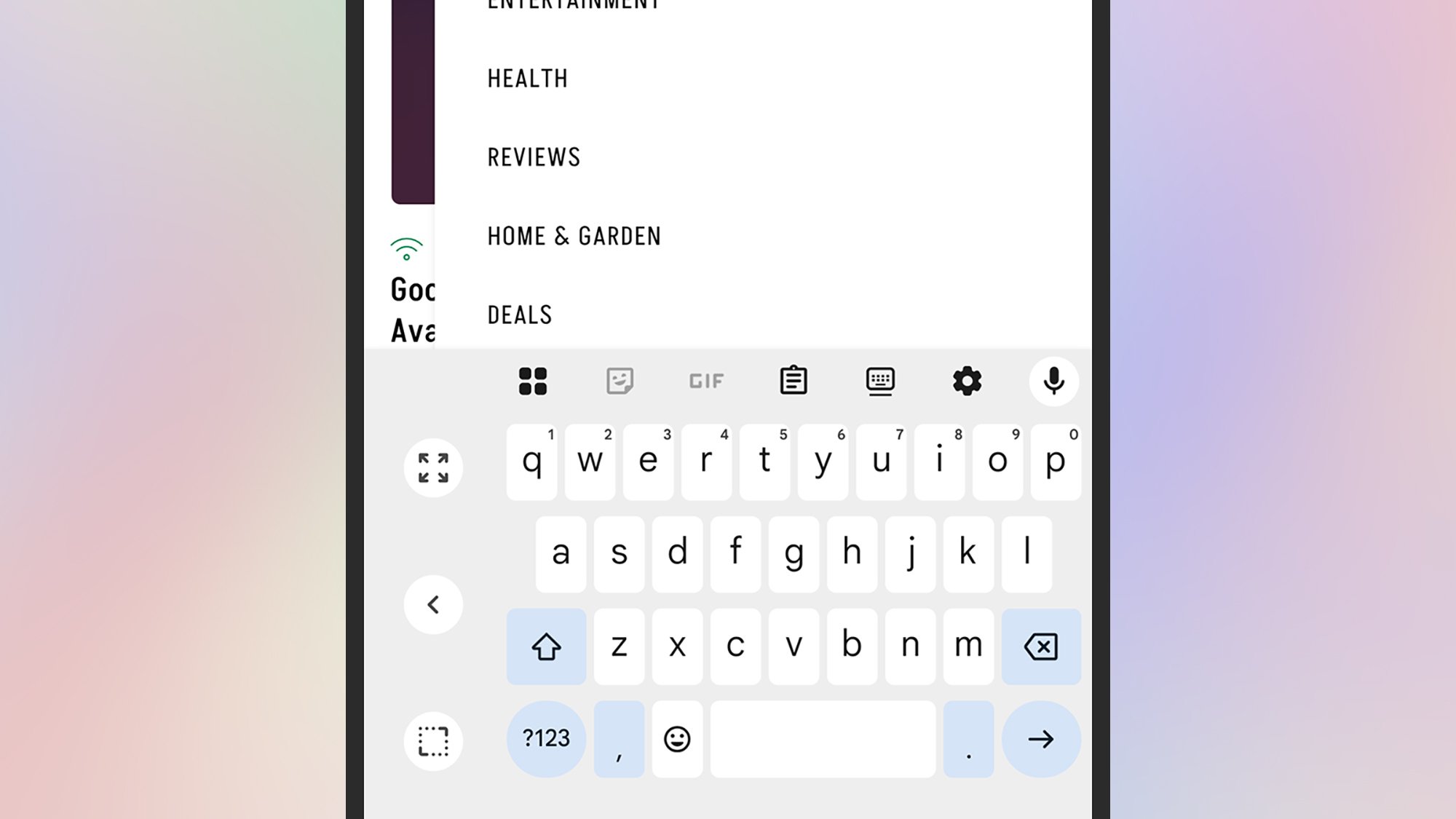
With the keyboard open on Android, tap the four squares to the top left (Pixels) or the three dots to the top right (Samsungs) to find the One-handed button, which pushes the keyboard to one side or the other (use the arrow to switch).

If you’re on an iPhone, open the keyboard, then press and hold the globe icon (bottom left). A series of icons pop up, enabling you to push the keyboard to the left or the right, or return it to its normal size.

Use your voice

Voice typing
Voice typing is another option on your phone.
Credit: Lifehacker

You probably don’t want to be dictating a personal message to your partner so that the whole subway car can hear, but if you’re busy on other jobs then voice input is a handy alternative. Depending on your typing speed, you might find it helps you get through your messages more quickly.

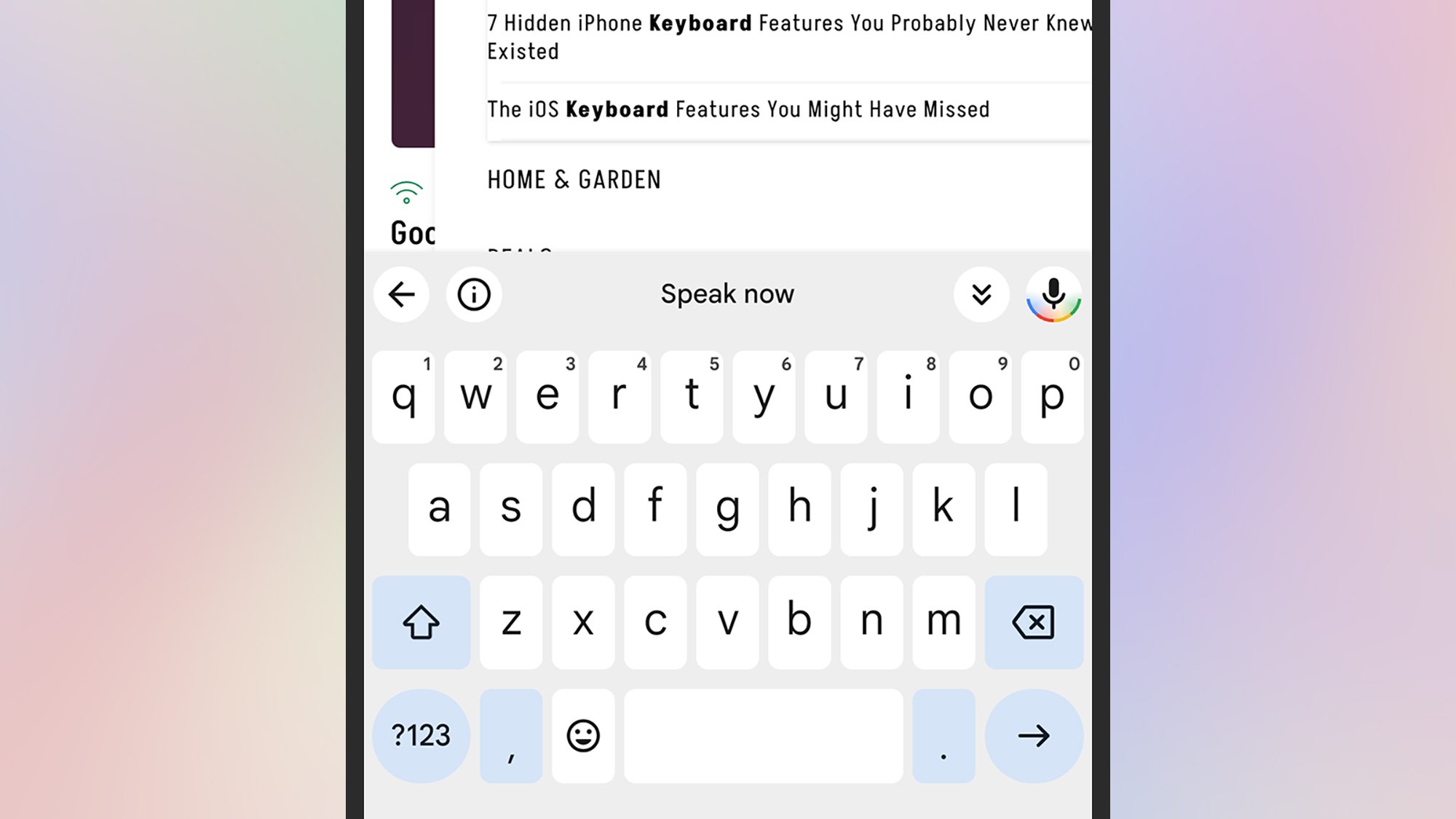
It couldn’t be much simpler to enable, either. Every default keyboard has a mic icon: Top right on Pixels, bottom left on Samsungs, and bottom right on iPhones. Tap the button, and then start talking—and you can speak out punctuation, too.

Try out different keyboards

Typewise keyboard
The Typewise keyboard gives you a choice of alternative layouts.
Credit: Lifehacker

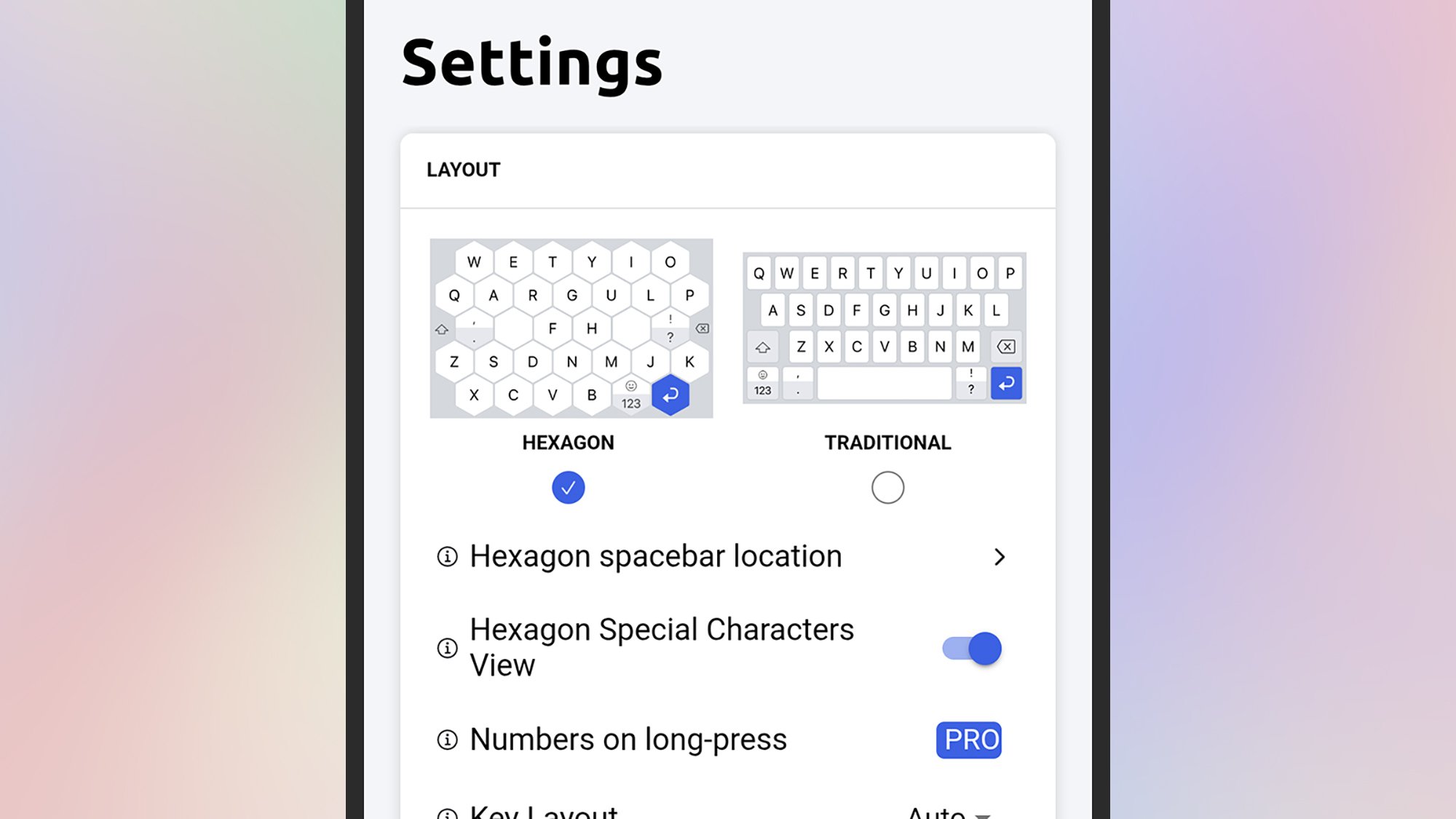
Both Android and iOS let you install alternative keyboards and switch between them, and you might find they help you type more quickly: Look at Typewise for example, for Android or iOS, which brings with it larger buttons, a host of customizations, and the ability to swipe-to-type mentioned above.

Then there’s SwiftKey from Microsoft, also available for Android and iOS, which gives you a host of ways to customize the keyboard to suit your typing style—as well as promising the most accurate autocorrect and text prediction around, meaning you can more quickly get out the message you want to type.

Slate Auto’s sub-$30,000 EV pickup is due next year—here’s the factory

WARSAW, INDIANA—The Blank Slate pickup scratches a particular itch for some, fulfilling the desire for an EV powertrain without all the bells and whistles associated with a modern vehicle. Gone is the infotainment screen, the lane-keeping assistance, and, for those concerned about surveillance, a modem. Instead, it’s an unpainted modular pickup and can be configured post-production into nearly anything the owner wants. Oh, and it’s cheap.

This Old Factory

For decades, the RR Donnelley & Sons printing plant in Warsaw, Indiana, pumped out catalogs. Glossy shopping books from JCPenney, Sears, and—my personal favorite—Radio Shack left the plant and were shipped all over the country to eager shoppers looking for their next mail-order delight. Then the Internet broke all of that.

The last employees clocked out in 2023.

Read full article

Comments

Marshall adds a subwoofer and compact soundbar to its Heston TV audio lineup

Marshall’s family of TV audio gear is growing. The company has announced the Heston Sub 200 subwoofer and Heston 60 compact soundbar, both of which are now available for pre-order. The $700 Heston 60 is a smaller take on the first soundbar Marshall introduced earlier this year, the Heston 120, offering Dolby Atmos and DTS-X for more intimate spaces. With the Heston Sub 200, a $600 subwoofer that pairs with both soundbars, Marshall touts “a sound that can be truly felt.” Both products come in Cream and Black, and sport Marshall’s classic guitar amp styling. They ship September 23.

The Heston 60 has 7 Class D amplifiers — two 25W and five 5W — with a total power output of 56W. It has two woofers and five full range drivers. The soundbar offers wireless and wired connectivity, with Bluetooth (5.3) and Wi-Fi, as well as an HDMI 2.1 port (eARC), a 3.5mm aux port, an RCA input and USB-C. It also supports AirPlay 2, Google Cast, Spotify Connect and Tidal Connect.

The Heston 200 subwoofer, the Heston 120 soundbar and the Heston 60 compact soundbar in black pictured in a vertical arrangement against a dark gray background
The Heston 200, Heston 120 and Heston 60
Marshall

The Heston Sub 200 packs two 5.25 inch subwoofers and two 120W Class D amplifiers, with a peak total power output of 236W. Marshall says it’ll deliver deep, room-shaking bass. The subwoofer has Bluetooth and wired input (RCA mono). 

The Heston 60 and Heston Sub 200 will be available from Marshall starting September 23, and will roll out to select other retailers on September 30.

This article originally appeared on Engadget at https://www.engadget.com/audio/speakers/marshall-tv-subwoofer-heston-200-compact-soundbar-heston-60-140044805.html?src=rss

The US Population Could Shrink in 2025, For the First Time Ever

An anonymous reader shares a report: The United States is on the precipice of a historic, if dubious, achievement. If current trends hold, 2025 could be the first year on record in which the US population actually shrinks.

The math is straightforward. Population growth has two sources: natural increase (births minus deaths) and net immigration (arrivals minus departures). Last year, births outnumbered deaths by 519,000 people. That means any decline in net immigration in excess of half a million could push the U.S. into population decline. A recent analysis of Census data by the Pew Research Center found that between January and June, the US foreign-born population fell for the first time in decades by more than one million. While some economists have questioned the report, a separate analysis by the American Enterprise Institute predicted that net migration in 2025 could be as low as negative 525,000. In either case, annual population growth this year could easily turn negative.


Read more of this story at Slashdot.

The Out-of-Touch Adults’ Guide to Kid Culture: Why Is ‘KPop Demon Hunters’ So Popular?

The last week of summer 2025 was marked by more number-based slang, a movie blockbuster that you may not have heard of, and a viral video that brought the entire world together to say, “give that kid that hat!”

What is KPop Demon Hunters?

KPop Demon Hunters is an animated film from Sony that started streaming on Netflix in late June. It quickly became the most-watched original animated film on the platform, and by August, it was the most-watched film on Netflix ever, surpassing 236 million views. KPop Demon Hunters is so popular, Netflix rushed a “sing-along” version into actual theaters. It opened on Aug. 23, on 1,700 screens, and, despite its audience largely already having seen the movie, it took first place at the box office, and grossed around $20 million. All without you and I ever having heard of it.

The film itself is a musical in which a K-pop girl group called Huntr/x fight demons by night while selling out stadiums by…night, also. Critical praise for KPop Demon Hunters is nearly universal, with critics praising its catchy songs, quality animation, positive message, and its energetic pace.

What (and why) is 2016 nostalgia?

There are over a million videos on TikTok tagged “#2016.” Some of them, no doubt, were shot in that bygone age, but most of them are nostalgia videos, meant to re-create the unique vibe and look of nine year ago. Remember? Everyone was excited about the presidential election, we all had fidget spinners, and we were all listening to that golden oldie “Hello” by Adele? Oh, and everything apparently looked like this:

The 2016 aesthetic is achieved through a TikTok filter, but the popularity needs more explanation. 2016 was only nine years ago.

“Steve, didn’t nine years ago just happen, like three years ago?” you may be asking. Maybe to you. And to you everything is about the same as it was then. But if you’re 18 years old, 2016 was half a lifetime ago. 2016 nostalgia isn’t really about the style or cultural difference between then and now; it’s a more of a personal kind of nostalgia, where young people are remembering who they were “back then,” not what the world was like. In any case, nostalgia cycles are getting smaller and smaller, in a shrinking recursive cycle. I can only assume it will catch up to itself soon and everyone will start being nostalgic for the present.

What is a Mason 67 Kid?

There is a new genre of male out there, and his name is Mason.

Last week, I defined Gen Alpha’s favorite slang term, “6-7” by pointing out that it doesn’t mean anything, but it does identify the person who says it as a certain kind of person. Culture watchers online have identified that person, stereotyped him, and named him Mason 67 Kid.

A Mason 67 Kid is a white, suburban Gen Alpha boy who plays baseball, rocks a fluffy “ice cream” haircut, and says “6-7” a lot. His sunglasses are Pit Vipers. He wears Yeezy slides. His polyester-as-hell ice cream shorts can be purchased at Dick’s Sporting Goods.

The name comes from this video that first identified the trend:

Others quickly latched on. Here’s a Mason:

And an AI Mason:

There are a million more Masons at the hashtag.

This is the first stereotype of Generation Alpha—children under 15—I’ve seen, and it will be interesting to see if it sticks. In a way, it’s just “white kid” and doesn’t say anything at all about anything. Just like 6-7.

What does “41” mean?

Since we’re doing number-based slang that only Gen Alpha says, have you heard of “41” yet? The number 41 is mostly a response to the whole 6-7 thing. Its origin is Blizzi Boi’s “41 Song (Yung Smiley Saks! Remix),” which you can see here:

In the (terrible) song, Blizzi Boi raps about how he is 41 years old and has 41 goals or maybe 41 gold. It’s a bad song, and Blizzie Boi should know better at his age, but apparently the kids like it, because they started saying “41” a lot. Like 6-7, you say it in answer to any question that calls for a number. “What time is it? 41!” So far, 41 is only a fraction as popular as “6-7,”, but maybe there are enough children looking for a new number to say that it will overtake the original.

In the future, look for 59 to gain popularity, or maybe 12.

What does “chopped” mean?

In young people slang, “chopped” is not the past tense of “chop.” It means “ugly” and is often applied to someone’s face or outfit, but anything that isn’t aesthetically pleasing could be referred to as “chopped,” as could anything that is generally not good, like an awkward situation.

(For more slang terms from generations Z and Alpha, check out my glossary of young people slang.)

Viral video of the week: Polish CEO snatches cap from young fan at US Open

Bet you’ve already seen this week’s viral video, but if you haven’t, it’s a clip of the crowd at the US Open, and captures the moment when tennis player Kamil Majchrzak tried to give his hat to a young fan, only for it to be snatched out of the kid’s hand by Polish CEO Piotr Szczerek.

This clip has spread everywhere because it contains all the ingredients of a perfect 2025 meme:

  • The kid looks like a tennis version of Mason 67.

  • Everyone already suspects CEO’s would steal candy from a baby, and here’s proof.

  • Self-righteousness is a powerful emotion.

  • You just knew it was going to ruin this CEO’s life, and it totally did! (Here’s his apology.)

It also typifies 2025 internet culture in that I could not find the original clip anywhere. Instead, I found thousands of viral reaction posts, commentary videos, and frame-by-frame breakdowns, all of which are trying to grab some of that attention, and all of which are unnecessary. We all had the same reaction. What commentary can you offer on this? No one needs to break down this video because we can see it for ourselves. Content-about-content is a plague on the land, a cycle as recursive as nostalgia for 2016, an entire culture becoming a snake eating its own tail.

Porsche’s next Cayenne is fully electric—we drove the prototype

Curved displays in cars are increasingly common, adding a bit of shape to the increasing pixel overload we face behind the steering wheel. The designers of Porsche’s upcoming Cayenne Electric, though, decided to do something more dramatic with the touchscreen that commands the center of the forthcoming SUV’s dashboard.

Its shape flows between dashboard and center console in a smooth, organic way, with a pronounced bend in the middle. The first time I dragged my finger from top to bottom, traversing that kink, I decided I was going to hate this layout. But a day behind the wheel of a prototype version of Porsche’s electric SUV changed my mind. I was left wondering why nobody has used this shape.

That was just one feature out of dozens that impressed in this SUV that promises somewhere north of 1,000 horsepower (745 kW) and something in excess of 300 miles (482 km) of range on a charge. It won’t hit dealerships until sometime next year, but early impressions are that it will be worth the wait.

Read full article

Comments

GeForce RTX 5070 Tops Modern GPUs In Steam Survey While RDNA 4 Is Still MIA

GeForce RTX 5070 Tops Modern GPUs In Steam Survey While RDNA 4 Is Still MIA
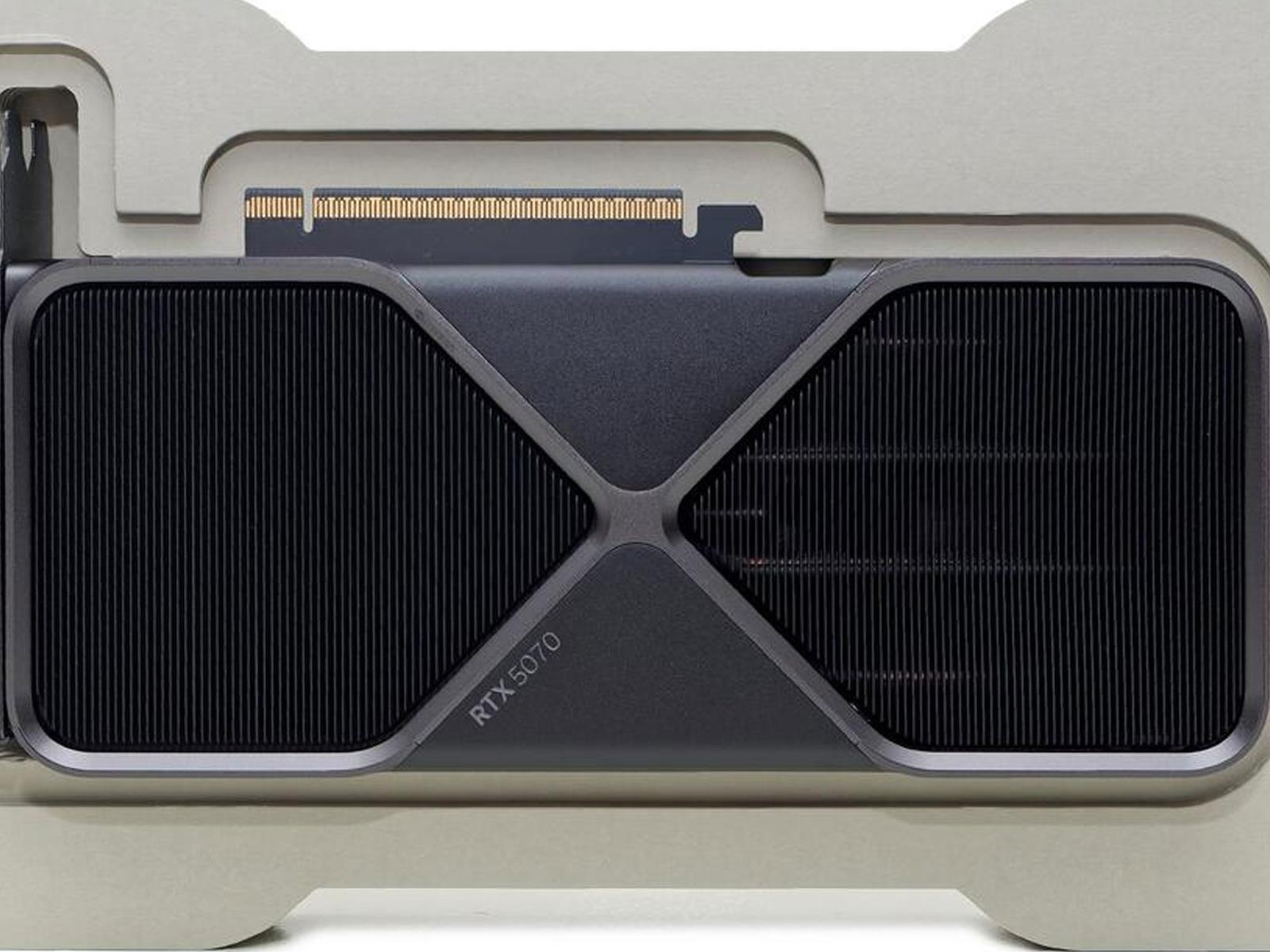
Steam’s monthly hardware and survey software is not a perfect science, but it is one of the best and most accessible resources for identifying trends in the PC gaming space. With that said, the survey results for August are in, and they show that NVIDIA’s GeForce RTX 5070 is still the most popular GPU among the latest-generation offerings.

Switzerland launches its own open-source AI model

There’s a new player in the AI race, and it’s a whole country. Switzerland has just released Apertus, its open-source national Large Language Model (LLM) that it hopes would be an alternative to models offered by companies like OpenAI. Apertus, Latin for the world “open,” was developed by the Swiss Federal Technology Institute of Lausanne (EPFL), ETH Zurich and the Swiss National Supercomputing Centre (CSCS), all of which are public institutions. 

“Currently, Apertus is the leading public AI model: a model built by public institutions, for the public interest. It is our best proof yet that AI can be a form of public infrastructure like highways, water, or electricity,” said Joshua Tan, a leading proponent in making AI a public infrastructure. 

The Swiss institutions designed Apertus to be completely open, allowing users to inspect any part of its training process. In addition to the model itself, they released comprehensive documentation and source code of its training process, as well as the datasets they used. They built Apertus to comply with Swiss data protection and copyright laws, which makes it perhaps one of the better choices for companies that want to adhere to European regulations. The Swiss Bankers Association previously said that a homegrown LLM would have “great long-term potential,” since it will be able to better comply with Switzerland’s strict local data protection and bank secrecy rules. At the moment, Swiss banks are already using other AI models for their needs, so it remains to be seen whether they’ll switch to Apertus. 

Anybody can use the new model: Researchers, hobbyists and even companies are welcome to build upon it and to tailor it for their needs. They can use it to create chatbots, translators and even educational or training tools, for instance. Apertus was trained on 15 trillion tokens across more than 1,000 languages, with 40 percent of the data in languages other than English, including Swiss German and Romansh. Switzerland’s announcement says the model was only trained on publicly available data, and its crawlers respected machine-readable opt-out requests when they came across them on websites. To note, AI companies like Perplexity have previously been accused of scraping websites and bypassing protocols meant to block their crawlers. Some AI companies have also been sued by news organizations and creatives for using their content to train their models without permission. 

Apertus is currently available in two sizes with 8 billion and 70 billion parameters. It’s currently available via Swisscom, a Swiss information and communication technology company, or via Hugging Face. 

This article originally appeared on Engadget at https://www.engadget.com/ai/switzerland-launches-its-own-open-source-ai-model-133051578.html?src=rss

You Can Get This iPhone 15 Pro Max on Sale for $770 Right Now

We may earn a commission from links on this page. Deal pricing and availability subject to change after time of publication.

It’s not the newest iPhone on the block, but the iPhone 15 Pro Max still has plenty of life left in it, and right now, StackSocial is offering the 256GB Black Titanium model—unlocked and premium refurbished—on sale for $769.99. That’s not exactly a budget buy, but considering this phone originally launched at over $1,000 just last year, it lands in that practical middle ground for someone who wants a top-tier experience without paying full flagship prices. It’s been rated “Grade A,” so while it’s not fresh from the factory, it should arrive looking close to new, with just the slightest signs of use. It’s built with a titanium frame that feels surprisingly light for its size, and the 6.7-inch OLED display holds up beautifully with smooth scrolling and sharp visuals.

This is the kind of phone that makes sense if you’re not fussed about having the absolute latest camera or chip generation. That said, the 15 Pro Max runs on Apple’s A17 Pro chip, which is fast enough to handle console-level games and high-end creative tasks. And with 256GB of storage, you’ll have plenty of space for your apps, photos, 4K videos, and anything else you need. It’s also IP68-rated for water and dust resistance and supports MagSafe and Qi wireless charging for added convenience.

As for the camera, the 48MP main sensor captures detailed shots in all lighting conditions, and the 5x telephoto lens gets you closer than ever—great for concert shots or unexpected wildlife moments. It also supports USB 3 for faster wired transfers, which is useful if you’re into shooting video or regularly backing things up. And while the move to eSIM only might be a minor adjustment depending on your carrier, it also makes switching between plans more seamless.

This phone isn’t for someone chasing iPhone 16 headlines, but if you’re upgrading from an older model or just want something reliable and powerful without getting pulled into Apple’s yearly refresh cycle, this iPhone 15 Pro Max sale could be the right balance of value and longevity.

Four Kindle Features You Can Only Find on the Colorsoft

Did you know you can customize Google to filter out garbage? Take these steps for better search results, including adding Lifehacker as a preferred source for tech news.


Since Oct. 2024, you’ve had the option of getting an Amazon Kindle in color in the form of the Colorsoft model. The original Signature Edition with 32GB of storage was recently also joined by a cheaper 16GB edition for your consideration, though it’s questionable whether the $30 saving is worth it, as you lose wireless charging and the auto brightness setting, as well as half the storage.

In our Amazon Kindle Colorsoft review, you’ll see there’s a lengthy debate over whether the price premium you pay for a color e-reader screen is worth it, compared to the perfectly capable black and white models. For many people monochrome is fine—but if you’ve splurged on color, or you’re wondering if you should, these are the extra tricks you’ve got access to.

Highlight in color

This is one of the most useful extra features you get with a color screen: the ability to use different colors when you’re highlighting blocks of text. You could use different colors for quotations from different characters, for example, or for different highlight categories.

Highlighting is done in the same way as it is on any other Kindle—by pressing and holding on a specific word, then dragging out the handles to the left and right and choosing Highlight. Press and hold on the highlight again to choose from four different colors.

Switch between color styles

Kindle Colorsoft
You’ve got two color style options.
Credit: Lifehacker

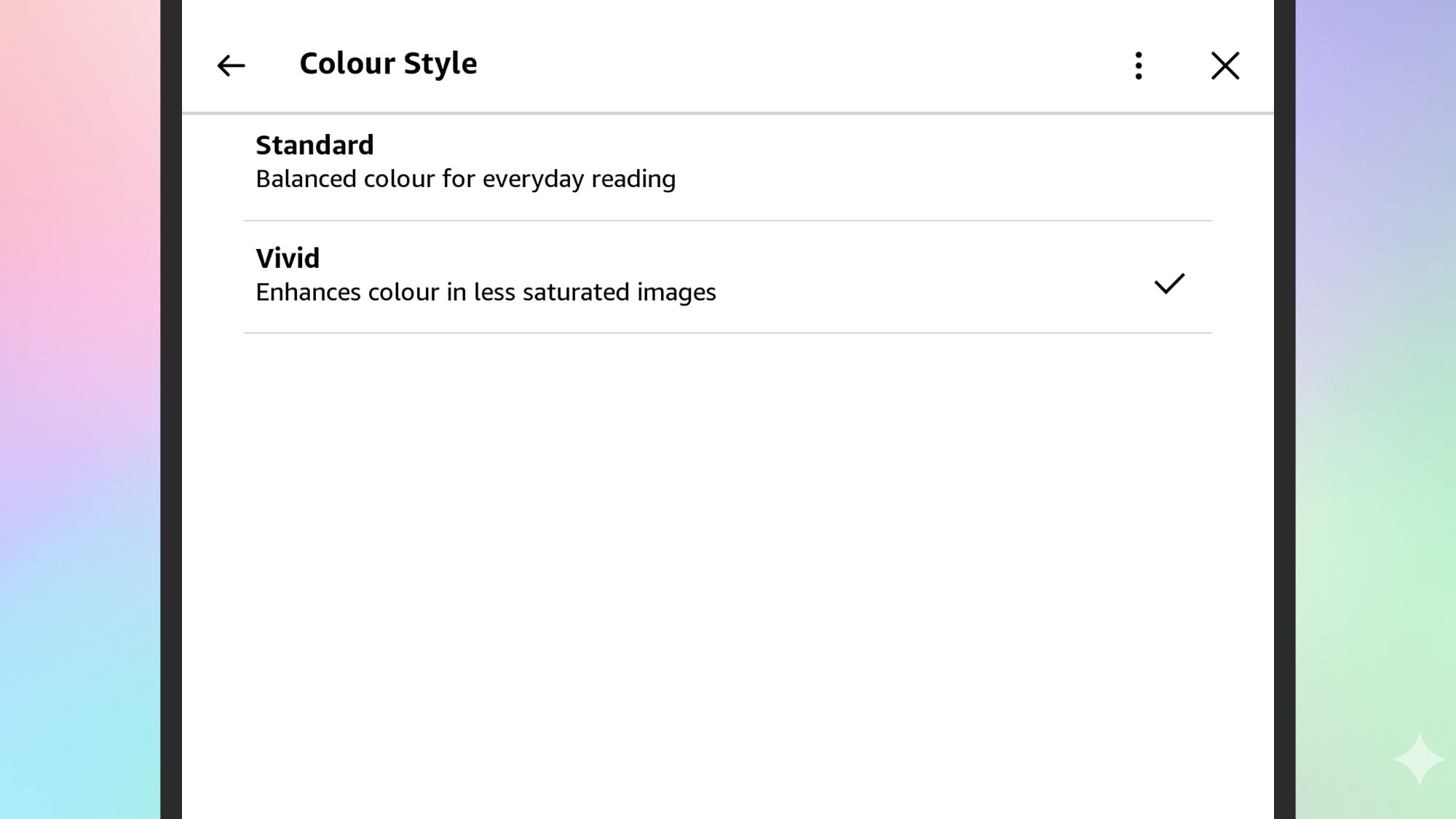
The Colorsoft comes with a choice of two color styles, which you can switch between depending on the ambient light levels or how saturated you want the colors to be—though neither of the available modes are anywhere close to what you get with a phone display.

From the home screen, tap the three dots (top right), then Settings. Under Screen and brightness, you’ll find the Color Style option, with the option to switch between Standard (for “everyday reading”) and Vivid, which boosts the color saturation levels on screen.

Open documents and articles in color

Your Kindle can be used as a general purpose document and article reader, too. You can transfer files over to these e-readers in several different ways, including via USB transfer or by emailing them to your own unique Kindle email address.

You can do this on any Kindle, but only the Kindle Colorsoft will show images, charts, diagrams, fonts, etc. in color. While e-books tend to be largely black and white once you get past the front cover, your documents and saved articles might not be.

Show a color cover on the lock screen

Admittedly, you can do this on black and white Kindles as well, but with a color screen it’s a bit more worthwhile.

From the home screen, tap the three dots (top right), then Settings. Tap Screen and brightness, then Show covers on lock screen and presto—whenever your device is locked, you’ll see the cover of the book you’re currently reading in glorious color.

Intel Core Ultra 7 365K Arrow Lake Refresh CPU Surfaces In Benchmark Leak

Intel Core Ultra 7 365K Arrow Lake Refresh CPU Surfaces In Benchmark Leak
Intel is under the impression that it’s Nova Lake-S launch on the desktop will bring the fight to AMD in a big, as evidenced by recent comments made by the company’s Chief Financial Officer (CFO), David Zinsner, during the 2025 Technology Conference in Dana Point, California. Intel’s confidence is exciting, especially if it proves warranted.

ExpressVPN switches to multi-tiered pricing plans, letting users tweak features to plan duration

ExpressVPN has tripled its subscription options by switching to a tiered pricing structure, effective today. The new system includes three levels of service, the cheapest offering basic VPN service and the others adding extra features. Each one of those levels — Basic, Advanced and Pro — can be purchased for monthly, yearly or two-year durations.

In total, you’ve now got nine different options for subscribing to ExpressVPN. The company also says legacy plans will remain active “for now,” and current customers won’t be downgraded. The change is similar to the approach already used by rivals like NordVPN and Surfshark.

Previously, ExpressVPN locked feature offerings to the duration of the plan, so the only way to get the full suite of features was to subscribe for 24 months. Now, while longer-term subscriptions will still offer discounts, features depend on your level of subscription instead of how long it lasts.

The new tiers roll in some features that were previously part of ExpressVPN’s Identity Defender suite, including identity monitoring, credit reports and data removal services. New types of plans will also bump the number of allowed simultaneous connections to as high as 14. Here’s what you’ll get with each tier.

Here's how ExpressVPN's new feature tiers break down.
ExpressVPN

The Basic plan comes with “core VPN functionality” including the Lightway protocol. Basic users will no longer have access to the ad blocker, tracker blocker or parental controls. It can be used on 10 devices at once and will cost $12.99 for a month, $74.85 for a year and $97.72 for two years.

The Advanced plan raises the device limit to 12 and adds the blockers and parental controls, plus the ExpressVPN Keys password manager. It also gives you three days of eSIM service and adds the Identity Defender features — leak alerts, $1 million of identity theft insurance, data removal and credit monitoring. As was already the case, those ID protection features are available only to users in the United States.

An Advanced plan will cost $13.99 for a month, $89.85 for a year and $125.72 for two years. The one-year and two-year plans are both cheaper than the same duration used to cost. Advanced subscribers also get five days of eSIM service and a discount coupon for between 25 and 50 percent off an ExpressVPN Aircove router (it’s not currently clear how the exact discount will be determined).

Although Basic and Advanced users can pay extra (between $3.99 and $8.99) for a dedicated IP address, it comes standard on a Pro subscription. Pro users additionally get monthly credit reports and data removal, 14 simultaneous connections and an Aircove discount between 50 and 75 percent. A Pro plan costs $19.99 for a month, $134.95 for a year and $209.72 for two years.

What ExpressVPN tiered pricing means for VPN shoppers

Ultimately, I don’t think this new approach will change much about the experience of using ExpressVPN. It’s not introducing any new features; I already touched on everything here in my recent ExpressVPN review, so the only difference is how much you’ll pay to access the perks.

The best news for consumers is that ExpressVPN is now available for significantly cheaper than before. A two-year Basic plan costs about 30 percent less than a two-year subscription used to — though a one-year basic plan is still more expensive than a comparable subscription to Proton VPN or Surfshark. All that said, I can’t enthusiastically recommend a Basic subscription until I know that it includes the Network Lock kill switch and split tunneling on supported platforms (we’re reaching out to ExpressVPN to confirm this).

We’re in the process of overhauling our ranking of best VPNs, including the new information from ExpressVPN — check in soon to see the results.

This article originally appeared on Engadget at https://www.engadget.com/cybersecurity/vpn/expressvpn-switches-to-multi-tiered-pricing-plans-letting-users-tweak-features-to-plan-duration-130016667.html?src=rss

Dolby announces Dolby Vision 2, expanding picture quality ‘beyond HDR’

Dolby Vision has been one of the industry standards for HDR on TVs for over a decade. At IFA 2025, Dolby Laboratories is introducing Dolby Vision 2, what it calls “a groundbreaking evolution of its industry-leading picture quality innovation.” The second iteration has been updated to meet the capabilities of today’s TV technology and the ever-expanding set of artist tools. Dolby Vision 2 includes a more powerful image engine, better optimization for your TV and features that go “beyond HDR.” 

The base of Dolby Vision 2 is called Content Intelligence. Dolby says these tools provide a better “bridge” between the creative professionals and the living room by using AI to automatically adapt your TV to what your watching and where you’re watching it. Content Intelligence includes tools like Precision Black to help keep darker scenes visible and Light Sense that detects ambient light to create the best picture. There’s also Sports and Gaming Optimization that caters to the specific needs of live sports and gaming with upgrades to white point adjustments and motion control. 

Bi-directional tone mapping will allow premium TVs produce “deliver higher brightness, sharper contrast and deeply saturated colors” while maintaining artist intent, Dolby explains. That “beyond HDR” push includes features like Authentic Motion. This tool is what Dolby calls “the world’s first creative driven motion control tool to make scenes feel more authentically cinematic.”

When it’s ready for the living room, Dolby Vision 2 will be offered in two ways. First, Dolby Vision 2 Max will come on premium TVs to harness all of their processing power to provide unique premium features. Regular Dolby Vision 2 is what you’ll find on mainstream TVs with features that run on the new image engine and Content Intelligence. 

When new standards like this are introduced, sometimes it takes a while for them to actually make it into products you can buy. Dolby says Hisense will be the first to bring Dolby Vision 2 to market, offering support for the new standard on its “premium” TVs, including RGB-MiniLED models. What’s more, French streaming service Canal+ is also on board, aiming to leverage the new technology for movies, TV shows and live sports. 

You’ll want to tune into our CES coverage in January, because Dolby Vision 2 will certainly be a topic of discussion for the companies that typically debut new TVs in Las Vegas. Perhaps we’ll also get a demo of what this second-gen tech is capable of at the show as well. 

This article originally appeared on Engadget at https://www.engadget.com/home/home-theater/dolby-announces-dolby-vision-2-expanding-picture-quality-beyond-hdr-123019504.html?src=rss

Amazon US Prime Sign-Ups Slow Despite Expanded Promotion, Data Shows

An anonymous reader shares a report: Amazon doubled its Prime Day discount sales to four days this year and touted blowout numbers days after the event. But by one critical metric, it missed the mark. Sign-ups in the U.S. failed to meet last year’s total and even the company’s own target, according to internal company data reviewed by Reuters.

The world’s largest online retailer registered 5.4 million U.S. sign-ups over the 21-day run-up to Prime Day and its four-day sales event from July 8 to July 11. That was around 116,000 fewer than for the same period a year earlier and 106,000 below the company’s own goal, a roughly 2% decline in both metrics.


Read more of this story at Slashdot.

JBL’s Grip Bluetooth speaker doubles as a snazzy reading light

JBL just announced a new portable Bluetooth speaker, called the Grip. This model includes a rope hook, which should make it easy to attach to backpacks, ski gear, or just about anything else.

It also features customizable ambient lighting that actually looks pretty useful. The company says this lighting scheme makes the speaker a “perfect bedside companion for late-night reading.” A speaker that doubles as a night light? I can see the use for that.

As for the audio, JBL promises “pro sound” at a “fuller volume” when compared to some rival Bluetooth speakers. It boasts multispeaker connectivity via Auracast, which makes it much easier to switch between sources. The battery life is also on point here, offering up to 14 hours of use per charge.

The speaker looks pretty durable, with an IP68 waterproof and dustproof rating. The company also notes that the unit is drop-proof, so “it can survive a hard fall onto concrete.” The JBL Grip costs $100 and is available in numerous colorways. Pre-orders are open right now, with shipments going out on September 28.

This article originally appeared on Engadget at https://www.engadget.com/audio/speakers/jbls-grip-bluetooth-speaker-doubles-as-a-snazzy-reading-light-120033764.html?src=rss