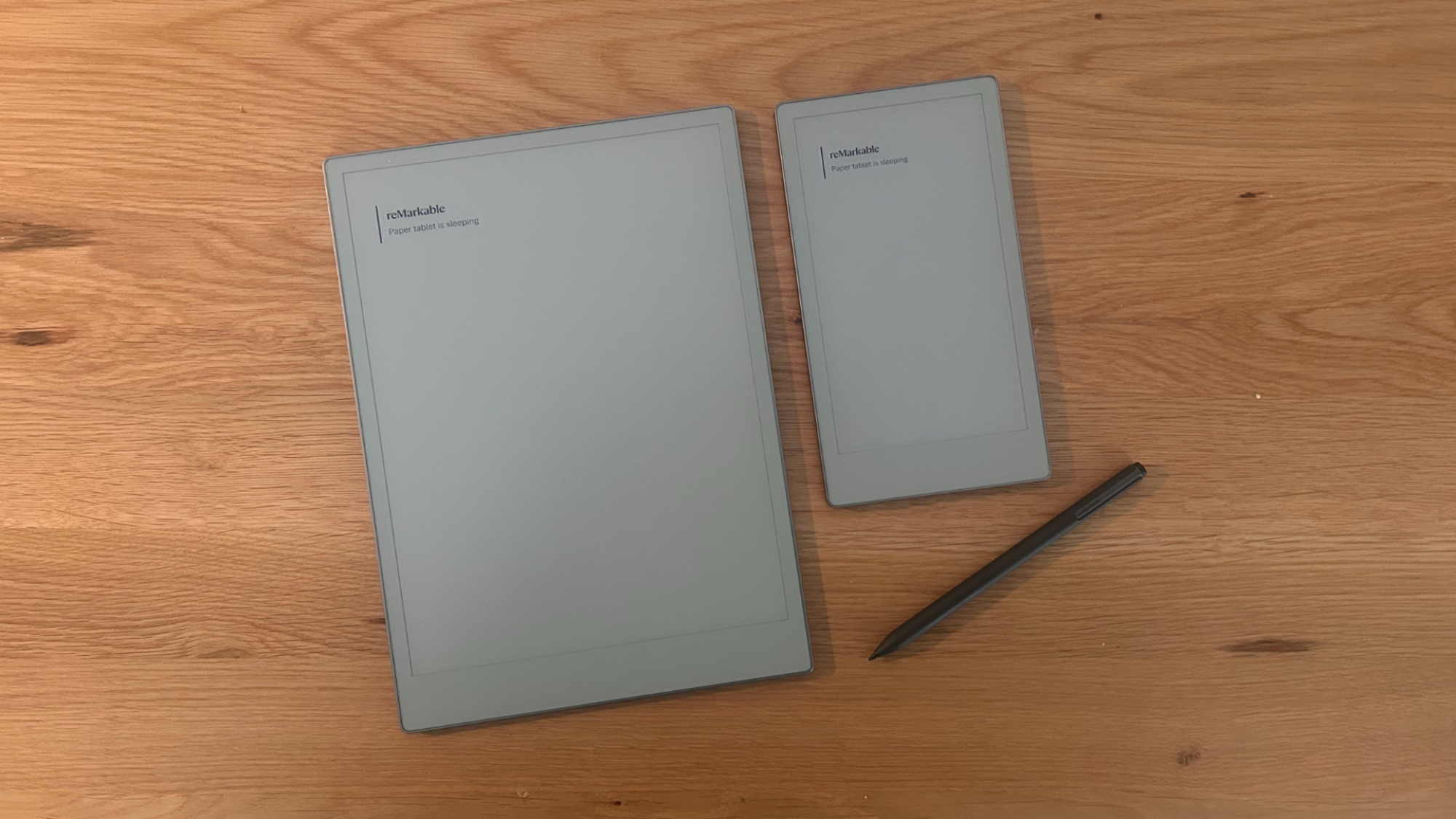
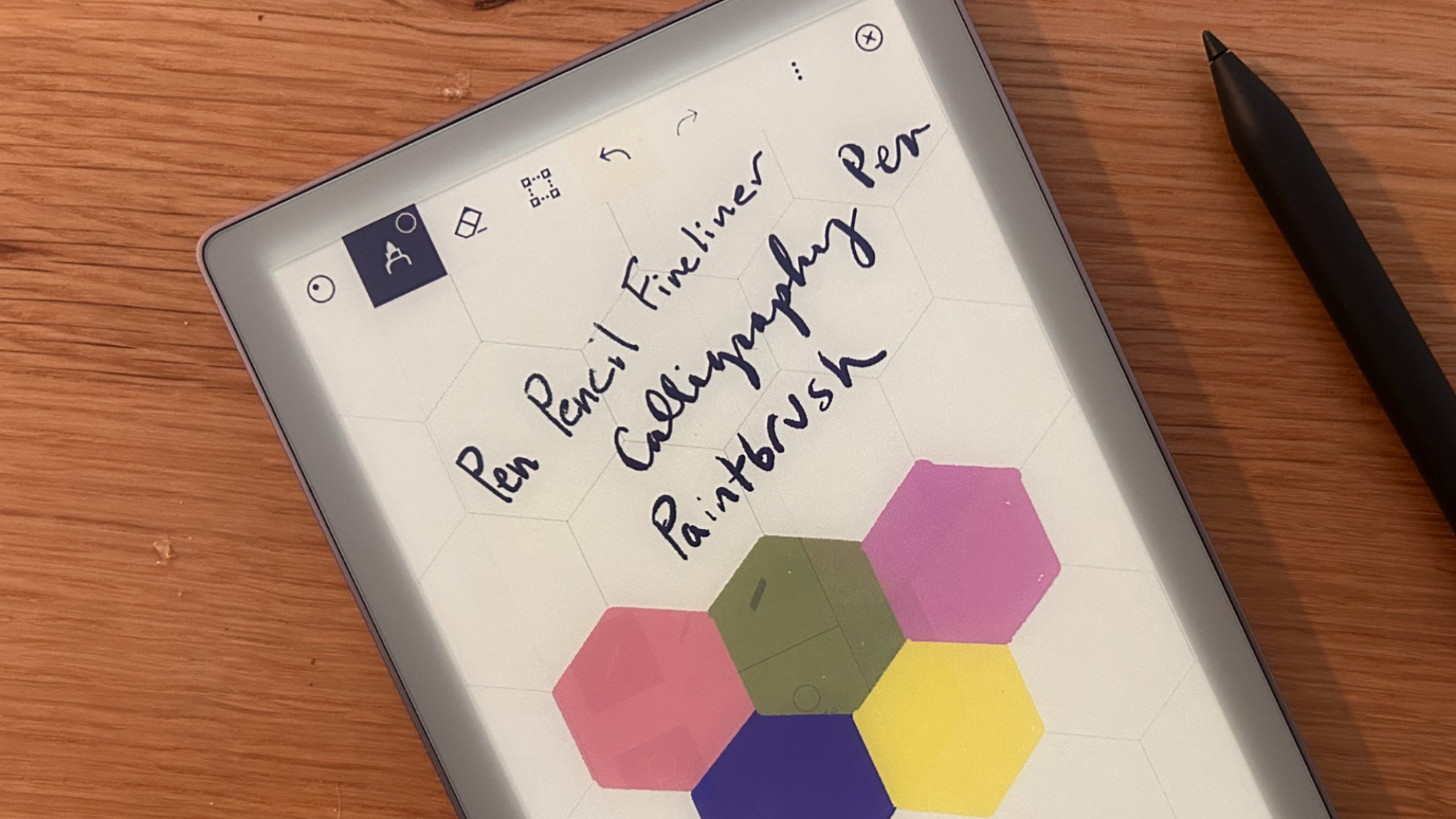
Fans of reMarkable’s series of notepad-like note-taking E-Ink tablets have something new to get excited about today: a new version of the devices called the reMarkable Paper Pro Move, which takes the features of a typical reMarkable tablet and puts them in a smaller 7.3-inch device that can be carried one-handed and easily slid into a pocket or bag.
The Paper Pro Move is available to order now and starts at $449 for a version with reMarkable’s standard Marker accessory and no case. Adding a Marker Pro accessory, which includes a built-in eraser and a nicer-to-hold texture, adds another $50. Folio cases for the device range from $69 to $139, or you can order the tablet without one.
Like the full-size reMarkable Paper Pro we reviewed a year ago, the Move uses a Canvas Color E-Ink display to support note-taking and highlighting in multiple colors—according to the spec sheet, it can render 20,000 distinct shades. Both the Paper Pro and the Paper Pro move advertise up to two weeks of battery life, similar 12 ms writing latency, 64GB of storage, a USB-C port for data and charging, Wi-Fi and Bluetooth, and 2GB of RAM. The Pro Move is somewhat thicker (0.26 inches, up from 0.2 inches for the Paper Pro) and uses a dual-core Arm processor instead of a quad-core model. But the Pro Move also weighs less than half as much as the Paper Pro, making it much more portable.
Critics are denouncing Tuesday’s antitrust remedies ruling against Google, calling them inadequate to restore search market competition. DuckDuckGo said the court’s decision allows Google to continue using its monopoly to hold back competitors in AI search.
The Open Markets Institute called it “pure judicial cowardice” that leaves Google’s power “almost fully intact.” Senator Amy Klobuchar said the limited remedies demonstrate why Congress needs to pass legislation stopping dominant platforms from preferencing their own products. The News/Media Alliance criticized Judge Amit Mehta for failing to address Google forcing publishers to provide content for AI offerings to remain in search results.
Acer is rolling out a new workstation for serious AI work, and it won’t take up a lot of space on your desk. It’s new Veriton GN100 AI Mini Workstation is, as the name implies, a compact mini PC that looks more like a traditional NUC than a workstation. Don’t let its small size fool you, though, as it’s packing NVIDIA’s GB10 Grace Blackwell
If the Tesla Model S prodded the legacy car companies to get on top of battery production and introduce iPad-like screens in cars, Chinese car companies are bringing the heat for what’s left of the 2020s in all segments. Much of the media coverage has rightly been on how this trend will affect mass-market vehicles. But what does it mean at the high end of the market?
“Well, the first question would be ‘Are the Chinese manufacturers really competitive?'” said Bentley Chairman and CEO Dr. Frank-Steffen Walliser in an interview during Monterey Car Week. In the bucolic coastal setting, surrounded by the rarest of rare cars, the competition from the other side of the world appeared far off.
“I don’t want to be arrogant, but having what is considered a car in the luxury segment needs more than just technology. It’s honestly only Germany, Italy, and the UK. You need heritage, you need the craftsmanship behind, you need the storytelling and everything with it. That builds up an actual brand.”
Google is set to reveal more information about its “Gemini for Home” plans, including new Nest devices designed for the AI assistant, the company announced on X. “Gemini is coming to Google Home,” the teaser states, while showing what could be a new Nest camera. That follows the company’s Made By Google announcement last month revealing Gemini for Home and its capabilities.
Gemini for Home will replace Google Assistant and enable natural language commands plus easier-to use controls. For instance, you could ask it to come up with recipes based on ingredients in your fridge, provide information on general topics like buying a car and help you troubleshoot home appliance issues. It will be available both in free and subscription versions — much like Amazon is doing with Alexa and Alexa+.
Is that you, Gemini? Come in and make yourself at Home �
Back at CES, Google said that Nest Aware subscribers who pay $10 per month would get early access to Gemini in Google Home, but it hasn’t confirmed that recently. In any case, the teaser implies we will likely see a new Nest camera (the image strongly resembles the company’s wired Nest security camera) and hopefully the unknown Nest speaker that caught everyone’s eye during Google’s recent live stream. If you’re interested, you can sign up for updates.
This article originally appeared on Engadget at https://www.engadget.com/home/smart-home/google-will-reveal-more-gemini-smart-home-plans-and-devices-on-october-1-133601777.html?src=rss
If you receive an unsolicited email that appears to come from Docusign, don’t trust it without verifying its origin first. Scammers are once again impersonating the e-signature provider in a phishing campaign that leads recipients to believe there is a problem with their Apple Pay accounts.
Docusign is no stranger to scams: Threat actors often use the company’s trusted reputation to impersonate real people and organizations, sending links to (fake) invoices, refund notices, employment contracts, and even legal documents in hopes of collecting sensitive information.
How the Docusign Apple Pay scam works
The latest Docusign scam, identified by staff at both AppleInsider and CyberGuy, starts with an email that, at first glance, looks like a receipt for a subscription purchased through Apple Pay. There’s branding from Apple and Docusign as well as an order ID, and the message directs you to call the included Apple support line if you don’t recognize the charge.
The phone number obviously isn’t Apple’s—instead, you’ll reach the scammers, who will try to extract information like your Apple ID and bank account number, convince you to download remote access software, or demand payment to protect your account. Phishing emails also often include malicious links or attachments.
Docusign scam red flags
Like all scams, this one plays on emotions like fear and a sense of urgency to fix an apparent problem with your account. It also relies on user trust in the brands being impersonated so you’re more likely to engage.
There are a few other ways to identify this campaign as a fraud. For one, the message doesn’t originate from an official Apple or Docusign domain—those sent to AppleInsider came from a Gmail address. (Note that sender names may include lookalike characters that are harder to spot and can evade spam filters.) For another, major companies don’t use Docusign to send receipts or invoices. If you cross-check against your App Store or Wallet transactions, you won’t find this fake one listed.
In general, you shouldn’t engage with anything from Docusign that you weren’t aware of prior to receipt. And always go directly to a company’s website or app to log into your account or find contact information to verify any suspicious claims. You can report spoofed Docusign emails to spam[at]docusign[dot]com.
More than 85 climate scientists declared the Department of Energy’s new climate report unfit for policymaking in a comprehensive review released Tuesday. The DOE’s report cherry-picked evidence, lacked peer-reviewed studies to support its questioning of the detrimental effects of climate change in the US and is “fundamentally incorrect,” the authors concluded.
Scientists have accurately modeled and predicted the volume and impact of excess CO2 in the Earth’s atmosphere since the 1970s, when Exxon workers first began measuring the impacts of their product on the planet’s atmosphere. Since then, climate science has matured into a crucial tool to help humans gauge how a warming planet may affect everything from weather and crops to the economy and mental health.
“This report makes a mockery of science. It relies on ideas that were rejected long ago, supported by misrepresentations of the body of scientific knowledge, omissions of important facts, arm waving, anecdotes, and confirmation bias,” said Andrew Dessler, a professor of atmospheric sciences at Texas A&M University, in a statement accompanying the review.
This is a video featuring the late great astronomer Carl Sagan reading the popular excerpt from his 1994 book ‘Pale Blue Dot’, set to the classical music piece ‘Spiegel im Spiegel’ by Arvo Pärt for extra poignancy. The original photo, which features earth as seen from a distance of some 3.7-billion miles, was taken by the Voyager 1 space probe in 1990 in part thanks to Sagan, who was the one to sugggest the probe’s cameras be turned around for one last shot of earth as Voyager left the solar system. I’m always moved every time I see and listen to this. It really gets me thinking. Just not about anything good, unfortunately, and it’s a shame the photo didn’t capture a giant asteroid speeding towards that pale blue dot.
It took a minute, but we’re finally starting to see some deals on NVIDIA’s GeForce RTX 50 series graphics cards. For the most part, that has entailed partner models selling for baseline MSRPs, as we recently highlighted with a couple of GeForce RTX 5070 Ti models (more on that in a moment). Now, however, we’re even seeing cards go for under
I’m sure you’ve seen displays of “male enhancement” products at your local gas station, liquor store, or head shop. With brand names like “Rhino Power 4000,” “Black Mamba,” or “X Rated Honey,” these “herbal” or “all natural” supplements boast that they will “increase stamina,” give you “rock hard power,” and “add inches.” The packaging may not state it directly, but the overall message is extremely clear: These pills treat erectile dysfunction.
If you’re like me, you’ve seen these pills and thought, “These would never work.” Well, my skeptical friend, this week we are the ones who are wrong. Gas station boner pills often work exactly as expected—but this isn’t because herbal ingredients like ginseng and Yohimbe bark are miracle cures for ED. It’s because many of these pills are basically mislabeled Viagra or Cialis. It’s true: The Food and Drug Administration has found all kinds of prescription medication in hundreds of different shady “supplements,” but you can still buy them. You shouldn’t, but you can.
How a rack full of unlicensed prescription pills came to be easily available at your local 7-11 is a twisty story. Most of these “supplements” originate in foreign factories, especially in China and India, where pharmaceutical manufacturing is cheaper and less tightly regulated. From there, they are distributed as “dietary supplements.”
Unlike prescription and over-the-counter drugs, dietary supplements don’t have to be tested by the Food and Drug Administration before they’re sold, so anyone who wants to make a quick buck can fill some capsules with dried grass, call it a supplement, and start selling it.
The FDA and supplement whack-a-mole
Of course, hiding the active ingredients in Viagra and Cialis in what you call a supplement is against the law, but the FDA doesn’t have enforcement power until after the sale. If people get sick or someone complains, the Feds can step in, but not before.
To its credit, the FDA steps in frequently. The agency maintains an ever-updated database of problematic “Sexual Enhancement and Energy Products,” where you can read all about the illicit ingredients in supplements like Green Lumber (contains tadalafil, the active ingredient in Cialis), HimGo (contains sildenafil, the active ingredient in Viagra, and diclofenac, an over-the-counter anti-inflammatory drug), and “Versace Real Honey” (sildenafil, tadalafil, and acetaminophen). The FDA even prosecutes people occasionally for selling this stuff, like Jacksonville “business executive” Jae Hong Kim who recently pled guilty to selling prescription drugs marketed as “Rhino 69” and “MegaZen Power 5000.”
But Kim’s story is the exception, not the rule. The FDA may pull Mega-Mamba Mojo pills from the market, but in a few weeks, your local gas station will be selling Lightning Lad Libido pills instead, maybe from the same shell company, but now with a different name. These pills can be produced for pennies and sold for up to $20 per, so the risk/reward ratio is solid for people who sell the stuff.
Why you should not take male “enhancement” products from gas stations
You shouldn’t take erection pills from a gas station; first, because you don’t need to be enhanced; you’re beautiful how you are, King. But if you’re treating erectile dysfunction, you can do better than a shady supplement. Taking strange pills from a gas station is a bad idea for a lot of reasons, including:
Unknown dosage: Even if you know it’s sildenafil, you have no idea how much you’re taking, but it’s usually “a crap-ton.” FDA tests of these products have found amounts of prescription drugs well above what a doctor would order, and that often leads to severe headaches, low blood pressure, dizziness, vision changes, or even heart problems.
Dangerous interactions: If you’re on heart meds, blood pressure drugs, or nitrates, ED drugs are generally not safe. For that matter, if you’re on any drug they’re generally not safe, because literally any drug could be in them.
Randomness: Lack of honest labeling means that you might get Ginkgo Biloba when you’re hoping for Viagra, and vice-versa.
Instead of confiding in the guy behind the counter at your local head shop, talk to your doctor. They have heard it before, and the prices of real-deal E.D. are usually better than the gas station equivalent. It’s $2 to $10 per pill for generic sildenafil (Viagra) and about $6 to $18 per pill for generic tadalafil (Cialis), where gas station drugs can cost as much as $20 per dose.
Why they still sell
So these pills are dangerous, expensive, and shady, and the FDA constantly warns us not to take them. Why are they still everywhere? First because the minimal oversight of dietary supplements has been baked into law since the Dietary Supplement Health and Education Act (DSHEA) passed in 1994. But also because these pills offer both an easy solution and an illicit thrill. The combination of curiosity, desperation, and sheepishness makes those shiny packages by the slushie machine an irresistible impulse purchase to some, especially people who are too shy to discuss medical issues with their doctors. So they keep selling because impulse, embarrassment, and weak regulation all collide, and the result is a product that’s as easy to get as it is risky to take.
Autumn is Apple season, and the tech company will once again host its annual unveiling of the season’s new smartphone generation. The fall event has been dubbed “Awe dropping,” and so we’re hoping for some surprising announcements that will earn the name. “Awe dropping” all begins on September 9 at 1PM ET/ 10 AM PT.
If you want to tune in to hear what Tim Cook and crew have to say about the iPhone 17, you can stream the whole show on Apple’s website or on its YouTube channel. We’ve also got the livestream embedded below so you can follow along with our liveblog while you watch.
With just a week to go until the “Awe dropping” event, it seems like we’ve already gotten a lot of advanced insights about what the new iPhone 17 lineup has in store. Apple introduced the software side of the equation with the iOS 26 unveil at WWDC this summer, and since then we’ve gotten some pretty reliable insights on the hardware.
The big reveal is expected to be an ultralight smartphone, potentially called the iPhone 17 Air. This would be Apple’s first application of its Air nomenclature for mobile, and when we had Bloomberg’s Mark Gurman on the Engadget Podcast at the end of August, he suggested that the first iteration of the smartphone might come with some growing pains. We also anticipate seeing a base iPhone 17, an iPhone 17 Pro, and an iPhone 17 Pro Max.
Beyond the smartphones, “Awe dropping” will likely showcase some refreshes for the Apple Watch and possibly for some new smart home tech. Tune in on September 9 to hear all the new product launches.
This article originally appeared on Engadget at https://www.engadget.com/mobile/smartphones/how-to-watch-apples-awe-dropping-event-on-september-9-130040484.html?src=rss
An anonymous reader quotes a report from Reuters: Amazon.com must face a class action on behalf of hundreds of millions of U.S. consumers over claims that the online retail giant overcharged for products sold by third-party sellers, a federal judge in Seattle has ruled. U.S. District Judge John Chun in an order (PDF) unsealed on Friday certified a nationwide class involving 288 million customers and billions of transactions, marking one of the largest-ever in the United States.
The class includes buyers in the United States who purchased five or more new goods from third-party sellers on Amazon since May 26, 2017. The consumers’ 2021 lawsuit said Amazon violated antitrust law by restricting third-party sellers from offering their products for lower prices elsewhere on rival platforms while they are also for sale on Amazon. Amazon’s policies have allowed the company to impose inflated fees on sellers, causing shoppers to pay higher prices for purchases, the lawsuit said. Amazon has denied any wrongdoing. It has already appealed Chun’s class certification order, which was first issued under seal on Aug. 6.
Amazon argued that the class was too large to be manageable and that the plaintiffs failed to show its alleged conduct had a widespread effect. Amazon also said that since 2019 it has not used a pricing program that the plaintiffs challenged. Chun found there was no evidence at this stage that the size of the class was overbroad. Other federal courts had certified class actions with millions or hundreds of millions of class members, the judge said.
Rebecca Kelly Slaughter can resume her work as a commissioner for the FTC, a federal appeals court has ruled. Slaughter, who was one of the two Democratic commissioners for the FTC that President Trump fired back in March, filed a lawsuit for her reinstatement. “Your continued service on the FTC is inconsistent with my administration’s priorities,” a letter to the commissioners said. In July, US District Judge Loren AliKhan ruled that her removal from the agency was “unlawful and without legal effect,” and Slaughter was able to go back to work. A few days later, however, an appeals court paused the order for her reinstatement.
Now, the appeals court judges voted 2-to-1 in favor of restoring AliKhan’s order. Obama appointees Patricia Millett and Cornelia Pillard voted to reinstate Slaughter, while Trump appointee Neomi Rao dissented. Millett and Pillard wrote in their decision that the government “has no likelihood of success on appeal given controlling and directly on point Supreme Court precedent.” They explained that a Supreme Court precedent known as Humphrey’s Executor prevents presidents from removing FTC commissioners at will and without cause. Based on federal law, commissioners can only be removed due to “inefficiency, neglect of duty, or malfeasance in office.”
Rao, however, has dissented. By “ordering the remaining FTC commissioners and the subordinates to treat Slaughter as though she is still in office, the district court expressly orders them to disregard the President’s directive,” she said in a statement. It “directly interferes with the President’s supervision of the Executive Branch and therefore goes beyond the power of the federal courts.” The FTC typically has five commissioners: Three from the same party as the president and two from the opposition. After Trump fired the FTC’s Democratic commissioners, only the three Republican commissioners remained.
Slaughter is now listed again on FTC’s website as a commissioner. According to The New York Times, she’s planning to report back to work today, September 3. “Amid the efforts by the Trump administration to illegally abolish independent agencies, including the Federal Reserve, I’m heartened the court has recognized that he is not above the law,” Slaughter said in an interview. Her fellow Democratic commissioner who was fired back in March, Alvaro Bedoya, resigned from the agency completely and took on a private-sector job.
This article originally appeared on Engadget at https://www.engadget.com/big-tech/appeals-court-reinstates-fired-democratic-ftc-commissioner-124549494.html?src=rss
In the latest case of AI being shoehorned into everything, say hello to Ooni’s Volt 2 pizza oven. It uses an adaptive heating system called “Pizza Intelligence” that’s designed to cook your pizza more consistently to deliver the ideal slice, while also giving the company a hot new marketing angle.
The Volt 2 is an all-electric indoor oven that can cook pizzas up to 13 inches in size, the same as the Volt 12. Like that model it operates at up to 450 degrees Celcius (850 degrees) Fahrenheit, allowing you to cook a Neapolitan-style pizza in around 90 seconds. However, the design has changed with a more rounded profile, considerably larger window, touch controls and a dial. Ooni notes that it’s compact enough to fit on a kitchen counter.
Ooni
The Volt 2 uses real-time sensor data to dynamically balance heat between the top and base heating elements in order to minimize temperature fluctuations and cold spots for “consistently perfect pizza.” Ooni dubbed that system “Pizza Intelligence,” though others may call it a “thermostat.” It also automatically adjusts for different types of pizzas ranging from New York slices to Chicago-style deep-pan pies. Each preset is programmable so you can bookmark favorite settings for consistent results.
It offers cooking modes including Dough Proof, Oven and Grills, making it useful for prepping, baking, roasting and recipe experimentation. Ooni’s Volt 2 electric pizza goes on sale October 1 for $699 — if you’re interested, you can join the waitlist here.
This article originally appeared on Engadget at https://www.engadget.com/home/kitchen-tech/oonis-volt-v2-oven-uses-pizza-intelligence-to-cook-your-pie-more-evenly-123055762.html?src=rss
There’s a reason about two-thirds of the households in America have at least one houseplant—many reasons, in fact. For one, they’re beautiful, bringing a blast of fresh, natural beauty into our homes. For another, they’re relatively inexpensive, especially when compared to other interior design elements. And some houseplants are easy to care for, which is ideal for busy lives.
Despite their popularity, however, most of us sleep on another potential benefit of houseplants: Practical, everyday uses. Houseplants don’t have to be merely decorative—the right ones combine that natural beauty with applications that can improve your life in myriad ways. If you’re looking to start an indoor garden or add to your existing collection, here are some of the most useful houseplants you can acquire.
Best houseplants for air quality
While claims that houseplants will scrub and purify your indoor air are overblown, there’s no doubt that houseplants do have a positive impact on your indoor air quality. All plants absorb carbon dioxide and excrete oxygen, after all, so just by having them you’ll be freshening up your home’s air. But specific plants also have more uses:
Improving humidity. If your house is feeling dry, giving you itchy eyes and skin, adding some spider plants to specific rooms can improve the situation. Studies have shown that spider plants can improve relative humidity in a room, making the space more comfortable. It should be noted that it’s all about leaf surface area, so you need a lot of them to make a real difference: 25 plants in 4-inch pots resulted in a 10% gain of relative humidity in the study, for example, though you could have fewer plants if they were larger.
Dust reduction. Many houseplants can improve the air quality in your home by capturing dust and other contaminants, trapping the stuff on their ridged leaves and stems. Peace lilies, English ivy, and rubber plants are great choices to have in the house for dust control. Note that these plants remove dust mechanically by capturing it, not by absorbing it in any way—you’ll need to dust them to actually remove the dust.
Plants with medicinal uses
Some houseplants are useful because they can be used to treat a range of mild discomforts and injuries. You might not be able to throw away all your store-bought stuff just because you have a few potted plants about, but if you include some of these plants in your collection, you can benefit from their proven healing qualities:
Aloe Vera has soothing properties, and the gel from a cut leaf can be used to treat minor burns (including sunburns) or other skin irritations. It’s also often used as a mild laxative.
Mint. Mint leaf teas have been used in folk medicine for centuries, and there’s some evidence that mint leaf teas can soothe the digestive tract. Having some fresh mint on hand in the form of an attractive houseplant means you can brew up a little relief any time you want.
Chamomile. Chamomile is often noted for its soothing qualities, reducing anxiety, aiding digestion, and improving sleep.
Edible plants to grow indoors
Your houseplants can be a source of ingredients in your cooking:
Herbs. The most obvious choices will be herbs like basil, sage, and parsley (among many, many other choices). These plants are attractive, easy to grow indoors, and can supply you with fresh seasoning for your meals.
Fruits. Several fruit trees actually thrive indoors. Figs, lemons, cherries, blueberries, and even bananas can be grown indoors, supplementing your grocery bills all year round.
Vegetables. Tomatoes, peppers, and kale are all beautiful houseplants that will also produce delicious veggies for your salads and other recipes.
Best plants for sleep aid
There are a lot of reasons to put houseplants in your bedroom, and better sleep is one of them. If you have trouble relaxing and falling asleep, just having plants in your bedroom can create a more serene, calm atmosphere that can promote better sleep. There’s also some evidence that scent can influence the quality and duration of sleep cycles—but it doesn’t have to be that complicated. Having plants that make the bedroom smell nice (like lavender, jasmine, or valerian) can contribute to a pleasant atmosphere that’s conducive to a good night’s sleep.
One of the first guides I ever worked on for Engadget was about power banks. In the years since, I’ve tested more than 50 portable batteries to keep our top picks as up-to-date as possible. Now that the iPhone 17 is on the horizon — and rumored to be the thinnest ever — we wanted to devote some space to MagSafe battery packs in particular.
I gathered up a new crop of batteries to test and compared the results with our existing data to pick the best MagSafe-compatible battery out there. As we learn more about the new iPhone’s battery specs and get our hands on banks enabled with the new Qi2 25W charging standard, I’ll continue to update this guide. For now, our top pick is Anker’s Qi2-enabled MagGo 10K power bank. It has a big capacity, fast charging times and handy extra features like a stand and display. But there are also options here for minimalists and the budget-conscious, too.
The best MagSafe power banks for 2025
What to consider before buying a MagSafe power bank
Choose the right capacity. Most portable MagSafe chargers have either a 5,000 milliamp hour (mAh) or 10,000mAh capacity. Obviously, the larger capacity batteries are physically bigger, but thanks to an iPhone’s magnetic attachment points, you can still use the phone comfortably as it charges. If you’re worried about overall bulk, you may prefer the slimness of a 5,000mAh battery.
Just note that a 5K battery pack won’t deliver its entire capacity to your phone due to energy loss from voltage conversion and heat dissipation. Over the years, I’ve measured around a 60-percent delivery rate for wireless banks. For example, that means an iPhone 16 with its 3,561mAh battery will get about 85 to 90 percentage points from a 5K battery. A 10K bank will charge that same phone fully once, with enough for a 50- to 60-percent boost next time.
Understand MagSafe versus Qi2. All iPhones model 12 and later have MagSafe technology, which rely on embedded magnets to align the phone with a wireless charger and can support charging speeds of up to 15 watts. The MagSafe name is owned by Apple — third-party chargers can’t freely use the term and instead call their accessories “magnetic,” or apply a branded name like Anker’s MagGo or UGreen’s MagFlow. Be sure to check the product details before buying: anything that works with Apple’s technology will be listed as MagSafe-compatible.
Qi2 is a standard from the Wireless Power Consortium (of which Apple is a member) and has the same stipulations as MagSafe (15W charging and magnetic alignment). Any company can submit their tech for this certification. iPhones 13 and later are Qi2 compatible.
A new standard is coming this fall; it’s called Qi2 25W and bumps wireless charging speeds up to 25W. The WPC says a certified smartphone using a certified charger can wirelessly go from dead to half full in about 30 minutes. These devices will start hitting shelves in the fall of 2025 and it’s highly likely that the new iPhone 17 will support it. Plus, it’s likely that iPhone 16 models will retroactively gain the certification since those phones already support 25W speeds when using Apple’s official MagSafe Charger puck.
Remember travel restrictions. You may have seen news reports of flights being grounded because a power bank caught fire in the cabin. Currently, the TSA allows them in your carry-on luggage as long as they’re rated at 100 watt-hours or lower (about 27,000mAh for lithium ion batteries).
But some airlines have enacted further restrictions. Southwest, for example, requires you to keep power banks out of the bag and visible while charging. Even if your airline doesn’t make such demands, keeping a power brick out in the open while it’s in use is a good idea — it’ll keep it cooler and you’ll be more likely to notice if it starts to overheat. Most, if not all, MagSafe battery packs come in at under the 100-watt-hour limit, so traveling should be easy with one.
Consider the extra features. You may not need them, but the little extra perks of a MagSafe power bank can come in handy. Some have stands so you can watch your phone while it refills. Some have LED displays that tell you how much charge is left, which can be a little more precise than the lighted pips other banks use. Some also have straps to make the bank easier to carry around or fish out of your bag.
MagSafe power banks FAQs
What does MagSafe do?
MagSafe is Apple’s own technology that supports 15W wireless charging speeds and incorporates embedded magnets to align the phone with chargers and other accessories.
Which iPhones support MagSafe?
iPhones 12 and later support MagSafe technology, though only iPhones 13 and later can reach the 15W charging speed with third party Qi2 chargers. The iPhone 12 maxes out at 7.5W with non-Apple accessories.
Can you use MagSafe batteries with a case?
In most cases (heh), yes. The wireless charge can travel across a distance of a few millimeters. If the case is more than 5mm thick or contains metal components, the wireless charge can be blocked. Many iPhone cases are marketed as MagSafe-compatible, which means the case itself has complimentary magnets inside and should not interfere with charging accessories. We tested a MagSafe power bank on an iPhone 15 with and without a MagSafe case and got the same charging speeds and amounts in both tests.
How much power do MagSafe batteries provide?
That depends on the power bank. If it is Qi2-certified, it can provide up to 15 watts of wireless power. Non-Qi2 batteries typically deliver around 7.5 watts. The amount of charge delivered depends on the capacity. Most MagSafe portable chargers are rated at 5,000mAh or 10,000mAh. The former can get a standard iPhone 15 from five percent to around 90 percent. The latter can fill the phone completely with enough left over for another half charge.
This article originally appeared on Engadget at https://www.engadget.com/computing/accessories/best-magsafe-power-banks-120015338.html?src=rss
reMarkable knows you’d like to use its e-paper tablet on the go, but the size of its current products don’t make that easy. To address this, it’s launching a smaller, pocket-sized version of its flagship slate for folks who can’t luxuriate at a desk or armchair to do their thinking. The reMarkable Paper Pro Move is a slate with a 7.3-inch display that’s the same size as a reporter’s notepad. It’s a device that Chief Product Officer Mats Herding Solberg says is perfect for getting “real work done while standing up and holding it in one hand.” Now, I’m on record saying that I love reMarkable’s products, and its ethos, but the bit about being able to do good work while standing up? That’s a harder sell.
reMarkable makes devices for serious, intentional work shorn of the myriad distractions inherent in modern computing. You can read, annotate and edit documents on its e-paper display, as well as write with either a stylus or a compatible keyboard. Its first device launched in 2016 and its second in 2020 with the third, the Paper Pro, arriving last year. The Paper Pro heralded a number of changes, including a bigger display (11.8-inch, up from 10.3-inch), a backlight, faster internals and, for the first time, the ability to reproduce color.
Nico Cormier, the company’s CTO, said the previous three models were really designed “for people who have a desk, people in a controlled environment.” The focus here was to build a reMarkable slate that could easily fit in a pocket or purse for work on the go. After a lot of prototyping, product manager Jon Dalvang said the team used the reporter’s notepad as the template for how the hardware should feel.
At first blush, the Paper Pro Move just looks like a slimmed down version of the Paper Pro from last year. If the company said it just threw some of its bigger tablets into a boil wash and they came out looking like this, you’d be tempted to believe them (I’m joking). But while they look and feel very similar, reMarkable made it clear that a lot of work had to go into reengineering the hardware and software to reach this smaller size.
Daniel Cooper for Engadget
The reMarkable Paper Pro Move measures 7.6 inches tall and 4.3 inches wide, with a 7.3-inch version of the same Canvas Color display found in its larger sibling. Inside, you’ll find a 1.7GHz dual-core Cortex A55 processor (compared to the Paper Pro’s 1.8GHz, quad-core Cortex A53 one). It has the same 2GB of RAM and 64GB of storage as found on the bigger model, and while the battery has shrunk from 5,030mAh to 2,344mAh, the promise of two weeks of battery life remains the same. Similarly, you’ll find the same ridged edge banding (to evoke the feeling of a sheaf of paper) as on the Paper Pro. And the power button and USB-C ports are in the same place (bottom edge and top left corner, respectively), too.
Dalvang explained that the changes are far more subtle, and designed to improve the user experience. For instance, the back cover has the same “high-friction surface” as found on the company’s styluses to improve friction. reMarkable believes users should always use their device with a folio for protection. After all, no matter how hardy a device like this is, it might not do too well if it’s dropped onto a curb from chest height. Such are the perils of using any device on the go.
The smaller chassis and smaller display pushed the company to make a lot of changes to the software. The Paper Pro’s 11.8-inch screen is positively luxurious compared to what’s here and, in usual reMarkable fashion, the details have been sweated. For instance, you can now drag and drop the toolbar, letting you pick a position in both portrait and landscape modes. The company also focused on ensuring gesture navigation is more efficient since you’ll need to use it a lot more frequently here.
I’ve maintained that reMarkable’s products work fine with a stylus, but only really become truly useful when paired with a keyboard. After all, it’s at that point that you have a pure, distraction free writing machine that enables you to get focused work done. But with the Move, the only way to write and edit text is with the on-screen keyboard, and the company has already ruled out making a smaller version of the Type Folio. On one hand, it’s logical since a keyboard for a 7.3-inch tablet would be fairly small, and using the equivalent of a Nokia 9210 to get work done would be a pain. But I’d have preferred the ability to pair up any old Bluetooth keyboard if I needed to write something out and this was my device of choice. For the bigger models, I grudgingly accept the company omitting Bluetooth to help encourage sales of the type folio, but here, its absence is churlish.
Daniel Cooper for Engadget
Now, I often use old-school reporters notebooks, especially when I’m on the go at a big tech trade show. I like their small size, the big volume of paper at hand and the fact that they fit in the back pocket of my pants. The spiral binding makes it easy to flip pages and is a neat place to hold my pen, making it practical and effective, if not particularly good-looking. Since the Paper Pro has the same footprint as one, I could easily see this as a useful tool when I’m on the go.
The notebooks I use measure five by eight inches, giving me plenty of space to write. It’s here, however, that I started to see the issue with the Move, given its usable writing area is closer to 3.6 by 6.4 inches. That puts your writing area in the same territory as the not-quite-A6 you’d find if you used Field Notes or one of its many imitators. reMarkable knows this, and believes users will more likely hold the slate in landscape orientation. So you get a longer writing line, at the expense of having to scroll up more frequently — and you can move the toolbar around to ensure you’re as comfortable as you can be.
reMarkable believes landscape orientation is easier to write with, but it’s not as easy to hold with your non-dominant hand. It now has to carry the weight of both the slate and the pressure of your writing from the palm to the tips of your fingers.
It’s here, I think, that the whole pitch for the Paper Pro Move is slightly undermined by its goals. After all, you can use the full-size reMarkables when sitting down in pretty much any location you can imagine. I’ve read, written and annotated documents on train journeys and long haul flights on a fairly regular basis. But in trying to capture the feeling of writing while standing up or moving around, I’ve found that the experience is compromised. My handwriting is quick and efficient, but it’s barely legible to anyone else but me, and that’s a problem for OCR (Optical Character Recognition).
Take this snippet that I scribbled on the Paper Pro Move:
Daniel Cooper for Engadget
Naturally, reMarkable thinks its ability to convert written text to type will be more useful with the smaller slate. This is true, since its algorithms are quite effective at discerning what’s being written. But you will always be cursed with more than a few “Eat up Martha” moments.
Daniel Cooper for Engadget
“Naturally, ReMarble thinks its ability to count untten text type will be more betel with the small Slate. This is the, since its algorithms are Quite effete at discerning that’s being within. But, you will always be cased with me than a few “EAT Up MARTHA” Moment.”
As the above shows, your mileage is likely to vary depending on how many stickers you got from your teacher complimenting your handwriting.
But for people with more legible handwriting, the company is offering a new feature: Search. Behind the scenes, the system is indexing your scrawl, and so if you need to find a reference across all of your notebooks, you can type the word in search. So long as your text is clear enough to be indexed, you’ll be able to jump straight to where you need to go.
The arrival of the Move allows reMarkable to talk up its plans for reducing friction when using its devices. As much as you want a deliberate experience while using it, getting content to and from the Paper tablets can be arduous. Text documents need to be sent to the slate and when edited, may only be returned as an emailable PDF. It’s a fussy process, and one reMarkable knows needs to be improved.
Daniel Cooper for Engadget
Over the year, it’s been looking at building one-click methods to send files to platforms like Slack. But the company has also developed Quick Share, which will let you push a file online to share and collaborate with others. Press the button, and you’ll be given a QR code that will take you there in the browser and allow others to view at the same time.
In my limited time with the Paper Pro Move, I’ve found it to be a little more compelling to use than its bigger siblings. The smaller size means I’ve had it alongside my Bullet Journal for the whole of the week, helping me keep track of things. But I’ve discovered that I’d much rather sit down to use it rather than embracing its new-found portability. I suspect the biggest cause of this is my unique handwriting, and that better graphologists than I won’t have that issue.
The reMarkable Paper Pro Move is available to order today, priced at $449 with the standard Marker. As before, you’ll be able to upgrade to the Marker Plus, which has a built-in eraser tip on its other end, for an additional fee. The company has said users should be buying a folio to help protect their Move on the go, and there are six options to choose from, ranging from gray polymer weave to black leather. The former will set you back $69, while the latter is $139, although if bought at the same time as the slate, you’ll get a small discount. As usual, the Paper Pro and reMarkable 2 will remain available at their existing prices.
This article originally appeared on Engadget at https://www.engadget.com/mobile/tablets/remarkables-paper-pro-move-is-a-pocketable-version-of-its-e-paper-tablet-120011894.html?src=rss
Even a niche market has its major players, and among digital notebook makers, reMarkable has garnered a cult following. It made a major impression with the 2020 launch of the reMarkable 2, a writing tablet dedicated to distraction-free note-taking. The reMarkable Paper Pro added color and a front light in 2024, and that device is something of a platonic ideal of the e-ink notebook.
When I reviewed the Paper Pro last year, I praised the device for its sublime, tactile writing experience; its robust cloud-based editing features; and its premium build. I had only a few criticisms—chiefly, that it was a bit too large to be easily portable, and that it cost more than much of its competition.
Today, reMarkable has announced its next device, the reMarkable Paper Pro Move, which retains all of the benefits while addressing those “complaints” in a way that at least some users will appreciate (because producing products for a niche market is sometimes about finding the niche within the niche).
Full features, smaller size
The Paper Pro Move (right) next to its larger sibling, the reMarkable Paper Pro. Credit: Joel Cunningham
About three weeks ago, reMarkable invited me to a press event in New York City where it showed off the Paper Pro Move, a reshaped and downsized version of the Paper Pro that is, in most meaningful ways, identical to that flagship device.
Whereas the Paper Pro is a large 11.8-inch slab, the Paper Pro Move has a 7.3-inch vertical screen that makes it look a bit like a beefed-up smartphone; both screens use the same Gallery 3 technology that can reproduce more than 10,000 colors. It weighs in at just over half a pound—235g to the Paper Pro’s 525g—but has the same 64GB of internal storage and 2GB of RAM. The chips are different, though a direct comparison is difficult on paper: The Paper Pro Move has a 1.7GHz dual-core Cortex-A55 processor, while the larger device has a 1.8GHz quad-core Cortex-A53, but performance feels comparable during real-world use.
Though it’s significantly less than half the size of the Paper Pro, the Paper Pro Move crams in a 2,334mAh battery that reMarkable says will last about two weeks with regular use and can be topped up with about three days worth of power after a 10-minute charge. (Of course, “regular use” will vary with the user, but generally, I found the Paper Pro has better than average battery life for devices of this type.) One small negative: The Paper Pro Move seems to have retained the same adjustable front light as its predecessor, which means I once again think it’s a bit disappointing—in certain conditions, it’s not nearly bright enough for my tired old eyes.
Despite the differences in specs, the Paper Pro Move is well-named in that it feels, er, remarkably comparable to its bigger brother, in a much more portable size.
Organize your thoughts on the move
According to reMarkable, the Paper Pro Move was engineered in response to feedback from customers who praised the company’s flagship devices but wanted something a little easier to carry around for ideating on-the-go. For me, the Paper Pro Move gets there. I started my career as a journalist for a small-town newspaper, a job that saw me out in the field conducting interviews and attending meetings, all the while jotting notes in a trusty 4-inch by 8-inch reporter’s notebook that I could stick in my back pocket and pull out whenever I needed to write something down; the size and shape made it easy to take notes while standing, holding the notebook in one hand and a pen in the other.
The Paper Pro Move comes in at around 4.25 inches by 7.75—close enough that using it to jot down notes on the fly takes me back to my cub reporter days—but with organizational software and cloud sync options I would have killed for back in the early 2000s.
Software that works at any size
Credit: Joel Cunningham
In all other ways, the Paper Pro Move is basically a resized Paper Pro. It offers the same excellent writing experience, which feels a lot like writing with a pencil on high-quality paper (when purchasing, you’ll be able to choose between a bundled Marker or Marker Plus with eraser), and the same software, including reMarkable’s familiar zoomable “infinite canvas” and $2.99/month cloud syncing features, but they have been tweaked to auto-reflow, so you can jump between editing documents on a Paper Pro and a Paper Pro Move without issue (if you are the sort of person with more than $1,100 to drop on two differently sized but otherwise largely comparable devices).
Not cheap, but cheaper
Starting at $679 with a basic stylus, the reMarkable Paper Pro is definitely pricey for a single-use device. The Paper Pro Move ameliorates that somewhat, even in the age of tariffs: You can choose a bundle with the Marker for $449 or the Marker Plus for $499.
That $230 is a significant price cut, but you’ve also got a lot less screen real estate to work with, so you’ll have to decide if the tradeoff is worth it—but based on my impressions after a few weeks of testing, that’s the only compromise you’ll need to worry about. In all other respects, the Paper Pro Move feels a lot like the Paper Pro. (I’ll follow up with a full review of the device later this week.)
The Paper Pro Move will be available for order today at reMarkable’s website and should be order-able at partner retailers (like Amazon) soon.
Acer just unveiled the new Swift 16 Air laptop at IFA 2025. The biggest selling point here is likely the weight. The 16-inch laptop clocks in at just over two pounds, which is lighter than a 13-inch MacBook Air.
The Swift 16 Air is available with two display options. There’s a standard IPS panel and an AMOLED. The AMOLED does tick the weight up a bit to 2.4 pounds, which is worth considering.
Acer
The overall specs here are solid. These computers are powered by AMD Ryzen AI 300 Series processors, with options up to the AI 7 350. They also come with AMD Radeon GPUs. The battery life is pretty decent, allowing for up to 13 hours of use per charge.
There’s a webcam with a privacy shutter and plenty of connectivity options. These include a pair of USB-C ports, two USB-A ports and an HDMI port. Finally, each laptop ships with two speakers and two microphones.
The Acer Swift 16 Air will be available this November in Europe, the Middle East and Africa. We don’t have pricing or availability information for the US yet, but the starting cost in Europe translates to around $1,160.
Acer
The company also used IFA to introduce the TravelMate X4 AI. This is a lightweight Copilot+ PC with Intel Core Ultra Processors. It weighs less than three pounds and meets MIL-STD810H durability standards. It ships later this month, with a starting price of $1,400.
This article originally appeared on Engadget at https://www.engadget.com/computing/laptops/acers-swift-16-air-laptop-weighs-less-than-22-pounds-090029625.html?src=rss
JBL just announced the PartyBox 720, which is an extremely chonky party speaker. As a matter of fact, it’s the company’s largest-ever battery-powered party speaker. The thing is bigger than many human children.
It boasts 800W of power with up to 15 hours of playtime via a replaceable battery. There are two 9-inch woofers and a pair of 30mm dome tweeters, which should provide for robust audio. The company has included its proprietary AI Sound Boost technology, which increases audio without distortion.
JBL
The PartyBox offers multi-speaker connectivity via Auracast and USB-C connectivity for streaming audio directly from a device. The speaker also creates a “futuristic lightshow” that syncs to the music, which is always fun.
This being a device intended for soirees, it also boasts a pair of XLR ports for connecting microphones, guitars or DJ consoles. The company says the speaker will “bring karaoke sessions to life.”
However, modern party speakers are expensive. This one costs $1,099. That’s cheaper than Marshall’s recently-announced $1,300 model, but still pricey. Pre-orders are open right now, with shipments going out on September 21.
JBL
JBL also announced the Boombox 4, which is an iterative update of the Boombox 3. We liked the previous model and it almost made our list of the best portable Bluetooth speakers. This one features the same AI Sound Boost tech as the PartyBox, for louder audio without distortion.
It’s nearly two pounds lighter than the predecessor, so it should be easy to carry out to the front lawn like that one scene in Say Anything. It’s IP68 water and dustproof and integrates with Auracast for linking to other speakers. It includes a replaceable battery that can go up to 28 hours before requiring a trip to the outlet.
Pre-orders for the Boombox 4 are open right now. It costs $550 and is available in three colorways. The speaker ships on September 28.
This article originally appeared on Engadget at https://www.engadget.com/audio/speakers/jbl-just-announced-its-largest-ever-battery-powered-party-speaker-090024747.html?src=rss