Microsoft open-sources Bill Gates’ 6502 BASIC from 1978

On Wednesday, Microsoft released the complete source code for Microsoft BASIC for 6502 Version 1.1, the 1978 interpreter that powered the Commodore PET, VIC-20, Commodore 64, and Apple II through custom adaptations. The company posted 6,955 lines of assembly language code to GitHub under an MIT license, allowing anyone to freely use, modify, and distribute the code that helped launch the personal computer revolution.

“Rick Weiland and I (Bill Gates) wrote the 6502 BASIC,” Gates commented on the Page Table blog in 2010. “I put the WAIT command in.”

For millions of people in the late 1970s and early 1980s, variations of Microsoft’s BASIC interpreter provided their first experience with programming. Users could type simple commands like “10 PRINT ‘HELLO'” and “20 GOTO 10” to create an endless loop of text on their screens, for example—often their first taste of controlling a computer directly. The interpreter translated these human-readable commands into instructions that the processor could execute, one line at a time.

Read full article

Comments

Anyone can now download Tesla’s iOS Robotaxi app, but there’s still a waitlist

Tesla has made its iOS Robotaxi app available for all iPhone users to download as it expands service beyond a group of early access users for the first time. Beyond the current lack of an Android app (Tesla says one is on the way), there are a couple of things to bear in mind here. The company’s proper robotaxis are currently only available in Austin, Texas. There’s also a waitlist, so you won’t be able to book a ride immediately.

That said, it might not take folks on the waitlist too long to gain access to the service. Business Insider was able to start using it after about three hours.

Robotaxi app now available to all

Download to join waitlist – expanding access soon pic.twitter.com/gYsB3ZkbZB

— Tesla Robotaxi (@robotaxi) September 4, 2025

Tesla deployed its first fleet of Cybercab robotaxis in Austin back in June (and it didn’t take long for tales of unexpected behavior on the vehicles’ part to emerge). The company started offering rides in the Bay Area the following month with human drivers at the wheel — so really just a regular ride-hailing service rather than an autonomous one. Tesla has yet to receive permission to run a full robotaxi service in California, but it is allowed to test such rides with a safety driver behind the wheel.

This article originally appeared on Engadget at https://www.engadget.com/transportation/evs/anyone-can-now-download-teslas-ios-robotaxi-app-but-theres-still-a-waitlist-165523028.html?src=rss

Microsoft’s 6502 BASIC Is Now Open Source

alternative_right writes: For decades, fragments and unofficial copies of Microsoft’s 6502 BASIC have circulated online, mirrored on retrocomputing sites, and preserved in museum archives. Coders have studied the code, rebuilt it, and even run it in modern systems. Today, for the first time, we’re opening the hatch and officially releasing the code under an open-source license. Microsoft BASIC began in 1975 as the company’s very first product: a BASIC interpreter for the Intel 8080, written by Bill Gates and Paul Allen for the Altair 8800. That codebase was soon adapted to run on other 8-bit CPUs, including the MOS 6502, Motorola 6800, and 6809.

The 6502 port was completed in 1976 by Bill Gates and Ric Weiland. In 1977, Commodore licensed it for a flat fee of $25,000, a deal that placed Microsoft BASIC at the heart of Commodore’s PET computers and, later, the VIC-20 and Commodore 64. The version we are releasing here — labeled “1.1” — contains fixes to the garbage collector identified by Commodore and jointly implemented in 1978 by Commodore engineer John Feagans and Bill Gates, when Feagans traveled to Microsoft’s Bellevue offices. This is the version that shipped as the PET’s “BASIC V2.” It even contains a playful Bill Gates Easter egg, hidden in the labels STORDO and STORD0, which Gates himself confirmed in 2010.


Read more of this story at Slashdot.

Harvard beats Trump as judge orders US to restore $2.6 billion in funding

A federal judge sided with Harvard University in its lawsuit against the Trump administration, ordering the US government to un-freeze about $2.6 billion in funding.

The judge’s ruling also criticized the Supreme Court for issuing orders that seem to set precedents aside “without much explanation.” Like various other rulings against the Trump administration, the Harvard case will be appealed and could end up at the highest court.

The Trump administration said it pulled Harvard’s funding because of antisemitism at the university. But “a review of the administrative record makes it difficult to conclude anything other than that Defendants used antisemitism as a smokescreen for a targeted, ideologically motivated assault on this country’s premier universities,” US District Judge Allison Burroughs wrote in yesterday’s ruling.

Read full article

Comments

The Switch 2’s latest update improves the console’s GBA emulator

We’re now several months into a brand new Nintendo generation, and waiting impatiently for important information such as the release date for Metroid Prime 4 and the whereabouts of the next 3D Mario game. But in the meantime, the company has been gradually updating its various retro console emulators on Nintendo Switch Online, with the latest being the Game Boy Advance.

As spotted by Nintendo Everything, the 3.0.0 update to the GBA app adds button remapping, which is already possible with the N64 and SNES emulators. Accessible from the menu while playing a game, this allows you to mess around with controls if you’re not happy with the default option, which admittedly does feel like something that should have been there from the beginning, but hey.

Nintendo Everything adds that GBA games in the Nintendo Switch Online library are also now playable in 1080p in handheld mode on the Switch 2, which is hard to verify as there’s no option to toggle video quality. Presumably any game booted on the newer hardware now just defaults to the higher resolution, where before they’d have been stretched from the original Switch’s 720p maximum output. Of course, if the idea of playing a game from the early 2000s with pin-sharp clarity on a huge display appalls you, there is still the option of enabling a bordered small screen, as well as the “classic feel” filter, which adds analog-y scanlines.

Perhaps the most enjoyable addition of all, however, is the hidden original GBA startup screen, which you can activate by wiggling the analogue stick when booting the app. I test this, and it is (obviously) delightful. Nintendo added a similar Easter egg to its GameCube app earlier this year.

Unfortunately, the updated GBA emulator doesn’t include any new game drops. The most recent title to join the service was Fire Emblem: The Sacred Stones back in April, which means the arduous wait for Nintendo to give us Mario Golf: Advance Tour continues. For me at least. Sigh.

This article originally appeared on Engadget at https://www.engadget.com/gaming/the-switch-2s-latest-update-improves-the-consoles-gba-emulator-164340851.html?src=rss

Adobe Premiere Is Coming to the iPhone (Along With Privacy Concerns)

Did you know you can customize Google to filter out garbage? Take these steps for better search results, including adding my work at Lifehacker as a preferred source.


You once needed a decent computer and expensive software in order to seriously edit video. No longer. These days, you can download a free app on any smartphone, and instantly have the tools necessary to put together a legitimate video, especially for social media platforms like TikTok, Instagram, and YouTube.

It would have been difficult to imagine something like Adobe Premiere working properly on a smartphone in the heyday of desktop video editing, but these days, it’s a reality. Perhaps that’s why Adobe is changing with the times. Following its Photoshop mobile app rollout earlier this year, Adobe announced on Thursday that Premiere, the company’s flagship video editing software, is coming to smartphones. The app will release first for iPhone on Sept. 30, though the company says an Android version is in the works.

Premiere for iPhone

According to Adobe, if you’re familiar with Premiere, you’ll be familiar with its mobile adaptation. There’s the same multi-track timeline, with “vibrant colors and dynamic audio waveforms,” that supports frame-by-frame trimming, layering, and tuning. There are automatic captions, subtitles, layers for video, audio, text, and 4K HDR support.

Unlike the current desktop version of Premiere, which requires a subscription, the mobile version of Premiere is free to download and use. Adobe says that only users who need extra storage or want to use the app’s AI features need to pay—though it doesn’t appear that Adobe has released pricing information yet. To that point, Adobe is pushing some of its AI features here, including Generative Sound Effects, which combines your voice with text prompts to produce a stylized voice over. There’s also Enhance Speech, which uses AI in an attempt to improve the quality of your voice recordings.

You can also use Adobe Firefly, the company’s AI content generator, to generate video, image, and audio assets. Adobe says Firefly content is safe for commercial use, so you should have no issue including generations in your content. In addition, you can tap into any of the assets in the Adobe Stock library, which includes music, sound effects, photos, graphics, and videos.

While it seems like the major editing tools you’d expect from the full Premiere app are here, there’s no doubt this experience was designed for mobile—and the platforms that mobile video editors tend to produce for. Adobe says you can export your projects instantly to platforms like TikTok, YouTube Shorts, or Instagram—as well as Premiere Pro, if you have it—in case you’d like to finish the video in these apps. If you complete the video in Premiere, you can publish the finished product directly to TikTok, YouTube Shorts, and Instagram. Videos can also automatically resize depending on the platform you’re sending it to.

You can preorder the app today through the App Store—though, again, the app itself is free. By preordering it, you are simply telling the App Store to download the app for you when it becomes available.

Will Premiere on mobile be worth it?

There are a lot of video editing apps out there specifically designed for mobile use. That’s not to say Premiere won’t be a good editing option: Adobe’s editor is popular for a reason, and if they’ve properly designed it to work on an iPhone or Android, it could be a serious threat to existing options like CapCut and LumaFusion. In fact, the company has already dipped its toe into mobile editors before, with Adobe Premiere Rush. That app is much more basic than the version of Premiere Adobe is announcing today.

Many users will likely enjoy trying out the app free of charge, and I know most (if not all) will have no problem shirking Adobe’s expensive subscriptions. However, as the saying goes, if a product is free, you are the product. According to Premiere’s App Privacy report in the App Store, there’s a lot of data Adobe collects from you when using this app, including:

  • Purchases

  • Location

  • Contact Info

  • User Content

  • Search History

  • Identifiers

  • Usage Data

  • Diagnostics

  • “Other Data”

Sure, it’s great to have a full-fledged video editor on your iPhone, but will it be worth the privacy invasion? It’s not the only one of Adobe’s apps to collect this much data, nor does Adobe have the best track record when it comes to user privacy, but still, it’s worth a consideration before you use it.

If Premiere for mobile is as capable an editor as Premiere Pro, I imagine this could make for a great experience, especially for those already in the Adobe ecosystem. For others, there may be some compromises to weigh. Myself? I might stick to other apps that are a little less creepy.

AI Not Affecting Job Market Much So Far, New York Fed Says

Rising adoption of AI technology by firms in the Federal Reserve’s New York district has not been much of a job-killer so far, the regional Fed bank said in a blog on Thursday. Reuters: “Businesses reported a notable increase in AI use over the past year, yet very few firms reported AI-induced layoffs,” New York Fed economists wrote in the blog. “Indeed, for those already employed, our results indicate AI is more likely to result in retraining than job loss, similar to our findings from last year,” and so far the technology does not point to “significant reductions in employment.”

There has been broad concern that AI could create major headwinds for hiring in the coming years, with the technology hitting highly-paid professional and managerial jobs the hardest. Investors are plowing cash into AI investments at a time when employment has already begun to show some softness, although job market changes related to AI will almost certainly play out over a long time horizon. The New York Fed blog noted that the modest impact on jobs so far may not hold in the future. “Looking ahead, firms anticipate more significant layoffs and scaled-back hiring as they continue to integrate AI into their operations,” New York Fed researchers wrote.


Read more of this story at Slashdot.

Google Photos gets Veo 3 integration, bringing in even more AI tools

The video-generation model Veo 3 has come to Google Photos, bringing even more AI tomfoolery to the platform. This allows users to do all sorts of wacky things. First and foremost, the pre-existing photo to video feature has been significantly improved. Google says that it can now be used to turn “still images into even higher-quality clips.”

There’s also a tool called Remix that transforms photos into various styles, like anime drawings, comic book illustrations, 3D animations and more. This is a popular use case for image generators. You’ve probably seen those Studio Ghibli-inspired images across the internet.

Veo 3 on Google Photos looking like trash.
Google

Veo 3 brings a new Collage tool that makes it easy to pick multiple photos and select a layout. There’s even a simple image editor here that can be accessed directly from the collage maker.

The Highlight tool creates visual montages based on search prompts, complete with music. There’s also something called Cinematic Photos, which creates 3D renderings of pre-existing photos. Many of these tools can be combined to create unique images and videos.

Google Photos with Veo 3 integration is available to US customers right now, and these tools can all be accessed in the new Create tab. Users only get a limited number of image generations each day, with more generations available for Google AI Pro and Ultra subscribers.

This is just the latest platform that Google is sloppin’ up with Veo 3. The company recently brought it to YouTube.

This article originally appeared on Engadget at https://www.engadget.com/ai/google-photos-gets-veo-3-integration-bringing-in-even-more-ai-tools-160042831.html?src=rss

Stealerium Malware’s Creepy New Trick Is To Snap Webcam Pics Of Victims Watching Porn

Stealerium Malware's Creepy New Trick Is To Snap Webcam Pics Of Victims Watching Porn
We have reported several malware campaigns where hackers buy expensive malware programs from various sources across the web. Recently, a cybersecurity firm, Proofpoint, has revealed that hackers are now using a free, open-source malware dubbed Stealerium to launch sophisticated attacks that help them steal data and even snap photos of victims

Hitachi Gives US Power Grid A $1 Billion Boost To Feed AI’s Insatiable Appetite For Electricity

Hitachi Gives US Power Grid A $1 Billion Boost To Feed AI's Insatiable Appetite For Electricity
Global tech and energy manufacturer Hitachi Energy announced a landmark $1 billion investment to expand the production of critical electrical grid infrastructure in the United States. A major reason for the investment is reported to be soaring energy demand from the growing artificial intelligence (AI) industry and ought to be a major step

Adobe Premiere is coming to iOS later this month

Adobe is bringing Premiere to iPhone for free, putting its powerful video editor in the hands of content creators on iOS. The app will offer easy exporting to TikTok, YouTube Shorts or Instagram with a single tap.

Users of the desktop application will be familiar with the multi-track timeline and the app’s core functionalities. Content creators will be able to splice video footage, fine-tune down to individual frames and add unlimited video, text or audio layers including voiceovers. Premiere will be able to handle 4K HDR footage and will include Adobe Lightroom color presets to help add a polished look to your footage. The app can resize the final output for posting on any platform.

Adobe says all these traditional features will be available for free with no ads, and videos will be exported without watermarks. This is somewhat unusual for a company that has all but perfected the monthly subscription model for its suite of tools that used to cost hundreds of dollars for a permanent license. The zero cost is likely driven by competition from other free video editing apps like CapCut, which shares a parent company with TikTok. Instagram also rolled out a free video editor this year.

For an AI-powered upgrade, users can buy generative AI credits to create sound effects, apply speech enhancement, or access AI assets generated through Adobe Firefly. Extra cloud storage will also be available for purchase through the app, which may explain why the App Store lists in-app purchases of $7.99 per month or $69.99 per year.

The Adobe Premiere: Video Editor app is available to pre-save on the App Store with an expected release date of September 30. Adobe says that Premiere for Android is also under development.

This article originally appeared on Engadget at https://www.engadget.com/mobile/adobe-premiere-is-coming-to-ios-later-this-month-155019427.html?src=rss

Honda combines Type-R handling with hybrid efficiency for 2026 Prelude

At the end of last year, we learned that Honda was bringing back the Prelude. Although Honda has varied the ingredients over the years, the recipe for the Prelude remains the same: a sleek coupe body and some cutting-edge technology under the skin, like four-wheel steering, as rhapsodized by the verbose but usually insightful motoring writer LJK Setright. Today, the new car broke cover ahead of its arrival in showrooms later this fall.

It’s a handsome shape, though I can’t quite get over the resemblance to the Toyota Prius, at least as far as the nose of the car is concerned. Then again, I’m on record as adoring the shape of the current Prius—did you know its windshield is more steeply raked than a Lamborghini Huracan? But from other angles, the Prelude is more unique. The proportions are low and wide, with some details that signal its sportiness and others that suggest a focus on reducing drag and maximizing efficiency.

That makes sense when you know what’s under the hood. It’s the same 2.0 L Atkinson cycle engine and hybrid system from the Honda Civic, which in the right hands is capable of up to 50 mpg (4.7 L/100 km). We’ll know the exact EPA fuel efficiency numbers closer to the car going on sale in late fall. Combined power is 200 hp (150 kW), with 232 lb-ft (315 Nm) of torque.

Read full article

Comments

Philips introduces budget-friendly Hue bulbs as part of major lineup overhaul

We’ve been covering Philips’ lineup of color-changing, Wi-Fi connected Hue lights since their earliest days, and their early success means they became integrated into many smart home setups just as smart thermostats, doorbells, smoke alarms, and speakers were really going mainstream.

For anyone embedded in the Hue ecosystem—or anyone who has stayed out because of the accessories’ relatively high prices—today’s large-scale overhaul of the lineup may be of interest. Philips and parent company Signify are introducing new flagship bulbs, light strips, a new hub, Matter-over-Thread support, and all kinds of other accessories; Hueblog has a comprehensive rundown.

For people who have stayed away from the Hue lineup because of high prices, the most important addition to the lineup is the new Hue Essential bulbs. These bulbs can’t dim as low as the flagship Hue bulbs and don’t support as wide a range of colors or white levels, but the standard A19/E26 versions are available for $25 per bulb individually or as low as $15 a bulb when bought in a four-pack, somewhere between one-half and one-quarter the typical price of a Hue bulb.

Read full article

Comments

Robinhood CEO Vlad Tenev Says Investing For a Living Could Replace Labor in a Post-AI World

AI will disrupt the labor market within five to ten years and force Americans to rely on investment returns rather than wages for income, according to Vlad Tenev, chief executive of stock trading firm Robinhood. Tenev told Fortune that “if you can’t rely on labor to generate money to make a living, capital becomes more important.”

The brokerage chief said private companies and government must make investing easier from an early age. He cited the proposed Invest America Act, included in congressional reconciliation legislation, which would provide every newborn with $1,000 in an investment account. Tenev said the policy represents preparation for an economy where “humans comprise less than 1% of the total intelligence” as AI systems advance beyond current capabilities.


Read more of this story at Slashdot.

Lull in Falcon Heavy missions opens window for SpaceX to build new landing pads

Remember the first time you saw a SpaceX rocket nail a bullseye landing after hurtling back from space? How about the first time two boosters landed side-by-side, punctuating the inaugural launch of SpaceX’s Falcon Heavy rocket with thrilling synchrony?

Some of SpaceX’s most defining moments happened on a piece of beachfront property at Cape Canaveral Space Force Station in Florida. This is where SpaceX first landed a reusable Falcon 9 booster coming back from space and, a few years later, landed two boosters side-by-side.

In all, SpaceX has landed 66 Falcon boosters at Landing Zones 1 and 2 since recovering the first Falcon 9 booster on December 21, 2015. Now, SpaceX is preparing to hand the landing zones back to the US Space Force, which owns the property and has reallocated the real estate to two startup launch companies.

Read full article

Comments

Apple’s Siri Overhaul With Google Gemini Will Take The AI Fight To OpenAI And Perplexity

Apple's Siri Overhaul With Google Gemini Will Take The AI Fight To OpenAI And Perplexity
An unexpected and potentially historic partnership between two of the world’s biggest tech rivals may be in the works. According to a Bloomberg report, Apple is in advanced talks to integrate Google’s Gemini artificial intelligence models to power a major upgrade to Siri, Apple’s long-standing but recently criticized voice assistant. This

Hollow Knight: Silksong is breaking Steam, Nintendo’s eShop

An influx of players excited for this morning’s launch of Hollow Knight: Silksong are encountering widespread errors purchasing and downloading the game from Steam this morning. Ars Technica writers have encountered errors getting store pages to load, adding the game to an online shopping cart, and checking out once the game is part of the cart.

That aligns with widespread social media complaints and data from DownDetector, which saw a sudden spike of over 11,000 reports of problems with Steam in the minutes following Silksong‘s 10 am Eastern time release on Steam. The server problems don’t seem to be completely stopping everyone, though, as SteamDB currently reports over 100,000 concurrent players for Silksong as of this writing.

Ars also encountered some significant delays and/or outright errors when downloading other games and updates and syncing cloud saves on Steam during this morning’s server problems. The Humble Store page for Silksong currently warns North American purchasers that “We have run out of Steam keys for Hollow Knight: Silksong in your region, but more are on their way! As soon as we receive more Steam keys, we will add them to your download page. Sorry about the delay!”

Read full article

Comments

Eufy’s latest security camera has three lenses and a detachable solar panel

Eufy just introduced its latest outdoor security camera at IFA in Germany. The EufyCam S4 monitors your home using a fixed 4K wide-angle camera and a pair of 2K sensors that activate when a possible intruder is spotted and track them. Capable of auto-framing its subject, the main camera can pan, tilt and zoom in on a person as far as 164 feet away. It can also intelligently zoom out to ensure groups are kept in view.

The EufyCam S4’s stationary bullet camera has a 130-degree field of view, while the pan, tilt and zoom camera provides 360-degree tracking. With the three lenses working in unison, it’s going to be pretty difficult for anyone to evade their gaze. The camera also has a dual motion detection system, combining radar and passive infrared (PIR) tech to distinguish between moving humans and vehicles. This way you should get fewer false alarms from the Eufy app.

If the camera detects an intruder, red and blue warning lights are activated and a siren will trigger to warn them off. The camera can also be paired with Eufy’s HomeBase S380 (sold separately), a smart security hub that uses the company’s BionicMind AI tech for what it says is 99.9 percent accurate facial recognition. It also increases local storage to a sizable 16TB.

The EufyCam S4 ships with a built-in 5.5 watt panel that can fully charge the camera with an hour of direct sunlight. The panel is detachable, so can easily be moved to an area where it’ll drink up more rays, and you also get a rechargeable battery included so you’re not exclusively relying on the sun.

On its own, the EufyCamS4 costs $300 and will be available later this year. Bundles of multiple cameras and a HomeBase S380 will also be available.

This article originally appeared on Engadget at https://www.engadget.com/home/smart-home/eufys-latest-security-camera-has-three-lenses-and-a-detachable-solar-panel-150014067.html?src=rss

Seven Android Quick Settings Controls You Should Be Using

The Quick Settings panel on Android is an underrated powerhouse, often forgotten by most Android users. While a lot is said about the iPhone’s Control Center, if you’re willing to put in some work, Android’s version is a lot more customizable and powerful.

You can use third-party apps to put virtually anything you want in the Quick Settings Panel. These can include simple shortcuts to apps and actions, or you could opt for quick access to things like your calendar appointments and weather updates.

How to customize the Quick Settings panel

If you’re new to Android, or if you just haven’t customized your phone much, your Quick Settings panel might still be in its default state. Let’s check it out.

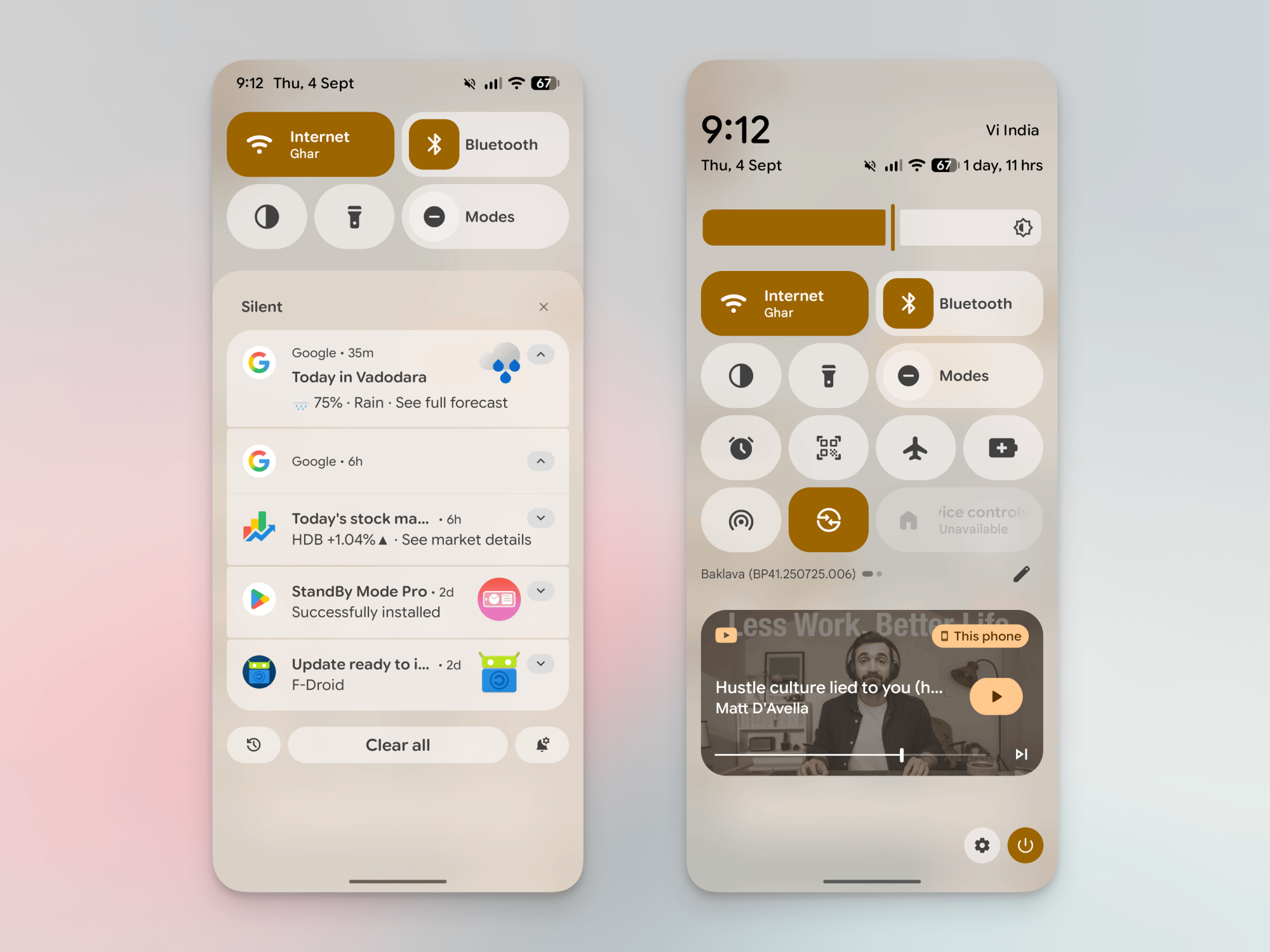
Quick Settings is the panel you see on top of your notifications when you pull down the Notifications panel. It usually shows you tiles for controlling settings like Wi-Fi and Bluetooth right away, but you can swipe once more to expand and reveal even more settings and toggles.

Quick Settings Panel on Pixel expanded.

Credit: Khamosh Pathak

I say “usually” because the panel looks different with each manufacturer or skin. So the Quick Settings panel will, by default, appear slightly different on Samsung phones than it does on Pixels, though as Android matures, manufacturers seem to be trying to play down differences.

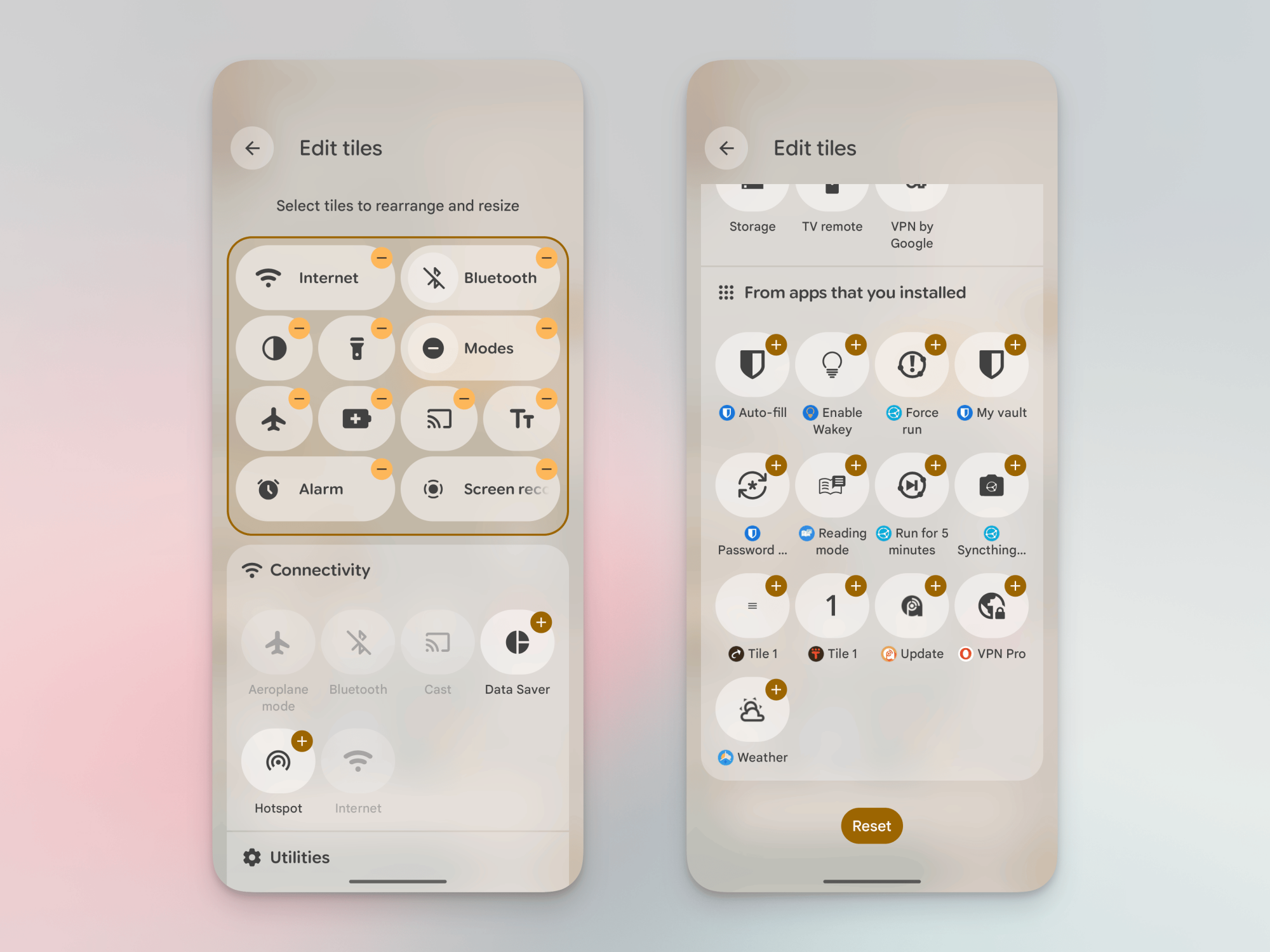
Editing Quick Settings.

Credit: Khamosh Pathak

The entire Quick Settings panel is customizable, and out of the box, you can move, edit, add, and expand the panel’s tiles by tapping the Edit button in the bottom right corner. You’ll see the Android defaults first, but if you scroll enough, you’ll even see options for third-party apps. This is where most of the panel’s extra power comes in. It’s fairly straightforward, but for more on how to actually adjust your Quick Settings panel, check out my guide on customizing the Quick Settings panel in Android 16.

Now that we know how to use and add Quick Settings tiles, let’s talk about some of my favorite tiles for it.

Shortcuts to apps

Creating Quick Settings tile for an app.

Credit: Khamosh Pathak

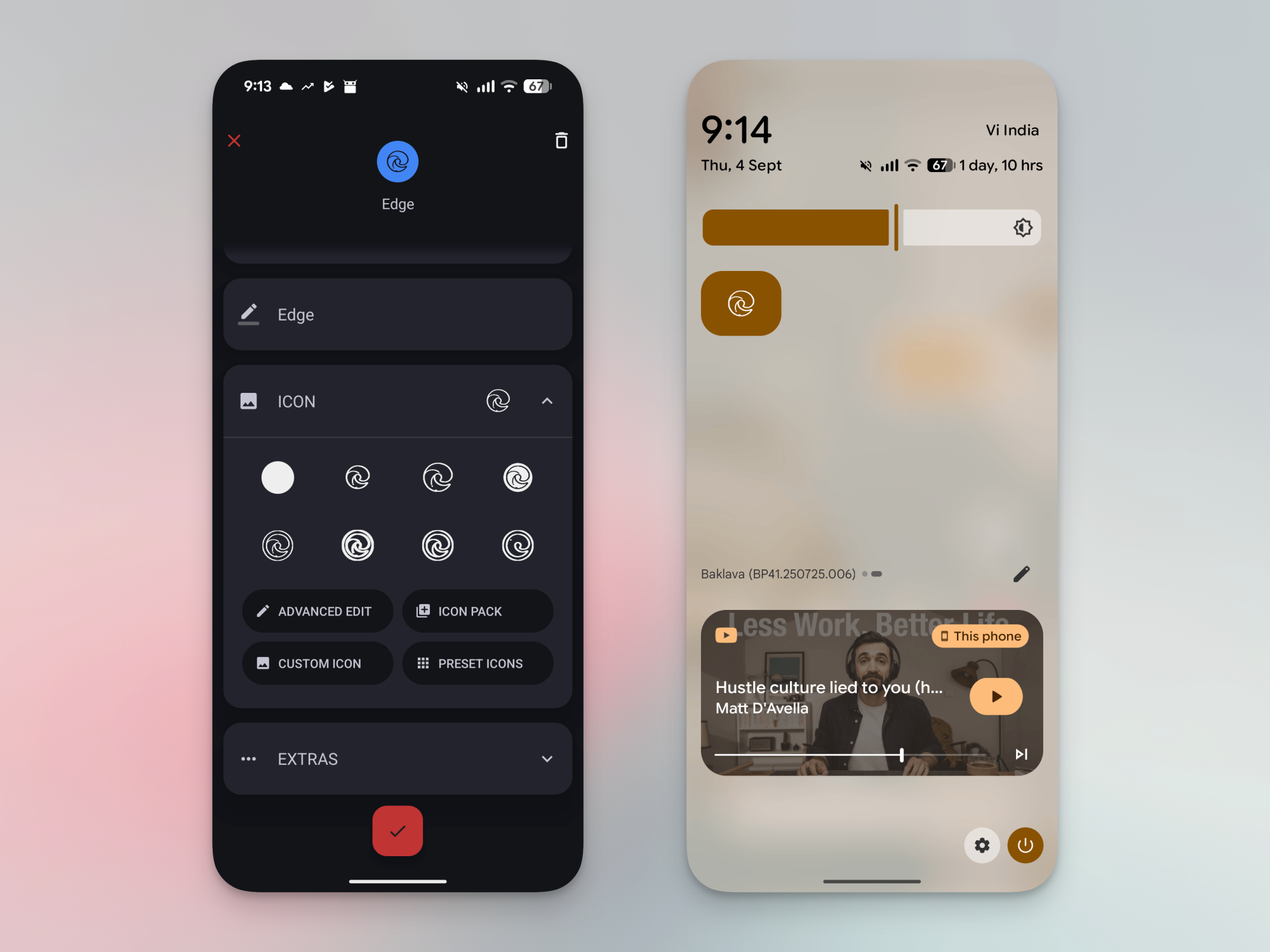
Some of the most convenient things to add to the Quick Settings panel are apps and app shortcuts. You can use the Tile Shortcuts app to essentially put in anything you want in there, including websites and system level options. The app is free to use, but a $0.99 upgrade unlocks more features, like app shortcuts.

Open the app and tap the Plus button to create a new tile. Then choose if you want to add an app, shortcut, or website. Shortcuts are sourced from apps, so you can create a shortcut to open a Drive folder, open a contact, or to go to a saved location. Choose the action you want, select an icon, and you’re done.

One you create a tile, open the Quick Settings customization page to add it to your Quick Settings panel. But note one quirk. Before you add your tiles, they’ll have generic names like “Tile 1” or “Tile 2” (also reflected in the app). Don’t worry—this will change once they’re actually in your Quick Settings panel.

Calendar appointments

CalenTile showing the next appointment.

Credit: CalenTile

CalenTile is a nifty utility that adds your next calendar appointment as a Quick Settings tile. To make use of this, you’ll have to expand the tile to a larger size. This app costs $0.99, but I think it’s worth the expense if you use your Calendar to manage your entire schedule. The tile will show your next appointment’s time and name, and you can tap it to get more information.

Keep your screen active

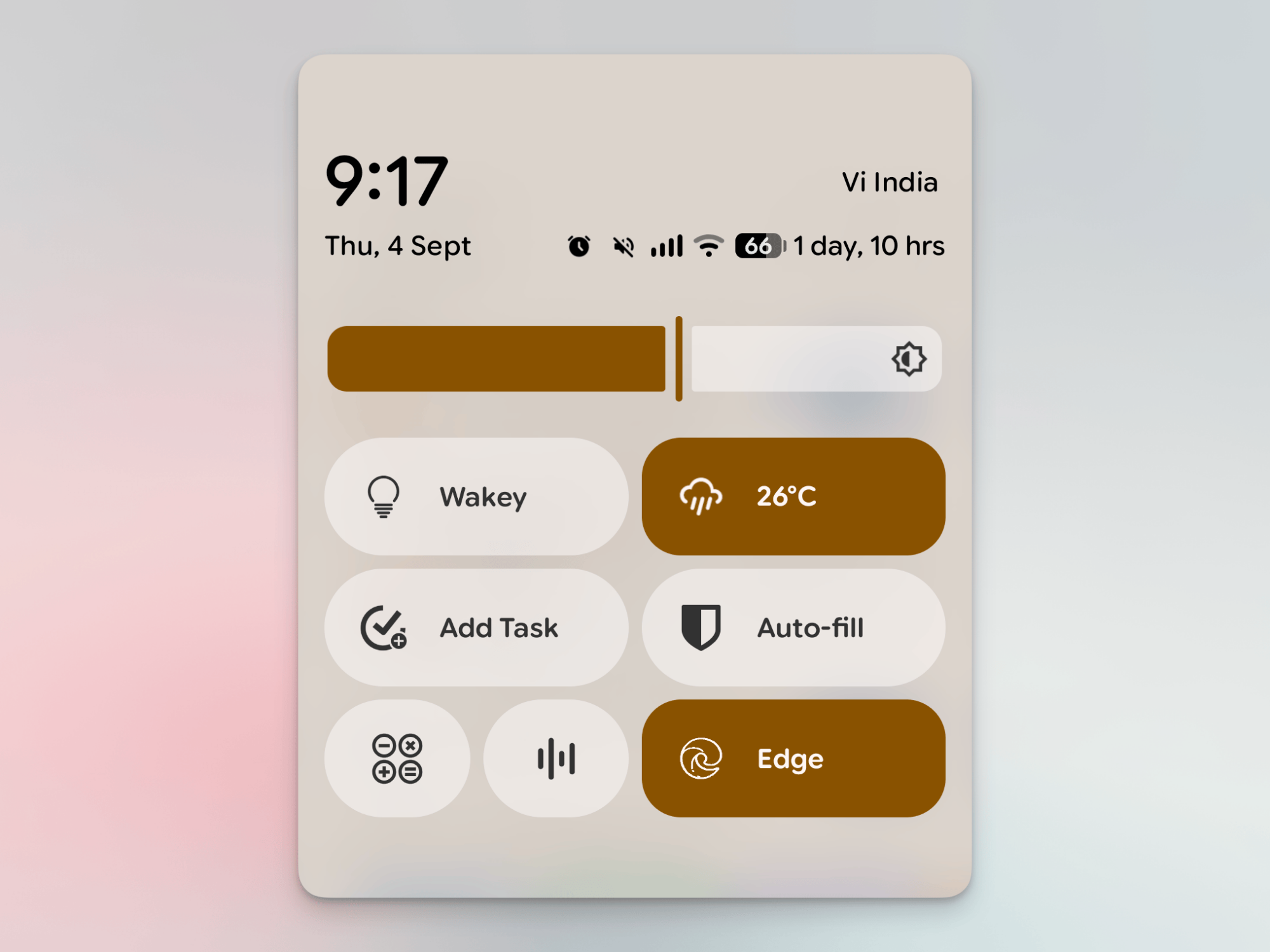
Third-party Quick Settings tiles.
Showing third-party Quick Settings tiles like Wakey, Chronus, TickTick, Bitwarden, and more.
Credit: Khamosh Pathak

Your device’s screen will time out automatically if you’re not looking at it, but there are times when you might want it to stay on, like if you’re referring to documents, or if you’re using an Android tablet in the background at work. This is where an app like Wakey can help. It’s a simple free app, which has an optional $2.5 upgrade for removing ads. Open the app and give it notification access. A new “Enable Wakey” tile will show up in the Quick Settings toggle. When enabled, the screen will now stay on no matter what you do, or rather, don’t do, on your device.

See the weather at a glance

The Chronus app offers an array of customizable weather widgets for your Home Screen. But there’s also an option to add a Quick Settings tile that shows just the temperature and weather conditions at a glance. To set this up, first open the Chronus app, tap the Menu button, and choose Quick Settings. Here, give the app permission to access your location, or add a location manually. Now, add the tile to Quick Settings and you’re done.

A shortcut for adding reminder

One of the best use cases I can think of for Quick Settings is a shortcut to quickly create a reminder. The faster you can note down something you want to do, the higher the chance you won’t just forget about it later.

Many popular productivity apps, like TickTick, Todoist, and Microsoft To Do, offer a Quick Settings tile that does just that. Check to see if your favorite productivity app does.

Easy access to system apps features

Adding system apps and toggles to Quick Settings.

Credit: Khamosh Pathak

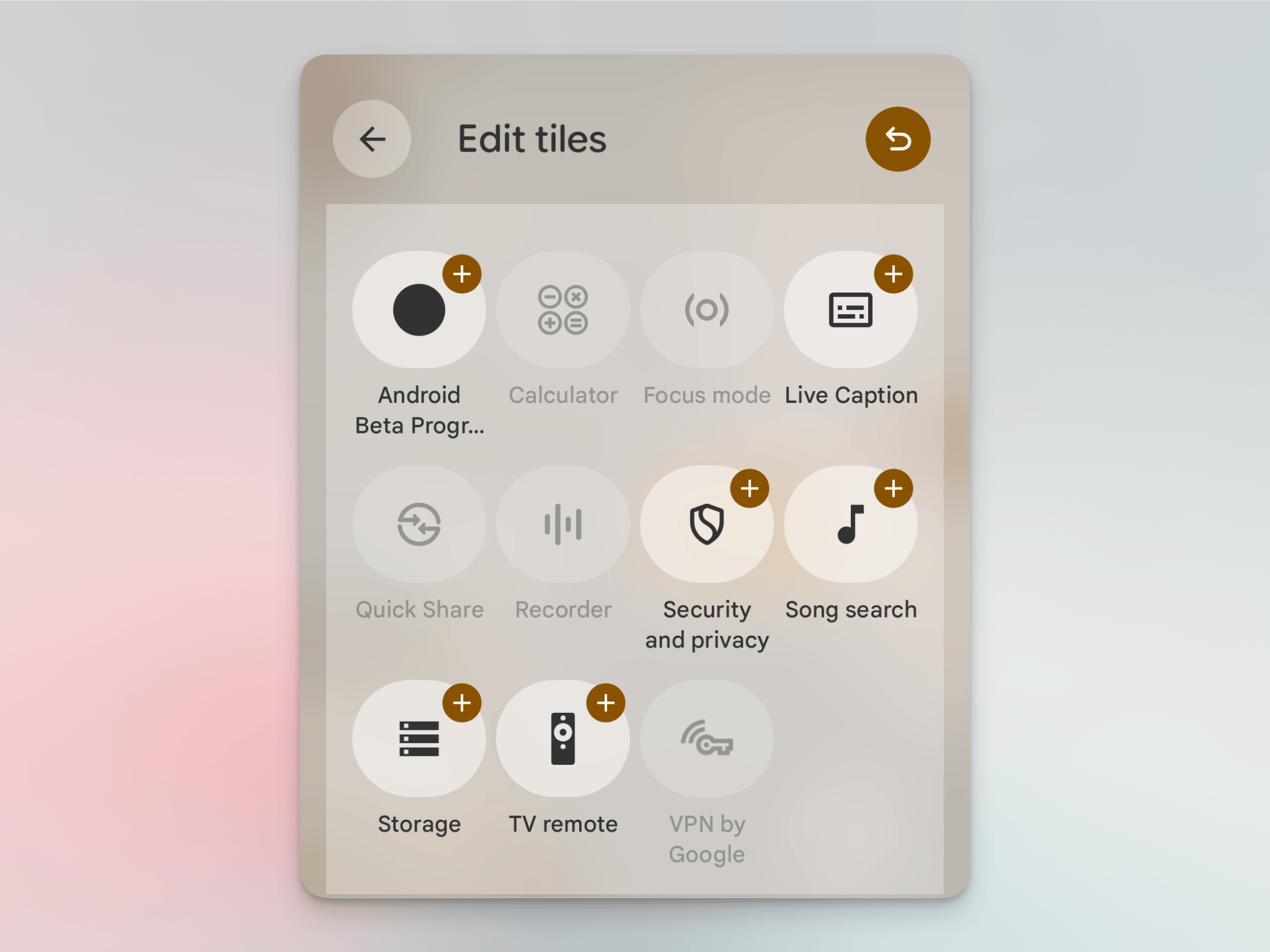
If you’re using a Pixel, you can add some system apps to the Quick Settings panel as well. You’ll find a From system apps section in the Quick Settings edit menu, where you can quickly add shortcuts for the Calculator, Recorder, Quick Share, and Live Caption features.

Trigger the OS-wide Reading mode

Android Reading Mode Quick Settings trigger.

Credit: Khamosh Pathak

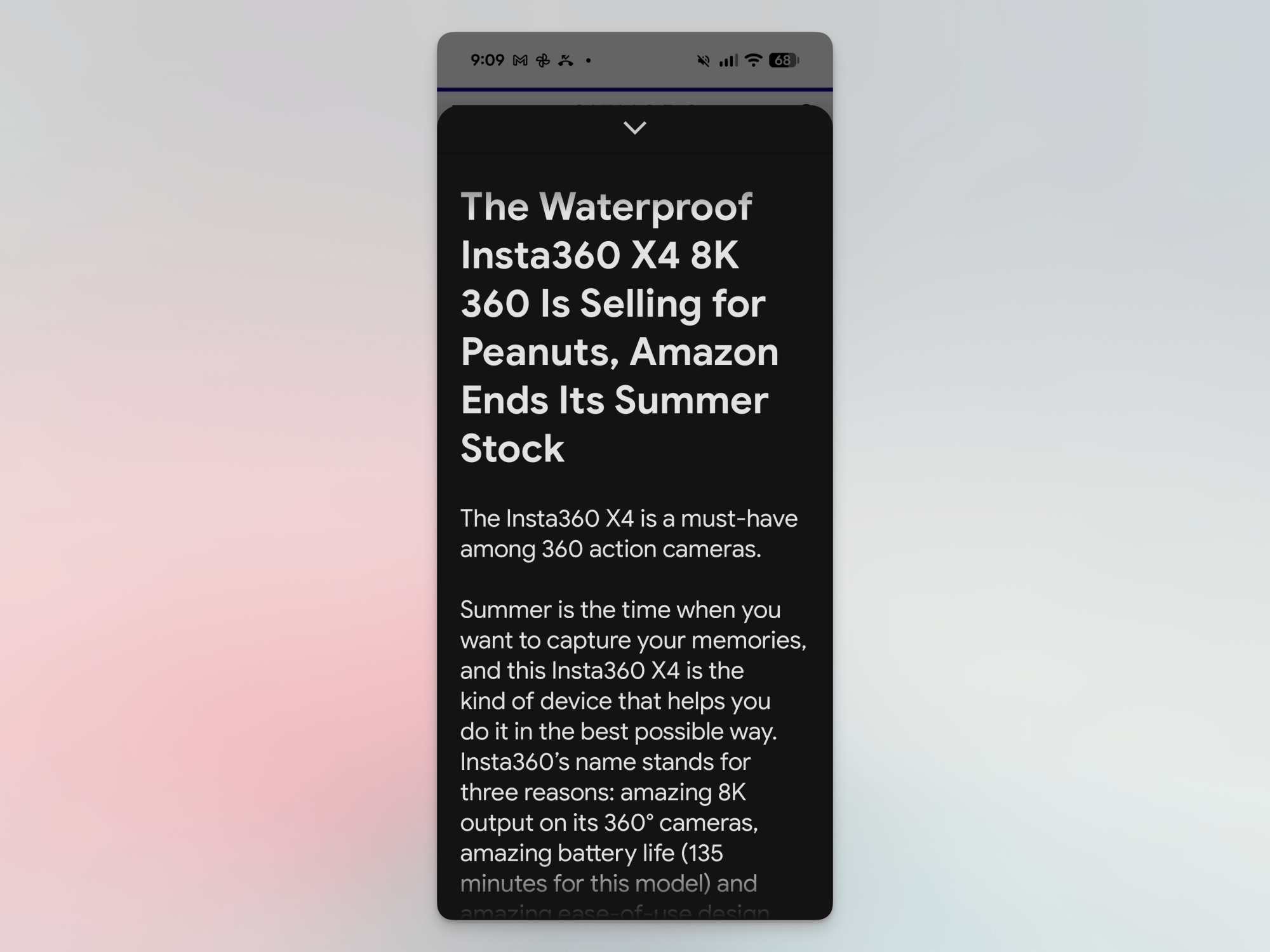
Google has a hidden Reading mode feature that can be triggered anywhere in Android, not just Chrome. It takes what’s on the screen and turns it into a minimalistic reading environment with customizable fonts. It removes all formatting, and even supports text to speech. As this is an accessibility feature, you have to select the page or text you want, and then share it to the Reading mode app to get started. But a faster way to do this is to use the Reading mode tile in Quick Settings. You’ll find the tile in the Third-party apps section, as long as you’ve installed the app linked above.

Atlassian is buying Arc maker The Browser Company for $610 million

The Browser Company — the maker of the Arc and AI-centric Dia browsers — is set to have a new owner. Atlassian is buying it for around $610 million in an all-cash deal, which it expects to close in the second quarter of its fiscal year 2026 (i.e. by the end of the 2025 calendar year).

According to The Browser Company, it will continue to operate independently as it builds Dia. A private beta for the browser started in June. Arc (a well-regarded browser on which the company has ended active development) and Arc Search will stick around, and a long-term plan for those will be revealed in the near future.

Co-founders Josh Miller and Hursh Agrawal are staying on as CEO and CTO, respectively. Miller wrote in a blog post that they are looking to accelerate their ambitions by teaming up with Atlassian. “We chose Atlassian because their strengths complement our gaps,” Miller wrote. “And most importantly, like us, they believe the browser is becoming the new operating system.” The Browser Company plans to bring Dia to “to every platform faster than we could have previously imagined” in the coming months.

Miller said the company had three conditions for any acquisition: to ensure it remained independent, that all of its team members still had a job and that its “vision for Dia remains at the center.” He added that “a large part of why we chose Atlassian is values. Now more than ever. Not the kind you hang on a wall, but the ones you see in the work itself.”

Atlassian is the owner of productivity and enterprise services such as project management apps Jira and Trello (which has been buggy for me for over a year, for what it’s worth). Last month, it reportedly laid off around 150 workers, many of whom were said to be in the customer service department, and was said to be planning to use AI to take over some of those former employees’ tasks.

“Our vision is to make Dia the AI browser for work,” Atlassian CEO Mike Cannon-Brookes said in a video announcing the acquisition. The team is designing Dia so it’s “optimized for the SaaS [software as a service] apps where you spend your day; packed with AI skills and your personal work memory to unleash your potential; and built with trust and security in mind, so you can bring it to the office. An AI browser for your system of work.”

This article originally appeared on Engadget at https://www.engadget.com/big-tech/atlassian-is-buying-arc-maker-the-browser-company-for-610-million-145236236.html?src=rss