Wyden Says Microsoft Flaws Led to Hack of US Hospital System

US Senator Ron Wyden says glaring cybersecurity flaws by Microsoft enabled a ransomware attack on a US hospital system and has called on the Federal Trade Commission to investigate. Bloomberg: In a letter sent Wednesday to FTC Chairman Andrew Ferguson, the Oregon Democrat accused Microsoft of “gross cybersecurity negligence,” which he said had resulted in ransomware attacks against US critical infrastructure.

The senator cited the case of the 2024 breach at Ascension, one of the nation’s largest nonprofit health systems. The intrusion shut down computers at many of Ascension’s hospitals, leading to suspended surgeries and the theft of sensitive data on more than 5 million patients. Wyden said an investigation by his office found that the Ascension hack began after a contractor carried out a search using Microsoft’s Bing search engine and was served a malicious link, which led to the contractor inadvertently downloading malware. That allowed hackers access to Ascension’s computer networks.

According to Wyden, the attackers then gained access to privileged accounts by exploiting an insecure encryption technology called RC4, which is supported by default on Windows computers. The hacking method is called Kerberoasting, which the company described as a type of cyberattack in which intruders aim to gather passwords by targeting an authentication protocol called Kerberos.


Read more of this story at Slashdot.

Ousted CDC director to testify before Senate after RFK Jr. called her a liar

Susan Monarez, the former director of the Centers for Disease Control and Prevention who was ousted last month after mere weeks in the role, is set to testify before the Senate next week about what was behind her dramatic downfall, as well as the ongoing chaos at the public health agency under health secretary and anti-vaccine activist Robert F. Kennedy Jr.

In a hearing last Thursday before the Senate Finance Committee, a combative Kennedy repeatedly called Monarez a liar and made the incredible claim that he fired her after he asked her directly if she was a trustworthy person and she responded “no.” While Senators clearly struggled to believe that explanation, Sen. Thom Tillis (R-N.C.) wryly noted that Kennedy should have asked her the question before having the Senate confirm her for the role.

In an op-ed published in The Wall Street Journal the same day as Kennedy’s testimony, Monarez gave a different account of her firing—one corroborated by independent reporting—saying that she was ousted after she refused Kennedy’s directives to fire senior CDC staff and pre-approve vaccine recommendations from an advisory committee he has stacked with fellow anti-vaccine advocates.

Read full article

Comments

Apple is slowly morphing AirPods into an always-on wearable

The AirPods Pro 3 Apple introduced at the iPhone 17 event yesterday have better active noise cancellation and foam-filled ear tips, but their most important new feature is a subtle one: Apple came up with even more reasons for you to never take them out.

Wearing headphones while you’re talking to someone or interacting in public was at one point a social faux pas, but the ubiquity of AirPods and new features Apple has added have started to change that. The AirPods Pro’s Conversation Awareness feature, which can automatically duck audio while you’re talking to someone, is the simplest expression of this idea, but the vast majority of the improvements the company has made to its wireless earbuds have also created reasons to keep them in.

Take the hearing health features Apple debuted in 2024. Not only do they let your AirPods Pro act as a tool for checking your ear health, they can also act as a hearing aid and even hearing protection in a loud environment. With the AirPods Pro 3, you can add heart rate monitoring and live translation to the growing list of reasons to constantly wear AirPods. The Pro 3’s new heart rate sensor means you can use them to track some workouts and display your health metrics on your TV during an Apple Fitness+ class, a feature usually exclusive to the Apple Watch. The Live Translation feature, meanwhile, lets your AirPods translate the world around you, and can even beam your translated voice into another pair of AirPods Pro 3. The fact the feature will also be available on AirPods 4 and AirPods Pro 2 should make keeping your headphones in even more common, too.

It’s hard to say how useful these new AirPods Pro 3 features will be without trying them, but they do highlight how much Apple seems to view its headphones as more than just an add-on purchase to every iPhone. Not many people are going to buy the $249 AirPods Pro 3 as a replacement for the $249 Apple Watch SE 3, but the fact the headphones can fill in for the smartwatch could be attractive to some. More importantly for Apple, it could make it easier to convince someone to subscribe to Fitness+ or buy an Apple Watch if they like the company’s approach to tracking workouts.

Apple has reportedly investigated going further down the path of making the AirPods Pro even more of a standalone device. Bloomberg reported last year that the company has explored adding cameras to AirPods so they can be used for Apple Intelligence features and visually understand the world around you. Whether or not that ever happens, the more immediate explanation for all this feature-creep is that making AirPods an always-on wearable is good for the company’s bottom line. The relationship between the AirPods and the Apple Watch could become similar to the iPad and the Mac in time. New features get added, and functionality continues to overlap, but the devices are always distinct and useful enough that many people are compelled to buy both.

Maybe there’s a future where your AirPods feel as essential to daily life as a smartphone does, and we’re wearing them all the time. For now though, Apple seems to have decided that tiptoeing towards that wearable future is a pretty good way to sell new wireless earbuds in the present, and maybe several of its other products in the process.

This article originally appeared on Engadget at https://www.engadget.com/audio/headphones/apple-is-slowly-morphing-airpods-into-an-always-on-wearable-203511552.html?src=rss

We Already Know How Much Faster the iPhone 17 Is

Did you know you can customize Google to filter out garbage? Take these steps for better search results, including adding my work at Lifehacker as a preferred source.


The iPhone 17 series has left the realm of mere rumor. Apple announced its four new iPhones at yesterday’s “Awe Dropping” event—the iPhone 17, iPhone Air, iPhone 17 Pro, and iPhone 17 Pro Max.

All four use the company’s new A19 chip, though different models come equipped with different versions of it: The iPhone 17 uses the base model A19, while the iPhone 17 Pro and 17 Pro Max use the A19 Pro. The iPhone Air has an A19 Pro, but it’s a “binned” chip. There’s a lengthy explanation of what that means, but in short, the Air uses a weaker version of the A19 Pro, so it isn’t quite as powerful as the version you’ll find on the Pros.

While Apple frequently touts how powerful its newest iPhones are, they’re never all that specific about it, especially during their big keynote announcements. The company likes to compare the new iPhones to random older iPhones, like saying the iPhone 17’s A19 chip is 1.5 times faster than the A15 Bionic in the iPhone 13. But Apple doesn’t usually put up the raw numbers to compare performance directly. For that, we turn to benchmarking.

Benchmarking tests offer a standardized way of testing a chips’ CPU (central processing unit) and GPU (graphics processing unit), and comparing their performance against other chips. Geekbench is a popular option for benchmarking, and tests a few different things: the performance of tasks that require one core of the CPU; performance of tasks that require multi-cores; and the “Metal” test, that benchmarks GPU performance.

When you run a benchmark through Geekbench, your results are posted to the site’s database. That means whenever a new device is announced, it’s only a matter of time before benchmarking data appears there for those devices. As GSMArena reports, it seems some A19 and A19 Pro tests have already been run. These tests give us an early look at the performance of the new chips, and an idea of how much Apple has improved them over previous generations—at least on paper.

As the phones, and iOS 26 itself, are not officially out yet, take these numbers with a grain of salt. With that said, here are the preliminary results.

iPhone 17

The A19, again found in the iPhone 17, scored a 3,608 in the single-core test, and 8,810 in the multi-core test. That represents an 8% jump over the iPhone 16’s single-core score of 3,317, and a 7% jump over its multi-core score of 8,198. The A19’s GPU scored a 37,014 on the Metal test, a more than 33% increase when compared to the iPhone 16’s score of 27,702. The test results show that the iPhone 17 has 8GB of RAM.

iPhone Air

The iPhone Air runs an A19 with a six-core CPU and a five-core GPU—one less than the iPhone 17 Pro, as this is a binned chip. GSMArena reports that it scored a 3,674 in the single-core test and 8,824 in multi-core. That’s not much higher than the standard A19, though the results show Apple included four extra gigabytes of RAM in the Air over the iPhone 17.

Turning to the GPU, the Air scored a 37,743 on the Metal test. That represents an improvement of just under 2% over the A19. While you’ll likely notice some gains if you’re coming from the iPhone 16, or even the 16 Pro (more on that below) the Air isn’t going to outperform the 17 much—even with its binned A19 Pro.

iPhone 17 Pro

While the iPhone Air’s binned A19 Pro chip seems barely improved over the iPhone 17’s A19 chip, the 17 Pro starts to show some advantage—at least in GPU. The A19 Pro in the iPhone 17 Pro scored 3,523 in single-score and 9,028 in multi-core. That’s a lower single-core score, and only a slightly higher multi-core score, which is certainly interesting. In theory, the lower-performing A19 and A19 Pro chips could yield slightly faster results in single-core tasks, while the Pro could beat the bunch a bit in multi-core tasks.

However, things get more interesting when it comes to the A19 Pro’s GPU—The chip achieved a Metal score of 44,342, 17% over the iPhone Air, and nearly 20% better than the iPhone 17. That’s not all that surprising, seeing as the Pro has six GPU cores compared to the Air’s five. Compare all that to the iPhone 16 Pro’s scores of 3,447 in single-core, 8,576 in multi-core, and 32,673 in Metal. It’s only a 2% bump in single-core and 5% in multi-core, but more than 35% in Metal. Not a bad gain.

iPhone 17 Pro Max

If you want the best possible performance in an iPhone, the Pro Max is usually the model to get. It seems the 17 Pro Max is no exception: According to these initial Geekbench results, the 17 Pro Max’s A19 Pro chip received a 3,781 single-core score, 9,679 multi-core score, and 45,657 Metal score. Those, of course, are the highest scores of any of the iPhone 17 series. The single-core score is not dramatically higher than the other phones, and the multi-core score isn’t a huge jump: The most dramatic difference there is between the iPhone 17 and the 17 Pro Max at just under 9%.

That said, the Metal score is pretty impressive. It’s less than 3% better than the 17 Pro, but it’s nearly 21% higher than the Air, and over 23% higher than the iPhone 17. We can see improvements from the iPhone 16 Pro Max’s 3,430 single core, 8,502 multi-core, and 32,665 Metal scores. That’s 10% improvement in single-core, nearly 14% in multi-core, and nearly 40% in Metal. There’s no denying the 17 Pro Max is the phone to beat when it comes to graphics processing potential.

You can look up any iPhone model you want on Geekbench’s database and compare its scores to the iPhone 17 series’ early scores listed here. Obviously, the older you go, the better the gains are going to be. For what it’s worth, comparing the iPhone 17 to the iPhone 13 shows a 71% gain in single-core and 79% gain in multi-core—not quite the 150% improvement Apple advertises. Perhaps there’s something missing from the early scores here, or maybe Apple is using a different internal metric. We’ll just have to see when testers benchmark the released iPhones running the public build of iOS 26.

Meta tests letting anyone rate Community Notes

As part of a new test, Meta will let anyone rate a Community Note or request one for a post, Meta’s Chief Information Security Officer Guy Rosen shared on X. After testing the feature in March, the company formally introduced Community Notes as a replacement for its fact-checking program in April of this year.

You have to apply to actually write Community Notes, but Meta’s new test means that anyone who sees one can rate it to signal whether it’s helpful or not. They’ll also be able to request a note if a post is incorrect or needs additional context. Based on the screenshot Rosen shared, Meta’s rating system is a simple thumbs up or down, but the fact the company is opening the system up to more input at all is one sign of its continued expansion.

We’re testing new Community Notes features at Meta:
Anyone can now request a note or rate if a note is helpful
– Users get notified when posts they’ve interacted with receive a Community Note
– 70,000+ contributors have written 15,000+ notes (6% published).
Learn more or join:… pic.twitter.com/WCQC3CMnbe

— Guy Rosen (@guyro) September 10, 2025

The test also includes a new system for notifying users if they interact with a post that receives a Community Note. Meta did something similar with posts that were fact-checked in the past, so this seems like a good way to let people know if they’ve read something misleading. Don’t expect to be receiving those notifications too often just yet, though. Rosen says that while there are over 70,000 people writing Community Notes and over 15,000 notes have actually been written, only six percent have been published. Meta is still very early in this whole process.

Community Notes are just one component of a larger right-wing turn Meta has taken in the wake of Trump’s reelection. While the system has been styled as pro-free speech, it doesn’t necessarily offer the same ability to counter misinformation that fact-checking does. For example, multiple reports found that X’s Community Notes program did little to address the platform’s misinformation problem.

This article originally appeared on Engadget at https://www.engadget.com/social-media/meta-tests-letting-anyone-rate-community-notes-201208279.html?src=rss

iPhone 17 Air Drops Physical SIM Slot Globally, Pushing eSIM-Only Future

Apple’s newly launched iPhone Air will ship globally without physical SIM card slots. The move follows the company previously eliminating SIM trays in US models starting in 2022.

Global consultancy firm Roland Berger forecasts eSIM connections will reach 75% of smartphone connections by 2030, rising from 10% in 2023. CCS Insight predicts eSIM-capable handsets will increase from 1.3 billion to 3 billion by 2030. Google offers eSIM-only Pixel 10 models in the US.


Read more of this story at Slashdot.

Apple Unveils Refreshed Watch Lineup, AirPods Pro 3 With Live Translation & 2X Better ANC

Apple Unveils Refreshed Watch Lineup, AirPods Pro 3 With Live Translation & 2X Better ANC
Yesterday Apple let loose the iPhone 17 lineup upon the world, with the svelte Air and the magnificent cameras on the Pro line, but that wasn’t all that came out of the announcements. The Cupertino tech giant also revamped its Apple Watch lineup and its AirPods Pro 3 earbuds. Let’s dig in.

The freshly minted AirPods Pro 3 appear to be a

Sony is rolling out a PlayStation parental controls mobile app

Sony is finally catching up to something Nintendo and Microsoft have had for years. The new PlayStation Family app mainly serves as a mobile extension of on-console parental controls. However, parents also get a few extra perks in the mobile version.

The app includes a “thoughtfully guided” onboarding process. (I imagine many people will prefer their phone or tablet over the console for that.) Once things are set up, parents can do everything they already could on the console. This includes setting playtime limits, viewing activity reports (daily and weekly), managing spending and creating content filters. Parents can also use the app to configure privacy settings for social features.

One of the mobile app’s nicer perks is real-time notifications of what the child is playing. Parents can also approve or deny requests from their children for extra playtime or access to restricted games from within the app. That feature will likely get a lot of use.

Although it’s a welcome rollout, Sony is quite late to the party. The Xbox Family Settings app launched over five years ago. Nintendo’s parental controls came even earlier, alongside the original Switch’s arrival.

The app starts rolling out globally starting today. If you don’t see it yet, you can try the storefront links for iOS or Android.

This article originally appeared on Engadget at https://www.engadget.com/gaming/playstation/sony-is-rolling-out-a-playstation-parental-controls-mobile-app-195002596.html?src=rss

A closer look at the AirPods Pro 3: ANC, Live Translation and heart-rate tracking

The AirPods Pro 3 are a big upgrade over the AirPods Pro 2. Even though Apple has continuously added new features to those earbuds over the last three years, it hasn’t changed the design or shape of the earbuds since the first model arrived in 2019. With the AirPods Pro 3, you might not notice those tweaks until you remove the new ear tips, and the most impactful upgrades are all on the inside. After my brief hands-on immediately following the iPhone 17 launch yesterday, I’ve since spent more time test driving all of the new features on the AirPods Pro 3 — from the improved active noise cancellation (ANC) to Live Translation and heart-rate monitoring.

Stronger ANC through tech and ear tips

Apple says the ANC on the AirPods Pro 3 blocks twice as much noise as the AirPods Pro 2 and four times as much as the original AirPods Pro. A big part of this is due to the ultra-low noise microphones and computational audio on the earbuds, but the new foam-infused ear tips are also playing a vital role.

The latest ear tips are still silicone on the outside like the Pro 2’s, but they’re now injected with foam. This provides much better passive noise isolation to block out distractions, helping with high-frequency sounds like human voices. In fact, there were several times this week where an Apple representative had to tap me on the shoulder because with the AirPods Pro 3 on, I couldn’t hear them speaking right next to me. No matter how they did it, the fact that Apple does a better job of silencing chatty co-workers on the AirPods Pro 3 is a welcome change. It’s impressive when you consider much of the competition struggles to reduce the volume of human voices on their earbuds and headphones.

The AirPods Pro 3 are no slouch in general noise cancellation performance either. During simulated air plane noise and recorded sounds of a bustling cafe, the earbuds did well to reduce the unwanted distraction of both. What’s more, the AirPods Pro 3 silenced the busy demo area outside of the keynote, providing a welcome respite for a few seconds during an otherwise stressful day.

Live Translation finally arrives

AirPods Pro 3
Sam Rutherford for Engadget

After Apple chatted up Live Translation in iOS 26 at WWDC, I was disappointed that those initial plans didn’t include AirPods. I should’ve known the announcement for the earbuds would come with the next iteration of the AirPods Pro. Like Google’s Pixel Buds, Apple’s take on the feature relies on a connected iPhone to do all of the heavy lifting, powered by the Translate app. However, you don’t need a prolonged interaction with a phone to turn on Live Translation. You can press and hold on both AirPods, ask Siri or set the shortcut for the Action Button to the task. As a reminder, Live Translation will be available on AirPods Pro 3, AirPods Pro 2 and AirPods 4 with ANC, because they all carry the H2 chip.

During a quick demo, Live Translation worked well, quickly converting the Spanish an Apple representative was speaking into English, which Siri then conveyed in the AirPods Pro 3. There’s a slight delay, which is expected, since the captured audio is processed on an iPhone and then translated in the second language. That might make for some awkward pauses, but I’ll have to wait for more real-world testing to know for sure. I did notice that text translations appeared in the app before they came through the earbuds, but again, that’s not really a surprise since the iPhone is the brains of the operation. Plus, you’ll want to use the phone as a horizontal display here, since the app provides a real-time transcription for the person you’re talking to.

One aspect of Live Translation that may go unnoticed until you actually use it on the AirPods is the role ANC plays in the process. After you activate the translation feature, active noise cancellation kicks in to reduce the speaker’s voice so that you can clearly hear the translation from Siri in the earbuds. This happens automatically, and during my demo I never felt like I needed to manually adjust the volume so I could better hear the translated English over the speaker’s Spanish.

Heart-rate tracking, but only for workouts

AirPods Pro 3 heart-rate tracking
Billy Steele for Engadget

Another big addition to the AirPods Pro 3 is heart-rate monitoring. Apple first debuted this capability on the Beats Powerbeats Pro 2 and is using a photoplethysmography (PPG) sensor to measure light absorption in blood flow. Heart rate stats are visible only in the Fitness app during workouts though, so if you’re looking to keep tabs in other apps or Widgets, you’re out of luck. But when it comes to activity tracking, the chorus of accelerometers, gyroscope, GPS and a new on-device AI model combine with the PPG sensor to monitor stats for 50 different workouts.

This is another feature I’ll need to test at home before I can properly gauge its merits, especially since my testing here in Cupertino consisted only of a three-minute walk. Sure enough, my live heart rate was displayed on the workout screen alongside distance covered, average pace, calories burned and elapsed time. Once I completed that strenuous session, I could see my average heart rate in the Workout Details summary, just above a graph of the info.

Improved audio through more air flow

Apple loves to discuss air flow when it comes to audio performance in AirPods and the company redesigned the venting system in the AirPods Pro 3 to improve sound quality. The company also turned the ear tip so it’s beaming audio more directly into the ear. Along with Adaptive EQ, this combination provides noticeably deeper bass and a wider soundstage for more immersive spatial listening.

To move all of that air around, Apple’s acoustics team devised a new set of fine-tuned chambers to maximize the overall flow. And as a result, the vent system had to be larger, so now the one on top of the earbuds is nearly twice as large as the one on AirPods Pro 2. Then, to properly harness all of that available air space, Apple had to slightly redesign the driver/transducer to achieve the necessary frequencies. Adaptive EQ has also been expanded since the inward facing microphones on the AirPods Pro 3 have been moved so they’re not obstructed by the sides of the ear canal as much.

AirPods Pro 3
Sam Rutherford for Engadget

Maggie Rogers’ “Alaska” was the test track of choice during my demo, a song I’m familiar with since I’ve listened to the album Heard It in a Past Life a ton. Beyond the enhancements to bass and the spatial effect, the thing that struck me about the audio upgrades was the level of detail the AirPods Pro 3 now provide. The separation of the bass drum and hand pan enhance the immersion, but there’s also the texture in the sound of both that is typically lost on most earbuds and headphones. I listened to the AirPods Pro 2 on the flight out here to refresh my memory and it was immediately apparent that Apple has made some big upgrades to sound quality on this new model.

The AirPods Pro 3 are available for preorder now for $249. It arrives September 19 alongside the iPhone 17 family and new Apple Watches.

This article originally appeared on Engadget at https://www.engadget.com/audio/headphones/a-closer-look-at-the-airpods-pro-3-anc-live-translation-and-heart-rate-tracking-193956229.html?src=rss

Senator blasts Microsoft for making default Windows vulnerable to “Kerberoasting”

A prominent US senator has called on the Federal Trade Commission to investigate Microsoft for “gross cybersecurity negligence,” citing the company’s continued use of an obsolete and vulnerable form of encryption that Windows uses by default.

In a letter to FTC Chairman Andrew Ferguson, Sen. Ron Wyden (D–Ore.) said an investigation his office conducted into the 2024 ransomware breach of the health care giant Ascension found that the default use of the RC4 encryption cipher was a direct cause. The breach led to the theft of medical records of 5.6 million patients.

It’s the second time in as many years that Wyden has used the word “negligence” to describe Microsoft’s security practices.

Read full article

Comments

FAA Warns Airlines About Lithium Battery Dangers After 50 Incidents This Year

The Federal Aviation Administration has issued a safety alert [PDF], warning airlines about lithium battery fire risks in passenger compartments after recording 50 incidents involving smoke, fire, or extreme heat from the devices this year.

The FAA recommended airlines implement risk mitigation strategies including clear passenger messaging and updated firefighting procedures and training.


Read more of this story at Slashdot.

Here’s How the Pixel Watch Compares to the New Apple Watches

We may earn a commission from links on this page.

Did you know you can customize Google to filter out garbage? Take these steps for better search results, including adding my work at Lifehacker as a preferred source.

Apple recently announced the features coming to the new Series 11 and Ultra 3 Apple Watches. We have highlights here of what was in that announcement, and everything we know about the Apple Watch Ultra 3, if you’re still catching up. But if you’re ready to dive into the details and are wondering how those specs stack up with Pixel watches, including the Pixel Watch 3 and the upcoming Pixel Watch 4, here’s a comparison. 

Display type and brightness

The new Apple Watch Ultra 3 has the most impressive display of all the watches I’ll discuss here today. Wide-angle OLEDs make the screen visible from more angles, and the LPTO3 technology means it draws far less power. These features mainly benefit the always-on display, since now even the inactive version of the display will be able to update every second, and you’ll be able to easily see the display without raising it to your wrist. Peak brightness is 3,000 nits.

The Apple Watch Series 11 doesn’t have the every-second updates, but it does include wide-angle OLEDs to be more visible when viewed at an angle. Peak brightness is 2,000 nits.

The Pixel Watch 3 has neither of those new features, but it does have a bright display at 2,000 nits. The Pixel Watch 4, due on store shelves in October, uses a domed display and has a peak brightness of 3,000 nits.

Battery life

The Apple Watch Ultra has always had an impressive battery life compared to other models of Apple Watch, and the Ultra 3 is no exception. The Ultra 3 has a 42-hour battery life, according to Apple, extending to 72 hours in Low Power Mode. 

The Series 11 gets up to 24 hours in regular use, extending to 38 hours in Low Power Mode. 

The Pixel Watch 3 gets 24 hours in regular use, and 36 with Battery Saver—nearly identical to the Apple Watch Series 11. The upcoming Pixel Watch 4 improves on that, with 30 to 40 hours of regular use (depending on which size watch you’re looking at) and 48 to 72 hours with Battery Saver.

Health and fitness features

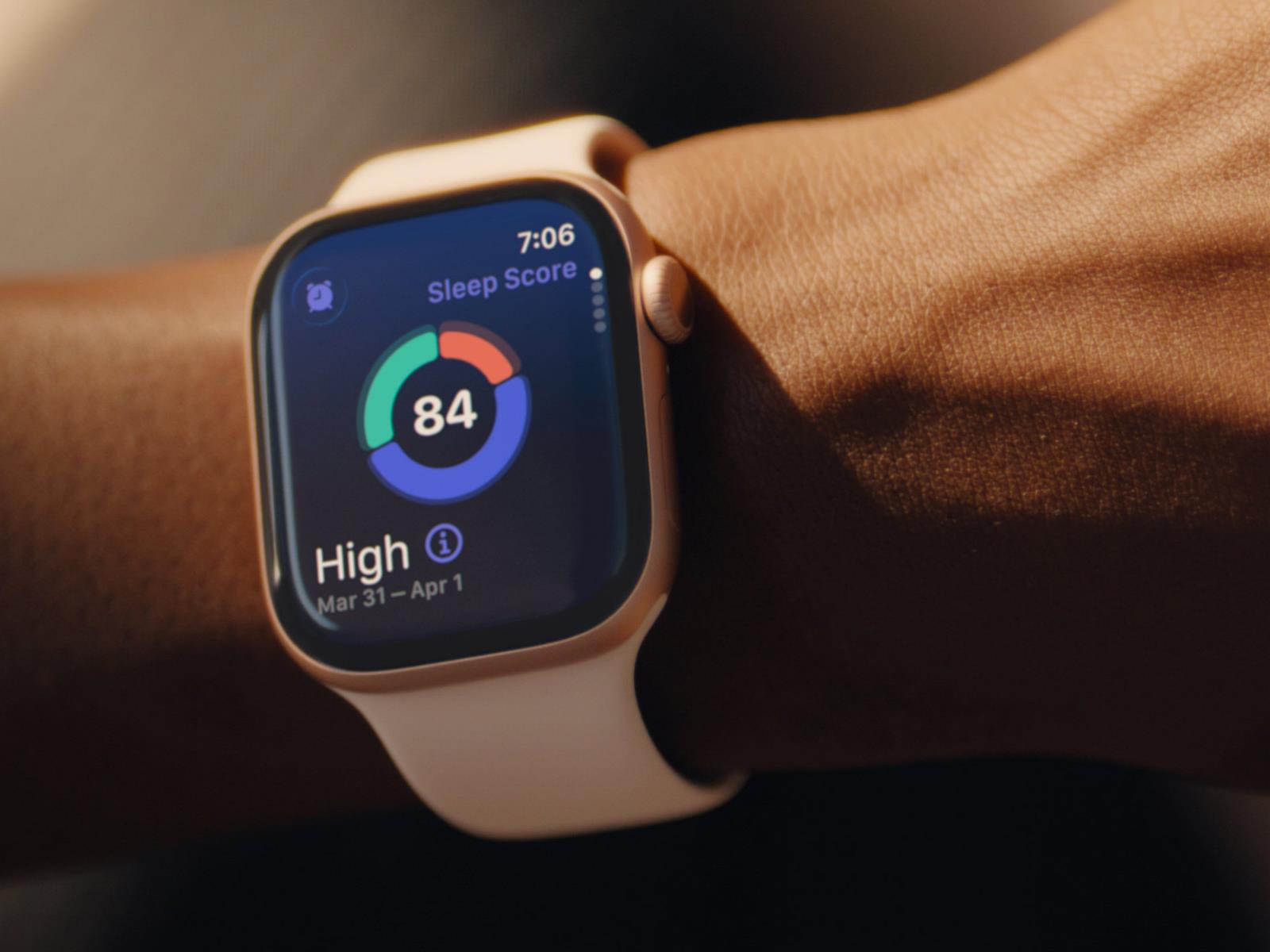
The new Apple Watches will finally have a sleep score, which is a feature that the Pixel watches have long had through the Fitbit app (which is its native app for health features). This isn’t a particularly useful metric, since it can’t be validated; I wouldn’t put too much stock in any app’s sleep score. But Apple shows that it’s catching up to other devices by offering an easy-to-read score instead of just separate metrics.

Apple also plans to introduce notifications for signs of high blood pressure, assuming it gets the needed regulatory approval. (Whoop recently got in trouble with the FDA for implementing an unapproved blood pressure feature; Apple is being more careful.) Pixel watches don’t have any blood pressure features, although it’s not clear whether smartwatches are any good at blood pressure monitoring in the first place.

The latest version of Apple’s WatchOS comes with Workout Buddy, a voice that delivers AI pep talks during your workouts (assuming your iPhone is new enough). Pixel watches don’t have this, but the Pixel Watch 4 will include an AI fitness coach as part of a premium-tier Fitbit subscription. The subscription is $9.99/month, and you get six months free with a new device.

Connectivity

The Apple Watch Series 11 and Ultra 3 both have connectivity with 5G networks and LTE in their cellular-capable models. The Apple Watch Ultra 3 also features satellite messaging, so that you can reach emergency services and notify your friends and family even without a cellular connection. 

The Pixel Watch 3 only has 4G LTE in its cellular-capable models, but the Pixel Watch 4 has a Satellite SOS feature as well. 

Pricing

The Apple Watch Series 11 starts at $399 for the 42-millimeter size, and $429 for the 46-millimeter size. The versions with cellular connectivity are $100 more. 

The Apple Watch Ultra 3 starts at $799 and comes in one size, 49 millimeters.

The Pixel Watch 3 starts at $249 for the 41-millimeter size and $299 for the 45-millimeter size. As with its Apple counterparts, the versions with cellular connectivity are $100 more. 

The Pixel Watch 4 starts at $349 for the 41-millimeter size and $399 for the 45-millimeter size, and again, the cellular versions are $100 more. 

One of Google’s new Pixel 10 AI features has already been removed

Google is one of the most ardent proponents of generative AI technology, as evidenced by the recent launch of the Pixel 10 series. The phones were announced with more than 20 new AI experiences, according to Google. However, one of them is already being pulled from the company’s phones. If you go looking for your Daily Hub, you may be disappointed. Not that disappointed, though, as it has been pulled because it didn’t do very much.

Many of Google’s new AI features only make themselves known in specific circumstances, for example when Magic Cue finds an opportunity to suggest an address or calendar appointment based on your screen context. The Daily Hub, on the other hand, asserted itself multiple times throughout the day. It appeared at the top of the Google Discover feed, as well as in the At a Glance widget right at the top of the home screen.

Just a few weeks after release, Google has pulled the Daily Hub preview from Pixel 10 devices. You will no longer see it in Google Discover nor in the home screen widget. After being spotted by 9to5Google, the company has issued a statement explaining its plans.

Read full article

Comments

Bending Spoons Buys Video Platform Vimeo for $1.38 Billion

Bending Spoons has entered a definitive agreement with Vimeo to purchase the video platform for $1.38 billion. From a report: Per the agreement, Bending Spoons will acquire Vimeo in an all-cash transaction and take Vimeo (VMEO), a public company, private. Vimeo shareholders will receive $7.85 per share in cash when the transaction closes.

[…] Vimeo, once a significant player in the streaming video space, has lost massive ground to other platforms, including YouTube, in recent years. Rather than fight a losing battle in the creator space, Vimeo has catered more toward business and enterprise users lately.


Read more of this story at Slashdot.

Lyft launches autonomous fleet with May Mobility in Atlanta

Lyft and May Mobility have teamed up to launch a fleet of autonomous vehicles in Atlanta. It’s a pilot program, so it’s currently only available to Lyft riders in the area of midtown Atlanta. The companies promise a “measured, safety-first approach” with this rollout.

The fleet consists of hybrid-electric Toyota Sienna Autono-MaaS vehicles equipped with May Mobility’s self-driving technology. Lyft and May Mobility announced this partnership last year, but Atlanta is the first city to get a fleet of self-driving vehicles.

Atlanta, we’re here! Our autonomous vehicle pilot program with @Lyft is now live in Midtown. Find us in the Lyft app! https://t.co/dUqF95q93r pic.twitter.com/TFfDg23D8Y

— May Mobility (@May_Mobility) September 10, 2025

The rides will be fully autonomous, but each vehicle will feature a human just in case something goes wrong. These standby operators are trained to take the wheel if needed. The companies haven’t announced a timeframe for when these standby operators will no longer be required.

Customers will have access to temperature controls, which is nice. However, hailing one of these cars is something of a crap shoot. You have to be in the service area, use the app and hope for the best. Lyft and May Mobility say they will increase the number of available vehicles and expand service hours in the “months ahead.”

This is May Mobility’s second launch in Georgia, as it operates a fleet of driverless vehicles in the Atlanta suburb of Peachtree Corners. Lyft’s primary rival Uber has also been making serious moves in this space. The company has entered into a partnership with Lucid to create a massive fleet of 20,000 autonomous vehicles. It also has plans to launch self-driving pilot programs throughout the globe.

This article originally appeared on Engadget at https://www.engadget.com/transportation/lyft-launches-autonomous-fleet-with-may-mobility-in-atlanta-184942285.html?src=rss

These Two New Features Cement Google’s NotebookLM As One of My Favorite Study Apps

While AI tools are incredibly divisive, and I remain highly skeptical of them in general (especially as someone who makes a living writing for the internet), I have to give props to Google’s NotebookLM, which is the rare AI tool I’ve found that meets my standards for being both ethical and useful.

This large language model pulls only from the content you put into it, making it a great way to organize your notes, pull out key ideas, and increase your productivity. And now a new update allows you to use it to create flashcards and quizzes, making it a perfect study companion—and it’s still free.

What NotebookLM can do

If you’re unfamiliar with NotebookLM’s capabilities, here’s a quick rundown: You start by uploading your materials to “notebooks,” which you can think of as your single source of truth on a given topic. (An SSOT is a repository where you keep all the information, resources, and materials related to whatever it is you’re doing.) You can upload local files, files from your Google Drive, links to websites or YouTube videos, or plain old copied-and-pasted text. This is particularly useful for students, as you can input links to articles mentioned in your study materials, upload PDFs from your teacher, or even add digital copies of your textbook, putting all your approved study materials in one place.

You can then ask the chatbot questions about the material, ask it to create an audio “podcast” of people discussing the content (which you can then interact with), and more. I most often use it when I’m working on a large project: I input all the interviews I’ve done, all the research material I have, and any other related elements, then ask it to help me find quotes or develop an outline. It’s also great for summarizing and organizing my notes and class materials when I’m preparing for a grad school exam.

And with the latest update, you have more options: Along the side menu, you’ll see buttons for Flashcards and Quizzes alongside Mind maps and Audio overview.

Testing NotebookLM’s new features

To test these new capabilities, I chose from my collection of notebooks one filled with materials for a certification exam I’ve been studying for.

Instant quizzes

NotebookLM previously allowed you to ask it to create quizzes, but it would just generate practice quizzes in plain text with an answer key at the end. The new Quizzes feature is a lot more involved.

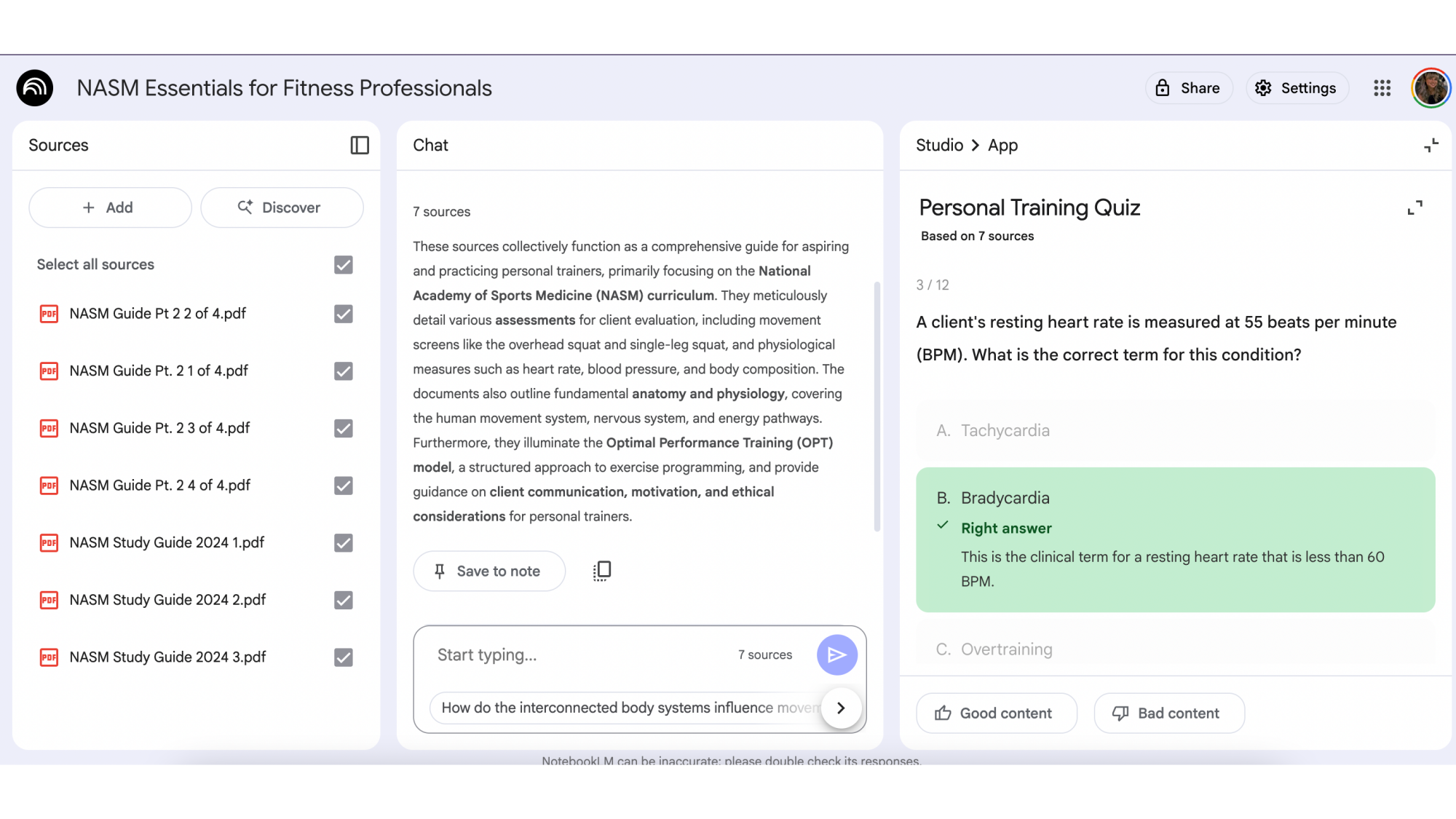
NotebookLM quiz

Credit: Google/Lindsey Ellefson

The quiz it generated from seven PDFs of material was extremely detailed and easy to use. It asked a question, gave me four options, and, after I clicked one, told me if it was right or wrong, and included an explanation for why the right answer was correct. All of the information was pulled directly from my own materials, so I didn’t have to worry about checking the sourcing.

Effortless flashcards

There are a ton of flashcard apps out there and I’ve reviewed plenty, but I never stuck with any of them because creating flashcards is invariably tedious—or expensive. In contrast, the flashcards NotebookLM generates were easy to use and, again, pulled right from my materials.

There isn’t much to say about them—they’re flashcards; you just flip them back and forth to reveal questions and answers—but notably, and unlike other flashcard apps, NotebookLM doesn’t have a way to indicate whether you got a card’s answer right or wrong. Some other apps will ask you to indicate how you did so they know how often to show you that card again, in line with the Leitner method of flashcard review. That doesn’t mean this approach to flashcards is terrible, however, as it adds some additional worthwhile features. For instance, once you flip a card by clicking on it to reveal the answer, NotebookLM adds an Explain button. Click it to get more context on the answer, or to see exactly where from your uploaded materials the card was generated.

NotebookLM is one of my favorite study apps

I’ve written about all kinds of learning techniques and studying apps, and used most of them myself, whether for work, grad school, or my own personal development. I am squeamish about most AI tools not only because they can be inaccurate, but because they provide so many shortcuts that it’s harder to learn and retain information. NotebookLM, meanwhile, makes it easy to study using proven methods, and as it only pulls information from resources you provide (and therefor presumably trust), you’ll be able to trust its output.

The addition of the quizzes and flashcards make it an even more powerful and useful study tool than it already was, and that’s saying a lot. I’m going to use both of them to prepare for my next exam exam.

‘No Tax on Tips’ apparently also applies to your favorite streamer

Streamers, YouTubers and other content creators are eligible for the new “No Tax on Tips” policy in the One Big Beautiful Bill Act President Donald Trump signed into law on July 4, 2024. “Digital Content Creators” are included in a preliminary list of occupations that are eligible for the new tax deduction on tips the US Treasury Department released last week. That means a podcaster could receive the same tax relief as a waiter or bartender.

Under that guidance, the “Bits” received during a Twitch stream or the “Super Thanks” a YouTuber receives for a great upload could go untaxed when next year’s tax season rolls around. As The Hollywood Reporter notes, though, there are limits to how much of that tipped income will be deducted — up to $25,000 per year and it’s phased out for single filers who make more than $150,000 per year — and language that suggests not every tipping scenario content creators face might apply.

According to the Treasury, tips won’t qualify for the deduction “if they are received in the course of certain specified trades or businesses,” which includes “the fields of health, performing arts, and athletics.” Does that mean this is a much narrower carve out for content creators than it appears? Possibly, but these classifications will need to be finalized before anyone will be able to say for sure. Ultimately, content creators have multiple possible sources of income: direct subscriptions, ad revenue, paid partnerships, direct sales and digital tips. How much a new tax deduction changes their calculus will vary.

Making tips tax deductible was one of several campaign promises Trump made leading up to his reelection in November 2024. The idea was eventually folded into the One Big Beautiful Bill, which is perhaps better known for the catastrophic cuts it made to social welfare and clean energy spending. As it turns out, the bill might also reshape the creator economy, too.

This article originally appeared on Engadget at https://www.engadget.com/entertainment/youtube/no-tax-on-tips-apparently-also-applies-to-your-favorite-streamer-182932748.html?src=rss

iPhones 17 and the Sugar Water Trap

Analyst Ben Thompson, commenting on Apple’s outlook following the launch of the iPhone 17 lineup: Apple, to be fair, isn’t selling the same sugar water year-after-year in a zero sum war with other sugar water companies. Their sugar water is getting better, and I think this year’s seasonal concoction is particularly tasty. What is inescapable, however, is that while the company does still make new products — I definitely plan on getting new AirPod Pro 3s! — the company has, in the pursuit of easy profits, constrained the space in which it innovates.

That didn’t matter for a long time: smartphones were the center of innovation, and Apple was consequently the center of the tech universe. Now, however, Apple is increasingly on the periphery, and I think that, more than anything, is what bums people out: no, Apple may not be a sugar water purveyor, but they are farther than they have been in years from changing the world.


Read more of this story at Slashdot.

Reddit, Yahoo, Medium and more are adopting a new licensing standard to get compensated for AI scraping

With web publishers in crisis, a new open standard lets them set the ground rules for AI scrapers. (Or, at least it will try.) The new Really Simple Licensing (RSL) standard creates terms that participants expect AI companies to abide by. Although enforcement is an open question, it can’t hurt that some heavy hitters back it. Among others, the list includes Reddit, Yahoo (Engadget’s parent company), Medium and People Inc.

RSL adds licensing terms to the robots.txt protocol, the simple file that provides instructions for web crawlers. Supported licensing options include free, attribution, subscription, pay-per-crawl and pay-per-inference. (The latter means AI companies only pay publishers when the content is used to generate a response.)

Launching alongside the standard is a new managing nonprofit, the RSL Collective. It views itself as an equivalent of nonprofits like ASCAP and BMI, which manage music industry royalties. The new group says its standard can “establish fair market prices and strengthen negotiation leverage for all publishers.”

Participating brands include plenty of internet old-schoolers. Reddit, People Inc., Yahoo, Internet Brands, Ziff Davis, wikiHow, O’Reilly Media, Medium, The Daily Beast, Miso.AI, Raptive, Ranker and Evolve Media are all on board. Former Ask.com CEO Doug Leeds and RSS co-creator Eckart Walther lead the group.

“The RSL Standard gives publishers and platforms a clear, scalable way to set licensing terms in the AI era,” Reddit CEO Steve Huffman wrote in a press release. “The RSL Collective offers a path to do it together. Reddit supports both as important steps toward protecting the open web and the communities that make it thrive.” (It’s worth noting that Reddit has licensing deals with OpenAI and Google.)

It’s unclear whether AI companies will honor the standard. After all, they’ve been known to simply ignore robots.txt instructions. But the group believes its terms will be legally enforceable.

In an interview with Ars Technica, Leeds pointed to Anthropic’s recent $1.5 billion settlement, suggesting “there’s real money at stake” for AI companies that don’t train “legitimately.” (However, that settlement is up in the air after a judge rejected it.) Leeds told The Verge that the standard’s collective nature could also help spread legal costs, making challenges to violations more feasible.

As for technical enforcement, the RSL standard can’t block bots on its own. For that, the group is partnering with the cloud company Fastly, which can act as a sort of gatekeeper. (Perhaps Cloudflare, which recently launched a pay-per-crawl system, could eventually play a part, too.) Leeds said Fastly could serve as “the bouncer at the door to the club.”

Leeds suggested to Ars that there are incentives for AI companies, too. Financially, it could be simpler for them than inking individual licensing deals. It could prevent a problem in AI content: using multiple sources for an answer to avoid using too much from any one. If content is legally licensed, the AI app can simply use the best source, which provides the user with a higher-quality answer and minimizes the risk of hallucinations.

He also referenced complaints from AI companies that there’s no effective means of licensing web-wide content. “We have listened to them, and what we’ve heard them say is… we need a new protocol,” Leeds told Ars Technica. “With the RSL standard, AI firms get a “scalable way to get all the content” they want, while setting an incentive that they’ll only have to pay for the best content that their models actually reference. If they’re using it, they pay for it, and if they’re not using it, they don’t pay for it.”

This article originally appeared on Engadget at https://www.engadget.com/ai/reddit-yahoo-medium-and-more-are-adopting-a-new-licensing-standard-to-get-compensated-for-ai-scraping-180946671.html?src=rss

Developers joke about “coding like cavemen” as AI service suffers major outage

On Wednesday afternoon, Anthropic experienced a brief but complete service outage that took down its AI infrastructure, leaving developers unable to access Claude.ai, the API, Claude Code, or the management console for around half an hour. The outage affected all three of Anthropic’s main services simultaneously, with the company posting at 12:28 pm Eastern that “APIs, Console, and Claude.ai are down. Services will be restored as soon as possible.” As of press time, the services appear to be restored.

The disruption, though lasting only about 30 minutes, quickly took the top spot on tech link-sharing site Hacker News for a short time and inspired immediate reactions from developers who have become increasingly reliant on AI coding tools for their daily work. “Everyone will just have to learn how to do it like we did in the old days, and blindly copy and paste from Stack Overflow,” joked one Hacker News commenter. Another user recalled a joke from a previous AI outage: “Nooooo I’m going to have to use my brain again and write 100% of my code like a caveman from December 2024.”

The most recent outage came at an inopportune time, affecting developers across the US who have integrated Claude into their workflows. One Hacker News user observed: “It’s like every other day, the moment US working hours start, AI (in my case I mostly use Anthropic, others may be better) starts dying or at least getting intermittent errors. In EU working hours there’s rarely any outages.” Another user also noted this pattern, saying that “early morning here in the UK everything is fine, as soon as most of the US is up and at it, then it slowly turns to treacle.”

Read full article

Comments