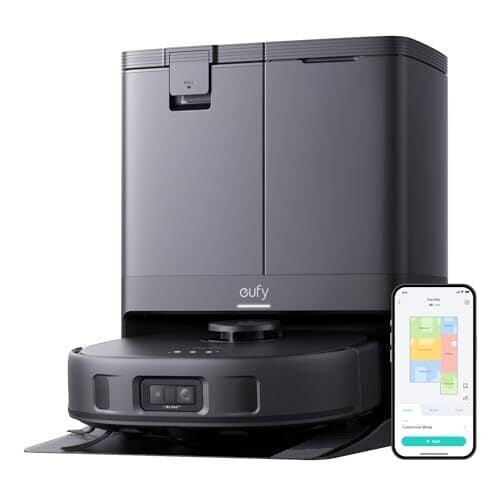
The Eufy X10 Pro Omni is currently selling for $549.99 on Amazon, a steep drop from its $899.99 list price and the lowest it has gone for, according to price trackers.]
It’s pitched as an all-in-one cleaning machine: it vacuums, mops, empties its own bin, and washes and dries its mop pads. On paper, that’s the dream—drop it in the corner, set a schedule, and let it handle the basics while you do anything else with your day.
In practice, the X10 Pro Omni hits some impressive notes while missing others. Navigation is excellent, especially in tricky rooms where many robots get stuck or spin in circles. It hugs walls and edges well, even using a dedicated “edge-hugging” mop feature to clean right up against the wall (something most bots leave untouched). The dual mop pads also wiggle as they move, which does a better job of lifting dirt when you run multiple passes. Rugs and pet hair aren’t a big issue either, as long as the roller brush is clear.
Where it stumbles is with larger debris and error recovery. If something small gets caught, it can throw the whole system into a loop of alerts and failed attempts to restart. This Lifehacker review notes that instead of recovering quickly, it sometimes spirals into repeated errors that need manual intervention.
That leaves the X10 in an interesting spot. If your home mostly deals with dust, daily dirt, and the occasional hair tumbleweed, it can be a huge help. It’s especially appealing for homes with complicated layouts since its obstacle avoidance and pathfinding are among the best around. But if you’ve got kids dropping food or floors that collect bigger debris, this model may test your patience. At $549.99, you’re getting a feature-rich robot that nails navigation and edge mopping at a lower price than its rivals, but you’ll want to be realistic about what it can and can’t handle.
The Cyberspace Administration of China (CAC) has reportedly banned the country’s local tech companies from purchasing NVIDIA’s newest AI chip made for the region. According to the Financial Times, the internet regulator told Chinese tech companies, including ByteDance and Alibaba, to cancel their orders for and to stop testing NVIDIA’s RTX Pro 6000D. After receiving the directive from CAC, the companies reportedly told their suppliers to stop all activities related to the GPU. As Reuters notes, the ban is stronger than the “guidance” the regulator issued against the company’s older H20 chips for the country. NVIDIA CEO Jensen Huang is disappointed by the ban, the BBC reports. “There are a lot of places we can’t go to, and that’s fine,” he told reporters. He also said he would “support the US” as it resolves its geopolitical issues with China.
Chinese companies had previously indicated that they would be ordering and testing tens of thousands of the AI chip based on NVIDIA’s Blackwell architecture. Reuters recently reported, however, that it has received lukewarm demand and that some tech firms decided not to put in orders for the product altogether. Some of the companies are apparently holding out for NVIDIA’s B30A, which is a more powerful model, to be approved for export by US authorities. The Times says Chinese regulators also recently concluded that local-made AI chips are now comparable to or have even exceeded the counterparts NVIDIA is selling in their country. They reportedly gathered domestic chipmakers, including Huawei and Baidu, to ask for a report on how their products compared against NVIDIA’s.
If you’ll recall, the US put an export restriction on NVIDIA’s H20 AI chips in April, out of concerns that China could use it to develop AI tech for its military. In July, the US government allowed the company to export the chips again, reportedly after closing a deal that would give it 15 percent of the sales. Huang also introduced the RTX Pro 6000D in Beijing during his visit at the time. It wasn’t the comeback NVIDIA was hoping for, however. Chinese regulators issued a guidance, dissuading local companies from purchasing the H20 chips, allegedly because they were insulted by statements made by US commerce secretary Howard Lutnick. By the end of August, The Informationreported that the company asked its suppliers to halt production related to the H20.
This ban comes days after another Chinese regulator accused NVIDIA of violating China’s antitrust laws over its acquisition of chipmaker Mellanox. The State Administration for Market Regulation said the company breached both national regulations and the conditions China set when it originally approved the acquisition. Those terms stated that NVIDIA must continue supplying GPUs and other products to the country and adhering to “fair, reasonable, and non-discriminatory principles”
This article originally appeared on Engadget at https://www.engadget.com/ai/china-reportedly-bans-tech-companies-from-buying-nvidias-ai-chips-120143740.html?src=rss
DJI’s flagship Mini 5 Pro consumer drone has arrived and it’s the first in the series with a 1-inch sensor camera for improved low-light video. Nearly every other feature has been updated as well, including the obstacle detection, range, subject tracking and more — all for around the same price as its predecessor, the Mini 4 Pro. I’ve had the drone for just enough time to give some quick thoughts (stay tuned for a full review later), but so far it looks like DJI has outdone itself again.
The Mini 5 Pro is a bit bigger and sits higher than the Mini 4 Pro, but it’s still under 250 grams (249.9 to be exact) so you don’t need a permit to fly it. A key new feature is the LiDAR sensors installed in the nose to detect and avoid obstacles when flying at night in light as low as 1 lux, while allowing RTH (return to home) in low light, even without a GPS signal. It also has six omni sensors to detect obstacles in every direction to keep the drone safe during ActiveTrack 360 and other types of flying in tight quarters.
Steve Dent for Engadget
The camera nacelle is noticeably larger to accommodate the 1-inch 50MP sensor that’s a big step up from the 1/1.3-inch sensor on the Mini 4 Pro. It’s the same size as the sensor on the Air 3S, bringing improved low light capability and finer detail to a lower priced drone. However, video resolution is only slightly up from the Mini 4 Pro to 4K at 120 fps max, up from 100 fps before.
With 10-bit D-LogM capture, it promises dynamic range up to 14 stops for easier grading. The extra resolution also allowed DJI to boost zoom to 2x without any noticeable loss in resolution. The company also added an enhanced portrait mode that optimizes brightness, contrast and skin tone performance to the level of the company’s best-selling Pocket 3 gimbal cam.
DJI’s Mini 5 Pro has improved ActiveTrack 360 capabilities for sports like cycling
DJI
The gimbal now rolls up to 225 degrees to allow true vertical video and let users capture rotating footage, while offering support for intelligent modes like QuickShot Rotate, Timelapse, Spotlight and Waypoint Flight. DJI also upgraded its ActiveTrack 360 function for tracking subjects while doing camera moves, making it safer and more stable while balancing speed and agility. Specifically, DJI says that during cycling it offers a “more agile response and keeps the target firmly locked.”
Battery life has improved to 36 minutes or 52 minutes with the Intelligent Flight Battery Plus (available in the US but not Europe and elsewhere). However, it offers a noticeably shorter charging time of just 115 minutes for three batteries (38.3 minutes per battery) with the two-way charging hub and DJI 65W portable charger. The maximum transmission distance via DJI’s O4+ system is unchanged at 20 km in the US (12.4 miles) or 10 km in Europe.
DJI
The Mini 5 Pro ships with either the standard RC-N3 controller or the RC-2 screen controller that first appeared with the DJI Air 3 mid-sized drone. I’d recommend the RC-2 if you can afford it (it adds $129 to the price), as it’s far more convenient and the screen is bright enough to use on sunny days.
I received a Mini 5 Pro in the Fly More combo with three batteries, a charger and the RC-2 screen controller, along with with extra propellers and the ND filter kit, and flew it a few times to briefly test the video quality and ActiveTrack 360 capabilities. So far, I’m impressed. Video and photo quality has noticeably improved with lower noise, sharper detail and more accurate color rendering. Dynamic range is also higher in sunny conditions when shooting with the D-LogM setting.
So far, the biggest difference appears to be shooting at dusk. Where the Mini 4 Pro delivered video with excessive noise or splotchy colors due to the aggressive noise reduction, the Mini 5 Pro offers relatively clean video up to ISO 3200 or even ISO 6400. While grain is very noticeable at the new highest ISO setting of 12,800, video is certainly usable with enough available light. Most importantly for many shooters, cityscapes at night are much cleaner than before with higher detail, lower noise and more saturated colors than the last model.
DJI Mini 5 Pro drone video shot in the evening at ISO 3200 shows improved clarity and reduced noise
Steve Dent for Engadget
My brief tests of DJI’s new LiDAR and ActiveTrack 360 capabilities were also successful. The Mini 5 Pro did a better job of avoiding fine branches than before and its algorithms took it on smooth and safe trajectories when I manually set the camera angles. The result was smoother and more interesting footage of someone walking and running around trees. At night, the LiDAR did do a good job of keeping the drone away from obstacles, however I found it to be a bit too conservative. For instance, one time with no obstacles around it except a wall, it refused to move in any direction.
Battery life, noise levels and other factors still require testing, but so far the Mini 5 Pro looks like a solid successor to the Mini 4 Pro, which sold like hotcakes. Once again, DJI hasn’t officially released the drone in the US but like DJI’s Mic 3, it could be available later at major retailers like Amazon. It’s on sale in Europe for €799/£689 with a battery, €999/£869 in the fly More Combo with the DJI RC-N3 controller and €1,129/£979 in the same combo with the RC-2 controller. More information about US pricing will be released as soon as it’s available.
This article originally appeared on Engadget at https://www.engadget.com/cameras/djis-mini-pro-5-drone-is-the-first-in-the-series-with-a-1-inch-sensor-120026323.html?src=rss
The iPhone Air is a device with shorter battery life, fewer cameras and a price tag that’s $200 more than a base iPhone 17. Sure, it’s got a bigger screen and it’s unbelievably sleek, but no matter how you slice it, that value proposition doesn’t make sense. At least on paper. That’s because as soon as you hold an iPhone Air, you instantly get a sense that this handset represents much more than a simple quest for thinness. The iPhone Air is a device with a mission: To push the company’s design and engineering further than ever before while doubling down on style. Plus, it’s potentially laying the foundation for something even more radical down the line.
What is the iPhone Air?
New iPhones generally don’t need to be explained, but the Air is a different sort of iPhone. On a purely practical level, it could be viewed as a (very) glowed-up replacement to the iPhone 16 Plus. However, the Air starts at $999, which is $100 more than the launch price of last year’s closest Apple equivalent (or $200 more after its recent price drop). Furthermore, the Air has a smaller 6.5-inch display (versus 6.7 inches on the 16 Plus) and only a single rear camera instead of the two you typically get on a base model iPhone. Then, to make things a touch more confusing, the Air has nearly the same A19 Pro chip used in Apple’s Pro series this year instead of a regular A19 processor. But most importantly, the Air’s design is unlike any iPhone that’s come before it, and it may end up becoming a bridge to Apple’s next era of smartphones (while also being irresistibly thin and stylish today).
Design: Simply stunning
Even with the arrival of Samsung’s super sleek Galaxy S25 Edge earlier this year, Apple is setting new highs for mobile design with the iPhone Air. Not only is it even skinnier at just 5.6mm (versus 5.8mm for the S25E), it’s the best example yet of what I like to call “the sci-fi space pebble look” thanks to its rounded corners and beautifully polished edges. It’s a proper marvel of engineering and while I generally don’t like saying this, you really do have to hold one to fully appreciate Apple’s craftsmanship.
Despite its dimensions, the Air isn’t all sleekness and no strength. You still get a full IP68 rating for dust and water resistance, while the titanium frame makes the whole handset remarkably sturdy. On top of that, the Air has a screen covered by a new Ceramic Shield 2 panel that also comes with an anti-reflective coating. And while it doesn’t completely eliminate glare, it does a good job of preventing annoying bright spots.
Sam Rutherford for Engadget
As for the display itself, there’s not much to complain about here either. The Air’s screen has a peak brightness of 3,000 nits and it has ProMotion support with a refresh rate that varies between 1Hz and 120Hz depending on the situation. But the real impact is that when you put a display this good in a device this thin, sometimes it really does look like someone has ripped a page out of a magazine and made it float in your hand. It’s kind of uncanny and I can’t get enough. To be fair, Samsung’s S25 Edge does produce a similar effect but it isn’t quite as pronounced.
I also appreciate that Apple still found room for the iPhone’s Action button and a flush Camera Control key. Around back, there’s subtle sophistication in the way the Air’s Ceramic Shield rear panel slopes up gently to create Apple’s camera plateau (though I don’t love that name). And weighing just 5.82 ounces (165 grams), the Air’s heft (or lack thereof) adds even more to its ethereal in-hand feel.
Sam Rutherford for Engadget
My main issue with the Air’s design is that it only has a single mono speaker. Granted, it packs a punch both in terms of volume and presence, but after years of stereo sound being the de facto equipment on premium smartphones, one-sided audio doesn’t sit quite right. The other potential sore spot is that the Air’s USB-C port isn’t perfectly centered in the bottom edge. But I fully admit that this is the most minor of nitpicks, and when you consider that due to the Air’s thinness Apple had to 3D-print the connector out of titanium (a first for the company), I’m not bothered.
Performance: Way better than good enough
Compared to the base iPhone 17, the Air has a more powerful A19 Pro chip. However, unlike the silicon available in the iPhone 17 Pro line, the Air’s processor has one fewer GPU core (five instead of six). But even with that small shortfall, the phone was never hurting for speed. Flipping between apps is essentially instantaneous and thanks to the new Liquid Glass visual design in iOS 26, doing so looks better than ever.
Sam Rutherford for Engadget
More intense tasks like gaming didn’t do much to slow it down either. Frame rates remained stable in demanding titles like Destiny: Rising while more casual fare like Sword of Convallaria looked effortlessly fluid. The only time the phone seemed mildly taxed was when using tools like Apple’s Image Playground. Just watch out if when do you any high performance tasks for a prolonged time, because the the Air can get a bit warm — particularly on its camera bump. Thankfully, in my experience, it never got too hot to touch.
Elsewhere, the addition of Apple’s new N1 and C1X chips rounds out the package that the company claims makes this the most power-efficient iPhone yet. That’s important because without a vapor chamber like on the Pro line, or room for a large battery, the Air doesn’t have much leeway for excess heat or power draw. The downside is that Apple’s C1X modem doesn’t support mmWave 5G. This may not be an issue depending on where you live or what network you’re on, but for those demanding peak mobile data speeds, it is something worth considering before upgrading.
Camera: Crisp images but is one lens enough?
Sam Rutherford for Engadget
The photos and videos the iPhone Air takes are excellent. But at the end of the day, there still isn’t a real replacement for more glass, and with only a single lens in back, Apple’s lone 48MP rear camera may be the phone’s biggest limitation. In a shot of some homemade cookies, details were sharp and colors were so rich that my mouth was still watering long after the treats were eaten. Same goes for a tricky photo at sunset, where the Air still managed to capture the warmth and subtle tones of the day’s fading light. And at night, it kept pace with or even outshot its biggest rivals, including the Pixel 10 Pro and the Samsung Galaxy S25 Edge — like in my image of a local mural and flower in low-light. However, if you’re the kind of person who loves a good telephoto shot or the extra field of view an ultra-wide lens provides, the Air’s 2x optical quality zoom means you’re out of luck.
Impressively, despite only having a single rear camera, the Air still manages to take portrait pics that look practically just as good as those from iPhones with two. Apple says that it reengineered its portrait pipeline to work without the need for stereo cameras for the Air, and it totally works. Now, if you do some serious pixel peeping, you might notice some small discrepancies between the iPhone 17 and the Air on things like flyaway hairs. But in the end, it’s nice to see that even without the same number of lenses, there isn’t a major drop in quality.
However, in front, Apple’s Center Stage feature and the Air’s new 18MP selfie cam might be the next big photo revolution that other companies will copy soon. By using a square sensor instead of a rectangular one, the phone can flip between wider landscape shots or taller portrait-style pics at a moment’s notice. In fact, there’s even an auto setting that allows the phone to switch between the two on its own, depending on how many people are in the frame.
As someone who is selfie-averse, the times that I do want to take a photo of my face are usually when I’m standing in front of a big vista and want to capture myself and the scenery. Center Stage lets me do just that without needing to awkwardly turn the phone on its side. Additionally, while the photos you see here were taken with Apple’s default “Standard” Photographic Style, I must admit I like the new “Bright” option in iOS 26, which adds just enough pop and color to your photos without going overboard.
Battery life and charging: Not a problem
The iPhone Air’s emphasis on thinness means there’s less room for a big battery, so you might think longevity would be a concern. But in my experience, it’s been a complete non-issue. Officially, Apple doesn’t provide specs for the size of the power cells in its devices, though the company does state the Air should provide 27 hours of continuous video playback, which is only three less than what you get from a base iPhone 17. That’s a drop of just 10 percent and, considering the sleekness of the Air, it’s a trade-off I’m happy to make.
Sam Rutherford for Engadget
Furthermore, my results generally line up with Apple’s numbers. In a streaming video rundown test over Wi-Fi, the iPhone Air lasted 23 hours and 39 minutes — barely an hour less than what I got from a base iPhone 17 (24:45). And in the real world, the Air fared even better than expected. Even on a day with over seven hours of screen on time (which includes running benchmarks and gaming), the phone has 25 percent juice left in the tank. And on lighter days when I’m not working or constantly checking my phone, I often had 40 to 45 percent energy remaining. When it comes to recharging, the Air keeps things simple: a 30-minute charge (either wired or wirelessly) can add 50 percent battery in just 30 minutes.
Apple’s MagSafe battery pack: The Air’s best buddy
I don’t normally mention peripherals during a review, since I’m not a fan of cases but I can understand wanting extra protection for a $1,000 phone. However, I’d argue that Apple’s MagSafe Battery for the iPhone Air may be an essential accessory for folks who like to travel light but don’t want to worry about their electronics dying — even if its $99 price tag stings.
Sam Rutherford for Engadget
In keeping with the iPhone Air’s design, Apple’s power pack is exceedingly slim at just 7.5mm and it snaps neatly onto the back of the device magnetically, so there are no wires to worry about. On its own, recharging tops out at 12 watts. Though if there’s a cord lying around, you can boost speeds up to the Air’s 20-watt limit. Alternatively, you can also use the pack’s built-in USB-C port to power up any of your other gadgets. And when you need to recharge the portable battery, all you have to do is keep it attached to the iPhone while it’s charging and it will automatically pass through juice as needed.
But my favorite part is that not only does the battery pack refill the iPhone Air, it can recharge the AirPods Pro 3 wirelessly as well. Admittedly, Apple’s slim MagSafe Battery doesn’t have the biggest capacity at 3,149mAh (which is enough to add an extra 65 percent charge to the phone). So even though you’re paying a premium to keep things super thin and breezy, between the handset, the power pack and Apple’s latest earbuds, I really appreciate the convenience for what might be the ultimate lightweight travel kit for iPhone faithful.
Wrap-up
Sam Rutherford for Engadget
While the iPhone Air’s thinness may be its most striking quality, it’s abundantly clear that this handset is so much more than that. Not only does this device represent a radical evolution of Apple’s design chops, it forced the company’s engineers to come up with more power-efficient solutions to make all this possible. And in that respect, the iPhone Air is a massive success. It’s sleek, it’s fast and it’s wildly stylish in a way that both fashionistas and people who just like packing light can appreciate.
One interesting wrinkle in all of this is that the true potential of the Air’s success might not be truly felt for another year or two. While Apple might not want to say so just yet, I’m willing to bet that this device will also be the template for an upcoming foldable iPhone. You slap two Airs together, connect them with a hinge and a flexible screen and baby you got stew going. That said, for fans of previous Plus models, the Air’s increased price, smaller screen and single rear cam certainly aren’t ideal. As long as you don’t mind the lack of extra lenses, for those who appreciate a powerful but still eminently effervescent mobile companion, the iPhone Air is in another stratosphere.
This article originally appeared on Engadget at https://www.engadget.com/mobile/smartphones/iphone-air-review-thinness-with-purpose-120037520.html?src=rss
For the sake of this iPhone 17 Pro review, I’ve developed a gaming addiction.
I don’t mean triple-A games like Destiny: Rising and Genshin Impact, or even double-A or non-A titles like Inside or Vampire Survivors, both ofwhich I greatly enjoy. I’m specifically referring to Snake Clash on YouTube Games — the type of thing you mindlessly play while pretending to watch a documentary on TV, or while slowly growing a hemorrhoid as you waste away on the throne.
The reason I’ve been playing so much Snake Clash is because I’ve noticed in my year with an iPhone 16 Pro that countless hours with games like this cause the device to burn up in my hands. And maybe some other title might also push thermal performance in similar ways, but alas, such is my taste. (Also, Inside and Vampire Survivors never caused my phone to get too warm.)
I spent a lot of time on the iPhone 17 Pro and Pro Max trying to get them to run hot, because one of the most interesting additions this year is a vapor chamber. That thermal management feature, together with the aluminum unibody redesign and three 48-megapixel rear cameras, is among the most compelling updates for this generation. Throw in the powerful A19 Pro chip (now situated in the “plateau”), a novel Center Stage selfie camera, promises of longer battery life and an eye-catching new color, and frankly the latest Pro phones seem like a serious leap.
For this review, I focused on the performance, thermal management, camera capabilities and battery life of the iPhone 17 Pro and Pro Max. I am bundling them together because aside from screen size, battery capacity and price, the two are functionally identical. I also spent time checking out Apple Intelligence and iOS 26 features, which won’t be exclusive to the new hardware and I’ll refer you to our iOS 26 preview for a deeper dive on.
An aluminum unibody design that’s new and familiar all at once
When I first picked up the iPhone 17 Pro at Apple Park, I found it refreshingly different from the iPhone 16 Pro I’d been using for a year (and also the iPhone 15 Pro before that). But the longer I caressed the matte edges of my review unit, the more I felt sparks of familiarity. The aluminum unibody here reminded me of the iPhone 8, which is no surprise since that device was made of steel wrapped in an aluminum band. Both the iPhone 8 and iPhone 17 Pros use the same 7000-series aluminum alloy that’s proprietary to Apple so that makes sense. Of course, the iPhone 17 Pro and Pro Max are far from being as thin as the older handset, but something about the matte finish felt great.
Two weeks before the iPhone launch event, my iPhone 16 Pro slipped out of my hand and crashed to the floor of a grimy public bathroom. It had landed at an awkward angle on its edge and cracked spectacularly. Thankfully, most of the shattered glass was near the bottom edge, while hairline fractures reached up in a strangely pretty pattern to the rear camera module. These didn’t cut my hands, but I knew I wanted the next iPhone to be a lot more durable.
With its aluminum frame protecting the edges of the rear and back, there is little chance the iPhone 17 Pro will break in the way my iPhone 16 Pro did. Its screen is now protected by Ceramic Shield 2, so if it fell flat on its face it should still be able to survive the impact. The rear is a bit more vulnerable, since the three cameras still protrude slightly from the plateau, but those are covered by the same sapphire crystal that previous models were. I’ve yet to crack an iPhone’s camera despite my years of klutzy behavior.
This bodes well for the iPhone 17 Pro, though I’ll say I didn’t try very hard to scratch my review unit. I actually went as far as to keep it in the Finewoven case that Apple provided so I could maintain a pristine surface for our photos. I did put both the iPhone 17 Pro and Pro Max in a bag with the iPhone 16 Pro and Pixel 10 Pro so I could bring them around while camera testing, and it was pretty nice to be able to identify the newest models simply by touch. For years, I’ve seen Android phones, particularly those by Samsung, grow more and more iPhone-like so the departure from glossy glass is welcome.
Plus, neither the Pro nor the Pro Max have been scratched despite my placing them in backpacks or pockets with other phones, keys or badges with hooks in them, though to be fair the same is true of the iPhone 16 Pro until its unfortunate fall.
One other way the iPhone 17 Pro is distinct? That orange color, which is reminiscent of the Action Button on Apple Watch Ultras. It’s also fairly similar to the hue on some traffic cones, though in a more metallic, burnished way. Because the iPhone 17 Pro is supposed to be so much more durable and scratch-resistant, I’d argue for simply showing off its bold new color by going case-free. I also took a whole bunch of pictures of the orange iPhone 17 Pro Max I’ve been testing in a variety of lighting conditions so you can better understand what it looks like in real life. Enjoy:
Faster AI processing and a body that’s largely cooler to hold
Apart from the material and the camera plateau, the iPhone 17 Pro’s redesign had a lot to do with thermal management and battery life. Like I mentioned in the beginning of this review, my iPhone 16 Pro runs hot sometimes, especially in recent months. I was eager to see if the vapor chamber in the new devices was effective at keeping them cool in similar situations.
In general, the iPhone 17 Pro stayed cool — and that’s both during the first few days with the case on and after I removed it altogether. When I played Snake Crash for about 25 minutes, I started noticing some gentle warmth emanating from the camera plateau. I put the device down on a terry cloth blanket and picked up the iPhone 16 Pro to play on instead, and just five minutes later it had gotten as warm as the 17 Pro. Ten minutes later, I had to adjust my fingers so the iPhone 16 Pro didn’t feel like an iron.
That’s not to say the iPhone 17 Pro never got noticeably hot in my testing, by the way. In my experience, generating photos in Image Playground or creating Genmoji typically caused my iPhone 16 Pro to heat up to scary levels. On the iPhone 17 Pro, it took a slightly longer time to get as warm, but it did eventually become so hot I felt the need to warn people if I were to hand the device off. I found the aluminum parts of the handset to be the hottest, which makes sense both scientifically and in the way our skin perceives temperatures.
I do want to commend Apple for the improved performance in Image Playground and Genmoji. It used to take ages for AI-generated pictures or emoji to appear (especially those based on a picture of someone in my photo album), but on the iPhone 17 Pro I was able to get several options in succession before things slowed down. Pictures where I opted to use ChatGPT’s more realistic styles took a lot longer, but by and large I saw a marked improvement in speed here. Those neural accelerators in the A19 Pro’s six-core GPU are certainly pulling their weight.
It might be worth noting that in the 25 minutes of Snake Clash time, the iPhone 17 Pro’s battery level dropped about ten percent. The iPhone 16 Pro went from 90 percent to 79 percent in roughly the same duration, so power efficiency in this specific use case seems fairly similar.
Camera performance
The trio of 48MP cameras on the iPhone 17 Pro and Pro Max are impressively versatile. Not only are they sharp, megapixel-rich sensors that deliver rich detail and vibrant colors, but also pull double duty and provide additional zoom options. When I was shooting on the iPhone 17 Pro, the camera app showed shortcuts for 0.5x, 1x, 2x, 4x and 8x, which is slightly different from the iPhone 16 Pro’s 0.5x, 1x, 2x and 5x.
As I mention those two models, I’m deeply aware that most people aren’t going to be considering upgrading from a phone as recent as the iPhone 16 Pro. So I’ll just say that as long as you’re swapping from the iPhone 14 Pro and older, you’ll get a significantly better camera system. For those already on an iPhone 15 Pro, it depends on whether you’re using a Max model and care a lot about some extra zooming ability.
I compared the iPhone 17 Pro mostly to the iPhone 16 Pro to see its improvements, as well as the Pixel 10 Pro, which I consider the best smartphone camera this year. So far, anyway. As it turns out, the iPhone 17 Pro holds its own against Google’s latest in most situations. In fact, it’s usually a bit better at retaining detail in shadows in photos with high dynamic range.
Also, as has been the case in the last few generations of iPhones, Apple’s images tend to be warmer and more saturated, whereas Google’s seem a bit muted and gray in comparison. That’s a somewhat subjective observation, really, and likely won’t impact anyone that’s not constantly carrying both phones around.
Engadget
All about zoom
It gets a bit complicated to compare the three phones on their various zoom capabilities, since they all have different limits and dedicated pipelines. But by and large, the iPhones performed similarly at the 1x level, which isn’t surprising given they’re basically the same hardware. They were also pretty closely tied at the 2x level, and further zooms were slightly different from that point.
I did find that the 8x option on the iPhone 17 Pro delivered clean shots with little noise or blur, and they were well-exposed in general. The fact that I could now go up to 40x compared to the iPhone 16 Pro’s top limit of 25x with digital zoom was a delightful bonus, especially when I was photographing some geese chilling by the river.
The Pixel 10 Pro’s scene options are 0.5x, 1x, 2x, 5x and 10x, with Pro Res Zoom allowing you to get all the way up to 100x, if you don’t mind AI filling in some gaps. I would caution against that, given the strange things it’s generated so far, but you’ll also still be able to use Super Res Zoom for up to 20x zoom without any generative AI assistance, just good ol’ computational photography (Math).
For what it’s worth, none of the photos beyond 8x on the iPhone 17 Pro and 10x on the Pixel 10 Pro look great. But in pictures I took of the “Water’s Soul” sculpture from my vantage point along the waterfront in downtown Jersey City, the Google version delivered cleaner lines and generally looked more sharp. I have yet to encounter obviously weird hallucinations in my photos, though in one close-up shot of a window in a skyscraper, the Pixel turned a white object inside the building into what appeared to be a smear of bird poop.
I also had to wonder what the lettering on the Hoboken Terminal clock tower actually looked like up close, since the Pixel-rendered image had the word “Lackawanna” seem like it had bulbs or dots.
In short, you can get up closer to faraway subjects with a Pixel 10 Pro and typically get cleaner photos, but be mindful that the AI might generate some weird things. Meanwhile, the iPhone 17 Pro delivers solid quality at 8x and gives you greater flexibility than it did before.
Portrait mode is better now
Apple is even closing the gap that Google has had in the last few years in Portrait mode, with its updated engine for photos with digitally applied background blur. The differences, I’ve learned, are in overall Portrait quality at the 2x zoom level, as well as refinements in separation of stray hairs from the background across the mode.
In these portraits I shot of a friend, as well as of a dog statue with a furry tail, there was a significant improvement, particularly at 2x zoom (which is the level I always use for portraits on an iPhone anyway). The iPhone 16 Pro blended some bits of hair (and fur) that stuck out of the silhouette into the mudded background, while the iPhone 17 Pro managed to accurately keep both in focus.
Engadget
When I compared the portraits by the iPhone 17 Pro to those from the Pixel 10 Pro, it was a close fight. While the Pixel was better at keeping definition along my friend’s temples, the iPhone was slightly better at mimicking the falloff in focus you’d get from a standalone camera with a large sensor. This is especially noticeable with the tuft of blonde hair poking out of her post-cardio ponytail, which the Pixel blurred completely into the background, while the iPhone 17 Pro kept it more in focus.
I will point out that I still prefer Google’s approach when it comes to shooting in portrait mode. In the dedicated mode on iPhones, you have to wait till the interface lights up to take your shot.
outside of the usual photo mode where the effect kicks in as soon as it detects faces of people and some animals)
It’s also worth noting that people might prefer how they look with the coloration of the iPhone shots compared to the Pixel’s, regardless of which is truer to life. You can always edit a picture in post-processing to get it to your desired representation, of course, and Apple’s portraits are also subject to the specific style chosen by the photographer.
I do want to shout out how much I love Apple’s Photographic Styles, which are basically sophisticated filters that apply effects based on depth maps. This year, the company added a new Bright style, which makes everything pop in a pleasant way (and is similar to my once-favorite Instagram filter “Oslo,” that is unfortunately no longer available).
Center Stage square sensor for portrait and landscape selfies
Apple’s latest selfie-camera update is, quite simply, a stroke of genius. I know it sounds hyperbolic, and I want to reassure the skeptics that I was on your side. At first. But I was won over when, almost immediately after saying I didn’t see the practical use for Center Stage in selfies, I was forced to turn my iPhone horizontally so I could squeeze in an extra person when trying to grab a photo of myself and my podcast guests Karissa Bell and The Verge’s Allison Johnson. Nothing convinces as quickly as instant shame.
I was all the more persuaded when I paired Center Stage with a timer or remote control of the selfie camera and placed the iPhone 17 Pro Max on a table. A group of seven or so friends and I gathered in front of the device and watched it flip into landscape mode as more of us got into the scene. It has been helpful in a number of unexpected ways.
If you’re like me and have grown used to zooming out whenever you flip over to the iPhone’s front camera, you’ll find that tapping the onscreen button to do so will disable Center Stage for that photo session. Don’t fret though, whenever you exit the camera app and relaunch it, Center Stage will be on again. You can turn it off altogether by tapping the button on the top right of the viewfinder and disabling both the zoom and orientation options. Or you can select one of the two, whichever you prefer to have.
I’ll also point out that the camera is sharper now, as the 24MP square sensor delivers 18MP selfies, compared to the 12MP TrueDepth system before. Though I‘ve noticed some issues with FaceID, no changes have been made to either TrueDepth or FaceID, so it’s likely my struggles were to do with the way I had set it up on the iPhone 17 Pro compared to the 16 Pro.
I’m not usually a fan of higher-resolution selfies, and did notice my freckles were a lot more prominent in some sunlit shots, but by and large the images haven’t been jarringly different.
Center Stage also works on FaceTime calls, although there it mostly tries to keep your face centered, similarly to how it functions on iPad and Macbook. However, the execution is slightly different, since it’s meant for hand-held calls as you’re walking on the street, for example, or when you don’t have a stable surface to place your phone. I would have loved it if my partner had Center Stage when he FaceTimed me from the streets of New York during a wild night out on the town.
When I called my coworker and paced around a large meeting room, we both noticed the difference with Center Stage and after I turned it off. It was most obvious when I stood still, held out my arm and didn’t move it, then shifted my head around. The iPhone 17 Pro adjusted the background and view of the call to keep my face fully in frame. Now I want to use Center Stage whenever I’m forced to hold my phone during a FaceTime (like an impromptu therapy session, for instance), so I can worry less about whether I’m in view and focus on the conversation.
Dual-camera video recording
I don’t know about you, but my selfie video angle is quite different from my regular angle. That is to say, I hold my hand stretched out farther away from my body, sometimes higher up than my face, tilted slightly down. I find it more flattering. When I shoot anything using the rear cameras, I simply hold it up in front of my face, not as far away as it would be for a selfie.
What I’m trying to say is: I didn’t like most of the dual-camera videos I shot because I could either prioritize the angle for the selfie camera, which might not be great for the rear sensor. Or I could focus on shooting what was behind the phone and include beautiful footage of my forehead. And I’ll be honest, I frequently found myself staring at my face in the little picture-in-picture box and sometimes even moved the phone around to show landmarks behind me, only to realize the main camera (and the rest of the screen) had already been recording it all along.
I don’t think there will be too many situations where dual-camera videos will be useful or share-worthy, but at least it’s a mode you turn on only when you want and isn’t in the way. Plus, for the specific times when you want to show off where you’re at while proving you’re also in the scene, it’s a nice tool to have handy. I did end up liking one dual-camera video I shot of myself enjoying the breeze by the Hudson River.
Sam Rutherford for Engadget
Greater battery life
I had one goal during this review, and that was to see if the iPhone 17 Pro or Pro Max would be able to last during my testing period without needing a charge. Since there was supposedly more space and better efficiency thanks to the redesign creating more room for the battery, I thought, perhaps naively, that maybe there would be a leap in endurance.
Alas, I was wrong. The smaller Pro fell short of those admittedly great expectations, the Pro Max did come close. Usually, the larger handset lasts about two full days as I go about my review process, which typically mostly involves camera testing, messaging and gaming. I tend to spend more time on the smaller device, using it for tasks like banking, emailing, social media browsing and posting, all in addition to the things I do on the Max. All that is to say that the two days I normally get out of the Pro Max is likely due in part to the fact that I use it less than the Pro, so don’t expect yours to last that long.
With that in mind, the iPhone 17 Pro Max made it to the end of Saturday before it dropped to 20 percent, having last been charged to about 95 percent on Thursday at 8:54AM. Meanwhile, the iPhone 17 Pro typically gets from 7AM till about 11pm ET without breaking a sweat. I still plugged it in overnight though, because I generally don’t like leaving the house in the morning with less than 50 percent, and the iPhone 17 Pro usually ends the day close to 25 percent. So far it mirrors my experience with the iPhone 16 Pro, though I’ll need a bit more time to better gauge the differences.
iOS 26 updates and other areas of improvement
I can’t write a review of the iPhone 17 Pro and Pro Max and not mention their screen sizes, so here: they’re 6.3 inches and 6.9 inches respectively. ProMotion’s adaptive refresh rates of up to 120Hz continue to make scrolling Reddit a breeze, and while Apple has improved the anti-reflection treatment here, it’s been hard for me to determine what’s changed.
The more obvious refresh when using the iPhone 17 Pro is in iOS 26, which rolled out this week to the public. Friends have already begun to complain about or compliment the new Liquid Glass aesthetic, and one buddy immediately had to turn on the “reduce transparency” option.
There’s a lot I could say about how much I appreciate the bigger buttons throughout the system, or the new lock screen styles. I could also go on about how I had to adjust to the new Screenshots interface and hate that it now requires an extra swipe to dismiss. The revamped Photos, Camera and Phone apps are… fine. I don’t hate the changes, and actually like the new Phone layout.
Ultimately, iOS 26 feels like a significant refresh that matches the vibes of Apple’s new hardware — especially the Air. But because it also rolls out to several previous generations, it’s not something that will impact your (or my) evaluation of the iPhone 17 Pro and Pro Max.
Sam Rutherford for Engadget
Why a Pro and not an Air or the iPhone 17?
This year, the iPhone Air actually feels like the status symbol model for those who need to own fancy hardware for external validation. It’s impressively svelte, has an A19 Pro chip and is just something I can’t stop trying to wave in people’s faces to get them to touch. It supplants the Plus model, at least this year, and has a medium-sized 6.5-inch screen that might be ideal for many. And despite its thin profile, the iPhone Air still managed to deliver respectable battery life, according to my colleague Sam Rutherford.
If a 6.5-inch screen or a super thin phone is something you simply must have, by all means go for the iPhone Air. But because I love to shoot ultrawide shots as well as closeups of distant, skittish wildlife, a versatile multi-camera setup is a must for me. If that sounds like you, pick a Pro. Whether you opt for the Max boils down to your preference for size (and I have to admit using the larger 6.9-inch screen was a lot easier on my eyes).
Those with unlimited resources can, of course, get both. Congrats on the wealth.
People with partners or family members that are looking to upgrade at the same time can consider getting one of each. I’ve suggested that to my friends who are married, so the person who cares more about photos gets the Pro and the one who hates bulk gets the Air. Neither is a bad purchase, but the Pro is slightly more reliable. In exchange, you’ll have to fork over more money and give up some pocket space.
Finally, it’s worth looking seriously at the iPhone 17 this year. With its new ProMotion screen, dual 48MP rear cameras and Center Stage selfie setup (that supports the same dual-camera video feature as the Pros), it’s a compelling package for hundreds less. You’ll even get the same Portrait mode that the 17 Pros offer, while the Air has its own specific image pipeline that enables automatic depth capture with a single camera.
If you’re a video creator or producer, I should point out that the iPhone Air’s USB-C port is only rated for USB 2 transfer speeds of 480Mbps and doesn’t support DisplayPort for video out. The regular iPhone 17 is also USB 2, but does support DisplayPort, while the Pro line can handle USB 3 speeds of up to 10Gbps and DisplayPort.
Wrap-up
This year’s iPhone lineup is forcing me to re-think the idea of a Pro phone. Is it one that looks and feels expensive or is it one that’s slightly more durable and maybe doesn’t appear as stylish? I’ve seen some discourse online about how the iPhone 17 Pro and Pro Max don’t look as classy as before and that the iPhone Air seems to be the more premium of the family. And while I agree that the Air is a shinier, more attractive device, for my needs the iPhone 17 Pro is still the way to go.
Of course, it would be better if Apple didn’t create this conundrum with this year’s iPhones, but it still has to obey the laws of physics. I like a reliable, durable phone that easily lasts all day, takes great pictures from all distances and angles and won’t burn a literal hole in my pocket. It might burn up your wallet, since the $1,099 price is certainly not something everyone can afford, but it does buy some security and longevity.
The iPhone 17 Pro and Pro Max are a significant update from previous models, and I haven’t felt this excited by a new generation of iPhones in a very long time.
This article originally appeared on Engadget at https://www.engadget.com/mobile/smartphones/iphone-17-pro-and-pro-max-review-an-impactful-redesign-120002202.html?src=rss
Famed aviator Amelia Earhart has captured our imaginations for nearly a century, particularly her disappearance in 1937 during an attempt to become the first female pilot to circumnavigate the globe. Earhart was a complicated woman, highly skilled as a pilot yet with a tendency toward carelessness. And her marriage to a flamboyant publisher with a flair for marketing may have encouraged that carelessness and contributed to her untimely demise, according to a fascinating new book, The Aviator and the Showman: Amelia Earhart, George Putnam, and the Marriage that Made an American Icon.
Author Laurie Gwen Shapiro is a longtime Earhart fan. A documentary filmmaker and journalist, she first read about Earhart in a short biography distributed by Scholastic Books. “I got a little obsessed with her when I was younger,” Shapiro told Ars. The fascination faded as she got older and launched her own career. But she rediscovered her passion for Earhart while writing her 2018 book, The Stowaway, about a young man who stowed away on Admiral Richard Byrd‘s first voyage to Antarctica. The marketing mastermind behind the boy’s journey and his subsequent (ghost-written) memoir was publisher George Palmer Putnam, Earhart’s eventual husband.
The fact that Earhart started out as Putnam’s mistress contradicted Shapiro’s early squeaky-clean image of Earhart and drove her to delve deeper into the life of this extraordinary woman. “I was less interested in how she died than how she lived,” said Shapiro. “Was she a good pilot? Was she a good, kind person? Was this a real marriage? The mystery of Amelia Earhart is not how she died, but how she lived.”
iOS 26 became publicly available this week, ushering in a new OS naming system and the software’s most overhauled look since 2013. It may take time to get used to the new “Liquid Glass” look, but it’s easier to appreciate the pared-down controls.
Beyond a glassy, bubbly new design, the update’s flashiest new features also include new Apple Intelligence AI integration that varies in usefulness, from fluffy new Genmoji abilities to a nifty live translation feature for Phones, Messages, and FaceTime.
New tech is often bogged down with AI-based features that prove to be overhyped, unreliable, or just not that useful. iOS 26 brings a little of each, so in this review, we’ll home in on the iOS updates that will benefit both mainstream and power users the most.
A new Stanford-led study finds that switching permanently to standard time could prevent 300,000 strokes and reduce obesity in 2.6 million Americans by better aligning circadian rhythms with natural light. Researchers argue that the twice-yearly clock changes are the worst option for public health, while permanent daylight saving time would offer two-thirds of the benefits. From a report: “We found that staying in standard time or staying in daylight saving time is definitely better than switching twice a year,” senior researcher Jamie Zeitzer said in a news release. He’s a professor of psychiatry and behavioral sciences at Stanford University in California. For the study, researchers estimated how different national time policies might affect American’s circadian rhythms — the body’s innate clock that regulates many physiological processes. The human circadian cycle isn’t exactly 24 hours, researchers noted. It’s about 12 minutes longer for most people, and it can be changed based on a person’s exposure to light.
“When you get light in the morning, it speeds up the circadian cycle. When you get light in the evening, it slows things down,” Zeitzer said. “You generally need more morning light and less evening light to keep well synchronized to a 24-hour day.” An out-of-sync circadian cycle has been linked with many different poor health outcomes, researchers said. “The more light exposure you get at the wrong times, the weaker the circadian clock,” Zeitzer said. “All of these things that are downstream — for example, your immune system, your energy — don’t match up quite as well.” Most people would experience the least circadian burden under permanent standard time, which prioritizes morning light, researchers found.
The research team then linked its analysis of circadian rhythms to county-level data from the U.S. Centers for Disease Control and Prevention (CDC) to see how each time policy might affect people’s health. Their models showed that permanent standard time would reduce obesity nationwide by 0.78% and stroke by 0.09%. Those seemingly small percentage changes, when played out across the national population, would mean 2.6 million fewer people with obesity and 300,000 fewer cases of stroke. Permanent daylight savings time would result in a 0.51% drop in obesity — around 1.7 million people — and a 0.04% reduction in strokes, or 220,000 cases. Either move would help American health. “You have people who are passionate on both sides of this, and they have very different arguments,” Zeitzer said. The findings have been published in the Proceedings of the National Academy of Sciences.
China’s internet regulator has told the country’s biggest technology companies to stop buying all of Nvidia’s artificial intelligence chips and terminate their existing orders, as Beijing steps up efforts to boost its homegrown semiconductor industry and compete with the US. From a report: The Cyberspace Administration of China (CAC) informed companies including ByteDance and Alibaba this week to terminate their testing and orders of the RTX Pro 6000D, Nvidia’s tailor-made product for the country introduced two months ago, according to three people with knowledge of the matter.
Several companies had indicated they would order tens of thousands of the RTX Pro 6000D, and had started testing and verification work with Nvidia’s server suppliers before telling them to stop the work after receiving the CAC order, said the people.
“Phys.org is reporting on a study published in Nature Physics involving ICN2 at the UAB campus, Xi’an Jiaotong University (Xi’an) and Stony Brook University (New York), showing for the first time that ordinary ice is a flexoelectric material — meaning it can generate electricity when subjected to mechanical deformation,” writes longtime Slashdot reader fahrbot-bot. From the report: “We discovered that ice generates electric charge in response to mechanical stress at all temperatures. In addition, we identified a thin ‘ferroelectric’ layer at the surface at temperatures below -113C (160K),” explains Dr. Xin Wen, a member of the ICN2 Oxide Nanophysics Group and one of the study’s lead researchers. “This means that the ice surface can develop a natural electric polarization, which can be reversed when an external electric field is applied — similar to how the poles of a magnet can be flipped. The surface ferroelectricity is a cool discovery in its own right, as it means that ice may have not just one way to generate electricity, but two: ferroelectricity at very low temperatures, and flexoelectricity at higher temperatures all the way to 0 C.” This property places ice on a par with electroceramic materials such as titanium dioxide, which are currently used in advanced technologies like sensors and capacitors.
These are several videos of 2024 Kendama World Cup U9 champion Naru Nishimoto demonstrating his very impressive skills with the toy. Naru was the youngest entrant in the competition and still took home the gold. And I can see why. If I had this level of hand-eye coordination I might not have just slapped myself in the nuts trying to high-five a former coworker. “What were you celebrating?” Oh I just got fired.
OpenAI is rolling out stricter safety measures for ChatGPT after lawsuits linked the chatbot to multiple suicides. “ChatGPT will now attempt to guess a user’s age, and in some cases might require users to share an ID in order to verify that they are at least 18 years old,” reports 404 Media. “We know this is a privacy compromise for adults but believe it is a worthy tradeoff,” the company said in its announcement. “I don’t expect that everyone will agree with these tradeoffs, but given the conflict it is important to explain our decisionmaking,” OpenAI CEO Sam Altman said on X. From the report: OpenAI introduced parental controls to ChatGPT earlier in September, but has now introduced new, more strict and invasive security measures. In addition to attempting to guess or verify a user’s age, ChatGPT will now also apply different rules to teens who are using the chatbot. “For example, ChatGPT will be trained not to do the above-mentioned flirtatious talk if asked, or engage in discussions about suicide of self-harm even in a creative writing setting,” the announcement said. “And, if an under-18 user is having suicidal ideation, we will attempt to contact the users’ parents and if unable, will contact the authorities in case of imminent harm.”
OpenAI’s post explains that it is struggling to manage an inherent problem with large language models that 404 Media has tracked for several years. ChatGPT used to be a far more restricted chatbot that would refuse to engage users on a wide variety of issues the company deemed dangerous or inappropriate. Competition from other models, especially locally hosted and so-called “uncensored” models, and a political shift to the right which sees many forms of content moderation as censorship, has caused OpenAI to loosen those restrictions.
“We want users to be able to use our tools in the way that they want, within very broad bounds of safety,” Open AI said in its announcement. The position it seemed to have landed on given these recent stories about teen suicide, is that it wants to “‘Treat our adult users like adults’ is how we talk about this internally, extending freedom as far as possible without causing harm or undermining anyone else’s freedom.”
Microsoft will invest $30 billion in the U.K. through 2028 to expand AI infrastructure and operations, including building the country’s largest supercomputer with 23,000 GPUs in partnership with Nscale. CNBC reports: On a call with reporters on Tuesday, Microsoft President Brad Smith said his stance on the U.K. has warmed over the years. He previously criticized the country over its attempt in 2023 to block the tech giant’s $69 billion acquisition of video game developer Activision-Blizzard. The deal was cleared by the U.K.s competition regulator later that year.
“I haven’t always been optimistic every single day about the business climate in the U.K.,” Smith said. However, he added, “I am very encouraged by the steps that the government has taken over the last few years.” “Just a few years ago, this kind of investment would have been inconceivable because of the regulatory climate then and because there just wasn’t the need or demand for this kind of large AI investment,” Smith said. Microsoft’s announcement comes as President Donald Trump embarks on a state visit to Britain where he’s expected to sign a new deal with U.K. Prime Minister Keir Starmer “to unlock investment and collaboration in AI, Quantum, and Nuclear technologies,” the government said in a statement late Tuesday.
A problem with the main engine on Northrop Grumman’s Cygnus XL spacecraft will keep it from delivering 11,000 pounds of supplies and experiments to the International Space Station as scheduled on Wednesday.
In a statement released Tuesday afternoon, NASA said ground teams are evaluating backup plans that might still allow the Cygnus spacecraft to reach the space station, just not on schedule. The problem arose early Tuesday when the spacecraft’s main engine shut down earlier than expected during two burns to boost the ship’s orbit for its rendezvous with the ISS, according to NASA.
Officials didn’t release any other details about the engine problem, but all other systems on the Cygnus XL spacecraft are performing as designed, NASA said. The agency said a new arrival date and time at the space station is “under review.”
BrianFagioli shares a report from NERDS.xyz: The Fedora Project has announced Fedora Linux 43 Beta, giving users and developers the opportunity to test the distribution ahead of its final release. This beta introduces improvements across installation, system tools, and programming languages while continuing Fedora’s pattern of cleaning out older components. The beta can be downloaded in Workstation, KDE Plasma, Server, IoT, and Cloud editions. Spins and Labs are also available, though Mate and i3 are not provided in some builds. Existing systems can be upgraded with DNF system-upgrade. Fedora CoreOS will follow one week later through its “next” stream. The beta brings enhancements to its Anaconda WebUI, moves to Python 3.14, and supports Wayland-only GNOME, among many other changes. A full list of improvements and system enhancements can be found here.
The official release should be available in late October or early November.
An anonymous reader quotes a report from the Associated Press: The Taliban leader banned fibre optic internet in an Afghan province to “prevent immorality,” a spokesman for the administration said Tuesday. It’s the first time a ban of this kind has been imposed since the Taliban seized power in August 2021, and leaves government offices, the private sector, public institutions, and homes in northern Balkh province without Wi-Fi internet. Mobile internet remains functional, however.
Haji Attaullah Zaid, a provincial government spokesman, said there was no longer cable internet access in Balkh by order of a “complete ban” from the leader Hibatullah Akhundzada. “This measure was taken to prevent immorality, and an alternative will be built within the country for necessities,” Zaid told The Associated Press. He gave no further information, including why Balkh was chosen for the ban or if the shutdown would spread to other provinces.
Gig economy platform Fiverr is laying off 250 employees as it pivots to being an “AI-first company,” CEO Micha Kaufman shared in an essay on X. The move affects around 30 percent of the company’s staff, The Register writes, and it’s not uncommon among tech companies in 2025. Duolingo announced similar plans to become “AI-first” in April.
Kaufman describes this process as returning to “startup mode” and writes that his ultimate goal is to turn Fiverr into “an AI-first company that’s leaner, faster, with a modern AI-focused tech infrastructure, a smaller team, each with substantially greater productivity, and far fewer management layers.” Part of the justification Kaufman offers for why Fiverr doesn’t “need as many people to operate the existing business” is that the company has already integrated AI into its customer support and fraud detection programs.
The first sign that Fiverr might justify layoffs with AI came when Kaufman was interviewed by CBS News in May 2025 about the danger the technology posed to employees. Kaufman specifically advised employees to “automate 100 percent” of what they do with AI, while also claiming that wouldn’t make them replaceable because they were still capable of “non-linear thinking” and “judgement calls.” That advice doesn’t seem like it was ultimately helpful for Fiverr’s own employees.
The company’s cuts affect fewer people than a larger firm like Workday, who announced plans to eliminate 1,750 roles in February 2025. Regardless of the size of the company or its level of investment in AI, though, layoffs have the same effect: More work has to be done by fewer people.
This article originally appeared on Engadget at https://www.engadget.com/ai/fiverr-is-laying-off-250-employees-to-become-an-ai-first-company-215730063.html?src=rss
iOS 26 is here, and with it, Apple’s “Liquid Glass” design revamp. Yesterday, I covered how to quickly undo most of the harshest changes that come with Liquid Glass, but a complaint users are making today requires an entirely separate fix. Luckily, there is an option that could help you, although it’s not for everyone.
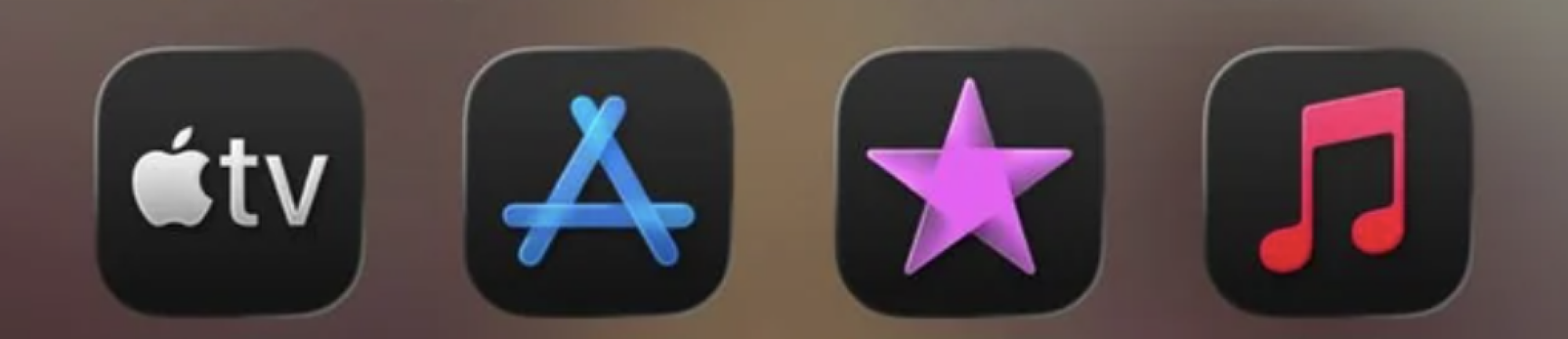
Dark Mode icons look a little tilted right now
As users are posting over on Reddit, it turns out that Dark Mode app icons don’t play nicely with iOS 26’s new Liquid Glass aesthetic. How much this will bother you will vary from person to person, but essentially, some folks online (and on the Lifehacker team) are now complaining that their Dark Mode icons look tilted, as if they’re not perfectly dead center.
Personally, I have a hard time seeing this when looking at my home screen as a whole, but after a colleague sent me a more zoomed-in shot, I can see how it would bother him. It’s an optical illusion, as the icon positioning is the same, but it’s there.
Credit: Joel Cunningham
The problem, it seems, is in new highlights added to certain, but not all, app icon corners while using Dark Mode. The uneven lighting produces an effect that, as reported by Lifehacker sister site Mashable, has some users complaining of dizziness. Worse yet, how prominent the highlights are depends on your background—I can see them more easily over dark parts of my background, but they tend to bleed into lighter parts.
Technically, those highlights are also there when using app icons with lighter backgrounds, but they’re less noticeable, since they don’t contrast with them as much.
Again, you may not be susceptible to the effect. If I’m not concentrating on it, I do tend to forget about it. But if it is bothering you, what can you do?
Reducing transparency does nothing
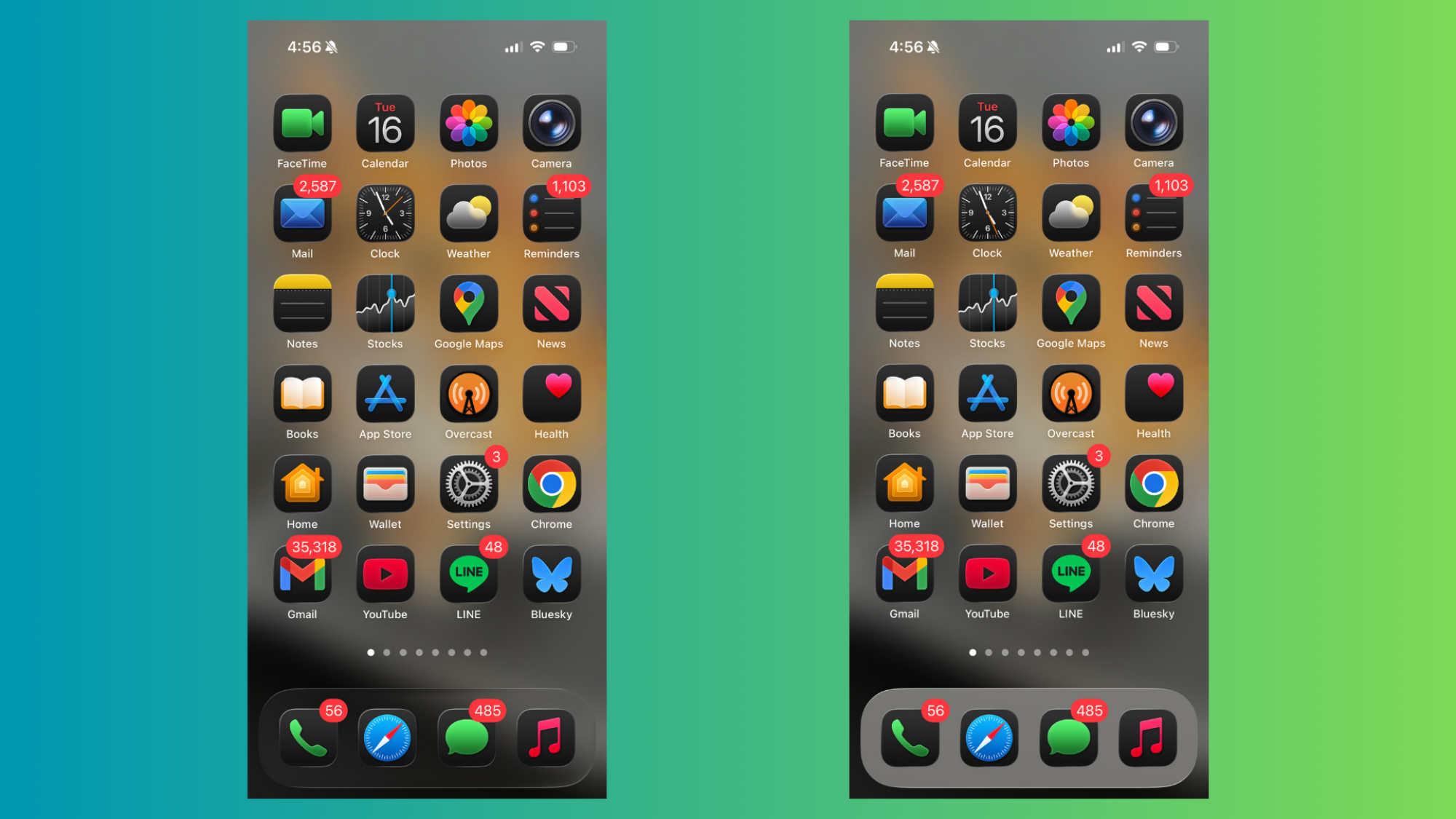
Unfortunately, the one-toggle fix that undoes most of the issues with Liquid Glass, “Reduce Transparency,” doesn’t seem to do anything for your app icons. Here’s my iPhone Home Screen with Reduce Transparency on, and the same screen with it off (please don’t judge my unread mail and unchecked reminders).
iPhone Home Screen with Dark Mode app icons and Reduce Transparency off (left) vs. on (right) Credit: Michelle Ehrhardt
That’s a shame, since Reduce Transparency is easy to implement: You just turn it on under Settings > Accessibility > Display & Text Size, and it’ll get rid of most of the see-through elements in Liquid Glass for you. But because the icons are solid anyway, it won’t do anything here. Instead, you’ll need to get creative.
Try tinting your app icons
Right now, I unfortunately don’t have a fix for Apple’s Dark Mode app icons. Even custom icons that use Apple’s Dark Mode background color will still have the new highlights. But I do have one piece of advice that will get you close to the same experience.
It turns out, setting your app icons to Dark Mode isn’t the only way to get them to use more subdued colors. If Dark Mode looks ugly to you right now, you could try tinting your app icons instead.
This gives your app icons a monochrome appearance with white or gray text, and while that does unfortunately mean losing out on app icons with more than two colors, it also means you can swap over to other dark colored backgrounds that might look a bit less tilted to you. The offending highlights will still be there, but with the right tinted background, you might be able to make them less noticeable.
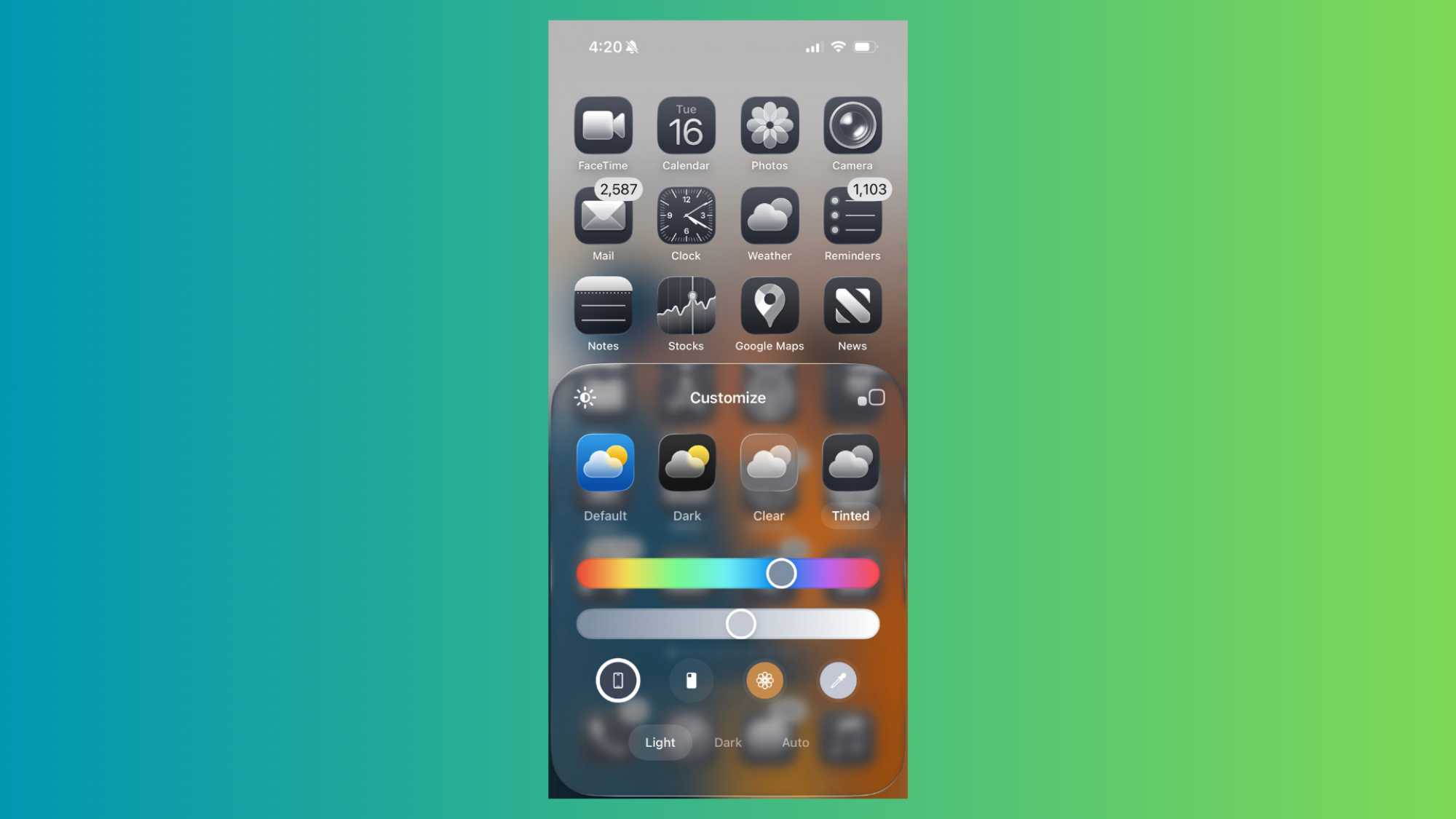
To try it out, head to your home screen, then long press until your apps start jiggling. Click Edit in the top left corner, then Customize. In the menu that pops up on the bottom of your screen, pick Tinted.
You’ll get two color picker bars, as well as the option to choose Light or Dark icons (this is separate from the general Light and Dark mode app icons, which aren’t monochrome). Think of the top color picker bar as the app’s general color, and the bottom as a way to get more specific within that color zone. Meanwhile, Light will make the app’s text and graphical elements white, while Dark will use a more grayish tone.
Credit: Michelle Ehrhardt
You can play around here to get an app tint you like best, although Apple does have a few shortcut buttons to help you find the color for you. Personally, I like the leftmost button, under the color picker bars, that takes you to a standard black and white if you’ve selected Light or a more subdued black and dark gray if you’ve selected Dark. If neither of those work for you, there’s also an Apple Intelligence button that will try to pick a tint that goes well with your wallpaper, or an eyedropper that will let you pick a color from your wallpaper.
None of this is quite the same as just using Dark Mode icons, but if you’re like me, it might be close enough.
TikTok will not shut down on Wednesday, as President Donald Trump inches nearer to closing a deal with China that will most likely see the app’s majority ownership shift to US owners and US-based users shift to a new app.
On Tuesday, Trump confirmed that he has extended the deadline to December 16 for TikTok owner ByteDance to divest ownership to comply with a law designed to block China from spying on US users or manipulating TikTok’s algorithm to influence Americans.
The president claimed that the extension allows time to finalize a deal that sources told The Wall Street Journal would shift 80 percent ownership to “an investor consortium including Oracle, Silver Lake, and Andreessen Horowitz.” Existing ByteDance investors will also join the consortium, including Susquehanna International, KKR, and General Atlantic, the WSJ reported.
Consumer Reports has urged Microsoft to keep supporting Windows 10 beyond its October 2025 cutoff, saying the move will “strand millions of consumers” who have machines incompatible with Windows 11. The Verge reports: As noted by Consumer Reports, data suggests that around 46.2 percent of people around the world still use Windows 10 as of August 2025, while around 200 to 400 million PCs can’t be upgraded to Windows 11 due to missing hardware requirements.
In the letter, Consumer Reports calls Microsoft “hypocritical” for urging customers to upgrade to Windows 11 to bolster cybersecurity, but then leaving Windows 10 devices susceptible to cyberattacks. It also calls out the $30 fee Microsoft charges customers for “a mere one-year extension to preserve their machine’s security,” as well as the free support options that force people to use Microsoft products, allowing the company to “eke out a bit of market share over competitors.”
Consumer Reports asks that Microsoft continue providing support for Windows 10 computers for free until more people have upgraded to Windows 11.