Gemini in Chrome no longer requires a subscription

Back at I/O 2025, Google began integrating Gemini into Chrome. At the time, you needed an AI Pro or AI Ultra subscription to access the AI assistant in the browser. That’s changing today. Google has begun rolling out the tool to all Chrome desktop users on both Windows and Mac. Provided you have Chrome’s language set to English and live in the US, you’ll see a new sparkle icon at the top of the interface. Tapping it will allow you to start making requests of Gemini. 

You can also use the tool on a smartphone. On Android, you can do so by holding your phone’s power button. On iOS, meanwhile, Google is working on bringing the assistant to the Chrome app.  

A GIF demonstrating Gemini in Chrome, which is accessible through a new dedicated shortcut.
Google

Since its introduction at I/O, Google has made some enhancements to how Gemini works inside of Chrome. To start, the tool can now work across multiple tabs, allowing it to compare and summarize information from different websites. At the same time, Gemini can access your browsing history thanks to a new recall feature. Google suggests this can be helpful in situations where you can’t quite remember where you saw something online. Instead of manually sifting through your browser history, you can write a prompt like “what was that blog I read on back to school shopping?” and Gemini will take care of the rest.

The new version of Gemini for Chrome also offers deeper integrations with other Google services, including Calendar, YouTube and Maps. For instance, you can ask the assistant to schedule meetings for you, and if you’re working through a long YouTube video, Gemini can generate timestamps you can use to jump around the video.

A GIF demonstrating Gemini in Chrome's browser history recall ability.
Google

At the start of May, Google began using Gemini Nano to upgrade Chrome’s Enhanced Protection suite. On Thursday, the company said Gemini Nano would also soon work to protect users against websites that use fake viruses or giveaways to trick them. Google has also added an algorithm that will learn your preferences for granting permissions. When it determines you’re unlikely to grant a website permission to access your computer’s camera or location, it will present those requests in a less intrusive way. Similarly, Google will add an AI designed to make it easier to update compromised credentials through Chrome’s built-in password manager. Starting with a handful of supported websites — including Coursera, Duolingo and Spotify — you’ll be able to change your passwords with a single click.

In the coming months, Google plans to bring agentic capabilities to Chrome, meaning Gemini will be able to complete tasks for you. For example, the company envisions people using this feature to do their weekly grocery shopping through Instacart. The company first previewed this capability with Project Mariner at the end of 2024. Over the last year, a few different companies have released their own takes on web-surfing agents with mixed results. For example, people have complained of OpenAI’s Operator failing to complete some tasks.

A GIF demonstrating Chrome's Gemini agent completing an Instacart purchase.
Google

“Our hope is that by the time this gets to users, we’ve done away with many of the potential snafus,” said Mike Torres, vice president of product for Chrome, during a media briefing Google held ahead of today’s announcement. “This is an experimental experience we’re continuing to improve. We’re not going to do something that comprises the user experience.”

Last but not least, Google is adding an AI Mode mode shortcut directly to Chrome’s address bar. If you need a refresher, AI Mode is Google’s dedicated search chatbot. At I/O 2025, the company made it available to every Search user in the US. Now you can access it without navigating to Google first. When I asked Torres about the button, he was quick to note users don’t have to use the shortcut. “What we’re trying to do is maintain users’ existing behavior,” he added.

As with any major update from Google, it may take a few days for the new features to roll out to your installation of Chrome.

This article originally appeared on Engadget at https://www.engadget.com/ai/gemini-in-chrome-no-longer-requires-a-subscription-170045611.html?src=rss

Nvidia will invest $5 billion in Intel, co-develop new server and PC chips

In a major collaboration that would have been hard to imagine just a few years ago, Nvidia announced today that it was buying a total of $5 billion in Intel stock, giving Intel’s competitor ownership of roughly 4 percent of the company. In addition to the investment, the two companies said that they would be co-developing “multiple generations of custom data center and PC products.”

“The companies will focus on seamlessly connecting NVIDIA and Intel architectures using NVIDIA NVLink,” reads Nvidia’s press release, “integrating the strengths of NVIDIA’s AI and accelerated computing with Intel’s leading CPU technologies and x86 ecosystem to deliver cutting-edge solutions for customers.”

Rather than combining the two companies’ technologies, the data center chips will apparently be custom x86 chips that Intel builds to Nvidia’s specifications. Nvidia will “integrate [the CPUs] into its AI infrastructure platforms and offer [them] to the market.”

Read full article

Comments

Notepad’s AI writing features will soon run locally on Copilot+ PCs

CoPilot+ PC owners have a new perk in the pipeline. Your AI PC will soon perform Notepad’s AI writing features on-device — no subscription required. The app’s summarize, write and rewrite options were introduced earlier this year.

Up to this point, you’ve needed a CoPilot Pro or Microsoft 365 subscription to use Notepad’s AI writing tools. So, if you’ve splurged on an AI PC, this could save you a few bucks each month. And if you have both a subscription and a CoPilot+ PC, it lets you choose between local and cloud generation.

Microsoft is rolling out the new local AI feature now for its Windows Insider beta testers. It’s available in English only, at least for now.

Sample image showing Microsoft Paint's new
Microsoft

Paint is also getting some love in the latest Insider builds. You can now save projects, Adobe-style. If you’re in the middle of an edit, you can choose File > Save as project. You can then select a location to save the .paint file and pick up later where you left off.

On top of that, Paint is also adding an opacity slider to the pencil and brush tools. Nobody in their right mind will describe MS Paint as a Photoshop rival. But at least the simple drawing and editing app is growing slightly more advanced. It’s gotten a renewed focus from the company after adding AI image generation chops last year.

Last but… definitely least is an update to Snipping Tool. Insiders will see a new quick markup option in the screenshot app. After snipping something onscreen, you’ll find the feature in the capture toolbar. You can then scribble away before saving.

All the Windows updates are available in the Canary and Dev Insider channels. Anyone with a Microsoft account can sign up for free. The company does occasionally cancel beta features before they’re released to Windows proper. But that’s more the exception than the rule.

This article originally appeared on Engadget at https://www.engadget.com/ai/notepads-ai-writing-features-will-soon-run-locally-on-copilot-pcs-163518223.html?src=rss

New attack on ChatGPT research agent pilfers secrets from Gmail inboxes

The face-palm-worthy prompt injections against AI assistants continue. Today’s installment hits OpenAI’s Deep Research agent. Researchers recently devised an attack that plucked confidential information out of a user’s Gmail inbox and sent it to an attacker-controlled web server, with no interaction required on the part of the victim and no sign of exfiltration.

Deep Research is a ChatGPT-integrated AI agent that OpenAI introduced earlier this year. As its name is meant to convey, Deep Research performs complex, multi-step research on the Internet by tapping into a large array of resources, including a user’s email inbox, documents, and other resources. It can also autonomously browse websites and click on links.

A user can prompt the agent to search through the past month’s emails, cross-reference them with information found on the web, and use them to compile a detailed report on a given topic. OpenAI says that it “accomplishes in tens of minutes what would take a human many hours.”

Read full article

Comments

$599 MacBook With iPhone Chip Expected To Enter Production This Year

An anonymous reader shares a report: Apple supply chain analyst Ming-Chi Kuo today reiterated that a more affordable MacBook powered by an iPhone processor is slated to enter mass production in the fourth quarter of 2025, which points towards a late 2025 or early 2026 launch.

Kuo was first to reveal that Apple is allegedly planning a more affordable MacBook. In late June, he said the laptop would have around a 13-inch display, and an A18 Pro chip. Kuo said potential color options include silver, blue, pink, and yellow, so the laptop could come in bright colors, like 2021-and-newer models of the 24-inch iMac.

This time around, he only mentioned the MacBook will have an unspecific iPhone processor. Apple recently introduced the A19 Pro chip, which has 12GB of RAM, so it will be interesting to see if the lower-cost MacBook uses that chip instead. The entire Mac lineup has started with at least 16GB of RAM since last year, with the only option with 8GB being the MacBook with an M1 chip, which is sold exclusively by Walmart for $599.


Read more of this story at Slashdot.

How to Schedule a Demo for Meta’s New Ray-Ban Display Smart Glasses

We may earn a commission from links on this page.

Did you know you can customize Google to filter out garbage? Take these steps for better search results, including adding Lifehacker as a preferred source for tech news.


Yesterday, at its 2025 Meta Connect conference, Meta finally unveiled its first Ray-Ban smart glasses that actually have a screen inside them. I have yet to try them for myself, but according to my colleagues over at CNET, seeing is believing. If you want to book a demo to try out the new Meta Ray-Ban Display glasses, you’re in luck: They’re popping up in select stores across the country, and you can already schedule your visit. In fact, you’ll need to if you actually want to take a pair home.

What are the Meta Ray-Ban Display Smart Glasses?

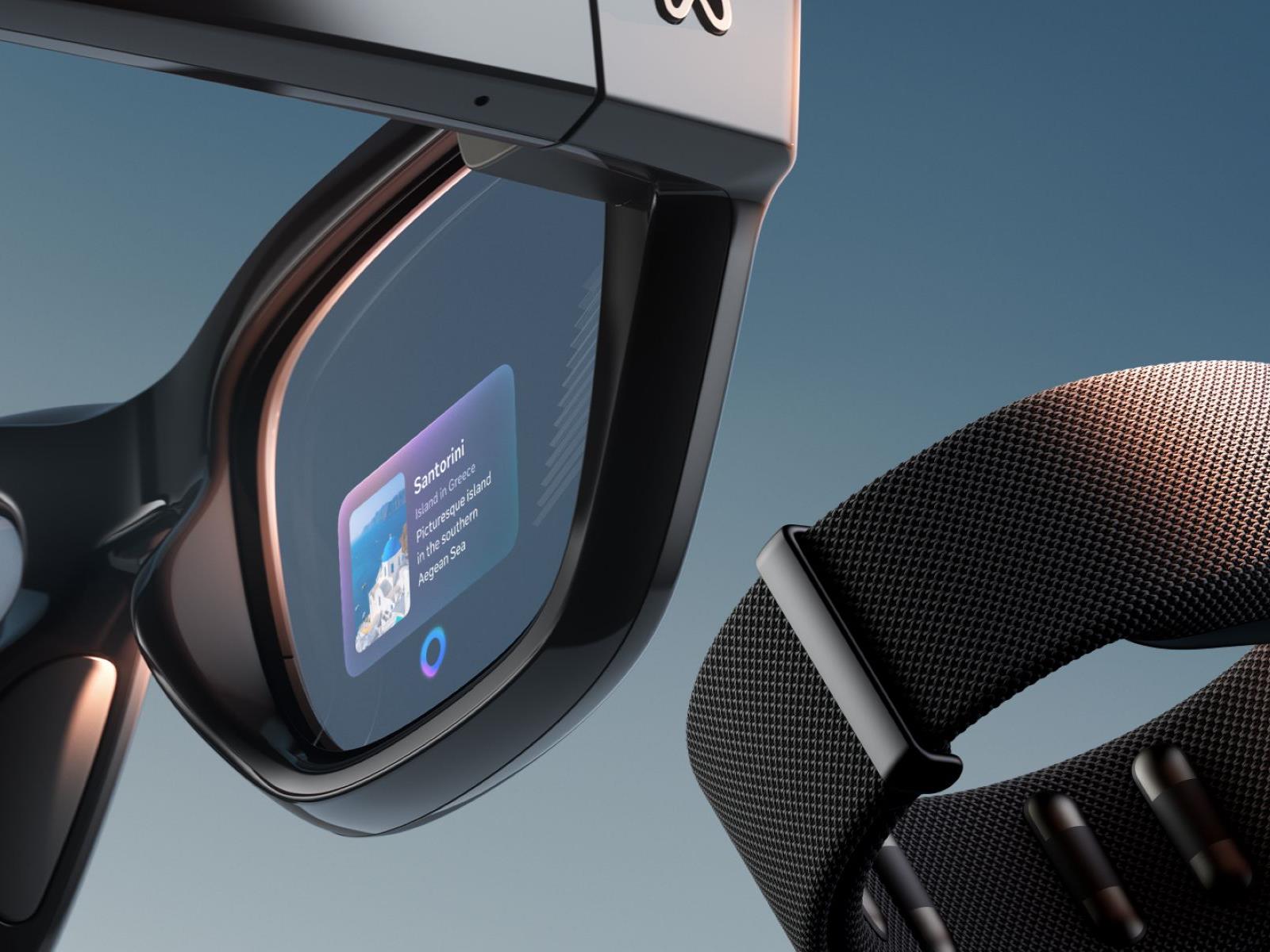
Meta’s Ray-Ban Display smart glasses are similar to the smart glasses the two companies have already been releasing since 2021, but if the name didn’t give it away already, now they have a screen inside them. This isn’t AR, so you don’t get head tracking or a large virtual display situated in your environment, but you do get a little heads-up 600×600 screen over your right eye that you can use to, say, check on texts or watch an Instagram Reel. It’s also private, according to my colleagues over at CNET, with some clever manufacturing keeping people from seeing what’s on your display through the transparent lens.

And it comes with a special “neural wristband” for actually navigating content, which can pick up thumb movements, pinches, and the like and translate them into swipes and taps.

It all sounds fancy— dare I say “innovative”?—even if it comes with a $799 price tag (the last generation of Meta Ray-Ban smart glasses was $379). But if you’re going to be dropping that much on such an unproven product, I don’t blame you for wanting to go hands-on with it before buying. And it seems, neither does Meta.

How to try out the Meta Ray-Ban Display Smart Glasses

Even though Meta’s Ray-Ban Display Smart Glasses technically start shipping on Sept. 30, you can’t buy them online. Instead, you’ll have to do an in-store demo before you can actually get a pair. These demos are available at Ray-Ban stores, but also partners including LensCrafters, Sunglass Hut, and Best Buy. You can book demos straight through a specific store’s site if you have a favorite, as seen on this Best Buy link, but the best way to see all the demos available near you is through Meta’s own site.

Just navigate to this scheduler page on the Meta site and enter your address to see participating stores near you and the dates when they have demos available. Then hit “Schedule a Demo” on a store of your choosing to be taken to that store’s site to finish booking.

While Meta’s site showed me appointments starting today, none of the stores I clicked through to had availability until October, so don’t be surprised if the scheduler’s data is a little behind.

What do you need for your Ray-Ban Display Demo?

Generally, you can just head to your Ray-Ban Display Demo and be golden. But if you wear prescription lenses, you’ll either need to wear contacts or know your lens details. Meta’s demo kits can accommodate a range of -4.00 to +4.00 prescriptions, so plan accordingly.

Then, it’s just a matter of trying the glasses on. When you’re done, you can either buy your pair, or hold off. If you wait, you’ll be sent an email with details from your appointment.

Meta says it’s limiting purchases to people who have tried a demo right now to ensure fit and satisfaction, but that more buying options will come “over time.” That’s great news for folks who live outside of the U.S., as demos are currently limited to Meta’s home country. However, the company says demos will expand to Canada, France, Italy, and the U.K. in early 2026.

LattePanda IOTA Palm-Sized Intel x86 SBC Is Here To Challenge Raspberry Pi 5

LattePanda IOTA Palm-Sized Intel x86 SBC Is Here To Challenge Raspberry Pi 5
Performance usually isn’t a first-order concern when you’re buying a single-board computer, but it definitely can have an impact on what sort of workloads you can run with your micro machine. If the performance of the Raspbery Pi 5 isn’t doing it for you, how about the new Lattepanda IOTA? This one-board beastie packs in an Intel Processor

A former Facebook lobbyist is now in charge of the EU’s Facebook regulator

A former lobbyist for Meta is now in charge of the EU’s chief regulator for big tech firms, according to reporting by The Irish Times. Niamh Sweeney has been named commissioner of the Data Protection Commission (DPC), which is one of the largest EU data protection authorities.

Prior to this, she worked at Meta for six years. Sweeney was director of European public policy at WhatsApp and head of Irish public policy at Facebook for many of those years. She becomes the third active commissioner of the regulatory body, joining Des Hogan and Dale Sutherland.

“As the responsibilities and scope of the DPC continue to grow, I am pleased that three commissioners will now lead and manage this key regulatory body,” said Ireland’s Minister for Justice Jim O’Callaghan.

� A former Meta lobbyist will join the DPC as a commissioner in October.

With this appointment, the Irish government does not even pretend to care about enforcing EU law anymore.

Read our full statement on the matter here:https://t.co/1AFv9qfKSG

— noyb (@NOYBeu) September 18, 2025

The organization has welcomed Sweeney’s appointment, saying it looks forward to “working with her as the DPC continues to uphold the EU’s fundamental right to data protection.” However, this regulatory body is notorious for being friendly to big tech, as is Ireland in general.

The country offers a low corporate tax rate and tends to be lenient when it comes to regulations. The DPC has developed a reputation for not actually calling on big tech companies to pay out fines for violating laws like the EU’s General Data Protection Regulation. As a matter of fact, the organization has only managed to collect around 0.6 percent of the billions of dollars in fines levied toward tech companies.

Some of these violations were attributed to Meta itself. The company was fined nearly $300 million after a data breach impacted Facebook accounts throughout the globe. Meta was fined another $100 million after it was found to be storing passwords in plain text, which is a GDPR violation. Here’s hoping Sweeney is willing to step up against her old bosses.

This article originally appeared on Engadget at https://www.engadget.com/big-tech/a-former-facebook-lobbyist-is-now-in-charge-of-the-eus-facebook-regulator-154444108.html?src=rss

Trump’s Golden Dome will cost 10 to 100 times more than the Manhattan Project

One thing that’s evident about President Donald Trump’s proposal for the Golden Dome missile defense shield is that designing, deploying, and sustaining it will cost a lot of money, at least several hundred billion dollars, over the course of several decades.

Beyond that, it’s really anyone’s guess. That doesn’t sit well with some lawmakers, but the Republican-controlled Congress committed $25 billion in July as a down payment for new missile-defense technologies.

The White House stated in May that Golden Dome will cost $175 billion over three years, but a new study from a center-right think tank concludes that it is simply not enough to develop the kind of multi-layer shield Trump described in a January executive order. It’s also clear that it will take longer than three years to implement the full spectrum of defense capability envisioned for Golden Dome.

Read full article

Comments

How to Adjust Strava’s Training Zones so They’re Actually Useful

Strava’s new Training Zones feature promises to help runners and cyclists better understand their training load across metrics like heart rate, power, and pace. That sounds like useful information, but if you’ve recently discovered that most of your runs fall into what’s commonly called the “gray zone” (Zone 3), take a deep breath: You aren’t doing everything wrong, you don’t need to panic, and you definitely don’t need to completely overhaul your training.

Here’s why—and how you can use training zones as the helpful tool they’re meant to be, rather than as a source of anxiety.

What are training zones?

Before diving into how Strava offers insights into training zones, let’s quickly go over what they really are. As Lifehacker senior health editor Beth Skwarecki has previously explained, talk of different zones is overhyped, since these zones aren’t clearly defined.

Most talked about is the coveted Zone 2, even though no one can agree on what exactly it is. On the flip side, I always see warnings about Zone 3 being the “no man’s land” of training—too hard to be easy, too easy to be hard. This dread is overblown.

Zone 2 training is celebrated because it helps build your aerobic base and burns calories without incurring significant fatigue. But guess what Zone 3 training also does? It builds your aerobic base, it burns even more calories, and it typically adds only marginally more fatigue than Zone 2. For most recreational runners, the difference between the zones is far less dramatic than the online discourse suggests.

Heart rate zones are indeed a completely valid way to describe how hard you’re working during a cardio workout. But it’s hardly a matter of “Zone 2 good, Zone 3 bad,” particularly given that different devices and apps define the zones differently. Your “Zone 2” might be 60% to 70% of max heart rate on an Apple Watch, but 65% to 75% on a Peloton. At 73% of your max heart rate, the Apple Watch would categorize your effort as Zone 3, while the Peloton would call it Zone 2. Which is right? Neither, really—because these boundaries are largely arbitrary.

The concept of training zones is sound when considered in the right context, but the specific percentages and boundaries aren’t set in stone. They’re guidelines, not gospel. Your physiology doesn’t magically change the moment you cross from 69% to 71% of your max heart rate. And if you’re a recreational runner focused on health and enjoyment, the difference between Zone 2 and Zone 3 is a mere technicality.

How Strava’s Training Zones actually work

Strava’s Training Zones use a familiar five-zone system. The feature allows you to filter by sport and analyze training load across different timeframes (seven days, one month, and three months), providing insights into how your training varies across activities.

Heart Rate Zones:

  • Zone 1 – Endurance

  • Zone 2 – Moderate

  • Zone 3 – Tempo

  • Zone 4 – Threshold

  • Zone 5 – Anaerobic

These zones indicate exercise intensity levels and are automatically calculated based on your max heart rate. Strava uses the standard formula of 220 minus your age, defaulting to 190 bpm if no age is provided. Your zones update automatically on your birthday unless you’ve manually set your max heart rate.

Adjust your Strava Training Zones to eliminate your workout anxiety

Luckily, you don’t need to accept the default settings as law. Strava allows subscribers to set different heart rate zones for running versus cycling, and you can adjust these zones anytime.

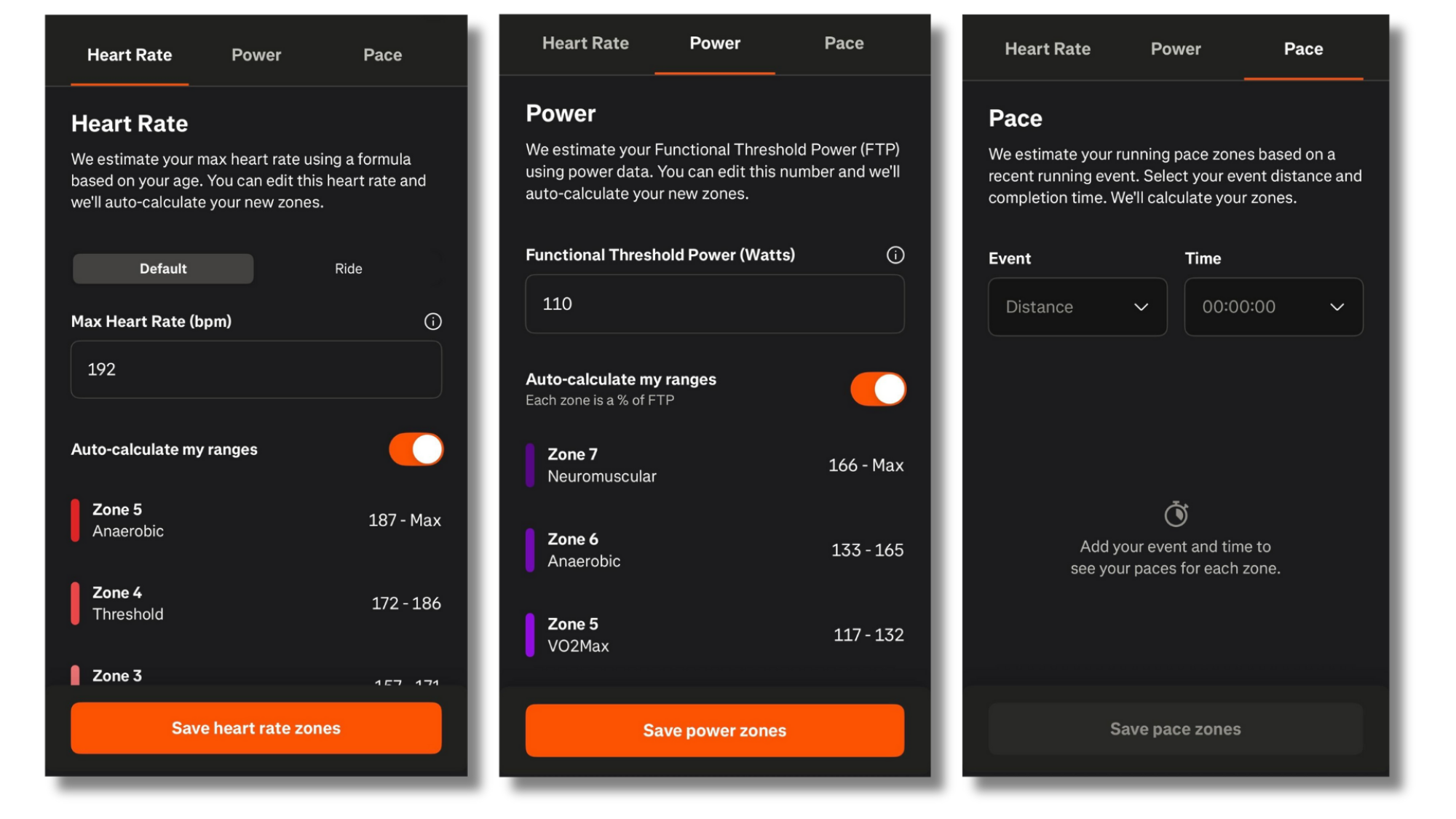
When you scroll down in the Progress tab on Strava, you’ll see Training Zones. Within that menu, select the Pencil (edit) icon. If you know your actual max heart rate from testing, use that instead of the age-based estimated maximum.

Training Zones in Strava
You can manually edit your training zones in Strava.
Credit: Meredith Dietz

Even if you don’t have exact numbers, you can adjust your zones based on feel. Your perceived exertion might be a better guide than your heart rate monitor. Toggle the “auto-calculate” option to manually adjust each individual heart rate zone. If Strava tells you you’re in Zone 3-4, but you can easily hold a conversation during that workout, you could then widen the range for Zone 2 to more accurately reflect what you know to be lower effort for you. When a run feels easy and conversational, it’s probably serving its purpose, regardless of whether your device says you’re in Zone 2 or Zone 3.

Instead of obsessing over individual workout zones, examine your training distribution over weeks and months. Are you doing mostly easy runs with some harder efforts? That’s what matters, not whether your easy pace puts you at the top of Zone 2 or bottom of Zone 3.

The bottom line

Training zones should inform your training, not dictate it. They’re tools to help you understand intensity and plan progression, not rigid boundaries that determine success or failure. Strava’s Training Zones feature can provide valuable insights into your training patterns and help you make more informed decisions about your workouts.

The next time your watch beeps to tell you you’ve crossed into Zone 3, remember: The boundaries aren’t real, but how your body feels is.

Meta Unveils $799 Ray-Ban Display Glasses, New Specs With 2x Battery & Oakley Vanguard

Meta Unveils $799 Ray-Ban Display Glasses, New Specs With 2x Battery & Oakley Vanguard
At the annual Meta Connect 2025 event, CEO Mark Zuckerberg pulled back the curtain on a new lineup of smart eyewear and in the process doubled down on the company’s aggressive push into the competitive connected glasses market. The highly-anticipated announcement included a trio of new devices: the second-generation Ray-Ban Meta, the athlete-focused

How Americans View AI and Its Impact on People and Society

Key takeaways from a new survey by Pew Research: 1. Americans are much more concerned than excited about the increased use of AI in daily life, with a majority saying they want more control over how AI is used in their lives.
2. Far larger shares say AI will erode than improve people’s ability to think creatively and form meaningful relationships.
3. At the same time, a majority is open to letting AI assist them with day-to-day tasks and activities.
4. Most Americans don’t support AI playing a role in personal matters such as religion or matchmaking. They’re more open to AI for heavy data analysis, such as for weather forecasting and developing new medicines.
5. Americans feel strongly that it’s important to be able to tell if pictures, videos or text were made by AI or by humans. Yet many don’t trust their own ability to spot AI-generated content.


Read more of this story at Slashdot.

Some dogs can classify their toys by function

Certain dogs can not only memorize the names of objects like their favorite toys, but they can also extend those labels to entirely new objects with a similar function, regardless of whether or not they are similar in appearance, according to a new paper published in the journal Current Biology. It’s a cognitively advanced ability known as “label extension,” and for animals to acquire it usually involves years of intensive training in captivity. But the dogs in this new study developed the ability to classify their toys by function with no formal training, merely by playing naturally with their owners.

Co-author Claudia Fugazza of Eötvös Loránd University in Budapest, Hungary, likens this ability to a person calling a hammer and a rock by the same name, or a child understanding that “cup” can describe a mug, a glass, or a tumbler, because they serve the same function. “The rock and the hammer look physically different, but they can be used for the same function,” she said. “So now it turns out that these dogs can do the same.”

Fugazza and her Hungarian colleagues have been studying canine behavior and cognition for several years. For instance, in 2023, we reported on the group’s experiments on how dogs interpret gestures, such as pointing at a specific object. A dog will interpret the gesture as a directional cue, unlike a human toddler, who will more likely focus on the object itself. It’s called spatial bias, and the team concluded that the phenomenon arises from a combination of how dogs see (visual acuity) and how they think, with “smarter” dog breeds prioritizing an object’s appearance as much as its location. This suggests the smarter dogs’ information processing is more similar to that of humans.

Read full article

Comments

China closes antitrust probe into Google’s Android operating system

China is ending its antitrust probe into Google, which had centered around Android’s ubiquity in the mobile world and what impact, if any, it was having on Chinese phone makers like Oppo and Xiaomi that use the software. As reported by the Financial Times, this move comes amid ongoing discussions between the US and Chinese governments over TikTok, NVIDIA, tariffs and the broader trading relationship between the world’s two largest economies.

Google’s search engine remains blocked in China, along with many of its other core products like Gmail, YouTube and Google Maps. Despite this, the tech giant still generates substantial revenue in the country through cloud services and ad sales to Chinese companies targeting overseas audiences.

According to the Financial Times, the decision by Beijing to ease up on Google is a tactical move, as China increasingly flexes its regulatory scrutiny on NVIDIA as a negotiating tool during trade talks with the US.

Earlier this summer NVIDIA struck a deal with the Trump administration to sell its pared-back H20 GPUs in China on the condition that it gives the US government 15 percent of the sales. Shortly thereafter, however, China began discouraging local companies from buying the H20 chips. Recently, the government outright banned Chinese tech companies from buying NVIDIA’s newest AI chip made specifically for the region, the RTX Pro 6000D.

In yet another move to exert control and flex power, Chinese regulators have accused NVIDIA of violating Chinese antitrust laws with its acquisition of chipmaker Mellanox. Were the chipmaker to be found in violation of China’s anti-monopoly law, the company could owe fines between 1 percent and 10 percent of its 2024 sales.

US and Chinese officials just wrapped three days of trade talks in Madrid, with President Donald Trump and President Xi Jinping set to speak on Friday. The leaders are expected to discuss a supposed framework for a TikTok deal that would cede control of the company’s US business to American companies, resulting in a roughly 80 percent stake in the entity domestically.

This article originally appeared on Engadget at https://www.engadget.com/big-tech/china-closes-antitrust-probe-into-googles-android-operating-system-145815140.html?src=rss

Meta’s $799 Ray-Ban Display is the company’s first big step from VR to AR

At last year’s Meta Connect, Mark Zuckerberg focused less on the company’s line of Quest VR headsets and more on the “Orion” prototype see-through augmented reality glasses, which he said could launch in some form or another “in the next few years.” At the Meta Connect keynote Wednesday evening, though, Zuckerberg announced that the company’s Meta Ray-Ban Display AR glasses would be available starting at $799 as soon as Sept. 30.

To be sure, Meta’s first commercial smartglasses with a built-in display are a far cry from the Orion prototype Zuckerberg showed off last year. The actual “display” part of the Ray-Ban Display is a paltry 600×600 resolution square that updates at just 30 Hz and takes up a tiny 20 degree portion of only the right eyepiece. Compared to the 70 degree field-of-view and head-tracked stereoscopic 3D “hologram” effect shown on the Orion lenses, that’s a little disappointing.

Still, Zuckerberg was able to call the 42 pixels per degree (PPD) you get on the Ray-Ban Display’s display “very high resolution,” in a sense (the Meta Quest 3 tops out at around 25 PPD across its much larger display). And hands-on reports suggest the bright 5,000 nit display is viewable even in bright outdoor scenarios, thanks in part to Transitions lenses that automatically darken to block outside light.

Read full article

Comments

MacBook Air Is Just $699, MacBook Pro Is $300 Off And More Fall Deals

MacBook Air Is Just $699, MacBook Pro Is $300 Off And More Fall Deals
Autumn has nearly arrived (the fall season officially kicks off next Monday, September 22), which means it’s a great time to go apple picking. It’s also a good time to go Apple device picking, especially if you’ve been considering a MacBook. No, they still don’t have OLED or touchscreen displays (somewhat soon, though), but there are several

Samsung’s very expensive Family Hub fridges will now treat you to ads on their displays

If you’ve just shelled out thousands of dollars on one of Samsung’s smart fridges, you’d be forgiven for expecting it to leave you alone, rather than encouraging you to spend even more money. But that is no longer the case — following a recent update, you’ll start seeing ads on the fridge’s display.

According to Android Authority, the new software update is being rolled out to Samsung’s Family Hub refrigerators in the US, and will now display ads and promotions while the display is idle. In a statement to the outlet, Samsung confirmed that it’s conducting a pilot program as part of its commitment to (brace yourselves for this one) “enhancing every day value for our home appliance customers.”

The Cover Screen on which ads show up appears when a refrigerator is not displaying something else, such as Samsung’s Art Mode or a photo album. Samsung told Android Authority that advertising won’t appear when one of these modes is active, adding that specific ads can also be dismissed and won’t appear again while the campaign is running.

What the statement doesn’t make clear is whether advertising can be turned off altogether, which again, seems like a reasonable option given that you can expect to pay anything between $1,800 and $3,500 for a Family Hub-equipped fridge. But it doesn’t appear to be possible while the pilot period is live. It also isn’t clear if any specific models are omitted from the testing.

Back in April, Samsung’s head of R&D for digital appliances, Jeong Seung Moon, told The Verge that at that time the company had no plans to bring ads to its smart home displays, but in the case of its refrigerators it appears to have changed its mind pretty quickly.

This article originally appeared on Engadget at https://www.engadget.com/home/smart-home/samsungs-very-expensive-family-hub-fridges-will-now-treat-you-to-ads-on-their-displays-143529070.html?src=rss

Apple’s 25W MagSafe charger is on sale for $35

Just ahead of the iPhone 17 lineup arriving on Friday, you can pick up Apple’s 25W MagSafe charger for a song. The two-meter version of the more powerful charging cable has dropped by 29 percent from $49 to $35. That’s a record-low price.

As it happens, that actually makes the two-meter version of the cable less expensive than the one-meter variant. The shorter cable will run you $39 as things stand.

If you have an iPhone 16, iPhone 17 or iPhone Air, this cable can charge your device at 25W as long as it’s connected to a 30W power adapter on the other end. While you’ll need a more recent iPhone to get the fastest MagSafe charging speeds, the charger can wirelessly top up the battery of any iPhone from the last eight years (iPhone 8 and later). With older iPhones, the charging speed tops out at 15W. The cable works with AirPods wireless charging cases too — it’s certified for Qi2.2 and Qi charging.

The MagSafe charger is one of our favorite iPhone accessories, and would pair quite nicely with your new iPhone if you’re picking up one of the latest models. If you’re on the fence about that, be sure to check out our reviews of the iPhone 17, iPhone Pro/Pro Max and iPhone Air.

Check out our coverage of the best Apple deals for more discounts, and follow @EngadgetDeals on X for the latest tech deals and buying advice.

This article originally appeared on Engadget at https://www.engadget.com/deals/apples-25w-magsafe-charger-is-on-sale-for-35-143415970.html?src=rss

Groundbreaking Study Discovers Microbial Life In 78 Million-Year-Old Asteroid Crater

Groundbreaking Study Discovers Microbial Life In 78 Million-Year-Old Asteroid Crater
After a catastrophic asteroid impact 78 million years ago, life didn’t just survive—it thrived, at least according to new research that provides the first direct evidence of microbial life recolonizing an impact crater. The study, which centers on the Lappajärvi impact structure in Finland, both confirms the ongoing theory that meteoric craters

How weak passwords and other failings led to catastrophic breach of Ascension

Last week, a prominent US senator called on the Federal Trade Commission to investigate Microsoft for cybersecurity negligence over the role it played last year in health giant Ascension’s ransomware breach, which caused life-threatening disruptions at 140 hospitals and put the medical records of 5.6 million patients into the hands of the attackers. Lost in the focus on Microsoft was something as, or more, urgent: never-before-revealed details that now invite scrutiny of Ascension’s own security failings.

In a letter sent last week to FTC Chairman Andrew Ferguson, Sen. Ron Wyden (D-Ore.) said an investigation by his office determined that the hack began in February 2024 with the infection of a contractor’s laptop after they downloaded malware from a link returned by Microsoft’s Bing search engine. The attackers then pivoted from the contractor device to Ascension’s most valuable network asset: the Windows Active Directory, a tool administrators use to create and delete user accounts and manage system privileges to them. Obtaining control of the Active Directory is tantamount to obtaining a master key that will open any door in a restricted building.

Wyden blasted Microsoft for its continued support of its three-decades-old implementation of the Kerberos authentication protocol that uses an insecure cipher and, as the senator noted, exposes customers to precisely the type of breach Ascension suffered. Although modern versions of Active Directory by default will use a more secure authentication mechanism, it will by default fall back to the weaker one in the event a device on the network—including one that has been infected with malware—sends an authentication request that uses it. That enabled the attackers to perform Kerberoasting, a form of attack that Wyden said the attackers used to pivot from the contractor laptop directly to the crown jewel of Ascension’s network security.

Read full article

Comments