Three people have been charged with illegally exporting NVIDIA GPUs to China

The US Attorney’s Office for the Southern District of New York has charged three people with illegally exporting NVIDIA GPUs to China in violation of the Export Control Reform Act. NVIDIA’s chips have become a critical component in the rush to train and run increasingly complex artificial intelligence models, one the US has sought to manipulate with export controls and profit-sharing schemes with NVIDIA.

The three people, Yih-Shyan “Wally” Liaw, Ruei-Tsang “Steven” Chang and Ting-Wei “Willy” Sun, two employees and one contractor working for US IT company Super Micro Computer, allegedly circumvented export control laws via a multi-step scheme that involved creating fake orders for servers with NVIDIA chips from Southeast Asian companies, that were then secretly sent to China. The plan involved paying a logistics company to repackage the servers in Taiwan, staging dummy servers to be inspected by Super Micro Computer’s compliance team and falsifying records so Liaw, Chang and Sun’s employer was unaware where the servers were actually being sent.

The DOJ claims Liaw, Chang and Sun facilitated the illegal purchase of $2.5 billion worth of servers between 2024 and 2025 in direct violation of US export laws. Super Micro Computer is not named as a defendant in the US Attorney’s indictment, but the company’s stock price has been impacted by the scheme, CNBC writes. In a statement released on Thursday, Super Micro Computer announced that it’s distancing itself from Liaw, Chang and Sun. “The individuals charged are Yih-Shyan “Wally” Liaw, Senior Vice President of Business Development and a member of the Company’s Board of Directors; Ruei-Tsang “Steven” Chang, a sales manager in Taiwan; and Ting-Wei “Willy” Sun, a contractor,” the company writes. “Supermicro has placed the two employees on administrative leave and terminated its relationship with the contractor, effective immediately.”

This isn’t the first time people have attempted to illegally smuggle NVIDIA’s products out of the US, and it likely won’t be the last time. Reportedly $1 billion worth of NVIDIA’s AI chips were illegally sold in the three months after the Trump administration tightened export controls, and back in December 2025, Texas authorities seized more than $50 million worth of NVIDIA GPUs bound for China. As long as there’s demand for AI, there’ll be demand for the hardware that makes it possible.

This article originally appeared on Engadget at https://www.engadget.com/ai/three-people-have-been-charged-with-illegally-exporting-nvidia-gpus-to-china-184928430.html?src=rss

Android’s New Advanced Flow: How To Sideload Apps After Google’s 2026 Security Update

Android’s New Advanced Flow: How To Sideload Apps After Google’s 2026 Security Update
Android’s most diehard fans were less than pleased when Google announced plans to limit the sideloading of apps, in an effort to create a more secure platform. The backlash from power users was immediate, with the developers behind the popular third-party app store F-Droid penning a scathing letter denouncing the coming clampdown. Today, fans

Here’s how not to leak military information with your Strava run

A French officer recently leaked the location of an aircraft carrier because of a run on the sports app Strava. This is not the first time this has happened, as the app tracks location data.

It was used to access the location of US military bases back in 2018 and members of the Secret Service accidentally shared their whereabouts while protecting then-US President Joe Biden. The same has happened to President Trump and other world leaders.

��� NEW: The location of the French aircraft carrier, FS Charles de Gaulle, has been given away by a sailor using Strava whilst jogging on the ship deck

[@lemondefr] pic.twitter.com/FuoKMAs06w

— Politics Global (@PolitlcsGlobal) March 19, 2026

In other words, the use of Strava to track runs is becoming a global security risk, but it doesn’t have to be. If you happen to find yourself in an undisclosed location as part of a military entourage, here are a couple of ways to keep things private.

Change the settings

Don’t want to give up those Strava runs? Just change the settings. On the web, click on “Do Not Share My Personal Information” on the feed page and then look for “Opt Out.”

This is also fairly easy for smartphone users. Just head to “Privacy Controls” for the app and follow the prompts on both iOS and Android. Both versions include an option to disable the sharing of personal information, including location data.

Use another running app

Most sports apps track location data, but they don’t all share Strava’s spotty history. There are plenty of apps out there to choose from, and some are quite good. No matter which one you download, be sure to take steps to change the privacy settings.

Run the old-fashioned way

Believe it or not, people still jogged before smartphones. Just lace up a pair of shoes and get out there. For extra protection, leave your phone and smartwatch at home.

Get a treadmill

Are you stuck on an aircraft carrier somewhere in the middle of the ocean? It could be tough to get your steps in, so consider bothering the top brass for a treadmill.

This article originally appeared on Engadget at https://www.engadget.com/apps/heres-how-not-to-leak-military-information-with-your-strava-run-183635879.html?src=rss

This Massive Data Breach Leaked 2.7 Million Social Security Numbers

Another massive data breach has compromised millions of Americans’ healthcare data and sensitive information. Navia Benefit Solutions, a benefits administrator for more than 10,000 U.S. employers, has disclosed a hack that affects nearly 2.7 million individuals, according to a March 18 filing with the Maine Attorney General.

Navia’s services include software and customer support for the administration of everything from Flexible Spending Accounts (FSAs) and Health Savings Accounts (HSAs) to commuter and education benefits.

What happened with the Navia Benefit Solutions data breach?

On Jan. 23, Navia identified “suspicious activity” on its systems, leading to the discovery that hackers had access to some of the organization’s data between Dec. 22, 2025, and Jan. 15, 2026. During this time, threat actors were able to exfiltrate a significant amount of personally identifiable information (PII), which may include the following:

  • Full name

  • Date of birth

  • Social Security Number (SSN)

  • Phone number

  • Email address

  • Health plan information

The compromised health plan data may include Health Reimbursement Arrangement (HRA) participation, Consolidated Omnibus Budget Reconciliation Act (COBRA) enrollment information, and information about users’ FSAs

Navia has said that no claims or financial data were included in the breach, though the information stolen is commonly used for social engineering attacks and identity theft.

What to do if you were affected by the Navia Benefit Solutions security breach

Navia began notifying affected individuals on March 18, so keep an eye out for a letter from Navia Benefit Solutions. If your data was included in the breach, you are eligible for one year of identity monitoring services through Kroll. Your letter will include information about how to enroll, including the deadline to sign up for services and your unique activation code. You’ll need to activate your account online at enroll.krollmonitoring.com/redeem.

As always, a major data breach is a good reminder to lock down your identity. Freeze your credit (this should be your default unless you are actively applying for a new credit line) and set up a one-year fraud alert, which adds extra friction if someone tries to apply for credit in your name. Check your credit report and financial accounts regularly for suspicious activity, and report fraud immediately to your financial institution. You can also file an identity theft report with the Federal Trade Commission and your local police department.

DOJ Charges Super Micro Co-Founder For Smuggling $2.5 Billion In Nvidia GPUs To China

Longtime Slashdot reader AmiMoJo shares a report from CNN: The co-founder of Super Micro Computer and two others were charged with diverting $2.5 billion worth of servers with Nvidia’s artificial intelligence chips to China, in violation of U.S. laws barring exports to that country without a license. Yih-Shyan Liaw, known as Wally; Ruei-Tsang Chang, known as Steven; and Ting-Wei Sun, known as Willy, were charged with conspiring to violate export control laws, smuggling goods from the U.S. and conspiring to defraud the U.S.

Liaw, who co-founded Super Micro Computer and served on its board of directors, was arrested Thursday in California and released on bail. Sun, a contractor, is held awaiting a detention hearing. Chang, who worked in the Taiwan office of Super Micro, remains at large. […] According to the indictment, the men used a pass-through company based in Southeast Asia to place orders to obscure that the servers would end up in China. The men worked with executives at the pass-through company to provide false documents to the server manufacturer to further the deception, the indictment said. They used a shipping and logistic company to repackage the servers into unmarked boxes to conceal their contents before they were shipped to China.

To deceive the manufacturer’s auditors, who checked the pass-through company for compliance with export laws, the men allegedly used “dummy” nonworking copies of the servers when the actual servers were on their way to China. Two of the defendants allegedly worked to stage the dummy servers at a warehouse rented by the pass-through company, according to the indictment. Sun took photos and videos of the staged servers to one of the compliance auditors who instead of conducting the audit was “off-site enjoying entertainment paid for” by the pass-through company, according to the indictment. In another instance, prosecutors said surveillance cameras documented individuals using hair dryers to remove labels and add labels and serial number stickers to the boxes and dummy servers. Super Micro said it’s fully cooperating with the investigation, but that hasn’t prevented its stock from plunging. It’s down nearly 30% following the news.

The company issued the following statement: “The conduct by these individuals alleged in the indictment is a contravention of the Company’s policies and compliance controls, including efforts to circumvent applicable export control laws and regulations. Supermicro maintains a robust compliance program and is committed to full adherence to all applicable U.S. export and re-export control laws and regulations.”


Read more of this story at Slashdot.

Google Just Made Four Big Upgrades to Android Gaming on Your Windows PC

Google just announced some notable upgrades to the Google Play gaming experience on Windows PCs, with improvements that cover game discovery and purchases, and the news that a broader number of paid titles are now becoming available for the desktop.

While an official Windows client for Google Play apps and games has been available for several years, these latest updates mean the experience is more polished than ever before.

There are four main changes for gamers wanting to play Android games on Windows.

  • First, Google is “actively expanding” the number of paid, premium games that are fully optimized for PCs. Android games don’t get this optimization by default, and need to be specifically tweaked to support PC gaming (keyboard controls and all), so more titles that meet this criteria will be very welcome.

  • Second, there’s a new PC section in the Play Store Games tab on mobile devices, so you can actually see which titles are going to be cross-platform compatible before you install them.

  • Third, you only need to buy a game once to use it on both mobile and desktop (something that wasn’t always the case in the past).

  • The last upgrade is Game Trials. On selected titles, you’ll be able to dive in and start playing for free—once you reach a certain limit in terms of time or progress, you’ll then be asked if you want to buy the game (and your progress will be carried over, if you do decide to make the purchase).

Google Play Games on PC

Credit: Lifehacker

It’s not clear from the announcements how long this will all take to roll out, but Google says games such as Moonlight Peaks, Sledding Game, and Low-Budget Repairs will be available on PC in the “coming months.” None of those games are live in the Play Store app on Android yet.

There’s a lot to like about running Android games on the desktop—not least a much bigger screen, and keyboard and mouse input options—so if you’re keen to dive in, here’s how you can give it a try.

How to Android games on your PC

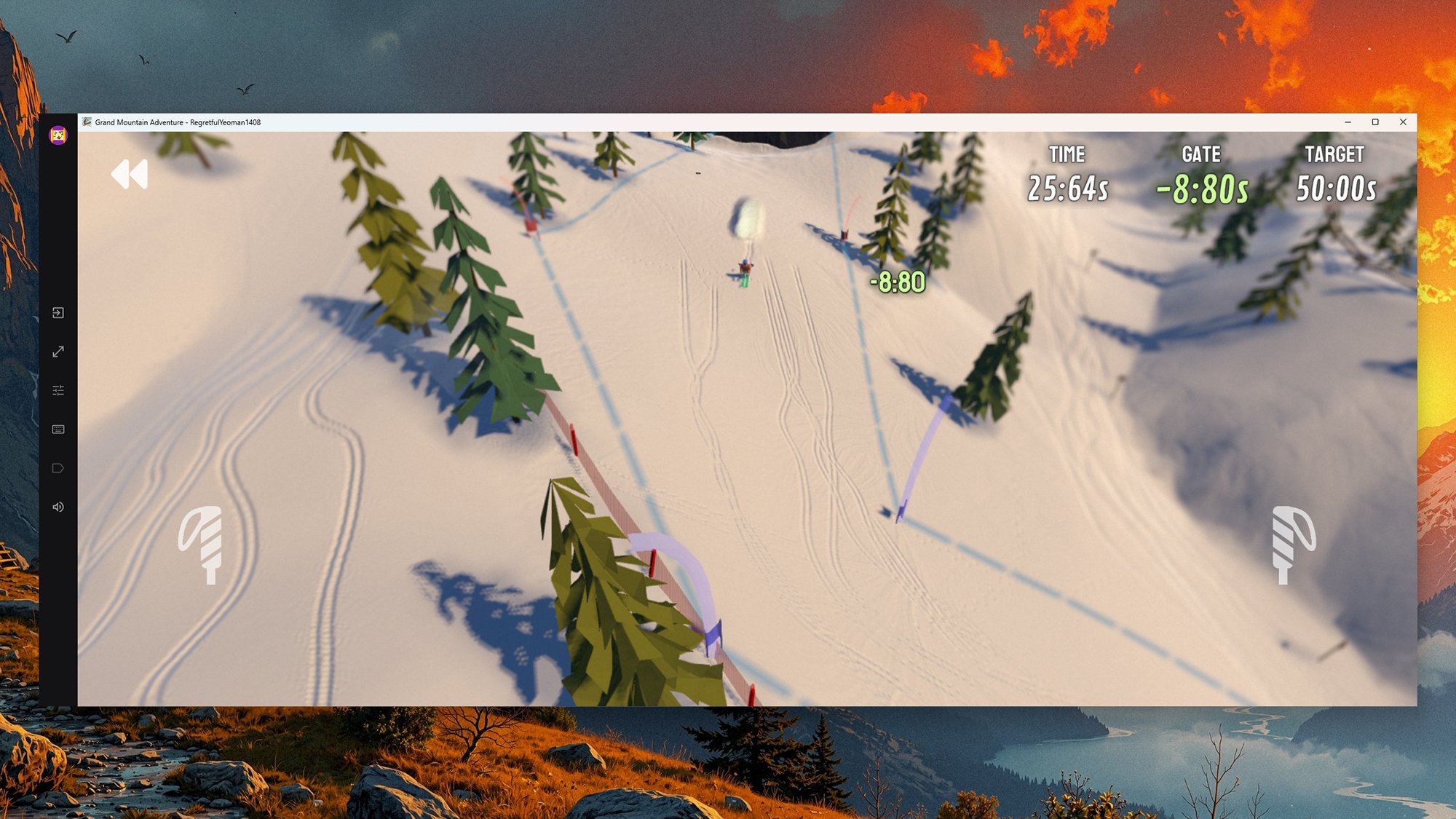
Get started by visiting the Google Play Games web portal on your Windows PC. Follow the download prompts, and you get taken through the process of installing the software and entering your Google account details (for syncing purposes). Assuming you have actually played a game on your Android device at some point, your profile and stats are carried over to the desktop.

At the end of the installation process, you’ll be shown a list of games you’ve already played that are available on Windows. You can also find this list later by clicking From your library on the home page of the Google Play Games app. The majority of the titles I’ve played on Android seem to be present and correct.

Google Play Games on PC

Credit: Lifehacker

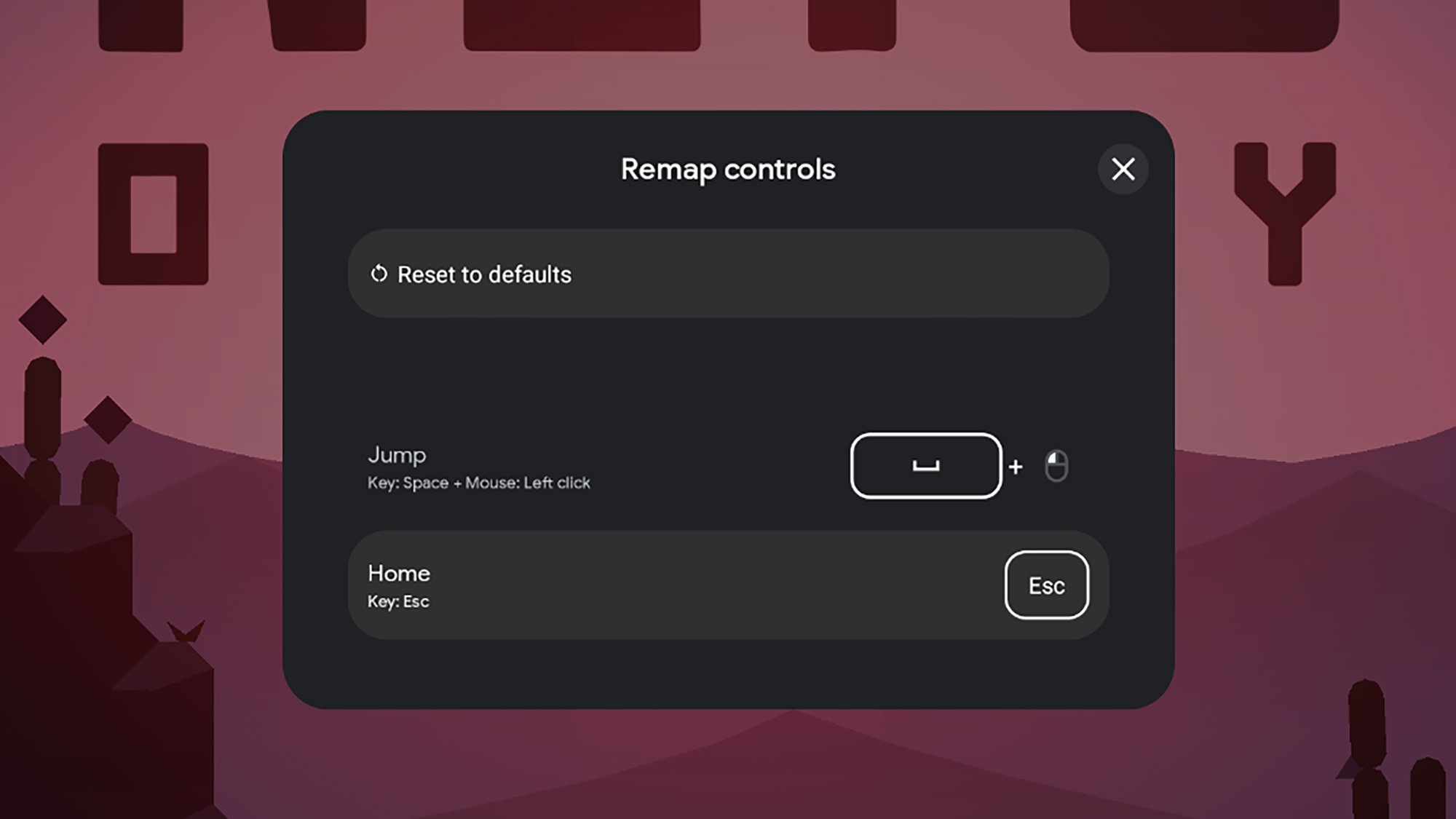
The playing experience is, on the whole, intuitive and straightforward. Most of the games I tried I had no problems with, although sometimes the desktop controls can take some working out: Click the keyboard icon to the left of the game window to remap these (you might also find some control settings within the games themselves).

You can also click the visual settings button (the sliders icon) to change how the game is displayed on screen, and there’s a volume control button on the left too. Games tend to stick to their default orientation from mobile, whether that’s landscape or portrait, but you can adjust the size of the gaming window.

The games I tried from my own library were rather hit and miss when it came to syncing up—some carried my progress over from my phone and some didn’t, so it seems likely that the onus is largely on developers to implement this right now (and it’s something Google clearly wants to improve).

Google Play Games for PC
#DRIVE on the PC.
Credit: Lifehacker

From the home page, click the magnifying glass icon to explore games from the desktop: You can filter out titles that haven’t been optimized for PC, and from what I can see, there’s already plenty to choose from. I didn’t find any Game Trials available at the time of writing, so it seems those are still in the pipeline.

Android games on PC can be a lot of fun—especially those that work properly with keyboards or gamepads—and I can see this being something a lot of gamers should set up, especially given the latest improvements. And when you’re not sitting at your Windows PC, you can carry on gaming as normal on your phone or tablet.

Will Arc A-Series GPUs Get Precompiled Shader Support? Here’s What Intel Says

Will Arc A-Series GPUs Get Precompiled Shader Support? Here's What Intel Says
You may recall that just a couple of days ago we posted about Intel’s new Arc Graphics Precompiled Shader Distribution. This is an implementation of Microsoft’s Advanced Shader Delivery, where gamers can download pre-compiled binary shaders ready to run on their Arc GPUs instead of having to sit there and slowly compile them before beginning

RFK may replace entire panel of CDC vaccine advisors again, ally lets slip

A member of an influential federal vaccine advisory panel made a dramatic claim Thursday afternoon that the panel had been disbanded following a temporary block by a federal judge and would be entirely reconstituted—again. But, just hours later, he retracted the claim, saying that it was merely a possibility.

The claim immediately caused a stir online. Public health experts began to cheer the news, given that most of the current members hold anti-vaccine views and have little to no qualifications for being on the panel—which is the Centers for Disease Control and Prevention’s Advisory Committee on Immunization Practices (ACIP). Current members were hand-selected by anti-vaccine health Secretary Robert F. Kennedy Jr., who had summarily fired all 17 experts previously on ACIP. Kennedy’s new ACIP members have since held several chaotic meetings in which they voted to roll-back CDC’s evidence-based vaccine guidance.

On Monday, Federal Judge Brian Murphy issued a temporary injunction blocking Kennedy’s ACIP members and their votes after finding that they were improperly appointed and vaccine recommendations were changed without procedural requirements. The ruling stemmed from a lawsuit brought by the American Academy of Pediatrics (AAP) and other medical groups, who challenged Kennedy’s anti-vaccine efforts.

Read full article

Comments

FBI Director Confirms Bureau Is Buying Private Data To Track Americans

FBI Director Confirms Bureau Is Buying Private Data To Track Americans
FBI Director Kash Patel confirmed in a Senate hearing on Wednesday, “We do purchase commercially available information that’s consistent with the Constitution and the laws under the Electronic Communications Privacy Act, and it has led to some valuable intelligence for us.” In 2023, the last FBI director claimed that such practices were no

Nintendo is reportedly making a Switch 2 with a user-replaceable battery for the EU

Nintendo is reportedly preparing a new version of the Switch 2 with a user-replaceable battery, according to Nikkei. This is to comply with a 2023 EU “right-to-repair” policy on portable electronics that mandates easy battery replacement.

The regulation also covers the Joy-Con 2 controllers, so they are reportedly being redesigned to allow users to replace each lithium-ion battery. We don’t know when this new Switch 2 will hit store shelves, but the policy gives companies until 2027 to make the required changes.

This is great news for Europe, but the rest of the world isn’t quite so lucky. There are no reported plans by Nintendo to bring this console refresh to other regions, but IGN notes that this could change if countries adopt similar policies to the EU. Tossing a perfectly good handheld console in the trash because the battery craps out isn’t exactly fun, so here’s hoping they do.

This EU legislation has forced other companies to make changes to their products. Apple has modified the design of newer iPhones to make it easier for consumers to swap out the battery. It’s long been rumored that Sony will update its DualSense PS5 controllers for the same reason.

The EU regulates that by 2027, all smartphones must be equipped with replaceable batteries. The new iPhone’s adoption of a stainless steel battery case not only reduces the difficulty of removing the battery to meet EU regulations but also allows Apple to increase the battery… https://t.co/jLhEbw04po

— 郭明錤 (Ming-Chi Kuo) (@mingchikuo) June 30, 2024

It has also been suggested that the original Switch may stop being sold in the EU by the end of 2027. It’s either that or redesign the now-ancient device. Nintendo hasn’t issued an official response to any of this just yet. Engadget has reached out to the company and will update this post when we hear back.

This has been a big week for the company’s flagship console. It just received a software update that lets many older games run in 1080p while in handheld mode. There’s also a little game called Pokémon Pokopia currently taking over the world.

This article originally appeared on Engadget at https://www.engadget.com/gaming/nintendo/nintendo-is-reportedly-making-a-switch-2-with-a-user-replaceable-battery-for-the-eu-172318540.html?src=rss

Perseverance’s radar revealed ancient subsurface river delta on Mars

When NASA’s Perseverance rover landed in Jezero Crater in 2021, its primary mission was to scour the remnants of a dried-up Martian lakebed for signs of ancient life. Scientists have been focused on the crater’s spectacular Western Delta, a fan-shaped geologic feature deposited by a river flowing into the basin billions of years ago. But now Perseverance’s ground-penetrating radar (called RIMFAX) detected what is likely another, even older river delta buried tens of meters beneath it.

“I think it’s a promising place to look for signs of biosignatures at depth,” says Emily L. Cardarelli. “Microbial life could have potentially developed in those types of environments.” Cardarelli, an astrobiologist at the University of California Los Angeles, led the team interpreting RIMFAX imagery.

Peeking underground

Perseverance’s RIMFAX, the Radar Imager for Mars Subsurface Experiment, continuously fires radar waves into the ground, acquiring soundings each time the rover traveled 10 centimeters. When these radio waves hit boundaries between different types of rock, ice, or sediment layers, some of the signal bounces back. The timing and intensity of these reflections allow scientists to construct a two-dimensional, vertical slice of the subsurface, much like a sonogram of the Martian crust.

Read full article

Comments

NASA is blowing stuff up to study the explosive potential of methalox rockets

For more than 60 years, nearly every large rocket used some combination of the same liquid and solid propellants. Refined kerosene was favored for its easy handling and non-toxicity, hydrazine for its storability and simplicity, hydrogen for its efficiency, and solid fuels for their long shelf life and rapid launch capability.

About 15 years ago, rocket companies started serious development of large methane-fueled engines. SpaceX and Blue Origin now build the most powerful of these new engines—the Raptor and BE-4—each capable of generating more than half a million pounds of thrust. SpaceX’s Starship rocket and its enormous booster are powered by 39 Raptors, while Blue Origin’s New Glenn and United Launch Alliance’s Vulcan rockets use a smaller number of BE-4s on their booster stages.

Burning methane in combination with liquid oxygen, these “methalox” engines have several advantages. Methane is better suited for reusable engines because they leave less behind sooty residue than kerosene, which SpaceX uses on the Falcon 9 rocket. Methane is easier to handle than liquid hydrogen, which is prone to leaks and must be stored at staggeringly cold temperatures of around minus 423 degrees Fahrenheit (minus 253 degrees Celsius). Methane is also a cryogenic liquid, but it has a warmer temperature closer to that of liquid oxygen, between minus 260 and minus 297 degrees Fahrenheit (minus 162 to minus 183 degrees Celsius).

Read full article

Comments

Netflix’s Assassin’s Creed is officially set in ancient Rome

Netflix’s live-action Assassin’s Creed show has entered production and will officially be set in Rome in the year 64AD, confirming previous reports.

The upcoming adaptation, then, will return to the setting of 2010’s Assassin’s Creed Brotherhood, although the latter’s story took place more than 1,000 years after the events we’ll see in Netflix’s show. Ubisoft confirmed in a press release that the Netflix series will tell an original story centered on a war between the Templar Order and the Assassin Brotherhood, who each have very different ideas on how the future of mankind should look.

The full ensemble cast has also now been announced. Sandra Guldberg-Kampp (Foundation), Youssef Kerkour (A Knight of the Seven Kingdoms), Mirren Mack (28 Years Later: The Bone Temple), and Louis McCartney (Broadway production Stranger Things: The First Shadow) have all been cast as recurring characters. Netflix previously announced Lola Pettigrew (Trespasses) and Toby Wallace (Babyteeth) as possible leads, along with a number of other series regulars.

Roberto Patino (Westworld, Sons of Anarchy) and David Wiener (Halo, The Killing) are serving as creators, showrunners and executive producers on the show, which is primarily filming at Rome’s iconic Cinecittà Studios. No release date has been announced.

Assassin’s Creed won’t represent the first time that Netflix has adapted a Ubisoft property. 2023’s Captain Laserhawk: A Blood Dragon Remix was based on a Far Cry 3 expansion, and last year Sam Fisher made his TV debut in the broadly well received Splinter Cell: Deathwatch.

This article originally appeared on Engadget at https://www.engadget.com/entertainment/streaming/netflixs-assassins-creed-is-officially-set-in-ancient-rome-171533234.html?src=rss

Chuck Norris Dies At 86

Longtime Slashdot reader SchroedingersCat writes: Chuck Norris, known for his roles in action films and as Texas Ranger Cordell Walker on the TV show “Walker, Texas Ranger,” passed away on March 19, leaving behind a legacy of inspiring millions around the world. He was 86.

He became Internet phenomenon after “Chuck Norris Facts” went viral online with such wildly hyperbolic statements as, “Chuck Norris had a staring contest with the sun — and won,” and, “When Chuck Norris does push-ups, he doesn’t push himself up, he pushes the Earth down.”

His death was announced by his family through his official Instagram account, but no further details were immediately available. He was hospitalized earlier that day in Hawaii after experiencing a medical emergency, the family said.


Read more of this story at Slashdot.

Here’s How Google’s ‘Safer’ Sideloading Works on Android

While Google has plans to severely restrict Android users’ ability to download apps from sources other than the Google Play Store, the company is introducing a new process that will allow sideloading after a mandatory 24-hour waiting period. This new “advanced flow” setting is meant to prevent users from installing malware distributed by bad actors through unverified sources, while still allowing them to sideload from legitimate developers.

Sideloading restrictions are coming to Android

Last year, Google announced that sideloading on Android would eventually be limited to verified third-party app stores and developers. This change has a clear goal: cracking down on malicious apps impersonating real ones found on the Google Play Store. These restrictions—which go into effect for Brazil, Indonesia, Singapore, and Thailand later this year, and apply globally in 2027—will eventually require developers to register specific details with Google in order to distribute their apps, as well as pay a fee. (Students and hobbyists will be still able to share apps with up to 20 devices without registering or requiring users to go through the new workaround.)

This move was met with significant criticism from both developers and users, with concerns ranging from privacy infringement (developers now need to share details they didn’t previously have to) to increased difficulty accessing modified or downgraded versions of apps. As such, Google is rolling out a compromise it feels will protect most users from malware, while allowing power users to sideload when they wish to.

Google is introducing a sideloading workaround

The new advanced flow setting will add multiple points of friction to unverified app installation, cutting into the sense of urgency scammers frequently use to distribute malware. Users will go through a one-time process to disable security protections—meaning you won’t need to repeat it every time you want to sideload—but you’ll still see a warning when you attempt to install an app from an unverified developer.

If you’re interested in this workaround, you will first need to enable developer mode in your device’s Settings app and confirm you are not being coerced into disabling security protections on your device (a common scam tactic). Next, you’ll need to restart your phone, which shuts down calls and remote access tools scammers may use to communicate with you or control your device. From here, you’ll have to wait 24 hours before you can return and authenticate the settings change using biometrics or your device PIN. Finally, you’ll confirm you understand the risks, which then allows you to install apps from unverified developers for seven days, or indefinitely.

This workaround will be available starting in August—before developer registration requirements kick in.

Amazon is reportedly developing an AI-centric smartphone

Amazon is developing a new smartphone over a decade after discontinuing the Fire Phone, Reuters reported today, citing four anonymous “people familiar with the matter.”

Reuters said the phone is codenamed Transformer but couldn’t confirm what it might cost, how much Amazon has invested into development thus far, or how much Amazon expects to make off the device. Like any product reportedly under development, it’s possible that Amazon will never release the phone. Reuters’ sources noted that Transformer could be cancelled over finances or a change in strategy.

When reached for comment by Ars Technica, an Amazon spokesperson declined to comment on Reuters’ report.

Read full article

Comments

Amazon Plans Smartphone Comeback More Than a Decade After Fire Phone Flop

Amazon is reportedly developing a new AI-focused smartphone that doesn’t rely as heavily on traditional apps. “The phone is seen as a potential mobile personalization device that can sync with home voice assistant Alexa and serve as a conduit to Amazon customers throughout the day,” reports Reuters. From the report: As envisioned, the new phone’s personalization features would make buying from Amazon.com, watching Prime Video, listening to Prime Music or ordering food from partners like Grubhub easier than ever, the people said. They asked for anonymity because they were not authorized to discuss internal matters. A key focus of the Transformer project has been integrating artificial intelligence capabilities into the device, the people said. That could eliminate the need for traditional app stores, which require downloading and registering for applications before they can be used. Alexa would likely be a core feature but not necessarily the primary operating system of the phone, the people said. When Amazon launched the Fire Phone in 2014, it aimed to compete directly with offerings from Samsung and Apple. Instead, the device received mixed reviews and failed to impress reviewers, leading Amazon to abandon the effort just over a year later.


Read more of this story at Slashdot.

10 Chrome Hacks for iOS and Android Everyone Should Know

You might think that Chrome for mobile is just a mini version of Google’s desktop browser, designed for quickly browsing the web, while all your serious work can only happen on your computer. While Chrome for desktop will likely always be more capable, Chrome for mobile has its own share of powerful features that you should explore. Once you customize its cluttered home screen, you’ll find a browser where organizing and pinning tabs is intuitive, blocking notifications is easy, and every website opens in dark mode.

Use pinned tabs to keep track of important pages

Pin tabs in Chrome for iOS and Android.
Option to pin tabs in overflow menu. Below: Pinned tabs section.
Credit: Khamosh Pathak

On desktop, you might be used to pinning tabs to gain quick access to important pages. For example, I always keep Gmail and Trello pinned in my default browser. This keeps the bookmarks bar and bookmark folders free for link organization. But Chrome for Android and iOS lacked this feature until fairly recently. If you didn’t know you could do it, it might be time to start pinning tabs on your device, especially when it comes to tablets.

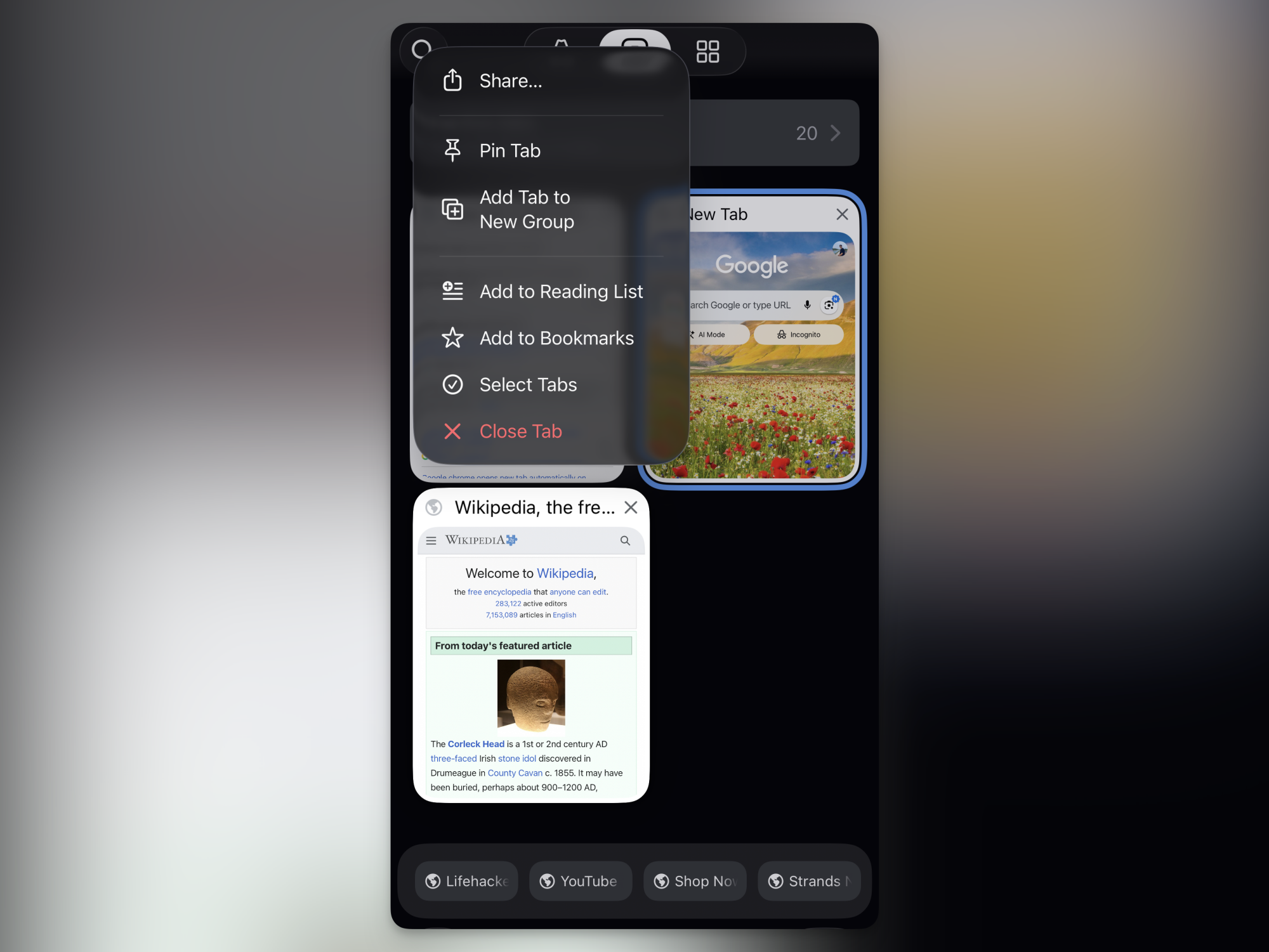
Pinning tabs in Chrome for mobile is slightly different than on desktop, though. After opening a page, you’ll have to open the Tabs menu. Then, tap and hold on a page and tap the Pin Tab button. Pinned tabs show up in a special pill-shaped “Pinned Tabs” section at the bottom of the tab switcher. Tapping on one will instantly take you to the pinned page. One added advantage? When you close all tabs because of tab overload, pinned tabs won’t disappear.

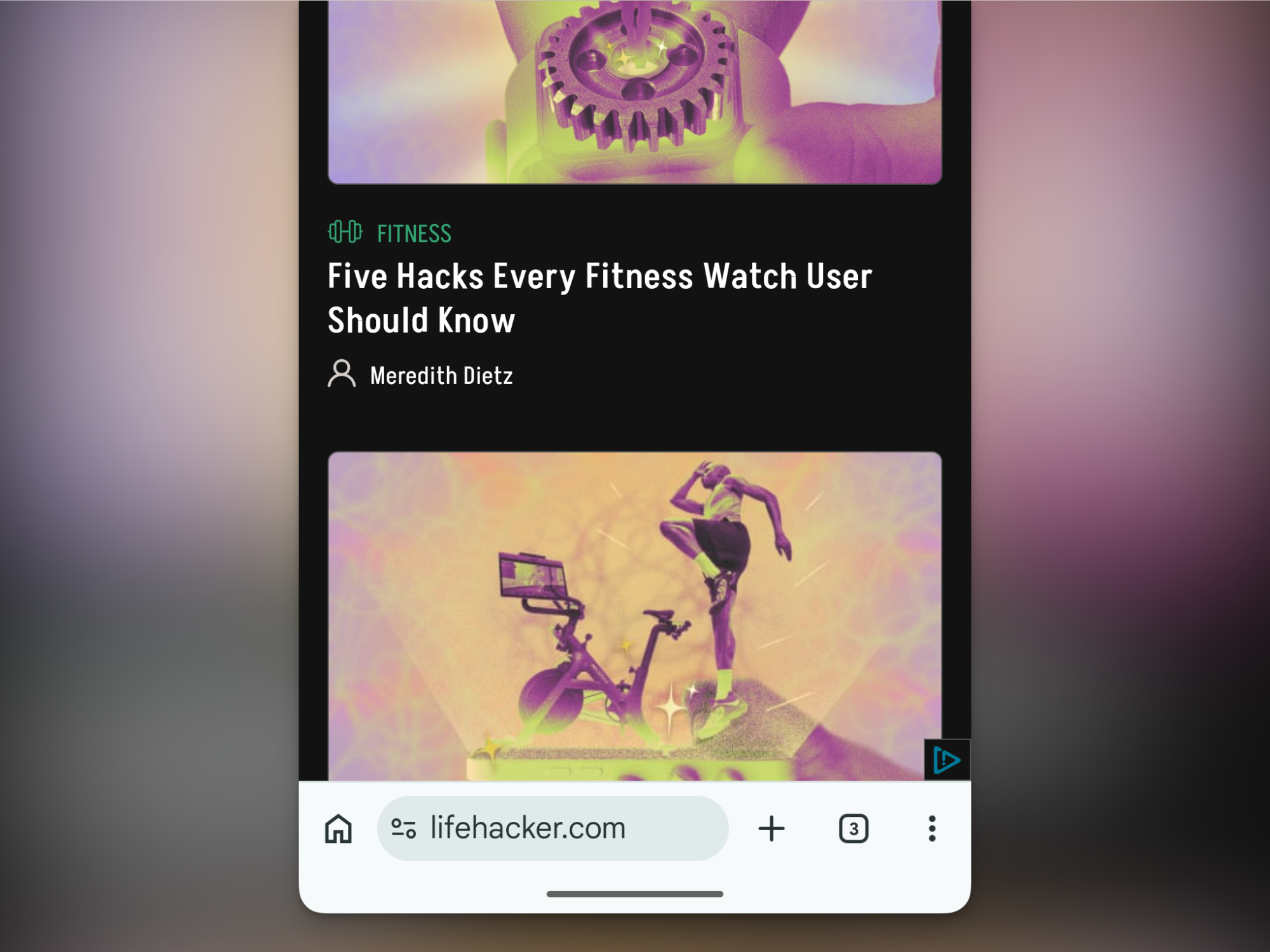
Prevent tab overload by closing old inactive tabs

Automatically close old inactive tabs on Android

Credit: Khamosh Pathak

Safari on iPhone automatically closes tabs that are older than 30 days. Chrome has something similar for Chrome for Android, but the feature on the iOS version is surprisingly limited.

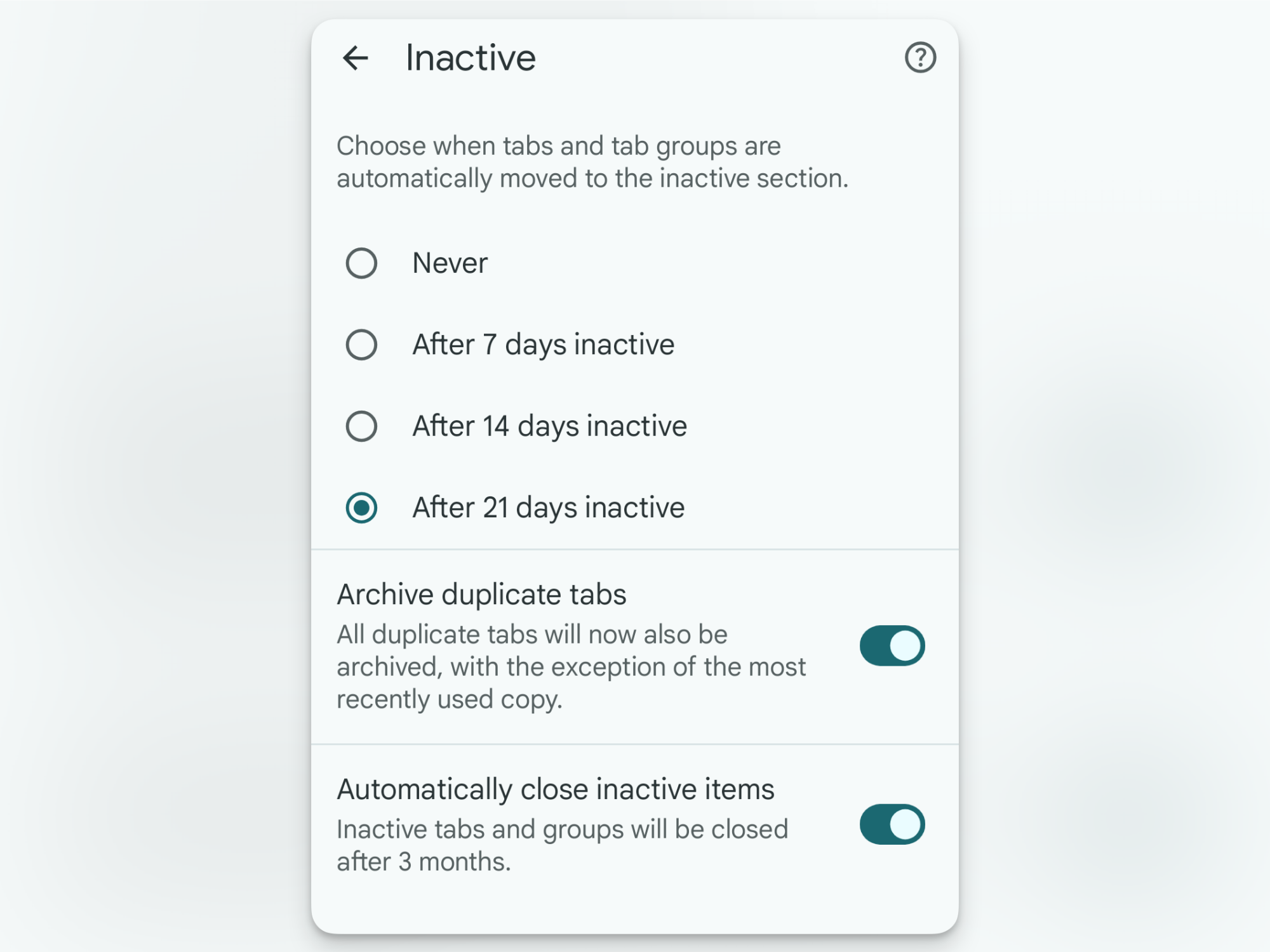
By default, any tab that you don’t use for 21 days automatically gets moved to “Inactive Tabs.” You’ll find this section at the top of the Tabs page. This means that when you open the main Tabs screen, you’ll only see tabs that you’ve used recently. But just because the inactive tabs are tucked away, that doesn’t mean they’re gone. If you have hundreds of inactive tabs cluttering things up, it’s time to close them manually. Go to the Inactive Tabs section, tap the Close all inactive tabs button, and confirm from the popup. Every time the list gets a bit too crowded, go in and clear it out.

Android users, though, get a Safari-like option to automatically close any tabs that haven’t been active for over three months (iOS users don’t have this option yet). Go to Settings > Tabs and tab groups > Move to inactive session and make sure that the Automatically close inactive items feature is enabled.

Move Chrome’s address bar to the bottom

Move address bar to the bottom of the screen.

Credit: Khamosh Pathak

Speaking of Safari-like features, Chrome now has an option to move the address bar to the bottom of the screen on both Android and iPhone. This is great news for anyone who uses a giant phone like I do. (Why Google doesn’t just switch this to the default, I will never know.) To move the address bar to the bottom, simply tap and hold on the address bar, then tap the Move address bar to bottom button. Going forward, there will be no need to stretch your fingers just to switch to another website.

Use “Send to Your Devices” to open your mobile links on desktop

Send links from Chrome for mobile to desktop.

Credit: Khamosh Pathak

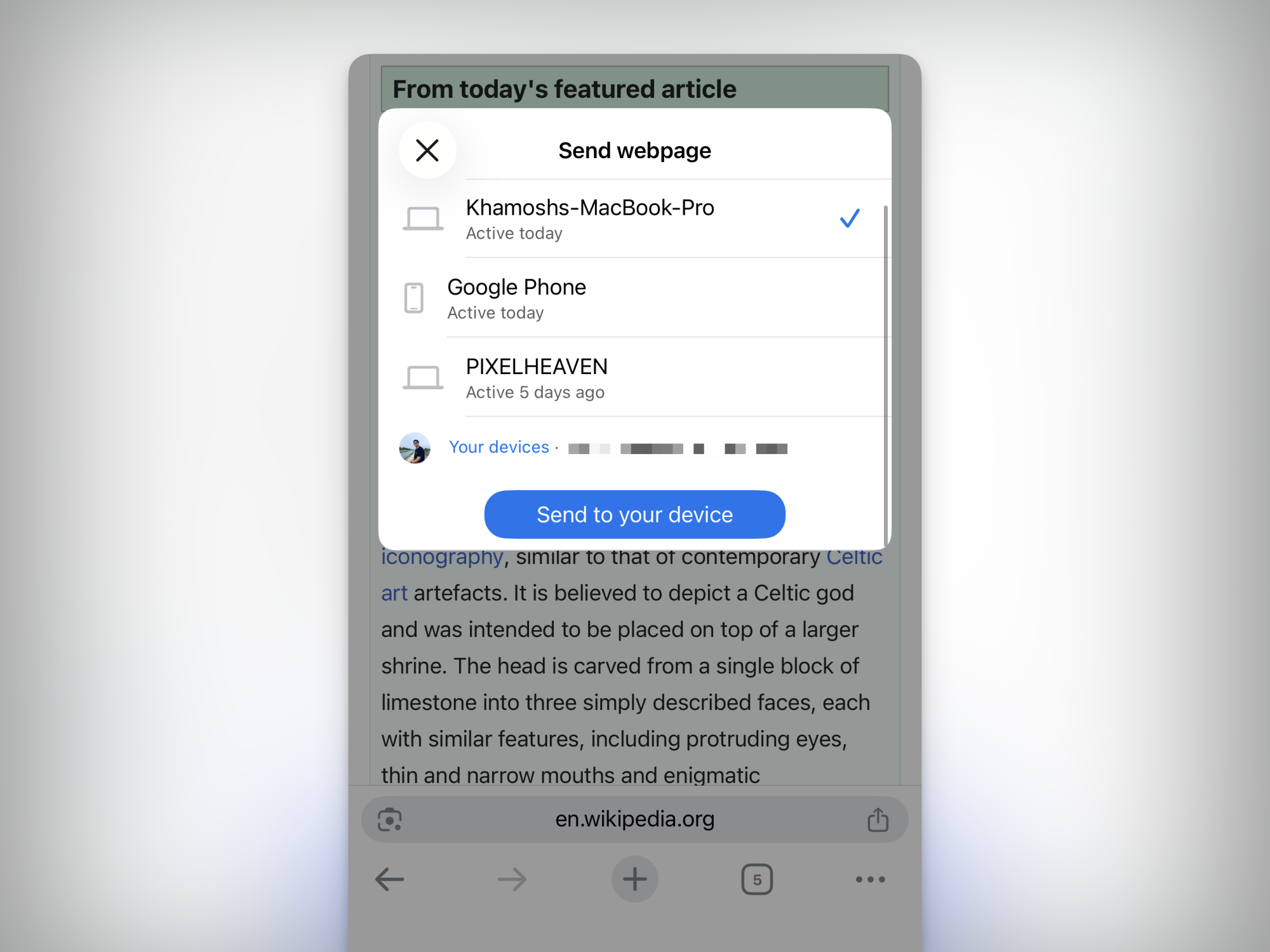
If you use Chrome on both mobile and desktop, you can use a little-known feature to send any link from your phone to the Chrome desktop app. On your smartphone, tap the Share button and choose the Send to Your Devices option. From the list, select the Chrome browser where you want to send it to, and tap the Send to your device button. The next time you open Chrome, you’ll see a popup saying that a page was shared from one of the devices. Click on Open in new tab to resume reading or working on the website on your computer.

Block websites from spamming you with notifications (Android only)

Don't allow notification popups on Android

Credit: Khamosh Pathak

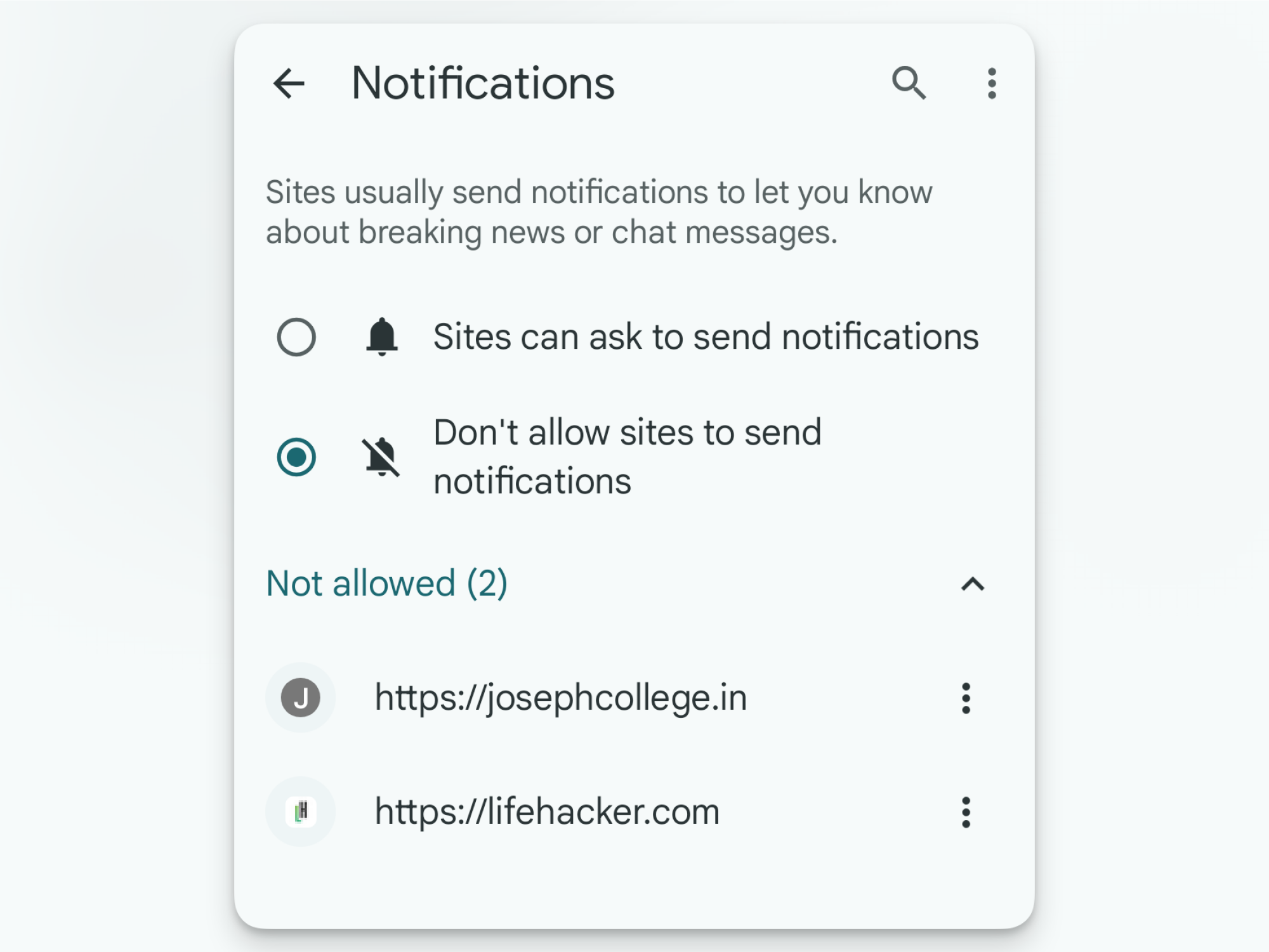
Spammers love to abuse Chrome for Android’s notification system. Every random website you visit wants to send you alerts, and if you tap “Allow” even once, you’re inundated with dozens of notifications a day. Luckily, Chrome has an option that blocks all sites from even presenting a popup for enabling notifications. Go to Settings > Site settings > Notifications and switch to Don’t allow sites to send notifications. Websites won’t be allowed to ask you for notification access, and they won’t be able to send you notifications either. If you want to keep the feature enabled, you can also disable notifications on a per-site basis from the section.

Set up your phone so Picture-in-Picture works on any website

Picture in Picture video playing using Chrome on Android.

Credit: Khamosh Pathak

Picture-in-picture isn’t just for YouTube and media apps. Chrome also supports this feature natively on both Android and iOS. This means you can tune in to any website’s video, and watch it in a little floating window no matter if they have a dedicated app or not. As long as Picture-in-Picture is enabled on your phone, all you have to do is to open the video playback, and go to the home screen. (This works with YouTube as well, but only if you’re paying for YouTube Premium.) On iPhone, you’ll even see a PiP button in the native video player, which will automatically close the app, and bring you to the home screen with the video still playing in the floating window.

If Picture-in-Picture is not enabled, you can set it up from the Settings app. On Android, go to Apps > Special app access > Picture-in-Picture > Chrome and enable the “Allow picture-in-picture” feature. On your iPhone, go to Settings > General > Picture in Picture and make sure that the Start PiP Automatically feature is enabled.

Use this setting to force any website into dark mode

Force website into dark mode.

Credit: Khamosh Pathak

If you use dark mode on your phone, you might be use to being blinded when you open a news site that only offers a light theme. But there’s a simple fix here: All you need is to enable an experimental feature that forces all websites into dark mode, with a black background and white text (without impacting any media or images).

Go to the Chrome address bar and enter “Chrome://flags.” Search for “dark” from the top. In the Auto Dark Mode for Web Contents option, tap on the drop-down and switch to Enabled, then tap the Relaunch button to restart Chrome. This works on both Android and iOS.

Lock Incognito tabs when you leave Chrome

Locked Incognito tabs in Chrome for Android

Credit: Khamosh Pathak

Incognito tabs are private for a reason, and yet, they’re as accessible as your standard tabs. Fortunately, Chrome has a feature that can automatically lock Incognito tabs when you leave the browser—again, something that should be enabled by default.

On Android, go to Settings > Privacy and Security and enable Lock Incognito tabs when you leave Chrome. Verify using your fingerprint or passcode to enable the feature. On iOS, the steps are slightly different. Go to Settings > Privacy and security > Hide Incognito tabs. Here, you can either choose to hide the tabs after 10 minutes, or, better yet, use Lock Immediately with Face ID option for a safer route.

Remove the Discover feed and customize the start page

Chrome New Tab Page Personalization.

Credit: Khamosh Pathak

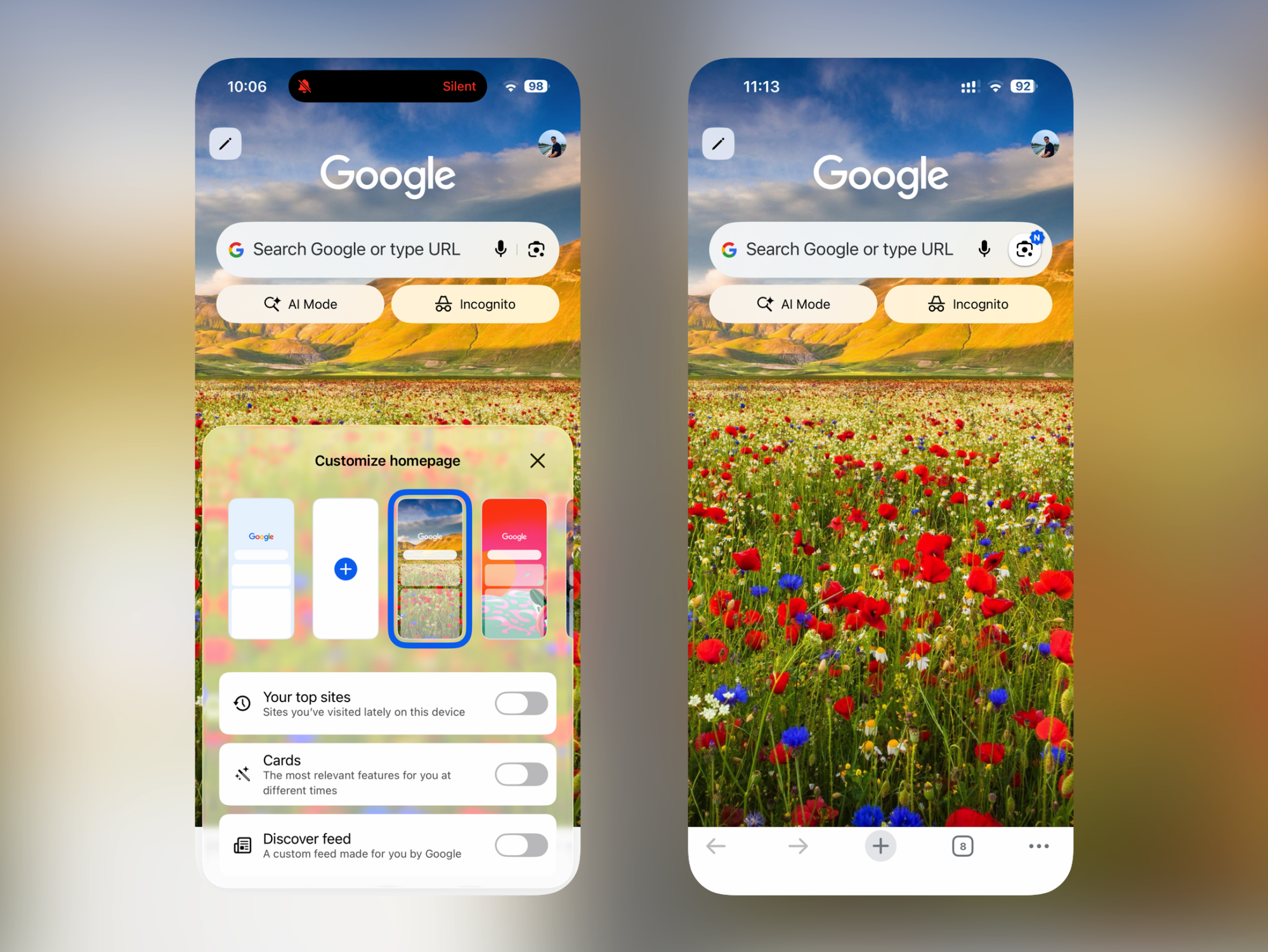
Chrome’s start page can be a bit much, especially on iOS. What you want is quick access to the address bar or the search bar, but that’s precisely what’s farthest to reach. Instead, what you’ll find are sections for your top sites, card suggestions, and, of course, the Discover feed, where Google shows you all the articles you might be interested in.

Thankfully, this start page is customizable, and you can disable all three sections to keep things clean and simple. Tap “Edit” from the top-left corner of the new tab page, and disable each feature that you no longer wish to use. When all features are disabled (and you’ve switched to a calmer background), you’ll likely find the new tab page is much more useful.

Join the beta to test out new features early

Google Chrome install beta for Android

Credit: Khamosh Pathak

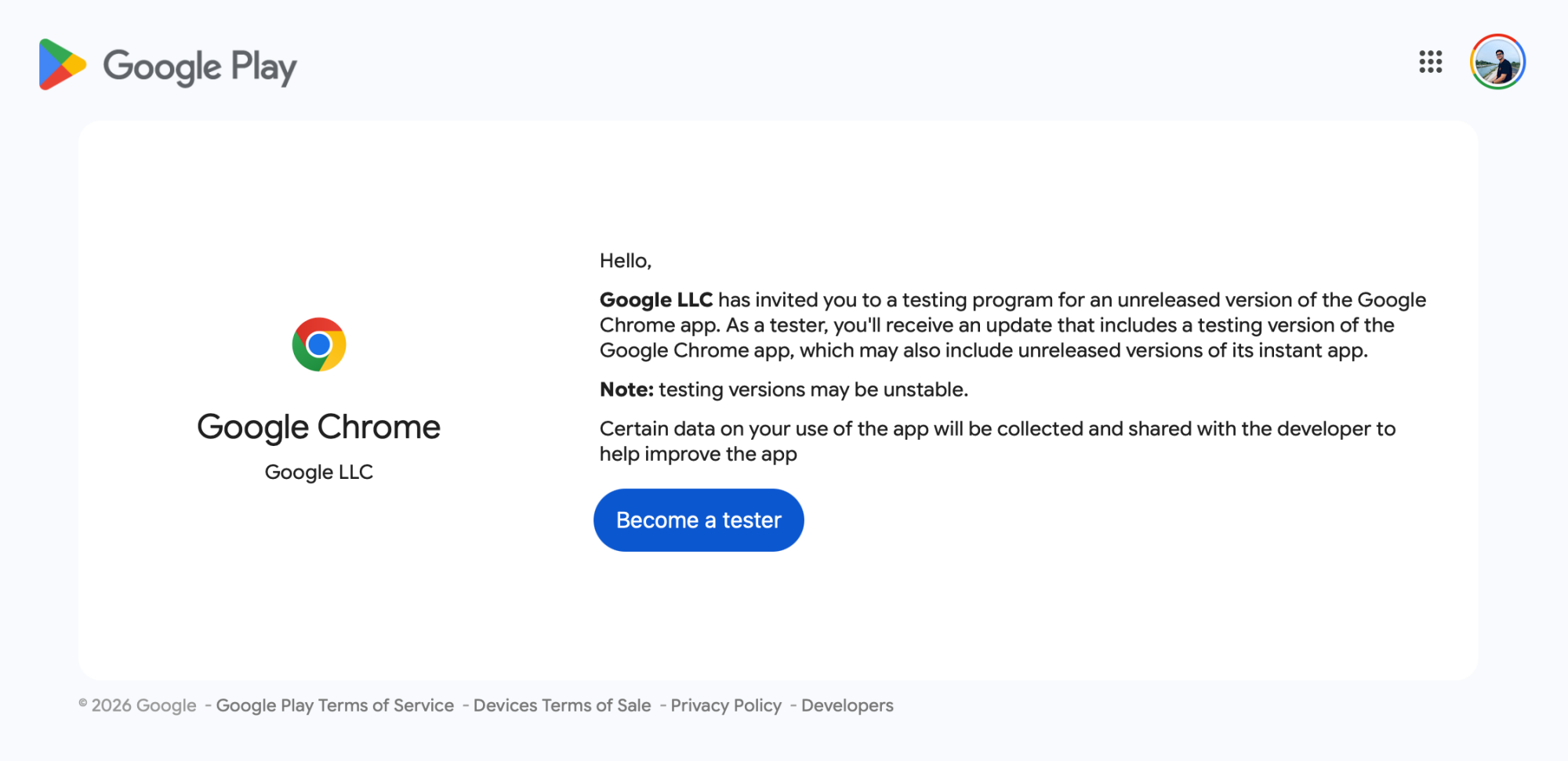
If you like being on the bleeding edge of tech, you can test new Chrome features before anyone else gets their hands on them, whether you have an iPhone or Android. On iOS, it’s as simple as installing the Google Chrome beta from the TestFlight app. If you already have the app installed, the beta version will replace the stable app. On Android, visit the Google Chrome beta testing site, log in with the Google Play account you use on your smartphone, and choose Become a tester. Once enrolled, you will get an update for Chrome that will switch you out to the latest beta version. If you want to leave the program and return to the stable build, go back to the same website, and use the Leave the program button.

Project Hail Mary could teach humanity a thing or two

It’s hard not to find the premise of Andy Weir’s Project Hail Mary instantly compelling: Something is slowly killing the sun and threatening life on Earth. That same mysterious force, dubbed the Astrophage, also destroyed every nearby star — except one. Our only hope is to visit that solar system and figure out what helped it survive. And there’s just one middle school science teacher who can do it. 

At its core is Weir’s love of technical problem solving, along with a tremendous performance by Ryan Gosling in full nerd hero mode as the aforementioned science teacher (and former molecular biologist). It’s the sort of sweeping sci-fi epic that will make a whole generation of kids ready to science the shit out of humanity’s future problems. And maybe it’ll remind clueless adults that we gain much more by working together to solve global issues, instead of being purely self-interested.

The film starts with Gosling’s character, Ryland Grace, waking up from an induced coma with no memory. He’s shocked to find that he’s light years away from Earth, and that the other two members of his crew are already dead. As he gets his bearings, he recalls that he was sent on a last-ditch mission, Project Hail Mary, to save the sun and everyone on Earth. No pressure! These early moments make it clear that screenwriter Drew Goddard (who also adapted The Martian), as well as directors Phil Lord and Chris Miller, can deftly juggle comedy alongside the inherent drama in the story.  

There’s something genuinely moving about the mission. With about 30 years before the planet is faced with a global cooling event likely ending in mass starvation, Earth’s major political powers put aside their differences and deliver their finest scientific minds to come up with a solution. You can really take your pick with real-world parallels, like the impending climate crisis, or the increasing threat of nuclear war. Simply seeing the world work together feels meaningful in these bleak times. And unlike other space disaster films like Armageddon and Interstellar, cooperation, rather than NASA alone, is the only way forward.

Ryan Gosling in Project Hail Mary.
Jonathan Olley for Amazon

Sure, humanity’s hope for survival ultimately falls on the shoulders of one of the most attractive white men on (or in this case, off) the planet, but you know, movies. It’s also not a spoiler to say that Grace isn’t entirely alone on his journey. As already revealed by the film’s trailers and a ton of social media clips, he’s also joined by a crab-like being made of rock, which he simply calls Rocky. They eventually learn to communicate, and it’s revealed that Rocky is also on a mission to save their own home planet. 

While we get brief glimpses of life on Earth, and the planning of Project Hail Mary, for the vast majority of the film we’re just left with Grace figuring things together with a rock alien. And yet, the film never drags. It’s a testament to Gosling’s inherent charm, but he also demonstrates an incredible ability to shift from joy and goofiness, to sheer terror, to leading-man heroics on a dime. It’s also hard to take your eyes off of Rocky, who is rendered with a loving mixture of practical puppetry and CG. We’ve never seen a creature like them before – one that, despite having no eyes or mouth, manages to connect with viewers mostly through their very expressive arms.

Ryan Gosling in Project Hail Mary.
Jonathan Olley for Amazon

Project Hail Mary is ultimately a work of pulp sci-fi as told by an author who loves deeply nerdy technical solutions, as well as a writer and directors who know precisely what makes a great blockbuster tick. But the notion that humanity can collectively come together to do the impossible always tugs at my heartstrings a bit. And yes, there’s the power of friendship, too. In this moment, when things seem particularly bleak, these ideas seem especially meaningful.

This article originally appeared on Engadget at https://www.engadget.com/entertainment/tv-movies/project-hail-mary-could-teach-humanity-a-thing-or-two-154327806.html?src=rss

Major SteamOS update adds support for Steam Machine, even more third-party hardware

Valve’s Steam Machine desktop is currently in a state of involuntary limbo, driven by historically awful pricing and availability for memory and storage chips. AI data centers are absorbing much of what memory manufacturers can produce, leaving much less for enthusiast and hobbyist hardware like the Steam Machine and the Steam Frame VR headset. Even the years-old Steam Deck is currently out of stock thanks to component shortages.

But that hardware uncertainty hasn’t stopped Valve from working on the software, and the company released a major update this week. The SteamOS 3.8.0 preview release comes with a long list of changes for the Steam Deck as well as third-party gaming handhelds and other PC hardware, and it also adds “initial support for upcoming Steam Machine hardware.”

Many of the update’s improvements come from various upstream Linux components. Valve says the update includes a new Arch Linux base, an updated graphics driver, version 6.16 of the Linux kernel, and a new version of the KDE Plasma desktop environment for Desktop Mode (which now uses Wayland rather than X11).

Read full article

Comments