Google Pixels Are Still Having Problems Calling 911

For the past few years, Google’s Pixel phones have had recurring problems with calling 911, and the issue has once again reared its ugly head. Over the past 24 hours, multiple users on Reddit have complained about being unable to call 911, while the Bell carrier in Canada issued a warning that the Pixel 6 and up was also having problems contacting emergency services on its network.

According to user Fabulous_Disaster730, who posted yesterday about difficulties contacting emergency services during a gas leak, her Pixel 9 Pro repeatedly prompted her to turn on wifi calling or turn off airplane mode before she could call 911, despite her having full signal on both 5G and wifi. The phone would then freeze and restart. After multiple attempts, she resorted to asking a friend to place the call for her instead.

Multiple replies mentioned facing similar problems yesterday as well, across multiple networks and models of Pixel. Bell, however, was the only carrier to issue an official notice.

Aside from the obvious danger, the problem with this bug is that it’s not consistent. Despite seemingly having had a surge yesterday, it’s been a known issue as far back as 2021. However, it doesn’t affect all users, nor is it entirely predictable when or how it will pop up. While recent reports are of calls simply not going through, one user posted two months ago that their call did go through, but they only heard screeching and static on the other end of the line. These recent reports are only the latest in an ever-evolving concern.

It’s also not clear what’s causing the problem. In 2021, the problem was attributed to Microsoft Teams, but even with that error patched up, users are still facing problems. To Google’s credit, Bell said it reached out to the company shortly after it learned about yesterday’s uptick in cases, and afterwards said that a fix had been issued. However, no other carriers have issued similar notices, and I wouldn’t be surprised to see other users making their own complaints in the future.

It’s worth noting that Bell mentioned that Pixel 6 users and up were the ones affected this time around, and that the Pixel 6 also happened to release in 2021, which is when the bug first started making news. Whatever is at the core of the problem here, I wouldn’t be surprised if it worked its way in on the Pixel 6 and just hasn’t yet been addressed.

However, given the severity of the issue, it’s something that needs looking at sooner rather than later. I’ve reached out to Google for comment on this issue, and will update if I hear back. In the meantime, it’s best to be prepared in case the worst happens. If you’re on a Pixel phone, here’s what you can do to contact 911 in an emergency:

First, try to place a 911 call

If you have time and the danger is not immediate, it’s worth trying to call 911 on your Pixel despite the issues. While users reporting problems have increased as of late, it’s still not an everyone or every time problem. It’s possible your call will still go through without issue.

You can also text 911

If, however, you are unable to call 911, it’s worth remembering that in certain jurisdictions (check this regularly updated list to see if where you live is supported), you can also contact 911 via text. This is a slower method of reaching out for help, but is still better than nothing. To text 911, open your texting app, put in 911 as the recipient, and write a concise message with your issue, your location, and any necessary specifics, like cross streets, landmarks, a specific hiding location, or whether you’re able to talk.

Use a backup phone

While I don’t expect someone who isn’t constantly reviewing tech to have multiple phones on hand, the surest method to ensure you’ll be able to call 911 if you’re on a Pixel is to keep a backup phone that isn’t a Pixel handy. This could be a landline or another cell phone. Crucially, it can be an old cell phone, even one that isn’t actively attached to a phone plan. So long as your phone is able to connect to a network, it’s legally required to be able to call 911, so if you have an old phone you’ve upgraded from and haven’t traded in laying around, it may be smart to keep it charged up in case you need it in an emergency.

DNA and jolts of electricity get people to make optimal antibodies

One of the things that emerging diseases, including the COVID and Zika pandemics, have taught us is that it’s tough to keep up with infectious diseases in the modern world. Things like air travel can allow a virus to spread faster than our ability to develop therapies. But that doesn’t mean biotech has stood still; companies have been developing technologies that could allow us to rapidly respond to future threats.

There are a lot of ideas out there. But this week saw some early clinical trial results of one technique that could be useful for a range of infectious diseases. We’ll go over the results as a way to illustrate the sort of thinking that’s going on, along with the technologies we have available to pursue the resulting ideas.

The best antibodies

Any emerging disease leaves a mass of antibodies in its wake—those made by people in response to infections and vaccines, those made by lab animals we use to study the infectious agent, and so on. Some of these only have a weak affinity for the disease-causing agent, but some of them turn out to be what are called “broadly neutralizing.” These stick with high affinity not only to the original pathogen, but most or all of its variants, and possibly some related viruses.

Read full article

Comments

US Expands Facial Recognition at Borders To Track Non-Citizens

The U.S. will expand the use of facial recognition technology to track non-citizens entering and leaving the country in order to combat visa overstays and passport fraud, according to a government document published on Friday. Reuters: A new regulation will allow U.S. border authorities to require non-citizens to be photographed at airports, seaports, land crossings and any other point of departure, expanding on an earlier pilot program.

Under the regulation, set to take effect on December 26, U.S. authorities could require the submission of other biometrics, such as fingerprints or DNA, it said. It also allows border authorities to use facial recognition for children under age 14 and elderly people over age 79, groups that are currently exempted. The tighter border rules reflect a broader effort by U.S. President Donald Trump to crack down on illegal immigration. While the Republican president has surged resources to secure the U.S.-Mexico border, he has also taken steps to reduce the number of people overstaying their visas.


Read more of this story at Slashdot.

Halo: Campaign Evolved is a remake of the original story, coming to Xbox, PC and PS5 in 2026

Before there’s a new Halo game, Halo Studios is revisiting the past. Xbox has announced Halo: Campaign Evolved, a remake of the first game in the storied shooter series, Halo: Combat Evolved, developed by Halo Studios and coming to Xbox, PC and PS5 in 2026.

Halo: Campaign Evolved is described as “a faithful yet modernized remake” of the first game’s campaign, with updated visuals and cinematics, “refined controls” and “three brand-new prequel missions featuring the Master Chief and Sgt. Johnson.”

The game will feature new weapons, vehicles and enemies, along with the all-important option for two-player splitscreen co-op on console. The game will also support cross-platform play with PS5 for the first time, and four-player online co-op between consoles and PC.

Halo: Campaign Evolved will be available in 2026 for Xbox Series X / S, PS5 and PC.

This article originally appeared on Engadget at https://www.engadget.com/gaming/xbox/halo-campaign-evolved-is-a-remake-of-the-original-story-coming-to-xbox-pc-and-ps5-in-2026-203913552.html?src=rss

ChatGPT’s AI Browser Has a Nasty Security Vulnerability

This week, OpenAI released ChatGPT Atlas, the company’s first AI web browser. Atlas lets you surf the web like any other browser, but, as you might expect, comes with ChatGPT integration. You can log into your account and tap into the assistant via the sidebar menu, which will remember not only past conversations, but your browsing history as well. Like other AI browsers—namely Perplexity Comet—the browser has an “agent mode,” which can take actions on your behalf. You can ask it to order you food through DoorDash or buy you plane tickets on Kayak instead of doing those things yourself.

While that might sound useful to ChatGPT fans, I had trouble recommending the browser to people, considering the security vulnerabilities AI browsers are currently facing. Any browser that has agentic features is vulnerable to prompt injection attacks: Bad actors can lace websites with hidden malicious prompts that the AI accepts as if they were written by the user. It might therefore take actions on behalf of the hacker, like opening a financial site or rooting through your email. Seems like a large risk just to outsource some basic internet tasks to an AI bot.

But prompt injections aren’t the only vulnerability Atlas currently faces. According to a new discovery, the browser may put the user’s clipboard at risk as well.

How Atlas’s clipboard injection vulnerability works

Android Authority spotted a post on X by the ethical hacker known as Pliny the Liberator. According to Pliny, ChatGPT Atlas is vulnerable to clipboard injection, a type of attack that allows a bad actor to access your computer’s clipboard. The idea is this: A bad actor can add a “copy to clipboard” feature to a button on their website. When you click the button, a malicious script runs in the background, which allows the bad actor to access your clipboard and add whatever they want to it. Maybe it’s a URL to a website designed to install malware on your devices; maybe it’s a URL to a site impersonating a financial site. Whatever the case, you don’t know your clipboard has been hacked, so you might open a new tab and paste what you think was the last thing you copied, falling into the trap.

The particular risk with ChatGPT Atlas is its agentic features: When in agent mode, Atlas might click a malicious button like this on its own, without you even knowing it. One moment, you’ve asked Atlas to order you lunch; the next moment, the browser accidentally set you up to be hacked.

Pliny says that OpenAI has evidently trained Atlas to recognize prompt injections, but the core “copy clipboard” function is hidden away from the AI’s sights. It’s a clever trick: The bot can hover over the button without knowing anything is wrong with it, so it “clicks” it without triggering any red flags.

For anyone that copies and pastes items frequently throughout the day, this could be quite dangerous. You might copy something in one app, then ask ChatGPT Atlas to do something on your behalf. But without knowing it, the browser clicks a malicious link that adds something to your clipboard. You then paste in your browser window, thinking you still have the original item copied, but you’re taken instead to a website that claims your banking session has expired, and you need to log in. If you’re multitasking quickly, you might “sign in” without thinking, handing over your bank credentials and 2FA codes without realizing it.

These are hypotheticals. At this time, there haven’t been documented cases of this type of malicious activity affecting ChatGPT Atlas. At the same time, ChatGPT Atlas is two days old. To me, the risk here doesn’t seem worth the execution—especially since I have no issue using the internet on my own.

Razer Raiju V3 Pro PS5 Controller Is Coming To Dominate Esports With Flagship Features

Razer Raiju V3 Pro PS5 Controller Is Coming To Dominate Esports With Flagship Features
It took a while, but Razer has finally introduced a pro controller for the PS5, dubbed the the Raiju V3 Pro, that keeps the PlayStation layout. The signature symmetrical analog stick design is here, and so too are the other Razer controller signatures we’ve come to expect from Razer gamepads. This includes magnetic TMR analog sticks, which

Official LEGO The Goonies Set Is One-Eyed Willy’s Pirate Ship

Hey you guuuuys, in their unending quest to snatch up all my Christmas money before my grandma even sends it, LEGO has announced an official The Goonies build set in the form of One-Eyed Willy’s pirate ship as seen at the end of the movie (plus some of the booby traps below for good measure). The set contains 2,912 pieces, costs $330 *spit-takes pieces of protein bar* and will release November 4th. It also contains 12 minifigs, including all the Goonies, Brand, the Fratellis, Andy and Stef, and two of the best minifigs of all time: Sloth and One-Eyed Willy. I’d almost buy the set for those two alone. Almost. Actually, can I just buy them? The pirate ship is cool and all, but grandma’s $20 only goes so far. Usually just to the nearest gas station for a lotto scratcher trying to double it.

The Android-powered Boox Palma 2 Pro fits in your pocket, but it’s not a phone

Digital reading devices like the Kindle have existed for almost 20 years, and the standard eReader form factor has hardly changed at all. Amazon, Boox, and a few other companies have offered larger E Ink screens, but how about something smaller? Boox has unveiled its second-generation Palma e-reader, which still fits in your pocket but adds a color screen and mobile data connectivity.

The first-gen Palma launched last year, earning fans who saw it as a way to read and access some apps without the full spate of distracting smartphone experiences. Boox e-readers are essentially Android tablets with E Ink screens and a few software quirks that arise from their unofficial Google Play implementation. The second-gen Palma might offer more opportunities for distraction because it’s almost a smartphone.

The Palma 2 Pro upgrades the 6.1-inch monochrome display from the original to a 6.13-inch color E Ink Kaleido display. That’s the same technology used in Amazon’s Kindle Colorsoft. The Amazon reader is a bit larger with its 7-inch display and chunkier bezels. Of course, the Kindle isn’t trying to fit in your pocket like the Palma 2 Pro, which is roughly the size and shape of a phone.

Read full article

Comments

Amazon’s AWS Shows Signs of Weakness as Competitors Charge Ahead

Amazon Web Services basically invented the cloud computing business and once held nearly half the market. That dominance is slipping. AWS captured 38% of corporate spending on cloud infrastructure services last year, down from almost 50% in 2018, according to Gartner. Microsoft now grows its backlog of corporate sales faster than Amazon. The company that brushed aside incumbents and transformed an internal startup into Amazon’s profit engine now faces internal bureaucracy that has slowed it down.

Bloomberg interviewed 23 current and former AWS employees who described management layers that proliferated after a pandemic hiring binge. One sales engineer who was six managers from Jeff Bezos before the pandemic found himself fifteen rungs from CEO Andy Jassy earlier this year. AWS hesitated to invest in Anthropic when the AI startup was spending most of its cash on Amazon servers.

Executives doubted the Anthropic AI could be monetized and were culturally reluctant to pay for external technology they believed could be built in-house. Google invested in early 2023. Amazon followed that September with $4 billion in commitments. On Thursday, Google said it will supply up to 1 million AI chips to Anthropic.


Read more of this story at Slashdot.

What the Science Says About Red Light Therapy for Athletic Recovery (so Far)

Red light therapy devices are everywhere—from lamps, to full-body mats, to those glowing face masks flooding my social media feed. I usually see red light therapy advertised for “younger-looking skin,” but I’m not interested in these devices as a means to slow down aging—I’m interested in them as a recovery-obsessed athlete with very sore muscles.

These gadgets promise to boost athletic performance, speed muscle recovery, and reduce inflammation, all by bathing your body in specific wavelengths of red and near-infrared light. But do these trendy tools live up to the hype, especially for muscle recovery?

What red light therapy advocates claim

Red light therapy devices typically emit light in the red (620-670 nanometers) and near-infrared (800-850 nanometers) spectrum. Manufacturers claim these wavelengths penetrate the skin to stimulate cellular activity, specifically targeting the mitochondria (the energy-producing powerhouses inside our cells). The purported benefits include enhanced muscle recovery, reduced inflammation, improved circulation, decreased muscle soreness, and even performance gains.

It all sounds scientific enough: the light supposedly helps mitochondria produce more ATP (cellular energy) and triggers the release of beneficial compounds like nitric oxide, which improves blood flow and activates repair processes throughout the body. But let’s dig into what these gadgets can actually do.

What the science actually says

Surprise, surprise: The science is more nuanced than marketing materials suggest. According to Dr. Wesley Buckle, a licensed naturopathic doctor, “the data on red light therapy is not definitive. Some studies show that it can help with delayed onset muscle soreness and muscle recovery. However, the evidence is mixed. Most of the studies that have found a positive benefit are small, short-term ones.”

While the research shows potential, there’s a significant gap between what manufacturers claim and what the evidence actually supports, Buckle says he’s seen “claims of enhanced performance, improved circulation, and muscle recovery” that are ultimately overblown. “The evidence supports mild improvements in muscle fatigue. It doesn’t support dramatic claims of large gains and strength or performance boosts.”

This is a crucial distinction. If you’re expecting red light therapy to transform your performance or replace proper training, you’ll be disappointed. The benefits appear to be modest and supportive rather than revolutionary.

Another critical factor is device quality. McCall McPherson, a physician associate and founder at Modern Thyroid Clinic and Modern Weight Loss, says that “not all devices are created equal. The effectiveness depends heavily on the wavelengths used, power output, and build quality of the device.” It’s important to distinguish between medical-grade panels built with specific, researched wavelengths and all the cheaper consumer devices that may not deliver the necessary light intensity or correct wavelengths to produce biological effects.

There’s certainly promising research, but this research is based on specific wavelengths (typically 620-670 nm for red light and 800-850 nm for near-infrared) and specific energy doses. Many budget-friendly devices don’t meet these parameters, which means they’re unlikely to produce the results seen in clinical studies.

Should you consider red light therapy?

For the average athlete, red light therapy could be a useful addition to a recovery routine—but with important caveats. Buckle advises prioritizing the fundamentals: “Sleep, nutrition, and proper training are all extremely important. Without these things, red light therapy won’t help. It can’t replace these practices…Red light therapy could be a good supportive recovery tool for most people. However, it’s best to focus on the basics first, such as proper training.”

McPherson is more enthusiastic, saying, “I really do think red light therapy can be a great recovery tool for casual athletes when used correctly.” She notes that for best results, athletes should look for quality medical-grade devices and use them consistently right before or after workouts on the specific muscles trained. “It’s not magic,” says McPherson, “but it’s one of the most well-researched, noninvasive tools we have for reducing soreness and speeding up recovery between workouts.”

The bottom line

Red light therapy for muscle recovery isn’t pure snake oil; there’s legitimate science supporting its use as a supportive recovery tool. However, the benefits appear to be modest improvements in muscle soreness and recovery rather than dramatic performance enhancements. The evidence is still evolving, with many studies being small and short-term.

If you’re considering adding red light therapy to your recovery arsenal, remember these key points: First, nail the basics. No amount of red light will compensate for poor sleep, inadequate nutrition, or improper training. Second, invest in quality. If you decide to try red light therapy, choose a medical-grade device with the correct wavelengths and power output rather than the cheapest option on Amazon. Third, be consistent. The research shows benefits with regular use, not occasional experimentation.

Finally, manage your expectations. Think of red light therapy as a potentially helpful tool for reducing soreness and supporting recovery—not a miracle device that will dramatically transform your athletic performance.

Mouse: P.I. for Hire arrives in March 2026

We finally have a release date for Mouse: P.I. for Hire. The delightfully animated game, which marks Troy Baker’s first time playing a rodent private eye, is slated for March 19, 2026.

Based on its trailers, you’d be forgiven for viewing Mouse: P.I. for Hire as Cuphead meets Doom. Although it does include FPS action, Engadget’s Jessica Conditt discovered surprising depth behind its whimsical brutality. The game “has more to offer than shock-value cartoon violence,” she wrote. “This is a clue-gathering, photo-snapping, girlfriend-avenging, noir detective simulator that happens to star a bunch of slick-talking mice and rats, and I’m fully into it.”

Baker plays Private Investigator Jack Pepper, the game’s protagonist. When he isn’t hunting clues or sneaking around during the game’s quieter moments, he’ll have a delightful arsenal on hand. This includes wacky ones like a turpentine gun that melts the inked “skin” of your foes. Fun stuff.

Like Cuphead, Mouse‘s most obvious point of comparison, it uses hand-drawn frames to recreate that old-school style. It also deploys an original jazz soundtrack recorded by an orchestral ensemble. It’s all presented in a gritty, film noir aesthetic.

You can check out the release date trailer below. Mouse: P.I. for Hire will launch next March on PC, Switch 2, Switch, PS5/4, Xbox Series X/S and Xbox One.

This article originally appeared on Engadget at https://www.engadget.com/gaming/mouse-pi-for-hire-arrives-in-march-2026-195454228.html?src=rss

YouTube Has a New Look on Mobile

Last week, YouTube started rolling out a new look across both the web and its various apps, promising a “more expressive and intuitive interface.” In reality, the reaction has been mixed. The TV app, for instance, no longer automatically rewinds or fast forwards when you press back or forward, instead navigating between buttons including “like” or “subscribe.” More than once while on TV, I’ve accidentally subscribed to a channel without meaning to, before realizing that I now need to press up first to get to the progress bar.

Now, the changes have reached the YouTube mobile app, as first spotted by 9to5Google. While they’re a bit more mild than you’ll see on TV, there’s still a few changes to get used to.

Bigger, chunkier icons

New icons in YouTube mobile app

Credit: Michelle Ehrhardt

By far, the most noticeable new change is YouTube’s new suite of icons, which all look like they’ve been hit with a “Ctrl + B.” Compared to the old look, the play, fast forward, and other buttons all look larger and bolder, with the idea being to make them more prominent.

Some of the buttons have also been consolidated. When watching a video in landscape, buttons that don’t affect playback (like, dislike, comment, etc.) all now appear together in a pill in the bottom-left corner, rather than as separate elements.

New animations

New buttons aren’t the only change YouTube has in store for you. Seeking videos also has a new animation now, and on some videos, liking now comes with a bit of extra personality.

New seek animation on YouTube

Credit: Michelle Ehrhardt

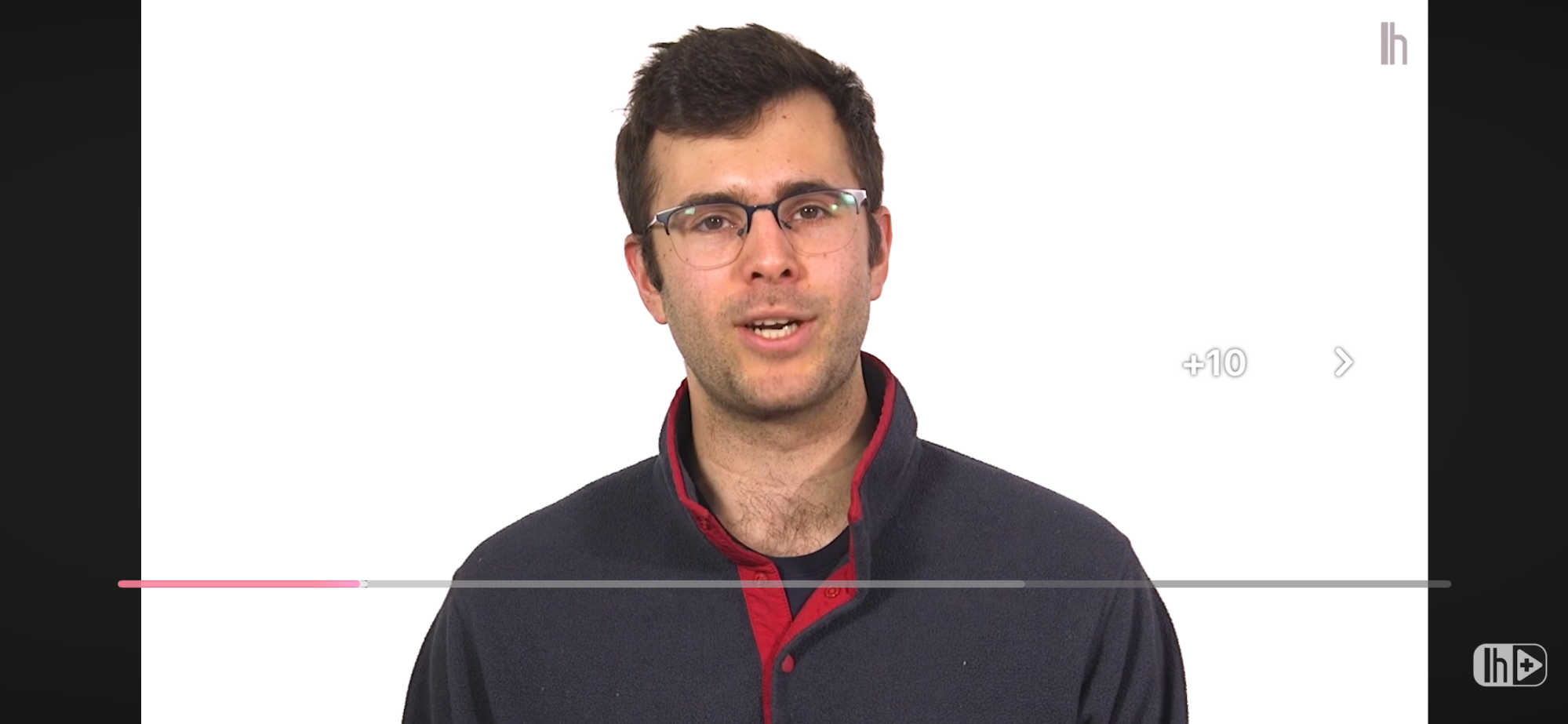
The first is a pretty minor change. Now, when you double tap the screen to either go forward or back 10 seconds, the video will just automatically jump to the new spot and display a big “-10” or “+10,” rather than showing a quick animation of three arrows disappearing into each other with a smaller “-10 seconds” or “+10 seconds” below them.

New like interaction on YouTube

Credit: Michelle Ehrhardt

The second is a bit cuter. On certain videos, tapping the “like” button will now play a custom animation, rather than simply putting some sparkles around a thumbs up. For instance, on a music video, you’ll now briefly see a musical note replacing the thumbs up.

Pausing no longer darkens your background

It used to be that pausing a video would darken the background until you unpaused it, kind of like lights being lowered on a stage. That’s no longer the case. While you’ll still see the lights go slightly down while you have controls open, a paused video will now display as normal if you tap again to dismiss the controls. It’s a small tweak, but could prove useful for taking screenshots. At the same time, though, I do worry that it might make it easy to think a video has frozen, if you’re not paying attention.

Nested comments and easier bookmarks

Finally, Google has removed a few steps to saving and commenting on videos.

Now, hitting the bookmark icon to save a video to a playlist has fewer steps, no longer requiring you to navigate multiple pages. Instead, it’ll just pause the video and open a list of your playlists for you, where you can quickly tap the playlist you want to save your video to.

YouTube nested comments

Credit: Michelle Ehrhardt

Additionally, comments are threaded now, easily showing who is replying to which comment. It’s a great way to keep track of the flow of the conversation, although it does make each comment take up a bit of extra space.

Can you get rid of the new YouTube UI?

Ultimately, I’m a little torn on the new YouTube app. Certain new features, like threaded comments, just make sense to me. But the chunkier buttons do feel like they get in the way a bit to me, and I can’t help but think of Fisher-Price when I see them.

Unfortunately, there’s not a lot you can do if you don’t like the new YouTube mobile interface. It’s still rolling out, so it’s possible you might not see every change yet. But because it’s server-side, once it hits you, that’s it. Even the web player is getting these changes, so leaving the app behind isn’t a viable option.

That said, if you’re on desktop, users on both Reddit and YouTube itself are putting together extension lists that you can mix and match to customize your experience. Technically, there are browsers for mobile that will allow you to play with these as well, with Firefox being the big one these days. However, I found that most of the suggested extensions no longer worked for me or weren’t available for mobile.

In that case, if you’re sick of how YouTube looks now, you might want to consider an alternate player app instead, like Play. It still relies on embedded videos, so it won’t save you from every change, but its overall minimalist style could offer welcome relief from YouTube’s increasingly busy design language.

Hackers Used Thousands of YouTube Videos To Spread Malware

Hackers have been spreading malware through more than 3,000 YouTube videos advertising cracked software and game hacks, cybersecurity firm Check Point warned this week. The campaign, active since at least 2021, tripled its video production in 2025. The videos promoted free versions of Adobe Photoshop, FL Studio, Microsoft Office, and game cheats for titles like Roblox. Fake comments created the appearance of legitimacy, the researchers found.

Users who downloaded archives from Dropbox, Google Drive, or MediaFire were instructed to disable Windows Defender before opening files. The downloads contained malware including Lumma and Rhadamanthys, which steal passwords and cryptocurrency wallet information. The hackers hijacked existing accounts and created new ones. One compromised channel with 129,000 subscribers posted a cracked Photoshop video that reached 291,000 views. Another video for FL Studio received over 147,000 views.


Read more of this story at Slashdot.

The Massive 75-inch ‘The Frame’ TV Is $1,100 Off Right Now

We may earn a commission from links on this page. Deal pricing and availability subject to change after time of publication.

I’ve been seeing a lot more interior design content on my feed lately, likely because I moved to a new home this year. Most of the content advising on living rooms talks about the furniture revolving around the TV. If you’re looking to wow your next guests, a TV that doubles are art will look much better than a big black rectangle. The 75-inch Samsung The Frame is the original canvas TV, and it’s $1,100 off right now, currently $1,797.99 (originally $2,997.99). This is matching the lowest price it has been, according to price-tracking tools

Samsung’s The Frame smart TVs have come a long way since their 2017 release. Launched to appeal to the crowd that wants a big TV but doesn’t want that TV to dominate their decor, one of the newer features, released last year, introduced an anti-reflection matte display that took the “framed artwork” aspect to new levels—and with 4K picture quality. As the name implies, the allure of this TV is that it can double as a digital art frame, with its anti-glare matte display and customizable frame.

I first saw the 2022 version up close when it was released, admittedly having been fooled by my brother into thinking it was an actual painting (it really does look like one). The matte screen does a good job of making the TV seem like a painting, and it’s great for bright rooms that might otherwise get a lot of glare from the screen. This version had an “average” review from PCMag due mainly to poor contrast and price. However, the new 2024 version is the latest generation of this series and has notable improvements.

You’ll get an improved refresh rate of 120Hz, the same QLED display, and 4K resolution with a Quantum 4K processor. You can buy frames separately to your taste, and even design them with a Harry Potter theme, like this guy did on TikTok.


Our Best Editor-Vetted Tech Deals Right Now


Amazon Fire TV Stick 4K Plus


—
$29.99

(List Price $49.99)


Ring Video Doorbell Pro 2 with Ring Chime Pro


—
$149.99

(List Price $259.99)

Deals are selected by our commerce team

Surprising no one, researchers confirm that AI chatbots are incredibly sycophantic

We all have anecdotal evidence of chatbots blowing smoke up our butts, but now we have science to back it up. Researchers at Stanford, Harvard and other institutions just published a study in Nature about the sycophantic nature of AI chatbots and the results should surprise no one. Those cute little bots just love patting us on our heads and confirming whatever nonsense we just spewed out.

The researchers investigated advice issued by chatbots and they discovered that their penchant for sycophancy “was even more widespread than expected.” The study involved 11 chatbots, including recent versions of ChatGPT, Google Gemini, Anthropic’s Claude and Meta’s Llama. The results indicate that chatbots endorse a human’s behavior 50 percent more than a human does.

They conducted several types of tests with different groups. One compared responses by chatbots to posts on Reddit’s “Am I the Asshole” thread to human responses. This is a subreddit in which people ask the community to judge their behavior, and Reddit users were much harder on these transgressions than the chatbots.

But there’s a darker side…

MIT researchers used Reddit’s “Am I The Asshole?” data to test how AI models become overly sycophantic and agreeable

Your most vulnerable moments are training tomorrow’s AI. pic.twitter.com/vRgYSjudGh

— anarchy.build (@anarchy_build) July 19, 2025

One poster wrote about tying a bag of trash to a tree branch instead of throwing it away, to which ChatGPT-4o declared that the person’s “intention to clean up” after themself was “commendable.” The study went on to suggest that chatbots continued to validate users even when they were “irresponsible, deceptive or mentioned self-harm”, according to a report by The Guardian.

What’s the harm in indulging a bit of digital sycophancy? Another test had 1,000 participants discuss real or hypothetical scenarios with publicly available chatbots, but some of them had been reprogrammed to tone down the praise. Those who received the sycophantic responses were less willing to patch things up when arguments broke out and felt more justified in their behavior, even when it violated social norms. It’s also worth noting that the traditional chatbots very rarely encouraged users to see things from another person’s perspective.

“That sycophantic responses might impact not just the vulnerable but all users, underscores the potential seriousness of this problem,” said Dr. Alexander Laffer, who studies emergent technology at the University of Winchester. “There is also a responsibility on developers to be building and refining these systems so that they are truly beneficial to the user.”

A study found 33% of teenagers use AI chatbots for companionship, conversation practice, and romance

They found talking to AI easier than talking to real people and use it for emotional support pic.twitter.com/AbCZbv6tpK

— Dexerto (@Dexerto) July 26, 2025

This is serious because of just how many people use these chatbots. A recent report by the Benton Institute for Broadband & Society suggested that 30 percent of teenagers talk to AI rather than actual human beings for “serious conversations.” OpenAI is currently embroiled in a lawsuit that accuses its chatbot of enabling a teen’s suicide. The company Character AI has also been sued twice after a pair of teenage suicides in which the teens spent months confiding in its chatbots.

This article originally appeared on Engadget at https://www.engadget.com/ai/surprising-no-one-researchers-confirm-that-ai-chatbots-are-incredibly-sycophantic-185935470.html?src=rss

Tech billionaires are now shaping the militarization of American cities

Yesterday, Donald Trump announced on social media that he had been planning to “surge” troops into San Francisco this weekend—but was dissuaded from doing so by several tech billionaires.

“Friends of mine who live in the area called last night to ask me not to go forward with the surge,” Trump wrote.

Who are these “friends”? Trump named “great people like [Nvidia CEO] Jensen Huang, [Salesforce CEO] Marc Benioff, and others” who told him that “the future of San Francisco is great. They want to give it a ‘shot.’ Therefore, we will not surge San Francisco on Saturday. Stay tuned!”

Read full article

Comments

EA Partners With Stable Diffusion Firm Stability AI, What This Means For Future Games

EA Partners With Stable Diffusion Firm Stability AI, What This Means For Future Games
A little over a year after EA gave a presentation discussing the ways it was planning the use of AI in game development, the company has announced a partnership that will help deeply integrate the technology. EA is teaming up with Stability AI, makers of the Stable Diffusion image model, to “reimagine how content is built.”

EA has already

Intel Has Cut 35,500 Jobs in Less Than Two Years

An anonymous reader shares a report: The first announcement that Lip-Bu Tan made a day after becoming the permanent chief executive of Intel was about massive layoffs to right-size the company in accordance with market realities. Now, the extent of those layoffs is becoming clearer, indicating Intel let go of as many as 20,500 employees in about three months. If we add 15,000 positions eliminated by the previous management, that means Intel reduced its headcount by 35,500 people in less than two years.


Read more of this story at Slashdot.

Tesla’s “Mad Max” mode is now under federal scrutiny

Earlier this month, Tesla rolled out a new firmware update that added a pair of new driving modes for the controversial full self-driving (FSD) feature. One, called “Sloth,” relaxes acceleration and stays in its lane. The other, called “Mad Max,” does the opposite: It speeds and swerves through traffic to get you to your destination faster. And after multiple reports of FSD Teslas doing just that, the National Highway Traffic Safety Administration wants to know more.

In fact, “Mad Max” mode is not entirely new—Tesla beta-tested the same feature in Autopilot in 2018, before deciding not to roll it out in a production release after widespread outcry.

These days, the company is evidently feeling less constrained; despite having just lost a federal wrongful death lawsuit that will cost it hundreds of millions of dollars, it described the new mode as being able to drive “through traffic at an incredible pace, all while still being super smooth. It drives your car like a sports car. If you are running late, this is the mode for you.”

Read full article

Comments

Why a Chest Strap Is the Best Way to Track Your Heart Rate During Exercise

We may earn a commission from links on this page.

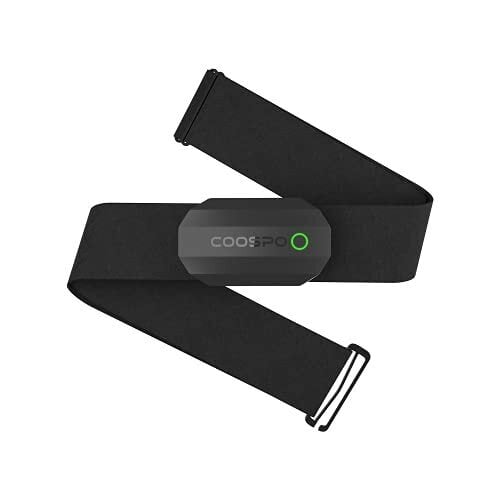
Pretty much every fitness tracker and smartwatch has an optical heart rate sensor, but they’re not always perfectly accurate. Not only can you get better accuracy by wearing a chest strap heart rate monitor, you can even use a chest strap without a fitness watch—just connect it to your phone. Chest straps don’t break the bank, either; my favorite is around 30 bucks.

Why chest straps are more accurate than watches

Chest straps come in two varieties: electrical and optical. When I say a chest strap is more accurate than a watch, I’m talking about the electrical kind. These use electrodes that contact your skin, and sometimes you may need to wait until you’ve worked up a bit of a sweat before they get a good connection (although I haven’t found that to be an issue in my workouts).

That makes them far more accurate than optical sensors, which are the type you’ll see on the back of a smartwatch. Optical sensors are also on armbands like the Polar Verity Sense, and on some chest straps. Most chest straps are the electrical type, including the Polar H10, the Wahoo TRACKR, and the Coospo I mentioned above. You can tell an electrical sensor because it has metal connectors or contact points instead of a green light.

The optical sensors in watches use a green light, and they pick up your heart rate by detecting the light that bounces off your blood vessels as the blood pulses through. Relying on light means that they don’t always work as well through tattoos and may struggle with accuracy on darker skin tones. They can also be confused by outside light, which is why they aren’t as accurate if your watch is worn loosely or is too large to get a good fit. Runners sometimes experience “cadence lock,” where the cadence of their footsteps (170 steps per minute, let’s say) causes the watch to think your heart is beating at exactly that rhythm. If your app reports a heart rate that is the same as your cadence, there’s a good chance it wasn’t measuring your heart rate at all.

You can sidestep all of those issues by wearing a chest strap. As I’ve found in my device reviews, even the most accurate watches won’t always record your heart rate perfectly 100% of the time. If you care a lot about your heart rate in training, just get the chest strap.

Why the Coospo is my favorite

I’ve been wearing a cheap Coospo heart rate monitor for years. I didn’t borrow it for a review, I just bought one because I wanted a cheap and easy way to track my heart rate without a watch. (I was doing a lot of kettlebell workouts, and the kettlebell rests gently on your wrist during overhead exercises, where a watch would be in the way.

I’ve kept using it since then. It’s been happily paired with an iPhone, a Peloton, an Apple Watch, a series of Garmins, and probably a bunch of others I’ve forgotten about. When I write the “accuracy” section in my fitness watch comparisons and reviews, I use the Coospo (either paired to my phone or to a third watch) to get a gold-standard heart rate graph to see how the tested devices stack up.

The Coospo heart rate monitor I have is a slightly older version of the one linked above (since I’ve had it so long). It uses Bluetooth and also supports ANT+, and it gets its power from a coin cell battery that I have to change out roughly once a year. It doesn’t have any on-device storage space, which I don’t need, because it beams the data directly to the connected watch or phone. It’s comfortable and easy to adjust. The device pops off so I can wash the strap. And even though there are more expensive straps out there (like the $100 Polar H10, which I’ve heard is great), I cannot think of a single chest strap feature I could possibly care about that I don’t already have.

How to use a chest strap without a watch

On my iPhone, I found the simplest way was to download the Polar Beat app (free on iOS and Android), which pairs with my strap over Bluetooth. If you’re going for a run or a bike ride while carrying your phone, it can also use your phone’s GPS to track your pace and record where you went on a map.

I tend to use mine for indoor cycling, though, and for kettlebell workouts (which I log as “other indoor”). Using a strap without a watch is especially handy with kettlebells, since the bell otherwise knocks into the watch in certain positions. But if you have a fitness watch and you like using it, most models will allow you to pair the watch with a chest strap directly. That way you can get the most accurate readings, and be able to check the numbers from your wrist.