What to Do If Your Pixel Watch Is Double Counting Your Steps or Calories

We may earn a commission from links on this page.

Ever since the March Pixel feature drop, some Pixel watch users have been reporting that their step counts and calorie counts are off. An official fix isn’t out yet, but users have found a few approaches that seem to correct the numbers. 

Steps and calories are being overcounted for some Pixel Watch users

The problem, according to numerous posts on forums like r/PixelWatch and comments on the March feature drop, is that the Fitbit app is reporting far more steps than the user feels is plausible. For example, one user reports: “my watch says I’ve walked 6,688 steps today, which is impossible! I just walked to the bathroom and back, and now my watch says I’ve walked 7,025 steps! I’ve probably only walked half that!”

Calorie counts seem to be affected for some users as well. One Redditor says: “I only got in roughly 7,000 steps yesterday, yet my Pixel Watch 4/Fitbit said I burned more than 11,000 calories, which is, obviously, impossible given that I’m not literally on fire and didn’t run three or four marathons yesterday while working my desk job.”

While the issues seem to have started shortly after the March drop, the issue may not be with the Pixel Watch firmware itself but with something else, like the Fitbit app. A few of the reports are from people who haven’t gotten the feature update on their watch yet, yet still have inflated calorie or step counts. (The March drop included a firmware update for Bluetooth/wifi watches but not LTE watches, so people with LTE watches haven’t gotten the update. You can see all available firmware updates here.)

Try these steps to correct step and calorie counts on your Pixel Watch

While Google hasn’t published an official fix yet, forum users have been sharing steps that they say fix the problem. One or more of the following may help: 

  • On your phone, go to Settings, then Apps, then Fitbit, then Storage. Select Clear cache. 

  • On your Pixel Watch, go to Settings, then Apps & Notifications, then App info, System apps, Fitbit, App info (again), and then Clear cache. 

  • Restart your watch: hold in the crown until a menu pops up, then select Restart.

  • Restart your phone.

Some users said the issue was fixed after they cleared their phone’s app cache, and some said it was fixed after restarting their watch. Some recommended doing all the steps above. 

3dfx Voodoo 1 Retro Reboot: FPGA Project Recreates The Legendary 1990s GPU

3dfx Voodoo 1 Retro Reboot: FPGA Project Recreates The Legendary 1990s GPU
Nostalgic console gaming aficionados have it good, man. You’ve got all kinds of options for playing retro console games, up to and including systems like the Analogue 3D that painstakingly recreate the original hardware using Field Programmable Gate Arrays (FPGAs), chips that can literally be reconfigured on the fly. Old PC gamer nerds like

Intuit beats FTC in court, ending restrictions on “free” TurboTax ads

An appeals court invalidated the Biden-era Federal Trade Commission’s attempt to punish Intuit for allegedly deceptive ads that pitched TurboTax as free.

Under then-Chair Lina Khan, the FTC determined in 2024 that the TurboTax maker violated US law with deceptive advertising and ordered it to stop telling consumers, without more obvious disclaimers, that TurboTax or other products are free. The FTC’s chief administrative law judge had previously found that Intuit’s ads violated prohibitions on deceptive advertising because the firm “advertised to consumers that they could file their taxes online for free using TurboTax, when in truth, for approximately two-thirds of taxpayers, the advertised claim was false.”

Intuit appealed in the conservative-leaning US Court of Appeals for the 5th Circuit and got a resounding victory on Friday in a 3–0 ruling issued by a panel of judges. “Following the Supreme Court’s decision in SEC v. Jarkesy, we hold that adjudication of a deceptive advertising claim before an administrative law judge violated the constitutional separation of powers,” the 5th Circuit panel said.

Read full article

Comments

Core Ultra 7 270K Plus & Ultra 5 250K Plus Review: Intel Boosts Cores, Clocks And Gaming

Core Ultra 7 270K Plus & Ultra 5 250K Plus Review: Intel Boosts Cores, Clocks And Gaming
Intel Core Ultra 200S Plus Series:  Core Ultra 7 270K Plus ($299), Core Ultra 5 250K Plus ($199) Intel’s mid-model Arrow Lake refresh improves upon the original Core Ultra 200S processors in a number of meaningful ways to boost performance and value significantly.   Increased Performance Competitive Pricing Comprehensive Platform…

US Car Buyers Envy What They Cannot Have: Affordable Chinese EVs

Many U.S. consumers are increasingly interested in lower-cost Chinese electric vehicles but steep tariffs and political resistance are keeping them out of the market. A recent survey from Cox Automotive found that 40% of respondents support allowing Chinese auto brands into the U.S. market. Reuters reports: While Chinese autos hit the highways of Europe, Latin America and even Canada, the U.S. government has effectively banned the cars with tariffs exceeding 100%, out of concerns over data security and protecting American jobs.
In places like Europe, a number of Chinese EVs sell at prices under $30,000. Some of those cars include amenities like advanced driving assistance software, a built-in mini fridge, and the option to sing karaoke with your fellow passengers. “The technology they offer for those lower price tags was astounding,” said Clint Simone, senior features editor for car-shopping website Edmunds, who drove several Chinese vehicles while at the CES trade show earlier this year. […]

Consumers have some concerns over allowing Chinese car imports, though, including over data security and protecting U.S. businesses, survey results from The Harris Poll as well as Cox show. Rhett Ricart, an Ohio car dealer who sells several brands, including Ford, Chevrolet and Hyundai, said he has no doubt customers would snap up Chinese models if they became available. He and other dealers don’t want that to happen yet, according to a recent Cox Automotive survey, which found that just 15% of dealers supported the entry of Chinese auto brands into the U.S., and just 26% trust that they would comply with U.S. safety standards.

Not meeting U.S. safety standards is one reason Chinese EVs cannot yet be owned permanently in the U.S. But those obstacles haven’t quieted the buzz. The Cox survey polled 802 U.S. consumers who expect to buy a car in the next two years. Nearly half — 49% — rated Chinese cars as having very good or excellent value, and 40% say they support the idea of Chinese auto brands in the U.S. market. Rich Benoit, a car enthusiast whose YouTube videos reviewing Chinese models garner millions of views, said the most compelling feature is the price. “That’s what a lot of people are looking for: efficient, quiet and low cost,” he said. “They want to ‘get to work– not everyone is a car enthusiast.” He’s considering buying a BYD model in Mexico and driving it across the border. “That’s the only way to get one,” Benoit said. “They’ve been selling in Mexico for years… “I want to own a Chinese EV in America.”


Read more of this story at Slashdot.

What Delay? Valve Adds Steam Machine Support To SteamOS In New Preview

What Delay? Valve Adds Steam Machine Support To SteamOS In New Preview
Valve continues to inch toward the inevitable Steam Machine release confirmed for this year, now by adding “initial support” for the hardware in the latest SteamOS preview update. That’s the most newsworthy part right there, but the rest of the SteamOS update patch notes indicate a lot of work being done at Valve to prepare for Steam Machine,

VoidStealer Malware Slips Past Chrome’s Defenses And Rips Credentials At Scale

VoidStealer Malware Slips Past Chrome's Defenses And Rips Credentials At Scale
It’s a never-ending game of cat and mouse between attackers and software makers, with the latest salvo being fired against one of Google Chrome’s key security features. Security researchers at Gen Threat Labs have discovered that a piece of malware, dubbed VoidStealer, is striking at the heart of how the browser keeps sensitive user data safe

Apple will talk iOS 27, macOS 27, and more at WWDC 2026 on June 8

Apple announced today that it would be holding its annual Worldwide Developers Conference (WWDC) from June 8 to 12 this year, giving both developers and the general public a first look at “incredible updates for Apple platforms, including AI advancements and exciting new software and developer tools.” The conference will start with an in-person “special event” at the company’s Apple Park headquarters that will also be streamed online via YouTube and Apple’s Developer app, among other places.

Apple occasionally introduces new hardware at WWDC, but the presentation is usually dedicated mostly to the major software releases that Apple will test all summer and release alongside new iPhones and other products in the fall. We don’t know much for sure about what’s coming in the new releases, but we can probably expect iOS 27, iPadOS 27, macOS 27, and the other new updates to refine the Liquid Glass design language, introduce the promised “AI advancements,” and end support for the last remaining Intel Macs.

Like the past few years, Apple will primarily host the developer-centric parts of the conference online. The keynote and the more technical Platforms State of the Union presentation will be live, in-person presentations on the 8th, and Apple says that day will also include opportunities to “meet with Apple engineers and designers, and connect with the worldwide developer community.” In-person passes will be handed out via lottery to those who request them.

Read full article

Comments

These Samsung Galaxy Devices Finally Have Native Webcam Support

If you work from a laptop, your built-in webcam may suit you fine for video calls. But for those of us with external monitors, or laptops with subpar cameras, it’s helpful (or necessary) to seek out dedicated, high-quality webcams. Before you drop hundreds of dollars on one from Amazon, just use your smartphone. Your iPhone or Android very likely has native webcam support that makes it easy to tap into the phone’s camera for work or personal calls. I guarantee your phone has a better camera than your laptop—even if it’s not quite as convenient to use.

I was surprised to learn today, however, that Samsung Galaxy phones have not supported this feature. You’ve been able to turn Galaxy devices into webcams using third-party apps, but it was never baked into the OS itself. It’s not a huge deal, but it adds an extra hurdle that doesn’t need to be there, and likely reduces the chances that Galaxy users even know they can use their smartphones as a webcam.

Luckily, that’s no longer the case. As reported by Android Authority, Samsung is now rolling out webcam support to Galaxy S26 devices. That includes that Galaxy S26, S26 Plus, and S26 Ultra. Samsung isn’t putting its own spin on the feature, either: It works exactly as it does on Pixel, so if you’ve used Android’s built-in webcam feature, you know how this works.

This isn’t the only Galaxy S26-exclusive feature to drop this week. Samsung also rolled out AirDrop support for the S26 line, joining the Pixel 9 and Pixel 10 series. Now, these Android phones can send files wireless to iPhones via Quick Share, something that would have sounded impossible six months ago.

How to use your Galaxy S26 as a webcam

This is a pretty straightforward feature, assuming you have compatible equipment. First, on your S26, open USB settings, then, under “Use USB for,” choose “Webcam.” Next, plug your S26 into your computer. You should see an alert letting you know you’ve connected your phone via USB. Tap it, then choose “Webcam” when the option appears. Your phone should now be in webcam mode: Tap into the webcam alert that appears to see the viewfinder and set up your angle accordingly.

Now, you should see your S26 as a camera option in any video calling client you use. Just select it over your device’s webcam (or choose it as your camera if you don’t have one in the first place), and you should notice a bump up in camera quality.

Apple will reportedly start stuffing ads into the Maps app

Apple is reportedly planning on inserting ads into the Maps app, according to Bloomberg’s Mark Gurman. An announcement could come as soon as this month, with the ads themselves appearing on iPhones this summer.

This will likely work similarly to ads in Google Maps and Yelp, which lets retailers and brands bid for coverage with particular search queries. I’ve personally never found the ads in Google Maps to be that annoying, so let’s hope Apple’s implementation is similar. 

This potential ad revenue could seriously bolster Apple’s services business, which currently generates $100 billion a year for the company. This division accounts for around 25 percent of annual revenue but faces challenges in both the short-term and long-term, as regulators around the world push for changes to App Store policies.

Apple has yet to comment on the matter. This idea has been floating around since last year, with rumors going all the way back to 2022. The company already displays ads on the App Store and on the News app, so the jump to Maps isn’t coming out of left field.

This article originally appeared on Engadget at https://www.engadget.com/apps/apple-will-reportedly-start-stuffing-ads-into-the-maps-app-182311634.html?src=rss

These Apps Can Help You Find the Cheapest Gas

In the wake of the U.S.-Iran conflict and the closure of the Strait of Hormuz, the price of crude oil has risen sharply on the international market. Now, it’s starting to impact gasoline and diesel prices in the U.S., with increases at the pump of as much as 30% in some areas. Gas prices are dynamic, changing based on the day and even based on city or state lines. For example, the national average price for gas, according to AAA, is $3.96 as of today, March 2026. But in Iowa, the average was $3.33, and in Illinois, it was $4.17.

If you’re heading out to fill up the tank, it might help to do a bit of research first, so you can save some money in the process. Using dedicated, community-sourced gas pricing tools, you can find the cheapest gas stations around your area, as well as cheaper options that are a short drive away. These apps can help.

Check GasBuddy to find low prices and earn free gas

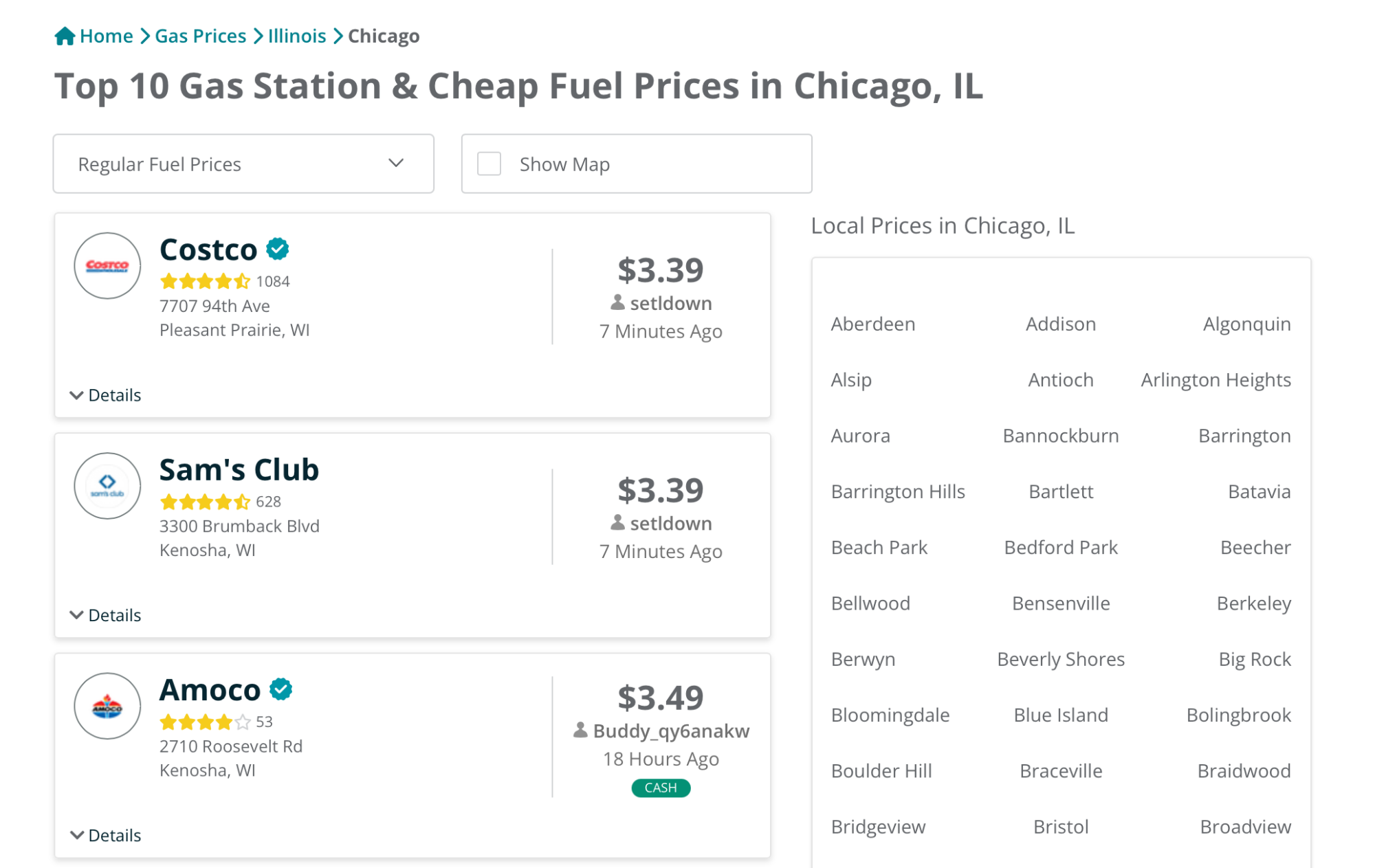
Gas Station prices in GasBuddy website and app.

Credit: Khamosh Pathak

GasBuddy (available for iOS and Android) is a popular, crowd-sourced app for reporting gas prices. The app has over 10 million downloads on the Play Store alone, and a massive community of users who update fuel prices on a near real-time basis. It also includes official pricing feeds for popular gas station operators like Costco. Community members who update prices receive points that can then be redeemed to pay for gas.

You can use your current location to find gas stations near you, or you can use the search bar or the map view to find cheaper gas stations in your city or in neighboring areas. GasBuddy will show you the cheapest options first (for regular fuel, though you can also filter for midrange and premium options). Each gas station has a ratings and an indicator showing how long ago the price was updated. Occasionally it’s a couple of hours, but frequently you’ll find gas prices that are just an hour or a couple of minutes old. The app also mentions which gas stations are cash only, and if they have other amenities like an ATM, convenience store, or loyalty discounts.

In the event gas shortages become an issue, GasBuddy also has a Tracker that which gas station has fuel and power, and if they’re running out of a particular kind of fuel. GasBuddy works best as an app because it has location and navigation features built-in. But if you just want to browse for cheap gas in your locality or your city, you can also simply use the Find Gas feature on their website.

Check Google Maps or Waze for prices along your route

Gas Prices Search in Google Maps

Credit: Khamosh Pathak

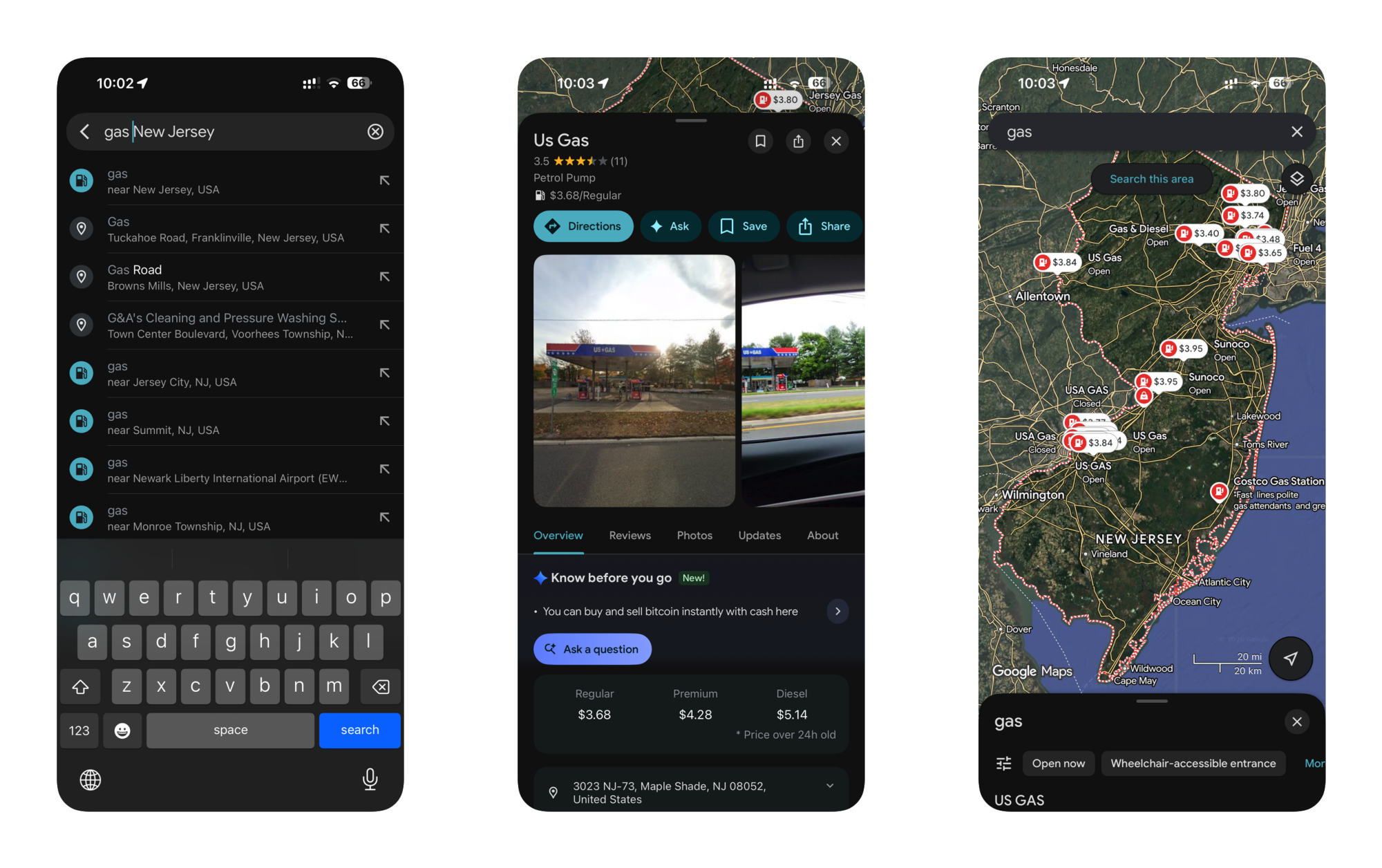
Google Maps has a built-in gas price tool as well, but it’s not community supported and it doesn’t update as often as you might like (many listings show prices that are over 24 hours old). Still, it’s convenient because it’s built right into an app you probably already use.

To find prices in your area, open Google Maps, and search for “Gas” to see a list of all nearby gas stations; on the map, you’ll also see their price for regular gas. If you want to see more gas stations nearby, zoom in or out, or move the map around and tap the “Search this area” button. You can also just search for “[Town name] gas” to get gas prices in the particular area.

Each gas station on the map will have a little label with the price on it. Choose a gas station for a detailed view and prices for midrange, premium, and diesel. The app will also tell you if the price was updated more than 24 hours ago.

Gas prices in Waze app.

Credit: Emily Long

If you don’t use Google Maps, you can also check out a similar, more detailed feature in Waze. Simply search for “gas station” in the search bar to view all prices near you. Unlike Google Maps, Waze uses crowd-sourced data for gas prices. Above each price, you’ll see when the data was last updated.

Mark Zuckerberg Is Building an AI Agent To Help Him Be CEO

An anonymous reader quotes a report from the Wall Street Journal: Mark Zuckerberg wants everyone inside and outside his company to eventually have his or her own personal artificial-intelligence agent. He is starting with himself. Zuckerberg, the chief executive of Meta Platforms, is building a CEO agent to help him do his job (source paywalled; alternative source), according to a person familiar with the project. The agent, which is still in development, is currently helping Zuckerberg get information faster — for instance, by retrieving answers for him that he would typically have to go through layers of people to get, the person familiar with the project said.

[…] Use of AI tools has spread quickly through the ranks at Meta — in part because it is now a factor in employees’ performance reviews. Meta’s internal message board is filled with posts from employees sharing new AI use cases they have found and new tools they have built using AI, according to people familiar with the matter. […] Employees have started using personal agent tools such as My Claw that have access to their chat logs and work files and can go talk to colleagues — or their colleagues’ own personal agents — on their behalf, the people said. Another AI tool called Second Brain that is somewhere between a chatbot and an agent is also gaining momentum internally, according to people familiar with the matter. Second Brain was built by a Meta employee on top of Claude and can index and query documents for projects, among other uses. On the internal post announcing it to staff, the employee said it is “meant to be like an AI chief of staff.”

There is even a group on the internal messaging board where employees’ personal agents talk to each other, some of the people said. (Separately, Meta acquired Moltbook, the social-media site for AI agents, and hired its founders in a deal earlier this month.) Meta also recently acquired Manus, a Singapore-based startup that makes personal agents that can execute tasks for its users, and is using the tool internally, some of the people said. Meta recently established a new applied AI engineering organization that is tasked with using AI to help speed up development of the company’s large language models. Those teams will have an ultraflat structure of as many as 50 individual contributors reporting to one manager, The Wall Street Journal previously reported. […] Employees across the company said they have been encouraged to attend AI tutorial meetings several times a week and frequent AI hackathons, and to create their own AI tools to speed up their work.


Read more of this story at Slashdot.

Long fingernails vs. touchscreens: This nail polish could help

The rise of touchscreen technology has been a boon in many respects, but for people with long fingernails, there can be issues with the capacitive variety since fingernails are non-conductive and thus don’t register on the screen as a touch. One can use a stylus, of course, or simply use the finger pad under the nail, but ideally it would be nice to be able to use one’s fingernail. A conductive nail polish might do the trick, according to research presented at a meeting of the American Chemical Society in Atlanta, Georgia.

The work began as a special project for Manasi Desai, an undergraduate at Centenary College of Louisiana who has an interest in cosmetic chemistry and decided to investigate ways to make fingernails compatible with touchscreen technology. There are a few existing conductive nail polishes that rely on spiking a clear polish with carbon nanotubes, conductive polymers, or metallic particles. And in 2013 and 2014, a proposed press-on false fingernail with a capacitive tip was showcased at CES in Las Vegas, although the technology doesn’t seem to be commercially available.

Desai reasoned that existing polishes rely on additives that could be dangerous if inhaled, as well as having a limited shade range given that they impart a black or metallic shimmer. Working with her supervisor, organometallic chemist Joshua Lawrence, Desai decided to try to create a clear, colorless nail polish that didn’t use any toxic materials and could be applied over any manicure.

Read full article

Comments

Wing expands its drone delivery service to the Bay Area

Wing’s drone deliveries are coming full circle after adding Bay Area to its service locations. The drone delivery startup has been rapidly expanding to metro areas across the US, but is now targeting the tech-friendly Silicon Valley region.

Going back to its inaugural deliveries, Wing ferried office supplies across Google’s Mountain View campus in the Bay Area with its automated drones. It was still a startup out of Google’s X, The Moonshot Factory incubator at the time, but early users were already asking for home delivery services, according to Wing. Now, Wing’s latest delivery drones can deliver groceries, food, or whatever else fits in a small package weighing up to five pounds in 30 minutes or less to Bay Area residents.

It may not be that common to spot a Wing drone yet, but the company expanded its service to 150 more Walmart locations across the US, including Los Angeles, St. Louis, Cincinnati and Miami, earlier this year. The drone delivery company also extended its hours of operation to 9 AM to 9 PM in its Charlotte and Dallas-Fort Worth metros, with approval from the Federal Aviation Administration. Beyond the recent Bay Area expansion, Wing has previously mentioned Orlando and Tampa as potential markets to enter.

This article originally appeared on Engadget at https://www.engadget.com/transportation/wing-expands-its-drone-delivery-service-to-the-bay-area-175748410.html?src=rss

Apple Just Announced WWDC 2026

WWDC 2026 is rapidly approaching. While Apple has a number of events throughout any given year, WWDC is one of two Apple keynotes that the tech community actively anticipates (the other being the iPhone fall event). This is Apple’s chance to show off all of the software updates its been working on since the last WWDC—and all the features that come with them. This year, that likely means iOS 27, iPadOS 27, macOS 27, and watchOS 27.

When is WWDC 2026?

Apple announced on Monday that WWDC 2026 will kick off on Monday, June 8 and run through Friday, June 12. If you’re used to watching a single keynote from past WWDCs, seeing that this year’s event runs multiple days might come as a surprise. But WWDC isn’t just the one announcement; instead, this is Apple’s “Worldwide Developer Conference,” which typically runs through the week. While the big keynote kickstarts the conference, the rest of the week is full of presentations about topics that concern Apple developers.

But if you’re not an Apple developer, the only day you really care about is June 8. That’s when Apple will reveal all its software news. That keynote starts at 10 a.m. PT (1 p.m. ET). While details are currently sparse, expect the presentation to run from 60 to 90 minutes. Apple says the keynote will be available to stream on the Apple Developer app, Apple’s website, as well as the company’s official YouTube channel. Viewers in China can tune in on the Apple Developer bilibili channel.

What do we expect from WWDC 2026?

As mentioned above, WWDC will be all about Apple’s latest batch of major updates. Last year was the first year the company ran with the “26” naming scheme, and this year will likely be no different—save for the number going up to 27.

When it comes to iOS 27, there are two big changes to note. First is Apple’s long-waited AI upgrade for Siri. The company first announced these changes back in 2024 for iOS 18, advertising a contextually-aware Siri that was much smarter than the assistant we currently know. Imagine asking Siri when your friend’s flight gets in, and having the bot know to dig through your emails to find their flight itinerary, or asking it to edit and send an image to a family member, all without you having to do a thing yourself. That was Apple’s vision for Siri two years ago; that vision has yet to materialize. The rumors suggest we’ll have it once we update to iOS 27, however, so we’ll just have to wait and see what Apple announces in June.

iOS 27’s other big feature, however, might not be a feature at all. Apple may take this update cycle to work on bug fixes and stability updates, rather than flashy new features. I’m all for that: While iOS 26 has been a relatively smooth experience for me, I’ve seen quite a number of complaints from users online, especially regarding the keyboard. Apple actually issued a fix for that with iOS 26.4, but I think it’s always smart to use the same resources you would building new features on smoothing out rough edges. macOS Tahoe also received its fair share of criticism: In fact, I wouldn’t install it on my M1 iMac until macOS 26.3, which seemed to be a bit more stable than previous versions.

Republicans in Congress add $250 annual federal EV tax to transport bill

They might be better than gas-powered cars in most conceivable ways, but electric vehicle sales are having an undeniably hard time right now. The cause is no mystery: since January 2025 the US government has been actively hostile to the idea of energy efficiency and in the intervening months has taken an axe to fuel efficiency regulations, prosecuting polluters, and the consumer-facing tax credit.

That last one had the effect of bringing forward sales from people who needed an EV and knew the credit was expiring at the end of last September, leading to a rosy-looking Q3 2025 followed by a rather bad Q4. Things got even worse this year—in January just 5.1 percent of all new vehicles sold were EVs, compared to 8.3 percent in January 2025. But the government’s antipathy toward EVs isn’t done yet. House Transportation and Infrastructure Committee Chair Sam Graves (R-Mo.) wants to include an annual $250 tax on EV drivers—hybrids would also pay $100 a year—in an upcoming bill.

This is the second time Graves has tried to tax drivers of more efficient vehicles; last year the committee under Graves wanted to include an escalating EV tax, starting at $200 annually, into the budget but was unsuccessful.

Read full article

Comments

As teens await sentencing for nudifying girls, parents aim to sue school

Two teens behind one of the earliest US high school deepfake scandals will be sentenced this week, but the case is unlikely to resolve families’ concerns about the school’s significantly delayed response.

Earlier this month, the 16-year-old boys admitted to using AI tools to “nudify” images of 48 female classmates at Lancaster Country Day School in Pennsylvania, along with 12 other young female acquaintances.

The incident could have been caught early, after the school learned of the images following an anonymous report to a state-run tipline. But officials—who at the time weren’t legally required to act—failed to notify parents or police for six months, as the number of victims continued to grow. In total, the boys created at least 347 AI-generated sexualized images and videos before they were stopped.

Read full article

Comments

Apple’s WWDC 2026 is set for June 8-12

Apple announced that this year’s Worldwide Developers Conference (WWDC) will take place from June 8-12. The company tends to be consistent with event timing, so it’s no surprise that CEO Tim Cook will take the stage for the keynote on June 8, most likely at 1PM ET. 

Much of WWDC will take place online and will be free to attend, though there will be an in-person component for select developers, students and media at Apple Park in Cupertino, California. You’ll be able to take in WWDC via the Apple Developer app, website and YouTube channel. It will also be available in China on the Apple Developer Bilibili channel.

What should we expect this time around? This is a software-focused event and all indications point toward a reveal of the upcoming “27” operating systems. This would include iOS 27, iPadOS 27, macOS 27, visionOS 27, watchOS 27 and macOS 27.

We don’t know for certain what new features these operating system updates will bring to the table, with Bloomberg’s Mark Gurman suggesting that WWDC will be “a fairly muted affair this year.” Rumors have indicated that iOS 27 will deliver much-needed improvements to Apple Intelligence along with the delayed Siri overhaul. Reports also suggest the presence of split-pane multitasking, a redesigned Health app and a new battery management system for iPhones. 

In any event, we don’t have that long to wait. Engadget will be on hand to report on all of the announcements and reveals.

This article originally appeared on Engadget at https://www.engadget.com/apps/apples-wwdc-2026-is-set-for-june-8-12-171359493.html?src=rss

Crimson Desert Walks Back Launch Misstep With Incoming Intel Arc GPU Support

Crimson Desert Walks Back Launch Misstep With Incoming Intel Arc GPU Support
You might recall just a few days ago when, immediately after the launch of hotly-anticipated open world RPG Crimson Desert, it was discovered that it simply would not launch on Intel Arc GPUs, throwing up an error message saying that the graphics card was not supported. An error message that looked like this:

The original error message

Walmart: ChatGPT Checkout Converted 3x Worse Than Website

Walmart found that purchases made directly inside ChatGPT converted at only one-third the rate of traditional website checkouts, leading it to abandon OpenAI’s Instant Checkout in favor of routing users through its own platform. Search Engine Land reports: Starting in November, Walmart offered about 200,000 products through OpenAI’s Instant Checkout. Users could complete purchases inside ChatGPT without visiting Walmart’s site. Daniel Danker, Walmart’s EVP of product and design, said those in-chat purchases converted at one-third the rate of click-out transactions. He called the experience “unsatisfying” and confirmed Walmart is moving away from it.

Instant Checkout was designed to let users complete purchases directly inside ChatGPT without visiting a retailer’s website. However, earlier this month, OpenAI confirmed it was phasing out Instant Checkout in favor of app-based checkout handled by merchants. Walmart will embed its own chatbot, Sparky, inside ChatGPT. Users will log into Walmart, sync carts across platforms, and complete purchases within Walmart’s system. A similar integration is coming to Google Gemini next month. In other Walmart-related news, the retailer announced plans to roll out “digital price tags” to all U.S. stores by the end of the year.


Read more of this story at Slashdot.