Universal Partners With AI Startup Udio After Settling Copyright Suit

Universal Music Group has settled its copyright lawsuit with AI music startup Udio and struck a licensing deal to launch a new AI-powered music platform next year. The Verge reports: The deal includes some form of compensation and “will provide further revenue opportunities for UMG artists and songwriters,” Universal says. Udio, the company behind “BBL Drizzy,” will launch the platform as a subscription service next year. Universal, alongside other industry giants Sony and Warner, sued Udio and another startup Suno for “en masse” copyright infringement last year.

Universal — whose roster includes some of the world’s biggest performers like Taylor Swift, Bad Bunny, and Ariana Grande — says the new tool will “transform the user engagement experience” and let creators customize, stream, and share music. There’s no indication of how much it will cost yet. Udio’s existing music maker, which lets you create new songs with a few words, will remain available during the transition, though content will be held “within a walled garden” and security measures like fingerprinting will be added.


Read more of this story at Slashdot.

OpenAI now sells extra Sora credits for $4, plans to reduce free gens in the future

OpenAI has started selling power users extra credits for its Sora AI video generation tool. An extra 10 video gens will retail for $4. The company currently has a limit of 30 free gens per day, a rate that will likely decrease as OpenAI starts to monetize the offering. Bill Peebles, who heads OpenAI’s Sora, posted on X about the changes. 

“Eventually we will need to bring the free gens down to accommodate growth (we won’t have enough gpus to do it otherwise!), but we’ll be transparent as it happens,” he said.

we are launching the ability to buy extra gens in sora today. we are doing this for two main reasons:

first, we have been quite amazed by how much our power users want to use sora, and the economics are currently completely unsustainable. we thought 30 free gens/day would be…

— Bill Peebles (@billpeeb) October 30, 2025

Peebles also said that OpenAI plans to monetize by letting entities essentially license out their copyrighted material, either their artwork, characters or likenesses. “We imagine a world where rightsholders have the option to charge extra for cameos of beloved characters and people,” he wrote. Although making the cameo feature a core part of the monetization while the company is being sued by Cameo for trademark infringement is certainly a bold choice. And that’s just the latest in a series of dodgy actions tied to OpenAI’s text-to-video AI app.

This article originally appeared on Engadget at https://www.engadget.com/ai/openai-now-sells-extra-sora-credits-for-4-plans-to-reduce-free-gens-in-the-future-223905628.html?src=rss

OpenAI Eyes $1 Trillion IPO

OpenAI is reportedly preparing for a massive IPO that could value the company at up to $1 trillion. It follows a recent corporate restructuring that loosened its dependence on Microsoft and aligned its nonprofit foundation with financial success. Reuters reports: OpenAI is considering filing with securities regulators as soon as the second half of 2026, some of the people said. In preliminary discussions, the company has looked at raising $60 billion at the low end and likely more, the people said. They cautioned that talks are early and plans — including the figures and timing – could change depending on business growth and market conditions. Chief Financial Officer Sarah Friar has told some associates the company is aiming for a 2027 listing, the people said. But some advisers predict it could come even sooner, around late 2026.

[…] An IPO would open the door to more efficient capital raising and enable larger acquisitions using public stock, helping to finance CEO Sam Altman’s plans to pour trillions of dollars into AI infrastructure, according to people familiar with the company’s thinking. With an annualized revenue run rate expected to reach about $20 billion by year-end, losses are also mounting inside the $500 billion company, the people said. During a livestream on Tuesday, Altman addressed the possibility of going public. “I think it’s fair to say it is the most likely path for us, given the capital needs that we’ll have,” he said.


Read more of this story at Slashdot.

Calley Means is out of the White House; Casey Means misses Senate hearing

Siblings Casey and Calley Means—wellness darlings of the Make America Healthy Again movement, despite being rife with potential conflicts of interest—are both missing from the political arena, at least for now.

Casey Means, President Trump’s nominee for surgeon general, was scheduled to appear virtually at a Senate confirmation hearing today, but the hearing was postponed indefinitely after she went into labor. The hearing, it turns out, had been scheduled two days after her due date, CNN reported this morning.

Meanwhile, The New York Times separately reported that Calley Means has departed from the White House, vacating his role as a “Special Government Employee,” which has a 130-day term limit. The Times reported that Calley left about a month ago when the term ended, though the White House never announced his departure, and he has continued to be identified as a government employee in press articles and at a conference. Calley, who has acted as an influential advisor to anti-vaccine health secretary Robert F. Kennedy Jr., told the Times that the press articles and his conference biography were inaccurate.

Read full article

Comments

Google Says Androids Get 58% Fewer Scam Texts Than iPhones, but I Have Some Questions

If you’re getting more scam texts than your friends and family, it turns out it might be your mobile platform, at least going by a recent poll from Google and YouGov. According to Google, users on Android report receiving 58% fewer scam texts than those on iOS, and that number is even better on Pixel devices.

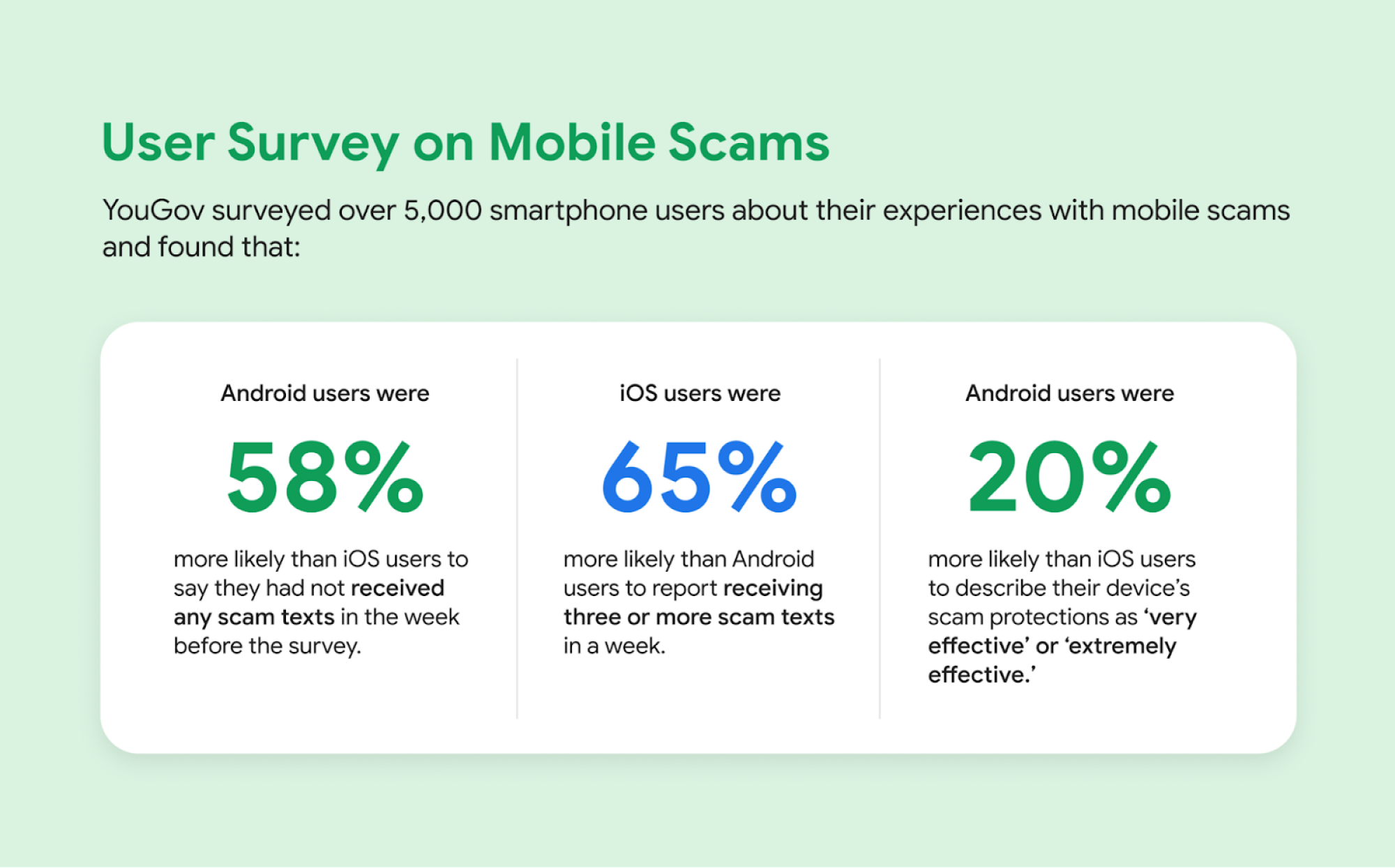
Android Survey

Credit: Google

That data comes from a survey Google and YouGov conducted of over 5,000 Android and iOS users across the U.S., India, and Brazil. The data says that Android users as a whole were “58% more likely than iOS users” to report that they had not received any scam texts in the week prior to the survey, and that iOS users were 65% more likely than Android users to report getting three or more scam texts in a week. On the whole, it also says that Android users were 20% more likely to describe their device’s scam protection features as “very effective” or “extremely effective.”

As for Pixel vs. iPhone specifically, the survey also found that Pixel users were 96% more likely to report zero scam texts than iPhone users, and that iPhone users were 136% more likely to say they had received “a heavy volume of scam messages” than Pixel users, as well as 150% more likely to say their device was “not effective at all in stopping mobile fraud.”

Those numbers don’t look good for Apple, although it’s worth pointing out a few details before taking Google at its word.

What is YouGov?

First, to Google’s credit, it didn’t conduct this study alone. While the company didn’t go into detail on how it partnered with YouGov here, YouGov itself is a respectable entity, widely cited in market research and even political news. The organization specializes in polls, and has been cited in everything from the New York Times to Lifehacker sister publication Mashable.

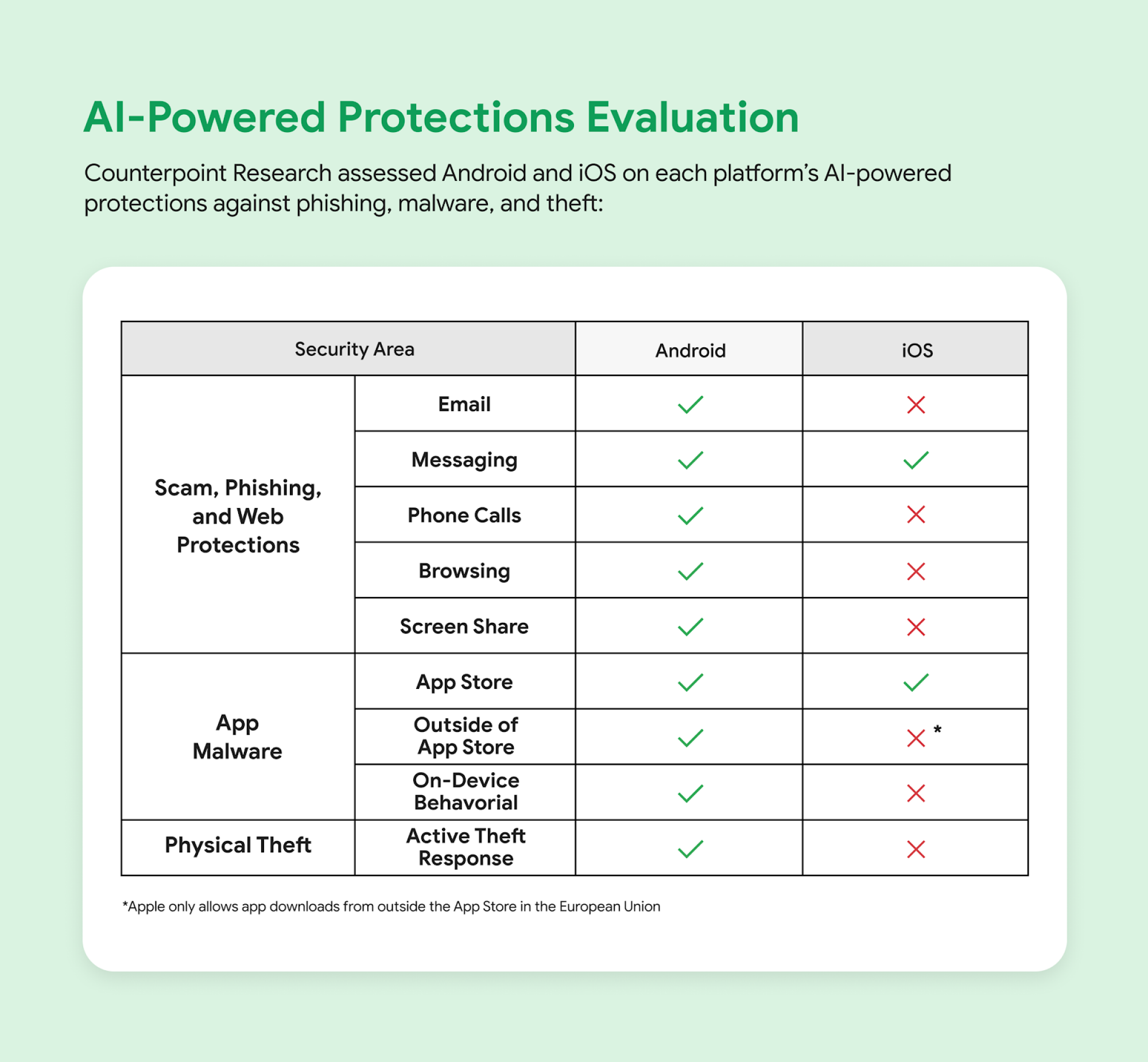
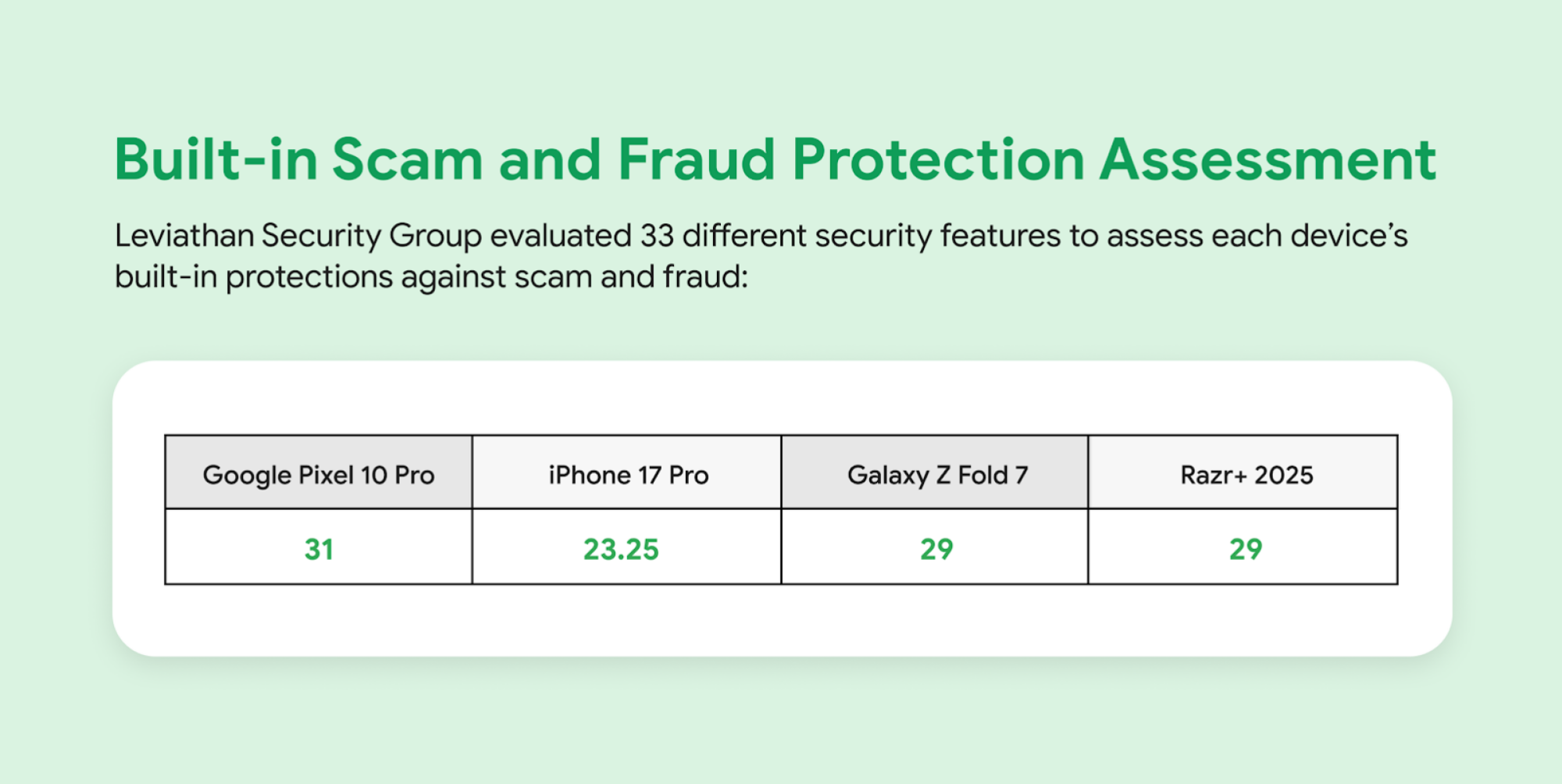
It’s also worth pointing out that YouGov wasn’t the only independent entity Google worked with while putting together its report. The company also reached out to Counterpoint Research to evaluate its AI-powered anti-scam protections, and Leviathan Security Group to asses scam protection across four Android phones. The company used these studies to put together infographics depicting its security features vs. iPhone’s, which you can see below.

Counterpoint Research numbers regarding Google's AI-powered scam prevention.

Credit: Google

Leviathan Security Group research numbers regarding Google's scam prevention tech.

Credit: Google

Note, however, how Google has put together the information here. Specifically, it implies that iPhone does not offer any scam protections in emails, while ignoring that many iPhone users access their email through the same Gmail app as on Android. It also doesn’t mention Safari’s ability to block pop-ups or the iPhone’s ability to screen phone calls, which makes me think Google might be getting choosy with how its presenting the data here. As such, it’s worth looking at its survey results with a critical eye as well.

Questions about methodology

While Google’s survey results are likely accurate to the polled audience, I do have a few questions about the methodology.

First, there’s the issue with this being a survey, rather than a more dispassionate look at texting inboxes. While helpful for getting insight into how users perceive their devices, surveys are susceptible to the word of those surveyed, which means that can be swayed by respondents misremembering details or misunderstanding questions.

The bigger question to me, though, is sample size. While I commend Google for conducting its survey across three different regions, the company was not clear about how many of its respondents owned iPhones vs. Android devices. It’s possible that iPhone users might have reported more scams simply because the iPhone is more popular in the U.S., for instance. To be fair, those numbers are reversed in India and Brazil, but without knowing a breakdown of how many people Google and YouGov interviewed where, it’s hard to know if the data is being impacted by other factors.

For instance, in addition to potentially being more numerous depending on a breakdown of the surveyed population, iPhone users might also be more susceptible to scam texts simply because scammers might want to target that user base more, as was once the case with viruses on Windows. The iPhone is known as a luxury device, which implies its user base might have extra money to spend, making it an alluring target.

Can you believe Google’s survey?

So, can you take Google’s polling at its word? Yes and no.

With YouGov helping the company out, it’s likely that the results presented are truthful, although they could still be misleading. The only way to know for sure would be to look at a detailed breakdown of the survey itself, but unlike the Counterpoint Research and Leviathan Security Group evaluations, there doesn’t seem to be a way to look at the raw survey data at the moment, just Google’s blog reporting on its findings.

I’ve reached out to Google and YouGov independently with questions about their methodology, and did not immediately hear back. For good measure, I’ve also reached out to Apple for its take, and similarly am still waiting for a reply.

In the meantime, I would take this survey with a grain of salt. It’s almost certainly based in truth, but it’s important to remember that it’s still part of a larger advertising narrative.

Google has made a big deal as of late about calling Apple’s ecosystem a walled garden. If the company can convince users that it can offer them greater freedom while also upping their protection, that would be a big win. It does, however, coincide with Android’s own efforts to close itself off in the name of security, so maybe the truth is both platforms aren’t so different after all.

Unpatched Bug Can Crash Chromium-Based Browsers in Seconds

A critical security flaw in Chromium’s Blink rendering engine can crash billions of browsers within seconds. Security researcher Jose Pino discovered the vulnerability and created a proof-of-concept exploit called Brash to demonstrate the bug affecting Chrome, Edge, OpenAI’s ChatGPT Atlas, Brave, Vivaldi, Arc, Dia, Opera and Perplexity Comet.

The flaw, reports The Register, exploits the absence of rate limiting on document.title API updates in Chromium versions 143.0.7483.0 and later. The attack injects millions of DOM mutations per second and saturates the main thread. When The Register tested the code on Edge, the browser crashed and the Windows machine locked up after about 30 seconds while consuming 18GB of RAM in one tab. Pino disclosed the bug to the Chromium security team on August 28 and followed up on August 30 but received no response. Google said it is looking into the issue.


Read more of this story at Slashdot.

Man finally released a month after absurd arrest for reposting Trump meme

The saga of a 61-year-old man jailed for more than a month after reposting a Facebook meme has ended, but free speech advocates are still reeling in the wake.

On Wednesday, Larry Bushart was released from Perry County Jail, where he had spent weeks unable to make bail, which a judge set at $2 million. Prosecutors have not explained why the charges against him were dropped, according to The Intercept, which has been tracking the case closely. However, officials faced mounting pressure following media coverage and a social media campaign called “Free Larry Bushart,” which stoked widespread concern over suspected police censorship of a US citizen over his political views.

How a meme landed a man in jail

Bushart’s arrest came after he decided to troll a message thread about a Charlie Kirk vigil in a Facebook group called “What’s Happening in Perry County, TN.” He posted a meme showing a picture of Donald Trump saying, “We should get over it.” The meme included a caption that said “Donald Trump, on the Perry High School mass shooting, one day after,” and Bushart included a comment with his post that said, “This seems relevant today ….”

Read full article

Comments

Beatboxer Beatboxes & Layers Popular Songs

This is a video of incredibly skilled beatboxer Xin An recreating popular songs by beatboxing and layering all the different pieces. It’s really impressive watching the songs come together. I embedded a handful below, but check out Xin’s Instagram for a ton more while I try to make one myself.
–15 minutes later–
Okay it’s a lot harder than it looks. Plus I think I forgot to actually record, but it was mostly just the dogs barking and my girlfriend yelling at me for using her towel to clean up a spill anyways.

Meta Is Adding More AI Slop to Your Feeds

I am extremely concerned about the prevalence of AI content on our social media feeds. Now that just about anyone can generate hyper-realistic videos with a simple text prompt, I fear that disinformation will rise exponentially, distorting worldviews faster than algorithms have so far been able to do. So you can imagine how I feel about Meta’s plans to add a “huge corpus” of AI content to its feeds. Good luck out there, everyone.

That’s directly from Meta CEO Mark Zuckerberg himself. In a Meta Platforms, Inc. earnings call on Wednesday, Zuckerberg confirmed the company’s plans to add this self-described huge corpus of content, thanks to how easy AI makes it to create and “remix” content. People will create AI content, the platform’s recommendation systems will deliver that content to people, who may then slightly alter that content and send it back into the Metaverse. As this feedback loop will continue, feeds will start filling up with more and more AI content. That’s good for Meta, and anyone who enjoys watching videos that aren’t real. For those of us a little sick of this content, or worried we won’t be able to spot it during long scrolling session, it’s only bad news.

While much (if not most) of that AI content is likely coming from outside sources, like OpenAI’s Sora, some of it may come from Meta itself. The company recently rolled out “Vibes,” its own short-form AI video generator, as part of the existing Meta AI app. Users can create videos directly in Vibes, or remix existing videos. I’d wager some Vibes content is going to cross your Meta feed in the near future, if it hasn’t already.

Zuckerberg took the time to highlight how Meta’s AI recommendation systems across all of its core products—Facebook, Instagram, and Threads—are delivering “higher quality and more relevant content” to users, especially with regards to video. Apparently, the amount of time we’ve spent watching Instagram reels has increased by more than 30% when compared to last year. (Fun fact: Reels brings in over $50 billion according to the earnings call.) That environment seems just right to foster a new wave of AI slop to Meta’s enormous audience.

Look, I’ve definitely laughed at some AI memes that have come my way. But to suggest that flooding the feeds with realistic AI videos without any regulation or forethought is a good idea is itself laughable. If you use Meta products, watch out: You might not be able to trust what you’re watching is actually real for much longer—if at all.

Affinity resurfaces as an all-in-one illustration, photo editing and layout app

The future of Affinity Designer, Photo and Publisher, subscription-free alternatives to Adobe Creative Cloud, was uncertain after the apps’ developer Serif was acquired by Canva in 2024. Now, over a year later, the changes Canva has introduced are big, but not necessarily unwelcome. The newly relaunched Affinity by Canva combines all three apps into a single piece of illustration, photo editing and layout software, and rather than move to a subscription model as many feared, Canva’s made it entirely free. Or, at least, freemium.

Affinity is available now as a desktop app for macOS and Windows, with an iPadOS version on the way at some point in the future. The basic functionality of the app doesn’t seem all that different from the three separate apps Serif offered before, only now you can toggle between their tools via separate Vector, Pixel and Layout tabs. Canva stresses you also have the option to mix and match tools, and save custom toolbars to use for specific types of projects, if you want.

Beyond layering in chunky serif fonts, Canva’s touch seems relatively light. The Affinity app now requires a free Canva account to use and offers integrations with the company’s suite of tools, with a new option to send an Affinity project directly to Canva. The company is also making its Canva AI Studio tools available in Affinity, giving users the ability to automatically remove a background or use Generative Fill to edit part of a photo. How well veteran Affinity users will take to these changes remains to be seen, but they’ll at least be able to continue using their existing copies of the old Affinity V2 lineup.

Free sounds good, but one of the draws of the original Affinity creative suite is that you could purchase a license for Serif’s individual apps and not ever have to think about it again. Canva is promising that the new Affinity will be free going forward, but a free app that requires an account and might try to upsell you on subscription-based AI features is not quite the same thing.

Affinity wasn’t the only Adobe competitor to be acquired in 2024. Pixelmator, a developer of popular photo and image editing tools for iOS, iPadOS and macOS, was absorbed by Apple in November that same year. The company’s apps continue to be maintained, but it’s still not clear if Apple plans to shift them to a subscription model in the future.

This article originally appeared on Engadget at https://www.engadget.com/apps/affinity-resurfaces-as-an-all-in-one-illustration-photo-editing-and-layout-app-204833289.html?src=rss

AI ‘Cheating’ App Founder Says Engineers Can’t Make Good, Viral Content and That’s Why Their Startups Flop

AI “cheating” app Cluely’s CEO and cofounder, Chungin “Roy” Lee, said most startups flop because their products don’t get seen. From a report: “Engineers just cannot make good content,” Lee said during a Wednesday interview at TechCrunch Disrupt 2025 “There’s a bunch of shallow replicas, but I challenge you to find one video you think is like, ‘Yo, this is as tough as Cluely,'” he told TechCrunch.

Every startup needs to focus more on distribution. And most startups flop because they fail to get seen, even if they have product-market fit, Lee said. Cluely launched earlier this year as a tool to help software engineers cheat on their job interviews, among other use cases. The startup earlier this year posted a tongue-in-cheek video of Lee trying to use Cluely to impress a woman on a date, which went viral.


Read more of this story at Slashdot.

What’s Better (and Worse) in Fitbit’s New App Preview

I’ve been using Fitbit’s revamped app, currently in “public preview” mode for adult Android users in the United States. While I like the simplified aesthetic, its functionality seems to center around the questionable AI that gave me so many wrong and confusing answers. Let me take you on a tour of where the new app has improved, where it’s falling short, and what’s still missing. 

Better: cardio load and key metrics are easy to read

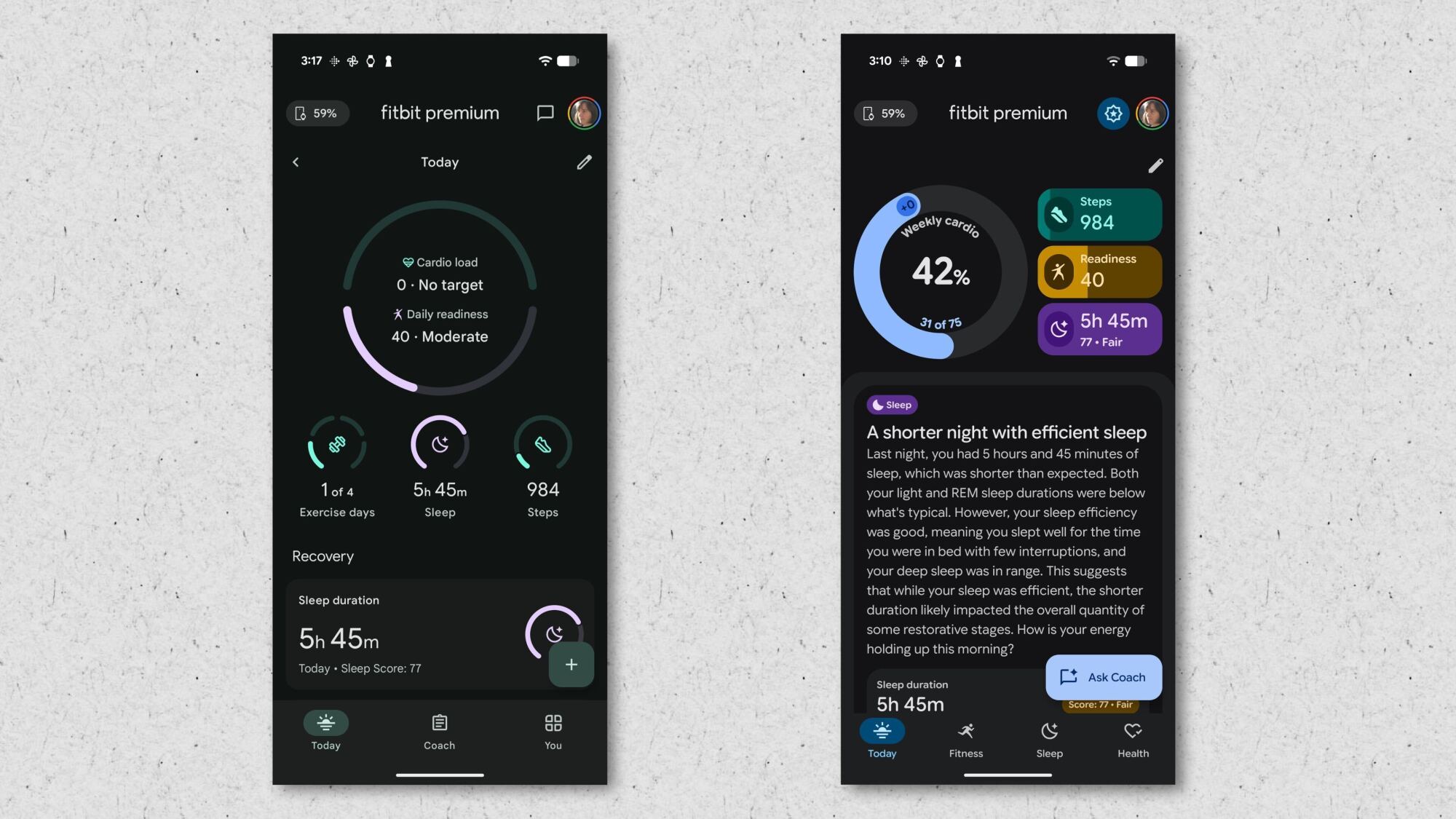
The top few metrics on the home screen have always been configurable, but I find the new version is even more readable than the old one. You get three “focus metrics” on the right hand side, and a big donut shape giving your progress toward your cardio load. 

Fitbit's current app on the left; the updated preview version is on the right.
Fitbit’s current app is on the left; the updated preview version is on the right.
Credit: Beth Skwarecki/Fitbit

Measuring cardio load as progress toward a weekly goal is a welcome change; previously, cardio load was a daily measure that often didn’t correspond to reality. There’s a downside to the new view, though: in the old version of the app, you could turn off the recommendations or hide them. In this version, there’s no way I could find to remove that metric from the top of your screen.

Better: separate tabs for fitness, sleep, and health

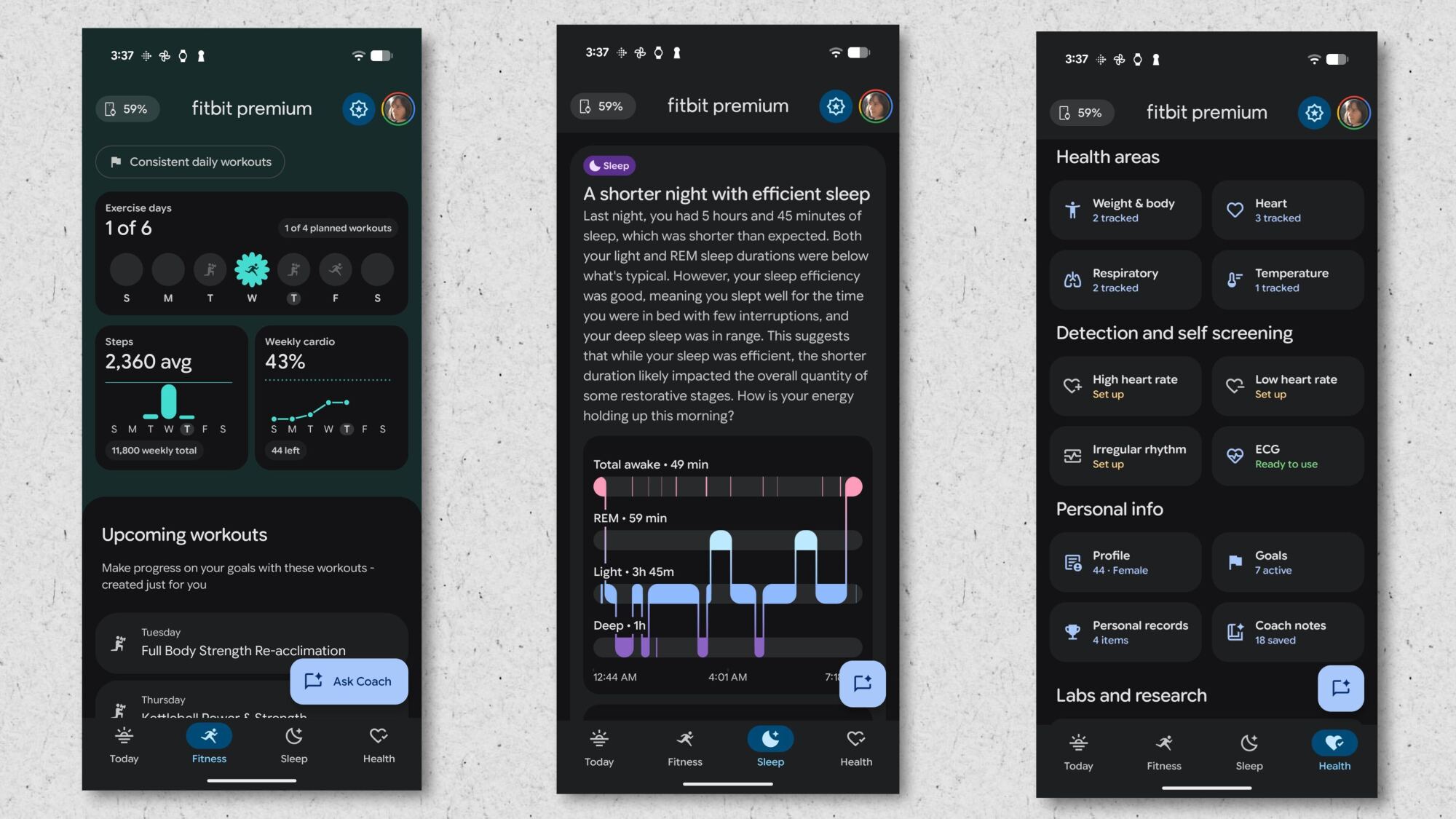
Screenshots of the Fitness, Sleep, and Health tabs
What you see on the Fitness, Sleep, and Health tabs.
Credit: Beth Skwarecki/Fitbit

Finding any specific data in the old Fitbit app always meant scrolling through a CVS receipt-length list of things you weren’t looking for. Items tended to be grouped, which helped a little, but ultimately some things need more space than the little card they were stuffed into. You couldn’t find your recent workouts without guessing on which tile to tap—turns out it’s Exercise Days (but not Cardio Load or Active Zone Minutes).

But now, you just tap on the Fitness icon at the bottom, and there everything is! My exercise days and weekly cardio are there, then a listing of upcoming workouts, and then my recent activities. I can log a manual activity right from this screen. Perfect. (The button doesn’t seem to be working right now, but hey, it’s a beta. I can appreciate the idea.) 

Same goes for the Sleep tab. Right up top there’s a trend insight (“Your steps linked [sic] to better sleep quality”) and then I get my graph of sleep stages, and a list of “key metrics” like when I went to bed and how much time in bed was spent awake. 

The Health tab gives my vitals, like my resting heart rate and HRV. If I scroll down, I can set up alerts, update my profile, and the “coach notes” that the AI has written down about me. For example, I see “wants low reps and heavy weights” and “hates lunges.” 

Worse: glitches galore

I know it’s a beta, but things seem really rough. My workout from two days ago is listed as “upcoming,” and the app crashes when I try to mark it as completed. The old Fitbit app says that my high and low heart rate notifications are “on & checking” but the new app says I still need to set them up. 

Some of the AI conversations fail to load at all. When they do, often the bot tells me it doesn’t have access to the information I’m asking about, or it says that “internally” it sees something different than what I’m seeing in the main screens of the app. The team has a lot to fix before these features are ready for widespread use.

Worse: structured data views are replaced with AI conversations

Humans invented graphs, charts, and other means of data presentation because these are easy to scan and interpret at a glance. The new Fitbit app can generate some charts (great!) but tends to present these as little cards to illustrate insights from the AI bot. 

To see more data, you’d think you could tap on a button or card about a recent run to get your lap times, running dynamics, and other information. But that doesn’t seem to be an option. Instead, I get a “continue conversation” button that seems to want to feed a screenshot of the AI output back into the AI bot. 

I’ve already written about some of the problems I’ve had conversing with the AI bot, so I won’t rehash those issues here. (It hallucinates in ways that are sometimes hilarious and often frustrating.) But even if the AI was as intelligent as it’s supposed to be, this would still be a major issue. The AI responses are slow, and I can’t always get the bot to give a straight answer to my questions. 

In short, it seems like the app’s designers said “we’ll have the AI handle it” anytime they weren’t sure how to build a feature. So the app feels like a mere wrapper around the bot, and the bot is just not the right tool for all those jobs. 

Missing: nutrition, menstrual health, and more

Google says that it hasn’t ported all the Fitbit app’s features to the new preview. When I asked about these limitations by email, the response I got was that “As a preview, the service is not yet feature-complete and lacks several functionalities to focus testing on the core AI coaching experience.” 

A full list of missing features is available from this Fitbit forum post. They include: 

  • Nutrition tracking

  • Hydration tracking

  • Menstrual health

  • Community features

  • Badges

  • Social media sharing

  • Heart rate zone analysis for workouts

  • Running analytics for Pixel Watch 3 and 4 users (other devices don’t provide this data)

  • Syncing data from Aria Air smart scales

The post also notes that the AI coach treats certain subjects as off-limits for the moment, including those related to weight, body fat, running distance, and heart health measurements like ECG and irregular rhythm notifications.

Leaker reveals which Pixels are vulnerable to Cellebrite phone hacking

Despite being a vast repository of personal information, smartphones used to have little by way of security. That has thankfully changed, but companies like Cellebrite offer law enforcement tools that can bypass security on some devices. The company keeps the specifics quiet, but an anonymous individual recently logged in to a Cellebrite briefing and came away with a list of which of Google’s Pixel phones are vulnerable to Cellebrite phone hacking.

This person, who goes by the handle rogueFed, posted screenshots from the recent Microsoft Teams meeting to the GrapheneOS forums (spotted by 404 Media). GrapheneOS is an Android-based operating system that can be installed on select phones, including Pixels. It ships with enhanced security features and no Google services. Because of its popularity among the security-conscious, Cellebrite apparently felt the need to include it in its matrix of Pixel phone support.

The screenshot includes data on the Pixel 6, Pixel 7, Pixel 8, and Pixel 9 family. It does not list the Pixel 10 series, which launched just a few months ago. The phone support is split up into three different conditions: before first unlock, after first unlock, and unlocked. The before first unlock (BFU) state means the phone has not been unlocked since restarting, so all data is encrypted. This is traditionally the most secure state for a phone. In the after first unlock (AFU) state, data extraction is easier. And naturally, an unlocked phone is open season on your data.

Read full article

Comments

Caught cheating in class, college students “apologized” using AI—and profs called them out

With a child in college and a spouse who’s a professor, I have front-row access to the unfolding debacle that is “higher education in the age of AI.”

These days, students routinely submit even “personal reflection” papers that are AI generated. (And routinely appear surprised when caught.)

Read a paper longer than 10 pages? Not likely—even at elite schools. Toss that sucker into an AI tool and read a quick summary instead. It’s more efficient!

Read full article

Comments

This Tinymoose Pencil Pro Ultra Stylus Is On Sale for Just $40 Right Now

We may earn a commission from links on this page. Deal pricing and availability subject to change after time of publication.

The Tinymoose Pencil Pro Ultra is both an affordable accessory and a serious productivity tool, and it’s currently on sale for $39.95 on StackSocial. It costs less than a third of what Apple charges for its stylus, and it works with an Android device thanks to its Smart Switch button on the top. A single press lets you jump from sketching on an iPad Pro to jotting notes on a Galaxy Tab without digging through settings. That makes it more flexible than most one-platform pens, especially for students or professionals who don’t want to carry two separate styluses. It also works on phones in dual mode, which could be handy if you like editing photos on your Android but use your iPad for work.

In use, the Pencil Pro Ultra does a lot right. Tilt sensitivity and palm rejection give you smooth shading and writing, at least on supported tablets, while zero-lag precision keeps lines from wobbling behind your strokes. Bluetooth gestures add a layer of convenience: one press takes you home, two pulls up multitasking, and a long press powers it on or off. As for the battery life, it holds its own with 10 hours of productivity, and supports fast charging via USB-C.

There are trade-offs, though. Palm rejection and tilt features only work in tablet mode, which means the experience is more basic when you’re on a phone. The magnetic attachment also doesn’t work outside of Apple’s tablets, so Android users will need to keep the included leather case handy. And while it’s backed by a six-month warranty, that’s shorter than what you get from bigger brands. Still, with three extra nibs, a carrying case, and cross-platform support baked in, it’s a compelling option for anyone who doesn’t want to lock into one ecosystem. If you’re a casual creator, note-taker, or multitasker who wants a stylus without splurging, this deal is worth considering.

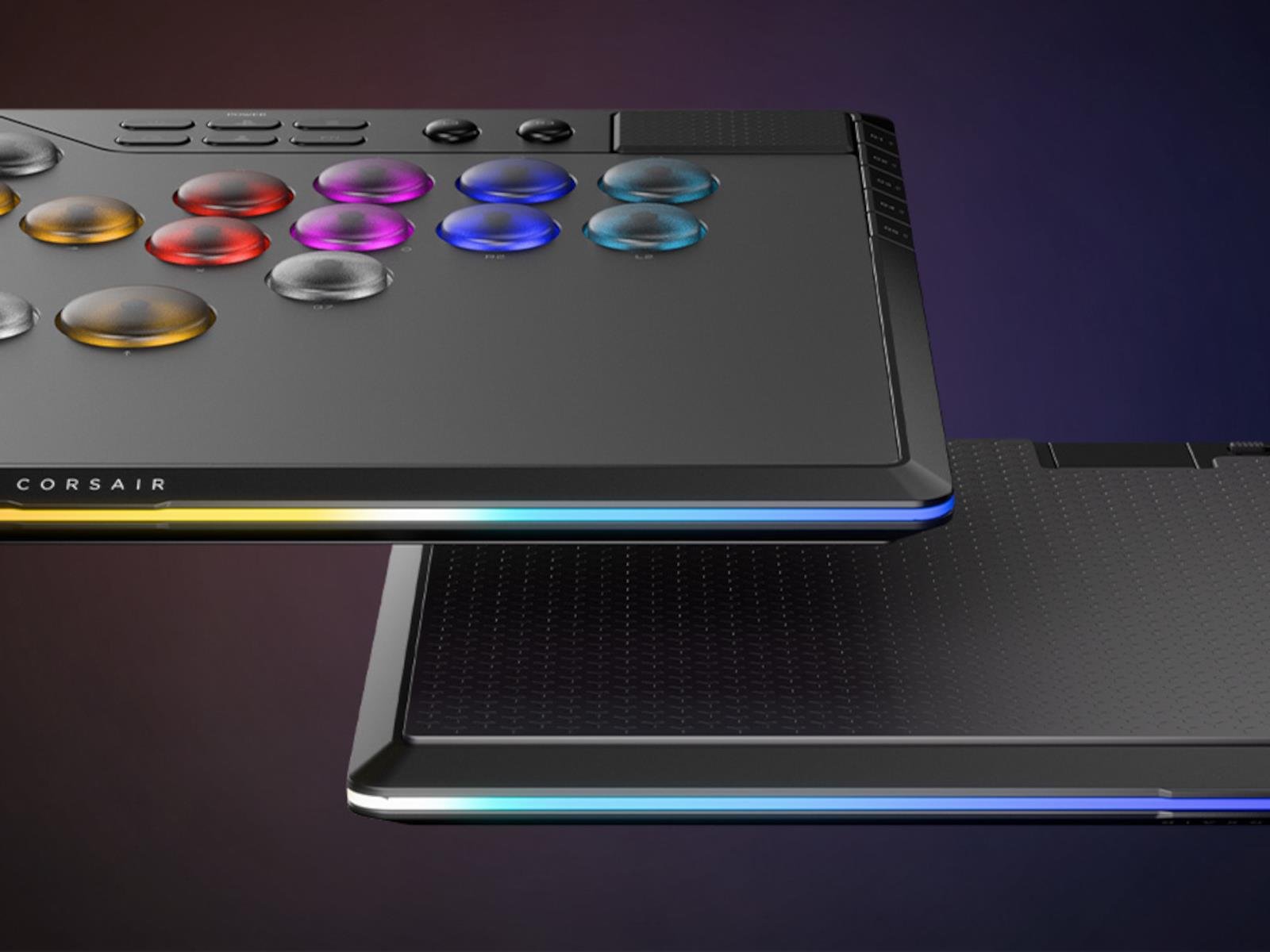
Corsair Smacks Down Hit Box & Razer With Its Sweet New Novablade Hall Effect Leverless Fight Controller

Corsair Smacks Down Hit Box & Razer With Its Sweet New Novablade Hall Effect Leverless Fight Controller
Corsair just announced its entrance into the leverless fightstick scene first popularized by Hit Box, the new Corsair Novablade Pro. Or to be more specific, the Corsair Novablade Pro Wireless Hall Effect Leverless Fight Controller—but we’ll stick with Novablade Pro for now. The Novablade Pro is a direct competitor to the likes of Hit Box’s

Affinity’s image-editing apps go “freemium” in first major post-Canva update

When graphic design platform-provider Canva bought the Affinity image-editing and publishing apps early last year, we had some major questions about how the companies’ priorities and products would mesh. How would Canva serve the users who preferred Affinity’s perpetually licensed apps to Adobe’s subscription-only software suite? And how would Affinity’s strong stance against generative AI be reconciled with Canva’s embrace of those technologies.

This week, Canva gave us definitive answers to all of those questions: a brand-new unified Affinity app that melds the Photo, Designer, and Publisher apps into a single piece of software called “Affinity by Canva” that is free to use with a Canva user account, but which gates generative AI features behind Canva’s existing paid subscription plans ($120 a year for individuals).

This does seem like mostly good news, in the near to mid term, for existing Affinity app users who admired Affinity’s anti-AI stance: all three apps’ core features are free to use, and the stuff you’re being asked to pay for is stuff you mostly don’t want anyway. But it may come as unwelcome news for those who like the predictability of pay-once-own-forever software or who are nervous about where Canva might draw the line between “free” and “premium” features down the line.

Read full article

Comments

Netflix drops a doozy of a trailer for Stranger Things S5

We’re a few weeks away from the debut of the fifth and final season of Stranger Things—at least the first of three parts of it—and Netflix has dropped one doozy of a trailer that shows things looking pretty bleak for our small-town heroes of Hawkins.

(Spoilers for prior seasons below.)

As previously reported, S4 ended with Vecna—the Big Bad behind it all—opening the gate that allowed the Upside Down to leak into Hawkins. We’re getting a time jump for S5, but in a way, we’re coming full circle, since the events coincide with the third anniversary of Will’s original disappearance in S1. The fifth season will have eight episodes, and each one will be looong—akin to eight feature-length films. Per the official premise:

Read full article

Comments

130-Foot Garden Tunnel Of Edible Fruit

This is a video highlighting the 130-long garden tunnel grown by horticulturist Steve Mills, which features plums, peaches, apples, pumpkins, and pears growing on all sides and overhead. How about that — just reach in any direction and there’s something to eat! It’s not unlike my desk in that regard. Just, you know, infinitely healthier. My desk is more Willy Wonka style.

Trump admin demands states exempt ISPs from net neutrality and price laws

The Trump administration is refusing to give broadband-deployment grants to states that enforce net neutrality rules or price regulations, a Commerce Department official said.

The administration claims that net neutrality rules are a form of rate regulation and thus not allowed under the US law that created the $42 billion Broadband Equity, Access, and Deployment (BEAD) program. Commerce Department official Arielle Roth said that any state accepting BEAD funds must exempt Internet service providers from net neutrality and price regulations in all parts of the state, not only in areas where the ISP is given funds to deploy broadband service.

States could object to the NTIA decisions and sue the US government. But even a successful lawsuit could take years and leave unserved homes without broadband for the foreseeable future.

Read full article

Comments