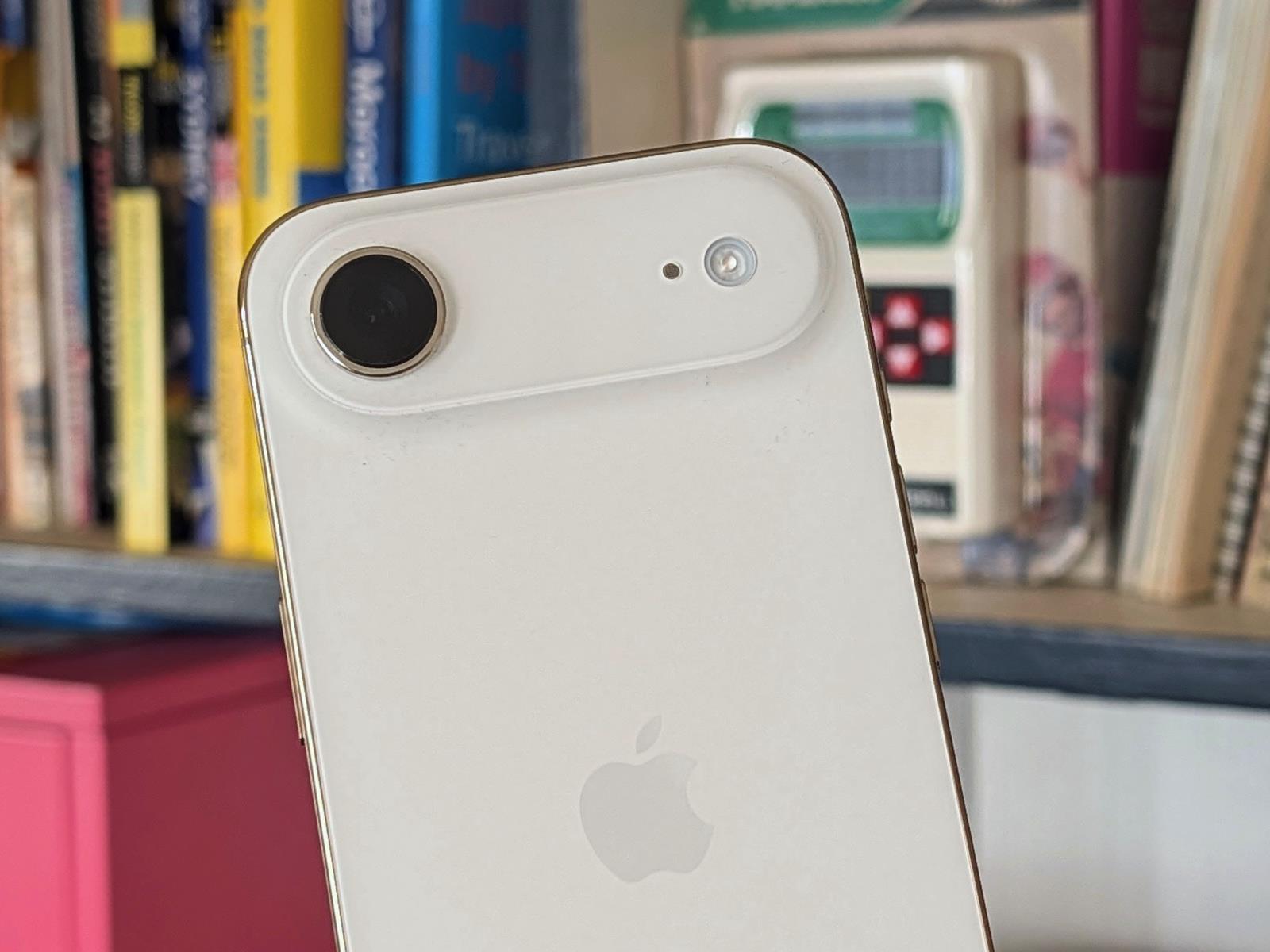
Google Maps is adding live lane guidance for the Polestar 4

Google is bringing live lane guidance to Google Maps in cars with the company’s built-in infotainment system, starting with the Polestar 4. Using the vehicle’s front-facing camera, Google Maps will be able to “see” the road just as the driver does. It will then create more detailed depictions of which lane a driver should be in and guide them using visual and audio cues.

Google says the new feature uses AI to analyze lane markings and road signs, which it then integrates in real time with Google Maps’ navigation system. Google paints a picture of fewer missed exits, as its navigation system reminds drivers in the left lane that their exit is coming up on the right side of the highway.

Details are scarce on where exactly this will function. In Google’s blog post announcing the feature, the company says it will expand live lane guidance to “more road types” in the future. We’ve reached out for clarification.

Live lane guidance with Google Maps will be rolling out on the Polestar 4 in the US and Sweden over the coming months. Google says it will expand to include more cars in partnership with other automakers.

This article originally appeared on Engadget at https://www.engadget.com/transportation/evs/google-maps-is-adding-live-lane-guidance-for-the-polestar-4-192705050.html?src=rss

OpenAI’s Sora app is now available on Android

Sora is now available to Android users on the Google Play Store. The iOS version of OpenAI’s text-to-video generative AI app is still only available in select markets and requires an invitation, but people are still extremely excited about making slop of their own; the app reportedly reached more than 1 million downloads in less than five days. And it didn’t take long for the company to land in hot water over users creating disrespectful clips of Martin Luther King Jr. and drawing censure from the Japanese government over copycats of famous manga and anime. 

Those aren’t the only legal issues Sora has been skirting. OpenAI was sued by Cameo on claims of copyright infringement, and the very next day, the company released a feature called “cameo” for putting existing entities into Sora’s gen-AI videos. Whatever it winds up being named, some form of licensing personas looks like it will be part of OpenAI’s eventual monetization plans for Sora.

This article originally appeared on Engadget at https://www.engadget.com/ai/openais-sora-app-is-now-available-on-android-191722821.html?src=rss

Pillars of Eternity to receive surprise turn-based mode in new update

Obsidian Entertainment, the studio behind Fallout: New Vegas and the recently released The Outer Worlds 2, has announced that it’s revisiting an RPG it released over a decade ago for a new update. Pillars of Eternity, a throwback isometric RPG, is receiving a turn-based mode as part of a new public beta on PC.

The new mode slows the game’s “real-time with pause” combat down, building on the optional turn-based mode the developer included with Pillars of Eternity: Deadfire, a sequel from 2018. The game’s director Josh Sawyer digs into the thinking behind the update in a trailer Obsidian released alongside the update announcement, but in brief, the mode attempts to faithfully adapt characters’ stats for turn-based combat, while making it easy to switch from real-time to turn-based modes on the fly.

Obsidian last returned to Eora, the setting of Pillars of Eternity, in the excellent Avowed from earlier this year. That game translated the series’ world and combat systems into a first-person RPG in the style of The Elder Scrolls V: Skyrim. Besides releasing The Outer Worlds 2, Obsidian is also actively developing Grounded 2 in early access.

Pillars of Eternity‘s turn-based mode will be available in a public beta for PC starting on November 5. Obsidian is looking for feedback on the new mode ahead of a planned update to the game at some point in the future.

This article originally appeared on Engadget at https://www.engadget.com/gaming/pillars-of-eternity-to-receive-surprise-turn-based-mode-in-new-update-191221448.html?src=rss

Samsung has a new line of microSD Express cards for the Switch 2

Samsung just announced the P9 Express series of microSD Express cards, which are primarily intended for use with the Switch 2 console. This is a good thing, as Nintendo’s latest console only works with microSD Express cards and, to be honest, there aren’t that many options out there for consumers.

The company boasts that these new cards feature maximum sequential read speeds up to 800MB/s, which is a mighty fine metric and in league with some of our other favorite cards for the Switch 2. The cards also include the company’s Dynamic Thermal Guard (DTG) technology, which was originally developed for SSDs. This should help things stay cool while you’re out there catching Pokémon or rampaging around as a cartoon gorilla.

A microSD card.
Samsung

Of course, these cards aren’t tied to the Switch 2. That’s just the most common use case scenario. They’ll work with just about anything, like tablets, drones, cameras and rival portable gaming consoles.

Samsung’s P9 Express microSD cards are available now, and the price is in line with similar offerings. The 256GB model costs $55 and the 512GB version costs $100.

This article originally appeared on Engadget at https://www.engadget.com/gaming/nintendo/samsung-has-a-new-line-of-microsd-express-cards-for-the-switch-2-190933303.html?src=rss

Amazon Echo Dot Max review: Disappointing sound, but Alexa+ is a star

There’s a lot more riding on Amazon’s latest batch of Echo hardware than usual. After all, these are the first devices arriving alongside Alexa+, the AI-powered revamp of the company’s signature voice assistant. And unlike the $220 Echo Studio, the new Echo Dot Max is a more affordable ($100) and compact entry point into using Alexa+. It’s also another example of how confusing Amazon’s hardware lineup can get: the older Echo Pop ($40) and Echo Dot ($50) are also getting Alexa+. The Echo Dot Max isn’t the cheapest Echo, nor is it the best-sounding speaker Amazon sells. So, where does it fit?

The best way to think about this new speaker is that it occupies the same spot in Amazon’s lineup as the venerable and discontinued device simply named “Echo.” For years, the Amazon Echo was the company’s main speaker, but it no longer sells one with that pleasantly concise name. The Echo Dot Max steps in at the same price point, though. And while my testing has shown that Alexa+ is a solid step forward, the Dot Max hardware itself isn’t as good as what it replaces.

Design

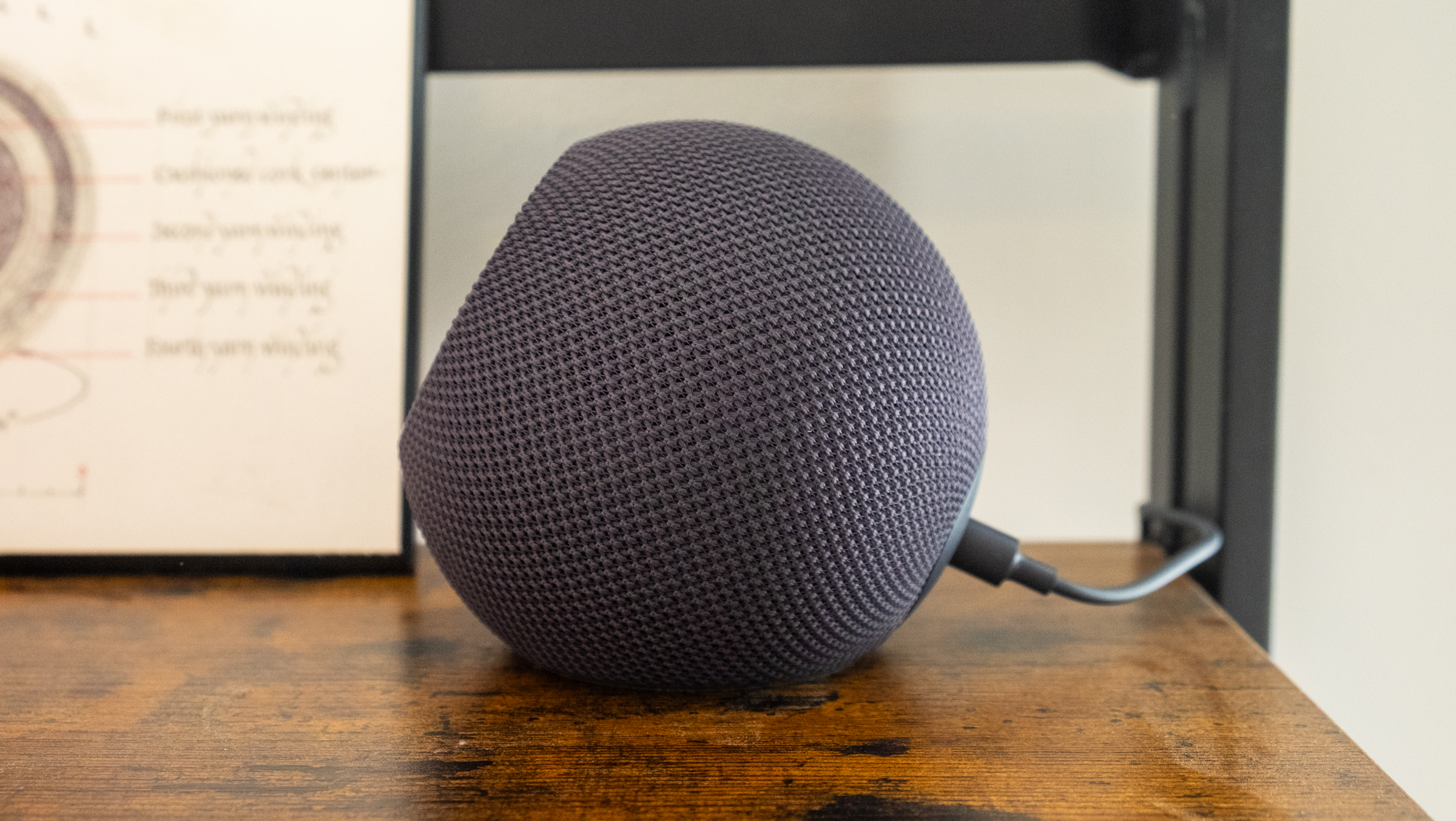
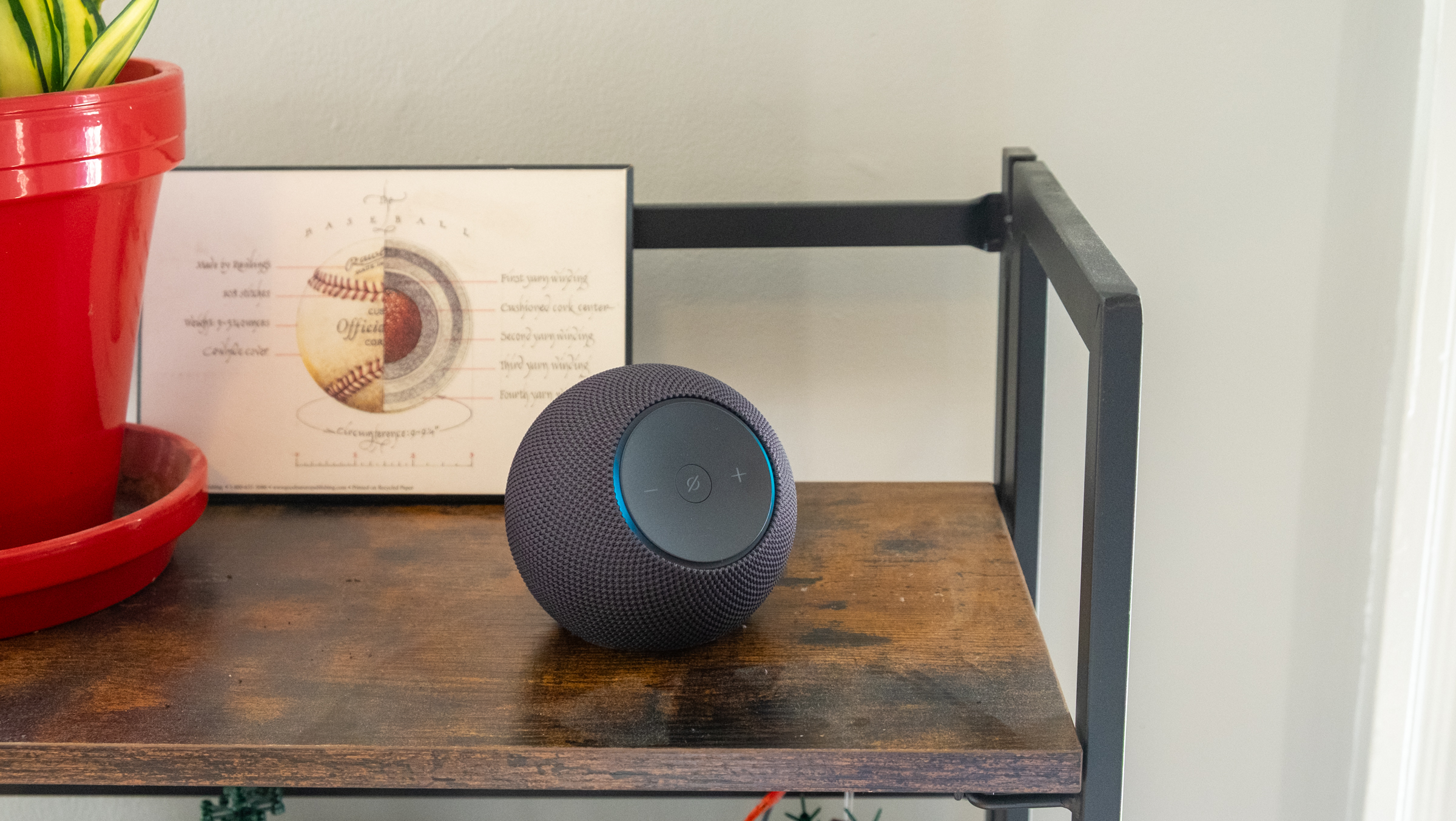
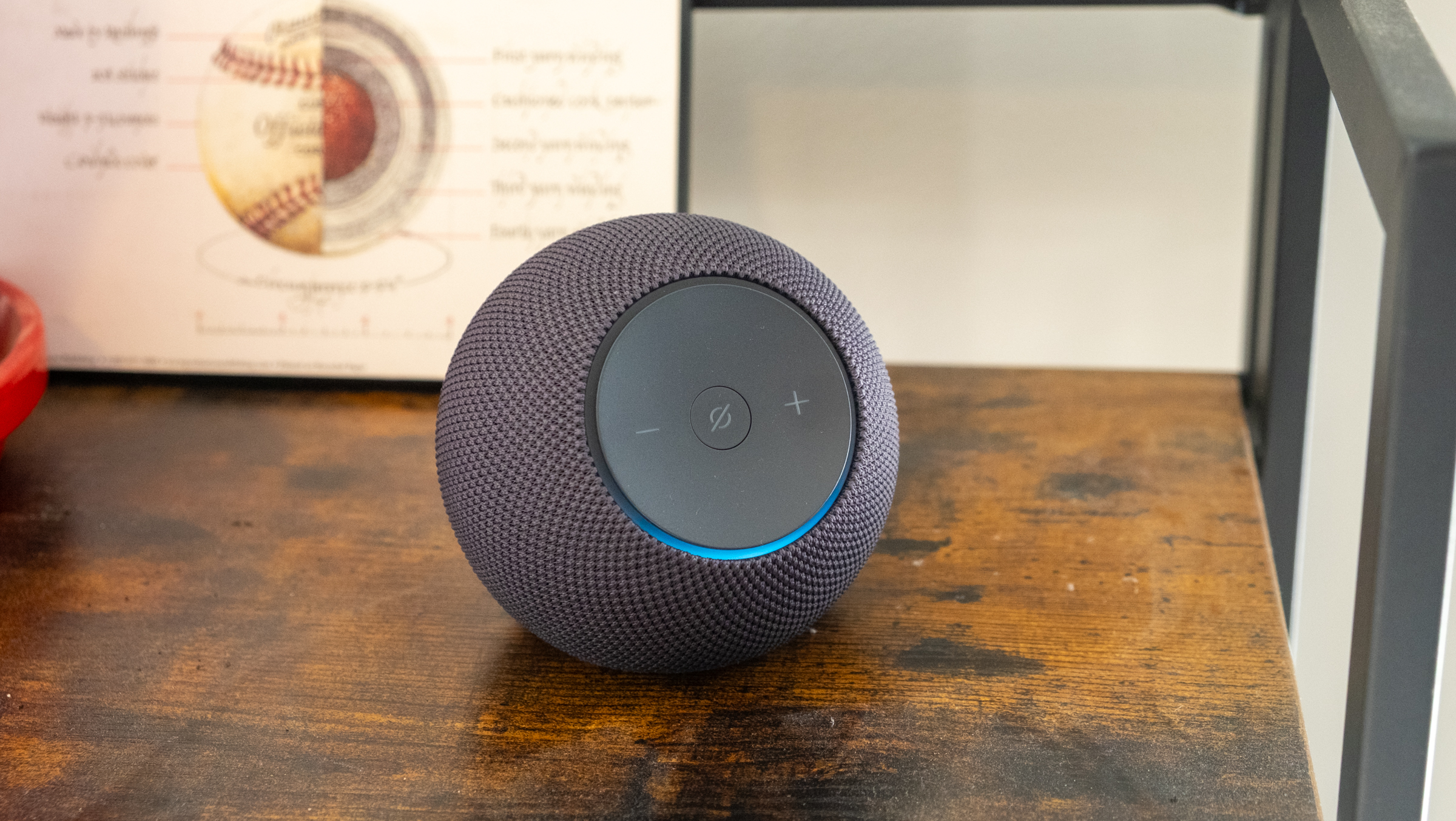
The Echo Dot Max feels immediately familiar if you’ve seen any of Amazon’s spherical smart speakers from the last five years or so, but there are numerous design changes here. The 2020 Echo and current Echo Dot have buttons on top for adjusting volume and muting the speaker’s microphone. Those buttons are now on a front-facing panel that is surrounded by the Echo’s signature light ring. While I liked how the light ring encircled the bottom of the Echo, it’s definitely easier to see in this new front-facing position and it’s particularly better at displaying the volume now. Overall, it’s a fairly refined and subtle device, which is exactly what you want from a smart speaker. I tested the graphite model, but you can also get it in white or a much bolder purple. I prefer the fully spherical, globe-like appearance of the Echo Dot, but there’s little to complain about here visually. 

Amazon's Echo Dot Max speaker.
Amazon’s Echo Dot Max speaker.
Nathan Ingraham for Engadget

I do have some quibbles about the front-facing volume and mute buttons, though. The Echo Dot Max is simply so light that if I press the controls I’ll push the speaker around the shelf it’s on. This is easily solved by putting your hand around it and pressing the buttons with your thumb, but if you reach out to it with your index finger it probably won’t stay in place. I guess you’re supposed to primarily interact with the Echo Dot Max with your voice, but top-mounted buttons would’ve avoided this problem. I imagine this isn’t as much of a problem with the similarly-designed Echo Studio, simply because it’s much larger and three times heavier. 

Audio quality

I’m a pretty big music nerd and I’ve listened to many smart speakers over the years. I’ve come away impressed with the Echo devices I tested in 2018 as well as the 2020 Echo I spoke about earlier. At $100, that Echo punched well above its weight and sounded notably better than the identically-priced HomePod Mini and Nest Audio. 

Unfortunately, the Echo Dot Max does not match that older speaker’s bonafides. Don’t get me wrong, it sounds just fine — better than a standard Echo Dot and in line with what I’d expect from a $100 speaker. It’s a good bit louder than my HomePod Mini, with plenty of volume to fill a medium-sized room on its own. If you’re looking to really pump music through a bigger room, though, you’re better off looking at the Echo Studio or something like the Sonos Era 100. You can also pair two Echo Dot Max speakers together for stereo playback and increased volume, but I didn’t get to test this so can’t say how it’ll perform in a larger space.

Side view of Amazon's Echo Dot Max speaker
Side view of Amazon’s Echo Dot Max speaker
Nathan Ingraham for Engadget

My biggest complaint with the Echo Dot Max is that frequencies often felt a bit smushed together, without a solid bass thump separating itself from the clarity in the mid- and high-range frequencies. It doesn’t provide the most dynamic listening experience. When you look at the difference in the Echo Dot Max’s speaker components compared to the fourth-generation Echo, that’s not a surprise. That older speaker paired a 3-inch woofer with dual 0.8-inch tweeters, while the Dot Max makes do with just one tweeter and a smaller 2.5-inch woofer. 

I want to reiterate that the Echo Dot Max still sounds good! The various beats, electronic glitches and vocals of Lorde’s “What Was That” came through clearly for the most part, and the modern disco vibes of “Jealous” by The Aces had a nice thump and the instruments were plenty punchy. The heavier, guitar-driven fury of albums like the new Deftones release Private Music and the 33-year-old Dirt by Alice In Chains came through loud and clear, while turning up the volume on the rave-esque vibes of “As Alive As You Need Me To Be” by Nine Inch Nails had plenty of life. But while the overall sound was pleasant enough, further listening made me realize that details like a good snap of a snare could get lost amidst a storm of guitars.

It’s a disappointment that Amazon took an undeniable step backwards here. Much like the Echo Studio that we just reviewed, the Echo Dot Max isn’t bad — it’s just underwhelming. It’s a little easier to forgive here, since the Dot Max is more of an all-purpose speaker rather than something designed to provide an exceptional listening experience. Again, it sounds totally fine for a $100 smart speaker, but given Amazon’s past success in providing surprisingly excellent audio, I was hoping for a lot more here. 

Amazon's Echo Dot Max smart speaker.
Amazon’s Echo Dot Max smart speaker.
Nathan Ingraham for Engadget

Alexa+

The other piece of the puzzle is, of course, Alexa+, Amazon’s long-awaited update to its digital assistant. Somehow, it’s already been two years since Amazon first showed off the improvements it was working on delivering with Alexa+. But with these new devices, “early access” to the service is pretty easy to come by now. 

I’ll admit that I’m not much of a voice assistant guy. I think a lot of that comes from not having a very smart home. I’ve been renting for the last eight months after owning a home for almost a decade, and there just hasn’t been much to do with Alexa (or any voice assistant) at the moment.

But even without home-based routines to run, lights to control or a smart thermostat to adjust, it was evident how much more conversational and context-aware Alexa+ is now. I did a lot of testing during the World Series and I made it a habit to ask Alexa what was going on in the series. We had several “conversations” about what happened in the previous night’s game, when the next game was happening, who the starting pitchers were and so forth. It was probably the most natural experience I’ve ever had using a voice assistant, even though using my natural language with a speaker still feels awkward. (I definitely said please to Alexa more than once.)

Once you’re set up with Alexa+ Early Access, you can use the same updated assistant in the Alexa app on your smartphone, either with your voice or in a chat interface. The chatbot-style Alexa experience is fine, but I actually prefer using my voice, because I felt like it was easier to have a conversation with it and just ask things as they popped into my head. 

Another good thing about Alexa+ is that it felt fast and responsive. There are short pauses while it thinks about a response, but it usually got back to me quickly enough that continuing that natural language conversation didn’t feel stilted or awkward. Speed is a crucial factor towards making a voice assistant feel responsive, and Alexa+ on the Echo Dot Max hits on that point. Some combo of Amazon’s AZ3 chip and whatever is happening up in its cloud is getting the job done here. 

As with any voice assistant, Alexa+ is, of course, not perfect. Most basic tasks like setting reminders, checking the weather and playing music all work reliably. But asking for specific songs or albums can sometimes go badly. Occasionally, Alexa wouldn’t be able to find a specific album I was looking for but it would play other songs by the artist; other times it would come up with completely unrelated music. This is an issue I’ve had with all assistants, but I was hoping Alexa+ might be smart enough to avoid getting too far off base.

I asked it to “play the latest release by the band Now, Now.” It’s an EP entitled 01 so I had a feeling Alexa might struggle with that. Sure enough, it said “sure, here’s new music from Now, Now” and played one of the songs from that release. Not bad, but not quite right. I then followed up and said “can you play this entire album?” That did not work. Instead, I ended up with the song “Ain’t it Funky Now” performed by legendary jazz guitarist and composer Grant Green. An outstanding recording, sure, but not remotely close to what I was looking for. Even asking “play the album ‘01 EP’ by the band Now, Now” got me Drake’s “Laugh Now Cry Later.” Sigh. 

Worse than that were the times when Alexa+ just made things up. The Alexa app provides you with little suggestions for things to ask about, like “iconic music duets.” I tapped it, curious to see what it provided, and it pulled up a list of “iconic music duets that have left an indelible mark on the music industry.” 

Among those was “Smells Like Teen Spirit” performed by the late Kurt Cobain and his wife Courtney Love. This happened? News to me! I followed up and asked for more details and got a response noting that “there isn’t a formal duet of ‘Smells Like Teen Spirit.’” Best I can tell, it popped up because Love sang some unused lyrics from the legendary song on an episode of the 60 Songs That Explain the ‘90s podcast, back in 2023. This is a perfect example of the random inferences AI often draws, and it’s a good reminder that Alexa+, like all AI assistants, can make things up sometimes. This didn’t happen often, but it’s still something you’ll need to look out for. 

Amazon's Echo Dot Max smart speaker.
Amazon’s Echo Dot Max smart speaker.
Nathan Ingraham for Engadget

Wrap-up

The Echo Dot Max more or less delivers on Amazon’s promises. It sounds better than smaller speakers like the Echo Dot or Pop, and it’s significantly cheaper than the Echo Studio. If you’re at all interested in music, it’s worth stepping up to the Dot Max over the standard Dot. Beyond just better audio, it’s also significantly newer (the Dot was last updated in 2022). Its more modern processor means it should have a longer lifespan than the standard Dot, making it a better option for people who are eager to try out Alexa+. 

That freshly updated hardware is a reason to consider the Echo Dot Max over similarly priced speakers like the Nest Audio and HomePod Mini, both of which are five years old. And despite Alexa+ dealing with some growing pains, it’s a better option at this moment than the unproven Gemini for Home Google that is rolling out or the old, limited Siri that the HomePod Mini is still stuck with.

But the Echo Dot Max still feels like a bit of a missed opportunity to me. The old Echo sounded so good, and this speaker is just not as exciting in comparison. It’s a fine way to interact with Alexa+ and enjoy some tunes, I just wish it sounded a little bit better.

This article originally appeared on Engadget at https://www.engadget.com/audio/speakers/amazon-echo-dot-max-review-disappointing-sound-but-alexa-is-a-star-190000721.html?src=rss

What People Are Getting Wrong This Week: Oz Pearlman’s Magical Powers

We may earn a commission from links on this page.

Every few decades, the pop culture machine spits out a person who purports to have supernatural powers. In the 1980s, it was spoon-bending swami Uri Geller. In the 1990s and 2000s, it was “mediums” like John Edward, who supposedly talked to people’s dead relatives. In 2025, we have Oz Pearlman. To be fair, unlike the rest of these examples, Pearlman doesn’t claim supernatural powers himself, but a lot of people seem to be taking his stage patter explanation for his mentalist tricks as the unvarnished truth. They’re wrong.

Oz (pronounced “Oh’s”) has a hell of a schtick. The 43-year-old dude seems like an unassuming nerd, until he starts reading people’s minds. In the years since he took third place on America’s Got Talent, Pearlman has done things like name NFL player A.J. Brown’s first childhood crush during a performance for the Philadelphia Eagles; guess who John Cena was thinking of on the Today Show; and maybe most famously, correctly divine Joe Rogan’s ATM PIN on an episode of the Joe Rogan Podcast. 

It’s only reasonable to assume that Oz Pearlman can’t actually read people’s minds, and “Magician Not Actually Doing Magic” isn’t much of a headline anyway. But the real story isn’t Pearlman, it’s the reaction he’s getting: As more media sources feature him and more people become fans, it’s becoming clear that a lot people who should know better are falling for his act.

How much can you tell from body language?

In his TED talk and in numerous interviews, Pearlman claims that he has “reverse engineered the human mind” and is able to tell what people are thinking through their body language, micro-expressions, and other imperceptible-to-mortals physical cues. “I don’t read minds, I just read people,” Pearlman says. That may sound scientific, but it isn’t.

While psychologists can sometimes interpret general emotions from micro-expressions and body language, there’s no evidence that these could help divine specific thoughts, including the word you’re thinking of, your PINs, or your childhood crushes. At best, body language gives you a vague sense of mood, but it fails at even broad tests like revealing whether you’re being lied to.

In other words, all his “reverse engineering the mind talk” is just patter from a magician, but it’s often reported as fact or left unexamined by media, as you can see in this recent 60 Minutes puff piece on Pearlman. This has led many to believe it’s actually possible to read minds if you know how (and of course Pearlman will sell you a book that can teach you). But Oz Pearlman is not reading minds, people, body language, or micro-emotions. He’s performing magic tricks—and old ones, at that.

Oz Pearlman’s carnival tricks

As with any kind of debunking, no one can prove a negative, so I can’t say for sure that Pearlman isn’t reading people’s postures, but if Pearlman could read people’s thoughts by how they hold their hands or whatever, why would he only prove it by doing variations on carnival mentalism gags that have been around for centuries? His gestures, nods, and pauses aren’t signs of mind-reading—they’re stage work. Pearlman’s tricks will work whether the subject is expressive or stiff, because the outcome is already controlled through pre-show work, audience manipulation, and clever gimmicks.

Pearlman often puts a high tech spin on old tricks, and he’s really good at what he does. For instance, check out this involved trick where random numbers entered on an iPhone calculator add up to exactly the serial number on a randomly chosen dollar bill.

Here’s how it’s done: First, Pearlman engages in the time-honored mentalist tradition of “sneaking a look.” Here he is quickly memorizing the serial number on the random bill:

Oz Pearlman trick

Credit: Bussin with the Boys-YouTube

Then he asks for a phone to use as a calculator. If you turn your iPhone calculator to the side, as Pearlman does here,

Oz Pearlman trick

Credit: Bussin with the Boys-YouTube

it turns on scientific mode, and that lets you store a number. (Try it with your own phone if you wanna) Pearlman then quickly enters the serial number he’s just seen, hits “store” and hands the phone back, so that it can be pulled up later. That’s the whole trick. All the patter and dates and math whatnot are window dressing.

The rest of his tricks have similar explanations: forced picks, sneaky looks, and magician’s gimmicks explain almost all of his mentalism—except his most mind-blowing tricks, like guessing Joe Rogan’s PIN number. But those have an even easier explanation.

How Pearlman (probably) guessed Joe Rogan’s ATM PIN

Tricks aimed at individuals, like the PIN number or the name of a childhood crush, are done by learning this information before the show begins. Pearlman is likely employing a mentalism technique that’s been around since at least the 1800s: using an advance team to gather “secret” information about prominent audience members long before the curtain goes up.

I’m not saying Pearlman hired someone to follow Rogan around or used a thermal camera pointed at a keypad to get his PIN, but it’s possible, and that’s what I would have done. All Pearlman needs to blow everyone’s mind is a single piece of “unknowable” information about a prominent person—the name of a childhood crush or a high school teacher, say—and that these can be learned in advance through old-fashioned means like interviews with childhood friends, checking out a high school yearbook, or by employing technical hacks.

With these kinds of tricks, you’re often only seeing the second part of the illusion. The first, pre-show part might involve asking the mark visit an innocent-seeming website (actually the magician’s own site) to search for the name of a childhood crush. The magician can then read the “most recent searches” from his phone and pull the answer out “thin air.” Think of it this way: hackers use social engineering and technical exploits to get secret passwords all the time; why wouldn’t a magician do the same kinds of things?

The Uri Geller effect

In the 1970s and ’80s, spoon-bending psychic Uri Geller occupied a similar place in popular culture as Pearlman does now. Geller was a frequent guest on daytime and late night talks shows, and his appearances were guaranteed to raise ratings. Hosts rarely challenged his claims of supernatural power, even though any magician could tell you how he did his signature spoon-bending tricks. Like Geller, Pearlman isn’t lying about bending spoons, he’s lying about how the spoons are getting bent.

In 2025 Pearlman couldn’t credibly claim otherworldly forces were helping him bend spoons like Uri Geller could in the 1970s, but he can get people to believe that micro-expressions and knowledge of human psychology will help you divine someone’s ATM PIN code. And unlike the 1970s, there seems to be no Johnny Carson around willing to call bullshit on his work.

I’m not knocking Oz Pearlman’s hustle—he’s a very skilled performer—but anyone should know that you can’t trust a magician. They entertain by making the impossible look real, but when supposedly serious journalistic outlets like 60 Minutes don’t even bother with a token pushback about a magician’s specious claims, there’s a problem.  

Amazon Accuses Perplexity of Computer Fraud, Demands It Stop AI Agent From Buying On Its Site

Amazon has sent a cease-and-desist letter to Perplexity AI demanding that the AI search startup stop allowing its AI browser agent, Comet, to make purchases online for users. From a report: The e-commerce giant is accusing Perplexity of committing computer fraud by failing to disclose when its AI agent is shopping on a user’s behalf, in violation of Amazon’s terms of service, according to people familiar with the letter sent on Friday. The document also said Perplexity’s tool degraded the Amazon shopping experience and introduced privacy vulnerabilities, said the people, who spoke on condition of anonymity to discuss internal matters.

In response, Perplexity said Amazon is bullying a smaller competitor with a rival AI agent shopping product. The clash between Amazon and Perplexity offers an early glimpse into a looming debate over how to handle the proliferation of so-called AI agents that field more complex tasks online for users, including shopping. Like OpenAI and Alphabet’s Google, Perplexity has pushed to rethink the traditional web browser around AI, with the goal of having it streamline more actions for users, such as drafting emails and conducting research.


Read more of this story at Slashdot.

Stop Killing Games Petition Sparks Fiery Parliament Debate But Is It Game Over?

Stop Killing Games Petition Sparks Fiery Parliament Debate But Is It Game Over?
The Stop Killing Games movement, which ramped up after Ubisoft shut down The Crew, has been steadily gaining support, with its petition garnering over a million signatures from citizens throughout the European Union. There are similar efforts happening in individual countries as well, including the United Kingdom, which officially brought

Apple Prepares To Enter Low-Cost Laptop Market for First Time

Apple is preparing to enter the low-cost laptop market for the first time, developing a budget Mac aimed at luring away customers from Chromebooks and entry-level Windows PCs. Bloomberg News: The new device — designed for students, businesses and casual users — will target people who primarily browse the web, work on documents or conduct light media editing, according to people familiar with the matter.

[…] Apple plans to sell the new machine for well under $1,000 by using less-advanced components. The laptop will rely on an iPhone processor and a lower-end LCD display. The screen will also be the smallest of any current Mac, coming in at slightly below the 13.6-inch one used in the MacBook Air. This would mark the first time that Apple has used an iPhone processor in a Mac, rather than a chip designed specifically for a computer. But internal tests have shown that the smartphone chip can perform better than the Mac-optimized M1 used in laptops as recently as a few years ago.


Read more of this story at Slashdot.

Nintendo’s patent on summoning fighting NPCs is being reexamined

Nintendo’s lawsuit against Palworld just hit a snag. The US Patent and Trademark Office (USPTO) has ordered a reexamination of a key Nintendo patent expected to be wielded in the case. Games Fray reports that the office is reviewing the Switch maker’s patent regarding “summon subcharacter and let it fight in 1 of 2 modes.” If we view Nintendo’s Palworld lawsuit as a test bed for monopolizing game mechanics, the development can only be seen as a good thing. 

Several factors make the reexamination unusual. First, Nintendo’s patent in question (No. 12,403,397) was just granted in September. The review was personally ordered by newly sworn-in USPTO Director John A. Squires. The Trump appointee has historically sided with patent holders, making it harder to contest them. Stranger still, Games Fray says this may be the USPTO’s first patent reexamination in over a decade.

Sheep with guns in the game Palworld.
Palworld
Pocketpair

Those ingredients suggest widespread blowback may be the driving force. Although Palworld developer Pocketpair is Nintendo’s immediate target, it’s easy to see the case opening a Pandora’s box where developers fear using well-established game mechanics. Indie developers would be particularly vulnerable. The “slippery slope” commentary practically writes itself.

If Nintendo’s patent is ultimately invalidated, we may be able to thank Konami. A 2002 patent application from the maker of Metal Gear and Castlevania was cited as prior art, casting doubt on Nintendo’s claim. A separate Nintendo patent, published in 2020, was also listed as possible prior art. Games Fray‘s report dives much deeper into the legal weeds.

Nintendo now has two months to respond. During that period, third parties can come forward with additional prior art references. As a nervous industry eyes Nintendo’s case as a potential test bed for monopolizing game mechanics, don’t be shocked if gaming lawyers search far and wide for more examples.

This article originally appeared on Engadget at https://www.engadget.com/gaming/nintendo/nintendos-patent-on-summoning-fighting-npcs-is-being-reexamined-180949135.html?src=rss

Apple Just Changed How You Turn Off Your iPhone Alarms

If you’ve been an iPhone user for a long time, you might remember “slide to unlock.” When you wanted to use your iPhone, you had to physically move your finger along the screen to actually unlock the device. It was a clever way of ensuring than your iPhone didn’t unlock in your pocket, or due to an accidental touch.

With iOS 10, Apple killed slide to unlock in favor of pressing the Home button, then later swiping up on the bottom of the screen. Since then, for the better part of a decade, swiping right on the Lock Screen simply takes you to the “Today View,” which contains your widgets. Change is good, and I don’t necessarily think Apple should bring back slide to unlock for the Lock Screen, but sometimes, I miss how things worked on my old iPhone 3GS. Nostalgia is a hell of a drug.

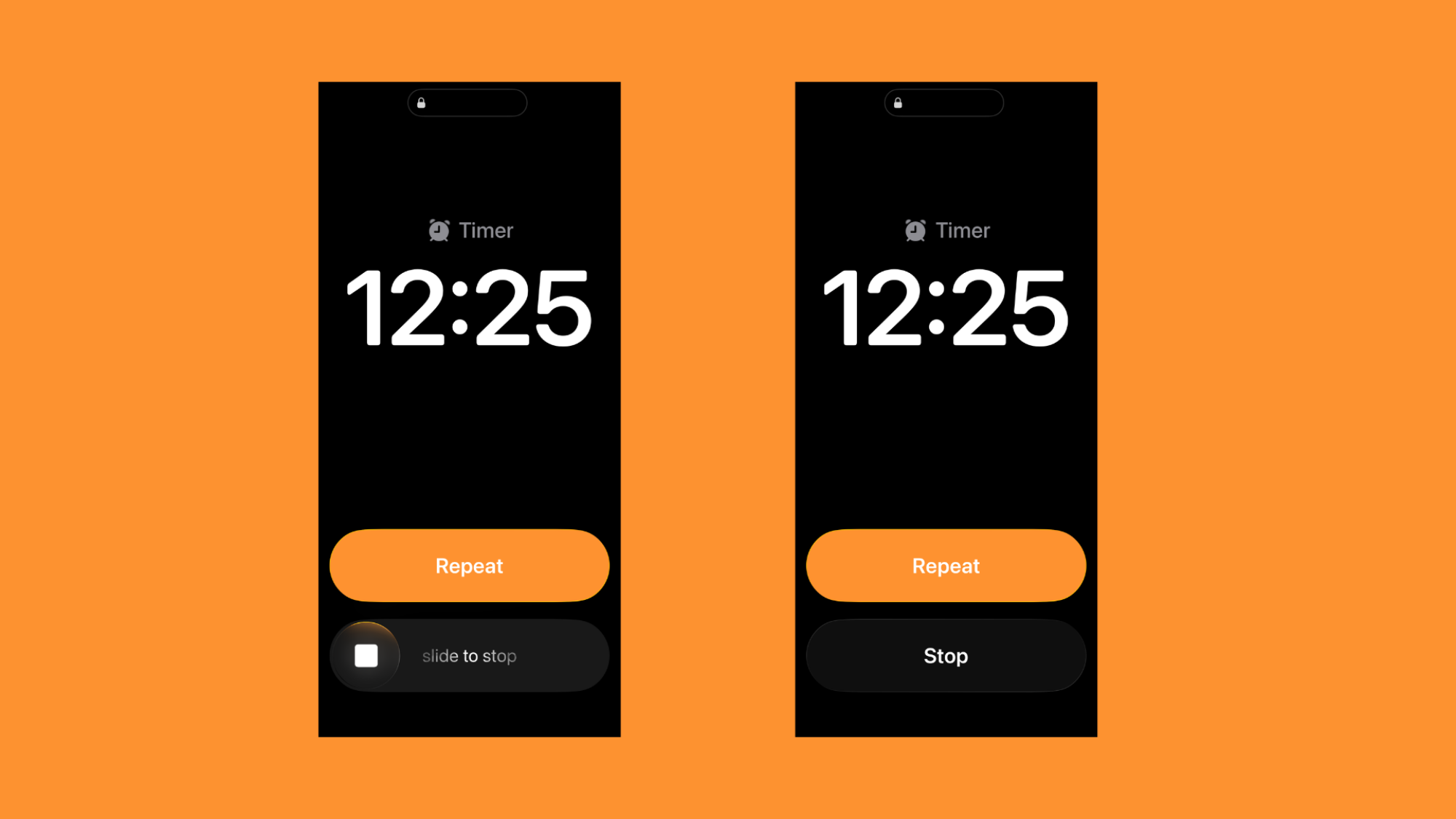
To my absolute surprise, however, the company is bringing back the slide function—just not to unlock. Instead, you’re now able to slide to stop your alarms, which might come as a surprise to anyone used to the usual alarm routine. Imagine it: One morning, you’re tapping to turn off your alarm as usual; the next, your taps are fruitless, and your alarm keeps blaring. Bleary-eyed, you look at your screen, to find a new “Slide to stop” function. If you’re like me, you’ll follow instructions, sliding to stop the alarm, only to forget the whole ordeal within moments, doomed to repeat the affair the next morning.

This change arrives as part of iOS 26.1, which dropped on Monday, and Apple doesn’t give you any say in the matter—at least, not at first. After updating to the latest update, your next alarm or timer will include the next slider (though “snooze” or “repeat” remain buttons), but the switch up is fine by me. I like it, and it brings back a fun feature from iOS’ heyday. But if you dislike the change, and you wish you could simply tap a button to silence your alarms and timers, the good news is, you still can.

How to disable “slide to stop alarm”

Apple buried the option to revert your alarm and timers back to the way they used to be, so I wouldn’t blame you for not knowing they even exist. You won’t find them in the Clock app’s settings page, which is confusing. Instead, it’s part of a hidden system-wide setting, called “Prefer Single-Touch Actions.”

This setting will disable sliders across iOS, and replace them with buttons. For our purposes, that turns “Slide to stop” back into a simple off button. To find it, head to Settings > Accessibility > Touch, then enable the toggle next to “Prefer Single-Touch Action.”

Slide to stop (left) vs. stop button (right).
Credit: Lifehacker

UK High Court sides with Stability AI over Getty in copyright case

Stability AI has partially succeeded in defending itself against accusations of copyright infringement. As reported by The Guardian, Stability AI prevailed in a high-profile UK High Court case, following Getty first suing the company in 2023 for allegedly using its copyright images to train its Stable Diffusion AI art tool without permission.

Getty’s original claim was that Stability AI had unlawfully copied and processed millions of protected images for training purposes, therefore abusing the rights of the original creators. However, the Seattle-based company eventually withdrew its claims of primary copyright infringement as it reportedly could offer no evidence that unauthorized copying for the training of Stable Diffusion had taken place in the UK.

Today’s ruling concerns claims of secondary infringement, to which the High Court judge, Justice Joanna Smith, ruled that “an AI model such as Stable Diffusion which does not store or reproduce any copyright works (and has never done so) is not an ‘infringing copy'” under UK law. This was despite the ruling finding some evidence of Getty’s images being used by Stability, as evidenced by the presence of the former’s watermark. While the judge sided with Getty on some of its claims, she said that the evidence was “both historic and extremely limited in scope.”

The High Court ruling likely won’t fill companies and creators concerned about AI-related copyright infringement with a huge amount of optimism, but unsurprisingly, both Getty and Stability AI have been quick to celebrate their respective victories. Getty’s statement reads, in part:

Today’s ruling confirms that Stable Diffusion’s inclusion of Getty Images’ trademarks in AI‑generated outputs infringed those trademarks. Crucially, the Court rejected Stability AI’s attempt to hold the user responsible for that infringement, confirming that responsibility for the presence of such trademarks lies with the model provider, who has control over the images used to train the model. This is a significant win for intellectual property owners. The ruling delivered another key finding; that, wherever the training and development did take place, Getty Images’ copyright‑protected works were used to train Stable Diffusion. The ruling also established a powerful precedent that intangible articles, such as AI models, are subject to copyright infringement claims in the same way as tangible articles. We will be taking forward findings of fact from the UK ruling in our US case.

The company added that it was “deeply concerned” that even “well-resourced companies” remain at risk of infringement due to a “lack of transparent requirements.” It also urged the UK government to build on the current laws around this issue. Christian Dowell, general counsel to Stability AI, said the final ruling from the court “ultimately resolves the copyright concerns that were the core issue.”

The ruling comes just days after Getty announced a new agreement with Perplexity AI that permits the latter to access Getty’s huge media library as part of its search and discovery tools. In a press release, Getty said a condition of the licensing deal was Perplexity committing to “making improvements on how it displays imagery, including image credit with link to source, to better educate users on how to use licensed imagery legally.”

This article originally appeared on Engadget at https://www.engadget.com/ai/uk-high-court-sides-with-stability-ai-over-getty-in-copyright-case-180029461.html?src=rss

Some stinkbugs’ legs carry a mobile fungal garden

Many insect species hear using tympanal organs, membranes roughly resembling our eardrums but located on their legs. Grasshoppers, mantises, and moths all have them, and for decades, we thought that female stinkbugs of the Dinidoridae family have them, too, although located a bit unusually on their hind rather than front legs.

Suspecting that they use their hind leg tympanal organs to listen to male courtship songs, a team of Japanese researchers took a closer look at the organs in Megymenum gracilicorne, a Dinidoridae stinkbug species native to Japan. They discovered that these “tympanal organs” were not what they seemed. They’re actually mobile fungal nurseries of a kind we’ve never seen before.

Portable gardens

Dinidoridae is a small stinkbug family that lives exclusively in Asia. The bug did attract some scientific attention, but not nearly as much as its larger relatives like Pentatomidae. Prior work looking specifically into organs growing on the hind legs of Dinidoridae females was thus somewhat limited. “Most research relied on taxonomic and morphological approaches. Some taxonomists did describe that female Dinidoridae stinkbugs have an enlarged part on the hind legs that looks like the tympanal organ you can find, for example, in crickets,” said Takema Fukatsu, an evolutionary biologist at the National Institute of Advanced Industrial Science and Technology in Tokyo.

Read full article

Comments

Apple may release its first ‘low-cost’ Mac laptop in early 2026

It seems Apple is preparing to debut a low-cost Mac laptop in the first half of 2026. According to Bloomberg, such a system is in early production at the company’s overseas suppliers and Apple is testing the devices internally.

Apple’s aim with this laptop, per the report, is to draw people away from the likes of Chromebooks and cheap Windows PCs and into its own ecosystem. The company is said to be making the system with casual users, students and businesses in mind — the kinds of folks who use laptops for tasks like web browsing, light media editing and working on documents. Apple is also reportedly planning to aim the system at potential iPad buyers who’d still rather have a traditional laptop.

The laptop is said to have a new design with a “lower-end LCD display” and it’s expected to run on an A-series iPhone processor that’s said to deliver better performance than the M1. It’s also likely to have a smaller display than the 13.6-inch MacBook Air.

Performance is important, but the price point will be crucial if Apple wants to really compete with the proliferation of Chromebooks and entry-level Windows devices. The company is said to be ready to sell this Mac for “well under $1,000.” Chromebooks and Windows laptops often sell for just a few hundred bucks. Higher-end Chromebooks cost around $600, so Apple would likely have to sell this laptop for $700 or less for it to make a real splash.

Apple has traditionally focused on making premium devices, but would be a smart time for the company to enter the lower end of the market. Microsoft is ending support for Windows 10, including on devices that don’t support Windows 11 and owners of such systems (including businesses) may need to buy new laptops in the near future to have the latest security updates.

This article originally appeared on Engadget at https://www.engadget.com/computing/laptops/apple-may-release-its-first-low-cost-mac-laptop-in-early-2026-174143869.html?src=rss

Australia Introduces ‘Landmark’ Streaming Content Quotas

Speaking of Australia, its government has introduced content quotas on global streamers. From a report: The rules require Netflix, Prime Video and the other global streamers with more than one million Australian subscribers to spend 10% of their total Australian expenditure — or 7.5% of their revenues — on local originals, whether they are dramas, children’s shows, docs, or arts and educational programs.

Following the announcement, the legislation will be introduced into the Australian parliament. Australia’s Labor government has long planned to being in the quotas as part of its Revive cultural policy, but months and months of delays had left the local industry wondering how committed their political leaders were to the plan. Global streamers have broadly rejected the necessity of quotas, claiming their local investment in content and jobs offsets them.


Read more of this story at Slashdot.

Disney Movies Are Disappearing From YouTube and Google TV

The ongoing feud between Disney and Google is heating up. It all started last week, when Disney pulled its channels from YouTube TV, Google’s Live TV service, over fee disputes. Now, Disney seems to be pulling content from other Google services as well. As first noted by 9to5Google, Disney movies are starting to disappear from YouTube’s pay-per-view offerings too, and even other platforms like Google TV.

For instance, try typing “Avengers” into your YouTube search bar right now. Aside from trailers and videos uploaded from individual users, you’re more likely to see a rental option pop up for that 1998 Sean Connery and Uma Thurman spy movie than Marvel’s superheroes. Meanwhile, Superman, a Warner Bros. movie, has a large “Buy or rent” button right at the top of the page.

Screenshot of 'The Avengers' and 'Superman' on YouTube

Credit: Michelle Ehrhardt

The same goes for Lilo & Stitch. Currently, YouTube shows no option to buy or rent either the original Lilo & Stitch or its remake, but pay-per-view buttons for Dreamworks family movie The Bad Guys 2 show up front and center at the top of the page, just like with Superman.

Even movies from Disney subsidiaries seem to be affected. While I was able to navigate to a rental page for Alien, which is now owned by Disney after its acquisition of Fox, I couldn’t actually go through with purchasing the movie. Instead, I just saw a message saying, “This video contains content from Fox. It is not available.”

'Alien' on YouTube

Credit: Michelle Ehrhardt

I ran into the same issues trying to find these movies on other Google services, like Google TV (which also offers rentals, much like Apple TV) or the Play Store, but notably, all of the movies listed above are available on non-Google platforms, like Prime Video. Even older “Disney Vault” titles, like the original The Little Mermaid, are on Prime, but are nowhere to be seen on Google’s services.

'The Little Mermaid' on Amazon Prime

Credit: Michelle Ehrhardt

I’ve reached out to both Disney and Google for comment, and will update when I hear back. In the meantime, neither company has made an official statement about this seeming pay-per-view content blockade.

My two cents? It’s a negotiation tactic. YouTube’s pay-per-view offerings are a separate service entirely from YouTube TV, and are thus likely unaffected by that platform’s licensing deals. At the same time, in pulling more of its content from Google’s other platforms, Disney can exert additional leverage on Google to pay up to stream its channels.

It’s not the only mind game going on right now, for what it’s worth. At time of writing, it’s currently the first major election day in the U.S. since last year’s presidential election, and yesterday, Disney offered to temporarily return ABC to YouTube TV so viewers could keep up with the news. YouTube rejected the proposal, saying it would “cause customer confusion” and instead proposed that Disney “immediately restore” ABC and ESPN while negotiations continue, as a sign of good faith.

“Those are the channels that people want,” YouTube said, implying that it is being overcharged for additional channels that viewers show little interest in. The company then said that if Disney is willing to play ball, it can “get these channels live in hours.”

That’s certainly more heated than we’ve seen past YouTube TV negotiations, which were largely settled before customers saw any impact, get. While it’s possible Disney might actually take YouTube up on its offer, we’re probably not out of the woods yet. Luckily for YouTube TV subscribers, YouTube is promising remediation if the situation drags on any further, and some have even started to see it.

As someone who doesn’t subscribe to YouTube TV but does rent movies through YouTube, though? I have to admit I feel a little caught in the crossfire.

Why DJI drones might be banned in the US

Since being placed on a Department of Commerce entity list in 2020 over national security fears, China’s DJI has faced the threat of a US ban on its hyper-popular drones. After exhausting its appeals and losing a lawsuit last month, DJI products like the Mini 4 Pro, Avata 2 and Neo may disappear from US shelves starting December 23.

The situation could be even worse than initially expected. The FCC just gave itself the power to retroactively cut off products from companies on its “covered” list, including DJI. That gives the government the right to not just halt sales of future products, but enact rules preventing people from using drones they’ve already purchased.

DJI dominates the consumer US drone market, so a ban would be terrible news for hobbyists and creators, along with industrial and public safety operators. However, the government’s concerns about the company’s drones as potential spying tools are very real.

A brief history of DJI

DJI, or Da-Jiang Innovations, is based in Shenzhen, China and introduced its ready-to-fly, now-iconic Phantom drone in 2013. It was $629 and offered a more user-friendly experience than other drones at the time, opening up aerial photography to creators and cinematographers.

DJI's new triple camera system offers a 28mm main camera, 70mm telephoto and a 168mm telephoto.
DJI Mavic 4 Pro
Steve Dent for Engadget

The company followed with increasingly sophisticated products like the Mavic Pro, Mini 3 Pro and Avata, along with larger commercial drones. It continued to expand its range with the small but powerful Air 3, Neo and Flip. As of 2020, DJI had an estimated 77 percent of the US drone market (which accounts for 40 percent of its sales), leaving rivals to fight for scraps.

Most observers attribute DJI’s dominance to its engineering-first culture. To give an idea of its technical progress, the latest 2025 Mavic 4 Pro can be flown from 25 miles away, compared to just 0.62 miles for the 2015 Phantom 3. Nearly every DJI drone feature, including video quality, battery life, range, tracking and obstacle detection, is superior to rivals.

Catching the eye of the US government

By 2016, the company had caught the attention of US regulators concerned about Chinese camera-equipped drones flying over sensitive facilities. While no one has uncovered a smoking gun proving that DJI drones spy for China, they undoubtedly pose a potential national security risk. The Cybersecurity and Infrastructure Security Agency (CISA) laid out the dangers last year in a guidance sheet:

  • DJI is subject to China’s 2017 National Intelligence Law, which compels companies to cooperate with state intelligence services.

  • The 2021 Cyber Vulnerability Reporting Law requires Chinese-based companies to disclose cyber vulnerabilities to PRC authorities prior to any public disclosure, which could allow them to exploit such flaws before they’re publicly known.

  • UAS (unmanned aircraft system) devices controlled by smartphones provide a path for UAS data egress and storage, which could enable intelligence gathering on US critical infrastructure.

  • Updates controlled by Chinese entities could introduce unknown data collection and transmission capabilities without the user’s awareness.

  • When a UAS is incorporated into a network, the potential for data collection and transmission of sensitive imagery, surveying data and facility layouts increases.

Video quality on the Neo isn't as good as other DJI drones but for $200, most buyers will be very satisifed
Photo taken by a $200 DJI Neo drone
Steve Dent for Engadget

In 2017, DJI’s drones were banned from use by the US Army. Later that year, the Department of Homeland Security (DHS) issued a memo stating “with moderate confidence” that DJI’s drones were “providing US critical infrastructure and law enforcement data to the Chinese government.” The agency never provided any direct proof, however, and DJI denied it.

Then in 2020, DJI was added to the US Department of Commerce’s “entity list” over claims it “enabled wide-scale human rights abuses within China.” That meant the company could no longer buy parts or services from US manufacturers, like Amazon Web Services, Texas Instruments and Intel. In response, DJI said it was “disappointed” with the decision but customers could “continue to buy and use DJI products normally.”

A year later, however, it was placed on the Treasury department’s “Chinese military-industrial complex companies” list for its alleged involvement in the surveillance of Uyghur Muslim people in China. That banned US citizens from investing in the company.

The US Department of Defense (DoD) piled on in October 2022, putting DJI on a list of “Chinese military companies” operating in the US. After the DoD refused DJI’s delisting petition in 2023, the company filed a lawsuit, arguing that it was “neither owned nor controlled by the Chinese military.” Nearly three years later, a court ruled against it, saying the DoD had substantial evidence that DJI contributed to the Chinese defense industry. DJI has since appealed that decision.

In September 2024, the US House of Representatives passed the Countering CCP Drones Act. Though still pending approval in the US Senate, the law would allow the FCC to block DJI’s drones from accessing US radio waves, effectively making them unusable here. DJI denounced the action as “inaccurate and unsubstantiated.” Later that month, US Customs and Border Protection was reportedly blocking some DJI drone imports under the Uyghur Forced Labor Prevention Act.

Moving closer to a ban

DJI Avata 2 review
Operating DJI’s Avata 2
Steve Dent for Engadget

Near the end of last year, the US military’s annual defense spending bill (called the National Defense Authorization Act or NDAA) further boosted the possibility of a DJI ban. It required an “appropriate national security agency” to rule that a company’s products didn’t pose an “unacceptable risk” to US national security, lest it be placed on a covered list. The DoD offered DJI and other companies a year to obtain such a ruling.

Because of the DoD’s requirements, DJI paused US sales and distribution in retail channels, citing regulatory uncertainty. However, some drones that originally couldn’t be purchased in the US, like the Mavic 4 Pro, can now be found on retailers like Amazon and B&H Photo Video — albeit at inflated prices compared to other regions.

In March, DJI sent a formal letter to five national security agencies (DHS, DoD, FBI, NSA, and ODNI) requesting that any or all of them begin evaluating its products. In a June blog post, however, DJI stated that none of them had offered to perform such checks.

“If no agency steps forward and completes the review by the December 2025 deadline, the NDAA provision could trigger an automatic ban on DJI… simply because no agency chose to take on the work of reviewing our products,” the company said. DJI further explained that it was “ready” for such an audit.

Last week, the situation became potentially more dire for DJI. The FCC voted 3-0 to give itself the authority to ban devices and radio components previously approved for operation in the US. On top of the NDAA ban, the FCC would theoretically have the right to prevent DJI’s drones and other products from using US radio frequencies, effectively making them inoperable. The new regulations would also empower the FCC to bar any clones of products like the Mavic Air 3 created by alleged DJI shell companies like Anzu and Skyhigh Tech, as The Verge reported.

DJI Flip drone review: A folding, user-friendly marvel for content creators
The DJI Flip lightweight drone
Steve Dent for Engadget

The FCC did underline that it wasn’t planning to take away drones people have already purchased. “We emphasize that we are currently not requiring manufacturers to replace equipment in the hands of consumers,” it said in a fact sheet. “The continued use of such equipment… would remain authorized.”

The FCC would be required to undertake a “public interest analysis” for each product to be banned while giving “particular weight” to national security concerns. It would also be required to allow the public to comment during a minimum 30 day period, according to a fact sheet.

The possible outcomes

Here are scenarios that could arise before the December 23 deadline:

  1. DJI passes its audit. In the best case scenario, which looks unlikely at this point, DJI would pass its audit and not be added to the FCC’s covered list. The company could fully resume sales of new products, rather than being stuck in limbo as it is now, and existing drones would remain legal with full support.

  2. DJI receives another extension. If this happens, the status quo would remain. New drones like the Mavic 4 Pro may still be hard to purchase, but you would likely be able to buy previously approved products like the Mavic 3 Pro. Existing drones would remain legal with full support.

  3. The FCC blocks new DJI certifications. New drone sales would not be approved in the US. Existing drones would remain legal but possibly lose long-term support.

  4. DJI drones are placed on the covered list. All drone sales for both new and previous models would cease. Current drones would be allowed to operate but may lose updates and future support.

  5. DJI drones are banned retroactively. All DJI drone sales are banned and existing drones grounded or severely restricted. The FCC has said this won’t happen.

PRODUCTION - 13 May 2025, Rhineland-Palatinate, Bernkastel-Kues: A DJI Agras 50 drone flies over a vineyard near Bernkastel-Kues on the Moselle during the official presentation. It is the first drone of this size approved in Germany for plant protection in steep-slope viticulture. Photo: Harald Tittel/dpa (Photo by Harald Tittel/picture alliance via Getty Images)
DJI Agras 50 agricultural drone
picture alliance via Getty Images

DJI has reportedly spent over $17 million since 2016 on lobbying and launched the Drone Advocacy Alliance last year to enlist support from customers. It has some allies as well, like agricultural drone operators that formed a lobby last year. Law enforcement, search and rescue and other agencies have also expressed concerns about the higher costs, lower reliability and reduced performance of non-DJI drones.

However, US politicians are largely unsympathetic. Senator Rick Scott (R-FL) refused to even take meetings with DJI’s lobbyists, calling the company part of a “despicable government” that wants to “spy on us.” The same sentiment appears on the other side of the aisle. “I simply won’t stand by and accept that risk, which is why I’ll continue to support DJI being added to the list of banned telecom technology,” said Representative Frank Pallone Jr. (D-NJ).

So what’s liable to happen? Given the limited time left before the December 23 deadline, I believe the number three or four scenarios above are most likely: The FCC blocks new certifications and DJI drones are put on the covered list. DJI would then be forced to cease sales of new drones and possibly stop selling current models. Customers in the US would still be able to use their existing products, but may have trouble obtaining repairs and updates. If you’re a DJI drone owner in the states, you might want to formulate a contingency plan.

DJI may be resigned to that scenario as well, hoping that a ban will create enough customer outcry to stimulate political action in its favor. The company’s only other hope is that the US and China miraculously strike a trade deal that includes DJI. Given the anti-China sentiment in Washington, that looks unlikely — but then again, with Trump as president, anything is possible.

This article originally appeared on Engadget at https://www.engadget.com/cameras/why-dji-drones-might-be-banned-in-the-us-170030273.html?src=rss

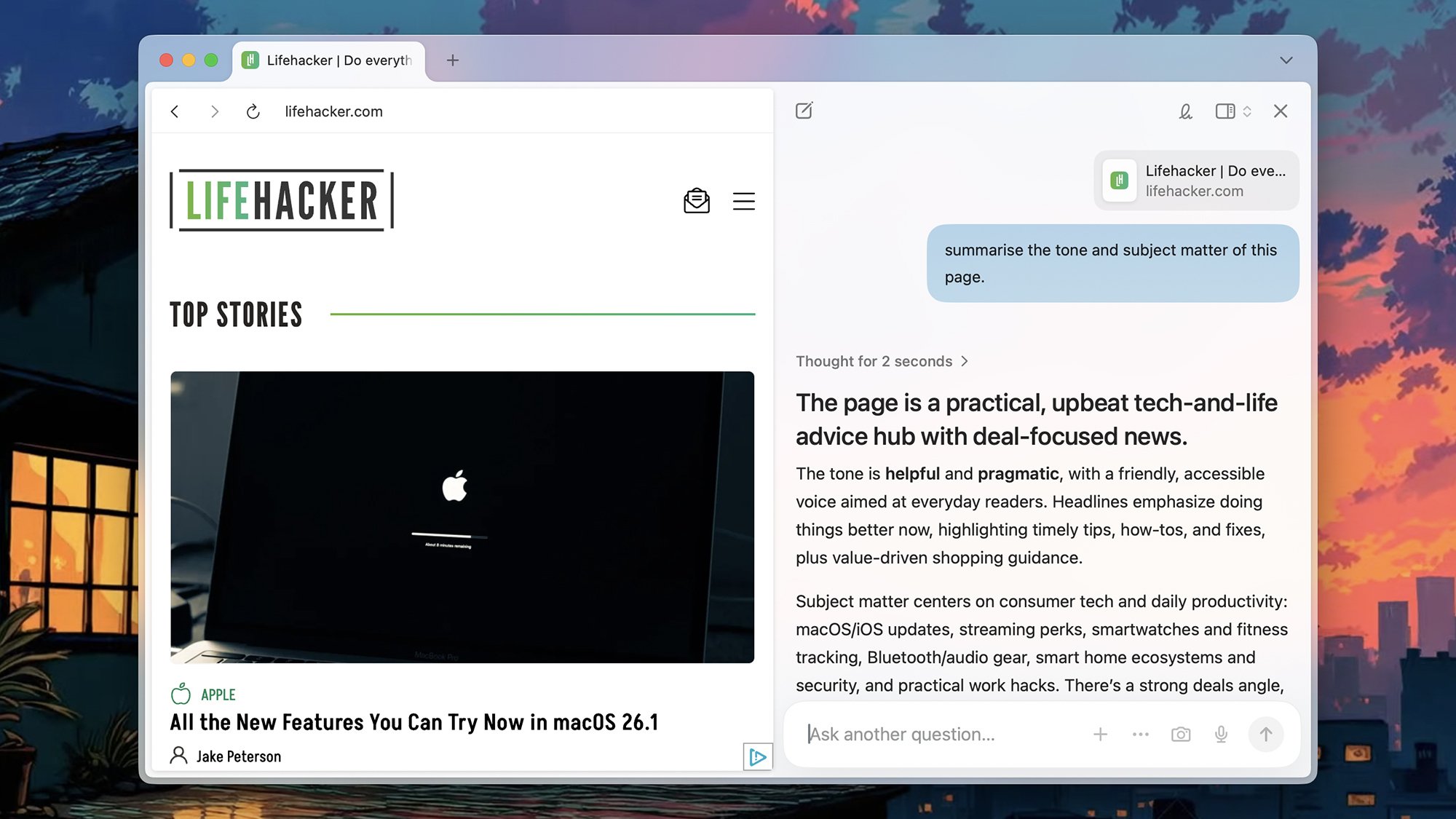
I Tested the Four Biggest AI Browsers, and Here’s What I Found

Since the days of Netscape Navigator and Internet Explorer, you’ve always have a choice when it comes to the program you use to access the internet—but we now have a whole new breed of software to consider: The AI browser. These browsers place AI models front and center, even more so than integrations like Gemini in Chrome or Copilot in Edge.

These browsers give you AI-powered search, AI-powered answers to just about any question you can come up with, and even agentic AI control—so the browser can actually do some browsing and complete simple tasks for you. A future where we never have to manually fill out another web form or compare prices on sixteen different flights is nearer than you think.

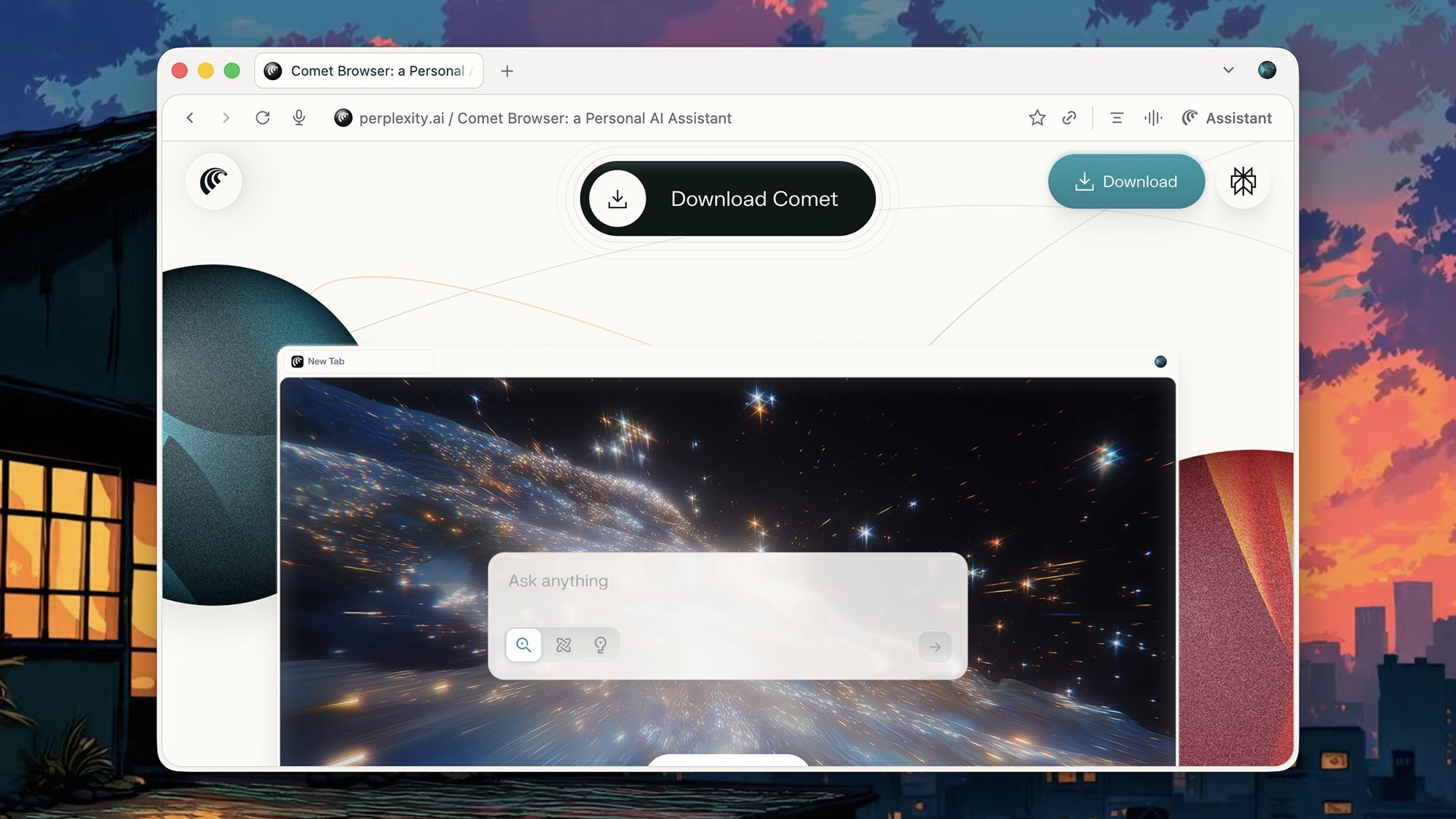
Or is it? To gauge the current state of the AI browsers available today, I gave four of them a test: Perplexity Comet, Opera Neon, ChatGPT Atlas, and Dai (from the makers of the Arc browser). It’s early days for all of these programs, but here’s what you can currently do with them, and how they compare to one another.

The pros and cons of AI browsing

Before we get to the details of specific browsers, it’s worth mentioning some of the pros and cons involved. The main pro, at least in theory, is more useful AI assistance: Some types of web searches can be ably handled by an AI bot (if you watch out for inaccuracies), and there are plenty of tedious, time-consuming browsing tasks that could be offloaded to an AI agent.

For example, you could pick something you want to make for dinner and have your AI browser order all the groceries for you—a lot of clicks saved. Or perhaps you could get your AI browser to bring up all the job listings you were looking at last week, sorted by their relevance, or have it compare the best gaming keyboards available on Amazon.

Perplexity Comet browser
Comet is one of the AI browsers now available.
Credit: Lifehacker

In theory at least, you can offload quite a bit of work to your AI browser—but of course, giving your browser more control comes with security and privacy concerns. We’ve already seen demonstrations of how hackers can embed malicious code into websites to take control of the AI agent and potentially get at your data and your accounts.

What’s more, these browsers typically remember everything you’ve done, so you can come back to a task later, if need be. That’s not too different to how standard browsers work, and it is possible to disable this tracking, but it’s a potential issue with AI browsers—you’re putting your trust in another company and another piece of software to respect the privacy of your browsing data and take good care of it.

Those are the general considerations to bear in mind when looking at AI browsers. With that all said, here’s what I found when I dug a bit deeper into the options currently available to try out.

Perplexity Comet

  • Perplexity Comet is available for Windows and macOS

  • Clean and polished look

  • AI agent capable of the basics

Something you can say for sure about Comet is that it’s cheaper than it used to be: Previously, you had to be subscribed to Perplexity Max for $200 per month to even try it. Now, anyone can—you don’t even need a Perplexity account—but AI usage limits apply if you’re not a subscriber.

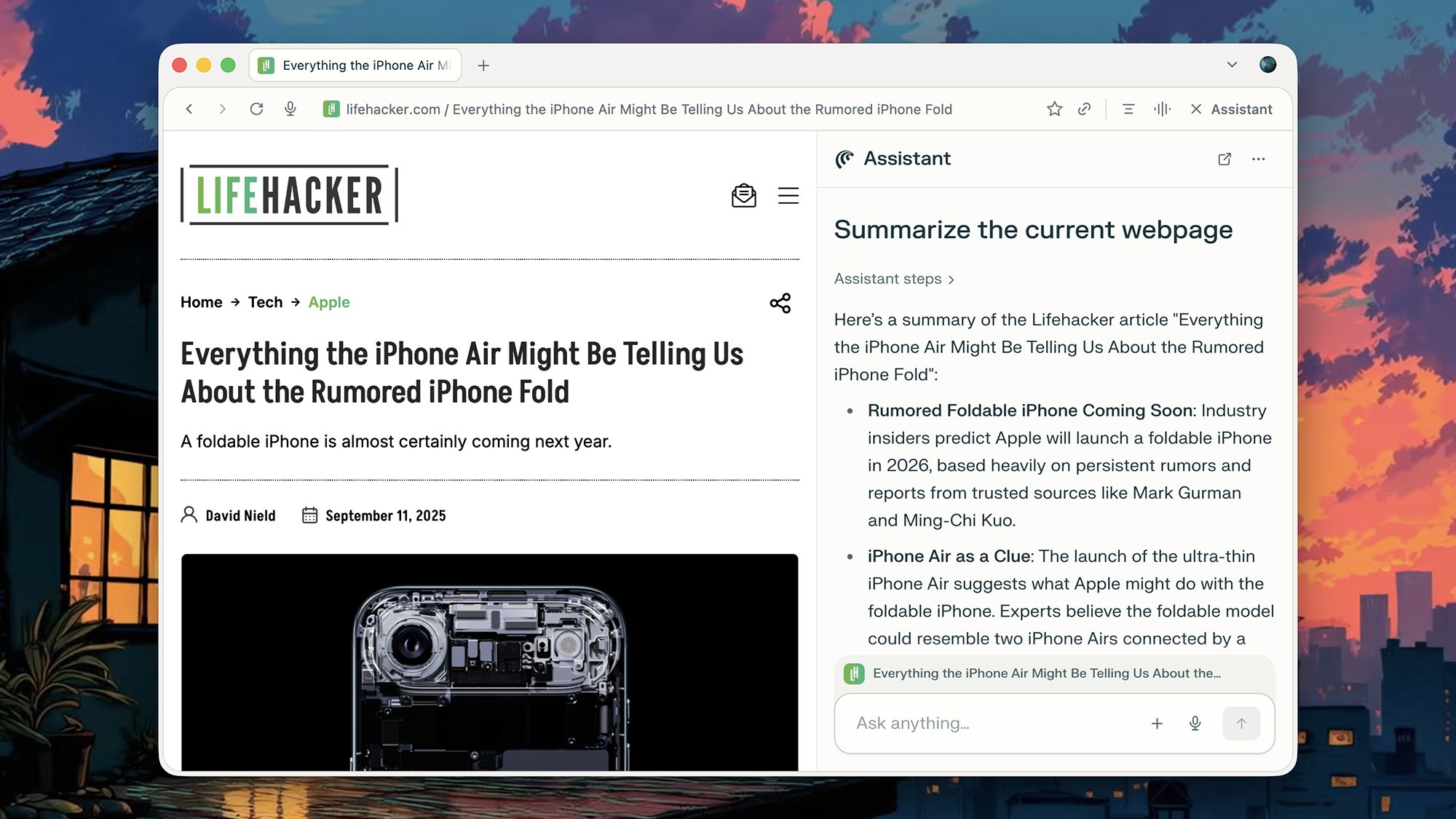
A couple of interesting features stand out immediately—the article summary feature and the voice mode feature, both available on the toolbar. They work well, for those times when reading full articles and typing on a keyboard seems like too much effort, while features like AI search and writing assistance are only a click away.

Perplexity Comet browser
Comet summarizes content with a couple of clicks.
Credit: Lifehacker

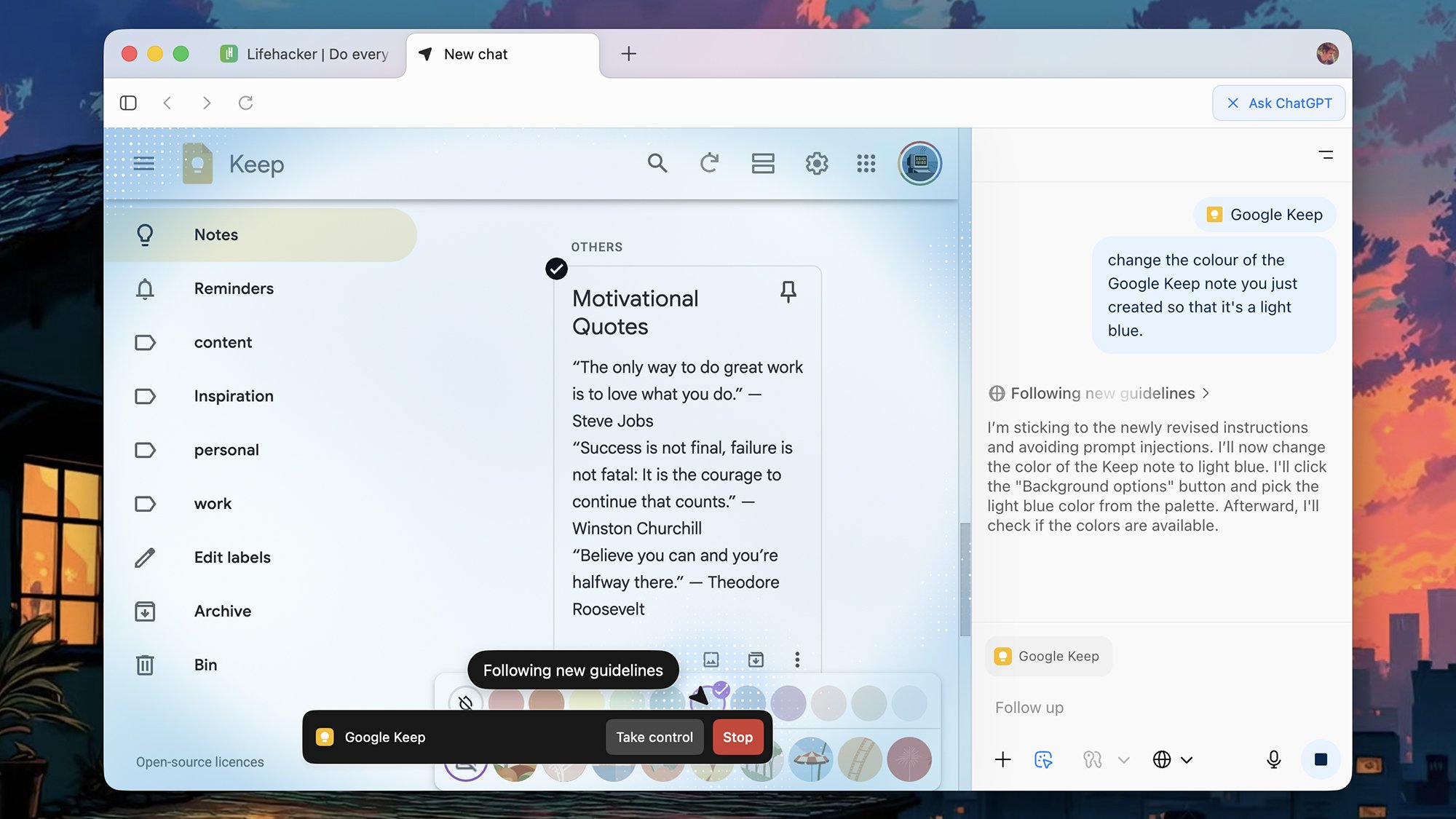
The Perplexity Assistant chatbot is always available from the sidebar or the new tab page, ready to help. I successfully got it to aid me in replying to a thread in Gmail—it even clicked the reply button for me. I also used the AI agent to create a Google Keep note with three motivational quotes inside. I am capable of achieving great things, apparently.

When it comes to the agentic AI, Comet tells you the steps it’s taking in the Assistant window as it works on your task. It can occasionally get tripped up by even the simplest of web interfaces, but seems to do well at understanding how to fix issues it encounters and assessing what’s actually on screen.

Opera Neon

  • Opera Neon is available for Windows and macOS

  • Wide range of AI capabilities

  • No free tier for the AI features

Unlike the other browsers on this list, Opera Neon isn’t yet open to the public—though you can sign up for early access. When you do get in, you’ll need to pay $20 a month for the advanced AI features, with models supplied by OpenAI and Google (Opera says it switches between them as and when needed).

Opera obviously knows what it’s doing when making browsers, and the usual Opera innovations are here, such as sidebar integrations for your chat apps. When it comes to the AI aspects, there’s all sorts of functionality to experiment with, from article summarizing and image generation, to deep research and coding generation.

Opera Neon browser
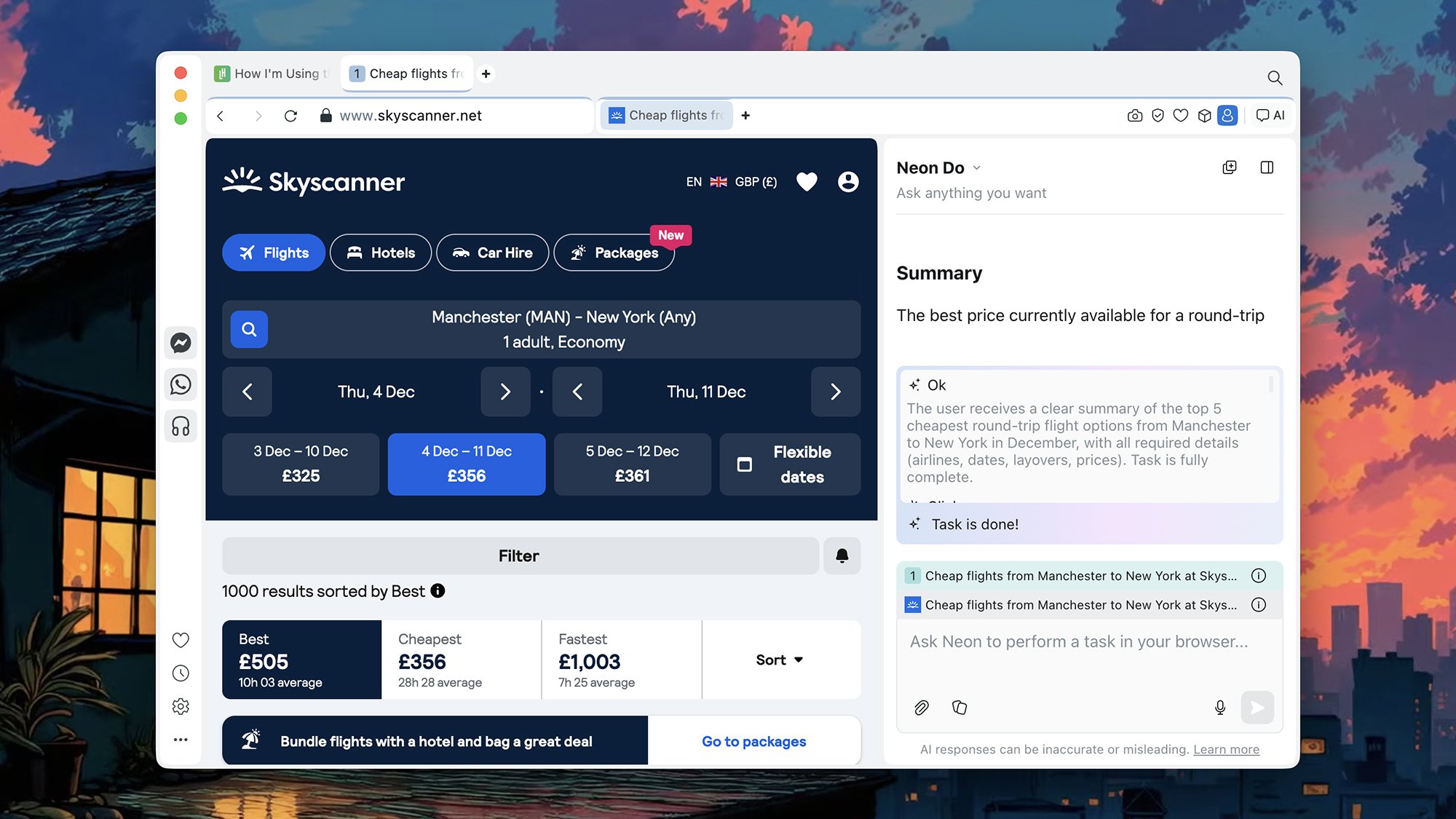
Neon successfully picked out cheap flights.
Credit: Lifehacker

While the subscription fee might put you off, you get plenty for your money. There’s agentic AI to take actions in the browser, though with mixed results: Opera Neon managed to create my inspirational Google Keep note when asked, but didn’t properly save it. When I complained, it tried its best to make amends, but again couldn’t work out what to do to actually save a note.

The browser was better at assessing what was on particular pages, and was able to give me a summary of the cheapest flights between two destinations across the next month—all by itself. I’d say the AI here still needs some work (perhaps why this remains a limited preview), but it scores highly on versatility and on actually being a functional browser.

ChatGPT Atlas

  • ChatGPT Atlas is available for macOS

  • Sticks to the browsing basics

  • Advanced agentic AI interface

OpenAI has now joined the AI browser party, such as it is, and ChatGPT Atlas takes a minimal approach to browser design: It’s basically just the essentials in terms of on-screen furniture, with a few quick links to settings and an Ask ChatGPT button up in the corner that you can click on whenever you need a hand from AI.

ChatGPT in Atlas can do just about everything it can do everywhere else, though I did like the way it picked out the Lifehacker stories “aligned to my interests” from the homepage—one benefit of giving the bot access to all your chatting history, amidst all the privacy drawbacks. As with the main ChatGPT app, you can use the browser for free, with higher usage limits if you decide to subscribe to a plan.

ChatGPT Atlas browser
Atlas does well at figuring out where to click and when.
Credit: Lifehacker

Where Atlas starts to diverge from the main ChatGPT is in the agentic AI capabilities: ChatGPT can actually jump in and take actions on your behalf. And on that score, it’s the most advanced of the browsers I tried—it reliably picks out the right elements within sites, accurately follows your instructions, and animates its actions so you can see what’s being done. You can also jump in and interrupt at any time.

It still makes mistakes though—while it successfully created my motivational quotes note in Google Keep, it needed several goes at the formatting, and I suspect it would’ve been quicker for me to do it myself.

Dai

  • Dia is available for macOS

  • Polished AI chat interface

  • Deep analysis works well

Dia is a little bit different to the other browsers I’ve tried out here, in that it’s very much built with AI at the forefront. In its original form, it didn’t have many traditional browser features at all—though it has recently started adding in some elements from its Arc predecessor, including pinned tabs and favorites.

The premise is you can use AI to “chat with your tabs”—summarize text, compare items, ask questions about what’s on screen, generate fresh text where needed, and lots more besides. What you won’t encounter (yet) is agentic AI, which means Dia isn’t going to be able to jump into websites and take actions for you.

Dia browser
Dia’s AI chat integrates tightly with what you’re looking at on the web.
Credit: Lifehacker

That said, it’s particularly good for learning: You can quickly turn videos and essays into bullet points or flashcards, for example. I also like the way Dia can summarize threads and pull information from Gmail: Even if it’s not able to actually click around for you, it can dig deep into websites and web apps and pull out what you need.

You also get Dia Skills, prepackaged shortcuts for fact checking, picking out the right clothing to match your style, creating transcripts of YouTube videos, and finding something to watch on streaming services. It’s a good early prototype of how AI can actually help make sense of the web at large.

The AI browsing future

In my testing, these browsers all performed well in different ways: Comet at integrating AI into the interface, Neon in its broad feature set, Atlas in the strength of its agent mode, and Dia in its deep understanding of sites and their data. This is undoubtedly the direction all browsers are headed in the future, to a greater or lesser extent.

How will this change how you interact with the internet? Personally, I would never let AI write anything for me—not even notes or emails—and I’m reluctant to hand over jobs like booking hotel rooms or creating and formatting documents to AI either. I’m wary of AI making the wrong choices and making serious mistakes, which is why I didn’t put these tools through anything too demanding here (and that’s before we get into the sticky privacy issues).

AI can be useful (though not infallible) in terms of searching and summarizing, and that’s where I think these browsers show the most promise—by taking the tasks AI is already good at, and integrating them more tightly with web-based workflows. Fully automated AI browsing may arrive one day, but based on what these browsers can do right now, it’s still a long way off.

Meet the Real Screen Addicts: the Elderly

Britain’s National Centre for Gaming Disorders has treated 67 people over the age of 40 since opening in 2019. The oldest patient was a 72-year-old woman with a smartphone gaming obsession. Britons over 65 spent more than three hours a day online on smartphones, computers and tablets last year, according to Ofcom. They spent more than five and a half hours watching broadcast television. Over-65s are more likely than under-25s to own tablets, smart televisions, e-readers, and desktop and laptop computers, a seven-country survey by GWI found. Nearly a fifth of 55- to 64-year-olds own a games console.

Ipsit Vahia, who heads the Technology and Ageing Laboratory at McLean Hospital, part of Harvard Medical School, said some older adults are increasingly living their lives through their phones the way teenagers or adolescents sometimes do. A 2022 study in South Korea estimated that 15% of those aged 60-69 were at risk of phone addiction. A meta-analysis published in April of studies on more than 400,000 older adults found that over-50s who regularly used digital devices had lower rates of cognitive decline than those who did not.


Read more of this story at Slashdot.

iPhone Air Review: Apple’s Slimmest iPhone Is A Design Triumph With Tradeoffs

iPhone Air Review: Apple’s Slimmest iPhone Is A Design Triumph With Tradeoffs
Apple iPhone Air (starts at $999, as reviewed $1,199) The iPhone Air is Apple’s new ultra thin smartphone and despite making compromises in camera versatility and battery life, this phone is a design masterpiece that’s simply greater than the sum of its parts. Ultra slick design Gorgeous display Excellent cameras Solid performance…