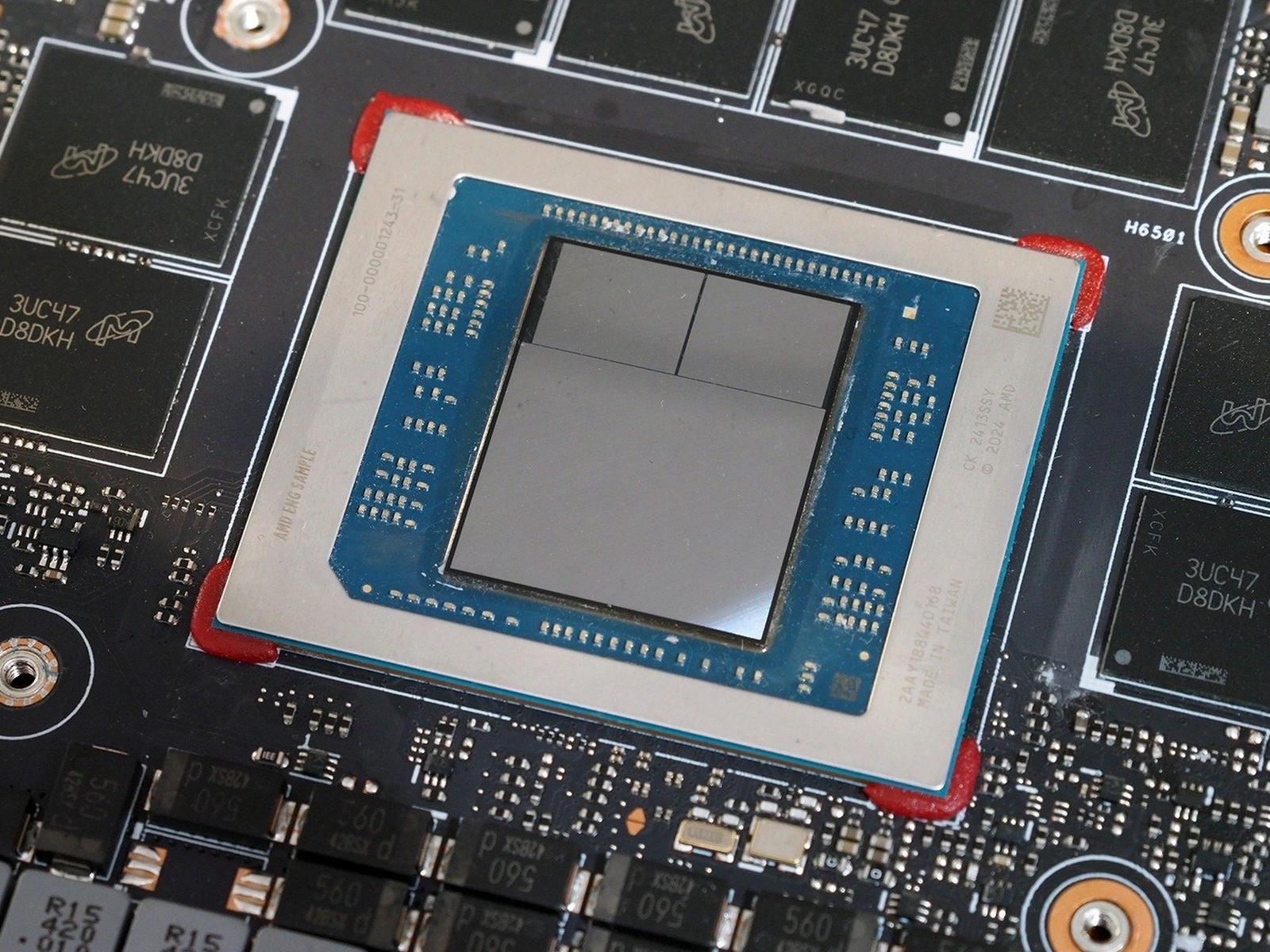
AMD Ryzen AI Max+ 388 Breaks Cover With Beastly Discrete-Class Radeon 8060S iGPU

AMD Ryzen AI Max+ 388 Breaks Cover With Beastly Discrete-Class Radeon 8060S iGPU
When AMD revealed the Ryzen AI Max 300 series, also known by its codename “Strix Halo”, there were only three models: the eight-core 385, the twelve-core 390, and the 16-core “Max+ 395”. That plus sign on the “Max” in the product name is meaningful; it indicates that the Ryzen AI Max+ 395 has the complete GPU, with no less than 20 RDNA 3.5

Discord gives parents more insight into their teens’ activity through Family Center

Discord has been trying to strike a balance between affording teen users their privacy and allowing for parental oversight. Over the next week, the platform is rolling out some updates for its Family Center with the aim of helping parents gain more understanding of what their teens are doing on Discord, while giving them the ability to manage certain settings. 

Parents and guardians were already able to see an overview of some of their teens’ Discord activity. Now, they’ll be able to view all purchases for the previous seven days; exactly how long teens have spent in voice and video calls across direct messages, servers and group DMs; and the five users and servers that a teen has called and messaged most often over the last week.

Teens will have the option to notify a guardian when they report another user or a piece of content to Discord. The guardian will receive an email telling them that their teen filed a report but not the details. The idea behind that is to have a conversation about the report and for the guardian to lend their support.

In addition, Discord is adding guardian-managed settings to Family Center. These include the ability to determine who can DM a teen and if sensitive content filters are enabled. Guardians will have access to some data privacy controls too.

Discord said it designed the updates with teens in mind and to make sure they can maintain their independence while having the parental support they might need. Guardians can’t see the content of messages that their teens send. Teens can also view the same information as their guardians in Family Center. 

To use Family Center, guardians and teens need to link their accounts. They can do so by going to User Settings > Family Center in the Discord app.

As with other social platforms, Discord is under the spotlight when it comes to the safety of young users. Earlier this year, New Jersey’s attorney general sued Discord, claiming that it “misled parents about the efficacy of its safety controls and obscured the risks children faced when using the application.” 

Australia, meanwhile, is considering banning children under 16 from using Discord. Starting on December 10, the country will prohibit Reddit, Kick, Facebook, X, Snapchat, TikTok, YouTube and Instagram from allowing under 16s to use their platforms.

This article originally appeared on Engadget at https://www.engadget.com/apps/discord-gives-parents-more-insight-into-their-teens-activity-through-family-center-170000419.html?src=rss

Flock haters cross political divides to remove error-prone cameras

Flock Safety—the surveillance company behind the country’s largest network of automated license plate readers (ALPRs)—currently faces attacks on multiple fronts seeking to tear down the invasive and error-prone cameras across the US.

This week, two lawmakers, Senator Ron Wyden (D-Ore.) and Representative Raja Krishnamoorthi (D-Ill.), called for a federal investigation, alleging that Flock has been “negligently handling Americans’ personal data” by failing to use cybersecurity best practices. The month prior, Wyden wrote a letter to Flock CEO Garrett Langley, alleging that Flock’s security failures mean that “abuse of Flock cameras is inevitable” and that they threaten to expose billions of people’s harvested data should a catastrophic breach occur.

“In my view, local elected officials can best protect their constituents from the inevitable abuses of Flock cameras by removing Flock from their communities,” Wyden wrote.

Read full article

Comments

Kodak Quietly Begins Directly Selling Kodak Gold and Ultramax Film Again

An anonymous reader shares a report: Kodak quietly acknowledged this week that it will begin selling two famous types of film stock — Kodak Gold 200 and Kodak Ultramax 400 — directly to retailers and distributors in the U.S., another indication that the historic company is taking back control over how people buy its film.

The release comes on the heels of Kodak announcing that it would make and sell two new stocks of film called Kodacolor 100 and Kodacolor 200 in October. On Monday, both Kodak Gold and Kodak Ultramax showed back up on Kodak’s website as film stocks that it makes and sells. When asked by 404 Media, a company spokesperson said that it has “launched” these film stocks and will begin to “sell the films directly to distributors in the U.S. and Canada, giving Kodak greater control over our participation in the consumer film market.”


Read more of this story at Slashdot.

If you want to satiate AI’s hunger for power, Google suggests going to space

It was probably always when, not if, Google would add its name to the list of companies intrigued by the potential of orbiting data centers.

Google announced Tuesday a new initiative, named Project Suncatcher, to examine the feasibility of bringing artificial intelligence to space. The idea is to deploy swarms of satellites in low-Earth orbit, each carrying Google’s AI accelerator chips designed for training, content generation, synthetic speech and vision, and predictive modeling. Google calls these chips Tensor Processing Units, or TPUs.

“Project Suncatcher is a moonshot exploring a new frontier: equipping solar-powered satellite constellations with TPUs and free-space optical links to one day scale machine learning compute in space,” Google wrote in a blog post.

Read full article

Comments

Bang & Olufsen’s latest speaker is a $5,800 aluminum soundbar

Bang & Olufsen just announced a new luxury speaker that costs a pretty penny. The Beosound Premiere is a soundbar made from aluminum that’s priced at $5,800.

It’s visually striking, with the company referring to the soundbar as a “piece of art.” The aluminum chassis looks to be seamless, with a gorgeous matte satin finish. The up-firing tweeter has been placed directly in the center to draw the eye and there are plenty of lights placed throughout. There are lots of little details here, including 1,925 bespoke perforations to pay tribute to the company’s founding year.

“This is not merely a product; it is a curated experience,” the company wrote. “Beosound Premiere redefines the category.”

As for sound, there are ten custom-engineered drivers that assist with spatial audio by firing upwards. This allows “sound to unfold around the listener from all angles” and “enhances clarity in dialogue and delivers deep, powerful bass.” It integrates with Dolby Atmos 7.1.4 and can be paired with additional Bang & Olufsen speakers via the company’s proprietary Beolink Surround technology.

The soundbar also features a new patent-pending technology called Wide Stage. This uses a custom-designed algorithm to create the illusion of having additional speakers, making the “soundstage wider and taller than it is.” All of this stuff combines for an immersive listening experience.

There’s also some kind of special integration with LG OLED C and G series TVs, but the company didn’t get into what that entails. We reached out to Bang & Olufsen for clarification. It’s worth noting that the soundbar can work with any TV or audio source.

A soundbar.
Bang & Olufsen

The Beosound Premiere is available in a trio of colorways, with the natural aluminum model releasing first in December. The gold one comes out in February, followed by a black soundbar in March. All models ship with a stand that enables both wall-mounting and tabletop placement. Again, the Premiere costs $5,800.

That high-end sticker price has become a hallmark of Bang & Olufsen. The company recently announced earbuds that cost $1,500 and a marble-adjacent speaker that’s so expensive that the price isn’t listed publicly.

This article originally appeared on Engadget at https://www.engadget.com/audio/bang–olufsens-latest-speaker-is-a-5800-aluminum-soundbar-163524028.html?src=rss

11 Useful Specialty Tools You Didn’t Even Know Existed

We may earn a commission from links on this page.

If you’ve ever tried to tackle a DIY project with just the hammer and screwdriver you bought at a convenience store, you’ve already learned the most important lesson: The right tools make all the difference.

The difference in effort it takes to complete a job when you have exactly the tool you need for it is startling. There are plenty of fancy power tools that you probably didn’t know about, but the humble hand tool can be transformative, too. If you’re planning some work around the homestead, consider picking up some of these simple but powerful specialty tools that will make your project easier.

Cabinet jack

I’m a solo DIY kind of person; I hate asking for help or relying on other people’s schedules, so I usually plow ahead and try to do everything myself. The first time I attempted to install cabinets in my kitchen alone was one of the most frustrating experiences of my life—if you’ve ever tried to position a wall cabinet and hold it in place so you can drive a set screw, you know my pain.

Enter cabinet jacks: simple, adjustable platforms that raise a cabinet box to the correct height so you can have both hands free to drive the screws into place. They instantly transform a nightmarish job into a pretty straightforward project. And they can be used to lift just about anything into position, so you can get a lot more use out of these than you think.

Magnetic pickup

You don’t have to be especially clumsy (note: I totally am especially clumsy) to experience the horror of dropping a bunch of small screws or washers when you’re working. Picking up tiny things with your hands is slow and frustrating, and some of these tiny bits of metal will absolutely slide into every nook and cranny available. Extra points if you just dropped the unique screw that came with a product that you’ll never figure out how to replace.

A magnetic pickup tool like this one is the answer. Flexible, extendable, and with a guide light, this tool will make finding and retrieving lost fasteners extremely fast and easy, so you don’t waste any more time on your hands and knees muttering as you blindly search for a lost screw.

Air wedge

Sometimes you just need to wedge something under whatever you’re working on, either to get it level or to open up some space underneath. You can monkey around with a bunch of shims or pieces of spare wood to engineer a wobbly solution, or you can use one of these air wedges—inflatable shims that slide under whatever you’re trying to lift and inflate to the perfect dimension. These are especially useful when you’re trying to level something, because you can slide one underneath, slap a level on top, and inflate until you get it perfect.

Augur bit

I like to re-use old lumber for framing projects—no one’s going to see the ugly wood, and it seems like a waste to toss it. But that means I’ve had to work around a lot of embedded screws and nails, and it can really be a pain in the butt. If you’ve ever started drilling into a wall and hit a screw in one of the studs, you also know how it can present a real problem if your choices of where to drill are limited.

Enter the augur bit. This thing will chew through those screws and nails with ease, allowing you to create fresh holes even in old studs or other lumber that are riddled with the fasteners of projects past.

Reversible wrench

When you’re working with a combination of squared-off bolts and round things (like pipes), you find yourself swapping out the wrench you’re using constantly. That means carrying an extra tool, and constantly searching for the other one. Unless you have a reversible, adjustable wrench. The reversible jaw means you can switch between bolts and rounded stock with ease, using just one tool.

Screw removal pliers

Stripped screws will strip you of your sanity. When the head gets so chewed up no bit in the universe will grab it, your whole project can be derailed as you spend hours trying to convince it to give up and come back out. Unless you have a pair of extractor pliers in your toolbox. These pliers are designed specifically to grab onto stripped and broken screws and twist them out with relative ease.

Cartridge puller

If you have a leaky faucet or shower handle, the cartridge in the faucet has likely failed. If you’ve ever tried to remove that cartridge for a little money-saving DIY plumbing, you likely walked away with a new appreciation for plumbers, because they can be a real pain to pull. Unless you have a cartridge puller, a nifty device designed to latch onto faucet cartridges and give you the necessary leverage to yank them out. Different faucets need different pullers, so you’ll first need to identify the brand you’re dealing with (for example, this cartridge puller works with a few specific Moen models), but it’s worth it if you value your time.

Hook and pick

You may not think you have a use case for a hook and pick set, but once you have one, you’ll never stop using it. I’ve used these dental-looking tools to scrape, to remove small, delicate parts, to grab onto things in tight spaces, and to bend and manipulate clasps on jewelry and other items. They’re also lifesavers if you have tangled necklaces or other chains, as they make grabbing onto the tiny links really easy. Trust me, you’ll use these more than you think.

Hand masker

If you’re going to be painting several rooms in your house or putting down protection on your floors ahead of a project, you’re going to be applying a lot of masking tape to protect surfaces. A hand masker makes that part of the job a lot easier. Just load up your roll of tape, and the masker lets you apply long strips without having to deal with twisted tape or crooked applications that have to be lifted off and re-applied. (You can whip up a DIY version of this using a paint roller—it’s not quite as easy to use as the real deal, but it’ll still make it a bit easier to tape up your work area.)

Magnetizer

For a long time, I was always surprised when I picked up a certain screwdriver in my tool chest and discovered it was magnetized—it saved me from losing screws plenty of times, and made setting the screw in place a lot easier. Guess what? You can magnetize—and de-magnetize—most screws and bits using a magnetizing/demagnatizing tool. It can also magnetize blades or other thin implements to be used as a quick parts retrieval tool.

Angle clamp

Have you ever tried to drill or screw two pieces of wood together at a 90° angle? Fun it is not. But if you have an angle clamp like the Can-Do clamp, it’s a lot easier. This clever clamp lets you hold a variety of angles together so you can easily drill starter holes and then secure everything without losing your mind as things slip and spin out of place.

The PlayStation Portal is still flawed, but I’ve learned to love it as a new dad

When it was first announced, the PlayStation Portal was sort of a joke. The Nintendo Switch was a megahit, and many PlayStation fans had long hoped Sony would respond with a new handheld of its own. It did… in the form of a $200 peripheral that can only stream games over the internet and required you to already own a PlayStation 5. Instead of a successor to the beloved yet famously neglected PlayStation Vita, we got the PlayStation version of the Wii U GamePad.

My colleague Devindra Hardawar called it “baffling” in our PlayStation Portal review, and many of his criticisms still stand two years later. I was happy to ignore the Portal as a result. Besides, I already owned a bunch of devices that covered every way I wanted to play. The PS5 and PC were for the “pretty” games I want to sit and revel in on my monitor, while the Switch and Steam Deck were for playing away from my desk. This combination worked for me.

Then, a few months ago, my wife and I had our first child. She is wonderful, and we are happy. But life pre-kids is often incongruous with life post-kids. My old routines and any pretense of personal time are gone. And while this might be the single least important aspect of my life that’s changed since becoming a father, the whiplash of going from “mid-30s man who spends too much time thinking about video games” to “mid-30s man who wants to enjoy his hobby but is now responsible for raising a kid” has completely turned me around on the Portal, which my wife gifted to me a few months prior to our baby’s birth.

To be clear, I’m not here jonesing to play games all day instead of bonding with my daughter. But every parent needs a break sometimes, and whatever “free” time I get these days is inherently staggered. It’s not just the usual changing, feeding, tummy-time monitoring and diaper pail maintenance; it’s the 20-30 minutes of prep and clean-up that often comes with each of those. Topping up the formula dispenser here, running out for more wipes and baby laundry detergent there. Spending 10 minutes pedaling her legs so she can get a fart out.

PlayStation Portal
Photo by Devindra Hardawar/Engadget

All of this has been much more fun than it sounds, but for gaming purposes, it means I’ve almost exclusively switched to things I can play in short bursts. It’s been a lot of Balatro, a lot of clearly timed multiplayer games like Rocket League, plus some slower, single-player games that let you save and quit at any time. These kinds of games have always been best suited to handhelds, and are thus the ones the Portal has helped me enjoy again when we get the baby to bed.

Yes, I could just use the Switch or Steam Deck. But I dropped $500 on this damn PS5 back in 2020. I have more games in my PlayStation library than any other platform. I want to (slowly) make my way through exclusives like Ghost of Yotei. I don’t want my fancy console to collect dust, and as silly as it sounds, finding the energy to sit at my desk and give my full attention to a game is difficult after a day of work and parenting. Most nights I’d prefer to unspool on the couch with my wife, and I need to be nearby to lend a hand or change a diaper. The Portal has allowed me to do this, and it’s kept my PlayStation from turning into a funky-looking paperweight in the process.

The Portal fills this niche mostly by just being a handheld device, but it has its own benefits. The controls are fantastic, essentially splitting a normal PS5 controller in half. They give everything an “official” feel that you just can’t replicate with a smartphone controller like a Backbone. I wish the 8-inch display had a more color-rich OLED panel, but it’s still good for an LCD, roomier than my phone’s screen and sharp enough at 1080p. I’m a wired headphone guy, so I can live with its lack of Bluetooth audio, as asinine as that is. And while I’m no longer paying $160 per year for PlayStation Plus Premium, those that do can now stream certain games directly from the cloud without having to boot up their console. That worked fine in the short time I tried it.

PlayStation Portal
The back of the PlayStation Portal.
Photo by Devindra Hardawar/Engadget

My experience with the Portal is entirely predicated on the fact that I live in a modest apartment with decent Wi-Fi. It’s still a streaming device, so there’ve been some hiccups here and there. Using it for shooters or fighting games is just asking for frustration, and things start to destabilize if we have several streams going in the house at once. But under normal conditions, I’ve been able to play competitive multiplayer games like Rematch without ruinous lag, and I just haven’t had the crushing connection issues some folks have suffered through with single-player fare. As long as I keep the PS5 in rest mode, everything turns on and eventually works as it should.

It’s a weird one: I still wouldn’t recommend the Portal to most PS5 owners, nor would I change all that much about our initial review. Of course, receiving it as a gift skews my perspective. Yet it’s made it easier to fit some games into my new life all the same. Looking after an infant has been one of my greatest joys, but it’s undeniably exhausting. With the Portal, I can still enjoy a platform I’ve heavily invested in — provided I don’t pass out first.

This article originally appeared on Engadget at https://www.engadget.com/gaming/playstation/the-playstation-portal-is-still-flawed-but-ive-learned-to-love-it-as-a-new-dad-120000850.html?src=rss

Google settlement with Epic caps Play Store fees, boosts other Android app stores

Google has spent the last few years waging a losing battle against Epic Games, which accused the Android maker of illegally stifling competition in mobile apps. Losses in court left Google to make sweeping changes to the Play Store, but Google appeared poised to take the case all the way to the Supreme Court. That is unlikely now that Epic and Google have reached a settlement in the case. It still needs to be approved by the judge, but the agreement provides a framework for long-term changes to Android app distribution that would apply globally.

Late last month, Google was forced to make the first round of mandated changes to the Play Store to comply with the court’s ruling. It grudgingly began allowing developers to direct users to alternative payment options and app downloads outside of Google’s ecosystem. By next summer, Google was supposed to open up Android to third-party app stores in a big way.

These changes were only mandated for three years and in the United States. The new agreement includes a different vision for third-party stores on Android—one that Google finds more palatable and that still gives Epic what it wants. If approved, the settlement will lower Google’s standard fee for developers. There will also be new support in Android for third-party app stores that will reduce the friction of leaving the Google bubble. Under the terms of the settlement, Google will support these changes through at least June 2032.

Read full article

Comments

My Favorite Amazon Deal of the Day: The Apple Watch SE 3

We may earn a commission from links on this page. Deal pricing and availability subject to change after time of publication.

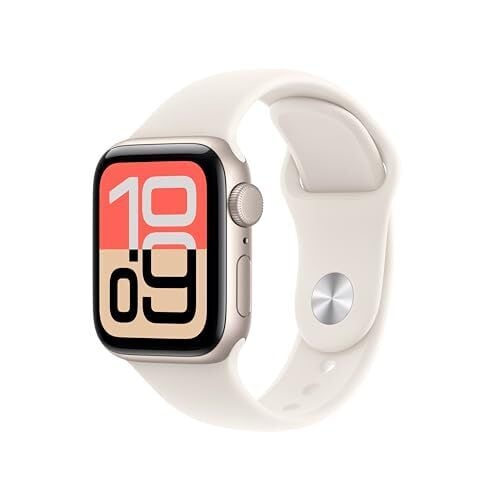
It’s a good day for Apple shoppers looking for the latest Apple Watches. The Apple Watch Ultra 3, Apple’s latest and most premium smartwatch, dropped to its lowest price, and now, the Apple Watch SE 3, their most affordable smartwatch (and truly, the best one for most people), also dropped to its lowest price yet, according to price-tracking tools. Despite being released just this past September, you can get the GPS 40mm Apple Watch SE 3 for $199.99 (originally $249). The bigger 44mm case is $229.99 (originally $279), also with a $50 discount.

The SE 3 is the most affordable option compared to the Series 11 and the Ultra 3, all of which are the latest models to be released by Apple. But never before has the budget model been so close in value to the middle-of-the-pack Apple Watch. That’s why it’s the best option for most people who would rather save money instead of getting all of the fancy specs and features, according to PCMag’s “excellent” review.

The SE3 has the same Apple S10 processor as the Series 11 and better battery life, averaging about 46 hours. It has the always-on display, supports 5G, has gesture controls, on-device Siri processing, ovulation estimates, sleep apnea detection, and wrist temperature sensing. And, of course, you get all of the benefits of the upcoming iOS 26.2.

Since this is the cellular version, you don’t need to bring your iPhone along to be able to take calls or text. The improved 5G connectivity means your calls will be less likely to drop, and your downloads and streams will be faster.

If I were a betting man, I’d say you won’t find this watch any cheaper on Black Friday or Cyber Monday, given its recent release and Apple’s history with sales. This price is likely as good as it’s going to get for a while.


Our Best Editor-Vetted Early Black Friday Deals Right Now


Apple AirPods 4 Wireless Earbuds


—
$119.00

(List Price $129.00)


Amazon Fire TV Stick 4K Plus


—
$29.99

(List Price $49.99)


Amazon Fire HD 10 (2023)


—
$69.99

(List Price $139.99)


Sony WH-1000XM5


—
$328.00

(List Price $399.99)

Deals are selected by our commerce team

World Economic Forum Chief Warns of Three Possible ‘Bubbles’ in Global Economy

An anonymous reader shares a report: The world should watch out for three possible bubbles in financial markets, including AI, the head of the World Economic Forum said on Wednesday, in comments that came amid sharp falls in global technology stocks.

Brokers and analysts say the falls are a cause for caution but not panic as markets have been touching record highs and some valuations are looking overblown. “We could possibly see bubbles moving forward. One is a crypto bubble, second an AI bubble, and the third would be a debt bubble,” WEF president Borge Brende told reporters during a visit to Brazil’s financial hub, Sao Paolo.


Read more of this story at Slashdot.

Beaver Moon Peaks This Week For A Spectacular View Of November’s Supermoon

Beaver Moon Peaks This Week For A Spectacular View Of November's Supermoon
Tonight will host what scientists have confirmed to the biggest, brightest full moon of the entire year. Some know it better as a supermoon, which is a full moon near its perigee (or closest approach to Earth in its elliptical orbit). This closeness means that the lunar disc will be visually stunning, shining up to 30% brighter and presenting

Sony has a new benchmark for ethical AI

Sony AI released a dataset that tests the fairness and bias of AI models. It’s called the Fair Human-Centric Image Benchmark (FHIBE, pronounced like “Phoebe”). The company describes it as the “first publicly available, globally diverse, consent-based human image dataset for evaluating bias across a wide variety of computer vision tasks.” In other words, it tests the degree to which today’s AI models treat people fairly. Spoiler: Sony didn’t find a single dataset from any company that fully met its benchmarks.

Sony says FHIBE can address the AI industry’s ethical and bias challenges. The dataset includes images of nearly 2,000 volunteers from over 80 countries. All of their likenesses were shared with consent — something that can’t be said for the common practice of scraping large volumes of web data. Participants in FHIBE can remove their images at any time. Their photos include annotations noting demographic and physical characteristics, environmental factors and even camera settings.

The tool “affirmed previously documented biases” in today’s AI models. But Sony says FHIBE can also provide granular diagnoses of factors that led to those biases. One example: Some models had lower accuracy for people using “she/her/hers” pronouns, and FHIBE highlighted greater hairstyle variability as a previously overlooked factor.

FHIBE also determined that today’s AI models reinforced stereotypes when prompted with neutral questions about a subject’s occupation. The tested models were particularly skewed “against specific pronoun and ancestry groups,” describing subjects as sex workers, drug dealers or thieves. And when prompted about what crimes an individual committed, models sometimes produced “toxic responses at higher rates for individuals of African or Asian ancestry, those with darker skin tones and those identifying as ‘he/him/his.'”

Sony AI says FHIBE proves that ethical, diverse and fair data collection is possible. The tool is now available to the public, and it will be updated over time. A paper outlining the research was published in Nature on Wednesday.

This article originally appeared on Engadget at https://www.engadget.com/ai/sony-has-a-new-benchmark-for-ethical-ai-160045574.html?src=rss

The Amazon Fire HD 10 Tablet Is More Than 50% Off Right Now

We may earn a commission from links on this page. Deal pricing and availability subject to change after time of publication.

If you just need a tablet for streaming, browsing, and the occasional recipe lookup, the Amazon Fire HD 10 (2023) is tough to ignore at its current price. It’s down to $79.99 (from $179.99), and according to price trackers, this is the lowest it’s ever been. The 32GB version costs $10 less, but spending that extra ten bucks is worth it if you plan to download movies or books for offline use. Whichever version you pick, you can expand the storage by up to 1TB with a microSD card (sold separately), so space won’t be an issue. Also, the battery life of this tablet is around 10 hours, which means you can get through a full day of use without reaching for the charger.

Performance-wise, the Fire HD 10 isn’t a powerhouse, but it handles everyday use smoothly. The octa-core processor and 3GB of RAM are enough for light multitasking—switching between Chrome, Kindle, and Netflix doesn’t cause much lag. As for its display, the 10.1-inch screen delivers a 1920 x 1200 resolution, which looks crisp when you’re watching movies or reading, though colors tend to wash out a bit if you’re not facing it head-on, notes this PCMag review. And while the stereo speakers are decent for dialogue-heavy content, music lovers will want headphones, either via Bluetooth or the 3.5mm jack.

Where the Fire HD 10 shows its limits is in the software. It runs on Amazon’s Fire OS, which means you’ll be using the Amazon Appstore instead of Google Play. That’s fine for most streaming apps, but not great for anyone who depends on Google’s productivity tools like Gmail, Docs, or Drive. On the upside, it integrates beautifully with Alexa, and with Echo Show mode, it can double as a smart display for checking the weather or playing music hands-free. For the price, this is a no-fuss, everyday tablet that’s built for entertainment, light productivity, and anyone who just wants a screen that gets the job done.

Our Best Editor-Vetted Tech Deals Right Now


Apple AirPods 4 Wireless Earbuds


—
$119.00

(List Price $129.00)


Amazon Fire TV Stick 4K Plus


—
$29.99

(List Price $49.99)


Amazon Fire HD 10 (2023)


—
$69.99

(List Price $139.99)


Sony WH-1000XM5


—
$328.00

(List Price $399.99)

Deals are selected by our commerce team

Best Early Black Friday Gaming Laptop Deals: RTX 50 Series Models Up to $480 Off

Best Early Black Friday Gaming Laptop Deals: RTX 50 Series Models Up to $480 Off
More Black Friday discounts are appearing by the day. Earlier this week, we highlighted a fantastic early Black Friday deal on a premium Samsung wireless soundbar system (as well as several other soundbars), and now we’re turning our attention to a batch of discounted gaming laptops rocking GeForce RTX 50 series GPUs. Game on, folks!
Gigabyte

How to declutter, quiet down, and take the AI out of Windows 11 25H2

It’s that time of year again—temperatures are dropping, leaves are changing color, and Microsoft is gradually rolling out another major yearly update to Windows 11.

The Windows 11 25H2 update is relatively minor compared to last year’s 24H2 update (the “25” here is a reference to the year the update was released, while the “H2” denotes that it was released in the second half of the year, a vestigial suffix from when Microsoft would release two major Windows updates per year). The 24H2 update came with some major under-the-hood overhauls of core Windows components and significant performance improvements for the Arm version; 25H2 is largely 24H2, but with a rolled-over version number to keep it in line with Microsoft’s timeline for security updates and tech support.

But Microsoft’s continuous update cadence for Windows 11 means that even the 24H2 version as it currently exists isn’t the same one Microsoft released a year ago.

Read full article

Comments

Tesla’s European and Chinese customers are staying away in droves

Tesla’s shareholders are ready to vote tomorrow on whether to give Elon Musk an even more vast slice of the company in an effort to keep him focused on selling electric vehicles. Currently, the trolling tycoon appears a little obsessed with the UK, a place he appears to conflate with Middle Earth, which investors may or may not take into account when making their decision. What they ought to take into account is how many cars Tesla sold last month.

Although Tesla only publishes quarterly sales figures and does not divide those up by region, slightly more granular data is available from some countries via monthly new car registrations. And the numbers for October, when compared year on year to the same month in 2024, should be alarming.

Sales fell by double-digit margins in Sweden (89 percent), Denmark (86 percent), Belgium (69 percent), Finland (68 percent), Austria (65 percent), Switzerland (60 percent), Portugal (59 percent), Germany (54 percent), Norway (50 percent), the Netherlands (48 percent), the UK (47 percent), Italy (47 percent), and Spain (31 percent).

Read full article

Comments

Europe’s Self-Driving Cars Aren’t Even at the Starting Line

Europe’s self-driving car industry has fallen far behind the United States and China. Self-driving taxis developed by Tesla and Waymo have become commonplace in several American cities. Waymo overtook Lyft’s market share in San Francisco in June. China operates a thriving robotaxi industry led by Baidu, WeRide and Pony AI. Europe has no established player and runs pilot projects in only a handful of cities. The most promising is Volkswagen-backed Moia in Germany.

Markus Villig, chief executive of Estonian ride-hailing company Bolt Technology, told Brussels officials in mid-October that Europeans will move about their cities in American robotaxis by 2030 unless the European Commission acts quickly. He called for investment, regulatory clarity and restrictions on foreign competitors. Traffic laws governing self-driving tests vary at national and city levels across Europe. Commission President Ursula von der Leyen delivered a speech in Turin about AI adoption days before Villig’s visit. Last week, Henna Virkkunen, the commission’s technology chief, gathered carmakers and technologists to create a harmonized framework for self-driving cars. Waymo announced plans to provide driverless rides in the United Kingdom starting in 2026.


Read more of this story at Slashdot.

Microsoft Finally Added an Em Dash Shortcut

One of the main reasons I’ve always insisted on having a keyboard with a full number pad—apart from being able to bash out numbers quickly—is that it lets me type out the Windows shortcut codes for an em dash (ALT+0151) and en dash (ALT+0150). They’re punctuation marks I use a lot, and apparently AI bots do too.

What you’ll notice about those shortcut codes, if you’ve spent time with both Microsoft and Apple operating systems, is that they’re longer and more awkward to type than the equivalents on macOS. On a Mac, you can type an em dash by holding down Shift+Option and pressing the hyphen (“-“) button. For en dashes, it’s even easier: Hold down Option, then press hyphen. You don’t have to enter a succession of numbers like you do on Windows, which makes it look like you’re busy filling a spreadsheet with figures rather than getting a simple symbol up on screen.

Well, there’s some good news for Windows users: As highlighted by Windows engineer Jen Gentlemen (via Windows Central), the em dash and en dash shortcuts are now as simple to do on Windows as they are on macOS. I can finally buy that TenKeyLess keyboard I’ve had my eye on for a long time.


This Tweet is currently unavailable. It might be loading or has been removed.

Now in Windows, you just need to hold down the Windows key, then press hyphen for an en dash. If you need an em dash, hold down Windows+Shift before pressing hyphen. It neatly mirrors the shortcuts that Mac users have been able to rely upon for years.

The tweak should have appeared with the late September 2025 update for Windows 11, and it’s definitely working on the Windows PC I’m using. If it’s not functioning for you, check you’ve got the latest Windows updates installed, and that there aren’t any other programs interfering with keyboard shortcuts.

It also means there’s no need to fall back on the other popular workaround, which is to copy and paste en dashes and em dashes from the web. Come on, this is 2025—we shouldn’t be relying on hacks like that. And now, we don’t need to.

One final tip: If you want to do away with shortcuts completely, get your word processor of choice to automatically replace two hyphens (or any character combination you like) with an em dash or en dash. It means you can keep on typing without having to hunt around on the keyboard for special function buttons.

In Google Docs, head to Tools > Preferences > Substitutions to get this set up, for example. In Word for Windows, pick File > Options > Proofing > AutoCorrect Options > AutoCorrect. It’s something that is in most word processors, if you dig into the settings.

An official Nintendo Store app hits iOS and Android

Nintendo has been a bit more focused on mobile apps in recent years, having released the likes of Nintendo Today! and Nintendo Music (not to mention games like Fire Emblem Shadows). Its latest one is Nintendo Store, which is out now on iOS and Android. This is a reimagining of the My Nintendo app the company debuted in Japan in 2020. 

You can use the app to browse consoles, physical and digital games, accessories and merch. To complete a purchase, you’ll need to tap through to the product page on an in-app browser. 

Nintendo says the app will keep you up-to-date on news about games, events and more. It can notify you when items on your wishlist go on sale too. If you go to a physical Nintendo store or event, you can use the app to check in and receive rewards. 

There’s another intriguing feature here: a way to view your play time for any game across Nintendo’s last few consoles, including the 3DS and Wii U. You’ll have to link your Nintendo Network ID to your Nintendo Account to see your Wii U and 3DS data, but play activity on those systems after February 2020 isn’t factored in.

This article originally appeared on Engadget at https://www.engadget.com/gaming/nintendo/an-official-nintendo-store-app-hits-ios-and-android-151733629.html?src=rss