The Four Most Helpful ‘Laws’ of Productivity

Your personal productivity may be dependent on your unique needs, personality, and circumstances, but there are still general “laws” governing time management and potential output that apply to pretty much everyone—like, actual “laws” named after the people who came up with them. Economists, philosophers, and scientists have spent a lot of their own time researching what practices make a person more productive. Here’s an overview of the rules all that research has given us. 

The Yerkes-Dodson Law

The Yerkes-Dodson Law says a person is most productive when they have just the right amount of stress pushing them—not too much and not too little. It models the relationship between stress levels and performance, resulting in an upside-down, U-shaped curve on a quadrant. Across the X axis, you have your low-stress moments on the left, high-stress moments on the right, and a peak of productivity in the middle. The Y axis shows your peak performance at the top, which is aligned with times when you have just a the right amount of stress behind your work. 

This means that you shouldn’t give yourself too much time to do a task, but should definitely not wait until the last minute. The way to do this is to create airtight to-do lists. Try the 1-3-5 method, which has you structure your day around one major task, three medium-sized ones, and five little ones. By breaking your day down and timing it just right, you can make sure everything gets done when it needs to, optimizing your stress in honor of psychologists Robert Yerkes and John Dillingham Dodson.

Parkinson’s Law

Parkinson’s Law is another one that governs how long you should spend on any given task. In fact, it goes hand-in-hand with Yerkes-Dodson, because it says that the longer you give yourself to do something, the longer you’ll naturally take to get it done. C. Northcote Parkinson popularized it in a 1955 essay for The Economist, concluding that you’ll ultimately procrastinate or over-complicate the task, dragging it out by not working on it enough or working on it way too long. 

Here, it helps to prioritize your to-dos and schedule your days and weeks thoroughly. Having a smaller window in which to work on pressing tasks will up the urgency, aligning you more with the peak of Yerkes-Dodson. Pre-plan your weeks using prioritization techniques like the Eisenhower Matrix and task batching, thinking about when you’ll have just the right amount of urgency to motivate you to do each task.

Once you’ve pre-plannned, try shaving the amount of time you give yourself to do things. If a project is due a week from now, don’t give yourself a whole week to get it done. Instead, Give yourself a personal deadline of five or even four days from now. Setting private deadlines ahead of your real ones is a good way to give your work some urgency while leaving a little wiggle room in case you don’t finish up in time for your personal deadline. It stops you from procrastinating or getting too in the weeds on busywork at the end. 

Illich’s Law

The third law here is cautioning against the same thing as the first two: You shouldn’t have too much time to work on any one thing. The reasons behind all three laws are different, though, which means the solutions to overcoming them are unique, too. Illich’s Law, or the Law of Diminishing Returns, says that after working for a while, your productivity decreases. Eventually, it goes negative, meaning your work isn’t even good anymore. At best, you’re churning out something less than ideal. At worst, you’ll waste more time in the future having to redo it.

To defeat it, don’t just cut your deadlines down to combat Parkinson’s Law; cut down how long you have to work on each task on your to-do list. Use time-tracking software or a simple spreadsheet for two weeks to track how long your usual duties typically take you, as well as when you start feeling bored or unproductive. After two weeks, cut the time you give yourself to do each task, ideally down to exactly how long it takes you to get bored or unproductive. In the gaps that appear in your schedule, make sure you take breaks. What Yerkes-Dodson and Parkinson’s Law don’t fully account for is the value of breaks to productivity. Giving yourself set times to work and set times to chill is foundational to all kinds of productivity methods because burnout is an output killer. You can (and should) always get back to work once you’re done with a little personal time. 

Carlson’s Law

Finally, the fourth law, Carlson’s Law, is all about how you work, not how much you work. Swedish economist Sune Carlson’s assertion was that interrupted work is always less effective and more time-consuming than uninterrupted work. If you’re distracted, your work will be of a poorer quality and take longer—and as you can tell, work that takes longer is no good, for all kinds of reasons. 

Like the other laws, the trick to nailing this one is to schedule carefully every day. Not only do you need to schedule your day based on what needs to be done and how long it will take, but on when you can reasonably do it all without distraction. Time boxing, or the practice of scheduling every minute of your day in your calendar, blocking it all out down to the minute, is central to basically every productivity tip.

In line with both Illich’s and Carlson’s Laws, not only should you keep in mind that you should give yourself less time to work than you think you need, but you should reflect that cut-down in your time boxes. When you do that, you’ll see gaps or breaks start to appear in your daily calendar. Embrace those. Breaks are elemental to productivity, so you should be scheduling those as seriously as you do your work.

Finally, when you’re aiming to defeat Carlson’s Law, you should take the extra step of making sure your now-thorough calendar is viewable by others in your organization or anyone who might interrupt you. If you’re likely to be distracted at a given time, don’t try to work on anything important then; wait until you can give it your full attention. In addition, never multitask. You can’t do two things at once. That’s just another form of distraction. Move from chore to chore, one at a time, to make sure you’re being efficient at all of them. 
Modular Samsung AutoSSD Has A Detachable Controller & NAND For Easy Upgrades

Modular Samsung AutoSSD Has A Detachable Controller & NAND For Easy Upgrades
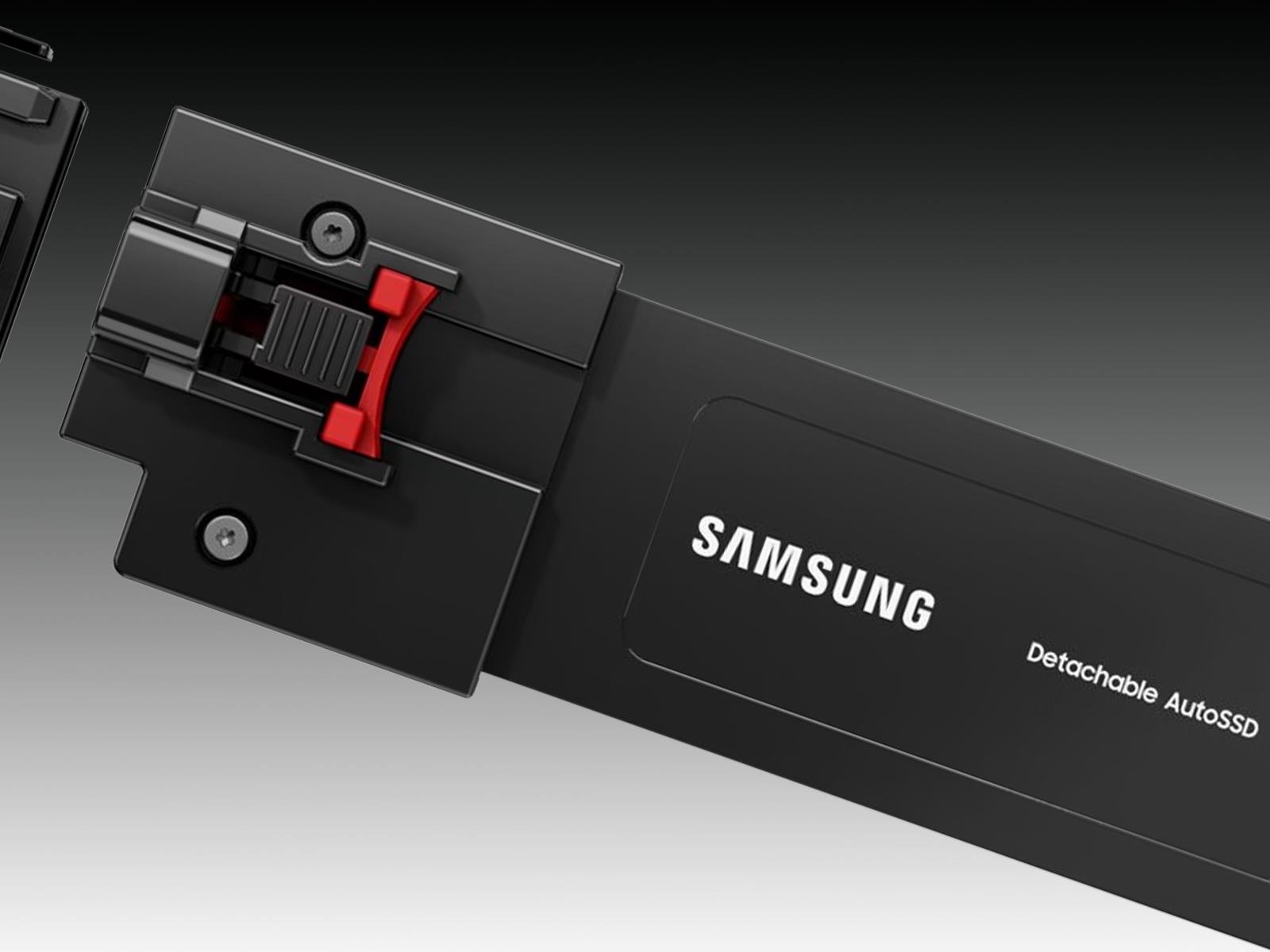
Samsung is showing off a couple of new storage products that it plans to showcase at the Consumer Electronics Show (CES) in January 2026, one of which is a cleverly designed solid state drive (SSD) with a modular aspect to it. Called the Detachable AutoSSD, the drive takes aim at automobiles and sports a modular makeup to make upgrades a little

How to watch PlayStation’s State of Play Japan tomorrow

Sony is bringing things home with State of Play Japan. The “special episode” will feature the same type of PlayStation gaming announcements as a typical State of Play broadcast, but with a focus solely on Japan and Asia. 

While we don’t know exactly what Sony will unveil, it promises 40 minutes of everything “from beloved series to distinctive indie creations, the show, hosted by voice actor Yuki Kaji, will be packed with great games, interviews, and new looks at anticipated titles.” Maybe if we all think hard enough we can manifest updates on Phantom Blade Zero or Marvel Tokon: Fighting Souls, which we first learned about at Playstation’s State of Play in June. 

The whole show will air in Japanese on the PlayStation YouTube channel for Japan, but the general PlayStation YouTube channel will show State of Play Japan with English subtitles. 

Catch State of Play Japan live on Tuesday, November 11 at 2PM PT / 5pm ET. 

This article originally appeared on Engadget at https://www.engadget.com/gaming/playstation/how-to-watch-playstations-state-of-play-japan-tomorrow-140519040.html?src=rss

TCL’s new budget-friendly QLED TV line starts at $600

TCL just announced a new line up of budget-friendly QLED TVs with plenty of bells and whistles. The T7 Series offers quantum dot technology and a native refresh rate of 144Hz. The sets are available in multiple sizes, from 55-inches all the way up to 85-inches. That last one will certainly fill up the living room.

They also ship with the company’s proprietary AI processor that automatically optimizes color, contrast and clarity. This should lead to some stunning 4K HDR performance. To that end, the TVs integrate with Dolby Vision and HDR10+.

The sound is also on point here. The televisions offer Dolby Atmos and Dolby Digital+ audio processing. The whole thing is powered via Google TV that allows for hands-free voice control via built-in microphones.

The prices here are fairly reasonable, considering the tech involved. These TVs start at $600 for the 55-inch model and go up to $1,400 for the 85-inch model. We don’t have a release date just yet. 

These aren’t the only interesting displays the company has announced this year. The QM6K Mini LED is available in sizes up to 98-inches, with a starting price of $700 for the smallest model. The QM7K is another Mini LED that ships with Bang & Olufsen speakers.

This article originally appeared on Engadget at https://www.engadget.com/home/home-theater/tcls-new-budget-friendly-qled-tv-line-starts-at-600-140024183.html?src=rss

iFit workouts are coming to Samsung Health, with free and paid options

Samsung has partnered with iFit to bring its guided workouts to the Samsung Health app. The integration gives Samsung Health users limited free access to iFit content, offering one video from each of the seven workout categories — high-intensity interval training (HIIT), Pilates, yoga, strength, recovery, barre and mindfulness — per month. For access to a bigger catalog, Samsung Health users can also snag an iFit subscription for cheaper than the usual cost ($15 per month) of the basic plan, with the option for $10 per month or $100 per year. 

There are also perks for anyone buying a new Samsung device. You can get 30 days free when buying a Galaxy phone, three months with the Galaxy Buds 3 Pro and six months with any of the latest Galaxy Watch models. Samsung and iFit announced their partnership in July, and just a few weeks ago rolled out Galaxy Watch compatibility for some NordicTrack and ProForm machines, which can now display certain metrics, like live heart rate, on-screen while you work out. 

This article originally appeared on Engadget at https://www.engadget.com/apps/ifit-workouts-are-coming-to-samsung-health-with-free-and-paid-options-140000756.html?src=rss

Visa and Mastercard Near Deal With Merchants That Would Change Rewards Landscape

Visa and Mastercard are nearing a settlement with merchants that aims to end a 20-year-old legal dispute by lowering fees stores pay and giving them more power to reject certain credit cards, WSJ reports, citing people familiar with the matter. From the report: Under terms being discussed, Visa and Mastercard would lower credit-card interchange fees, which are often between 2% and 2.5%, by an average of around 0.1 percentage point over several years, the people said. They would also loosen rules that require merchants that accept one of a network’s credit cards to accept all of them.

A deal could be announced soon, the people said, and would require court approval to take effect. If an agreement is finalized, consumers could see big changes at the register. Merchants that accept one kind of Visa credit card wouldn’t have to accept all Visa credit cards, for example. Under the current talks, credit-card acceptance would be divided into several categories including rewards credit cards, credit cards with no rewards programs, and commercial cards, the people familiar with the matter said.

Some stores might turn away rewards cards, which charge them higher fees and in recent years have become very popular with consumers. But stores that reject those cards would face the risk of declining sales.


Read more of this story at Slashdot.

Apple Watch SE 3 review: Good enough for most people

I started my review of the Apple Watch Series 11 talking about how everyone uses smartwatches differently. And based on your needs, the right Apple Watch might not be the one with the most features. 

The Apple Watch SE series has long been the option for parents to buy for their kids or other dependents, or people who are dipping their toe into the world of smartwatches. But with the introduction of an always-on-display (AOD), on-device Siri and faster charging, the Apple Watch SE 3 has shed most of its limitations and may well be good enough for most people. Throw in an onboard temperature sensor, support for 5G, media playback and gestures like double tap and wrist flick, and the latest Watch SE is not only a serious upgrade over its predecessor but also a compelling option for pretty much anyone. 

I used the SE 3 for a few weeks to see if it’s good enough to replace the Apple Watch Series 11 I regularly wear, and, setting aside some small caveats, the short answer is yes.

What’s new in the Apple Watch SE 3?

The most important upgrades in this generation of the entry-level smartwatch are the arrival of the always-on-display, faster charging speeds and on-device Siri. That latter addition allowed me to ask the assistant to start workouts, reply to messages or check the weather without having to deal with the tiny buttons on the cramped screen. You’ll also be able to dismiss notifications and alarms with a flick of your wrist, or use the double tap gesture to navigate the smart stack and select or confirm items onscreen.

Older models of the Watch SE would not only require a connection to your iPhone to work with Siri, but those requests would also be a lot slower since the system would need to wait for the phone to deliver the answer. I also loathed how long it took for earlier Apple Watches to charge, and in my testing the Watch SE 3’s speed comes closer to more recent models like the Series 7 and newer. It still took noticeably more time to recharge than the Series 11, but it’s not slow enough to be a dealbreaker. You’ll just need to establish some sort of charging routine that allows at least a few hours for the Watch SE 3 to get back to 100 percent.

An always-on-display is something I missed when I tested the Watch SE 2, because I’m the sort of gym fiend that likes to be able to quickly glance at my wrist while pumping some pushups and see exactly what my heart rate is. Without AOD, you’d need to raise your wrist or wake the screen somehow to see your stats, which is annoying if you’re in the middle of a workout or are lugging heavy weights around. The Watch SE 3 delivered basically the same experience as the Series 11 when I wore both to my resistance and HIIT (high intensity interval training) sessions, though the latter’s larger display did make it easier to read my stats.

Speaking of the screen, the Watch SE 3 hasn’t gotten any brighter, with its peak of 1,000 nits being the same as the SE 2’s. But the latest SE can get as dim as 2 nits, which is very close to the Series 11’s 1 nit. You may wonder why this is worth noting, but trust me — your retinas will be grateful when you accidentally raise your wrist or get a notification in the middle of the night or are in a darkened theater. Older smartwatches were pretty disruptive in cinemas since their screens were bright enough to scorch any eyeballs that were accustomed to low-light environments. 

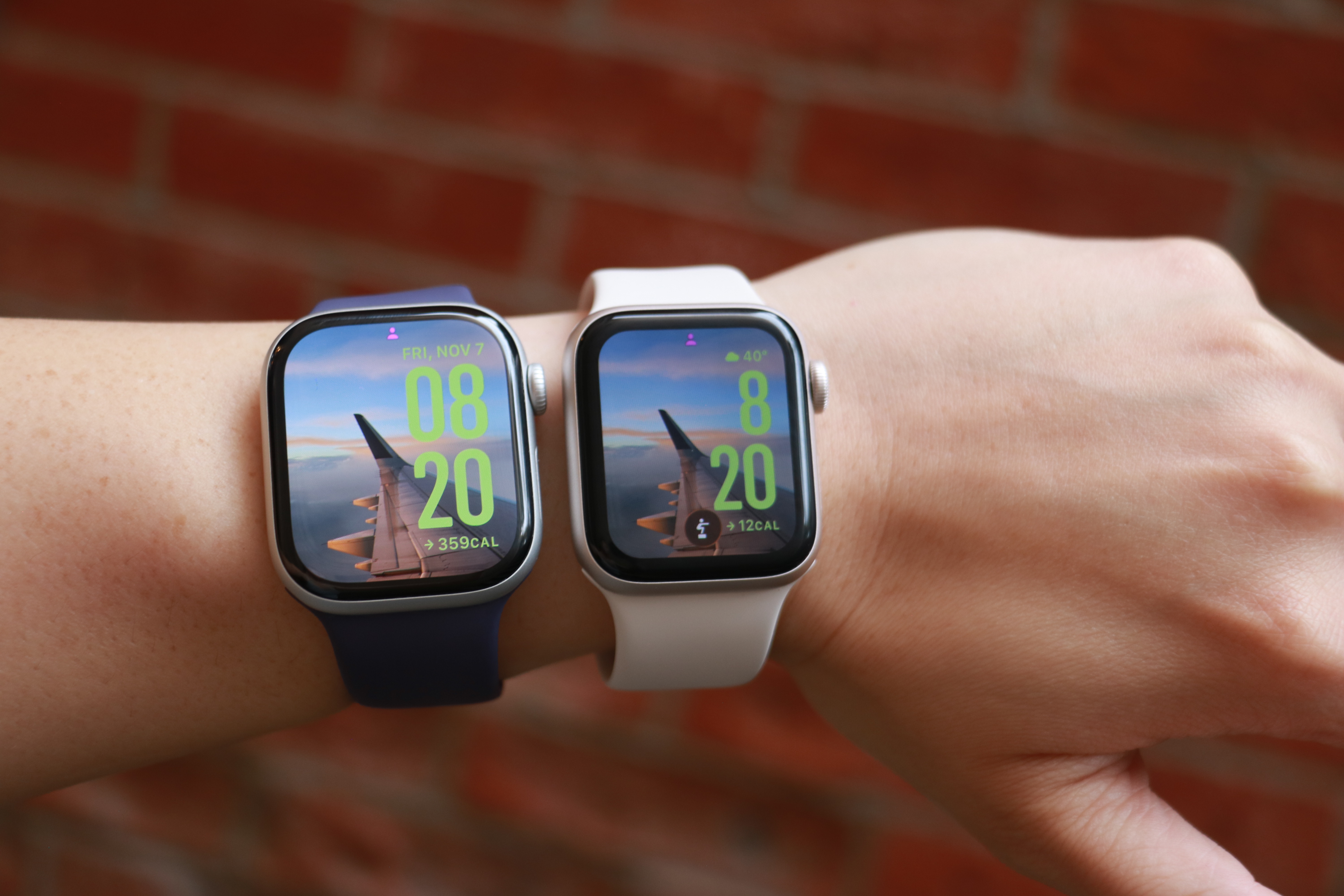
The Apple Watch Series 11 and Apple Watch SE 3 side by side on the same forearm.
Cherlynn Low for Engadget

Another screen-related update that isn’t immediately obvious is the Ion-X glass on the SE 3, which Apple says is four times more crack-resistant than the SE 2. I haven’t put this claim to the test, but the hardier material should help keep your smartwatch safe from more mishaps. 

I should also point out that the Watch SE 3 uses the same S10 processor as the Series 11, which has a four-core neural engine that should help speed up Siri and Apple Intelligence tasks. In general, I found the SE 3 snappy and responsive, and mostly as fast as the Series 11. Previous Watch SE models tended to be a bit sluggish, so it’s nice to see the SE 3 get this particular bump. 

The impact of most of the other improvements to the SE 3 depend on how you use a smartwatch. The new 5G support, for example, would be helpful if you get a cellular model and want to leave your phone behind while you run errands or go on walks. The wrist temperature sensor is mostly there to help with predicting cycles, so if you don’t ovulate it is unlikely to be useful to you right now. Sleep apnea notifications don’t affect non-sufferers, though they’re a nice feature to have. And finally, though I appreciate the ability to play songs of media through the watch’s onboard speaker, I rarely find myself wanting to do so.

It might be worth noting that the SE 3 comes in one fewer color option than the SE 2. You can only choose between starlight (a warm light gray) or midnight (black), as the silver version is not available in the latest generation. 

Apple Watch Series 11 vs the Watch SE 3 

The main thing I wanted to determine when reviewing the Watch SE 3 was whether it’s good enough to replace the Series 11. Like I said earlier, the short answer is yes, but it depends on how you use these devices. I don’t wear smartwatches to bed, and as a result my Watch SE 3 still has plenty of power left in the morning when I need it, so I’m a lot less affected by its relatively slower charging speeds. If you use your Apple Watch all the time, you might find something that recharges faster a lot more suitable — the Series 10 or 11 are both better on that front. 

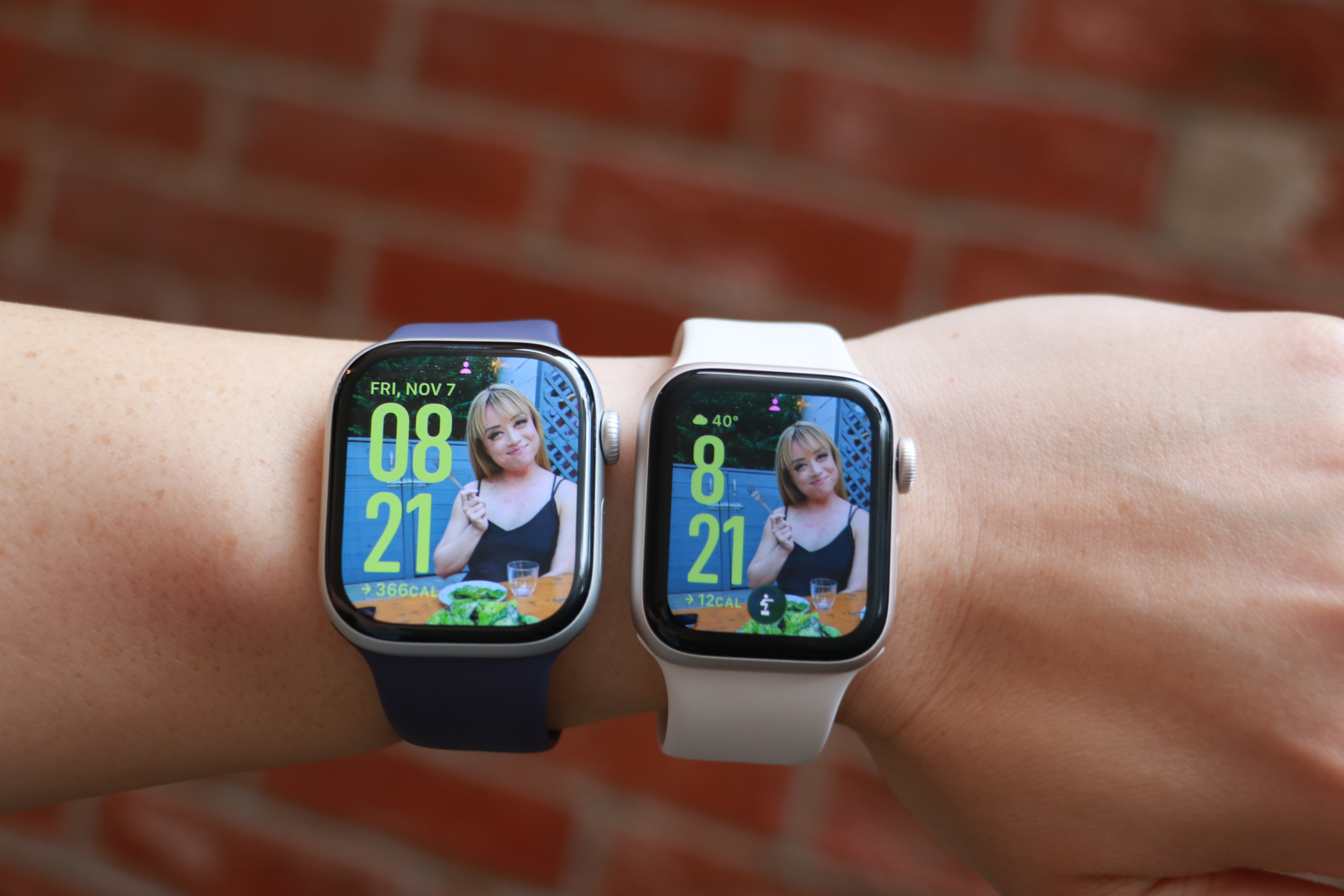
The Apple Watch Series 11 and Apple Watch SE 3 side by side on the same forearm, with the same photo watch face on their screens.
Cherlynn Low for Engadget

The Series 11’s larger screen and smaller bezels makes it a lot nicer to look at, though since the SE 3 also runs watchOS 26, I was able to use the same watch faces for both. Aesthetically, I didn’t find the two to be very far apart in terms of appearances, and if you’re not familiar with the latest Apple Watches like I am, you might not find the bezels as unsightly as I did. And though the SE 3 uses a flat OLED compared to the Series 11’s wide-angle OLED, I never really had an issue reading it, regardless of the position. 

Thanks to their electrical heart rate sensors, the Series 11 and Series 10 support Apple’s newer health-centric features like hypertension alerts, as well as apps for ECG and blood oxygen readings. The SE 3’s optical sensor is older and doesn’t have those capabilities, but you’ll still get notifications for irregular rhythms, low cardio fitness, as well as high and low heart rate notifications. Those were more than enough for me, and though I occasionally run an ECG reading on my Series 11, it’s not something I’d miss (especially if a $150 difference in price were in the balance). 

I’m also not a big swimmer or underwater enthusiast, so the SE 3’s lack of a depth gauge and water temperature sensor don’t bother me. All three watches I’ve mentioned in this section are water resistant to 50 meters, and that’s more than enough for my needs. If you want your watch to help with your underwater activities, it’s probably worth splurging on the Series 10 or 11.

The pricier watches are also certified IP6x for dust resistance, meaning they should offer a bit more peace of mind for those who work on beaches or on job sites, for example. I’ve not yet encountered a smartwatch that stopped working due to dust ingress, regardless of whether it was rated, so the SE 3 not having this certification doesn’t bother me either. 

One thing that the most discerning tech fans might call out is the fact that the SE 3 doesn’t have the same ultra wideband (UWB) chip that the Series 10 and 11 do. This enables the greater precision in Find My that allows you to locate your iPhone or wearable down to the number of feet. But you’ll still get basic Find My support on the Watch SE 3, and honestly all I really did with this was to use my watch to ring my phone so I could confirm it was with me without having to dig through all the pockets in my gigantic purse. Still, if you use this Find My interface a lot, it’s worth considering when getting your next Apple Watch.

Finally, if you’re a fan of the titanium finish or multiple color options in Apple’s more-premium lineup, only the Series 10 and 11 come in the silver and rose gold colors for the aluminum case. The Series 11 is also available in Space Gray in aluminum, as well as Slate, Gold and Natural hues for the titanium finish. Again, the SE 3 is only available in two colors.

Using the Apple Watch SE 3 as a Series 11 wearer

I’m the sort of person who straps on my smartwatch when I head out and removes it when I get home. When I’m outside, I expect my Apple Watch to track my steps and activity, automatically detect and log extended walks, tell me when someone’s calling or texting and keep tabs on my workouts. For all those situations, the SE 3 was more than adequate. Occasionally I noticed it was a bit slower than the Series 11 at recognizing when I was done working out and suggesting I end the session, but not at a frequency that was concerning. 

The SE 3 was also as capable as the Series 11 when it came to acting as a remote viewfinder for my iPhone’s camera, and Siri was satisfyingly responsive at launching my workouts or telling me about the weather. I also enjoyed having the double tap and wrist flick gestures at my disposal, and honestly kind of liked the watch’s smaller size. 

But I did miss the Series 11’s brighter screen and smaller bezels. I also prefer the Series 11 for its ability to recharge more quickly, as well as its slightly longer-lasting battery. Both still were able to make it through an entire day before needing a charge, but the Series 11 generally did more in the background in that amount of time. 

In the end, it wasn’t the features like blood oxygen readings or hypertension notifications that I wanted back. It boiled down to physical components like a brighter display or bigger battery and more durable case that I wanted around for peace of mind. 

Wrap-up

Is peace of mind worth a $150 premium? In this economy, it’s hard to say. On one hand, it’s possible a $399 Apple Watch will outlast the $249 SE 3, mostly due to its harder materials, making it a more astute investment in the long run. But for those who currently have tight budgets and need to replace aging or broken smartwatches, the SE 3 is the way to go.

This article originally appeared on Engadget at https://www.engadget.com/wearables/apple-watch-se-3-review-good-enough-for-most-people-133000008.html?src=rss

How to Beat ‘Carlson’s Law’ and Be More Productive

We may earn a commission from links on this page.

To do deep work, you have to focus on one task, and to focus, you have to avoid distractions. That’s a common-sense idea, and it’s the basis for Carlson’s Law, named for Swedish economist Sune Carlson. He determined that interrupted work is always less effective and more time-consuming than un-interrupted work.

It’s a lofty goal, but that doesn’t mean a distraction-free zone is easy to achieve. If you want to beat Carlson’s Law, you have to have a plan.

How to eliminate distractions when trying to focus

Before getting to work on anything, make sure your space is free from distractions—not just physically, but mentally. Here are a few ways to do that:

  • Work somewhere with a door and keep it closed so others know you’re busy and not to interrupt you.

  • Try earplugs or noise-cancelling headphones to minimize noise. 

  • Turn on a white noise machine to drown out distractions. I sometimes use white noise playlists on Spotify or white noise channels on my Roku, depending where I am and what I have access to. (They’re free!) Here are some of my favorite white noise YouTube channels, too.

  • Use apps, extensions, and software that prevent you from accessing social media or other distracting platforms. I have two favorites: Steppin, which blocks all your distracting apps and forces you to trade minutes you earn by walking around to access them; and FocusPomo, which initiates “focus sessions” that block your apps for a pre-determined period.

If you don’t think you can work on something without getting distracted—say, if your kids are due home from school and will burst in loudly, or there are free bagels in the break room and everyone is walking past you to get one—don’t. Carlson’s Law is all about how the work you do if you’re distracted will be lower quality than what you can do if you’re focused. When you’re focused, it takes less time, too, so you’ll make up for skipping work if it’s not feasible to do it at a given time. If you work when you’re distracted, not only will you produce something subpar, but you’ll waste even more time going back and redoing it. Sometimes, strategizing and choosing to do nothing for the moment is the most productive thing you can do.

Strategically allocate your time

In addition to blocking out external distractions, you have to tamp down on your personal distractions, too. That means no multitasking. Every task you do should be a single mission. Don’t answer emails and work on a project. Don’t plan dinner while you’re in a meeting. When you’re doing two things, you’re distracted and neither of them will be done as efficiently as they would be if you did them one at a time. It might seem counterintuitive, but I’ve noticed improvements in the personal projects I care most about now that I’ve abandoned multitasking.

To accomplish this, you need a few rules and guidelines in place. First, organize your responsibilities in order of importance. Try using the 1-3-5 method to make your to-do list every morning, planning on completing one big task, three medium-sized tasks, and five small ones. You can use the Eisenhower matrix to figure out what those nine task should be, organizing them by urgency and timeliness using a quadrant. 

Once you figure out your tasks and the order they need to happen in, put time on your calendar for them. Even the small tasks should get their own designated “timebox” on the calendar—as should your downtime and breaks, which are as elemental to true productivity as working without distractions.

When you glance at the calendar, you’ll see each item separated and know exactly how much time you have for it. This way, they won’t run into each other, you won’t end up multitasking, and you’ll be able to focus on each action item one by one. Bonus points if you do this on a shared office calendar or one that’s visible to people around you, so they can easily see when you’re busy—and not come around and distract you. 

You Can Get a Costco Executive Gold Star Membership Plus a $60 Shop Card on Sale for $130 Right Now

We may earn a commission from links on this page. Deal pricing and availability subject to change after time of publication.

You get a one-year Costco Executive Gold Star Membership plus a $60 Digital Costco Shop Card on sale for just $130 on StackSocial right now. The card works both online and in-store, and it arrives via email within two weeks of activation, providing an immediate way to recoup nearly half of the membership cost. This offer is available to new members only, or to those whose membership expired at least 18 months ago, and must be redeemed online before visiting a Costco location. The offer is valid until January 21, 2026. Once activated, you can shop at any of the 800+ Costco warehouses worldwide or on Costco.com, and your membership will be valid for one year.

The Executive level is a step above the standard Gold Star plan, adding a few perks that can actually pay off if you shop regularly. Executive Members earn a 2% annual reward (up to $1,250) on most Costco and Costco Travel purchases, which can easily cover the extra $65 upgrade fee if you spend around $3,000 a year. The plan also includes access to early shopping hours starting at 9 a.m., extra discounts on Costco Services, and a $10 monthly credit for SameDay.Costco.com or Costco via Instacart with qualifying orders of $150 or more. Whether you’re stocking up on groceries, planning a vacation through Costco Travel, or refilling prescriptions at the pharmacy, the membership stretches far beyond warehouse shopping.

That said, it’s worth considering how often you’ll use it. If you only make the occasional Costco trip, the regular Gold Star membership might make more sense. The digital shop card doesn’t arrive instantly; it can take up to two weeks, and this deal can’t be used to renew an existing membership. There’s also no refund once the code is redeemed, so you’ll want to activate it with a plan to use it. Still, for frequent Costco shoppers or families who already buy in bulk, this is an easy upgrade. The $60 shop card helps offset the upfront cost, and the annual 2% reward gives regular members a reason to stay in the Executive tier.

Our Best Editor-Vetted Tech Deals Right Now


Amazon Fire TV Stick 4K Plus


—
$24.99

(List Price $49.99)


Amazon Fire HD 10 (2023)


—
$69.99

(List Price $139.99)


Sony WH-1000XM5


—
$328.00

(List Price $399.99)


Fitbit Versa 4 Fitness Smartwatch (Black)


—
$119.95

(List Price $199.95)

Deals are selected by our commerce team

The best Christmas gifts to give everyone on your 2025 holiday shopping list

This time of year has a lot of merry and bright things to be excited about, but it can be stressful if you’re stumped on what to get your mom, dad, best friend, coworker or kids’ teacher as a holiday gift. Whether you enjoy or dread buying gifts for people, it’s safe to say we all want to give our loved ones things they will enjoy and appreciate. But there’s a lot of noise, junk and bad deals disguised as good deals to sift through as we get closer and closer to the holidays.

Allow us at Engadget to help you through it. Here, you’ll find all of our holiday gift guides collected in one place, so you can more easily find the best Christmas gifts you need this year. Are you looking for white elephant gift ideas? Are you struggling to come up with a good gift for the father figure in your life? Are you just looking for a good board game to pick up for your own family? We’ve got you covered with gift ideas for all of those scenarios and more. Check back here throughout the season as we add more of our gift guides to the list.

Best tech gifts and gadgets

Trying to find the right gift for an unabashed gadget lover during the holidays can be difficult, especially if you don’t keep up with tech industry news yourself. Fortunately, you’re reading Engadget.com, a site entirely staffed by people who spend all day figuring out what new stuff is and isn’t actually good. So allow us to help. We’ve rounded up some of our favorite gadgets and gear that just might satisfy the avid geek in your life.

Read more: The best tech gifts and gadgets

Best board game gifts

We could all use more time away from screens of all types and sizes, and board games are a fun way to do that and bond with friends and family. You can find plenty of unique sets out there now, from word puzzles to whodunnits to calming playthroughs that showcase the beauty of the little things in life. From games with giant monsters to those with haunted mansions, we’re sure at least one of our suggestions will be a hit with you and your loved ones.

Read more: The best board games to gift this season

Best gifts under $50

We wouldn’t blame you if you try to do all of your tech shopping around the holidays. That’s when you can typically get the best sales, both on relatively affordable gear and (more importantly) on big-ticket items. But it would be wrong to think that only the most expensive tech is worth gifting. Since we at Engadget test a plethora of gadgets every year, we know that there are some hidden (and not so hidden) tech gems at lower price ranges — you just have to know where to find them.

Read more: The best gifts under $50 that make great stocking stuffers

Best gifts for remote workers

There’s a pretty good chance you know at least one person who works remotely in some fashion. While the WFH life has its perks — nobody likes a long commute — it comes with its own set of challenges, from lacking pro-level equipment to dealing with household disturbances. If you’re looking to give a gift to someone who spends much of their time in their home office, we’ve rounded up a few techy gift ideas that should make their days a little more delightful, or at least easier to manage.

Read more: The best gift ideas for the remote worker in your life

Best white elephant gift ideas

According to legend, the King of Siam would give a white elephant to courtiers who had upset them. The recipient had no choice but to simply thank the king for such an opulent gift, knowing that they likely could not afford the upkeep for such an animal. It would inevitably lead them to financial ruin. This story is almost certainly untrue, but it has led to a modern holiday staple: the white elephant gift exchange. These gift ideas will not only get you a few chuckles, but will also make your recipient feel (slightly) burdened.

Read more: The best white elephant gift ideas

Check out the rest of our gift ideas here.

This article originally appeared on Engadget at https://www.engadget.com/the-best-christmas-gifts-to-give-everyone-on-your-2025-holiday-shopping-list-170018456.html?src=rss

Apple told to remove LGBTQ+ dating apps by China

LGBTQ+ rights and acceptance have taken another hit in China, with Apple removing two of the countries biggest LGBTQ+ dating apps. Wired reports that Blued and Finka are no longer available on the iOS App Store or certain Android App Stores following orders from the Cyberspace Administration of China, the country’s internet regulator and censor. 

Apple told Wired that it must “follow the laws in the countries where we operate.” Both dating apps were available solely in China, where LGBTQ+ dating apps are minimal — Grindr, for instance, hasn’t been available on Apple since 2022. Blued exists internationally under the name HeeSay. 

China has increasingly cracked down on LGBTQ+ individuals’ rights and groups in recent years, allegedly shuttering large organizations like the Beijing LGBT Center in 2023. For reasons unknown, Blued previously stopped new registrations this past July, with individuals buying second-hand accounts to use the app. However, it reopened in the middle of August. 

sBlued and Finka share a parent company, BlueCity, which is, in turn, owned by Newborn Town. BlueCity also operates in the healthcare space, with a non-profit dedicated specifically to prevention and treatment for diseases such as HIV/AIDS. 

This article originally appeared on Engadget at https://www.engadget.com/apps/apple-told-to-remove-lgbtq-dating-apps-by-china-130022336.html?src=rss

Try This Free Plex Alternative Client If You Hate the New Interface

Plex has been rolling out a new user interface for a while now, and to say it’s been divisive among users would be an understatement. Users on Reddit regularly complain about the interface being confusing and slow; others wish the application would focus on personal media servers instead of things like movie rentals.

Plezy is an alternative Plex client that solves these issues. The application, which is available for Windows, macOS, Linux, Android, and iOS, focuses entirely on personal media servers.

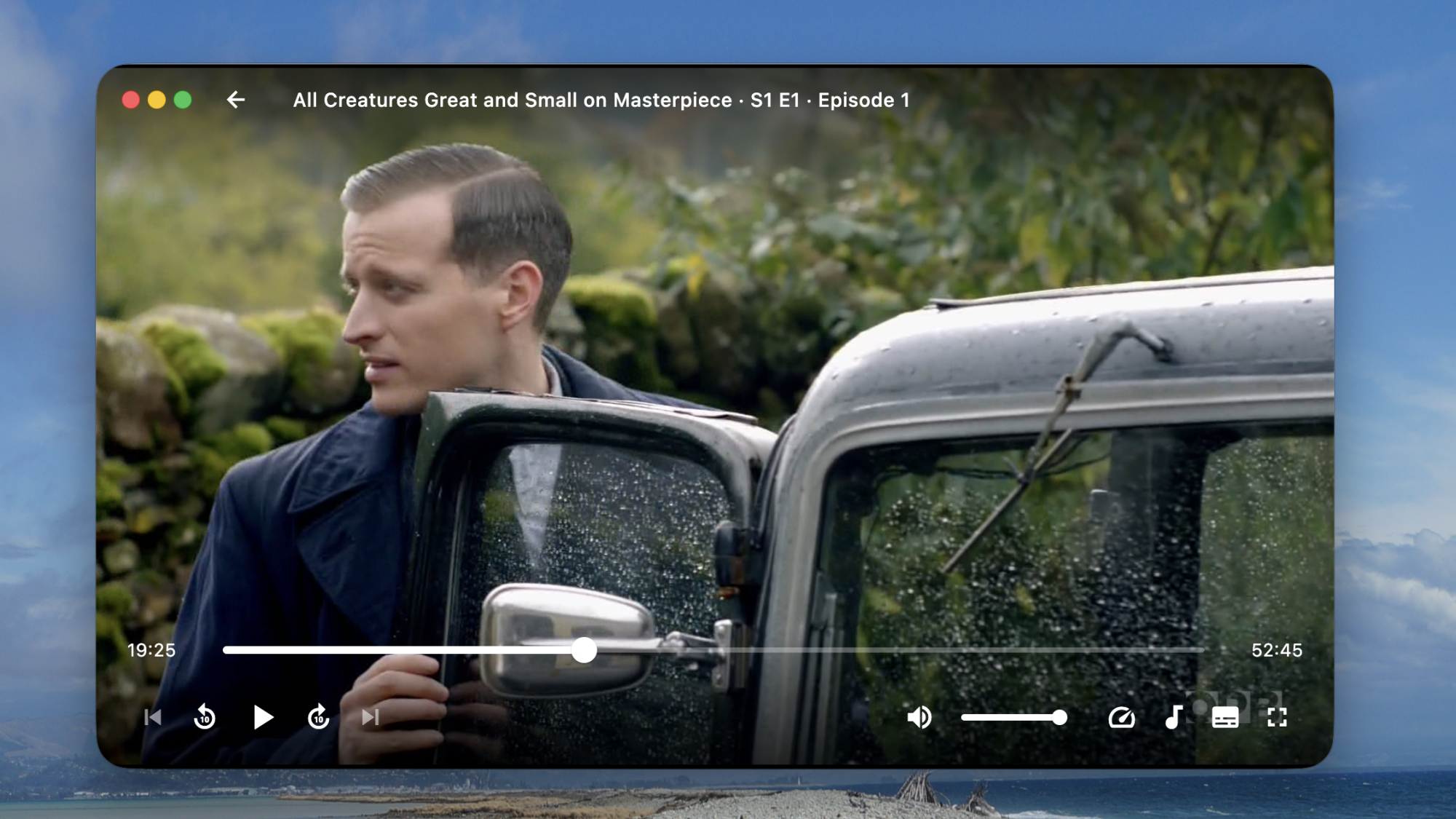
Plez has a simple user interface, but the real advantage over the official Plex app is its speed. Everything about Plezy is faster than the official Plex app—it launches faster, searches faster, and starts playing videos faster. If you’ve ever found yourself frustrated waiting for Plex to load, Plezy might be the answer you’re looking for.

The Plezy player showing an episode of All Creatures Great and Small

Credit: Justin Pot

Having said that, Plezy isn’t perfect. A few prominent Plex features, including live TV and offline downloads,aren’t supported at all. There are no applications for Roku, Apple TV, or any TV-based platform. The application also can’t combine shows and movies from multiple servers, even for search or the “now watching” list, meaning anyone who uses multiple servers may have to switch between servers regularly. That’s a small annoyance more than balanced by the performance improvements.

But if you just want a quick way to play personal media on a computer, phone, or tablet, Plezy does the job faster, and with less clutter, than the official Plex app. Plex is a great way to build your own personal streaming service, but the company has been downplaying that particular use case for a while—it’s nice to see an alternative client with focus.

The desktop version of Plezy—macOS, Windows, and Linux—is available for free. The iOS version costs $4. The Google Play link was not yet active while I was writing this, though you could download the APK file from Github and sideload it.

What’s the Best Ways for Humans to Explore Space?

Should we leave space exploration to robots — or prioritize human spaceflight, making us a multiplanetary species?

Harvard professor Robin Wordsworth, who’s researched the evolution and habitability of terrestrial-type planets, shares his thoughts:

In space, as on Earth, industrial structures degrade with time, and a truly sustainable life support system must have the capability to rebuild and recycle them. We’ve only partially solved this problem on Earth, which is why industrial civilization is currently causing serious environmental damage. There are no inherent physical limitations to life in the solar system beyond Earth — both elemental building blocks and energy from the sun are abundant — but technological society, which developed as an outgrowth of the biosphere, cannot yet exist independently of it. The challenge of building and maintaining robust life-support systems for humans beyond Earth is a key reason why a machine-dominated approach to space exploration is so appealing…

However, it’s notable that machines in space have not yet accomplished a basic task that biology performs continuously on Earth: acquiring raw materials and utilizing them for self-repair and growth. To many, this critical distinction is what separates living from non-living systems… The most advanced designs for self-assembling robots today begin with small subcomponents that must be manufactured separately beforehand. Overall, industrial technology remains Earth-centric in many important ways. Supply chains for electronic components are long and complex, and many raw materials are hard to source off-world… If we view the future expansion of life into space in a similar way as the emergence of complex life on land in the Paleozoic era, we can predict that new forms will emerge, shaped by their changed environment, while many historical characteristics will be preserved. For machine technology in the near term, evolution in a more life-like direction seems likely, with greater focus on regenerative parts and recycling, as well as increasingly sophisticated self-assembly capabilities. The inherent cost of transporting material out of Earth’s gravity well will provide a particularly strong incentive for this to happen.

If building space habitats is hard and machine technology is gradually developing more life-like capabilities, does this mean we humans might as well remain Earth-bound forever? This feels hard to accept because exploration is an intrinsic part of the human spirit… To me, the eventual extension of the entire biosphere beyond Earth, rather than either just robots or humans surrounded by mechanical life-support systems, seems like the most interesting and inspiring future possibility. Initially, this could take the form of enclosed habitats capable of supporting closed-loop ecosystems, on the moon, Mars or water-rich asteroids, in the mold of Biosphere 2. Habitats would be manufactured industrially or grown organically from locally available materials. Over time, technological advances and adaptation, whether natural or guided, would allow the spread of life to an increasingly wide range of locations in the solar system.
The article ponders the benefits (and the history) of both approaches — with some fasincating insights along the way.
“If genuine alien life is out there somewhere, we’ll have a much better chance of comprehending it once we have direct experience of sustaining life beyond our home planet.”


Read more of this story at Slashdot.

NASA is kind of a mess: Here are the top priorities for a new administrator

After a long summer and fall of uncertainty, private astronaut Jared Isaacman has been renominated to lead NASA, and there appears to be momentum behind getting him confirmed quickly as the space agency’s 15th administrator. It is possible, although far from a lock, the Senate could finalize his nomination before the end of this year.

It cannot happen soon enough.

The National Aeronautics and Space Administration is, to put it bluntly, kind of a mess. This is not meant to disparage the many fine people who work at NASA. But years of neglect, changing priorities, mismanagement, creeping bureaucracy, meeting bloat, and other factors have taken their toll. NASA is still capable of doing great things. It still inspires. But it needs a fresh start.

Read full article

Comments

The best record players for 2025

Everyone knows by now that vinyl is back. The classic format has seen a resurgence for years at this point, and new albums these days almost always include a vinyl preorder. If you’ve finally decided to embark on the hobby, or if you’re looking to upgrade your current setup, we’ve compiled a list of the best turntables you can buy for under $600. Obviously, there are some very good, very popular options out there for around $1,000, but we had to start somewhere, and we had to narrow down the options a bit. Plus, there’s no reason for novices or even experienced spinners to spend that much to get a decent deck.

Best record players for 2025

Other record players we tested

Audio-Technica AT-LP60XBT

This is about as basic as it gets, unless you opt for the AT-LP60X which ditches the Bluetooth connectivity. This is a perfectly decent option for someone just getting into vinyl, but if you spend a little more for the AT-LP70X, you won’t be in quite as big of a hurry to upgrade once you surrender to the obsession.

Cambridge Audio Alva ST

The Alva ST has a refined design that made me want to keep it out in my living room longer than many of the models on this list. The controls are limited on the top to power and individual options for 33 and 45 RPM speeds. Everything else is on the back panel, including Bluetooth pairing and preamp buttons. To complete the look, Cambridge Audio opted for a 1mm aluminium top plate, which sits on an MDF plinth with a layer of EVA to absorb vibrations in between.

While the overall audio performance on the Alva ST is warm and inviting, there is a lack of detail across genres. I’ve noticed albums don’t have a particularly wide soundstage, and songs lack their normal punch at times, so some sound compressed compared to when they’re played on other turntables. Additionally, the free swinging tone arm needs more resistance so it’s not so prone to dropping on a record immediately if it slips out of your fingers when you have the cueing lever down. Since this turntable is fully manual operation, I felt a bit of peril every time I went to lower the needle. (The price increased during testing for this guide.)

Denon DP-300F

Denon’s DP-300F is a mixed bag. On one hand, you get the convenience of fully automatic operation, dedicated speed and record size buttons and somewhat refined design. There are also some confounding decisions though, like the permanently affixed cables, the preamp switch being under the platter and the overall midrange build quality for a $500 turntable. The sound from the preamp and Denon’s cartridge has a clear lack of depth and detail that almost any model at this price should offer.

How to shop for a turntable

The first question you’ll need to ask yourself when looking for a turntable is how you plan to use it. Are you into vinyl for the ritual? If you simply like the concept of physical media, having to flip a record to finish it or the need to intentionally swap out an album when it’s done, that’s just fine. You probably can make do with a more affordable turntable since overall sound quality may not be a main concern. If you crave the warmth of analog sound, and you want the collection you’ve invested in to sound its best, you’ll need to consider something with better specs. 

You’ll also need to account for where and how you’re going to listen to vinyl. Are you planning to connect this turntable to headphones or Bluetooth speakers? Do you have shelf or tower speakers you’re going to use? Are you willing to invest in a dedicated preamp or would you rather a new turntable come with one built in? All of these questions will impact your buying decision — even the Bluetooth codecs, if you’re going the wireless route.

Best record players
Best record players
Billy Steele for Engadget

Automatic, semi-auto and manual operation

If you’re just getting into vinyl, an automatic turntable will save you a lot of stress. These are the models that place the stylus for you — all you have to do is push a button. When you get to the end of the record, the turntable will also return the tonearm to its resting spot automatically. Or, if you need to stop your session mid-side, there’s a button for that too. 

Some turntables have semi-automatic operation. Maybe they can’t place the needle for you, but they do have an automatic stop when a side of a record is complete. This auto stop, which sometimes comes with an on/off switch, can prevent unnecessary wear on your stylus and vinyl. Plus, many turntables with automatic operation allow you to take control if you need to drop the stylus in a certain place (that’s not the beginning of the record) or if you have a die-cut vinyl (like the It’s the Great Pumpkin, Charlie Brown soundtrack). 

Then there’s the fully manual option. Here, you’re solely responsible for placing the tonearm and taking it off when the music stops. A lot of turntables have a cue lever to assist with the process, and a lot of tonearms have a mechanism that lowers them slowly rather than violently dropping them on a record. This adds one more step to the ritual, and it’s one many purists prefer. 

Preamp

The biggest decision you’ll need to make in terms of a preamp is to decide if you want one built into your turntable or if you’d rather use a separate one. It can be very convenient, especially for beginners, to use a built-in component to amplify the signal from the turntable before it hits any speakers or headphones. The downside is that you’re left with what the company provides from the factory, so if you’re looking to upgrade, you’ll have to disable the preamp inside. On most turntables, there’s a switch that allows you to do this, so it’s no trouble. But, opting to skip the preamp on some models could save you money that could be invested elsewhere. 

A dedicated preamp typically uses higher-quality components and reduces noise by keeping internal parts properly separated. More robust models may even provide controls for things like tone or multiple inputs, while the basic options will simply allow you to plug in, play and forget it. If you’re after the best possible clarity and realism from your record collection, we’d recommend a dedicated preamp right from the start. 

Best record players
Best record players
Billy Steele for Engadget

Removable cartridge/headshell

The next item you’ll want to consider is if the turntable you’re eyeing can be upgraded in the future. The best way to do this is by swapping out the cartridge. Most turntables allow you to do this but there are some that don’t, so you’ll need to pay attention to this detail. Upgrading the cartridge down the road is a great way to improve overall sound quality without having to buy a new turntable, new speakers or a new amp. 

Belt drive vs. direct drive

There are two main types of turntables: belt drive and direct drive. All of the models we tested for this guide are belt drive, which means there’s a thin belt that connects the platter to the motor to make the thing spin. Direct drive turntables are widely used by DJs and Technics was the first to make them. Here, the motor is directly under the platter and connected to it directly so the setup is less prone to wearing out. This is especially key when you’re doing things like scratching. Direct-drive turntables tend to be more expensive than their belt-driven counterparts.

Counterweight and anti-skate control

Most turntables will include a counterweight on the tonearm and some form of anti-skate control. Both of these help keep the stylus in place with the correct amount of pressure, all to ensure proper operation with minimal wear on your records. Sometimes the anti-skate elements are built into the tonearm while other models offer a dedicated dial on the surface of the plinth. The ability to adjust both of these can help you fine-tune the performance of your turntable over time, which may be necessary after upgrading the cartridge or other components. 

Other components to consider

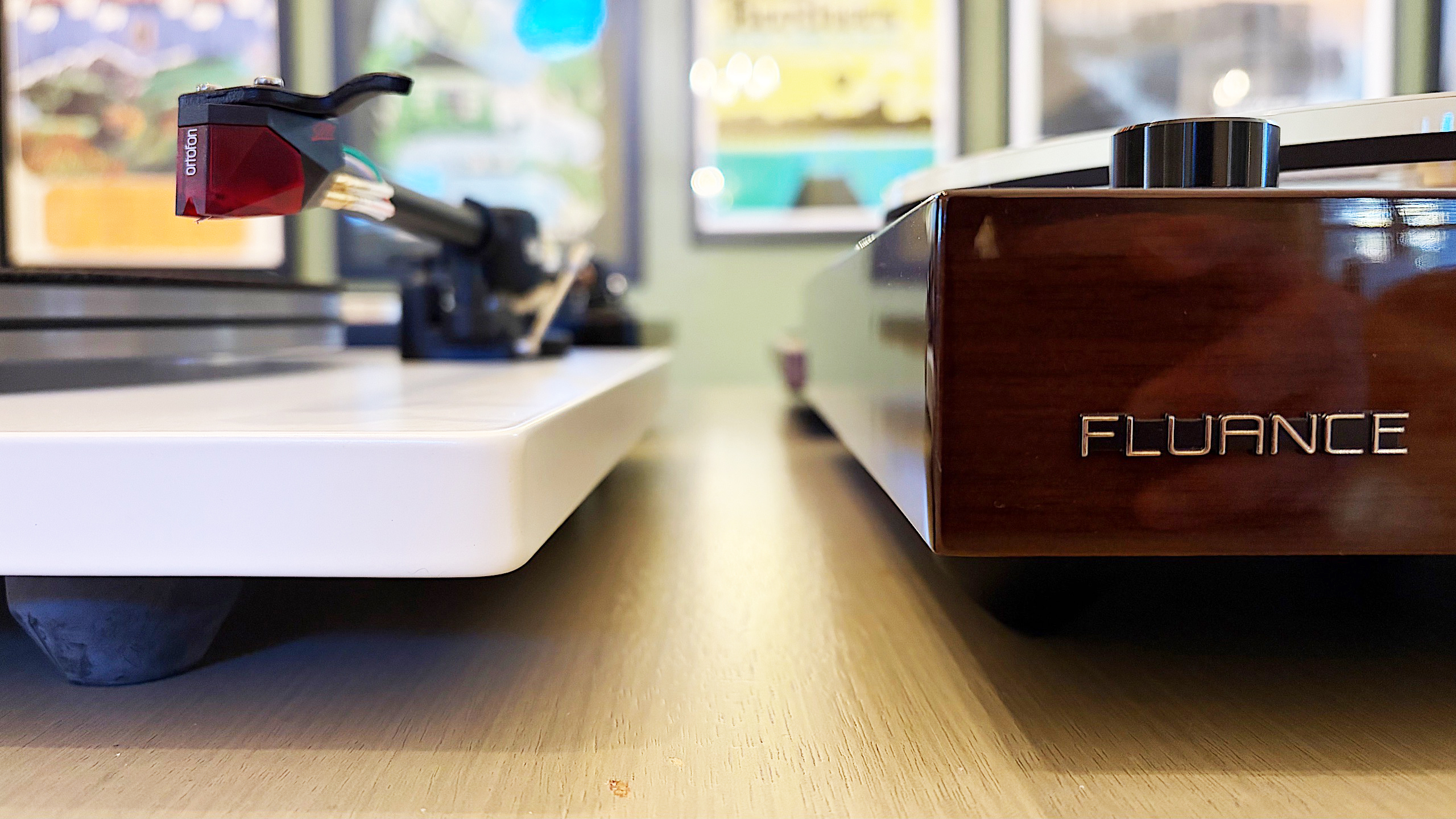
Some final items you’ll want to evaluate on a prospective turntable purchase include the materials used for the base (plinth), platter and even the feet. Cheaper turntables may be mostly plastic affairs while more expensive models can use solid MDF (medium-density fibreboard) for the plinth. A lot of turntables have aluminum platters with a felt pad while others may feature a thick acrylic version. And while entry-level turntables may have small, plastic feet, premium models come with larger, adjustable, rubberized feet for better vibration isolation. While some of these come down to personal preference — a frosted acrylic platter looks really nice — there are some performance boosts to be gained depending on how the company uses the components.

How we test turntables

Since most turntables under $600 meet the criteria for entry-level through midrange, we tested every model with a set of Audio-Technica AT-SP3X powered speakers. These offer balanced sound for turntables with a 1.1-inch tweeter and 3-inch woofer in each unit. And at $269, they won’t break the bank if you need speakers for your new turntable and they’ll provide ample sound performance even if you spend more than our budget on a new deck.

For all of our test units that didn’t have a built-in preamp, we used the Fluance PA-10. At $100, it’s an affordable upgrade if you’re looking to bypass a turntable’s included components or if you’re looking to go more analog with your turntable purchase. There are no buttons or controls, just connect your turntable, speakers and ground wire (if you’re using one) and you’re ready to go. It’s simple, straightforward and inexpensive, so it’s a great option for beginners and more experienced vinyl collectors alike. 

In terms of performance testing, we play a variety of genres on each turntable to evaluate sound quality. We also carefully examine the overall experience of putting a record on, setting the speed, placing the tonearm and more, which allows us to judge how well each turntable will work for users at different experience levels. Lastly, we take notes on design and components, comparing those elements from each turntable with our other test subjects to make our recommendations.

This article originally appeared on Engadget at https://www.engadget.com/audio/best-record-player-120000239.html?src=rss

NVIDIA Connects AI GPUs to Early Quantum Processors

“Quantum computing is still years away, but Nvidia just built the bridge that will bring it closer…” argues investment site The Motley Fool, “by linking today’s fastest AI GPUs with early quantum processors…”

NVIDIA’s new hybrid system strengthens communication at microsecond speeds — orders of magnitude faster than before — “allowing AI to stabilize and train quantum machines in real time, potentially pulling major breakthroughs years forward.”

CUDA-Q, Nvidia’s open-source software layer, lets researchers choreograph that link — running AI models, quantum algorithms, and error-correction routines together as one system. That jump allows artificial intelligence to monitor [in real time]… For researchers, that means hundreds of new iterations where there used to be one — a genuine acceleration of discovery. It’s the quiet kind of progress engineers love — invisible, but indispensable…

Its GPUs (graphics processing units) are already tuned for the dense, parallel calculations these explorations demand, making them the natural partner for any emerging quantum processor…
Other companies chase better quantum hardware — superconducting, photonic, trapped-ion — but all of them need reliable coordination with the computing power we already have. By offering that link, Nvidia turns its GPU ecosystem into the operating environment of hybrid computing, the connective tissue between what exists now and what’s coming next. And because the system is open, every new lab or start-up that connects strengthens Nvidia’s position as the default hub for quantum experimentation…

There’s also a defensive wisdom in this move. If quantum computing ever matures, it could threaten the same data center model that built Nvidia’s empire. CEO Jensen Huang seems intent on making sure that, if the future shifts, Nvidia already sits at its center. By owning the bridge between today’s technology and tomorrow’s, the company ensures it earns relevance — and revenue — no matter which computing model dominates.

So Nvidia’s move “isn’t about building a quantum computer,” the article argues, “it’s about owning the bridge every quantum effort will need.”


Read more of this story at Slashdot.

Rust Foundation Announces ‘Maintainers Fund’ to Ensure Continuity and Support Long-Term Roles

The Rust Foundation has a responsibility to “shed light on the impact of supporting the often unseen work” that keeps the Rust Project running. So this week they announced a new initiative “to provide consistent, transparent, and long term support for the developers who make the Rust programming language possible.”

It’s the Rust Foundation Maintainers Fund, “an initiative we’ll shape in close collaboration with the Rust Project Leadership Council and Project Directors to ensure funding decisions are made openly and with accountability.”

In the months ahead, we’ll define the fund’s structure, secure contributions, and work with the Rust Project and community to bring it to life. This work will build on lessons from earlier iterations of our grants and fellowships to create a lasting framework for supporting Rust’s maintainers… Over the past several months, through ongoing board discussions and input from the Leadership Council, this initiative has taken shape as a way to help maintainers continue their vital development and review work, and plan for the future…

This initiative reflects our commitment to Rust being shaped by its people, guided by open collaboration, and backed by a global network of contributors and partners. The Rust Foundation Maintainers Fund will operate within the governance framework shared between the Rust Project and the Rust Foundation, ensuring alignment and oversight at every level… The Rust Foundation’s approach to this initiative will be guided by our structure: as a 501( C)(6) nonprofit, we operate under a mandate for transparency and accountability to the Rust Project, language community, and our members. That means we must develop this fund in coordination with the Rust Project’s priorities, ensuring shared governance and long-term viability…

Our goal is simple: to help the people building Rust continue their essential work with the support they deserve. That means creating the conditions for long term maintainer roles and ensuring continuity for those whose efforts keep the language stable and evolving. Through the Rust Foundation Maintainers Fund, we aim to address these needs directly.

“The more companies using Rust can contribute to the Rust Foundation Maintainers Fund, the more we can keep the language and tooling evolving for the benefit of everyone,” says Rust Foundation project director Carol Nichols.


Read more of this story at Slashdot.

Nonprofit Releases Thousands of Rare American Music Recordings Online

The nonprofit Dust-to-Digital Foundation is making thousands of historic songs accessible to the public for free through a new partnership with the University of California, Santa Barbara. The songs represent “some of the rarest and most uniquely American music borne from the Jazz Age and the Great Depression,” according to the university, and classic blues recordings or tracks by Fiddlin’ John Carson and his daughter Moonshine Kate “would have likely been lost to landfills and faded from memory.”

Launched in 1999 by Lance and April Ledbetter, Dust-to-Digital focused on preserving hard-to-find music. Originally a commercial label producing high-quality box sets (along with CDs, records, and books), it established a nonprofit foundation in 2010, working closely with collectors to digitize and preserve record collections. And there’s an interesting story about how they became familiar with library curator David Seubert…

Once a relationship is established, Dust-to-Digital sets up special turntables and laptops in a collector’s home, with paid technicians painstakingly digitizing and labeling each record, one song at a time. Depending on the size of the collection, the process can take months, even years… In 2006, they heard about Seubert’s Cylinder Preservation and Digitization Project getting “slashdotted,” a term that describes when a website crashes or receives a sudden and debilitating spike in traffic after being mentioned in an article on Slashdot.

Here in 2025, the university’s library already has over 50,000 songs in a Special Research Collections, which they’ve been uploading it to a Discography of American Historical Recordings (DAHR) database. (“Recordings in the public domain are also available for free download, in keeping with the UCSB Library’s mission for open access.”) Over 5,000 more songs from Dust-to-Digital have already been added, says library curator Seubert, and “Thousands more are in the pipeline.”

One interest detail? The bulk of the new songs come from Joe Bussard, a man whose 75-year obsession with record collecting earned him the name “the king of the record collectors and “the saint of 78s”.


Read more of this story at Slashdot.

What Happens When Humans Start Writing for AI?

The literary magazine of the Phi Beta Kappa society argues “the replacement of human readers by AI has lately become a real possibility.

“In fact, there are good reasons to think that we will soon inhabit a world in which humans still write, but do so mostly for AI.”

“I write about artificial intelligence a lot, and lately I have begun to think of myself as writing for Al as well,” the influential economist Tyler Cowen announced in a column for Bloomberg at the beginning of the year. He does this, he says, because he wants to boost his influence over the world, because he wants to help teach the AIs about things he cares about, and because, whether he wants to or not, he’s already writing for AI, and so is everybody else. Large-language-model (LLM) chatbots such as ChatGPT and Claude are trained, in part, by reading the entire internet, so if you put anything of yourself online, even basic social-media posts that are public, you’re writing for them.

If you don’t recognize this fact and embrace it, your work might get left behind or lost. For 25 years, search engines knit the web together. Anyone who wanted to know something went to Google, asked a question, clicked through some of the pages, weighed the information, and came to an answer. Now, the chatbot genie does that for you, spitting the answer out in a few neat paragraphs, which means that those who want to affect the world needn’t care much about high Google results anymore. What they really want is for the AI to read their work, process it, and weigh it highly in what it says to the millions of humans who ask it questions every minute.

How do you get it to do this? For that, we turn to PR people, always in search of influence, who are developing a form of writing (press releases and influence campaigns are writing) that’s not so much search-engine-optimized as chatbot-optimized. It’s important, they say, to write with clear structure, to announce your intentions, and especially to include as many formatted sections and headings as you can. In other words, to get ChatGPT to pay attention, you must write more like ChatGPT. It’s also possible that, since LLMs understand natural language in a way traditional computer programs don’t, good writing will be more privileged than the clickbait Google has succumbed to: One refreshing discovery PR experts have made is that the bots tend to prioritize information from high-quality outlets.

Tyler Cowen also wrote in his Bloomberg column that “If you wish to achieve some kind of intellectual immortality, writing for the Als is probably your best chance…. Give the Als a sense not just of how you think, but how you feel — what upsets you, what you really treasure. Then future Al versions of you will come to life that much more, attracting more interest.” Has AI changed the reasons we write? The Phi Beta Kappa magazine is left to consider the possibility that “power over a superintelligent beast and resurrection are nothing to sneeze at” — before offering another thought.

“The most depressing reason to write for AI is that unlike most humans, AIs still read. They read a lot. They read everything. Whereas, aided by an AI no more advanced than the TikTok algorithm, humans now hardly read anything at all…”


Read more of this story at Slashdot.

Apple Explores New Satellite Features for Future iPhones

In 2022 the iPhone 14 featured emergency satellite service, and there’s now support for roadside assistance and the ability to send and receive text messages.

But for future iPhones, Apple is now reportedly working on five new satellite features, reports LiveMint:

As per Bloomberg’s Mark Gurman, Apple is building an API that would allow developers to add satellite connections to their own apps. However, the implementation is said to depend on app makers, and not every feature or service may be compatible with this system. The iPhone maker is also reportedly working on bringing satellite connectivity to Apple Maps, which would give users the chance to navigate without having access to a SIM card or Wi-Fi. The company is also said to be working on improved satellite messages that could support sending photos and not be limited to just text messages. Apple currently relies on the satellite network run by Globalstar to power current features on iPhones. However, the company is said to be exploring a potential sale, and Elon Musk’s SpaceX could be a possible purchaser.

The Mac Observer notes Bloomberg also reported Apple “has discussed building its own satellite service instead of depending on partners.” And while some Apple executives pushed back, “the company continues to fund satellite research and infrastructure upgrades with the goal of offering a broader range of features.”

And “Future iPhones will use satellite links to extend 5G coverage in low-signal regions, ensuring that users remain connected even when cell towers are out of range…. Apple’s slow but steady progress shows how the company wants iPhone satellite technology to move from emergency use to everyday convenience.”


Read more of this story at Slashdot.