Rodecaster Video S review: Compact and comprehensive video production

The Rodecaster series of podcast mixers have become a mainstay among audio creatives. Last year, the company expanded the line with its first multimedia model — the Rodecaster Video. It was a more niche proposition, aimed at streamers, video podcasters and live producers, and, at $1,200, people with deeper pockets. Today, Rode returns with the Rodecaster Video S (RCV-S), a streamlined version that offers much of the same functionality for less than half the cost of the original ($499).

If you currently use Ecamm Live, OBS, a Stream Deck, a Rodecaster Pro/Duo, a video capture card or Blackmagic Atem type switcher, then there’s a good chance the RCV-S does something, or many things, useful to you. Maybe it can replace all those products, some of them or enhance your workflow. It’s a little complicated, but within that complication is a lot of versatility.

With three HDMI inputs, one USB webcam/mic input and up to four NDI/wireless camera inputs, video is clearly the focus here. But there are also two XLR/Combo ports for studio microphones and instruments and the option to connect up to two of Rode’s wireless lav mics (such as the Wireless Go) directly without the need for a receiver. The RCV-S, like Blackmagic’s popular Atem Mini, outputs over HDMI at 1080p/60 (no 4K) or can be used over USB as a virtual camera just like you’d find in Zoom or Teams.

Unlike the Rodecaster Pro or Duo, there are no faders; instead, there are two rows of pads for switching between video sources and scenes. There’s 20GB of onboard storage for media — such as overlays, graphics and audio/video clips — and you can record shows directly onto USB hard-drives or stream natively to Twitch, YouTube and other platforms via RTMP/S. There’s a lot going on, and how you want to use it all is largely up to you. While the RCV-S leans more toward “live” productions such as streaming or podcasts, you can use it for conventional YouTube-style video production, depending on your workflow or video preferences.

Rodecaster Video versus Rodecaster Video S

The huge price difference between the original Rodecaster Video and the new S model might lead you to expect some serious feature trimming this time around, but Rode’s garden shears have been fairly kind. Most notably, the number of sources you can connect has been reduced from six to four. Meanwhile, the number of “scenes” you can create is now five, down from seven. As mentioned above, there are three HDMI inputs, not four, and only one USB webcam/mic input, down from two on the original. There are still nine channels of audio with two headphone outputs, but the line outputs on the original are no longer here. The SD card slot for media has also been removed in favor of internal storage. In short, there’s a little bit less connectivity, but not enough for it to feel hobbled, especially for the more casual users this is clearly aimed at.

In-use

At its most basic, the RCV-S is an all-in-one video switcher. You don’t need to connect it to a PC, just plug in your video and audio sources and you can jump between them in real time with a choice of transitions. For a more polished production you can create “scenes” via the menu with a selection of layouts for multiple cameras, picture-in-picture and so on. That could be two talking heads for a podcast, overlaying your web camera on top of your gameplay or a top-down camera mixed with a different perspective for cooking tutorials or presentations. 

You can create scenes directly on the device in advance or live via templates, but things get a lot easier and more creative when you use Rode’s companion Rodecaster app. Here, you’ll find a “scene creator” tool that’s both visual and intuitive, plus it has the option to make custom layouts where you can freely resize and place all your different media wherever you want, add borders or rounded corners and so on. 

While the main pads are primarily for switching between sources and scenes, they can also trigger media — pre-made video clips, overlays and graphics, for example. You can assign media to them without reducing the number of sources/scenes that are available to switch between, just tap the Media/Overlay button to temporarily change the functionality of the pads. You can also set up chromakey/green screening directly on the device or via the Rodecaster App, too.

Once you have everything set up, you can directly record output onto a USB SSD, again, without the need for a PC. There’s even the option to record only the main output (“program”) or a multi-track version which will export a recording of every input as a separate file that you can edit as you see fit. This is helpful if you’re using apps like Adobe Premier or Davinci Resolve. If you shoot multi-camera dance tutorials, for example, you can jump between your main and wide camera and then to a close up without having to hunt-down the right part from each file you recorded on different memory cards. 

Rode recently updated the Rodecaster Video firmware to add support for up to four “NDI” wireless cameras as additional sources. Typically these are remote or security-style cameras, but Rode’s Capture mobile app also supports NDI streaming, meaning you can use your phone wirelessly as another camera that you can switch to, which is particularly useful. Though do note, the Rodecaster Video will need to be hard-wired to your router on the same network as your phone for this to work. 

Audio 
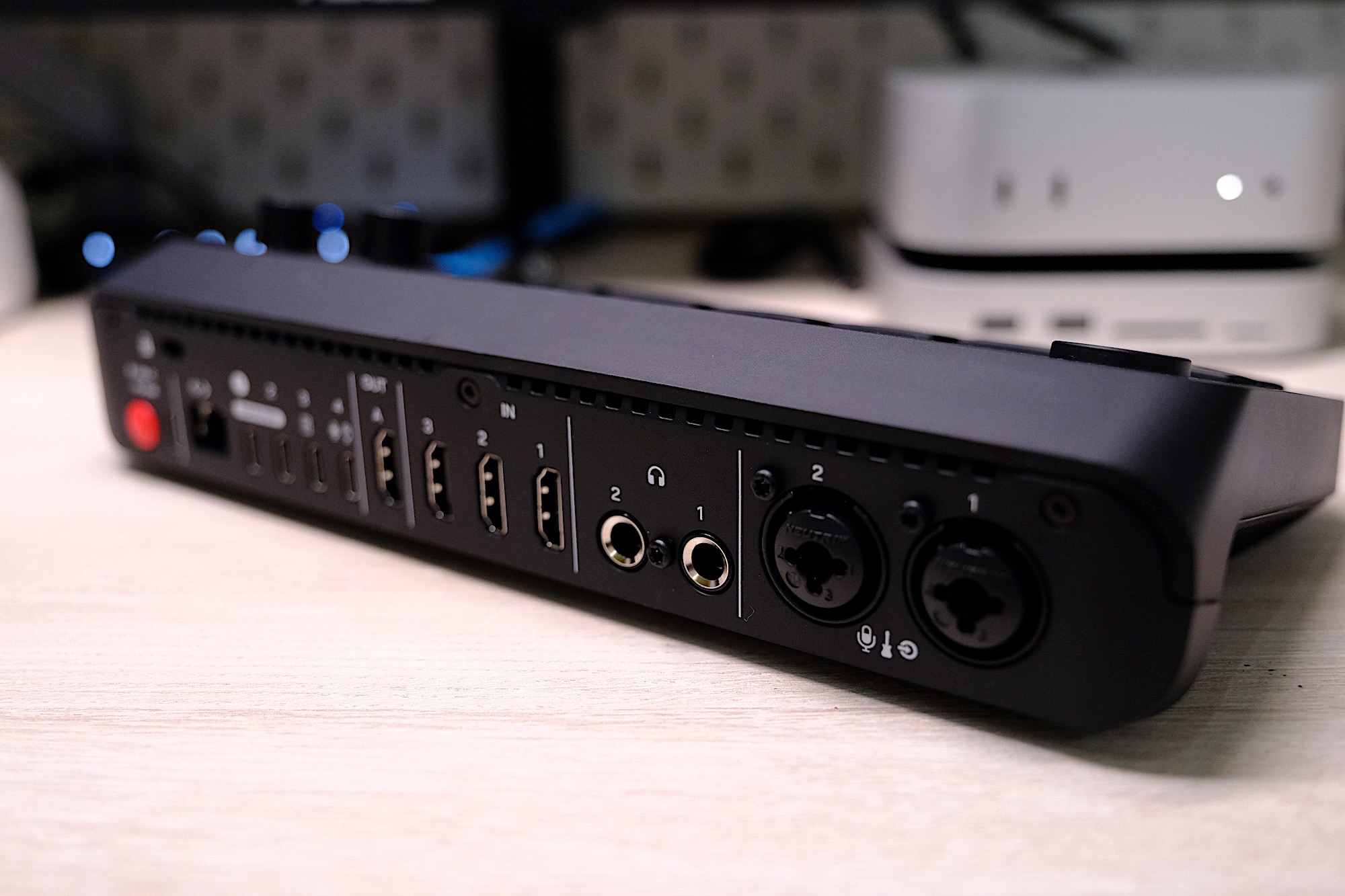
The Rodecaster Video S handles audio and video with ease.
James Trew for Engadget

While the RCV-S offers nine audio tracks, it’s fair to say it isn’t really designed for live audio mixing in the pure sense since there are no faders. Instead, you have to access different channels via the menu on a small display and a dial — It’s a lot of hunting and pecking. If you’re connected to a PC, the Rodecaster app does offer a software mixer with faders though, which makes adjusting levels on the fly much easier.

The good news is that some voice enhancement tools, such as Depth, Sparkle and Punch have been carried over from the Rodecaster Pro/Duo, giving you a little more fine-grained control over how you or your guests sound.

There’s a slight drawback when using the RCV-S as a standalone unit, in that you need to physically push the buttons to change the scene, which might not be ideal if you’re trying to make a polished recording or can’t always be near the console. Thankfully, Rode has a solution in “auto switching.” I’m mentioning it here, in the audio section, as the RCV-S can switch cameras based on which one has the strongest audio or based on user-defined priority. Typically, that would be whoever is talking in a podcast, but it could also be in-game sound or when you switch to playing a musical instrument. 

Auto switching works well, but it’s not quite dependable enough to rely on for full autonomy in a professional environment — say while recording a panel at a conference — but it solves a problem if you’re on your own, and it could at least save some time in a casual podcast situation.

Things to consider
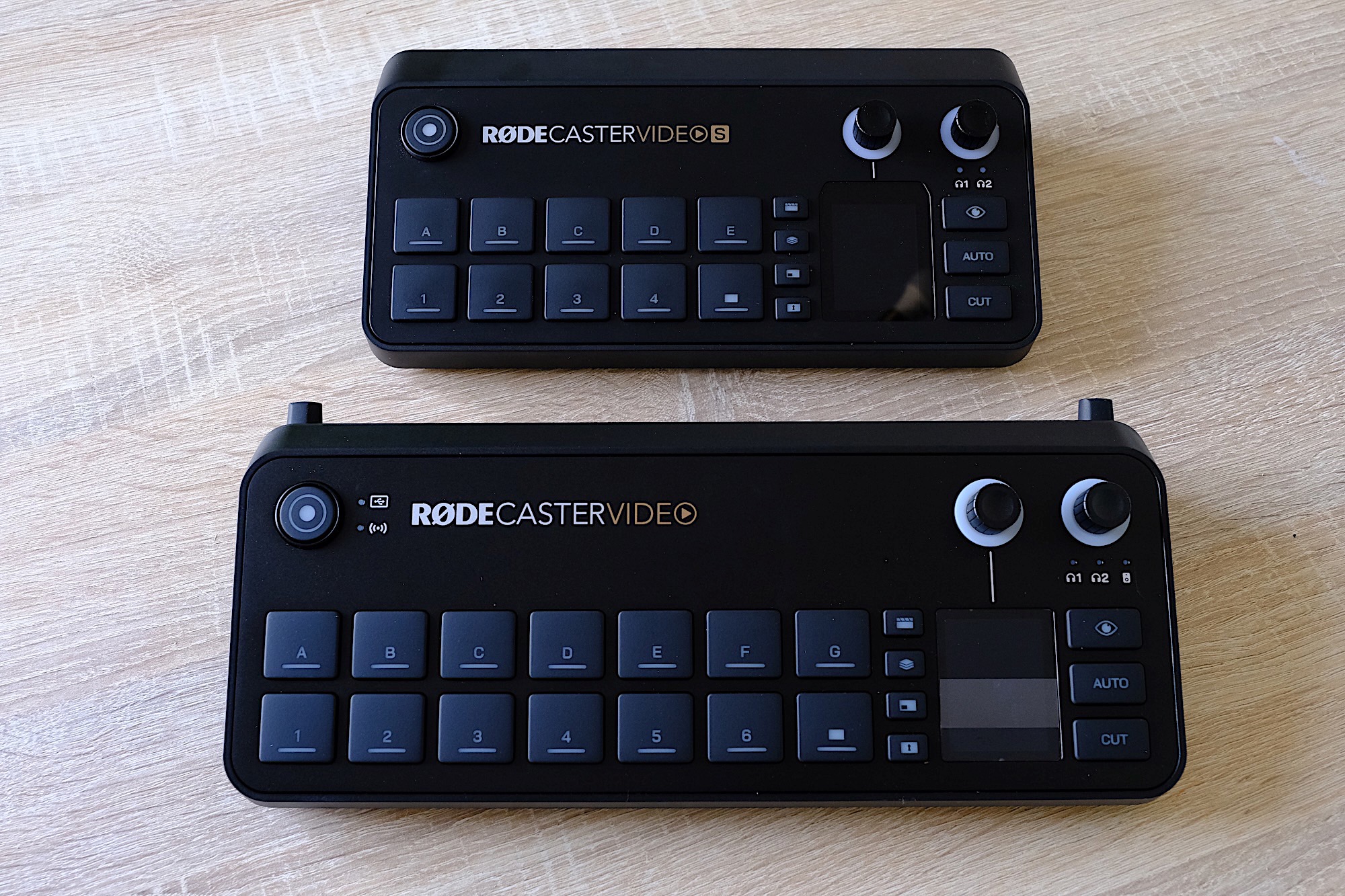
The Rodecaster Video S (top) vs. The Rodecaster Video (bottom)
James Trew for Engadget

It’s clear that the RCV-S, despite having fewer inputs than the original Rodecaster Video, is still quite a complex, open-ended tool. If you already have a streaming setup you like and the software and interfaces you need, then the appeal of the RCV-S will be down to whether it can do what you need more efficiently. For live video production, it’s an easier sell, as there aren’t many all-in-one devices to compete with it that can be used standalone. 

For example, Blackmagic’s Atem series is incredibly popular, and until now, had the advantage on price with the Mini Pro costing just $330. Even the Mini Pro ISO ($550) that exports multi-track video was half the price of the original Rodecaster Video. The RCV-S now offers comparable connectivity, onboard recording, more expansive audio features and multi-track export for $50 less. 

For general content creators it’s a little trickier. As someone that makes YouTube videos, the appeal to me is the chance to consolidate a few devices into one and remove some friction in my recordings. Right now, I have a Rodecaster Duo handling my audio, a capture card for my main camera and I swap out that camera for a smaller one if I am shooting top-down footage or need a second angle. That means I have several different devices on my desk, and I’m constantly doing a dance of unplugging things and juggling media or different recordings before I get everything ready to edit.
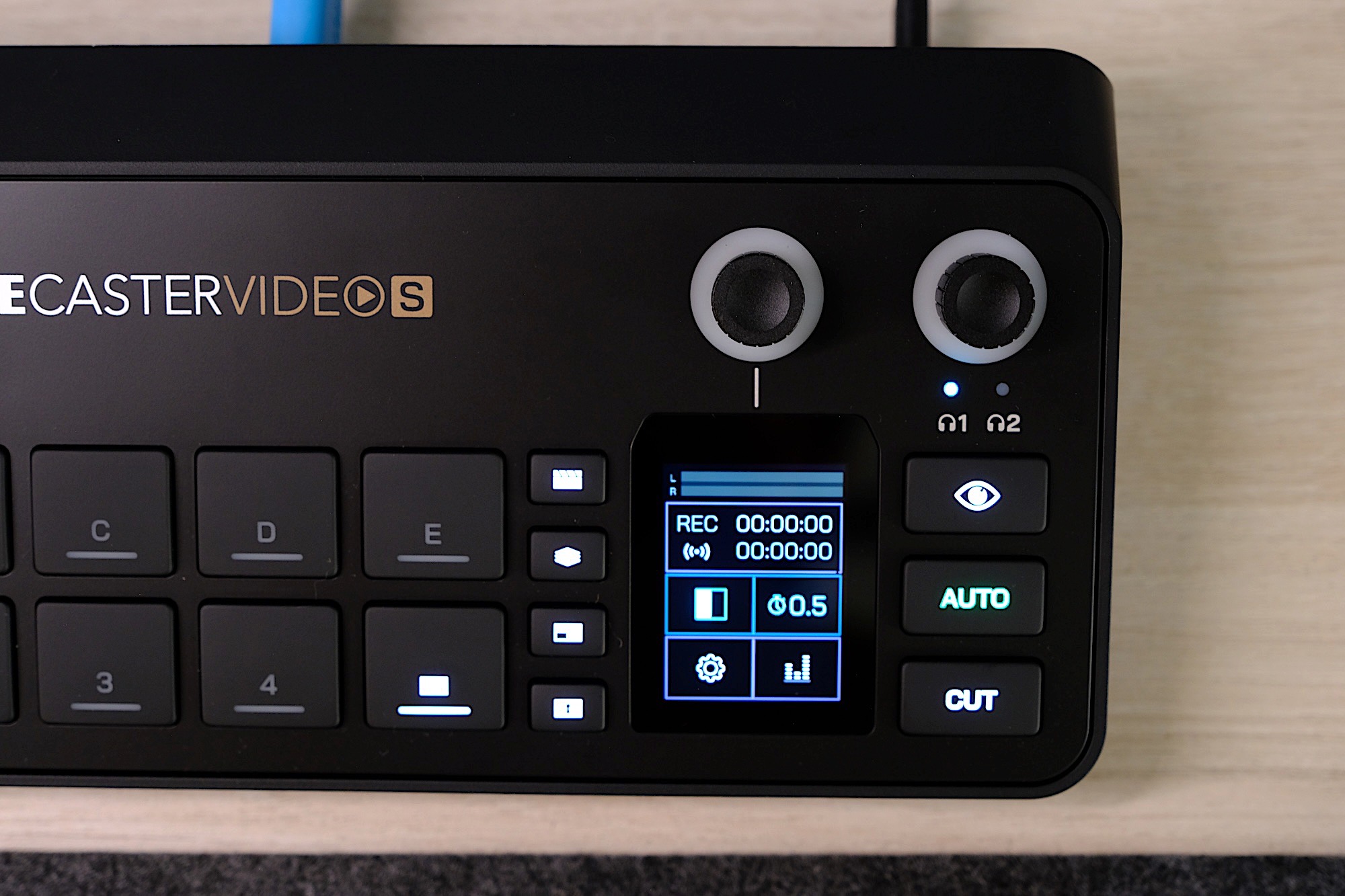
The Rodecaster Video S has a tiny display for menus and settings.
James Trew for Engadget

With the RCV-S I can ditch my standalone capture card and permanently leave multiple cameras connected to the Rodecaster so that they are ready to go at any time. I can even remove the Rodecaster Duo and bring it back out again on the occasions I need more immediate control over multiple sources of audio (which is sometimes, but not often). The appeal in my case is fewer devices on my desk, and the ability to record multi-camera video without having to set up every shot, every single time, which saves significant time that I can then use to actually get more work done.

There are, of course, some limitations. Not least of all is the lack of 4K. I’m still inclined to record on camera for my primary shot to ensure I still have a 4K copy for YouTube and then use the Rodecaster Video S for everything else, but as a small creator, convenience and flexibility is very appealing. For streamers and live video production, the Rodecaster Video S is a very capable tool that offers a wide range of functionality for an accessible price that will no doubt become the central hub for many creators. 

The real kicker here is the price. Let’s be clear, $500 is still significant money. But at less than half the price of the original Rodecaster with decent connectivity and basically the same functionality, it’s an easy recommendation to those who were holding off based on price alone. Likewise, if you’re just starting out with content creation and need something with solid video credentials and audio chops, Rode makes a good case for itself with the Rodecaster Video S.

This article originally appeared on Engadget at https://www.engadget.com/general/rodecaster-video-s-review-compact-and-comprehensive-video-production-230000221.html?src=rss

Canada fought measles and measles won; virus now endemic after 1998 elimination

Canada has lost its measles elimination status, meaning the highly infectious virus is considered endemic once again in the country, The Pan American Health Organization (PAHO) announced Monday.

The determination was made by a committee of PAHO experts, who spent last week poring over disease data to assess the measles status of countries across the entire region. The fact that Canada has lost its elimination status means that the region of the Americas overall has also lost the status, which it achieved in 2016. Of the 35 countries and territories in the region—a health region designated by the World Health Organization—Canada is currently the only country where measles is considered to be spreading endemically, though other countries, namely the US and Mexico, are headed in the same direction.

Measles is considered eliminated when a country can go 12 months without continuous local spread. Sporadic cases brought in from international travel can continue to occur, potentially causing limited outbreaks. But elimination is lost and endemicity is declared only when transmission is sustained over the course of a year.

Read full article

Comments

Apple Has Three New AI Features in the Works, Starting With an AI Siri

When you think about the tech companies leading the AI race, Apple is pretty much at the bottom of the list. That’s not necessarily a bad thing, as far as I’m concerned. From where I’m sitting, many of us couldn’t care less about the latest AI features companies are shoving into their products—we just want the products we actually use to work, and work well.

But strictly focusing on AI progress, Apple is far behind rivals like Google and Microsoft. While Android and Windows are full of AI features, either through Google’s Gemini or OpenAI’s GPT models, Apple’s first-party AI advances are much more limited. Both Google and Microsoft promote their AI assistants as a cornerstone of their marketing strategies; meanwhile, Apple pulled it AI Siri commercial, as its promised upgrades kept getting delayed.

That’s not to say there aren’t any AI features here—far from it. Since iOS 18, Apple has rolled out AI features under the Apple Intelligence umbrella, including things like Image Playground, AI image editing, and Writing Tools. But, again, these features are not selling iPhones, and it seems like Apple knows it. The company appears to be doing more AI work behind the scenes than in front of it these days.

Despite all this, the company is still making serious in-roads with AI. In fact, the company is planning three key new AI features, at least according to Bloomberg’s Mark Gurman.

AI Siri

Remember how I said Apple’s AI Siri upgrade keeps getting delayed? Well, as it happens, AI Siri might be here sooner than later—at least, in part. According to Gurman, Apple plans to roll out “a new Siri” with iOS 26.4, while the assistant will get a “redesign” with next year’s iOS 27.

If you recall, Apple promised an AI-powered Siri with iOS 18 that was smarter than any iteration of Siri that had come before. This AI Siri was highly contextual, understanding what you meant in your requests without you needing to be hyper-specific. In addition, the assistant could pull information from a variety of sources, such as messages or emails, to fulfill requests, and even had an agent mode to take actions on your behalf. This is similar to how AI browsers let you ask the assistant to do things on the web for you. It’s objectively futuristic, to be sure, but not necessarily useful—nor is it secure.

As it happens, Apple had a lot of trouble actually getting those features to work. The company’s new Siri is an extreme engineering puzzle that wasn’t solved by iOS 18’s release, and was delayed through iOS 26.0. If the schedule holds, those changes should be coming to 26.4, and may even be powered in part by Google’s Gemini model. That said, iOS 26.4 is likely four months away: Apple just released iOS 26.1 and is beta testing iOS 26.2, and neither update comes with any Siri upgrades. Since the company released iOS 18.4 in March of this year, chances are we’ll see 26.4 in March 2026. If so, we might only be a quarter year away from a new Siri experience.

Next year, according to Gurman, Siri will get a total makeover. The assistant will be more conversational, and will power Apple’s upcoming smart home device strategy. But that’s a ways away yet.

AI health agent

Gurman says Apple is also working on an AI agent that can coach users on health-related issues. Codenamed “Project Mulberry,” the service combines a new Health app, subscription (Health+), and AI health assistant. This assistant can pull data from the Health app to inform its advice, and is being trained using real doctors across medical professions. According to Gurman, “if the Health app receives data about poor heart-rate trends, a video explaining the risks of heart disease could appear.”

The company is actually opening studio space to record videos for this service, and may feature a “major doctor personality” to “host” this Health+ service. (My money’s on Doctor Mike, but maybe that’s the only major doctor personality I know.)

Gurman says this AI health agent could arrive as soon as iOS 26.4, alongside the new AI Siri. It will be interesting to see how Apple squares two key problems with this feature: AI sometimes makes mistakes (and sometimes just makes things up), so trusting it to offer health advice raises some red flags. Add in the fact that Apple will be using user data to inform the AI on how to handle health advice, and user privacy questions pop up. The company prides itself on privacy, so I imagine it will have a clear plan here, but if this AI health agent really launches, these points will need to be addressed.

Web search tool

Finally, Gurman says that Apple has “plans for an AI-powered web search tool.” This tool is called “World Knowledge Answers” within the company, and is intended to compete against similar search tools from companies like OpenAI and Perplexity.

World Knowledge Answers will integrate directly within Siri, and may come to Safari and Spotlight too. It may include text, images, videos, and “local points of interest,” as well as AI summaries. The idea is to keep users asking questions within Apple’s own suite of products, rather than see them use other AI search tools. It’s likely it’ll arrive alongside these other two features with iOS 26.4.

Will these AI features be enough to catch Apple up to the rest of the AI players? I’m not sure. But I’m not sure the company needs to catch up. As much as Microsoft has made AI a cornerstone of its new Windows experiences, it’s not the reason people are buying PCs. Similarly, few users are choosing their smartphones, tablets, and computers based on whether Apple, Google, or Microsoft has the best AI assistant, or the best array of AI features. AI might be big money right now, but not in a way where Apple needs to be on top to remain one of the biggest companies in the world.

Everything You Need to Know About Amazon’s Black Friday and Cyber Monday Sale

We may earn a commission from links on this page. Deal pricing and availability subject to change after time of publication.

Amazon has finally revealed its Black Friday plans in a press release, much later than the competition, which is unusual for the biggest retailer. Here is everything you need to know about Amazon’s Black Friday and Cyber Monday sale.

What is Amazon doing for Black Friday and Cyber Monday?

Amazon will have an early Black Friday sale that will lead up to Black Friday and then a Cyber Monday sale that will last a few days. They will also have new flash daily deals throughout the events with Today’s Big Deals.

When is Amazon’s Black Friday Week and Cyber Monday in 2025?

Amazon’s Black Friday Week and Cyber Monday deal event will kick off on Nov. 20 at 12:01 a.m. PST, and run through Dec. 1.

What deals can I expect during Amazon’s Black Friday Week and Cyber Monday?

Amazon says it will have deals on categories like home, electronics, beauty, apparel, and more where people can shop deals of up to 50% on artificial Christmas trees, seasonal decor, Amazon devices, and select electronics. Here are some deals Amazon has already said people will be able to take advantage of starting Nov. 20:

Amazon Devices: Save up to 50% on select Amazon devices, including new releases like Echo Dot Max, Fire TV Stick 4K Select, Fire TV 50″ 4-Series, Blink Mini 2K+, and Blink Outdoor 2K+. Customers can also save on favorites such as Echo Show 11, Fire HD 8 and Fire HD 10 tablets, Kindle Paperwhite, Kindle Scribe Essentials Bundle, and Ring Indoor Cam.

Seasonal: Save up to 50% on artificial Christmas Trees from National Tree Company and Fraser Hill Farm. Customers can also find up to 40% on ornaments from Lenox, and up to 20% on holiday gift wrap, bags, and bows from Hallmark.

Grocery: Save on complete holiday meals including Butterball turkeys at $0.69 per pound, pre-made sides like homestyle stuffing, mashed potatoes, and traditional fixings from select brands—all online for same-day delivery where available and at Amazon Fresh stores. Customers can also enjoy great prices on a wide selection of fresh grocery ingredients like carrots, green beans, and gold potatoes, plus wine enthusiasts can save 20% when purchasing six or more bottles through Amazon Fresh (valid through 11/30). Visit amazon.com/grocery for the full selection of grocery items available in your area.

Electronics: Save up to 50% on select electronics from JBL and Canon, and up to 45% on select Bose audio and PC hardware from ACER and ASUS. Customers can also get up to 40% on select home entertainment from LG, TCL, and Hisense, and up to 35% on select Samsung and Google products.

Home: Save up to 55% on select home products from Shark and up to 40% on select floorcare from BISSELL and iRobot. Customers can also find up to 35% on select floorcare from Dyson and select furniture from Signature Design by Ashley, and up to 25% on select luggage from Away and select fitness equipment from NordicTrack.

Kitchen: Save up to 50% on select kitchen appliances from Ninja and up to 40% on select kitchen essentials from Bentgo, Vitamix, Staub, and Nespresso, including deals on Nespresso Original Line Capsules. Customers can also enjoy up to 35% on select espresso and coffee machines from Keurig and De’Longhi, and up to 25% on premium kitchen brands like Breville and Our Place.

Beauty: Save up to 50% on select premium beauty products from Lancôme and luxury fragrances from Armani Beauty and Maison Margiela. Customers can also get up to 30% on skincare and bodycare essentials from Kiehl’s, ELEMIS, Sol de Janeiro, and medicube, makeup from NYX PROFESSIONAL MAKEUP, Milk Makeup, and Tarte; plus select beauty tools from Drybar and Shark.

Fashion: Save up to 50% on select fashion from NAADAM, GAP, Levi’s, Cinq A Sept, and Derek Lam 10 Crosby. Customers can also get up to 40% on apparel from Theory, AllSaints, New Balance, Carhartt, and ASTR the Label, plus up to 25% on select styles from Shopbop featuring brands like LE BOP, PAIGE, and FRAME.

Toys: Save up to 40% on select toys from MAGNA-TILES, Melissa & Doug, Little Tykes, Play-Doh, and NERF. Customers can also get up to 30% off select classic toys from Hasbro Gaming, Fisher-Price, and American Girl, plus character favorites featuring Disney, WICKED, Barbie, Star Wars, Marvel, and Harry Potter.

Books: Save up to 80% on Kindle books and up to 65% on print books, including Editor favorites from Amazon’s Best Books of the Year lists of the past 25 years, including A Little Life by Hanya Yanagihara, The Silent Patient by Alex Michaelides, and The Devil in the White City by Erik Larson. Customers can also get three months of Kindle Unlimited for just $0.99, unlocking millions of titles across every genre. Terms and conditions apply. See here for details.

Do you need to be a Prime Member to shop during the Black Friday and Cyber Monday sales?

Yes, you will need to be a Prime Member to shop the exclusive sales during Black Friday and Cyber Monday. Prime membership starts at $14.99 per month. While only you can decide if buying a yearly Prime membership is worth it for you, remember you can always sign up and then cancel your Prime membership once the sale is over: Amazon offers a free 30-day trial, so you can shop during both events (and even get some early Black Friday deals) before canceling without being charged. Here’s how to sign up for a Prime account and all of the benefits that come with it.

What other retailers are doing Black Friday sales?

The other major retailers doing sales are Best Buy, Target, and Walmart. Right now, Best Buy is the one having the biggest early Black Friday sale, with new deals every Friday. Target has some week-long deals and a Deal of the Day. For Walmart, you’ll have to wait until Nov. 14.

Some tips for a successful Black Friday with Amazon

If this will be your first Black Friday shopping at Amazon, there are some basic things you need to know about Amazon sales:

But if you only take one bit of advice for shopping on Amazon, let it be this one: Don’t buy anything you weren’t going to buy anyway. A good way to make sure you do this is by making a list of the products you do want, and only having eyes for those.


Our Best Editor-Vetted Early Black Friday Deals Right Now


Amazon Fire TV Stick 4K Plus


—
$24.99

(List Price $49.99)


Amazon Fire HD 10 (2023)


—
$69.99

(List Price $139.99)


Sony WH-1000XM5


—
$328.00

(List Price $399.99)


Fitbit Versa 4 Fitness Smartwatch (Black)


—
$119.95

(List Price $199.95)

Deals are selected by our commerce team

Wikipedia Urges AI Companies To Use Its Paid API, and Stop Scraping

Wikipedia on Monday laid out a simple plan to ensure its website continues to be supported in the AI era, despite its declining traffic. From a report: In a blog post, the Wikimedia Foundation, the organization that runs the popular online encyclopedia, called on AI developers to use its content “responsibly” by ensuring its contributions are properly attributed and that content is accessed through its paid product, the Wikimedia Enterprise platform.

The opt-in, paid product allows companies to use Wikipedia’s content at scale without “severely taxing Wikipedia’s servers,” the Wikimedia Foundation blog post explains. In addition, the product’s paid nature allows AI companies to support the organization’s nonprofit mission. While the post doesn’t go so far as to threaten penalties or any sort of legal action for use of its material through scraping, Wikipedia recently noted that AI bots had been scraping its website while trying to appear human.


Read more of this story at Slashdot.

Meta is killing off the external Facebook Like button

Next year will see the end arrive for two of Facebook’s external social plugins. The platform’s Like button and Share button for third-party websites will be discontinued on February 10, 2026. The blog post from Meta explains that site admins shouldn’t have to take any additional steps as a result of the change, although they can choose to remove the plugins before the discontinue date. Any remaining plugins will “gracefully degrade,” which sounds much more dramatic than what will actually happen, which is that they’ll render as a 0x0 invisible element. 

Ending support for these features marks the end of an era for Meta and Facebook. External Like and Share buttons were introduced in 2013. The tools were promoted as ways for sites to generate more traffic through the social network, which was a major way that people shared and saw articles at that time. The company’s official line is that the plugins “reflect an earlier era of web development, and their usage has naturally declined as the digital landscape has evolved.” But Facebook also plays a much smaller role in the broader Meta business operation than it once did, and anecdotally, it’s less common to see sites running only integrations with a single social network.

This article originally appeared on Engadget at https://www.engadget.com/meta-is-killing-off-the-external-facebook-like-button-205207354.html?src=rss

The PHP Foundation Is Seeking a New Executive Director

New submitter benramsey writes: The PHP Foundation has launched a search for its next executive director.

The Executive Director serves as the operational leader of the PHP Foundation, defining its strategic vision and translating it into reality while managing day-to-day operations and serving as the primary bridge between the Board, staff, community, and sponsors.

While the programming language PHP is over 30 years old, the PHP Foundation was only created in 2021. The Executive Director will be responsible for maturing the foundation’s internal structure and will play a crucial role in ensuring the foundation can effectively support this vital ecosystem.

Interested parties are encouraged to submit a cover letter describing their interest and relevant experience, resume or CV, and a brief vision statement detailing the applicant’s understanding of the position, key opportunities and challenges they see for the foundation, and their approach to the role.


Read more of this story at Slashdot.

From 1976 To Today, Dhrystone Benchmarks Reveal How Far CPUs Have Come

From 1976 To Today, Dhrystone Benchmarks Reveal How Far CPUs Have Come
Possibly the most absurd truth of modern computing is that, as far as the technology has evolved, we’re fundamentally still doing the exact same thing we were doing decades ago: twiddling bits. The question, of course, has always been how fast we can twiddle those bits, and how many we can do at once. Because it’s still the same work, though,

The Apple Watch Series 10 With Cellular + GPS Is Now $200 Off

We may earn a commission from links on this page. Deal pricing and availability subject to change after time of publication.

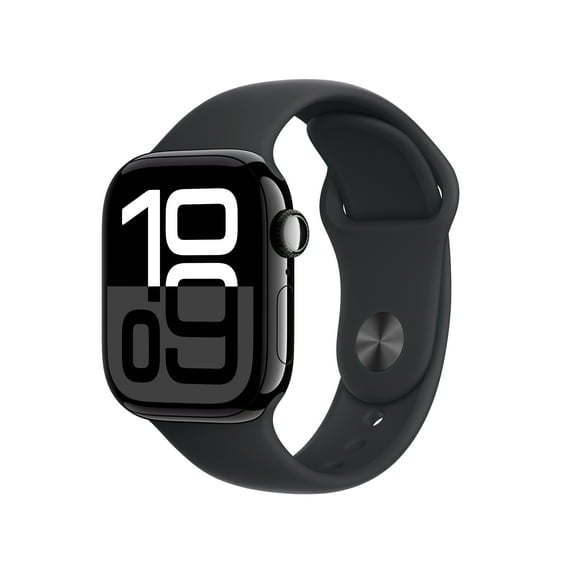
Each year, Apple releases new models of the Apple Watch, but the updates aren’t always that significant—meaning it might make more sense to choose an older one and save on the purchase price. That’s certainly a good option right now, because you can get last year’s Apple Watch Series 10 with GPS + Cellular for $299, $200 off the original price, at Walmart (in four colors!).

The Series 10 has a larger AMOLED display (30% larger, to be precise) and a thinner case than its predecessor, the Series 9. It also features a more powerful chip, improving performance and helping future-proof the device. According to this PCMag review, where it landed an Editors’ Choice Award, its standout features include the Depth app, which measures underwater depth (it’s waterproof up to 50 meters), and a water-temperature sensor, making it great for swimmers and divers. Along with other key health and sleep stats from the Series 9, it also monitors breathing disturbances for people with sleep apnea.

According to PCMag, it exceeds the official battery life estimate of 18 hours and can last more than 36 hours in real-world tests with heavy use, which is close to the battery life on the 11. It’s also fast-charging, reaching around 80% in just 30 minutes. This model comes with both GPS and Cellular, meaning you don’t need to tether it to your iPhone to take full advantage of its features. Design-wise, it has a minimalist look and a durable aluminum and titanium case. 

If you’re in the iOS ecosystem and seeking a smartwatch that blends style, readability, and an ergonomic case with advanced health and fitness stats and monitoring, the Apple Watch Series 10 with GPS + Cellular is a feature-packed steal at $299.

Our Best Editor-Vetted Tech Deals Right Now


Amazon Fire TV Stick 4K Plus


—
$24.99

(List Price $49.99)


Amazon Fire HD 10 (2023)


—
$69.99

(List Price $139.99)


Sony WH-1000XM5


—
$328.00

(List Price $399.99)


Fitbit Versa 4 Fitness Smartwatch (Black)


—
$119.95

(List Price $199.95)

Deals are selected by our commerce team

Snap is bringing back 2D Bitmoji for Snapchat+ subscribers

Snap is offering Snapchat+ subscribers the chance to have 2D Bitmoji avatars once again. In the coming days, they’ll be able to activate a setting called Comic Bitmoji. Snap said this will revive “the charm of classic avatars, while keeping all the benefits of today’s 3D infrastructure.” If you turn on Comic Bitmoji, all Bitmoji avatars that you see in Snapchat will be rendered in 2D. You’ll also be able to send stickers to your friends in that style.

Snap switched from 2D to 3D avatars back in 2023. The company said the move allowed it to offer a larger array of customizations, including more body types, hairstyles and makeup looks.

However, many users yearned for a return to a 2D look. Nearly 100,000 of them signed a Change.org petition demanding the return of 2D Bitmoji, and Snap said it listened. CEO Evan Spiegel signed the petition too.

Snap says Comic Bitmoji effectively applies a filter to the 3D avatars. To make the animations and expressions work properly in the 2D format, the team had to make adjustments to proportions, shading and outlines, according to Fast Company. Snap said that more than 320 million people use Bitmoji every day, so getting the 2D renders right was important.

It’s a little disappointing that Snap is locking the the Comic Bitmoji setting behind a paywall. However, it seems like just the kind of feature that might prompt more users to sign up for a Snapchat+ subscription.

This article originally appeared on Engadget at https://www.engadget.com/apps/snap-is-bringing-back-2d-bitmoji-for-snapchat-subscribers-202257144.html?src=rss

World’s First Green Fuel Levy To Add Almost $32 To Air Fares

Air passengers departing Singapore will pay a green fuel levy of as much as S$41.60 ($31.95) from next year as the city-state locks in a key step in its effort to cut the aviation industry’s emissions. From a report: Travelers flying in economy and premium economy, as well as those on short-haul routes, will be charged far less. Those customers will pay an additional S$1 for trips to Southeast Asia, and S$10.40 for flights to the Americas, the Civil Aviation Authority of Singapore said Monday. Business and first class travelers will pay four times more, it said. […] The funds collected from passengers will go to the centralized purchase of sustainable aviation fuel — typically made from waste oils or agricultural feedstock — as Singapore looks to achieve a SAF adoption rate of 3% to 5% by 2030.


Read more of this story at Slashdot.

That Lost iPhone Alert Is a Phishing Scam

If your iPhone has been lost or stolen, you’d probably be relieved to get it back, even if it is has been weeks or months since you’ve replaced your device. Having your old phone in hand may provide some peace of mind that your data is secure, and if nothing else, you can sell or trade it in or repurpose it for another use.

Unfortunately, you’re pretty unlikely to see your missing iPhone again, but bad actors are hoping you hold out enough hope to fall for a phishing scam promising that your device has been found.

How the lost iPhone scam works

According to a warning from the Swiss National Cyber Security Center, some iPhone owners whose devices were lost or stolen are receiving SMS or iMessage notifications—purportedly from Apple—claiming that their phones have been located. The text messages include specific and accurate details about the missing iPhones, including the model, color, and storage capacity, and direct recipients to click a link to view the device’s location. The message is signed by the “FindMy Support Team.”

Of course, like all phishing schemes, the link is fake. It directs you to a spoofed Apple Find My page with an Apple ID sign-in designed to steal your credentials, which scammers can use to take over your account.

The goal of this scam is to disable Apple’s built-in security feature tying your iPhone to your Apple ID, which prevents malicious actors from erasing and reselling the device. How scammers manage to find your phone number to text you is unclear, though in some cases they may get it from the lock screen message you can enable when you switch your device to Lost Mode. This may be a good reason to put alternative contact information, such as a dedicated email address, in your custom message.

Avoid falling for lost the iPhone scam

If you do receive a message with a link to locate your lost iPhone, ignore it. Apple does not contact users via text or email with updates about found devices. (Of course, if you’ve enabled Lost Mode and someone reaches out claiming they have your device, proceed with caution.) Never click on links in unsolicited communication, as these are common vectors for phishing.

Of course, you should mark your device as lost in Find My to suspend alerts and notifications that appear on your lock screen as well as payment card access. You should also consider preemptively enabling Apple’s Stolen Device Protection, an anti-theft feature that helps prevent thieves from breaking into your iPhone. If your device does go missing, don’t remove it from your Apple account, as doing so disables some security protections.

Alarming runC Flaws Enable Hackers To Exploit Docker Containers For Root Access

Alarming runC Flaws Enable Hackers To Exploit Docker Containers For Root Access
Security researchers have found several alarming security flaws in tooling used by containerization tool Docker that allows attackers to attack the host machine. The flaws specifically relate to runC, which Docker describes as the “infrastructure plumbing” that makes it such a useful tool for developers.

RunC is a universal container runtime

Renders show off Samsung’s upcoming Galaxy S26+

It looks like Samsung is sticking with its Plus line of Galaxy phones, according to a report by Android Headlines. This comes after rumors swirled that the company would be dropping the Plus line in favor of the slim Edge handset. This report indicates that not only is Samsung keeping the Plus, but it’s ditching the well-reviewed Edge entirely.

A leaker has given us a peek at the forthcoming S26+ and it looks similar to the company’s other modern smartphones. The camera island has been tweaked a bit. The leak shows a small, raised camera island, which is different from the design of the S25+.

Exclusive: Samsung Galaxy S26 Plus Official CAD Renders & Rumorshttps://t.co/gkh378hnYW #GalaxyS26Plus #Samsung #Android

— Androidheadline (@Androidheadline) November 10, 2025

Also, the leaked images seem to suggest that the S26+ won’t have the full-width camera that was rumored to be coming with the S26 Edge. That phone is now reportedly cancelled, so we don’t know when we’ll get that camera.

The publication suggests that the S26+ will be 7.35mm thick, which is in line with the S25+. It also seems to be decidedly chunkier than the S25 Edge, so this is likely not a covert rebrand. The Verge has suggested that the company is also ditching the long-rumored S26 Pro. In other words, we’ll likely be getting a standard S26, the S26+ and the S26 Ultra next year. That’s the same naming convention as this year.

We won’t have too long to wait for actual details from Samsung. The company typically reveals new Galaxy phones sometime in January. It’s been reported that Samsung is dropping the Edge due to poor sales. However, Dutch fansite Galaxy Club has reported that the company is still developing a slim handset for release sometime in the coming years.

This article originally appeared on Engadget at https://www.engadget.com/mobile/smartphones/renders-show-off-samsungs-upcoming-galaxy-s26-194014359.html?src=rss

Apple Delays Release of Next iPhone Air Amid Weak Sales

An anonymous reader shares a report: Apple is delaying the release of next year’s version of the iPhone Air, its thinnest smartphone, after the first model sold below expectations, according to three people involved in the project.

Although the length of the delay remains uncertain, the product won’t be released in fall 2026 as previously planned, they said. Apple has already sharply scaled back production of the first version, according to multiple people with direct knowledge of the matter.


Read more of this story at Slashdot.

Use this hack to get one year of Peacock for $49 before Black Friday

Walmart is offering its Walmart+ subscription at half off for new sign-ups, and it includes a choice of either Peacock Premium or Paramount+ Essential. The deal for new subscribers is just $49 for the first year, marked down from $98.

The real value is in selecting Peacock Premium, which would normally run you $110 per year on its own. With the current discount on a Walmart+ subscription you are essentially getting half off on your streaming subscription for that year.

Just about every major streaming service has raised its prices in the last year, including HBO Max, Disney+, Netflix, Apple TV and YouTube TV, so saving some money on one of them just might be worth the effort. Cord cutting is not nearly as affordable as it used to be, so finding a deal like this is pretty helpful.

Walmart+ itself offers myriad additional benefits like early access to Black Friday deals, free shipping on orders over $35, discounts on gas, free online veterinary care and more. Earlier this year, Walmart+ subscribers got first dibs on the Nintendo Switch 2 at the retailer. You can also use that free shipping to take advantage of Walmart’s drone delivery program in a handful of select cities.

This article originally appeared on Engadget at https://www.engadget.com/deals/use-this-hack-to-get-one-year-of-peacock-for-49-before-black-friday-192739041.html?src=rss

The Best Ways to ‘Track’ Your Runs Without a Fitness Watch or App

We may earn a commission from links on this page.

When you’re new or returning to running, the last thing you need is one more barrier. Shoes, appropriate clothes, sweat-resistant sunscreen: These things are hard to do without. But those running watches that it seems like everyone else is using? You don’t need one, and certainly not on your first day. You don’t even need to run with your phone. 

It’s off how “fitness” has become almost synonymous with tracking fitness. How many steps are you taking? How many calories are you burning? How many minutes per mile was your pace when you went jogging this morning? What was your heart rate? Each of these numbers can be worth tracking…sometimes, in some contexts. Heart rate training, for example, has its uses.

But you don’t need to know any of this. You can just go for a run, and the results are recorded in the very fibers of your muscles. Your heart and lungs know how hard they worked, and they are in the process of adapting so that they’ll be able to serve you better next time. This process does not require you, at any point, to look at numbers on a screen. So do you need a Garmin, a Fitbit, an Apple Watch, or any of their kin? Absolutely not.

What a running watch provides, and how to do without

I may seem like a hypocrite going for runs with three watches on (look, these reviews and comparisons don’t write themselves), but in the past I’ve gone years at a time without regularly wearing a device. Most of the time, I don’t feel like strength workouts need any kind of wrist-based tracking at all. And there have been times I actually took a watch off to go for a run—see the photo up top where I have a watch-shaped indent on my wrist. Not every workouts needs to be tracked.

When I do a watch-less run, I have a vague idea of time and mileage, but no precise numbers. My brain is empty of thoughts except for “don’t go too fast” and “turn around when I get to the main road.” Now I’ll discuss the data I’m not getting from a running watch when I do that, and how to go without it. 

Distance

The watch tells you: how far you’ve gone. Want to run 3 miles? Turn around when your watch says 1.5. You can also add up your miles at the end of the week. 

How to do without: Measure a route beforehand. This doesn’t need to be precise. You can use Google Maps (right-click and select “measure distance,” or just plan a walking route through the normal interface). For a nicer interface, use an app like Footpath. The free version lets you measure routes but not save them; honestly, creating a route and then taking a screenshot is good enough for our purposes here. If you’re going to pay for an app with route planning, you might as well get Strava—but more on that later.

You can plan the route before you go, and then when you’ve finished the route, you know you’ve done your mileage. It can be handy to have a few routes on hand for common distances you like to run. There’s a 5-mile loop at my local park, for example, and I know exactly where to jog in my neighborhood if I want a 2-miler.

Tracking mileage over the course of the week is even easier. To keep track of distance from day to day, you can keep a note in your phone, or add it to your training journal. Want more analytics without having to download an app? Our resident marathoner Meredith Dietz has a spreadsheet you can download.

Time

The watch tells you: how long you’ve been running. 

How to do without: In the olden days, you’d use a regular (non-smart) watch to track time, or even just look at the clock before you leave home and then again when you come back. Where a watch-user knows that their run was 32 minutes and five seconds, you are free from worrying about such minutia and can be happy to know that you were running for about half an hour.

You can also use a stopwatch on your phone to track the time, if you really want to know. You can also just estimate from your mileage: That three-mile route will take about 30 minutes if you run at a 10:00 pace.

Pace

The watch tells you: how many minutes it’s taken you to run each mile; also, what pace you are going right now. 

How to do without: Go by feel. If you’re a beginner, the exact pace doesn’t matter; do easy runs at a speed that feels easy. Do faster intervals at a pace that feels challenging but doesn’t leave you gassed. The exact numbers aren’t important.

If you’re an experienced runner, use that experience! How do you feel when you’re running 10-minute miles? 8-minute miles? Run at an effort level that feels right for the programmed run, and every now and then you can run a race or time yourself on a track to recalibrate. For track intervals, use that old-fashioned stopwatch I mentioned above. That’s the traditional way, anyhow.

Heart rate

The watch tells you: your current heart rate, and maybe the “zone” you’re in. 

How to do without: Honestly, if you’re a beginner, don’t use heart rate at all. Heart rate can be a useful number once you have a pretty good handle on what your personal heart rate is at different effort levels. But the way most watches and apps calculate heart rate is with an error-prone formula that often sets the zones too high or too low. 

As a beginner, the only thing that really matters is that you do your easy runs at an easy pace, not a gut-busting breakneck speed that ends up being unsustainable. So, go with perceived effort here too. Do you feel like you could keep this up almost forever? Like you could talk on the phone with only a little bit of heavy breathing? That’s the famous “zone 2.”  See, you didn’t need a heart rate monitor after all.

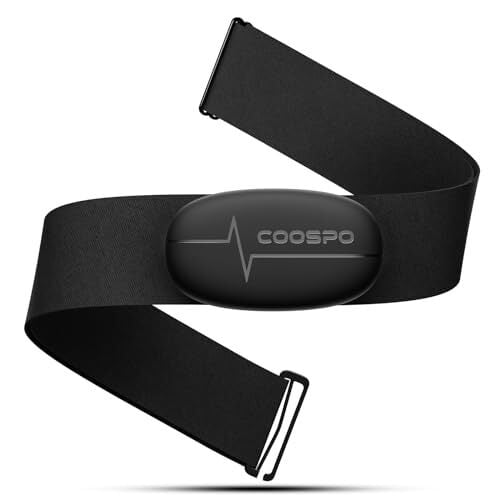
If you’re an experienced runner, you probably get more use out of pace data than heart rate data, anyway—but you can always use a chest strap connected to your phone if you’d like the numbers.

COOSPO Heart Rate Monitor Chest Strap H6M, Bluetooth ANT+ Heart Rate Monitor Chest Sensor with 400H Battery, HRM Works with Strava/Wahoo Fitness/Polar Beat/Peloton/Zwift/DDP Yoga App

COOSPO Heart Rate Monitor Chest Strap H6M, Bluetooth ANT+ Heart Rate Monitor Chest Sensor with 400H Battery, HRM Works with Strava/Wahoo Fitness/Polar Beat/Peloton/Zwift/DDP Yoga App

COOSPO Heart Rate Monitor Chest Strap H6M, Bluetooth ANT+ Heart Rate Monitor Chest Sensor with 400H Battery, HRM Works with Strava/Wahoo Fitness/Polar Beat/Peloton/Zwift/DDP Yoga App

Coaching, sometimes

Not all watches have this feature, and even among people who have running watches, not everyone uses the coaching. But yes, some watches and some apps provide a running plan, telling you how many miles, at what pace, to run each day. They may also give you guided runs, with a coach in your ear telling you when to speed up and slow down. 

Without a watch, you’re on your own for this stuff. But you can also find a plan online that’s not tied to any particular app. Hal Higdon says I’m running 3 miles on Tuesday? Well then, I’ll go out on Tuesday and run (roughly, approximately) 3 miles. 

How I’ve trained without a running watch

Putting all of this together, here’s what it looked like for me last year, a time that was largely watch-free as I returned to running after taking time off. First, I started my running habit by getting consistent with my morning walk (30 minutes, so about 1.5 miles.) Over the course of a week, I started adding some bits of running to my walk, slowing down when I got winded or uncontrollably itchy, and after about two weeks, I was running pretty much the whole 1.5 miles in relative comfort. The following week, I started adding a little mileage—doing 2 miles most morning instead of 1.5.

This worked beautifully as a gentle re-introduction to running, and honestly? I don’t think I would have done it this way if I were wearing a watch. It would have been demoralizing to see that my “running” pace was so much slower than what I was used to seeing when I was in better shape. But once I was in the habit, it was easy to add mileage. 

After that introductory period, I collected a few neighborhood routes into a mental library. I’d put on my sun visor and headphones when I went out with the kids to wait for the bus, and as soon as they left I’d turn and head off on one of my 3-mile (usually) routes. 

I kept track of my mileage in a notebook. Three miles, five times a week, is 15 miles. If I missed a morning or if I wanted to add more time on my feet, I’d add another run in the evening or on a weekend day, usually heading to a nearby park where I knew the mileage of my favorite trails and roads. If I wanted to try a new route, I’d sometimes pick an album that is about as long as I’d like my run to be (many are around 45 minutes, which is perfect) and take note of which song occurs at the halfway point. When I hear that song, I turn around. That’s a 45-minute run in the books—in the ballpark of four miles or so.

Can I use my phone instead of a running watch?

You sure can! If you’re looking at that list above and thinking “aww, I wish I had that data,” wish no more! There are tons of running apps that can track distance, duration, and pace in real time, even speaking up through your headphones to let you know your split times each mile. 

Pros of phone based running apps 

  • No need to buy special equipment like a watch.

  • Numbers are available anytime you want to pull your phone out and look at them.

  • You’re probably bringing your phone anyway to listen to music.

  • You’ll get a map of your run after the fact (thanks to your phone’s GPS).

  • The app will keep track of your mileage over time.

Cons of phone based running apps

  • You may not want to see all those numbers, especially if the thought of logging a “bad” average pace makes you rush warmups or skip walking breaks.

  • GPS tracking on phones is not always as accurate as the tracking on watches (but this depends on your phone).

  • GPS tracking tends to run a phone’s battery down faster than if you weren’t using the GPS.

  • No heart-rate tracking, if that’s a thing you want (unless you use a chest strap and pair it to your phone with Bluetooth).

I enjoy the guidance I get from running apps if I’m doing a specific workout—like one I tried recently that involved segments of 0.6, 0.5, and 0.35 miles. No way was I going to track that manually, but the pleasant voice in my ear told me exactly when to start and stop each interval, and cued me to speed up or slow down if I was getting off pace.

If you do decide to get a running watch later on, they’ll have the same features as the phone apps, but with better battery life and an easier way to view the numbers. 

What are the best running apps to use if you don’t have a phone? 

The classic is Strava. In fact, if the community aspect of a running app or watch is what’s most important to you, you’ll definitely want to get on Strava. People who log their runs on a Garmin or another device will often upload to Strava so they can have everything in one place. But you can also “record” a run from the Strava app directly, no extra device needed. Just beware that the social features can end up revealing your location, so dip into the privacy settings to make sure you aren’t sharing more than you intend. 

If you have an iPhone, the best simple running app (thanks to an update earlier this year) is the built-in Fitness app. This used to only manage data from the Apple Watch, but has since turned into a nice standalone fitness app.

Other popular running apps include MapMyRun, Runkeeper, Adidas Running (formerly Runtastic), and Nike Run Club. There are also some general fitness apps that can track running data, like Polar Beat and Intervals Pro.

How do you track mileage when running without a watch? 

Measure or estimate the length of each run, ideally by measuring on a tool like Google Maps or Footpath. (In the olden days, we would sometimes drive a route and use the odometer.) 

Add up your mileage over time by keeping notes on a calendar (paper or digital), a notebook (paper or digital), or any other way you’d keep track of a running tally. 

How do you pace yourself when running without a watch? 

By paying attention to your body. For an easy or “zone 2” pace, you’ll want to feel like you’re breathing easy and like you can keep going forever. Faster paces might feel harder, but they’ll still be sustainable enough that you can make it the entire distance you intend, without collapsing into a heap by the end. You’ll learn over time what each appropriate pace feels like. 

On guided runs, offered by many running apps, the coach or narrator will help you figure out the right effort level. They might ask you to aim for a 5 on a scale of 1 to 10, or they might describe in words how your body should feel when you’re at a given pace.

Do I need a watch to run a marathon? 

You don’t make it to the start line of a marathon without having a decent amount of running experience under your belt. And these days, when you’ve been running regularly for the amount of time it takes to build a base and then train for a marathon…you’ll probably have already given in to the temptation to buy a running watch. 

But it’s not necessary in any way. You can do your training by mapping out routes ahead of time, gauging your pace based on how you feel, and writing down your weekly mileage in a notebook. This is how almost everybody trained until running watches became more accessible about 10 or 15 years ago. The race organizers are keeping track of your time (there’s a chip in your bib, usually), and they’ll post mile markers along the course so you know where you are. 

On race day, you probably won’t want to use your running app; it drains battery, and you’ll be out there a long time. Instead, you can pace yourself by wearing a basic stopwatch and comparing your time at each mile marker with pre-calculated split times. Sound complicated? It’s not—just grab one of these temporary tattoos that has them all calculated for you. 

What is the best running watch for beginners?

Once you’ve gotten the hang of running, you may eventually decide it’s time to shop for a watch. Fortunately, we have a guide to the best watches for runners here, and I even have a shortlist of the best running watches under $250. Currently the Coros Pace 4 looks like the best of the bunch to me, while my colleague Meredith enjoys her Garmin Forerunner 165.

How HR Took Over the World

Human-resources departments in American companies employed 1.3 million professionals in 2024, a 64% increase over ten years. Overall employment grew 14% in the same period. Professional-services and technology firms saw the number of HR workers double since 2014. Similar patterns have emerged in Australia, Britain and Germany.

Chief human-resources officers also gained ground financially. Their total compensation, which stood at 40% of the average director’s salary in 1992, reached 70% by 2022, according to a Stanford University study. Mary Barra, who runs General Motors, previously held the carmaker’s top HR position.

The expansion has followed several workplace disruptions, including the Me Too movement, the pandemic’s shift to remote work, and the rise of diversity initiatives, Economist reports. Companies also faced more state regulations on employee relations and a jump in workplace complaints. The average number of discrimination or harassment allegations rose from six per 1000 employees in 2021 to 15 last year.


Read more of this story at Slashdot.

Apple TV execs dismiss introducing an ad tier, buying Warner Bros. Discovery

The heads of Apple TV have “no plans” to bring ads to the streaming service, balking, at least for now, at a strategy that has driven success for Apple’s streaming rivals.

In its November 2025 issue, British movie magazine Screen International asked Eddy Cue, SVP of Apple Services, if there are plans to launch an ad-based subscription tier for Apple TV. Cue responded:

Nothing at this time. … I don’t want to say no forever, but there are no plans. If we can stay aggressive with our pricing, it’s better for consumers not to get interrupted with ads.

The comments follow reports over the years suggesting that Apple has been seeking knowledge on how to build a streaming ads business. Most recently, The Telegraph reported that Apple TV executives met with the United Kingdom’s ratings body, Barb, to discuss what tracking ads on Apple TV would look like. In 2023, Apple hired advertising exec Lauren Fry as head of video and Apple News ad sales.

Read full article

Comments

Why I Use ‘Albums’ Instead of the Official Apple Music Mac App

Apple Music’s selection is exceptional, but I’ve never enjoyed using its Mac app much. It’s slow, buggy, and lacks the razor sharp focus on albums that I sometimes desire.

On my iPhone, I often turn to the excellent Albums app to scratch that itch, which is why I’m excited to say that the same app has recently arrived on the Mac as well. I’m always looking for excuses to avoid opening the Music app on the Mac, and Albums has arrived at exactly the right time for me to make the switch. While I do enjoy listening to individual songs or playlists, I am going through an albums phase right now. For this, the Albums app is perfect. Its sole focus is on playing whole albums from your Apple Music library, rather than mixing and matching songs for you. It goes without saying that this app requires an active Apple Music subscription, but I far prefer it to the official Music app.

Play whole albums from Apple Music

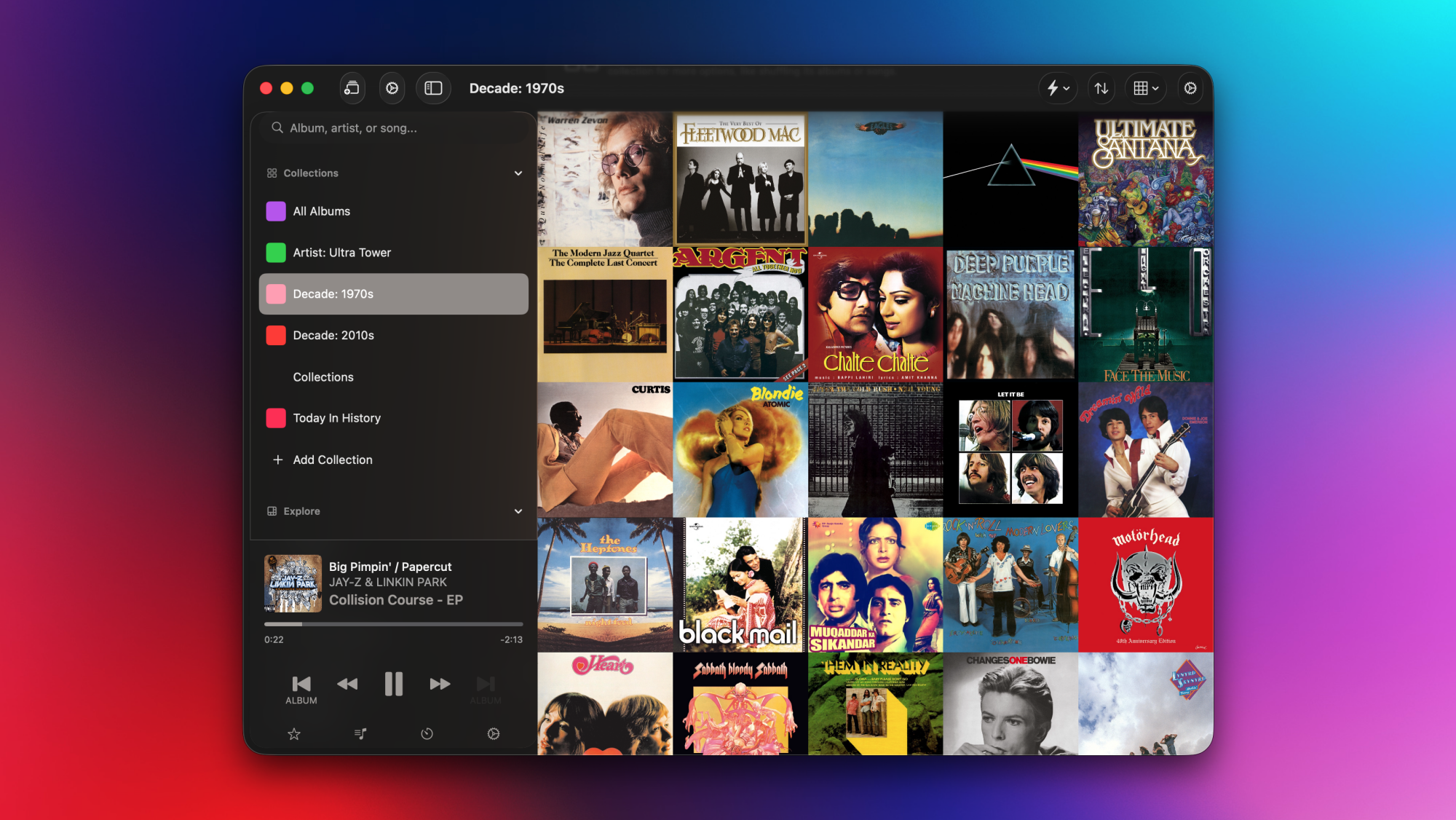
A cover art grid in Albums for Mac.

Credit: Pranay Parab

Albums is available as a free download from the Mac App Store, but it does have a premium tier that unlocks some of its best features. On the free tier, you can search for and listen to albums. When you open the app, it shows a randomized grid containing all the albums in your Apple Music library. You can click any album to start playing it, and you can also queue other albums to play after the current one ends.

Albums Premium is available either as a subscription ($2/month or $19/year) or a one-time purchase ($90). If you join the premium tier, you get access to a whole bunch of power user features, such as listening stats, a release feed that tracks upcoming albums from artists in your library, and an “Insights” section for you to find curated lists of music albums you’ve listened to before. You only need to subscribe or purchase the app on one device to unlock it on your iPhone, iPad, and Mac.

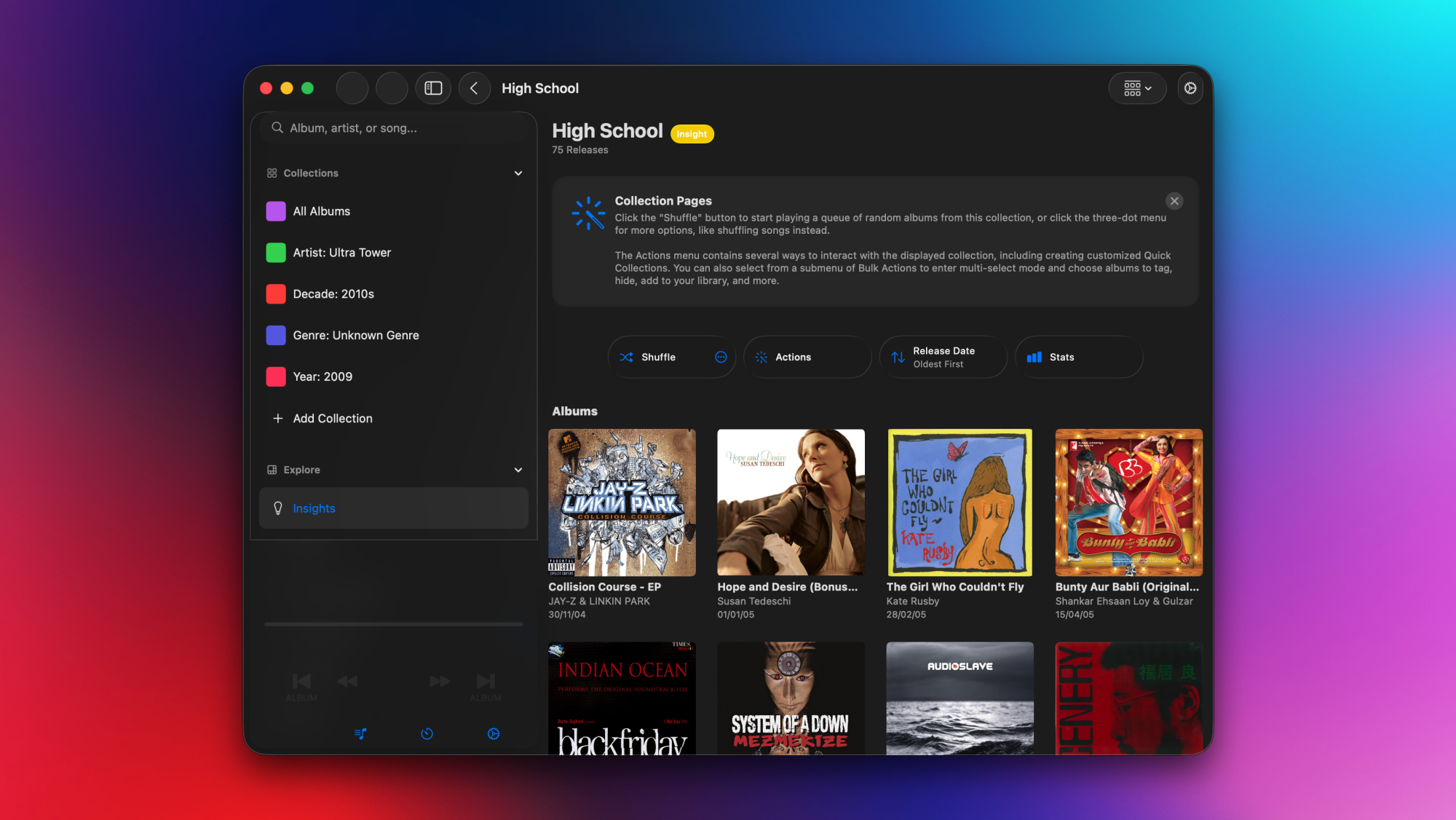
Stats and insights in Albums for Mac

Albums for Mac, with the Insights tab open.

Credit: Pranay Parab

The Albums app’s Insights section is a fascinating way to discover music. It gives you the choice to enter your date of birth and generates a full list of collections based on that. Some examples of these collections include “High School,” “Late Teens/Early 20s,” “My 30s,” and so on. If you open any of these collections, it shows you albums (from your Apple Music library) that were released during that stage of your life, which is a great way to take a walk down memory lane.

Most collections in the Insights section don’t require your personal information, though. Albums will also look at your Apple Music data, and create useful collections such as “Only Listened Once,” “Never Played,” etc. I also like the “Today In History” section here, which highlights albums released on the day you’re listening on, but in previous years. Once you open a collection, you can either choose an album you want to play, or use the shuffle option to automatically queue other albums after the current one finishes playing. This is also a nice way to stick to the app’s core principle of focusing on whole albums, while still including a “shuffle” feature. 

The Albums Premium tier also lets you create custom collections. You can create a collection of albums by a specific artist, music from a particular decade, or even albums of a particular runtime. For instance, if you’re only in the mood for short albums, you can use the app’s collection filters to group all albums under 15 minutes long. This is how I learned that the longest album in my Apple Music library is a 666-minute epic (Beethoven: Piano Sonatas, by Daniel Barenboim). I might actually play that start-to-finish when I start writing an epic fantasy novel.

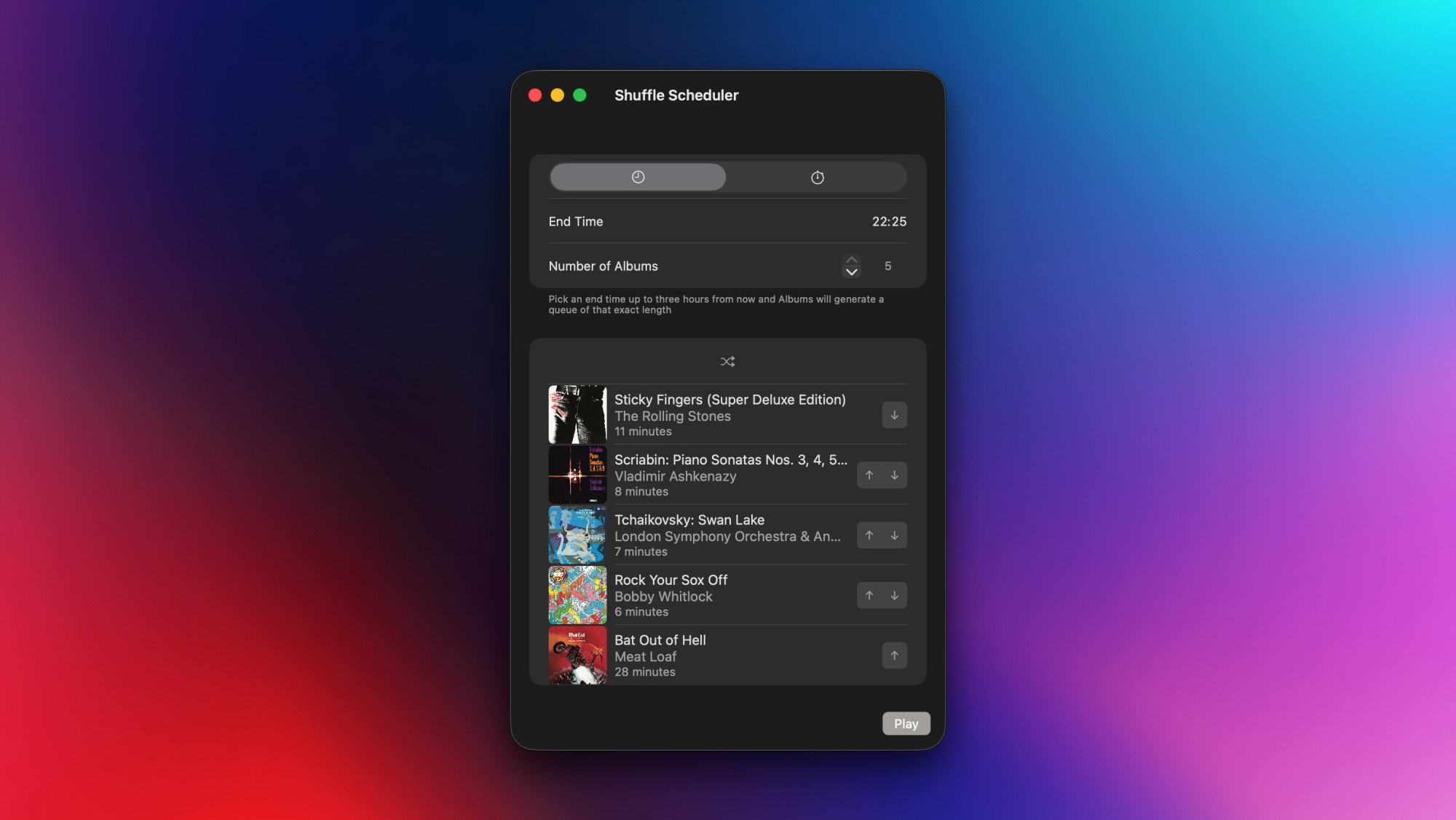
Power user features in Albums

A power user feature (shuffle scheduler) in Albums for Mac.

Credit: Pranay Parab

If you’re looking for different ways to discover and play albums, this app does a great job. It’s also perfect for people who love customizing a UI. You can edit the sidebar to reorder various sections, add collections, or even opt for a minimalist look by picking just one element for each section in the sidebar. Albums also supports bulk actions that let you quickly add notes to a bunch of albums or add a set of albums to a new collection. And there are useful sorting options that let you order albums based on release date, title, time spent listening to them, etc. 

In fact, some of you may complain that Albums has too many customization options, since they can make the UI a bit confusing. For instance, I noticed three different gear icon buttons on the same screen in the app. One of them opens app settings, the second is for collection settings, and the third one is for now playing settings. Power users may enjoy this degree of customizability, but it can also be overwhelming for someone who’s just looking for the right button to change their collection’s sort order. I also spotted a minor UI bug that displays search results on top of sidebar elements, which makes both hard to read.

Still, other than these minor complaints, Albums is a great app that brings some much-needed improvements to Apple Music. It is much faster than Apple Music’s own Mac UI, loads songs flawlessly, and does its one job of curating all your albums very well. On the surface, Albums may look like a one-trick pony, but the moment you start exploring it, you’ll realize that it has a lot of amazing features for you to enjoy.

The developer is clearly is an album enthusiast, and it’s nice to see such care still being put into listening to music in the order the artists intended.