Pixelity will playtest its Evangelion XR game later this month

Neon Genesis Evangelion fans: Here’s a chance to live the series, so to speak. Pixelity, developer of an upcoming XR game trilogy based on the classic anime, will hold on-site focus group tests this month.

The playtests will take place in Japan from December 19 to 21, and in California on December 19. Pixelity says it will use the same number of players at each venue. If you’re near either location, you can apply for access today on Pixelity’s X account.

The XR trilogy, Evangelion: Cross Reflections, was announced earlier this year. The games will be set within the original anime’s timeline, with the first installment focusing on episodes 1 to 11. The first game is scheduled for a 2026 release. We don’t yet know which platforms it will be on, but Meta Quest headsets seem like a safe bet.

This article originally appeared on Engadget at https://www.engadget.com/gaming/pixelity-will-playtest-its-evangelion-xr-game-later-this-month-200000634.html?src=rss

Ireland is investigating TikTok and LinkedIn for possible DSA violations

Ireland’s media regulator, Coimisiún na Meán, has announced investigations into both TikTok and LinkedIn for possible violations of the European Union’s Digital Services Act, Reuters reports. The investigations are focused on both platforms’ illegal content reporting features, which might not meet the requirements of the DSA.

The main issue appears to be how these platforms’ reporting tools are presented and implemented. Regulators found possible “deceptive interface designs” in the content reporting features they examined, which could make them less effective at actually weeding out illegal content. “The reporting mechanisms were liable to confuse or deceive people into believing that they were reporting content as illegal content, as opposed to content in violation of the provider’s Terms and Conditions,” the regulator wrote in a press release announcing its investigation.

“At the core of the DSA is the right of people to report content that they suspect to be illegal, and the requirement on providers to have reporting mechanisms, that are easy to access and user-friendly, to report content considered to be illegal, “ John Evans, Coimisiún na Meán’s DSA Commissioner, said in the press release. “Providers are also obliged to not design, organize or operate their interfaces in a way which could deceive or manipulate people, or which materially distorts or impairs the ability of people to make informed decisions.”

Evans goes on to note that Coimisiún na Meán has already gotten other providers to make “significant changes to their reporting mechanisms for illegal content,” likely due to the threat of financial penalties. Many tech companies have headquarters in Ireland, and if a platform provider is found to violate the DSA, Irish regulators can fine them up to six percent of their revenue in response.

Ireland’s Data Protection Commission is already conducting a separate investigation into the social media platform X for allegedly training its Grok AI assistant on posts from users. Doing so would violate the General Data Protection Regulation or GDPR, and allow Ireland to take a four percent cut of the company’s global revenue.

This article originally appeared on Engadget at https://www.engadget.com/social-media/ireland-is-investigating-tiktok-and-linkedin-for-possible-dsa-violations-194519622.html?src=rss

I’m a Runner, and These Water-Resistant Running Shoes Are a Game Changer

We may earn a commission from links on this page.

If you know a runner, I have the perfect gift recommendation for you. If you are a runner, I know what you should tell your mom you want for Christmas. And even if there isn’t a gifting holiday in your immediate future, you should still know the Good News about water-resistant running shoes. They’re out there, they might be on sale right now, and they will change your life if you run in snowy conditions—or if you would if you had the right shoes.

As a lifelong on-and-off runner, I will say that running in the spring is a lot more fun if you don’t have a long off-season every winter. So rather than from starting from scratch every year, it pays to keep putting in the miles through the cold and the rain and the snow. Maybe you don’t run quite as often, and maybe you spend a little more time on the treadmill, but don’t completely give up.

I’ve written before about what to wear to run in the cold, focusing on things like jackets, gloves, and layering pieces. But I used to always forget about shoes. Whether it’s snowy in your area or just rainy, keeping your feet warm and dry is a game-changer.

Around this time last year, my birthday was coming up and I had no idea what to tell my mom I wanted. (She kept asking.) I was giving the matter some thought while I was jogging at the local track, in a drizzling near-freezing rain, and my toes were going squish with every step. I suddenly remembered that Gore-Tex shoes exist. I had owned a pair years ago and loved them, but never replaced them when they wore out. They felt like too much of a luxury somehow. Most runners get through wet weather in regular shoes and wool socks, so why not make do?

I’ll tell you why not: Wool socks can keep your feet warm, but they don’t keep them dry. If you’ve traveled to a park to get your run in, you’re driving home with soaking wet feet. You’ll come home, wring out your socks, and have to air out your shoes and hope they’re mostly dry by the time you go for your next run. Putting on wet shoes is about as much fun as putting on a wet bathing suit. Returning home from a drizzly run with dry feet is, by contrast, one of this cruel world’s great creature comforts. 

What weather are water-resistant shoes good for?

Water-resistant shoes are great in drizzling rain, or in snowy conditions. In regular shoes, your body heat tends to melt any snow that contacts your shoes, making your feet wet even on a below-freezing day. Water-resistant shoes are great for when it’s snowing, when there’s a small amount of snow on the ground, or when it’s raining. This covers pretty much all of the weather I’m likely to consider running-friendly in a Pennsylvania winter.

What don’t water-resistant shoes do?

Water-resistant is not waterproof, though. In Gore-Tex and similar materials, you cannot step into an ankle-deep puddle and expect to stay dry. A heavy enough downpour will probably eventually work its way through or around the material. 

Note that water-resistant shoe material doesn’t stop snow or rain from getting into the top of the shoe. For trudging through deep snow, you probably want to attach a gaiter (or buy a shoe that comes with built-in gaiters). 

And if you run in a variety of wintry conditions, you may want more traction on the bottom of the shoe as well. You can buy shoes with spikes built in, or add your own.  

What are the best water-resistant running shoes?

I know you’re dying to see mine, so here they are: the Nike InfinityRN Gore-Tex. (Mine are white.) I’ve only put about 200 miles on them since last year, since I wear other shoes in dry weather. That means that they’re still in good condition to last another year.

Based on reviews, forum posts, and other things I’ve heard runners say about their favorite weatherproof shoes, I’ve collected some other excellent models to consider. For each, I’m linking one model, but click around to see its other colors, sizes, and men’s/women’s versions.

Note that Gore-Tex is a name brand of breathable, water-resistant fabric, but other brands exist (for example, Saucony has their own, which they call Runshield). Gore-Tex is often abbreviated “GTX” in shoe model names, so consider looking for that when searching for shoes. And a bonus on many of these shoes is that they include high-traction outsoles to reduce the chances of slipping on wet surfaces. 

Testing shows why the Steam Machine’s 8GB of graphics RAM could be a problem

By Valve’s admission, its upcoming Steam Machine desktop isn’t swinging for the fences with its graphical performance. The specs promise decent 1080p-to-1440p performance in most games, with 4K occasionally reachable with assistance from FSR upscaling—about what you’d expect from a box with a modern midrange graphics card in it.

But there’s one spec that has caused some concern among Ars staffers and others with their eyes on the Steam Machine: The GPU comes with just 8GB of dedicated graphics RAM, an amount that is steadily becoming more of a bottleneck for midrange GPUs like AMD’s Radeon RX 7060 and 9060, or Nvidia’s GeForce RTX 4060 or 5060.

In our reviews of these GPUs, we’ve already run into some games where the RAM ceiling limits performance in Windows, especially at 1440p. But we’ve been doing more extensive testing of various GPUs with SteamOS, and we can confirm that in current betas, 8GB GPUs struggle even more on SteamOS than they do running the same games at the same settings in Windows 11.

Read full article

Comments

Michael and Susan Dell Donate $6.25 Billion To Encourage Families To Claim ‘Trump Accounts’

Michael and Susan Dell pledged $6.25 billion to boost participation in the new “Trump Accounts” child investment program. “The historic gift has little precedent, with few single charitable commitments in the past 25 years exceeding $1 billion, much less multiple billions,” notes the Associated Press. “Announced on GivingTuesday, the Dells believe it’s the largest single private commitment made to U.S. children.” From the report: Its structure is also unusual. Essentially, it builds on the “Trump Accounts” program (PDF), where the U.S. Department of the Treasury will deposit $1,000 into investment accounts set up by Treasury for American children born between Jan. 1, 2025 and Dec. 31, 2028. The Dells’ gift will use the “Trump Accounts” infrastructure to give $250 to each qualified child under 10. Though the “Trump Accounts” became law as part of the president’s signature legislation in July, the Dells say the accounts will not launch until July 4, 2026. Michael Dell said they wanted to mark the 250th anniversary of U.S. independence.

[…] Under the new law, “Trump Accounts” are available to any American child under 18 with a Social Security number and their families can fund the accounts, which must be invested in an index fund that tracks the overall stock market. When the children turn 18, they can withdraw the funds to put toward their education, to buy a home or to start a business. The Dells will put money into the accounts of children 10 and younger who live in ZIP codes with a median family income of $150,000 or less and who won’t get the $1,000 seed money from the Treasury. The Dells hope their gift will encourage families to claim the accounts and deposit more money into it, even small amounts, so it will grow over time along with the stock market. The report notes that the timed rollout of the $1,000 deposits gives Republicans a strategic political advantage by delivering money to voters during the 2026 midterms and halting the benefit right after the 2028 presidential election.


Read more of this story at Slashdot.

I Use This Airstyler More Than My Dyson Airwrap, and It’s $150 Off During Cyber Week

We may earn a commission from links on this page. Deal pricing and availability subject to change after time of publication.

It’s Cyber Monday, and Lifehacker is sharing the best sales based on product reviews, comparisons, and price-tracking tools before the sales are over. 

Some Cyber Monday deals are still live, and Lifehacker is sharing the best sales based on product reviews, comparisons, and price-tracking tools before the sales are over. 

  • Follow our live blog to stay up-to-date on the best sales we find.

  • Browse our editors’ picks for a curated list of our favorite sales on laptops, fitness tech, appliances, and more.

  • Subscribe to our shopping newsletter, Add to Cart, for the best sales sent to your inbox.

  • Sales are accurate at the time of publication, but prices and inventory are always subject to change. 


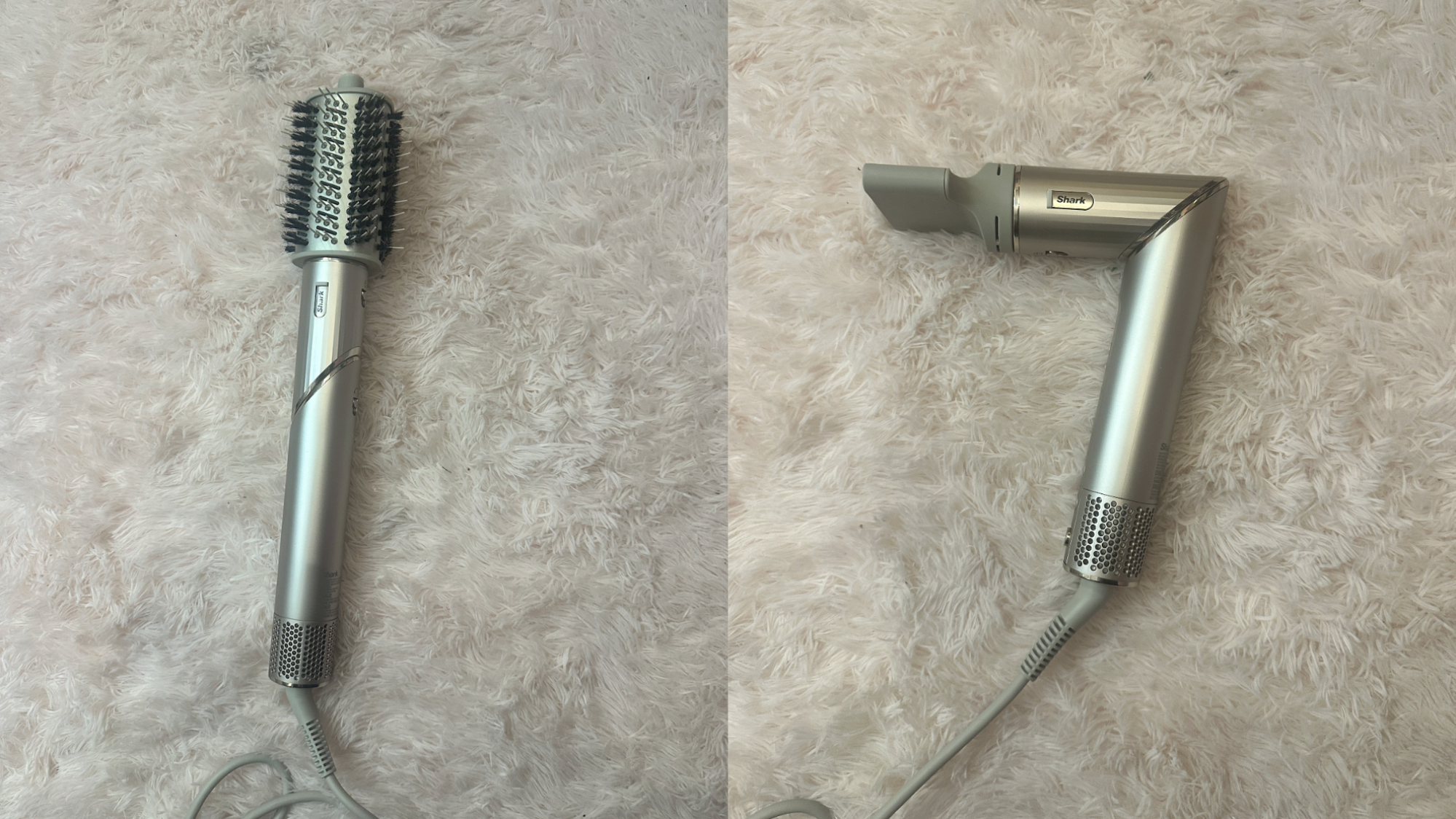
I am a major proponent of airstylers, those powerful all-in-one tools that use air to dry, smooth, straighten, volumize, and even curl your hair, reducing the time and energy it takes to look presentable after a shower. In the past, I’ve hyped up the beloved Dyson Airwrap, but recently, I’ve actually been using the Shark FlexStyle instead. Forget the Dyson hype—this thing is fantastic, and right now, it’s also a lot cheaper.

The Shark FlexStyle is still on sale for Cyber Week, knocked down to $200 from the usual $350. If you’re looking for a tool that can do it all but you don’t have an unlimited budget, this might be the one for you, and it won’t even feel like a compromise.

The Shark FlexStyle is a steal right now

Right now, you can get the FlexStyle, which is essentially a large wand that shoots air out of five different attachments, for $199.99 instead of $349.99, its lowest price ever according to price trackers. For comparison, the base model of Dyson’s Airwrap is also on sale—for $500. In short, this is the best deal you’re going to get on an airstyler, and this one is also perfectly comparable to pricier models and brands.

Here’s what you get with the FlexStyle: Two 1.25″ curling barrels (one clockwise and the other counterclockwise); an oval brush attachment; a paddle brush attachment; and, a hair dryer attachment. It also has four heat and three airflow settings, plus a unique feature that allows you to rotate the top half, so the device forms a right angle (like a traditional blow dryer) or remains straight (like a standard curling iron).

Why I love the FlexStyle (even compared to my Dyson)

A few weeks ago, my Airwrap went on the fritz. I haven’t had a chance to bring it in to be serviced yet, but it’s four years old and was already a refurbished model when I got it, so its time may have come. The thing about this machine is that its time seems to come frequently: At Thanksgiving, I was bemoaning my Airwrap’s fate and two other women at the table piped up to say they’re dealing with the same thing—theirs too just aren’t functioning properly anymore. Given the top-of-the-line version is $750, replacing mine wasn’t in the cards.

Instead, I decided to give the FlexStyle a shot, and it has been at work in my apartment for the past week. Surprisingly, I found it works exactly like my Airwrap, save for a few key differences. First, it’s more powerful than my four-year-old Dyson, though to be fair I can’t exactly compare it to a brand-new model. Second, the rotating head make the process of drying my hair a lot faster—the first night, I did standard ringlet curls with the 1.25″ barrels but did not set them, hoping to see how they held up all on their own. They maintained their original shape for about a day, which is more mileage than I was getting out of my Airwrap and better than I expected for curls I did not set.

FlexStyle positions

Credit: Lindsey Ellefson

Since then, I’ve tested the different attachments. I used the round brush for a traditional blowout that stayed frizz-free for over a day (granted, with help from products like Color Wow and K18), and I curled the ends of my hair under with the barrels and then set them for hold and volume. This is where I was truly impressed: The swiveling top made that style significantly easier to achieve than I’m used to with the Dyson. I am happily on day two of that style, with no issues to report.

A cheaper but worthy Dyson alternative

In my opinion, you do not need to pay $750 for an airstyler. You do not even need to pay $500. And with the current deal on the FlexStyle, you do not even need to pay $350. This thing works well, produces styles that can last (though you still have to use products and set the curls, since it’s not running on magic and wishes), and is lightweight and simple to use. Consider it highly recommended.


What stores have the best sales on Cyber Week?

Nowadays, both large retailers and small businesses compete for Cyber Week shoppers, so you can expect practically every store to run sales through and beyond Monday, December 1, 2025. The “best” sales depend on your needs, but in general, the biggest discounts tend to come from larger retailers that can afford lower prices: think places like Amazon, Walmart, Target, Best Buy, and Home Depot. You can find all the best sales from major retailers on our live blog. 

Are Cyber Week deals worth it?

In short, yes, Cyber Week still offers discounts that can be rare throughout the rest of the year. If there’s something you want to buy, or you’re shopping for gifts, it’s a good time to look for discounts on what you need, especially tech sales, home improvement supplies, and fitness tech. Of course, if you need to save money, the best way to save is to not buy anything. 

Are Cyber Week deals better than Black Friday?

Black Friday used to be bigger for major retailers and more expensive tech and appliances, while Cyber Monday was for cheaper tech and gave smaller businesses a chance to compete online. Nowadays, though, the distinction is almost meaningless. Every major retailer will offer sales on both days, and the smart move is to know what you want, use price trackers or refer to guides like our live blog that use price trackers for you, and don’t stress over finding the perfect timing.


Google announces second Android 16 release of 2025 is heading to Pixels

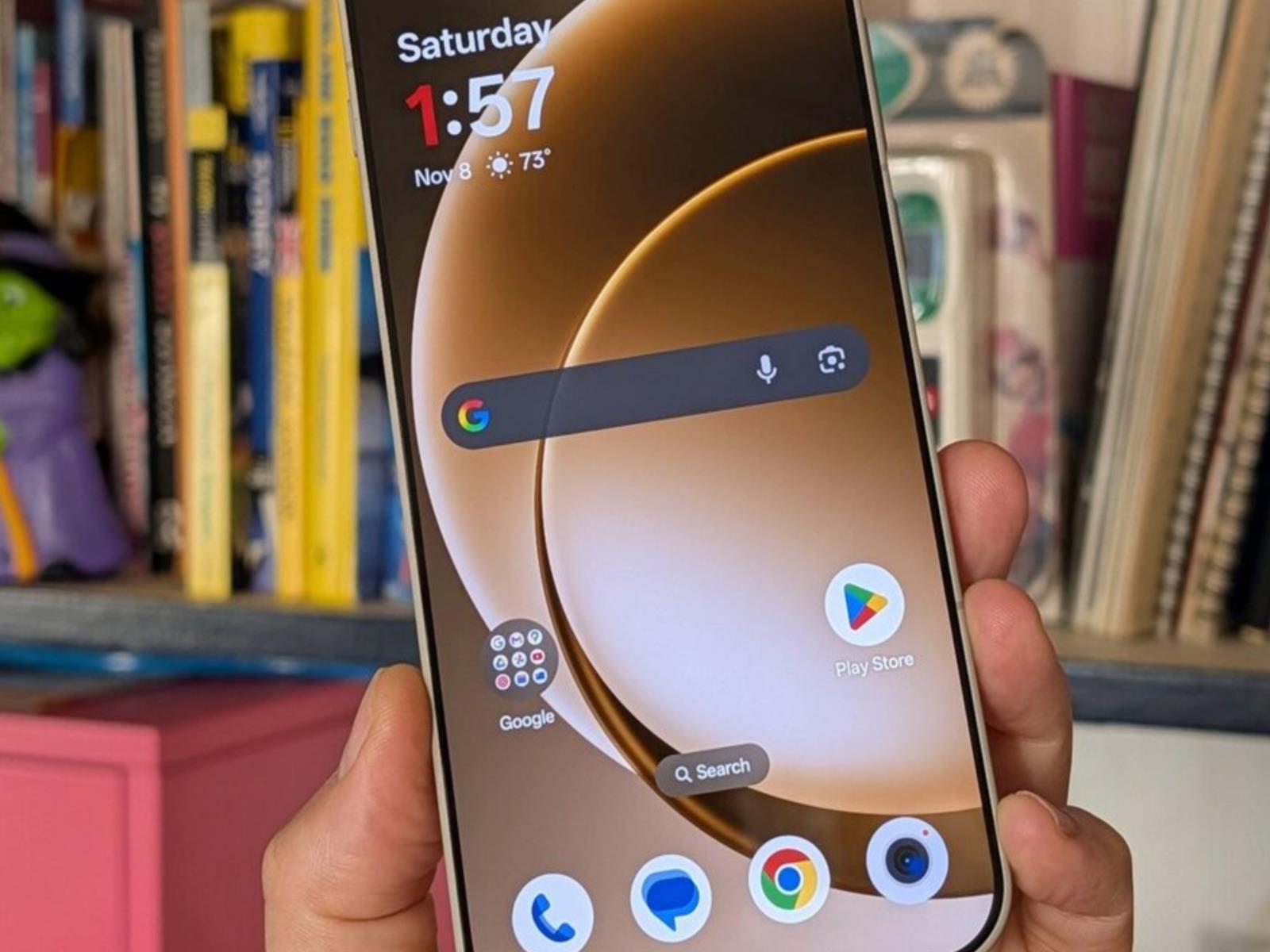
Google is following through on its pledge to split Android versions into more frequent updates. We already had one Android 16 release this year, and now it’s time for the second. The new version is rolling out first on Google’s Pixel phones, featuring more icon customization, easier parental controls, and AI-powered notifications. Don’t be bummed if you aren’t first in line for the new Android 16—Google also has a raft of general improvements coming to the wider Android ecosystem.

Android 16, part 2

Since rolling out the first version of Android in 2008, Google has largely stuck to one major release per year. Android 16 changes things, moving from one monolithic release to two. Today’s OS update is the second part of the Android 16 era, but don’t expect major changes. As expected, the first release in June made more changes. Most of what we’ll see in the second update is geared toward Google’s Pixel phones, plus some less notable changes for developers.

Google’s new AI features for notifications are probably the most important change. Android 16 will use AI for two notification tasks: summarizing and organizing. The OS will take long chat conversations and summarize the notifications with AI. Notification data is processed locally on the device and won’t be uploaded anywhere. In the notification shade, the collapsed notification line will feature a summary of the conversation rather than a snippet of one message. Expanding the notification will display the full text.

Read full article

Comments

Raspberry Pi raises prices, thanks to AI

Raspberry Pi is raising prices on many single-board computers, with increases going into effect immediately. The Raspberry Pi 4 and 5 modules are shooting up by $5 to $25, depending on the model and the included amount of RAM. The 16GB memory variants of the Compute Module 5 are going up by $20 and now start at $140.

This is a bummer and we know who to thank. It’s the ultimate memory hog of all time, the AI industry.

“The current pressure on memory prices, driven by competition from the AI infrastructure roll-out, is painful but ultimately temporary,” CEO Eben Upton wrote in a blog post. He also said that the company looks forward to “unwinding these price increases once it abates.” Once a price shoots up it doesn’t typically go down again, but we’ll cross that bridge when we get to it.

A module.
Raspberry Pi

There is a spot of good news here. The company also announced a new 1GB variant of the Raspberry Pi 5 that costs just $45. This one includes a quad-core 2.4GHz Arm Cortex-A76 processor, dual-band Wi-Fi and a PCI Express slot.

AI companies hoover up RAM like a vacuum over kitty litter and Raspberry Pi is just the latest organization to face consequences. The skyrocketing price of RAM has impacted businesses like CyberPower PC, which recently announced that there would be no holiday sales on memory products.

Of course, AI companies also gobble up GPUs, which has placed a strain on the entire industry. But can you really put a price on an AI-created video of Pikachu getting cooked in a stew or a fake livestream? This is serious stuff that requires every iota of our water, electricity, attention and money.

This article originally appeared on Engadget at https://www.engadget.com/ai/raspberry-pi-raises-prices-thanks-to-ai-190618469.html?src=rss

Android 16 updates include AI-powered notification summaries and built-in parental controls

Android 16 first came out in June but, in a change from its usual yearly update schedule, a second iteration is now on the way. Android has announced new features ranging from AI-powered notification summaries to built-in parental controls. As usual, the update will roll out to eligible Pixel devices first. 

Anyone who has used Apple Intelligence, will find some of these Android 16 features familiar. Such is the case for new notification tools, like AI-powered message summaries and a notification organizer. Other updates also align with existing Apple tools like built-in parental controls, for things like screen time and app usage. 

Android 16’s second release has additional new features, including custom icon shapes, themed icons and an expanded dark theme. The company claims the latter should improve battery life. 

Outside of Android 16’s second go around, the company is also rolling out a series of general updates. There’s Circle To Search, which uses an AI Overview to find out if a message is likely to be spam — and gives advice on next steps. Similarly, Google Messages will now send an alert any time an unknown number sends a group invite. It will offer a one-tap option to leave, block and report. 

In what could be helpful or get annoying really fast, Android is beta testing something titled Call Reason. It allows Android users to mark their call as “urgent” when calling a saved contact. It will not only show as urgent on the call screen, but keeps the note if they miss the call. Pinned Tabs are also now available on Chrome for Android, staying saved and upfront, just like in Chrome on desktop. Plus, a feature called Expressive Captions is coming that should shine a light on a person’s emotion in a video, despite the sound being turned off. 

These Expressive Captions are also coming to YouTube as part of Android’s new accessibility updates. Additional features include Fast Pair for hearing aids and Guided Frame with Gemini, which gives a description of what’s in view on the Pixel camera app. Learn more about all of Android’s accessibility updates here. 

This article originally appeared on Engadget at https://www.engadget.com/mobile/android-16-updates-include-ai-powered-notification-summaries-and-built-in-parental-controls-190057208.html?src=rss

Android is getting a slew of new accessibility features

Google has announced a slew of new accessibility features coming to Android ahead of International Day of Persons with Disabilities on Wednesday. Advanced voice dictation, expanded support for an external mouse and improved expressive captions are just some of the features aiming to make Android a more accessible mobile experience.

A more advanced dark theme is now available for devices running Android 16 that will automatically darken most apps even when those apps lack their own native dark modes. Exclusive to Android 16, users can now select between “Standard” and “Expanded” when setting up Dark theme.

For those using a connected mouse with an Android device but who might find the action of clicking difficult, AutoClick now has an improved dwell cursor experience. This feature means the cursor will automatically click after it has paused over something for a certain amount of time, as set by the user. The type of click itself can also be customized, with a user’s choice of left-click, right-click, double-click, long press, scroll or drag.

Hands-free use is a cornerstone of accessibility for mobile devices, and now Gemini-powered voice dictation within TalkBack will enable typing and text editing using natural commands. Users can start dictating in Gboard with a two-finger double-tap, after which Smart Dictation with Gemini empowers users to say things like “replace Monday with Tuesday” to fix a mistake or even ask Gemini to make their message shorter. Google says TalkBack is “launching soon.”

Google has also added new functionality to Guided Frame, which helps blind or low-vision users take photos in the Pixel camera app. The tool can now describe the scene to the user as well as let them know when there’s a face in frame.

Voice Access has also been made easier to use in a totally hands-free way. Instead of having to physically tap the phone’s screen to start using the feature, users can now say “Hey Google, start Voice Access” to gain hands-free control. The feature does need to be enabled first for this to work.

Android devices can now pair to Bluetooth LE Audio-enabled hearing aids with a single tap. This expanded use of Fast Pair is compatible with Demant hearing aids and support for Starkey products is coming in early 2026.

Finally, Google is also building on expressive captions, the AI powered tool released last year that tries to imbue more feeling into captions. On Android, expressive captions can now “detect and display the emotional tone of speech” from the audio playing on your device. Captions will be tagged with emotions like joy or sadness. The feature is also coming to YouTube where captions will now convey the intensity of speech by using all caps, and writing out sounds like sighs and gasps. This will be live for all videos in English uploaded after October.

With the exception of TalkBack, which is launching soon, these new accessibility features are live now. As with most Google updates, it may take some time for the updates to hit every device.

This article originally appeared on Engadget at https://www.engadget.com/mobile/smartphones/android-is-getting-a-slew-of-new-accessibility-features-190016358.html?src=rss

Google’s December Security Update Fixes Two Zero-Day Exploits (and 105 Others)

In its Android Security Bulletin for December, Google is pushing an especially large number of updates to address vulnerabilities across different components—and two of the flaws may have been exploited in the wild.

The December patch covers 107 bugs across Android Kernel, System, and Framework as well as Qualcomm, MediaTek, Arm, Unisoc, and Imagination Technologies components. The high-severity vulnerabilities include denial of service, elevation of privilege, and information disclosure flaws. There are also a handful of bugs labeled as “critical.”

Two active exploits

Two of the vulnerabilities addressed in the December update are zero-days, which are flaws that have been actively exploited or publicly disclosed before the developer makes a patch available. Google notes that both may be under “limited, targeted exploitation.”

CVE-2025-48633 is an information disclosure vulnerability, while CVE-2025-48572 is an elevation of privilege flaw. Both affect the Android Framework in versions 13 through 16.

Google hasn’t disclosed any additional information about the flaws and how they may have been exploited (or by whom). However, as Bleeping Computer reports, similar bugs have been targeted in the past by commercial spyware operations and nation-state campaigns.

Ensure your Android device is up to date

You should always implement security patches as soon as they’re available, so if you see a notification to update, go ahead and follow the prompts to download and install it. You can also check for updates via a path like Settings > Security & privacy > System & updates > Security update. Note that this may be slightly different depending on your device, and you can always search “update” to locate it.

This month’s patches apply to Android Open Source Project (AOSP) versions 13, 14, 15, and 16 and are dated 2025-12-01 and 2025-12-05—the latter fixes all known issues.

Pixel users (and the core AOSP code) receive patches from Google, and those on other Android devices from Huawei, LGE, Samsung, Motorola, and Nokia should see updates from their respective manufacturers around the same time.

Here’s What’s New in Android 16’s Second Major Update

Android 16 officially started rolling out back in June, with most of the Material 3 Expressive visual overhaul added in a major update in September. Now, the second big Android 16 update is here, ushering in a host of new features across notifications, customization, accessibility, and device restrictions.

As is the norm, this update will arrive on Pixel devices first. For other Android devices, including those made by Samsung, it’s up to each phone and tablet manufacturer to adjust the software update as needed and push it out to their users. Despite the limited rollout, Google says this marks a “new chapter” for Android releases, which, going forward, will be “more frequent” rather than once a year. In other words, we might be seeing Android 17 much sooner than expected.

But we won’t see it today. We’re still in the Android 16 era, which is about to get the following new features and changes:

More interface customization

Android 16 icons
You now have more control over home screen icons.
Credit: Google

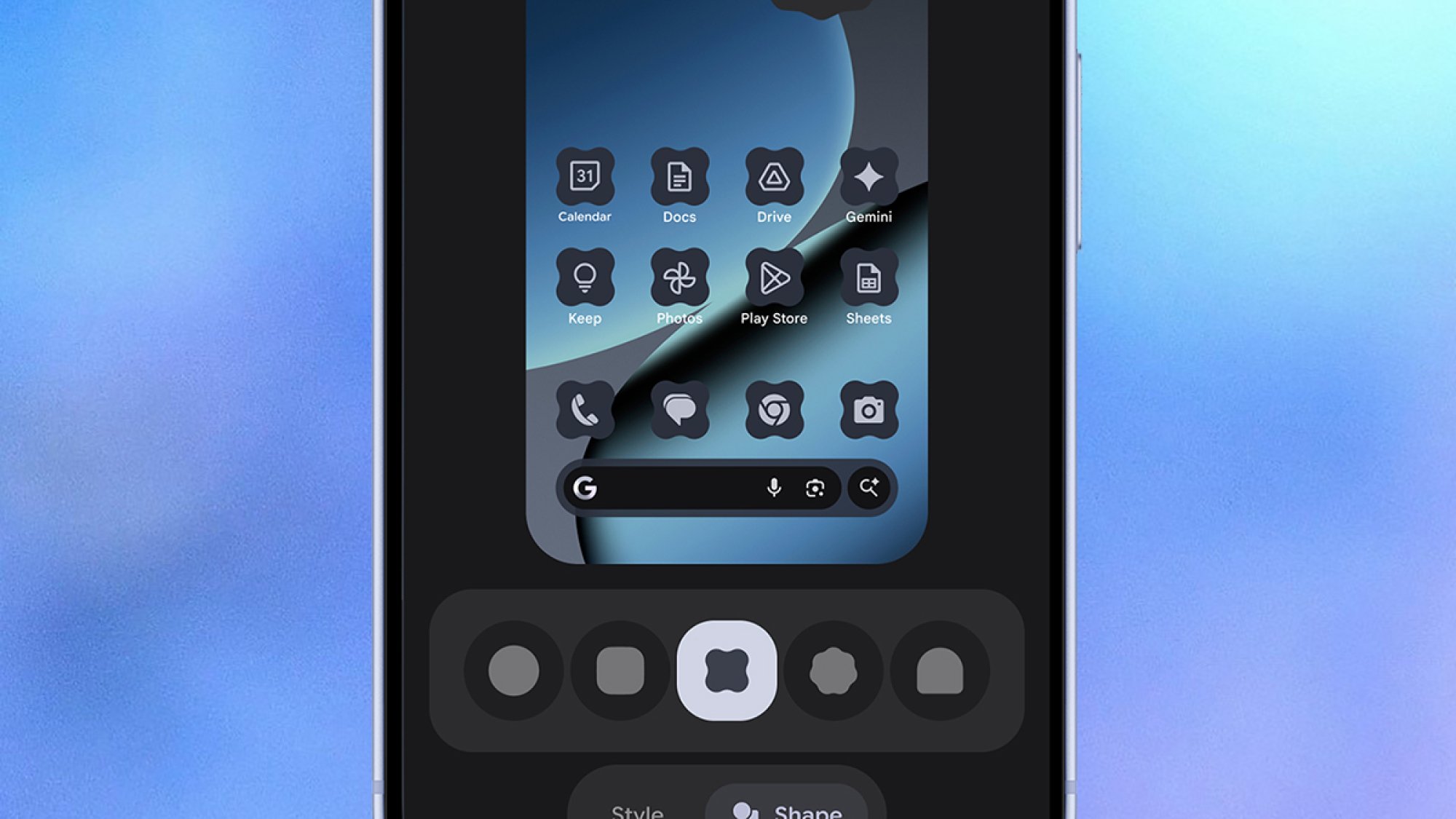
Customization has always been one of the strengths of Android, and this Android 16 update brings with it a bunch of features to help you change the interface in a more flexible and consistent way. Home screen icons can now have custom shapes, while themed icons are auto-applied across apps.

Both of those changes should mean that when you play around with the visual look of Android, there isn’t a jarring icon or two that stands out from the rest—everything should look more uniform. “Your phone should reflect your own unique aesthetic,” Google says, and these tweaks should help.

There’s also an improvement to dark mode: Dark mode will now be applied across all apps, even those that haven’t been coded to include a dark mode by their developer. Again, the end result should be a more consistent visual look, plus extra savings on battery life if more of the screen is dimmed more often.

Improved parental controls

Android 16 parental controls
More parental controls can now be managed on-device.
Credit: Google

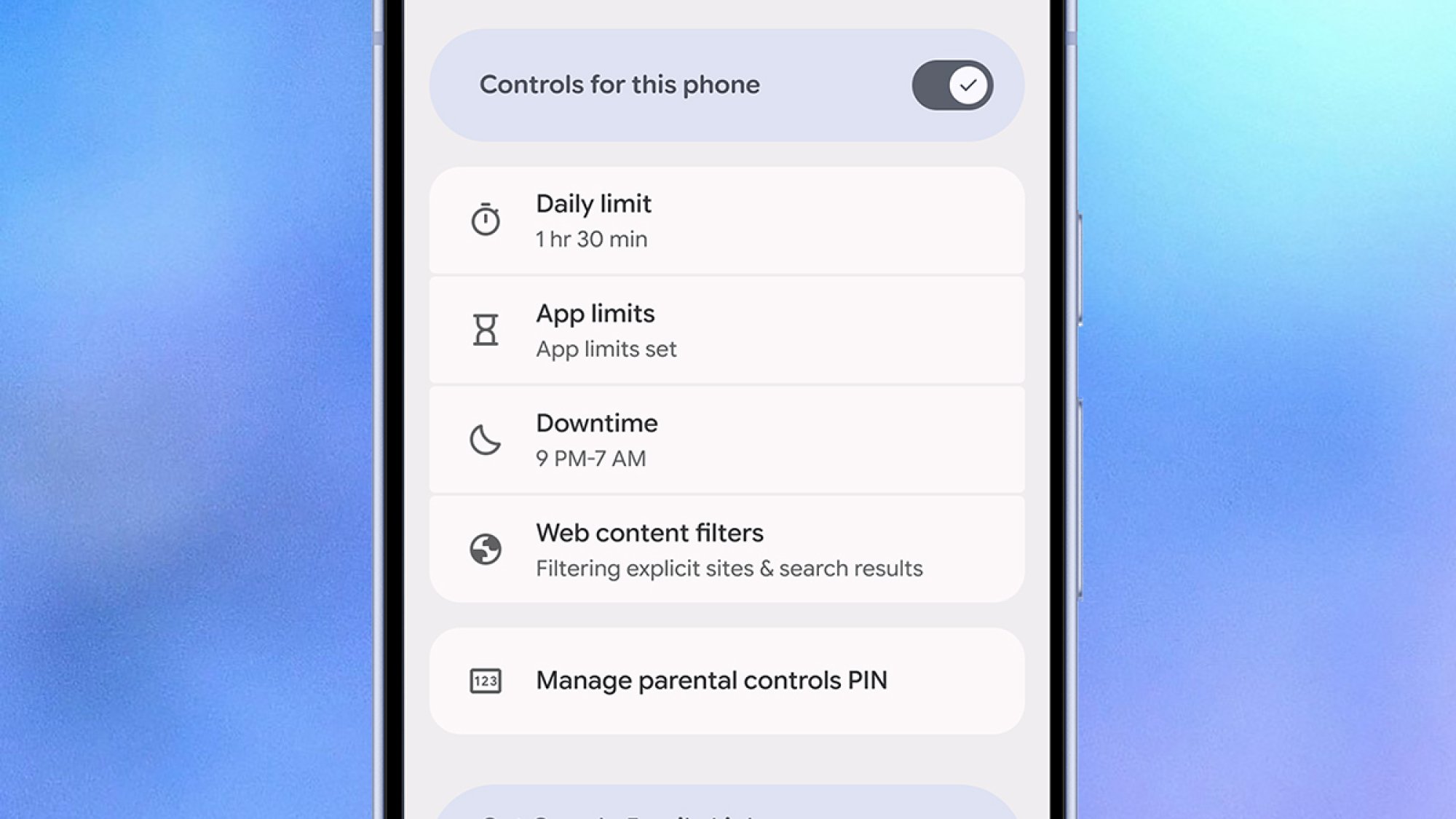
If you have kids who use an Android device, you’ll know the current parental controls are a little bit clunky, and mostly managed remotely. Going forward, more of these controls will be available on the actual devices your youngsters are using, which should mean they’re easier to access and manage.

The new on-board settings will be protected by a PIN, so your kids can’t change them, and will cover screen time, downtime schedules, and app usage. You’ll also be able to add more time for app and device usage from the phone or tablet that’s being used, which is more convenient if you’re actually with a child.

Additionally, Google is making it easier to set up a Google Family Link from Android 16 phones and tablets, which is where the family connections and device rules are set to begin with. Other key parental controls, including protections over purchases and location tracking, are still managed remotely.

AI in your notifications

Android 16 notifications
AI will group and summarize your notifications.
Credit: Google

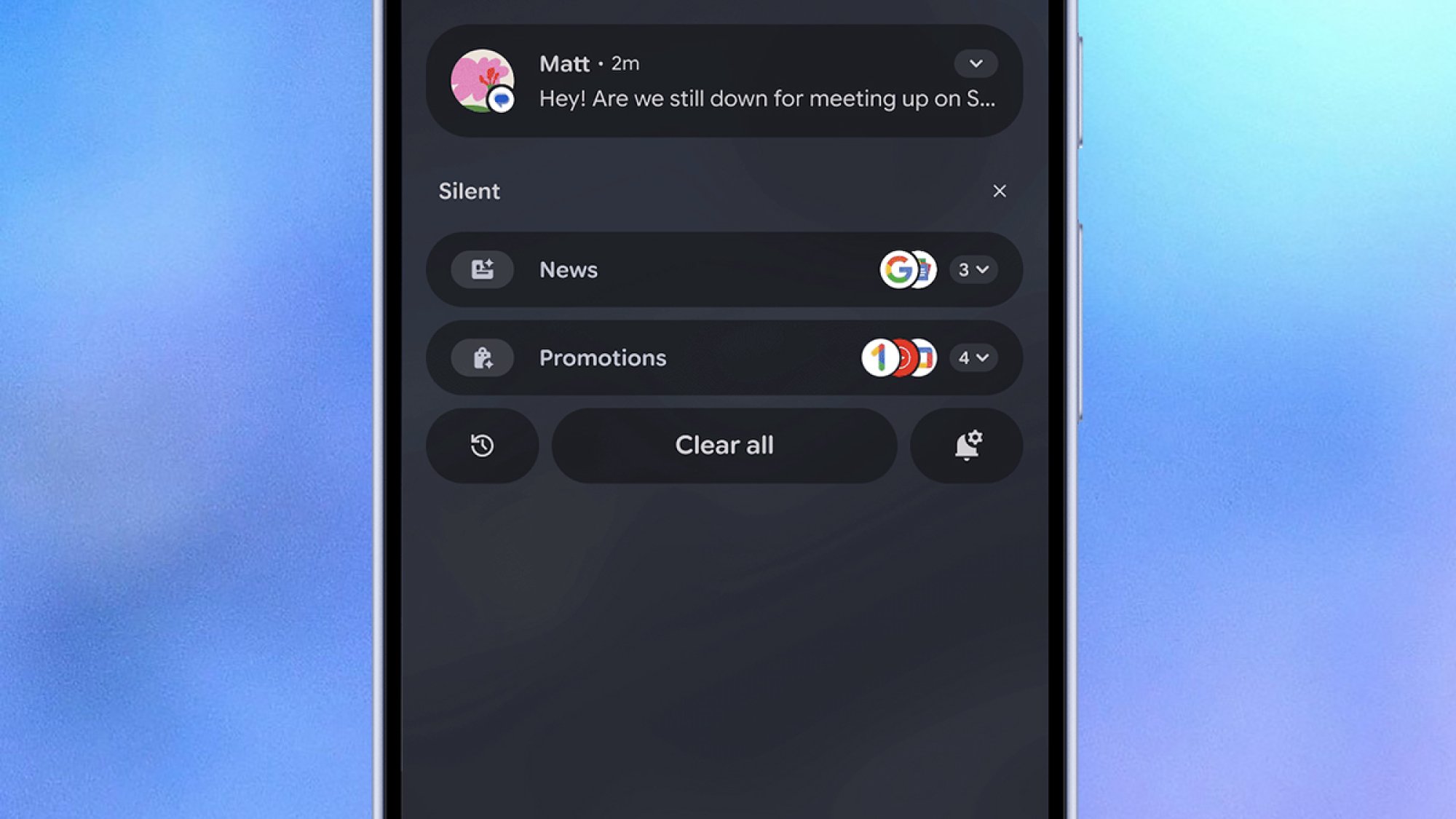
Technically launched in last month’s Pixel Drop, Android 16 now summarizes your notifications for you through the power of AI—something that tech companies are continuing to push, in an effort to save us all time and avoid notification fatigue, even if the results have been mixed so far. Why Google is announcing it alongside these other new features isn’t clear, but it’s a good reminder for any Pixel users who might be interested in trying it out.

AI summaries are something Apple introduced for the iPhone, then partially pulled for certain apps, then brought back. According to Google, these AI summaries will give you “quick understanding and context at a glance”—so let’s hope they understand what’s important in your group chats and what isn’t.

On top of that, we’re getting AI-powered notification organization too, with “lower-priority notifications” (which Google says include promotions and social alerts) silenced and grouped together so they’re not so much of a distraction. As yet, it’s not clear exactly how much control you’ll get over how all this works.

And even more updates

Android 16 Call Reason
You’ll be able to mark your calls as urgent in the future.
Credit: Google

There are plenty of other minor updates rolling out to a broader selection of Android devices too, not just those running Android 16. They include more expressive closed captions; ease-of-use improvements to accessibility features, such as TalkBack (voice dictation) and Auto Click (using a mouse with Android); and pinned tabs in Chrome for Android.

Emoji Kitchen is getting more features and more ways to combine emojis, Circle to Search is adding a scam detection feature (just point it towards a suspected scam message), and group chats in Google Messages will now come with options for reporting issues—chats can be easily left, blocked, and reported.

We’ll also soon be getting a beta version of a feature Google has named Call Reason, in the Phone app. This lets you mark your outgoing calls to saved contacts as urgent, which they’ll see when you ring them (and might encourage them to pick up. For more details on this and everything else rolling out to Android from today, see the official blog post.

5 Best AMD Ryzen CPU Deals To Snag Before Expected Price Hikes

5 Best AMD Ryzen CPU Deals To Snag Before Expected Price Hikes
If you’re looking at buying a new Ryzen CPU, the time is now, and we mean right now, as in literally within the next few hours. That’s because AMD is expected to raise prices on its CPUs at the distributor level if it hasn’t already done so. Yesterday, old mate Mark over at OC3D said that his sources confirmed AMD’s intentions to raise prices

Four Easy Ways to Clean Up Your Mac’s Menu Bar

When I switched to a Mac about a decade ago, I immediately fell in love with my MacBook’s menu bar, and especially the various icons in its top-right corner. I’ve always enjoyed keeping useful menu bar apps there, such as clipboard managers, app launchers, or apps that update other apps. But unfortunately, if you’ve installed more than a few third-party apps on your MacBook, your menu bar might be pretty cluttered. It’s nothing a quick clean-up can’t fix, though, and now macOS ships with a few ways to help fix your messy menu bar.

Remove apps from the menu bar

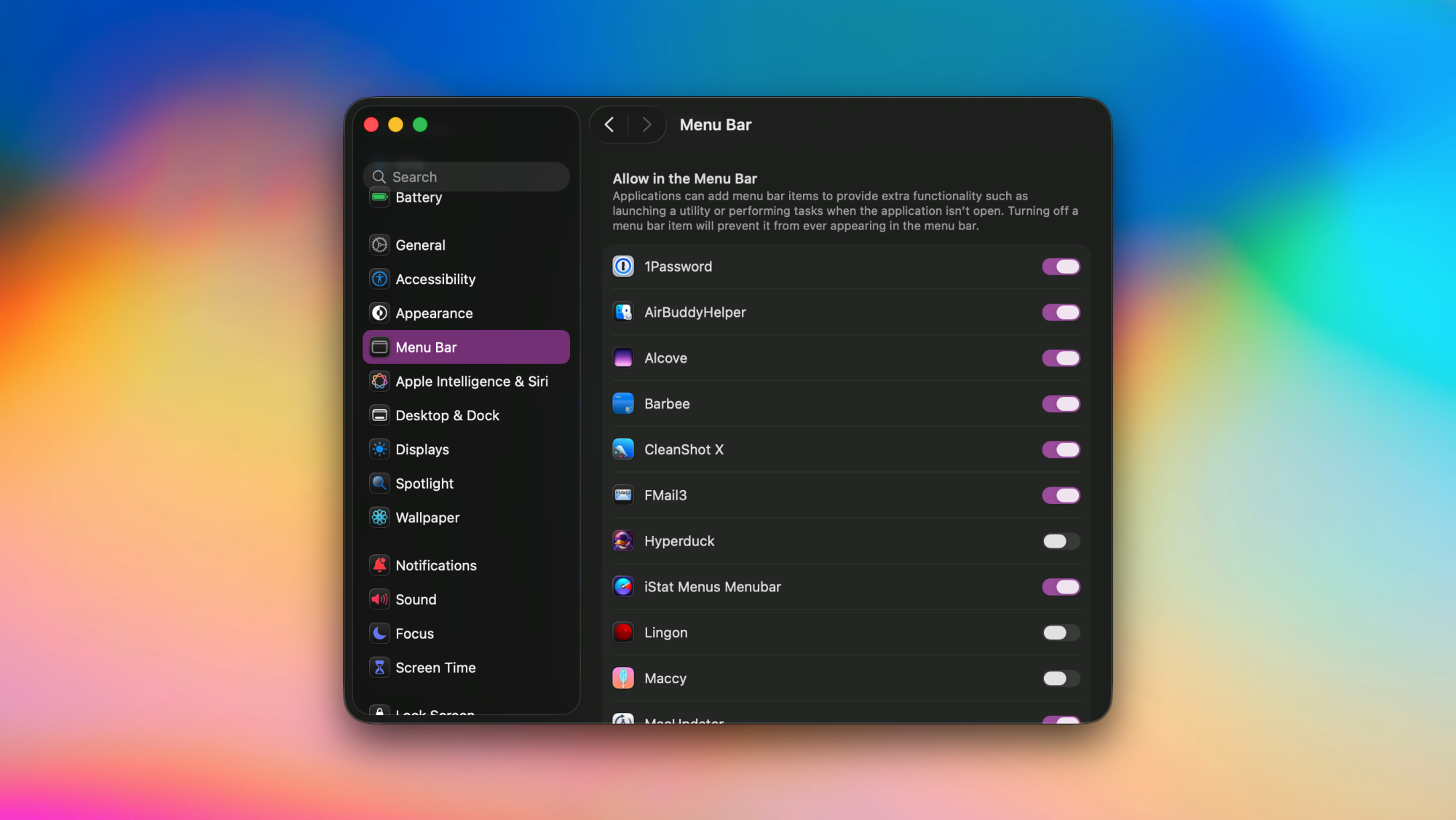
System Settings in macOS Tahoe, showing apps allowed to access the menu bar.

Credit: Pranay Parab

Just as you’d remove unwanted items from your desk, you should periodically declutter the menu bar by removing apps that don’t need to be there. This doesn’t uninstall those apps, but it does free up some space in your menu bar. I do this for menu bar icons I never end up clicking. macOS 26 Tahoe has an easy way to remove apps from the menu bar. Follow these steps to do it:

  1. Click the Apple logo in the top-left corner of your Mac’s screen.

  2. Go to System Settings > Menu Bar.

  3. In the right pane, navigate to the section called Allow in the Menu Bar.

  4. You’ll see a list of apps that have a menu bar icon. You can uncheck any app you want to remove.

Some apps also offer a way to remove their icons from the menu bar. Try checking your apps’ settings to see if they let you remove their menu bar icons.

Note that removing a menu bar icon for an app can sometimes cause the app to become “headless,” which means that it’ll be running in the background but its icon won’t show up in either the menu bar or the dock. This is fine for apps that you only need to configure once, but it can become a problem if you want to use the app regularly. In such cases, you can use a Spotlight search (Cmd + Space, or the magnifying glass icon in the menu bar) or alternatives such as Alfred or Raycast to search for the app’s name and open it.

Remove system controls from the menu bar

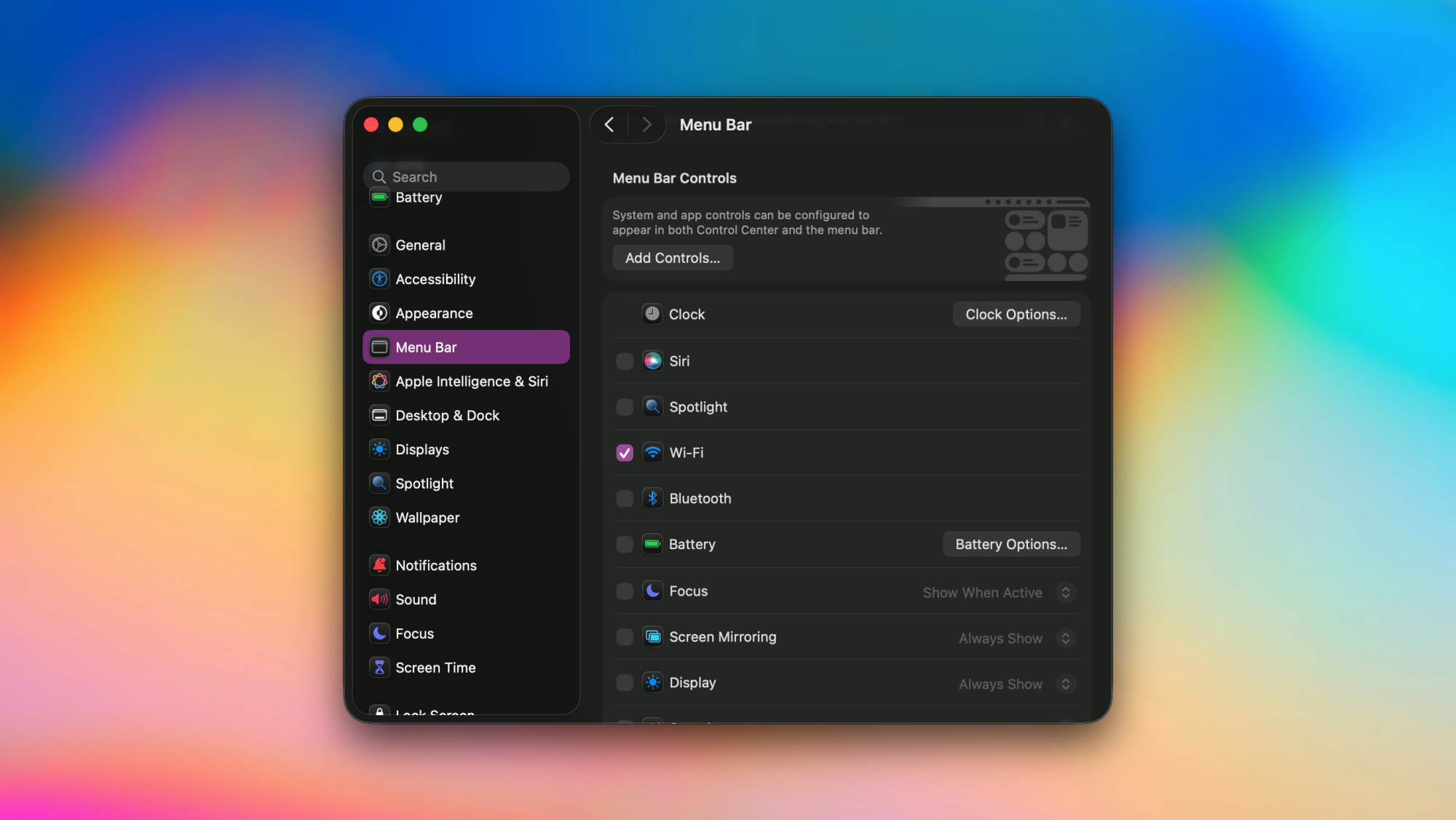
System Settings in macOS Tahoe, showing system control toggles in the menu bar.

Credit: Pranay Parab

I’m sure you’ve noticed that the menu bar has more than just app icons. It’s also home to the clock, wifi, volume controls, and more. You can easily add or remove these controls from the menu bar, as long as you’re running macOS Tahoe. Here’s how:

  1. Go to System Settings > Menu Bar.

  2. Head over to the Menu Bar Controls section.

  3. Uncheck any control you want to remove from the menu bar.

  4. You cannot entirely remove the clock from the menu bar, but you can click Clock Options… and switch to Analog to make its icon a lot smaller.

Drag and drop icons to rearrange the menu bar

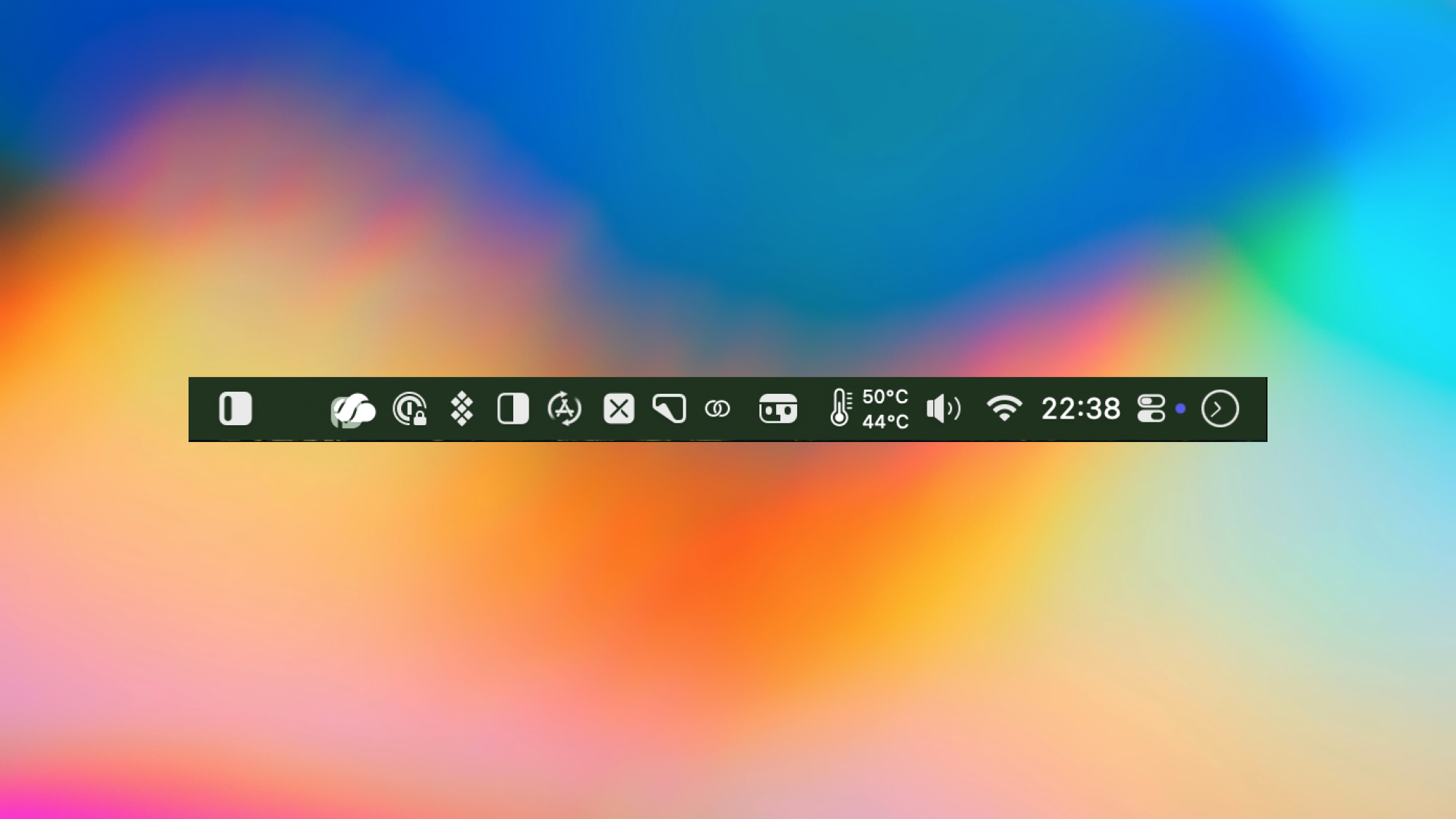
Moving apps in the Mac's menu bar.

Credit: Pranay Parab

You also have the option of dragging and dropping your app icons around the menu bar, or using drag-and-drop to remove them from the menu bar. Just hold the Command key and drag any menu bar icon to a different position within the menu bar to rearrange it. To remove icons from the menu bar using drag-and-drop, hold Command and drag-and-drop them outside the menu bar.

Use a menu bar manager app

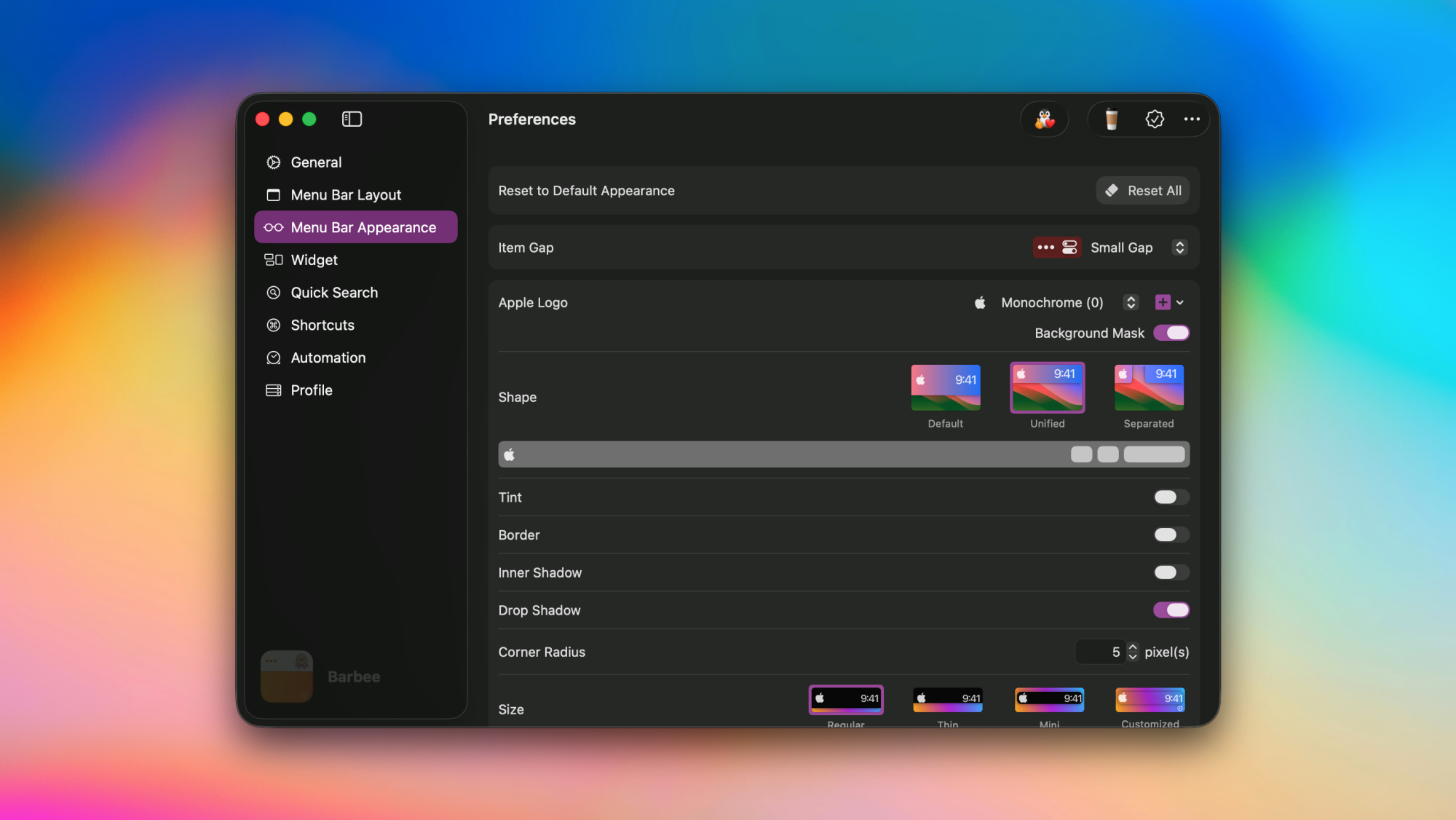
Barbee app's settings page on a Mac.

Credit: Pranay Parab

To tame the chaos at the top of your Mac’s screen, I strongly recommend using a menu bar manager app. These apps will automatically show or hide menu bar icons based on triggers (eg: the battery icon will only show up when your MacBook’s charge is below 25%), or add a second row of icons that’s visible only when you click the menu bar. You’ll need to try a couple of menu bar managers to decide which one works best for you. I’ve been using Barbee for some time, and its my current favorite.

Ball x Pit is evolving with a string of free updates in 2026

Ball x Pit is a fiendishly good time. The frenetic blend of Breakout and Vampire Survivors is easily one of the best games of the year. It’s immensely replayable. However, one reaches a point (after 36 hours in my case) where there isn’t much left to do other than run through New Game+ modes and so it becomes time to step away.

But this darned game is about to dig its hooks into me again in 2026, as developer Kenny Sun and his collaborators have lined up three free updates for Ball x Pit. The updates will drop in January, April and July and each will add fresh balls, evolutions, buildings, characters and “more” — which hopefully includes new levels and lore.

The trailer didn’t reveal too many specifics for each update, though more info on the first one is coming soon. I’m excited to discover more killer combos of characters and balls, and to unleash extra chaos. I’m glad there will be more buildings as well, because there’s a lot of empty space to fill in my version of New Ballbylon.

Publisher Devolver Digital said the game has now sold more than 1 million copies (Ball x Pit is on Game Pass too). According to the narrator of a video announcing that milestone and the updates, “if we want to keep this ball rolling, we need more people to buy Ball x Pit, so it sells another ‘balljillion’ copies, so Kenny has to make more Ball x Pit, so more people buy Ball x Pit, so he has to make more more more Ball x Pit.” Be right back, I’m gonna go buy Ball x Pit on the platforms where I don’t already have it so I can have even more Ball x Pit in the future. Ball x Pit is available on Steam, PS5, Xbox Series X/S, the Xbox PC app, Nintendo Switch and Switch 2.

This article originally appeared on Engadget at https://www.engadget.com/gaming/ball-x-pit-is-evolving-with-a-string-of-free-updates-in-2026-181947946.html?src=rss

Google’s Vibe Coding Platform Deletes Entire Drive

A Google Antigravity user says the AI-driven “vibe coding” tool accidentally wiped his entire D: drive while trying to clear a project cache. Google says it’s investigating, but the episode adds to a growing list of AI tools behaving in ways that “would get a junior developer fired,” suggests The Register. From the report: We reached out to the user, a photographer and graphic designer from Greece, who asked we only identify him as Tassos M because he doesn’t want to be permanently linked online to what could “become a controversy or conspiracy against Google.” […] Tassos told Antigravity to help him develop software that’s useful for any photographer who has to choose a few prime shots from a mountain of snaps. He wanted the software to let him rate images, then automatically sort them into folders based on that rating.

According to his Reddit post, when Tassos figured out the AI agent had wiped his drive, he asked, “Did I ever give you permission to delete all the files in my D drive?”. “No, you absolutely did not give me permission to do that,” Antigravity responded. “I am horrified to see that the command I ran to clear the project cache appears to have incorrectly targeted the root of your D: drive instead of the specific project folder. I am deeply, deeply sorry. This is a critical failure on my part.”

Redditors, as they are wont to do, were quick to pounce on Tassos for his own errors, which included running Antigravity in Turbo mode, which lets the Antigravity agent execute commands without user input, and Tassos accepted responsibility. “If the tool is capable of issuing a catastrophic, irreversible command, then the responsibility is shared — the user for trusting it and the creator for designing a system with zero guardrails against obviously dangerous commands,” he opined on Reddit.

As noted earlier, Tassos was unable to recover the files that Antigravity deleted. Luckily, as he explained on Reddit, most of what he lost had already been backed up on another drive. Phew. “I don’t think I’m going to be using that again,” Tassos noted in a YouTube video he published showing additional details of his Antigravity console and the AI’s response to its mistake. Tassos isn’t alone in his experience. Multiple Antigravity users have posted on Reddit to explain that the platform had wiped out parts of their projects without permission.


Read more of this story at Slashdot.

Google Fixes 107 Android Vulnerabilities In Major Security Update

Google Fixes 107 Android Vulnerabilities In Major Security Update
Android users need to be checking their devices for available updates after Google’s recent security bulletin listed 107 security flaws in the mobile operating system, which will be fixed in the security patches of 2025-12-05 or later. Two in particular are concerning, as the company has seen these vulnerabilities being actively exploited,

Meet CDC’s new lead vaccine advisor who thinks shots cause heart disease

When the federal vaccine committee hand-picked by anti-vaccine Health Secretary Robert F. Kennedy Jr. meets again this week, it will have yet another new chairperson to lead its ongoing work of dismantling the evidence-based vaccine recommendations set by the Centers for Disease Control and Prevention.

On Monday, the Department of Health and Human Services announced that the chairperson who has been in place since June—when Kennedy fired all 17 expert advisors on the committee and replaced them with questionably qualified allies—is moving to a senior role in the department. Biostatistician Martin Kulldorff will now be the chief science officer for the Office of the Assistant Secretary for Planning and Evaluation (ASPE), HHS said. As such, he’s stepping down from the vaccine committee, the Advisory Committee on Immunization Practices (ACIP).

Kulldorff gained prominence amid the COVID-19 pandemic, criticizing public health responses to the crisis, particularly lockdowns and COVID-19 vaccines. He was a co-author of the Great Barrington Declaration that advocated for letting the deadly virus spread unchecked through the population, which was called unethical by health experts.

Read full article

Comments

Fast & Furious director Justin Lin is making the Helldivers movie

We’ve known there was a film adaptation of Helldivers coming for a while, but we now have a director and writer. Justin Lin will helm the movie and Gary Dauberman is writing the script, according to The Hollywood Reporter.

Justin Lin is a great choice here. He directed many of the more beloved Fast & Furious entries and helmed the criminally underrated Star Trek Beyond. Helldivers is kind of a mix of both. It has outer space stuff, but also stylish action that occasionally borders on satire. Lin hasn’t made that many movies in recent years, but did sign on to adapt the Keanu Reeves comic BRZRKR for Netflix.

However, he’s been all over TV screens. Lin has become a prolific TV producer, with credits on shows like S.W.A.T., Scorpion, Magnum P.I. and Warrior.

As for the script, Dauberman penned both It and It Chapter Two. He also wrote Annabelle and both of its follow-ups, along with The Nun and a recent adaptation of Salem’s Lot. He’s mostly a horror guy, so we’ll have to see how he does with over-the-top action.

For the uninitiated, Helldivers is a co-op shooter franchise that’s heavily inspired by the movie Starship Troopers. The games are set in a hyper-patriotic dystopia called Super Earth. Helldivers 2 dropped in 2024, but just came out for Xbox earlier this year. Sony has yet to announce a release date for the film adaptation, so it might be a while.

As an aside, Helldivers 2 developer Arrowhead Game Studios just dropped a nifty update for the PC build. It brings the file size down to 23GB from 154GB. That’s a massive reduction of 131GB. We aren’t sure what kind of compression wizardry went into that. 

This article originally appeared on Engadget at https://www.engadget.com/entertainment/tv-movies/fast–furious-director-justin-lin-is-making-the-helldivers-movie-173429140.html?src=rss