Meta says it’s fixing its broken support system, with the help of AI

If you’ve ever had something go wrong with your Facebook or Instagram account, then you probably have a good idea of just how frustrating the support process can be. The company’s automated processes are so broken that some people have found that suing Meta in small claims court can be a more reliable way of getting help from the company.

Now, Meta says it’s trying to address some of these longstanding issues. In an update, the company acknowledged that its “support hasn’t always met expectations” but that a series of AI-powered updates should make it easier for people to get help. 

The company is rolling out a new “support hub” on Facebook and Instagram that is meant to bring all of its support features into one place. The hub will also have a new AI chat feature so users can ask questions about account issues or Meta’s policies. An in-app support hub might not be that helpful if you can’t access your account, though. A Meta spokesperson pointed to its external account recovery tool, which is meant to help people get back into their accounts. 

Recovering hacked accounts has long been a pain point for Facebook and Instagram users. But Meta says that it’s now improved the process with better email and text alerts. AI has also helped the company’s systems detect devices and locations you’ve frequently used in the past. “Our new account recovery experience adjusts to your particular situation with clearer guidance and simpler verification,” Meta writes. “We’ve also expanded recovery methods to include taking an optional selfie video to further verify your identity.”

Meta is also starting to test a new “AI support assistant” on Facebook that can provide “instant, personalized help” for issues like account recovery or managing your profile. It’s not clear how this will work, or if it will enable people to talk to an actual person who works for Meta. For now, the most reliable way to access live support is via a Meta Verified subscription, though many users report that the chat-based service isn’t able to help with more complex issues.

A Meta spokesperson said that the assistant is in the “early stages of testing” and is currently only available to some Facebook users globally. Those who are part of the test can find it via the app’s new support hub. 

According to Meta, these improvements have already shown some success in helping people get back into hacked accounts. The company says that this year it has “increased the relative success rate of hacked account recovery by more than 30% in the US and Canada.”

This article originally appeared on Engadget at https://www.engadget.com/social-media/meta-says-its-fixing-its-broken-support-system-with-the-help-of-ai-185348328.html?src=rss

ChatGPT hyped up violent stalker who believed he was “God’s assassin,” DOJ says

ChatGPT allegedly validated the worst impulses of a wannabe influencer accused of stalking more than 10 women at boutique gyms, where the chatbot supposedly claimed he’d meet the “wife type.”

In a press release on Tuesday, the Department of Justice confirmed that 31-year-old Brett Michael Dadig currently remains in custody after being charged with cyberstalking, interstate stalking, and making interstate threats. He now faces a maximum sentence of up to 70 years in prison that could be coupled with “a fine of up to $3.5 million,” the DOJ said.

The podcaster—who primarily posted about “his desire to find a wife and his interactions with women”—allegedly harassed and sometimes even doxxed his victims through his videos on platforms including Instagram, Spotify, and TikTok. Over time, his videos and podcasts documented his intense desire to start a family, which was frustrated by his “anger towards women,” whom he claimed were “all the same from fucking 18 to fucking 40 to fucking 90” and “trash.”

Read full article

Comments

Android 16 Just Put Parental Controls Directly on Your Kid’s Phone

In the long-running Android vs. iOS competition, iPhones have historically had the edge in terms of parental controls: They’ve been a bit more straightforward and intuitive, and easier for caregivers to understand and manage. Apple does many things well, and getting its apps and devices working seamlessly together is definitely one of them.

Google, however, is gradually improving the experience for parents, with a batch of updates earlier this year, and now some more changes as part of a significant Android 16 upgrade. The latest changes mean more controls can be accessed on your kids’ devices.

What’s new in Android 16

The usual Android caveat applies here: Each Android phone maker does things slightly differently, though there’s not actually too much variation in this particular area. The latest Android 16 updates mentioned above are rolling out now to Pixel phones (and I’ve tested them on a Pixel), but will take a while to reach other handsets—Samsung phones will most likely get them early next year, for example, with One UI 8.5.

So what’s new? Essentially, more of the existing parental controls are available on the Android devices of your youngsters, so you can get at them from their phones and tablets as well as accessing them remotely. It should make life easier if you’re with your kids and they pass their devices over to you.

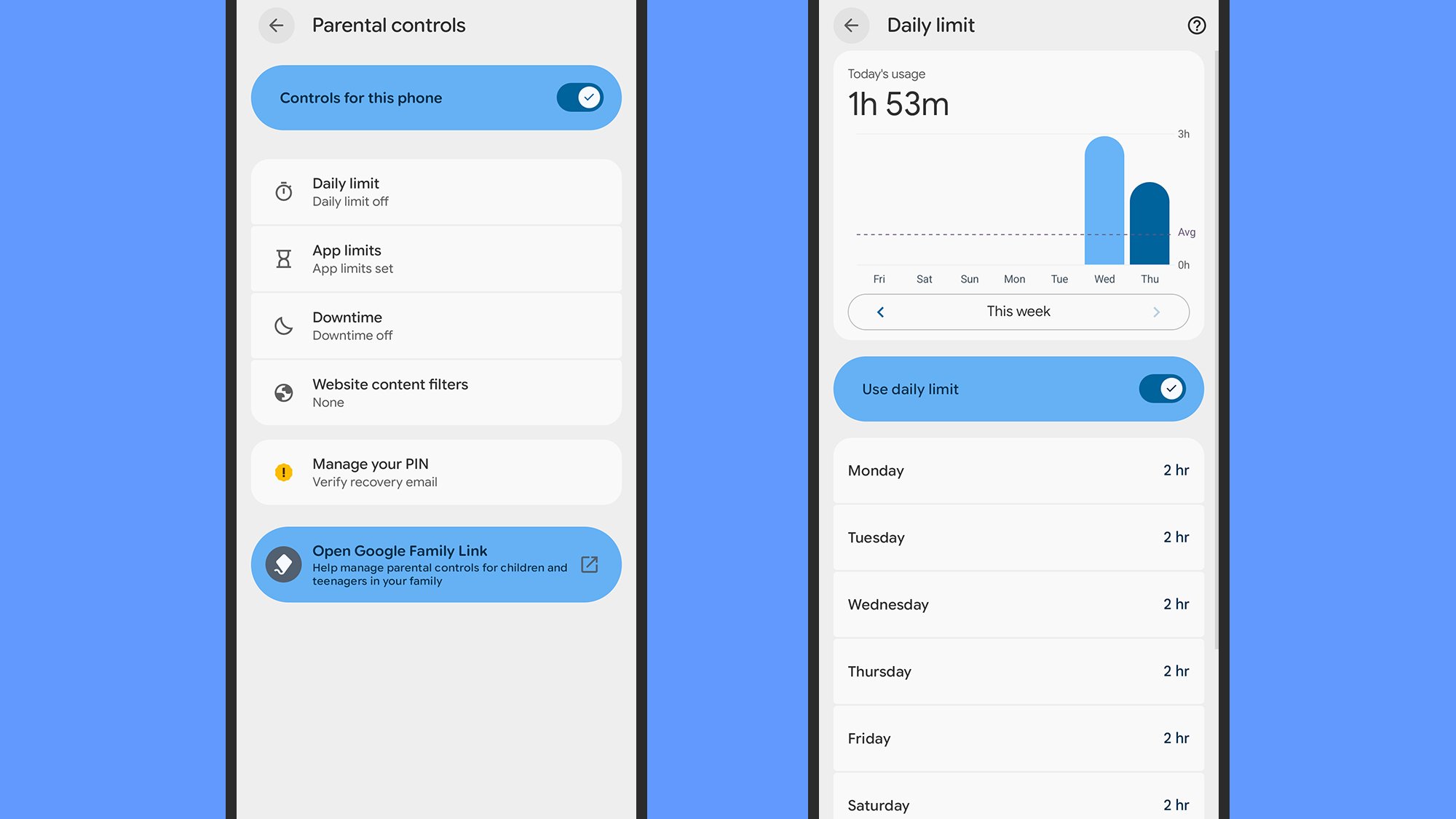
You can find the options that have been added to kids’ devices by opening Settings on the phone or tablet of your young person and choosing Parental controls. Right away you’ll see a toggle switch for enabling on-device controls, and when you do enable them you need to enter a PIN—to stop your kid from changing these settings themselves.

Android 16 parental controls
The new on-device controls in Android 16.
Credit: Lifehacker

There are then four sections you can access: Daily limit, App limits, Downtime, and Website content filters. Tap on any of these to set restrictions for the current device, which can be adjusted depending on the day of the week in some cases. Pick Downtime, for example, and you can set times during which the device is locked. These match the tools you’ve previously been able to manage remotely.

Select Daily limit, then turn on the Use daily limit toggle switch, and you’re able to control how many hours your kid can use their phone or tablet for each day. There’s also a bar chart showing device usage over time, so you can see how much screen time your child has been taking advantage of.

These settings are simple, understandable, and a breeze to use—you don’t have to mess around with Google accounts or family relationships if you don’t want to. You can just enter a PIN and start making changes—you don’t necessarily have to connect these settings to any other devices. If you want to manage them remotely, though, Google has a wider parental control system in place.

Google’s Family Link controls

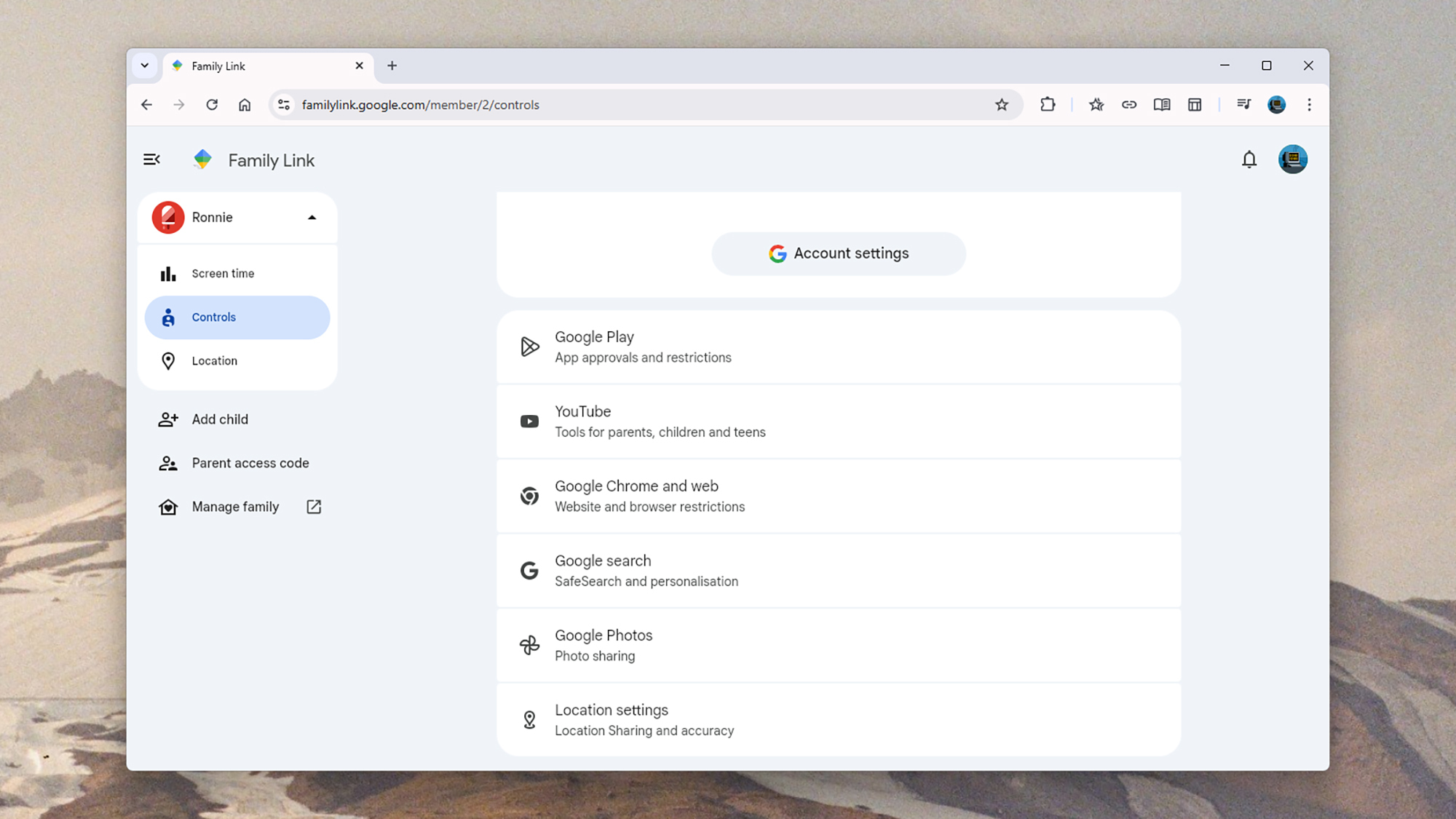
The new Android 16 controls that appear on devices can work independently of anything else, but Google already offers plenty of options if you need them. Everything is managed through the Google Family Link portal, which you can access on the web or through the apps on Android or iOS.

You can use Google Family Link to set up Google accounts for your kids, and then manage what they’re able to do with them. The idea is that they sign into their Android devices using the account you’ve created for them, and because Google knows you have a verified connection to them, you can put restrictions on those devices remotely.

All the usual safeguards and protections are covered: You can set screen time limits, manage the apps your kids can use (and for how often), put blocks on certain websites and categories of website, and put parental approvals in place for making purchases through Google’s various digital storefronts. These mostly match what’s now available on-device.

Google Family Link
Google Family Link on the web.
Credit: Lifehacker

There’s a location tracking element to Google Family Link as well, so you can see where your young people are at all times, and even get notifications based on their movements: You might want to get a ping when they turn up at school, for example, or when they leave home. All this can be managed through the apps.

More recent updates let you control the amount of screen time your children can have during school hours, and there are also now tools for managing the contacts that youngsters are able to interact with—as yet you can’t get to these controls directly on your kids’ devices. There’s plenty in the way of reports on usage too, alongside these controls.

Add everything up, and Google now has a fairly comprehensive set of parental controls that you can manage from just about any device, or from the devices your kids are using—assuming you’ve given them Android phones or tablets.

RAM Is So Expensive, Samsung Won’t Even Sell It To Samsung

A severe spike in global DRAM prices has pushed Samsung Semiconductor to refuse a long-term RAM order from its own sibling, Samsung Electronics. The move is forcing the smartphone division into short, expensive renegotiations, which will likely mean higher costs for consumer devices. PCWorld reports: Samsung subsidiaries are, naturally, going to look to Samsung Semiconductor first when they need parts. Such was reportedly the case for Samsung Electronics, in search of memory supplies for its newest smartphones as the company ramps up production for 2026 flagship designs. But with so much RAM hardware going into new “AI” data centers — and those companies willing to pay top dollar for their hardware — memory manufacturers like Samsung, SK Hynix, and Micron are prioritizing data center suppliers to maximize profits.

The end result, according to a report from SE Daily spotted by SamMobile, is that Samsung Semiconductor rejected the original order for smartphone DRAM chips from Samsung Electronics’ Mobile Experience division. The smartphone manufacturing arm of the company had hoped to nail down pricing and supply for another year. But reports say that due to “chipflation,” the phone-making division must renegotiate quarterly, with a long-term supply deal rejected by its corporate sibling. A short-term deal, with higher prices, was reportedly hammered out.


Read more of this story at Slashdot.

Jensen Huang On Joe Rogan: How Fear Of Failure Fuels NVIDIA’s AI Empire

Jensen Huang On Joe Rogan: How Fear Of Failure Fuels NVIDIA’s AI Empire
NVIDIA CEO Jensen Huang made his debut on the latest episode of The Joe Rogan Experience last evening, sitting down for over two hours with the host of America’s most popular podcast. During the episode, the two cover a fairly wide variety of topics with a focus on technology and governance, but especially focused on NVIDIA itself and ongoing

OnePlus 15 finally gets FCC clearance after government shutdown delay—preorders live

OnePlus is ready to sell its new flagship smartphone in the US weeks after it made the device official. Having now finally gotten Federal Communications Commission clearance, the OnePlus 15 is available for preorder. It’s currently only live on the OnePlus storefront, but the device will eventually come to Amazon and Best Buy as well.

The OnePlus 15 launched in China earlier this year, and it was supposed to go on sale in the US a month ago. However, the longest US government shutdown on record got in the way. Most of the FCC’s functions were suspended during the weekslong funding lapse, which prevented the agency from certifying new wireless products. Without that approval, OnePlus could not begin selling the phone. Thus, it had no firm release date when the phone was officially unveiled for the US in early November.

Interested parties can head to the OnePlus website to place an order. The base model starts at $900 with 12GB of RAM and 256GB of storage. This version is only available in black. If you want the Ultraviolet or Sand Storm (with the distinctive micro-arc oxidation finish), you’ll have to upgrade to the $1,000 version, which has 16GB of RAM and 512GB of storage.

Read full article

Comments

Amazon Luna’s December lineup includes Hollow Knight, Lego 2K Drive and a few Fallout games

Amazon Luna’s December lineup of games has been announced, and there are plenty of early Christmas presents to sink your teeth into. For those unaware, Prime members automatically qualify for Luna standard, the entry-level tier of Amazon’s cloud gaming service, and each month the company also hands out a number of codes for PC games that permanently join in your library once redeemed.

Among those claim-and-keep-forever games this month are the underrated open-world Lego racing game, Lego 2K Drive, the very pretty Metroidvania, Bō: Path of the Teal Lotus, and a couple of retro Fallout games, just in time for the new season of the Prime Video show. Here’s the full list of games for December. Most come in the form of codes you can redeem on GOG, but a couple are tied to the Epic Games Store or Legacy Gaming.

  • LEGO 2K Drive

  • Bō: Path of the Teal Lotus

  • Fallout: A Post Nuclear Role Playing Game

  • Fallout 2

  • Forgotten Realms: The Archives – Collection One

  • Gylt

  • Forgotten Realms: The Archives – Collection Two

  • Christmas Adventure: Candy Storm

  • Gunslugs 2

  • Ashworld

  • Forgotten Realms: The Archives – Collection Three

  • Dreamscaper

On the cloud side of things, Luna members can stream the likes of Fallout 4: Game of the Year Edition, with Fallout 3 and fan favorite New Vegas already available. Quite the month for wasteland wanderers, then. Mafia: Definitive Edition, Hollow Knight and Shadow of the Tomb Raider: Definitive Edition also feature in the current library.

Amazon relaunched its revamped Luna service at the end of October, when it also added a beginner-friendly collection of smartphone-controlled multiplayer games for Prime subscribers to play at no additional cost.

This article originally appeared on Engadget at https://www.engadget.com/gaming/amazon-lunas-december-lineup-includes-hollow-knight-lego-2k-drive-and-a-few-fallout-games-180048528.html?src=rss

In 1995, a Netscape employee wrote a hack in 10 days that now runs the Internet

Thirty years ago today, Netscape Communications and Sun Microsystems issued a joint press release announcing JavaScript, an object scripting language designed for creating interactive web applications. The language emerged from a frantic 10-day sprint at pioneering browser company Netscape, where engineer Brendan Eich hacked together a working internal prototype during May of 1995.

While the JavaScript language didn’t ship publicly until that September and didn’t reach a 1.0 release until March 1996, the descendants of Eich’s initial 10-day hack now run on approximately 98.9 percent of all websites with client-side code, making JavaScript the dominant programming language of the web. It’s wildly popular; beyond the browser, JavaScript powers server backends, mobile apps, desktop software, and even some embedded systems. According to several surveys, JavaScript consistently ranks among the most widely used programming languages in the world.

In crafting JavaScript, Netscape wanted a scripting language that could make webpages interactive, something lightweight that would appeal to web designers and non-professional programmers. Eich drew from several influences: The syntax looked like a trendy new programming language called Java to satisfy Netscape management, but its guts borrowed concepts from Scheme, a language Eich admired, and Self, which contributed JavaScript’s prototype-based object model.

Read full article

Comments

This Windows Update Pop-Up Is a Scam

The update screen is a normal occurrence on Windows machines, so of course hackers are now manipulating it to sneak malware onto devices. The scheme, a recent iteration of a ClickFix attack, is designed to trick you into executing a dangerous command under the guise of completing a “critical security update.” But what you’re actually doing is installing an infostealer that hands data over to bad actors.

When a Windows update pop-up is actually a ClickFix attack

ClickFix is a social engineering ploy that uses tactics like fake error messages, CAPTCHA forms, and command prompts to deliver malware to your device. As PCMag reports, the Windows update scam is a pop-up that looks like a standard Windows blue screen but is actually a full screen browser page being displayed from a malicious domain.

The ClickFix element is a set of keystrokes—not part of the real update interface—that have the user paste and execute a malicious command, ultimately delivering malware to their device. These instructions have an air of urgency, which is a common element of a scam.

Researchers at cybersecurity firm Huntress have detailed the exact mechanism behind this attack, including an iteration in which users are prompted to verify they are human (rather than complete a security update). As Bleeping Computer outlines, the malicious code is embedded into the pixel data of PNG images, and the final payload is one of two known infostealers.

According to the Huntress analysis, following a recent law enforcement operation, fake Windows update pages continue to exist across multiple domains, but those domains no longer seem to host the malware payload. That doesn’t mean, however, that this attack, or some version of it, won’t pop up elsewhere.

How to stay safe from this ClickFix attack

If you run Windows on your device, you’ve probably seen a blue or black update or error screen many times, and you may not be suspicious if your computer randomly begins an update or prompts you to take an extra step to confirm it. But while a legitimate update screen will have a progress indicator and instructions not to turn off your computer, you should never need to input manual commands. This is a red flag of a ClickFix attack and not something a trusted service will require.

Of course, it’s important to keep your computer up to date. Microsoft releases security updates on the second Tuesday of the month, known as Patch Tuesday, and you can enable automatic updates on your machine to ensure you get fixes as soon as they’re available.

If you want to take additional steps to prevent ClickFix attacks on Windows, you can disable the Windows Run box to prevent unauthorized access to commands.

30% of Doctors In UK Use AI Tools In Patient Consultations, Study Finds

An anonymous reader quotes a report from the Guardian: Almost three in 10 GPs in the UK are using AI tools such as ChatGPT in consultations with patients, even though it could lead to them making mistakes and being sued, a study reveals. The rapid adoption of AI to ease workloads is happening alongside a “wild west” lack of regulation of the technology, which is leaving GPs unaware which tools are safe to use. That is the conclusion of research by the Nuffield Trust thinktank, based on a survey of 2,108 family doctors by the Royal College of GPs about AI and on focus groups of GPs.

Ministers hope that AI can help reduce the delays patients face in seeing a GP. The study found that more and more GPs were using AI to produce summaries of appointments with patients, assisting their diagnosis of the patient’s condition and routine administrative tasks. In all, 598 (28%) of the 2,108 survey respondents said they were already using AI. More male (33%) than female (25%) GPs have used it and far more use it in well-off than in poorer areas.

It is moving quickly into more widespread use. However, large majorities of GPs, whether they use it or not, worry that practices that adopt it could face “professional liability and medico-legal issues,” and “risks of clinical errors” and problems of “patient privacy and data security” as a result, the Nuffield Trust’s report says. […] In a blow to ministerial hopes, the survey also found that GPs use the time it saves them to recover from the stresses of their busy days rather than to see more patients. “While policymakers hope that this saved time will be used to offer more appointments, GPs reported using it primarily for self-care and rest, including reducing overtime working hours to prevent burnout,” the report adds.


Read more of this story at Slashdot.

Pixel-art cyberpunk game Replaced arrives in March

Based on what we’ve seen, Replaced is a gaming art director’s dream. The long-delayed indie title has lush pixel-art environments, set in a cyberpunk fever dream. And now we finally know when it’s arriving. Mark your calendar for March 12, 2026.

If you’ve been following Replaced‘s journey, you’ll know that’s four years after its original release date. Shit happens! In this case, that included having to relocate from Belarus to Cyprus after Russia invaded Ukraine in 2022. It will be the first game from developer Sad Cat Studios. Thunderful Games is publishing.

Gaming still from Replaced. "Pit's Diner," set in a dystopian cyberpunk world (pixel art). Various shady characters mill about.
Gaming still from Replaced. “Pit’s Diner,” set in a dystopian cyberpunk world (pixel art). Various shady characters mill about.
Sad Cat Studios / Thunderful Games

Replaced is set in a dystopian alternate 1980s America. In this timeline, nuclear winter has reshaped the world. “Step into a world where neon lights flicker over rain-soaked streets, industrial decay meets futuristic technology, and every shadow holds a secret,” the blurb reads. You play as R.E.A.C.H., an AI unwillingly trapped in a human body.

As for gameplay, it’s a 2.5D cinematic action platformer. “Chain precise melee strikes with satisfying ranged attacks to take down enemies in high-intensity encounters while keeping the flow of exploration,” the description reads. Expect plenty of running, climbing and kicking ass.

You can see some of the dazzling art direction, fluid movement, and smooth combat in the new trailer below. You can wishlist Replaced now through Steam or Xbox.

This article originally appeared on Engadget at https://www.engadget.com/gaming/pixel-art-cyberpunk-game-replaced-arrives-in-march-170253220.html?src=rss

The Samsung Galaxy Buds 3 Pro Are Almost 40% Off Right Now

We may earn a commission from links on this page. Deal pricing and availability subject to change after time of publication.

Earbuds don’t usually get major design overhauls, but the Samsung Galaxy Buds 3 Pro make a clear break from earlier models. This new version leans into a more angular, stemmed shape that feels closer to the AirPods silhouette, complete with small customizable LEDs that add a bit of personality. With today’s drop to $159.99 from $249.99, you’re getting a premium pair for $90 off its regular price.

Samsung uses a 10.5mm dynamic driver paired with a 6.1mm planar driver, which gives the buds a wider, more layered sound than you’d expect from something this size. Music comes through with good depth and detail, but this PCMag review notes that active noise cancellation can soften the treble a little. You can fine-tune that through Samsung’s EQ, though only Galaxy phone users get the full set of audio tools and support for Samsung’s Seamless Codec for 24-bit audio.

Living with the Buds 3 Pro feels different depending on the device you pair them with. Galaxy users get the complete experience: auto-pairing, in-depth customization, and access to features like Interpreter Mode, which handles real-time translation during conversations. Android users outside the Samsung ecosystem still get most core features through the Wear app, with some limitations—no 24-bit audio and fewer advanced controls. iPhone users get the shortest end of the stick, as the buds function as regular Bluetooth headphones with no app support at all. That means no EQ tuning, no control customization, and no access to Samsung’s smart extras. The saving grace here is that the hardware itself holds up well on any device. Calls come through clearly, ANC works well for everyday noise, and the earbuds stay comfortable enough for long listening sessions.

Durability is another bright spot. The IP57 rating puts these buds ahead of many competitors in this price range, making them solid for workouts, commutes, and even rainy runs. The case is compact, and the buds snap into place securely without fuss. Battery life is solid, though not chart-topping, and you can stretch it further by toggling between ANC modes. The lack of LDAC support might disappoint Android audiophiles looking for maximum bitrate playback, but for most listeners, the combination of comfort, sound quality, and smart features will outweigh that gap.

Our Best Editor-Vetted Tech Deals Right Now


Amazon Fire HD 10 (2023)


—
$69.99

(List Price $139.99)


Sony WH-1000XM5


—
$278.00

(List Price $399.99)


Amazon Fire TV Stick 4K Plus


—
$24.99

(List Price $49.99)

Deals are selected by our commerce team

Amazon’s Kindle Scribe Colorsoft finally has a release date: December 10

When it announced the latest series of Kindle Scribe writing tablets in October, Amazon didn’t have a specific release date to share beyond “later this year.” And now that we’re approaching the final weeks of 2025, the company is meeting its own deadline by sharing that it will be available on December 10. That detail is now posted on the Amazon product page for the Kindle Scribe Colorsoft, if you’d like to see the date for yourself.

As a refresher, this is the third generation of the Kindle Scribe line of E Ink writing tablets. This year was the first time Amazon made three different versions of the Scribe, turning it into a series of products. At the entry-level, the Scribe without a front light will start at $430, while the model with a front light starts at $480. The Kindle Scribe Colorsoft, which, as it name suggests, can render colors, will start at $630.

All three flavors will feature the updated hardware and design that’s a bit more symmetrical than previous generations, which had a thicker bezel on one side. They’re also thinner than older Scribes and come with redesigned Kindle software that can help make note-taking a bit more efficient. Based on my hands-on with the Kindle Scribe Colorsoft, it also seemed to render colors more vividly than competing devices like the reMarkable Paper Pro, though I’ll definitely need to get a review unit in for better comparison.

For now, check out our hands on of the Kindle Scribe Colorsoft and review of the reMarkable Paper Pro and even of the last-gen Kindle Scribe to see if this is something you might want. While December 10 is cutting it pretty close to the holiday gifting season, it’s still weeks ahead of Christmas, so it might still be worth keeping an eye on.

This article originally appeared on Engadget at https://www.engadget.com/computing/amazons-kindle-scribe-colorsoft-finally-has-a-release-date-december-10-170000910.html?src=rss

Meta is reportedly going to slash spending on the metaverse

Meta is reportedly planning steep cuts to its metaverse division, according to Bloomberg. This is happening just a few years after the company changed its name from Facebook to reflect its renewed interest in that same metaverse.

Bloomberg notes that the metaverse department could get hit with significant budget cuts in the near future, with layoffs potentially occurring early next year. The budget cuts could go as high as 30 percent and will likely impact the virtual worlds product Meta Horizon Worlds and the Quest virtual reality headset. The publication did note that this isn’t a done deal just yet.

Company insiders say this is all part of Meta’s annual budget planning for 2026 and that the cuts were discussed at a series of meetings at CEO Mark Zuckerberg’s compound in Hawaii. The metaverse team was reportedly asked for deeper-than-average cuts because the technology hasn’t exactly taken the world by storm.

As a matter of fact, the whole metaverse idea has been a dud with investors, who see it as a drain on resources. Consumers aren’t exactly keen on the idea either, even if they still buy VR headsets and traditional games. It’s one thing to throw on a headset to shoot bad guys for 20 minutes but it’s a whole other thing to, well, wander around a fake Abercrombie & Fitch for hours looking to spend real money on fake clothing for an avatar.

$META has spent $37.7B on reality labs over the last two years pic.twitter.com/ppW7uo2sGB

— Buddy Wiseman-Barker (@buddy_barker) December 4, 2025

The report does suggest that Zuckerberg still believes that people will one day spend the majority of their time in virtual worlds, but these cuts signal that he understands that this idea is still years or decades away from fruition. The metaverse sits within a company division called Reality Labs that has lost more than $70 billion since 2021. Zuckerberg has also largely refrained from mentioning the metaverse in public and in earnings calls.

So what will Meta be spending money on instead? It’s reportedly focused on further developing large AI models and chatbots, in addition to hardware products linked to AI experiences like those Ray-Ban smart display glasses.

This article originally appeared on Engadget at https://www.engadget.com/ar-vr/meta-is-reportedly-going-to-slash-spending-on-the-metaverse-164547153.html?src=rss

10 ‘Educational’ Gifts That Aren’t Boring

We may earn a commission from links on this page.

Opening presents is supposed to be fun. And while everyone has their own idea of what constitutes fun, no one likes a gift that is too functional or boring. This may be why you don’t often consider gifting educational goods.

However, there are plenty of gifts that are can challenge or enrich your giftee in some way—and which are decidedly not boring. Here are 10 suggestions to get you started.

The best educational gifts for kids

Getting an educational gift for a kid is tricky business. When I was about six, my mom kept hyping up a Christmas present she was so excited for me to open, she actually made me open it early, on the afternoon of Christmas Eve. It turned out to be a CD-ROM “game” called Mavis Beacon Teaches Typing, which she gleefully installed on our clunky old PC before we left for mass.

I was furious. I had been dreaming of colorful gifts, gifts with pizzazz, gifts a 6-year-old might actually want. But I did end up playing those typing games, and by the next year, I was a whiz on the QWERTY keys, outpacing my classmates and maybe even setting myself up for my current career. At the very least, I type much faster and more efficiently than any of my friends.

All of that is to illustrate the fact that as much as I didn’t appreciate Mavis Beacon in the moment, the way it gamified learning for me was the real gift. So when looking for educational gifts for kids, remember: Learning should be fun. Here are some that will make it that way.

A marble gravity maze teaches practical lessons about physics and is a fun way for kids to learn about building while using their hands, while this interactive globe toy strikes me as especially cool and useful because it requires additional tech, like a tablet or phone, to scan the globe and get information about different countries—I love the way it blends old-fashioned materials with new tech, teaching kids the value of using both to seek out information.

Honestly, anything that retains some of those practical, hands-on elements is a good gift. Kids have access to tons of information via the internet, but there’s something foundational about learning through actually building or creating. While everyone else is giving them super tech-forward gifts, consider giving them this mini chemistry set, or a root viewer. Just do me a favor and ask your giftee’s parents whether an ant farm will be a welcome present. I had one as a child and enjoyed the hell out of it, but that outcome will vary depending on the whims of the kid and the patience of the parents involved.

And that’s a good rule of thumb for any educational gifts you’re considering: Remember to keep the actual interests of the kid in mind when choosing one. Back in the ’90s, my mom knew that I was interested in computers (and made a smart bet that they’d only be more relevant and important as I got older), which is why she got me the typing game. If the kid you’re shopping for isn’t into motors of vehicles, forego a hands-on robot kit; it’s only educational if they actually use it.

The best educational gifts for adults

The goal of getting kids into learning is to prepare them for adulthood, right? Ideally, they become lifelong learners—and hopefully you know a few of those yourself. If you’re seeking cool educational gifts for a grown-up, try one of these.

I love learning new things, taking random classes, and throwing myself into new hobbies—just because I don’t know anything about, say, Brazilian martial arts doesn’t mean I can’t figure it out after purchasing a month-long class pass. I also love making things with my hands. Last year, for reasons unclear, I decided to learn how to do a hard gel manicure on my own nails. I didn’t care about saving money; I just wanted to see if I could do it. I couldn’t! But I had fun trying, just as I’ve enjoyed building my own shelving and learning to paint different types of surfaces while redecorating my apartment. So when you’re buying an educational gift for an adult, the same rules apply as when shopping for kids: Figure out what they are already interested in, or might be open to learning about.

Personally, I’d be delighted to receive a build-your-own bluetooth speaker kit or some countries of the world flashcards. I don’t know anything about audio or nearly enough about geography—but I’d like to.

Any gift that has to be built or worked on is ideal for an adult, because half the present is the effort to create it, but the other half is the physical item they’ll be left with as a result. A motorized marble maze puzzle or mini bonsai garden are both great options there—and bonus points if you offer to work on it with them, and build a lasting holiday memory too.

Welcome to “necroprinting”—3D printer nozzle made from mosquito’s proboscis

Necrobotics is a field of engineering that builds robots out of a mix of synthetic materials and animal body parts. It has produced micro-grippers with pneumatically operated legs taken from dead spiders and walking robots based on deceased cockroaches. “These necrobotics papers inspired us to build something different,” said Changhong Cao, a mechanical engineering professor at the McGill University in Montreal, Canada.

Cao’s team didn’t go for a robot—instead, it adapted a female mosquito proboscis to work as a nozzle in a super-precise 3D printer. And it worked surprisingly well.

Fangs and stings

To find the right nozzle for their 3D necroprinting system, Cao’s team began with a broad survey of natural micro-dispensing tips. The researchers examined stingers of bees, wasps, and scorpions; the fangs of venomous snakes; and the claws of centipedes. All of those evolved to deliver a fluid to the target, which is roughly what a 3D printer’s nozzle does. But they all had issues. “Some were too curved and curved for high-precision 3D printing,” Cao explained. “Also, they were optimized for delivering pulses of venom, not for a steady, continuous flow, which is what you need for printing.”

Read full article

Comments

Subaru Owners Are Ticked About In-Car Pop-Up Ads For SiriusXM

Subaru owners are reporting full-screen SiriusXM pop-up ads appearing on their infotainment systems while driving — sometimes even overriding Apple CarPlay. Subaru says the ads appear only twice a year, but frustrated drivers argue the practice is distracting, unsafe, and a sign of an industry trend that’s likely to get worse. The Drive reports: At least one 2024 Crosstrek owner reported that the pop-up took over their screen even though they were using Apple CarPlay. To force-close an application that’s in use, solely for the sake of in-car advertising, is especially egregious. [The following Subaru owner complaints to the National Highway Traffic Safety Administration reiterate that point…]

The Drive reached out to Subaru for comment on the marketing tactics. A company spokesperson responded, “We will discuss those messages in an upcoming meeting and will always consider customer feedback. This is the first we’ve heard of any issue. Those messages occur only twice a year, around Memorial Day and Thanksgiving, to alert customers that all channels are available to them for about two weeks.” Reddit posts dating back as far as 2023 show owners complaining about in-car notifications.


Read more of this story at Slashdot.

ASRock’s New Intel Motherboard Has Both DDR5 And DDR4 Memory Slots

ASRock's New Intel Motherboard Has Both DDR5 And DDR4 Memory Slots
Thanks to an AI arms race, PC memory prices have gotten out of control in the past several months (and also pushed Crucial out of the consumer market), but is a motherboard with slots for both DDR5 and DDR4 modules really the answer? Probably not but that didn’t stop ASRock from quietly launching such a thing. It’s new H610M Combo lives up

20 of the Coolest Tech Stocking Stuffers For Under $50

We may earn a commission from links on this page. Deal pricing and availability subject to change after time of publication.

What if you make this the year you don’t fill all the stockings with candy or socks? Both have their place, but if you want to really make this the best Christmas ever, you have to shove some tech in those stockings. The good news: tech gifts don’t have to be expensive to be impressive.

No matter who you’re shopping for, there are tons of affordable gizmos that are some combination of cool and useful and that feel pricier than they are. Here are 20 cool tech stocking stuffers to light up any holiday morning, all of which cost less than $50.

This handheld retro gaming console

If there’s an old-school gamer on your list, their Christmas morning will be extra merry if it includes a tiny video game emulator. R36T Retro Gaming Console ($47.50) puts over 18,000 video games in the palm of your hand. It has a 3.5″ screen, so whether they like arcade classics or consoles-of-the-past, they can fit ’em all in a pocket. You can even network up with another emulator for head-to-head action.

A teeny tiny e-reader

The Xteink X4 is an e-reader that’s smaller than your phone. It uses e-ink like an Amazon Kindle, so you can whip a glare-free screen out of your pocket and start reading anywhere there’s a light source. The X4 is a no-frills gadget—there’s no lighting, touchscreen, or apps—but if you want a cheap, convenient way to read for around $50, it’s perfect.

An electric air duster

Those disposable cans of compressed air with the red straws are so 2015. Blow the dust off your electronics with an SDFM Electric Air Duster ($32.99) instead. With an engine that moves at 150,000 RPM, it shoots air such high speeds, the dust doesn’t stand a chance. It’s also cordless and comes with a variety of cleaning attachments to keep your gear in top shape.

These sleep headphones

If your giftee likes to listen to music or podcasts while drifting off to sleep, there’s no gift better than a pair of sleep headphones; except two pairs of sleep headphones! This two-pack retails for $29.99 and contains two headbands with built in speakers you can pair with your phone or other device easily. You could buy a single pair, but these things break fairly regularly, so a backup is good.

These colorful smart LED light bars

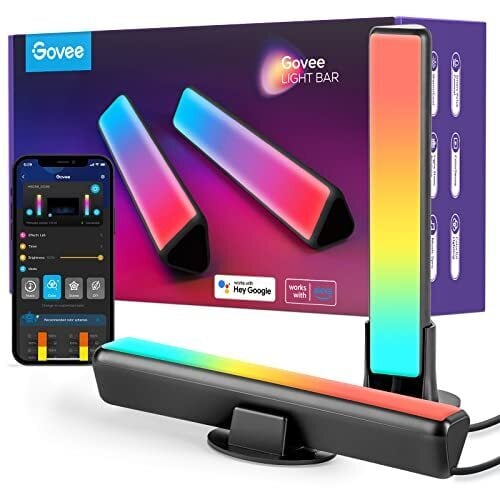
Your giftee may have the tech side of their battle station/home office locked down, but I bet they don’t have the aesthetics dialed in. Govee Smart LED Light Bars ($33) are programmable, colorful light bars work with Alexa and Google Assistant and can display light effects created from 16 millions colors. It even syncs with your music to provide trippy visuals.

A mini chainsaw

My lifestyle doesn’t involve cutting down trees, but I still need one of these miniature chainsaws. I mean, it’s a chainsaw, and it’s only six-inches long. This Dodowin mini chainsaw ($40) is battery powered, so no one will be accidentally cutting the cord. According to listing, it’s suitable for tree pruning, garden artistry, shrub trimming, forest logging, and wood cutting. They don’t mention it, but it’s also perfect for tiny Texas massacres.

A programmable macro keyboard

You know what computer fiends are missing in their lives? Knobs. This little $36 gadget lets you assign functions to four external knobs and 12 push buttons, so you can finally have a decent volume control, scrub through video smoothly, skip music tracks with a button push, and control any other function easily and physically. Perfect for gamers.

A laser measuring tool

You could use a tape measure like a caveman, or you could measure things with a frickin’ laser that fits in your pocket. This $40 gadget has an LED screen that’s easy to read and it doubles as a cat toy. But does it measure things? Goddamn right it measures things—big things, little things, middle-sized things—it doesn’t give a shit what you put in front of it, it will measure the hell out of it! (Up to 98 feet, anyway.)

The X10 MAX Bluetooth speaker

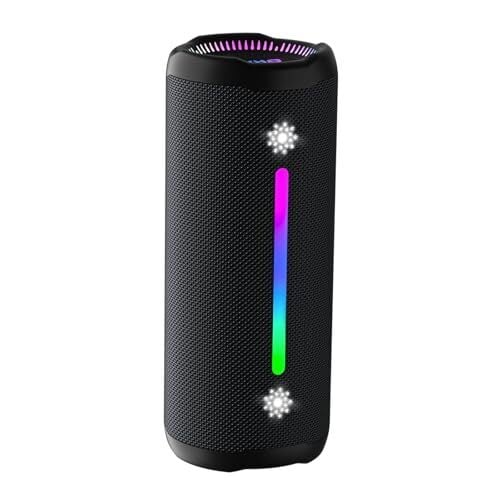
This compact bluetooth speaker has an Amazon rating of 4.7 stars out of 5, and it’s cheap—just $32. It’s waterproof, it sounds great, and it features a built-in light show with six different settings so you can check out cool visuals with your tunes.

These Bluetooth trackers

Keep track of the things in your life with these miniature tracking tags. Slip one in your wallet or your keys, and if you misplace them, you can hit a button and it will play a sound and/or give you a map that will lead you exactly to your missing item. Plus, it works in reverse, so you can hit a tag and it will ring your lost phone. I rely on these; no joke.

This wearable heating pad

If you want to keep warm during the holidays, you could do a lot worse than this portable neck, shoulder, and back warmer. There are three temperature settings and a safety shut-off feature, and it heats up really fast.

A desktop vacuum cleaner

This tiny little vacuum will keep your desktop dustfree. It sucks at 1000Pa of suction power for 400 minutes off a single charge, and it’s very easy to use: You put it in the palm of your hand and push it around. Cool!

This USB endoscope camera

It’s not like most people need an endoscope camera every day, but if the need for a tiny camera does arise—if you need to see why the engine isn’t working or if your wedding ring falls behind the oven or something—you’ll be glad you have this Anykit USB Endoscope Camera. It plugs right into your Android or iPhone and captures HD photos and video.

A foldable mini Bluetooth keyboard

Why have you been carrying your laptop around to coffeehouses like a chump when you can just connect this foldable mini Bluetooth keyboard from iClever to your phone, turning it into an ultra-portable productivity device? It even has a little trackpad!

A portable HD mini projector

Projectors have gotten really good over the last few years, and they prices have come down massively too. This mini projector costs only $40 and projects a 1080p image up to 201″ and even comes with a remote control and a projection screen.

The Amazon Echo Dot

If your giftee is into house automation within the Amazon ecosystem, you can’t go wrong with an Echo Dot. This compact smart speaker packs a surprisingly nice sound along with built-in Alexa, so it can be used for for playing music, setting timers, and controlling your smart devices.

The Roku Streaming Stick 4K

Alright, most people already have a media streamer attached to their televisions, but in case you’re gifting someone who doesn’t, the Roku Streaming Stick 4K is a solid choice. This no-frills device serves up 4K HD video, gives you access to hundreds of free and premium channels, and is easy to setup.

A wireless transmitter for your earbuds 

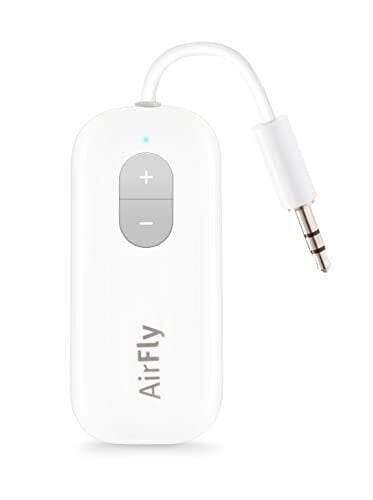
The Twelve South AirFly SE is an ultra-compact Bluetooth transmitter lets you plug into any device with a 3.5 mm jack, like in-flight entertainment systems, gym machines, or TVs, and stream audio wirelessly to your Bluetooth earbuds or headphones. Leave those accursed wired headphone in the drawer where they belong!

This portable tire inflator

A portable inflator is perfect for car emergencies or keeping your bike tires plump, and this one from Slime is a steal at only $50. It’s rechargeable, has an onboard pressure guage, an LED flashlight, and can inflate a car tire in only eight minutes. You will never go back to a manual air pump, I promise.

This versatile Anker Nano II USB charger

I am 100% sure whoever you’re giving a gift to will be able to use this compact, high‑power Anker charger. It has two USB‑C ports plus one USB‑A, letting you power up your laptop, phone, and tablet all at once, from one plug.