Engineer proves that Kohler’s smart toilet cameras aren’t very private

Kohler is facing backlash after an engineer pointed out that the company’s new smart toilet cameras may not be as private as it wants people to believe. The discussion raises questions about Kohler’s use of the term “end-to-end encryption” (E2EE) and the inherent privacy limitations of a device that films the goings-on of a toilet bowl.

In October, Kohler announced its first “health” product, the Dekoda. Kohler’s announcement described the $599 device (it also requires a subscription that starts at $7 per month) as a toilet bowl attachment that uses “optical sensors and validated machine-learning algorithms” to deliver “valuable insights into your health and wellness.” The announcement added:

Data flows to the personalized Kohler Health app, giving users continuous, private awareness of key health and wellness indicators—right on their phone. Features like fingerprint authentication and end-to-end encryption are designed for user privacy and security.

The average person is most likely to be familiar with E2EE through messaging apps, like Signal. Messages sent via apps with E2EE are encrypted throughout transmission. Only the message’s sender and recipient can view the decrypted messages, which is intended to prevent third parties, including the app developer, from reading them.

Read full article

Comments

EU Hits Meta With Antitrust Probe Over Plans To Block AI Rivals From WhatsApp

The EU has opened an antitrust investigation into Meta over a new WhatsApp policy that could block rival AI assistants from accessing the platform. Complaints from smaller AI developers triggered the probe, which could lead to fines of up to 10% of Meta’s global revenue if the company is found to have abused its dominance. Reuters reports: EU antitrust chief Teresa Ribera said the move was to prevent dominant firms from “abusing their power to crowd out innovative competitors.” She added interim measures could be imposed to block Meta’s new WhatsApp AI policy rollout. “AI markets are booming in Europe and beyond,” she said. “This is why we are investigating if Meta’s new policy might be illegal under competition rules, and whether we should act quickly to prevent any possible irreparable harm to competition in the AI space.”

A WhatsApp spokesperson called the claims “baseless,” adding that the emergence of chatbots on its platforms had put a “strain on our systems that they were not designed to support,” a reference to AI systems from other providers. “Still, the AI space is highly competitive and people have access to the services of their choice in any number of ways, including app stores, search engines, email services, partnership integrations, and operating systems.”


Read more of this story at Slashdot.

Cairn’s new release date is January 29, 2026

We’ve been monitoring the upcoming rock climbing game Cairn for several months, as have the many folks who’ve already enjoyed the demo — which has an impressive 99 percent rating on Steam. In September, developer The Game Bakers pushed back the game’s planned 2025 debut to give some extra time for polish. Today, the team dropped a fresh trailer announcing the revised launch date for the project. Cairn will be available on January 29, 2026 for Steam and PlayStation 5 for $30.

The Game Bakers have a solid track record of indie gems, often with a strong, unique sense of place and character. The survival-climbing experience seems like an excellent new topic for the team behind games including Haven and Furi. Cairn captures the intensity of winding your way up a mountain and paints a psychological portrait of the people who are drawn to tackling that mental and physical challenge. And if you find the basic gameplay isn’t difficult enough, there will also be a free solo mode for channelling your inner daredevil without ropes.

This article originally appeared on Engadget at https://www.engadget.com/gaming/cairns-new-release-date-is-january-29-2026-211508330.html?src=rss

Flying Through The Eye Of A Hurricane

This is a GoPro video captured by the “Hurricane Hunters” of the US Air Force’s 53rd Weather Reconnaissance Squadron as they fly through the eye of Hurricane Melissa. I don’t know about you, but I’ve known several Hurricane Melissas myself. Actually, every Melissa I’ve ever known. If you’re a Melissa I’m sure you’re the exception and not the rule though. It looks so peaceful inside, doesn’t it? Hard to believe its exterior is WREAKING HAVOC. Want to see a hurricane up close and personal? Come over to my place. My girlfriend isn’t a Melissa, but make no mistake, she leaves a trail of total destruction. “What are you writing?” Nothing dear! Just hitting the keys at random.

Ads Might Finally Be Coming to ChatGPT

Love it or hate it, there’s one thing that ChatGPT avoids that many other tech products include right now: ads. Everything from websites, streaming services, and games ship with ads—either as a subsidized choice, or as a requirement. Chatbots like ChatGPT, however, have so far managed without this ad model, which is somewhat refreshing. The chatbot might lower your critical thinking skills, but it won’t try to get you to buy something.

That might not be the case for long, however. Over the past week, reports have been circulating about OpenAI’s plans to incorporate ads into ChatGPT. These aren’t just based on rumors and conjecture, either: Engineer Tibor Blaho spotted references in ChatGPT’s Android app beta to an “ads feature,” that included things like “bazaar content,” “search ad,” and “search ads carousel.” More damning, a Wall Street Journal report indirectly confirms the company’s work to bring ads to ChatGPT—though more on that later.


This Tweet is currently unavailable. It might be loading or has been removed.

If OpenAI were to actually roll out ads in its chatbot, it would have huge implications for the platform. Ads, of course, drive a huge amount of revenue for internet-based products, in large part because advertisers can target users with pinpoint precision. Nike doesn’t want to pay for ads to show up on a random assortment of users’ screens; they want to pay for ads to show up on users who are likely to buy Nike products. That’s where all the data trackers collect about us across apps and websites comes into play—and ChatGPT knows a lot about its users.

Imagine a scenario in which you ask ChatGPT for a lasagna recipe, and an accompanying shopping list. Where the current iteration of ChatGPT might suggest “tomato sauce,” you’ve expressed an interest in high quality ingredients in the past. So, in between mozzarella cheese and lasagna noodles, ChatGPT plops an ad for Rao’s. Perhaps you would’ve spend $3 on the generic brand at the store, but now you’re spending potentially more than $10 on the sauce. Or, say you’re asking ChatGPT for advice on getting into running. An important factor here is the shoe you use, as a low-quality or old sneaker can lead to injury. Along with tips like “taking it slow” and “eating right,” you get a convenient link to Nike’s latest running shoe. How thoughtful.

ChatGPT ads might be delayed, but other tests are still ongoing

Before you get too worked up about this news, know that this isn’t necessarily happening just yet. While OpenAI might have serious intentions to brings ads to ChatGPT, the company appears to be pausing those efforts for now.

According to that Wall Street Journal piece, OpenAI CEO Sam Altman sent an internal memo to the company on Monday issuing a “code red.” The key objective? Improve ChatGPT, in response to Google’s latest Gemini models. Among the strategies here, which include improving personalization and performance, is to move resources away from lower priority efforts—including, most relevant to this discussion, advertisements.

But ads aren’t the only intrusion OpenAI is testing right now. As highlighted by TechCrunch, among the hullabaloo about traditional ad placements, critics are also going after the company for another test: app suggestions. Hyberbolic Labs co-founder Yuchen Jin posted on X about his experience here, where at the end of one response, ChatGPT presents a box to “Find a fitness class” and “Connect Peloton.” Jin isn’t a free user either: He’s a Pro subscriber, which costs $200 per month. One user responded to the thread, sharing that ChatGPT was routinely recommending Spotify, even though the user already subscribed to Apple Music.


This Tweet is currently unavailable. It might be loading or has been removed.

At first glance, this seems like ChatGPT’s much discussed ad test, but, according to OpenAI’s data lead Daniel McAuley, it isn’t. McAuley responded to Jin with the full explanation, detailing how this feature is designed to suggest an app based on the context of the conversation. Importantly, OpenAI doesn’t make any money off this app placement, so it’s really not an ad in the traditional sense of the word. The goal seems to be to provide access to an external app when relevant—if you’re talking about working out, maybe it’ll recommend the Peloton app; if you’re talking about finding new music, maybe it’ll send a link to Spotify. That could be helpful, but it could also be annoying, especially if the bot is suggesting apps and services you don’t actually use. Plus, the current implementation of this feature just feels like an ad, especially when it seems apparent the company is working on ad integrations for ChatGPT.

At this time, there doesn’t appear to be an imminent threat of ads in your ChatGPT experience, but just know you may see suggested apps as you chat with Chat.

CDC vaccine panel realizes again it has no idea what it’s doing, delays big vote

The panel of federal vaccine advisors hand-selected by anti-vaccine Health Secretary Robert F. Kennedy Jr. has once again punted on whether to strip recommendations for hepatitis B vaccinations for newborns—a move it tried to make in September before realizing it didn’t know what it was doing. The decision to delay the vote today came abruptly this afternoon when the panel realized it still does not understand the topic or what it was voting on.

Prior to today’s 6–3 vote to delay a decision, there was a swirl of confusion over the wording of what a new recommendation would be. Panel members had gotten three different versions of the proposed recommendation in the 72 hours prior to the meeting, one panelist said. And the meeting’s data presentations this morning offered no clarity on the subject—they were delivered entirely by anti-vaccine activists who have no subject matter expertise and who made a dizzying amount of false and absurd claims.

“Completely inappropriate”

Overall, the meeting was disorganized and farcical. Kennedy’s panel has abandoned the evidence-based framework for setting vaccine policy in favor of airing unvetted presentations with misrepresentations, conspiracy theories, and cherry-picked studies. At times, there were tense exchanges, chaos, confusion, and misunderstandings.

Read full article

Comments

This New Android Feature Protects You From a Scam Call While It’s Happening

Bank impersonation is a popular scam tactic, and one I’ve written about a lot. Fraudsters prey on people’s fear, confusion, and desire to protect their money, which may lead targets to hand over login credentials, make irreversible wire transfers, or provide other sensitive information without stopping to question their actions.

Android users in the U.S. will soon have extra protection against scams targeting their financial apps, preventing threat actors impersonating bank representatives from accessing data on their devices. Google’s in-call scam protection is designed to prevent users from sharing their screens with threat actors and help them avoid revealing their banking information.

How Android in-call protection works

Android’s scam protection kicks in if you are on a phone call with a number not saved in your contacts and attempt to open a participating financial app. You’ll get a pop-up warning that the call is likely a scam with a reminder not to make payments or share personal information and a button to end the call (and stop screen sharing). There’s also a 30-second delay on further action on your device, which Google says is designed to disrupt any sense of urgency.

Note that financial institutions must opt into in this feature—at this time, Google has specifically named Cash App and JPMorganChase as partners, though it indicates expansion to other popular fintechs and banks.

Google initially rolled out in-call protections for banking apps to UK users earlier this year as part of a larger package of security features announced ahead of Google I/O. That launch also included real-time scam detection alerts for calls and texts, improved theft protection via remote lock and identity check, key verifier for Google Messages, and device-level Advanced Protection (in addition to account-level settings).

Alongside the US pilot, in-call scam protections will now cover most major banks in the UK as well as financial apps in Brazil and India.

Bending Spoons Buys Eventbrite For $500 Million

Longtime Slashdot reader williamyf writes: The Italian company Bending Spoons seems to be on an acquisitions spree. Their recent acquisitions of AOL and Vimeo are not yet finalized, yet on Dec. 2 they announced they are buying Eventbrite, a company specializing in publicizing and organizing local events, for just half a milliard USD. Bending Spoons’ portfolio also includes other companies like Evernote and WeTransfer. Further reading: Private Equity Hipsters Are Coming For Your Favorite Apps (2024)


Read more of this story at Slashdot.

Researchers find what makes AI chatbots politically persuasive

Roughly two years ago, Sam Altman tweeted that AI systems would be capable of superhuman persuasion well before achieving general intelligence—a prediction that raised concerns about the influence AI could have over democratic elections.

To see if conversational large language models can really sway political views of the public, scientists at the UK AI Security Institute, MIT, Stanford, Carnegie Mellon, and many other institutions performed by far the largest study on AI persuasiveness to date, involving nearly 80,000 participants in the UK. It turned out political AI chatbots fell far short of superhuman persuasiveness, but the study raises some more nuanced issues about our interactions with AI.

AI dystopias

The public debate about the impact AI has on politics has largely revolved around notions drawn from dystopian sci-fi. Large language models have access to essentially every fact and story ever published about any issue or candidate. They have processed information from books on psychology, negotiations, and human manipulation. They can rely on absurdly high computing power in huge data centers worldwide. On top of that, they can often access tons of personal information about individual users thanks to hundreds upon hundreds of online interactions at their disposal.

Read full article

Comments

One of the Mac’s Best Productivity Apps Is Now on Windows

Raycast is one of the best things to happen to Windows. It brings one of my favorite Mac apps to Microsoft’s operating system. In fact, I’ve enjoyed using Raycast for Windows so much, I can’t see myself going back to the non-Raycast life. This app is free to download and use, though there is an optional paid subscription for those who want certain additional features.

What is Raycast?

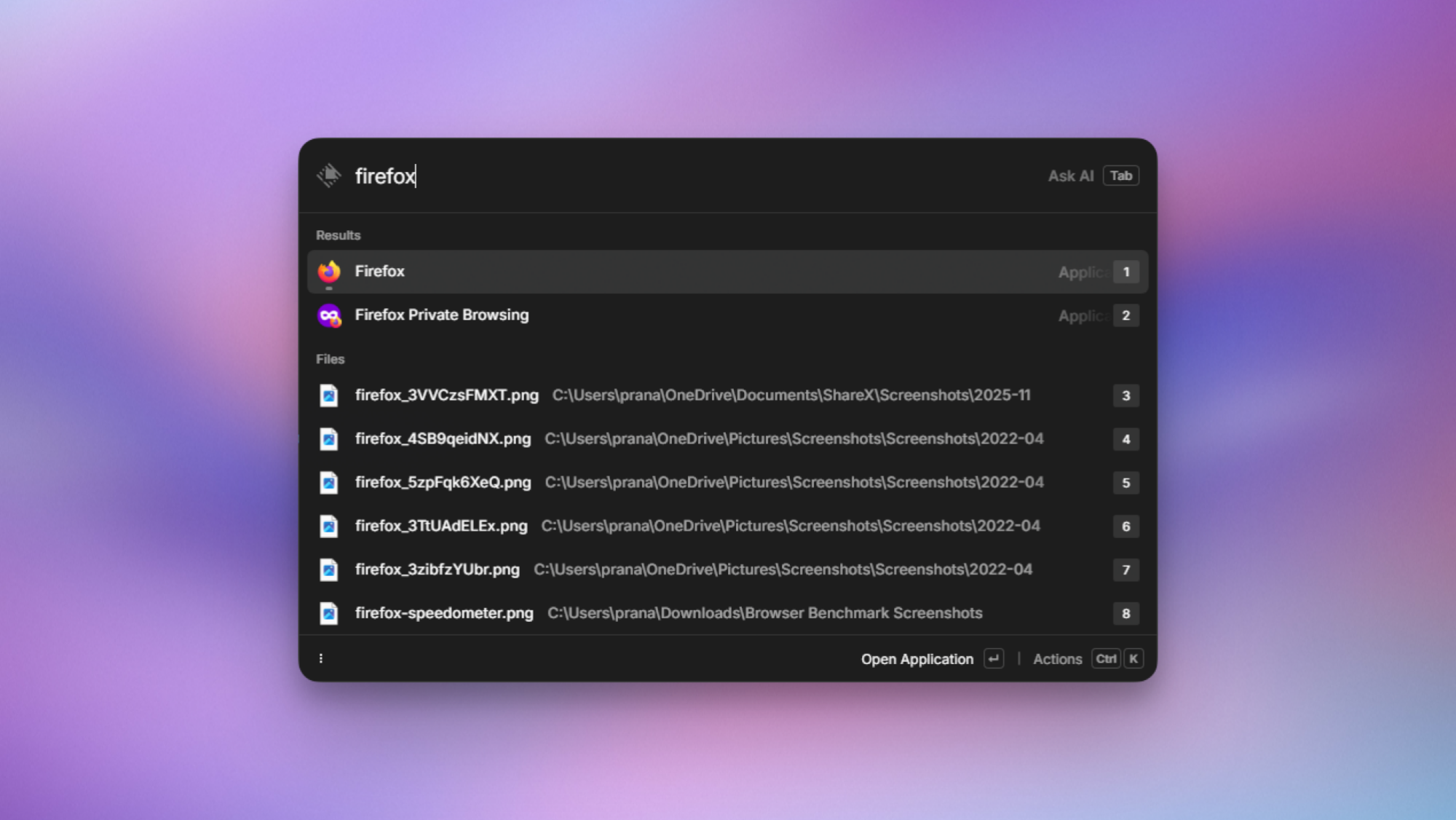
Raycast for Windows, launching Firefox.

Credit: Pranay Parab

At its heart, Raycast is an app that lets you search for apps and files stored in your computer. It stays hidden until you press its keyboard shortcut (Alt-Space on Windows). Once you do, Raycast appears as a floating search bar on the desktop. You can type anything you want to locate in the search bar, and Raycast forages through your computer to find it. I primarily use it as an app launcher since I have way too many apps on my Mac (and PC). Raycast helps me find the right app quickly and open it.

That’s just the surface layer of Raycast, though. You can use Raycast to search for files on your computer, retrieve items you’ve copied to the clipboard, send queries to ChatGPT (or other AI tools), convert currencies and units, and much more. All of these features are available under the same simple floating search bar.

Set up keyboard shortcuts in Raycast

Raycast for Windows, with a hotkey set up to open a webpage.

Credit: Pranay Parab

Raycast is designed for people who love keyboard shortcuts. You can totally use it without them, but you’ll enjoy it a lot more if you set up a few shortcuts of your own. As an example, if you open Raycast and press Tab, it switches to AI mode, and you can directly send your questions and requests to ChatGPT from Raycast.

Whenever you search for anything in Raycast, you’ll probably see a button called Record hotkey next to the results. This is your cue to set up a keyboard shortcut for that action, and doing so will allow you to get to it faster. You can also go to Raycast settings to find commonly used actions and record your preferred keyboard shortcuts for all of them.

Note that the Raycast app is still in beta on Windows, and during this trial period, you can use these AI features for free. Expect that to change, though, once it’s out of beta. If you want to keep using these features, the pro tier costs $8 per month for most AI models, but certain advanced AI models are only available in the $16 per month subscription tier.

What I use Raycast for on Windows

Raycast for Windows, showing currency conversion.

Credit: Pranay Parab

I use Raycast for a lot more than just launching apps on Windows. As someone who lives outside the US, converting units and currencies is a big part of my work day. Raycast’s workflow is quite seamless for this task. You can just type “$499” or any other number after the dollar sign, and Raycast automatically converts it to your local currency. You can also type something like “EUR499 to USD” and it’ll convert euros to the US dollar. I really like the fact that you don’t even have to press the Enter/Return key to see the converted currency. The moment you type a currency number, the result shows up without any further prompts.

You can also try other unit conversions with Raycast, eg: “100kg to lbs,” “800ml to fl oz,” “44 sqm to sqft,” etc. This helps me a lot when I’m ordering things from international websites that don’t always have dimensions, weight, or pricing available in units I’m used to.

Beyond this, I like using Raycast to store and view clipboard history. You can search for Clipboard in Raycast to access items you’ve copied, and the app even categorizes these items for you. You can search just for links, images, files, or email address you’ve copied, which makes it easy to quickly find specific items from your clipboard history.

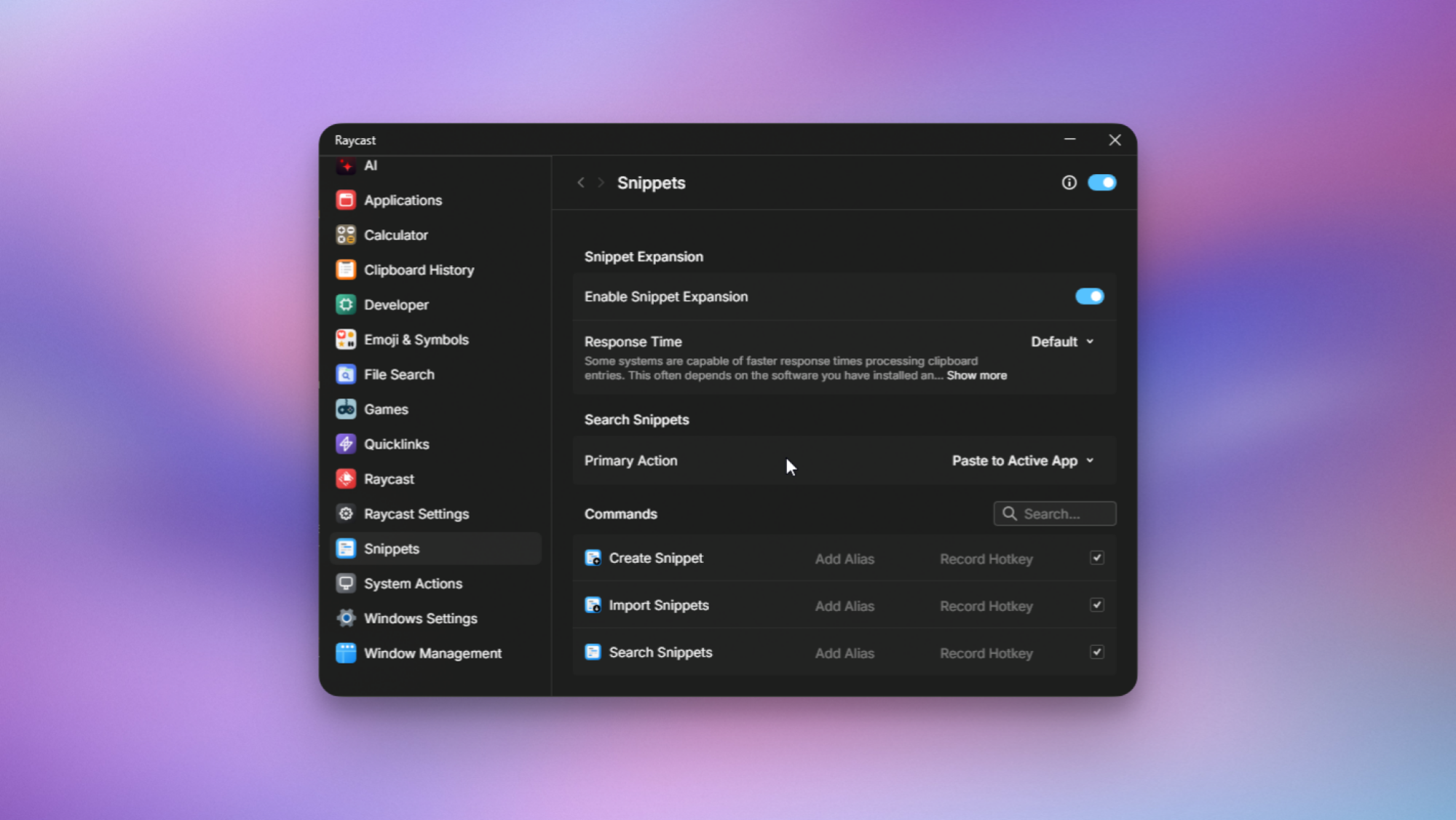
Raycast also supports many other things such as window management, emptying the recycle bin, restarting your computer, locking your PC, bookmarking links and opening them in specific browsers, and text snippets—which let you quickly create or copy bits of text or code. You can open Raycast, and press Ctrl-, (comma) to open its settings and explore all its features.

The limitations of Raycast for Windows

Raycast for Windows, showing text snippets.

Credit: Pranay Parab

Raycast only recently launched on Windows, which means there are a few things still missing from the macOS version. This includes the AI Chat feature (more advanced than the quick AI search available now), focus timers, the built-in notes feature, and support for more extensions. Many of its extensions were originally built only for macOS, so it’s going to take some time to bring them to Windows. The feature that I miss the most is the ability to sync your snippets, notes, chats, and other data across devices. This feature is yet to come to the Windows app, and I hope the developers change that soon.

Raycast is available on the Mac, iPhone, and now, Windows.

Why won’t Steam Machine support HDMI 2.1? Digging in on the display standard drama.

When Valve announced its upcoming Steam Machine hardware last month, some eagle-eyed gamers may have been surprised to see that the official spec sheet lists support for HDMI 2.0 output, rather than the updated, higher-bandwidth HDMI 2.1 standard introduced in 2017. Now, Valve tells Ars that, while the hardware itself actually supports HDMI 2.1, the company is struggling to offer full support for that standard due to Linux drivers that are “still a work-in-progress on the software side.”

As we noted last year, the HDMI Forum (which manages the official specifications for HDMI standards) has officially blocked any open source implementation of HDMI 2.1. That means the open source AMD drivers used by SteamOS can’t fully implement certain features that are specific to the updated output standard.

“At this time an open source HDMI 2.1 implementation is not possible without running afoul of the HDMI Forum requirements,” AMD engineer Alex Deucher said at the time.

Read full article

Comments

Russia reportedly bans Snapchat and FaceTime

Roskomnadzor, Russia’s federal agency for monitoring and censoring mass media, has blocked access to Snapchat and FaceTime in the country, Bloomberg reports, citing Russian news service Interfax. The bans were reportedly put in place because the platforms were used “to organize and carry out terrorist acts,” and commit fraud.

It’s not clear if either service is still accessible by using a VPN, but banning Snapchat and FaceTime fits with Russia’s crackdown on communication and social platforms that started after the country’s invasion of Ukraine in 2022. Facebook and X were blocked in March of that year, and Instagram was added to the ban list not long after. In 2024, the encrypted messaging app Signal was also banned, and more recently in July 2025, Russia threatened to block access to WhatsApp.

Engadget has contacted both Apple and Snap to comment on the Russian bans. We’ll update this article if we hear back.

Banning or restricting these platforms is a way to exert control over where and how conversation happens in Russia — and prevent the spread of “LGBT propaganda,” if you believe Roskomnadzor’s reasoning for banning Roblox — but it might also be an attempt to drive people to use “MAX,” a state-run super app that offers services like communication, banking and document storage. The app is part of a long-standing push to rely on Russia’s tech industry rather than foreign companies, and could potentially give the Russian government an easier method for surveilling its citizens, The New York Times reports.

This article originally appeared on Engadget at https://www.engadget.com/apps/russia-reportedly-bans-snapchat-and-facetime-194906404.html?src=rss

Valve Engineer Confirms Plan To Run Steam Windows Games On Arm & Even Phones

Valve Engineer Confirms Plan To Run Steam Windows Games On Arm & Even Phones
Valve has done a lot of work to support Proton, which is the compatibility layer that’s enabled Windows games to work smoothly on the Steam Deck, which also happens to be a Linux-based device. Unbeknownst to the rest of the world, though, is that the company was funding another project, called Fex, which aims to bring x86 games to Arm, according

My Favorite Amazon Deal of the Day: The Nintendo Switch 2 and ‘Mario Kart World’ Bundle

We may earn a commission from links on this page. Deal pricing and availability subject to change after time of publication.

The best deal of Cyber Monday is back: The Nintendo Switch 2 with Mario Kart World bundle, is back at Amazon after running out of stock very quickly. (It’s also in stock at Walmart.) The deal includes the new console with the new Mario Kart for the same price as the standalone console. You can get this one for $449 (down from $499)—the lowest price it has reached yet, according to price-tracking tools. (Note that you can only see the price once you’ve signed in and it’s in your cart, as Nintendo restricts retailers from promoting anything below the “minimum advertised price” of $499.) With Christmas on the way, this deal is likely to sell out fast again, so I’d advise ordering it sooner rather than later if you’re considering it.

This bundle deal is great, and likely the best one you’ll see for quite some time, judging by Nintendo’s previous deals. To put it into perspective, the OLED edition of the original Nintendo Switch is $400 right now, meaning you can get the new Switch 2 with Mario Kart for $50 more. The new console is also an upgrade in every way, according to Associate Tech Editor Michelle Ehrhardt’s Nintendo Switch 2 review. The ergonomics and design have improved, making it much better to hold and look at. The battery life has also improved, now with about 180 minutes of handheld playtime before the juice runs out.

A big plus is that the Switch 2 is backwards compatible, meaning you can play your old Switch games. Some Switch games have the ability to upgrade to the Switch 2 Edition by buying that game’s upgrade pack. This is especially worth it for games like The Legend of Zelda: Tears of the Kingdom, which will look better on the Switch 2.

There aren’t a lot of Switch 2 games out at the moment, but there are some classic Nintendo games to keep you busy until the library expands, like Donkey Kong Bananza, Kirby Air Riders, and Hyrule Warriors: Age of Imprisonment.

Microsoft ‘Mitigates’ Windows LNK Flaw Exploited As Zero-Day

joshuark shares a report from BleepingComputer: Microsoft has silently “mitigated” a high-severity Windows LNK vulnerability exploited by multiple state-backed and cybercrime hacking groups in zero-day attacks. Tracked as CVE-2025-9491, this security flaw allows attackers to hide malicious commands within Windows LNK files, which can be used to deploy malware and gain persistence on compromised devices. However, the attacks require user interaction to succeed, as they involve tricking potential victims into opening malicious Windows Shell Link (.lnk) files. Thus some element of social engineering, and user technically naive and gullibility such as thinking Windows is secure is required. […]

As Trend Micro threat analysts discovered in March 2025, the CVE-2025-9491 was already being widely exploited by 11 state-sponsored groups and cybercrime gangs, including Evil Corp, Bitter, APT37, APT43 (also known as Kimsuky), Mustang Panda, SideWinder, RedHotel, Konni, and others. Microsoft told BleepingComputer in March that it would “consider addressing” this zero-day flaw, even though it didn’t “meet the bar for immediate servicing.” ACROS Security CEO and 0patch co-founder Mitja Kolsek found, Microsoft has silently changed LNK files in the November updates in an apparent effort to mitigate the CVE-2025-9491 flaw. After installing last month’s updates, users can now see all characters in the Target field when opening the Properties of LNK files, not just the first 260. As the movie the Ninth Gate stated: “silentium est aurum”


Read more of this story at Slashdot.

Legendary 3dfx Voodoo2 GPU Spotted Running Quake 2 On Ryzen 9 9900X PC

Legendary 3dfx Voodoo2 GPU Spotted Running Quake 2 On Ryzen 9 9900X PC
Having a retro PC is awesome, because it lets you experience classic games as they were intended to be, on the original hardware. Maintaining one is a pain, though; beyond all the issues with using 25-plus-year-old hardware, you’ve also got to find space for it. What if you could just slap a Voodoo 2 into your current desktop and play some

Google Is Testing AI-Generated Headlines, and It’s Not Going Well

Take a look at the top of this article. See that headline? If it looks different than what you clicked on to get to this page, congratulations: Google might have chosen you to participate in its latest AI experiment: rewriting news headlines for some users in Google Discover.

Evidence of the new effort was first spotted by The Verge, as it seems writer Sean Hollister was affected by the update. Here’s what’s going on: When you swipe right on your Pixel or Galaxy home screen (or scroll down in the Google app on iPhone, or open up a new Chrome browser window with Google as your homepage), there’s now a chance the article previews you’ll see from Google Discover were actually generated by AI, rather than mirroring the headlines and/or descriptions handwritten by those articles’ actual authors and editors.

Sometimes, these AI headlines are just clunky or vague—one AI headline introduced another Verge story about specific AI initiatives within Microsoft as “Microsoft developers using AI,” which doesn’t tell you much, especially in the current tech landscape.

You can’t trust AI headlines

But more dangerously, these headlines can also get the facts of the story wrong. In Hollister’s case, his Google Discover fed him a headline saying “Steam Machine price revealed,” whereas the original article from Ars Technica simply said “Valve’s Steam Machine looks like a console, but don’t expect it to be priced like one.” Clicking through leads to an article with quotes from a Valve designer hinting that the upcoming PC/home console hybrid won’t have a subsidized price like most home consoles, which is not at all the same thing as an official price reveal.

Another headline Hollister saw said “Qi2 slows older Pixels,” which implies using a Qi2 charger on your phone could hurt its performance. The original article simply said that older pixels won’t be able to use the full extent of a Qi2 charger’s fast-charging.

Granted, mistakes with consumer tech headlines will probably only cause some momentary disappointment or confusion, or maybe a missed opportunity to buy the best charger for your phone. But imagine that misinformation applied to a story about something more serious, like the Luigi Mangione case. Considering previous attempts other companies have made to summarize the news with AI, it’s hardly unlikely.

Perhaps worst of all, it also seems these AI headlines can throw shade when it wasn’t intended, introducing a risk of libel. Recently, PCGamer wrote a cheeky story about Baldur’s Gate 3, covering gamers who discovered that they can use the Polymorph and Dominate Beast spells to recruit child NPCs to their cause who, thanks to real-world German laws, can’t die. You can imagine how that would be useful in a game, and hey, it’s all fiction, right? Unfortunately, Google’s AI headline chose to change PCGamer’s original “Child labor is unbeatable” into “BG3 players exploit children.” Yikes.

What’s going on with these Google AI headlines?

Both Hollister and I reached out to Google for comment, and were given the same response: The new headlines are part of a “small UI experiment for a subset of Discover users,” and follow up on similar AI previews introduced into Google Discover in October. Those previews featured short AI summaries of articles that users could expand to see more information (and even an AI headline), but didn’t outright replace existing, author-written headlines.

The new experiment “changes the placement of existing headlines to make topic details easier to digest,” which seems to be code for the AI headlines now being placed up-top, where you would expect the real headlines to be. I’m personally not part of the UI experiment, but Hollister reported he wasn’t able to see the actual headlines until he clicked through to the real articles.

How to tell if that Google Discover headline was written by AI

Obviously, there’s a number of problems with this test. The AI headlines could misreport the news, as they already have in Hollister’s case, or make false accusations. And unfortunately, since they’re right where actual headlines have been shown in the past, it’s totally understandable for a reader to think they were approved by the articles’ authors or editors. If a Discover headline looks fishy to you, there are three ways to identify whether it was written by AI.

  • Google’s AI is obsessed with making headlines shorter. All of the AI headlines Hollister saw were four words or less, and while we like to be concise here at Lifehacker too, I can say from experience that actual journalists and editors usually write headlines that are a bit longer than that.

  • None of Google’s AI headlines seem to capitalize anything but the first word. That’s a stark difference from most websites’ style guides. At Lifehacker, for instance, we use A.P. style, which capitalizes most words expect for articles like “the.”

  • You can tap “See more” under the Discover preview and check for a tag saying that it was “Generated with AI, which can make mistakes.” Articles using actual headlines won’t even have a “See more” button.

Unfortunately, there does not seem to be a way to opt out of these AI headlines, as Google did not provide me with one when I asked, instead simply reiterating that this is a “small UI experiment.” That means not everyone is seeing these for now., at least

As someone who made frequent use of Google Discover back before I moved to an iPhone, that’s still a major bummer. In the past, it’s been a convenient way to catch up on stories that were relevant to me without having to scroll social media or check multiple homepages, but I can imagine that having to scrutinize every headline to know whether or not it’s real will make things a lot rougher.

It’s also not great for journalists, who both rely on Google Discover for traffic, and could take the brunt of user ire about inaccurate headlines from readers who don’t realize a machine created them. As it is, I think the latter is the more likely outcome. But even if Google eventually works out the kinks with AI headlines, they could still hurt web traffic, potentially removing the incentive to click that is part of all good headline writing. Google will continue to use outside content to keep people on its platform, but the people behind that content will get fewer eyes on it.

(Of course, as always, if you want to get the most accurate idea of what an article says, it’s best to read it thoroughly before forming an opinion.)

Meta says it’s fixing its broken support system, with the help of AI

If you’ve ever had something go wrong with your Facebook or Instagram account, then you probably have a good idea of just how frustrating the support process can be. The company’s automated processes are so broken that some people have found that suing Meta in small claims court can be a more reliable way of getting help from the company.

Now, Meta says it’s trying to address some of these longstanding issues. In an update, the company acknowledged that its “support hasn’t always met expectations” but that a series of AI-powered updates should make it easier for people to get help. 

The company is rolling out a new “support hub” on Facebook and Instagram that is meant to bring all of its support features into one place. The hub will also have a new AI chat feature so users can ask questions about account issues or Meta’s policies. An in-app support hub might not be that helpful if you can’t access your account, though. A Meta spokesperson pointed to its external account recovery tool, which is meant to help people get back into their accounts. 

Recovering hacked accounts has long been a pain point for Facebook and Instagram users. But Meta says that it’s now improved the process with better email and text alerts. AI has also helped the company’s systems detect devices and locations you’ve frequently used in the past. “Our new account recovery experience adjusts to your particular situation with clearer guidance and simpler verification,” Meta writes. “We’ve also expanded recovery methods to include taking an optional selfie video to further verify your identity.”

Meta is also starting to test a new “AI support assistant” on Facebook that can provide “instant, personalized help” for issues like account recovery or managing your profile. It’s not clear how this will work, or if it will enable people to talk to an actual person who works for Meta. For now, the most reliable way to access live support is via a Meta Verified subscription, though many users report that the chat-based service isn’t able to help with more complex issues.

A Meta spokesperson said that the assistant is in the “early stages of testing” and is currently only available to some Facebook users globally. Those who are part of the test can find it via the app’s new support hub. 

According to Meta, these improvements have already shown some success in helping people get back into hacked accounts. The company says that this year it has “increased the relative success rate of hacked account recovery by more than 30% in the US and Canada.”

This article originally appeared on Engadget at https://www.engadget.com/social-media/meta-says-its-fixing-its-broken-support-system-with-the-help-of-ai-185348328.html?src=rss

ChatGPT hyped up violent stalker who believed he was “God’s assassin,” DOJ says

ChatGPT allegedly validated the worst impulses of a wannabe influencer accused of stalking more than 10 women at boutique gyms, where the chatbot supposedly claimed he’d meet the “wife type.”

In a press release on Tuesday, the Department of Justice confirmed that 31-year-old Brett Michael Dadig currently remains in custody after being charged with cyberstalking, interstate stalking, and making interstate threats. He now faces a maximum sentence of up to 70 years in prison that could be coupled with “a fine of up to $3.5 million,” the DOJ said.

The podcaster—who primarily posted about “his desire to find a wife and his interactions with women”—allegedly harassed and sometimes even doxxed his victims through his videos on platforms including Instagram, Spotify, and TikTok. Over time, his videos and podcasts documented his intense desire to start a family, which was frustrated by his “anger towards women,” whom he claimed were “all the same from fucking 18 to fucking 40 to fucking 90” and “trash.”

Read full article

Comments