India Proposes Charging OpenAI, Google For Training AI On Copyrighted Content

An anonymous reader quotes a report from TechCrunch: On Tuesday, India’s Department for Promotion of Industry and Internal Trade released a proposed framework that would give AI companies access to all copyrighted works for training in exchange for paying royalties to a new collecting body composed of rights-holding organizations, with payments then distributed to creators. The proposal argues that this “mandatory blanket license” would lower compliance costs for AI firms while ensuring that writers, musicians, artists, and other rights holders are compensated when their work is scraped to train commercial models. […]

The eight-member committee, formed by the Indian government in late April, argues the system would avoid years of legal uncertainty while ensuring creators are compensated from the outset. Defending the system, the committee says in a 125-page submission (PDF) that a blanket license “aims to provide an easy access to content for AI developers reduce transaction costs [and] ensure fair compensation for rightsholders,” calling it the least burdensome way to manage large-scale AI training. The submission adds that the single collecting body would function as a “single window,” eliminating the need for individual negotiations and enabling royalties to flow to both registered and unregistered creators.


Read more of this story at Slashdot.

After years of resisting it, SpaceX now plans to go public. Why?

SpaceX is planning to raise tens of billions of dollars through an initial public offering next year, multiple outlets have reported, and Ars can confirm. This represents a major change in thinking from the world’s leading space company and its founder, Elon Musk.

The Wall Street Journal and The Information first reported about a possible IPO last Friday, and Bloomberg followed that up on Tuesday evening with a report suggesting the company would target a $1.5 trillion valuation. This would allow SpaceX to raise in excess of $30 billion.

This is an enormous amount of funding. The largest IPO in history occurred in 2019, when the state-owned Saudi Arabian oil company began public trading as Aramco and raised $29 billion. In terms of revenue, Aramco is a top-five company in the world.

Read full article

Comments

Why RAM Prices Are Going Way, Way Up (and Why You Should Care)

We may earn a commission from links on this page.

RAM, also known as random-access memory (or just memory for short), is an important part of most electronics these days. It essentially allows programs to keep key information at the ready so they don’t have to dig through your storage (like your hard drive or solid state drive) to find it. RAM is in laptops, phones, tablets, gaming consoles, and even cars, and all apps rely on it at least a little bit.

Essentially, if your device has a computer in it, it probably comes with RAM equipped, or it’ll want you to install some before it’ll boot up. But that dependency has become a big problem recently. While RAM has historically been one of the cheaper components for home techies to buy, over the past few months, RAM has gotten much more expensive, going from an afterthought on many people’s budgets to something you have to save for.

There are a few reasons for that, but even if you’re not a hardcore PC builder and you’re not buying RAM outright, these price jumps could still affect you in the long term.

What happened?

Like with most tech shakeups these days, the big reason for the sudden explosion in RAM pricing is AI. Citing trade research firm TrendForce and Korean publication The Chosun Daily, Lifehacker sister site PCMag started reporting on shifting RAM prices in October, and it’s only gotten worse since.

According to these analysts and industry insiders, manufacturers have slowly been focusing more of their attention on RAM specifically meant for AI data centers, with Samsung and SK Hynix in particular prioritizing production of high bandwidth memory that consumer goods don’t use. Tom’s Hardware backed this up with its own reporting in October, saying that these companies have devoted what may be around 40% of global RAM output to a single AI project—OpenAI’s Stargate project. Those are two out of the three biggest RAM makers right now, and while all this was followed by a bombshell last week, the situation already didn’t look good as we entered fall, with a shortage beginning to affect consumer prices.

“This is insanity,” wrote one Reddit user in October, with more pessimism coming around Black Friday, when other users and even publications like other Lifehacker sister site Mashable noticed that some RAM was selling for as high as four-figures, during what was supposedly a sales season.

But the largest RAM price hikes hit at the start of December, following an announcement from the last remaining major RAM producer—Micron. The company, long known for its consumer-focused Crucial series, said it would be leaving the consumer RAM business in 2026 to focus on AI, bringing an end to Crucial’s 30-year history in the process. Since then, RAM prices across several products have jumped even higher, even as RAM producers report doubled profits over last year.

Essentially, as Gartner analyst Shrish Plant told The Verge, “If you are not a server customer, you will be considered a second priority for memory vendors.”

How expensive is RAM now?

While all computer component prices fluctuate, RAM has usually been among the cheaper ones, generally coming in under $100 for a respectable amount from a good brand, or closer to $150 for an upgrade. Those days, it seems, have gone out the window.

A streamer and TikToker I follow, Christian Divyne, recently posted that a RAM kit he bought in April for $90 is now over $400, and he’s not alone. I’ve seen this sentiment all over social media lately, so to check it myself, I went through PCMag’s list of the best RAM for gaming in 2025, and here are the price differences I found from August of 2025 to now.

While this is a small selection of RAM, it’s clear these higher prices are present across the whole industry. PCPartPicker, a popular site where PC building enthusiasts rate parts for their machines, currently says its highest rated RAM is $407, with competing memory often hitting similar highs. Essentially, it’s now difficult to find any RAM below $100, and most likely, you’ll need to pay two or three times more than you might have earlier in the year.

These price jumps are most apparent when buying RAM directly, which mostly affects PC builders, but others will likely feel the crunch soon.

How is more expensive RAM going to affect me?

So far, I’ve only focused on higher prices for people buying RAM outright, which mostly affects PC builders. But if you prefer to buy your tech pre-built, don’t assume that means you won’t end up paying more, too. Laptop, tablet, and phone makers all need to get RAM from somewhere, and as prices increase, they’ll also be affected.

Already, prices at companies like CyberPowerPC, which offers pre-built desktops, have gone up, and modular laptop maker Framework has announced that it will soon follow suit. Even Raspberry Pi, known for making cheap single board computers for home projects, was forced to raise prices on its most recent flagship, while calling out memory costs as the reason.

All of those products are aimed more at enthusiasts, sure, but consider them the canary in the coal mine. Leaker Moore’s Law is Dead recently suggested RAM prices could lead to another price hike for the Xbox, while Dell COO Jeff Clarke said in a recent earnings call that “the fact is, the cost basis is going up across all products.”

Some companies are doing their best to keep consumers from feeling the effects of the shortage. Bloomberg recently reported that Lenovo is currently stockpiling RAM to try to “strike a balance between price and availability” for consumers in 2026, while HP said it might limit the memory inside its devices, but could still end up having to raise prices.

In short, it’s a tough time to be buying tech, even if you’re more casual with your devices. And it might affect more than RAM, too—speaking to The Verge, Research VP at IDC Jeff Janukowicz suggested some companies might skimp on other components, like battery or display, to help avoid raising prices due to increased memory costs. He also suggested that more affordable devices, where corners have already been cut as much as possible, could end up seeing more price increases than others.

Will RAM prices go back to normal?

As Dell COO Jeff Clarke mentioned in that earnings call, this isn’t the first time RAM prices have fluctuated, but he did admit this particular bump is “unprecedented.” While I’d agree that’s true for memory, it does remind me of the graphics card price hikes that happened around the early 2020s.

Graphics card demand is still not a solved problem, as those components are also very useful for AI, but towards the start of the decade, it became very difficult for gamers to get their hands on GPUs, especially for close to MSRP. That was thanks to demand from cryptocurrency miners, which was high enough that Nvidia actually started making its cards worse at mining. Manufacturers reported thereafter that demand was drying up, largely in response to changes in how cryptocurrency works and lowered interest in cryptocurrency overall.

While the AI bubble hasn’t popped (yet), it’s possible RAM could follow a similar cycle if interest in AI starts to cool. Otherwise, it’ll be up to manufacturers to balance supply and demand.

Going back to Clarke’s comments, he said “I’d categorize it as demand is way ahead of supply.” On that note, while Micron is supposedly getting out of the consumer RAM game, Samsung and SK Hynix haven’t stayed silent on the issue.

As reported by Korean outlet Seoul Economic Daily, SK Hynix is planning to spend $500 billion to build new production plants, with the first set to open in 2027. The company also told The Verge that, concerning consumer products, it “is not considering to discontinue the related business.” So, supply could see a boost in coming years.

At the same time, it’s difficult to know for sure when the RAM shortage will clear up. Contrasting SK Hynix, Samsung recently said during an investor relations call (as translated by PCGamer and originally reported on by Tech Insight) that it won’t be “rapidly expanding facilities,” and will instead pursue a much harder to define plan of “maintaining long-term profitability.” Tech Insight took the opportunity to speculate that RAM prices could remain high through 2028.

In short, it’s clear that the market is still volatile, and that companies are still figuring out ways to address pricing. I can’t say for certain when RAM prices will drop again, but going on what those in the industry are saying, as well as similar issues with GPUs in the past, it seems like the key indicators here would be a reduced interest in AI, or increased production capacity.

What if I need to buy RAM now?

In the meantime, because so many electronics need RAM, you may find yourself needing to bite the bullet and buy during the shortage. If that’s the case, here are the best ways to buy RAM right now.

  • Buy prebuilt. While smaller prebuilt device manufacturers are already increasing prices, it’s clear that larger device makers like Lenovo are doing their best to keep their customers from feeling the shortage. Right now, Apple has yet to raise prices on MacBooks or the iPhone 17, and devices like the Pixel 10 and Microsoft Surface Laptop are actually on sale. Historically, buying a computer prebuilt instead of building it yourself has come at a premium, but during a component shortage, a large company is going to have more avenues to mitigate costs than you.

  • Use less RAM. While I wouldn’t suggest going for less than 8GB of RAM, most users shouldn’t need more than 16GB, even if they want to game. More headroom is good when you can get it, and while it’s been a good suggestion to err on the side of caution in the past, as prices get higher, it might be better to figure out the bare minimum you can skate by with for now.

  • Buy now, or choose to wait. This one sounds a bit contradictory, but basically, I wouldn’t expect RAM prices to normalize anytime soon. Take a look at your needs and figure out whether you need a new laptop, PC, phone, tablet, or game console anytime soon. If so, it might be worth going in on one now, before manufacturers like Dell, HP, or even Xbox have a chance to raise prices. If you think you can hold out for a few more years, though, it might be better off waiting to see how the situation plays out rather than trying to build during a shortage. Either way, make your decision soon, because you probably won’t want to be buying RAM as supply starts to shrink even further through 2026.

Qualcomm Acquires RISC-V Chip Designer Ventana Micro Systems

Qualcomm has acquired RISC-V startup Ventana to strengthen its CPU ambitions beyond mobile, “reinforcing its commitment and leadership in the development of the RISC-V standard and ecosystem,” the company said in a press release. CRN Magazine reports: The San Diego-based company said Ventana’s expertise in RISC-V, a free and open alternative to the Arm and x86 instruction set architectures, will enhance its CPU engineering capabilities and complement “existing efforts to develop custom Oryon CPU technology.” Financial terms of the deal were not disclosed.

Qualcomm, which has already been using RISC-V for some products outside the PC and server markets, said Ventana’s contributions will boost its “technology leadership in the AI era across all businesses,” indicating the broad impact expected by this acquisition. “We believe the RISC-V instruction set architecture has the potential to advance the frontier on CPU technology, enabling innovation across products,” Durga Malladi, executive vice president and general manager of technology planning, edge solutions and data center for Qualcomm, said in a statement. “The acquisition of Ventana Micro Systems marks a pivotal step in our journey to deliver industry-leading RISC-V-based CPU technology across products.”

Further reading: Qualcomm Is Buying Arduino, Releases New Raspberry Pi-Esque Arduino Board


Read more of this story at Slashdot.

The M5 MacBook Pro Just Got Its Biggest Discount Ever

We may earn a commission from links on this page. Deal pricing and availability subject to change after time of publication.

Apple released the latest 14-inch MacBook Pro with the powerful M5 chip this October, and ever since then, it has been steadily dropping in price—right now, it’s down to $1,349 (originally $1,599) for the base model. This new price is $50 cheaper than it was during Black Friday, when Lifehacker’s Senior Tech Editor Jake Peterson called it “a ridiculously good value.” At the time of this writing, Amazon is sold out of the base model, but it’s still available at Best Buy.

To be honest, this laptop is overkill for most people. The M4 MacBook Air is a more than capable laptop and will get the job done for under $800, but for those who need that extra oomph, like those who do media editing or complex programming, the MacBook Pro will be worth every penny. This is the first laptop Apple makes with the latest M5 chip, which offers significant upgrades in many aspects, like graphics performance compared to the M4.

In addition to performance improvements over the MacBook Air, the Pro model also has a fan, which the MacBook Airs don’t. This should help keep the machine’s temperature down and prevent performance hiccups.

This base model starts with a 10-core CPU and a 10-core GPU M5 chip, 16GB of RAM, and 512GB of storage. PCMag says this laptop is so powerful that you can play most games without issues in its “outstanding” review. If you’re looking for the one of the best laptops Apple has to offer, this is likely the best price you’ll see on it for some time.


Ubuntu Will Have Native AMD ROCm AI/ML and HPC Libraries In Next LTS Release

Longtime Slashdot reader MadCow42 writes: Canonical just announced that they’re packaging AMD’s ROCm libraries (for AIML and HPC with both data-center GPUs as well as desktop/laptop GPUs), directly into the Ubuntu Universe archive. You can run ROCm on Ubuntu today but you have to install it via a script from AMD and manually remove and reinstall for any upgrades or bug fixes. Having it in Ubuntu as a normal Debian package will make it much easier to install and also to maintain in the long run via normal apt tooling (‘apt upgrade’). This also means that ROCm can be an automatically-installed dependency for other packages, which doesn’t happen today.

And, interestingly, Canonical has committed to providing long-term-support for ROCm in Ubuntu — which is particularly exciting for edge and IoT devices that may have a long life in the field and need regular security patches and updates.


Read more of this story at Slashdot.

The NES game Jaws is getting a retro physical re-release on Switch and PS5

The year is 1987. Beverly Hills Cop II is the highest-grossing movie. “Walk Like an Egyptian” is the hottest song. The Iran-Contra scandal dominates American political headlines, while Konami’s Contra sucks up coins in arcades. But towering above them all is the watershed moment of Jaws arriving on the NES. (“This time there’s no escape!”, warned the box art.) Now, 38 years later, the 8-bit game is returning as a Limited Run Games physical re-release.

The retro release coincides with the Spielberg movie’s 50th anniversary. From December 19 to January 18, you can pre-order a physical copy for Switch and PS5.

It will be available in two physical editions: a standard (“Retro Edition”) one for $35, and a deluxe (“The Bigger Boat Edition”) one for $100. The latter adds an NES-inspired box, a physical CD of the game soundtrack, a keychain and — best of all — a pixelated shark lamp. Both versions include original and “enhanced” versions of the 1987 game.

Promo art for the Jaws NES reissue
Limited Run Games

The game is split mainly between a birds-eye view (where you pilot your boat around the map) and an underwater side view (where you harpoon the shit out of marine wildlife). Eventually, you’ll encounter Jaws. After several of these encounters, gradually diminishing his hit points, you’ll try to finish him off in a faux-3D perspective on the water’s surface. If you think this sounds like a minor variation of what you found in a handful of other licensed NES games from that era, you wouldn’t be wrong.

You can pre-order the Jaws re-release from Limited Run Games’ website, starting on December 19 at 10 AM ET. In the meantime, you can refresh your memory of the 8-bit game with the video below.

This article originally appeared on Engadget at https://www.engadget.com/gaming/the-nes-game-jaws-is-getting-a-retro-physical-re-release-on-switch-and-ps5-221052996.html?src=rss

Apple TV and Apple Music were down for some users

Apple Music and Apple TV were briefly down during outage, according to Apple’s System Status page. The outage was logged on Apple’s own system at around 2:53PM ET and affected both of the company’s streaming services, along with Apple TV’s Channels feature, until the company resolved the issue around 4:31PM ET.

On DownDetector, reports of issues with Apple TV and Apple Music first appeared right around 2:33PM ET, a little before Apple officially confirmed the outage on its own site. Only “some” users were affected by the outage, according to Apple, and anecdotally, multiple members of Engadget’s staff were still able to stream content while the services were reportedly out.

Engadget has reached out to Apple for more information on the outage and how many people were impacted. We’ll update this article if we hear back.

Apple relies on cloud services from third-party companies like Amazon, and is ultimately only as stable the data centers it’s paying for. In October 2025, the company was impacted by the same Amazon Web Services outage that took down services and apps like Alexa, Fortnite and Snapchat for hours.

Update, December 10, 5:09PM ET: Article and headline updated to reflect that the outage has been resolved.

This article originally appeared on Engadget at https://www.engadget.com/entertainment/streaming/apple-tv-and-apple-music-were-down-for-some-users-214425802.html?src=rss

How (and Why) I Use My Garmin Running Watch to Track Rests During Strength Workouts

We may earn a commission from links on this page.

The strength training mode in Garmin watches like the Forerunner 570 is a little confusing at first, but once you get the hang of it, it’s incredibly useful in the gym. Garmin handles rest timers better than any other wearable I’ve tried, and when combined with a third-party app called LiftTrack, you can even track your volume and PRs. I’ll lead you through how I use this workout mode, and how it’s helped me do more work in less time in the gym.

How to find strength workouts in Garmin Connect

A workout in Garmin Connect web

Credit: Garmin

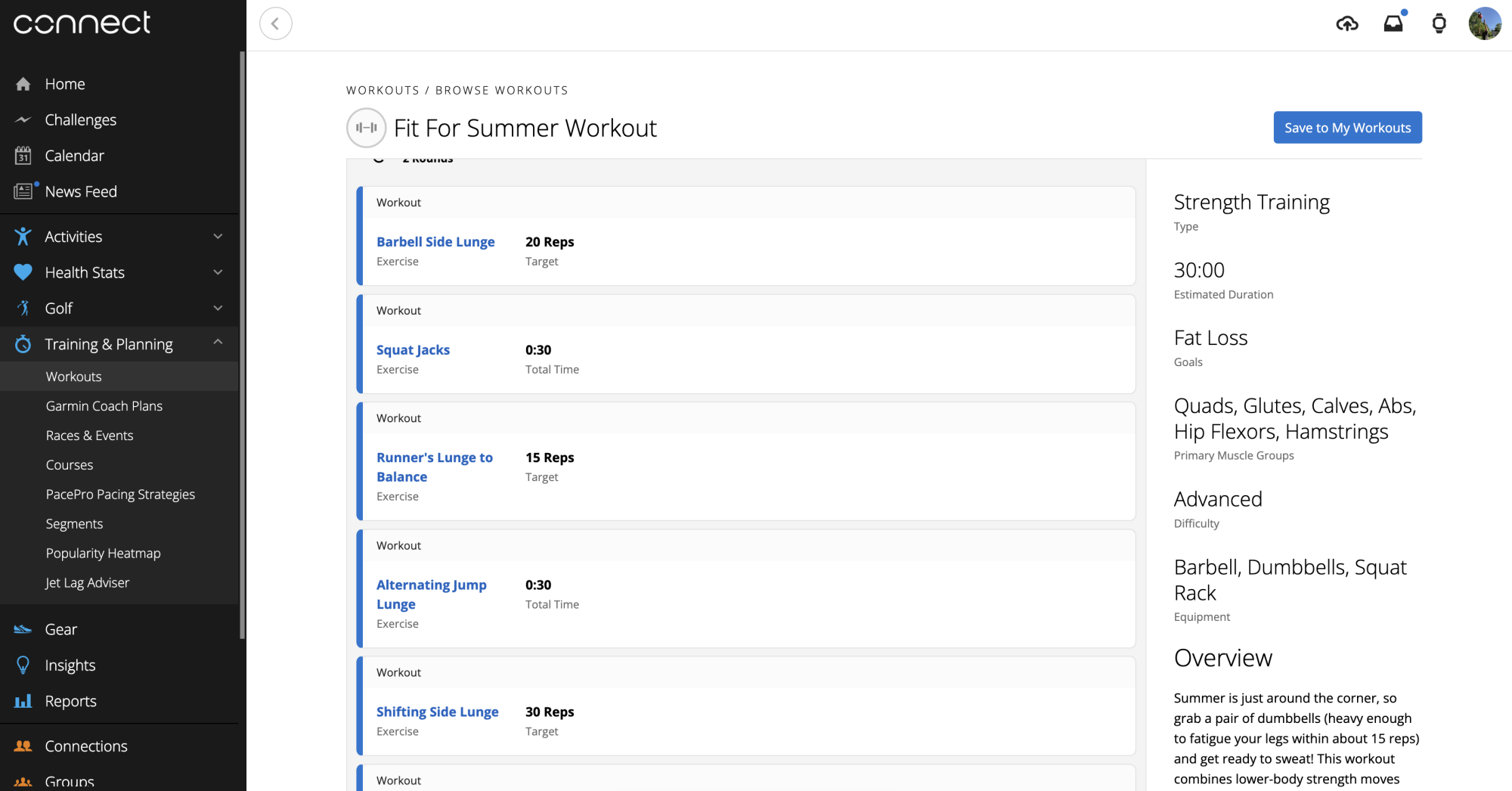
I’ll get into how to create workouts in a minute, but first I just want to let you know that there are some strength workouts already available for download, if you’d like to just select one and start doing it right now. Go to either your Garmin Connect app or to Garmin Connect on the web, tap Training & Planning, then Workouts, then Find a Workout. 

You’ll be able to choose workouts from a library, and you can search by type (including weights, yoga, and bodyweight cardio). Most of the workouts are short, simple, and don’t use much equipment. If you’re experienced at strength training, you’ll probably want to create your own workouts or use the coach feature, but these will get you started in the meantime.

screenshots of push/pull/legs program in Garmin Connect app

Credit: Garmin

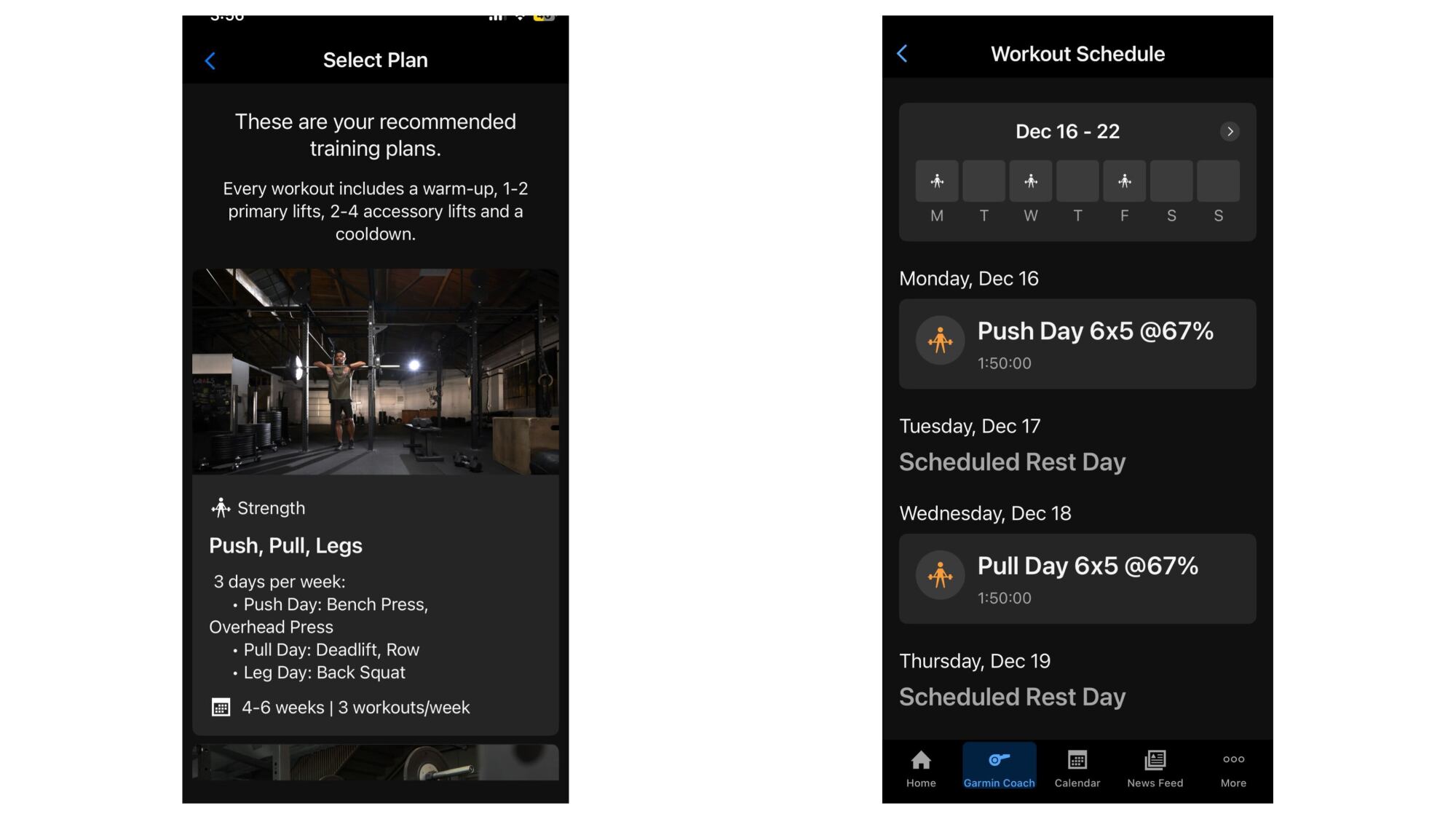
As for that coach feature, it works much like the adaptive running coach plans. You can read more here from Garmin, but basically you set it up by selecting Garmin Coach and telling it your goals and schedule. Workouts will then appear for you each day. The image above shows a Push/Pull/Legs workout programmed by Garmin Coach. It let me choose which workout happens on which day, had me set my max lifts as benchmarks (this program uses percentages), and even let me edit the workouts to swap exercises before finally putting them on my calendar.

How to create strength workouts in Garmin Connect

screenshot of a workout in the Garmin Connect workout builder, and then the same workout displayed on the watch

Credit: Beth Skwarecki/Garmin

I’m going to walk you through this step-by-step, because I was so confused the first time I tried to build a workout. Again, you can do this either on your phone or on the web. I usually end up creating my workouts on the phone, and it’s not hard once you get the hang of it. One tip, though: you can skip this whole process if you’re willing to install a third-party app. LiftTrack takes care of workout planning and syncs to your Garmin account, and you can read more about how to use that app here.

Go to the “More” menu on your phone (or the sidebar on web) and select Training & Planning, then Workouts, and then Create a Workout. From here, select Strength, and you’ll be given a skeleton of a workout with a warmup, cooldown, and one slot for an exercise. 

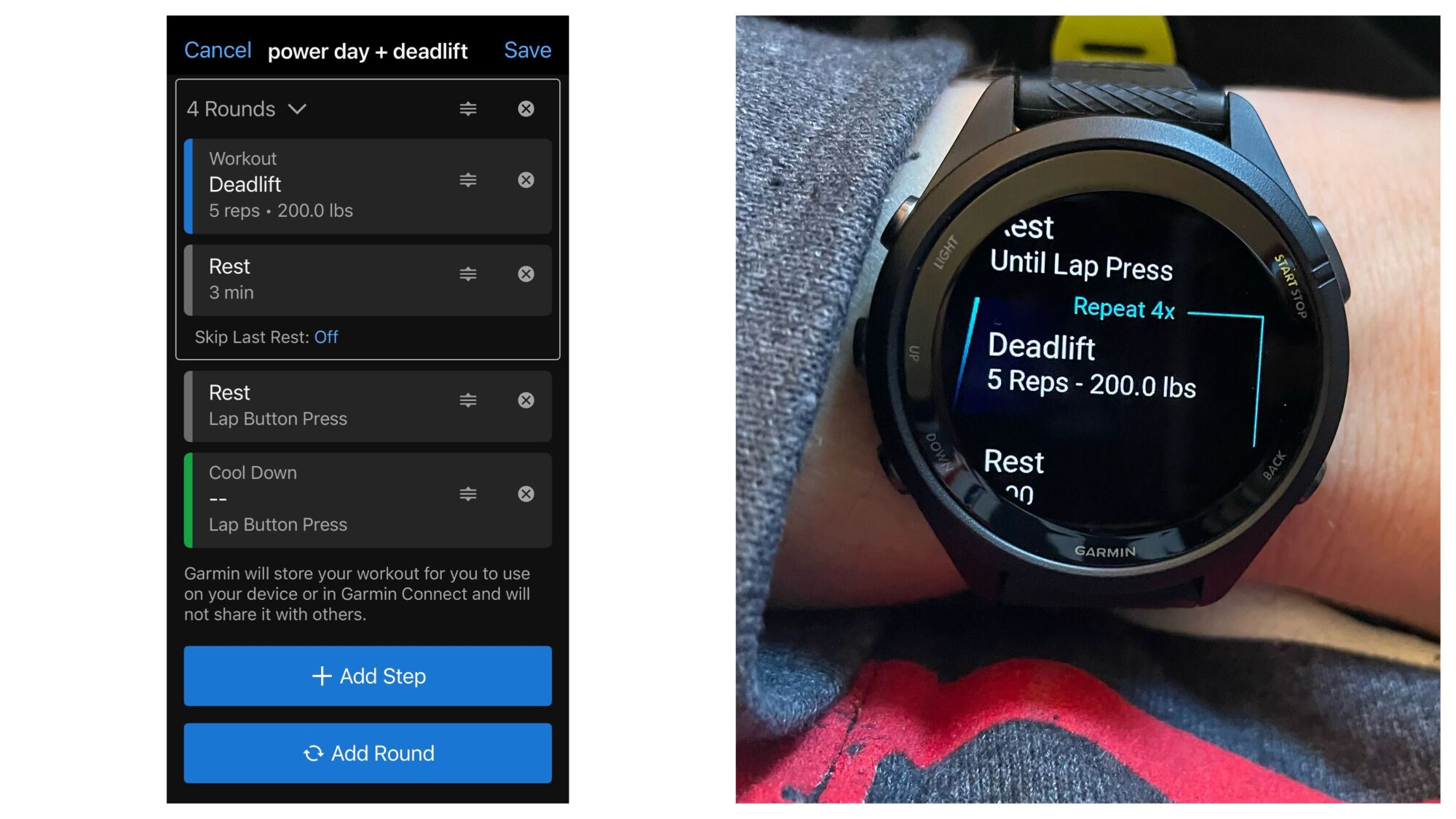
To start adding exercises, tap Add Round, which will give you a workout card and a recovery card, both in a little box that says “2 Rounds” at the top. Here’s what you do to turn this into a traditional sets-and-reps format (in this example, we want to do four sets of five deadlifts at 200 pounds):

  1. Tap the card that says workout. 

  2. Select an exercise (deadlift), a weight (200 pounds), and a target type. In this case, the target type will be Reps (five). Hit the arrow on the top left of the screen to return to the main workout editing page.

  3. For the recovery card, you’ll want to change that to Rest rather than Recovery. For that one, the target type should be Time. Let’s set it to three minutes. Return to the main workout screen again.

  4. Now, tap the dropdown at the top of the round and set it to the number of sets you want to do (four). If your watch supports it, you can select Skip Last Recovery to avoid the final rest period.

  5. Before you add another set, go to the bottom of the screen and tap Add Step. Change this new step to Rest (it will be outside of the repeat) and set the target to Lap Button Press.

Now you have a repeat that will give you four sets of five deadlifts with a three-minute rest timer in between. After you finish that, there will be a rest period that lasts until you press the lap button. This is to give you as much time as you need to find your equipment and set up for the next exercise. Continue adding repeats and steps as desired, and make sure to save the workout when you’re done.

How to send Garmin workouts to your watch

After creating a workout, it doesn’t automatically show up on your watch. You need to tap the “send to watch” icon that you’ll see on the top right of your screen when you’re looking at the workout. 

You can also schedule a workout (which will automatically send it to your watch for the scheduled day) by using the three dots menu to add it to your calendar. 

How to use a Garmin strength workout from your watch

There are a few ways to access the strength workouts, but here’s the easiest: When it’s gym time, hit the button that starts an activity, and rather than selecting Strength, scroll down until you find Workouts. Tap the one you want to do. 

Pay attention here: You’ll need to select the workout, tell it you want to do the workout, and start the workout. (Just keep pressing the select button until the workout actually begins.)

The exact details of which buttons do what will vary from watch to watch, but on a Forerunner, your top right button starts and stops the workout, and your bottom right button is a lap button. (During a timed rest, you can press the lap button to skip to the end of that rest and start the next set.) From the top right button, you can also skip a group of sets (say, if the squat rack was busy, you can skip squats) and then use the same menu later to View Skipped and add it back in. 

Why I like the strength training feature

I love using the strength workout feature for one main reason: the customizable timed rests. Rest is important in the gym because you’ll be able to lift more if you dial in the perfect rest time for each exercise. It’s easy to sit around scrolling on your phone between sets and realize too late that it’s been 10 minutes since you did your last deadlift. But when I program the workout as above, all I have to do is hit the lap button after my set. Three minutes later, my watch will buzz to let me know it’s time to do the next set. 

Pro tip: Set your rest timer for the longest time you might want to rest between sets. If you’re aiming for three to five minutes, set it for five minutes. If you’re ready to go after three, just hit the lap button to skip the remainder of that rest. 

You can also program exercises in other ways besides the traditional sets and reps. For example, set the Target Type to Time to do a five-minute density set. Or do EMOMs (every-minute-on-the-minute intervals) by putting just one card inside a repeat, and setting that card to a one-minute target time. You’ll get a beep at the top of each minute. 

The Garmin strength features I don’t use

I don’t worry too much about the weights or reps in the app, to be honest. By default, the watch will ask you after each set how many reps you did and how heavy the weight was. I’ve turned that feature off, and I don’t even bother to set rep or weight targets in the app. I use the workouts for timing, not to log the details of my workout. (I have a notebook for that.) 

I also haven’t found the automatic set detection or rep counting to be very useful. The watch is impressively good sometimes—how did it know I was doing pullups?!—but it’s just not good enough to be generally useful. It also doesn’t recognize a lot of the Olympic weightlifting exercises I do. And the rep counting? Sometimes OK, but more often useless. Again, I’d rather jot down my reps in that notebook than fiddle with selecting a number on my watch screen after each set. 

Meta is reportedly working on a new AI model called ‘Avocado’ and it might not be open source

Mark Zuckerberg has for months publicly hinted that he is backing away from open-source AI models. Now, Meta’s latest AI pivot is starting to come into focus. The company is reportedly working on a new model, known inside of Meta as “Avocado,” which could mark a major shift away from its previous open-source approach to AI development. 

Both CNBC and Bloomberg have reported on Meta’s plans surrounding “Avocado,” with both outlets saying the model “could” be proprietary rather than open-source. Avocado, which is due out sometime in 2026, is being worked on inside of “TBD,” a smaller group within Meta’s AI Superintelligence Labs that’s headed up by  Chief AI Officer Alexandr Wang, who apparently favors closed models.

It’s not clear what Avocado could mean for Llama. Earlier this year, Zuckerberg said he expected Meta would “continue to be a leader” in open source but that it wouldn’t “open source everything that we do.” He’s also cited safety concerns as they relate to superintelligence. As both CNBC and Bloomberg note, Meta’s shift has also been driven by issues surrounding the release of Llama 4. The Llama 4 “Behemoth” model has been delayed for months; The New York Times reported earlier this year that Wang and other execs had “discussed abandoning” it altogether. And developers have reportedly been unimpressed with the Llama 4 models that are available. 

There have been other shakeups within the ranks of Meta’s AI groups as Zuckerberg has spent billions of dollars building a team dedicated to superintelligence. The company laid off several hundred workers from its Fundamental Artificial Intelligence Research (FAIR) unit. And Meta veteran and Chief AI Scientist Yann LeCun, who has been a proponent for open-source and skeptical of LLMs, recently announced he was leaving the company. 

That Meta may now be pursuing a closed AI model is a significant shift for Zuckerberg, who just last year said “fuck that” about closed platforms and penned a lengthy memo titled “Open Source AI is the Path Forward.” But the notoriously competitive CEO is also apparently intensely worried about falling behind OpenAI, Google and other rivals. Meta has said it expects to spend $600 billion over the next few years to fund its AI ambitions.

This article originally appeared on Engadget at https://www.engadget.com/ai/meta-is-reportedly-working-on-a-new-ai-model-called-avocado-and-it-might-not-be-open-source-215426778.html?src=rss

Adobe Integrates With ChatGPT

Adobe is integrating Photoshop, Express, and Acrobat directly into ChatGPT so users can edit photos, design graphics, and tweak PDFs through the chatbot. The Verge reports: The Adobe apps are free to use, and can be activated by typing the name of the app alongside an uploaded file and conversational instruction, such as “Adobe Photoshop, help me blur the background of this image.” ChatGPT users won’t have to specify the name of the app again during the same conversation to make additional changes. Depending on the instructions, Adobe’s apps may offer a selection of results to choose from, or provide a UI element that the user can manually control — such as Photoshop sliders for adjusting contrast and brightness.

The ChatGPT apps don’t provide the full functionality of Adobe’s desktop software. Adobe says the Photoshop app can edit specific sections of images, apply creative effects, and adjust image settings like brightness, contrast and exposure. Acrobat in ChatGPT can edit existing PDFs, compress and convert other documents into a PDF format, extract text or tables, and merge multiple files together.

The Adobe Express app allows ChatGPT users to both generate and edit designs, such as posters, invitations, and social media graphics. Everything in the design can be edited without leaving ChatGPT, from replacing text or images, to altering colors and animating specific sections. If ChatGPT users do want more granular control over a project they started in the chatbot, those photos, PDFs, and designs can be opened directly in Adobe’s native apps to pick up where they left off.


Read more of this story at Slashdot.

Apple TV and Apple Music are down for some users

Apple Music and Apple TV are experiencing an outage, according to Apple’s System Status page. The outage was logged on Apple’s own system at around 2:53PM ET, and is currently affecting both of the company’s streaming services, along with Apple TV’s Channels feature, which lets you subscribe to and watch other streaming services inside the Apple TV app.

Only “some” users are affected by the outage, according to Apple. Anecdotally, multiple members of Engadget’s staff were still able to stream content as usual. On DownDetector, reports of issues with Apple TV and Apple Music first appeared right around 2:33PM ET, a little before Apple officially confirmed the outage on its own site.

Developing…

This article originally appeared on Engadget at https://www.engadget.com/entertainment/streaming/apple-tv-and-apple-music-are-down-for-some-users-214425626.html?src=rss

Yep, Apple Music and Apple TV Are Down

If you picked up your iPhone to round out your Apple Music Replay for the year, or turned on your TV to watch a show like Pluribus, you might have noticed something odd: Neither service is working. It’s not just you: Apple Music, Apple TV, and Game Center are currently down.

That’s directly from Apple’s “System Status” website, which tracks all of Apple’s web-based services and identifies which ones may be experiencing problems. While most of Apple’s services, like the App Store, Find My, and iMessage, are all “Available,” four of these services are experiencing an outage: Apple Music, Apple TV, Apple TV Channels, and Game Center.

If you click on each, you can see the service’s full status report:

  • Apple Music – Outage

    Today, 2:53 PM – ongoing

    Some users are affected

    Users may be experiencing intermittent issues with this service.

  • Apple TV Channels – Outage

    Today, 2:53 PM – ongoing

    Some users are affected

    Users may be experiencing intermittent issues with this service.

  • Apple TV – Outage

    Today, 2:53 PM – ongoing

    Some users are affected

    Users may be experiencing intermittent issues with this service.

  • Game Center – 1 Outage, 1 Resolved Issue

    Outage: Today, 2:53 PM – ongoing

    Some users are affected

    Users may be experiencing a problem with this service. 

    Resolved Issue: Today, 8:43 AM – 9:14 AM

    Some users were affected

    Users may have experienced a problem with this service.

It’s not clear what is causing the outages, though they all went down at 2:53 p.m.. (Apple doesn’t specify, but I imagine that’s ET.) This isn’t the first time this has happened, of course. In fact, Apple Music was down earlier this year, though it was actually still working for me when Apple said the outage was active.

That appears to be the situation today, as well. Each report says “some users are affected,” not all. As it happens, Apple Music is working on my Mac, and I’m able to stream the free pilot episode of Pluribus without issue.

Apple will likely get these services back up and running for affected users. In the meantime, if your Apple Music or Apple TV won’t cooperate, this is likely the cause.

Instagram Is Finally Letting You Control the Reels You See

After years of suffering from a crippling TikTok addiction, I decided enough was enough: I quit the app cold turkey and deleted it from my phone. Then, I discovered Instagram Reels, and my attention span hasn’t been the same since.

TikTok’s algorithm is infamous, but we don’t give Instagram’s enough credit. This platform is addicting. I hardly use the app to keep up with friends and family anymore: Reels grabs my attention and doesn’t let go, and before I know it, it’s midnight, and I’ve done nothing with my evening. How many videos did I watch? What did I even watch? Whatever Meta has going on in that algorithm is dangerous stuff.

You can influence the algorithm, of course: The decisions you make in the app—likes, comments, watch time, sharing—tell the algorithm which videos you like, which you don’t, and inform its fraction-of-a-second decisions about what to show you next. But until now, you haven’t been able to see what’s driving those decisions. You’re kind of flying blind—you can try to steer the algorithm in a new direction, but you’ll never know exactly what direction you’re really going in.

That’s now changing. As reported by Wired, Meta is rolling out a new tab for Reels viewers that will let us see why the algorithm is delivering us these particular videos. This tab, called, appropriately, “Your Algorithm,” is now rolling out, first in the U.S., but soon to the rest of the world—at least, only to English speakers. It seems reminiscent of TikTok’s “Manage Topics” feed, which lets you adjust the content types that appear in your For You feed.

How “Your Algorithm” works on Instagram

When “Your Algorithm” hits your phone, you’ll find it in the top right corner of the Reels feed: two lines with heart icons placed on each. (I had to update the app and force quit it a couple times to get it to appear.) Once you open this tab, you’ll see a short summary of the type of content the algorithm says you’ve liked recently. In Meta’s example, it says, “Lately you’ve been into creativity, sports hype, fitness motivation, [and] skateboarding.” Mine says, “Lately you’ve been into classic video games, laughing at comedy clubs, and making beats in the studio.”

Beneath this summary, you’ll find the “What you want to see more of” section. Here, you can choose specific content categories you’d like to appear in your feed more often. Instagram will populate some choices here based on your past interests—Meta’s example from above shows things like “Sports,” “GRWM,” “Thrifting,” and “Horror movies”—but you can tap an “Add” button to contribute your own requests. You can tap any of these content types to find the option to watch Reels in that category, in case you want to test drive any before locking in your choices.

Beneath this, you’ll find “What you want to see less of.” This is the same concept, but the reverse: You can choose any content types you don’t want in your feed anymore. If you’re sick of seeing hiking videos, but Instagram continues to show them to you, here’s your chance to directly tell the algorithm to cut it out.

If you tap the three dots in the top right, you’ll find some shortcuts to existing content controls, too, like whether to suggest political content on your feed, “sensitive” content controls, and specific words and phrase filters, to name a few. You can also tap the share button to share your algorithm summary to your story. I’m not sure who would want to do that, but I guess I shared my summary here, so who am I to judge.

Meta’s changing content controls

Wired highlights how these changes come as the European Commission is pushing Meta to present more data controls to EU users: These users have so far been able to pay to not see ads, but since the European Commission didn’t think that was enough, Meta will allow users to choose whether to allow all their data to be used for personalized ads, or only a small percentage.

That’s not happening here in the U.S., but that doesn’t mean Meta is staying the same, either. “Your Algorithm” is launching as Meta is facing criticism over how it handles younger users on its platforms. Reports suggest Meta understands how addictive its apps are, especially to teens, and the company’s internal policies for chatbot interactions with minors was, frankly, appalling. The company has rolled out Teen Accounts across apps like Instagram and Facebook, which offer limits on communications and interactions, and new AI parental controls are also on their way. “Your Algorithm” seems to be the latest in a string of efforts to make it easier for users to control the experience on Meta platforms. Theoretically, you could even use these controls to make your Reels experience less addicting.

Those are all good developments as far as I’m concerned, but I fear there’s still quite a lot of work to do to make Meta’s products—as well as many other social media products—less addictive, and, overall, better for us. Case in point: I opened the app to test out “Your Algorithm,” and not only did I not find it at first, I ended up losing five minutes of my life watching the first video that appeared in my feed. I need to delete Instagram from my phone.

Conservative attacks on NPR and PBS continue with call to take FCC licenses

A conservative group yesterday urged the Federal Communications Commission to take licenses away from NPR and PBS stations and let other entities use the spectrum. The request came from the Center for American Rights (CAR), a nonprofit law firm that has played a prominent role in the news-distortion investigations spearheaded by FCC Chairman Brendan Carr.

“In the wake of the wind-down of the Corporation for Public Broadcasting and the end of federal funding for NPR and PBS, the Center respectfully suggests that the Commission open an inquiry that looks at the future of ‘public’ broadcasting in that new environment,” a Center for American Rights filing said.

The CPB is set to shut down after Congress approved President Trump’s request to rescind its funding. The Center for American Rights said the CPB shutdown should be used as an opportunity to reassign spectrum used by NPR and PBS stations to other entities.

Read full article

Comments

The Newest Amazon Echo Show Is Almost $50 Off

We may earn a commission from links on this page. Deal pricing and availability subject to change after time of publication.

The wall-mounted Amazon Echo Show 15 has built-in Fire TV, but it also functions as a customizable family hub that keeps you on track with calendars, lists, and more. Right now, it’s $254.99 (originally $299.99), its lowest price on Amazon to date, according to price-tracking tools.

The newest generation Amazon Echo Show features a bright 15.6-inch display and a remote control that lets you navigate the Fire TV interface and control media playback. It’s well-suited for mounting in an office, kitchen, or living room where you need a home-organization hub that hangs easily like a picture (it also doubles as a digital picture frame). It also makes for a helpful alternative to a laptop or tablet for comfortable video calling with a wide field of view, 3.3x zoom, and a 13 MP camera.

Like all Echo Show devices, the experience is centered around Amazon’s Alexa, so it’s better for those already in the Amazon ecosystem. It comes complete with smart home controls and widgets that make it more capable as a shared household device. It also supports multiple profiles, recognizing users by voice or face using the camera. This PCMag review notes that although the Fire TV interface is capable and the speakers are louder than the previous generation, they could be clearer and more dynamic.

Still, even though sound quality isn’t perfect, the Amazon Echo Show 15 performs well as a productivity-forward, centralized smart display rather than a smart TV used solely for entertainment (unless you want to add an external speaker to the larger screen model, which is 13% off right now).

A new open AI coding model is closing in on proprietary options

On Tuesday, French AI startup Mistral AI released Devstral 2, a 123 billion parameter open-weights coding model designed to work as part of an autonomous software engineering agent. The model achieves a 72.2 percent score on SWE-bench Verified, a benchmark that attempts to test whether AI systems can solve real GitHub issues, putting it among the top-performing open-weights models.

Perhaps more notably, Mistral didn’t just release an AI model, it released a new development app called Mistral Vibe. It’s a command line interface (CLI) similar to Claude Code, OpenAI Codex, and Gemini CLI that lets developers interact with the Devstral models directly in their terminal. The tool can scan file structures and Git status to maintain context across an entire project, make changes across multiple files, and execute shell commands autonomously. Mistral released the CLI under the Apache 2.0 license.

It’s always wise to take AI benchmarks with a large grain of salt, but we’ve heard from employees of the big AI companies that they pay very close attention to how well models do on SWE-bench Verified, which presents AI models with 500 real software engineering problems pulled from GitHub issues in popular Python repositories. The AI must read the issue description, navigate the codebase, and generate a working patch that passes unit tests. While some AI researchers have noted that around 90 percent of the tasks in the benchmark test relatively simple bug fixes that experienced engineers could complete in under an hour, it’s one of the few standardized ways to compare coding models.

Read full article

Comments

Spotify’s new playlist feature gives users more control over their recommendation algorithm

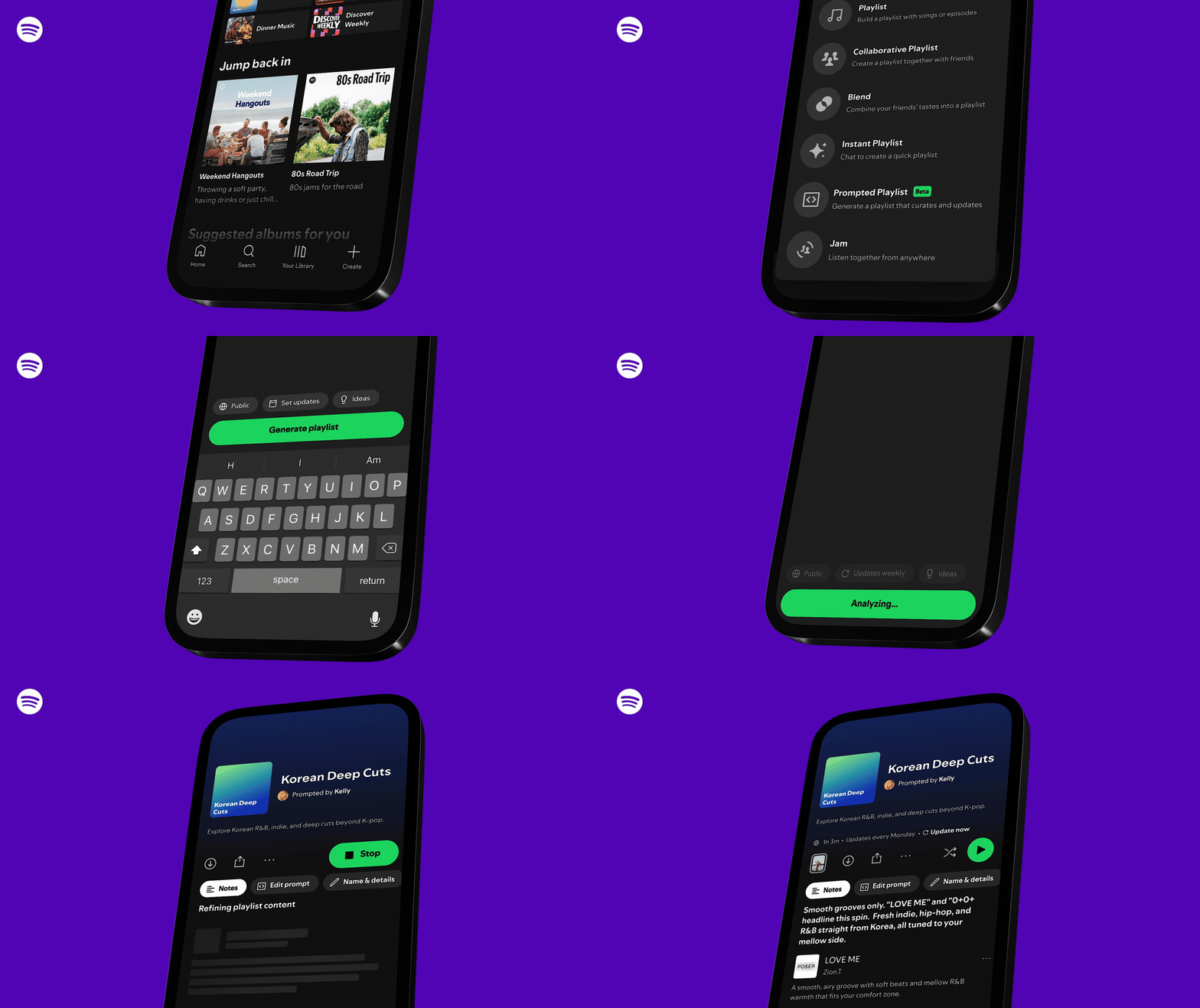
Spotify is attempting to give users more control over the music the streaming service recommends with a new playlist feature called “Prompted Playlist.” The beta feature is rolling out in New Zealand starting on December 11, and will let users write a custom prompt that Spotify can use — alongside their listening history — to create a playlist of new music.

By tapping on Prompted Playlist, Spotify subscribers participating in the beta will be presented with a prompt field where they can type exactly what they want to hear and how they want Spotify’s algorithm to respond. And while past AI features took users’ individual taste into consideration, Spotify claims Prompted Playlist “taps into your entire Spotify listening history, all the way back to day one.” 

A gif showing how users will create a new Prompted Playlist.
Prompted Playlist will exist alongside Spotify’s other playlist features.
Spotify

Prompts can be as broad or specific as users want, and Spotify says playlists can also be set to automatically update with new songs on a specific cadence. An “Ideas” tab in the Prompted Playlist setup screen can provide suggestions for users who need inspiration for their prompt. And interestingly, Spotify says each song in the playlist will be presented with a short description explaining why the algorithm chose it, which could help direct future fine-tuning.

If this all sounds familiar, it’s because Spotify has already tried AI-generated playlists in the past. The difference here, besides Spotify framing the new feature as giving users more “control,” is the detail of the prompts, the depth of user data Spotify is applying and the options users will have to keep playlists up-to-date. Prompted Playlist is only available in English for now, but Spotify says the feature will evolve as it adds more users.

Spotify isn’t the first company to offer users more direct control over how content is recommended to them. Meta has recently started experimenting with algorithm-tuning options in Threads and Instagram, and TikTok lets users completely reset their For You page to start fresh. The irony of all these features is that algorithm-driven feeds were supposed to be able to recommend good music, posts and videos without additional prompting. Now that prompting is being pitched as a feature, rather than extra work.

This article originally appeared on Engadget at https://www.engadget.com/entertainment/music/spotifys-new-playlist-feature-gives-users-more-control-over-their-recommendation-algorithm-203237903.html?src=rss

Google Maps Will Now Automatically Save Your Parking Spot on iPhone

Forgetting where you parked your car isn’t just a sitcom trope—though it does make for classic TV. Even in the age of the smartphone, it’s all too easy to walk away from your car and retain zero memory of where you left it. As it happens, Google Maps has a solution—provided you have an iPhone.

So long as you’re running the app on an Apple device, Google Maps can automatically remember where you parked and display that information on the map. There’s no need to mark the location yourself, tell the app to save your spot, or take a picture of the cross streets in case you forget: You can simply glance at the screen to find a “You parked here” label.

The thing is, while some are reporting this feature is relatively new to them, others suggest it’s been out for a while. What gives?

How Google Maps automatically saves your parking location on iOS

This feature works if you connect your iPhone to your car, whether via Bluetooth, CarPlay, or a USB cable. When you disconnect your iPhone from your car, Google Maps will assume you’ve parked, and will automatically mark that location on the map. The feature will also work if you give Google Maps permission to access your Motion & Fitness data, which allows the app to tell when you’ve started and stopped driving. (You can check on this setting from Google Maps’ in-app settings: Head to Navigation, then, under “Automatically save parking,” tap Let maps use your motion to save your parking.)

You can also choose to set Google Maps’ location permissions to “Always,” which gives the app persistent access to your location data, and also lets it figure out when you’ve stopped your car. You can change this option on your iPhone by navigating t0 Settings > Privacy & Security > Location Services > Google Maps.

Is this feature actually new?

This feature is genuinely great, and I’m happy Google Maps supports it—even if Android users are inexplicably being excluded for now. But you might also be wondering to yourself, wasn’t this already a feature? It doesn’t sound all that new. Yet you might have even seen a flurry articles like this one today, all reporting on this “new” Google Maps parking feature.

As it turns out, the answer is a bit complicated. The coverage today all references this announcement on LinkedIn from Google Maps senior product manager Rio Akasaka—only that post is, according to LinkedIn, a month old. Some of the comments are more recent, but others appear to be from the original posting date.

Potentially adding to the confusion, other navigation apps, like Apple Maps, already support automatically saving your parking spot, and while Google Maps has also had an option to save your parking spot for some time, it previously wasn’t automatic. If you wanted the app to remember where you stopped, you needed to tap your blue dot on the map and choose “Save your parking.” That’s how it still is on Android, since the automatic feature only works on iOS.

Looking through the comment sections on articles from outlets like The Verge or MacRumors, some users insist they’ve had this feature for some time—well before that month-old LinkedIn announcement. This commenter says they’ve had the feature for years, while this one claims they’ve had it for “ages.” So what gives? Have at least some iPhone users have had this feature for years? It is possible Google has been testing out the feature with smaller subsets of users and only recently rolled it out en masse, but whether or not that actually happened is unclear at this time.

I’ve reached out to Google for clarification about the timeline of this feature’s implementation, and I will update this article if I get an answer. Until then, I can only hope Google is actively working on rolling out the feature to Android, as that really would be something new.

Cable channel subscribers grew for the first time in 8 years last quarter

In a surprising, and likely temporary, turn of events, the number of people paying to watch cable channels has grown.

On Monday, research analyst MoffettNathanson released its “Cord-Cutting Monitor Q3 2025: Signs of Life?” report. It found that the pay TV operators, including cable companies, satellite companies, and virtual multichannel video programming distributors (vMVPDs) like YouTube TV and Fubo, added 303,000 net subscribers in Q3 2025.

According to the report, “There are more linear video subscribers now than there were three months ago. That’s the first time we’ve been able to say that since 2017.”

Read full article

Comments