10 Hacks Every Traveler Should Know

We may earn a commission from links on this page.

We travel for a wide variety of reasons—vacations, business, family obligations—and in a variety of different ways, but there’s one constant: The actual traveling can be hectic, stressful, and expensive. Considering Americans took nearly 2 billion trips in 2025 alone, that stress can be pretty epic. From planning to de-boarding, travel can be a challenge—that is, unless you know and utilize these hacks.

There are a lot of travel hacks out there in the wild, many of them dubious, but when a hack actually works to lower your costs, increase your comfort, or simply solve an irritating problem, it’s kind of magical. Here are the essential travel hacks everyone should be implementing, whether you’re traveling for pleasure, business, or any other reason.

Get a vacuum-seal travel backpack

You may have been instructed at some point to roll your clothes to make your packing more efficient. It’s not that this doesn’t work—rolling clothes tightly can improve your packing and unpacking experience. But there’s an even better way: Vacuum-sealing. You can use vacuum-sealed storage bags to compress your clothes, allowing you to fit more into your bag (or to travel much lighter with a single carry-on), but there’s a downside: The Transportation Security Administration (TSA) may require you to uncompress your clothes for a special check as you pass through security, which can wreak havoc on your packing.

A better choice is a carry-on backpack with an included pump, like this. If you are flagged for a special inspection, you can quickly re-compress everything and be on your way.

Travel during off-peak times

If your main goal for travel is to see exotic places, have new experiences, or even see old friends, traveling off-peak is a powerful hack. Off-peak simply means going places when most tourists aren’t there. Most people travel for pleasure during the warmer months, for example, so deciding you’re going on a European tour in February nets you cheaper flights, cheaper hotel rooms, and less crowded everything.

Start using packing cubes

Raise your hand if this has ever happened to you: You realize you need something from a piece of luggage you spent six hours carefully organizing, compressing, and zipping closed. You dig through everything to find what you need, and then re-packing that bag is a sweaty, stressful fail. That’s where packing cubes come in.

Packing cubes don’t necessarily shrink your clothes and other possessions, but they make the whole experience of packing, unpacking, and actually finding stuff while you’re traveling much easier. They turn your chaotic piles of clothing and supplies into geometric cubes that can be organized individually and removed and replaced in your luggage easily. Because you’re dealing with uniform cubes, popping stuff in and out of your suitcase won’t result in a nervous breakdown, either.

Stash clothing in carry-on pillows

It’s truly a time to be alive: You can now purchase so-called “basic” economy airline seats that don’t allow a carry-on. And carry-on fees and restrictions are increasing as well. If you’re attempting to travel with just one small bag, you may find it a struggle—and that’s where the pillow hack comes into play. The basic idea is simple: Grab a neck pillow or pillowcase, remove the stuffing, and jam in some extra clothes instead. The pillow can still be used as a pillow (your clothes act as the cushion), but you get to smuggle extra stuff on the plane. It does work, though it works best with the neck pillow option—bringing an enormous pillowcase filled with jeans and T-shirts is going to be less successful fooling unamused flight crews.

Mount your phone horizontally

Entertaining yourself on long flights can be a challenge, especially if your whole survival plan involved sleeping for ten hours and you can’t seem to get comfortable. If your plane doesn’t offer convenient screens (I’m very fond of the “tiny screen up in the air four rows ahead of me” arrangement, myself), or the entertainment choices available aren’t appealing, you can always load up a device with movies, shows, and games.

If you find yourself stuck with just your phone for a screen, you can improv a phone holder from the barf bag typically supplied in the pocket of the seat in front of you, as demonstrated here. By clipping the bag between your phone and its case, then clipping the top of the bag under the fold-down tray, you can mount your phone horizontally at the right height for watching content. This could be a real sanity-saver (assuming you don’t need to use that bag for, well, other purposes).

Pay for everyday expenses with a travel credit card

You’re spending money practically every day anyway—but by putting all those expenses on a credit card that awards you miles or points toward travel (and then paying that card off in full every month) you’re essentially getting free travel coupons. You’re going to buy groceries anyway, so why not get a hundred miles every time you do? Many travel credit cards offer large sign-up bonuses of anywhere from 20,000 to 100,000 points (or more) once you spend a certain amount on the account, so by paying your everyday bills for a few months using the card you can fund an entire trip for free.

Reverse-image-search your Airbnb before you book

Booking a place to stay on your trip can be a hassle, and you have to wonder if you’re getting the best deal. An Airbnb might look ideal but put a big dent in your budget—but it may be listed elsewhere, and possibly for less money. You can find out using Google’s “reverse image lookup.” Pick a photo from the Airbnb listing, search for the image on Google, and other rental platforms will probably show up—or a link to a hotel’s direct web page. If nothing else, the image search might identify the apartment building or hotel depicted, which can give you a leg up on the pricing. There are also tools like HiChee that will compare listings across several platforms for you, but where’s the fun in that?

Use a pants hanger to clip your curtains closed

You drag yourself, exhausted, into a hotel room at night and don’t notice that the curtains on the windows are hanging loose. You collapse into bed, and then you’re awakened at 6 a.m. by a vengeful sun, shining through the gaps in those curtains. This hack is so simple, but it can make a big difference in your sleep quality: Take a pants hanger from your hotel closet (the ones with the metal clips) and clip your room’s curtain shut. When the morning sunlight tries to infiltrate your room and wake you up first thing in the morning, the clips will keep it out.

Store one shoe in the hotel safe

If you use the safe supplied in your hotel room to store some valuables or your essential travel documents, the worst thing you can do is forget them when you check out. A quick hack to ensure that doesn’t happen is to put something you can’t possibly forget in there as well. Some folks suggest a shoe, figuring that when you’re getting dressed for the next leg of your journey, you’ll definitely notice if one shoe is missing. But this will work with anything, as long as you choose something you can’t possibly leave without.

Download offline maps before you leave

We once lived in a world where finding your way around a new area meant paper maps and confusing directions from friends that referenced a lot of fast food restaurants as landmarks. These days, we have access to military-grade GPS systems, and a pleasant computer voice will tell us to turn right in one hundred feet. That’s amazing when you’re traveling in an unfamiliar place—until you lose your internet connection.

A great hack is to download offline maps of your destinations before you leave on your trip. You can do this with Google Maps or using an app like HERE WeGo. This requires some planning, as you have to download the maps while you have a signal, but once you have them downloaded you can use them more or less as you normally would, getting directions and seeing distances clearly. Take a moment to do this before every trip, and you’ll never be lost again.

A study in contrasts: The cinematography of Wake Up Dead Man

Rian Johnson has another Benoit Blanc hit on his hands with Wake Up Dead Man, in which Blanc tackles the strange death of a fire-and-brimstone parish priest, Monseigneur Jefferson Wicks (Josh Brolin). It’s a classic locked-room mystery in a spookily Gothic small-town setting, and Johnson turned to cinematographer Steve Yedlin (Looper, The Last Jedi) to help realize his artistic vision.

(Minor spoilers below but no major reveals.)

Yedlin worked on the previous two Knives Out installments. He’s known Johnson since the two were in their teens, and that longstanding friendship ensures that they are on the same page, aesthetically, from the start when they work on projects.

Read full article

Comments

Clair Obscur: Expedition 33 devs dropped a big update after sweeping The Game Awards

Sandfall Interactive, the developer of Clair Obscur: Expedition 33, knows how to ride the wave. Right after the visually stunning RPG finished dominating The Game Awards, the team dropped a free “Thank You” content update for fans.

This is no minor patch. It adds a playable environment and new boss battles for late-game players. The “Thank You” update also adds new music tracks, a Photo Mode and new text and UI localizations. On top of that, you’ll find quality-of-life tweaks, including improved performance on handheld PCs.

Clair Obscur: Expedition 33 won a record-breaking nine categories at The Game Awards 2025. That includes — deep breath — Game of the Year, Best RPG, Best Art Direction, Best Game Direction, Best Narrative, Best Performance (Jennifer English), Best Score and Music, Best Debut Game and Best Indie Game. The previous record was The Last of Us Part 2, which took home seven awards in 2020.

The game’s free “Thank You” update is rolling out now. You can catch a glimpse of it in the trailer below.

This article originally appeared on Engadget at https://www.engadget.com/gaming/clair-obscur-expedition-33-devs-dropped-a-big-update-after-sweeping-the-game-awards-183628313.html?src=rss

Berlin Approves New Expansion of Police Surveillance Powers

Berlin’s regional parliament has passed a far-reaching overhaul of its “security” law, giving police new authority to conduct both digital and physical surveillance. From a report: The CDU-SPD coalition, supported by AfD votes, approved the reform of the General Security and Public Order Act (ASOG), changing the limits that once protected Berliners from intrusive policing. Interior Senator Iris Spranger (SPD) argued that the legislation modernizes police work for an era of encrypted communication, terrorism, and cybercrime. But it undermines core civil liberties and reshapes the relationship between citizens and the state.

One of the most controversial elements is the expansion of police powers under paragraphs 26a and 26b. These allow investigators to hack into computers and smartphones under the banner of “source telecommunications surveillance” and “online searches.” Police may now install state-developed spyware, known as trojans, on personal devices to intercept messages before or after encryption.

If the software cannot be deployed remotely, the law authorizes officers to secretly enter a person’s home to gain access. This enables police to install surveillance programs directly on hardware without the occupant’s knowledge. Berlin had previously resisted such practices, but now joins other federal states that permit physical entry to install digital monitoring tools.


Read more of this story at Slashdot.

10 Hacks for Moving Day That Everyone Should Know

We may earn a commission from links on this page.

More than 37 million Americans moved last year—and while that’s actually a historic low, one thing that hasn’t changed is the levels of hair-tearing stress the experience can inspire. Everything about moving, from packing to hiring movers to switching utilities, comes with a little spice of stress and anxiety. Even the most competent and careful planning can leave you with an ulcer and an incipient nervous breakdown as you try to pack your entire life into a truck and transport it to another location.

There are lots of little ways to reduce that stress and make moving a little easier. These hacks can help anyone, no matter how far you’re moving or what your housing situation might be, because they each reduce the friction a tiny bit without much effort. Whether the big day is tomorrow or next month, take a moment and employ a few of these moving hacks to make the day a little less nightmarish.

Get free boxes

Buying moving boxes can be pricey—U-Haul sells kits that range from about $150 to $460, depending on the size of your household, for example. That’s not a lot of money in the grand scheme of things, but after paying for everything else associated with a new home, saving a few hundred bucks is a worthy hack.

Luckily, there are several ways to get your mitts on some free boxes, from companies like U-Haul that connect its customers to platforms like Freecycle where people often post used boxes for free pickup. And there’s always the old standby of contacting local grocery stores and the like to see if you can dumpster dive for some old boxes. If you start collecting boxes early enough, you can save yourself stress and money.

Size your boxes

When collecting or buying moving boxes, most of us just grab what’s available and wind up with a Tetris-like assortment of sizes and shapes. If at all possible, make all of your moving boxes the same size. This will make packing them into a truck or van a lot easier and more efficient, and make stacking them onto a handtruck or cart a lot faster and more stable. There will be obvious exceptions to this rule of thumb—garment boxes, television boxes, etc.—but the more you can make your boxes uniform, the faster things will go.

Stretch wrap

Moving stuff like desks or dressers often means playing whack-a-mole with drawers and doors that keep popping open, or having to make multiple trips because nothing fits together snugly.

The answer is stretch wrap. You’ve seen professional movers use this stuff, but you can easily buy your own. And you should—it makes combining oddly-shaped things into one unit easy, it can be used to ensure drawers and doors stay closed, and protects your stuff from incidental damage caused by your enthusiastic but careless friends who are just in it for the free pizza.

Vacuum bags

Sometimes moving can feel positively Kafka-esque in its suffering. For example: You put in some effort to score a bunch of boxes only to discover that each box fits approximately one fluffy sweater. Sure, that’s an easy carry, but now you have to go find 100 more boxes—or start thrusting your clothes into garbage bags.

Or, get yourself some vacuum storage bags. The same physics that allows you to store an entire winter wardrobe in the space under your bed will make your move a lot more efficient, shrinking down those bulky items to a more manageable size. Once shrunk, you can then roll or fold the bags to fit efficiently into boxes. Bonus: The plastic bags will also protect your clothes during the move, ensuring they don’t arrive stained, dusty, or torn.

Rubber band doors

It’s a ritual of moving: Propping the door. You’re up and down, in and out, and the front door keeps swinging shut and latching, forcing you to constantly fish out your keys or fobs to open it up.

There’s an easy hack for this, though: Take some (relatively large) rubber bands (you might need more than one), loop them over both knobs, and lay it against the latch so it’s pushed in. Now the door won’t latch, so you can just push or pull it open as needed.

Have a “go bag”

Sometimes, when packing up stuff for a move, you can fall into a bit of a trance and become a packing machine, just madly shoving everything into boxes and bags. And then you arrive at your new home and you can’t brush your teeth, find the bandages, or find utensils to eat your victory Doordash.

A great hack is to set up a “go bag” with all the essentials you might need. Treat it like staying one night in a hotel and bring everything you need to be comfortable, like hygiene products, toilet paper, basic utensils, and cleaning products. Throw in anything you might need: dry socks, fresh underwear, pet food, baby supplies, a first aid kit. This way, when you’re exhausted from the move, you won’t have to search through a pile of boxes looking for your toothbrush.

Hangers and trash bags

Transporting your finery safely can be challenging, especially if you’re moving yourself. Wardrobe boxes can help protect your clothes during the move, but they’re also bulky and cost money, and you have to take the time to drag your clothes out of the closet and transfer them to the box.

There’s a hackier way: Separate your clothes into groups, then slide a trash bag up from the bottom to envelope the whole group of clothes and secure the plastic ties around the tops of the hangers. In a few minutes your whole closet is wrapped up and ready to go. You can combine this with a wardrobe box if you have one, but if not, your clothes are protected and your closet is instantly organized and ready to be emptied out.

Keep track of the contents of your boxes

Moving houses can descend into chaos so quickly we often make our future selves miserable. What starts off as a relatively organized effort becomes a mad dash to cram stuff into boxes and finish the project, which means future you is stuck with a load of boxes filled with random stuff, and there will always be at least one treasured item that just seems to have dropped through a portal into another dimension.

You can prevent this with a simple hack: Mark each box with a number and take a photo of the contents of every box before you tape it shut and stuff it into the van. Sure, you could be more meticulous and have a spreadsheet, color-coded system of stickers, or other more robust way of tracking each box’s contents, but the photo method blends well with the barely-held-together chaos of many house moves. Later, when you’re searching for something, a quick scan of your photos will tell you precisely which box you put it inside.

Take pics of wire hookups

It’s amazing how wires proliferate as if they’re an alien species infiltrating our world. Everything seems neat and tidy in your house, and then comes moving day and you realize that each television, desktop computer, and device has at least one—and sometimes several—cords associated with it. Keeping them all straight when moving to a new place can be a real pain. While cords like HDMI cables are usually interchangeable between devices, that won’t be the case if your laptop uses a USB-C-to-HDMI cable, and sometimes your cables are ideally sized—a short HDMI cable between a Roku and your TV, for example, won’t hang down and be an eyesore.

To ensure you put everything back the way it should be without tearing your hair out, take photos of the back of your devices before you disassemble them for transport. Being able to see exactly where every cord goes and how it was set up will save you a lot of time and trouble on the back end of your move.

Clean while you pack

Cleaning is a huge part of moving. If you’re renting, it’s a vital aspect of your plan to get your security deposit back. If you’ve sold a place, it’s just the right thing to do (and might even be stipulated in your sale contract).

A simple but powerful hack: Don’t wait until you’ve moved everything out to clean. While it might seem like a completely empty house would be ideal for cleaning, it’s also kind of overwhelming. An empty room is just as easy to clean, and tackling each space as you clear it out instead of leaving it all to the end will make cleaning seem like less of a chore. Plus, alternating between packing and cleaning will actually make both go a little more smoothly, because at least there will be some variation.

Trump tries to block state AI laws himself after Congress decided not to

President Trump issued an executive order yesterday attempting to thwart state AI laws, saying that federal agencies must fight state laws because Congress hasn’t yet implemented a national AI standard. Trump’s executive order tells the Justice Department, Commerce Department, Federal Communications Commission, Federal Trade Commission, and other federal agencies to take a variety of actions.

“My Administration must act with the Congress to ensure that there is a minimally burdensome national standard—not 50 discordant State ones. The resulting framework must forbid State laws that conflict with the policy set forth in this order… Until such a national standard exists, however, it is imperative that my Administration takes action to check the most onerous and excessive laws emerging from the States that threaten to stymie innovation,” Trump’s order said. The order claims that state laws, such as one passed in Colorado, “are increasingly responsible for requiring entities to embed ideological bias within models.”

Congressional Republicans recently decided not to include a Trump-backed plan to block state AI laws in the National Defense Authorization Act (NDAA), although it could be included in other legislation. Sen. Ted Cruz (R-Texas) has also failed to get congressional backing for legislation that would punish states with AI laws.

Read full article

Comments

Amazon Gives First Look At New Tomb Raider Games Coming In 2026 And 2027

Amazon Gives First Look At New Tomb Raider Games Coming In 2026 And 2027
The beloved series Tomb Raider is making a return with not one, but two new games being published by Amazon Game Studios and developed by series veterans Crystal Dynamics. The two new titles revealed during The Game Awards 2025 are Tomb Raider: Legacy of Atlantis, a 2026 title billed as a fully-modernized remake of the original, and Tomb Raider: Catalyst,

10 Hacks Every Student Should Know

Whether you’re an academically inclined student looking for study hacks, or a more creative person who’s just looking to work smarter instead of harder, there are lots of little ways to make getting through school a little easier. Even as students deal with increased competition and rising costs, you can make life just a little bit easier with each of these hacks.

Make the most of student discounts

Everyone knows about student discounts on laptops, streaming platforms, and some productivity services. However, there are plenty of other great deals for students that aren’t as widely known. For instance, you can get a Setapp subscription for 50% off as a student, which gives you a year of access to over 200 Mac apps. You can also get some great deals such as scoring a free year of Google’s Gemini Pro if you’re a U.S. college student (the offer expires on January 31, 2026).

If your college provides you with a .edu email address, that’s an easy way to score student discounts with practically every digital service. Some institutions let you keep that email address even after you graduate, as long as you keep the account active. You can also keep your student ID after graduation to get a few more discounts. Although it’s not always considered ethical to get student discounts when you’re working, this method could help you tide over a difficult time financially, as rent and bills tend to hit a lot harder when you’re working on a low wage at the start of your career.

3D printing is sometimes better than buying

I’ve visited a few universities that have 3D printers their students can use for free (my editor went to one). If that’s the case with your college, then you can use it to save yourself a bit of money by 3D printing objects you’d otherwise end up buying. These can include desk lamps, phone stands, small desk organizers, and much more. If you’re mechanically savvy, you can even print small car parts that are expensive or hard to find.

Even if your university doesn’t have a 3D printer, it’s not too hard to find stores or websites where you can upload a design and get the finished product shipped to you. Quite often, 3D printing is a lot cheaper than buying new or even used items. You can check out the FunctionalPrints community and Makerworld for great 3D printing ideas, and often, downloadable design models. This means that you can take the design to a 3D printer near you and get it printed easily.

Consider writing your notes by hand

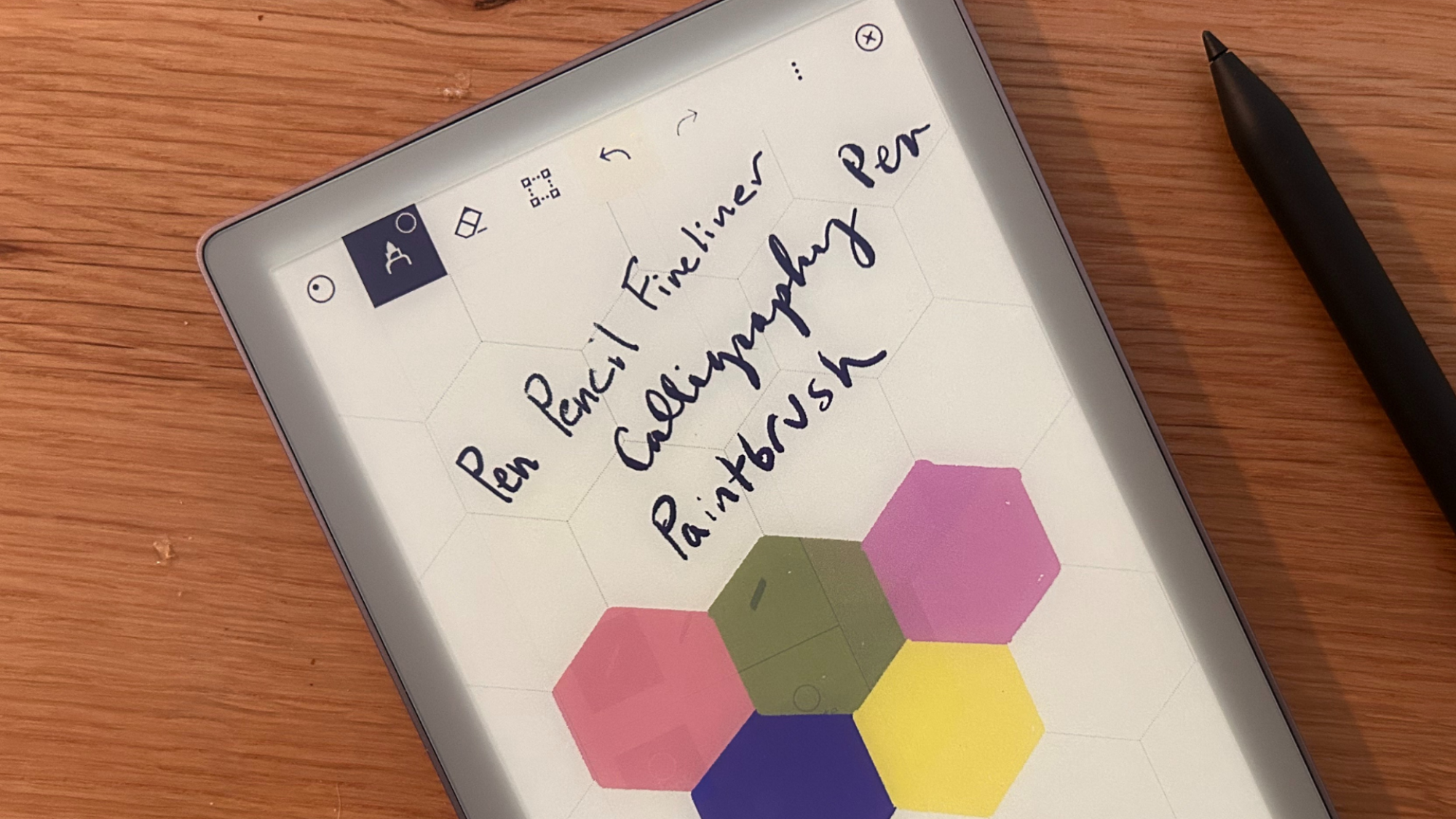
The reMarkable tablet with the stylus.

Credit: Joel Cunningham

I had a rough time studying in high school, as I got distracted immersing myself in novels, video games, and the internet. When I started college, I noticed that my focus time was lower when I was using computers to study. So, I switched to writing notes by hand ,and it was like a switch flipped in my brain. When I read those notes ahead of exams, I was able to recall the parts of the class I wrote them down in, which noticeably improved my scores.

I took the GMAT exam a few years ago and I got a pretty decent score all thanks to handwriting all of my notes, and solving all math problems by hand. I’m not a gifted math student, and in spite of that, I did pretty well in the math exam, only because I avoided using my iPad or Mac for studies. Of course, I used those devices to read textbooks, but I did all my note-taking and problem solving by hand.

While I prefer old-school methods like pen and paper to handwrite notes, you can also use modern technology to your advantage here. An iPad with an Apple Pencil, or something like the reMarkable tablet, can make a great study tool. The reMarkable uses an e-ink screen that mimics real paper, which makes it feel far more like an actual notebook than using an iPad.

Use meditation apps to reduce anxiety

While exercise is my number 1 recommendation to anyone who’s looking to relieve anxiety, it’s not always possible to make time for workouts during busy periods as a student. If you’re in this boat, I highly recommend using a free meditation app to reduce anxiety and focus better on studies. During my GMAT prep, I was confronting multiple demons at once. I was quite scared of math, tests, and had a crippling fear of failure. I had a 40-minute train ride back from work and I used it to do a 20-minute guided meditation on Headspace’s free tier.

Doing this for a few weeks helped me calm down immensely. On the day of the test, I remember being completely unfazed by the difficult questions, and I was able to follow all the exam strategies my tutor had suggested. My score was a lot higher than what I was expecting, and most of it was down to getting my anxiety out of the way. You can use any free meditation app to get started. Remember that you don’t need to sit under a tree in the forest to meditate. You can start wherever you are.

Try a few different study methods

I must admit that I really didn’t know about any study methods when I went to university, and I just did whatever helped me remember things. Working at Lifehacker has been an eye-opening experience in many ways, and one of those is learning that you can actually use more than one method to grasp difficult subjects. My colleague Lindsey Ellefson has written at length about the best study methods, and you should definitely give it a read to see if a different study method can help you.

I’m now a big fan of the Feynman method, which says that once you’ve finished studying a topic, you should explain it to someone who knows nothing about it. If you’re able to do this and answer follow-up questions the person has, then it means you know the subject pretty well. If not, it’s time to study again. I generally don’t encourage using AI too much to study, but you can tell ChatGPT, Claude, or Gemini that you’re using the Feynman method to study a concept, and explain what you’ve learned. These tools will help you identify what you’ve explained correctly and ask decent follow-up questions to help you deepen your understanding of the subject.

Try flashcard apps for faster learning

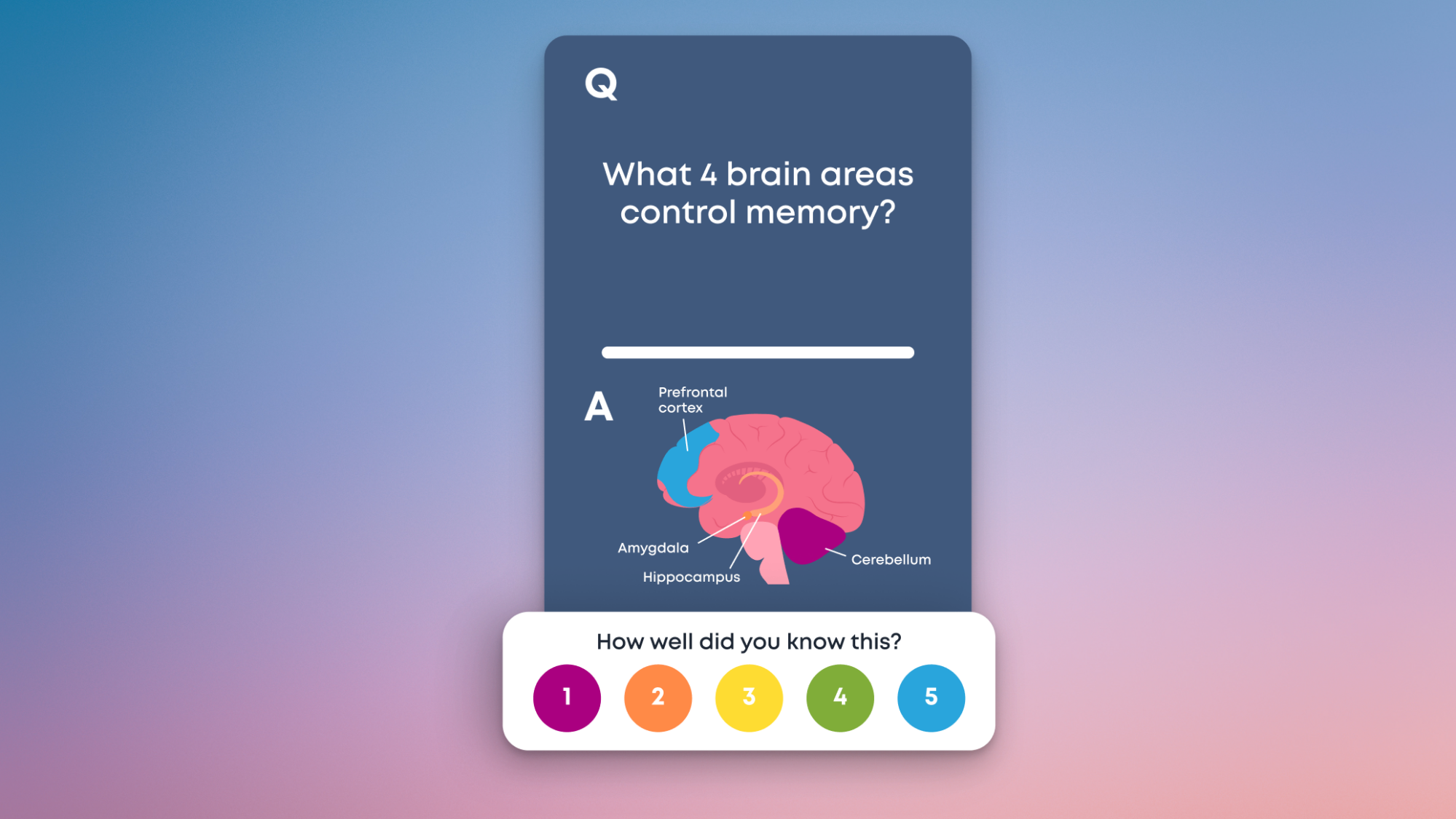
A flashcard in Brainscape.

Credit: Brainscape

Pretty much every student has used flashcards to study in school, but it’s not easy to keep making flashcards for every subject when you have way too much to study. This is when it’s a good idea to outsource the work to flashcard study apps. These are great tools to commit things to memory, and particularly useful when you’re trying to learn a new language, memorize chess openings, or if you’re studying for exams.

You can try Brainscape if you want pre-made flashcards, which eliminates the effort of generating the cards, too. It’s great both for students prepping for a specific exam and for adults learning different skills. The variety of pre-made cards is vast, and you probably won’t ever have to make any cards on the app. The free tier lets you use text, and the paid version lets you access audio, images, removes limits on studying, and many more useful features. It costs $20/month, $96/year, or $200 for a lifetime membership.

Don’t forget the Pomodoro technique

At times, the simplest advice is the best. I only learned about the Pomodoro technique after I started working, and I still wish I’d known about it during my student days. The concept is simple: Follow a schedule where you study or work on a project for 25 minutes and then take a five-minute break. Rinse and repeat until your large task is done. The work and break time intervals should be changed based on what works best for you.

If you like the idea of using a dedicated app to follow this technique, you should consider FocusPomo, which has a solid 4.5/5 score in Lifehacker’s review. The biggest downside of this app is that you still have to check your phone to use it, and if that’s a no-go for you, then you can try alternatives such as following this 3-hour Pomodoro study video or using a Pomodoro app that works in your desktop browser, such as My Study Life.

Block distractions to focus better

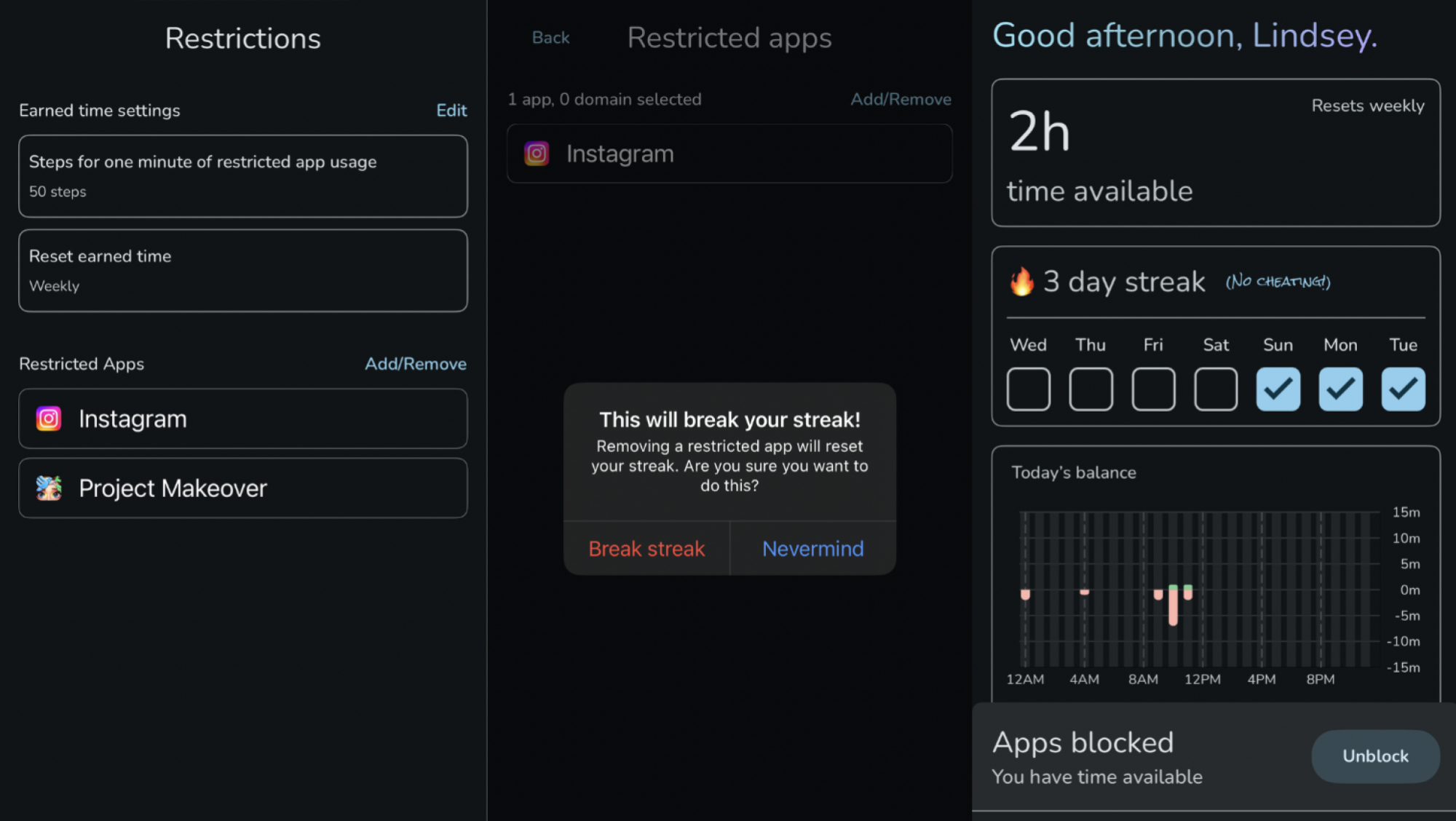
The Steppin app.

Credit: Lindsey Ellefson

You should definitely use a distraction blocker app to stop doomscrolling and focus on what you need to do. Be it studying, journaling, meditation, or any other hobby you’re fond of, using distraction blocking tools can help you focus at a time when every major internet company is out to get your attention. You can try tools such as Cold Turkey or StayFocusd, both of which let you block distracting websites for free. Similarly, Steppin is a great distraction blocking tool for your smartphone.

Befriend the power nap

When you’re focused on studies, don’t neglect the importance of a healthy sleep cycle. Ideally, you want to use the wind down feature on your phone to remind you that it’s time to stop using all apps and get to bed. On iPhones and Android phones, you can also quickly switch to grayscale mode at bedtime, which is another way to trick your brain into getting off the screen. I find that I sleep better when all my gadgets aren’t right next to my bed.

But more than that, I highly recommend taking a power nap when you’re tired. Sometimes, I get home from a long day and I feel too tired to do much. If I’m able to take a 30-minute nap, I often wake up refreshed and feeling a lot better. Adding a little bit of rest to your day can make a big difference to your ability to get things done, so you should consider adding power naps to your day.

In case you find it hard to relax and sleep, I’ve had good results with progressive muscle relaxation. It’s a simple technique that requires you to tense and relax various muscles in your body, which in turn helps you relax enough to go to sleep. The Insight Timer app has a great guided relaxation exercise by Shinzen Young, which I’ve used more often than I can count.

Consider a change in location

Once again, this may sound like simple advice, but it’s incredibly effective. Whenever I’ve found it hard to study or complete assignments at home, it’s always helped to go sit at a library or a cafe to get work done. A lot depends on how good the public libraries are in your locality, but even if that’s not an option for you, try to see if you can go to a friend’s place or anywhere other than your usual place for assignments. Sometimes, a change in environment can help you get work done faster.

If that doesn’t help break a pattern of procrastination, then you can consider gamifying the process. You can use Stickk as a motivational tool to stick to your goals. The app makes you commit to donating money or posting on social media if you don’t meet your goals, which is one way to put something real on the line as a penalty for not honoring your commitment. There are plenty of tools to help you stay on track with your commitments to hobbies or academics, so there’s bound to be one that works for you.

Google Translate is now better at translating slang terms and idioms using AI

Google is rolling out new Gemini-assisted functionality to Search and its Translate app. It says its AI can now provide more natural and accurate text translations for phrases that have more “nuanced meanings.”  Translate will now take slang terms and colloquial expressions into consideration rather than provide sometimes unhelpful direct translations.

The latest update to its text translation feature is rolling out first in the US and India, translating between English and just under 20 other languages, including German, Spanish, Chinese and Arabic. It works in the Translate app for iOS and Android and on the web.

Gemini’s speech-to-speech translation feature has also been updated, so you can now hear real-time translations in your headphones, like with Apple’s AirPods Pro 3. Google says the new functionality, which is now in beta in the Translate app for Android (iOS is coming next year) in the US, tries to “preserve the tone, emphasis and cadence of each speaker” so you better understand the direction of the conversation and who said what. It works with any headphones and supports more than 70 languages.

Finally, Google is adding more tools to its potentially Duolingo-rivaling AI-powered language learning tools, which it introduced to the Translate app in August. Like Duolingo, Translate can now track how many days in a row you’ve been attempting to learn a new language, so you can check your progress over time. Whether it will nag you as persistently as the Duolingo owl famously does for slacking off is not clear.

The feedback feature has also been improved, so you should receive more useful tips on how you’re pronouncing words or phrases. Germany, India and Sweden are among the 20 new countries that can now use these educational tools.

After not showing it much love for a while, Google has been busy adding new features to Translate recently. As well as the new language practice feature, an update last month added the ability to select between “Fast” and “Advanced” translations that allow you to prioritize speed when you’re in a rush (ordering a drink at the bar, for example) or receiving more accurate translations using Gemini.

This article originally appeared on Engadget at https://www.engadget.com/apps/google-translate-is-now-better-at-translating-slang-terms-and-idioms-using-ai-173428316.html?src=rss

Man shocks doctors with extreme blood pressure, stroke from energy drinks

Sometimes, downing an energy drink can feel like refueling your battery. But with too much, that jolt can turn into a catastrophic surge that fries the wiring and blows a fuse. That was the unfortunate and alarming case for a man in the UK several years ago, according to a case report this week in BMJ Case Reports.

The man, who was in his 50s and otherwise healthy, showed up at a hospital after the entire left side of his body abruptly went numb and he was left with clumsy, uncoordinated muscle movements (ataxia). His blood pressure was astonishingly high, at 254/150 mm Hg. For context, a normal reading is under 120/80, while anything over 180/120 is considered a hypertensive crisis, which is a medical emergency.

The man had suffered a mild stroke, and his extremely high blood pressure was an obvious factor. But why his blood pressure had reached stratospheric heights was far less obvious to his doctors, according to the retrospective case report written by Martha Coyle and Sunil Munshi of Nottingham University Hospital.

Read full article

Comments

WhatsApp Is Now Rolling Out Missed Call Messages

They say no one actually uses their phones for phone calls anymore. That’s not really true, though maybe the “Phone” app does get underused. Instead, many of us have turned to chat apps for our calls. FaceTime, WhatsApp, Messenger—these apps are now our go-to choices for getting in immediate touch with friends and family. (Not that I’m complaining: The call quality is usually better, anyway.)

But one thing the Phone app—and traditional phone calls—have on these chat apps is voicemail. For decades, when you called someone and they didn’t answer, you could “leave a message after the tone.” That way, when the person saw they had a missed call, they didn’t need to guess what you wanted to say. If it was important, they’d hear about it, and call you back. If it wasn’t, they could choose to call back when it was convenient.

Voicemail isn’t dead: You can still leave these messages if you call someone the old fashioned way. But since many of us choose to use our chat apps of choice, we’ve largely lost this practice. It’s been wholly replaced with text messages and voice notes: If they don’t answer the call, you can simply text them what you wanted to talk about, or record a voice note to achieve a similar end.

Some chat apps are trying to bring voicemails back, however. The first major player on my radar was FaceTime: Back in 2023, Apple made it possible to leave video and audio messages for people whenever they didn’t pick up a FaceTime call. It’s a small but logical feature: Sure, there are other ways to leave a message. But it just makes sense given the history of phone calls to present the option as soon as someone misses your call.

How WhatsApp voicemails work

Now, WhatsApp is getting in on the feature. The company first started testing missed call messages in August, before rolling out the option in full on Thursday. Now, when you try calling someone in WhatsApp and they miss it, you have the option to leave either a video or an audio message—depending on what type of call you started.

Again, these are functions you could initiate already in the app itself: You could simply record a video saying what you want to say, and send it to the recipient, or record an audio note letting them know to call you back. But this built-in option isn’t only convenient, it establishes voice messages as a standard for missed WhatsApp calls.

Interestingly, WhatsApp says this new feature “will make voicemails a thing of the past.” As it see it, it’s actually keeping them alive.

‘Apple Tax is Dead in the USA’

The Ninth Circuit Court of Appeals has almost entirely upheld a scathing April ruling that found Apple in willful violation of a 2021 injunction meant to open up iOS App Store payments in its long-running legal battle against Epic Games. A three-judge panel affirmed that Apple’s 27% fee for developers using outside payment options had a “prohibitive effect” and that the company’s design restrictions on external payment links were overly broad.

The appeals court also agreed that Apple acted in “bad faith” by rejecting viable, compliant alternatives in internal discussions. One divergence from the lower court: the appeals court ruled that Apple should still be able to charge a “reasonable fee” based on its actual costs to ensure user security and privacy, rather than charging nothing at all. What qualifies as “reasonable” remains to be determined.

Epic CEO Tim Sweeney told reporters he believes those fees should be “super super minor,” on the order of “tens or hundreds of dollars” every time an iOS app update goes through Apple for review. “The Apple Tax is dead in the USA,” he wrote on social media. Sweeney also alleged that a widespread “fear of retaliation” has kept many developers paying Apple’s default 30% fees, claiming the company can effectively “ghost” apps by delaying reviews or burying them in search results.


Read more of this story at Slashdot.

Inside A Simulated Steam Machine: 27 Games Tell The Real Story

Inside A Simulated Steam Machine: 27 Games Tell The Real Story
The year is 2013. Valve Software, whose Steam digital delivery service has just hit the ten-year mark, has decided it’s time to launch a series of gaming PCs, along with a custom operating system. The project continues through 2015 and but doesn’t catch on, mostly because the software situation simply wasn’t ready. SteamOS at that time could…

Doom studio id Software forms ‘wall-to-wall’ union, with 165 employees voting in favor

Id Software, the company behind Doom, has voted in favor of forming a “wall-to-wall” union. The term “wall-to-wall” refers to a union that includes every employee, regardless of duties. The vote wasn’t unanimous, with 165 of 185 total employees in favor of the union.

The union will work in conjunction with the Communications Workers of America (CWA), which is the same organization involved with parent company ZeniMax’s recent unionization efforts. Microsoft, who owns ZeniMax, has already recognized this new effort, according to a statement by the CWA. It agreed to a labor neutrality agreement with the CWA and ZeniMax workers last year, paving the way for this sort of thing.

“The wall-to-wall organizing effort at id Software was much needed; it’s incredibly important that developers across the industry unite to push back on all the unilateral workplace changes that are being handed down from industry executives,” id Software producer and CWA committee member Andrew Willis wrote in a statement to Engadget.

From the onset, this union will look to protect remote work for id Software employees. “Remote work isn’t a perk. It’s a necessity for our health, our families, and our access needs. RTO policies should not be handed down from executives with no consideration for accessibility or our well-being,” said id Software Lead Services Programmer Chris Hays. He also said he looks forward to getting worker protections regarding the “responsible use of AI.”

Workers at id began organizing around 18 months ago, according to a report by Aftermath. Things sped up after Microsoft closed several Bethesda studios in the middle of last year.

“We look forward to sitting across the table from Microsoft to negotiate a contract that reflects the skill, creativity and dedication these workers bring to every project,” said CWA Local 6215 President Ron Swaggerty.

The developer’s latest game is Doom: The Dark Ages, which we loved. It scooped up an award for accessibility at last night’s The Game Awards. 

This article originally appeared on Engadget at https://www.engadget.com/big-tech/doom-studio-id-software-forms-wall-to-wall-union-with-165-employees-voting-in-favor-164808311.html?src=rss

Doom studio id Software forms ‘wall-to-wall’ union, with a majority of employees voting in favor

Id Software, the company behind Doom, has voted in favor of forming a “wall-to-wall” union. The term “wall-to-wall” refers to a union that includes every employee, regardless of duties. The vote wasn’t unanimous, though a majority did vote in favor of the union.

The union will work in conjunction with the Communications Workers of America (CWA), which is the same organization involved with parent company ZeniMax’s recent unionization efforts. Microsoft, who owns ZeniMax, has already recognized this new effort, according to a statement by the CWA. It agreed to a labor neutrality agreement with the CWA and ZeniMax workers last year, paving the way for this sort of thing.

“The wall-to-wall organizing effort at id Software was much needed; it’s incredibly important that developers across the industry unite to push back on all the unilateral workplace changes that are being handed down from industry executives,” id Software producer and CWA committee member Andrew Willis wrote in a statement to Engadget.

From the onset, this union will look to protect remote work for id Software employees. “Remote work isn’t a perk. It’s a necessity for our health, our families, and our access needs. RTO policies should not be handed down from executives with no consideration for accessibility or our well-being,” said id Software Lead Services Programmer Chris Hays. He also said he looks forward to getting worker protections regarding the “responsible use of AI.”

Workers at id began organizing around 18 months ago, according to a report by Aftermath. Things sped up after Microsoft closed several Bethesda studios in the middle of last year.

“We look forward to sitting across the table from Microsoft to negotiate a contract that reflects the skill, creativity and dedication these workers bring to every project,” said CWA Local 6215 President Ron Swaggerty.

The developer’s latest game is Doom: The Dark Ages, which we loved. It scooped up an award for accessibility at last night’s The Game Awards. 

This article originally appeared on Engadget at https://www.engadget.com/big-tech/doom-studio-id-software-forms-wall-to-wall-union-with-a-majority-of-employees-voting-in-favor-164808829.html?src=rss

China Leads Research in 90% of Crucial Technologies – a Dramatic Shift this Century

China is leading research in nearly 90% of the crucial technologies that “significantly enhance, or pose risks to, a country’s national interests,” according to a technology tracker run by the Australian Strategic Policy Institute (ASPI) — an independent think-tank. Nature: The ASPI’s Critical Technology Tracker evaluated research on 74 current and emerging technologies this year, up from the 64 technologies it analyzed last year. China is ranked number one for research on 66 of the technologies, including nuclear energy, synthetic biology, small satellites, while the United States topped the remaining 8, including quantum computing and geoengineering.

The results reflect a drastic reversal. At the beginning of this century, the United States led more than 90% of the assessed technologies, whereas China led less than 5% of them, according to the 2024 edition of the tracker. “China has made incredible progress on science and technology that is reflected in research and development, as well as in publications,” says Ilaria Mazzocco, who researches China’s industrial policy at the Center for Strategic and International Studies, a non-profit research organization based in Washington DC.

Mazzocco says the general trend identified by the ASPI is not a surprise, but it is “remarkable” to see that China is so dominant and advanced in so many fields compared with the United States.


Read more of this story at Slashdot.

Framework Raises DDR5 Prices By 50%, Accuses Apple & Dell Of Price Gouging

Framework Raises DDR5 Prices By 50%, Accuses Apple & Dell Of Price Gouging
Framework is on a mission to change the status quo when it comes to laptops, having introduced several modular models with replaceable parts that go beyond the DIY boundaries of what is typical for a laptop. Be that as it may, Framework is susceptible to the same market conditions as everyone else. As a result, it’s being forced to raise DDR5

The Immediate Post-College Transition and its Role in Socioeconomic Earnings Gaps

A new study of roughly 80,000 bachelor’s degree recipients from a large urban public college system finds that characteristics of a graduate’s first job can explain nearly two-thirds of the otherwise-unexplained earnings gap between students from low-income and high-income families five years after graduation.

The research [PDF], published as an NBER working paper by economists at Columbia University, tracked graduates from 2010 to 2017 using administrative education data linked to state unemployment insurance records. Low-income students — defined as those receiving Pell grants throughout their undergraduate enrollment — earned about 12% less than their high-income peers at the five-year mark. A substantial gap of roughly $4,900 persisted even after the researchers controlled for GPA, college attended, major, and other pre-graduation characteristics. That residual gap fell to about $1,700 once first-job variables entered the equation.

Graduates from lower-income families tended to start at employers paying lower average wages and were less likely to have their first job secured before graduation. Just 34% of low-income graduates continued at a pre-graduation employer compared to 40% of their higher-income peers. The firms employing low-income graduates paid average wages that were 18% lower than those employing high-income graduates. The researchers say that while the study cannot establish causation, the patterns suggest that supporting low-income students during their transition from college to the labor market may be a fruitful area for policy intervention.


Read more of this story at Slashdot.

Epic celebrates “the end of the Apple Tax” after appeals court win in iOS payments case

Back in April, District Court Judge Yvonne Gonzalez Rogers delivered a scathing judgment finding that Apple was in “willful violation” of her 2021 injunction intended to open up iOS App Store payments. That contempt of court finding has now been almost entirely upheld by the Ninth Circuit Court of Appeals, a development that Epic Games’ Tim Sweeney tells Ars he hopes will “do a lot of good for developers and start to really change the App Store situation worldwide, I think.”

The ruling, signed by a panel of three appellate court judges, affirmed that Apple’s initial attempts to charge a 27 percent fee to iOS developers using outside payment options “had a prohibitive effect, in violation of the injunction.” Similarly, Apple’s restrictions on how those outside links had to be designed were overly broad; the appeals court suggests that Apple can only ensure that internal and external payment options are presented in a similar fashion.

The appeals court also agreed that Apple acted in “bad faith” by refusing to comply with the injunction, rejecting viable, compliant alternatives in internal discussions. And the appeals court was also not convinced by Apple’s process-focused arguments, saying the district court properly evaluated materials Apple argued were protected by attorney-client privilege.

Read full article

Comments

Philips Hue’s New Security Camera Is Surprisingly Useful

We may earn a commission from links on this page.

Philips Hue is one of the most well-respected and popular brands in smart lights—but what about its smart security cameras? Parent company Signify has been developing Hue cameras for a couple of years now, with a video doorbell and 2K camera upgrades recently added to the portfolio of devices. (Note: This 2K version hasn’t yet landed in the U.S., but the existing 1080p versions are quite similar.)

I got a chance to test out the new 2K Hue Secure camera, and alongside all the basics of a camera like this, it came with an extra bonus that worked better than I expected: seamless integration with Philips Hue lights. These two product categories actually work better together than you might think.

While you can certainly connect cameras and lights across a variety of smart home platforms, Philips Hue is one of very few manufacturers making both types of device (TP-Link is another). That gives you a simplicity and interoperability you don’t really get elsewhere.

Setting up a Hue camera

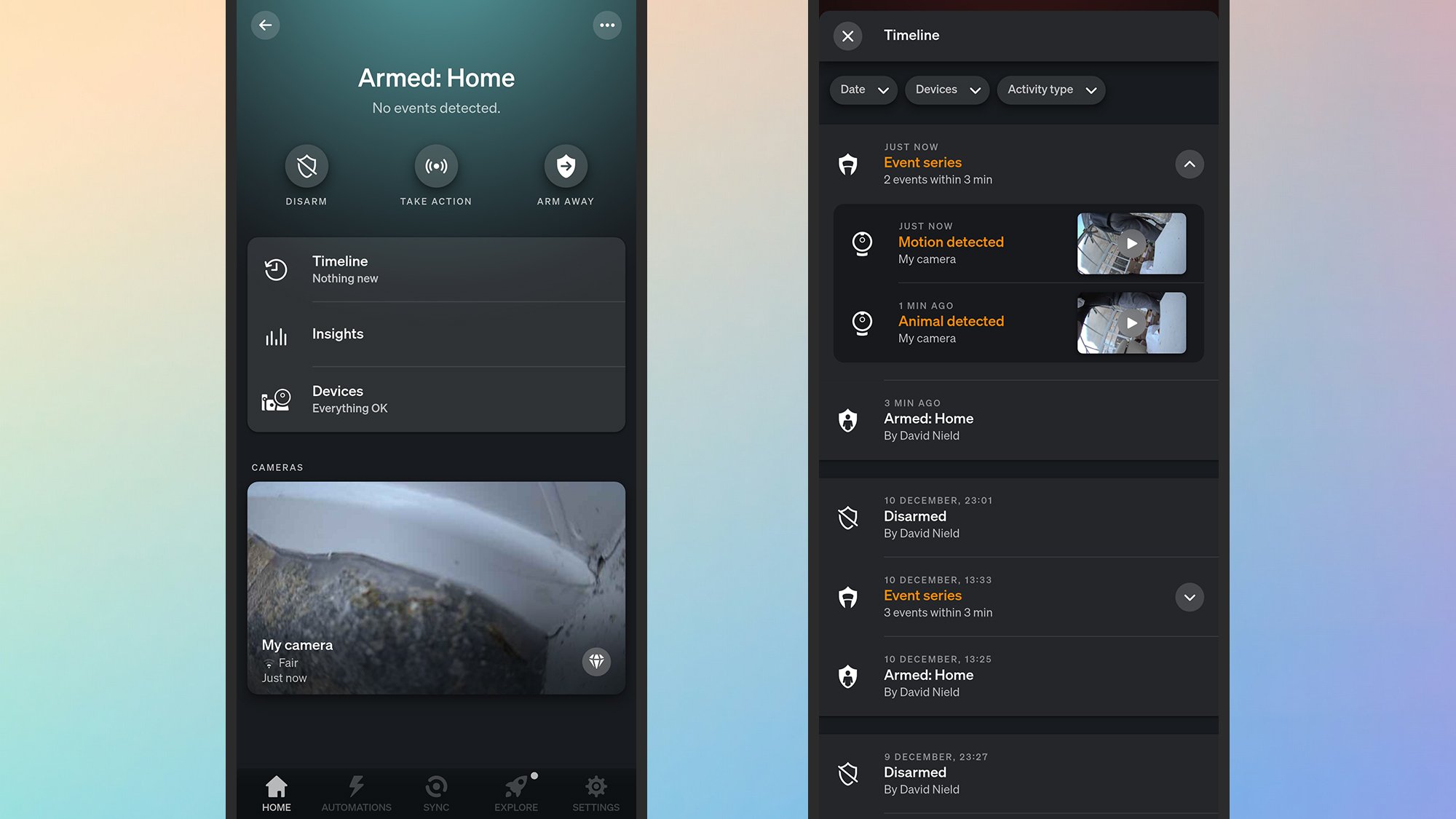
Philips Hue app
All the basic security camera features are covered.
Credit: Lifehacker

Hue cameras are controlled inside the same Hue app for Android or iOS as the Hue lights. You don’t necessarily need a Hue Bridge to connect the camera, too, as it can link to your wifi directly, but the Bridge is required if you want it to be able to sync with your lights—which is one of the key features here. (If you already have the lights, you’ll already have the Bridge anyway.)

The 2K Hue Secure wired camera I’ve been testing comes with a 2K video resolution (as the name suggests). two-way audio, a built-in siren, infrared night vision, and weatherproofing (so you can use it indoors or out). As well as the wired version I’ve got here, there’s also a battery-powered option, and a model that comes with a desktop stand.

Once configured, the camera lives in the same Home tab inside the mobile app as any Philips Hue lights you’ve got. The main panel doesn’t show the camera feed—instead, it shows the armed status of the camera, which can be configured separately depending on whether you’re at home or not. The idea is that you don’t get disturbed with a flurry of unnecessary notifications when you’re moving around.

The basic functionality is the same as every other security camera: Motion is detected and you get a ping to your phone with details, with a saved clip of the event that stays available for 24 hours. You can also tap into the live feed from the camera at any time, should you want to check in on the pets or the backyard.

As is often the case with security cameras, there is an optional subscription plan that gives you long-term video clip storage, activity zone settings, and AI-powered identification of people, animals, vehicles, and packages. That will set you back from $4 a month, with a discount if you pay for a year at a time.

Syncing a camera with smart lights

Philips Hue app
Your cameras can be used as customized triggers for your lights.
Credit: Lifehacker

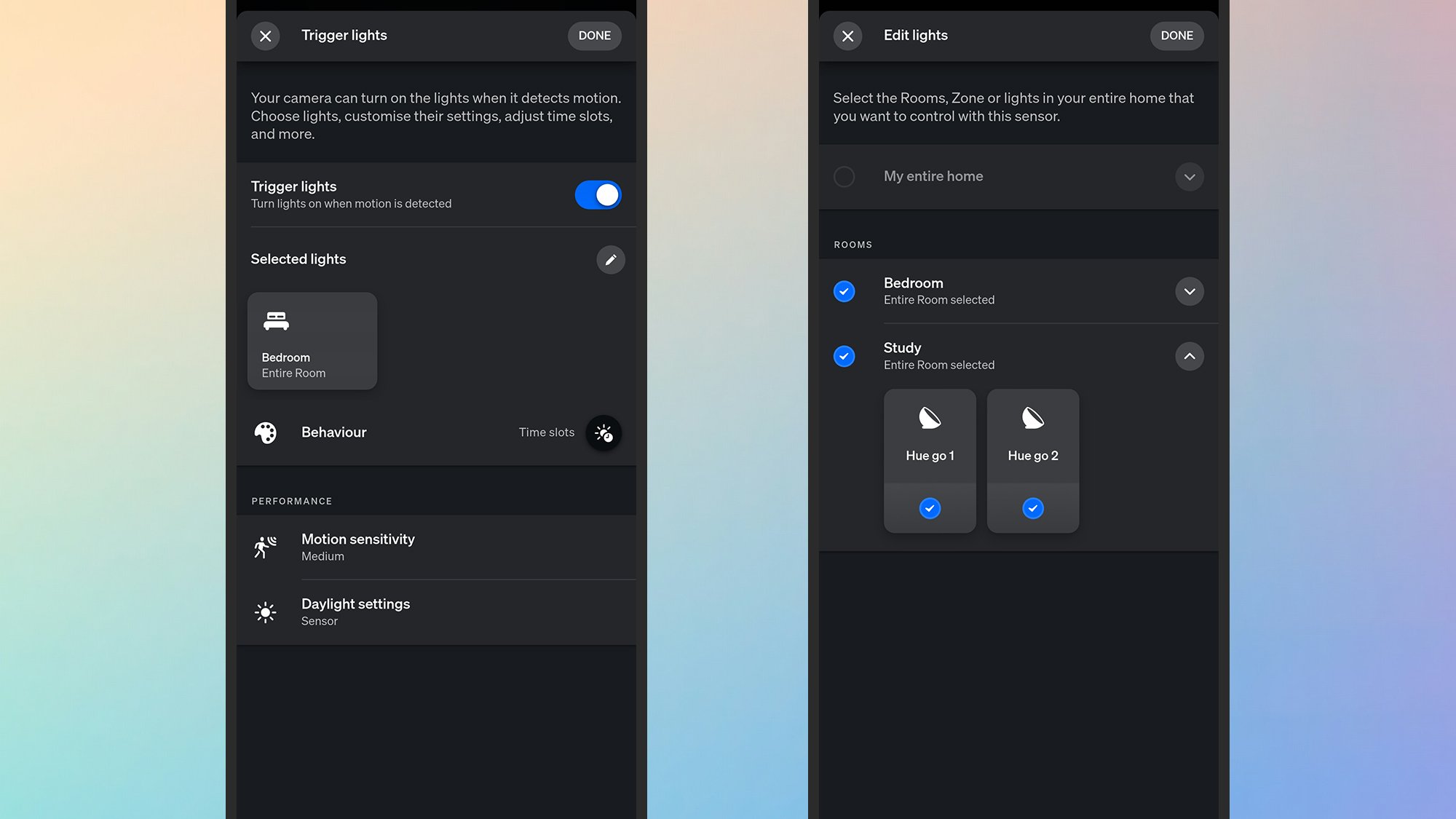
I started off a little unsure about just how useful it would be to connect up the Hue cameras and Hue lights—it’s not a combination that gets talked about much—but it’s surprisingly useful. If you delve into the camera settings inside the Hue app, there’s a Trigger lights section especially for this.

You get to choose which of your lights are affected—they don’t all have to go on and off together—and there are customizations for color and brightness across certain time schedules. You could have your bulbs glowing red during the night, for example, or turning bright blue during the daytime. The duration the lights stay on for can also be set.

It’s not the most sophisticated system, but it works: If someone is loitering around your property, you can have a selected number of lights turn on to put them off, or to suggest that someone is in fact at home. This is in addition to everything else you can do, including sounding a siren through the camera, and because it works through the Hue Bridge it all happens pretty much instantaneously.

You can also set specific cameras as basic motion sensors for you and your family—lighting up the way to the bathroom late at night, for example. This can work even when the system is disarmed, so there’s no wifi video streaming happening, but the cameras are still watching out for movement and responding accordingly.

There’s one more option worth mentioning in the security settings in the Hue app: “mimic presence.” This can randomly turn your lights on and off at certain points in the day, and the schedule you choose can be controlled by whether or not your Hue security is armed or disarmed (so nothing happens when everyone is at home).