I Tried the New Sunscreen Ingredient the FDA Is Finally Approving After Over 20 Years

Some unexpected good news from the FDA: bemotrizinol, a sunscreen ingredient that has been used in Europe and Asia for decades, is finally being added to the allowable ingredients list for products sold in the U.S. Bemotrizinol is the active ingredient in sunscreens like Bioré Watery Essence, which has a cult following for being unlike anything we can get in the U.S.

I’ve tried Bioré UV Aqua Rich Watery Essence (that’s the full name of the product) in its original Japanese formulation. This sunscreen is a cult favorite on skincare and Asian beauty forums because of its non-greasy feel, and because it protects against both UVA and UVB rays without leaving a white cast. I got mine from a friend who had either picked it up while traveling or possibly ordered from overseas; you can’t buy it in U.S.-based stores. 

I’ll explain why this is below, but first: it truly is nothing like anything we have locally. Even our most “non-greasy” sunscreens tend to feel a little goopy or sticky. This one really feels like nothing after you rub it in. I instantly understood why it’s so sought-after. Remembering that experience, I’m looking forward to what we might see in American sunscreens once manufacturers are allowed to include this ingredient. 

What’s so special about bemotrizinol?

Bemotrizinol has a lot of things going for it. One is that it “plays well with other sunscreen ingredients,” as one dermatologist told Women’s Health. You can make lighter, nicer-feeling sunscreens with it, hence the popularity of the Bioré formulation I tried. To see what I mean, check out this video where a dermatologist shows off the differences between Bioré’s Japanese formulation and the version it sells in the U.S. The ingredients are different, and the texture just isn’t the same.

It’s also more effective at broad-spectrum protection. With our current sunscreen formulations, all active ingredients protect against UVB rays (the rays that cause sunburn) but only a few can also provide protection against UVA rays (which contribute to wrinkling and aging of skin). UVB is considered to be the bigger risk for skin cancer, but both probably contribute to cancer risk. Right now, most broad-spectrum U.S. sunscreens use mineral components like zinc oxide. Mineral sunscreens work pretty well, but can leave a white cast on your skin when applied as thickly as you’re supposed to. 

Bemotrizinol is a chemical UV filter, so it doesn’t leave that white cast. But it protects well against UVA rays in addition to UVB, and it’s more photostable than a lot of our existing chemical sunscreen ingredients so it can last longer on the skin. In other words, it’s a chemical sunscreen, but combines some of the best features of both chemical and mineral sunscreens. 

It’s also considered to be one of the safest sunscreens. All sunscreens on the market are much safer than going without sunscreen, but all of our chemical sunscreen ingredients are currently undergoing a safety evaluation because regulators determined they are probably fine but need more research to know for sure. Currently only our two mineral sunscreen ingredients (zinc oxide and titanium dioxide) are considered GRAS, or generally recognized as safe and effective. Bemotrizinol will be the third.

If you’re looking at ingredient lists on Asian or European sunscreens, be aware that it goes by several names. Tinosorb S is bemotrizinol; so is bis-ethylhexyloxyphenol methoxyphenyl triazine.

Why it’s taken so long

Ask anyone in the skincare world what they think about U.S. sunscreens, and for decades now you’d get complaints that we’re missing out on the best sunscreens that the rest of the world uses. (Our last new sunscreen ingredient was approved in 1996.) In most countries, sunscreens are regulated as cosmetics, but in the U.S. they are regulated as drugs. That means the U.S. requires more rigorous testing and approval. 

The CARES act, passed in 2020 for pandemic relief, provided a way for over-the-counter drugs to be sold without going through the complete approval process, so long as the FDA was satisfied they were safe and effective. Bemotrizinol met the criteria, thanks in large part to the fact that it’s been used safely since 2000 in Europe, Asia, and Australia. The FDA’s rule on bemotrizinol still needs to be finalized, but it seems likely we’ll see new sunscreens on shelves before the end of 2026.
How I Use the NotebookLM Slide Deck Generator to Study More Easily

Once again, there is a new feature available on Google’s NotebookLM, the AI tool that functions like a personal assistant and only references material you provide for it. This one is a slide deck generator, which can be useful if you need to make a presentation in a hurry, but I’ve been using it a little differently to help myself retain new information.

Generating a slide deck in NotebookLM

First, you should know how to generate a deck. In case you’re unfamiliar with NotebookLM, it’s basically just like ChatGPT, but instead of pulling answers from the big, wide Internet, it only relies on PDFs, links, videos, and text you input as resources. This makes it the perfect tool for working on a specific project or studying for a class, since you don’t run the risk of inadvertently getting misled by some random, unrelated source.

You can use the chat bot feature the way you would ChatGPT, asking questions and getting summaries of your materials. You can also automatically generate flashcards, videos, infographics, mind maps, fake podcasts, and much more.

To generate slides, it’s the same process you’d follow to make those: In the left-side panel, select all of the sources you want the tool to pull from. In the right-side panel, select Slide Deck from the menu. After a few minutes, you’ll get slides you can download as a PDF, the same as you would if you were downloading a PowerPoint, and you can upload those to Google Slides or PowerPoint to create a simple presentation.

Why I like NotebookLM’s slide deck feature

I’ve mentioned before that while I love NotebookLM and use it every day for both work and personal pursuits, I can’t stand its app. It just doesn’t work nearly as well as the browser version, which is a shame because the browser version works so well. I pretty much ignore the app and don’t use NotebookLM on mobile or, when I do, I use my mobile browser to access it, which we all know is an annoying workaround that never quite translates right on the smaller screen.

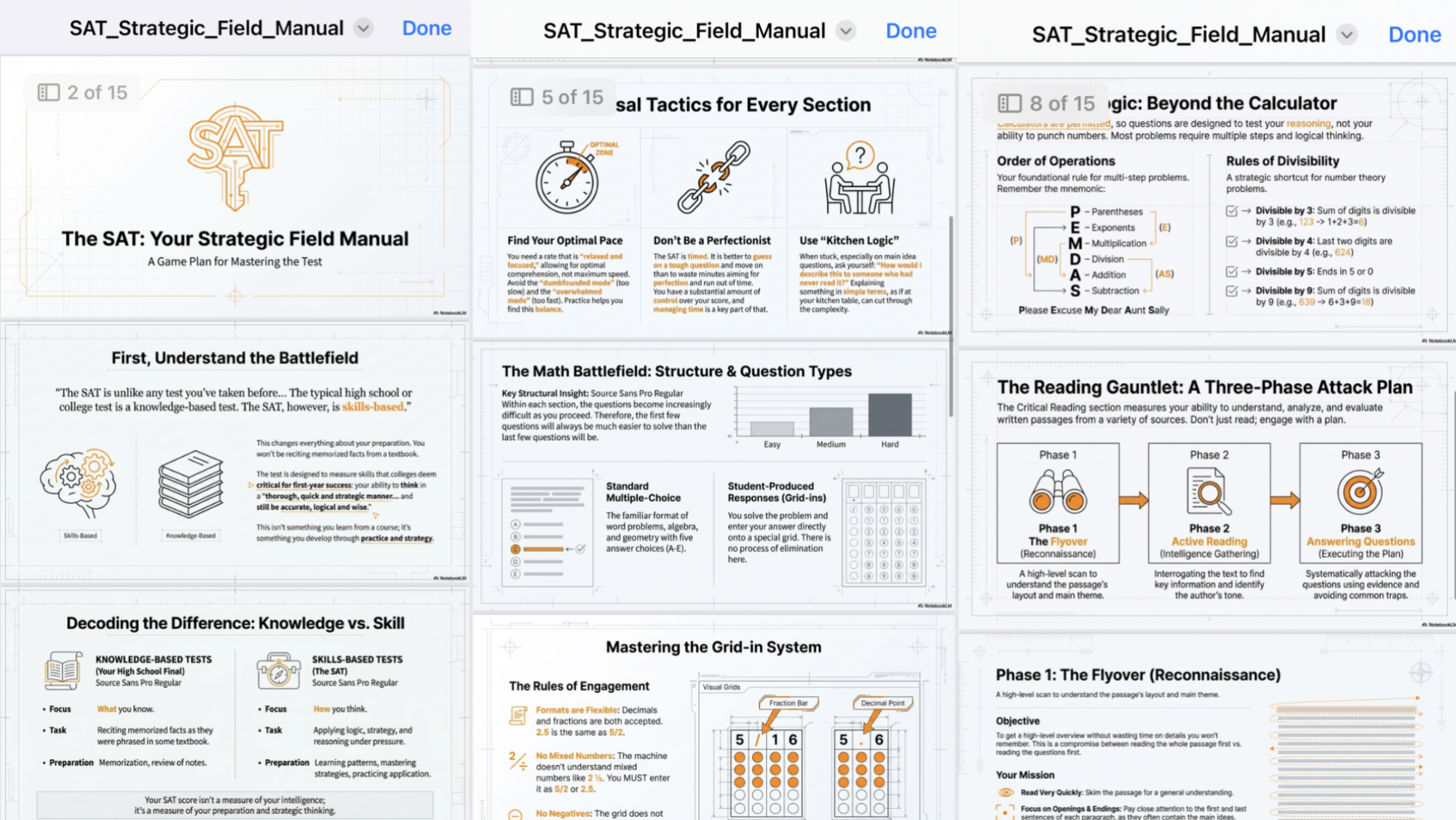
NotebookLM slides on mobile

Credit: Google/Lindsey Ellefson

With the slide PDF, however, I get a ready-made study guide complete with visuals, which I can send to myself via iMessage and study on the go. When I generate my own study materials without NotebookLM, I almost always do it in Google Slides, then download the full PDF and review the slides like a giant study guide, so this new feature is taking a bunch of the work out of doing that for me.

Google Translate Expands Live Translation To All Earbuds On Android

An anonymous reader quotes a report from Ars Technica: Google has increasingly moved toward keeping features locked to its hardware products, but the Translate app is bucking that trend. The live translate feature is breaking out of the Google bubble with support for any earbuds you happen to have connected to your Android phone. The app is also getting improved translation quality across dozens of languages and some Duolingo-like learning features.

The latest version of Google’s live translation is built on Gemini and initially rolled out earlier this year. It supports smooth back-and-forth translations as both on-screen text and audio. Beginning a live translate session in Google Translate used to require Pixel Buds, but that won’t be the case going forward. Google says a beta test of expanded headphone support is launching today in the US, Mexico, and India.

The audio translation attempts to preserve the tone and cadence of the original speaker, but it’s not as capable as the full AI-reproduced voice translations you can do on the latest Pixel phones. Google says this feature should work on any earbuds or headphones, but it’s only for Android right now. The feature will expand to iOS in the coming months. […] The new translation model, which is also available in the search-based translation interface, supports over 70 languages.


Read more of this story at Slashdot.

These Kid-Friendly Websites Put a Modern-Day Twist on ‘the Quiet Game’

Whether you’re a teacher, a parent, or just someone with a big family, you know how difficult it can be to keep a room full of kids quiet for any amount of time.

One trick I’ve used is offering to time how long kids can stay quiet. For reasons I don’t understand, kids love it when something is being timed. But that only work a few times at the most, so it’s good to have as many other tricks on hand as possible. That’s why I was fascinated to learn there are multiple websites that use the microphone on your laptop to motivate kids to be quiet. Some put children’s curiosity to work, having animated characters show up if the group is quiet for long enough. Others combine animation with good old-fashioned timers.

Here are a few you can check out—all of them are completely free and don’t require anything more than your browser.

Silent Forest: Animals emerge if the room is quiet

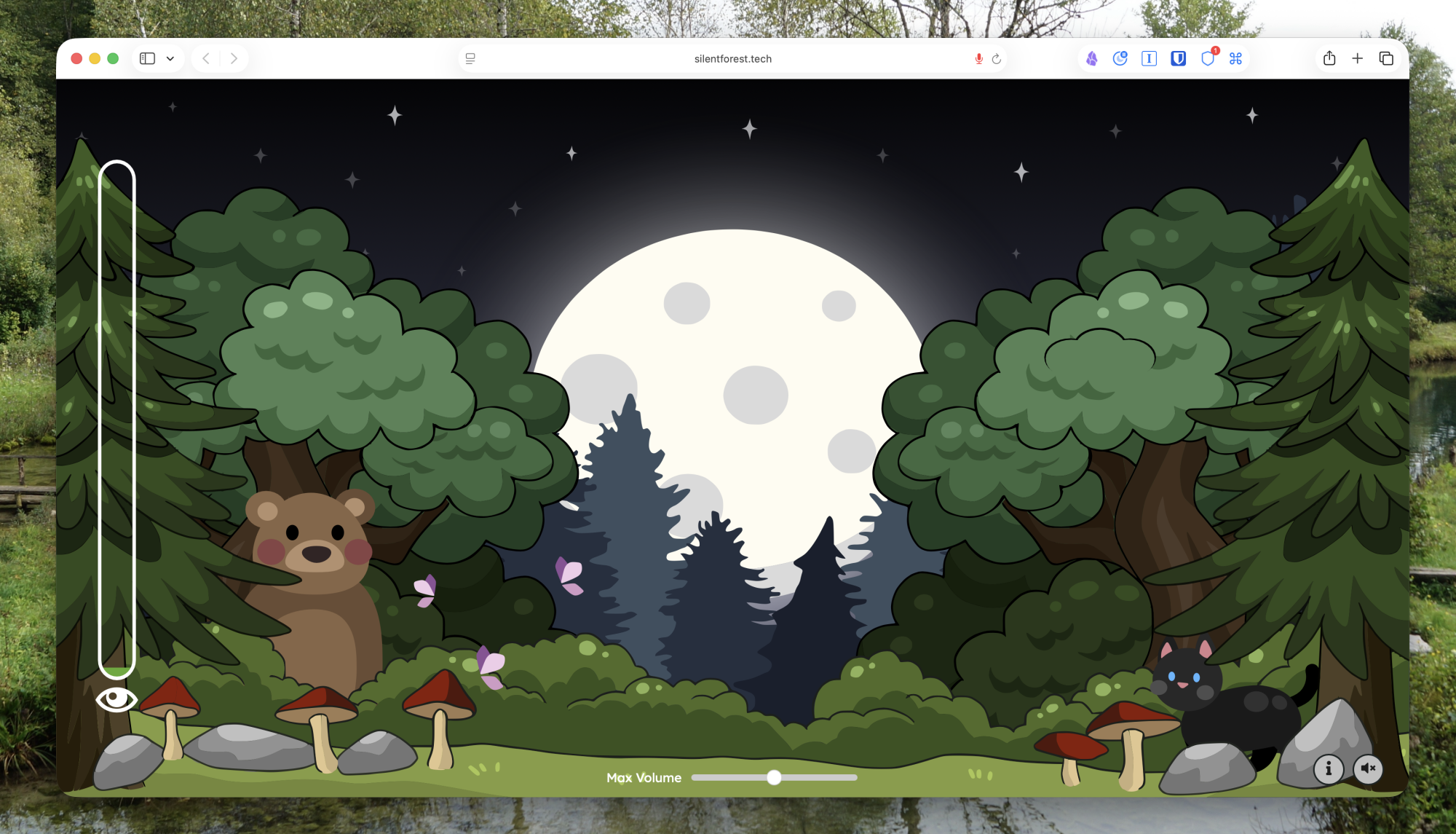
A screenshot of Silent Forest featuring an animated forest with a bear and a cat. It's running in Safari on a Mac.

Credit: Justin Pot

Silent Forest shows a simple animated forest with a volume indicator. Stay silent for a bit and a cat shows up. A bit longer and a bear shows up. Who else might join? There’s only one way to find out. Make too much noise, though, and you’ll scare the animals, meaning you have to start over if you ever want to see everyone. The idea is that the kids will be curious to see which animals will show up next and keep quiet—and, ideally, pressure each other into staying quiet.

Bouncy Balls: Noise will disrupt the balls

A bunch of numbered balls are scattered all over the screen

Credit: Justin Pot

Bouncy Balls fills your screen with balls—options include colored balls, emojis, numbered balls, eyeballs, and even bubbles. The balls are constantly vibrating, threatening to explode with a bit of noise—which they do. There’s a risk of this backfiring—it’s sincerely very fun to see the balls bounce—which you can mitigate by enabling a shushing or beeping sound after any violation.

Classroom Zen: Don’t interrupt Ruby or Milo

A cartoon character is meditating in front of mountains at sunset in this screenshot.

Credit: Justin Pot

Classroom Zen offers a few different tools for keeping the room quiet. Two feature Ruby, a cartoon who is meditating in either the mountains or the desert. If the room gets too loud, her eyes will start opening—keep going and she’ll ask the room to be quiet. Another features Milo, a three-eyed monster who is trying to sleep.

The secret sauce here, though, is the timer at the top of the screen. This means you can tell the kids they need to be quiet for a certain amount of time and have a timer to enforce that.

The Data Breach That Hit Two-Thirds of a Country

Online retailer Coupang, often called South Korea’s Amazon, is dealing with the fallout from a breach that exposed the personal information of more than 33 million accounts — roughly two-thirds of the country’s population — after a former contractor allegedly used credentials that remained active months after his departure to access customer data through the company’s overseas servers.

The breach began in June but went undetected until November 18, according to Coupang and investigators. Police have called it South Korea’s worst-ever data breach. The compromised information includes names, phone numbers, email addresses and shipping addresses, though the company says login credentials, credit card numbers, and payment details were not affected.

Coupang’s former CEO Park Dae-jun told a parliamentary hearing that the alleged perpetrator was a Chinese national who had worked on authentication tasks before his contract ended last December. Chief information security officer Brett Matthes testified that the individual had a “privileged role” giving him access to a private encryption key that allowed him to forge tokens to impersonate customers. Legislators say the key remained active after the employee left. The CEO of Coupang’s South Korean subsidiary has resigned. Founder and chair Bom Kim has yet to personally apologize but has been summoned to a second parliamentary hearing.


Read more of this story at Slashdot.

A Toed, Motorless Artificial Foot That’s Flexible To Adapt To Terrain

Developed by researchers at the Istituto Italiano Di Tecnologia along with researchers from Centro E. Piaggio at the University of Pisa (teamwork!), the SoftFoot Pro is a flexible artificial foot designed to mimic a human foot in order to adapt to the terrain it’s standing on. And it requires no motors to operate so it doesn’t turn into a brick foot if the power goes out and you can’t get a charge.

Because of its flexibility, SoftFoot Pro perfectly reproduces the natural positions assumed by the human feet and allows for performing simple everyday actions, such as bending down to tie a shoe, or picking something up from the ground, improving also the walking experience on stairs. Finally, being waterproof makes SoftFoot Pro also adequate to be used outdoor, on meadows, beaches, and slippery terrain, avoiding the need for the user to eventually switch to prostheses specifically designed for specific activities.

Plus it has toes so you can do the whole “this little piggy went to market” bit. Just the for the record, I am that last little piggy. “The one that went ‘Wee! Wee! Wee!’ all the way home?” What the — when I was a kid I’m pretty sure he went “Wah! Wah! Wah!” all the way home. He was sad. I am the sad pig.

OpenAI built an AI coding agent and uses it to improve the agent itself

In interviews with Ars Technica this week, OpenAI employees revealed the extent to which the company now relies on its own AI coding agent, Codex, to build and improve the development tool. “I think the vast majority of Codex is built by Codex, so it’s almost entirely just being used to improve itself,” said Alexander Embiricos, product lead for Codex at OpenAI, in a conversation on Tuesday.

Codex, which OpenAI launched in its modern incarnation as a research preview in May 2025, operates as a cloud-based software engineering agent that can handle tasks like writing features, fixing bugs, and proposing pull requests. The tool runs in sandboxed environments linked to a user’s code repository and can execute multiple tasks in parallel. OpenAI offers Codex through ChatGPT’s web interface, a command-line interface (CLI), and IDE extensions for VS Code, Cursor, and Windsurf.

The “Codex” name itself dates back to a 2021 OpenAI model based on GPT-3 that powered GitHub Copilot’s tab completion feature. Embiricos said the name is rumored among staff to be short for “code execution.” OpenAI wanted to connect the new agent to that earlier moment, which was crafted in part by some who have left the company.

Read full article

Comments

Amazon pulls its bad AI video recaps after Fallout fallout

Amazon has responded to viewers catching errors in its AI-generated season recaps by apparently pulling them from Prime Video. The company announced its new Video Recaps feature in November as a way to make it easier to jump into a new season of a show, but the feature had issues: A recap created for Fallout included factual errors about the plot and the setting of the show.

On Prime Video, recaps can be played in the “Extras” section if you’re watching on the web, or via a dedicated “recap button” on the show’s page, according to Amazon’s original Video Recaps announcement. If you head to the Fallout season two page now, the erroneous recap has been removed. In fact, at least on the web, there are currently no video recaps available on the show’s Amazon was testing the feature on, which includes Fallout, Bosch, Upload, The Rig and Tom Clancy’s Jack Ryan.

Engadget has contacted Amazon for more information on why the recaps were removed. We’ll update this article if we hear back.

Video Recaps are just one of the ways Amazon is trying to integrate AI into its different products and services. The company offered AI-generated English dubs for select anime shows on Prime Video, before it pulled the dubs after users complained. Amazon also uses AI to generate recaps for long-running book series that are sold through the Kindle Store.

This article originally appeared on Engadget at https://www.engadget.com/entertainment/streaming/amazon-pulls-its-bad-ai-video-recaps-after-fallout-fallout-220358758.html?src=rss

Four Ways to Fix a Slippery Wood Floor

We may earn a commission from links on this page.

Recently, a few spots on the hardwood floors in my house have become mysteriously slippery—so slippery that they’re kind of dangerous. I really feel like my feet might go out from under me when I walk there, and there were a few close calls before I started avoiding them (or at least bracing myself to walk over them more carefully).

This is no way to live, so I started looking into solutions, starting with the root cause.

Why your wood floors are suddenly slippery

Turns out it’s not uncommon for hardwood floors to become spontaneously slippery, and it can happen for a variety of reasons.

  • Wax or polish: If you apply any kind of coating to give your floor extra shine, it can build up over time and turn the floor into an ice rink.

  • Oil and silicone cleaning products: Some cleaning products that promise a shiny finish contain silicone or oil, which can also build up and turn your floors into a slip-n-slide.

  • Dirt and humidity: Dirt, even the stuff you can’t see, can act as a dry lubricant, and high humidity can result in a moisture slick on the surface of the floors.

  • Time: Finally, over time, all those feet walking over the floor can polish the finish, removing the microscopic imperfections that previously gave it some grip.

I don’t polish or wax my floors or use oil- or silicone-based cleaners, and I clean pretty regularly, so I discounted the first few causes and assumed that we’ve just polished the seal on our floors with regular foot traffic. This can happen to any sealed wood floor, but there are some pretty straightforward ways to deal with it.

Start with a thorough cleaning

The first step I took was a thorough cleaning. I clean my floors regularly, but it’s always possible that something spilled without being noticed—the spots where the slipperiness occurred are in the path from the kitchen to the dining room, and from my tool closet to everywhere else in the house. Cooking oils, WD40—there are a lot of things that could have dripped without being noticed. If you’re not sure about substance buildup on a slippery floor, a thorough cleaning might be the easy solution.

Always use a pH-neutral cleaner designed specifically for wood floors—and never use vinegar, even heavily diluted in water. Vinegar can eat away at the finish of your floor; while it might help with the slipperiness, it can also do some permanent damage. I used Bona Hardwood Floor Cleaner and cleaned the areas a few times, but my floors remained slippery.

Add some rugs

A simple solution, especially if you’re dealing with one or two isolated slippery spots, is to just throw down a rug or a runner with a non-slip backing. Your floors will still be slippery, but won’t pose any threat. If the slippery area is quite large (or encompasses your entire floor), this might not work because the rugs might just slide around with nothing to grip onto. But for a small slippery area, it might be a quick, easy solution.

Apply a temporary (or permanent) treatment

If cleaning and covering up your slippery floors won’t work, there are some more involved solutions to try:

  • Anti-slip sprays. There are a variety of temporary anti-slip coating sprays you can apply to your floors, like Rustoleum AntiSlip or Slip Doctors Safety Spray. Although the Rustoleum spray is okay for indoor use and wood, it doesn’t specify hardwood floors, and in a quick test it looked slightly cloudy on a remnant plank I had lying around. The Safety Spray, on the other hand, dried very clear, and reduced the slip factor significantly, so I’d recommend it. It does change the sheen of the floor slightly (noticeable in the right light), but it’s also temporary and will need to be re-applied every year or so.

  • Slip NoMor. This stuff is actually designed for stages and dance floors, but you can use it on any wood floor. I didn’t test this, but the procedure is pretty straightforward: Clean thoroughly first, and dilute it with one part Slip NoMor and 20 parts water. Then mop it on and let dry. The coating will only last a week or so (and you can remove it with hot water at any time), so it’s not a permanent solution unless you’re okay with re-applying every week or so.

  • Coatings. A longer-lasting and more involved solution is to coat your floors with a clear anti-slip product like Floor Grip, Bona Anti-Slip, or Loba 2K Invisible. These are essentially new finish seals on your floors, and all require you to sand the floor before application and allow them to cure for several days. It’s a DIY solution if you’re comfortable doing the prep work, but it’s not a quick fix.

  • Paint. If your wood floors are in good condition, this might not be a great idea—but if your floors are a bit worn down, painting them with an anti-slip additive can be a cheap, easy way to eliminate the problem.

As a last resort, refinish

If cleaning and temporary sprays don’t work and you’re considering a coating to fix your slippery floor, you might think about going all-in and having your floors professionally refinished with an anti-slip finish. This will ensure a consistent finish and refresh your floors in the process. It’s the most expensive and disruptive solution, but also the most permanent. Most professional refinishers can suggest an appropriate seal for your floors that will increase traction.

New Kindle Feature Uses AI To Answer Questions About Books – And Authors Can’t Opt Out

An anonymous reader shares a report: Amazon has quietly added a new AI feature to its Kindle iOS app — a feature that “lets you ask questions about the book you’re reading and receive spoiler-free answers,” according to an Amazon announcement.

The company says the feature, which is called Ask this Book, serves as “your expert reading assistant, instantly answering questions about plot details, character relationships, and thematic elements without disrupting your reading flow.”

Publishing industry resource Publishers Lunch noticed Ask this Book earlier this week, and asked Amazon about it. Amazon spokesperson Ale Iraheta told PubLunch, “The feature uses technology, including AI, to provide instant, spoiler-free answers to customers’ questions about what they’re reading. Ask this Book provides short answers based on factual information about the book which are accessible only to readers who have purchased or borrowed the book and are non-shareable and non-copyable.”

As PubLunch summed up: “In other words, speaking plainly, it’s an in-book chatbot.” […] Perhaps most alarmingly, the Amazon spokesperson said, “To ensure a consistent reading experience, the feature is always on, and there is no option for authors or publishers to opt titles out.”


Read more of this story at Slashdot.

Update Your iPhone ASAP to Avoid FaceTime Scams

On Friday, Apple dropped iOS 26.2. Despite being the third update in the iOS 26 era, 26.2 still adds some interesting and useful new features, like alarms for reminders and refinements to the Sleep Score on Apple Watch.

Updates aren’t all about the features, however. Apple typically includes a number of security patches with its software releases as well, which makes each update important to install. You don’t always need to install the latest version of iOS or macOS to benefit from these security patches, either: Apple usually releases important security patches for some older versions of its software. iPhones running iOS 18 can install the same security patches as those running iOS 26, as can Mac users running macOS Sequoia or Sonoma, rather than Tahoe.

All that to say, Apple’s update today comes with a series of patches you’ll want to install on your iPhone—no matter what software version you’re currently running. This particular release ships with 25 patches, and while some of them seem only pertinent to software developers, others are plainly serious.

iOS 26.2 patches some serious security vulnerabilities

Perhaps most importantly from a security perspective, this release includes two patches for potential zero-day vulnerabilities. Zero-day flaws are especially dangerous as they are either publicly disclosed or actively exploited before a developer has a chance to issue a patch—leaving users vulnerable to attack.

Both flaws (CVE-2025-43529 and CVE-2025-14174) affect WebKit, Apple’s platform for developing Safari and web browsers on iPhone. Before Apple patched these issues, bad actors could present users with malicious web content. Once the user processes it on their iPhone, it could lead to arbitrary code execution, which, essentially, allows the bad actor to run whatever code they want on your iPhone. Apple says it is aware of reports that these two flaws may have been exploited in “an extremely sophisticated attack against specific targeted individuals” in versions of iOS older than iOS 26.

This is not the first time Apple has patched flaws with this warning. Due to the iPhone’s popularity, these flaws are valuable to governments and other large-scale actors that target high-profile individuals, like journalists and politicians. Apple will even send these users warnings when their iPhone has been identified in such an attack. While the risk is low that the average iPhone user will be targeted in one of these campaigns, it’s not impossible, which means it’s important to update as soon as a patch is available. These apply to other Apple devices too, like Macs, so update all devices as soon as possible.

While those two flaws are the most important of the bunch to fix, there are others here that you’ll want to fix ASAP. One of the first to jump out at me was a “Calling Framework” flaw that allows bad actors to spoof their FaceTime caller ID. With the rise of AI scams, bad actors could create an AI voice that sounds like someone you know, and spoof their contact so it looks like they’re calling you over FaceTime audio. This update patches that possibility—at least, as far as spoofing is concerned.

Speaking of FaceTime, this update also patches a flaw that sometimes reveals password fields when remotely controlling a device over FaceTime. If you were sharing your screen with someone over a video call, they might be able to see when you typed in your password and use that against you. There’s also a patch for an issue that allowed an app to see other apps you had installed on your device—a major privacy and security vulnerability.

If you use the Photos’ app Hidden feature to hide sensitive pictures you don’t want others to see, you’ll want to install this update ASAP, too: Previous versions of iOS contained a bug that made it possible to view these hidden photos without authentication.

iOS 26.2 security release notes

If you’re interested in seeing all of Apple’s security patches in this update, the full release notes are as follows:

App Store

  • Available for: iPhone 11 and later, iPad Pro 12.9-inch 3rd generation and later, iPad Pro 11-inch 1st generation and later, iPad Air 3rd generation and later, iPad 8th generation and later, and iPad mini 5th generation and later

  • Impact: An app may be able to access sensitive payment tokens

  • Description: A permissions issue was addressed with additional restrictions.

  • CVE-2025-46288: floeki, Zhongcheng Li from IES Red Team of ByteDance

AppleJPEG

  • Available for: iPhone 11 and later, iPad Pro 12.9-inch 3rd generation and later, iPad Pro 11-inch 1st generation and later, iPad Air 3rd generation and later, iPad 8th generation and later, and iPad mini 5th generation and later

  • Impact: Processing a file may lead to memory corruption

  • Description: The issue was addressed with improved bounds checks.

  • CVE-2025-43539: Michael Reeves (@IntegralPilot)

Calling Framework

  • Available for: iPhone 11 and later, iPad Pro 12.9-inch 3rd generation and later, iPad Pro 11-inch 1st generation and later, iPad Air 3rd generation and later, iPad 8th generation and later, and iPad mini 5th generation and later

  • Impact: An attacker may be able to spoof their FaceTime caller ID

  • Description: An inconsistent user interface issue was addressed with improved state management.

  • CVE-2025-46287: an anonymous researcher, Riley Walz

curl

  • Available for: iPhone 11 and later, iPad Pro 12.9-inch 3rd generation and later, iPad Pro 11-inch 1st generation and later, iPad Air 3rd generation and later, iPad 8th generation and later, and iPad mini 5th generation and later

  • Impact: Multiple issues in curl

  • Description: This is a vulnerability in open source code and Apple Software is among the affected projects. The CVE-ID was assigned by a third party. Learn more about the issue and CVE-ID at cve.org.

  • CVE-2024-7264, CVE-2025-9086

FaceTime

  • Available for: iPhone 11 and later, iPad Pro 12.9-inch 3rd generation and later, iPad Pro 11-inch 1st generation and later, iPad Air 3rd generation and later, iPad 8th generation and later, and iPad mini 5th generation and later

  • Impact: Password fields may be unintentionally revealed when remotely controlling a device over FaceTime

  • Description: This issue was addressed with improved state management.

  • CVE-2025-43542: Yiğit Ocak

Foundation

  • Available for: iPhone 11 and later, iPad Pro 12.9-inch 3rd generation and later, iPad Pro 11-inch 1st generation and later, iPad Air 3rd generation and later, iPad 8th generation and later, and iPad mini 5th generation and later

  • Impact: An app may be able to inappropriately access files through the spellcheck API

  • Description: A logic issue was addressed with improved checks.

  • CVE-2025-43518: Noah Gregory (wts.dev)

Foundation

  • Available for: iPhone 11 and later, iPad Pro 12.9-inch 3rd generation and later, iPad Pro 11-inch 1st generation and later, iPad Air 3rd generation and later, iPad 8th generation and later, and iPad mini 5th generation and later

  • Impact: Processing malicious data may lead to unexpected app termination

  • Description: A memory corruption issue was addressed with improved bounds checking.

  • CVE-2025-43532: Andrew Calvano and Lucas Pinheiro of Meta Product Security

Icons

  • Available for: iPhone 11 and later, iPad Pro 12.9-inch 3rd generation and later, iPad Pro 11-inch 1st generation and later, iPad Air 3rd generation and later, iPad 8th generation and later, and iPad mini 5th generation and later

  • Impact: An app may be able to identify what other apps a user has installed

  • Description: A permissions issue was addressed with additional restrictions.

  • CVE-2025-46279: Duy Trần (@khanhduytran0)

Kernel

  • Available for: iPhone 11 and later, iPad Pro 12.9-inch 3rd generation and later, iPad Pro 11-inch 1st generation and later, iPad Air 3rd generation and later, iPad 8th generation and later, and iPad mini 5th generation and later

  • Impact: An app may be able to gain root privileges

  • Description: An integer overflow was addressed by adopting 64-bit timestamps.

  • CVE-2025-46285: Kaitao Xie and Xiaolong Bai of Alibaba Group

libarchive

  • Available for: iPhone 11 and later, iPad Pro 12.9-inch 3rd generation and later, iPad Pro 11-inch 1st generation and later, iPad Air 3rd generation and later, iPad 8th generation and later, and iPad mini 5th generation and later

  • Impact: Processing a file may lead to memory corruption

  • Description: This is a vulnerability in open source code and Apple Software is among the affected projects. The CVE-ID was assigned by a third party. Learn more about the issue and CVE-ID at cve.org.

  • CVE-2025-5918

MediaExperience

  • Available for: iPhone 11 and later, iPad Pro 12.9-inch 3rd generation and later, iPad Pro 11-inch 1st generation and later, iPad Air 3rd generation and later, iPad 8th generation and later, and iPad mini 5th generation and later

  • Impact: An app may be able to access user-sensitive data

  • Description: A logging issue was addressed with improved data redaction.

  • CVE-2025-43475: Rosyna Keller of Totally Not Malicious Software

Messages

  • Available for: iPhone 11 and later, iPad Pro 12.9-inch 3rd generation and later, iPad Pro 11-inch 1st generation and later, iPad Air 3rd generation and later, iPad 8th generation and later, and iPad mini 5th generation and later

  • Impact: An app may be able to access sensitive user data

  • Description: An information disclosure issue was addressed with improved privacy controls.

  • CVE-2025-46276: Rosyna Keller of Totally Not Malicious Software

Multi-Touch

  • Available for: iPhone 11 and later, iPad Pro 12.9-inch 3rd generation and later, iPad Pro 11-inch 1st generation and later, iPad Air 3rd generation and later, iPad 8th generation and later, and iPad mini 5th generation and later

  • Impact: A malicious HID device may cause an unexpected process crash

  • Description: Multiple memory corruption issues were addressed with improved input validation.

  • CVE-2025-43533: Google Threat Analysis Group

Photos

  • Available for: iPhone 11 and later, iPad Pro 12.9-inch 3rd generation and later, iPad Pro 11-inch 1st generation and later, iPad Air 3rd generation and later, iPad 8th generation and later, and iPad mini 5th generation and later

  • Impact: Photos in the Hidden Photos Album may be viewed without authentication

  • Description: A configuration issue was addressed with additional restrictions.

  • CVE-2025-43428: an anonymous researcher, Michael Schmutzer of Technische Hochschule Ingolstadt

Screen Time

  • Available for: iPhone 11 and later, iPad Pro 12.9-inch 3rd generation and later, iPad Pro 11-inch 1st generation and later, iPad Air 3rd generation and later, iPad 8th generation and later, and iPad mini 5th generation and later

  • Impact: An app may be able to access a user’s Safari history

  • Description: A logging issue was addressed with improved data redaction.

  • CVE-2025-46277: Kirin (@Pwnrin)

Screen Time

  • Available for: iPhone 11 and later, iPad Pro 12.9-inch 3rd generation and later, iPad Pro 11-inch 1st generation and later, iPad Air 3rd generation and later, iPad 8th generation and later, and iPad mini 5th generation and later

  • Impact: An app may be able to access sensitive user data

  • Description: A logging issue was addressed with improved data redaction.

  • CVE-2025-43538: Iván Savransky

Telephony

  • Available for: iPhone 11 and later, iPad Pro 12.9-inch 3rd generation and later, iPad Pro 11-inch 1st generation and later, iPad Air 3rd generation and later, iPad 8th generation and later, and iPad mini 5th generation and later

  • Impact: An app may be able to access user-sensitive data

  • Description: This issue was addressed with additional entitlement checks.

  • CVE-2025-46292: Rosyna Keller of Totally Not Malicious Software

WebKit

  • Available for: iPhone 11 and later, iPad Pro 12.9-inch 3rd generation and later, iPad Pro 11-inch 1st generation and later, iPad Air 3rd generation and later, iPad 8th generation and later, and iPad mini 5th generation and later

  • Impact: Processing maliciously crafted web content may lead to an unexpected Safari crash

  • Description: A type confusion issue was addressed with improved state handling.

  • WebKit Bugzilla: 301257

  • CVE-2025-43541: Hossein Lotfi (@hosselot) of Trend Micro Zero Day Initiative

WebKit

  • Available for: iPhone 11 and later, iPad Pro 12.9-inch 3rd generation and later, iPad Pro 11-inch 1st generation and later, iPad Air 3rd generation and later, iPad 8th generation and later, and iPad mini 5th generation and later

  • Impact: Processing maliciously crafted web content may lead to an unexpected process crash

  • Description: A use-after-free issue was addressed with improved memory management.

  • WebKit Bugzilla: 301726

  • CVE-2025-43536: Nan Wang (@eternalsakura13)

WebKit

  • Available for: iPhone 11 and later, iPad Pro 12.9-inch 3rd generation and later, iPad Pro 11-inch 1st generation and later, iPad Air 3rd generation and later, iPad 8th generation and later, and iPad mini 5th generation and later

  • Impact: Processing maliciously crafted web content may lead to an unexpected process crash

  • Description: The issue was addressed with improved memory handling.

  • WebKit Bugzilla: 300774

  • WebKit Bugzilla: 301338

  • CVE-2025-43535: Google Big Sleep, Nan Wang (@eternalsakura13)

WebKit

  • Available for: iPhone 11 and later, iPad Pro 12.9-inch 3rd generation and later, iPad Pro 11-inch 1st generation and later, iPad Air 3rd generation and later, iPad 8th generation and later, and iPad mini 5th generation and later

  • Impact: Processing maliciously crafted web content may lead to an unexpected process crash

  • Description: A buffer overflow issue was addressed with improved memory handling.

  • WebKit Bugzilla: 301371

  • CVE-2025-43501: Hossein Lotfi (@hosselot) of Trend Micro Zero Day Initiative

WebKit

  • Available for: iPhone 11 and later, iPad Pro 12.9-inch 3rd generation and later, iPad Pro 11-inch 1st generation and later, iPad Air 3rd generation and later, iPad 8th generation and later, and iPad mini 5th generation and later

  • Impact: Processing maliciously crafted web content may lead to an unexpected process crash

  • Description: A race condition was addressed with improved state handling.

  • WebKit Bugzilla: 301940

  • CVE-2025-43531: Phil Pizlo of Epic Games

WebKit

  • Available for: iPhone 11 and later, iPad Pro 12.9-inch 3rd generation and later, iPad Pro 11-inch 1st generation and later, iPad Air 3rd generation and later, iPad 8th generation and later, and iPad mini 5th generation and later

  • Impact: Processing maliciously crafted web content may lead to arbitrary code execution. Apple is aware of a report that this issue may have been exploited in an extremely sophisticated attack against specific targeted individuals on versions of iOS before iOS 26. CVE-2025-14174 was also issued in response to this report.

  • Description: A use-after-free issue was addressed with improved memory management.

  • WebKit Bugzilla: 302502

  • CVE-2025-43529: Google Threat Analysis Group

WebKit

  • Available for: iPhone 11 and later, iPad Pro 12.9-inch 3rd generation and later, iPad Pro 11-inch 1st generation and later, iPad Air 3rd generation and later, iPad 8th generation and later, and iPad mini 5th generation and later

  • Impact: Processing maliciously crafted web content may lead to memory corruption. Apple is aware of a report that this issue may have been exploited in an extremely sophisticated attack against specific targeted individuals on versions of iOS before iOS 26. CVE-2025-43529 was also issued in response to this report.

  • Description: A memory corruption issue was addressed with improved validation.

  • WebKit Bugzilla: 303614

  • CVE-2025-14174: Apple and Google Threat Analysis Group

WebKit Web Inspector

  • Available for: iPhone 11 and later, iPad Pro 12.9-inch 3rd generation and later, iPad Pro 11-inch 1st generation and later, iPad Air 3rd generation and later, iPad 8th generation and later, and iPad mini 5th generation and later

  • Impact: Processing maliciously crafted web content may lead to an unexpected process crash

  • Description: A use-after-free issue was addressed with improved memory management.

  • WebKit Bugzilla: 300926

  • CVE-2025-43511: 이동하 (Lee Dong Ha of BoB 14th)

Amazon Prime Video Pulls AI-Powered Recaps After Fallout Flub

An anonymous reader shares a report: Amazon Prime Video has pulled its AI-powered video recap of Fallout after viewers noticed that it got key parts of the story wrong. The streaming service began testing Video Recaps last month, and now they’re missing from the shows included in the test, including Fallout, The Rig, Tom Clancy’s Jack Ryan, Upload, and Bosch.

The feature is supposed to use AI to analyze a show’s key plot points and sum it all in a bite-sized video, complete with an AI voiceover and clips from the series. But in its season one recap of Fallout, Prime Video incorrectly stated that one of The Ghoul’s (Walton Goggins) flashbacks is set in “1950s America” rather than the year 2077, as spotted earlier by Games Radar.


Read more of this story at Slashdot.

Gorgeous Samsung 65” S90F OLED TV Hits A Killer Price And Other Holiday TV Deals

Gorgeous Samsung 65” S90F OLED TV Hits A Killer Price And Other Holiday TV Deals
If you’re itching for a new TV this holiday season, there’s a bunch of good deals going on at the moment, which include some deep discounts on a slew of OLEDs. It may just be the perfect time to pick up a TVan OLED display that is able to deliver a colorful picture while retaining the inky dark blacks necessary for the best image quality possible.

Samsung

How to Give an Actually Thoughtful Gift (Without Consulting ChatGPT)

A good gift should say, “I see you. I know you. I’ve been paying attention.” In other words, it’s the thought that counts—so don’t take “thought” out of the equation by turning to ChatGPT for any part of your gift-giving this holiday season.

Sure, ChatGPT can rapidly generate gift lists based on demographics, trending items, and surface-level interests. But a truly meaningful gift transcends data points—which, besides, can be far from foolproof. An AI chatbot can suggest a bestselling cookbook for someone who likes cooking, but we’re at risk of losing something far more valuable than perfectly matched presents: genuine human connection. The art of gift-giving isn’t about finding the most objectively impressive item, but about communicating love, understanding, and personal investment. Instead of using AI, let’s tackle some practical strategies for thoughtful gift-giving.

How to give a thoughtful gift

The task of capturing a perfectly unique understanding of the gift recipient’s inner world is daunting, to say the least. Luckily, that’s not the task at hand. All you need is a human touch.

Do a memory dive

Reflect on conversations you’ve had with the recipient over the past year. What stories did they tell? What challenges did they overcome? What moments made them laugh or feel vulnerable?

Some more tips for researching your friend: Review old text messages and emails, or even look through social media posts. And of course, don’t be afraid to ask their close friends or family for insights. When word gets back to them that you put in so much effort, they’ll surely be moved—and, you know, not in the “AI psychosis” way.

Research their interests

Go beyond surface-level hobbies. If someone loves art, don’t just buy art supplies. A good rule is to remember that people usually buy themselves whatever they need for their hobbies. So, it’s important to find something they wouldn’t get themselves. In this artist example, consider some accoutrements:

  • A painting class they can take with a friend

  • Museum tickets

  • A book about an artist they like

Throw in a handwritten note explaining why you selected this specific item. Again: Since it’s the thought that counts, it helps to always explain your thinking. Even if you can’t find the perfect story or connection behind the gift, there are ways to express that you put thought into it.

Do a mind map

If you ever need to come up with any sort of idea for anything, a mind map is your best friend. Create a gift “mind map” that connects:

  • Their interests

  • Shared memories

  • Inside jokes

  • Aspirational goals

  • Nostalgia

And just because I argue against feeding the AI beast, that doesn’t mean you need to be all on your own. Check out gift guides written by real people, like, say, Lifehacker’s own Stephen Johnson.

The bottom line

Gift-giving isn’t about robotic perfection. A $10 item selected with a little heart will always outweigh a $100 item selected by an algorithm. Go for handmade items, curated experience gifts, or something that references specific shared memories. Like I mention above, a handwritten note goes a long way. Hey, make a note of the fact that you didn’t use ChatGPT, and instead had a nice afternoon reflecting about this person! That sort of message is worth way more than whatever you end up gifting.

So if any of my loved ones are reading this, please: Put down the AI prompt. Pick up a notebook. Reflect. Remember. Connect. (New running sneakers, size 8.) Your imperfect, human-generated gift will always be more perfect than any robot-recommended present.

IKEA’s new wireless charger is as cute as it is practical

IKEA’s revamp of its smart home products doesn’t end with Matter support. The furniture and home goods company also has a line of new Qi wireless chargers, the best of which, the VÄSTMÄRKE wireless charger, combines the functionality of a PopSockets-style phone grip with cable storage.

The $10 VÄSTMÄRKE wireless charger is reminiscent of a bagel or donut, if you could take the top half of those ring-shaped foods and turn them inside out to create a cozy grip for your fingers. That same red silicone design also makes for a perfect place to store the charger’s built-in USB-C cable, according to IKEA’s product page, and otherwise acts as a playful replacement for what can be a pretty boring smartphone accessory.

A VÄSTMÄRKE wireless charger with its top half unfolded so fingers can grip it.
IKEA

VÄSTMÄRKE offers Qi2 charging speeds and can magnetically attach to iPhones with MagSafe or Pixel phones with Google’s Pixelsnap magnets. If you’re interested in something a bit more discrete, the $25 VÄSTMÄRKE wireless charger with lighting is a bowl-shaped charger with a column in the center for attaching a smartphone, and room around it for keys or your wallet.

IKEA has had multiple different ideas over the years for how smart home tech should integrate with its minimalist and user-friendly furniture. The company’s partnership with Sonos ended in May 2025, which produced lights and picture frames with smart speakers built-in. Since then, the company has announced a new Bluetooth speaker and started rolling out a new collection of Matter-connected remotes, lights and sensors.

This article originally appeared on Engadget at https://www.engadget.com/mobile/smartphones/ikeas-new-wireless-charger-is-as-cute-as-it-is-practical-195013422.html?src=rss

Ukrainians sue US chip firms for powering Russian drones, missiles

Dozens of Ukrainian civilians filed a series of lawsuits in Texas this week, accusing some of the biggest US chip firms of negligently failing to track chips that evaded export curbs. Those chips were ultimately used to power Russian and Iranian weapon systems, causing wrongful deaths last year.

Their complaints alleged that for years, Texas Instruments (TI), AMD, and Intel have ignored public reporting, government warnings, and shareholder pressure to do more to track final destinations of chips and shut down shady distribution channels diverting chips to sanctioned actors in Russia and Iran.

Putting profits over human lives, tech firms continued using “high-risk” channels, Ukrainian civilians’ legal team alleged in a press statement, without ever strengthening controls.

Read full article

Comments

You Can Use ‘Circle to Search’ to Identify Scams on Android

Android users are getting more tools to combat the seemingly endless stream of scam texts from bad actors looking to steal your data and your money. Circle to Search and Google Lens can now assess messages for scam red flags, and if possible fraud is detected, you’ll get recommendations for what to do (or not do) next. Even if you think you know the telltale signs of a scam—a sense of urgency, a demand for money or personal information, a link to log in or pay—using these tools can confirm your suspicions, especially when you feel pressured to act.

Use Circle to Search to identify scams

To activate Circle to Search, long press the home button or navigation bar on your device and circle the text you want to scan. Alternatively, you can take a screenshot, open Lens in the Google app (also available on iOS), and tap the screenshot. The feature works for text messages as well as communication on messaging apps and social media sites. Google says the capability is available “when our systems have high confidence in the quality of the response.”

This is just the latest in the Google’s suite of security features meant to protect against fraud. Pixel users have real-time, AI-powered scam detection, which identifies and alerts you to suspicious conversational patterns in Google Messages and Phone by Google. In-call protections for Android prevent you from taking certain actions, such as sideloading new apps and changing accessibility permission, on your device while on the phone with anyone not saved in your contacts.

Earlier this month, Google also expanded its in-call scam detection feature, meant to combat bank impersonation schemes, to U.S. users. If you are on a call with a number that’s not in your contacts and try to open a participating financial app, you’ll get a notification reminding you not to share information and a one-click option to stop screen-sharing and end the call.

Scientists built an AI co-pilot for prosthetic bionic hands

Modern bionic hand prostheses nearly match their natural counterparts when it comes to dexterity, degrees of freedom, and capability. And many amputees who tried advanced bionic hands apparently didn’t like them. “Up to 50 percent of people with upper limb amputation abandon these prostheses, never to use them again,” says Jake George, an electrical and computer engineer at the University of Utah.

The main issue with bionic hands that drives users away from them, George explains, is that they’re difficult to control. “Our goal was making such bionic arms more intuitive, so that users could go about their tasks without having to think about it,” George says. To make this happen, his team came up with an AI bionic hand co-pilot.

Micro-management issues

Bionic hands’ control problems stem largely from their lack of autonomy. Grasping a paper cup without crushing it or catching a ball mid-flight appear so effortless because our natural movements rely on an elaborate system of reflexes and feedback loops. When an object you hold begins to slip, tiny mechanoreceptors in your fingertips send signals to the nervous system that make the hand tighten its grip. This all happens within 60 to 80 milliseconds—before you even consciously notice. This reflex is just one of many ways your brain automatically assists you in dexterity-based tasks.

Read full article

Comments

10 Hacks Every Traveler Should Know

We may earn a commission from links on this page.

We travel for a wide variety of reasons—vacations, business, family obligations—and in a variety of different ways, but there’s one constant: The actual traveling can be hectic, stressful, and expensive. Considering Americans took nearly 2 billion trips in 2025 alone, that stress can be pretty epic. From planning to de-boarding, travel can be a challenge—that is, unless you know and utilize these hacks.

There are a lot of travel hacks out there in the wild, many of them dubious, but when a hack actually works to lower your costs, increase your comfort, or simply solve an irritating problem, it’s kind of magical. Here are the essential travel hacks everyone should be implementing, whether you’re traveling for pleasure, business, or any other reason.

Get a vacuum-seal travel backpack

You may have been instructed at some point to roll your clothes to make your packing more efficient. It’s not that this doesn’t work—rolling clothes tightly can improve your packing and unpacking experience. But there’s an even better way: Vacuum-sealing. You can use vacuum-sealed storage bags to compress your clothes, allowing you to fit more into your bag (or to travel much lighter with a single carry-on), but there’s a downside: The Transportation Security Administration (TSA) may require you to uncompress your clothes for a special check as you pass through security, which can wreak havoc on your packing.

A better choice is a carry-on backpack with an included pump, like this. If you are flagged for a special inspection, you can quickly re-compress everything and be on your way.

Travel during off-peak times

If your main goal for travel is to see exotic places, have new experiences, or even see old friends, traveling off-peak is a powerful hack. Off-peak simply means going places when most tourists aren’t there. Most people travel for pleasure during the warmer months, for example, so deciding you’re going on a European tour in February nets you cheaper flights, cheaper hotel rooms, and less crowded everything.

Start using packing cubes

Raise your hand if this has ever happened to you: You realize you need something from a piece of luggage you spent six hours carefully organizing, compressing, and zipping closed. You dig through everything to find what you need, and then re-packing that bag is a sweaty, stressful fail. That’s where packing cubes come in.

Packing cubes don’t necessarily shrink your clothes and other possessions, but they make the whole experience of packing, unpacking, and actually finding stuff while you’re traveling much easier. They turn your chaotic piles of clothing and supplies into geometric cubes that can be organized individually and removed and replaced in your luggage easily. Because you’re dealing with uniform cubes, popping stuff in and out of your suitcase won’t result in a nervous breakdown, either.

Stash clothing in carry-on pillows

It’s truly a time to be alive: You can now purchase so-called “basic” economy airline seats that don’t allow a carry-on. And carry-on fees and restrictions are increasing as well. If you’re attempting to travel with just one small bag, you may find it a struggle—and that’s where the pillow hack comes into play. The basic idea is simple: Grab a neck pillow or pillowcase, remove the stuffing, and jam in some extra clothes instead. The pillow can still be used as a pillow (your clothes act as the cushion), but you get to smuggle extra stuff on the plane. It does work, though it works best with the neck pillow option—bringing an enormous pillowcase filled with jeans and T-shirts is going to be less successful fooling unamused flight crews.

Mount your phone horizontally

Entertaining yourself on long flights can be a challenge, especially if your whole survival plan involved sleeping for ten hours and you can’t seem to get comfortable. If your plane doesn’t offer convenient screens (I’m very fond of the “tiny screen up in the air four rows ahead of me” arrangement, myself), or the entertainment choices available aren’t appealing, you can always load up a device with movies, shows, and games.

If you find yourself stuck with just your phone for a screen, you can improv a phone holder from the barf bag typically supplied in the pocket of the seat in front of you, as demonstrated here. By clipping the bag between your phone and its case, then clipping the top of the bag under the fold-down tray, you can mount your phone horizontally at the right height for watching content. This could be a real sanity-saver (assuming you don’t need to use that bag for, well, other purposes).

Pay for everyday expenses with a travel credit card

You’re spending money practically every day anyway—but by putting all those expenses on a credit card that awards you miles or points toward travel (and then paying that card off in full every month) you’re essentially getting free travel coupons. You’re going to buy groceries anyway, so why not get a hundred miles every time you do? Many travel credit cards offer large sign-up bonuses of anywhere from 20,000 to 100,000 points (or more) once you spend a certain amount on the account, so by paying your everyday bills for a few months using the card you can fund an entire trip for free.

Reverse-image-search your Airbnb before you book

Booking a place to stay on your trip can be a hassle, and you have to wonder if you’re getting the best deal. An Airbnb might look ideal but put a big dent in your budget—but it may be listed elsewhere, and possibly for less money. You can find out using Google’s “reverse image lookup.” Pick a photo from the Airbnb listing, search for the image on Google, and other rental platforms will probably show up—or a link to a hotel’s direct web page. If nothing else, the image search might identify the apartment building or hotel depicted, which can give you a leg up on the pricing. There are also tools like HiChee that will compare listings across several platforms for you, but where’s the fun in that?

Use a pants hanger to clip your curtains closed

You drag yourself, exhausted, into a hotel room at night and don’t notice that the curtains on the windows are hanging loose. You collapse into bed, and then you’re awakened at 6 a.m. by a vengeful sun, shining through the gaps in those curtains. This hack is so simple, but it can make a big difference in your sleep quality: Take a pants hanger from your hotel closet (the ones with the metal clips) and clip your room’s curtain shut. When the morning sunlight tries to infiltrate your room and wake you up first thing in the morning, the clips will keep it out.

Store one shoe in the hotel safe

If you use the safe supplied in your hotel room to store some valuables or your essential travel documents, the worst thing you can do is forget them when you check out. A quick hack to ensure that doesn’t happen is to put something you can’t possibly forget in there as well. Some folks suggest a shoe, figuring that when you’re getting dressed for the next leg of your journey, you’ll definitely notice if one shoe is missing. But this will work with anything, as long as you choose something you can’t possibly leave without.

Download offline maps before you leave

We once lived in a world where finding your way around a new area meant paper maps and confusing directions from friends that referenced a lot of fast food restaurants as landmarks. These days, we have access to military-grade GPS systems, and a pleasant computer voice will tell us to turn right in one hundred feet. That’s amazing when you’re traveling in an unfamiliar place—until you lose your internet connection.

A great hack is to download offline maps of your destinations before you leave on your trip. You can do this with Google Maps or using an app like HERE WeGo. This requires some planning, as you have to download the maps while you have a signal, but once you have them downloaded you can use them more or less as you normally would, getting directions and seeing distances clearly. Take a moment to do this before every trip, and you’ll never be lost again.

A study in contrasts: The cinematography of Wake Up Dead Man

Rian Johnson has another Benoit Blanc hit on his hands with Wake Up Dead Man, in which Blanc tackles the strange death of a fire-and-brimstone parish priest, Monseigneur Jefferson Wicks (Josh Brolin). It’s a classic locked-room mystery in a spookily Gothic small-town setting, and Johnson turned to cinematographer Steve Yedlin (Looper, The Last Jedi) to help realize his artistic vision.

(Minor spoilers below but no major reveals.)

Yedlin worked on the previous two Knives Out installments. He’s known Johnson since the two were in their teens, and that longstanding friendship ensures that they are on the same page, aesthetically, from the start when they work on projects.

Read full article

Comments