NVIDIA Unveils Nemotron 3 Open Models To Power High-Efficiency Agentic AI

NVIDIA Unveils Nemotron 3 Open Models To Power High-Efficiency Agentic AI
NVIDIA has announced the release of Nemotron 3, the latest generation in its ongoing Nemotron line of large language models (LLMs). It presents the new models as open, high-efficiency building blocks for agentic AI systems. The first model in the series, Nemotron 3 Nano, is available now, with larger “Super” and “Ultra” variants scheduled

Cloudflare Reveals How Bots and Governments Reshaped the Internet in 2025

Cloudflare’s sixth annual Year in Review report describes an internet increasingly shaped by two forces: automated traffic and government intervention, as global connectivity grew 19% year over year in 2025.

Google’s web crawler now dominates automated traffic, dwarfing other AI and indexing bots to become the single largest source of bot activity on the web. Nearly half of all major internet disruptions globally were linked to government actions, and civil society and non-profit organizations became the most attacked sector for the first time.

Post-quantum encryption crossed a significant threshold, now protecting 52% of human internet traffic observed by Cloudflare. The company also recorded more than 25 record-breaking DDoS attacks throughout the year.


Read more of this story at Slashdot.

Amazon sells MOBA March of Giants to Ubisoft

Ubisoft is moving deeper into MOBAs after buying March of Giants from Amazon and acquiring the team that made the game. As part of the agreement, Amazon will help promote March of Giants on Twitch. The deal is expected to close on December 16

There’s no release date as yet for March of Giants. Amazon announced the free-to-play game back in August and there was a closed alpha playtest the following month. The next playtest will take place in 2026. The next major update for March of Giants will include “new giants, expanded competitive modes and foundational systems designed to support long-term growth.”

March of Giants is a 4v4 game in which players control giant war commanders. You’ll lead armies with thousands of soldiers and send them to attack enemy giants. Likewise, you’ll have to fend off the other team’s minions. You can also deploy reinforcements (called Battleworks) like trenches, tanks and bunkers to help you win a match.

MOBAs aren’t entirely new territory for Ubisoft. While it’s ostensibly a third-person action game, For Honor checks all the MOBA criteria too. Although it clearly sees an opportunity in the MOBA market, Ubisoft will have a job on its hands to make March of Giants succeed in a space that’s dominated by League of Legends and Dota 2.

March of Giants was in development at Amazon Games Montreal, a studio that was established five years ago. Several former Ubisoft employees are returning to that company as part of this deal. Many of them were part of the original creative team behind Rainbow Six Siege, including Amazon Games Montreal founder and March of Giants creative director Xavier Marquis.

This article originally appeared on Engadget at https://www.engadget.com/gaming/amazon-sells-moba-march-of-giants-to-ubisoft-183948291.html?src=rss

LG TVs Draw Outrage Over Unremovable Microsoft Copilot Installs

LG TVs Draw Outrage Over Unremovable Microsoft Copilot Installs
LG makes some of the most popular TVs on the market thanks to its long running line of OLED sets, which happen to be part of some solid holiday discounts right now. As with most other TV manufacturers in the market, it bundles pre-installed apps on its smart TV platform, WebOS. However, the latest addition to this included set of apps hasn’t

‘Slop’ is Merriam-Webster’s word of the year

Merriam-Webster has selected “slop” for the dictionary company’s 2025 word of the year. The leading lexicographers define slop as “digital content of low quality that is produced usually in quantity by means of artificial intelligence.” We’ve seen an absolute deluge of AI slop this year, from fake movie trailers on YouTube to AI-generated bands on Spotify. Not even food delivery like Uber Eats could escape the onslaught of AI-generated garbage that no one asked for.

It’s gotten to the point that half the videos my well-meaning parents send me on social media are AI-generated videos of dogs. This isn’t all that surprising given how very intentionally the social media giants have added slop to all our feeds.

Merriam-Webster rightly points out the somewhat mocking nature of calling it “slop.” “Like slime, sludge and muck, slop has the wet sound of something you don’t want to touch. Slop oozes into everything. The original sense of the word, in the 1700s, was ‘soft mud.’ In the 1800s it came to mean ‘food waste’ (as in ‘pig slop’), and then more generally, ‘rubbish’ or ‘a product of little or no value,'” the dictionary distributors wrote.

As the proliferation of AI slop expanded, some platforms like TikTok and Pinterest got wise and began offering users the choice to tone down the sheer amount of it in their feeds. Even Spotify is at least trying to combat some of this stuff now, though that didn’t stop an AI-generated copycat from going unnoticed on the platform for weeks. Elsewhere, companies like Google leaned in, incorporating Veo 3-generated videos into YouTube Shorts. We’ll only be able to tell in hindsight if 2025 was the peak of AI slop, but for now it shows no signs of abating.

Merriam-Webster highlighted some other words for the year (some of which the chronically online will be familiar with), including Gerrymander, Touch Grass, Performative, Tariff, Conclave and Six Seven.

This article originally appeared on Engadget at https://www.engadget.com/ai/slop-is-merriam-websters-word-of-the-year-181903322.html?src=rss

Google will end dark web reports that alerted users to leaked data

Google began offering “dark web reports” a while back, but the company has just announced the feature will be going away very soon. In an email to users of the service, Google says it will stop telling you about dark web data leaks in February. This probably won’t negatively impact your security or privacy because, as Google points out in its latest email, there’s really nothing you can do about the dark web.

The dark web reports launched in March 2023 as a perk for Google One subscribers. The reports were expanded to general access in 2024. Now, barely a year later, Google has decided it doesn’t see the value in this type of alert for users. Dark web reports provide a list of partially redacted user data retrieved from shadowy forums and sites where such information is bought and sold. However, that’s all it is—a list.

The dark web consists of so-called hidden services hosted inside the Tor network. You need a special browser or connection tools in order to access Tor hidden services, and its largely anonymous nature has made it a favorite hangout for online criminals. If a company with your personal data has been hacked, that data probably lives somewhere on the dark web.

Read full article

Comments

Google To Retire ‘Dark Web Report’ Tool That Scanned for Leaked User Data

Google has decided to retire its free dark web monitoring tool, saying it wasn’t as helpful as the company hoped. From a report: In a support page, Google announced the discontinuation of the “dark web report” tool, two years after offering it as a free perk to Gmail users before expanding it more broadly. The feature worked by scanning for your email addresses to determine whether they had appeared in data breaches, which often circulate on Dark Web marketplaces. The tool could then alert you about where the data was exposed, including any accompanying details such as dates of birth, addresses, and phone numbers.


Read more of this story at Slashdot.

How to Set Up Your Own Custom Focus Modes on iPhone

The iPhone’s Focus modes are perhaps its most underrated feature. Once customized, they can become incredibly powerful tools that put you in control of how your iPhone can grab your attention. They can take some time to set up, but it’s worth it. Once you’ve got everything squared away, you’ll have timed boundaries from certain apps, people, and even your work, for that mythical work-life balance. Forget having a personal phone and a work phone—a couple of well-tuned Focus modes might be enough.

Diving into Focus modes

iPhone Focus Modes

Credit: Khamosh Pathak

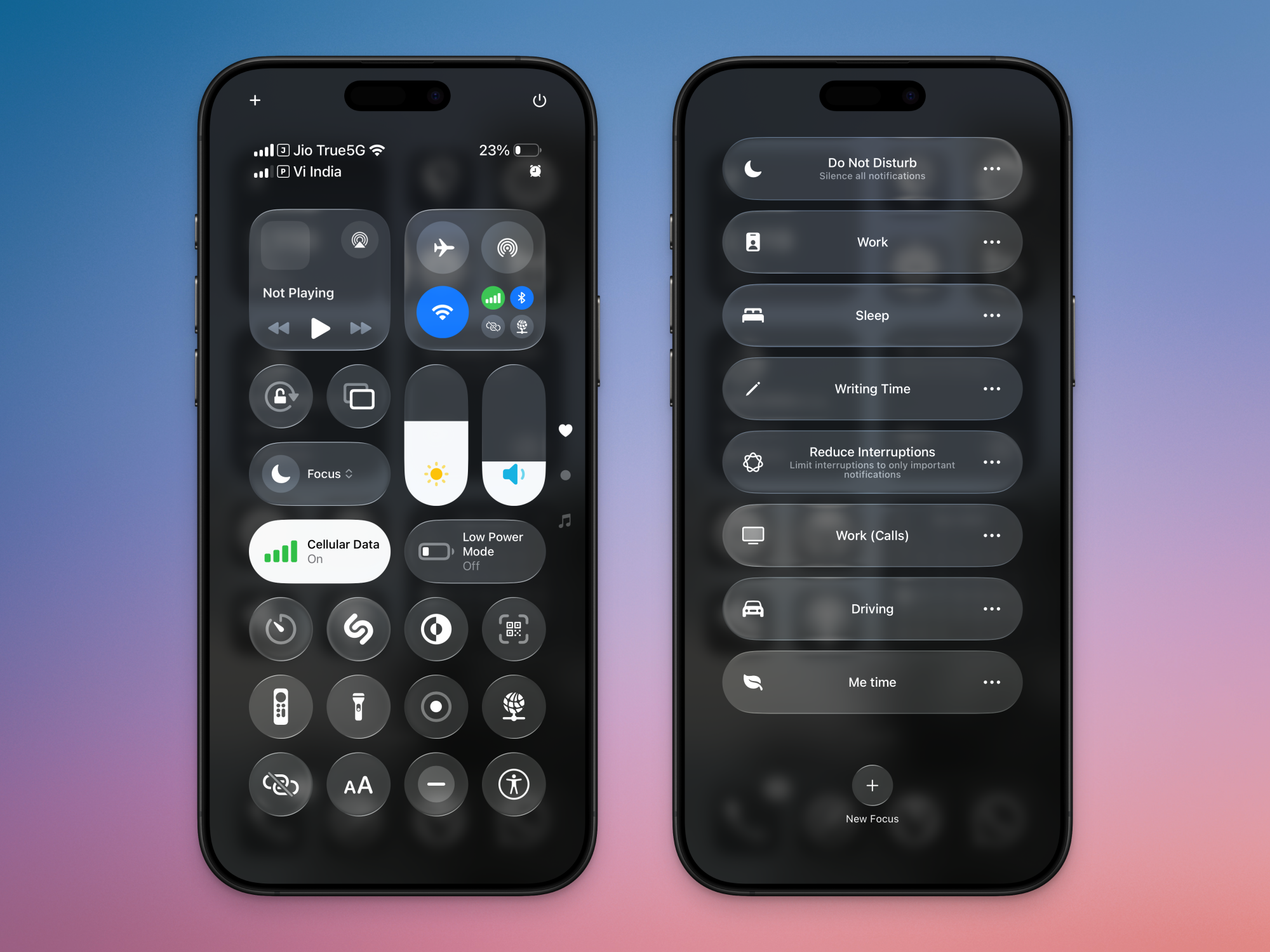
What used to be Do Not Disturb on iPhone is now Focus mode, which comes with many more options. Open the Control Center and tap the Focus button to see a list of all available Focus modes. The familiar Do Not Disturb option will be up top, but you’ll also see helpful Focus modes premade by Apple, Sleep being a prominent example. If you have a device that supports Apple Intelligence, you’ll also see a mode called Reduce Interruptions, which automatically mutes all notifications except the really important ones. Other premade modes include Personal, Work, and Sleep, which you can all customize to your own liking.

How to set up your own Focus mode

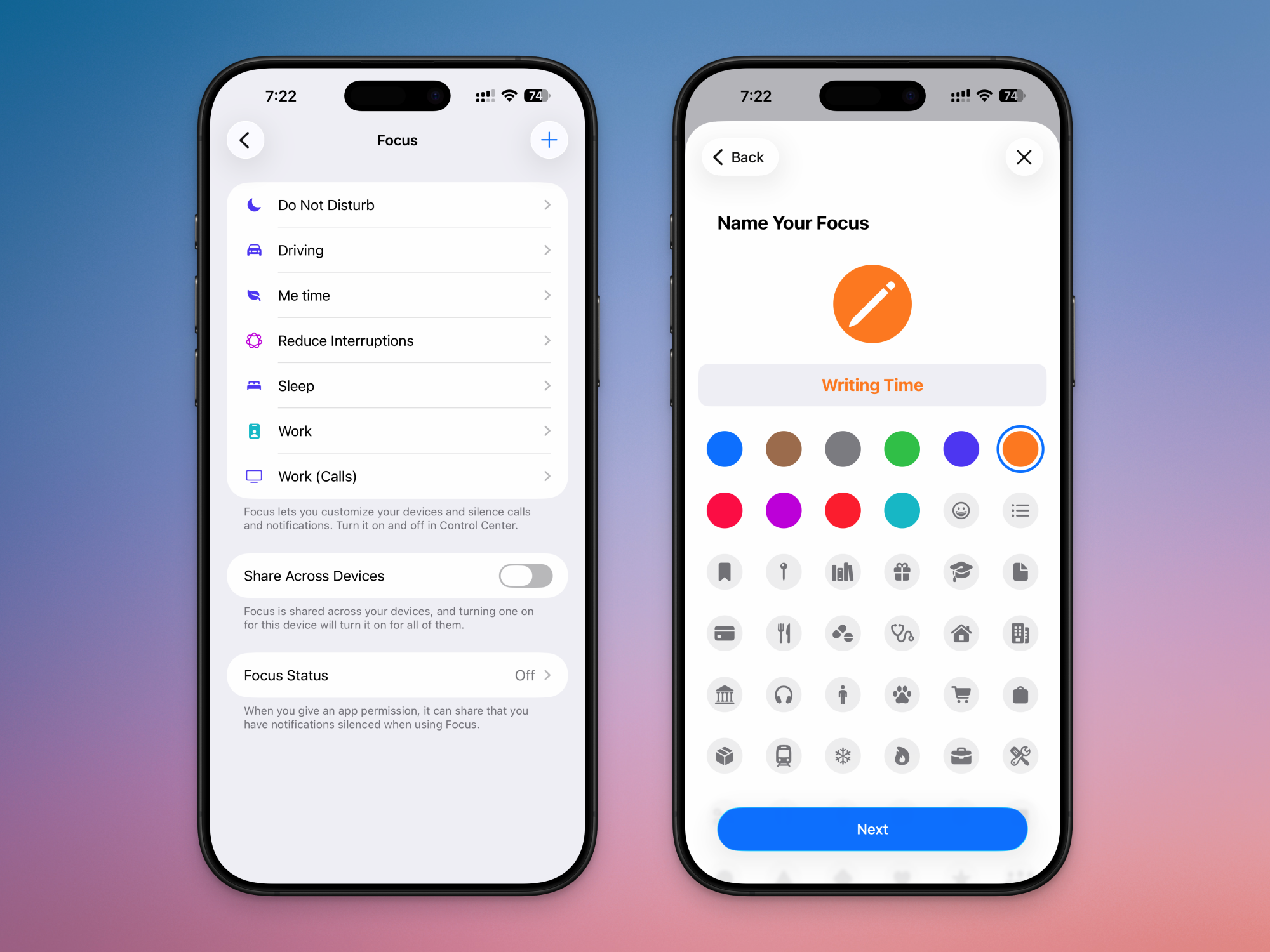
To get the most out of Focus Modes, you should set some Focus modes for yourself. One for work and one for personal time would be a great place to start. Go to Settings > Focus and tap the Plus button at the top. Here, choose the Custom mode option to get the most flexibility. Give it a name, icon, and tap Next. Then, tap Customize Focus.

Creating your own custom Focus mode

Credit: Khamosh Pathak

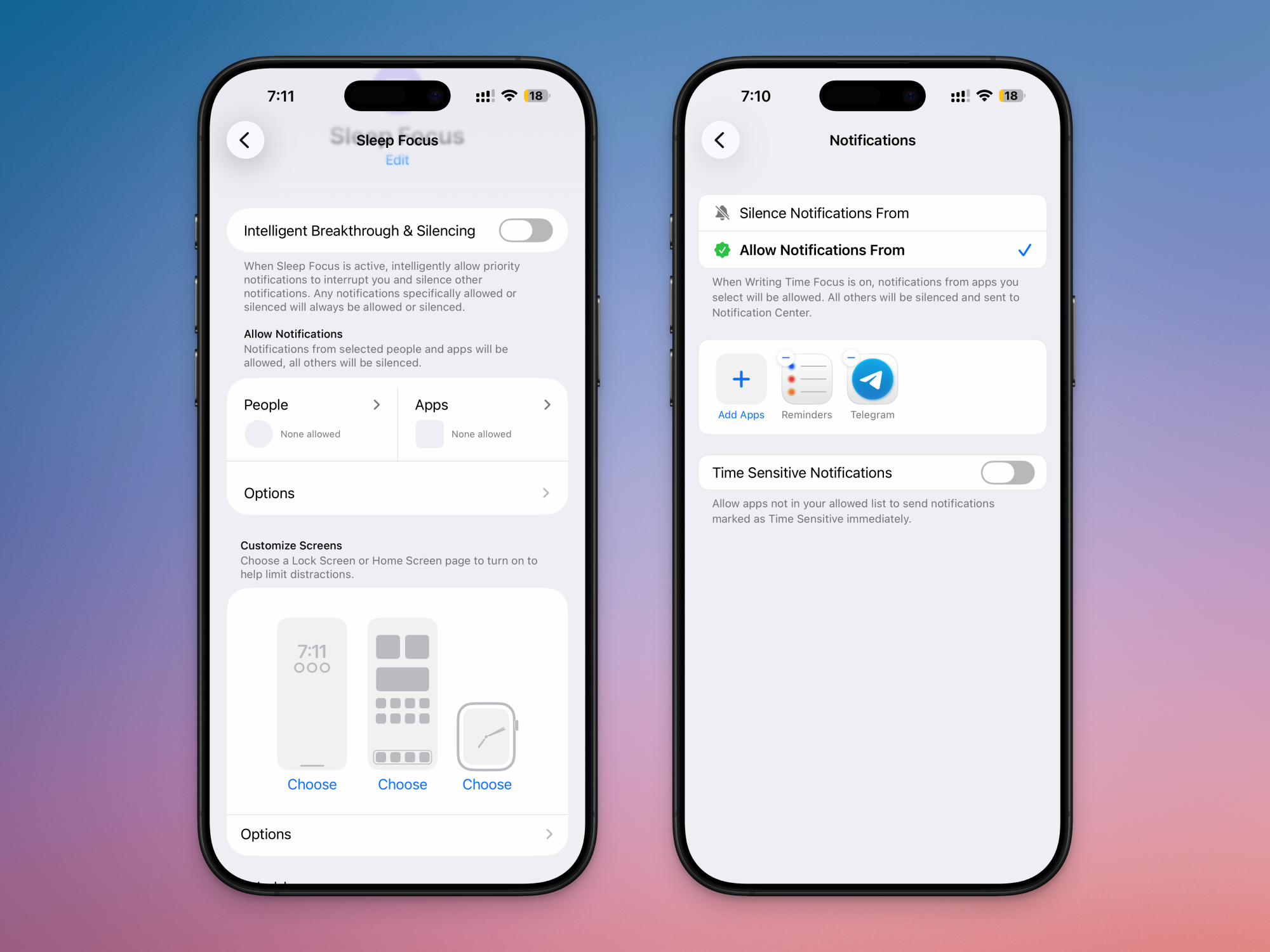
This is where you’ll do most of your work. First, tap Choose People and select if you want to allow notifications from only a couple of people, or if you want to silence notifications from particular folks. If you’re setting up a Focus mode for personal time, you might want to stop notifications only from your boss and colleagues. Choose the people to allow, and tap Next. Then, choose who is allowed to call you. You can limit it to just your Favorites, or only a handful of people.

Customizing Focus mode

Credit: Khamosh Pathak

Then, tap Choose Apps and follow the same process for apps as well, either allowing notifications from some apps, or only silencing notifications from particular apps. For example, if you’re setting up a Focus mode for personal time, you might want to disable notifications from work apps like Slack, Teams, Gmail, and more. Tap into the Options menu, and you can also choose to show silenced notifications on the Lock Screen, or to dim the lock screen every time that Focus mode is enabled.

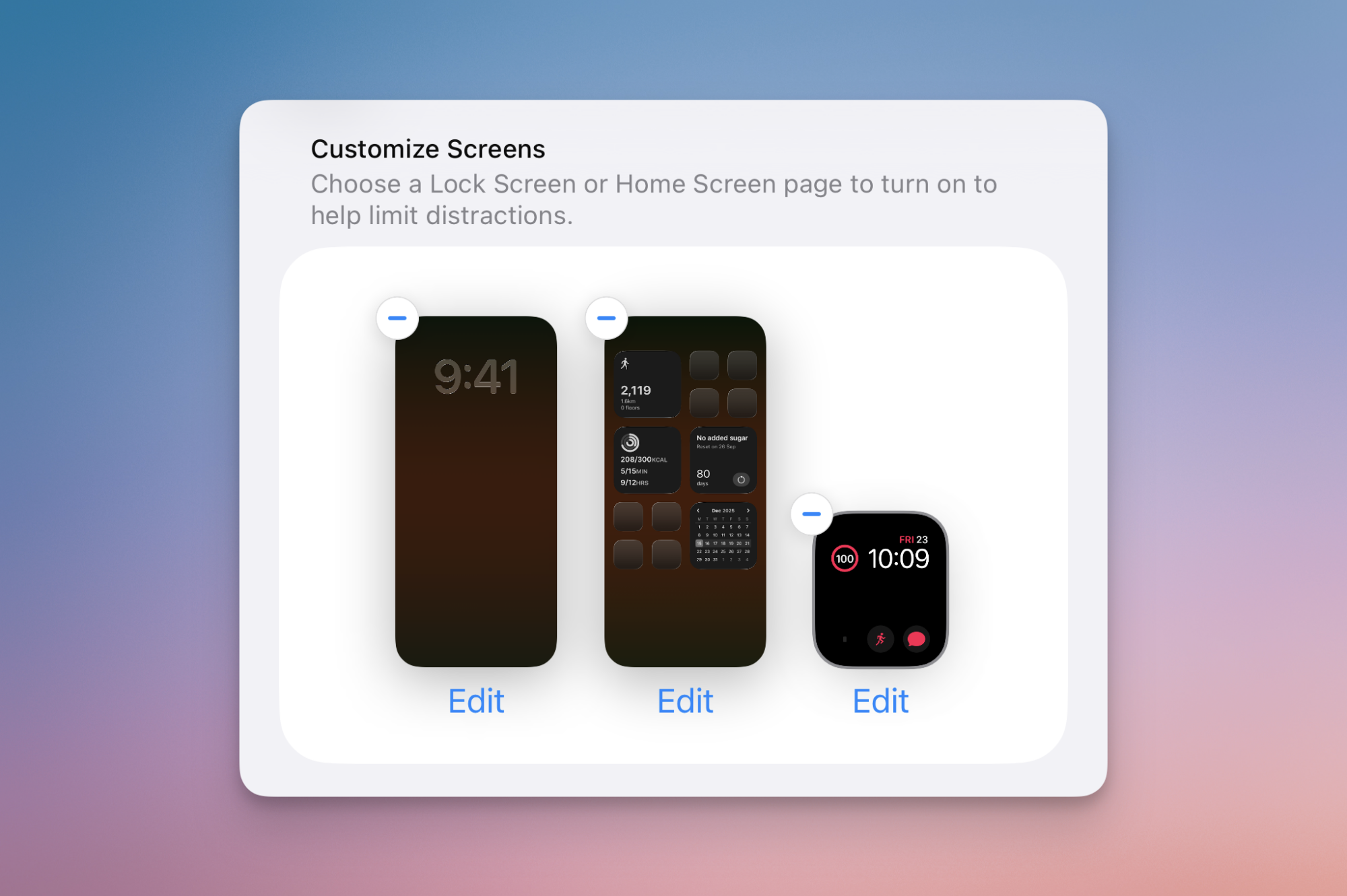
Next, take some time to customize what you see when a Focus mode is enabled. Apple will let you choose a distinct Lock screen, Home screen and even an Apple Watch watch face per Focus mode. For example, your work Focus can feature just your calendar and to do list. This will go a long way towards cementing the Focus state in your mind. For example, when I’m in my Writing Focus mode, my home screen is devoid of everything, including my tasks widget and communication apps.

Custom home screen and lock screen for Focus mode.

Credit: Khamosh Pathak

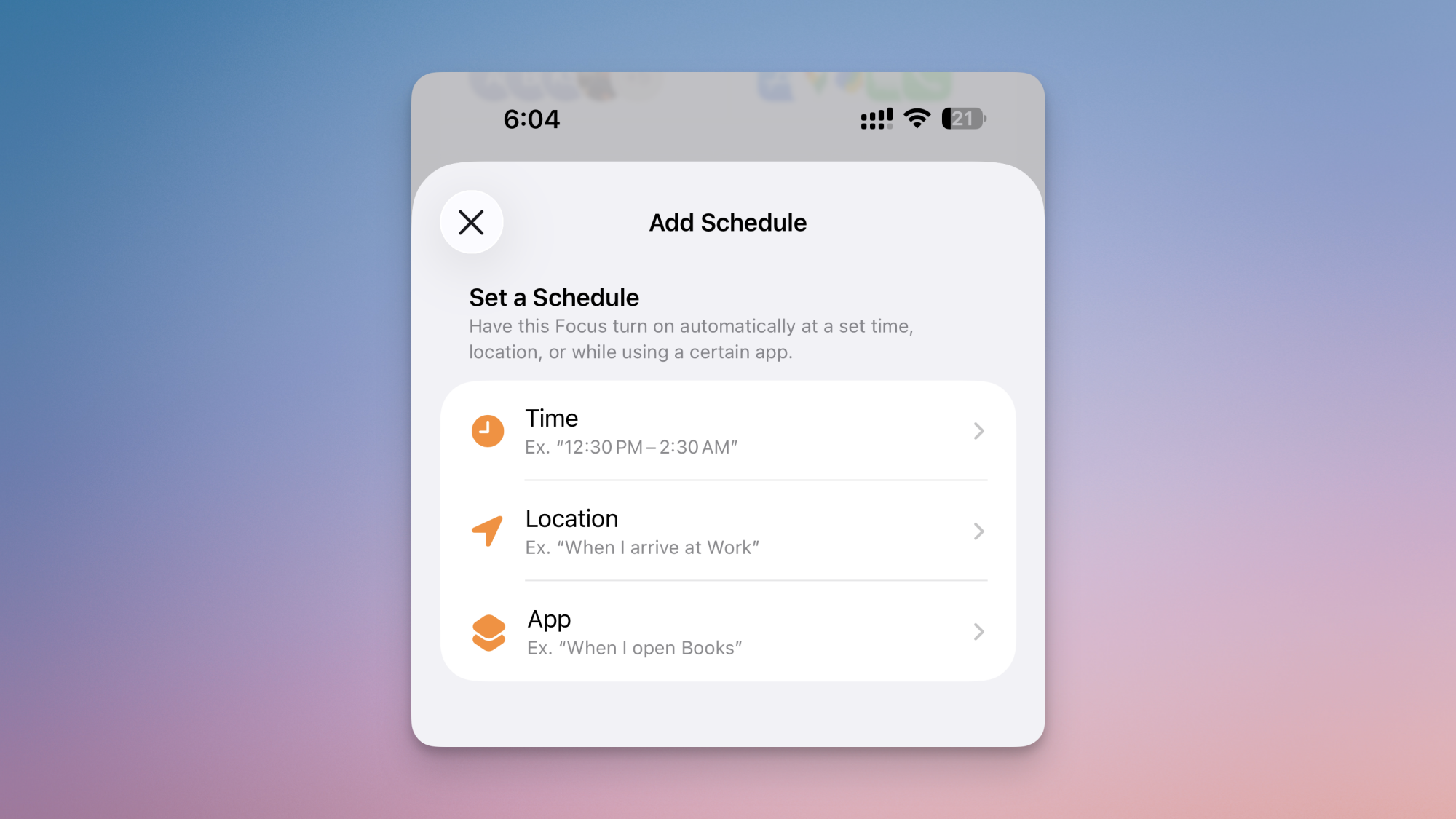
Then, you’ll see a Set a Schedule section. Here, you can turn on a Smart Activation feature that will automatically enable a Focus mode depending on your location, app usage and so on. This has been hit or miss for me, so I would advise you to avoid it for the most reliable results. But you can definitely create a manual schedule using the Add Schedule button. Here, You can trigger a Focus mode to automatically start or stop at a certain time of day.

Custom schedule Focus mode.

Credit: Khamosh Pathak

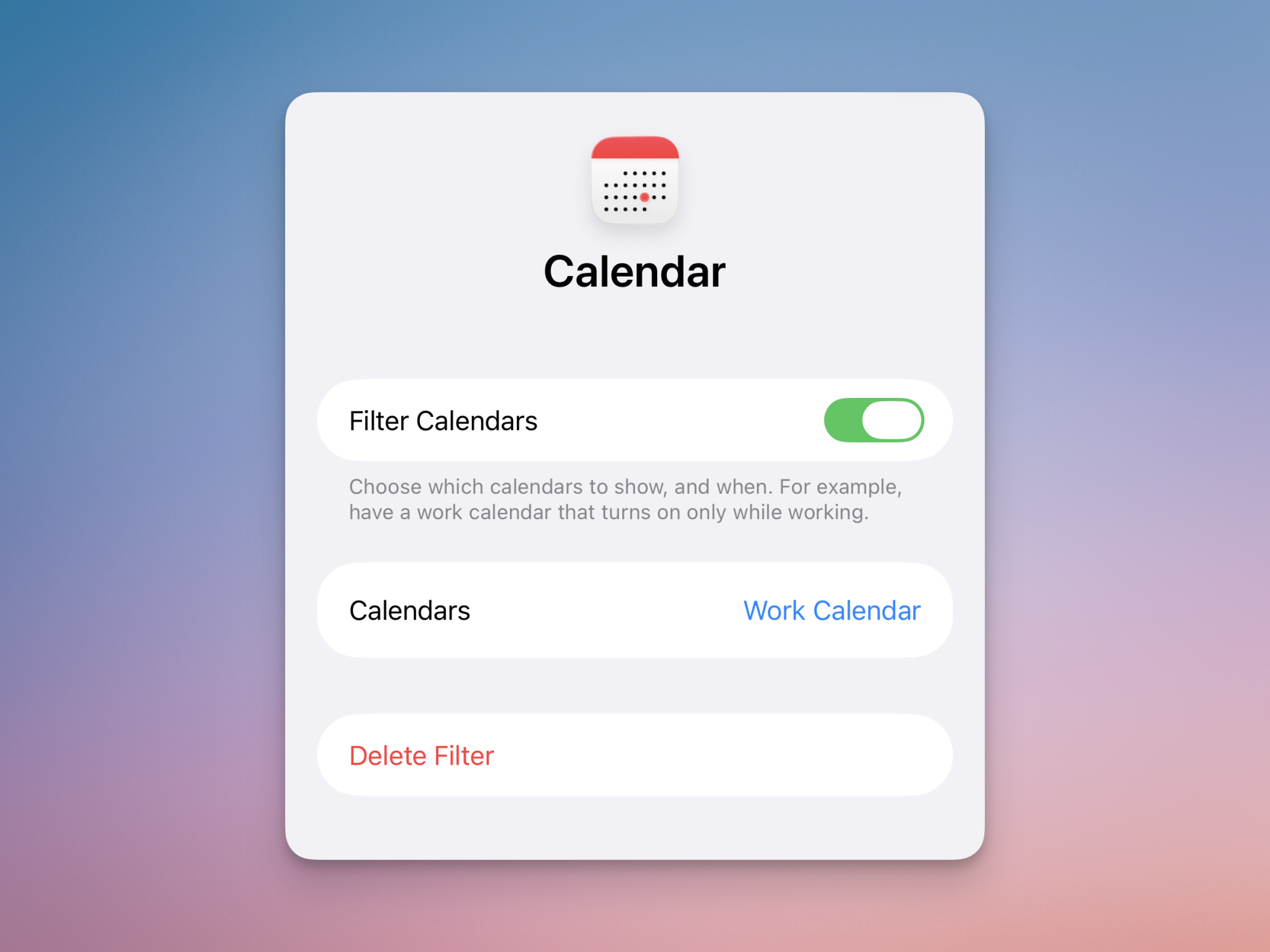
You can even use Focus Filters to further customize exactly what apps can show you when you’re in a Focus mode. For example, you can choose to only see your work calendar when you’re in your work Focus, but not your other calendars. These filters work for Apple’s apps and even third-party apps.

Calendar filter in Focus mode.

Credit: Khamosh Pathak

Lastly, you can choose to enable the Intelligent Breakthrough & Silencing feature that’s found at the top of the Focus page. If you have an iPhone with Apple Intelligence enabled, you’ll see this setting. It uses on-device intelligence to allow priority notifications to interrupt you even when you’re in silent mode. This goes over all other customizations that you might’ve done. But, being an Apple Intelligence feature, its reliability can be a bit iffy. Based on personal experience, I would recommend you take the time to fully customize the Focus mode to your liking instead of handing some of that work over to Apple Intelligence, as it gets things wrong for me fairly often.

US Tech Force Aims To Recruit 1,000 Technologists

The Trump administration announced Monday the United States Tech Force, a new program to recruit around 1,000 technologists for two-year government stints starting as soon as March — less than a year after dismantling several federal technology teams and driving thousands of tech workers out of their jobs.

The program will primarily recruit early-career software engineers and data scientists, paying between $150,000 and $200,000 annually. About 20 companies have signed on to participate, including Palantir, Meta, Oracle and Elon Musk’s xAI. Some engineering managers will be allowed to take leaves of absence from their private-sector employers to join the program without divesting their stock holdings.

The initiative follows the March closure of 18F, General Services Administration’s internal tech consultancy, and the shuttering of the Social Security Administration’s Office of Transformation in February. The IRS had lost over 2,000 tech workers by June.


Read more of this story at Slashdot.

10 Hacks That Every Smart Home Owner Should Know

We may earn a commission from links on this page.

My smart home routines are ready for a refresh. As new standards have emerged for connecting gadgets in the home, and Google and Amazon have been updating their respective hardware and apps, I’ve been lagging in keeping things sharp and running smoothly. So, I’m doing something about it now.

If you’ve been feeling bored by your smart home and its current routines too, keep reading. These are ways to configure the smart devices around you to make them for more than just turning the lights on and off (although there’s always plenty of that). Although my personal smart home is in the Google Home ecosystem, these features also apply to smart homes powered by Apple HomeKit and Amazon Alexa.

Turn everything off when no one is home

It sounds like a no-brainer, but in nearly ten years, I still haven’t set up my smart home so the lights turn off when I leave the house. Given how my energy bill is looking lately, I’d like to get out of this practice. I want to make sure the lights and any errant appliances turn off, especially when no one is inside.

A screenshot of the Away routine in Google Home app
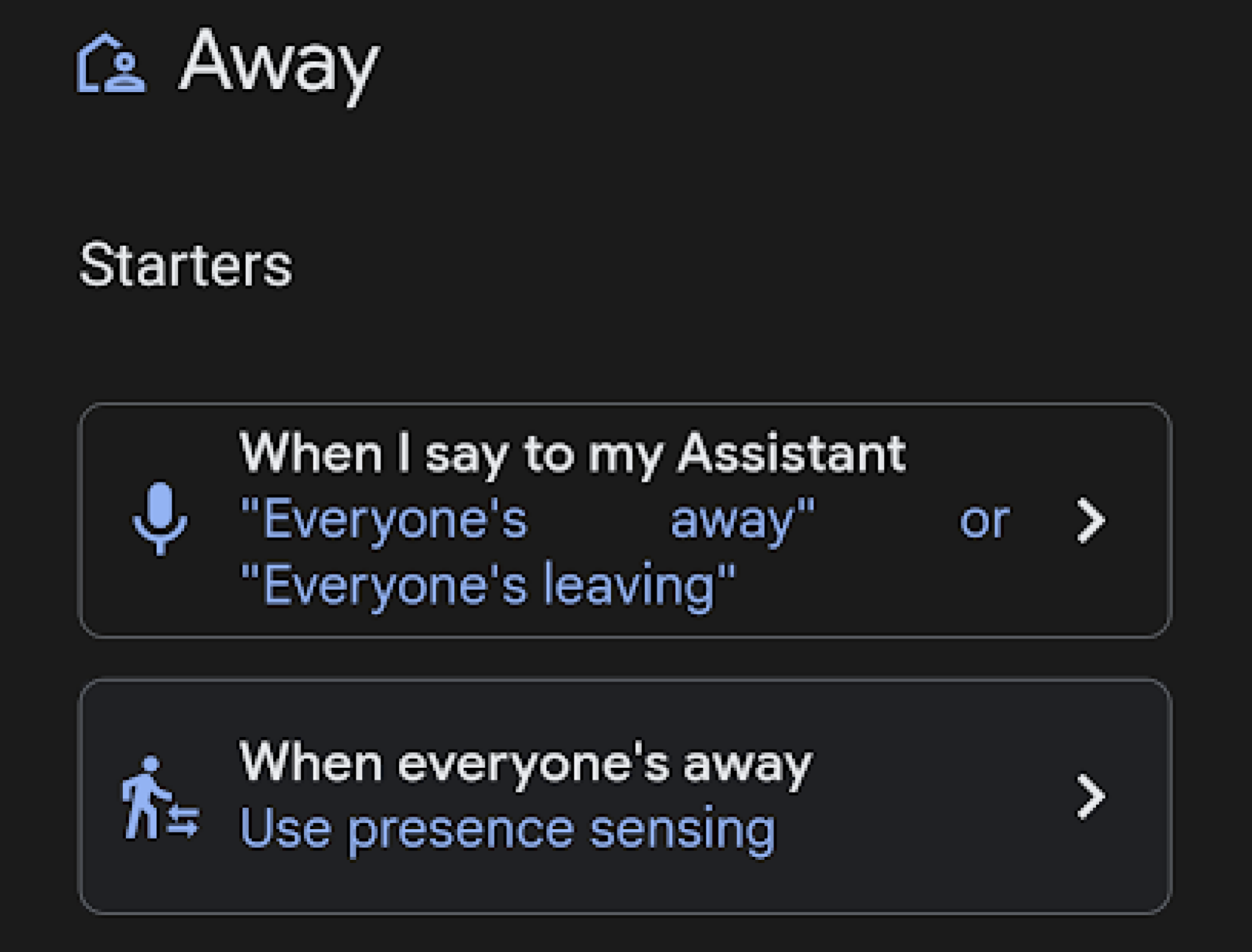
The “Away” routine in Google Home can be programmed to detect when everyone is out of the house.
Credit: Florence Ion/Lifehacker

In the Google Home app, there’s an “Away” routine in the Automations tab that lets me select which devices to turn off when the system detects that my phone is gone and away. But what if everyone else is home? I don’t want the lights to turn off on them. Instead, I use an automation that turns the lights off when two conditions are met: I’m not at home, and none of the house’s centralized gadgets, like the Chromecast-connected TVs, are on.

Even if you aren’t in the Google ecosystem, you can use similar “if-this-then-that” logic. For Apple HomeKit users, the Shortcuts app is a better way to make a “Leave Home” automation and add a “Get State of Home” condition to ensure companion devices, like an Apple TV, are not in use. Amazon Alexa users have it a bit harder, as there is no native way to detect a device’s on/off status. You can create a location-based routine or use the “Away Lighting” feature (in your Home/Away settings). It effectively switches on an “enforce” mode when you leave.

A screenshot of what the option for "when the last person leaves" looks like in the Apple Home app
Apple lets you select “when the last person leaves” as a trigger for a smart home automation.
Credit: Florence Ion/Lifehacker

Set the morning volume

Some people like to rock out first thing in the morning. But there’s nothing worse than scaring the rest of the household into a wake-state because the volume was left on high. While you could yell over the device streaming music or run to turn down the volume, there’s no need to deal with all that. Instead, set a volume-first routine so the speaker is set to the desired volume each morning before anyone activates it.

A screenshot for setting the volume on multiple smart speaker devices in the Google Home app
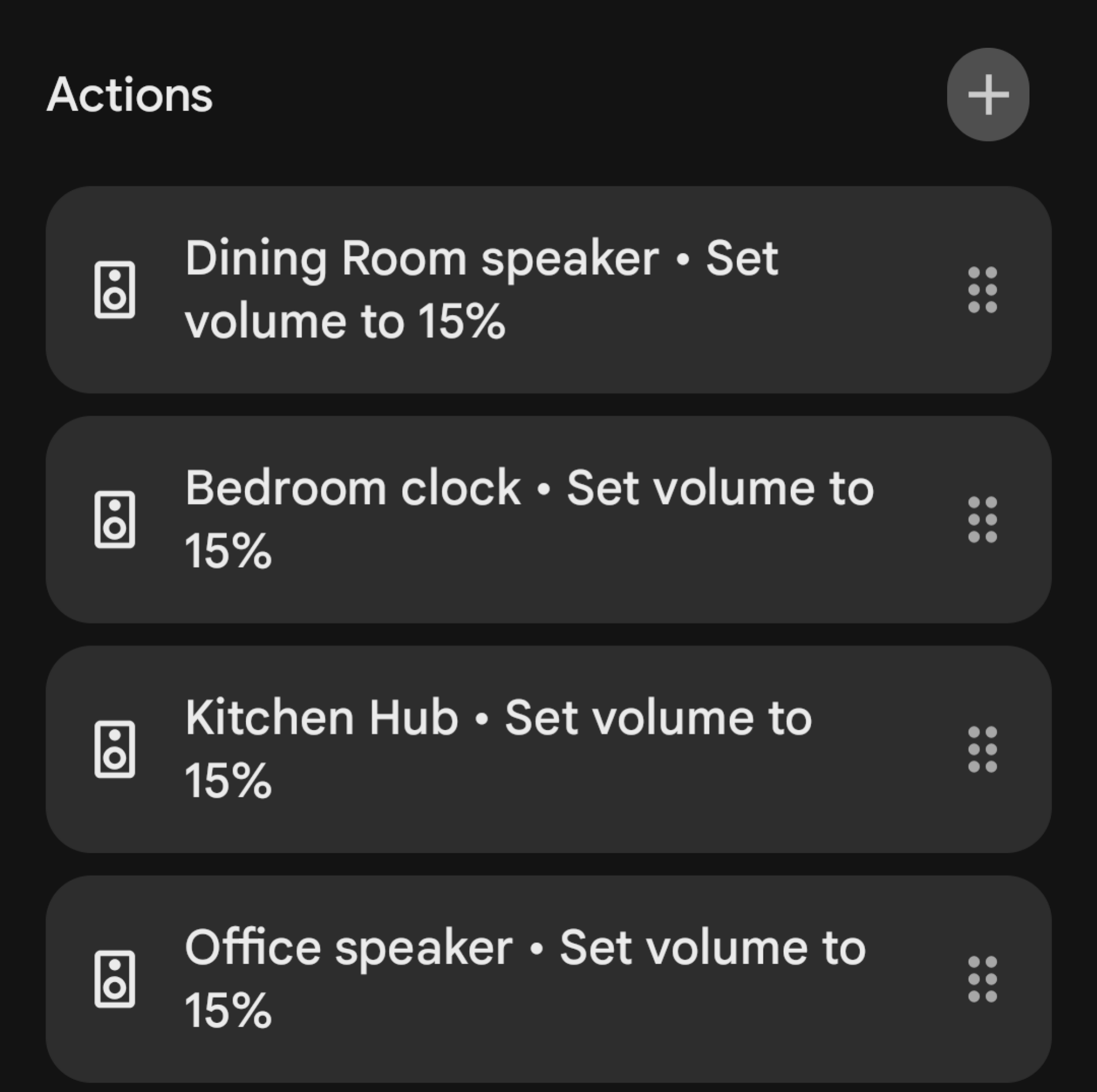
Set all your smart speakers to the same volume level at each time of day so no one gets their ears blasted off.
Credit: Florence Ion/Lifehacker

In the Google Home app, under Automations, set the formula to run first thing in the morning every day, week after week. Then select the offending speaker-equipped devices. (I set up all my smart speakers at the same volume each day, upstairs and downstairs, since you never know.) Apple and Alexa have similar setups. In the Apple Home app, you’ll set a scene on the corresponding HomePod to run at a Time-of-Day Automation. And through Amazon Alexa, you’ll create a Routine with a “schedule” trigger, then select Echo devices to set the volume.

Deter people from your porch

If you’re not interested in visitors at certain times of day or night, you can set up your porch to perform a visible action that gets whoever is outside to scram.

If you have a doorbell camera, you are likely used to getting passive notifications that someone is visible. You can turn that notice into a smart home automation. Set it up so that when motion is detected, the outdoor lights blast to full brightness and the outward-facing lights inside the house flicker on. You will need smart bulbs or smart plugs to enable this.

A screenshot of the option to detect events on a Nest camera
Nest cameras in the Google Home app let you choose a “person detected” trigger to start an action.
Credit: Florence Ion/Lifehacker

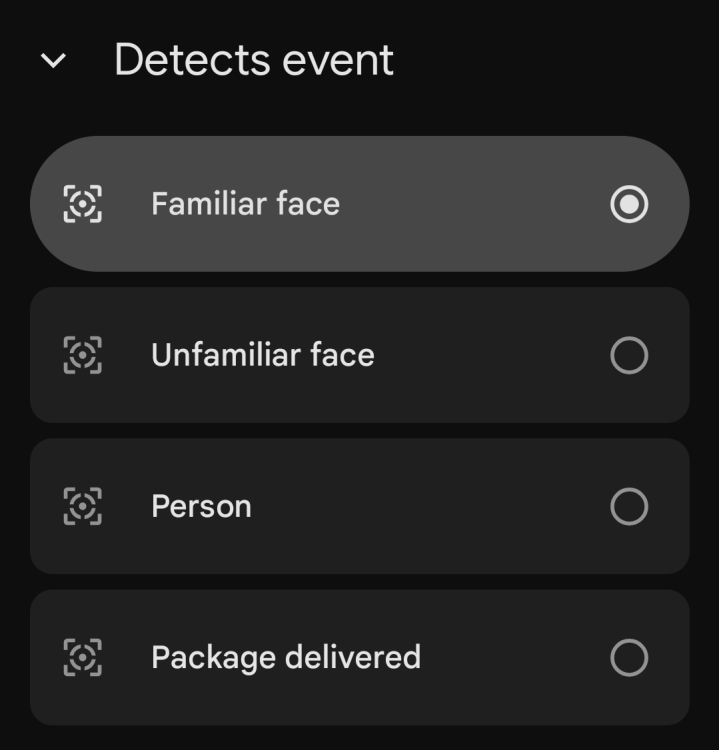
In the Google Home app, the Automations tab is where this is done. I set my Nest doorbell camera to “Starter” when it detects “Person seen.” Then, I choose the lights that I want blaring at 100% under Actions. Apple smart homes need HomeKit Secure Video (HSV)-enabled cameras to access something like this. In the Home app, you can create an automation that runs when the camera detects activity, then select the outdoor lights and the outward-facing lights that should turn on. Amazon users with Ring cameras can do the same in the Alexa app under Routines. You can even go a step further and enable the same “Away Lighting” feature from the last tip, which broadcasts a chime inside the house the moment motion is detected.

Focus mode for the house

Unfortunately, I can’t focus. I need all external distractions disabled in some capacity. Rather than do that manually, I set up an automation to get the rest of the house whipped into shape when it’s time to work. With that, I skip saying a command out loud and instead set it up on a schedule.

Beginning at 9:30 each morning, except weekends, I put the action to adjust all the lights in my office to a specific setting, enough to get me into the groove, and turn off any other lights in the house that may have been left on from the chaotic morning routine. I also turn off the TVs and any internal-facing security cameras that shouldn’t be watching me while I work. It’s a similar schematic for Apple HomeKit users, though it’s even better because iOS lets your iPhone’s state set the tone. In the Shortcuts app, you can create a personal automation. Select a Focus mode as the trigger (it might look like “Do not disturb”), then select “When Turning On.” You’ll then set the action to “Control Home,” and that’s where you’ll put the status for smart lights and any other devices you want. Once you place the iPhone into silent mode, or the clock strikes 9:30 a.m.—whichever comes first—you’ll see the devices linked here follow suit.

Alexa uses a similar logic to Google Home, with the schedule doing the heavy lifting. In the Alexa app, go to Routines and create one with a scheduled time as the trigger, set to run only on weekdays. Then add the smart home actions you want to adjust, turn off, and turn on. The only bummer here is that there is no way to extend the action to your smartphone, at least through Alexa.

Create a Guest Mode for smart devices

People are confused about how I control my house, and I don’t blame them. So, I set up a “limited access” guest profile for friends who plan to stay only a night or two.

A screenshot of the option that pops up to add a "member" in the Google Home app
The Google Home app lets you add a “Member” with limited access to the smart home.
Credit: Florence Ion/Lifehacker

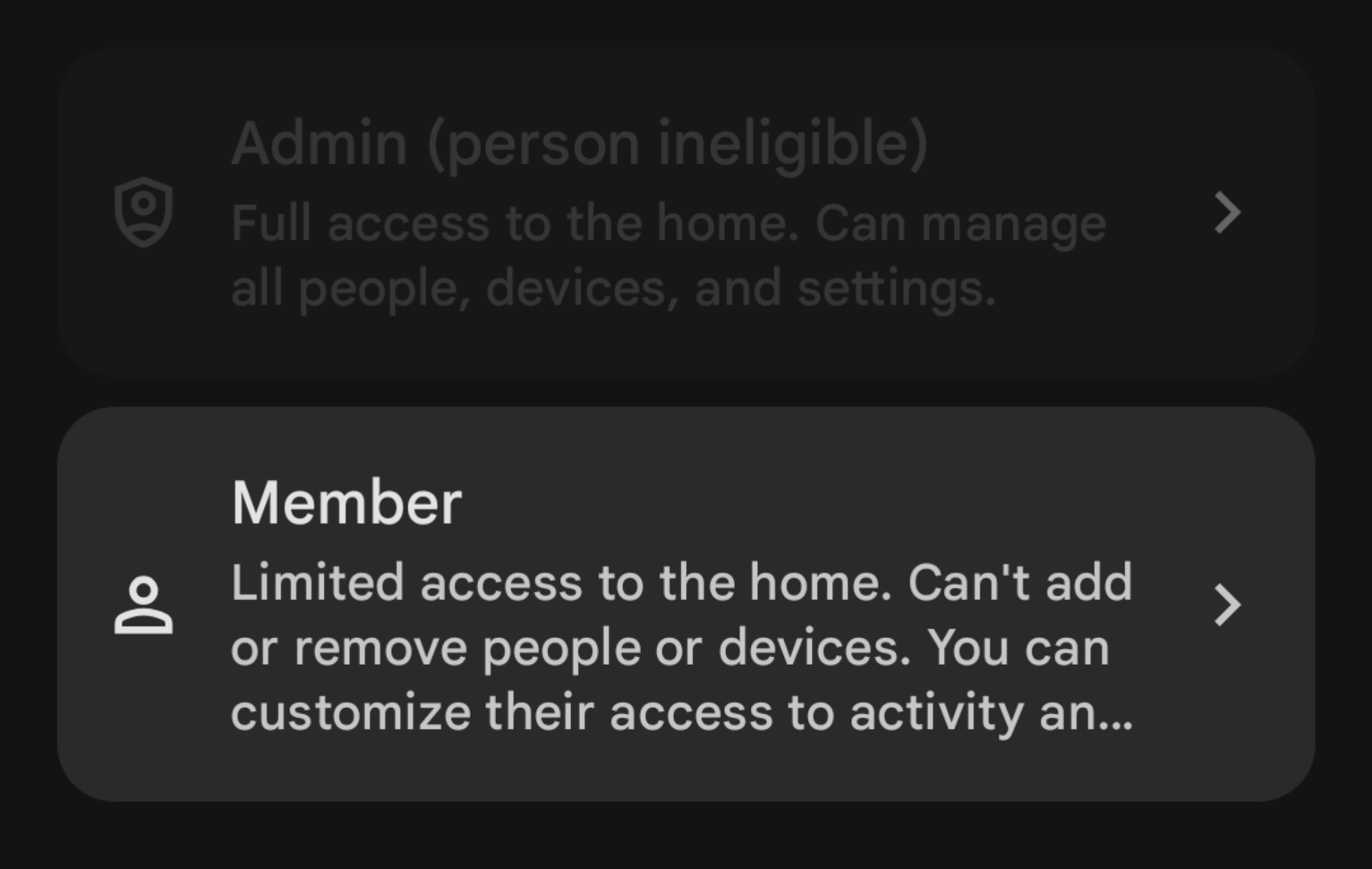
Google Home lets you invite people with the “Member” role to access smart home controls. Provided they have a Google account, the person can access connected lights in the designated rooms as needed. Apple HomeKit is much more granular, but it works similarly. You can invite people by their Apple ID and manage access to certain accessories. You can also lock them out of security cameras and thermostats, so they have access only to the essentials, like the smart lights.

In the Amazon ecosystem, Alexa is the most limited. (It once offered a now-deprecated Guest Connect feature.) Instead, you’ll rely on the Amazon Household feature, so you’ll have to invite a guest with an Amazon account to control devices. However, this also gives them access to the whole kit and caboodle, like your payment methods. If you want to avoid oversharing, teach your guests the basic “on” and “off” commands for your smart devices.

Protect your thermostat

If you don’t want other people adjusting your thermostat, you can lock them out with your smart home. In Google-led smart homes, you can set up a PIN in the Home app to prevent manual adjusters from accessing the thermostat and changing the temperature. However, this works only with compatible hardware, like a Nest Thermostat.

In an Amazon home, you need an Alexa-compatible thermostat. You could dig through the settings of the manufacturer’s apps to set up a PIN to keep people from messing with the dial. Or you can use a Routine within Alexa to set a specific schedule so that the temperature automatically returns to your preferred setting even if someone else has touched it.

A screenshot of what it looks like to create a new scene in Apple Home
Remind everyone that the scene that’s taking place is your temperature, and no one else’s.
Credit: Florence Ion/Lifehacker

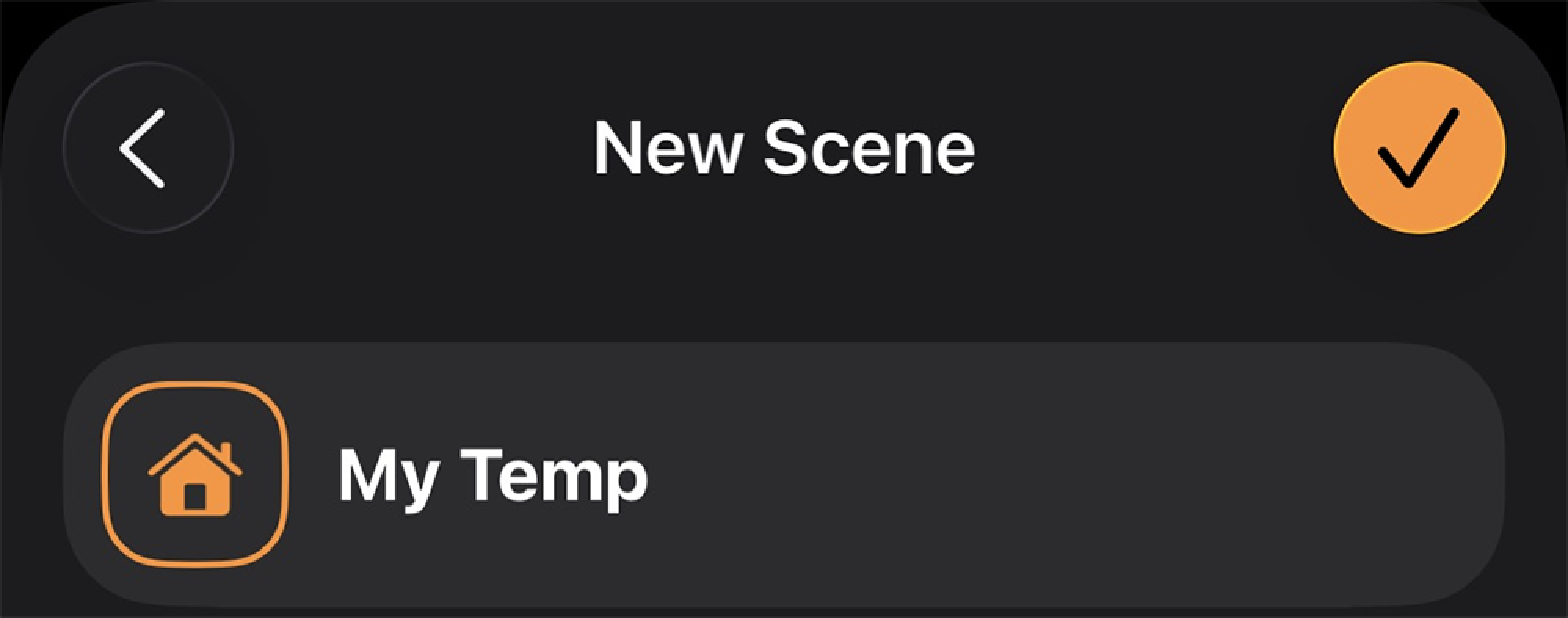
Apple HomeKit lets you, the smart home owner, be the boss with Scenes. (Get used to making them, because they become essential later.) In the Home app, create a scene called “My temp” and then set the compatible thermostat to your preferred temperature. In the Shortcuts app, create a personal automation to run this scene at a specific time, then select how often you want it to run. This will check and adjust the temperature every few hours to ensure it’s at your favorite level, not anyone else’s.

Never forget another load of laundry

I have a connected washer and dryer for laundry, which I can configure to alert me when a load is done. There’s the simple push notification, which might work for some, but I prefer Google Home to holler at me when the laundry’s done drying. In the Home app, under Automations, I can select my LG dryer going off as the status, then ask the Home app to broadcast a message to a few specific smart speakers around the house to let me know the laundry is ready to fetch.

If you don’t have internet-connected appliances, you can use a smart plug with energy- and power-monitoring capabilities from brands like Govee or TP-Link’s Kasa. Provided they can handle high-voltage use (look for over 15 amps), you can plug in your unconnected washer or dryer that way and have it notify you when the appliance shuts off.

Apple HomeKit users should look into compatible Eve Energy smart plugs, then create a personal automation routine in the Shortcuts app to trigger when the smart plug’s current drops below a set threshold. The action can be to “Control Home,” and then choose a scene that flashes lights a certain color at high brightness, all-lights-on, as an indicator that it’s time to get to the clothes. Amazon users are in the same boat. A compatible smart plug can be added to a Routine that triggers when the smart plug’s energy usage is below a certain wattage. For the action, you’d set a smart bulb to red or something similar to serve as a visual cue that it’s time to fold.

Don’t water when it rains

My husband has set up a vast network of internet-connected sprinklers in both the front and back yards using B-Hyve. It’s great for easily turning the sprinklers on and off, and for scheduling them in the summertime. But in the winter, we don’t need to water the grass as much as we do in the dry summer. So we set up a weather override in the app. If you don’t have a smart sprinkler setup, you can fake it. Again, all you need is a smart plug rated for outdoor use, plugged into the sprinkler system. An external temperature sensor can make this routine more accurate.

For Google Home users, you’ll rely on seasonal schedules instead of live weather data. Start a new automation with a “time of day” trigger that runs only on weekdays. You will need to manually turn this routine off in winter to prevent it from overwatering the lawn. You can use a third-party service like IFTTT or Zapier to set up something that’s based on the actual weather forecast. Alexa requires a similar third-party to make a Routine with a weather condition.

Apple is more accommodating. In the Apple Home app, you can create a time-of-day automation and then convert it to a Shortcut to add the weather as a condition. You can then set the action to “Get Weather Forecast” and select whether the current weather is “rainy” or whether the chance exceeds a certain percentage. If the forecast calls for rain, the Shortcut doesn’t affect the system. Alternatively, if there is no rain, the Shortcut continues and sets the sprinkler’s smart plug to “on.”  

Play music or soundscapes on command

I work best with one of those binaural tracks on loop in the background. Instead of manually starting these tracks every day, I can have Google do it by tying my soundscapes directly to a routine. You can make one, too, for any media you’d like to listen to.

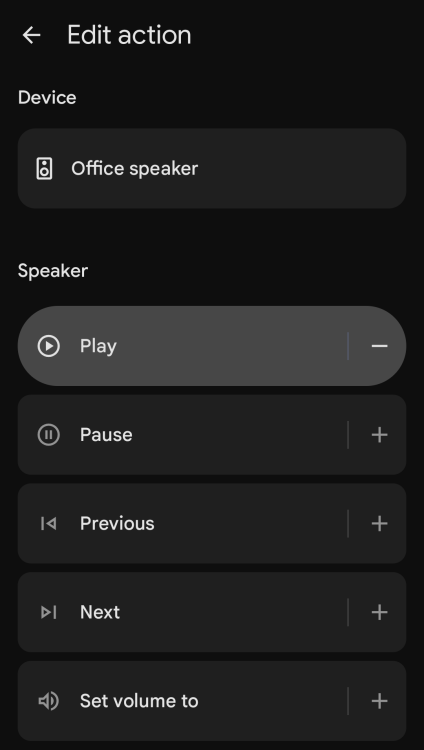
In the Google Home app, under Automations, create a household routine that runs when you say “Hey Google, it’s chill time!” Under Actions, select which lights should turn on and how they should be set up. Then, you can choose a smart speaker or a Chromecast device and set it up to play specific media from Spotify or YouTube.

A screenshot of choosing a speaker to do an action in the Google Home app
You can select speakers to play something very particular when it’s working time.
Credit: Florence Ion/Lifehacker

The same goes for Apple and Amazon households. Apple Home lets you set a time-of-day automation or a voice command to run on its own. For audio, select the HomePod and set it to play “ambient sounds” or anything from Apple Music. HomePod supports a “Stop Playing After” setting, so you can set it to turn off after an hour or two.

Amazon also relies on a Routine. For the action, select the music and audio option, then specify the source of your noises. Add a second action by selecting “Timers & Alarms” and setting a “Sleep Timer.” This ensures that Alexa stops the audio after a set time, like with Apple Home, so you don’t have to turn it off manually.

Get an alert if someone leaves the garage door open

The best part of having a smart home is remote access to all the appliances and devices you’re worried about leaving on or open when you leave the house. You can do this with your garage without dealing with one of those tricky garage door sensor installations, provided you have a compatible smart home hub.

You can buy a cheap security camera that uses an SD card to monitor the garage door and let you peek in. Or, for around $20, you can buy a small ZigBee-enabled tilt sensor and automate it to check the garage status once the system has detected that everyone is out of the house. In Google Home, you’d attach this sensor to the “Home & Away status.” Like the routine we set up for the lights earlier, here you’d choose the tilt sensor to check when “Everyone is Away.” If the sensor device status is set to “open,” you can select an action to notify you with a custom message. Closing it is still on you, though. If you were the last to leave, you’ll need to double back; if someone else was, you can quickly call or text them to turn around and close the door.

Apple and Amazon have the same location-based blueprint. On Apple, you’d set up the sensor along with the “People Leave” automation, then set the condition to “Open” after the last person leaves. Set the Action to send a notification to your device if so. And on Amazon, set a Routine to check for the garage status when you’ve left the premises.

PlayStation Portal Update Removes Major Friction With This New Feature

PlayStation Portal Update Removes Major Friction With This New Feature
Despite its limits as a game streaming device, PlayStation Portal has proven surprisingly successful—and now, the update allowing for PlayStation Portal to stream from Sony’s servers instead of your own PlayStation 5 has finally come out of beta, meaning the device can now technically function as a standalone handheld. There are still many

Oh look, yet another Starship clone has popped up in China

Every other week, it seems, a new Chinese launch company pops up with a rocket design and a plan to reach orbit within a few years. For a long time, the majority of these companies revealed designs that looked a lot like SpaceX’s Falcon 9 rocket.

The first of these copy cats, the medium-lift Zhuque-3 rocket built by LandSpace, launched earlier this month. Its primary mission was nominal, but the Zhuque-3 rocket failed its landing attempt, which is understandable for a first flight. Doubtless there will be more Chinese Falcon 9-like rockets making their debut in the near future.

However, over the last year, there has been a distinct change in announcements from China when it comes to new launch technology. Just as SpaceX is seeking to transition from its workhorse Falcon 9 rocket—which has now been flying for a decade and a half—to the fully reusable Starship design, so too are Chinese companies modifying their visions.

Read full article

Comments

Scientists Thought Parkinson’s Was in Our Genes. It Might Be in the Water

For decades, Parkinson’s disease research has overwhelmingly focused on genetics — more than half of all research dollars in the past two decades flowed toward genomic studies — but a growing body of evidence now points to something far more mundane as a primary culprit: contaminated drinking water.

A landmark study by epidemiologist Sam Goldman compared Marines stationed at Camp Lejeune in North Carolina, where trichloroethylene (TCE) had contaminated the water supply for approximately 35 years, against those at Camp Pendleton in California, which has clean water. Marines exposed to TCE at Lejeune were 70% more likely to develop Parkinson’s.

The latest research suggests only 10 to 15 percent of Parkinson’s cases can be fully explained by genetics. Parkinson’s rates in the US have doubled in the past 30 years — a pattern inconsistent with an inherited genetic disease. The EPA moved to ban TCE in December 2024. The Trump administration moved to undo the ban in January.


Read more of this story at Slashdot.

In 2025, tech giants decided smart glasses are the next big thing

There’s a growing sentiment that gadgets have gotten boring. And while I don’t fully agree, I understand why people might feel that way. Just think about some of the novel device types that companies have tried to push since the original iPhone came out. 

3D TVs were a massive flop and tablets still feel like extra-large smartphones despite Apple’s efforts to prop them up as laptop replacements. Meanwhile, even with huge technological advancements over the last decade, VR headsets remain relatively niche due to factors like high prices and a lack of compelling content. And although big names like Google, Microsoft, Meta and others continue to dump billions into AI development, the first wave of dedicated AI devices was an abject failure. 

When you think about it, the only new(ish) class of gadget that has made major inroads to the mainstream market is smartwatches. That said, because they’ve evolved into wearable health and fitness sensors instead of the wrist-based computers that many once thought they would be, they haven’t really disrupted our lives like the personal computer and smartphone did. But that seems poised to change because the tech giants have decided that smart glasses are going to be the next big thing. 

Headsets versus smart glasses, what’s the difference?

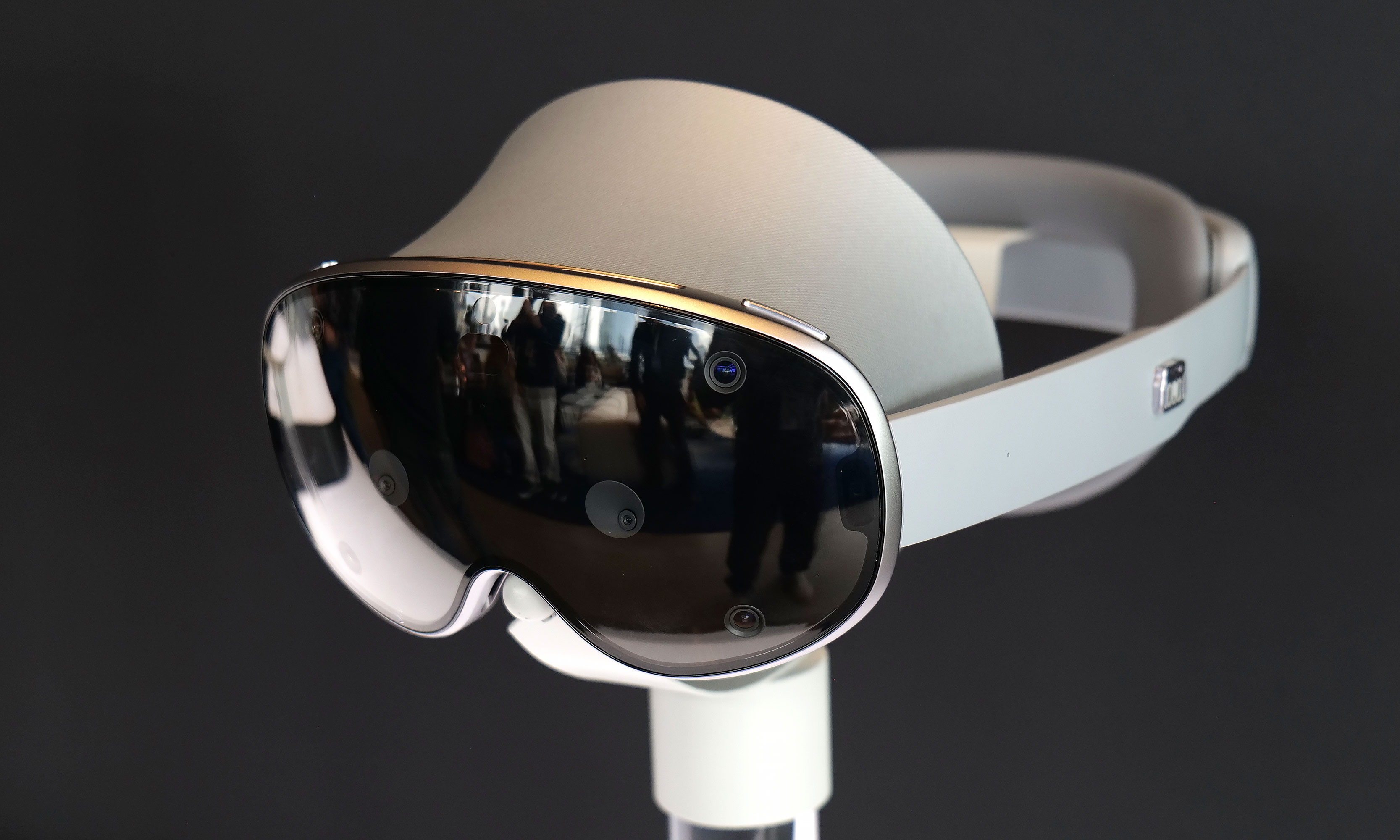
Google is planning to support both smart glasses and headsets with Android XR, though the increased size and weight of devices like the Galaxy XR means it's not a great choice for all-day functionality.
Google is planning to support both smart glasses and headsets with Android XR, though the increased size and weight of devices like the Galaxy XR means it’s not a great choice for all-day functionality.
Sam Rutherford for Engadget

At this point, you might be saying, “Wait, hold on. Aren’t VR headsets and smart glasses kind of the same thing?” Well, yes and no. Both types of gadgets require similar software and hardware, but they utilize them in very different ways. Not only are VR goggles typically much bigger and heavier, they also provide a more isolated experience that can make it feel like you’ve been transported to another world. 

Sure, most modern headsets have exterior cameras that support some level of mixed reality (blending virtual graphics with physical objects) or let you peek quickly into meatspace (passthrough view) for when you need to get a drink or acknowledge other humans in the room. But in many respects, that closed-off feeling is the goal because it creates the ideal environment for playing games, taking virtual meetings or modeling 3D objects without real-world distractions. Furthermore, while many headsets like the Vision Pro and the Meta Quest 3 can function as standalone systems and support accessories like controllers or other motion trackers, they can also be tethered to a nearby PC for enhanced functionality.  

On the other hand, the default use case for smart glasses is a mixed reality environment where the spectacles can overlay helpful info or messages while you stay active and aware of your surroundings. Notably, while smart glasses might come with lenses or clip-on attachments that allow them to get darker or serve as sunglasses when you’re outside, there typically isn’t a way to completely block out the world like you can with a headset, mostly because that’s simply not the point. And even though most smart spectacles can be paired with a phone to get access to mobile data or notifications, they’re generally not meant to be tethered to a PC full-time (though there are some exceptions). The goal for smart glasses is more to provide a mobile-first heads-up display that augments what you see with your eyes instead of replacing things entirely with a digital environment. 

OK, but what makes you so sure that smart glasses are “it?”

Now that we’ve discussed what separates smart glasses from headsets, what makes it so obvious that they are going to be the next big thing? This one is a bit easier to answer because we can simply look at the sheer number of companies that have released smart glasses or are planning to do so in the future. If we skip past the Google Glass from 2013 as forward-thinking specs that were ahead of their time, the most well-known example of modern smart glasses is the Meta Ray-Ban (or the even earlier Ray-Ban Stories from back when Facebook was still Facebook). 

While they are a bit chunky, the Meta Ray-Ban Display are some of the most sophisticated smart glasses on the market right now due in large part to their single full-color screen.
Karissa Bell for Engadget

Even though they don’t have built-in displays, the ability to capture photos and videos and play audio via built-in speakers brought the idea of smart glasses into the mainstream without making the concept look or feel completely ridiculous. Those earlier models then paved the way for even more sophisticated iterations like the Meta Ray-Ban Display from earlier this fall, which features a stunning RGB HUD (though only in the right lens) that has gotten us tantalizingly close to a true wearable display that doesn’t make you look like a cyborg. Of course, Meta isn’t the only game in town: there’s a rapidly growing number of competitors from companies like Even Realities, Rokkid, TCL, Xreal, Viture and more. 

But for an even clearer sign of where the tech giants are heading, we can just look at Meta’s two biggest competitors: Apple and Google. While Apple hasn’t publicly announced plans to make its own smart glasses, Bloomberg’s Mark Gurman — who is one of the company’s most reliable analysts — provided inside info earlier this fall that Tim Cook and Co. are planning to pivot away from a proper follow-up to the Vision Pro in favor of more lightweight spectacles with greater mass appeal. 

This shouldn’t really come as a major surprise, as sales of Apple’s $3,500 headset have been lackluster. But more importantly, for a company that’s extremely cautious about entering new product categories (foldable iPhone anyone?), it feels very telling to hear that Apple is shifting to smart glasses instead of abandoning the idea of wearable displays entirely. This is a company that doesn’t swing and miss very often, so the idea of two flops in a row seems preposterous. If this pivot is real, there must be some Apple execs who are big believers that glasses and not goggles are the right choice for future development. 

Here are two of Google's reference model smart glasses. The one in the front features dual RGB waveguide displays while the one in the back relies on a single monocular screen.
Here are two of Google’s reference design smart glasses. The one in the front features dual RGB waveguide displays while the one in the back relies on a single monocular screen.
Sam Rutherford for Engadget

Meanwhile, Google is taking a two-pronged approach. In addition to releasing a new mixed reality OS — Android XR — on Samsung’s Galaxy XR headset in October, the company has also teased upcoming smart glasses along with a handful of partners including glasses makers Gentle Monster and Warby Parker.  Just this week, the company also added a number of new features to Android XR designed to support a wide range of upcoming devices while simultaneously making it easier for developers to port existing apps over to smart glasses and headsets. And if you still need additional evidence regarding Google’s desire to get into smart glasses, consider that even with its ongoing collaboration, the company also spent $100 million to acquire a 4 percent stake in Gentle Monster. 

Regardless of who is making them though, the big draw for these companies is the idea that smart glasses will become a new piece of core personal computing, similar to how people rely on smartphones and laptops today (or to a lesser extent wireless headphones and smartwatches). If true, that could become a trillion-dollar market in the next 10 to 15 years (or sooner, who knows), which not only makes it a natural avenue for expansion but possibly a future existential crisis for certain companies. After all, none of these organizations want to be the next Microsoft after it failed to develop a successful smartphone or mobile OS.

Fine, the smart glasses trend is real, but why would we even want them?

At this point, I hope it’s clear that the push for smart glasses is very real and very serious. But so far, we’ve only addressed why companies are betting big on them. So what’s in it for us, the people who might actually buy and use them? Well, to answer that, we need to separate the current models into three main categories.

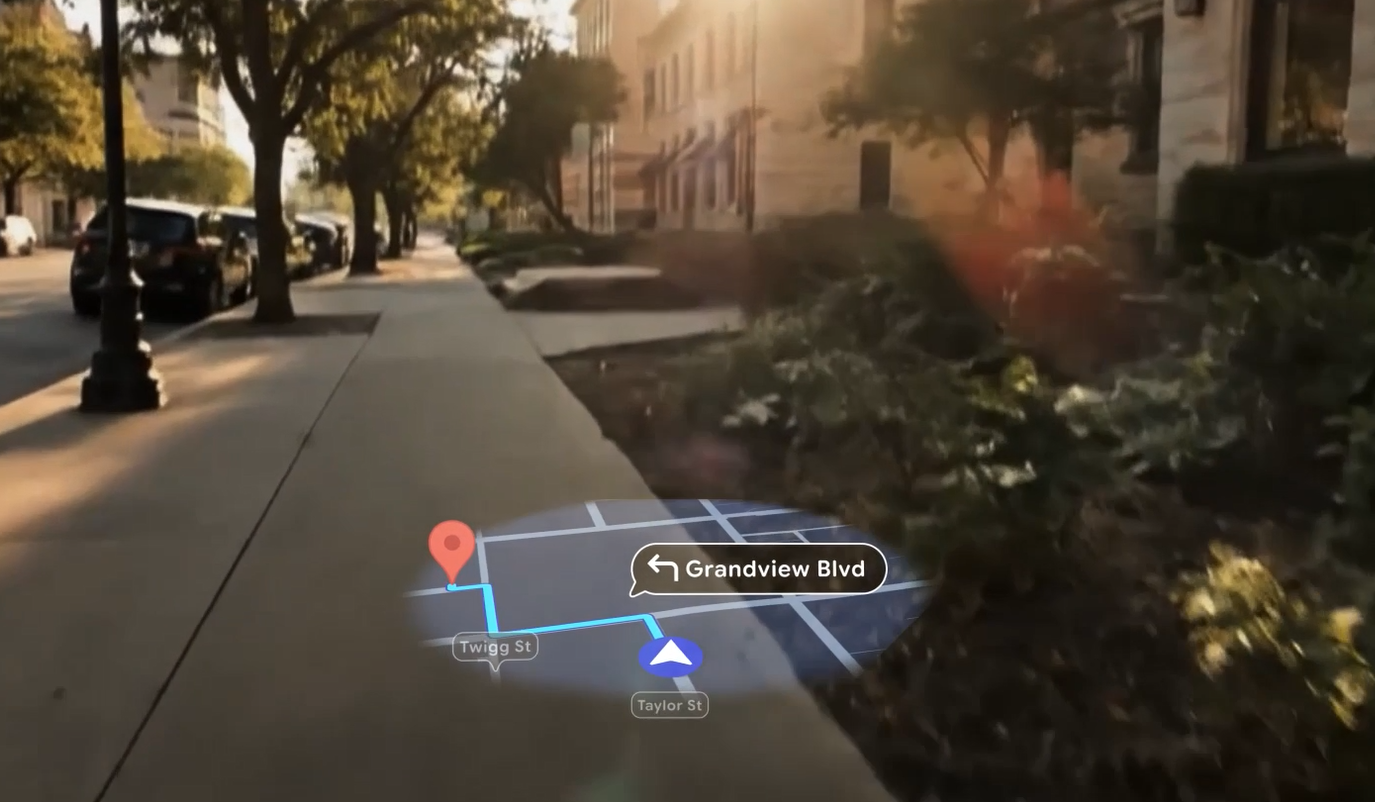
A great use case for smart glasses would be to provide heads-up mapping without the need to constantly look down at your phone.
A great use case for smart glasses would be to provide heads-up mapping without the need to constantly look down at your phone as seen in this demo clip of Android XR.
Google

First, there are the most basic smart glasses that don’t come with built-in displays and typically rely on cameras and built-in speakers for enhanced functionality. The best example of this class of devices is the Meta Ray-Ban smart glasses (or the original Ray-Ban Stories) along with rivals like the Bose Sound Frames, which, believe it or not, have been on the market since 2019. 

However, before anyone gets attached to these early models, the simplest smart glasses already kind of feel like dinosaurs and will probably, in the not-too-distant future, go extinct. They were an interesting attempt to add things like music playback or photo and video capture to regular-looking sunglasses, but their limited feature set puts a clear ceiling on what they can do. Plus, if this is what people really wanted, they would have taken off already. 

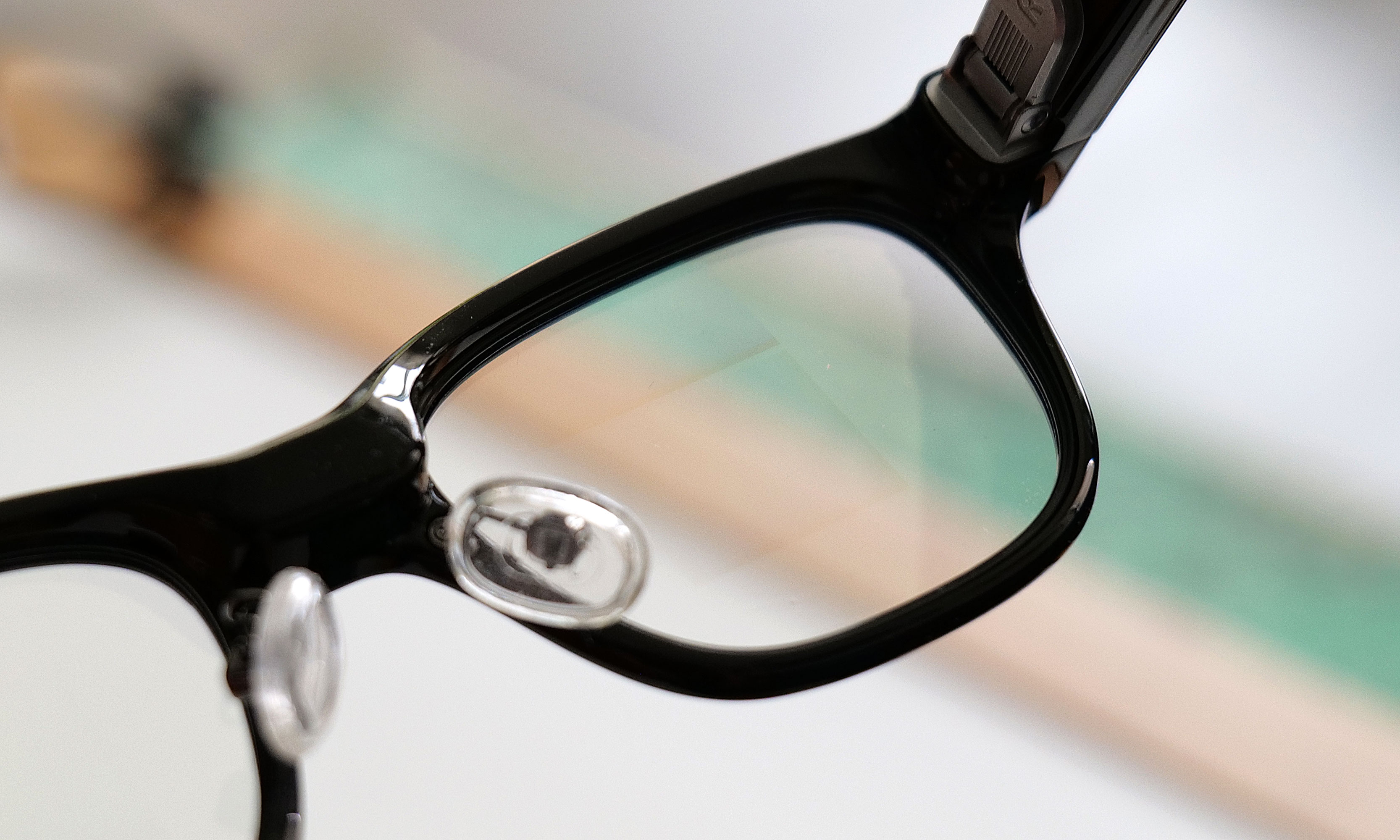
Waveguides like the ones built into the Even Realities G2  project images directly onto their lenses allowing for super sleek glasses featuring a heads-up display.
Waveguides like the ones built into the Even Realities G2 project images directly onto their lenses allowing for super sleek glasses featuring a heads-up display.
Sam Rutherford for Engadget

This brings us to more recent offerings like the Meta Ray-Ban Display, Even Realities G2, the Halliday glasses and others which add some type of built-in display to the mix. Most often, these models rely on waveguide displays as they enable thinner and lighter designs while propagating images onto the glasses’ lenses. Currently, most of these smart glasses feature single-color optics (usually green) to reduce complexity and power draw, but there are others like the Meta Ray-Ban Display and both the TCL RayNeo X2 and X3 that support full color.

In this day and age when everyone is surrounded by screens, the idea of yet another display mounted inches away from your eyeballs might sound like the last thing you want. However, because modern smart glasses are much more discreet and less awkward-looking, I find that they can actually help cut down on distractions. That’s because instead of having to peek down at your phone or smartwatch to check notifications, reply to messages or look up directions, you can do many or all of these things using smart glasses — all in the middle of a conversation without anyone noticing. 

Not only does this keep your focus where it should be — on people instead of gadgets — the glasses are also just as easy to wear as a smartwatch and far more comfortable than bulky VR headsets. Then, when you consider some other features of modern smart glasses like on-the-fly translation, the ability to function as a teleprompter hidden in plain sight or additional support from AI, suddenly you have a wearable that allows you to keep all of your other devices neatly stashed away. In many respects, smart glasses could be the portable displays that people might not even know they want.

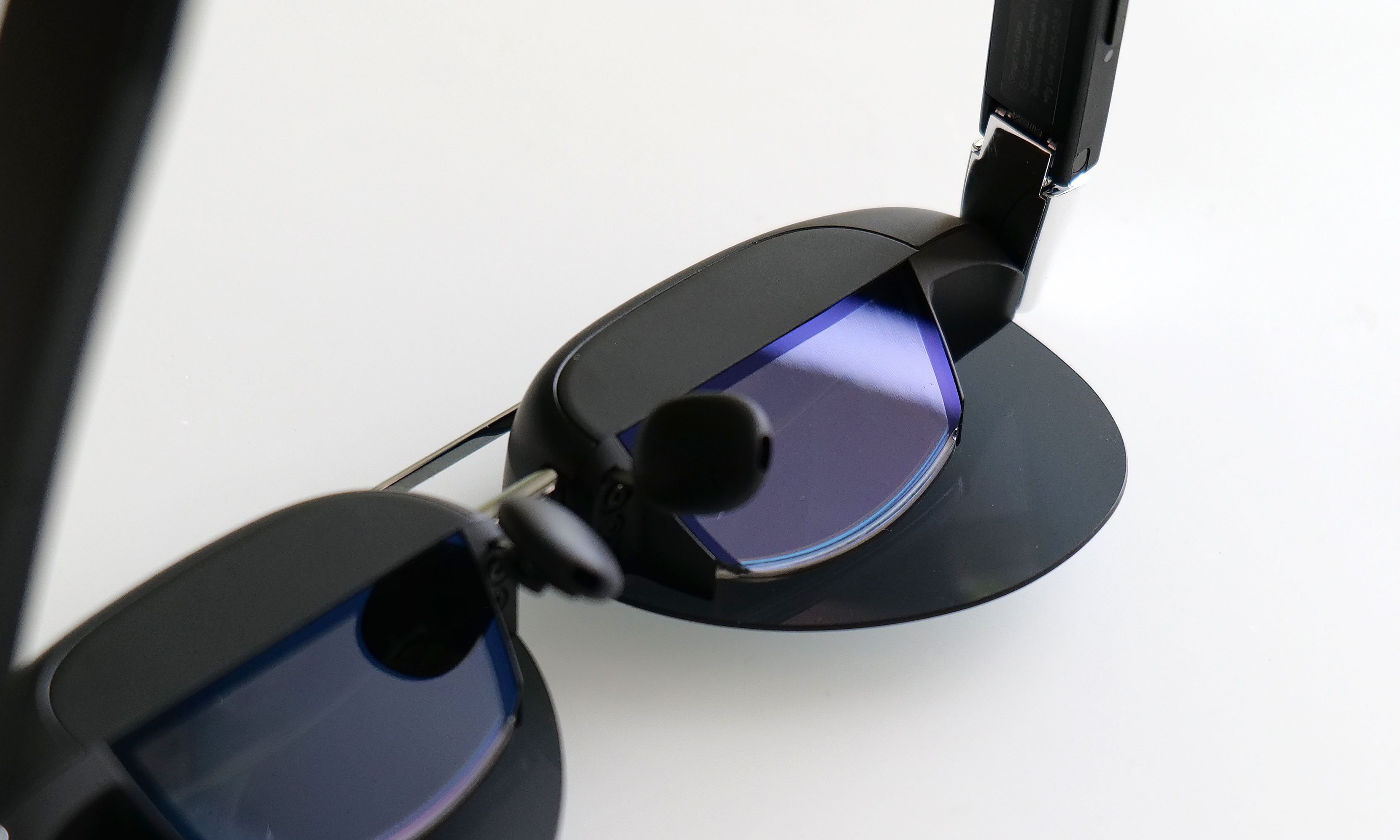
Compared to rivals with waveguides, glasses featuring "birdbath" optics are often significantly thicker and bulkier.
Compared to rivals with waveguides, glasses featuring “birdbath” optics are often significantly thicker and bulkier.
Sam Rutherford for Engadget

Speaking of portable displays: If you recall, I mentioned above how most smart glasses generally don’t need to be tethered to other devices. The exception to that comes from a subclass of specs that are primarily designed to function as wearable monitors capable of supporting one or more virtual screens that can be in excess of 100 inches in size, relatively speaking. 

The most well-known smart glasses in this category come from Xreal and Viture, with both companies offering a range of models with varying levels of performance. One interesting thing to note is instead of waveguides, some of these smart glasses rely on birdbath optics. This means instead of projecting an image into the lens itself, they use a beamsplitter and mirror to reflect images into your eye. The benefit of this is that you get good image quality from components that cost less than an equivalent waveguide setup, with the downside being increased light loss, potentially lower brightness and a much thicker design. This results in chunky frames that often look like they are sitting too far away from your face, which might not be immediately apparent if you see someone using them from afar. But up close, they don’t look quite right. Or at least they don’t look like a pair of “normal” glasses.

Another issue is that due to more light loss, birdbath smart glasses require darker lenses (similar to sunglasses), which means they aren’t great for wearing all day in a variety of environments. And because we still don’t really have a great protocol for wireless displays (though it looks like Valve may be cooking up something with the Steam Frames), most of these  need to be connected by wire to a nearby PC. So you plug them in, put them on, get your work done and then you take them off. 

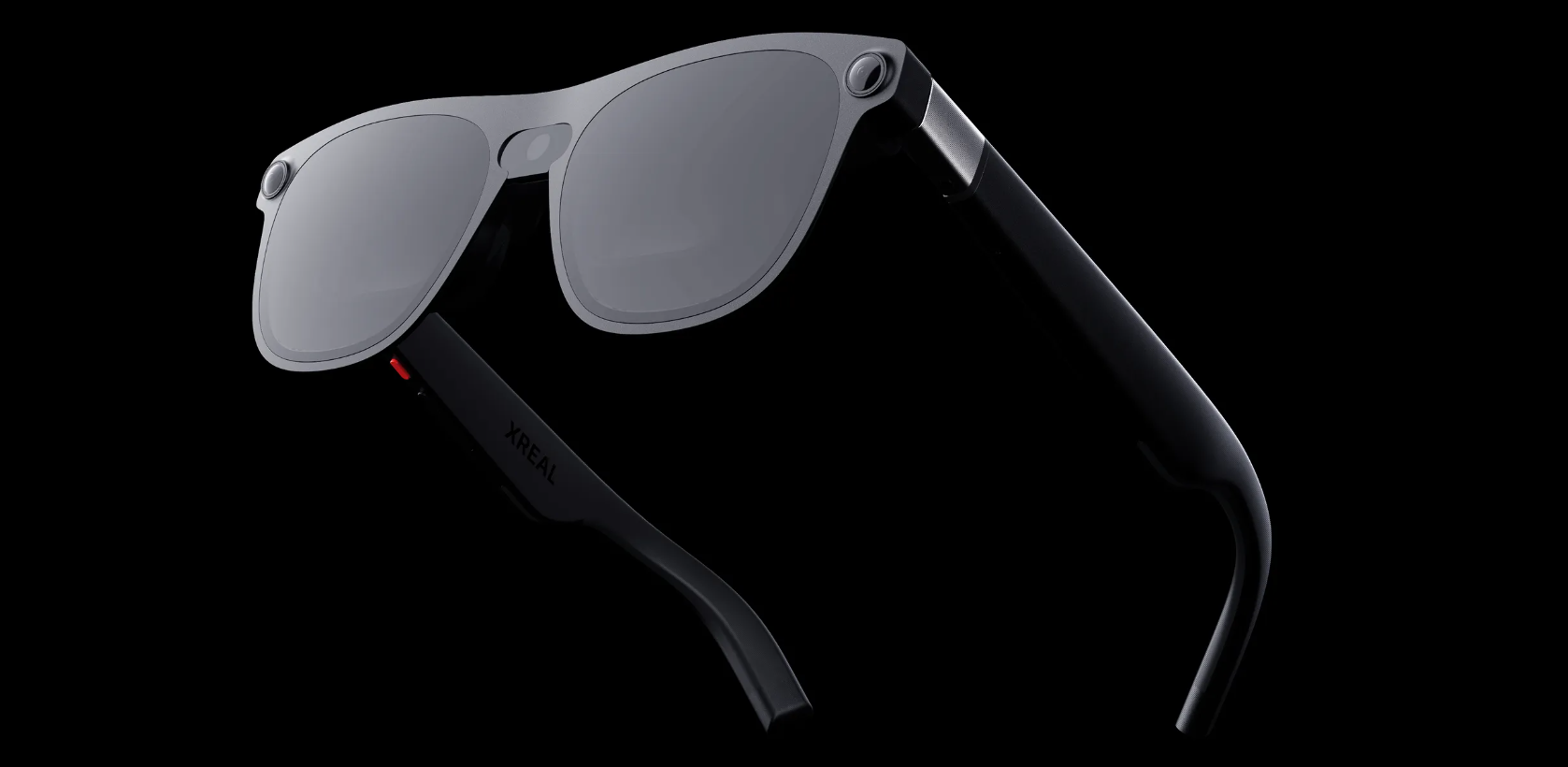
Project Aura is Xreal's next-gen smart glasses and they feature a large 70-degree field of view and fancy electrochromic lenses.
Project Aura is Xreal’s next-gen smart glasses and they feature a large 70-degree field of view and fancy electrochromic lenses.
Sam Rutherford for Engadget

That said, for those who need a ton of screen real estate, this type of smart glasses can be a very attractive alternative to traditional portable monitors. On top of being smaller and more portable, they provide additional privacy when working in public spaces like a cafe or plane, which is what prompted a doctor friend of mine to get a pair instead of going with a portable display. And for the gamers out there, because they can be connected to a phone or even a portable PC or Switch 2 (with the proper dock, of course), they’re great for people who might not have room for or access to a big screen TV.

So where do we go from here?

Ultimately, I think all three types of smart glasses will merge into one as engineers perfect the tech and steal ideas from one another, though there will surely be plenty of room for more niche designs. But more importantly, if we consider the types of gadgets most people carry around today, it boils down to just a handful of devices: a smartphone, some type of wireless audio (either earbuds or headphones) and maybe a health and fitness tracker of some kind (typically a smartwatch or smart ring). 

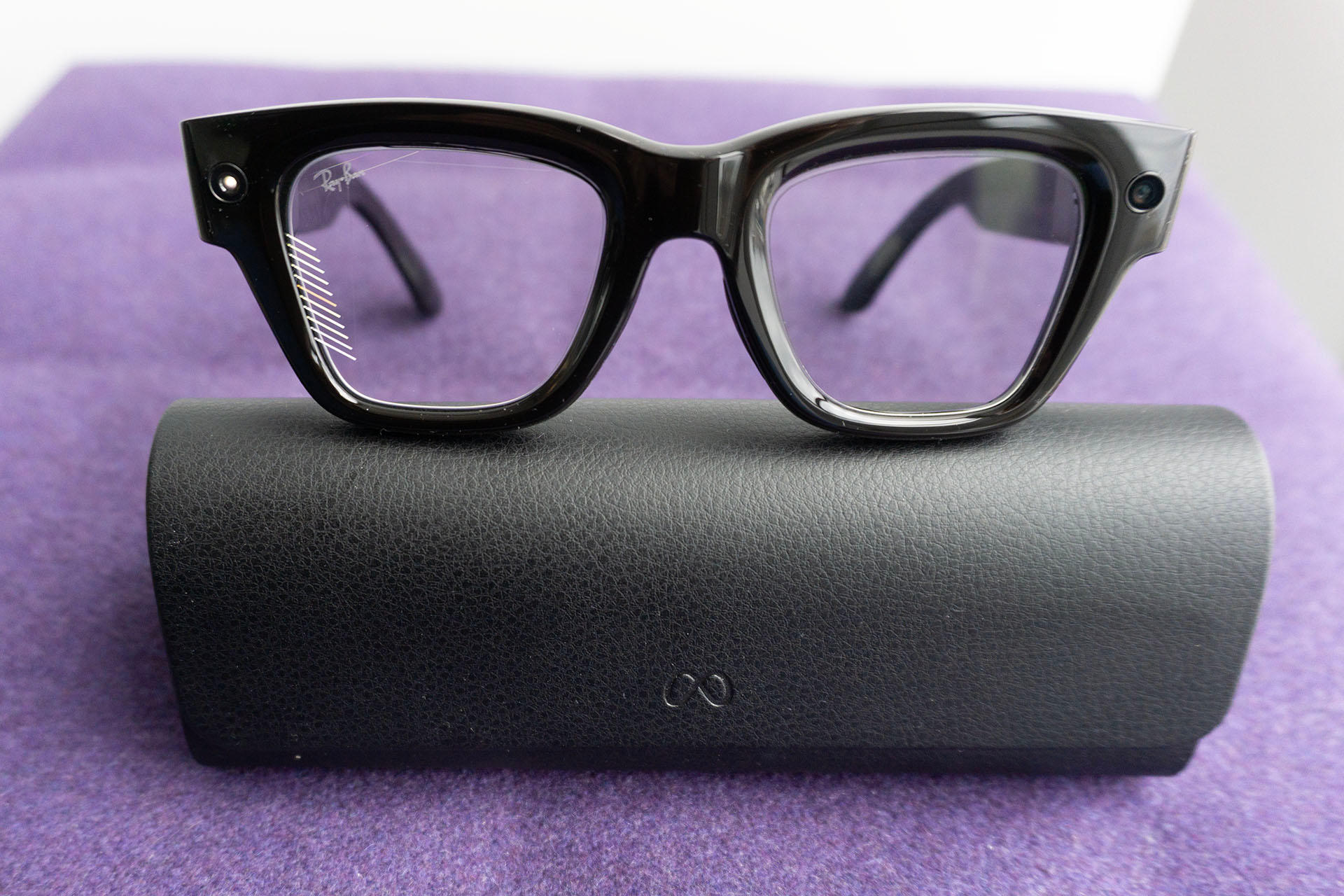
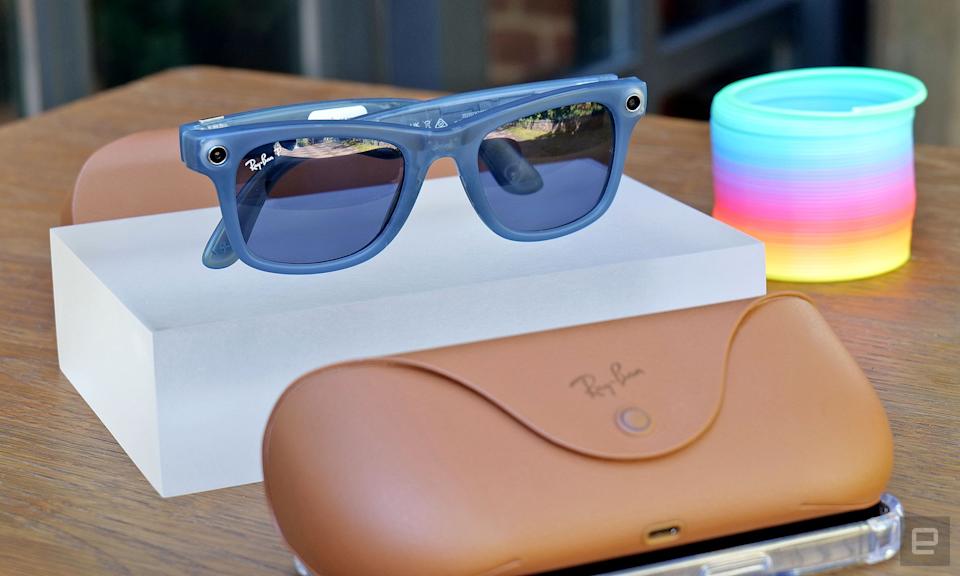
The Meta Ray-Ban smart glasses from 2023 raised a ton of awareness for the category, because even without any built-in displays, the combination of good-looking frames with onboard speakers and a camera was rather compelling.
Even tough they didn’t have a built-in display, the Meta Ray-Ban smart glasses from 2023 raised a ton of awareness for the category.
Sam Rutherford for Engadget

Smart glasses have the potential to really round out that kit by allowing us to keep most of those devices in our pocket while the wearables serve up helpful info when we need it, but without being overly intrusive or distracting. In the short term, you’ll still need a laptop for work, but smart glasses may have a role to play there too, as they can provide way more screen space than a traditional physical display (even the new-fangled flexible ones). It might never happen, but I wouldn’t rule out a future scenario where your next employer gives you a company-issued phone and a pair of smart glasses and that’s it. 

Before that happens though, there are still a bunch of other things that need to be figured out. Without help from a mouse or keyboard, navigating a virtual display is a bit of a challenge. AI combined with hand and eye tracking can help, but no one has really nailed that combo yet. Not even Apple could do so on the much bulkier Vision Pro. To address this, Meta created a bracelet (they call it a neural band) that pairs with the Ray-Ban Display that can detect subtle movements so you can type or navigate menus practically anywhere. Even Realities opted for a ring accessory that does some basic health monitoring and comes with a tiny touchpad. In the more distant future, this hurdle may be solved by BCIs (brain-computer interfaces), but even the most optimistic view suggests that those aren’t going to be mainstream for a long time.

Even though we're still a long ways away, one day everyone might be able to have something like Tony Stark's E.D.I.T.H. smart glasses from the Marvel Universe.
Even though we’re still a long ways away, one day everyone might be able to have something like Tony Stark’s E.D.I.T.H. smart glasses from the Marvel Universe.
Marvel

The issue for Meta is that it’s pretty obvious that its wristband really ought to be incorporated into a smartwatch. The idea of a single-purpose bracelet that doesn’t track your health or do anything else sort of feels like a step backwards. And there’s the problem of Meta’s glasses being largely tied down to its own platforms (i.e. Instagram, Whatsapp and Facebook), which may end up being a major hindrance after rivals like Google and Apple catch up.

And then there’s the cost. Right now, a pair of Meta Ray-Ban Displays (which thankfully come with the wristband) costs $800. That’s a lot for what is basically a publicly available beta test. But when you consider that an Even Realties G2 and an R2 ring costs even more at $850, it’s clear that wearing smart glasses is going to be a very expensive hobby for at least the next few years. And while more single-purpose smart glasses from Xreal and Viture are a bit more affordable, with models ranging from $400 to $550 or $600, they still aren’t cheap. On top of that, getting prescription lenses for smart glasses can often be a major pain in the ass and may not even be an option for people with more limited eyesight. 

But those are problems for another day. And just because tech giants are pouring billions into the development of smart glasses doesn’t mean they will be a guaranteed hit. If you care about tech, alongside AI and possibly EVTOL aircraft (aka flying taxis), pay attention to the advancements in smart glasses. Otherwise, you could miss out on what might be the next major wave in sci-fi gadgetry made real.

This article originally appeared on Engadget at https://www.engadget.com/wearables/in-2025-tech-giants-decided-smart-glasses-are-the-next-big-thing-163000812.html?src=rss

iFixit’s New AI Assistant Can Help You Fix Almost Anything

Generative AI has advanced to the stage where you can ask bots such as ChatGPT or Gemini questions about almost anything, and get reasonable-sounding responses—and now renowned gadget repair site iFixit has joined the party with an AI assistant of its own, ready and willing to solve any of your hardware problems.

While you can already ask general-purpose chatbots for advice on how to repair a phone screen or diagnose a problem with a car engine, there’s always the question of how accurate the AI replies will be. With FixBot, iFixit is trying to minimize mistakes by drawing on its vast library of verified repair guides, written by experts and users.

That’s certainly reassuring: I don’t want to waste time and money replacing a broken phone screen with a new display that’s the wrong size or shape. And using a conversational AI bot to fix gadget problems is often going to feel like a more natural and intuitive experience than a Google search. As iFixit puts it, the bot “does what a good expert does” in guiding you to the right solutions.

How FixBot improves accuracy

The iFixit website has been around since 2003—practically ancient times, considering the rapid evolution of modern technology. The iFixit team has always prided itself on detailed, thorough, tested guides to repairing devices, and all of that information can now be tapped into by the FixBot tool.

iFixit says the bot is trained on more than 125,000 repair guides written by humans who have worked through the steps involved, as well as the question and answer forums attached to the site, and the “huge cache” of PDF manuals that iFixit has accumulated over the years that it’s been business.

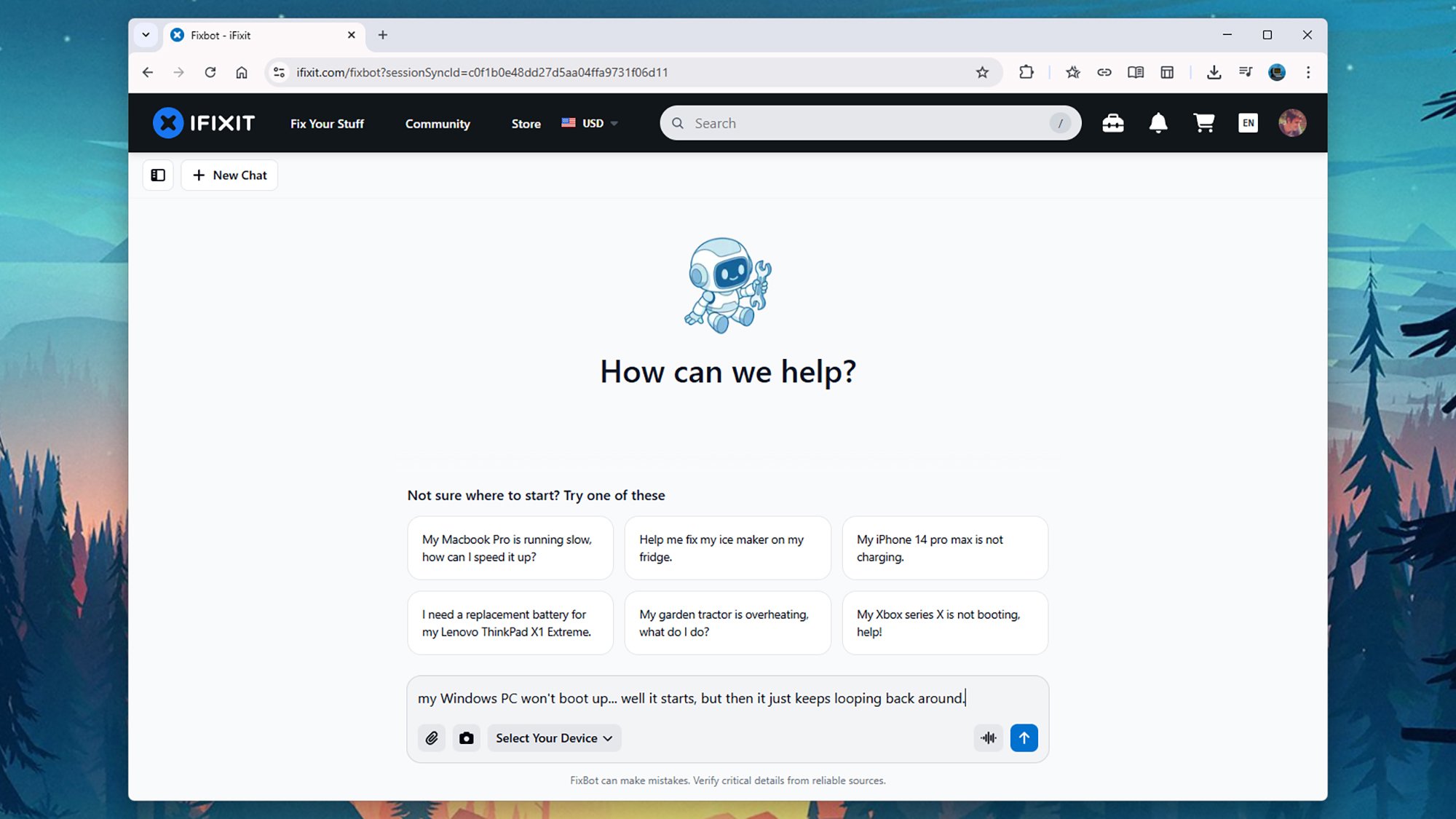
iFixit FixBot
FixBot uses an intuitive chatbot interface.
Credit: Lifehacker

That gives me a lot more confidence that FixBot will get its answers right, compared to whatever ChatGPT or Gemini might tell me. iFixit hasn’t said what AI models are powering the bot—only that they’ve been “hand-picked”—and there’s also a custom-built search engine included to select data sources from the repair archives on the site.

“Every answer starts with a search for guides, parts, and repairs that worked,” according to the iFixit team, and that conversational approach you’ll recognize from other AI bots is here too: If you need clarification on something, then you can ask a follow-up question. In the same way, if the AI bot needs more information or specifics, it will ask you.

It’s designed to be fast—responses should be returned in seconds—and the iFixit team also talks about an “evaluation harness” that tests the FixBot responses against thousands of real repair questions posed and answered by humans. That extra level of fact-checking should reduce the number of false answers you get.

However, it’s not perfect, as iFixit admits: “FixBot is an AI, and AI sometimes gets things wrong.” Whether or not those mistakes will be easy to spot remains to be seen, but users of the chatbot are being encouraged to upload their own documents and repair solutions to fix gaps in the knowledge that FixBot is drawing on.

Using FixBot to diagnose problems

iFixit says the FixBot is going to be free for everyone to use, for a limited time. At some point, there will be a free version with limitations, and paid tiers with the full set of features—including support for voice input and document uploads. You can give it a try for yourself now on the iFixit website.

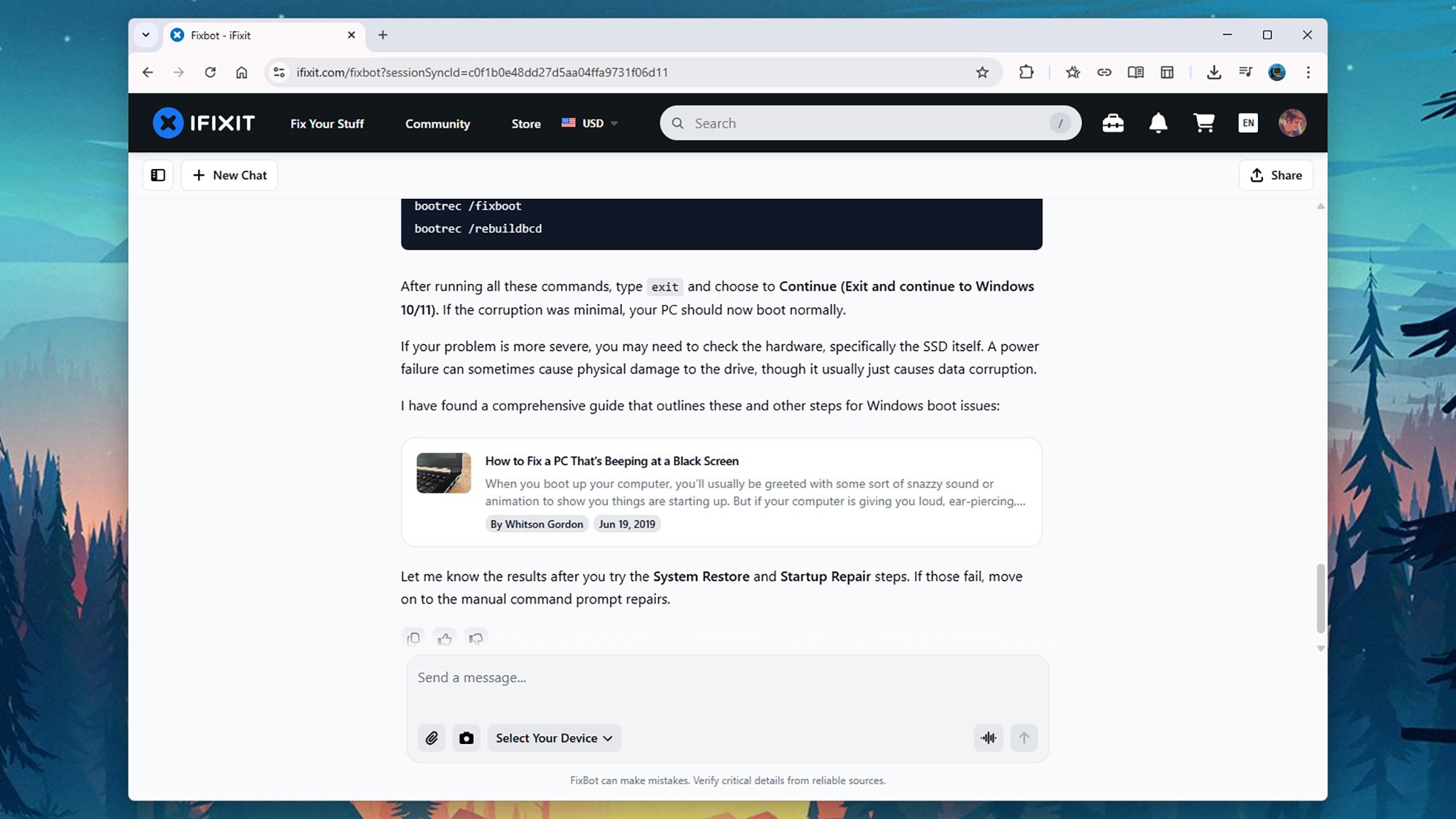
I was reluctant to deliberately break one of my devices just so FixBot could help me repair it, but I did test it with a few issues I’ve had (and sorted out) in the past. One was a completely dead SSD drive stopping my Windows PC from booting: I started off with a vague description about the computer not starting up properly, and the bot did a good job at narrowing down what the problem was, and suggesting fixes.

iFixit FixBot
FixBot will refer back to articles and forum posts.
Credit: Lifehacker

It went through everything I had already tried when the problem happened, including trying System Repair and troubleshooting the issue via the Command Prompt. Eventually, via a few links to repair guides on the iFixit website, it did conclude that my SSD drive had been corrupted by a power cut—which I knew was what had indeed happened.

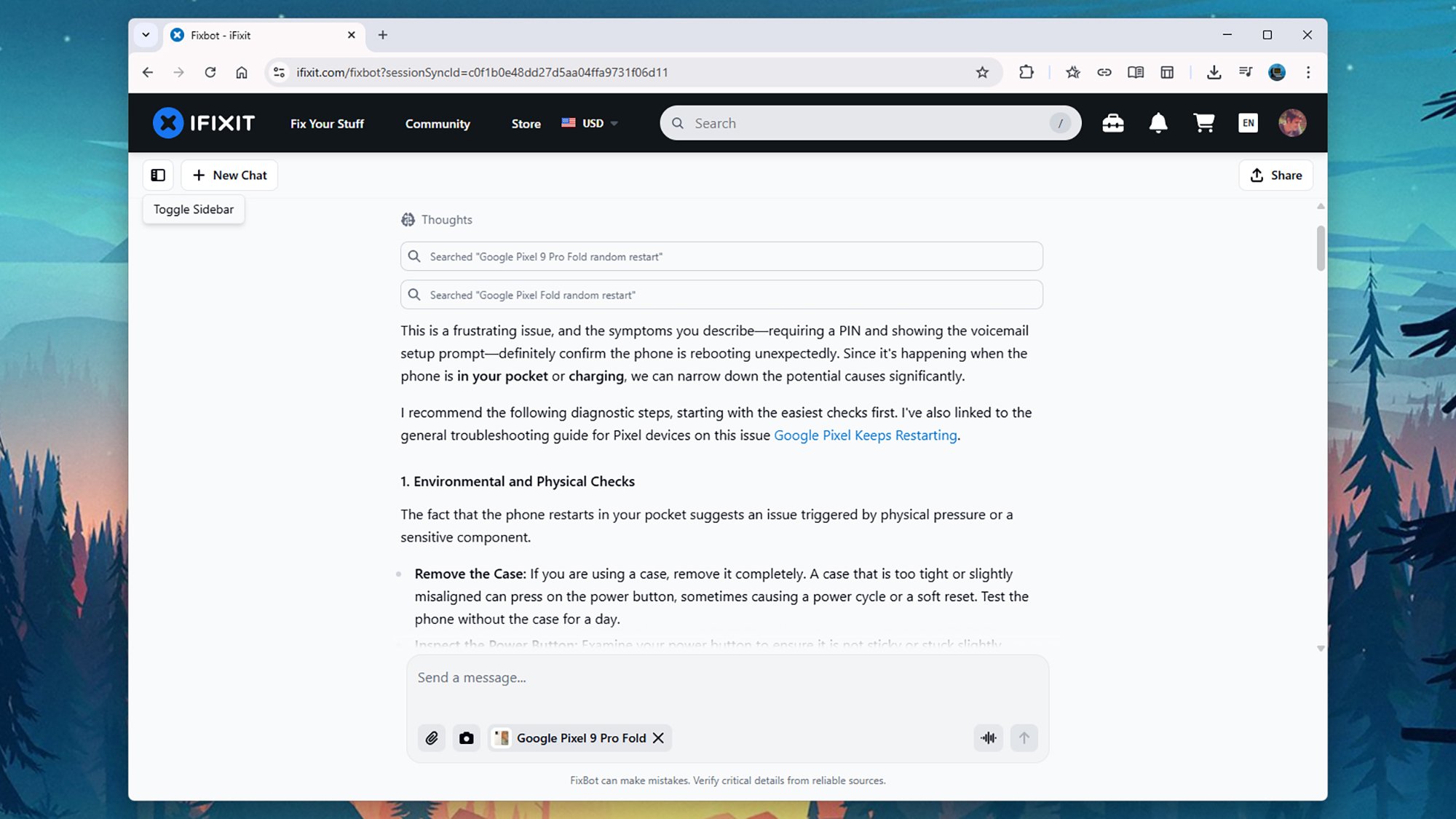
I also tested the bot with a more general question about a phone restarting at random times—something one of my old handsets used to do. Again, the responses were accurate, and the troubleshooting steps I was asked to try made a lot of sense. I was also directed to the iFixit guide for the phone model.

iFixit FixBot
FixBot’s answers are generally accurate and intelligent.
Credit: Lifehacker

The bot is as enthusiastic as a lot of the others available now (I was regularly praised for the “excellent information” I was providing), and does appear to know what it’s talking about. This is one of the scenarios where generative AI shows its worth, in distilling a large amount of information based on natural language prompts.

There’s definitely potential here: Compare this approach to having to sift through dozens of forum posts, web articles, and documents manually. However, there’s always that nagging sense that AI makes mistakes, as the on-screen FixBot disclaimer says. I’d recommend checking other sources before doing anything drastic with your hardware troubleshooting.

How Did the CIA Lose a Nuclear Device?

Sixty years after a team of American and Indian climbers abandoned a plutonium-powered generator on the slopes of Nanda Devi, one of the world’s most forbidding Himalayan peaks, the U.S. government still refuses to acknowledge that the mission ever happened. The device, a SNAP-19C portable generator containing plutonium isotopes including Pu-239 — the same material used in the Nagasaki bomb — was left behind in October 1965 when a sudden blizzard forced climbers to retreat from Camp Four, just below the summit.

The mission originated from a cocktail party conversation between General Curtis LeMay and National Geographic photographer Barry Bishop, who had summited Everest in 1963. China had just detonated its first atomic bomb in October 1964, and the CIA wanted to intercept radio signals from Chinese missile tests by placing an unmanned listening station atop the Himalayas. Barry Bishop recruited elite American climbers and coordinated with Indian intelligence to haul surveillance equipment up the mountain.

Captain M.S. Kohli, the Indian naval officer commanding the mission, ordered climbers to secure the equipment and descend when the blizzard struck. Jim McCarthy, the last surviving American climber, recalled warning Kohli he was making a mistake. “You can’t leave plutonium by a glacier feeding into the Ganges!” he recalled. “Do you know how many people depend on the Ganges?” When teams returned in spring 1966, the entire ice ledge where the gear had been stashed was gone — sheared off by an avalanche. Search missions in 1967 and 1968 found nothing.

The device remains buried somewhere in the glaciers that feed tributaries of the Ganges River.


Read more of this story at Slashdot.

Attackers Are Spreading Malware Through ChatGPT

You (hopefully) know by now that you can’t take everything AI tells you at face value. Large language models (LLMs) sometimes provide incorrect information, and threat actors are now using paid search ads on Google to spread conversations with ChatGPT and Grok that appear to provide tech support instructions but actually direct macOS users to install an infostealing malware on their devices.

The campaign is a variation on the ClickFix attack, which often uses CAPTCHA prompts or fake error messages to trick targets into executing malicious commands. But in this case, the instructions are disguised as helpful troubleshooting guides on legitimate AI platforms.

How attackers are using ChatGPT

Kaspersky details a campaign specific to installing Atlas for macOS. If a user searches “chatgpt atlas” to find a guide, the first sponsored result is a link to chatgpt.com with the page title “ChatGPT™ Atlas for macOS – Download ChatGPT Atlas for Mac.” If you click through, you’ll land on the official ChatGPT site and find a series of instructions for (supposedly) installing Atlas.

However, the page is a copy of a conversation between an anonymous user and the AI—which can be shared publicly—that is actually a malware installation guide. The chat directs you to copy, paste, and execute a command in your Mac’s Terminal and grant all permissions, which hands over access to the AMOS (Atomic macOS Stealer) infostealer.

A further investigation from Huntress showed similarly poisoned results via both ChatGPT and Grok using more general troubleshooting queries like “how to delete system data on Mac” and “clear disk space on macOS.”

AMOS targets macOS, gaining root-level privileges and allowing attackers to execute commands, log keystrokes, and deliver additional payloads. BleepingComputer notes that the infostealer also targets cryptocurrency wallets, browser data (including cookies, saved passwords, and autofill data), macOS Keychain data, and files on the filesystem.

Don’t trust every command AI generates

If you’re troubleshooting a tech issue, carefully vet any instructions you find online. Threat actors often use sponsored search results as well as social media platforms to spread instructions that are actually ClickFix attacks. Never follow any guidance that you don’t understand, and know that if it asks you to execute commands on your device using PowerShell or Terminal to “fix” a problem, there’s a high likelihood that it’s malicious—even if it comes from a search engine or LLM you’ve used and trusted in the past.

Of course, you can potentially turn the attack around by asking ChatGPT (in a new conversation) if the instructions are safe to follow. According to Kaspersky, the AI will tell you that they aren’t.

Swallowing the Moon and other new indie games worth checking out

Welcome to our latest roundup of what’s going on in the indie game space. Between The Game Awards and showcases like Day of the Devs, Wholesome Snack, Latin American Games and Women-Led Games, there’s been a ton of video game news over the last week (I need Control Resonant ASAP, please and thank you, Remedy). And hey, guess what? I’ve got even more for you to dig into, including info on some new releases that you can play right now.

One of those is a game I’d been looking forward to since about 2022, and it’s always nice when something you’ve remained patient for turns out to be worth the wait. In Sam Eng’s Skate Story, you play as a demon who accepts a deal offered by the Devil. If the demon can ride a skateboard to the Moon and swallow it after being transformed into a creature made of “glass and pain,” the Devil will grant them their freedom. 

It’s just as strange as that setup sounds. While you’ll need to execute combos to defeat bosses, this is a skateboarding game that leans more heavily on story than pure gameplay. It’s visually and sonically arresting too, with Blood Cultures and John Fio crafting a killer soundtrack I know I’ll be listening to for a long time to come. 

Skate Story is out now on Nintendo Switch 2, Steam and PS5 for $20. PlayStation Plus Extra and Premium members can play it at no extra cost. 

New releases

Unbeatable is another game I’ve had on my radar for some time, though I haven’t had a chance to jump in yet. This is another stylish game in which you play as Beat, who sings in a band. However, music is outlawed in this world (oh no!). Through rhythm-based minigames and battles with cops, Beat tries to bring back the music. There’s a separate arcade mode with a dedicated progression system too.

I’m a sucker for stories about rebellious underdogs, and this rhythm adventure could well hook me in. Unbeatable — from D-Cell Games and publisher Playstack — is available on Steam and PS5 for $28 (there’s a 10 percent discount on Steam until December 23). It’s set to hit Xbox Series X/S very soon too.

Speaking of games I’ve been keeping an eye on, Adrift (from solo developer S.K.9.8 and co-publisher Secret Sauce) was one of the first games I covered when I started doing this weekly roundup earlier this year. It’s a driving game in which your aim is to deliver a volatile energy core. Since you’re traversing a hot desert, you’ll need to be careful to prevent the core from overheating and blowing up. Thankfully, there are safe spots and cooling stations where you can bring down the temperature.

The vaporwave aesthetic of Adrift caught my eye and although I dig the presentation, the game isn’t quite clicking for me in the early going. It didn’t take long before my vehicle got stuck and I had to reset, and I’m finding the top-down world a little confusing to navigate. I’ll stick with it for at least a little longer, though. Adrift is out now on Steam. It usually costs $13 though there’s a 25 percent discount until December 23. 

I’ve very happy that a game like Drywall Eating Simulator can exist. Peripheral Playbox’s satirical walking sim sees your character trying to deal with the maddening realities of daily life and the frustration that one may find in dealing with other people. Get mad enough and you’ll be able to punch through a wall (something you’ll have to do to move through the levels anyway). Then, you can munch on some drywall to calm yourself down.

I had a good time with it and there’s some pointedly funny writing here. “I thought AI sucks but it told me that was wrong and I believed it,” says one person. That’s all well and good, but I mainly just want the NPCs to leave me alone so I can eat drywall in peace. Drywall Eating Simulator is out now on Steam. It’ll usually run you $10, but there’s a 10 percent discount until December 17.

Planet of Lana was one of my favorite games of 2023 and now it’s available on iOS and Android for $9. It sees teenage Lana and her cute companion Mui making their way through a world that’s been taken over by alien robots as they try to rescue Lana’s sister.

This is a puzzle platformer in the vein of Inside and Limbo, and despite the pretty and often bright presentation, it’s just as dystopian as those games. It sounds gorgeous too, thanks in large part to a beautiful score from The Last Guardian composer Takeshi Furukawa. I’m very much looking forward to the sequel from Wishfully and publisher Thunderful. That’s set to arrive next year.

A Game About Digging A Hole is one of this year’s real indie success stories. It’s a game that a developer started making in their spare time that has sold more than 1.2 million copies since February. After landing on PC and mobile, the $5 game from Doublebee and publisher Rokaplay is now on Nintendo Switch, Xbox Series X/S and PS5. It’s on Game Pass Ultimate, Game Pass Premium and PC Game Pass.

It’s a straightforward loop. Start digging a hole in your backyard, sell the stuff you find, upgrade your equipment and keep going. Just, uh, be careful down there. You never quite know what you’ll run into.

Upcoming 

Vampire Therapist developer Little Bat Games has revealed its latest project, Better Than Us, which is coming to Steam in 2026. It’s a narrative-driven sci-fi narrative game in which you’ll infiltrate swanky parties thrown by wealth hoarders in the future to steal spoils back from them. 

Violence isn’t the solution here, as you’ll need to charm the ultra-rich, who buy elections and have “monopolized AI development to ensure machines serve their interests” (I dunno, this all seems extremely far-fetched). You can spin up a web of lies about things like how your husband died and how much Worldcoin you have. To maintain your ruse, you’ll need to keep your story straight by remembering what you said and to which characters. 

Okomotive (Herdling, Far: Changing Tides) just revealed its next game. PinKeep is a roguelike deckbuilder in which you’ll place structures on a playing field to fend off enemies. To collect resources, you’ll need to play some pinball. By using the flippers (and flicking the ball for more precise movement), you can pick up what you need to fight back against your opponents. You can damage bad guys directly with the balls too. 

As a Ball x Pit enthusiast with a tepid but growing interest in deckbuilders, this speaks to me. A PinKeep demo is coming to Steam in January, with the full game set to arrive late in 2026.

AudioMech is a neat-looking game that popped up for the first time during the pre-show of The Game Awards. This is a rhythm-based action title from Dylan Fitterer, the creator of Audiosurf. It taps into whatever music you have playing on your computer (even something that you’re streaming or playing through a microphone) to customize both your weapons and opponents.

A track that’s heavy on bass might give you a longer sword, while vocals and lead instruments can power a cannon. There are several ways to play, including a mode in which you don’t take damage and a boss rush option. AudioMech is coming to Steam and there’s a demo available now. 

Let’s wrap things up with something a little more relaxing. Lost and Found Co. is a hidden object game from Bit Egg Inc. and co-publisher Gamirror Games. During the latest Wholesome Snack showcase, it was revealed that the game is coming to Steam on February 11.

It’s little wonder that more than 170,000 Steam users have wishlisted this game. It looks absolutely lovely. The developers sought to recapture the “magic” of childhood puzzle books in their hand-drawn world. Here, you’ll help Ducky, a duck-turned-human intern at a startup that hunts for items that townspeople have lost. There’s a demo available that features the option to decorate a part of the world using items you find.

This article originally appeared on Engadget at https://www.engadget.com/gaming/swallowing-the-moon-and-other-new-indie-games-worth-checking-out-154937071.html?src=rss

Spotify was down this morning for thousands of users: Updates on the widespread outages

My boyfriend texted me those dreaded four words: “Is your Spotify down?” Sure enough his, mine and thousands of other users’ Spotify accounts appear to be down and out at the moment, with Downdetector recording over 10,000 reports from users. 

Spotify is apparently working on the problem. The account, Spotify Status, shared an update on X at 9:45 AM on Monday, “We’re aware of some issues right now and are checking them out!” About an hour later, the company shared an update saying that the outage was resolved as of 10:34 AM ET.

All clear! Thanks for your patience. If you’re still having issues, you can find out more on this issue on our Community support thread: https://t.co/IaZcQTy9jF

— Spotify Status (@SpotifyStatus) December 15, 2025

Update, December 15, 2025, 10:48AM ET: This story and its headline were updated to indicate that Spotify’s outage has been resolved.

This article originally appeared on Engadget at https://www.engadget.com/entertainment/music/spotify-was-down-this-morning-for-thousands-of-users-updates-on-the-widespread-outages-150453379.html?src=rss

Meta Quest 3 Is $90 Off Plus Get A $100 Amazon Gift Card If You’re Quick

Meta Quest 3 Is $90 Off Plus Get A $100 Amazon Gift Card If You're Quick
Have you been on the fence about jumping into VR? Now is a great time to go ahead and make the leap because Amazon is serving up a fantastic deal on Meta’s Quest 3 headset, which comes 512GB of built-in storage, controllers, and a couple of noteworthy bonuses, not the least of which is a $100 Amazon gift card.
Meta Quest 3 Is 19% Off And