Uber and DoorDash challenge NYC law that encourages tipping

Uber and DoorDash are challenging a forthcoming NYC law that encourages tipping on food-delivery apps, as reported by The New York Times. The two entities have filed a joint federal lawsuit just ahead of the ruling going into effect next month.

Back in 2023, many food delivery apps in the city moved the tip suggestion box to after purchases had been completed. This is sort of how rideshare apps work. It followed NYC mandating a minimum pay rate for food delivery workers, the first in the country. The new law simply switches the tip suggestion box back to checkout, with a suggestion of ten percent. Customers are still free to set it to zero, if that’s their thing.

The two companies say this law violates the First Amendment by requiring them to “speak a government-mandated message.” They also say the rule would cause customers to use the app less because they were suffering from “tipping fatigue.” As a customer of food delivery apps, I am not stricken with tipping fatigue. I have, however, come down with a serious case of “what are all of these mysterious fees on my bill and why is my burrito $45?” fatigue.

NYC food delivery workers have experienced a sharp decline in tips since the apps switched the suggestion field to after a purchase has been completed. It’s extremely easy to ignore an app notification while in a food coma on the couch.

“Removing the tipping option is to keep workers in poverty and make them depend on taking more orders,” said Ligia Guallpa, co-founder of Workers Justice Project.

Food delivery in the city is still booming. New Yorkers spent more than $265 million on restaurant deliveries in the first half of 2025, which is up from $183 million during the same period in 2022. Current estimates suggest that there are around 80,000 delivery workers in NYC.

This particular law became a small part of the city’s recent mayoral campaign. Mayor-elect Zohran Mamdani said during the campaign that he supported giving customers the option to tip at checkout. DoorDash donated $1 million to his rival, former Gov. Andrew Cuomo.

This article originally appeared on Engadget at https://www.engadget.com/big-tech/uber-and-doordash-challenge-nyc-law-that-encourages-tipping-163315375.html?src=rss

Google Sues Alleged Chinese Scam Group Behind Massive US Text Message Phishing Ring

Google is suing a Chinese-speaking cybercriminal group it says is responsible for a massive wave of scam text messages sent to Americans this year, according to a legal complaint filed Tuesday. From a report: The group, known as Darcula, sells software that allows users to send phishing text messages en masse, impersonating organizations like the IRS or the U.S. Postal Service in scams. The lawsuit is designed to give Google legal standing so U.S. courts will allow it to seize websites the group uses, hampering their operations, a spokesperson said.

Darcula is possibly the most prominent name in an emerging, loosely affiliated cybercrime world that creates and sells hacking programs for aspiring scammers to use. Darcula’s signature program, called Magic Cat, provides an easy-to-use, intuitive way for cybercriminals without advanced hacking skills to quickly spam millions of phone numbers with links to fake websites impersonating businesses like YouTube’s premium service, then steal the credit card numbers victims put in.


Read more of this story at Slashdot.

Trump admin threatens to break up major climate research center

On Tuesday, the head of the Office of Management and Budget, Russell Vought, announced that a major climate research center will be “broken up.” The National Center for Atmospheric Research, or NCAR, is a significant contributor to research on the weather, climate, and other atmospheric phenomena. The move will be a crippling blow to climate research in the US and is being widely decried by scientists.

Vought initially gave a statement regarding NCAR to USA Today and later confirmed the outlet’s reporting on social media. Calling it “one of the largest sources of climate alarmism in the country,” Vought also decried what he termed “woke” activities at NCAR. These appear to be fairly typical efforts made to attract underrepresented groups to the sciences—efforts that were uncontroversial prior to the current administration.

NCAR is primarily based in a complex on the outskirts of Boulder, Colorado, and maintains a supercomputing center in Wyoming. Much of its funding comes from the National Science Foundation, but the day-to-day management is handled by the University Corporation for Atmospheric Research (UCAR), a nonprofit that represents 130 individual educational institutions. In addition to climate science, researchers based there study Earth and space weather, atmospheric chemistry, and their impacts on the environment and humans. NCAR hosts a series of webpages that explain its research and all the ways it helps society.

Read full article

Comments

Google releases Gemini 3 Flash, promising improved intelligence and efficiency

Google began its transition to Gemini 3 a few weeks ago with the launch of the Pro model, and the arrival of Gemini 3 Flash kicks it into high gear. The new, faster Gemini 3 model is coming to the Gemini app and search, and developers will be able to access it immediately via the Gemini API, Vertex AI, AI Studio, and Antigravity. Google’s bigger gen AI model is also picking up steam, with both Gemini 3 Pro and its image component (Nano Banana Pro) expanding in search.

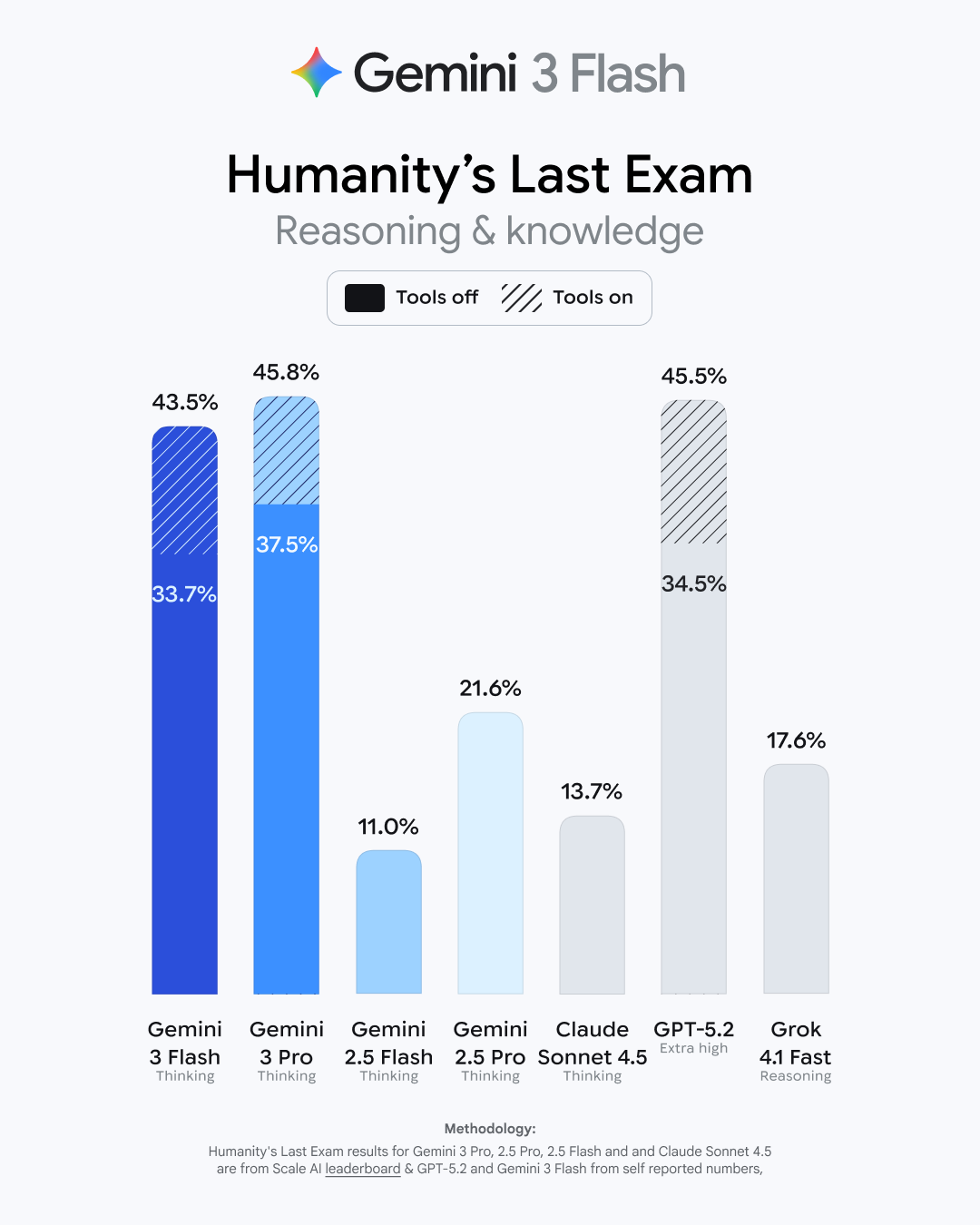
This may come as a shock, but Google says Gemini 3 Flash is faster and more capable than its previous base model. As usual, Google has a raft of benchmark numbers that show modest improvements for the new model. It bests the old 2.5 Flash in basic academic and reasoning tests like GPQA Diamond and MMMU Pro (where it even beats 3 Pro). It gets a larger boost in Humanity’s Last Exam (HLE), which tests advanced domain-specific knowledge. Gemini 3 Flash has tripled the old models’ score in HLE, landing at 33.7 percent without tool use. That’s just a few points behind the Gemini 3 Pro model.

Gemini HLE test
Credit:
Google

Read full article

Comments

Google’s Gemini 3 Flash model outperforms GPT-5.2 in some benchmarks

Almost exactly a month after the debut of Gemini 3 Pro in November, Google has begun rolling out the more efficient Flash version of its latest AI model. According to the company, the new system offers similar “pro-grade” reasoning performance as its flagship model at a fraction of the cost, making it ideal for everyday use. 

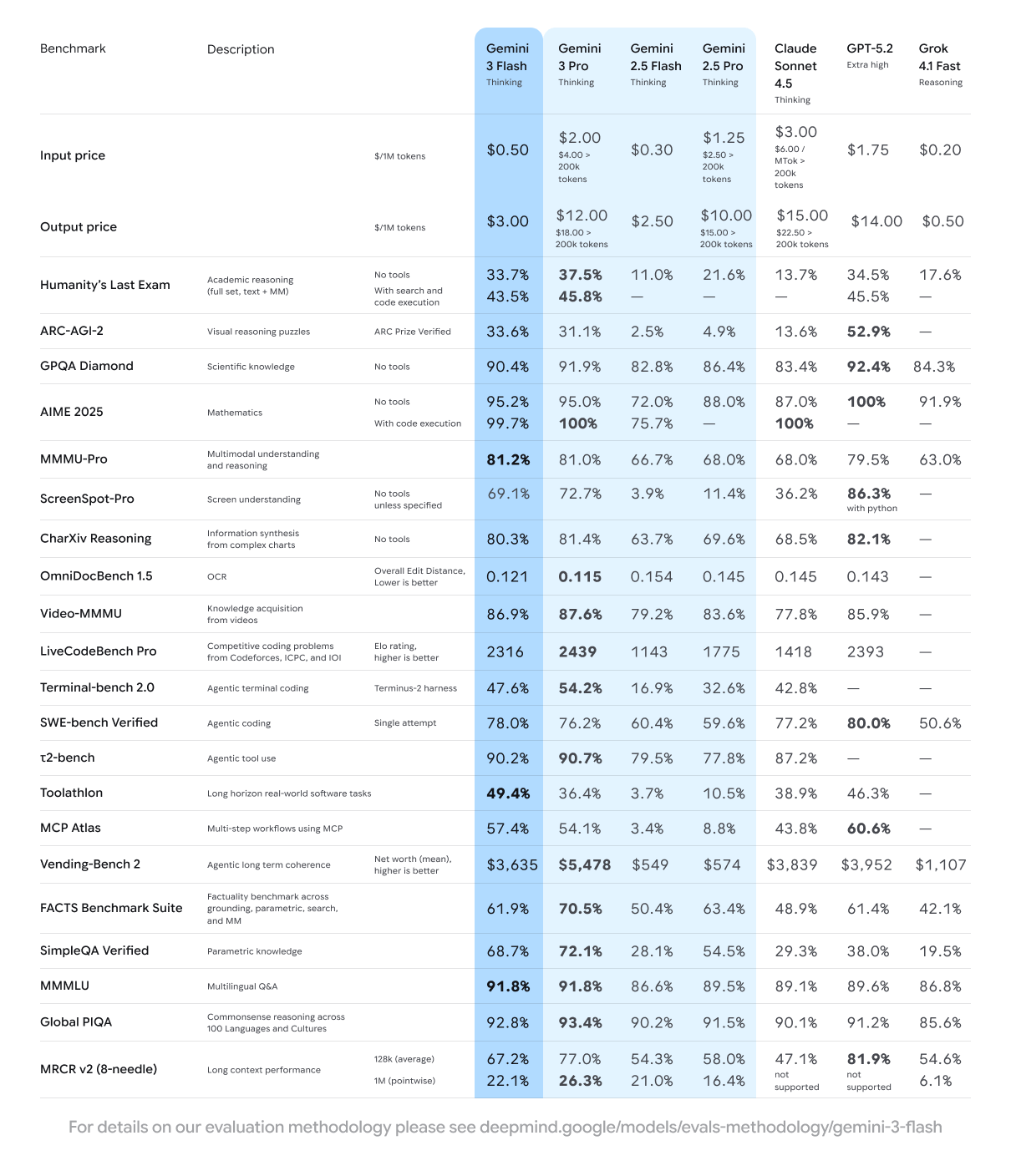
In benchmarks, the new system performed significantly better than Google’s previous generation models, including Gemini 2.5 Pro. More notably, in Google’s testing it managed to trade blows with GPT-5.2, the model OpenAI rushed out to counter Gemini 3 Pro. 

A table comparing Gemini 3 Flash's performance across a variety of AI benchmarks.
A table comparing Gemini 3 Flash’s performance across a variety of AI benchmarks.
Google

For example, in the tough Humanity’s Last Exam suite, Gemini 3 Flash scored less than a percentage point worse than GPT-5.2 when neither model had access to tools like web search. In a handful of other benchmarks, Google’s more efficient system even managed to outperform OpenAI’s latest. For instance, in MMMU-Pro, a benchmark designed to test a model’s multimodal understanding and reasoning, it edged out GPT-5.2 with a result of 81.2 percent compared to 79.5 percent. Of course, benchmarks only tell a partial story; we’ll have to see what people think once both systems are broadly available. Still, the fact Gemini 3 Flash is even close to GPT-5.2, and the “Extra High” reasoning mode at that, is a worrying sign for OpenAI.   

As with Gemini 3 Pro, Google is rolling out the new model to both the Gemini App and AI Mode in Search where it will be the default model for both services. “That means all of our Gemini users globally will get access to the Gemini 3 experience at no cost, giving their everyday tasks a major upgrade,” Google explains. While on the subject of AI Mode, it’s now possible to access Nano Banana Pro, Google’s latest image generator, directly from the chatbot. Provided you live in the US, select “Thinking with 3 Pro,” followed by “Create Images Pro” from the model picker.

This article originally appeared on Engadget at https://www.engadget.com/ai/googles-gemini-3-flash-model-outperforms-gpt-52-in-some-benchmarks-160000000.html?src=rss

Pixel 10 Pro Deal Hits Hard At 25% Off For An All-Time Low Price

Pixel 10 Pro Deal Hits Hard At 25% Off For An All-Time Low Price
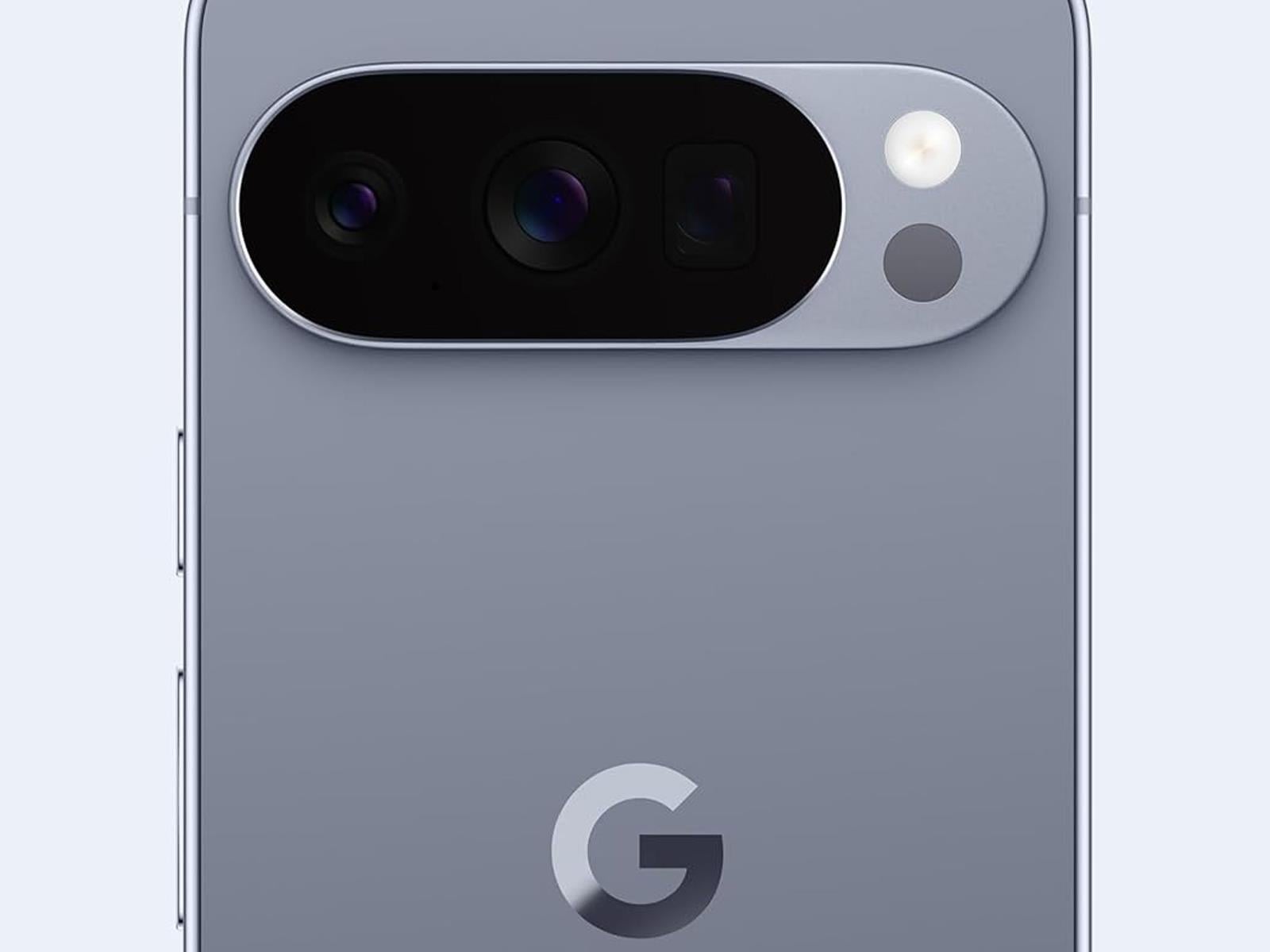
In case you missed our review of the Pixel 10 series, we’re seriously impressed with Google’s latest-generation Android phones, and many of them are currently offered at seriously big discounts. That includes the Pixel 10 Pro that, with the current limited time deal on Amazon, is marked down to its lowest price ever.
Google Pixel 10 Pro Is

JWST Sees Mysterious Exoplanet With Atmosphere That Breaks All Predictions

JWST Sees Mysterious Exoplanet With Atmosphere That Breaks All Predictions
Scientists are scratching their heads over a recent James Webb Space Telescope (JWST) discovery that looks more like a piece of fruit than your typical celestial sphere.

The planet, designated PSR J2322-2650b, has simply been described by astronomers to look like a lemon. This bizarre world, located 750 light years from us, is not only

Browser extensions with 8 million users collect extended AI conversations

Browser extensions with more than 8 million installs are harvesting complete and extended conversations from users’ AI conversations and selling them for marketing purposes, according to data collected from the Google and Microsoft pages hosting them.

Security firm Koi discovered the eight extensions, which as of late Tuesday night remained available in both Google’s and Microsoft’s extension stores. Seven of them carry “Featured” badges, which are endorsements meant to signal that the companies have determined the extensions meet their quality standards. The free extensions provide functions such as VPN routing to safeguard online privacy and ad blocking for ad-free browsing. All provide assurances that user data remains anonymous and isn’t shared for purposes other than their described use.

A gold mine for marketers and data brokers

An examination of the extensions’ underlying code tells a much more complicated story. Each contains eight of what Koi calls “executor” scripts, with each being unique for ChatGPT, Claude, Gemini, and five other leading AI chat platforms. The scripts are injected into webpages anytime the user visits one of these platforms. From there, the scripts override browsers’ built-in functions for making network requests and receiving responses.

Read full article

Comments

Meta Is Considering Charging Business Pages To Post Links

Meta is informing some users that they will soon be restricted in how many link posts they can share each month, unless they pay for its Meta Verified subscription service. As per the notification message: “Starting December 16, certain Facebook profiles without Meta Verified, including yours, will be limited to sharing links in 2 organic posts per month. Subscribe to Meta Verified to share more links on Facebook, plus get a verified badge and additional benefits to help protect your brand.”

To be clear, right now this is a limited test, so relatively few Pages are impacted. But understandably, a lot of users are also seeking more information on the change, and whether it could be expanded to all Pages. So, Meta’s seeking to boost take-up of Meta Verified, in order to make more money out of its subscription option, which, for business users, costs between $14.99 and $499 per month, depending on which package you choose.


Read more of this story at Slashdot.

Electric vehicles cause tension in the automotive aftermarket

After federal clean vehicle tax credits ended in September, the electric vehicle industry reached a crossroads. Well, technically, it has been there since Trump took office. This is a weird period in automotive history; A chunk of the industry is full-steam ahead with EV development, another is cutting back, and the consumer is left wondering what the electrification landscape will look like next year, let alone in three, during the next administration.

But what about the automotive aftermarket? Typically, this corner benefits from whatever progress is made on the OEM front—have Trump’s policies expanded or contracted its EV technological development? I recently spent some time chatting with personnel of the Specialty Equipment Market Association (SEMA) at its yearly tradeshow in Las Vegas to find out. I also hit the bricks (or, rather, bright carpeting) of the massive show itself, seeking out some new, unique developments in the space that behoove EV tech’s inherent benefits.

Above one of the show’s several sprawling halls, I met with Mike Spagnola, SEMA’s CEO, and Karen Bailey-Chapman, senior vice president, public and government affairs, to learn what the organization’s official stance is. First and foremost: It doesn’t want to be told what to do.

Read full article

Comments

Apple Could Bring Back iMac Pro In 2026 With New M5 Max Power

Apple Could Bring Back iMac Pro In 2026 With New M5 Max Power
The last time Apple released an iMac Pro was back in 2017. That could change next year, however, with the Pro designation for Apple’s all-in-one PC making a comeback with a custom M5 Max chip in tow. Alternatively, Apple could be prepping a higher-end model of the iMac without the Pro moniker, while still having it aimed at power users.

Nothing

OnePlus 15R Review: Affordable Midrange Phone With Big Battery Life

OnePlus 15R Review: Affordable Midrange Phone With Big Battery Life
The OnePlus 15R delivers strong Snapdragon 8 Gen 5 performance and spectacular battery life at the expense of some camera versatility. OnePlus 15R – Starting At $699 Quality materials and build Beautiful 165Hz display Solid performance Outstanding battery life Fast wired charging, charger in the box Clean and responsive software IP69K ingress…

Lawsuit Accuses LG, Samsung, Sony, Hisense & TCL TVs Of Spying On Users

Lawsuit Accuses LG, Samsung, Sony, Hisense & TCL TVs Of Spying On Users
Texas has declared war on your smart TV’s data collection, alleging that certain screens at the center of American homes are actually sophisticated surveillance tools designed to monitor the viewing habits of every user.

As such, Texas Attorney General Ken Paxton initiated a series of lawsuits against five of the world’s most prominent

OnePlus 15R review: A 165Hz display and big battery for $700

I know what you’re thinking, didn’t OnePlus release a new phone just last month? It did. A little over five weeks after the announcement of the OP15, the company is back with the OnePlus 15R, a more affordable version of its new flagship that starts at $700 (or $200 less than its sibling). Off the top, this will be a shorter review because most of what I said about the OnePlus 15 also applies to the OP15R. It’s a great phone that asks you to make one pretty significant compromise. 

Design and display

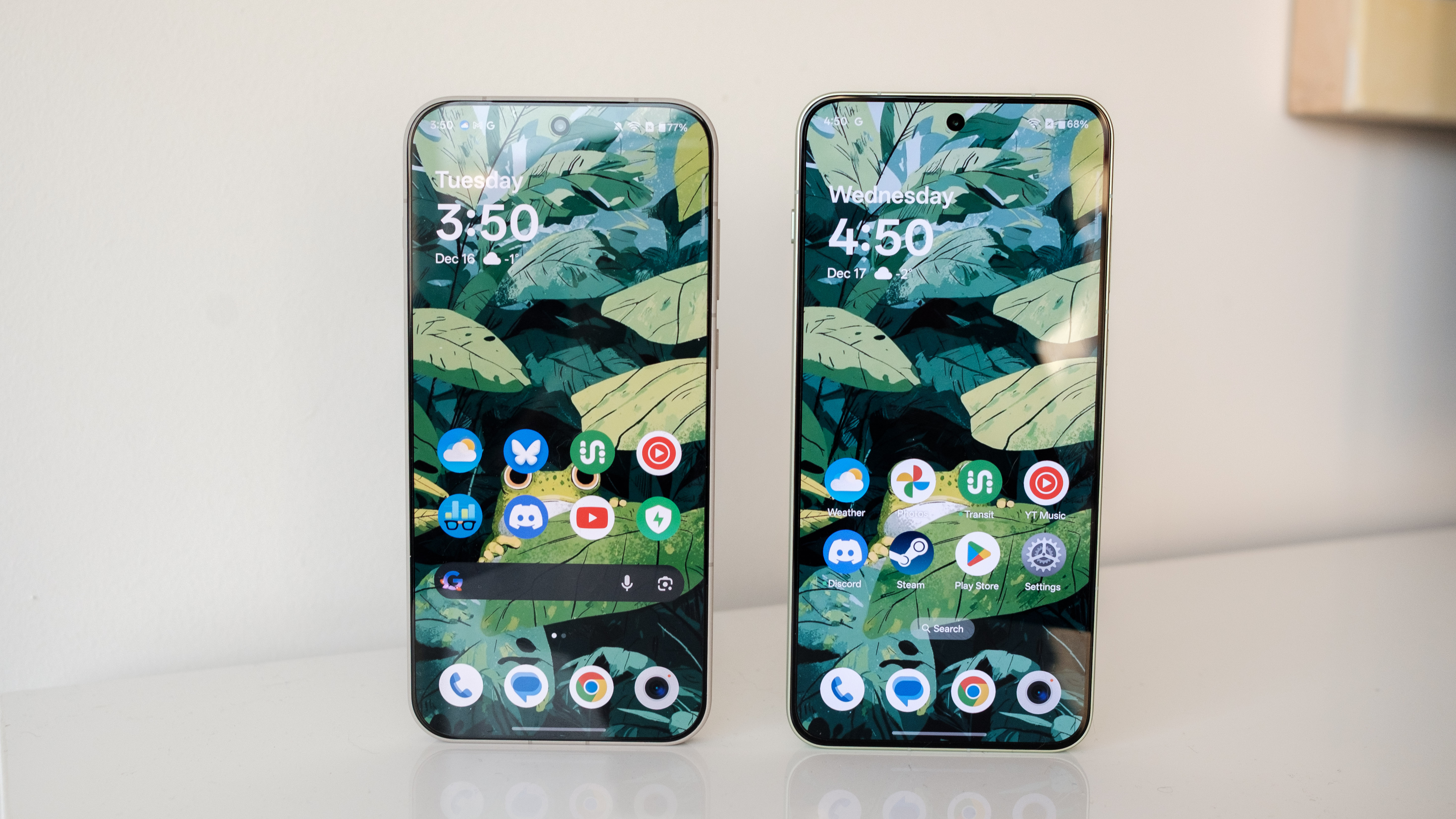
The OnePlus 15R's screen is slightly cooler than that of the OnePlus 15.
The OnePlus 15R’s screen is slightly cooler than that of the OnePlus 15.
Igor Bonifacic for Engadget

Like the OnePlus 15, the 15R looks like the OnePlus 13s and 13T, a pair of smaller, 6.32-inch phones the company released in India and China this past spring. I said the design of the OP15 was boring and derivative of the iPhone 16 Pro. The 15R has done nothing to change that opinion. With one fewer camera, the OP15R doesn’t look much different from the iPhone 12 I’ve been hanging on to since 2020. 

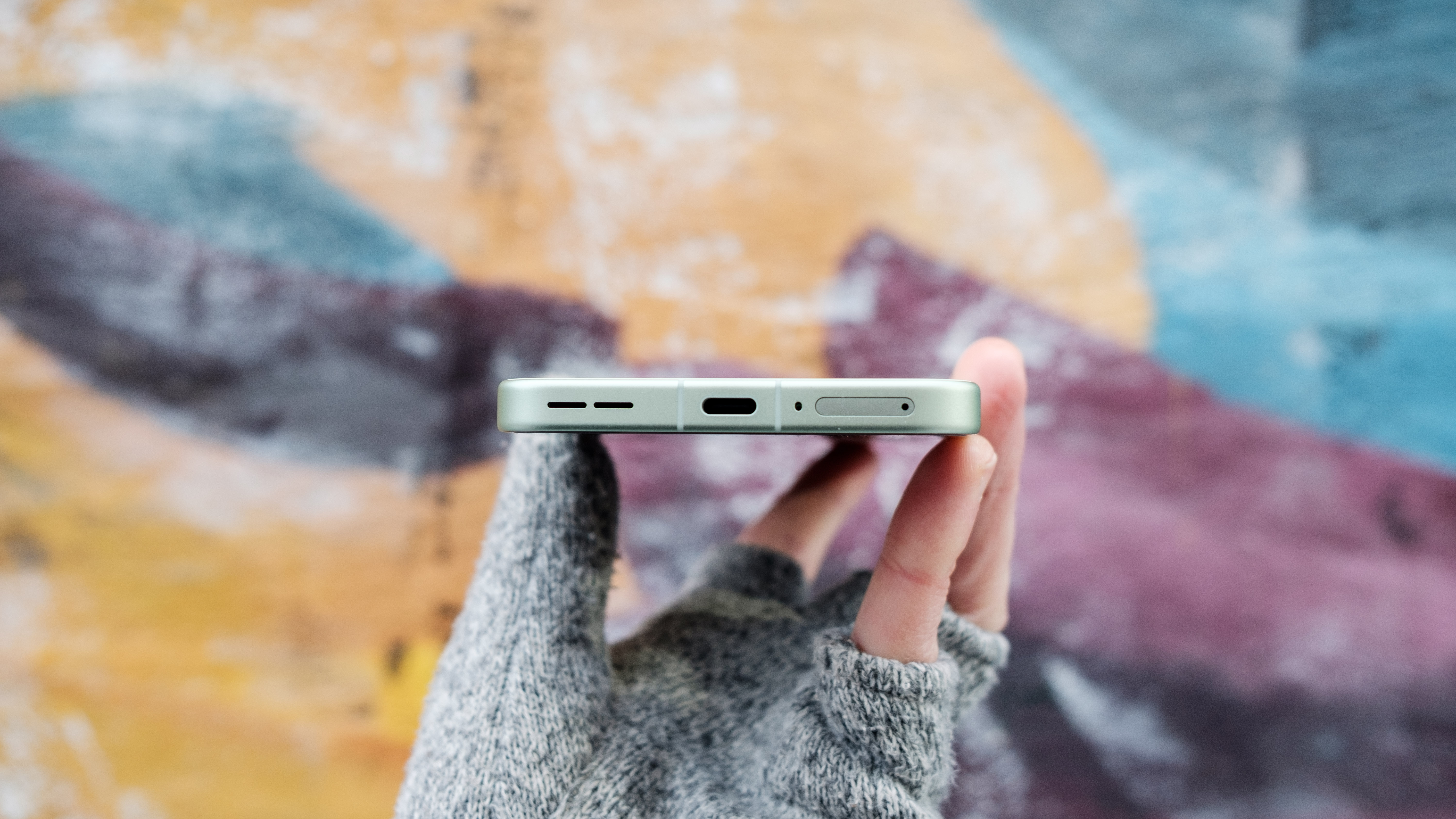
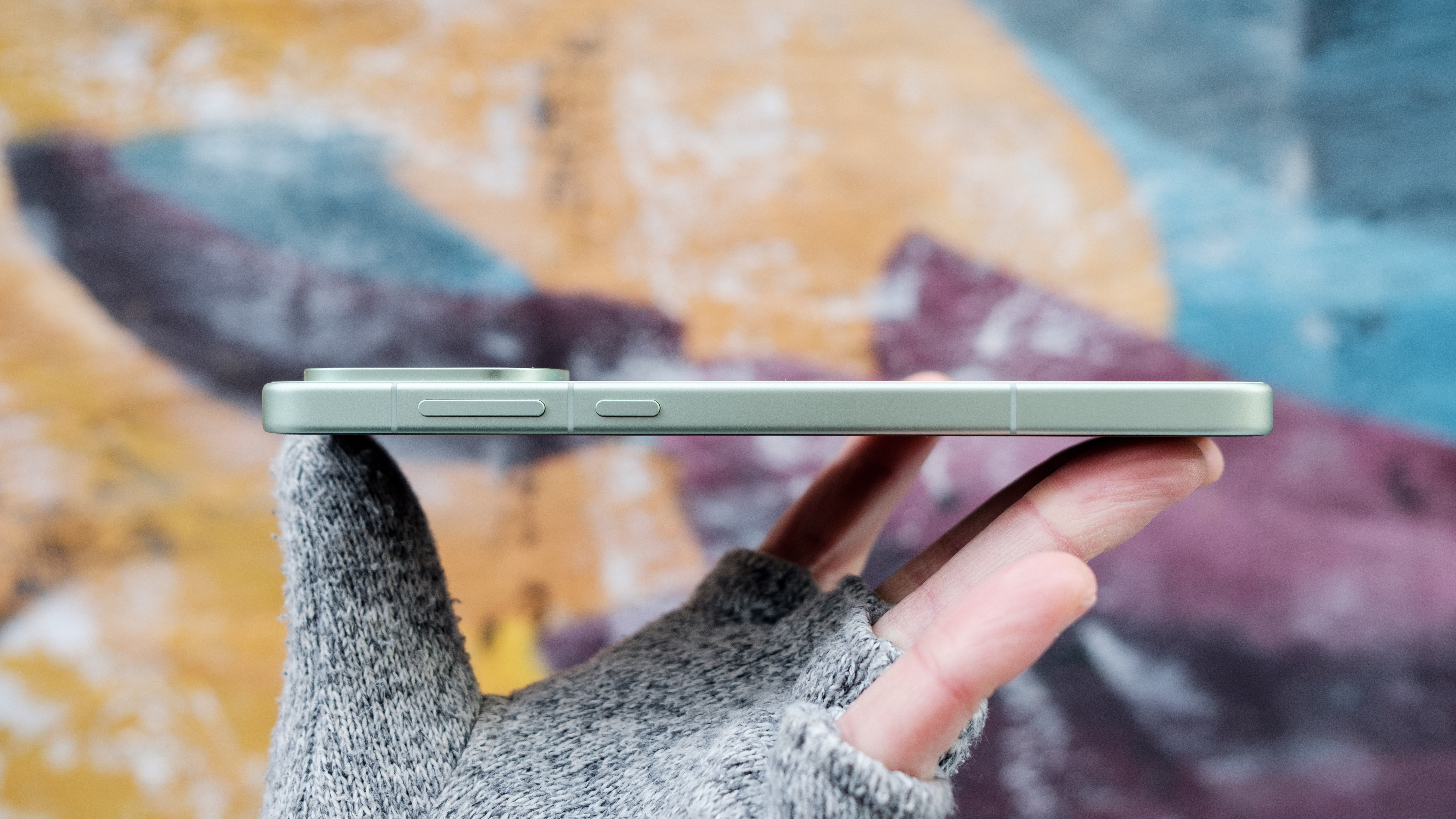
That said, I’m more fond of the 15R’s mint breeze color (the phone is also available in charcoal black) than the sand storm shade of my OP15. We’re big fans of minty phones here at Engadget, and OnePlus has gone with a particularly pleasing hue of the color with its new phone. With the redesign, OnePlus has also improved the phone’s waterproofing, bringing it in line with the OP15. The new handset is IP69K-certified against moisture and dust, meaning it can withstand heated water shot at it at pressure. Like the OP15, the 15R trades OnePlus’ old Alert Slider for a new Plus Key. It functions like the iPhone’s Action button, allowing you to add a shortcut for a favorite feature. For example, you can configure it to open the camera app or act as a do not disturb toggle, among a few other options.  

One departure from the OP15 is that the 15R has a larger 6.83-inch display, making it slightly taller than its sibling. OnePlus is marketing this as one reason buyers might pick the 15R over the OP15, but holding the phones side by side, there’s not much difference between the two. They’re both big, and you’ll either like that or won’t.

On top of being big, the 15R’s screen can refresh at a fast 165Hz in games. The two displays are also comparable in terms of resolution and brightness; both can push 1,800 nits of brightness. One difference I noticed is the OnePlus 15 has a warmer panel, even when the two phones are set to the same colorspace. I’ve reached out to OnePlus to find what might be causing the disparity, but for now it may be due to a quality control issue or oversight in the company’s software.  

One last thing, OnePlus has upgraded the 15R to add an ultrasonic fingerprint sensor beneath the screen. This is placed in a nice spot toward the bottom third of the display, and it’s fast and accurate.   

Performance and battery

The OnePlus 15R is also slightly thinner than the OnePlus 15.
Igor Bonifacic for Engadget

The OnePlus 15R is the first phone in North America to arrive with Qualcomm’s latest Snapdragon 8 Gen 5 chipset. Not to be confused with the Snapdragon Gen 5 Elite in the OP15, this new chipset is similar to Qualcomm’s flagship system-on-a-chip but has a weaker CPU and GPU. This is reflected in benchmarks like Geekbench 6 where the OP15 handily outperforms the OP15R. It’s not even close, either, with the OP15 delivering standout single- and multi-core scores of 3,773 and 11,293, while the 15R put up more modest results of 2,857 and 9,512. 

From that perspective, you’re losing a fair amount of performance, but real-world use tells a different story. Outside of the handful of games such as Call of Duty: Mobile and PUBG that support the OP15 and 15R’s 165Hz displays, the Snapdragon 8 Gen 5 offers more than enough muscle for the majority of applications. Even for most games (like the ones I like to play, including Diablo Immortal and League of Legends: Wild Rift), the Snapdragon 8 Gen 5 is a great match. 

OnePlus also hasn’t skimped on the 15R’s other internal components. You’re still getting 12GB of LPDDR5X Ultra RAM and 256GB of UFS 4.1 storage. That’s the same configuration as the base model of the OP15. This translates to a phone that doesn’t miss a beat when switching between apps and loading files like images and videos.  

The 15R has a slightly bigger battery, coming in at 7,400mAh, up from 7,300mAh on the OP15. In practice, the two phones offer the same amount of battery life. Putting them through both Engadget’s video rundown test, they both ran for 38 hours before their batteries died (which makes sense given the OP15R has a bigger screen). Like the OP15, the 15R comes with the OnePlus 55W SUPERVOOC charger in the box. The adapter can get the 15R from dead to 100 percent in less than an hour. If you hate charging your phone, the 15R makes that process as painless as possible, with a battery that both lasts long and won’t be at the outlet for hours.            

Cameras

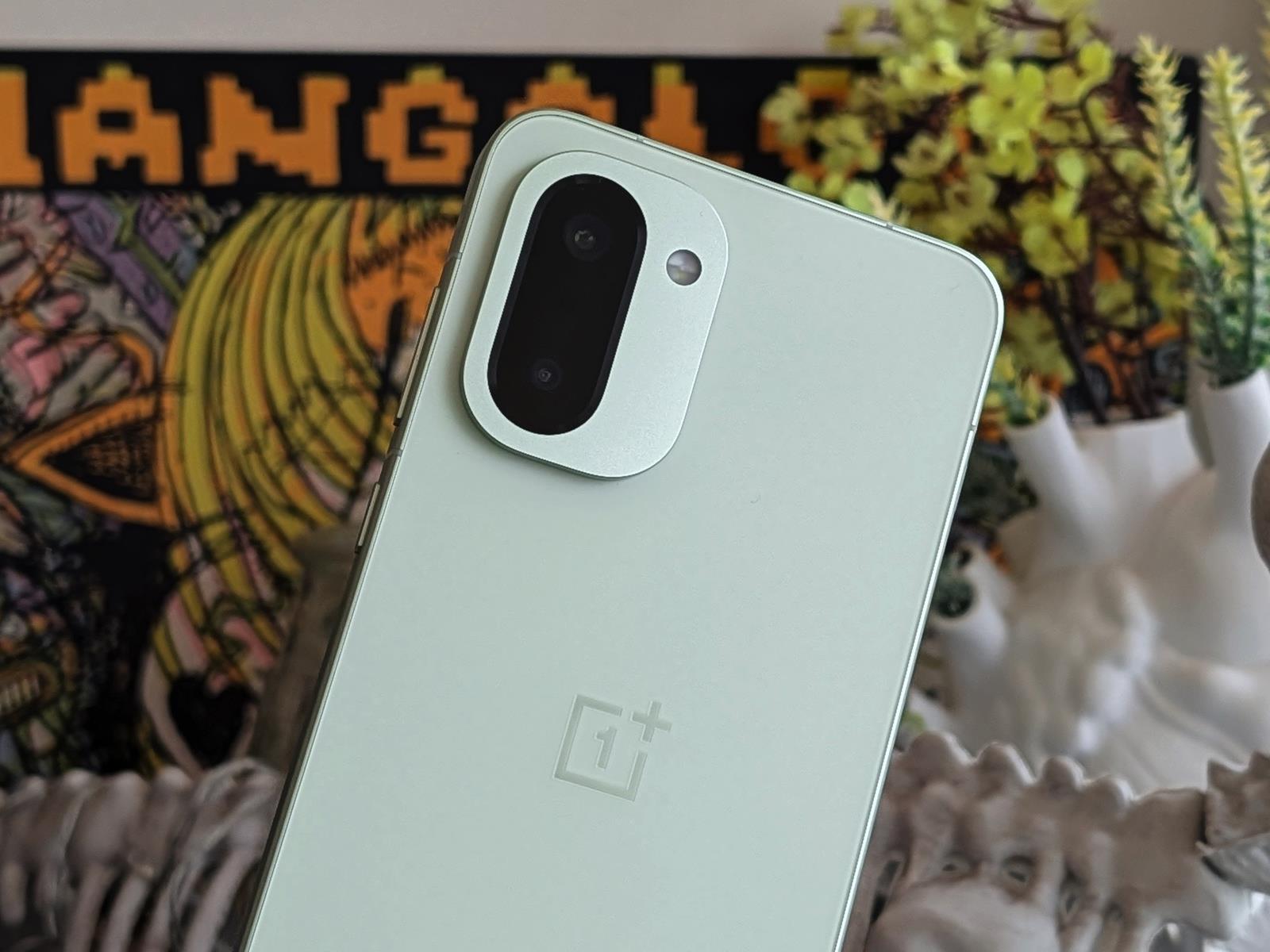
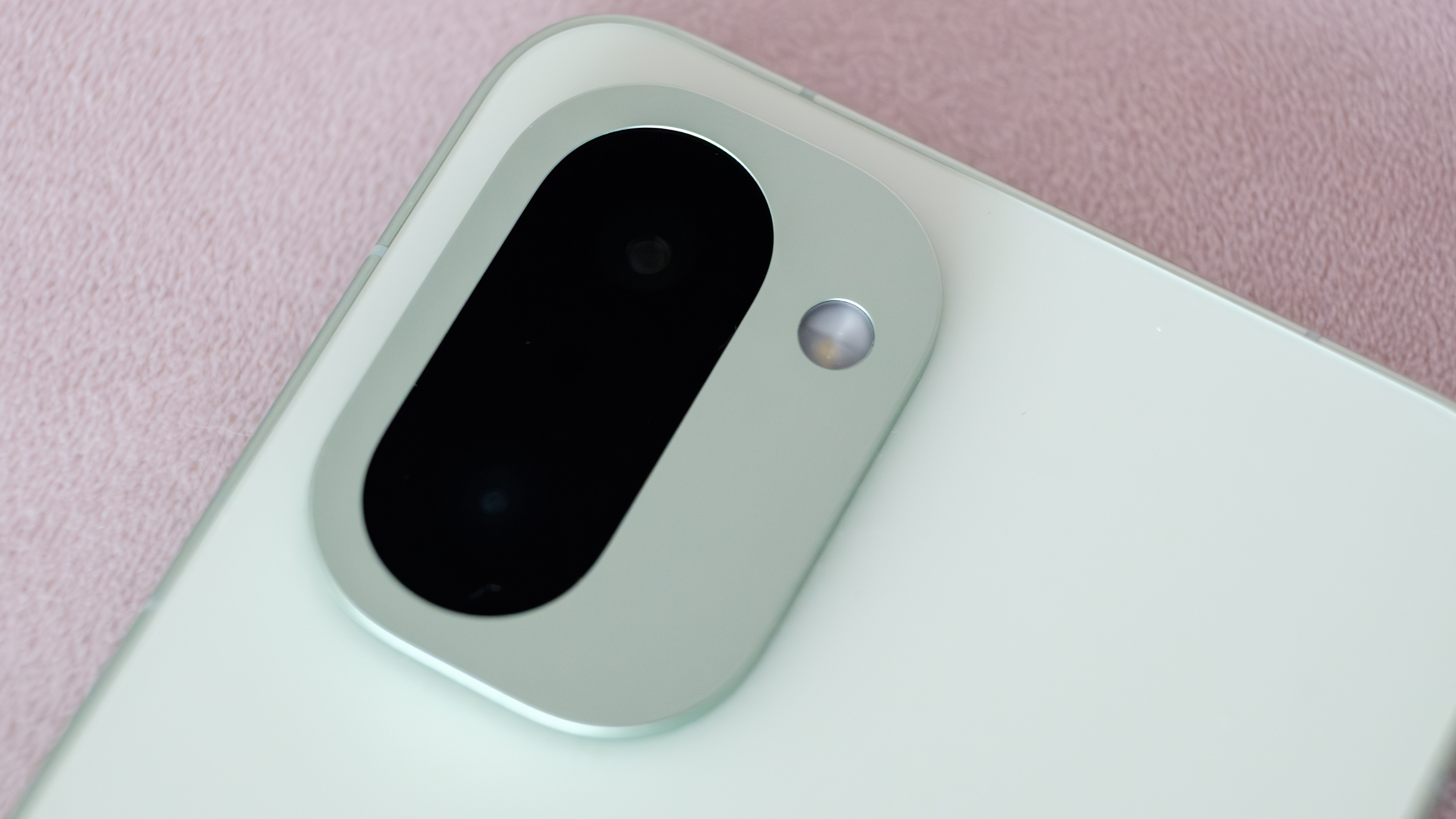
A closeup of the OnePlus 15R's camera module.
A closeup of the OnePlus 15R’s camera module.
Igor Bonifacic for Engadget

By this point you’re probably wondering what OnePlus cut from the OP15 to make the 15R more affordable. The answer — quite literally — is an entire camera. The new phone is missing a telephoto camera, something you could find on its predecessor, the OnePlus 13R. And as far as I can tell, the two remaining cameras use the same 50-megapixel and 8MP sensors OnePlus shipped on last year’s model. The company also hasn’t upgraded the glass on either camera. That leaves the selfie camera as the only area to see some change in the form of a sharper 32MP sensor and the addition of autofocus.       

Unfortunately, none of the 15R’s cameras stand out. As a whole, they suffer from the same set of problems that plague the OnePlus 15’s cameras. They’re fine out on a sunny day, but as soon as the light becomes a bit challenging, the 15R struggles with shadow details, resulting in muddy pictures. The more I’ve used both the OP15 and 15R, the more I’ve come to the conclusion that OnePlus needs to go back to the drawing board with its new Detail Max Engine. It feels like it’s holding back what should, at least on paper, be solid hardware.

Software

Despite it's large size, the OnePlus 15R isn't too heavy.
Despite it’s large size, the OnePlus 15R isn’t too heavy.
Igor Bonifacic for Engadget

There’s not much to say here other than the 15R ships with OxygenOS 16, just like the OP15. OnePlus has also promised to support the 15R for the same amount of time as the OP15: four years with software updates and six years with security patches. That’s a shorter window than Google and Samsung, both of which promise seven years on all their latest phones. It’s hopefully something that OnePlus decides to change starting with the OnePlus 16. The reason I bring that up is that the company’s version of Android is one I like a lot. OxygenOS is slick, with animations that highlight the speed of the 15R’s processor and display. The fact the phone comes with the latest version of OxygenOS means you also get access to all of the company’s newest AI features, including its Mind Space hub where you can save screenshots and notes for an on-device model to transcribe and summarize.    

 Wrap-up

The OnePlus 15R comes in a lovely mint color.
Igor Bonifacic for Engadget

In short, the OnePlus 15R is the phone for people who don’t care about photos and videos. That’s the same conclusion I came to with the OP15. If you’re a OnePlus fan, the 15R excels in all the areas you would expect the company’s devices to make a good showing: performance, battery life and display responsiveness. Given I wasn’t too impressed with the OP15’s camera, I would actually recommend the 15R over that model. For $200 off the starting price of the OP15, you’re getting a device that has almost all of the same strengths of its more expensive sibling.  

Compared to other phones in its price range, such as the Pixel 10 and Galaxy S25 FE, the 15R is not as well-rounded, and can’t compete with those devices in camera quality, but you’re getting much better performance, battery life and a display they can’t match.  

This article originally appeared on Engadget at https://www.engadget.com/mobile/smartphones/oneplus-15r-review-a-165hz-display-and-big-battery-for-700-150000340.html?src=rss

Warner Bros Discovery Board Rejects Rival Bid From Paramount

Warner Bros Discovery’s board spurned Paramount Skydance’s $108.4 billion hostile takeover bid on Wednesday, calling the offer “illusory” as it accused the studio giant of misleading shareholders about its financing. From a report: Paramount has been in a race with Netflix to win control of Warner Bros, and with it, its prized film and television studios, HBO Max streaming service and franchises like “Harry Potter.” After Warner Bros accepted the streaming giant’s offer, Paramount launched a hostile offer to outdo that bid.

In a letter to shareholders on Wednesday, the Warner Bros board wrote that Paramount had “consistently misled” Warner Bros shareholders that its $30-per-share cash offer was fully guaranteed, or “backstopped,” by the Ellison family, led by billionaire and Oracle co-founder Larry Ellison.


Read more of this story at Slashdot.

Twitter comeback bid draws lawsuit from Elon Musk’s X Corp

On Tuesday, X Corporation, formerly known as Twitter, sued “Operation Bluebird,” the new startup that is seeking to reclaim the allegedly abandoned Twitter trademark and relaunch a new social media network under that name.

In its 43-page lawsuit, which was filed in federal court in Delaware, X Corporation alleges trademark infringement, adding that despite Bluebird’s “purported plan, it cannot bring Twitter ‘back’—Twitter never left and continues to be exclusively owned by X Corp.”

One of Bluebird’s leaders, Michael Peroff, told Ars in an email that Operation Bluebird was “fully expecting” a lawsuit from X Corporation and that “we planned for it.”

Read full article

Comments

How a VPN works (and why you should care)

The best VPNs can make your online life more private with software that’s convenient and cheap — sometimes even free. While keeping your IP address invisible, you can use your VPN to explore streaming content from all over the world or (virtually) sneak into a sports event that’s not available in your area.

However, while VPNs are widely available, there’s a strange dearth of information on what they actually do behind the scenes. You may know that a VPN masks your device with a proxy server to make it look like you’re somewhere else, and maybe even that encryption is involved. But finding any more details can mean running a gauntlet of misinformation.

That’s a shame, because the inner workings of a VPN aren’t all that difficult to understand. You may not be able to build one yourself without a degree in computer science, but with a little work, you can understand exactly what it’s doing on your computer. That’s information you can use to select the right VPN for you, and make the most of it once you’ve got it.

What is a VPN?

To make sure nobody gets left behind, I’ll start from the beginning. A VPN (virtual private network) is a method of securely accessing a network, either a closed network (like you might have at the office) or the internet as a whole. Initially, organizations set up VPNs so remote workers can work with secure files. While this still happens, the last 15 years have seen VPNs increasingly marketed to individuals, with Proton VPN, ExpressVPN and others seeing massive user growth.

Broadly, a VPN consists of two parts: the server, which forwards requests to your chosen destination, and the client, a piece of software that lets you interact with the server. You can find a longer explanation here, but I’ll use the two sections below to tell you what you need to know right now.

One more note before that — there are multiple kinds of VPNs, including the remote-access VPNs and site-to-site VPNs commonly used by workplaces. However, for this article, I’ll be talking mainly about the commercial VPN services sold to individuals for general security needs. Instead of a specific network, these VPNs are designed to handle all of a user’s traffic to any point on the internet.

What happens when you use a VPN?

First, you use the client to connect to a server — either the fastest one available or a particular location you need. Once you’ve connected, every request you send to the internet goes through the VPN server first. This communication between your device and the web is encrypted so it can’t be traced back to you.

The VPN server decrypts your requests and sends them on. The destination then communicates with the VPN server, which relays the information back to you — after re-encrypting it so nobody follows it home.

Since the VPN does everything on your behalf, it’s your “mask” online. Your internet service provider (ISP) and third parties can see what’s being done, but — so long as you’re not otherwise logged in or identifying yourself — nobody knows that it’s you doing it. It’s like having a friend order pizza for you so the pizzeria doesn’t hear you calling for the third time this week (not that I speak from experience).

What’s the point of using a VPN?

Why add an extra step to the already complex process of getting online? The two biggest reasons are maintaining anonymity and changing your virtual location. I’ve already explained how a VPN keeps you anonymous. Among other things, this prevents your ISP from selling your browsing history to advertisers and protects activists who face government repercussions for what they do online.

Changing your virtual location is part of masking, but it can also be used to see the internet as it’s visible in other countries. Streaming services are frequently limited to certain places, and almost all of them change the available content based on their licenses in each nation. You can also use a VPN in a country with a nationwide firewall, like China, to see forbidden outside information sources.

How does a VPN work? The full technical explanation

Most online explanations stop after defining a VPN as an anonymous agent between you and the internet — but I wrote this article to go a little bit deeper. To understand what a VPN is doing on a technical level, we’ll need to cover how the internet works, how the VPN knows where to send encrypted information and just what “encryption” actually is.

How the internet transmits data

When you’re not using a VPN, internet traffic goes directly from your modem to your ISP, then on to your chosen destination. The key technologies here are IP, which stands for Internet Protocol, and TCP, which stands for Transmission Control Protocol. They’re usually combined as TCP/IP.

You may have heard that every online device has an IP address that identifies it to every other device. TCP/IP governs not just those names but how data moves between them. Here’s how it works, step-by-step.

  1. You click a link or enter a URL into your web browser.

  2. Your computer sends a request to your modem, asking to see the page associated with the URL. Your modem forwards the request to your ISP.

  3. Your ISP finds a domain name server (DNS) that tells it which IP address is connected to the URL you asked to see. It then sends the request to that IP address along the fastest available route, which will involve being relayed between several nodes.

  4. That IP address is connected with a server that holds the content you’re looking for. Once it receives the request, it breaks the data down into small packets of about 1 to 1.5 kilobytes.

  5. These packets separate to find their own fastest routes back to your ISP, your modem and finally your web browser, which reassembles them.

  6. You see a web page, likely no more than a second after you asked for it.

The outgoing requests and inbound packets are key to understanding VPN function. A VPN intervenes during step 2 (when your modem contacts your ISP) and step 5 (when your ISP sends the packets back to you). In the next section, I’ll explain exactly what it does during those steps.

How VPN tunneling protects data

You might have heard a VPN’s activities described as “tunneling.” That term refers to a figurative tunnel being created between your device and the VPN. Data enters the tunnel when it’s encrypted by the VPN client and exits when it’s decrypted by the VPN server. Between those two points, encryption means nobody can see the true data. It’s as though it’s traveling through an opaque tunnel.

While the tunnel is a useful metaphor, it may be better to think of VPN encryption as an encapsulation. Each packet of data sent via VPN is “wrapped” in a second packet, which both encrypts the original packet and contains information for reaching the VPN server. However, none of these outer layers have the complete path — each just knows enough to reach the next relay. In this way, the origin point (that’s you) remains invisible.

The same thing happens when the internet returns content to show you. Your ISP sends the data to the VPN server, because, as far as it knows, that’s where the request came from. The VPN then encrypts each packet and sends them back to you for decryption and reassembly. It takes a little longer with the extra steps; that’s why VPNs always slightly slow down your browsing speed, though the best ones don’t do that by much (Surfshark is currently the fastest).

You learned in that last section that two protocols, IP and TCP (usually combined as TCP/IP), are responsible for letting online devices talk to each other, even if they’ve never connected before. In the same way, a VPN protocol is like a shared language that lets VPNs encrypt, move and decrypt information. See the next section to learn how a VPN protocol works in detail.

How VPN protocols encrypt data

VPN protocols are the technology behind VPNs; every other feature of your VPN is just a method of interacting with them. All protocols are designed to encrypt data packets and wrap them in a second layer that includes information on where to send them. The main differences are the shape of that second layer, the types of encryption used and how the client establishes its initial secure connection with the server.

It’s extremely common for VPNs to advertise protocols with “bank-grade” or “military-grade” encryption. This is talking about the 256-bit Advanced Encryption Standard (AES-256), a symmetric encryption algorithm, which is used by financial institutions and the US government and military. AES-256 is indeed some of the strongest available encryption, but it’s only part of the story. As a symmetric algorithm, it’s not fully secure on its own, because the same keys are used to encrypt and decrypt it — and those keys can be stolen.

For that reason, most VPN protocols use AES-256 (or a similarly strong cipher like ChaCha20) to encrypt the data packets themselves, then combine it with a larger suite of multiple encryption algorithms. One of the most reliable and popular protocols, OpenVPN, uses the asymmetric TLS protocol to establish a secure relationship between client and server, then transmits packets encrypted with AES-256 across that channel, knowing the keys will be safe.

Explaining this could easily reach the length of a book, but the basic principle isn’t complicated. In asymmetric encryption, a sender encodes data with a unique key, then a recipient decodes it with a different paired key. The keys are provided by a trusted third party. In a maneuver called a TLS handshake, the server and client send each other encrypted data. If each can decode the other’s test data, they know they have a matched pair of keys, which proves that both are the same client and server that got the keys from the trusted authority.

Why not just use asymmetric encryption for the data itself, if it’s more secure? Mainly, protocols don’t do this because it’s a lot slower. Asymmetric encryption requires a lot of resource-heavy math that makes connections drag. That’s why OpenVPN and others use the asymmetric-to-symmetric two-step instead.

To summarize, a VPN protocol is a complex set of instructions and tools that control encryption and routing via VPN servers. Protocols still in use include OpenVPN, WireGuard, IKEv2, SSTP and L2TP. PPTP, one of the oldest protocols, is no longer considered secure. On top of these, VPNs often build their own proprietary protocols, such as ExpressVPN’s Lightway.

Putting it all together

Now that we’ve hit all the relevant information, let’s revisit that step-by-step from earlier, this time with a VPN in the mix. Here are the steps, starting with establishing the VPN connection and ending with anonymously viewing a website.

  1. You open your VPN client, choose a server location and connect. The VPN client and server authenticate each other with a TLS handshake.

  2. The client and server exchange the symmetric keys they’ll use to encrypt and decrypt packets for the duration of this session (i.e. until you disconnect). Your VPN client tells you that it’s established a secure tunnel.

  3. You open your web browser and enter a URL. Your browser sends a request to view the content at that address.

  4. The request goes to your VPN client, which encrypts it and adds an outer layer of information with directions to the VPN server.

  5. The encrypted request reaches the VPN server, which decrypts it and forwards it to your ISP.

  6. As normal, your ISP finds the IP address associated with the URL you entered and forwards your request along.

  7. The destination server receives the request and sends all the necessary packets of information back to your ISP, which forwards it to the VPN server.

  8. The VPN server encrypts each packet and adds a header directing it to the VPN client.

  9. The client decrypts the packets and forwards them to your web browser.

  10. You see the web page you opened.

Because of the encrypted tunnel, the request arrives at the VPN server without any information on where it came from. Thus, the VPN doesn’t actually encrypt your activity on the websites themselves — for the most part, the HTTPS protocol does that. Instead, a VPN gives you a false name to put in the register, with no information that could be traced back to your real identity.

How to use this information

Now that you know how a VPN works on a technical level, you’re better equipped to choose one for yourself. You can cut through marketing hype statements like:

  • “Military-grade encryption!” (It’s the same algorithm everybody uses)

  • “Stay completely anonymous online!” (Plaintext you post on social media is not encrypted)

  • “Dodge ISP throttling!” (If your ISP is throttling you based on your IP address, this works — but if you’re being slowed down because of your moment-to-moment activity, your identity doesn’t matter)

A VPN is just one important part of a complete cybersecurity breakfast. While hiding your IP address, make sure to also use strong passwords, download updates immediately and remain alert for social engineering tactics.

This article originally appeared on Engadget at https://www.engadget.com/cybersecurity/vpn/how-a-vpn-works-and-why-you-should-care-143000250.html?src=rss

How ChatGPT’s New Image Generator Stacks Up Against Gemini’s Nano Banana Pro

Following the major image editing upgrades added to Google Gemini back in August—under the whimsical codename Nano Banana—it’s OpenAI’s turn to supercharge the tools you get for image manipulations inside ChatGPT. The new update is called GPT Image 1.5, and is rolling out now for all users.

One of the key improvements here, as was the case with Nano Banana, is the way that ChatGPT can now edit a specific part of an image while keeping everything else consistent. You can add or remove something, or change the color or style of something, without ending up with an entirely different looking picture.

Another feature ChatGPT has now borrowed from Gemini: the ability to combine multiple images together in one scene. Want you and your best friend in front of Sydney Harbour Bridge? No problem—just supply the source pictures and the AI will do the rest. You can also change visual styles while maintaining consistent details.

OpenAI says the new image editor and generator is able to follow instructions “more reliably,” and render pictures up to four times faster than before. Text can be more varied in style and size, and images should be more realistic and error-free in general—though OpenAI also admits there’s still room for improvement.

It’s the best image generator tool we’ve ever seen in ChatGPT, and it all looks impressive at first glance—but how does it stack up in practice against Gemini and Nano Banana? I put the two models to the test via the $20-per-month plan on both platforms (that’s ChatGPT Plus and Google AI Pro, respectively) to see how they compared.

Rendering and editing images

Open up ChatGPT on the web or on mobile and you’ll see there’s a new Images tab on the left-hand navigation pane. This takes you to a library of your existing pictures, together with some new prompts for creating images. You get some suggestions for prompts, plus an assortment of preset portrait image styles you can apply.

Gemini images
A journalist, lamp, and countryside scene courtesy of Gemini.
Credit: Gemini

ChatGPT images
A journalist, lamp, and countryside scene courtesy of ChatGPT.
Credit: ChatGPT

I tested out the new GPT Image 1.5 model by getting ChatGPT to generate a busy tech journalist, a lamp in the middle of an empty warehouse, and a cartoon-style rolling landscape of hills in the fog. I then got Gemini to create the same pictures with the same prompts. While the results were pretty varied, in terms of quality and realism they were pretty equal—the occasional issue with weird physics and repetition, but nothing too bad.

Both ChatGPT and Gemini are now quite competent at clean image edits, too: Both AI bots seamlessly switched the journalist’s clothing to a shirt and tie without touching any other part of the picture. This would have taken a significant amount of time to do manually, even by a Photoshop expert, and shows just how transformative AI imaging is becoming.

Color changes were all handled with aplomb, but the AIs struggled a bit with perspective changes, where I asked to see the same shot from another angle. In these cases, instructions were less well-followed and the images were less consistent (as new areas needed to be rendered), though ChatGPT did a little better than Gemini at getting good results.

Gemini images
Clothing can now be swapped out in seconds (Gemini edition).
Credit: Gemini

ChatGPT images
Clothing can now be swapped out in seconds (ChatGPT edition).
Credit: ChatGPT

The classic “remove an object from this picture” challenge was handled with aplomb: Both Gemini and ChatGPT were able to remove a cottage from the countryside scene with surgical precision, leaving everything else intact. Again, these are the kind of time-intensive image edits that would previously have needed a lot of careful effort, and that can now be done in seconds.

Gemini images
Gemini’s attempt at removing a cottage.
Credit: Gemini

ChatGPT images
ChatGPT’s attempt at removing a cottage.
Credit: ChatGPT

Combining and remixing images

Another talent ChatGPT and Gemini now have is being able to combine images together. So you can have separate photos of you and your parents, put them together in the same shot, and then add in a background of wherever you like. You can get perfect family photos without actually gathering together your relatives together or going anywhere.

This was an area where Gemini and ChatGPT did struggle a bit more: The editing dexterity was still impressive, but the results didn’t always look like a single, coherent scene. Lighting is sometimes off, or elements from different images appear at different scales, and you’ll have to do a bit more tweaking and editing and reprompting to get everything right.

ChatGPT did fare slightly better at blending different images and elements together, and changing the overall look of a picture. When I tried to get the AIs to mix all my images together in a moody film noir shot, ChatGPT produced something pretty consistent—the Gemini effort looked a lot more like a cut-and-paste job.

It can be fun remixing photos again and again—adding new people, changing the weather, moving the location—and both these bots are now capable of some rather incredible results. Remixing photos of family and friends will be popular, but it’s not all that easy: With people you know, any generative AI that gets added tends to look wrong, because neither ChatGPT nor Gemini knows exactly what these people look like, how they smile, how they’re built, or how they tend to stand or sit.

Gemini images
Gemini can combine images—but they look like different images.
Credit: Gemini

ChatGPT images
ChatGPT did a better job at creating a new image that looked correct.
Credit: ChatGPT

In terms of ChatGPT vs. Gemini, they’re both at a high level now—a level that puts advanced Photoshop-style editing capabilities at everyone’s fingertips. If either AI model has the edge right now, it’s ChatGPT’s, but there’s not much in it. It’s also going to be fascinating to see where these image editing capabilities go next.

Samsung will show off its expanded Micro RGB TV series at CES

Last year at CES, Samsung debuted its first mainstream Micro RGB TV, a 115-inch model that surprised us with its rich, vivid colors and $30,000 price tag. Now, the company has announced that it will be showing off an entire lineup of Micro RGB TVs at CES 2026 ranging from 55- to 115-inch models, promising to set “a new standard for premium home viewing.” 

As a reminder, Micro RGB is a unique new technology similar to Mini LED displays. Unlike the white backlights used on Mini LEDs, though, it uses tiny red, green and blue LEDs that produce more accurate colors and offer smaller and more controllable dimming zones. However, because pixels can’t be turned on and off individually like Micro LED or OLED, Micro RGB contrast ratios aren’t as high. They promise to be brighter and more color accurate than other technologies, though, hence the high prices and “premium” branding. 

Samsung’s upcoming Micro RGB lineup will be available in 55-, 65-, 75-, 85-, 100- and 115-inch models and use the next evolution of the company’s technology. The main claim to fame is near broadcast monitor-like color accuracy, covering 100 percent of the demanding BT.2020 HDR standard. That new standard now has a name and VDE certification: Micro RGB Precision Color 100. 

Other key features include Samsung’s “Micro RGB AI Engine Pro” for more precise frame-by-frame clarity and realism, new color enhancement functions, Samsung’s glare free tech and enhanced audio features including Dolby Atmos and Adaptive Sound Pro. 

Yesterday, LG announced that it would also show off new televisions using Micro RGB technology, with 75-, 86- and 100-inch models coming next year. What remains to be seen, however, is pricing. Given the $30,000 cost of the 115-inch model, you can likely expect the first Micro RGB televisions to be among the most expensive in the lineups of both LG and Samsung. 

This article originally appeared on Engadget at https://www.engadget.com/home/home-theater/samsung-will-show-off-its-expanded-micro-rgb-tv-series-at-ces-141716449.html?src=rss

OpenAI in Talks With Amazon About Investment That Could Exceed $10 Billion

OpenAI is in discussions with Amazon about a potential investment and an agreement to use its AI chips, CNBC confirmed on Tuesday. From the report: The details are fluid and still subject to change but the investment could exceed $10 billion, according to a person familiar with the matter who asked not to be named because the talks are confidential. The discussions come after OpenAI completed a restructuring in October and formally outlined the details of its partnership with Microsoft, giving it more freedom to raise capital and partner with companies across the broader AI ecosystem.

Microsoft has invested more than $13 billion in OpenAI and backed the company since 2019, but it no longer has a right of first refusal to be OpenAI’s compute provider, according to an October release. OpenAI can now also develop some products with third parties. Amazon has invested at least $8 billion into OpenAI rival Anthropic, but the e-commerce giant could be looking to expand its exposure to the booming generative AI market. Microsoft has taken a similar step and announced last month that it will invest up to $5 billion into Anthropic, while Nvidia will invest up to $10 billion in the startup.


Read more of this story at Slashdot.