This Soundcore Saltwater-Resistant Speaker Is $50 Off Right Now

We may earn a commission from links on this page. Deal pricing and availability subject to change after time of publication.

Most outdoor speakers claim they can handle water. The Soundcore Boom 3i goes further: it’s fully waterproof and dustproof with an IP68 rating, but it also resists saltwater, which is still rare at this size and price. That matters if your weekends involve beaches, boats, or the ocean rather than a backyard patio. Also, it floats, and more importantly, it does so facing upward, which keeps the drivers out of the water and the sound clear. That one detail makes a real difference when waves or movement would normally flip a speaker onto its side. The Boom 3i usually sells for $129.99, but it’s currently down to $79.99, its lowest price so far, according to price trackers.

It weighs a little over three pounds and comes with a shoulder strap, so carrying it to a beach or campsite doesn’t feel like a chore. And pushing up to 50 watts, the Boom 3i is loud enough to cover a small gathering of about eight people without sounding strained.

The sound quality is solid but not dramatic. You get punchy mid-bass and a warm tone, but very little deep bass, which is expected from a compact, front-facing speaker. There’s a BassUp button on top if you want more low-end emphasis, and the Soundcore app includes a nine-band equalizer for finer tuning. Battery life sits around 15 to 16 hours at moderate volume, and you can keep listening while charging over USB-C.

The Boom 3i’s interesting extras include a Buzz Clean mode, which plays a low-frequency tone to shake sand and grit out of the speaker after a beach day. It works surprisingly well, though you may still need to rinse or shake it afterward. Plus, there’s an emergency alarm and voice amplifier built in, which could be useful for kayaking or group outings, even if they’re not things you’ll use often. On the downside, the speaker reportedly down-mixes stereo audio to mono unless you pair it with a second unit, and the app doesn’t show an exact battery percentage.

All said, this isn’t the speaker for indoor listening or detailed sound. It’s for water-heavy trips where durability matters more than finesse. At this price, it’s a strong option for that specific use case.


Ayaneo Pocket Vert Retro Gaming Handheld Gets A Great Pre-Launch Discount

Ayaneo Pocket Vert Retro Gaming Handheld Gets A Great Pre-Launch Discount
Ayaneo Pocket Vert is here, and if you hop on the bandwagon soon enough, you can get it for as low as $269 USD for the 8GB RAM + 128GB storage configuration, or $349 for the top-end 12GB RAM + 256GB storage config (or $369 if you want it in red). The vertical retro handheld market has been heating up in the past few years, but the Pocket Vert

Top NVIDIA GeForce GPU Deals To Snag Before Prices Potentially Rise

Top NVIDIA GeForce GPU Deals To Snag Before Prices Potentially Rise
Word on the web is that graphics card pricing is about to go up as add-in board (AIB) partners for both AMD and NVIDIA look to pass along the cost of rising DRAM prices. If the reports are true, we’ll start to see higher-priced GPUs next month for AMD and February for NVIDIA, followed by more price increases as 2026 stretches its legs. That’s

China drafts world’s strictest rules to end AI-encouraged suicide, violence

China drafted landmark rules to stop AI chatbots from emotionally manipulating users, including what could become the strictest policy worldwide intended to prevent AI-supported suicides, self-harm, and violence.

China’s Cyberspace Administration proposed the rules on Saturday. If finalized, they would apply to any AI products or services publicly available in China that use text, images, audio, video, or “other means” to simulate engaging human conversation. Winston Ma, adjunct professor at NYU School of Law, told CNBC that the “planned rules would mark the world’s first attempt to regulate AI with human or anthropomorphic characteristics” at a time when companion bot usage is rising globally.

Growing awareness of problems

In 2025, researchers flagged major harms of AI companions, including promotion of self-harm, violence, and terrorism. Beyond that, chatbots shared harmful misinformation, made unwanted sexual advances, encouraged substance abuse, and verbally abused users. Some psychiatrists are increasingly ready to link psychosis to chatbot use, the Wall Street Journal reported this weekend, while the most popular chatbot in the world, ChatGPT, has triggered lawsuits over outputs linked to child suicide and murder-suicide.

Read full article

Comments

I Tested Three macOS Finder Alternatives, and This Is the Best One

You can customize more on your Mac than you might have realized, and that extends to the file management software you use to browse around your system. Take, for example, Finder: There are a good number of alternatives around that bring with them extra features and different layouts.

I’ve been testing out three of the most well-known and highly rated alternatives to Finder to see what I might be missing. Each one has its own appeal, but the third in the list here is so good that I might switch to it permanently for all my file and folder needs on macOS.

Commander One

Commander One

Credit: Lifehacker

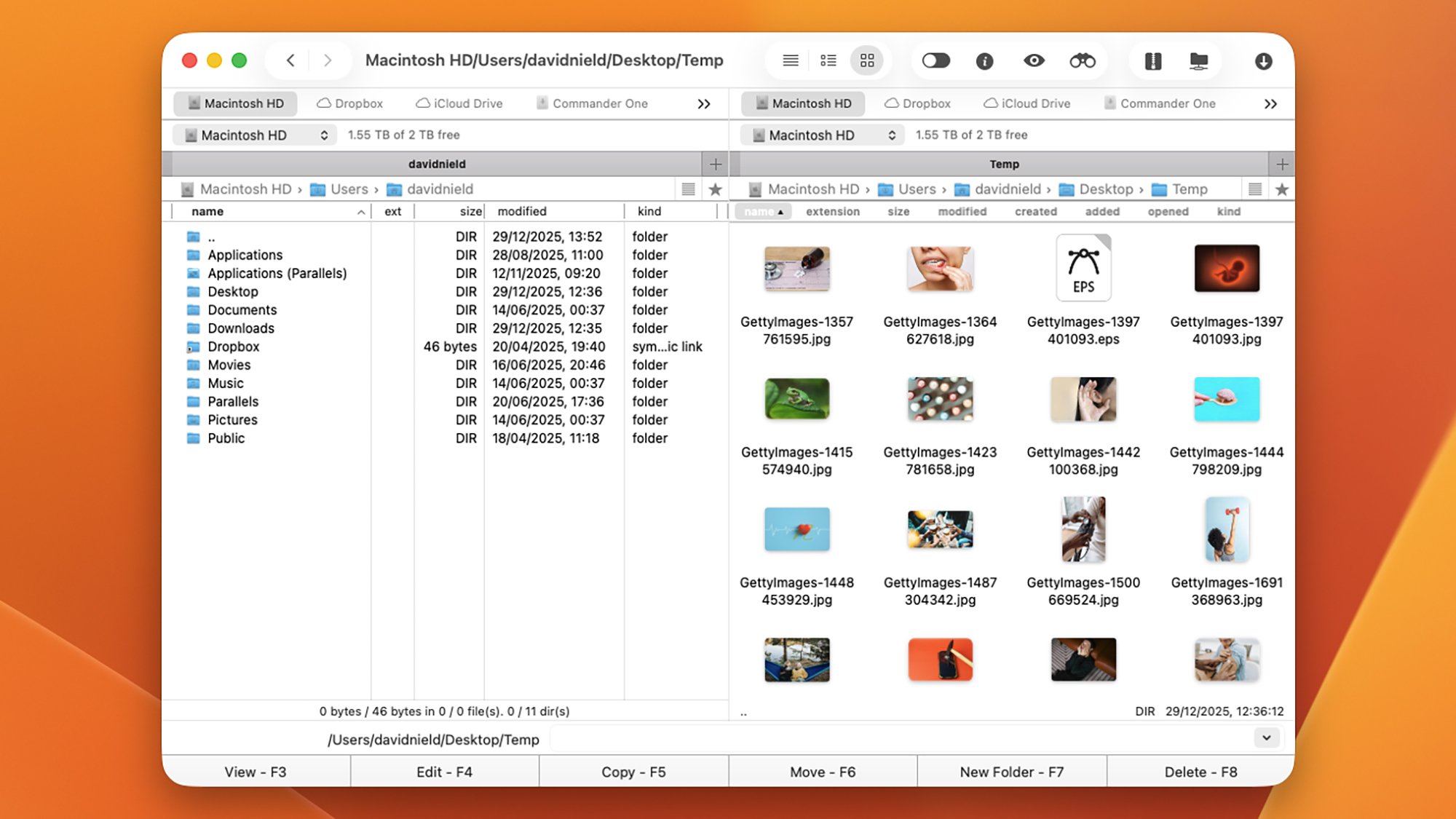
As soon as you load up Commander One, you’ll notice it has a busier interface than Finder, which may or may not suit you, depending on your attitude toward minimalism. Its layout is based around a dual-pane interface, and you can customize it in a variety of ways—even down to the fonts and colors used, if you want something bespoke.

The software starts to show its potential when you move from just looking at your files and folders to actually doing something with them. You’re able to rename files when copying and moving them; you get a dedicated file operations queue; and you can run complex searches through your system using regular expressions, too.

I like the quick toggle switches for seeing hidden files and for previewing files without any additional apps, and connecting up to network locations and cloud storage is straightforward. There’s even an integrated Terminal for you to make use of. It’s handy having shortcut keys on show in the interface as well, and you can customize these as needed if you don’t like the defaults.

There’s certainly a lot going on, and while the interface takes a little bit of getting used to, that’s to be expected—and it doesn’t take long to learn what’s what. The Pro version of the software comes with extra features, including layout themes, and integrations for FTP, Google Drive, and Dropbox: That’s yours for a one-off fee of $29.99.

QSpace Pro

QSpace Pro

Credit: Lifehacker

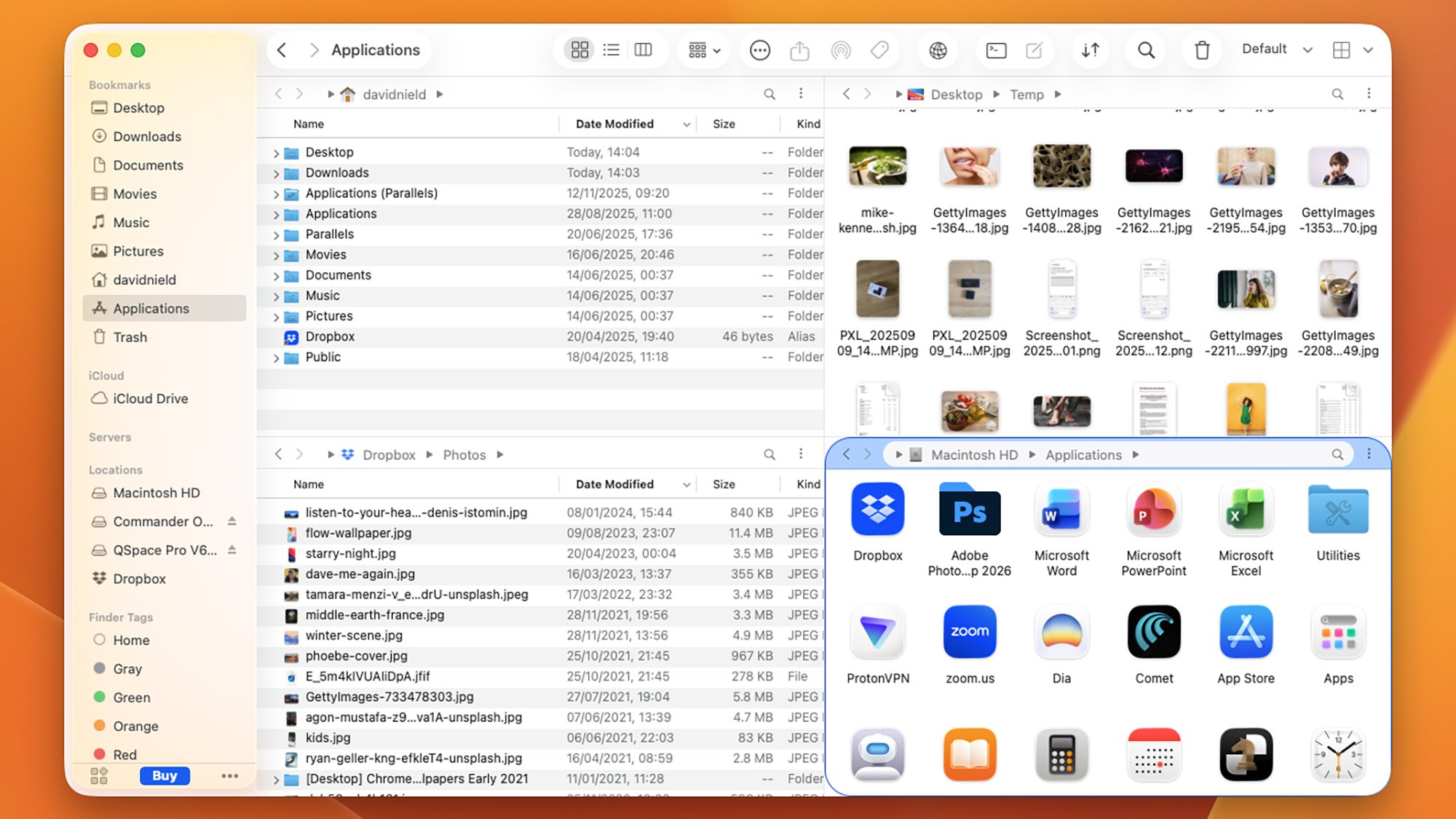
QSpace Pro is the best Finder alternative I tested in terms of the interface customizations you get access to: You can tailor to a fine level of detail, though the default look isn’t all that different from Finder. You can have up to four different system locations on view at once, with the panels arranged in a variety of different ways, and jumping between these layouts is easily done.

After a short while using QSpace Pro I definitely felt I was better able to get around my Mac more efficiently, and when you’ve got a lot to do on your system, that really helps. Copying, moving, searching, deleting, tagging, and previewing is all intuitively and simply done, and you can easily hide parts of the interface if you know you won’t need them.

The wealth of settings available in QSpace Pro is a testament to how much you can do with this: Keyboard shortcuts, the context menu, new file creation, batch operations, folder syncing, iCloud links, and app launching can all be customized, and those are just some of the options available. It’s like Finder, but with a lot more going on.

QSpace Pro isn’t free, however: Its features cost a one-off fee of $27.99 via the Mac App Store (or $29.99 via a direct download), though at the time of writing, those prices are down to $12.99 and $13.99, respectively. If you go through the QSpace Pro website, you can test the software out for 30 days for free before buying.

Path Finder

Path Finder

Credit: Lifehacker

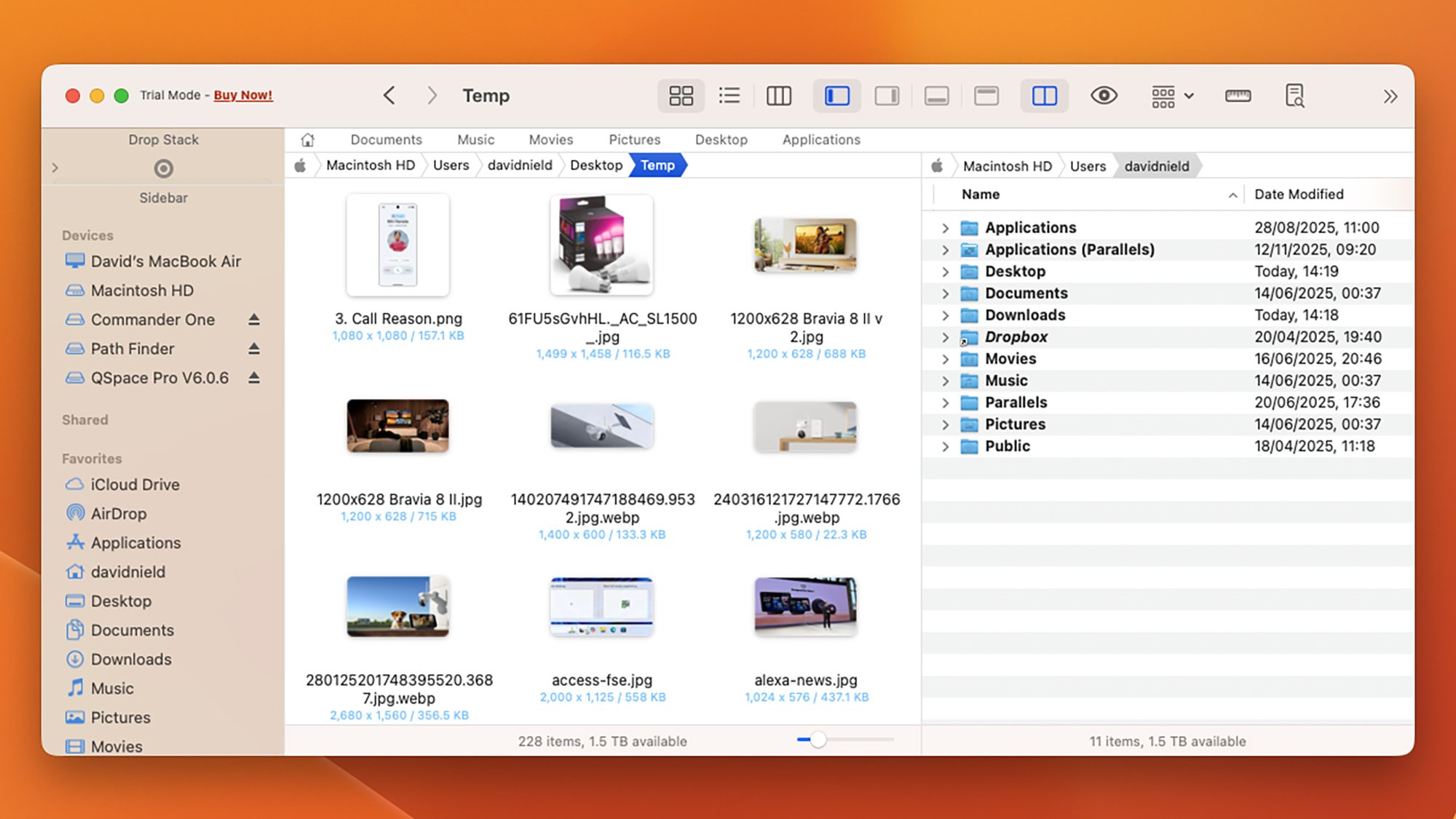
Path Finder is one of the Finder alternatives that’s been around the longest, and I think it’s the one I’m actually going to switch to permanently. It’s absolutely packed with features and options to play around with, and if you spend a little time getting it set up the way you want it, it should seriously speed up all your file operations.

There are a choice of different layouts to pick from, including a dual-pane layout that makes moving and copying more straightforward, and I very much appreciate the “stacking” approach that lets you pile up several files and folders in a temporary holding pane first, before you do anything with them.

Batch file operations are supported, as are synced folders, so you can merge and compare two folders on your system as required. There’s also extensive use of bookmarks and tab presets, so that you can quickly jump to the places on your Mac system that you need to visit the most—something that isn’t always simple to do in Finder.

The visual representations of how much space files and folders are taking up on disk is very handy, and so is the Dropbox integration (with Dropbox being my go-to cloud storage option). Admittedly it’s not the most visually appealing of the software packages listed here, but that’s not necessarily the most important thing in a file manager, and it adds all the features I didn’t know I’d been missing from Finder.

Path Finder is $29.99 for the year, but there’s a 30-day trial available.

NASA’s SPHEREx Completes First All-Sky Infrared Map Of Entire Universe And It’s Stunning

NASA's SPHEREx Completes First All-Sky Infrared Map Of Entire Universe And It's Stunning
Less than a year into its mission, NASA’s SPHEREx has already completed its first full survey of the sky, producing a near-infrared map that captures the entire cosmos in a staggering 102 colors. Words can’t really convey the true splendor of the achievement, though, so have a look for yourself at the panoramic video NASA released.

Unlike

Think Your Gaming Monitor Is Fast? This One Hits A Blistering 1080Hz

Think Your Gaming Monitor Is Fast? This One Hits A Blistering 1080Hz
Old school PC geeks may remember a time when AMD and Intel were in a race to 1GHz and beyond, back before multiple cores, hybrid designs, and mountains of stacked cache took center stage. Those days may be gone forever, but now we have monitor makers trying to one-up each other with increasingly fast speeds, and HKC is touting a gaming monitor

Samsung’s New Wireless Speakers Blend Immersive Audio And Home Design At CES

Samsung’s New Wireless Speakers Blend Immersive Audio And Home Design At CES
Hold on a second, Samsung designers were allowed to actually design something? Ahead of the upcoming CES 2026, the South Korean company has unveiled not just a soundbar, but some very fresh-looking Wi-Fi speakers that combine artistic design and high-fidelity performance (on paper anyway).

Music Studio 7

Undoubtedly the eye-catcher during

A quirky guide to myths and lore based in actual science

Earthquakes, volcanic eruption, eclipses, meteor showers, and many other natural phenomena have always been part of life on Earth. In ancient cultures that predated science, such events were often memorialized in myths and legends. There is a growing body of research that strives to connect those ancient stories with the real natural events that inspired them. Folklorist and historian Adrienne Mayor has put together a fascinating short compendium of such insights with Mythopedia: A Brief Compendium of Natural History Lore, from dry quicksand and rains of frogs to burning lakes, paleoburrows, and Scandinavian “endless winters.”

Mayor’s work has long straddled multiple disciplines, but one of her specialities is best described as geomythology, a term coined in 1968 by Indiana University geologist Dorothy Vitaliano, who was interested in classical legends about Atlantis and other civilizations that were lost due to natural disasters. Her interest resulted in Vitaliano’s 1973 book Legends of the Earth: Their Geologic Origins.

Mayor herself became interested in the field when she came across Greek and Roman descriptions of fossils, and that interest expanded over the years to incorporate other examples of “folk science” in cultures around the world. Her books include The Poison King: The Life and Legend of Mithradates, Rome’s Deadliest Enemy (2009), as well as Greek Fire, Poison Arrows, & the Scorpion Bombs (2022), exploring the origins of biological and chemical warfare. Her 2018 book, Gods and Robots: Myths, Machines, and Ancient Dreams of Technology, explored ancient myths and folklore about creating automation, artificial life, and AI, connecting them to the robots and other ingenious mechanical devices actually designed and built during that era.

Read full article

Comments

This Dashcam Is My Tech ‘Upgrade of the Year’

We may earn a commission from links on this page.

To be alive in 2025 is to assume you are being recorded at all times. There are cameras just about everywhere we go these days: Security cameras, video doorbells, and smartphones are frequently recording, and so ubiquitous that I tend to figure that if I go out in public, I’m being watched.

But when you’re driving, it can be a different story. Sure, there are cameras on the road—either street cameras or cameras built directly into modern cars—but there are plenty of moments behind the wheel where nothing you do is recorded. You could view this as a nice reprieve from the surveillance of modern life, but it also means that if you get into an accident, it could quickly turn into a “he said, she said” incident. Someone could reverse directly into your car, but because there were no cameras around to document the accident, your insurance company could throw their hands in the air and make you both pay for something that wasn’t your fault.

I’ve never been in that situation, but I was tired of worrying about it. My car is on the older side, and doesn’t come with any of the modern safety features newer cars now include—including cameras. Where something like a Tesla records everything in and around the car, my vehicle records nothing. If someone accidentally hit my car, or worse, intentionally tried to scam me, I could be out of luck, and without clear evidence I wasn’t at fault.

You won’t regret buying a dashcam, even if you never use it

After following one too many threads online sharing such horror stories, I decided it was time to get myself a dashcam.But before I could, I was gifted one last Christmas—a Redtiger 4K dashcam. It was easy enough to set up, though even after a full year of use, I’m not taking full advantage of it yet: The main unit attaches to my front windshield, with a cable that plugs into the cigarette lighter port, but this particular model also comes with a rear camera that requires a little extra maneuvering to install. I’ve been a bit lazy on that front, but I should get cracking, since it would be helpful to have a camera protecting the back of my car, too.

I almost wish I had some harrowing tale to tell that shows off how the dashcam saved me during the past year, or even a story about capturing some wild driving habits from my fellow drivers. But, spoiler alert: I haven’t actually had to put it to use, as I’ve fortunately not been in an accident, or even experienced an interesting close call. But the peace of mind that comes with knowing that if an otherwise ambiguous fender bender has been refreshing. It’s nice to know when I’m driving on a particularly busy road that I have a little extra protection should someone jump their lane or decide to text and drive.

There are so many different dashcam models, so I won’t try to make the case that mine specifically is the one that everyone should buy. But there are a few things I like about it: First, the main unit records in 4K, which means your videos will be clear enough to use in the event you need to prove yourself innocent. While 4K takes up more recording space than 1080p, this model is designed to record over itself when it fills up. Since you probably don’t need all your driving footage, you don’t really need to worry about running out of space, and can grab the file when something actually happens. There are other features that I don’t use, like wifi connectivity as well as a smart app, but I prefer to just grab the footage off the included SD card—at least, I would if I ever needed it.

3 New Year’s Resolutions for Your Dog

Deal pricing and availability subject to change after time of publication.

New Year’s resolutions are all about improving ourselves, right? The same goes for your best buddy—your dog. 

While your dog can’t physically tell you what they need to feel their best, there are simple things you can do to help set them up for success. Right now, you can save 50% off your first box of human-grade The Farmer’s Dog pet food, so that’s a great start. Check out these pup-centric resolutions and help keep their tail wagging into 2026—and for years to come. 

Make the switch to fresh dog food

Say goodbye to kibble this year by getting a subscription to The Farmer’s Dog. A new study from the company shows that fresh food can support healthier aging in dogs—and who doesn’t want more good years with their pup? 

The Farmer’s Dog makes fresh dog food that’s formulated by on-staff board-certified veterinary nutritionists. Each batch is made from gently cooked meats and vegetables, has no added fillers or preservatives, and is quickly frozen to lock in nutrients. It’s then shipped to your door while it’s still fresh. 

Sign up and The Farmer’s Dog will create a personalized plan with portions that meet your pup’s unique nutritional and caloric needs. Considering nearly 60% of dogs are overweight, these portions can support a healthy lifestyle. 

Brush your dog’s teeth 

Over 80% of dogs will get some form of dental disease in their lifetime. To tackle that stinky dog breath and protect their chompers, you’ll need a toothbrush designed for dogs and doggie toothpaste that has your vet’s approval. (Never use human toothpaste on your pup, as it can be toxic for dogs.) Start by putting doggie toothpaste on your finger and letting your pup lick it off to get them used to having your finger in their mouth. Eventually, replace your finger with the toothbrush.

Teach your dog some new tricks

While daily walks with your dog are key for physical fitness (for both you and your pup), training your dog is a fantastic way to provide them with intellectual stimulation. Teach your dog to sit or some ‘Gram-worthy tricks like playing Bach on the piano, as long as you give them positive affirmation, your pet will feel like the good dog they are. 

When you’re making resolutions this year, don’t forget about your pup. Subscribe to The Farmer’s Dog today and save 50% off your first box of human-grade pet food—and keep the wag-worthy vibes going all year.

Global Hotel Groups Bet on Customer Loyalty To Beat Online and AI Agents

The world’s largest hotel chains are aggressively pushing customers toward direct bookings as they brace for a future where AI “agents” could reshape how travelers find and reserve rooms. Marriott, Hilton, Hyatt and Wyndham have all expanded their loyalty programs and perks in recent months, aiming to reduce their reliance on online travel agents like Expedia and Booking.com that typically charge commissions of 15 to 25%.

Marriott’s Bonvoy program reached almost 260 million members by the end of September, an 18% jump from the prior year. Hilton has lowered the barriers to elite status and struck partnerships that let members spend points outside its hotel portfolio.

AI-powered booking tools could route customers away from brand-conscious decisions, but they could also offer hotels a cheaper distribution channel than traditional OTAs. Marriott CFO Leeny Oberg said at a conference this month that AI bookings “could potentially be cheaper than the OTAs.” Wyndham CEO Geoff Ballotti called tools like ChatGPT and Gemini “a unique opportunity” to reduce OTA dependency.


Read more of this story at Slashdot.

GPS is vulnerable to jamming—here’s how we might fix it

In September 2025, a Widerøe Airlines flight was trying to land in Vardø, Norway, which sits in the country’s far eastern arm, some 40 miles from the Russian coast. The cloud deck was low, and so was visibility. In such gray situations, pilots use GPS technology to help them land on a runway and not the side of a mountain.

But on this day, GPS systems weren’t working correctly, the airwaves jammed with signals that prevented airplanes from accessing navigation information. The Widerøe flight had taken off during one of Russia’s frequent wargames, in which the country’s military simulates conflict as a preparation exercise. This one involved an imaginary war with a country. It was nicknamed Zapad-2025—translating to “West-2025”—and was happening just across the fjord from Vardø. According to European officials, GPS interference was frequent in the runup to the exercise. Russian forces, they suspected, were using GPS-signal-smashing technology, a tactic used in non-pretend conflict, too. (Russia has denied some allegations of GPS interference in the past.)

Without that guidance from space, and with the cloudy weather, the Widerøe plane had to abort its landing and continue down the coast away from Russia, to Båtsfjord, a fishing village.

Read full article

Comments

The Seven Best Combo Tools for Your DIY Projects

We may earn a commission from links on this page.

There are two universal truths about tools: They’re expensive, and they take up a lot of space. If you’re trying to maintain a home or perform some DIY work in a small space or on a small budget, stacking up all the tools you might need to get the job done can strain your wallet and simultaneously pose a storage challenge.

The solution is actually pretty easy: Buy tools that combine more than one function into a single item. While having the specific tool you need for every job will always be your best choice, if you lack space and/or cash, combination tools like these give you all the capability you need without eating up all your storage space—or draining your bank account.

The universal wrench is a great multi-purpose tool

Having a wide range of wrenches on hand means you can tackle any job—but it also means you’ve got to figure out how to store those wrenches so they don’t take over your life. Enter the universal wrench, which can be every wrench and ratchet you need. It will fit spline bolts, six- and 12-point bolts, torx, and square bolts. It also handles damaged bolts and all standard sizes.

This multipurpose screwdriver combines 17 tools into one

You might already have a multitool, but that’s nothing compared to this useful combination tool. This combines 17 standard tools into one hand-sized unit, including a screwdriver, tape measure, level, flashlight, and hammer. You’re not going to be doing major renovation projects with this, but if you need a complete toolbox for everyday DIY and have no space or budget for real tools, this will get just about every job done.

This five-in-one drill packs a lot of power into a small unit

This five-in-one drill from Dewalt is a terrific combination tool for two reasons: It’s multifunctional, and it combines a small size with a lot of power so it can be used in just about any situation. It comes with four attachments: an offset adapter, a quick-release bit holder, right-angle adapter, and a ratcheting chuck. You can bore holes and drive fasteners while easily changing the angle and position of your bit—the right-angle and offset attachments plus its small size means you don’t need any other drill to get your jobs done.

This hammer is also a prybar (and more)

Two of the most useful items in a tool box are a hammer and a prybar. If you’re looking to save some space, combining the two is a great solution. The Vaughan Rage model also works as a sledgehammer/demolition tool, and offers a nail-puller as well as the prybar function, making it incredibly useful for such a small and affordable tool.

This eight-in-one hand saw has swappable blades

Having the right saw for the job is essential—trying to use a wood saw when a hacksaw would be a better choice is never going to work. This eight-in-one hand saw offers swappable blades for wood, drywall, metal, and plastic, allowing you to cut a wide range of materials without having to collect and swap out multiple saws. It also features a quick-change mechanism, so if you’re working with multiple materials, you can quickly switch between them.

This adjustable wrench is much more

If you’re going to fix things, you’ll need a wrench, a pair of pliers, and a screwdriver—and this tool combines them all, as well as a wire cutter and a knife. The adjustable wrench will fit most standard bolts, and it also provides multiple screwdriver bits so you’re not stuck with just the standard Phillips head. Instead of four or five tools taking up space, this one small piece will do it all for you.

This 10-in-one painter’s tool fits in your back pocket

You don’t have to be a professional painter to use this nifty 10-in-one tool to make your painting projects easier and your toolbox a bit lighter. This thing is a paint, caulk, and adhesive scraper, can (and bottle) opener, roller cleaner, spot hammer—it can even drive a flathead screw in a pinch if you need it to. In other words, instead of carrying a bunch of tools to deal with the usual irritations and challenges of painting a wall, you can slip this into your back pocket and get to work.

LG Launches UltraGear Evo Gaming Monitors With What It Claims is the World’s First 5K AI Upscaling

LG has announced a new premium gaming monitor brand called UltraGear, and the lineup’s headline feature is what the company claims is the world’s first 5K AI upscaling technology — an on-device solution that analyzes and enhances content in real time before it reaches the panel, theoretically letting gamers enjoy 5K-class clarity without needing to upgrade their GPUs.

The initial UltraGear evo roster includes three monitors. The 39-inch GX9 is a 5K2K OLED ultrawide that can run at 165Hz at full resolution or 330Hz at WFHD, and features a 0.03ms response time. The 27-inch GM9 is a 5K MiniLED display that LG says dramatically reduces the blooming artifacts common to MiniLED panels through 2,304 local dimming zones and “Zero Optical Distance” engineering.

The 52-inch G9 is billed as the world’s largest 5K2K gaming monitor and runs at 240Hz. The AI upscaling, scene optimization, and AI sound features are available only on the 39-inch OLED and 27-inch MiniLED models. All three will be showcased at CES 2026. No word on pricing or when the sets will hit the market.


Read more of this story at Slashdot.

AMD Radeon And NVIDIA GeForce GPU Price Hikes May Be Coming

AMD Radeon And NVIDIA GeForce GPU Price Hikes May Be Coming
While you’re planning your New Year’s resolutions, add-in board (AIB) partners for both AMD and NVIDIA are getting ready to ring in 2026 with a round of price increases, followed by more price hikes as the year goes on, according to multiple reports. The culprit, as you can probably guess, is the rising cost of DRAM, which has already impacted

UK Accounting Body To Halt Remote Exams Amid AI Cheating

The world’s largest accounting body is to stop students being allowed to take exams remotely to crack down on a rise in cheating on tests that underpin professional qualifications. From a report: The Association of Chartered Certified Accountants (ACCA), which has almost 260,000 members, has said that from March it will stop allowing students to take online exams in all but exceptional circumstances. “We’re seeing the sophistication of [cheating] systems outpacing what can be put in, [in] terms of safeguards,” Helen Brand, the chief executive of the ACCA, said in an interview with the Financial Times.

Remote testing was introduced during the Covid pandemic to allow students to continue to be able to qualify at a time when lockdowns prevented in-person exam assessment. In 2022, the Financial Reporting Council (FRC), the UK’s accounting and auditing industry regulator, said that cheating in professional exams was a “live” issue at Britain’s biggest companies. A number of multimillion-dollar fines have been issued to large auditing and accounting companies around the world over cheating scandals in tests.


Read more of this story at Slashdot.

Samsung plans to integrate Google Photos into its TVs

Samsung has announced that it “aims to be the first” to natively integrate Google Photos into TVs. The aim is for Google Photos to work seamlessly with Vision AI Companion, Samsung’s souped-up version of Bixby. This would help to make user photos part of the day-to-day TV experience, with photos appearing while navigating the TV’s OS during “contextual and convenient moments.”

The company says users will be able to explore their Google Photos libraries in three new experiences. The first is called Memories, and will show curated stories based on “people, locations and meaningful moments.” This has a planned launch in March 2026 and will be exclusive to Samsung TVs for six months.

Create with AI will use Google DeepMind’s image generation and editing model, enabling users to transform their photos using AI using themed templates. Users will also be able to turn any still image into a short video using the tool. Create with AI has a planned launch in the second half of 2026.

Finally, Personalized Results will create themed slideshows of users’ photos based on particular topics or the content of an image. Examples given by Samsung include the ocean, hiking and Paris. This also has a planned launch in the latter part of 2026.

This article originally appeared on Engadget at https://www.engadget.com/home/samsung-plans-to-integrate-google-photos-into-its-tvs-132739713.html?src=rss

How to watch the Sony Afeela CES 2026 press conference

Sony Honda Mobility

Longtime CES observers know that Sony’s press conference is the traditional capper to the press day that precedes the show floor’s official opening the following day. And while that appears to be the same for 2026, there’s a twist: Instead of an overview of Sony’s electronics, video game and Hollywood studio plans for the new year, the presser will apparently have a more narrow focus: electric vehicles. Apparently the full event will be focused on two vehicles from Sony Honda Mobility — the Afeela 1 car that has made repeat appearances at CES, as well as an all-new concept model at the event.

How to watch the Sony Afeela CES 2026 press conference

The event will be streamed live from Las Vegas on Monday, January 5 at 8PM ET via the Afeela official YouTube channel. (We’ll embed the stream here once it appears on the channel.)

What to expect from Sony Afeela at CES

What’s now the Afeela 1 has been shown in various incarnations since CES 2020, where it was originally announced as Vision-S. But so many more important details were confirmed in the past couple of years, including the price, which starts at a staggering $89,900. However, the earlier impressions were less than impressive, and as of CES 2025, that thought remains the same. Engadget’s automotive expert Tim Stevens said earlier this year that the EV “feels like a PlayStation 4 in the PS5 era,” and that “the car lost what little interesting styling it had while sticking true to some specifications that sounded good five years ago.” Ouch.

But the Afeela 1 won’t be the only vehicle on display. Its CES booth will showcase “several Afeela 1 pre-production vehicles in multiple color variations, alongside a new Afeela concept model,” Sony Honda Mobility said in a press release.

We’re hoping to hear about what’s new and improved at CES 2026, and we’re also excited to see its newest concept model. And between booth displays and press releases, we’re hoping we’ll get to see at least a few new Sony Electronics products on the docket for 2026, too.

This article originally appeared on Engadget at https://www.engadget.com/transportation/evs/how-to-watch-the-sony-afeela-ces-2026-press-conference-130048921.html?src=rss

Remembering what Windows 10 did right—and how it made modern Windows more annoying

If you’ve been following our coverage for the last few years, you’ll already know that 2025 is the year that Windows 10 died. Technically.

“Died,” because Microsoft’s formal end-of-support date came and went on October 14, as the company had been saying for years. “Technically,” because it’s trivial for home users to get another free year of security updates with a few minutes of effort, and schools and businesses can get an additional two years of updates on top of that, and because load-bearing system apps like Edge and Windows Defender will keep getting updates through at least 2028 regardless.

But 2025 was undoubtedly a tipping point for the so-called “last version of Windows.” StatCounter data says Windows 11 has overtaken Windows 10 as the most-used version of Windows both in the US (February 2025) and worldwide (July 2025). Its market share slid from just over 44 percent to just under 31 percent in the Steam Hardware Survey. And now that Microsoft’s support for the OS has formally ended, games, apps, and drivers are already beginning the gradual process of ending or scaling back official Windows 10 support.

Read full article

Comments