If your New Year’s resolution to be more thrifty with your device purchases in 2026, then you’ll be happy to know that Samsung is rolling out a couple of affordable new products. One is a $199.99 smartphone, the Galaxy A17 5G, and the other is a the Galaxy Tab A11+ tablet priced at $249.99. What’s more, both are being released in the United
Chances are that if a VPN is marketed to everyday users, it more or less runs itself. As long as you go with one of the best VPNs instead of setting up your own manual connection, the interface is likely built so you have to engage with it as little as possible. Generally, if you find yourself constantly thinking about your VPN while using it — as happened to me with Norton VPN — that’s a bad thing and you should change providers.
That said, it’s still useful to get a high-level view of how to use a VPN, especially if you’ve never used one before. In this article, I’ll walk you through how to download, install and configure a VPN on any platform and how to choose servers for specific situations. I’ll also discuss specific steps for desktop and laptop computers, phones, tablets, smart TVs, game consoles and routers.
How to download and install a VPN
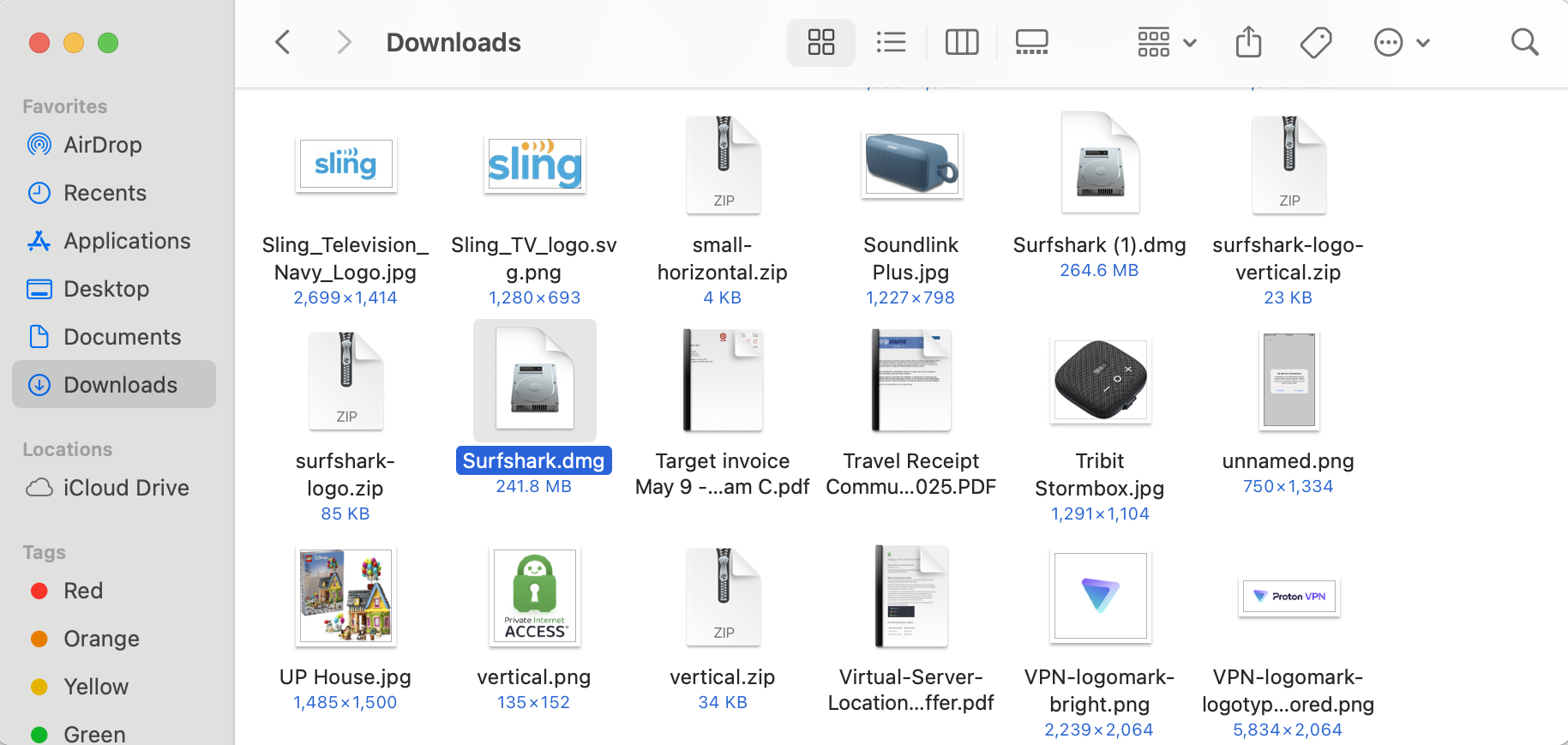
There are over 100 VPNs available on the internet and the two big mobile app stores, but most of them follow a similar approach to download and installation. Except for certain free VPNs, you’ll need to create an account on the VPN provider’s website, install the VPN client, then use your account to log in. Here are the steps.
In a web browser, navigate to a VPN provider’s website. For suggestions on where to start, check out our list of the best VPN deals. Click any link that mentions getting the VPN or claiming the deal — as a rule, they aren’t hard to find.
Select a plan based on the length of time you need the VPN for, the features you want and the number of devices you’d like to use the VPN on simultaneously. Add a payment method. You’ll be prompted to create the username and password for a new account.
On desktop, you can start with the Mac or Windows app store, though some VPNs require a download directly from their respective website. That’s generally the way to get the most feature-rich version of the VPN, but just make sure you’re downloading from the provider’s website to ensure you don’t get a malicious copycat. On mobile, the app store is your only choice, but don’t forget to check the reviews and make sure you’re getting the service you paid for — unfortunately, rival (and sometimes less scrupulous) VPN brands can use paid placements to appear higher on search results, even for a rival product.
Follow the pre-programmed installation flow. Again, don’t let a VPN make any changes to your system if you haven’t thoroughly vetted the provider (or gone with one of our recommendations). If it’s safe, allow the VPN all the setup permissions it needs.
Finally, open the VPN client and sign in with the credentials you created in step two. You’re now ready to start using your new VPN.
Surfshark in Mac downloads folder
Sam Chapman for Engadget
With so many VPNs on the market, this process won’t always be the same. Sometimes you’ll have to make the account before paying, and some mobile VPNs let you handle the whole process in-app. What’s always true, though, is that a good VPN will make the signup flow as easy as possible. If you have trouble before you even log in, that’s a red flag.
How to configure a VPN app
Most VPNs are ready to go out of the box. However, even if you don’t think you’re a power user, it’s a good idea to go through the settings and make sure they match what you need. Here are a few steps I recommend taking.
Activate the kill switch. This feature monitors your connection to the VPN server. If it ever drops — either from problems in the server, your client or somewhere in between — the kill switch instantly cuts off your internet until your VPN connection is restored. This saves you from accidentally broadcasting anything sensitive while also ensuring you only connect to legitimate VPN servers (avoiding the Tunnelvision bug).
Set up favorites and profiles. VPNs usually let you select servers you’ll use regularly, websites you’ll often connect to through the VPN and other preferences that will appear immediately when you open the app. Some go further, like Proton VPN, which lets you create user profiles that bundle several preferences together.
Decide if you want the VPN to automatically launch and connect when you start up your computer.
Check on split tunneling. There may be cases where you want a certain app or site to work outside the VPN, or where you want everything to go unencrypted except one site or app. You can set up a split tunnel when you need it, but if there’s one you know you’ll use regularly, it helps to build it early.
Activate or deactivate any content blockers the VPN comes with, including ad blockers, malware detectors and parental controls, as you see fit.
Decide whether you want the VPN to send you notifications, and how.
Select a VPN protocol. It’s almost always best to let the VPN choose for itself, but it’s helpful to at least know where the protocol-switching option is. Occasionally, if one protocol isn’t working, you can troubleshoot by selecting another.
You can do all this by digging into your VPN’s preferences control panel. A gear seems to be the universal icon for that, but Mac users may also find it by picking “preferences” or “settings” from the menu bar. When you find the preferences menu, go through each tab in turn and make sure everything is the way you like it.
How to choose a VPN server
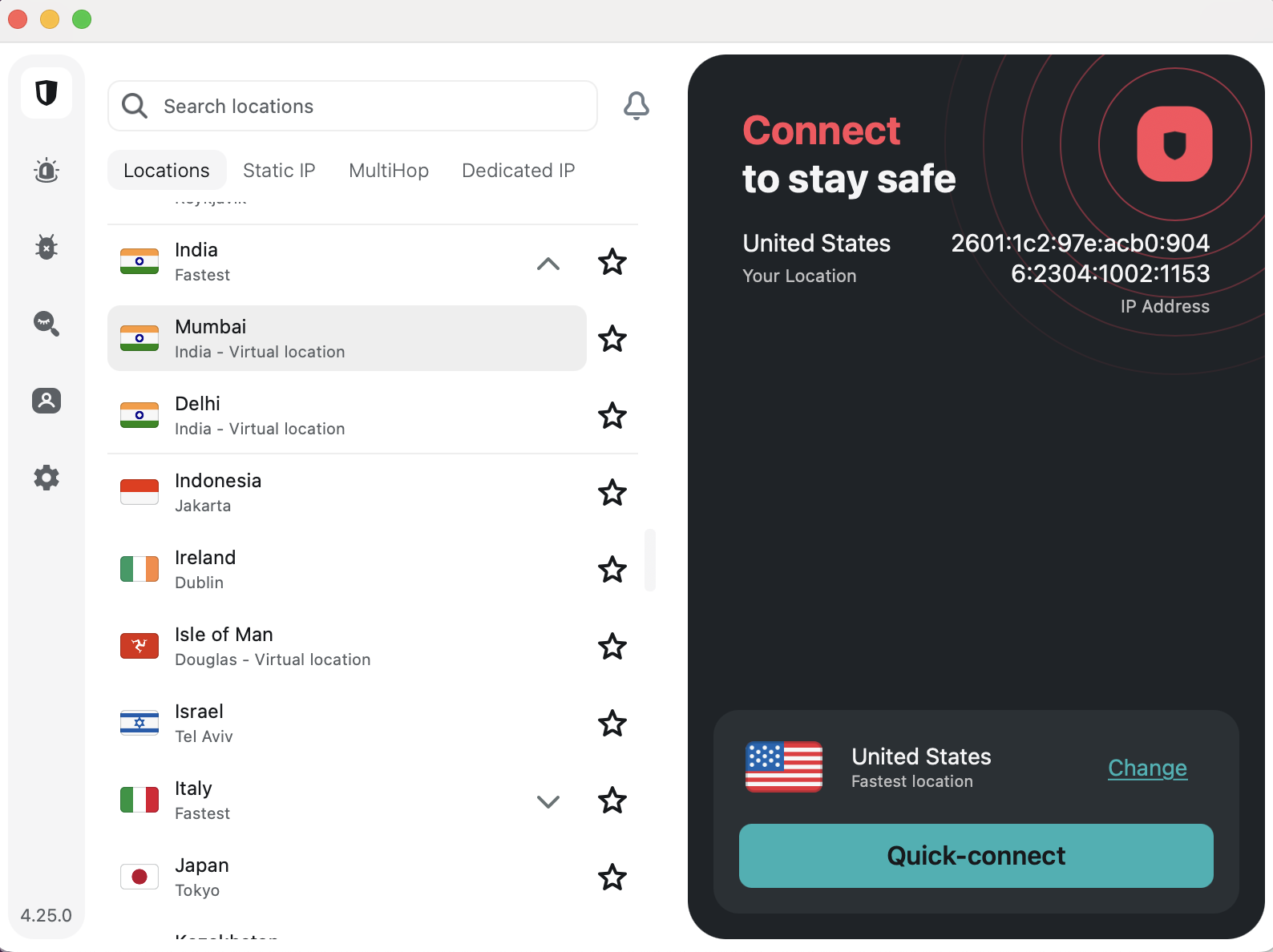
Picking a server location is the final box to check before connecting. You nearly always have the option of letting the VPN pick the best server. Most apps tend to determine the best server with a latency test, so it will almost always be a node very close to your physical location.
If you just want anonymity online, that’s fine — it doesn’t matter which IP address you use as long as it’s not your real one. But several VPN use cases do require a specific server location. For those, follow one simple rule: Pick a server in the place you want your signal to come from.
Choosing locations on Surfshark
Sam Chapman for Engadget
For example, let’s say you want to watch The Office, but you’re only subscribed to Netflix and not Peacock. Luckily, Netflix is licensed to show The Office in the U.K. If you connect to a British server location before opening Netflix, you’ll be able to access the show without paying for an extra subscription. (Of course, make sure VPNs aren’t expressly banned by the streaming service’s terms of service before accessing it while using one.)
Other than streaming, the most common reason you’ll need a specific VPN server is to get around firewalls that block websites. Whether it’s your school doing the censorship, your workplace or your entire state, the solution is the same: Pick a VPN server outside the restricted region. Censorship systems filter by location — they can’t block where they don’t have jurisdiction. Get a new virtual location and you should be free and clear. (Always be cognizant of the laws on VPN usage in your location before activating them.)
When to use a VPN (and when not to)
It’s good to get into the habit of connecting to your VPN whenever you get online. You can never be sure what information your ISP is gathering on you. If you’re using unprotected Wi-Fi, or a public network with a clearly visible password, anybody might be listening in. Even if you don’t need a particular location, always be using your VPN.
The only reason you might want to be online without a VPN is that certain websites, especially online banks, get suspicious if they note repeated logins to the same account from too many different IP addresses. For those cases, you can either set up a split tunnel to exclude the website from encryption, or temporarily turn your VPN off altogether.
Instructions for specific devices
Although most VPNs try to keep their apps similar on every platform, the strictures of differing hardware and software lead them to install and operate differently. In case you still have questions after reading the general guide above, this section goes into detail on every platform where you might use a VPN.
How to use a VPN on desktop
After subscribing to a VPN on Windows, you should be directed to download an EXE file — if this doesn’t happen, log into your account on the website and find the downloads center. Find the folder where the EXE is saved, double-click it and follow the onscreen instructions.
On Mac, the process is more or less the same, except you’ll usually get a PKG file instead of an EXE. Go to your downloads folder (either in Finder or through your web browser) and double-click the PKG file. Grant the VPN whatever permissions it needs. (Again, this is why it’s important to only use a legitimate vendor, such as the ones we recommend.)
Once installed, you can open the VPN client at any time by double-clicking the icon again. Some VPNs open as separate windows, while others will add icons to your toolbar. This often varies by platform; if you’re concerned that your VPN doesn’t look like a screenshot you’ve seen, check which operating system the image comes from.
How to use a VPN on mobile
On Android and iOS, you’ll download your VPN app through the Google Play Store or Apple App Store, respectively. Even if you get started through a mobile browser, it will probably redirect you to the app store for the actual download and installation.
Follow the usual step for downloading an app: search for its name in the app store, click “Get” or “Install,” then let your phone cook. As always, so long as it’s a vetted VPN, grant it the permissions it needs. You may be able to download and install the VPN first, then create your account and submit payment through the app afterward.
One final note: several leading VPNs offer free trials for mobile users. If you see a button that says something like “get free trial,” you may be able to use the VPN for several days without paying. Just be warned that if the trial lapses, you might get automatically signed up for a plan that’s longer than you’d like.
How to use a VPN browser extension
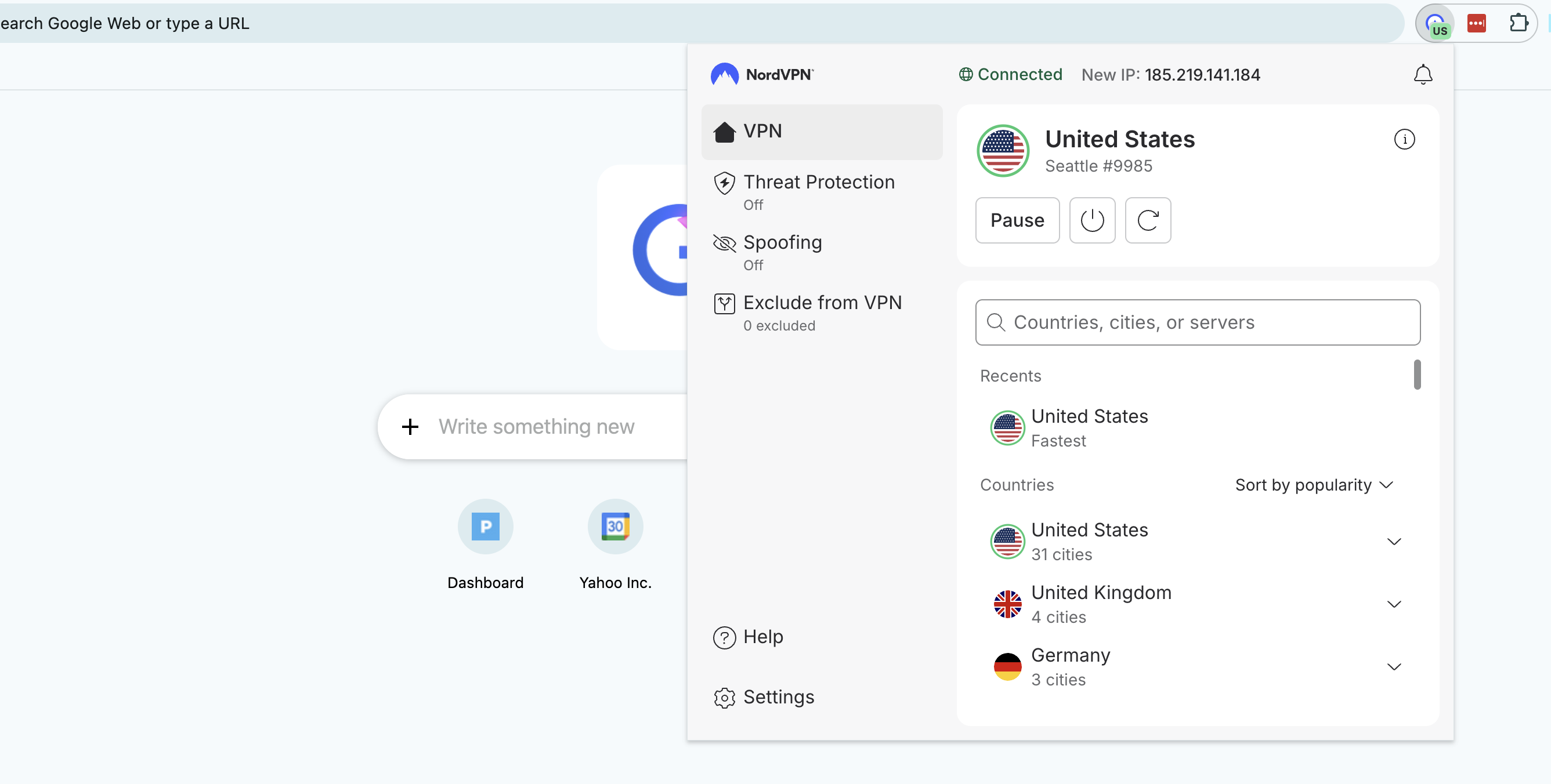
VPNs offer browser extensions as lightweight versions of their main clients. While a desktop or mobile VPN reroutes everything that device sends to the internet, a browser extension only protects traffic through your web browser. You can use one as a primitive form of split tunneling, but they’re mainly for basic convenience — most of what you do online goes through a browser, so it’s nice to be able to protect your connection without opening a separate app.
NordVPN browser extension on Chrome
Sam Chapman for Engadget
To use a VPN browser extension, just create your account as normal, then download the extension from your VPN’s website. You can manage it from your browser’s extensions center. That’s a jigsaw piece at the top-right corner on most browsers, including Chrome, Edge and Firefox.
How to use a VPN on a smart TV
You can use a VPN to change your location and stream international content directly to a smart TV. The catch is that not all smart TV brands support VPN apps. For those that don’t, you’ll have to find a workaround.
The good news is that a ton of the best smart TVs can natively host VPNs, including Google TV, Android TV, Amazon Fire TV and Apple TV (though only tvOS 17 and above). To use a VPN on Android TV or Apple TV, go through the device’s app store. On Fire TV, simply type the name of your chosen VPN provider into the search bar.
On smart TVs that don’t have native VPN, like LG, Roku and Samsung, you have a few options. You can use a smart DNS feature like ExpressVPN’s MediaStreamer to reroute smart TV traffic without full VPN encryption; the steps for this are different for every VPN, so check the provider’s website. You can also install a VPN on your router (see below) so your smart TV automatically uses the router’s location.
Finally, you can get a temporary fix by using your computer as a Wi-Fi hotspot while it has a VPN active. Follow the steps for your operating system.
On Windows:
In your system settings, go to “Network & Internet” and turn on the mobile hotspot.
Go to “Network & Sharing Center” and click “Change adapter settings.”
Right-click the name of your VPN provider and go to “Properties,” then “Sharing.”
Check the boxes next to “Allow other network users to connect through this computer’s internet connection” and “Allow other network users to control or disable the shared internet connection.”
Click the “Home networking connection” dropdown and select “Microsoft Wi-Fi Direct Virtual Adapter.”
Open your VPN client and connect to a server in your desired location.
On your smart TV, open the internet connections menu and select the name of your PC. Your TV is now online through the VPN server.
On Mac:
Open system settings and go to the “General” tab. Scroll down and click “Sharing.”
Toggle “Internet Sharing” on, then click on “Configure.”
Click the “Share your connection from” dropdown, then choose the VPN installed on the Mac. Under “To computers using,” select “Wi-Fi.”
Click on “Wi-Fi options” and enter a name and password for your hotspot network.
On your smart TV, connect to the network you just created.
How to use a VPN on a game console
Right now, there’s no such thing as a game console with native VPN support. If you want to use a VPN while gaming — and I recommend that for safety if you’re planning to play online — you can use two of the same methods that work for a smart TV: install a VPN on your router, or get your console online through a Mac or PC hotspot.
How to install a VPN on a router
When you install a router VPN, anything that gets online through your home network will be protected, including game consoles, TVs and smart devices that don’t support VPNs natively. It’s not a process for the faint of heart, though. You’ll need to get a new router and potentially install VPN firmware on it yourself. If you want to go this route, the easiest option is to get an ExpressVPN Aircove router — not only does it come with all the settings done for you, but it can be managed through the same clean interface as ExpressVPN’s other apps.
We don’t have space here to go through the entire process, but here’s a general overview. First, get a router with firmware that supports VPN configurations — most ISP default routers don’t, so you’ll have to go third-party.
Next, go to the downloads center of your VPN’s website and look for the section with VPN configurations. A “configuration” is a complete set of the information needed to access a certain VPN server through a certain protocol — say, a Proton VPN server in Arizona through OpenVPN. Download a configuration file for the protocol and location you want all your home devices to connect through.
Finally, open your router control panel by entering your router’s IP address into a web browser address bar, then log in with your router credentials (these should be marked on the router itself unless you’ve changed them). Go to the VPN tab — which should be there if it’s a router with VPN firmware — and upload the profile you downloaded from the VPN website. Use the same router control panel to activate and deactivate the router VPN connection.
This article originally appeared on Engadget at https://www.engadget.com/cybersecurity/vpn/how-to-use-a-vpn-140000564.html?src=rss
The U.S. has surpassed 2,000 measles cases for the first time in more than 30 years, according to data from the Centers for Disease Control and Prevention. From a report: As of Dec. 23, a total of 2,012 cases have been reported in the U.S. Of those cases, 24 were reported among international visitors to the U.S.
We may earn a commission from links on this page. Deal pricing and availability subject to change after time of publication.
Smart glasses have promised convenience for years, but few have felt practical enough to wear daily. The Ray-Ban Meta Smart Glasses (Gen 1) come closer by keeping things familiar. They look like classic Wayfarers, not a tech experiment, which lowers the barrier right away. Right now, they’re also easier to justify on price. The matte black version with polarized lenses is 25% off at $246.75, down from $329, which is the lowest price so far, according to price trackers. A glossy black version with clear lenses costs less at $224.25 if you don’t need sun protection.
The real test is whether they fit into your routine without getting in the way. At 49 grams, they’re a bit heavier than standard Ray-Bans, and if you use prescription lenses, you’ll feel that extra weight after a while. In short bursts, though, they’re easy to live with. Tapping the frame to snap a photo or record 1080p video feels natural when your phone is in your pocket or bag. The 12 MP ultra-wide camera captures a lot of what’s in front of you and handles movement well enough for walks or events. That said, everything is recorded vertically, which should work fine for social media but limits what you can do with the footage later.
Meta AI is where these glasses either win you over or leave you cold. You can ask simple questions, send texts, manage music, or use live language translation that keeps up with real conversations (which is genuinely helpful when traveling, as noted by our senior staff writer in his review), but these won’t book trips or handle complicated requests. Also, its open-ear speakers let you listen to music or take calls while staying aware of traffic and people around you. That trade-off favors awareness over audio quality, which makes sense for everyday use. The potential downside is its battery life, which lasts about four hours, with the case adding up to eight more charges, so you’ll need to think about charging if you plan to wear them all day.
In a roundup of the top stories of 2024, Ars included a supply-chain attack that came dangerously close to inflicting a catastrophe for thousands—possibly millions—of organizations, which included a large assortment of Fortune 500 companies and government agencies. Supply-chain attacks played prominently again this year, as a seemingly unending rash of them hit organizations large and small.
For threat actors, supply-chain attacks are the gift that keeps on giving—or, if you will, the hack that keeps on hacking. By compromising a single target with a large number of downstream users—say a cloud service or maintainers or developers of widely used open source or proprietary software—attackers can infect potentially millions of the target’s downstream users. That’s exactly what threat actors did in 2025.
Poisoning the well
One such event occurred in December 2024, making it worthy of a ranking for 2025. The hackers behind the campaign pocketed as much as $155,000 from thousands of smart-contract parties on the Solana blockchain.
The Lego Group is hosting its first-ever press conference at CES 2026 – but what the company is going to announce remains a mystery. While the huge toy brick creators haven’t given any hints as to what they’ll be showcasing, the possibilities run the gamut from new video games to Formula 1 race cars.
Here’s how you can watch Lego’s presentation at CES, and what we might expect to see.
How to watch The Lego Group’s CES 2026 press conference
The Lego CES press conference is scheduled for Monday, January 5 at 1PM ET. While Lego and the Consumer Technology Association haven’t yet provided the details, we expect that the press conference will be available as a livestream. Once the details are confirmed, we’ll update this post to confirm them. But if a livestream isn’t immediately available, the Engadget team will be liveblogging the Lego presser and posting timely details.
What to expect
Thus far, Lego hasn’t shared any public info about its CES plans, so we’re largely in the dark as to what to expect. At CES 2025, for instance, the toy production giant partnered with Sony to announce the animated Lego Horizon Adventures online game. As such, Lego may spend some time talking up its new 2026 game, Lego Batman: Legacy of the Dark Knight. The company may also give some stage time to its Lego Group F1 Academy racing car, though that too would be more about brand building than consumer products.
While there are plenty of new Lego sets for 2026, however, this is CES, not Toy Fair. So we’re assuming that the company will be showcasing something that’s more tech-centric. Stay tuned.
This article originally appeared on Engadget at https://www.engadget.com/gaming/how-to-watch-the-first-ever-lego-ces-2026-press-conference-live-130005307.html?src=rss
Longtime Slashdot reader ptorrone writes: The January 1, 2026, NYC mayoral inauguration prohibits attendees from bringing specific brand-name devices, explicitly banning Raspberry Pi single-board computers and the Flipper Zero, listed alongside weapons, explosives, and drones. Rather than restricting behaviors or capabilities like signal interference or unauthorized transmitters, the policy names two widely used educational and testing tools while allowing smartphones and laptops that are far more capable. Critics argue this device-specific ban creates confusion, encourages selective enforcement, and reflects security theater rather than a clear, capability-based public safety framework. New York has handled large-scale events more pragmatically before.
Following two years of immense hype in 2023 and 2024, this year felt more like a settling-in period for the LLM-based token prediction industry. After more than two years of public fretting over AI models as future threats to human civilization or the seedlings of future gods, it’s starting to look like hype is giving way to pragmatism: Today’s AI can be very useful, but it’s also clearly imperfect and prone to mistakes.
That view isn’t universal, of course. There’s a lot of money (and rhetoric) betting on a stratospheric, world-rocking trajectory for AI. But the “when” keeps getting pushed back, and that’s because nearly everyone agrees that more significant technical breakthroughs are required. The original, lofty claims that we’re on the verge of artificial general intelligence (AGI) or superintelligence (ASI) have not disappeared. Still, there’s a growing awareness that such proclaimations are perhaps best viewed as venture capital marketing. And every commercial foundational model builder out there has to grapple with the reality that, if they’re going to make money now, they have to sell practical AI-powered solutions that perform as reliable tools.
This has made 2025 a year of wild juxtapositions. For example, in January, OpenAI’s CEO, Sam Altman, claimed that the company knew how to build AGI, but by November, he was publicly celebrating that GPT-5.1 finally learned to use em dashes correctly when instructed (but not always). Nvidia soared past a $5 trillion valuation, with Wall Street still projecting high price targets for that company’s stock while some banks warned of the potential for an AI bubble that might rival the 2000s dotcom crash.
Here are some of this year’s biggest, most star-studded TV specials you can watch to help you ring in 2026. (CHARLY TRIBALLEAU / AFP via Getty Images)
CHARLY TRIBALLEAU via Getty Images
This year, it seems like there are more ways than ever to celebrate New Year’s Eve… from the comfort of your couch, that is. Whether you want to catch the enduring Dick Clark’s New Year’s Rockin’ Eve hosted by Ryan Seacrest and filmed live out of Times Square in New York City, or check out of one the many other live specials filled with music performances, comedy and celebrity guests, you’ve got options.
Thursday night’s TV schedule also includes New Year’s Eve Live: Nashville’s Big Bash, a star-studded celebration of country music featuring five hours of performances from some of Nashville’s most beloved stars, airing on CBS and Paramount+, plus CNN’s New Year’s Eve Live with Anderson Cooper and Andy Cohen, and a livestream of the Times Square ball drop, too.
Here’s everything you need to know about some of this year’s biggest New Year’s Eve TV specials, including channels, streaming info, and more.
How to watch New Year’s Eve Live: Nashville’s Big Bash
Date: Wednesday, Dec. 31, 2025
Time: 8 p.m.-1:30 a.m. ET
Channel: CBS
Streaming: Paramount+, DirecTV + more
What time is New Year’s Eve Live: Nashville’s Big Bash on?
New Year’s Eve Live: Nashville’s Big Bash starts at 8:00 p.m. ET. The event will be broadcast live in two segments, from 8:00-10:00 p.m. ET/PT and 10:30 p.m.-1:30 a.m. ET/PT on CBS streaming on Paramount+.
Who is appearing at New Year’s Eve Live: Nashville’s Big Bash?
Nashville’s Big Bash includes performances from, headliners Jason Aldean, Lainey Wilson and Bailey Zimmerman, and special guests CeCe Winans and the Fisk Jubilee Singers who will all perform live from Nashville’s Bicentennial Park. Additionally, the five-hour special will feature performances by Dierks Bentley, Brooks & Dunn, Rascal Flatts, Riley Green, Marcus King, Megan Moroney, Zach Top, Keith Urban, Gretchen Wilson and Stephen Wilson Jr. from various venues across the city. The night will be hosted by comedian Bert Kreischer and country star HARDY, who will also perform. You can also expect additional appearances throughout the night by comedian Dusty Slay, TV host Cassie DiLaura, Sirius XM host Buzz Brainard and UFC champion Kayla Harrison.
How to watch Dick Clark’s New Year’s Rockin’ Eve
Date: Wednesday, Dec. 31, 2025
Time: 8 p.m.- 4 a.m. ET
Channel: ABC
Streaming: Hulu + Live TV, DirecTV + more
What time is Dick Clark’s New Year’s Rockin’ Eve?
Dick Clark’s New Year’s Rockin’ Eve hosted by Ryan Seacrest begins at 8 p.m. ET and runs all the way until 4 a.m. ET, marking its longest New Year’s Eve broadcast ever. You can tune in live on ABC, or stream it on DirecTV, Hulu + Live TV, Fubo and more.
Who is appearing at Dick Clark’s New Year’s Rockin’ Eve?
This year’s New Year’s Eve celebration won’t just be taking place in Times Square, the show will span multiple time zones, including hosts and performers stationed in Las Vegas, Chicago, Puerto Rico and beyond. In Chicago, Chance the Rapper is co-hosting the broadcast to help welcome in the new year from the Midwest and lead the live Central Time Zone countdown. Rob Gronkowski and Julianne Hough will be co-hosting the Las Vegas broadcast, and in New York, Ryan Seacrest will be joined by co-host Rita Ora.
The 2026 NYRE broadcast will feature 42 superstar performers across New York, Las Vegas, Chicago, Puerto Rico and beyond. Diana Ross will headline the evening with a midnight performance.
Ciara, LE SSERAFIM, Little Big Town, and Maren Morris will perform in Times Square. On the West Coast, there will be performances from 4 Non Blondes, 50 Cent, 6lack, AJR, The All-American Rejects, BigXthaPlug, Charlie Puth, Demi Lovato, DJ Cassidy’s Pass the Mic Live! featuring Busta Rhymes, T.I., and Wyclef Jean, Goo Goo Dolls, Jess Glynne, Jessie Murph, Jordan Davis, KPop Demon Hunters: The Singing Voices of HUNTR/X (EJAE, Audrey Nuna, and REI AMI), Leon Thomas, Mariah Carey, Madison Beer, New Kids on the Block, OneRepublic, Pitbull joined by Lil Jon and Filmore, Rick Springfield, Russell Dickerson, Tucker Wetmore, and Zara Larsson. Daddy Yankee will perform from Puerto Rico, Chappell Roan will perform from Kansas City and Post Malone will play from Nashville.
How to watch CNN’s New Year’s Eve Live with Anderson Cooper and Andy Cohen
Date: Wednesday, Dec. 31, 2025
Time: 8 p.m. ET
Channel: ABC
Streaming: Hulu + Live TV, DirecTV + more
Who is appearing on CNN’s New Year’s Eve Live with Anderson Cooper and Andy Cohen?
CNN’s New Year’s Eve special will feature performances by Robyn, performing live from Times Square, Shakira performing from Hard Rock Live at Seminole Hard Rock Hotel & Casino in Hollywood, FL, Brandy and Monica from The Boy Is Mine Tour presented by BPC, Bryan Adams from Madison Square Garden, Florence + The Machine, RAYE, mentalist Oz Perlman, plus appearances from Amy Sedaris, Brandi Carlile, Aloe Blacc, Patti LaBelle, singer Michelle Williams, Rebecca Romijn and Jerry O’Connell, comedians B.J. Novak, Leanne Morgan, Sarah Sherman, Stephen Colbert and more.
NYC Times Square Ball Drop New Year’s Eve free livestream:
There will be a free livestream of the Ball Drop on Timessquarenyc.org, offering commercial-free, webcast coverage of the Times Square festivities leading up to the Ball Drop at midnight. There will also be a livestream with open captions and American Sign Language (ASL) interpretation available on YouTube. Both livestreams begin at 6 p.m. ET.
More ways to watch this year’s New Year’s Eve specials
This article originally appeared on Engadget at https://www.engadget.com/entertainment/streaming/from-dick-clarks-new-years-rockin-eve-to-nashvilles-big-bash-heres-how-to-watch-this-years-biggest-new-years-eve-tv-specials-120016871.html?src=rss
PostNord is ending letter delivery in Denmark after a 90%+ collapse in mail volume. It marks the first known case of a national postal carrier abandoning letters entirely — a symbolic milestone of a fully digitized society that’s sparking nostalgia even among people who stopped sending mail years ago. The New York Times reports: Denmark has had a postal service for more than 400 years. But a steep decline in its use has led the Nordic country’s longtime postal carrier to stop letter deliveries entirely, a change taking effect on Tuesday.
Danes have seen it coming for months: The carrier, PostNord, has been removing its red mailboxes, once a ubiquitous public fixture. The disappearance of the mailboxes is “what actually made people emotional,” said Julia Lahme, a trend researcher and the director of Lahme, a Danish communications agency, “even though most of them hadn’t sent a letter in 18 months.”
Letter writing in the country has declined by more than 90 percent since 2000, according to PostNord, which is owned jointly by the Danish and Swedish governments. Next year, in Denmark, it will only deliver packages, although in Sweden it will continue to deliver letters.
The change comes partly as a result of a drop-off in government mail. Denmark is one of the world’s most digitized countries. Only 250,000 people, or less than 5 percent of the population, still receive their official communications in the mail. “People simply do not rely on physical letters the way they used to,” Andreas Brethvad, the communications director of PostNord Denmark, said in an emailed statement. He said that because nine in 10 Danes shop online each month, the change “is about keeping up with times to meet the demands of society. It’s a natural evolution.” The report notes that snail mail lovers will still be able to send and receive letters through Dao, a private company. “While some Danes are quietly mourning a service that, for the most part, they had largely stopped using, the transition feels like a sign of the times,” reports the Times.
Israel has operationally deployed Iron Beam, a 100,000-watt laser air-defense system capable of shooting down drones, rockets, and mortars at negligible per-shot cost. According to Tom’s Hardware, it marks the first real-world deployment of a high-energy laser as part of a modern, multi-layered missile defense network. From the report: The Iron Beam is a short-range line-of-sight laser interceptor that is extremely cheap to run and, therefore, perfectly suited for intercepting low-cost, high-volume threats. According to the official Israeli announcement, Iron Beam systems have “successfully intercepted rockets, mortars, and UAVs.”
A complex mix of government, military, scientific, and commercial interests were responsible for the research and development of the Iron Beam laser system. Central to the Iron Beam are “an advanced laser source and a unique electro-optical targeting system, enabling the interception of a wide range of targets at an enhanced operational range, with maximum precision and superior efficiency,” boasted the press release by Israel’s MoD. Moreover, it works “at a negligible marginal cost, which constitutes the laser system’s primary advantage.”
We don’t get much more by way of technical details, perhaps understandably. However, Rafael Advanced Defense Systems execs heralded the system’s “unique adaptive optics technology,” in what it calls “the world’s most advanced laser-based system for intercepting aerial threats.” Its operational debut “marks the beginning of the era of high-energy laser defense,” they claimed.
An anonymous reader quotes a report from the New York Times: South Africans … have found a remedy for power cuts that have plagued people in the developing world for years. Thanks to swiftly falling prices of Chinese made solar panels and batteries, they now draw their power from the sun. These aren’t the tiny, old-school solar lanterns that once powered a lightbulb or TV in rural communities. Today, solar and battery systems are deployed across a variety of businesses — auto factories and wineries, gold mines and shopping malls. And they are changing everyday life, trade and industry in Africa’s biggest economy. This has happened at startling speed. Solar has risen from almost nothing in 2019 to roughly 10 percent of South Africa’s electricity-generating capacity.
No longer do South Africans depend entirely on giant coal-burning plants that have defined how people worldwide got their electricity for more than a century. That’s forcing the nation’s already beleaguered electric utility to rethink its business as revenues evaporate. Joel Nana, a project manager with Sustainable Energy Africa, a Cape Town-based organization, called it “a bottom-up movement” to sidestep a generations-old problem. “The broken system is unreliable electricity, expensive electricity or no electricity at all,” he said. “We’ve been living in this situation forever.” What’s happening in South Africa is repeating across the continent. Key to this shift: China’s ambition to lead the world in clean energy. The report says that more than 7 gigawatts of solar capacity have been installed in South Africa over the past five years — about 1/10 of the country’s total installed capacity (55 GW). And most of this new solar capacity is privately owned and installed by households and businesses rather than utilities.
Across the continent, Chinese solar imports rose 50% in the first 10 months of 2025. Cheap Chinese solar is rapidly reshaping Africa’s energy landscape from the bottom up but it’s also shifting geopolitical influence, hollowing out local manufacturing opportunities, and deepening divides between those who can afford energy independence and those who can’t. “The solar surge does little to address the most pressing social and economic problems of developing countries like South Africa, the need to generate new jobs for millions of young citizens,” reports the NYT. “Installation labor is local, but the panels and batteries are almost all made in China.”
Further reading: Why Solarpunk Is Already Happening In Africa
In an opinion piece for Computerworld, columnist Steven Vaughan-Nichols argues that restrictive visa policies and a hostile border climate under the Trump administration are driving foreign tech workers, researchers, and conference speakers away from the U.S. The result, he says, is a gradual shift of talent, events, and long-term innovation toward more welcoming regions such as Europe, Canada, and Asia. From the report: I go to a lot of tech conferences — 13 in 2025 — and many of those I attend are outside the U.S.; several are in London, one is in Amsterdam, another in Paris, and two in Tokyo. Wherever I went this past year, when we weren’t talking about AI, Linux, the cloud, or open-source software, the top non-tech topic for non-Americans involved the sweeping changes that have occurred since President Donald J. Trump returned to office last January. The conversations generally ended with something like this: “I’m not taking a job or going to a conference in the United States.”
Honestly, who can blame them? Under Trump, America now has large “Keep Out!” and “No Trespassing!” signs effectively posted. I’ve known several top tech people who tried to come to the U.S. for technology shows with proper visas and paperwork, but were still turned away at the border. Who wants to fly for 8+ hours for a conference, only to be refused entry at the last minute, and be forced to fly back? I know many of the leading trade show organizers, and it’s not just me who’s seeing this. They universally agree that getting people from outside the States to agree to come to the U.S. is increasingly difficult. Many refuse even to try to come. As a result, show managers have begun to close U.S.-based events and are seeking to replace them with shows in Europe, Canada, and Asia. […]
Once upon a time, everyone who was anyone in tech was willing to uproot their lives to come to the U.S. Here, they could make a good living. They could collaborate, publish, and build companies in jurisdictions that welcome them, and meet their peers at conferences. Now, they must run a gauntlet at the U.S. border and neither a green card nor U.S. citizenship guarantees they won’t be abused by the federal government. Trump’s America seems bound and determined to become a second-rate tech power. His administration can loosen all the restrictions it wants on AI, but without top global talent, U.S. tech prowess will decline. That’s not good for America, the tech industry or the larger world.
One-Netbook has unveiled the OneXSugar Wallet, the first gaming handheld with a folding OLED display. The Verge reports: The OneXSugar Wallet was announced on China’s Weibo yesterday, but with few details about its features and capabilities. That folding OLED screen has a resolution of 2480 x 1860 pixels, and the handheld will be powered by an unspecified “Qualcomm gaming platform flagship processor,” but its performance and emulation capabilities are unknown.
Based on photos and a video released by One-Netbook, the OneXSugar Wallet will feature a standard set of controls including asymmetrical thumbsticks, four action buttons, and a D-pad situated on either side of the lower half of its display. There are also shoulder buttons and triggers on the back of the handheld, and a pair of front-facing speakers flanking the top half of the screen. The biggest question is how much will the handheld cost…
LG just revealed several new speakers in the xboom line ahead of CES 2026. These speakers are part of an ongoing collaboration with will.i.am from Black Eyed Peas, who is on board as the “experimental architect” involved with “development, design and brand marketing.”
These speakers are fairly different from one another, but they all have AI in common. Each speaker includes an algorithm that automatically adjusts the EQ after analyzing the audio content and the listening space. Many also feature an AI algorithm for ambient lighting, which will adjust the lights to match the song being played.
The xboom Stage 501 is intended for parties and karaoke sessions. It features additional AI that can remove vocals from “virtually any song” and even adjust the pitch. The battery lasts for around 25 hours and can operate while plugged in. The speaker delivers up to 220W of power, with dual woofers and full-range drivers. It boasts a five-sided cabinet design that allows for vertical and horizontal placement.
LG
The xboom Blast is a boombox with a 99Wh battery that allows for up to 35 hours of continuous playback. That’s a mighty fine metric. This is a modern boombox, so it’s designed for durability. There are edge bumpers and a side rope handle for carrying.
LG
The Mini is a tiny doodad that can be placed just about anywhere. It offers ten hours of battery life per charge and a strap for easy placement. The speaker also includes a built-in tripod mount.
LG
The Rock is a, well, rock-shaped speaker that’s larger than the Mini but can still be held in the palm of the hand. The battery lasts for ten hours and the design is focused on durability. It has been tested to “seven military standards” to ensure reliability in “challenging outdoor environments.” This is an upgrade of the pre-existing XG2 model.
We don’t have pricing or exact availability on this stuff yet, though the speakers will be on display at LG’s booth at CES. The company has said that all four of these gadgets will come out in 2026.
This article originally appeared on Engadget at https://www.engadget.com/audio/speakers/lg-announces-new-line-of-xboom-speakers-ahead-of-ces-010052598.html?src=rss
PC Gamer argues that 2025 was a year full of high-profile AI embarrassments across games and entertainment, with Disney and Lucasfilm serving as the “opening salvo.” From the report: At a TED talk back in April, Lucasfilm senior vice president of creative innovation Rob Bredow presented a demonstration of what he called “a new era of technology.” Across 50 years of legendary innovation in miniature design, practical effects, and computer animation, Lucasfilm and its miracle workers at Industrial Light & Magic have blazed the trail for visual effects in creative storytelling — and now Bredow was offering a glimpse at what wonders might come next.
That glimpse, created over two weeks by an ILM artist, was Star Wars: Field Guide: a two-minute fizzle reel of AI-generated blue lions, tentacled walruses, turtles with alligator heads, and zebra-stripe chimpanzees, all lazily spliced together from the shuffled bits of normal-ass animals. These “aliens” were less Star Wars than they were Barnum & Bailey. It felt like a singular embarrassment: Instead of showing its potential, generative AI just demonstrated how out of touch a major media force had become. And then it kept happening.
At the time, I wondered whether evoking the legacy of Lucasfilm just to declare creative bankruptcy had provoked enough disgusted responses to convince Disney to slow its roll on AI ventures. In the months since, however, it’s clear that Star Wars: Field Guide wasn’t a cautionary tale. It was a mission statement. Disney is boldly, firmly placing its hand on the hot stove. Other embarrassing AI use cases include Fortnite’s AI-powered Darth Vader NPC, Activision’s use of AI-generated art in what was widely described as the “weakest” Call of Duty launch in years, McDonald’s short-lived AI holiday ad, and Disney’s $1 billion licensing deal with OpenAI.
This is a video from 4 Ever Green detailing some of the more exotic species of pigeons from around the world, birds that come in all sorts of wild color and pattern combinations. How about that! Personally, I think standard New York City pigeons are beautiful, but that’s just me and I’m probably biased because I’ve trained a bunch of them to steal coins from tourists. Just a few more years and my bird friends and I should have enough saved to pay last month’s rent.
Before that moment, g1 was my alter ego, and after that moment… (Holy cow, I can’t believe I have 1000 followers and can actually promote products! I’ll give it a try!), This video contains algorithm development experiments. The robot is dangerous, so everyone please watch out for your… well, you know.
Was this user error? 100%. If there’s a robot aping your moves, you do NOT throw any punches or perform any kicks. That’s like, Robot Operation 101. “Didn’t you fail Robot Operation 101?” Yeah, but only because I didn’t go. “What about geometry?” That I failed because shapes are confusing. “And what about colors?” Don’t even get me started.
An anonymous reader quotes a report from DW: India has surpassed Japan to become the world’s fourth-largest economy, according to calculations in the Indian government’s end-of-year economic review. On current trends, India is expected to overtake Germany to become the world’s third-largest economy within the next three years, the review said.
The review said India’s gross domestic product has already reached about $4.18 trillion, and is projected to reach $7.3 trillion by 2030. On current trends, it said, India would trail only the United States and China in economic heft. India’s real GDP grew 8.2% in the second quarter of the 2025-26 financial year, up from 7.8% in the previous quarter and marking a six-quarter high.
Export performance has also strengthened, the review noted. Merchandise exports rose to $38.13 billion in November, up from $36.43 billion in January, supported by engineering goods, electronics, pharmaceuticals, and petroleum products. Official confirmation however depends on data due in 2026 when final annual GDP figures are released. The International Monetary Fund suggests India will surpass Japan next year. The Reserve Bank of India has revised its growth forecast for the 2025-26 financial year upward to 7.3%.
Axios reports that venture capitalist Alex Davis is warning that a speculative rush to build data centers without committed tenants could trigger a financing crunch by 2027-2028.
“This critique is coming from inside the AI optimist camp,” notes Axios, as Davis’ firm, Disruptive, “recently led a large investment in AI chipmaker Groq, which then signed a $20 billion licensing deal with Nvidia. It’s also backed such unicorn startups as Reflection AI, Shield AI and Gecko Robotics.”
Here’s what Davis had to say in his investor letter this morning: “While I continue to believe the ongoing advancements in AI technology present ‘once in a lifetime’ investment opportunities, I also continue to see risks and reason for caution and investment discipline. For example, we are seeing way too many business models (and valuation levels) with no realistic margin expansion story, extreme capex spend, lack of enterprise customer traction, or overdependence on ’round-trip’ investments — in some cases all with the same company. I am also deeply concerned about the ‘speculative’ data center market. The ‘build it and they will come’ strategy is a trap. If you are a hyperscaler, you will own your own data centers. We foresee a significant financing crisis in 2027-2028 for speculative landlords. We want to back theowner/users, not the speculative landlords, and we are quite concerned for their stress on the system.”
The full letter can be found here.