Amazon is apparently planning a big box store in the Chicago suburbs

Amazon is making a return, of sorts, to physical retail via plans to build a big-box retail store in the Chicago suburbs, The Information reports. The 225,000-square foot retail space will open in Orland Park, Illinois, and give the company the opportunity to sell more than just groceries after it closed most of its physical bookstores and gift shops in 2022.

The new store will offer in-store shopping, but also act as a fulfillment center for online orders, which could make it similar to competitors like Target and Walmart, and some of Amazon’s existing Whole Foods and Amazon Fresh locations. “The proposed development will offer a wide selection of products, including groceries and general merchandise, with accessory services and potentially dining locations for prepared food sold onsite,” Amazon wrote in a planning document The Information viewed.

While best known as an online marketplace, Amazon has made multiple attempts to have a physical retail presence. Amazon Books sold books based on what was trending on the company’s website, Amazon 4-star sold a variety of products that were rated four or more stars in Amazon reviews and the company’s Amazon Go stores sold pre-made food and select groceries via its cashier-less “Just Walk Out” technology. 

Amazon has abandoned basically all those experiments in favor of sticking with the grocery brand it bought in 2017, Whole Foods, and the new one it’s formed in the years since, Amazon Fresh. This new store could be an entirely new concept, or an evolution of Amazon Fresh, but whatever it is, it’ll have to be approved by the Orland Park Village Board to move forward, according to the Chicago Tribune.

This article originally appeared on Engadget at https://www.engadget.com/big-tech/amazon-is-apparently-planning-a-big-box-store-in-the-chicago-suburbs-213451978.html?src=rss

Microsoft Windows Media Player Stops Serving Up CD Album Info

An anonymous reader shares a report: Microsoft is celebrating the resurgence of interest in physical media in the only way it knows how… by halting the Windows Media Player metadata service. Readers of a certain vintage will remember inserting a CD into their PC and watching Windows Media Player populate with track listings and album artwork. No more.

Sometime before Christmas, the metadata servers stopped working and on Windows 10 or 11, the result is the same: album not found. We tried this out at Vulture Central on some sacrificial Windows devices that had media drives and can confirm that a variety of compact discs were met with stony indifference. Some 90s cheese that was successfully ripped (for personal use, of course) decades ago? No longer recognized. A reissue of something achingly hip? Also not recognized.


Read more of this story at Slashdot.

Monarch Money’s budgeting app is 50 percent off for new users

A new year is the perfect time to get your spending in order, and if you’re not trying to build your own spreadsheet, budgeting apps are one of the best ways to do it. To save yourself some money in the process, you can pick up a year-long subscription to Monarch Money, one of Engadget’s favorite budgeting apps, for just $50 if you use code NEWYEAR2026 at checkout and you’re a new subscriber. That’s a 50 percent discount on the service’s normal $100 price.

Monarch Money makes for a capable and detailed budgeting companion. You can use the service via apps for iOS, Android, iPadOS or the web, and Monarch also offers a Chrome extension that can sync your Amazon and Target transactions and automatically categorize them. Like other budgeting apps, Monarch Money lets you connect multiple financial accounts and track your money based on where you spend it over time. Monarch offers two different approaches to tracking budgeting (flexible and category budgeting) depending on what fits your life best, and the ability to add a budget widget on your phone so you can know how you’re tracking that month.

How budgeting apps turn your raw transactions into visuals you can understand at a glance is one of the big things that differentiates one app from another, and Monarch Money offers multiple graphs and charts to look at for things like spending, investments or categories of your choice based on how you’ve labelled your expenses. The app can also monitor the spending of you and your partner all in one place, to make it easier to plan together.

The main drawbacks Engadget found in testing Monarch Money were the app’s learning curve, and the differences in features (and bugginess) between Monarch’s web and mobile versions. Still, for 50 percent off, the Monarch Money is well worth experimenting with if you’re trying to save money in 2026, especially if you want to do it collaboratively with a partner.

Follow @EngadgetDeals on X for the latest tech deals and buying advice.

This article originally appeared on Engadget at https://www.engadget.com/apps/monarch-moneys-budgeting-app-is-50-percent-off-for-new-users-204507740.html?src=rss

Identity and Ideology in the School Boardroom

The abstract of a paper on NBER: School boards have statutory authority over most elementary and secondary education policies, but receive little attention compared to other actors in education systems. A fundamental challenge to understanding the importance of boards is the absence of data on the policy goals of board members — i.e., their ideologies — forcing researchers to conduct tests based on demographic and professional characteristics — i.e., identities — with which ideology is presumed to correlate.

This paper uses new data on the viewpoints and policy actions of school board members, coupled with a regression discontinuity design that generates quasi-random variation in board composition, to establish two results. The first is that the priorities of board members have large causal effects across many domains. For example, the effect of electing an equity-focused board member on test scores for low-income students is roughly equivalent to assigning every such student a teacher who is 0.3 to 0.4 SDs higher in the distribution of teacher value-added. The second is that observing policy priorities is crucial. Identity turns out to be a poor proxy for ideology, with limited governance effects that are fully explained by differences in policy priorities. Our findings challenge the belief that school boards are unimportant, showing that who serves on the board and what they prioritize can have far-reaching consequences for students.


Read more of this story at Slashdot.

This Is the Best Firewall App for Mac I’ve Ever Used, and It’s Free

Most people haven’t actively managed a firewall in at least a decade, assuming they ever have. But keeping track of which applications are using the internet—and how much data they’re using—is still useful at times, as is blocking apps from accessing the net entirely.

While you’re traveling, for example, internet access might be limited, so it’s a good idea to cut off applications that constantly churn through data. But even while at home, it’s a good security practice to review which applications are connecting to the internet. And while macOS comes with a firewall, it’s not really a useful tool for that.

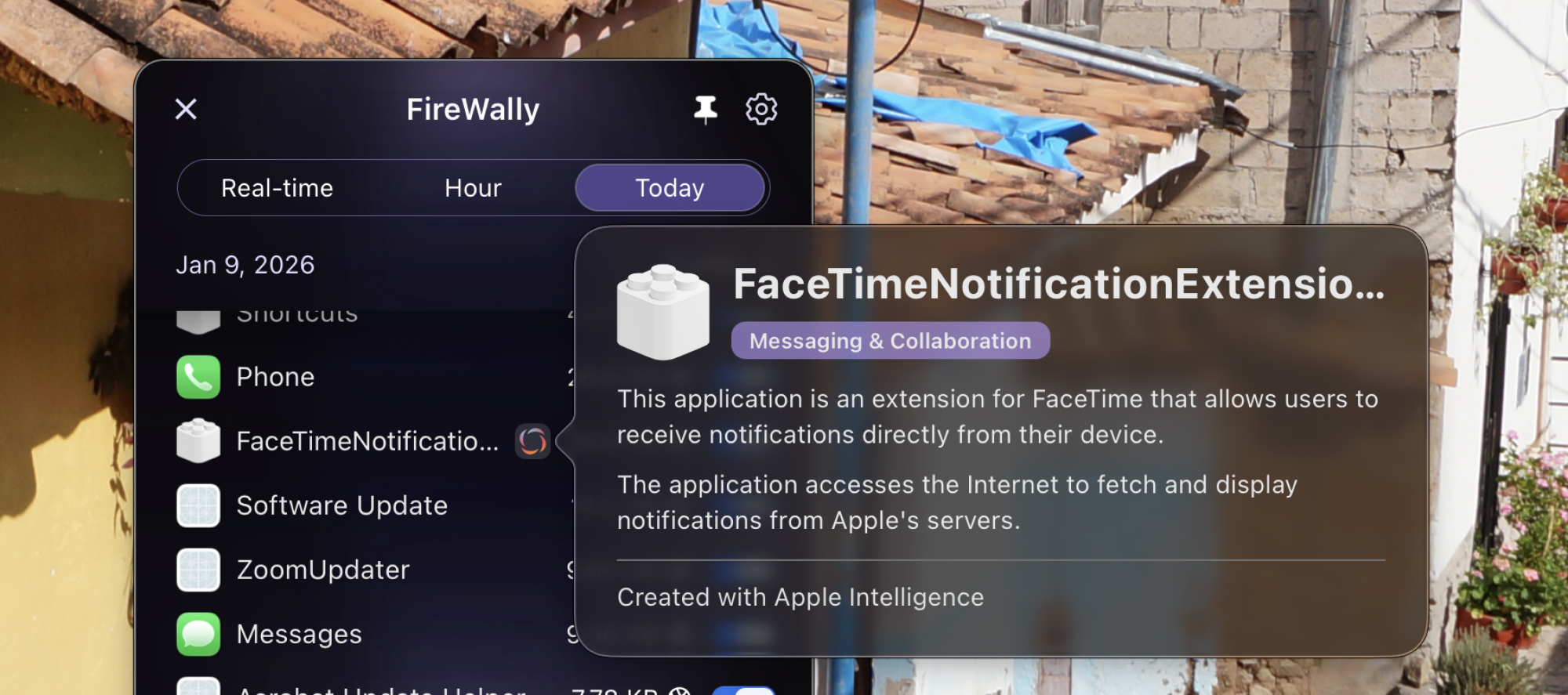
Which is why I like FireWally. This totally free application, offered by the Ukraine-based indie Mac developers Nektony, isn’t a tool for power users—it’s streamlined and user friendly. Click the menu bar icon and you’ll see a list of applications using the internet. You can see a summary of all traffic today, in the past hour, or monitor incoming traffic in real time.

Beside every application is its data usage. You can see a breakdown of inbound and outbound traffic for any application by hovering the mouse over it. You can block any application from accessing the internet by toggling the switch.

An AI-generated summary of the "FaceTimeNotificationExtension", which is an Apple-provided background utility.

Credit: Justin Pot

What if you don’t recognize an application? I, traditionally, ended up copying the name of the application and pasting it into a search engine. FireWally tries to save you some time by providing AI-generated summaries of each application using Apple Intelligence (assuming your Mac supports that feature). It’s a useful way to quickly remind yourself what a particular application is, or to identify one you don’t recognize.

It’s a very streamlined application, but perfect for anyone hoping to understand a bit more about how much data their various Mac applications are using. Give it a spin if you’re looking for a simple firewall application.

Google: Don’t make “bite-sized” content for LLMs if you care about search rank

Search engine optimization, or SEO, is a big business. While some SEO practices are useful, much of the day-to-day SEO wisdom you see online amounts to superstition. An increasingly popular approach geared toward LLMs called “content chunking” may fall into that category. In the latest installment of Google’s Search Off the Record podcast, John Mueller and Danny Sullivan say that breaking content down into bite-sized chunks for LLMs like Gemini is a bad idea.

You’ve probably seen websites engaging in content chunking and scratched your head, and for good reason—this content isn’t made for you. The idea is that if you split information into smaller paragraphs and sections, it is more likely to be ingested and cited by generative AI bots like Gemini. So you end up with short paragraphs, sometimes with just one or two sentences, and lots of subheds formatted like questions one might ask a chatbot.

According to Sullivan, this is a misconception, and Google doesn’t use such signals to improve ranking. “One of the things I keep seeing over and over in some of the advice and guidance and people are trying to figure out what do we do with the LLMs or whatever, is that turn your content into bite-sized chunks, because LLMs like things that are really bite size, right?” said Sullivan. “So… we don’t want you to do that.”

Read full article

Comments

The Golden Age of Vaccine Development

Microbiology had its golden age in the late nineteenth century, when researchers identified the bacterial causes of tuberculosis, cholera, typhoid, and a dozen other diseases in rapid succession. Antibiotics had theirs in the mid-twentieth century. Both booms eventually slowed. Vaccine development, by contrast, appears to be speeding up — and the most productive era may still lie ahead, Works in Progress writes in a story.

In the first half of the 2020s alone, researchers delivered the first effective vaccines against four different diseases: Covid-19, malaria, RSV and chikungunya. No previous decade matched that output. The acceleration rests on infrastructure that took two centuries to assemble. Edward Jenner’s 1796 smallpox vaccine was a lucky accident he didn’t understand. Louis Pasteur needed ninety years to turn that luck into systematic methods — attenuation and inactivation — that could be applied to other diseases. Generations of scientists then built the supporting machinery: Petri dishes for bacterial culture, techniques to keep animal cells alive outside the body, bioreactors for industrial production, sterilization and cold-chain logistics.

Those tools have now compounded. Cryo-electron microscopy reveals viral proteins atom by atom, a capability that directly enabled the RSV vaccine after earlier attempts failed. Genome sequencing costs collapsed from roughly $100 million per human genome in 2001 to under $1,000 by 2014, according to data from the National Human Genome Research Institute. The mRNA platform, refined through work by Katalin Kariko, Drew Weissman, and others, allows vaccines to be redesigned in weeks rather than years. The trajectory suggests more breakthroughs are possible. Whether they arrive depends on continued investment, however.


Read more of this story at Slashdot.

Hands-On: Dell Pro Max Workstations Get NVIDIA Grace Blackwell Ultra

Hands-On: Dell Pro Max Workstations Get NVIDIA Grace Blackwell Ultra
At CES 2026, we got to go hands on with the Dell Pro Max GB300 desktop. This is the big brother of the Dell Pro Max GB10, which as you could probably guess from the name, is essentially Dell’s take on the NVIDIA DGX Spark concept. The GB300 carries something far more potent inside: a Grace Blackwell Ultra Desktop Superchip.

(click for big)
If

The Morning After: The best of CES 2026

We’re wrapping up coverage of the biggest tech show in the world. CES 2026 is almost over, and while we have more stories and wrap-ups to come, here are the most interesting products we’ve spotted, written about and critiqued/praised. That includes our picks for the best of CES. We gave out 15 awards as well as our best of show, and you might be surprised by some of our picks — I know I was.

Read on for some of the best things to come out of Las Vegas this week, but first up, our Best of the Best winner, which was Lego Smart Play. As Engadget’s editor-in-chief Aaron Souppouris put it, “Lego could almost be seen as the antithesis of the typical CES product.”

Regardless of trends, Lego has always persisted. And in 2026, it’s getting much smarter.

TMA
Lego

The system consists of a Smart Brick, Tags and Minifigures. They’re packed with modern technology, so they can respond to how you play with them or the sets you build. The Smart Brick has a 4.1mm ASIC chip, which Lego says is smaller than a standard Lego stud. It senses things like motion, orientation and magnetic fields, but also has a tiny built-in speaker, which produces audio “tied to live play actions,” not just canned clips.

It’s hard to explain it in only a few words (we’ve got a deep-dive hands-on right here), but what immediately drew me in was the lack of smartphone pairing and screens. The ability of each part to detect and interact with others can lead to some ridiculous setups, whether it’s ducks and police officers or a helicopter or an X-Wing.

Naturally, it’s a little pricier than basic Lego, but not out of the realm of being a special gift or birthday present. One of the first sets, with a smart Darth Vader Minifigure, one Smart Brick and one Smart Tag, is $70.

We’ll be back to our regularly scheduled newsletter next week. Have a great weekend!

— Mat Smith

The other big stories (and deals) this morning


All the winners at CES 2026

Wait, IKEA?

TMA
Engadget

With no further ado, here are our winners.

Best robot: Switchbot Onero H1

Best accessibility tech: WheelMove

Best TV: LG’s Wallpaper TV

Best AI hardware: Subtle Voicebuds

Best smart home: IKEA Matter-compatible smart home

TMA
Engadget

Best home theater: Samsung HW-QS90H

Best audio: Shokz OpenFit Pro

Best outdoor tech: Tone Outdoors T1

Best toy: Lego Smart Play

Best PC or laptop: Dell XPS 14 + 16

Best health tech: Eyebot eye test booth

Best gaming tech: ASUS ROG Zephyrus Duo

Best mobile tech: Samsung Galaxy Z TriFold

Most promising concept: Lenovo Legion Pro Rollable

Best emerging technology: IXI autofocus lenses


Everything NVIDIA announced at CES 2026

NVIDIA has started production of its Vera Rubin supercomputer.

TMA
Engadget

On Monday, which feels like an age ago, Jensen Huang shared the latest from NVIDIA. While the presentation was more a refresher than a barrage of new announcements, it was a pretty low-key presentation, with lots of AI chat. One announcement was Alpamayo, a family of open-source reasoning models designed to guide autonomous vehicles through difficult driving situations. The centerpiece is Alpamayo 1, a 10-billion-parameter chain-of-thought system NVIDIA says can drive more like a human.

When it comes to tech we all might use, we had to wait for a separate event, when NVIDIA announced DLSS 4.5 and G-Sync Pulsar. For both features, you’ll need a 50-series GPU. You got one, right?

Continue reading.

This article originally appeared on Engadget at https://www.engadget.com/general/the-morning-after-engadget-newsletter-193045065.html?src=rss

How to Delete ‘Bloatware’ From Your Android (and Why You Should)

Any new phone almost certainly comes with a handful of preinstalled apps you’ll never use, regardless of which manufacturer you buy from or which operating system you’re on. Some devices are more bloated than others: Google Pixels have a relatively “clean” build compared to Samsung phones, for example, and don’t typically come with third-party apps and games.

But you may still want to eliminate apps and features that clutter your home screen, take up valuable space, and create a drag on performance, especially if you have alternatives you like more. On Android, that likely means uninstalling what you easily can and disabling everything else.

What you can (and can’t) uninstall on Android

Unfortunately, many preinstalled first-party apps can’t be easily removed. This varies by manufacturer and device—for example, Pixel users can uninstall Google Play Games and Books but are stuck with Chrome, Drive, Maps, and Calculator. As HowToGeek points out, you can delete other pre-selected Google apps added during initial setup, such as the Pixel Watch app and NotebookLM.

On Samsung Galaxy phones, again, some preinstalled bloatware is locked in, but ZDNET calls out five native apps that most users should delete right away: Global Goals, Samsung Free, Samsung TV Plus, Samsung Shop, and Samsung Kids.

To uninstall an app on your Pixel, go to the Google Play Store and tap the Profile icon. Tap Manage apps & devices > Manage, select the app you want to remove, and tap Uninstall. On Samsung, go to Settings > Apps, tap the app name, and tap Uninstall > OK. You can also touch and hold the app icon on your home screen and tap or drag to uninstall.

If you’re absolutely set on removing preinstalled apps that can’t be deleted using the above steps, you can use the Android Debug Bridge (ADB), but these methods are more advanced.

How to disable preinstalled apps

Built-in apps that aren’t in use can be disabled, which hides the icon from your app drawer. They’ll still take up space, but at least they’ll be out of sight. Most preinstalled apps can be disabled if you don’t need them, with the exception of critical system apps.

On your Pixel, go to Settings > Apps > See all apps to select individual apps, and tap Disable at the top of the screen. You can hide preinstalled Samsung apps from your home screen settings: tap Hide apps and tap the icon of the apps you want to disable, the press Done.

America Is Falling Out of Love With Pizza

The restaurant industry is trying to figure out whether America has hit peak pizza. From a report: Once the second-most common U.S. restaurant type, pizzerias are now outnumbered by coffee shops and Mexican food eateries, according to industry data. Sales growth at pizza restaurants has lagged behind the broader fast-food market for years, and the outlook ahead isn’t much brighter.

“Pizza is disrupted right now,” Ravi Thanawala, chief financial officer and North America president at Papa John’s International, said in an interview. “That’s what the consumer tells us.” The parent of the Pieology Pizzeria chain filed for chapter 11 bankruptcy protection in December. Others, including the parent of Anthony’s Coal Fired Pizza & Wings and Bertucci’s Brick Oven Pizza & Pasta, earlier filed for bankruptcy.

Pizza once was a novelty outside big U.S. cities, providing room for growth for independent shops and then chains such as Pizza Hut with its red roof dine-in restaurants. Purpose-made cardboard boxes and fleets of delivery drivers helped make pizza a takeout staple for those seeking low-stress meals. Today, pizza shops are engaged in price wars with one another and other kinds of fast food. Food-delivery apps have put a wider range of cuisines and options at Americans’ fingertips. And $20 a pie for a family can feel expensive compared with $5 fast-food deals, frozen pizzas or eating a home-cooked meal.

[…] Pizza’s dominance in American restaurant fare is declining, however. Among different cuisines, it ranked sixth in terms of U.S. sales in 2024 among restaurant chains, down from second place during the 1990s, Technomic said. The number of pizza restaurants in the U.S. hit a record high in 2019 and has declined since then, figures from the market-research firm Datassential show. Further reading, at WSJ: The Feds Need to Bail Out the Pizza Industry.


Read more of this story at Slashdot.

Cloudflare defies Italy’s Piracy Shield, won’t block websites on 1.1.1.1 DNS

Italy fined Cloudflare 14.2 million euros for refusing to block access to pirate sites on its 1.1.1.1 DNS service, the country’s communications regulatory agency, AGCOM, announced yesterday. Cloudflare said it will fight the penalty and threatened to remove all of its servers from Italian cities.

AGCOM issued the fine under Italy’s controversial Piracy Shield law, saying that Cloudflare was required to disable DNS resolution of domain names and routing of traffic to IP addresses reported by copyright holders. The law provides for fines up to 2 percent of a company’s annual turnover, and the agency said it applied a fine equal to 1 percent.

The fine relates to a blocking order issued to Cloudflare in February 2025. Cloudflare argued that installing a filter applying to the roughly 200 billion daily requests to its DNS system would significantly increase latency and negatively affect DNS resolution for sites that aren’t subject to the dispute over piracy.

Read full article

Comments

WhatsApp might soon be subject to stricter scrutiny under the EU’s Digital Services Act

Meta’s messaging app WhatsApp could soon be subject to deeper scrutiny (and punishment) under the European Commission’s Digital Services Act, Reuters reports. Because the app’s broadcasting feature WhatsApp Channels grew to around 51.7 million average monthly active users in the European Union in the first six months of 2025, the feature has crossed the 45-million-person barrier that lets DSA rules apply.

A platform is designated as a “very large online platform” or VLOP once it has 45 million monthly users or more, according to the European Commission. Once an app or service passes that amount, it’s subject to the DSA and all its rules about how digital platforms should operate, particularly around removing illegal or harmful content. Companies can be fined up to six percent of their global annual revenue for not complying with the DSA.

WhatsApp traditionally functions as a private messaging app, but its Channels feature, which lets users make one-sided posts to anyone who follows their channel, does look a lot more like Meta’s other social media platforms. “So here we would indeed designate potentially WhatsApp for WhatsApp Channels and I can confirm that the Commission is actively looking into it and I wouldn’t exclude a future designation,” a Commission spokesperson said in a daily news briefing Reuters viewed.

Engadget has asked Meta to comment on WhatsApp’s possible new designation. We’ll update this article if we hear back.

The possibility that WhatsApp could become a regulatory target in the EU was first reported in November 2025, but Meta has been dealing with DSA-related fines since well before then. Meta was charged with violating the EU law in October 2025 because of how it asks users to report illegal content on Facebook and Instagram. Earlier that month, a Dutch court also ordered the company to change how it presents the timelines on its platforms because people in the Netherlands were not “sufficiently able to make free and autonomous choices about the use of profiled recommendation systems” in the company’s apps.

This article originally appeared on Engadget at https://www.engadget.com/social-media/whatsapp-might-soon-be-subject-to-stricter-scrutiny-under-the-eus-digital-services-act-191000354.html?src=rss

US Black Hawk helicopter trespasses on private Montana ranch to grab elk antlers

Collecting fallen (or “shed”) elk antlers is a popular pastime in elk-heavy places like Montana, but it’s usually a pretty low-tech, on-the-ground affair. That’s why last year’s story about a US Black Hawk helicopter descending from the skies to harvest shed elk antlers on a ranch was such an odd one.

Was it really possible that US military personnel were using multimillion-dollar government aircraft to land on private property in the Crazy Mountains—yes, that’s their actual name—just to grab some antlers valued at a few hundred bucks?

Antler hunt

In May 2025, Montana rancher Linda McMullen received a call from a neighbor. “He said, ‘Linda, there’s a green Army helicopter landed on your place, picking up elk antlers,’” McMullen told The New York Times last year. “I said, ‘Are you joking?’ He said, ‘I’m looking at them with binoculars.’”

Read full article

Comments

Amazon’s New Manager Dashboard Flags ‘Low-Time Badgers’ and ‘Zero Badgers’

Amazon has begun equipping managers with a dashboard that tracks not just whether corporate employees show up to the office but how long they stay once they’re there, according to an internal document obtained by Business Insider. The system, which started rolling out in December, flags “Low-Time Badgers” who average less than four hours daily over an eight-week period and “Zero Badgers” who don’t badge into any building during that span.


Read more of this story at Slashdot.

YouTube Now Lets You Filter Shorts Out of Search

Internet videos have always been addicting, but short-form content is a whole other beast. Whatever platform you watch them on, these brief clips pull you in and don’t let go, and, before you know it, you’ve mindlessly scrolled through hours of videos, most of which you’ll never remember watching.

YouTube Shorts are no exception. But unlike TikTok or Instagram, short-form content is not the main source of videos on the platform. YouTube, of course, hosts long-form videos first and foremost, and is the sole reason why many of us visit the site or app. Shorts are just an afterthought, but an afterthought that YouTube pushes hard. You might hop on to watch a specific video, or check out new content from your subscriptions, but to do so, you’ll have to push past rows of “Shorts” all vying for your attention. God help your afternoon if you accidentally click on one.

If you like YouTube Shorts, please disregard. But for the rest of us that just want to find and watch standard videos on YouTube, there’s now some respite: As part of a larger update to search filters and content discovery, YouTube is now allowing users to filter out Shorts in searches. The company is pitching this as a way to separate searches between either Shorts or traditional videos, but you’ll never catch me searching specifically for Shorts. What YouTube has done here, at least for users like myself, is to create a way to exclude Shorts from any particular search.

How to remove YouTube Shorts from search

To start, open YouTube and search for something. You should now see a series of options along the top of the display, one of which is “Videos.” Choose it, and you’ll reload the search with only long-form videos. Huzzah. You can also do the same from the greater search filters settings: On desktop, when the results appear, select “Filters” in the top right then look for “Type” on the left of the “Search filters” pop-up window. On mobile, tap the three dots icon, then choose “Search filters.” On both platforms, you’ll find the “Videos” option here.

Unfortunately, this isn’t something you can set and forget: You’ll need to choose this option every time you search for something, which is definitely a bummer. That said, at least there’s some way to filter Shorts out of a search—especially if those Shorts were impacting your ability to find what you were looking for in the first place.

YouTube might not ever let us disable Shorts completely, but there are tools to get around them. You can choose to limit how many Shorts you watch in any given day—though the guardrails aren’t necessarily strict. The company also lets you tell them to show you fewer Shorts on the home page, but if that’s not enough, you can also install an extension to block Shorts from your feeds.

Other changes to YouTube filters

In addition to this new Shorts filter, YouTube made some adjustments to filters and sorting options. “Sort By” is now known as “Prioritize,” and while YouTube doesn’t say whether it changed the function, it does say the menu “aims to maximize utility.” The company also changed the “View count” sort option to “Popularity.” The menu still takes view count into consideration, but also watch time, to sort videos in a search by the algorithms’ assumed popularity.

Finally, YouTube is removing the “Upload Date – Last Hour” and “Sort by Rating” options from search. The company says you can still find videos uploaded most recently from the “Upload Date” filters.

ExpressVPN two-year plans are up to 78 percent off right now

ExpressVPN is back on sale again, and its two-year plans are up to 78 percent off right now. You can get the Advanced tier for $101 for 28 months. This is marked down from the $382 that this time frame normally costs. On a per-month basis, it works out to roughly $3.59 for the promo period.

We’ve consistently liked ExpressVPN because it’s fast, easy to use and widely available across a large global server network. In fact, it’s our current pick for best premium VPN. One of the biggest drawbacks has always been its high cost, and this deal temporarily solves that issue.

In our review we were able to get fast download and upload speeds, losing only 7 percent in the former and 2 percent in the latter worldwide. We found that it could unblock Netflix anywhere, and its mobile and desktop apps were simple to operate. We gave ExpressVPN an overall score of 85 out of 100.

The virtual private network service now has three tiers. Basic is cheaper with fewer features, while Pro costs more and adds extra perks like support for 14 simultaneous devices and a password manager. Advanced sits in the middle and includes the password manager but only supports 12 devices.

The Basic plan is $78 right now for 28 months, down from $363, and the Pro plan is $168, down from $560. That’s 78 percent and 70 percent off, respectively. All plans carry a 30-day money-back guarantee for new users, so you can try it without committing long term if you’re on the fence.

Follow @EngadgetDeals on X for the latest tech deals and buying advice.

This article originally appeared on Engadget at https://www.engadget.com/deals/expressvpn-two-year-plans-are-up-to-78-percent-off-right-now-180602025.html?src=rss

Torvalds Tells Kernel Devs To Stop Debating AI Slop – Bad Actors Won’t Follow the Rules Anyway

Linus Torvalds has weighed in on an ongoing debate within the Linux kernel development community about whether documentation should explicitly address AI-generated code contributions, and his position is characteristically blunt: stop making it an issue. The Linux creator was responding to Oracle-affiliated kernel developer Lorenzo Stoakes, who had argued that treating LLMs as “just another tool” ignores the threat they pose to kernel quality. “Thinking LLMs are ‘just another tool’ is to say effectively that the kernel is immune from this,” Stoakes wrote.

Torvalds disagreed sharply. “There is zero point in talking about AI slop,” he wrote. “Because the AI slop people aren’t going to document their patches as such.” He called such discussions “pointless posturing” and said that kernel documentation is “for good actors.” The exchange comes as a team led by Intel’s Dave Hansen works on guidelines for tool-generated contributions. Stoakes had pushed for language letting maintainers reject suspected AI slop outright, arguing the current draft “tries very hard to say ‘NOP.'” Torvalds made clear he doesn’t want kernel documentation to become a political statement on AI. “I strongly want this to be that ‘just a tool’ statement,” he wrote.


Read more of this story at Slashdot.

CES: So very big, so little sustainability tech

Every third booth at CES showed off some new AI product or other. If you wanted to find a robotic lawn mower, throw a rock. Humanoid robots, smart locks and super thin TVs were everywhere. But if you went looking for sustainability products, you’re going to have to hunt a bit.

Last year, the Sustainability section at the Las Vegas Convention Center had 20 booths. This year, there were 38, but that’s in part due to the combination of the energy and sustainability categories. So exhibitors like South Korea’s largest electric utility company, a nuclear power company from the same country and lots of battery manufacturers. There was also an AI data platform booth in the section that had nothing to do with sustainability as far as I can tell. Guess the organizers just ran out of room for all the AI.

Within the sustainability section, and at other CES venues, I found a few encouraging displays of sustainable products — organizations and devices that were trying to address the multitude of problems the world is facing when it comes to energy production, climate and pollution.

But none of it quite achieved Engadget’s best of CES status this year. Some of what we saw was utility-scale, some wasn’t quite ready for consumer consumption and other stuff was too niche or had too many caveats to make the list. I won’t go so far as to say sustainability is dead at CES, because that sends me into dark downward spirals, but it’s getting sparse out there, friends.

Here are the companies I saw that had promise and innovative ideas. And gosh darn it, at least these guys are trying.

Shine Turbine 2.0

Spinning the Shine Turbine 2.0
Spinning the Shine 2.0 wind turbine
Amy Skorheim for Engadget

This little guy could be a precursor to some serious personal wind power generation. That’s where the company is heading. For now, the Shine 2.0 can use as little as a light breeze to start generating power to charge your smartphones, laptops or even a power station. The whole unit weighs three pounds and sets up in around two minutes. The second generation model can output up to 75 watts and the company is working on a third version that goes up to 100 watts for even more substantial energy production.

Learn more at Shine.

Flint battery tech

Flint batteries break down by 70 percent in four weeks in a compost pile.
Amy Skorheim for Engadget

When I approached Flint’s booth, the rep told me the company made cellulose batteries. And I thought, like paper-wrapped batteries? Nope. The chemicals inside the batteries are made from cellulose. They have a solvent-free, lithium-free, PFAS-free chemistry and break down by 70 percent in four weeks in a composting environment. They use the same basic architecture as a lithium-ion cell, with an anode, cathode and separator with ion transfers between the two. As of now, Flint is focused on partnering with manufacturers, and consumer products are on the horizon.

Learn more at Flint.

Clear Drop soft plastics compactor

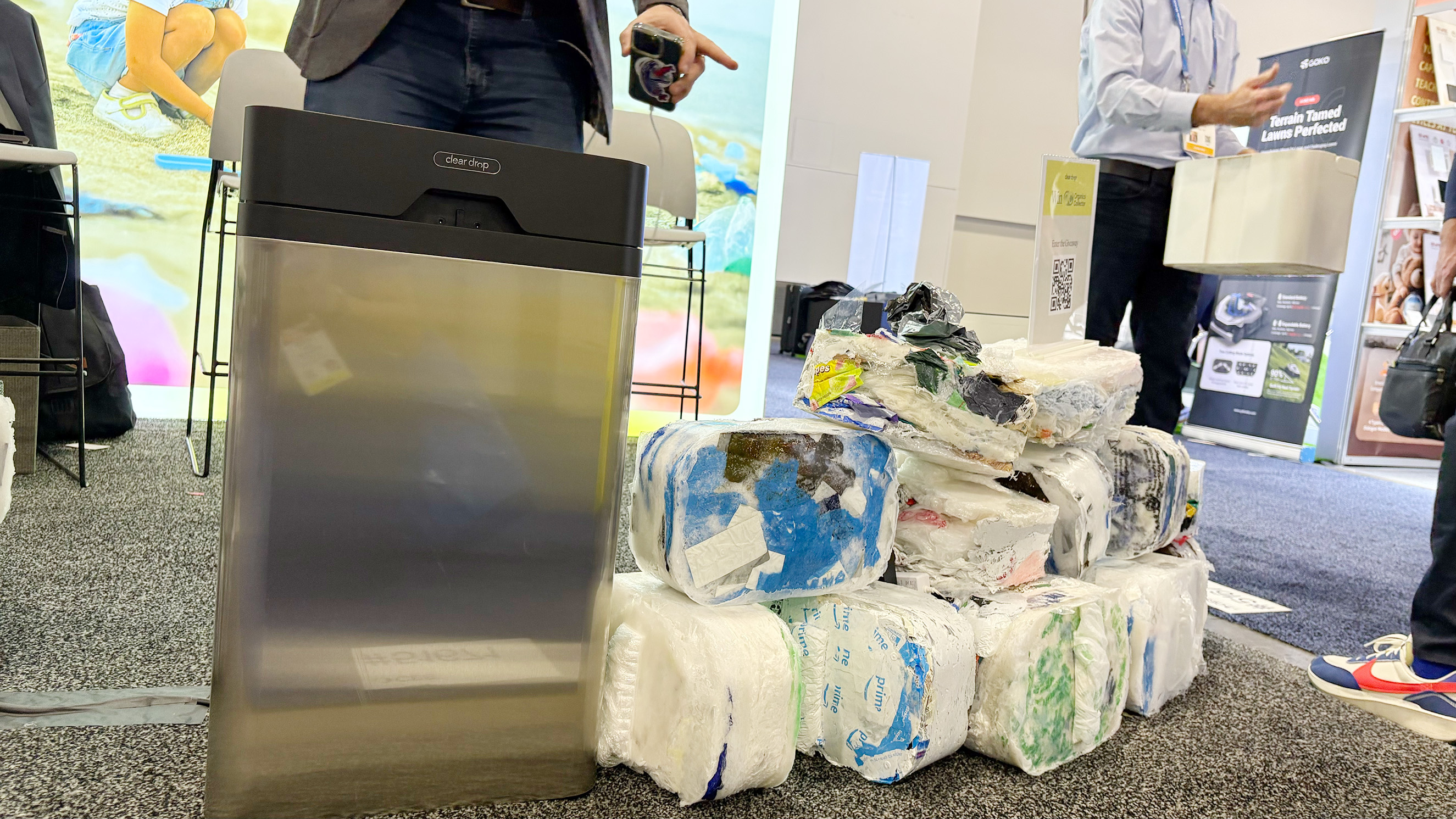
The Clear Drop soft plastics compactor next to a pile of the bricks it produces.
Amy Skorheim for Engadget

The Clear Drop is a soft plastics compactor that creates eight by twelve by four-inch bricks out of hundreds of grocery bags, bubble wrap, ziplocks and plastic packaging. One brick is equivalent to a 30-pound trash bag-worth of bags. Once the brick is created, it can be shipped to one of Clear Drop’s partner facilities in a pre-paid USPS shipping envelope. They currently work with a few US-based recycling facilities and hope to one day create an infrastructure to include municipal recycling.

Learn more at Clear Drop.

Alpha Power by CPTI

Alpha power by CPTI
Alpha power by CPTI
Amy Skorheim for Engadget

From what I’ve learned at the show, perovskite is the hottest thing in solar right now. It’s a mineral compound that’s been used to create more efficient solar panels. Some so sensitive to light that just indoor illumination is enough to create usable energy. Alpha Power by CPTI creates lightweight, flexible perovskite solar panels that can conform to multiple surfaces. Again, this is a company that’s partnering with manufacturers, so look for panels built into your laptop to charge it under the glare of your too-harsh office lights.

Learn more at CPTI.

Green Vigor

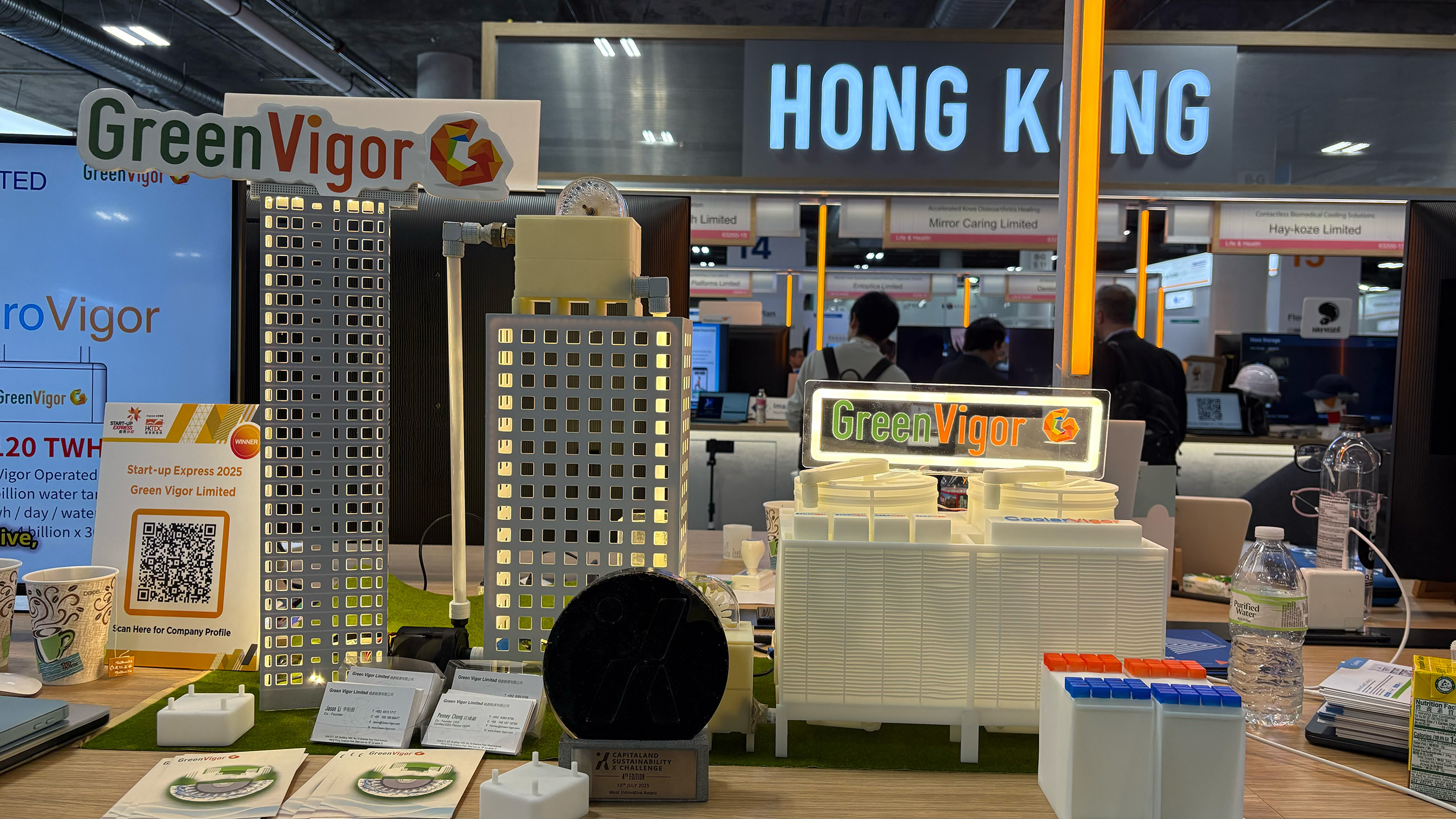
3D models of buildings using Green Vigor technology.
Amy Skorheim for Engadget

Down in the lower levels of the Venetian Expo at CES I found Green Vigor in the Hong Kong pavilion. This small company has two solutions to create energy for buildings by harnessing the potential energy from existing systems. HydroVigor generates power from water systems. So every time someone washes their hands or flushes a toilet in a building, the roof-top system generates a bit of power. CoolVigor uses the same principles to harness energy from HVAC systems. HydroVigor is currently in use in many buildings in Singapore and Hong Kong and they’re working to expand to more buildings globally.

Learn more at GreenVigor.

Jackery Solar Gazebo

Jackery's Solar Gazebo.
Jackery’s Solar Gazebo.
Amy Skorheim for Engadget

This outdoor hangout spot can produce up to 10kWh of power on a given day. It’s a modular design that lets you choose louvered walls, sunshades, lights and fans when you order it and the solar panels are so strong that a full-sized human Jackery rep was able to stand on a sample panel in front of me and nothing cracked (though the company officially rates it at 20 pounds of snow per square foot). You can use the power directly, tie it into your home system, feed it into the grid or hook it up to one of Jackery’s many power stations to save the power for later. The gazebo costs $12,000 and will ship in mid-2026.

Learn more at Jackery.

Bluetti RV Solar System

Bluetti's DIY RV Solar power system
Bluetti’s DIY RV Solar power system
Amy Skorheim for Engadget

Bluetti, like Jackery, is known for its vast lineup of portable and fixed power stations and batteries. This year, it brought a new power station made with bio-based plastic as well as a DIY system for adding solar power to your existing RV.

Learn more at Bluetti.

Airloom wind power generation

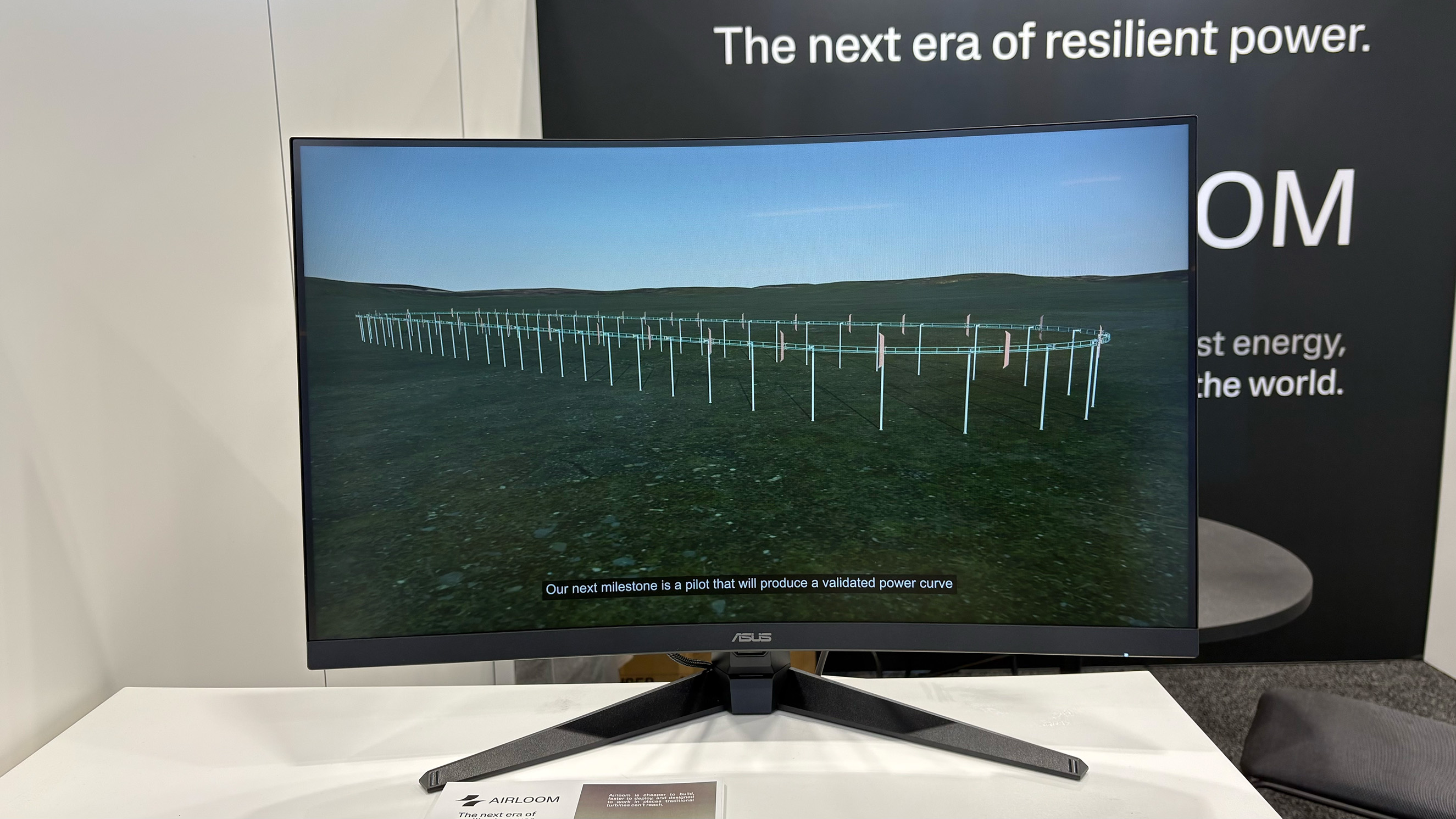
Airloom's roller coaster-like wind power generator for data centers.
Airloom’s roller coaster-like wind power generator for data centers.
Amy Skorheim for Engadget

Engadget’s Anna Washenko does a great job of explaining the tech behind Airloom. In short it’s a roller coaster for wind that’s comprised of 40 percent less mass than a standard wind turbine and uses 42 percent fewer parts and 96 percent fewer unique parts. That makes it faster to deploy and cheaper to instal. I can also be sited in more places. Again, this is a utility-scale solution, geared towards data centers and their insatiable need for energy to power Very Important AI Things.

Learn more at Airloom.

Gaotu Innovation Energy Group

Gaotu had a range of solar products in various formats.
Amy Skorheim for Engadget

If you are looking for a solar-powered anything, hit up Gaotu. At the company’s booth, I saw hats, a fishing chair, a backpack, a sunbrella and a car roof-top enclosure that unfurls to charge up your Tesla. The Shenzhen-based company has been in business for 18 years and plans to just keep sticking solar panels on anything it can.

Learn more at Gaotu.

Segway Muxi cargo e-bike

Segway's latest cargo e-bike
Segway’s latest cargo e-bike
Amy Skorheim for Engadget

The single largest booth in the CES sustainability section was Segway. This year, the company showed off two new e-bikes, which our own Dan Cooper covered. This one here is the Muxi, a cargo bike with an easily swappable battery, an optional passenger seat with foot pegs and an optional middle basket. Plus a beverage cup holder.

Learn more at Segway.

If we don’t all fall into the ocean before then, perhaps CES 2027 will have a stronger showing of sustainability tech. In the meantime, I’ll take a modicum of comfort in these few brave organizations still dedicated to keeping us afloat.

This article originally appeared on Engadget at https://www.engadget.com/science/ces-so-very-big-so-little-sustainability-tech-180000648.html?src=rss

10 Hacks Every Kindle User Should Know

The Kindle has become the default e-reader for many bookworms, and I get it. I’ve used Kindles for well over a decade, and I’ve enjoyed using my latest Paperwhite quite a bit. It helped me read more than 30 books last year, so I’m not complaining.

The basic Kindle setup is okay, but if you learn your way around the device’s gestures, hidden features, and additional services, you can really get a lot out of this unassuming reading device.

Kindle Gestures that you really should know

There’s only one button on the Kindle. Everything else happens using touch. And like every touchscreen device, there are countless gestures you need to know to use the device. The most obvious ones are for the page turns. You can swipe or tap right to go to the next page and swipe or tap left for the previous one. If you have a Paperwhite Signature Edition, you can also double tap on the back or sides of the device to move to the next page.

Tap on the top of the Kindle to bring up the toolbar, where you can go back to the Home screen, change the settings, view the table of contents, and more.

If you tap the bottom left corner, you can cycle between different stats like reading progress, page number, time left in chapter, and more. Oh, and if you want to quickly change the font size, just pinch in or out to zoom in on the text (like you would zoom into images on your phone).

Want to take a screenshot of what’s on your Kindle screen? Tap any two opposite corners of the screen together (top-right and bottom-left or top-left and bottom-right). The screen will flash for a second, and the image will be saved as a PNG in the root directory. Connect your Kindle to your Mac or PC to retrieve the image file.

Easily navigate between chapters

Chapter navigation in Kindle.

Credit: Khamosh Pathak

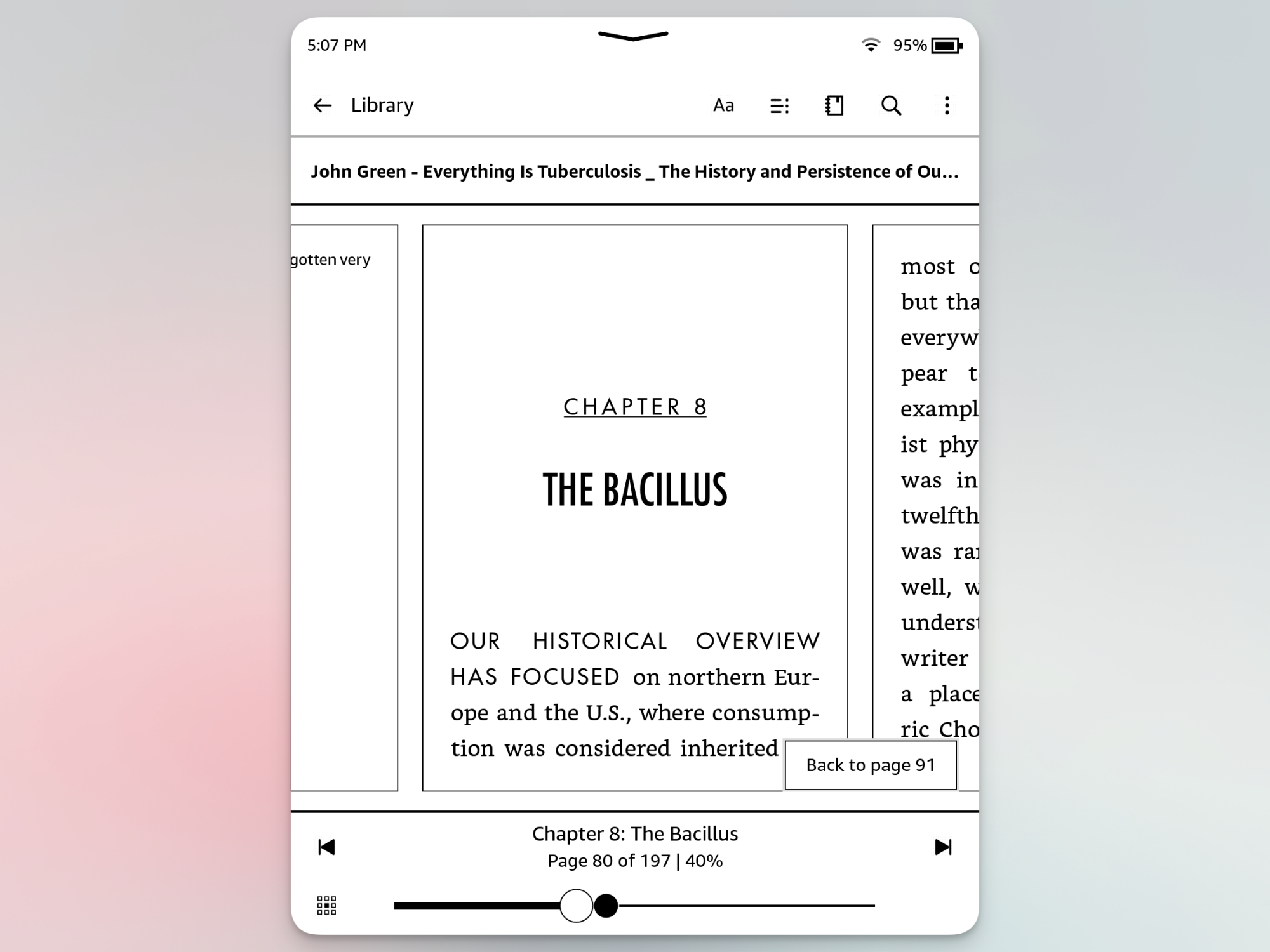
The Kindle isn’t the easiest device to navigate, especially when you’re reading a book where you need to jump between different chapters. Here, again, a hidden gesture can help. Swipe up from the bottom of the screen to bring up a new Page Flip mode. You’ll see a slider at the bottom, which you can use to move forward and back. There are buttons to jump to the next chapter as well (I use this all the time).

Switch to dark mode and schedule warm light

Dark mode and Warm light settings.

Credit: Khamosh Pathak

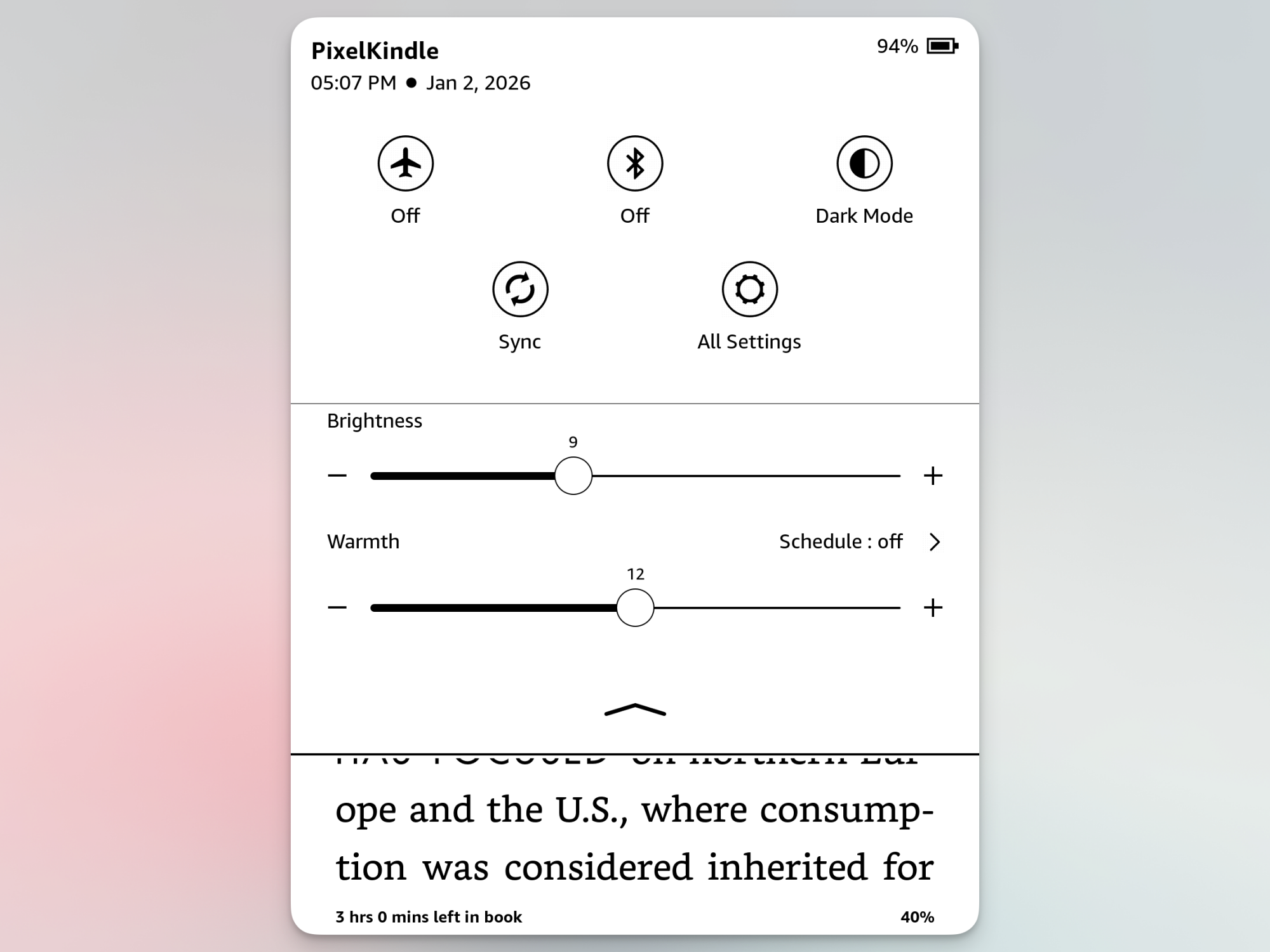
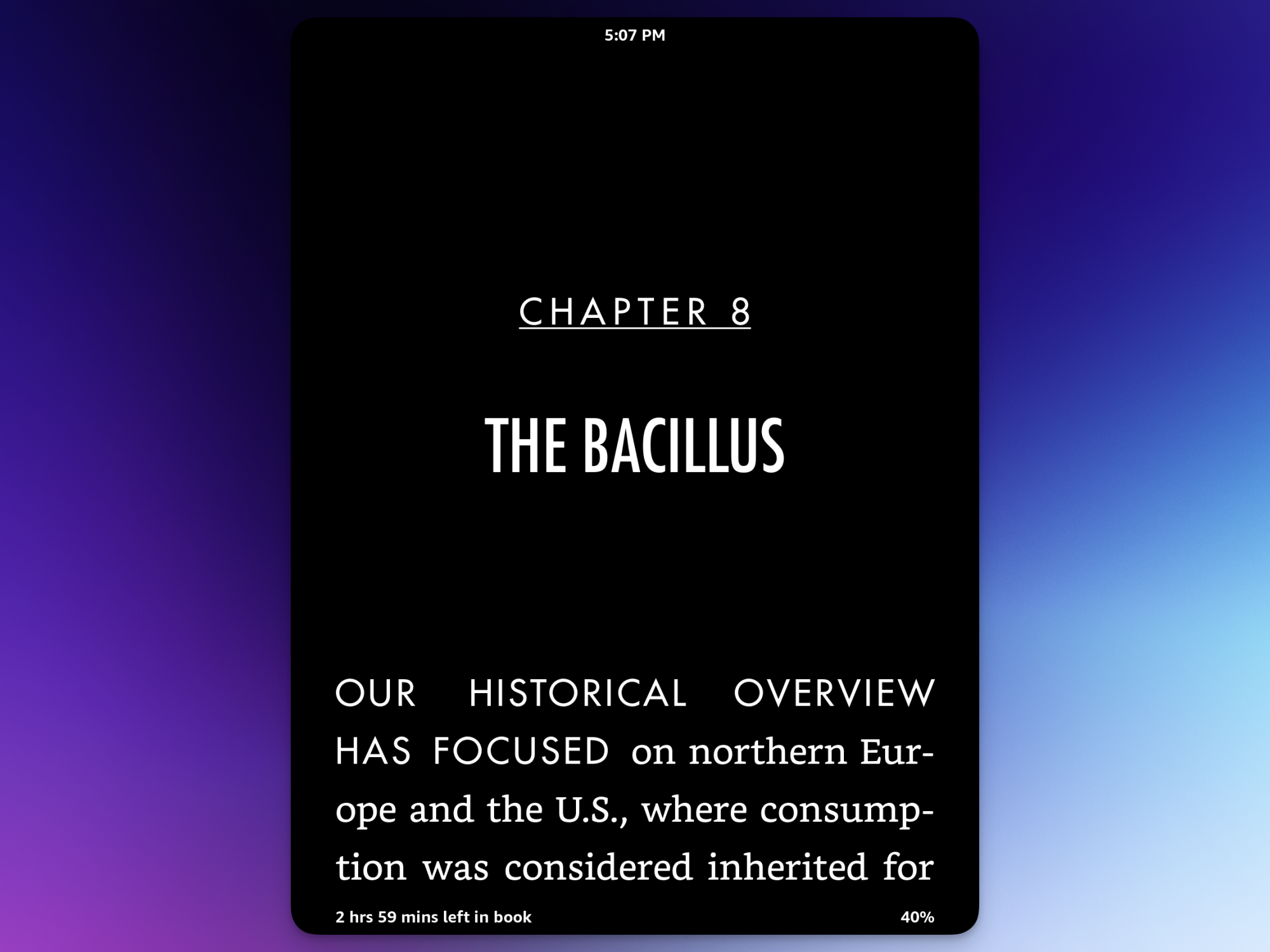
If you love reading in bed, you’ll want to enable dark mode. Pull down from the top edge to bring up the quick settings panel. Here, tap the Dark Mode button to quickly invert the colors. You’ll now read white text on a black background. While you’re here, also check out the Warm Light settings (if you have a Kindle Paperwhite, Oasis, or Scribe). Use the slider to increase the warmth of the screen, making it more amber-toned.

Dark mode in Kindle.

Credit: Khamosh Pathak

This is especially useful for reading in the evenings or at night, but I like it so much I keep it enabled at all times. You can also set your color temperature to change on a schedule, so that the display slowly warms up in the evening hours. Do this under Settings > Device Options > Display Settings > Schedule.

Lock your Kindle

Setting a pin for Kindle.

Credit: Khamosh Pathak

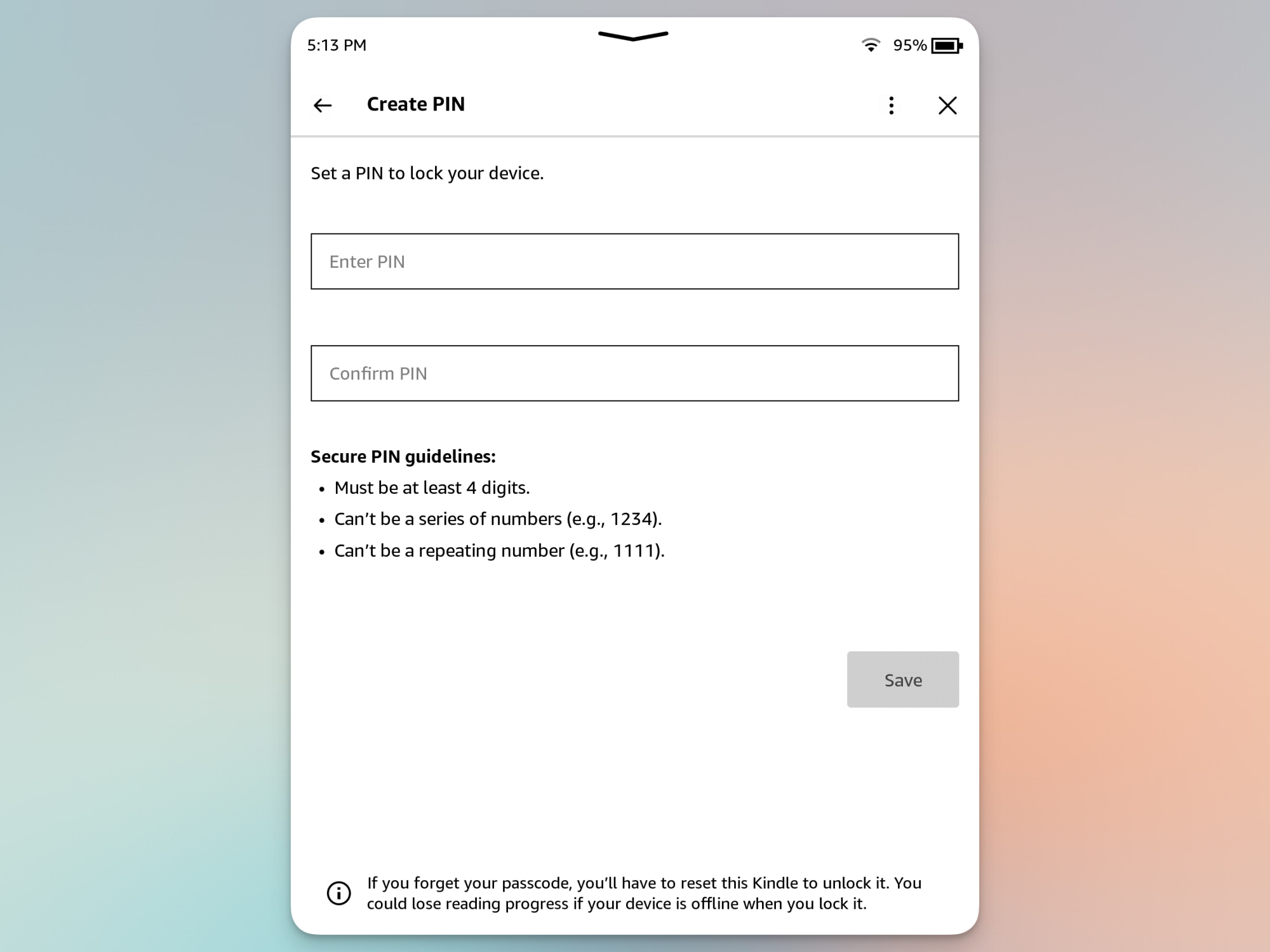
Not everyone needs to know what’s on your Kindle, right? If you read a lot in school, or public areas, you can lock down your Kindle using an optional setting. Go to Settings > Device Options > Security and Privacy > Device PIN. You can then set a numeric unlock code up to 12 digits long, but it might be easier to stick to a four or six-digit code.

Send documents and books to Kindle wirelessly

Send documents and ebooks to Kindle.

Credit: Khamosh Pathak

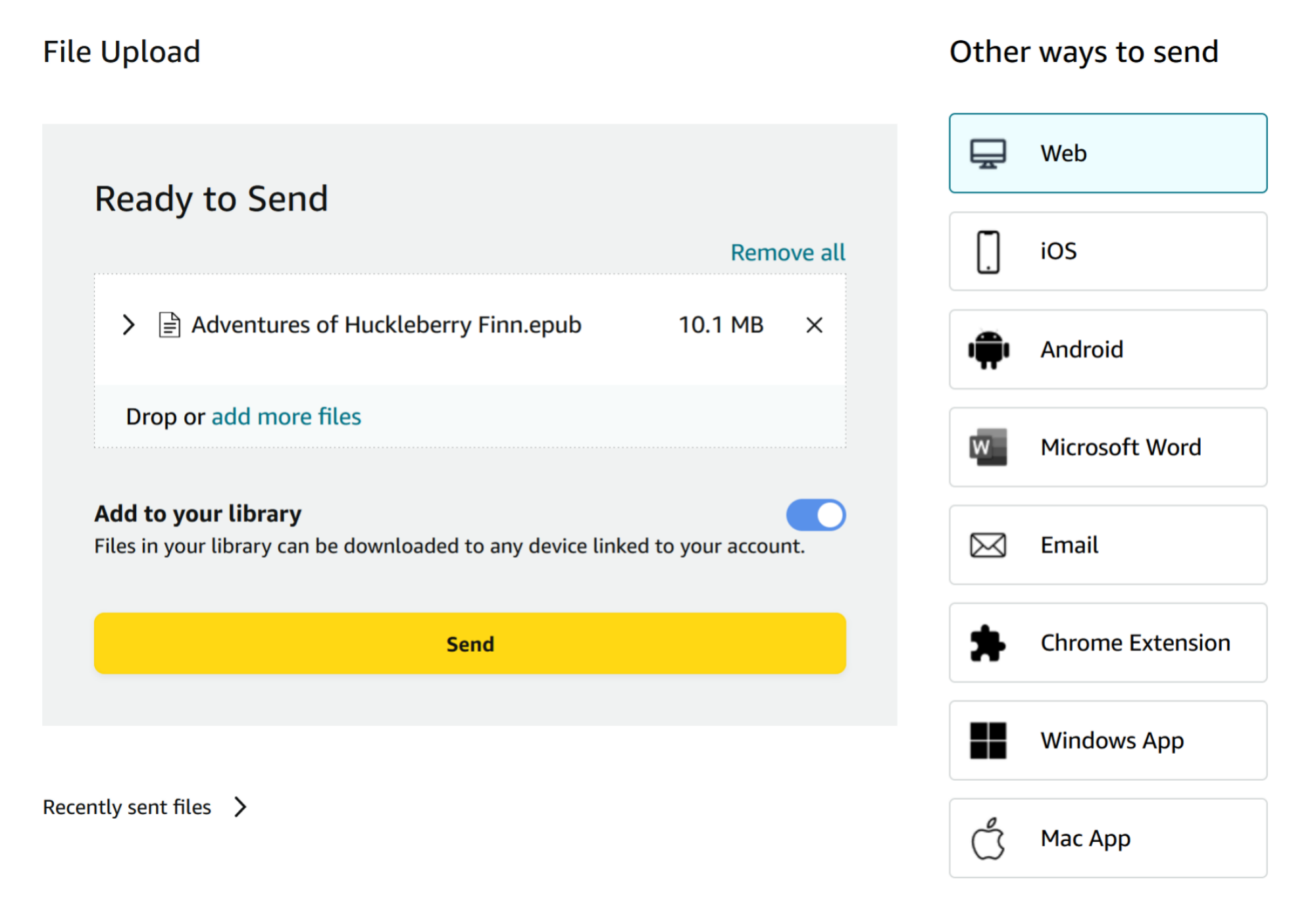
Reading on your Kindle doesn’t need to be limited to books you buy from the Kindle store. In fact, you can send any PDF or DRM-free ebook to your Kindle, and wirelessly. I have previously outlined multiple methods for doing this, ranging from using an email address, to using the Kindle app. But the one I keep coming back to is Amazon’s own Send to Kindle website. Open it on any browser, sign in with your account, drag and drop a document in a supported format (.DOC, .DOCX, .HTML, .TXT, .PDF and .EPUB), and send it off. Once you sync your Kindle using Wi-Fi, these documents will be available to read on it, just like that.

Show your book covers as screensavers

Kindle book as cover.

Credit: Amazon

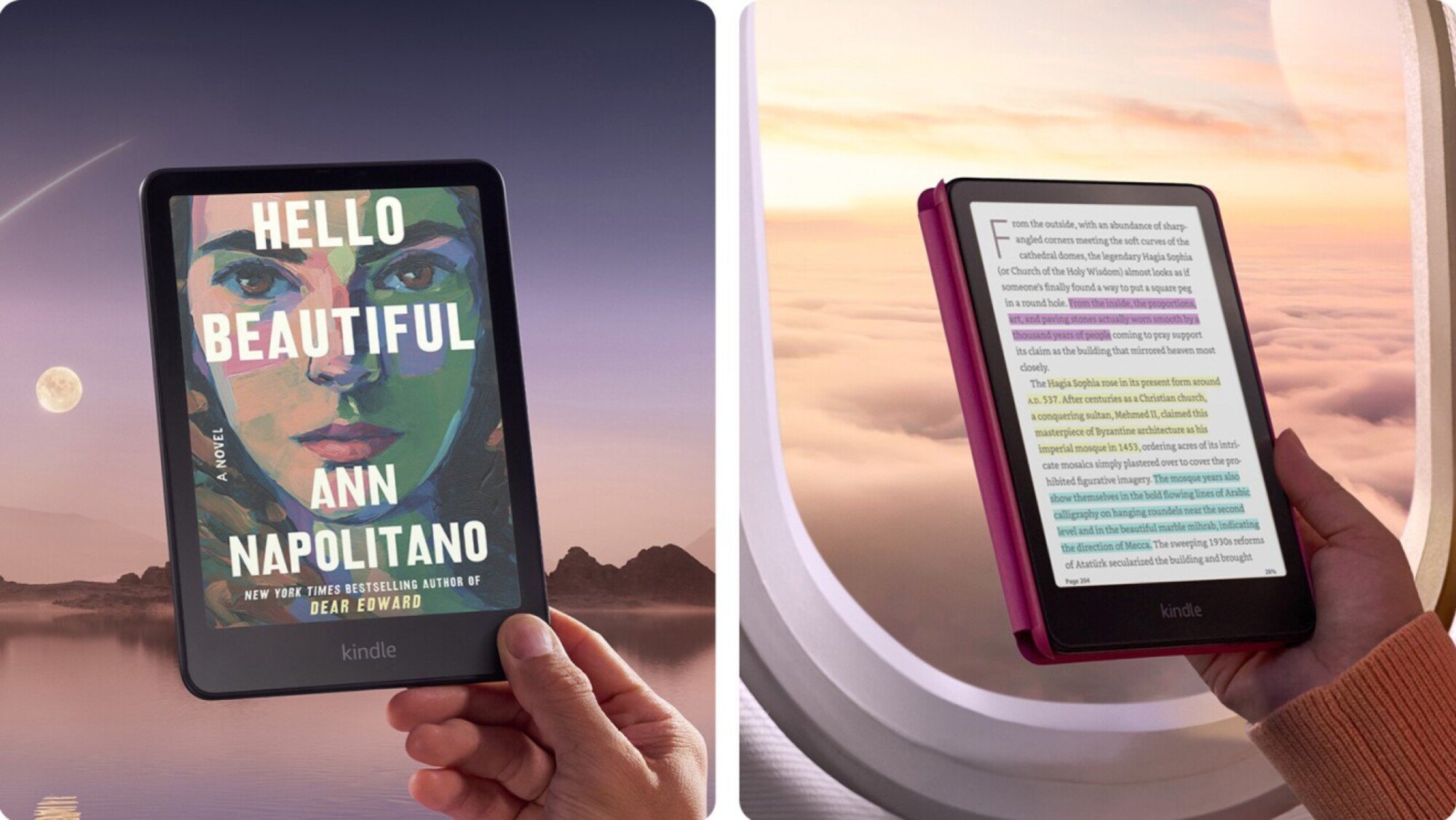
Every time I set up a new Kindle, I’m surprised that this is a feature that I still need to enable manually. By default, Kindles shows a couple of images as screensavers when turned off. That’s because of the e-ink display, which lets them show a static image without using power. These default screensavers, though, are boring. You can make this feature much more interesting (and useful) by showing the cover of the book you were last reading as the screensaver instead. Go to Settings > Device Options and enable the Display Cover feature.

Read long articles on Kindle

Send to Kindle Chrome extension.

Credit: Khamosh Pathak

Kindle’s built-in browser is pretty barebones and laggy, but you can still read long articles on it. For a smoother experience, though, you can wirelessly send articles to your Kindle, where they’ll show up in form of books, devoid of ads, formatting, and images.

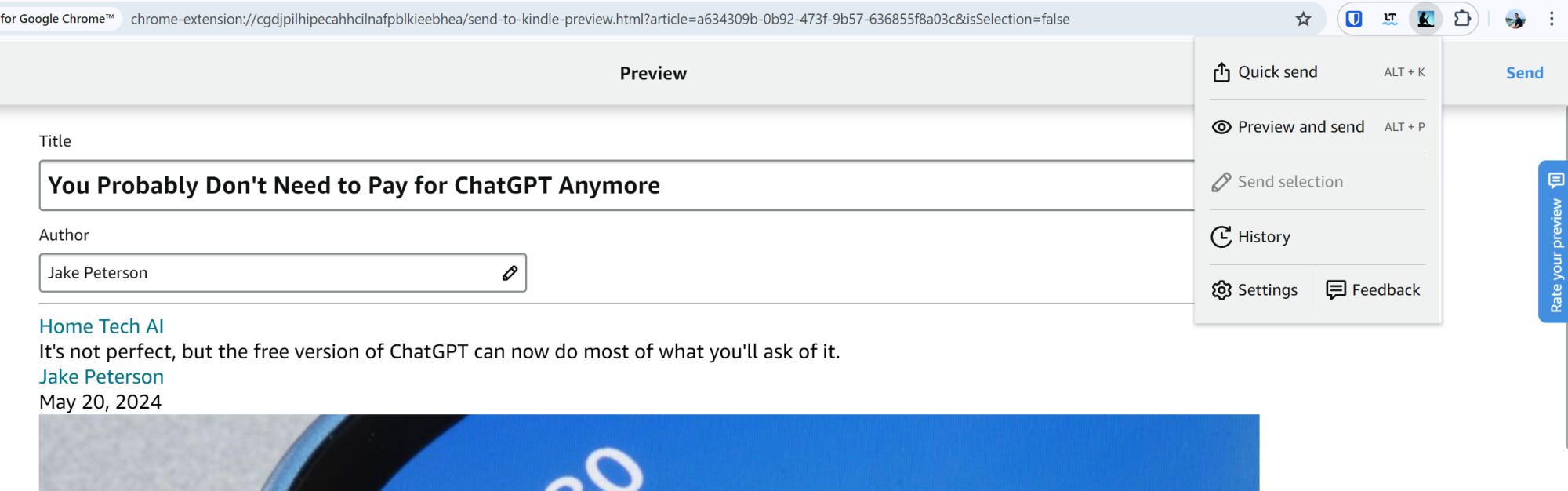
The simplest way to do this is by using Amazon’s Send to Kindle Chrome extension. Visit a page, trigger the extension, and send it off to your e-reader.

If you don’t use Chrome, you can also use a dedicated service like Push to Kindle to send articles to your Kindle. You can send up to 10 articles a month for free, and a $2.99/month plan unlocks all limits.

Export your highlights and notes

Highlights from Amazon Kindle book.

Credit: Khamosh Pathak

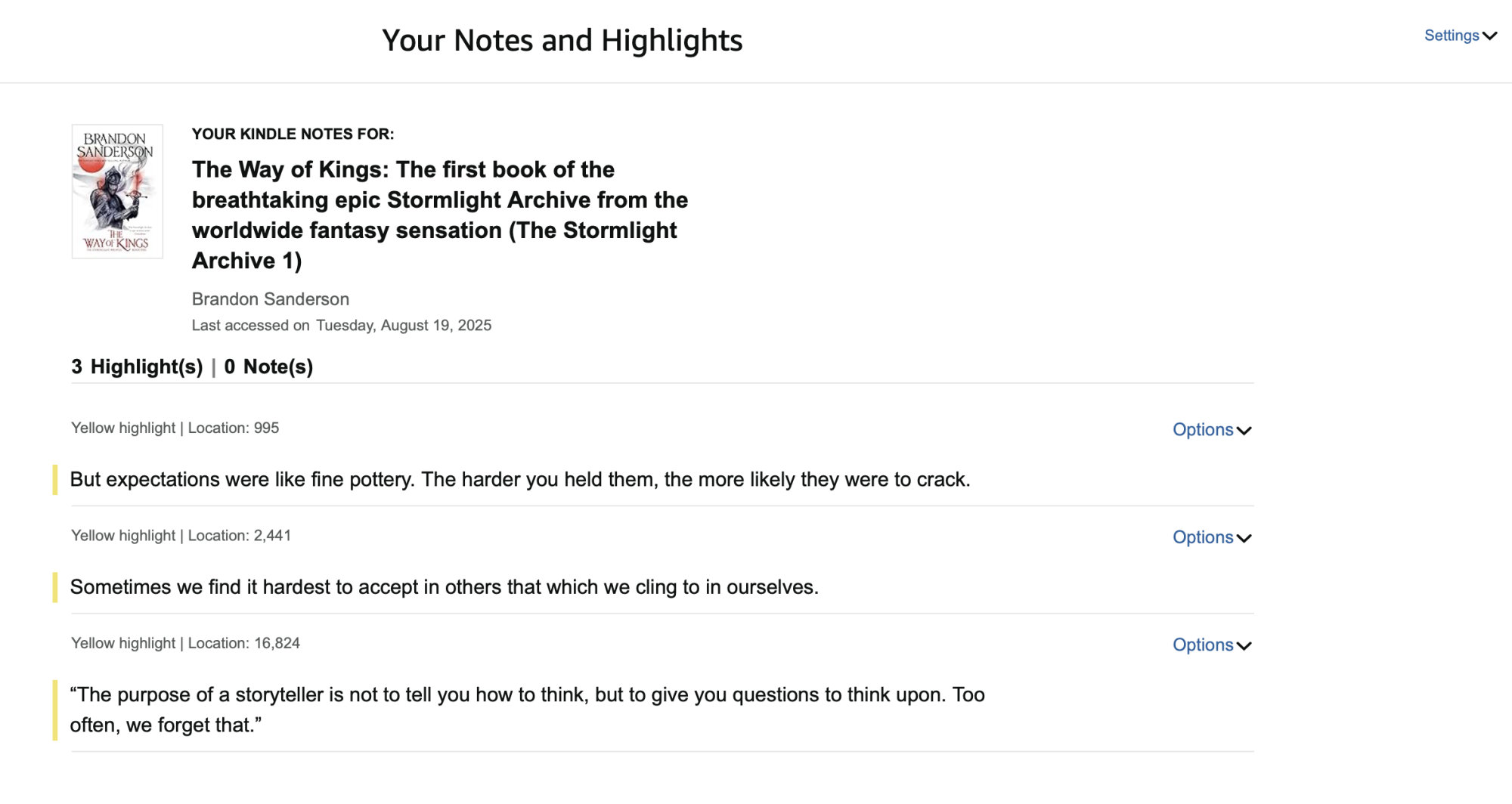
If you’re using your Kindle to research or read non-fiction books for school or work, you’ll end up with a lot of highlights. Those highlights, just sitting in your Kindle, aren’t that useful. Amazon has a dedicated website that lists all the highlights from all the books you’ve purchased via the Kindle Store, but it’s not your only option.

Personally, I prefer Clippings, which also works for content not bought from the Kindle Store. With it, you can import all the highlights and notes from your Kindle books and personal documents using a browser extension. You can view and organize all your notes from your browser, too, but if you want to export them to a document, you’ll need to pay for a $1.99/month Professional plan.

Borrow books to read from your local library, for free

There are many places where you can rent and borrow books to read legally and for free. The most popular option is using the Libby app from Overdrive, which loans you books via your library card or student ID. In the Libby app, go to Shelf > Loans > Read With… > Kindle. Here, sign in with your Amazon account and verify your Kindle device. Then, tap Get Library Book. Voila, an ebook from your local library will instantly show up on your Kindle device.

De-Amazon your Kindle

Lastly, you can take inspiration from my colleague Pranay, who uses his Kindle without any Amazon services. You can set up a Kindle without an Amazon account and use it as a perfectly good e-reader. You can buy DRM-free books online from various sources and transfer them to your Kindle simply by transferring the ebook files to your Kindle storage or using the Send to Kindle feature I talked about above.