Meta has closed three VR studios as part of its metaverse cuts

Several of Meta’s VR studios have been affected by the company’s metaverse-focused layoffs. The company has shuttered three of its VR studios, including Armature, Sanzaru and Twisted Pixel. VR fitness app Supernatural will no longer be updated with fresh content.

Employees at Twisted Pixel, which released Marvel’s Deadpool VR in November, and Sanzaru, known for Asgard’s Wrath, posted on social media about the closures. Bloomberg reported that Armature, which brought Resident Evil 4 to Quest back in 2021 has also closed and that the popular VR fitness app Supernatural will no longer be updated with fresh content, though the current version will continue to be supported. 

A spokesperson for Meta confirmed the closures. “We said last month that we were shifting some of our investment from Metaverse toward Wearables,” the spokesperson said in a statement to Engadget. “This is part of that effort, and we plan to reinvest the savings to support the growth of wearables this year.”

The cuts raise questions about Meta’s commitment to supporting a VR ecosystem it has invested heavily in. The company hasn’t announced any new VR headsets since the Quest 3S in 2024, and last month it “paused” planned Horizon OS headsets from Asus and Lenovo. Now, it’s also pulling back on in-house game development too. 

Meta is claiming, internally at least, that it remains committed to supporting the industry. “These changes do not mean we are moving away from video games,” Oculus Studios director Tamara Sciamanna wrote in the memo reported by Bloomberg. “With this change we are shifting our investment to focus on our third-party developers and partners to ensure long-term sustainability.”

Have a tip for Karissa? You can reach her by email, on X, Bluesky, Threads, or send a message to @karissabe.51 to chat confidentially on Signal.

This article originally appeared on Engadget at https://www.engadget.com/ar-vr/meta-has-closed-three-vr-studios-as-part-of-its-metaverse-cuts-202720670.html?src=rss

Microsoft vows to cover full power costs for energy-hungry AI data centers

On Tuesday Microsoft announced a new initiative called “Community-First AI Infrastructure” that commits the company to paying full electricity costs for its data centers and refusing to seek local property tax reductions.

As demand for generative AI services has increased over the past year, Big Tech companies have been racing to spin up massive new data centers for serving chatbots and image generators that can have profound economic effects on the surrounding areas in which they are located. Among other concerns, communities across the country have grown concerned that data centers are driving up residential electricity rates through heavy power consumption and by straining water supplies due to server cooling needs.

The International Energy Agency (IEA) projects that global data center electricity demand will more than double by 2030, reaching around 945 TWh, with the United States responsible for nearly half of total electricity demand growth over that period. This growth is happening while much of the country’s electricity transmission infrastructure is more than 40 years old and under strain.

Read full article

Comments

Apple: You (Still) Don’t Understand the Vision Pro

Analyst Ben Thompson, sharing the experience of watching an NBA game on the Vision Pro: When I started the broadcast [on Apple Vision Pro’s immersive view of the Bucks vs. Lakers NBA game] I had, surprise surprise, a studio show, specially tailored for the Apple Vision Pro. In other words, there was a dedicated camera, a dedicated presenter, a dedicated graphics team, etc. There was even a dedicated announcing team! This all sounds expensive and special, and I think it was a total waste.

Here’s the thing that you don’t seem to get, Apple: the entire reason why the Vision Pro is compelling is because it is not a 2D screen in my living room; it’s an immersive experience I wear on my head. That means that all of the lessons of TV sports production are immaterial. In fact, it’s worse than that: insisting on all of the trappings of a traditional sports broadcast has two big problems: first, because it is costly, it means that less content is available than might be otherwise. And second, it makes the experience significantly worse.

[…] I have, as I noted, had the good fortune of sitting courtside at an NBA game, and this very much captured the experience. The biggest sensation you get by being close to the players is just how tall and fast and powerful they are, and you got that sensation with the Vision Pro; it was amazing. The problem, however, is that you would be sitting there watching Giannis or LeBron or Luka glide down the court, and suddenly you would be ripped out of the experience because the entirely unnecessary producer decided you should be looking through one of these baseline cameras under the hoop […]


Read more of this story at Slashdot.

This Free Android App Blocks Useless Notifications and Lets Important Ones Through

We all know how annoying unwanted notifications are, especially when you’re trying to focus. But turning notifications off entirely for a given app potentially means missing important messages. That’s where the free Android app DoNotNotify comes in—with it you can set up custom filters for notifications.

Maybe you’re in a group chat that is, for the most part, useful, but includes one person who talks too much. With this application, you could filter that person out, meaning you’d only get notifications when anyone else sends a message. You could also use this to filter news notifications about particular subjects or public figures you’d rather not see pop-ups about. You get the idea.

The application itself is deceptively simple. Launch it and you’ll need to give it permissions to access your notifications. Once you do, it will start collecting a log of notifications. You can tap any of these notifications in order to set up a rule.

The first thing you need to decide is whether you want to create a blacklist or a whitelist. You can add filters for the title of the notification (the bolded part at the top of the notification) or the text (which is the excerpt below the title).

The whitelist feature is great when you only want certain notifications from your apps. For example: Maybe your banking app sends out notifications about your credit score, which you want to see, but also promotions for other services, which you don’t. You could whitelist the words “credit score.” The same goes for news applications—maybe you only want to see headlines from a particular app when the headline mentions a certain country or public figure.

Blacklists, meanwhile, allow you to do the opposite. The group text example I gave earlier is an example of this. You could also use blacklists to prevent certain public figures or topics from showing up in notifications from news applications.

It’s worth noting that the application needs access to your notifications in order to filter them, meaning it could potentially gather a lot of information about you—concerns were raised about this on Hacker News. On the other hand, the app’s privacy policy is quite robust, claiming not to collect any information and not to work with any third parties.

I don’t think this is the kind of application every person is going to want—it’s for the obsessive. If that’s you, though, and you get annoyed by notifications often, you should give this a try.

This Modular Mini PC Packs Panther Lake And A GeForce RTX 5060 Ti eGPU Dock

This Modular Mini PC Packs Panther Lake And A GeForce RTX 5060 Ti eGPU Dock
Khadas’ latest modular mini PC, the soon-to-launch Mind Pro, will be one of the first Intel Panther Lake-powered Mini PCs on the market. The Khadas Mind Pro is the latest in a series of hyper-compact mini PCs from Khadas, with the Mind 1, Mind 2, and Mind 2S all sharing an identical palm-sized form factor and previous-gen Intel hardware. The

Proposed legislation opens the door to robotaxi services in New York

Waymo, Alphabet’s self-driving car company, tested its autonomous vehicles in New York City in 2025, and as part of proposed legislation from New York Governor Kathy Hochul, the company could soon offer its services across the state, Wired reports.

Governor Hochul’s proposed legislation was formally announced during a State of the State address covering policy proposals for the upcoming year. The new law, if passed, would loosen the state’s restrictions on self-driving car companies by forming a pilot program that would allow for “the limited deployment of commercial for-hire autonomous passenger vehicles outside New York City.” Applicants to the pilot program would need to demonstrate that they have “local support for [autonomous vehicle] deployment” and prove their “adherence to the highest possible safety standards” to be considered.

As a company with presumably good odds of being approved, Waymo supports the legislation. “Governor Hochul’s proposal to legalize fully autonomous vehicles is a transformative moment for New York’s transportation system,” Waymo’s Head of Global Public Policy Justin Kintz said in a statement. “With the Governor’s leadership, New York has the opportunity to pair its investments in slower speeds, better traffic enforcement, and first-in-the-nation congestion management strategies with Waymo’s demonstrably safe technology, creating a future where living in New York is safer, easier, and more accessible.”

Waymo already has commercial robotaxi services in select cities in California, Texas and Georgia, offered on its own or in partnership with Uber. The company announced plans to expand in Texas and Florida late last year, and is already committed to offering service in Las Vegas, San Diego and Detroit in 2026. Wired reports Waymo spent over $370,000 lobbying regulators in New York about telecommunications and transportation issues in 2025, and based on today’s announcement, it appears those efforts are paying off.

This article originally appeared on Engadget at https://www.engadget.com/transportation/proposed-legislation-opens-the-door-to-robotaxi-services-in-new-york-193804671.html?src=rss

I Finally Got My Hands on Oura’s New Charging Case

We may earn a commission from links on this page.

Oura announced last week that its long-awaited charging case is finally shipping. I got one to try out, and can confirm that it works well and is arguably better designed than those of its competitors. That said, is it really worth $99? 

The charging case works with the Oura Ring 4, not the older models like the gen 3. I’ve previously reviewed the Oura Ring 4, and it’s probably the best smart ring out there right now. You pay a premium for it, though—not only are Oura’s prices higher than many of its competitors ($349 to $499), Oura also requires a $5.99/month subscription to access nearly all of its features. 

The standard charger that ships with any of the Oura rings is a simple flat square with a post that the ring fits onto. (The square base then plugs into a USB-C cord.) This works fine, but it’s inconvenient to travel with, and also susceptible to jostling. Maybe you never bump things around on your nightstand, or snag a charging cable, but it’s certainly happened to me. 

Like other Oura users, I’ve been wishing for a charging case. RingConn and Luna Ring both come with cases, so it would be nice if Oura would catch up. I usually keep my ring in my gym bag during weightlifting workouts (since it’s neither comfortable nor useful in those workouts). I plan to keep the charging case in my gym bag and use it during workouts. 

Specs of Oura’s charging case

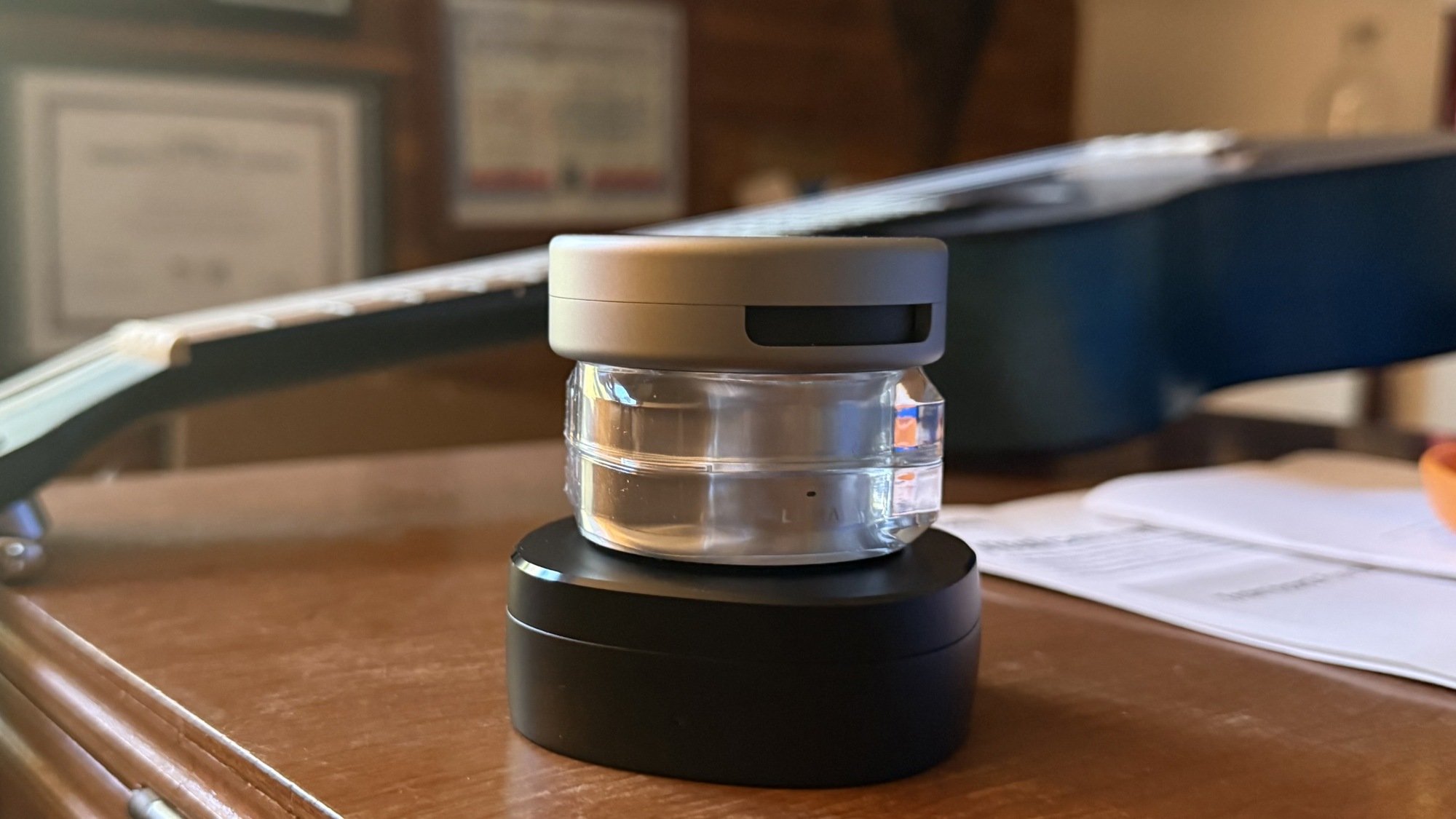
Oura's charging case, open
Charging my size 8 ring
Credit: Beth Skwarecki

Oura says the case holds enough power for five full charges of the ring, and it takes up to 80 minutes to charge the ring (less if the ring is partially charged, obviously). The case itself charges in 90 minutes. 

I haven’t been able to test the case in the long term, since I just got it, but the ring has a battery life of five days or more depending on the size of the ring and the settings you have enabled. That means you could go about a month without charging from a cable. 

The case is sized to your ring, so you have to make sure to buy the correct size of charging case—for example, a size 8 case for a size 8 ring. 

There’s a colored LED on the front of the charging case. When a ring is inside and charging, a white LED will pulse, just like the nightstand charger does. When the case is empty and open, it will indicate the case’s charge level. Green means the battery is full. The case pairs to your Oura app, so you can check the app to see the charge level of both your ring and the case. 

How it compares to other brands

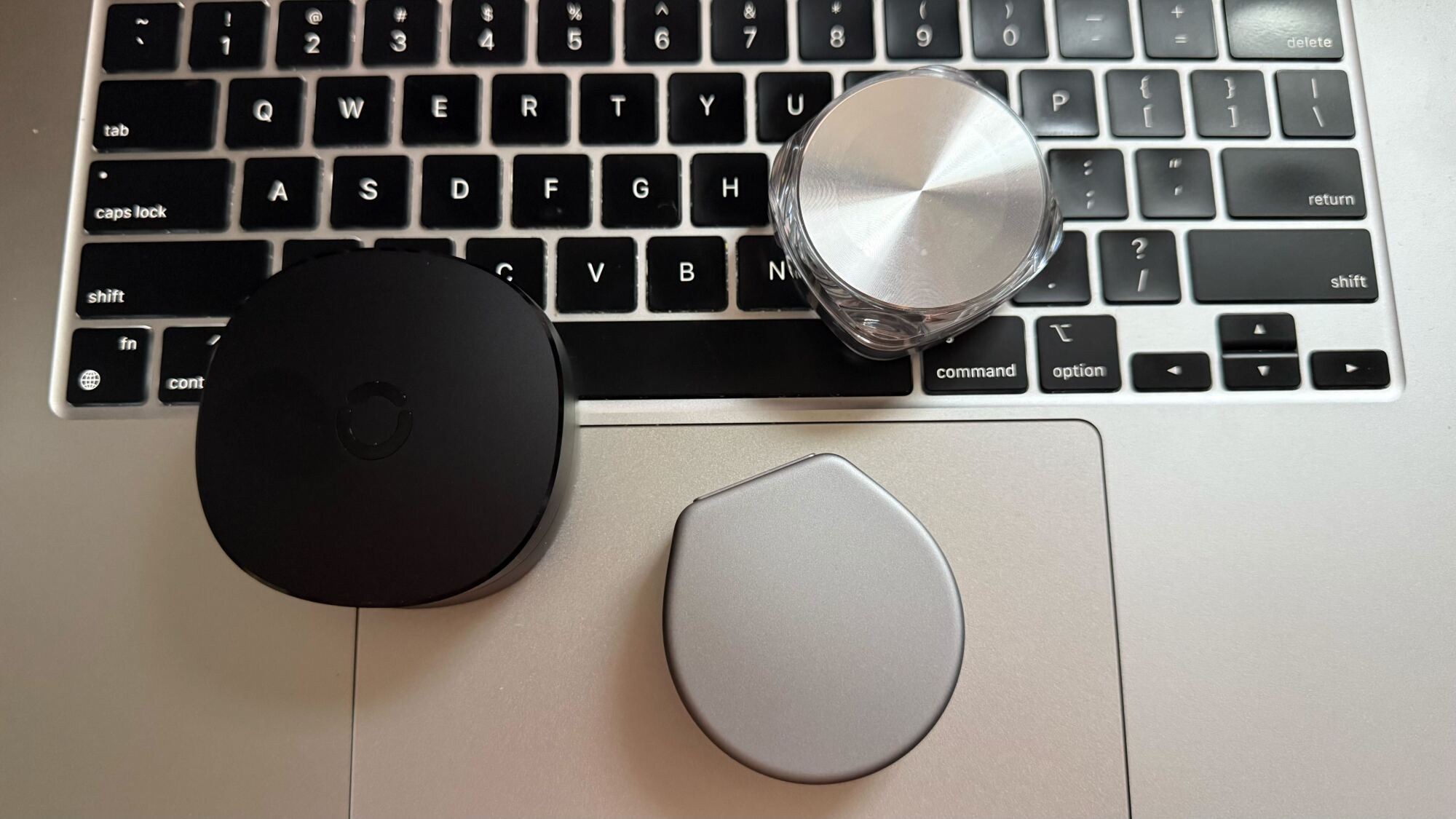
Top to bottom: Oura, Luna, RingConn
Credit: Beth Skwarecki

I happen to have a Luna Ring and a RingConn gen 2, which both ship with a charging case. Luna’s case holds about 30 days of charge, similar to Oura’s, while RingConn says its case can hold 150 days of charge. 

The other noticeable difference is size. RingConn’s case is the largest of the three, which probably explains its longer battery life. Oura’s case is slightly wider than Luna’s, but slimmer. You can see the size differences in my photos here.

RingConn is the larger black case to the left. Oura is bottom right, Luna is top right.
Credit: Beth Skwarecki

RingConn’s case comes with the ring, and costs $299 for the package. Luna charges $329 for a ring plus charging case. (I recall Luna’s charging case being optional, and available for an extra $49, as I wrote here, but right now I can only find the package deal on their site.) Oura’s charging case is sold separately, for $99, so you’d spend $448 to $598 for the ring plus the case.

Google’s updated Veo model can make vertical videos from reference images with 4K upscaling

Google’s Veo video AI made stunning leaps in fidelity in 2025, and Google isn’t stopping in 2026. The company has announced an update for Veo 3.1 that adds new capabilities when you provide the model with reference material, known as Ingredients to Video. The results should be more consistent, and output supports vertical video and higher-resolution upscaling.

With Ingredients to Video, you can provide the AI with up to three images to incorporate into the generated video. You can use that to provide the robot with characters to animate, backgrounds, and material textures. When you do that, the newly upgraded model will allegedly make fewer random alterations, hemming closer to the reference images. You can also generate multiple clips and even prompt for changes to the setting or style while keeping other elements consistent.


Veo 3.1 Updates – Bring more creativity and expressiveness into your videos.

Google is also expanding its support for mobile-first video in Veo. When using Ingredients to Video, you can now specify outputs in a 9:16 (vertical) ratio. That makes it ideal for posting on social apps like Instagram or TikTok, as well as uploading as a YouTube Short. So get ready for even more phone-centric slop. Google added support for vertical videos via a text prompt last year.

Read full article

Comments

Mercedes Temporarily Scraps Its Level 3 ‘Eyes-off’ Driving Feature

Mercedes-Benz is pausing the roll-out of Drive Pilot, an “eyes off” conditionally automated driving feature that was available in Europe and the US. From a report: As first reported by German publication Handelsblatt, the revised S-Class will not have the Level 3 system when it arrives at the end of this month. Mercedes was one of the first automakers to offer a Level 3 driving system to its customers when it launched Drive Pilot with the electric EQS sedan and the gas-powered S-Class in the fall of 2023. At up to 40mph in traffic jam situations on highways, Drive Pilot provided hands-free, eyes-off driving that allows the driver to look away from the road at something else, like a game or a movie.

It was big leap up from hands-free Level 2 systems — Tesla’s Autopilot and Full Self-Driving (FSD) included — which still require the driver to be in full control, looking ahead and paying attention while the system is active. But now Mercedes says it is temporarily scrapping the feature, citing middling demand and the high production costs of developing the technology.


Read more of this story at Slashdot.

Starlink tries to stay online in Iran as regime jams signals during protests

President Trump asked Elon Musk to get Starlink working more reliably in Iran to thwart the Iranian government’s Internet shutdown. Starlink operator SpaceX was apparently already working on the problem before Trump reached out to Musk.

Iran severed Internet connections and phone lines last week as the government conducted a violent crackdown on anti-government demonstrators, according to numerous reports, which say that thousands of people have been killed.

Starlink hasn’t been completely disabled. The government’s jamming technology has reportedly caused Starlink packet loss of anywhere from 30 to 80 percent.

Read full article

Comments

Innosilicon First To Ship LPDDR6 Memory IP At Blistering 14.4Gbps Speeds

Innosilicon First To Ship LPDDR6 Memory IP At Blistering 14.4Gbps Speeds
Chinese IP vendor Innosilicon, who we previously reported hitting 10 Gbps with LPDDR5X, has announced the first commercial delivery of its LPDDR6 memory controller and PHY IP, marking an early milestone in the rollout of the next-generation low-power DRAM standard. The company says its LPDDR6/LPDDR5X combo IP has now been shipped to initial

This Little-Known Peloton Feature Customizes Instructor-Led Classes for You

I have taught spin classes for four years, but the majority of my friends have never taken one—they’re just not “class” people. Everyone works out differently and classes are a very specific kind of experience. I take a class nearly every day, whether in-person or using my Peloton, so obviously I am firmly in the pro-class category, but I can understand why being blabbed at by an instructor wouldn’t motivate some people. I learned recently, though, that Peloton offers a solution to those who don’t enjoy all the yap: You can actually customize how much of their in-app instructors you hear, so whether you want to pay close attention to cues or hear practically nada from the teacher, you can make it happen, creating a truly custom “class” experience.

How to customize instructor volume on Peloton

If you’re using a Peloton machine, like the Bike or the Tread, locate the volume buttons on your touchscreen. When you press them, not only can you control the overall volume output of the class you’re taking, but you get options like Boost instructor and Customize. When you tap Customize, you’re presented with a slider that can reduce the volume of the instructor down to practically nothing or boost them so they’re significantly louder than the music in the class’s playlist.

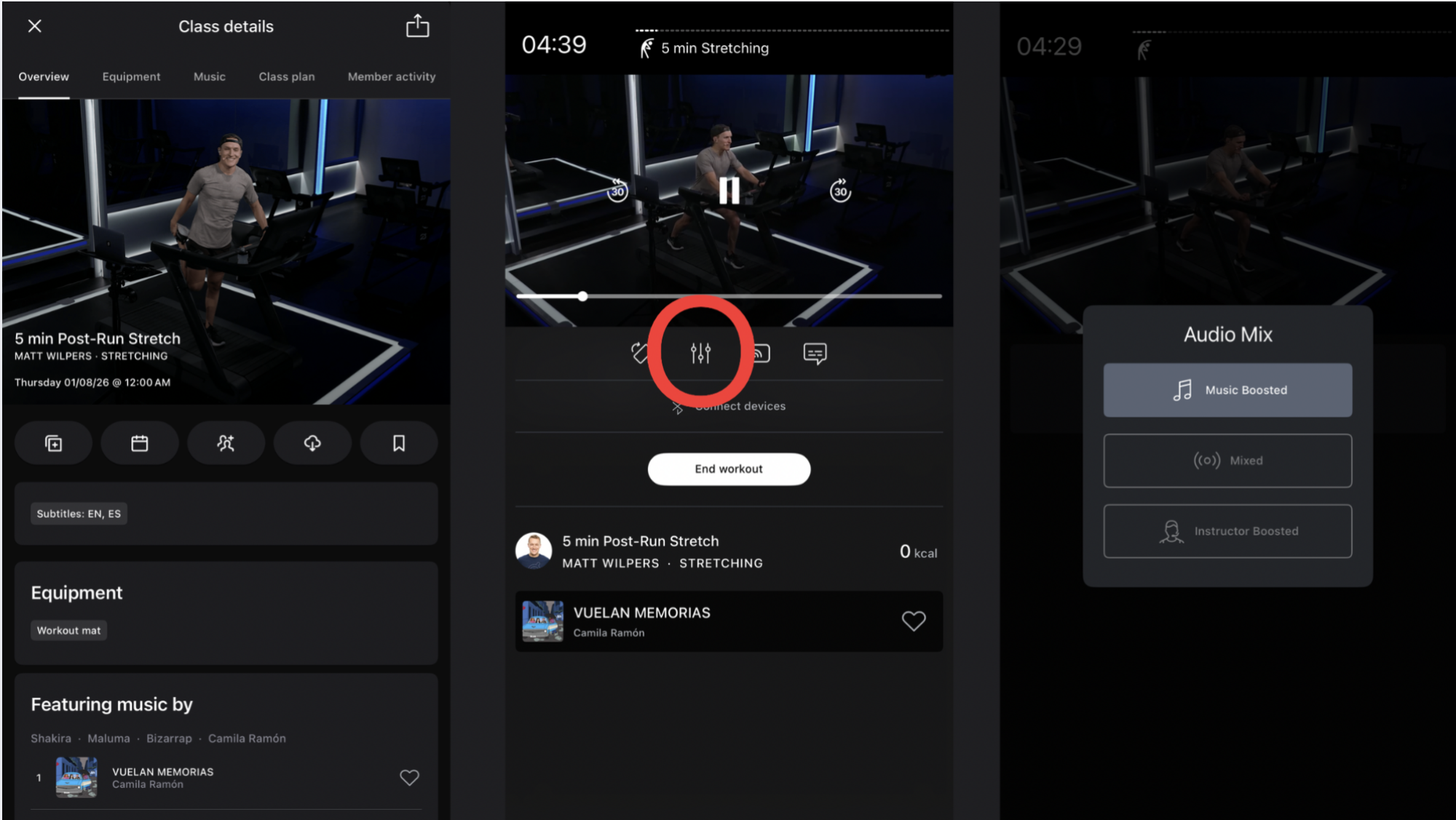
On the mobile app, you have a similar option for classes that don’t require the brand’s proprietary cardio equipment, though it’s not always as customizable. First, load up a class (like stretching or yoga). The video of the instructor walking you through it will start to play. Tap the video itself and you’ll get a menu of icons that show what appears to be a phone turning on its side (to play the video full-screen), a volume slider, a Bluetooth caster to enable AirPlay across other devices in the area, and a speech bubble for subtitles. Tap that volume slider, the second icon from the left. It opens an Audio Mix box that allows you to choose whether you want Music Boosted or Instructor Boosted. You can’t control the mix between the music and the instructor as precisely as you can when you’re using the equipment, but you can at least prioritize the music or the teacher.

Changing volume in Peloton iOS

Credit: Peloton/Lindsey Ellefson

Why you’d want to do this and what to keep in mind

Some of Peloton’s instructors are notoriously chatty. Personally, I think it’s endearing and I see nothing wrong with the parasocial relationships it creates if those motivate someone to hop on their Bike more often. The instructors are beamed into hundreds of thousands of homes every month and are akin to celebrities, so it’s good for marketing and engagement if users feel connected to them, especially because at-home workouts are otherwise pretty isolating (although Peloton offers plenty of other ways to replicate the feeling of connectedness you get from in-person classes, like Teams competitions).

Still, some people aren’t trying to replicate that feeling; they just want to work out by themselves with no chatter. Usually, that means loading up your own music or taking one of Peloton’s scenic rides, but the trade-off there is that you don’t get a well-planned workout designed by a professional trainer, like you do when you take an instructor-led class. You trade the suggested resistance and speed for something self-paced, which can be detrimental to motivation or effort. By cutting down the volume of the instructor’s mic and amplifying the playlist, you get to take a real class, follow along with the resistance and speed cues on the screen, and listen to a playlist you don’t have to bother curating. If you don’t care what a teacher had for breakfast but do care to follow along with a 45-minute progressive push because it aligns with your fitness goals, turning down the instructor volume could be for you.

That said, there is a reason these classes are instructor-led. Teachers are certified for a reason and the ones on high-profile platforms like Peloton are well-credentialed. They provide safety cues, insights into why playlists and rides are structured the way they are, and helpful information you can carry into your self-led workouts—plus motivation when you need it. I wouldn’t recommend cutting out the instructor volume if you’re a beginner. There is value in hearing what a pro has to say about form, speed, and self-pacing. You should only cut it out if you’re a seasoned rider with good form and a solid understanding of your own abilities and limits. That said, if you’re just getting started with Peloton and have concerns about your form or understanding of the workouts, it might even be worth it for you to use this feature the opposite way, prioritizing the instructor feed and deprioritizing the music. Riding to the beat will come in time, but doing it safely and effectively is most important.

If you’re a newbie and you don’t like instructor chatter, I recommend filtering your classes so you only take ones from the less-talkative teachers, like Ben Alldis, Sam Yo, Matt Wilpers, and Leanne Hainsby. It might take you some time to find the instructor whose methods align best with your interests and motivators, but it’s worth it. You can also take specialty Metrics classes, which are designed to focus more heavily on performance metrics like cadence, resistance, and output. Those have less talking overall.

EPA moves to stop considering economic benefits of cleaner air

If you were to do a cost-benefit analysis of your lunch, it would be pretty difficult to do the calculation without the sandwich. But it appears that the US Environmental Protection Agency (EPA) is moving in this same direction—removing the benefit—when it comes to air pollution regulations.

According to a New York Times report based on internal emails and documents—and demonstrated by a recently produced analysis on the EPA website—the EPA is changing its cost-benefit analysis process for common air pollutants. Instead of comparing the economic cost of a certain pollution limit to an estimate of the economic value of the resulting improvements in human health, the EPA will just qualitatively describe health benefits while carefully quantifying economic costs.

Cost-benefit analysis has been a key component of EPA regulations. Any decision to raise or lower air quality standards or pollution limits includes evaluations of the cost that change, like the addition of new pollution control equipment at power plants, would incur, for example.

Read full article

Comments

Taiwan issues arrest warrant for Pete Lau, CEO of OnePlus

Taiwanese officials have issued an arrest warrant for OnePlus CEO Pete Lau on allegations of illegally employing workers in Taiwan. Two Taiwanese citizens who worked for Lau have also been indicted. The China-based smartphone company has been accused of illegally recruiting more than 70 engineers from Taiwan. 

Members of the Shilin District Prosecutors Office claim that OnePlus reportedly set up a shell company in Hong Kong with a distinct name, then launched a branch in Taiwan in 2015 without government approval. The branch reportedly worked on research and development for OnePlus mobile phones. Taiwanese officials claim these actions by OnePlus violated the Cross-Strait Act, which is designed as a guide for relations between Taiwan and mainland China. One of the act’s provisions requires Chinese companies to obtain permission from the Taiwanese government to hire workers from Taiwan.

This article originally appeared on Engadget at https://www.engadget.com/mobile/smartphones/taiwan-issues-arrest-warrant-for-pete-lau-ceo-of-oneplus-185400997.html?src=rss

How Your Child’s Google Account Changes When They Turn 13

The internet is a wild place, and not particularly kid-friendly. Unfortunately, it’s highly impractical to keep your kids entirely off the web. That’s where family accounts come in handy: Parents can set their kids up with supervised accounts, giving them access to essential apps and services, without allowing unfettered access to the entire net. It’s often imperfect, and kids find workarounds for the guardrails, but still; it’s better than nothing.

Every company that offers a family account handles things differently. Meta, for example, continues to update their policies in the wake of criticism surrounding how addictive and harmful their apps can be for children. These days, teens have to deal with a number of limitations they didn’t previously have: While users 16 and older can remove these limitations if they wish, those under 16 need a parent’s consent to do so. That means things like screen time, going live on Instagram, and DMs are all blocked and controlled by the parent for users 15 and under.

If you’re the administrator of a Google Family Account, you might assume you have a similar level of control over your kids’ Google accounts. Perhaps you imagine it’s like Meta: When they’re old enough, maybe something like 16, they can decide for themselves what level of access they have on their account, but until then, you’d have the final say. As it turns out, that’s not the case. In fact, you really only have that control until your kid turns 13.

Google Accounts are available for users 13 and up

I first came across this issue from this LinkedIn post from user Melissa McKay. McKay, frustrated, shared how she received an email from Google, alerting her that her youngest child will soon have the option to remove supervision on their Google Account once they turn 13. According to the attached screenshots, the email says that once the child turns 13, they’ll be able to access more Google apps and services, and customize their Google Account to make it their own. McKay summed up her discontent with the following: “Call it what it is. Grooming for engagement. Grooming for data. Grooming minors for profit.”

The post currently has over 6,400 reactions on LinkedIn, which is relatively viral for the platform. Since I don’t have kids, this is the first I’m hearing about these rules. But a quick search pulls up Google’s official support doc on the subject. Indeed, when a child turns 13 (or an applicable age due to the law of the country or region) they are given the choice to either continue on with parental supervision, or manage their own Google Account.

Here’s what that means for your child:

  • They’ll no longer have access to YouTube Kids, but will have access to general YouTube. Google will also disable supervised YouTube experiences.

  • They’ll be able to add payment cards to Google Wallet or Google Pay, and can remove cards from their phone or watch, as well.

  • They’ll be able to use these cards for tap to pay, in-app payments, website payments via Google Pay, autofill, as well as various payments across Google services, like the Play Store and YouTube.

And here’s what that means for you, as their parent:

  • You can no longer set up supervision features like downtime, app blocking, or mandatory location sharing. (Your child can choose to share their location, if they want to.)

  • You can no longer see your child’s transactions or get notifications when they make new purchases.

  • You can’t add or remove payment cards for your kid.

  • You can’t block their access to Wallet passes.

Of course, these changes are contingent on your child’s decision to remove the supervision. They can choose to keep it on, and, as such, you can continue to monitor and administer your kid’s account. However, I can imagine many 13 year olds will choose to remove supervision, unless they’re particularly agreeable. As such, you effectively lose control when your child does turn 13.

Interestingly, Google says that once a child removes supervision without your permission, their device is locked “temporarily.” It’s not clear whether this means that the parent device needs to unlock the device, or if this just a cool down period, and the device will unlock on its own. I’ve reached out to Google for clarity here.

Not all Google services are available for minors

Even though Google allows kids to lift restrictions when they turn 13, they don’t have total access to all of Google’s services. According to this support doc, there are some key age-restricted content and services that require users to be 18 or older, including:

  • Age-restricted YouTube videos

  • AdSense

  • Google Ads

That’s it, at least according to Google’s safety doc. I’ve reached out to Google again for clarity on what other restrictions are in place on accounts between ages 13 and 18, and will update this article when I know more.

Google is changing its family link age policy

This is all changing, however. Kate Charlet, Google’s head of global privacy, safety, and security, posted on LinkedIn as well, acknowledging the current policy and asserting that Google has changes in the works. Soon enough, Google will require both the child and the parent to agree to lift supervision. That should help parents who aren’t ready to let their 13 year old access standard YouTube and other Google services without their permission.

Of course, for parents that have already received an email about their kids reaching “the age of digital consent,” this might not offer much solace.

Apple’s Mac and iPad creative apps get bundled into “Creator Studio” subscription

Apple’s professional creative apps have been slower to jump on the subscription bandwagon than those from Adobe or some of its other competitors, but the company is taking a step in that direction today. Starting on January 28, Apple will offer an Apple Creator Studio subscription for $13 a month, or $130 a year. Subscribers will get access to the Mac and (where applicable) iPad versions of Final Cut Pro, Logic Pro, Pixelmator Pro, Motion, Compressor, and MainStage, as well as “intelligent features and premium content” for the Mac, iPad, and iPhone versions of Keynote, Pages, Numbers, and Freeform.

Apple says it will also offer a one-month free trial for the subscription and a discounted version for students at $3 a month, or $30 a year.

Most of the apps also seem to be getting small feature updates to go along with the Creator Studio announcement. Final Cut will get a new Transcript Search feature that will allow you to dig through video footage by searching for specific dialogue, and a new Montage Maker feature “will analyze and edit together a dynamic video based on the best visual moments within the footage.” An updated Logic Pro “helps creators deliver original music for their video content” and adds a synth player to the app’s lineup of “AI Session Players.”

Read full article

Comments

The Seven Best Tool Box Accessories Everyone Should Have

We may earn a commission from links on this page.

Every self-respecting DIYer eventually buys a tool box—a sturdy place to store, organize, and protect your valuable tools. A quality metal tool box instantly ups your home maintenance and repair game—suddenly, you no longer have to spend twenty minutes rooting around for that pair of pliers or that box of random screws, because everything is in its place. And that place can often roll around and follow you to wherever you need to work.

Tool boxes are terrific, but that doesn’t mean they can’t be improved and augmented. Whether your tool box is a small, efficient unit or a behemoth with deep drawers and pull-out trays, you could be getting more out of it with a few simple additions. If you’re looking to squeeze a little more juice out of your tool box set-up, here are the tool box accessories you should be considering.

Spray can caddies

I used to keep all the spray cans in my life—the lubricants, adhesives, and paints—on a little shelf in my work room, and they kept being knocked off onto the floor. And, inevitably, I would already be knee-deep in a project when I realized I needed one of them, and I would have to troop back to my tool closet to grab them. Instead of doing that, invest in a spray can caddy like these. They slap onto the side of your metal tool box and hold all your cans of paint or WD-40 so they’re always at hand and never lost.

Power tool holders

You often need more than one drill, driver, or blower for a job, and having them scattered all over the work site is never ideal. This magnetic power tool holder slaps onto the side of your tool box and makes it easy to slot in up to three tools for easy access. This also keeps those bulky tools out of the tool box itself, freeing up space for more tools while ensuring that your power tools are always in the same spot when you need them.

Wrench and plier organizers

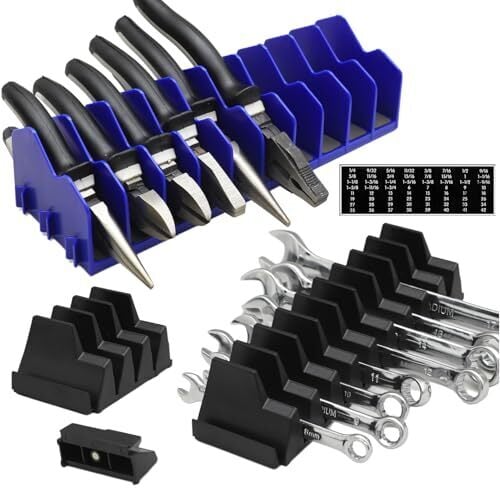
We all know what happens to wrenches and pliers in your standard tool box: They get shoved into a drawer and jumbled up, and you spend more time picking through them trying to find the size you need than you do actually using them. A magnetic organizer like this one solves that problem, at least for your wrenches, keeping them easily accessible and organized. Interior organizers like this also make sense, and can accommodate pliers as well as wrenches, keeping things tidy in your tool box’s drawers and saving you a little time whenever you grab one—time that adds up over the course of a project.

Shelves and towel holders

Nothing is more useful on a tool box than accessories that let you temporarily store stuff. A folding shelf like this one designed for Milwaukee’s popular Packout Tool Box is incredibly useful when you need to have hand tools or fasteners in reach. If you can’t find a shelf designed for your specific tool box, there are magnetic kits like this that will work with any metal tool box, giving you some quick storage when you need it. One genius thing included in that kit is the towel holder—the simple convenience of being able to grab a paper towel as needed is worth every penny. You can also find magnetic towel holders on their own if that’s the only thing your tool box lacks.

Power strips

Cordless power tools may have mostly freed us from the outlet—but not every tool can (or should) be cordless, and sometimes you need a handy power source. Adding a magnetic power strip to the exterior or interior of your tool box means you can plug in that legacy corded tool, charge up batteries, or plug in anything else you might need, from lights to your dying phone.

Tool strips

You probably have a magnetic tool holder in your workshop or tool closet already, so why not add one to your tool box? Aside from giving you more storage options, a magnetic strip lets you slap your tools into place as you need them, without losing them in the depths of a drawer or leaving them behind when you drop them on the floor and move away as you work.

Cup holder

Honestly, cup holders should be built into everything. Having a beverage at hand while you work—whether it’s water to hydrate, coffee to wake and warm up, or a beer to settle your nerves after discovering yet another disaster brewing in your house, a simple magnetic cup holder for your tool box just makes every DIY project a little nicer.

Scott Adams, Dilbert creator, dead at 68

Scott Adams, the creator of the Dilbert comic strip, died today of prostate cancer at 68.

Adams satirized the world of cubicle-based IT and engineering in Dilbert, which at its height appeared in 2,000 daily newspapers and was later anthologized in numerous books.

Dilbert was an engineer with few social skills, but he always knew more than his pointy-haired boss, a caricature of terrible supervisors everywhere who managed to make the life of those who actually knew what they were doing—the engineers—much harder than it needed to be.

Read full article

Comments

My Favorite Amazon Deal of the Day: The Samsung Odyssey G5 Gaming Monitor

We may earn a commission from links on this page. Deal pricing and availability subject to change after time of publication.

When it comes to gaming monitors, having an ultra-wide curved screen takes the experience to the next level, with a more immersive experience than a regular monitor. Unfortunately, that improved experience tends to come at a much higher price. But there are budget monitors that go on sale, making it much more affordable to upgrade your gaming without hurting your wallet too much. Samsung is currently selling its 34-inch Samsung Odyssey G5 for $279.99 (originally $399.99).

The Samsung Odyssey G5 is a great ultra-wide monitor for those who haven’t used one before, with all the important specs you’d want while keeping the price relatively low. Other high-end, bigger ultra-wide monitors go upwards of $700, like the Odyssey OLED G9. Those are much bigger and offer OLED quality visuals, though.

The Odyssey G5 comes with a 1000R curve, which Samsung claims is optimal to avoid eye strain. Your media will be displayed on a 21:9 aspect ratio and 3440×1440 resolution, which means if you watch videos that are not compatible with that ratio, it’ll have some black space on the sides to prevent it from looking stretched. You also get a 165Hz refresh rate and native FreeSync variable refresh rate (VRR) support, helping fast games look smoother. The input lag is 1ms, which is very fast for a budget gaming monitor. It’s also compatible with HDR10, so watching movies or shows will look good, but mostly in dark rooms since the HDR peak brightness isn’t very high.

Deals are selected by our commerce team

Anthropic Invests $1.5 Million in the Python Software Foundation and Open Source Security

Python Software Foundation: We are thrilled to announce that Anthropic has entered into a two-year partnership with the Python Software Foundation (PSF) to contribute a landmark total of $1.5 million to support the foundation’s work, with an emphasis on Python ecosystem security. This investment will enable the PSF to make crucial security advances to CPython and the Python Package Index (PyPI) benefiting all users, and it will also sustain the foundation’s core work supporting the Python language, ecosystem, and global community.

Anthropic’s funds will enable the PSF to make progress on our security roadmap, including work designed to protect millions of PyPI users from attempted supply-chain attacks. Planned projects include creating new tools for automated proactive review of all packages uploaded to PyPI, improving on the current process of reactive-only review. We intend to create a new dataset of known malware that will allow us to design these novel tools, relying on capability analysis. One of the advantages of this project is that we expect the outputs we develop to be transferable to all open source package repositories. As a result, this work has the potential to ultimately improve security across multiple open source ecosystems, starting with the Python ecosystem.


Read more of this story at Slashdot.