California authorities have launched an investigation into xAI following weeks of reports that the chatbot was generating sexualized images of children. “xAI appears to be facilitating the large-scale production of deepfake nonconsensual intimate images that are being used to harass women and girls across the internet, including via the social media platform X,” California Attorney General Rob Bonta’s office said in a statement.
The statement cited a report that “more than half of the 20,000 images generated by xAI between Christmas and New Years depicted people in minimal clothing,” including some that appeared to be children. “We have zero tolerance for the AI-based creation and dissemination of nonconsensual intimate images or of child sexual abuse material,” Bonta said. “Today, my office formally announces an investigation into xAI to determine whether and how xAI violated the law.
The investigation was announced as California Governor Gavin Newsom also called on Bonta to investigate xAI. “xAI’s decision to create and host a breeding ground for predators to spread nonconsensual sexually explicit AI deepfakes, including images that digitally undress children, is vile,” Newsom wrote.
xAI’s decision to create and host a breeding ground for predators to spread nonconsensual sexually explicit AI deepfakes, including images that digitally undress children, is vile.
I am calling on the Attorney General to immediately investigate the company and hold xAI…
California authorities aren’t the first to investigate the company following widespread reports of AI-generated child sexual abuse material (CSAM) and non-consensual intimate images of women. UK regulator Ofcom has also opened an official inquiry, and European Union officials have said they are also looking into the issue. Malaysia and Indonesia have moved to block Grok.
Last week, xAI began imposing rate limits on Grok’s image generation abilities, but has so far declined to pull the plug entirely. When asked to comment on the California investigation, xAI responded with an automated email that said “Legacy Media Lies.”
Earlier on Wednesday, Elon Musk said he was “not aware of any naked underage images generated by Grok.” Notably, that statement does not directly refute Bonta’s allegation that Grok is being used “to alter images of children to depict them in minimal clothing and sexual situations.” Musk said that “the operating principle for Grok is to obey the laws” and that the company works to address cases of “adversarial hacking of Grok prompts.”
This article originally appeared on Engadget at https://www.engadget.com/ai/california-is-investigating-grok-over-ai-generated-csam-and-nonconsensual-deepfakes-202029635.html?src=rss
An anonymous reader shares a report: Global temperatures soared in 2025, but a NASA statement published Wednesday alongside its latest benchmark annual report makes no reference to climate change, in line with President Donald Trump’s push to deny the reality of planetary heating as a result of human activities.
That marks a sharp break from last year’s communications, issued under the administration of Democrat Joe Biden, which stated plainly: “This global warming has been caused by human activities” and has led to intensifying “heat waves, wildfires, intense rainfall and coastal flooding.”
Last year’s materials also featured lengthy quotes from the then-NASA chief and a senior scientist and included graphics and a video. By contrast, this year’s release only runs through a few key figures, and amounts to a handful of paragraphs. According to the US space agency, Earth’s global surface temperature in 2025 was slightly warmer than in 2023 — albeit within a margin of error — making it effectively tied as the second-hottest year on record after 2024.
The prices that Americans paid for subscription- and rental-based access to video streaming services and video games increased 29 percent from December 2024 to December 2025, according to data that the US Department of Labor’s Bureau of Labor Statistics (BLS) released on Tuesday.
According to the BLS, the Consumer Price Index for All Urban Consumers (CPI-U), which BLS says represents over 90 percent of the US population across the country, for all items “increased 2.7 percent before seasonal adjustment.”
The CPI-U for “subscription and rental of video and video games” includes subscription video-on-demand (SVOD) streaming services, like Netflix and Disney+, and “one-time rental of video and video game media. These may be rented or subscribed to through physical copy, streaming, or temporary download,” BLS says. For comparison, “cable, satellite, and live streaming television service [such as YouTube TV and Sling]” saw 4.9 percent inflation last year.
ASRock has introduced a new variant of its ASRock Taichi AMD RX 9070 XT—the same card but now white, with an added LCD display. The ASRock Taichi White AMD RX 9070 XT is otherwise clocked the same as the previous rendition of the card, but the white Taichi aesthetic with the LCD now looks like a great match for ASRock’s own debut line of AIOs
It’s not whoever gets to the flagpole first, but who does it with the most style. Following PlayStation and Steam, Nintendo has finally released an annual recap so you can pour over your Switch and Switch 2 stats for 2025, and as it turns out, even see your playtime data for as far back as when you first booted up a Nintendo Switch system.
Mid-January is a bit of a late release for one of these annual recaps, and last year’s Nintendo Switch Year in Review came out in mid-December. However, since Metroid Prime 4 came out pretty shortly before that, I can see why Nintendo might have opted to wait this year. Plus, the delay gave people who got Nintendo Switch 2 systems for the holidays some time to get some stats on the book before year’s end.
Like last year, Nintendo’s 2025 recap is available via browsers rather than a dedicated app. Just head to the recap webpage, sign into your Nintendo Account, and scroll to see all your stats.
If you started playing on a Nintendo Switch 2 system this year, you’ll first see some congratulations for that, and then the real fun can begin. I’ll post some examples from my Year in Review below, but be nice—I play most of my games on PC, and when I do play on Switch, it’s mostly on my husband’s profile. I swear I do more in my free time than just browse YouTube Shorts until I fall asleep, honest.
Credit: Michelle Ehrhardt
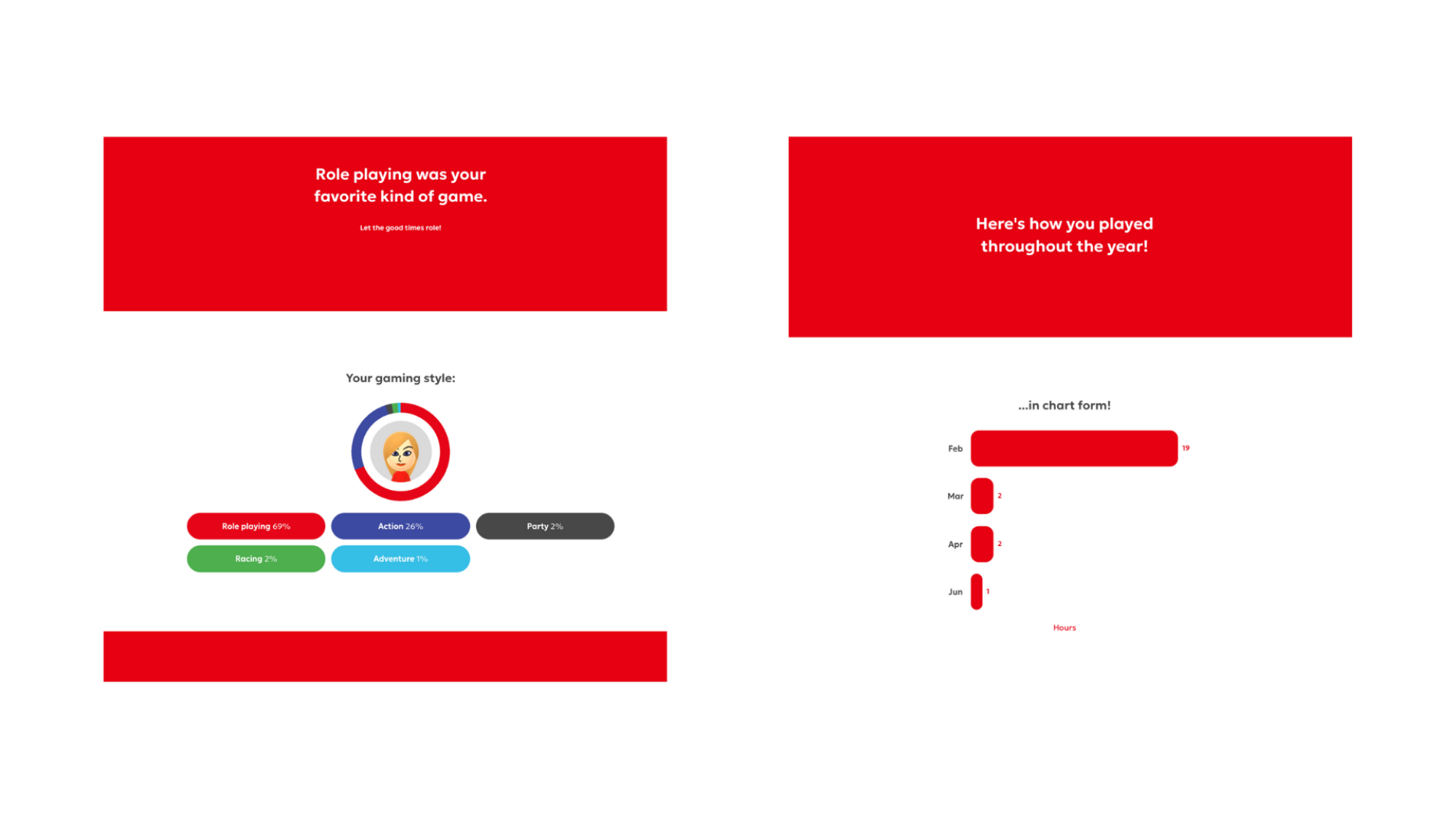
Anyway, you’ll start off looking at how many games and hours you played in total, and then get a short list of the games you played the most. After that, you’ll get breakdowns by genre and month, and then comes the coolest part of this whole thing. You’ll be able to pick your own personal game of the year from the games you’ve played, which will show up on a card you can share with others.
Credit: Michelle Ehrhardt
In a bit of a different twist, though, Nintendo’s data doesn’t end at 2025. Instead, if you keep scrolling, you’ll see when you first started playing on a Nintendo Switch system, as well as your most played games for each of the years you’ve been playing Switch. Mouse over a game to see stats for it, or click the “See Your Stats” button in the lower-right corner to see detailed stats for that year, with a breakdown of your most played games, favorite genres that year, and playtime broken down by month.
Credit: Michelle Ehrhardt
At the end, you’ll get a short shareable video with a bite-sized look at your entire Switch history, showing when you first started playing a Switch and/or Switch 2, which games you’ve played the most, and how long you’ve played each.
In that way, Nintendo’s Year in Review is almost more of a Console in Review, but I suppose that makes sense—the original Switch hasn’t been discontinued yet, but the Switch 2 did come out last year.
Verizon said on Wednesday that its wireless service was suffering an outage impacting cellular data and voice services. From a report: The nation’s largest wireless carrier said that its “engineers are engaged and are working to identify and solve the issue quickly.” Verizon’s statement came after a swath of social media comments directed at Verizon, with users saying that their mobile devices were showing no bars of service or “SOS,” indicating a lack of connection.
Verizon, which has more than 146 million customers, appears to have started experiencing services issues around 12:00 p.m. ET, according to comments on social media site X. Users also reported problems with Verizon competitor T-Mobile. But the company said that it was not having any service issues. “T-Mobile’s network is keeping our customers connected, and we’ve confirmed that our network is operating optimally,” a spokesperson told NBC News. “However, due to Verizon’s reported outage, our customers may not be able to reach someone with Verizon service at this time.”
Before we get started here, let’s take a moment and explain the headline. You see, Rockstar’s in a bit of legal hot water right now for terminating a group of employees in Scotland over purportedly leaking information about GTA VI into a non-company Discord. The only problem is that they were union members speaking in a union Discord. The
One of the bright spots for PC gaming in 2026 is the upcoming release of Valve’s Steam Machine, even if leaked pricing indicates it might not as affordable as many hoped. While official pricing is still unknown, the company shared in an interview with Game Developer that its verification process, which has been a boon for the Steam Deck alongside
DIY fixes around the house can save you a lot of money and headaches—with few basic skills and a few basic tools, you can tackle a wide range of home projects while other folks pay professionals enormous amounts of money to get the same work done.
But sometimes, you get what you pay for. Professionals may be pricey, but they bring with them a wealth of experience and knowledge that helps them avoid simple mistakes that can lead to real trouble—including code violations. A lot of DIYers tend to skip steps like pulling permits and inspections on the assumption that they’re not necessary for minor fixes, but hacks that seem like clever solutions when you’re DIY-ing can actually be illegal. And code violations can and will come back to haunt you once you try to sell the house, if not sooner.
Here are some of the most common DIY choices that could also cause code violations.
Using the wrong electrical outlet
Changing electrical receptacles (also commonly, if incorrectly, referred to as outlets) is a relatively easy DIY project that just about anyone with a screwdriver can tackle, from upgrading to modern three-prong receptacles or adding USB capabilities. But even if your project is successful in the sense that you end up with working receptacles and you haven’t electrocuted yourself or burned down the house, you can still wind up with a major code violation if you don’t use ground-fault circuit interruption (GFCI) receptacles in areas where water sources are present, such as bathrooms, kitchens, or laundry areas.
The applicable codes can be exacting when it comes to minimum distances from water sources, daisy-chaining receptacles, and using GFCI breakers instead of individual outlets. If you’re just slapping any old outlet into place, you’re probably violating electrical codes, even if everything works.
Handrails without proper returns
If you have a set of stairs that lacks a handrail (or has an old handrail that’s loose and coming free from the wall), it’s easy to buy a new one, cut it to size, and attach it to the wall with fresh screws. But if your handrail isn’t at the correct height (typically somewhere between 30 and 38 inches from the stair tread), you’re in violation of most residential codes. And if your handrail doesn’t make a 90-degree turn toward the wall, floor, or a post at the end—known as a return—you’re also violating code. It’s a safety issue, because clothing and straps can loop over the handrail as you start up or down the stairs, leading to a potential fall and injury.
Venting into a void
A few years after buying my house, I decided to replace the ugly ventilation fan in the bathroom. Imagine my surprise when I yanked that sucker out and discovered it was vented directly into the ceiling void. Ventilation fans in bathrooms, kitchens, or laundry rooms must vent outside the house, not into an attic or basement. Even if the fan you’re replacing currently vents into an interior space, you have make upgrades to vent it outside or your repair will also violate codes.
Overloading your electrical box
If you know that you need a metal electrical box when running wiring through your house, that’s great. If you cram way too many wires and clamps into that box, you’ll be in violation of the electrical code—and in real danger of burning down your house. Each electrical box is rated by volume—not the number of wires, but their total volume. Calculating this can be complex if you’re not deeply familiar with wiring, so a good rule of thumb is to avoiding adding wires to a box unless you’re absolutely certain you’re not breaking code by doing so.
Cutting into beams
Running electrical or plumbing work through walls, basements, or crawl spaces seems straightforward: You start at A, run the material to B, and close everything up. Except you will quickly run into a common problem when a beam or joist invariably blocks your wires or pipes from advancing.
Drilling through studs to run wiring is pretty common, as is notching joists to squeeze pipes through. But if you cut into a load-bearing stud or beam with too large a notch, you can easily run into a code violation (and a dangerous one, at that). That’s because cutting into a load-bearing structure weakens it, and weakens everything it’s supporting as a result. As with electrical work, the code for notching lumber in the house can be difficult to parse unless you’re experienced with it. You can usually use common sense here and be okay, but it’s also very easy to drill a hole or cut a notch that’s a little too large, setting yourself up for future headaches.
Unmarked breakers
Did you know that your breaker box is supposed to be clearly—and accurately—labeled? Unlabeled breakers (or, worse, incorrectly labeled breakers that don’t reflect changes to the wiring) are dangerous to anyone who works on them, because critical assumptions will be made based on those labels. If you did some DIY wiring in the house that’s otherwise up to code but you forgot to label or update your breakers, you’re violating code anyway.
Overusing extension cords
Everyone uses extension cords, whether it’s to bring power to something that can’t be plugged into the wall or as a temporary solution to a problem. With stress on the word temporary, because extension cords are never supposed to be used as permanent wiring. That means if you’ve been powering something in your basement, yard, or even a bedroom for a long time, you’re probably violating your local fire code. Extension cords are simply not rated for constant use—if you’ve been using one to deliver power for a while, it’s time to call an electrician and have some proper wiring done. (If you want to double extra violate that code, go ahead and run an extension cord—or even an appliance cord—inside your walls.)
Too-tall fencing
Neighbors can be nosy (and annoying), and the old saying that “good fences make good neighbors” is all too true. Just don’t let the desire for privacy and dominion over your lands lead you into violating local codes, because privacy fences usually have strict upper height limits. Most building codes limit privacy fencing to about six feet at most, so if you build a 12-foot green monster in your backyard to block your neighbor’s view of your sunbathing area, you’re setting yourself up for a future problem.
An anonymous reader shares a report: Chinese authorities have told domestic companies to stop using cybersecurity software made by roughly a dozen firms from the U.S. and Israel due to national security concerns, two people briefed on the matter said.
As trade and diplomatic tensions flare between China and the U.S. and both sides vie for tech supremacy, Beijing has been keen to replace Western-made technology with domestic alternatives. The U.S. companies whose cybersecurity software has been banned include Broadcom-owned VMware, Palo Alto Networks and Fortinet, while the Israeli companies include Check Point Software Technologies, the sources said.
Civilization VII is coming to the iPhone and iPad, Apple and publisher 2K announced today.
Formally titled Sid Meier’s Civilization VII Arcade Edition, it is developed by Behaviour Interactive with input from original developer Firaxis Games.
Neither announcement makes any mention of a non-Arcade version, so this appears to be exclusively part of the subscription.
Verizon’s network appears to be having technical issues that are impacting calls and wireless data. Users on X have reported seeing “SOS” rather than the traditional network bars on their smartphones, and even Verizon’s own network status page is struggling to load.
Based on the experience of Verizon users on Engadget’s staff, the services that are impacted appear to be calls and wireless data. Text messages continue to be delivered normally. On DownDetector, reports of a Verizon outage started growing around 12PM ET and now number in the hundreds of thousands.
We are aware of an issue impacting wireless voice and data services for some customers. Our engineers are engaged and are working to identify and solve the issue quickly. We understand how important reliable connectivity is and apologize for the inconvenience.
In a post on the cell provider’s news account on X, Verizon acknowledged the issues with its network. “We are aware of an issue impacting wireless voice and data services for some customers,” Verizon wrote. “Our engineers are engaged and are working to identify and solve the issue quickly. We understand how important reliable connectivity is and apologize for the inconvenience.”
Based on DownDetector’s map of outage reports, issues with Verizon’s network appear to be concentrated in major cities in the eastern United States. Engadget has contacted Verizon for more information about the network issues. We’ll update this article if we hear back.
Verizon’s last major outage was in September 2024, when the company’s network dealt with connectivity issues that lasted for several hours. That outage similarly impacted users ability to make calls.
This is a developing story. Our team will make frequent updates as more news occurs…
This article originally appeared on Engadget at https://www.engadget.com/big-tech/verizon-outage-voice-and-data-services-down-for-many-customers-183048956.html?src=rss
Sony just announced January’s Game Catalog additions for PS Plus subscribers and it’s a fantastic lineup. All of these titles will be ready to play on January 20.
First up, there’s Resident Evil Village. This is a direct sequel to 2017’s Resident Evil 7: Biohazard. It’s a full game with plenty of jump scares and an engrossing narrative. It’s set in a spooky village, thus the name, and a nearby castle. This shouldn’t disappoint fans of the franchise and will be available for both PS4 and PS5.
Like a Dragon: Infinite Wealthis a 2024 sequel toYakuza: Like a Dragon. It was a massive hit upon release, thanks to solid RPG mechanics and a truly unique sense of humor. There are minigames that parody both Pokémon and Animal Crossing. The combat and movement have also both been enhanced since the last entry. It’ll be playable on both PS4 and PS5.
Expeditions: A MudRunner Game is a neat little riff on a driving sim, mixing in other genres. The meat and potatoes involve driving an off-road vehicle to locate treasures and uncover secrets, but there’s also a base-building element. It’ll be available for both PS4 and PS5.
That’s really just the tip of the iceberg. This is a big month for PS Plus subscribers. Other titles dropping on January 20 include the iconic roguelike Darkest Dungeon II and the horror adventure A Quiet Place: The Road Ahead.
This article originally appeared on Engadget at https://www.engadget.com/gaming/playstation/ps-plus-game-catalog-additions-for-january-include-resident-evil-village-and-like-a-dragon-infinite-wealth-181501574.html?src=rss
Coal power generation fell in China and India for the first time since the 1970s last year, in a “historic” moment that could bring a decline in global emissions, according to analysis. From a report: The simultaneous fall in coal-powered electricity in the world’s biggest coal-consuming countries had not happened since 1973, according to analysts at the Centre for Research on Energy and Clean Air, and was driven by a record roll-out of clean energy projects.
The research, commissioned by the climate news website Carbon Brief, found that electricity generated by coal plants fell by 1.6% in China and by 3% in India last year, after the boom in clean energy across both countries was more than enough to meet their rising demand for energy. China added more than 300GW of solar power and 100GW of wind power last year — together, more than five times the UK’s total existing power generation capacity — which are both “clear new records for China and, therefore, for any country ever,” the report said. India added 35GW of solar, 6GW of wind and 3.5GW of hydropower last year, according to the analysis.
Generative AI, we are repeatedly told, is a transformative and complicated technology. So complicated that its own creators are unabletoexplain why it acts the way it does, and so transformative that we’d be fools to stand in the way of progress. Even when progress resembles a machine for undressing strangers without their consent on an unprecedented scale, as has been the case of late with Elon Musk’s Grok chatbot.
UK Prime Minister Kier Starmer seems to have so fully bought into the grand lie of the AI bubble that he was willing to announce:
“I have been informed this morning that X is acting to ensure full compliance with UK law.”
Not that it currently is in compliance. Nor a timeline in which it is expected to do so. Just that he seems satisfied that someday, eventually, Musk’s pet robot will stop generating child sexual abuse material.
This statement comes just under two days after Starmer was quoted as saying “If X cannot control Grok, we will.” What could Elon possibly have said to earn this pathetic capitulation. AI is difficult? Solutions take time?
These are entirely cogent technical arguments until you remember: He could just turn it off.
Elon Musk has the power to disable Grok, if not in whole (we should be so lucky) than its image generation capabilities. We know this intuitively, but also because he rate-limited Grok’s image generation after this latest scandal: after a few requests, free users are now prompted to pay $8 per month to continue enlisting a wasteful technology to remove articles of clothing from women. Sweep it under the rug, make a couple bucks along the way.
Not only is it entirely possible for image generation to be turned off, it’s the only responsible option. Software engineers regularly roll back updates or turn off features that work less than optimally; this one’s still up and running despite likely running afoul of the law.
That we have now gone the better part of a month aware this problem exists; that the “feature” still remains should tell Starmer and others all they need to know. Buddy, you’re carrying water for a bozo who does not seem to care that one such victim was reportedly Ashley St Clair, the mother of one of his (many) children.
Some countries — namely Malaysia and Indonesia — chose to turn Grok off for their citizens by blocking the service. Indonesia’s Communication and Digital Affairs Minister was quoted as saying “The government sees nonconsensual sexual deepfakes as a serious violation of human rights.” Imagine if everyone in the business of statecraft felt that way.
The UK (not to mention the US, but please, expect nothing from us, we’re busy doingauthoritarianism) has a lot more sway over X, and by extension Elon, than either of those countries. Musk does, and is looking to do even more, business in the UK. Even if Musk were not perhaps the world’s most well known liar, Grok can still make images and that should speak for itself. Grok should bewell out of second chances by now, and it’s up to government leaders to say no more until they can independently verify it’s no longer capable of harm.
This article originally appeared on Engadget at https://www.engadget.com/he-could-just-turn-it-off-180209551.html?src=rss
Short form videos are addicting. They’re also often low quality, AI-generated, misinformation, or some combination of the bunch, and may have a negative impact on our attention spans and mental health. In short, they’re just not that good for us. It’s bad enough for grown adults to control their scrolling habits, but it’s another thing entirely for children, which poses quite the a challenge.
It’s easy enough to ban short-form video apps entirely, like TikTok. But what about apps that have short-form content as just one pillar of the overall package? Take YouTube: You might not mind your child having limited access to the app or site to watch long-form content you approve of, but having Shorts always in the way throws a wrench in that system. Any type of short-form video feed would be an issue here, but YouTube Shorts is particularly egregious, allowing kids to watch some truly horrific content, often generated by AI.
Choosing whether your kids watch YouTube Shorts
Luckily, YouTube finally appears to be giving parents some control here. As spotted by TechCrunch, YouTube announced updates to its parental controls on Wednesday. While there are a few changes on the way, the headline for me concerns Shorts. Not only will YouTube let parents choose a timer for how often their kids can watch Shorts, they can choose to set the timer to zero—effectively blocking Shorts for their kids’ and teens’ accounts.
This should be welcome news to any parents struggling to limit the short-form video content their kids are watching. You can let them watch other types of videos on YouTube Kids, or even standard YouTube if its a teen account, without worrying about them going down short-form video rabbit holes for hours.
The control here can be even more granular than an outright ban, too. Since you’re always in control of the timer, YouTube says you can customize timers based on the scenario: You could set the Shorts timer to zero during homework time, then offer 30 minutes of scrolling after dinner. You could bump that to 60 minutes on weekends, or when in the car. If your child is under a supervised account, you’ll also be able to control both custom Bedtime and “Take a Break” reminders.
Look, virtual private networks are great — I wouldn’t have made a list of the best VPNs if I didn’t recommend using them. But being able to control your own technology is also important. A VPN can provide protection and peace of mind when used properly, but you may not want it active on your phone all the time.
For example: Are your Google search results suddenly in German? That’s one example of what can happen if you leave your virtual location set to Berlin or Vienna. Or maybe a VPN you installed for work or to watch a single tennis match is persistently trying to keep itself active.
The point is, deactivating a VPN on an iPhone can sometimes be unusually tricky, because there’s more than one off switch. Fortunately, it’s not hard. There are several easy ways to disconnect from an iOS VPN or delete it entirely. If you catch it turning itself back on, I’ll show you how to stop that too.
Three ways to turn off your iPhone VPN
I’m using a fluid definition of “turn off” here. Some of the steps below simply disconnect the VPN, while others remove it from your phone altogether. I’ll make it clear in each section what the outcome will be.
How to disconnect in the VPN app
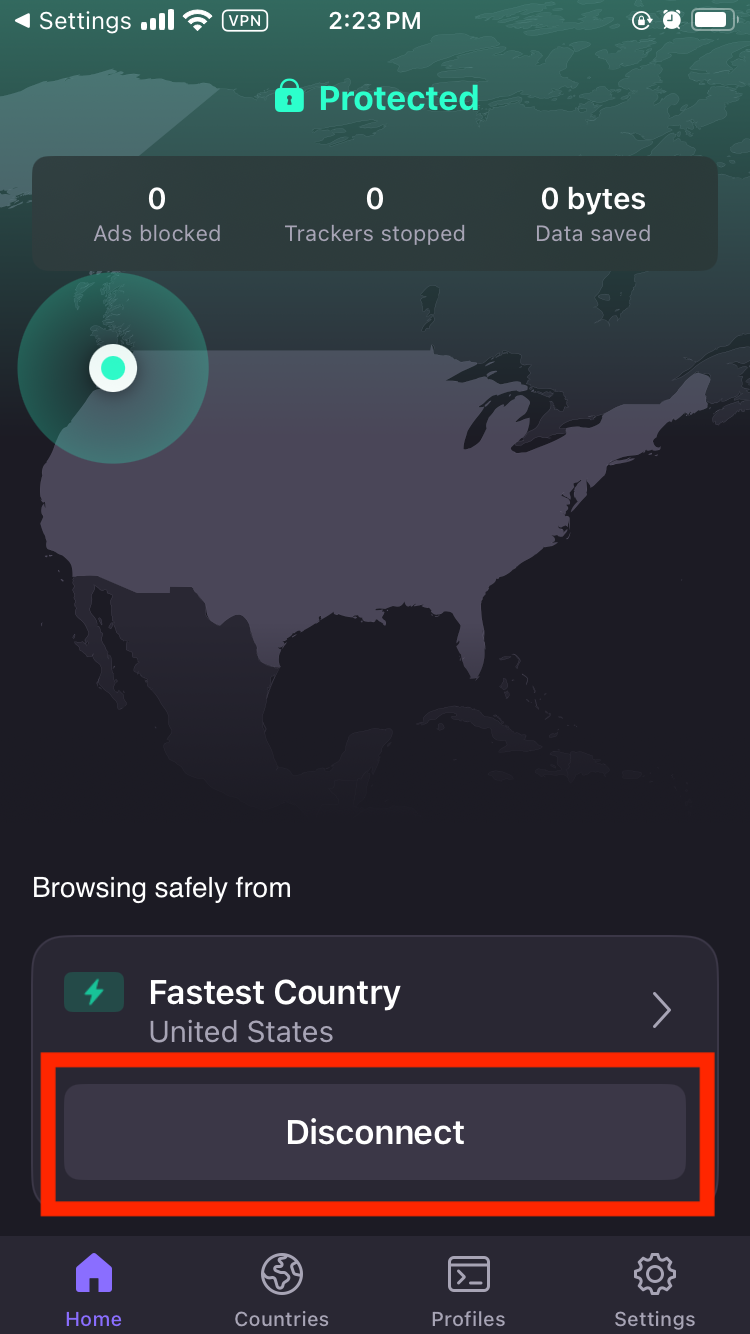
This is the easiest way to turn off a VPN on your iPhone. First, find the VPN app that’s active, which should be on your home screen somewhere. Each app has a different interface for connecting and disconnecting, but the disconnect button should be fairly obvious — it may say the word “disconnect” or show a green power icon. In any case, it should be right on the home screen, without requiring any digging through menus.
Example of where to find the disconnect option on a VPN’s home screen.
Sam Chapman for Engadget
Tap the disconnect button and wait for the VPN to clearly state that it’s disconnected. Check to make sure the rectangle with “VPN” inside has disappeared from the top of your iPhone screen. The VPN is now disconnected.
How to turn off the VPN in Settings
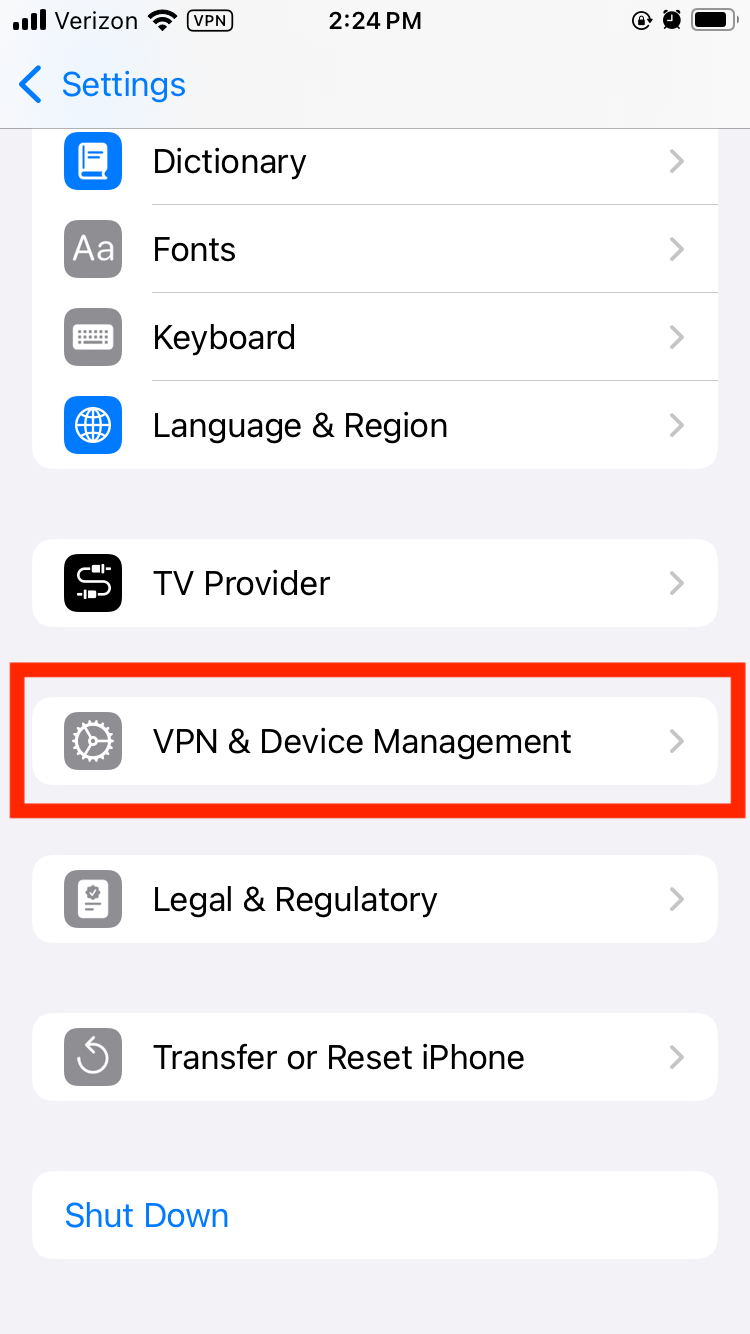
If you aren’t sure which VPN app is active, or if its interface doesn’t make it clear how to turn it off, you can shut it down from the Settings menu instead. Find the app on your home screen that looks like several interlocking gray gears and tap it.
Next, scroll down and tap the VPN option. If it’s not present (which it won’t be on older iOS versions), tap the General option next to another picture of a gray gear. Scroll down again and tap VPN & Device Management by yet another gray gear. Finally, tap the VPN option at the top of the screen to reach the VPN management page.
Location of the VPN settings on iOS.
Sam Chapman for Engadget
If you have a VPN active, you should see an option at the top of the page labeled VPN Status. Toggle it from Connected to Not Connected. The VPN icon should disappear from the top of your screen, indicating that it’s turned off.
How to delete the VPN app altogether
If you don’t want the VPN on your phone at all, you can turn it off permanently by deleting both the app and the configuration. This is a lot harder to undo, so only do it if you’re certain.
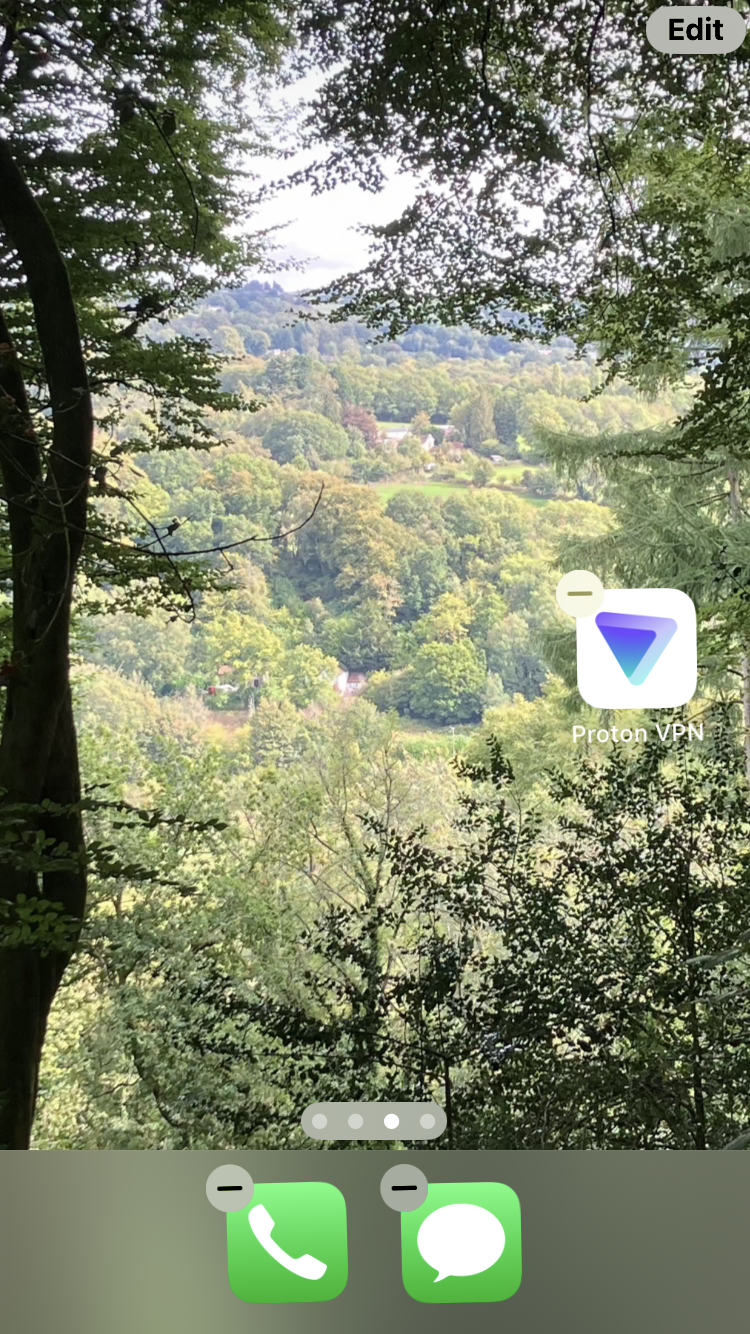
Start by deleting the app the same way you’d get rid of any other app. Tap the icon and hold until a pop-up menu appears. Select the Remove App option in red text, then click Remove App again when prompted.
Deleting a VPN on the iOS home screen.
Sam Chapman for Engadget
Deleting the app should also delete the configuration, but you can verify this for yourself. Follow the process from the previous section to find the VPN settings page. If there’s still a VPN profile in those settings, tap the circled letter “i” next to its name, then tap Delete VPN at the bottom of the screen. The VPN is now gone from your iPhone unless you re-download it from the App Store.
Troubleshooting: When an iPhone VPN turns itself back on
Sometimes, even though you’ve followed all the steps, that pesky VPN rectangle is back on your screen the next time you unlock your phone. If your iOS VPN keeps turning itself back on, a few things might be happening, most of them thankfully fixable.
If you did not delete the VPN, it may be turning itself back on because its settings are telling it to. Go into its preferences menu and check for a setting called “auto-connect” or something similar. Settings like these have the VPN connect by itself to protect users who forget to activate it manually. Toggle all auto-connect options off and the problem should stop.
It’s also possible that settings on the iOS side are making the VPN reconnect. Go to the VPN settings page (you’ll find instructions for getting there in the previous section) and find the name of the active VPN profile. Tap the “i” next to it. On the next page, turn off “connect on demand” to stop the automatic reconnections.
If you did delete the VPN, but it’s still reinstalling itself and turning back on, make sure that you deleted both the app and the connection profile. Reboot your iPhone to make sure all the settings stick. If the problem persists after all this, you’ve either got malware disguised as a VPN or you’re using a school or work phone where the VPN can’t be uninstalled.
If you aren’t on a phone provided by a school or office, meaning you probably have malware, download an antivirus app and run a complete scan of your iPhone. This should remove any persistent files that keep reinstalling the virus. If, after all this, the VPN is still turning itself back on, I recommend burning your phone in a salt circle with a bundle of sage.
When should you turn off your iPhone VPN?
I encourage everyone to use a VPN every time they connect to the internet, but there are some situations where going through a VPN server is less convenient (this is the whole reason split tunneling exists). Here are a few cases in which temporarily turning off your VPN might be a good idea.
The VPN isn’t working. If your browsing speed is sluggish or the VPN keeps dropping the connection, your VPN server might be having problems. Disconnecting and reconnecting, even in the same location, should switch you to a different server that may work better.
The VPN is causing unintended browsing errors. If you’re using mapping software or just trying to do a location-based search, having your VPN active can cause more problems than it solves.
Your internet connection is unstable.A VPN adds an extra step to the process of getting online. If your phone is already struggling, the VPN might be an unnecessary complication.
You’re on a site that blocks all VPNs. Sites that work based on your location, including all streaming sites, may blanket-block VPNs so nothing messes with their location services. Good VPNs can get around these blocks, but even the best sometimes fail. In these cases, briefly turning off the VPN may be a good idea.
Your battery is low. VPNs can put a strain on your phone’s battery life. This varies with the quality of your VPN, but you may sometimes need to shut it off if your battery is in the red.
How to turn off iCloud Private Relay
iCloud Private Relay is not a VPN, but it’s often confused for one. If you found this page because you want to turn it off, you’re in luck — the steps are just as simple as turning off a VPN. Start by opening Settings, then tap your name. Scroll down and tap iCloud.
Private Relay will only be active if you’re an iCloud+ subscriber. If you are, tap Private Relay, then choose whether to turn it off temporarily or indefinitely.
This article originally appeared on Engadget at https://www.engadget.com/cybersecurity/vpn/how-to-turn-off-a-vpn-on-iphone-180000533.html?src=rss
On Tuesday, Bandcamp announced on Reddit that it will no longer permit AI-generated music on its platform. “Music and audio that is generated wholly or in substantial part by AI is not permitted on Bandcamp,” the company wrote in a post to the r/bandcamp subreddit. The new policy also prohibits “any use of AI tools to impersonate other artists or styles.”
The policy draws a line that some in the music community have debated: Where does tool use end and full automation begin? AI models are not artists in themselves, since they lack personhood and creative intent. But people do use AI tools to make music, and the spectrum runs from using AI for minor assistance (cleaning up audio, suggesting chord progressions) to typing a prompt and letting a model generate an entire track. Bandcamp’s policy targets the latter end of that spectrum while leaving room for human artists who incorporate AI tools into a larger creative process.
The announcement emphasized the platform’s desire to protect its community of human artists. “The fact that Bandcamp is home to such a vibrant community of real people making incredible music is something we want to protect and maintain,” the company wrote. Bandcamp asked users to flag suspected AI-generated content through its reporting tools, and the company said it reserves “the right to remove any music on suspicion of being AI generated.”
McKinsey is asking graduate applicants to “collaborate” with an AI tool as part of its recruitment process, as competence with the technology becomes a requirement in competing for top-level jobs. From a report: The blue-chip consultancy is incorporating an “AI interview” into some final-round interviews, according to CaseBasix, a US company that helps candidates apply for posts at leading strategic consulting companies.
In an online post, CaseBasix said candidates in “select final rounds” in the US have been asked to complete tests using McKinsey’s internal AI tool, Lilli. They are required to carry out practical consulting tasks with the help of Lilli. “In the McKinsey AI interview, you are expected to prompt the AI, review its output, and apply judgment to produce a clear and structured response. The focus is on collaboration and reasoning rather than technical AI expertise,” CaseBasix said.
A New York man is suing Prenuvo, a celebrity-endorsed whole-body magnetic resonance imaging (MRI) provider, claiming that the company missed clear signs of trouble in his $2,500 whole-body scan—and if it hadn’t, he could have acted to avert the catastrophic stroke he suffered months later.
Sean Clifford and his legal team claim that his scan on July 15, 2023, showed a 60 percent narrowing and irregularity in a major artery in his brain—the proximal right middle cerebral artery, a branch of the most common artery involved in acute strokes. But Prenuvo’s reviews of the scan did not flag the finding and otherwise reported everything in his brain looked normal; there was “no adverse finding.” (You can read Prenuvo’s report and see Clifford’s subsequent imaging here.)
Clifford suffered a massive stroke on March 7, 2024. Subsequent imaging found that the proximal right middle cerebral artery progressed to a complete blockage, causing the stroke. Clifford suffered paralysis of his left hand and leg, general weakness on his left side, vision loss and permanent double vision, anxiety, depression, mood swings, cognitive deficits, speech problems, and permanent difficulties with all daily activities.