T2/Linux Brings a Flagship KDE Plasma Linux Desktop to RISC-V and ARM64

After “a decade of deep focus on embedded and server systems,” T2 SDE Linux “is back to the Desktop,” according to its web site, calling the new “T2 Desktop” flavour “ready for everyday home and office use!”

Built on the latest KDE Plasma, systemd, and Wayland, the new T2 Desktop flavour delivers a modern, clean, and performant experience while retaining the project’s trademark portability and reproducible cross-compilation across architectures.
T2 Desktop targets x86_64, arm64, and riscv64, delivering “a fully polished, streamlined out-of-the-box experience,” according to project lead René Rebe (also long-time Slashdot reader ReneR):

I>[T2 Desktop] delivered a full KDE Plasma desktop on RISC-V, reproducibly cross-compiled from source using T2 SDE Linux. The desktop spans more than 600 packages — from toolchain to Qt and KDE and targets a next-generation RVA23 RISC-V flagship desktop, including full multimedia support and AMD RDNA GPU acceleration under Wayland.

As a parallel milestone, the same fully reproducible desktop stack is now also landing on Qualcomm X1 ARM64 platforms, highlighting T2 SDE’s architecture-independent approach and positioning both RISC-V and ARM64 as serious, first-class Linux desktop contenders.


Read more of this story at Slashdot.

As US Officials Showed Off a Self-Driving Robo-Bus – It Got Hit By a Tesla Driver

An anonymous reader shared this report from the Washington Post:

The U.S. Department of Transportation brought an automated bus to D.C. this week to showcase its work on self-driving vehicles, taking officials from around the country on a ride between agency headquarters at Navy Yard and Union Station. One of those trips was interrupted Sunday when the bus got rear-ended.

The bus, produced by the company Beep, was following its fixed route when it was struck by a Tesla with Maryland plates whose driver was trying to change lanes, officials said. The bus had a human driver behind the wheel for backup as required by the city. The Tesla driver stayed on the scene on H Street for about 10 minutes. No police were called.

“The service was temporarily paused after another vehicle made an illegal lane change and contacted the rear of the autonomous bus, which resulted in minor cosmetic damage to both vehicles,” a spokesman for Beep said in a statement. “The autonomous bus operated appropriately in the moment and, after review, it was determined the autonomous bus was safe to resume service.”

Beep is working with the [U.S.] Transportation Department and Carnegie Mellon University on a pilot program of automated public buses. The vehicle was brought to D.C. for an annual conference that brings together transportation researchers and policymakers…


Read more of this story at Slashdot.

ASUS Cites Customer Confusion And Not Scratched PCBs For Another Q-Release Redesign

ASUS Cites Customer Confusion And Not Scratched PCBs For Another Q-Release Redesign
ASUS has confirmed that it tweaked the design of its Q-Release PCIe mechanism on every new Neo motherboard coming out this year, including both high-end models with more premium designs and entry-level options. The official reason for the redesign, however, is not because of reported issues with the previous design leaving scratch marks on

How to pair AirPods with any device

AirPods work most smoothly with Apple hardware, but they also connect reliably to Android phones, Windows laptops and other Bluetooth devices. The pairing process depends on the platform in use although the basics remain the same. Once the AirPods are placed in pairing mode, most devices detect them quickly and handle the remaining steps in the background. The guide below explains how to pair AirPods with Apple products, how the process differs on newer iPhones that support H2 features and how to connect them to non-Apple devices.

How to pair AirPods with Apple devices

Apple builds AirPods to pair almost instantly with devices in its own ecosystem. Opening the charging case near an unlocked iPhone or iPad usually brings up an on-screen prompt. Tapping Connect links the earbuds to the device and to every other Apple product signed into the same iCloud account. After that, switching between devices is automatic. Audio output follows the active device as long as each product is using updated software and is signed in with the same Apple ID.

If the pairing prompt does not appear, there are a few simple checks that help things move along. Opening the Control Center and selecting the audio output menu confirms whether the AirPods already appear as an available device. If they are listed there, choosing them establishes the connection. If they do not appear, opening the Settings app and checking Bluetooth usually reveals whether the AirPods are in range or already recognized. Opening the case while viewing the Bluetooth menu often triggers the pairing card once more.

The process is similar across Apple Watch and Mac. When the AirPods are already linked to an iPhone, they tend to show up automatically on a paired Apple Watch. On Mac, opening System Settings and viewing the Bluetooth section reveals the same device list seen on an iPhone. Selecting the AirPods from that list completes the connection and also syncs the pairing status back to every other Apple device using the same account.

Enhanced pairing with newer iPhones

Some newer iPhones support features enabled by the H2 chip used in newer AirPods models. With compatible AirPods, models such as iPhone 15 Pro, iPhone 15 Pro Max and the iPhone 16 lineup tend to deliver a faster and more responsive setup experience. When an AirPods case is opened near one of these phones, the device quickly detects the earbuds and displays the pairing card with little delay. This also tends to speed up transitions between devices and improves reliability when switching audio sources.

If the fast pairing prompt does not appear on a newer iPhone, reopening the case while the phone is unlocked is usually enough to reinitiate the process. It also helps to confirm that Bluetooth is turned on. Placing the AirPods back in the case for a few seconds and trying again will often reset the pairing state if the earbuds were connected elsewhere.

AirPods Pro 3
AirPods Pro 3
Engadget

How to put AirPods into pairing mode

Every AirPods model supports a manual pairing mode. This is essential when linking the earbuds to devices outside the Apple ecosystem, or when the automatic prompt fails to appear on an iPhone or Mac. On older AirPods models, pairing mode is activated by opening the lid and pressing and holding the setup button on the back of the case until the LED light flashes white. Newer models, including AirPods 4 and AirPods Pro 3, use a touch-based method instead. With the lid open, tapping the area near the LED light places the earbuds into pairing mode. Leaving the lid open keeps the AirPods discoverable for nearby devices. Closing the case ends the process and requires it to be repeated if the device fails to detect them.

Pairing mode does not remove any previous connections. It simply makes the AirPods available to new devices, which is helpful when switching between ecosystems. However, connecting to a new device usually takes priority. If the AirPods are already linked to something else that is nearby, turning off Bluetooth on the previously connected device prevents interference and helps the new device detect them more easily.

How to pair AirPods with Android devices

Although AirPods are designed for Apple hardware, they function like any other Bluetooth earbuds on Android. Opening the case and placing the AirPods in pairing mode allows Android phones to detect them through the standard Bluetooth menu. The earbuds appear in the list of available devices and selecting them initiates the connection. Once paired, AirPods work for calls and media playback. Some features, such as automatic ear detection and battery status indicators, may require a third-party app on Android and are not supported at a system level. Features such as spatial audio and device switching remain exclusive to Apple’s ecosystem but day-to-day performance is consistent on Android.

If the AirPods fail to appear, refreshing the Bluetooth device list on the Android phone usually helps. Making sure the earbuds are still in pairing mode is essential since the white LED indicator stops flashing after a short period. Reopening the case and holding the button again, or tapping on the front for newer models, restores discoverability.

How to pair AirPods with Windows laptops

Windows 11 handles AirPods as a regular audio device. Opening the Bluetooth and Devices menu in System Settings displays a list of nearby accessories. With the AirPods in pairing mode, the laptop should detect them and display them as an audio device. Selecting them completes the process and adds the earbuds to the device’s known accessories. Windows generally reconnects to AirPods automatically on future sessions as long as Bluetooth remains enabled.

If the earbuds do not appear in the list, toggling Bluetooth off and back on helps the system refresh the device scan. Checking whether the AirPods are already linked to a different device is another useful step. Windows sometimes struggles to take over a connection when the earbuds remain in range of a previously paired phone so disabling Bluetooth on the other device often resolves the issue.

Troubleshooting common pairing issues

Most pairing problems come down to the AirPods not being in discoverable mode or being connected to another device nearby. Resetting the earbuds solves many problems. On AirPods models with a setup button, placing the AirPods in the case, leaving the lid open and holding the button until the LED turns amber then white restores the factory pairing state. On newer models without a physical button, place the AirPods in the case, close the lid for about 30 seconds, then open it and quickly tap the front of the case three times. The status light should then flash amber and then white, to indicate that the reset is complete. This clears previous connections and makes the AirPods behave as if they are new out of the box. 

Low battery levels can also interrupt pairing. Ensuring both the earbuds and the case have enough charge prevents unexpected disconnections during setup. Interference from other wireless accessories affects pairing on crowded networks. Moving to a quieter spot or turning off surrounding Bluetooth devices helps the AirPods stand out when scanning.

AirPods are built to pair quickly with Apple devices but they also integrate smoothly with other platforms. Keeping the earbuds in pairing mode and confirming that Bluetooth is enabled on the device in use ensures a smooth setup every time. Once connected, the AirPods tend to remember the device and reconnect whenever they are nearby which keeps day-to-day use simple regardless of the platform.

This article originally appeared on Engadget at https://www.engadget.com/audio/headphones/how-to-pair-airpods-with-any-device-140000234.html?src=rss

California AG sends cease and desist to xAI over Grok’s explicit deepfakes

California Attorney General Rob Bonta has sent a cease and desist letter to xAI, days after his office launched an official investigation into the company over reports that Grok was generating nonconsensual

If you’ll recall, xAI and Grok have been under fire for taking images of real individuals and putting them in revealing clothing like bikinis upon random users’ requests.

Bonta’s office demands that xAI immediately cease and desist from creating “digitized sexually explicit material” when the depicted individual didn’t consent to it or if the individual is a minor. It also demanded that xAI stop “facilitating or aiding and abetting the creation… or publication of digitized sexually explicit material” of nonconsenting individuals and persons under 18 years of age.

X changed its policies after the issue broke out and prevented the Grok account from being able to edit images of real people into revealing clothing. xAI also moved Grok’s image-generating features behind a paywall and geoblocked paying users’ ability to edit images of real people into bikinis, but only in regions where it’s illegal.

In his announcement, Bonta said xAI developed a “spicy mode” for Grok to generate explicit content and used it as a marketing point. The California AG also said that Grok-generated sexual images are being used to harass both public figures and ordinary users. “Most alarmingly, news reports have described the use of Grok to alter images of children to depict them in minimal clothing and sexual situations,” Bonta’s announcement reads.

“The actions above violate California law, including California Civil Code section 1708.86, California Penal Code sections 311 et seq. and 647(j)(4), and California Business & Professions Code section 17200,” it said. The state’s Department of Justice now expects to hear from xAI on the steps it’s taking to address these issues within the next five days.

xAI has been producing deepfake nonconsensual intimate images used to harass women & girls across the internet.

This is unacceptable. We’re demanding immediate answers on their plan to stop the creation & spread of this content.

We’ll use all tools at our disposal to keep… pic.twitter.com/2elGTV0wRq

— Rob Bonta (@AGRobBonta) January 16, 2026

This article originally appeared on Engadget at https://www.engadget.com/ai/california-ag-sends-cease-and-desist-to-xai-over-groks-explicit-deepfakes-140000574.html?src=rss

This 34-Inch Alienware QD-OLED Gaming Monitor Hits All-Time Low At 28% Off

This 34-Inch Alienware QD-OLED Gaming Monitor Hits All-Time Low At 28% Off
We’re more than a month removed from all those Black Friday and Cyber Monday deals that closed out last year, but we spotted a discount on an Alienware gaming display that brings its price back down to its deepest discount ever. It has quite a few bells and whistles too, not the least of which is an OLED panel with quantum dot technology.
Alienware

How to cancel CyberGhost and get a refund

I came out of my CyberGhost review with a positive opinion, feeling it had earned its spot in my best VPN roundup. However, even an expert review is subjective, and there’s a chance CyberGhost will not work for you. If that’s the case, here’s how to cancel your subscription.

How to stop your CyberGhost subscription renewing

Cancelling your CyberGhost subscription won’t end it right away, unless you delete your account or get the refund (I’ll explain how to do both of those later). Instead, the way to cancel CyberGhost is to stop your subscription from renewing at the end of each billing period. Once you’ve done that, you can keep using CyberGhost until your current period ends.

The following steps will cancel auto-renewal if you got CyberGhost through its website. If you bought it through an app store instead, see the next section.

  1. Open your browser and go to cyberghostvpn.com.

  2. At the top-right of the screen, click the box labeled My Account. Enter your username and password if you aren’t logged in already.

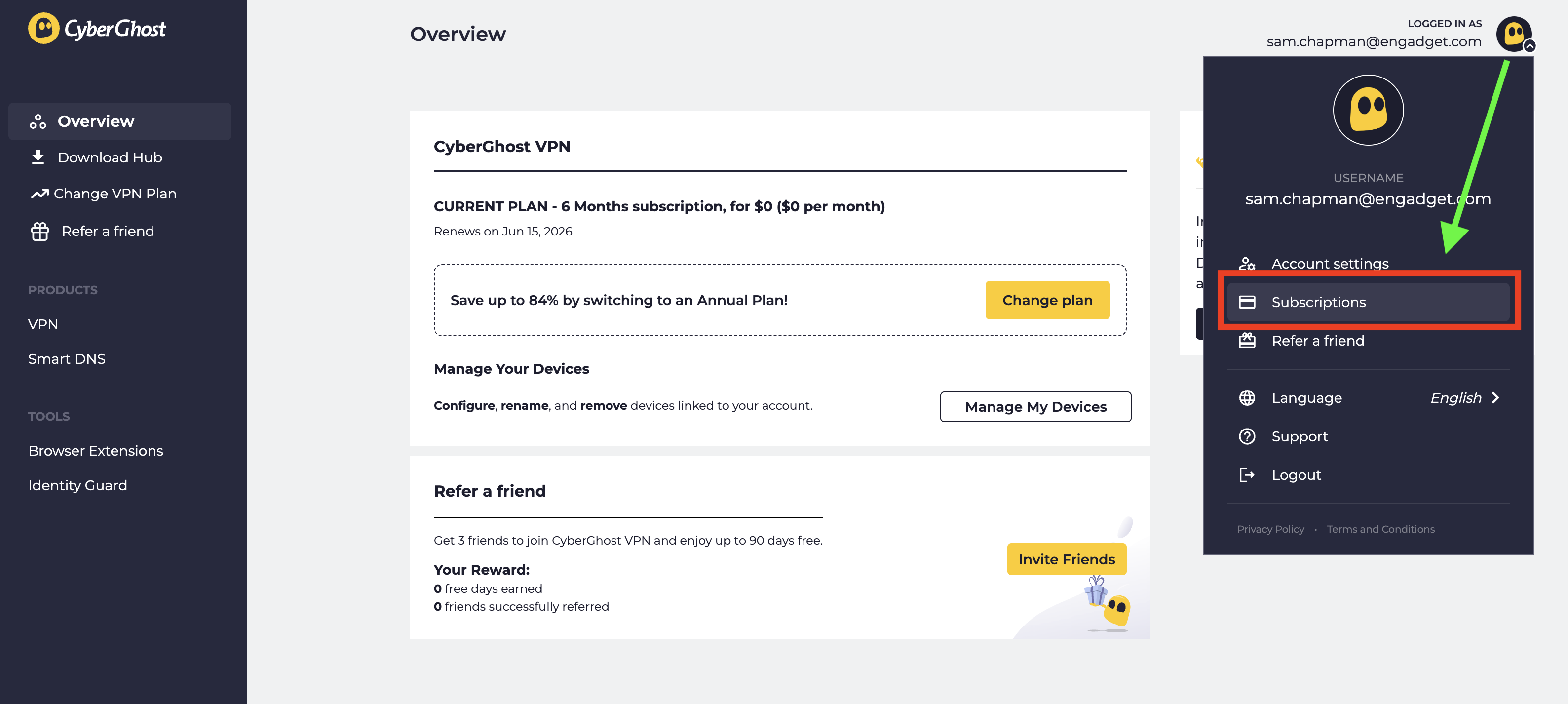
  3. Look at the top-right corner of the new screen and click the CyberGhost logo next to your email address. From the drop-down menu, select Subscriptions.

  4. Find the subscription you want to cancel and select Cancel Subscription.

  5. When prompted, click Continue to Cancel.

Click the logo at top-right, then click Subscriptions to manage auto-renewal.
Sam Chapman for Engadget

This will turn off automatic billing for your account. The next time you would have been billed, your subscription will expire. You can resubscribe by purchasing another term. If you’re within the refund period — 14 days for a monthly subscription and 45 days for all others — you can now request your money back.

How to cancel CyberGhost if you subscribed through an app store

When you subscribe to an app through the Apple App Store or Google Play Store, the store handles the billing; the app provider doesn’t process the money itself. If you bought CyberGhost through an app store and want to cancel, you’ll have to ask the app store in question, not CyberGhost. Here’s how to do it.

If you subscribed through the Apple App Store, you’ll need to cancel through your Apple ID. Here are the steps.

  1. Open the Settings app on your home screen.

  2. At the top of the Settings menu, you’ll see your name. Tap it.

  3. In your Apple Account menu, tap Subscriptions.

  4. Scroll until you find your CyberGhost subscription, then tap on it.

  5. Tap the words Cancel Subscription, then follow the prompts.

Here’s what to do if you subscribed through the Google Play store. Similar to the Apple process, you’ll go through the list of subscriptions on your profile.

  1. Open the Google Play Store app.

  2. Tap the circle in the top-right corner with the first letter of your name.

  3. Find the Payments & Subscriptions menu and tap on it. On the next menu that appears, tap Subscriptions.

  4. Scroll down until you find your CyberGhost subscription. Tap on it, then click Cancel Subscription.

  5. Follow the prompts to complete cancellation.

How to delete your CyberGhost account

Before you set out to delete your CyberGhost account altogether, make sure you’ve cancelled auto-renew first by following the steps in the previous section. If you don’t, you might still be charged for the subscription you’re not using, and it’s a huge hassle to end that without an account.

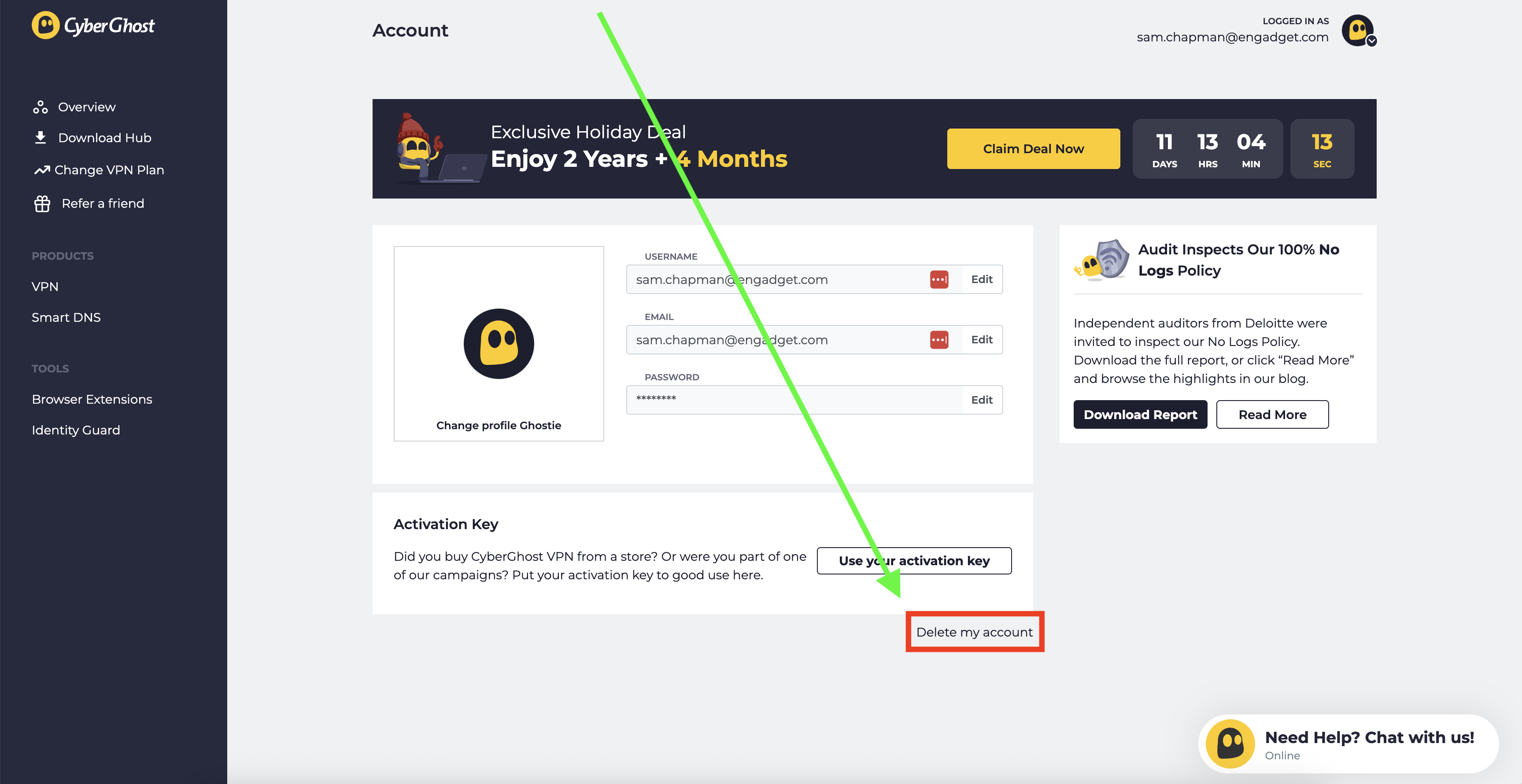
Once you’ve done that, log into your account on cyberghostvpn.com and click on your account profile at the top-right, just like when you canceled auto-renewal. Below the username/password window and the message about an activation key, you’ll see the words Delete My Account in tiny letters.

How to find the button that deletes your CyberGhost account.
Sam Chapman for Engadget

Click on them. On the page that appears, select Delete My Account again. Follow any more prompts you’re given to annihilate your username for good (note that you can’t use it again afterwards).

How to get a refund from CyberGhost

To get a refund on your CyberGhost subscription, you have to be inside the window for the plan you chose. With a monthly plan, the refund period is 14 days. For all other plans, it’s 45 days. If this time has elapsed, there’s unfortunately no way to get your money back.

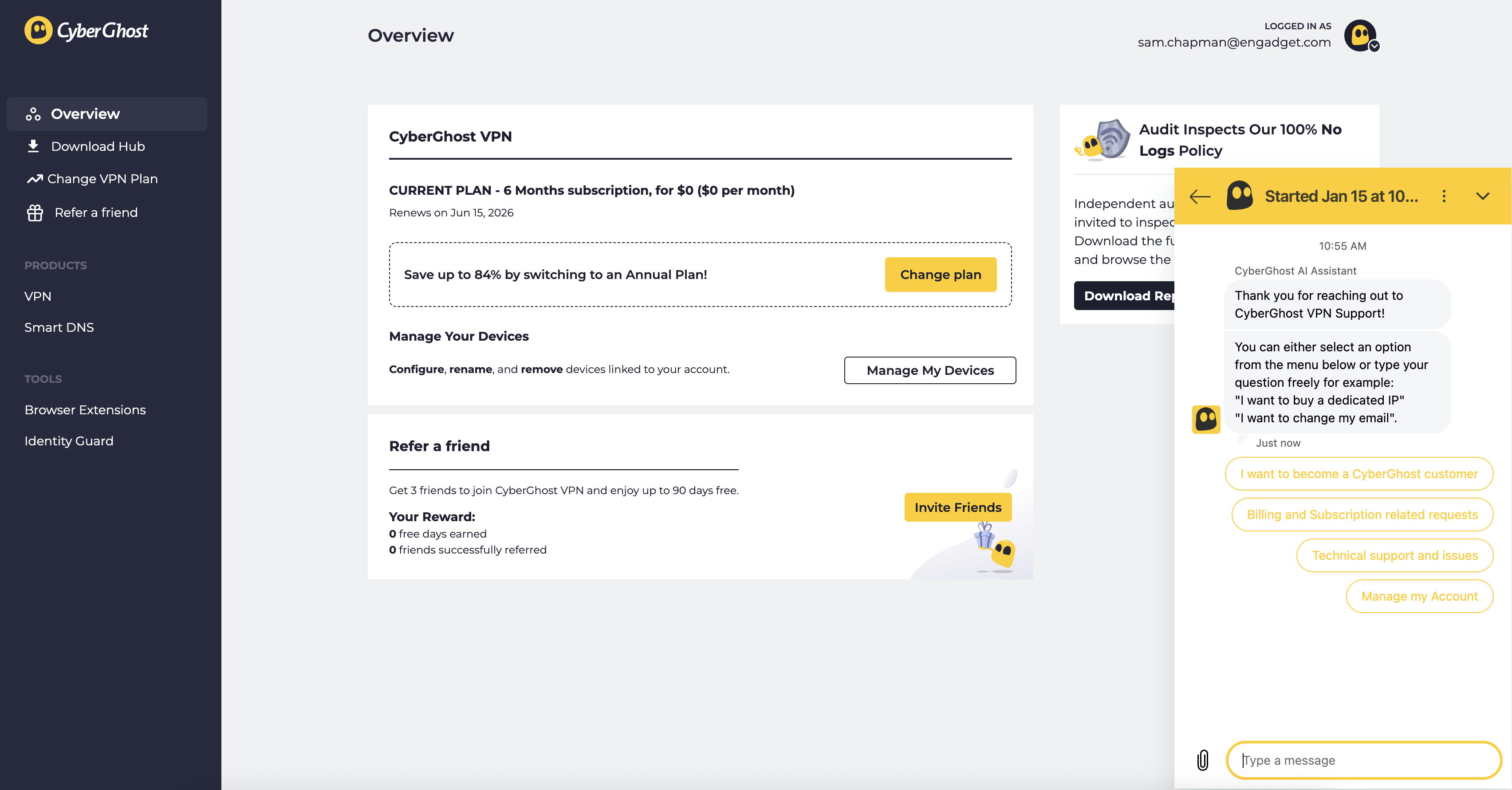
If you are within the refund period, you can get your money by sending a request through customer support. You can email support@cyberghost.ro, submit a ticket through this link or open a live chat conversation by clicking the Live Chat button at the bottom-right of any page on cyberghostvpn.com. No matter what method you choose, the conversation will go faster if you have your order number on-hand — check your inbox if you don’t know it.

Start a live chat conversation by clicking the live chat button at the bottom-right of any screen on CyberGhost's website.
Start a live chat conversation by clicking the live chat button at the bottom-right of any screen on CyberGhost’s website.
Sam Chapman for Engadget

If you went through an app store, you’ll need to request your money back from that platform instead. Apple and Google Play handle their own monetary transactions, which means they also process refunds.

Best CyberGhost alternatives

After you’ve cancelled and/or deleted CyberGhost out of your life, you still need a VPN; the benefits of masking your IP address and changing your virtual location don’t go anywhere. You can check out my best list (linked at the top) or best free VPN roundup for ideas, or check out the review for my favorite service, Proton VPN.

Proton VPN is my top choice because of its focus on user freedoms and attention to quality in everything it does. If you’re willing to pay a bit more for extreme simplicity and total reliability, ExpressVPN is ideal for beginners. If you’re a speed demon and just want to keep your downloads fast, go with Surfshark.

This article originally appeared on Engadget at https://www.engadget.com/cybersecurity/vpn/how-to-cancel-cyberghost-and-get-a-refund-130000311.html?src=rss

Nearly 5 Million Accounts Removed Under Australia’s New Social Media Ban

An anonymous reader quotes a report from the New York Times: Nearly five million social media accounts belonging to Australian teenagers have been deactivated or removed, a month after a landmark law barring those younger than 16 from using the services took effect, the government said on Thursday. The announcement was the first reported metric reflecting the rollout of the law, which is being closely watched by several other countries weighing whether the regulation can be a blueprint for protecting children from the harms of social media, or a cautionary tale highlighting the challenges of such attempts.

The law required 10 social media platforms, including Instagram, Facebook, Snapchat and Reddit, to prevent users under 16 from accessing their services. Under the law, which came into force in December, failure by the companies to take “reasonable steps” to remove underage users could lead to fines of up to 49.5 million Australian dollars, about $33 million. […] The number of removed accounts offered only a limited picture of the ban’s impact. Many teenagers have said in the weeks since the law took effect that they were able to get around the ban by lying about their age, or that they could easily bypass verification systems.

The regulator tasked with enforcing and tracking the law, the eSafety Commissioner, did not release a detailed breakdown beyond announcing that the companies had “removed access” to about 4.7 million accounts belonging to children under 16. Meta, the parent company of Instagram and Facebook, said this week that it had removed almost 550,000 accounts of users younger than 16 before the ban came into effect. “Change doesn’t happen overnight,” said Prime Minister Anthony Albanese. “But these early signs show it’s important we’ve acted to make this change.”


Read more of this story at Slashdot.

Papers Please but with zombies, a farming-based shoot-’em-up and other new indie games worth checking out

Welcome to our latest roundup of what’s going on in the indie game space. Several neat-looking games arrived this week, we got release dates for several others that I’m really looking forward to and a brand-new Steam festival was announced. 

The Love, Romance, and Heartbreak Debutante Ball is said to be the first Valentine’s Day-themed Steam festival. It’ll run from February 13 to 20 and feature more than 100 games, including discounts and demos. A showcase will take place on February 13 at 1PM ET on the Sunny Demeanor Games YouTube channel too.

Organizers say the festival includes a wide variety of games about love, including RPGs, puzzle games and (naturally) visual novels. You might play as a cat or someone trying to fish an engagement ring out of a claw machine, as a secret agent or a couple that’s run off to another planet. I’m intrigued! There will be some NSFW games involved, for what it’s worth.

New releases

Quarantine Zone: The Last Check seems like a 3D version of Papers Please but with zombies. At a checkpoint amid a zombie outbreak, your mission is to screen survivors for signs of infection. If you’re unsure of their status, you can send an individual to quarantine for further observation or a lab for additional screening. Otherwise, you can let them in or send them to “liquidation.” Get things wrong and it could spell disaster, but at least you have a sidearm (and a weaponized drone) to help you deal with sticky situations.

It looks like there’s a lot going on in Quarantine Zone: The Last Check, which is from Brigada Games and publisher Devolver Digital. There are base and resource management aspects as well. It’s out now on Steam (usually $20, but there’s a 10 percent discount until January 26) and PC Game Pass.

Air Hares seems to draw inspiration from classic top-down shoot-’em-ups. But instead of simply blowing up countless ships, your mission is to restore farmland. You’ll fire seeds and water to turn barren land into fertile carrot fields. There are still enemies to contend with — you (and perhaps a co-op partner) can dodge and ram them as you try to protect the land. Expect boss battles, too.

I really like the aesthetic here. It has a ’90s-style cartoon look (I suddenly really want a modern Bucky O’Hare game). Also, the song from the trailer is going to live in my head for weeks.

Husband-and-wife team Tim and Megan Bungeroth created Air Hares over six years with the help of several contributors. According to a press release, the game is “inspired by the creators’ personal journey with infertility and the idea of creating life rather than destroying it.” 

Air Hares is out now on Steam. It typically costs $9, but there’s a 20 percent discount until January 28.

Luckshot Games’ Big Hops looks like my kind of 3D platformer: joyous and playful. As a young frog who has been kidnapped, you’ll try to find airship parts for a raccoon who has promised to help get you home.

There are tons of movement mechanics here, and Hop’s tongue plays a major role in those. You can use it to swing across gaps, hookshot your way to higher platforms and solve puzzles. 

Big Hops is out now on Steam, Nintendo Switch and PS5 for $20. The Switch and Steam versions have a 10 percent launch discount until January 19.

Cassette Boy is a pixel-art game that might appear to be a 2D exploration puzzler, but there’s more going on here. You can rotate the world to discover new secrets and hide enemies and hazards from view so you can move past them. If you can’t see something on your screen, it doesn’t exist. There’s a bit of a Fez influence here, it would appear.

Wonderland Kazakiri and publisher Pocketpair are behind this one, which I’m looking forward to checking out when I have a chance. Cassette Boy is available on Steam, Switch, PS4, PS5, Xbox One and Xbox Series X/S for $13.

Upcoming 

I really enjoyed the demo for Aerial_Knight’s DropShot (as well as Aerial_Knight’s previous games). I’m for sure going to be playing the full game when it hits PS5, Xbox Series X/S, Steam and Epic Games Store on February 17.

This is a single-player first-person shooter in which you’re skydiving with finger guns. You compete with four enemies to grab the only available parachute as you’re falling through the air. Rounds are fast-paced too, generally lasting under a minute.

Point-and-click adventure Earth Must Die has been on my radar for a while and we’ll all get a chance to try it soon. It’s designed to be a playable cartoon (with a runtime of about eight hours) and it has an art style to match. 

The cast is pretty stellar, with Ben Starr (Final Fantasy XVI, Clair Obscur: Expedition 33, Hades II), Joel Fry (Our Flag Means Death) and a whole load of British comedy figures on board. There’s a demo available on Steam now and the full game — from Size Five Games and publisher No More Robots — will land on January 27.

Let’s wrap things up for this week something very silly-looking from Monster Shop Games. Pie in the Sky is a Tony Hawk’s Pro Skater-inspired action arcade game in which you play as a magpie that terrorizes bystanders. You can knock people off the Sydney Harbour Bridge, ram kids off of scooters, actually go skateboarding and, uh, cause havoc from above. In classic THPS-style, there are hidden areas too. 

This looks like a fun distraction from [gestures at everything]. Pie is the Sky will swoop onto Steam on February 2.

This article originally appeared on Engadget at https://www.engadget.com/gaming/papers-please-but-with-zombies-a-farming-based-shoot-em-up-and-other-new-indie-games-worth-checking-out-123000437.html?src=rss

Meta’s layoffs leave Supernatural fitness users in mourning

Tencia Benavidez, a Supernatural user who lives in New Mexico, started her VR workouts during the Covid pandemic. She has been a regular user in the five years since, calling the ability to work out in VR ideal, given that she lives in a rural area where it’s hard to get to a gym or work out outside during a brutal winter. She stuck with Supernatural because of the community and the eagerness of Supernatural’s coaches.

“They seem like really authentic individuals that were not talking down to you,” Benavidez says. “There’s just something really special about those coaches.”

Meta bought Supernatural in 2022, folding it into its then-heavily-invested-in metaverse efforts. The purchase was not a smooth process, as it triggered a lengthy legal battle in which the US Federal Trade Commission tried to block Meta from purchasing the service due to antitrust concerns about Meta “trying to buy its way to the top” of the VR market. Meta ultimately prevailed. At the time, some Supernatural users were cautiously optimistic, hoping that big bag of Zuckerbucks could keep its workout juggernaut afloat.

Read full article

Comments

Supreme Court May Block Thousands of Lawsuits Over Monsanto’s Weed Killer

The U.S. Supreme Court will hear Monsanto’s argument that federal pesticide law should shield it and parent company Bayer from tens of thousands of state lawsuits over Roundup since the Environmental Protection Agency has not required a cancer warning label. The case could determine whether federal rules preempt state failure-to-warn claims without deciding whether glyphosate causes cancer. The Los Angeles Times reports: Some studies have found it is a likely carcinogen, and others concluded it does not pose a true cancer risk for humans. However, the court may free Monsanto and Bayer, its parent company, from legal claims from more than 100,000 plaintiffs who sued over their cancer diagnosis. The legal dispute involves whether the federal regulatory laws shield the company from being sued under state law for failing to warn consumers.

[…] “EPA has repeatedly determined that glyphosate, the world’s most widely used herbicide, does not cause cancer. EPA has consistently reached that conclusion after studying the extensive body of science on glyphosate for over five decades,” the company told the court in its appeal. They said the EPA not only refused to add a cancer warning label to products with Roundup, but said it would be “misbranded” with such a warning.

Nonetheless, the “premise of this lawsuit, and the thousands like it, is that Missouri law requires Monsanto to include the precise warning that EPA rejects,” they said. On Friday, the court said in a brief order that it would decide “whether the Federal Insecticide, Fungicide, and Rodenticide Act preempts a label-based failure-to-warn claim where EPA has not required the warning.” The court is likely to hear arguments in the case of Monsanto vs. Durnell in April and issue a ruling by late June.


Read more of this story at Slashdot.

Biggest Offshore Wind Project In US To Resume Construction

A federal judge has temporarily lifted the Trump administration’s suspension of the Coastal Virginia Offshore Wind, allowing construction on the largest offshore wind project in the U.S. to resume. CNBC reports: Judge Jamar Walker of the U.S. District Court for the Eastern District of Virginia granted Dominion’s request for a preliminary injunction Friday. Dominion called the Trump suspension “arbitrary and illegal” in its lawsuit. “Our team will now focus on safely restarting work to ensure CVOW begins delivery of critical energy in just weeks,” a Dominion spokesperson told CNBC in a statement Friday. “While our legal challenge proceeds, we will continue seeking a durable resolution of this matter through cooperation with the federal government,” the spokesperson said.

Dominion said in December that “stopping CVOW for any length of time will threaten grid reliability for some of the nation’s most important war fighting, AI and civilian assets.” Coastal Virginia Offshore Wind is a 176-turbine project that would provide enough power for more than 600,000 homes, according to Dominion. It is scheduled to start dispatching power by the end of the first quarter of 2026. In December, the Trump administration paused the leases on all five offshore wind sites currently under construction in the U.S., blaming the decisions on a classified report from the Department of Defense.


Read more of this story at Slashdot.

Managers on alert for “launch fever” as pressure builds for NASA’s Moon mission

KENNEDY SPACE CENTER, Florida—The rocket NASA is preparing to send four astronauts on a trip around the Moon will emerge from its assembly building on Florida’s Space Coast early Saturday for a slow crawl to its seaside launch pad.

Riding atop one of NASA’s diesel-powered crawler transporters, the Space Launch System rocket and its mobile launch platform will exit the Vehicle Assembly Building at Kennedy Space Center around 7:00 am EST (11:00 UTC). The massive tracked transporter, certified by Guinness as the world’s heaviest self-propelled vehicle, is expected to cover the four miles between the assembly building and Launch Complex 39B in about eight to 10 hours.

The rollout marks a major step for NASA’s Artemis II mission, the first human voyage to the vicinity of the Moon since the last Apollo lunar landing in December 1972. Artemis II will not land. Instead, a crew of four astronauts will travel around the far side of the Moon at a distance of several thousand miles, setting the record for the farthest humans have ever ventured from Earth.

Read full article

Comments

Pesticides May Drastically Shorten Fish Lifespans, Study Finds

An anonymous reader quotes a report from the Guardian: Even low levels of common agricultural pesticides can stunt the long-term lifespan of fish, according to research led by Jason Rohr, a biologist at the University of Notre Dame in Indiana. Signs of aging accelerated when fish were exposed to the chemicals, according to the study, published in Science, which could have implications for other organisms. […] The research found that fish from pesticide-affected lakes showed shortened telomeres, the caps at the end of chromosomes that are known as the biological clock for aging. When they shorten, it is a sign of cellular aging and a decline in the body’s regenerative capacity. The lake populations consisted of younger fish, indicating that the pesticides contributed to shortened lives. Laboratory experiments confirmed the findings and showed chronic low-dose exposure reduced fish survival and degraded telomeres. These effects were not seen with acute high-dose exposure.

Chemical analysis showed chlorpyrifos, which is banned in the UK and the EU but used in the US and China, was the only compound found in the fish tissues that was consistently associated with signs of aging. These included shortened telomeres and lipofuscin deposition — a buildup of insoluble proteins often described as cellular “junk”. The worrying aging effects occurred at concentrations below current US freshwater safety standards, Rohr said, suggesting the effects of chemicals and pesticides could be occurring at low levels over the long term. While short-term exposure to high doses did not appear to cause these aging issues — though it did cause high toxicity and death in fish — the researchers concluded that it was long-term exposure to low doses that drove the changes. The scientists added that reduced lifespan was particularly problematic because older fish often contribute disproportionately to reproduction, genetic diversity and population stability.


Read more of this story at Slashdot.

Judge Orders Anna’s Archive To Delete Scraped Data

Anna’s Archive has been hit with a U.S. federal court default judgment and permanent injunction over its scraping and distribution of OCLC’s WorldCat data, which occurred more than two years ago. According to the ruling, the shadow library must delete all copies of its WorldCat data and stop scraping, using, storing, or distributing the data. “It is expected that OCLC will use the injunction to motivate third-party intermediaries to take action against Anna’s Archive,” reports TorrentFreak. From the report: Yesterday, a federal court in Ohio issued a default judgment and permanent injunction against the site’s unidentified operator(s). This order was requested by OCLC, which owns the proprietary WorldCat database that was scraped and published by Anna’s Archive more than two years ago. OCLC initially demanded millions of dollars in damages but eventually dropped this request, focusing on taking the site down through an injunction that would also apply to intermediaries. “Anna’s Archive’s flagrantly illegal actions have damaged and continue to irreparably damage OCLC. As such, issuance of a permanent injunction is necessary to stop any further harm to OCLC,” the request read.

This pivot makes sense since Anna’s Archive did not respond to the lawsuit and would likely ignore all payment demands too. However, with the right type of court order, third-party services such as hosting companies and domain registrars might come along. The permanent injunction, issued by U.S. District Court Judge Michael Watson yesterday, does not mention any third-party services by name. However, it is directed at all parties that are “in active concert and participation with” Anna’s Archive. Specifically, the site’s operator and these third parties are prohibited from scraping WorldCat data, storing or distributing the data on Anna’s Archive websites, and encouraging others to store, use or share this data. Additionally, the site has to delete all WorldCat data, which also includes all torrents.

Judge Watson denied the default judgment for ‘unjust enrichment’ and ‘tortious interference.’ However, he granted the order based on the ‘trespass to chattels’ and ‘breach of contract’ claims. The latter is particularly noteworthy, as the judge ruled that because Anna’s Archive is a ‘sophisticated party’ that scraped the site daily, it had constructive notice of the terms and entered into a ‘browsewrap’ agreement simply by using the service. While these nuances are important for legal experts, the result for Anna’s Archive is that it lost. And while there are no monetary damages, the permanent injunction can certainly have an impact. Further reading: Spotify Says ‘Anti-Copyright Extremists’ Scraped Its Library


Read more of this story at Slashdot.

Patch Tuesday Update Makes Windows PCs Refuse To Shut Down

A recent Microsoft Patch Tuesday update has introduced a bug in Windows 11 23H2 that causes some PCs to refuse to shut down or hibernate, “no matter how many times you try,” reports The Register. From the report: In a notice on its Windows release health dashboard, Microsoft confirmed that some PCs running Windows 11 23H2 might fail to power down properly after installing the latest security updates. Instead of slipping into shutdown or hibernation, affected machines stay stubbornly awake, draining batteries and ignoring shutdown like they have a mind of their own and don’t want to experience temporary non-existence.

The bug appears to be tied to Secure Launch, a security feature that uses virtualization-based protections to ensure only trusted components load during boot. On systems with Secure Launch enabled, attempts to shut down, restart, or hibernate after applying the January patches may fail to complete. From the user’s perspective, everything looks normal — until the PC keeps running anyway, refusing to be denied life.

Microsoft says that entering the command “shutdown /s /t 0” at the command prompt will, in fact, force your PC to turn off, whether it wants to or not. “Until this issue is resolved, please ensure you save all your work, and shut down when you are done working on your device to avoid the device running out of power instead of hibernating,” Microsoft said.


Read more of this story at Slashdot.

Trump Wants Tech Companies To Foot the Bill For New Power Plants

The Trump administration urged the largest electricity grid in the U.S. to make big tech companies pay for new power plants to support the surging electricity demand from AI and data centers. CNBC reports: Electricity prices have exploded in recent years on PJM Interconnection due in part to the data centers that tech companies are building to train and power artificial intelligence. The PJM grid serves more than 65 million people across 13 states and Washington, D.C. Its service area includes northern Virginia, the largest data center market in the world.

The Trump administration and several states signed a pact that calls for tech companies to pay for new power plants built in PJM. Leading tech companies have agreed to fund $15 billion of new generation for the grid, according to an administration statement. The Trump administration and the states urged PJM to hold an emergency capacity auction to procure this power, according to the Department of Energy. PJM should also cap the amount that existing power plants can charge in the grid’s capacity market to protect ratepayers, according to the administration. “We have to get out from underneath this bureaucratic system that we have in the regional grid operators and we’ve got to allow markets to work,” said Interior Secretary Doug Burgum at the White House. “One of the ways markets can work is to have the hyperscalers actually rapidly building power.”


Read more of this story at Slashdot.

Supreme Court Hacker Posted Stolen Government Data On Instagram

An anonymous reader quotes a report from TechCrunch: Last week, Nicholas Moore, 24, a resident of Springfield, Tennessee, pleaded guilty to repeatedly hacking into the U.S. Supreme Court’s electronic document filing system. At the time, there were no details about the specifics of the hacking crimes Moore was admitting to. On Friday, a newly filled document — first spotted by Court Watch’s Seamus Hughes — revealed more details about Moore’s hacks. Per the filing, Moore hacked not only into the Supreme Court systems, but also the network of AmeriCorps, a government agency that runs stipend volunteer programs, and the systems of the Department of Veterans Affairs, which provides healthcare and welfare to military veterans.

Moore accessed those systems using stolen credentials of users who were authorized to access them. Once he gained access to those victims’ accounts, Moore accessed and stole their personal data and posted some online to his Instagram account: @ihackthegovernment. In the case of the Supreme Court victim, identified as GS, Moore posted their name and “current and past electronic filing records.” […] According to the court document, Moore faces a maximum sentence of one year in prison and a maximum fine of $100,000.


Read more of this story at Slashdot.

Cloudflare Acquires Team Behind Open Source Framework Astro

Cloudflare has acquired the core team behind the open source JavaScript framework Astro, bringing its creators in-house while pledging to keep Astro fully open source. The New Stack reports: Astro is used by major brands like IKEA, Unilever, Visa and OpenAI to build fast, content-driven websites. Search engines prioritize fast-loading and clean pages, the Cloudflare statement noted. Websites that rely heavily on JavaScript for initial rendering often struggle to deliver the required speed, which hinders search rankings and customer conversions.

Pages on Astro serve up only the code needed to display a page in a browser. That’s in part because of its Island architecture, which it introduced in 2021. Astro’s Islands allow developers to create “islands” of interactive client-side components, while most of the page is generated statically in HTML. Server Islands extend the same architecture to the server.

Astro is also UI-agnostic, meaning that while it has its own independent engine, it allows developers to bring in components from React, Svelte, Vue and other frameworks. This makes Astro a preferred choice for building high-performance, content-driven websites optimized for speed, according to Cloudflare. “Over the past few years, we’ve seen an incredibly diverse range of developers and companies use Astro to build for the web,” said Astro’s former CTO, Fred Schott, in a post with Cloudflare senior product manager Brendan Irvine-Broque. “At Cloudflare, we use Astro, too — for our developer docs, website, landing pages and more.” They said that the acquisition will allow them to “double down” on making Astro the best framework for content-driven websites.


Read more of this story at Slashdot.

Rackspace customers grapple with “devastating” email hosting price hike

Rackspace’s new pricing for its email hosting services is “devastating,” according to a partner that has been using Rackspace as its email provider since 1999.

In recent weeks, Rackspace updated its email hosting pricing. Its standard plan is now $10 per mailbox per month. Businesses can also pay for the Rackspace Email Plus add-on for an extra $2/mailbox/month (for “file storage, mobile sync, Office-compatible apps, and messaging”), and the Archiving add-on for an extra $6/mailbox/month (for unlimited storage).

As recently as November 2025, Rackspace charged $3/mailbox/month for its Standard plan, and an extra $1/mailbox/month for the Email Plus add-on, and an additional $3/mailbox/month for the Archival add-on, according to the Internet Archive’s Wayback Machine.

Read full article

Comments