What’s the ‘Best’ Month for New Movies and Music? A Statistical Analysis

An analysis of film and music release patterns has found that summer and late fall are the optimal windows for movie premieres, while the music industry has no clear “best” month — only a worst one, December, which the report’s author dubbed “Dump-cember.”

For films, the calendar splits into distinct strategic zones. Summer months and holidays see elevated box office because audiences have more free time, and studios chase mega-billion-dollar hits during these windows. October and November see a surge of prestige releases as studios cluster their Oscar hopefuls to keep them fresh in voters’ minds when awards season begins in January.

The Silence of the Lambs, which swept the Academy Awards’ Big Four categories in 1992, remains the only Best Picture winner in seven decades to have been released in January — the industry’s infamous “Dump-uary.” The music industry operates differently. Most months are interchangeable for album releases, but December is uniquely bad. Artists avoid it because they would compete against Christmas classics from Bing Crosby and Andy Williams, both dead for decades. Albums released in December also receive weaker critical reception as measured by Pitchfork scores, and labels quietly slot their least promising projects into this low-attention window.


Read more of this story at Slashdot.

Review: AMD’s Ryzen 7 9850X3D is a little faster and a lot more power-hungry

AMD has released three distinct generations of its 3D V-Cache technology, which initially appeared in the Ryzen 7 5800X3D in 2022. The kernel of the idea has remained the same throughout AMD’s efforts: take an existing desktop processor design and graft 64MB of additional L3 cache onto it.

This approach disproportionately helps apps that benefit from more cache, particularly games, and the size of the boost that 3D V-Cache gives to game performance has always been enough to offset any downsides these chips have come with. And in the four years since the 5800X3D was released, AMD has steadily chipped away at those disadvantages, adding more CPU cores, improving power consumption and temperatures, and re-adding the typical Ryzen range of overclocking controls.

AMD’s new Ryzen 7 9850X3D, which launches for $499 starting tomorrow, is the very definition of a mild upgrade. It’s the year-old Ryzen 7 9800X3D but with an extra 400 MHz of turbo boost speed. That’s it. That’s the chip.

Read full article

Comments

The GoPro Hero12 Black Is One of the Best Action Cameras, and It’s 42% Off Right Now

We may earn a commission from links on this page. Deal pricing and availability subject to change after time of publication.

The GoPro Hero12 Black might not be the newest model in the lineup, but it still checks all the right boxes for action camera buyers—and at $215.99 on Woot, it’s down to its lowest price yet. That’s a steep cut from Amazon’s current $369 listing, and you’re still getting a full one-year manufacturer warranty. Shipping is free for Prime members, and the deal is live for three more days (or until it sells out). PCMag gave it an “outstanding” rating in its review, highlighting how stable and clean the footage looks. Lifehacker’s Stephen Johnson also called it one of his favorite products, largely because it works without much effort.

In use, the Hero12 Black sticks closely to what GoPro has always done well. It’s compact, tough, and easy to mount almost anywhere. Video tops out at 5.3K at 60 frames per second, which gives you noticeably more detail than 4K and extra room to crop without wrecking the quality. The stabilization, thanks to GoPro’s HyperSmooth stabilization, is strong enough that handheld clips often look like they were shot on a gimbal. And there are front and rear screens for easy framing—helpful whether you’re vlogging or filming the view ahead. The 8:7 shooting mode of the Hero12 Black is especially useful if you’re creating content for multiple platforms. You can shoot once and crop for vertical reels or horizontal YouTube clips without needing separate takes.

It is also waterproof to 33 feet without a case, which covers swimming, snorkeling, rain, and most casual water use. That said, GoPro removed the built-in GPS on this model. That means no automatic speed or route overlays out of the box. The upside is slightly better battery life, though it still won’t last a full day of continuous recording. Carrying a spare battery will be the smarter move if you’re filming long sessions. Storage is via microSD, and you get Bluetooth, wifi, and USB-C for easy transfers. This isn’t the right camera for someone looking for automatic tracking or cinematic depth of field, but if your priorities are portability, versatility, and durability, it still holds up well. It’s a great tool for creators, travelers, and anyone who wants to capture fast-moving moments without worrying about breaking the gear.

Deals are selected by our commerce team

Google Accidentally Leaks Secret Android Desktop OS User Interface

Google Accidentally Leaks Secret Android Desktop OS User Interface
Google just might’ve (inadvertently) revealed the first look at its ambitious Android for PC project, bringing the long-awaited unification of ChromeOS and Android to desktop closer to reality.

The leak (as spotted by our friends at 9to5Google) originated from a bug report on the Chromium Issue Tracker, which contained two screen recordings

430,000-Year-Old Wooden Tools Are the Oldest Ever Found

Early hominins in Europe were creating tools from raw materials hundreds of thousands of years before Homo sapiens arrived there, two new studies indicate, pushing back the established time for such activity. From a report: The evidence includes a 500,000-year-old hammer made of elephant or mammoth bone, excavated in southern England, and 430,000-year-old wooden tools found in southern Greece — the earliest wooden tools on record.

The findings suggest that early humans possessed sophisticated technological skills, the researchers said. Katerina Harvati, a paleoanthropologist at the University of Tubingen in Germany and a lead author of the wooden-tool paper, which was published on Monday in the journal PNAS, said the discoveries provided insight into the prehistoric origins of human intelligence. Silvia Bello, a paleoanthropologist at London’s Natural History Museum and an author on the elephant-bone study, which was published last week in Science Advances, concurred.

The artifacts in both studies, recovered from coal-mine sites, were probably produced by early Neanderthals or a preceding species, Homo heidelbergensis. Homo sapiens emerged in Africa more than 300,000 years ago, and the oldest evidence of them in Europe is a 210,000-year-old fossil unearthed in Greece. By the time Homo sapiens established themselves in Britain 40,000 years ago, other hominins had already lived there for nearly a million years.


Read more of this story at Slashdot.

Scott Pilgrim EX will hit PC and consoles on March 3

Fans of co-op beat-‘em-ups and fictional bass players who kind of suck as human beings might want to mark March 3 on their calendars. That’s when Scott Pilgrim EX is set to hit PS4, PS5, Xbox Series X/S, Xbox One, Nintendo Switch and Steam. 

Developer and publisher Tribute Games announced the release date in a new trailer, which also revealed two more playable characters: Matthew Patel (a member of the League of Evil Exes) and Robot-01, a creation of the Katayanagi Twins. One more fighter will be unveiled in the coming weeks. 

Tribute worked with Scott Pilgrim creator Bryan Lee O’Malley on an original storyline for the game. After Scott’s bandmates in Sex Bob-omb are kidnapped and demons descend on Toronto, Scott and Ramona Flowers set out to save the day with some unexpected allies. Anamanaguchi are making new music for the game, after providing the soundtrack for Scott Pilgrim vs. The World: The Game way back when. 

I’m a fan of Scott Pilgrim vs. The World and I dug Tribute’s last two games, Marvel Cosmic Invasion and Teenage Mutant Ninja Turtles: Shredder’s Revenge. So it’s safe to say I’ll be trying out Scott Pilgrim EX in a few weeks. 

This article originally appeared on Engadget at https://www.engadget.com/gaming/scott-pilgrim-ex-will-hit-pc-and-consoles-on-march-3-160427832.html?src=rss

This Highly Rated Wi-Fi 6E Mesh System Is $150 Off Right Now

We may earn a commission from links on this page. Deal pricing and availability subject to change after time of publication.

At $249.99 for a three-pack, the TP-Link Deco XE75 Pro Tri-Band Mesh System is sitting $150 below its usual $399.99 price, and price-trackers show this is the lowest it has gone so far. That discount matters because this is not an entry-level mesh kit. It’s built around Wi-Fi 6E, which adds access to the cleaner 6GHz band alongside the familiar 2.4GHz and 5GHz bands. In practice, that means less congestion if you have newer devices that support 6E, and more consistent speeds across a larger home. The three cylindrical nodes are understated and easy to place, each covering a chunk of space so the full kit can handle homes up to roughly 7,200 square feet. Setup happens through the Deco app and is largely painless, even if you are not used to managing network gear.

Each node includes a 2.5GbE WAN port, which is useful if your internet plan is already pushing past standard gigabit speeds. You also get two additional 1GbE LAN ports per node, plus support for wired backhaul if you want to connect the units with Ethernet instead of relying on wireless links. Internally, TP-Link uses a 1.7GHz quad-core processor and multiple internal antennas to keep traffic moving smoothly. What you do not get are USB ports, so there’s no option to plug in a drive or printer directly. That omission may not matter for most people, but it is worth noting at this price.

As for its performance, PCMag’s testing showed reliable throughput across bands, and the publication gave the system an “excellent” rating in its review, calling it easy to manage and a solid value for large spaces. Management leans heavily on the mobile app, which is simpler than the web interface and good enough for everyday use. TP-Link includes its HomeShield tools for basic parental controls and security scanning, but some of the more detailed features sit behind a paid subscription. That may be a drawback if you want everything included upfront. Still, for homes with many devices, fast internet, and a need for wide coverage, this deal makes the Deco XE75 Pro a much more reasonable buy than it is at full price.

Deals are selected by our commerce team

Super Bowl 2026 TV deals: The best sales ahead of kickoff

The big game is one of the few instances now in the US where most people gather around the TV to watch the live event together. While the teams playing in Super Bowl 2026 are the true stars of the show (and Bad Bunny, of course), your TV is a pretty important part of the puzzle of putting together an excellent Super Bowl party. Maybe you’ve been thinking about replacing an aging set, or you’re itching for a full refresh of your home theater setup — either way, you’ll want to try to get a good deal on a new TV. Thankfully, the weeks leading up to the Super Bowl can be a great time to shop for a new TV.

Generally, TV prices steadily decrease after a new model comes out. Some 2026 TV models were announced at CES and are forthcoming things year, making now a good time to look for discounts on 2025 sets. Aside from the holiday shopping season, now is one of the best times of the year to save on a TV. Here, we’ve curated the best Super Bowl TV deals we could find this year, from already affordable sets discounted even further to high-end OLEDs that are hundreds of dollars off.

Super Bowl 2026 TV deals for less than $500

You can easily find solid 1080p and 4K TV sets within this budget-friendly price range. What you’ll be more limited in is size — most TV deals under $500 we’re seeing right now are on sets up to 55 inches. There are a few 65- and 75-inch models in there, but the pickings are slim.

Hisense 32-inch Class A4 1080 FHD smart TV for $98 (18 percent off)

Roku 24-inch 720p smart TV for $100 (18 percent off)

Roku 55-inch 4K smart TV for $248 (29 percent off)

Roku 55-inch Mini LED 4K smart TV for $348 (30 percent off)

TCL 75-inch Class S5 4K smart TV for $480 (26 percent off)

OLED TV deals

This is where you want to look if you want your new TV to have the richest colors, deepest blacks and excellent contrast performance. Of course, that all comes at steeper prices — it can be difficult to find a good OLED set for less than $1,000, even on sale.

LG 55-inch B5 OLED 4K smart TV for $847 ($50 off)

Samsung 65-inch Class OLED S95F 4K smart TV for $2,298 (23 percent off)

Sony 77-inch Bravia XR A95L OLED 4K smart TV for $3,498 (30 percent off)

Super Bowl 2026 TV deals for $500 and up

This will likely be the sweet spot for many people when it comes to TV features, performance and price. Good 4K sets are common in this price range, and you’ll also find some Mini LED sets available here as well.

TCL 65-inch Class T7 4K smart TV for $500 (29 percent off)

Hisense 65-inch Class U6 Mini LED 4K smart TV for $550 (35 percent off)

Amazon 65-inch Fire TV Omni Mini LED 4K smart TV for $920 (16 percent off)

TCL 65-inch Class QM8K Mini LED 4K smart TV for $998 (33 percent off)

Streaming and home entertainment deals

A good TV is key, but having the right peripherals and accessories to go along with it will complete your home theater setup. Deals we’re tracking right now include discounts on streaming devices, soundbars and projectors.

Roku Ultra streamer for $78 (22 percent off)

Vizio 2.0 SV200M-08 soundbar for $78 (22 percent off)

Samsung HW B400F soundbar with built-in subwoofer for $100 (29 percent off)

Anker Nebula Capsule 3 projector for $540 (28 percent off)

Valerion VisionMaster Max 4K projector for $3,999 (20 percent off)

This article originally appeared on Engadget at https://www.engadget.com/deals/super-bowl-2026-tv-deals-the-best-sales-ahead-of-kickoff-160000725.html?src=rss

Genesis Reveals X Skorpio Concept With 1,100-HP V8 For Rugged Desert Performance

Genesis Reveals X Skorpio Concept With 1,100-HP V8 For Rugged Desert Performance
Genesis has unleashed a guttural, 1,100-horsepower roar across the dunes of the Arabian Peninsula. Could the radical X Scorpio concept off-roader be a hint of the brand’s upcoming Dakar or WEC aspirations?

As you can see, the Genesis X Scorpio concept is a departure from the brand’s typical luxury offerings. Debuting in the Rub’ al Khali,

Samsung Galaxy Z TriFold Launches In The US Soon For $2900, Are You In?

Samsung Galaxy Z TriFold Launches In The US Soon For $2900, Are You In?
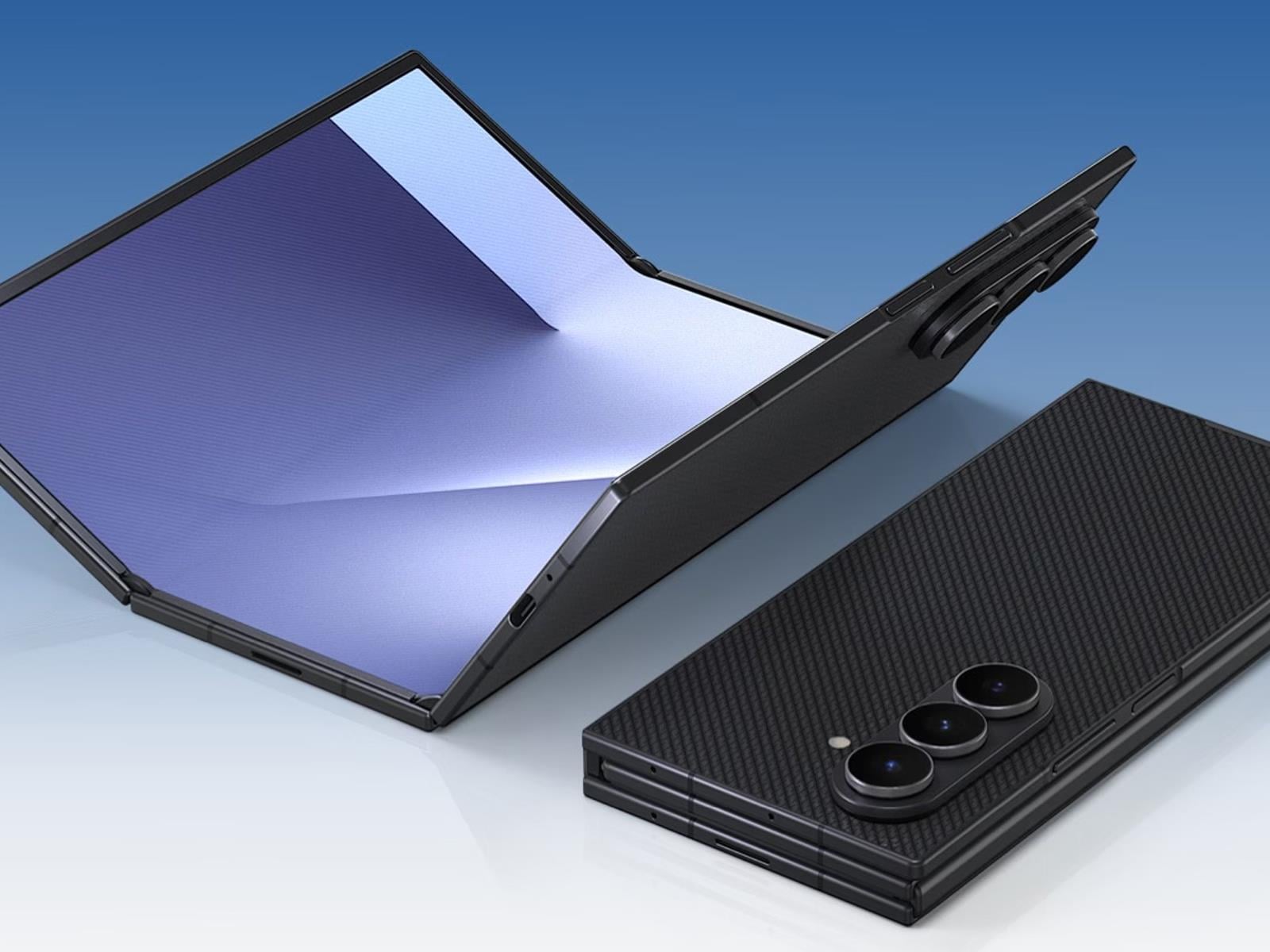
Samsung is set to make a splash in the U.S. market with release of its Galaxy Z TriFold on Friday, January 30, 2026. How big of a splash are we talking about? A sizable one, like a cannonball from a high-rise diving board, and that’s regardless of whether you’re talking about its ginormous display that folds out twice into a tablet-like form

Suunto’s New Route Planner Is Free and Awesome

Something you don’t see every day: a sports tech company actually giving away premium features for free. Suunto’s route-planning tool lets you create and download GPX files without even creating an account. No paywall, no trial period—just open the page and start planning routes. And the tool itself works great.

What you can do with the Suunto Routeplanner

The tool packs in everything you’d expect from a paid service, and then some:

  • Route creation that uses different map types (outdoor, satellite, even specialized ones for winter and avalanche terrain)

  • Routing that optimizes for your activity (running, hiking, cycling, mountaineering, roller skating, and more), using actual heat map data from real athletes

  • Heat map overlays for about a dozen different sports so you can see where people actually go

  • Elevation profiles with ascent and descent numbers (crucial for not dying on climbs you didn’t see coming)

  • Export routes as GPX files that work with basically any GPS device

  • Shareable link generation (good for six months) so you can send routes to friends without making them create accounts either

  • Ability to import and modify existing GPX or FIT files from other platforms

  • Optional account sync if you own Suunto or Hammerhead gear

You don’t even need to be in Suunto’s ecosystem to use this. I was able to export a map to my Garmin watch with no problem. If you do have a Suunto or Hammerhead device, you can link your account and routes will sync automatically.

How to use the Suunto Routeplanner

Go to routeplanner.suunto.com. From there, creating a route is pretty straightforward. If you let your browser share your location, it’ll center on where you are. If not, just search for wherever you want to start.

The controls on the right side let you switch between map types. The usual suspects are there: outdoor, satellite, light, dark. But then it gets weird in the best ways with a winter map, an avalanche terrain map for backcountry stuff, and, in a show of national pride, a dedicated Finland Terrain map. Respect.

To actually connect points on the map, you have the following options:

  • Free drawing (no automatic routing)

  • Any road or path (ideal for activities by foot)

  • All road types—avoiding hills (ideal for bikes)

  • All road types (still ideal for bikes)

  • Paved roads (ideal for road cycling)

After you create your route, you simply download the GPX file and throw it on whatever GPS device you own.

The six-month shareable links are a nice touch too. You can plan a route for a group ride or run, send everyone the link, and they can grab it without jumping through hoops. It’s the kind of friction-free sharing that should be standard but somehow isn’t.

Why you should try the Suunto Routeplanner

Strava and Komoot have trained users to expect paywalls for route planning. Of course, this could be strategic on Suunto’s part, to give away the software in the hopes of selling the hardware. Or maybe it’s just goodwill after years of user complaints about Suunto closing their tracking system Movescount. Either way, users win. You get a legitimately useful tool without opening your wallet or handing over your email address.

If you’re already paying for route planning elsewhere, try this first. Worst case, you waste five minutes. Best case, you cancel a subscription and pocket the savings. Even if you’e not looking to save money, having another route planning option in your toolkit doesn’t hurt.

30,000 More UPS Jobs On the Chopping Block as Amazon Era Ends

UPS said today it plans to eliminate an additional 30,000 operational jobs this year as the shipping giant continues to wind down its partnership with Amazon — previously its largest customer — and push forward a broader turnaround strategy under CEO Carol Tome.

CFO Brian Dykes said on an earnings call that the cuts will be accomplished through attrition and a voluntary separation program for full-time drivers. The company also plans to further deploy automation across its network. UPS has identified 24 buildings for closure in the first half of 2026 and expects to reduce operational hours by approximately 25 million as the Amazon relationship unwinds.

Last year, UPS eliminated 48,000 jobs — 34,000 operational and 14,000 management — and closed 93 buildings. The company expects $3 billion in total savings from the Amazon unwind.


Read more of this story at Slashdot.

NASA Says AI Found Hundreds Of Hidden Galaxies And Cosmic Oddities In Hubble Data

NASA Says AI Found Hundreds Of Hidden Galaxies And Cosmic Oddities In Hubble Data
Deep in the digital bedrock of 35 years of Hubble observation archives, a new AI tool has uncovered more than 800 previously undocumented cosmic anomalies in a scant two and a half days. 

Using a sophisticated neural network called AnomalyMatch, astronomers have unearthed nearly 1,400 bizarre astronomical objects hidden within the Hubble

10 Hacks Every ‘Google TV Streamer’ User Should Know

The launch of the Google TV Streamer marked a significant shift for the company’s streaming lineup, moving away from the behind-the-TV Chromecast dongles it popularized and introducing a pill-shaped set-top box that blends in nicely on a shelf of tchotchkes. It’s hiding a worthy processor, double the memory you’d get from a streaming stick, and enough storage to download what you need to run all of your apps. It even acts as a smart hub, with Matter and Thread built in.

It’s taken me a long time to do anything with the Google TV Streamer. I reluctantly brought it into my home after realizing something more robust, but dated, like the Nvidia Shield, would be too much to manage alongside maintaining a home server. But since then, I’ve tweaked several things on the set-top box and enabled features I hadn’t been using, turning it into a helpful hub in my living room.

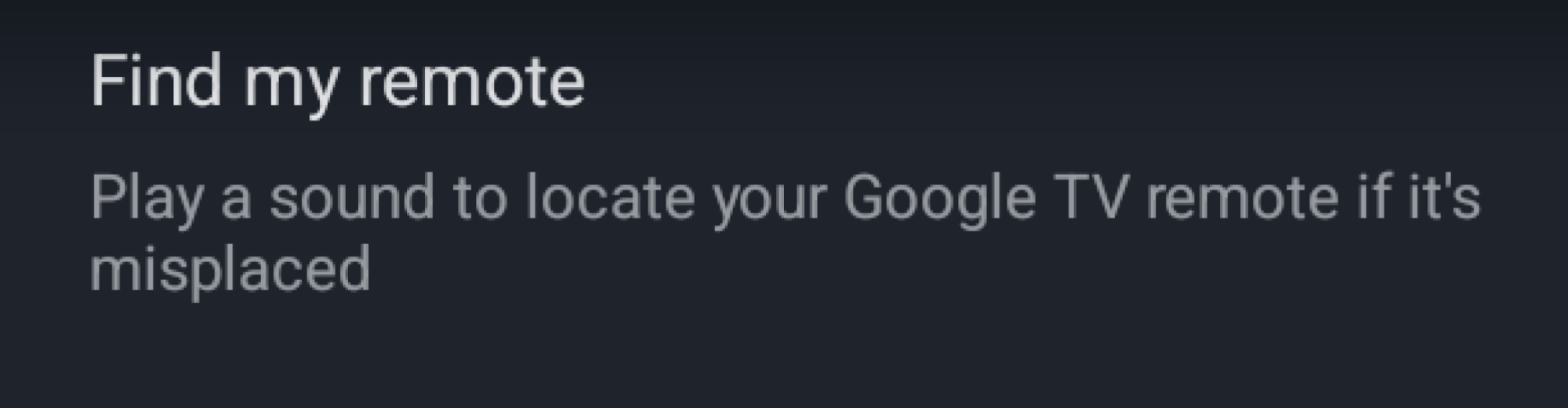
Enable “Find my remote” to never lose your Google TV Streamer remote again

This sounds like an obvious tip, but I’ve had the Google TV Streamer since it debuted in 2024, and it wasn’t until this week, while writing this piece, that I finally enabled the remote finder. I had skipped it during the initial setup. The option is available in Settings > Remotes & Accessories. You’ll see the Find my remote option in there.

a screenshot showing the find my remote option in the settings panel

Credit: Florence Ion/Lifehacker

The Google TV Streamer has a physical button on the back of the device that lets you locate your remote if it’s stuck somewhere on the couch. But what if you can’t reach the streamer behind the TV? Try one of your Google-enabled voice devices instead. If you have a Nest speaker or a Pixel phone nearby, say “Hey Google, find my remote.” The remote should start chirping if you’ve set it up.

Set up the Google TV Streamer remote shortcut

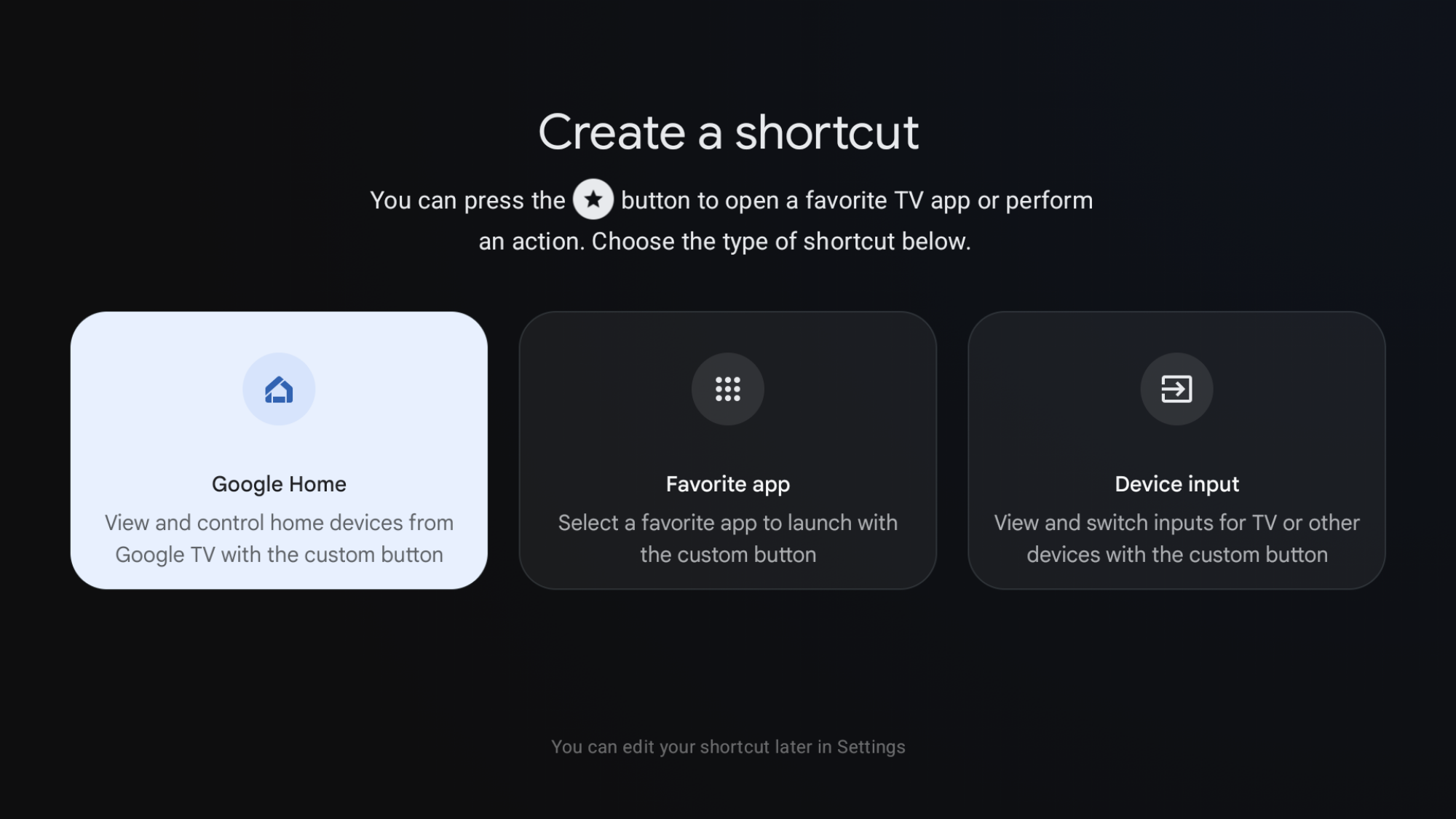
The remotes that come with the Google TV Streamer feature a tiny, unregistered button with a star icon right next to the power button. By default, this shortcut does nothing! But you can change that in the device’s system preferences.

a screenshot showing the three options available

Credit: Florence Ion/Lifehacker

In Settings > Remotes & Accessories > Set up remote buttons, select one of three options for customizing the shortcut button. I set it up as my Google Home shortcut so I can easily turn the lights on and off from the couch. You can also set it up as a launcher for another app installed on the set-top box. Or create a shortcut to cycle through device inputs—this button is on legacy Chromecast devices with an included remote. It was removed from this generation of streaming devices, so if you miss it, you can spoof it back.

For serious power users, map the shortcut to an app like Projectivity Launcher to make it a more powerful launcher button.

Remap other buttons on your Google TV Streamer remote to be more useful

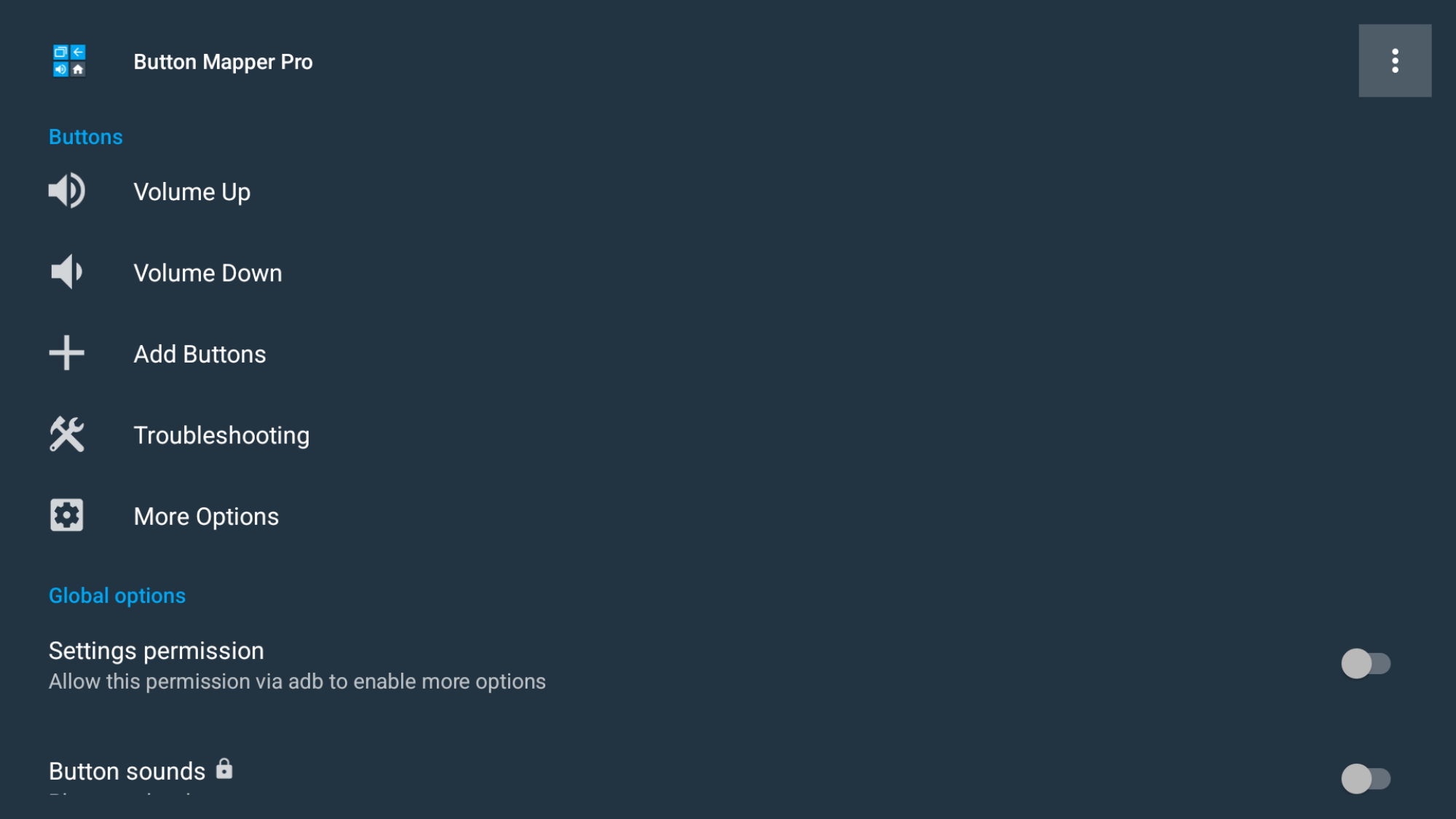
a screenshot of a button mapper app
What Button Mapper looks like running on Google TV.
Credit: Florence Ion/Lifehacker

Don’t care for the default YouTube or Netflix buttons included on the Google TV Streamer remote? You can remap them with a third-party app, then affix a small sticker to indicate what it does. Install an app like Button Mapper or tvQuickActions. Then go to Google TV Settings > System > Accessibility, and turn on the service. After that, you can head back into the app to adjust what those physical buttons do. You can set them as shortcuts to other apps, or even something cheekier for others to discover when they press the button.

Remove the clutter from the Google TV Streamer home screen

a screenshot showing where the option is

Credit: Florence Ion/Lifehacker

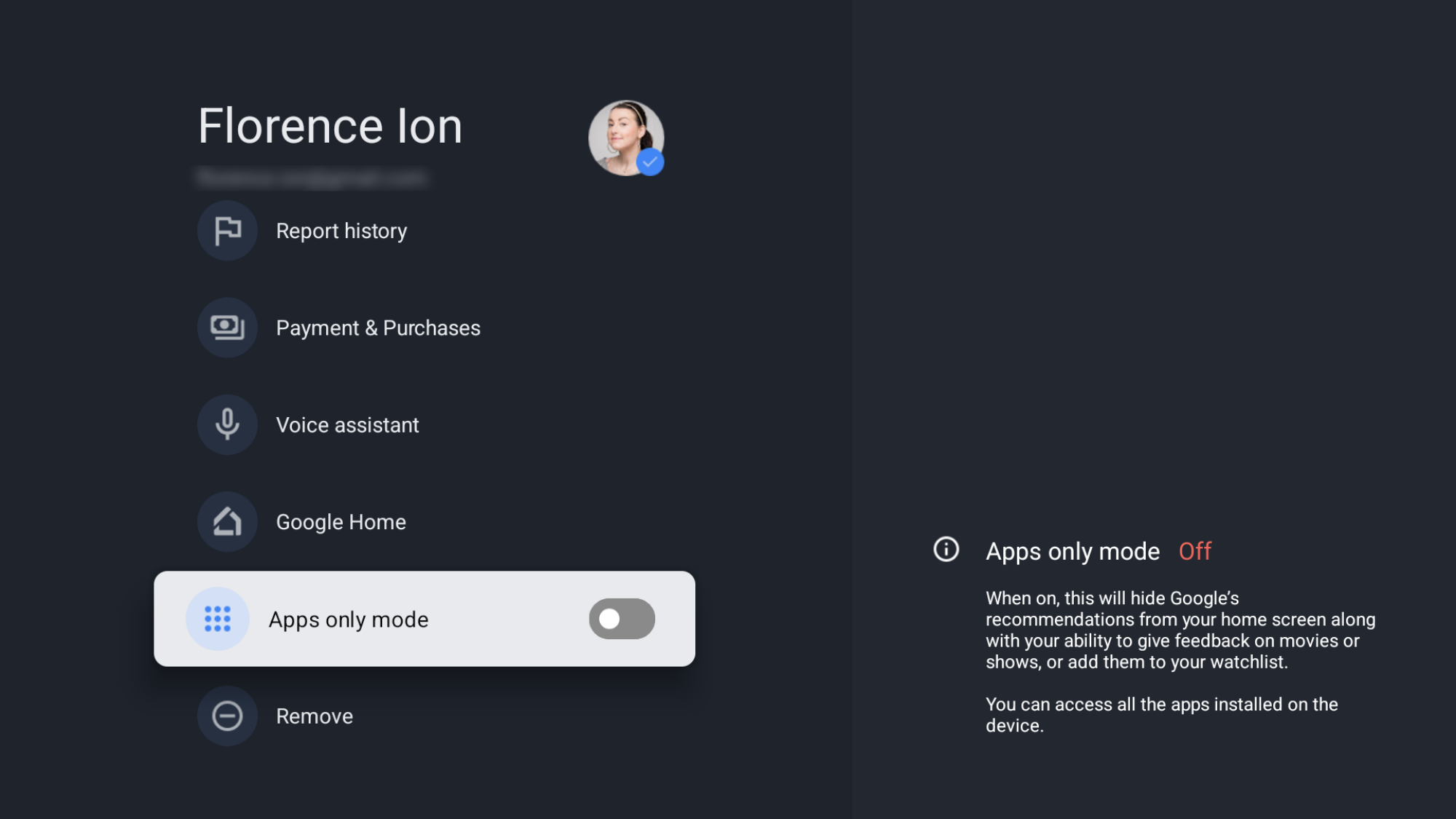
Can’t stand all the recommendations and sponsored content Google TV suggests in the main carousel? You can effectively shut off some of the clutter so it doesn’t visually overwhelm you. Go to Settings > Accounts & Sign-In > Your Account. and toggle on Apps only mode.

This clears the clutter and “sponsored” content, leaving you with just app icons. Keep in mind that this turns off the “Watchlist” feature that’s tied to your account and some Gemini voice search capabilities for specific content.

Enable Google TV Streamer “Developer options” for more customization

a screenshot showing the developer options toggle

Credit: Florence Ion/Lifehacker

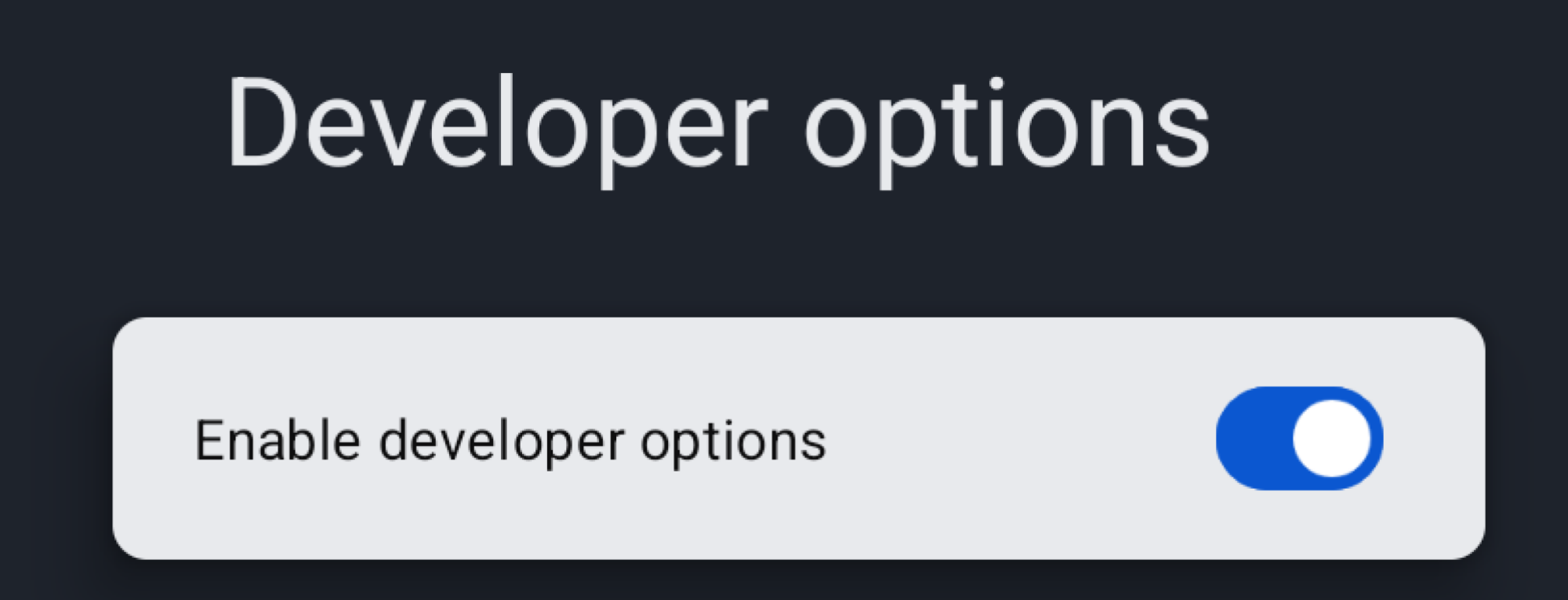
You’ll need to enable developer options to enable features like faster animations and side-loading apps. It’s easy to set up, and it’s just like on an Android smartphone. Head into Settings > System > About, then tap Android TV OS Build 7 times.

You’ll see a little dialog pop up to let you know you’ve got developer access. Once enabled, a new menu will appear under Settings > System > Developer options.

Limit animations to make navigation faster

The Google TV interface is organized and functional, but its animations can slow down menu navigation. You can eliminate these animations and tweak other visual elements to speed things up deep within the developer settings.

A screenshot of the Animator duraction scale setting

Credit: Florence Ion/Lifehacker

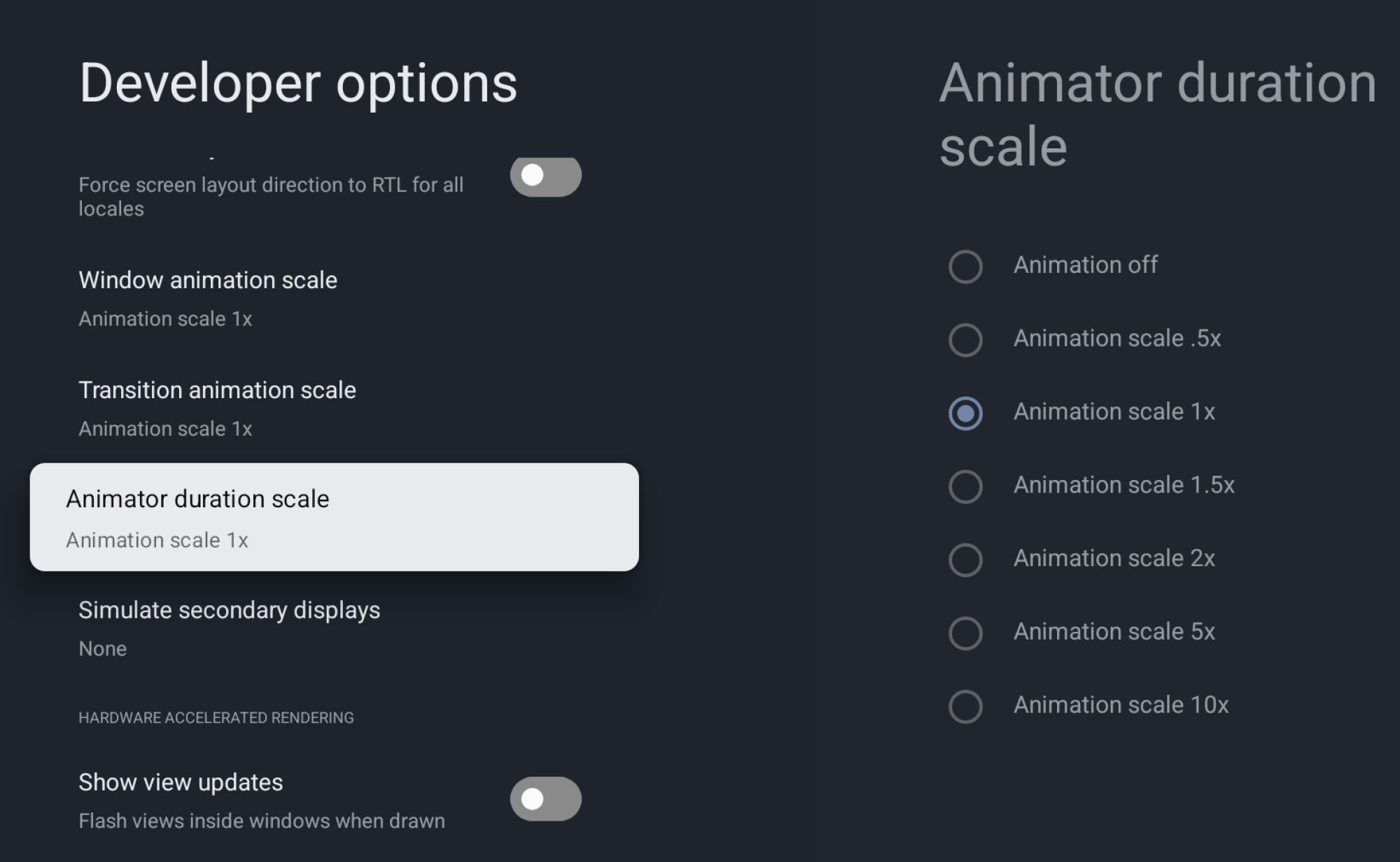
In Developer Options, scroll down to Window animation scale, Transition animation scale, and Animator duration scale. Change one of these, or all three, from 1x to Animation off to turn off animations completely. You can also go the other way and effectively “overclock” the animations to speed them up, making them appear smoother.

Side-load apps or an alternative launcher

With developer options turned on, you can enable USB and wireless debugging to use apps like Send Files to TV and atvTools to sideload APKs. But first, enable the “Allow installs from unknown sources” option in the Developer Options under Security settings. This allows APKs you’ve transferred over to the device to run on the streamer.

Why would you want to go through the fuss of connecting to the Google TV Streamer this way? Because then you could access alternative streaming apps not available in the Play Store, or even an alternative launcher, like LeanbackLauncher.

Pair headphones to your Google TV Streamer for private listening

a screenshot of the Bluetooth audio menu on Google TV

Credit: Florence Ion/Lifehacker

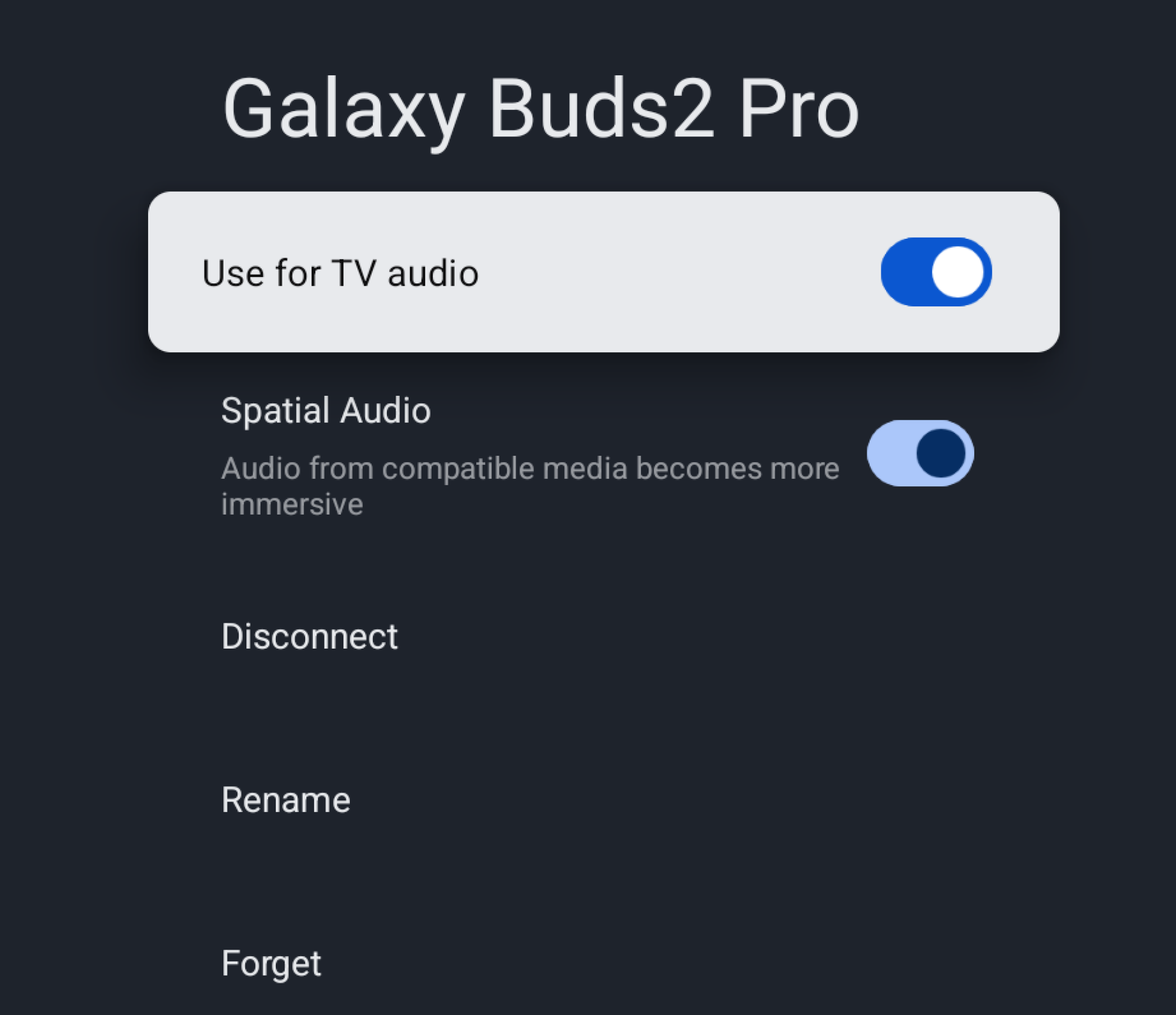
This is one of my favorite little hacks that comes especially in handy when living in a house occupied by other people. When I do my workouts in the living room, I use a set of Bluetooth earbuds connected to the Google TV Streamer so I can hear the instructor’s directions even when I’m face down in a plank and my kid is screaming in the background.

The ability is available in the same submenu where you set up your remote. In Settings > Remote & Accessories > Pair Remote/Accessory, put your audio device into Bluetooth pairing mode, then watch it come up on the screen as an option. If you’re successful, you can now pop on the buds when you need to. Be aware that audio latency can occur, and you might need to restart the connection—it is Bluetooth, after all.  

Force your Google TV Streamer to choose the best resolution, regardless of bandwidth

If you don’t care about your bandwidth and want full-resolution streaming at all times, you can set the best resolution to display as the default in your Google TV Streamer preferences. Go to Settings > Display & Sound > Resolution. Switch the Resolution from “Automatic” to 4K 60Hz, or whatever your TV’s peak is. Once this is enabled, the Google TV Streamer won’t downscale to 1080p. If you’re a sucker for HDR, this is the same menu where you can turn it on so that it’s always in high definition.

Use the USB-C port to add accessories and turn your Google TV Streamer into an all-in-one media center

The USB-C port can do more than charge up the Google TV Streamer. You can plug in a power delivery hub with extra ports to add components like external storage and effectively run your own all-in-one home media center. Those power delivery hubs usually include extra USB ports for peripherals, so you can hook up things like keyboards and game controllers for extra fun.

The origin story of syphilis goes back far longer than we thought

When King Charles VIII of France occupied Naples in 1495, his army of nearly 20,000 mercenaries became the ground zero of the “Great Pox,” the first massive venereal syphilis pandemic in Europe, which went on to cause up to 5 million deaths. For a long time, the siege of Naples was considered the first time syphilis entered European accounts and culture. “But the evolutionary history of Treponema pallidum, the lineage of bacteria including the one that causes syphilis, goes way deeper in time,” says Elizabeth Nelson, an anthropologist at the Southern Methodist University.

Nelson and her colleagues found a 5,500-year-old Treponema pallidum genome in an individual excavated from a rock shelter in Colombia—a discovery that shows pathogens causing treponemal diseases like syphilis, bejel, or yaws are several millennia older than we thought. And this means we might have been thinking about the origins of syphilis in an entirely wrong way.

The blame game

While the French occupation of Naples did not introduce syphilis to this world, it created the perfect storm that shaped the perception of this disease and its origins for centuries to come. The first ingredient of this storm was the French army and its leader. Charles VIII invaded Naples with a vast melting pot of brigands and mercenaries from all over Europe, including the French, Swiss, Poles, and Spaniards. The king himself wasn’t exactly the epitome of morality. Chroniclers like Johannes Burckard noted his “fondness of copulation” and reported that, once he’d been with a woman, he “cared no more about her” and immediately sought another partner—a behavior eagerly mirrored by his soldiers.

Read full article

Comments

SK Hynix Spins Off Solidigm To Form A $10 Billion AI Company In The US

SK Hynix Spins Off Solidigm To Form A $10 Billion AI Company In The US
SK hynix is making a major investment on U.S. soil with the formation of an AI solutions firm that it is tentatively calling AI Company (or AI Co.). Most of the finer grain details are light at the moment, though from a high-level overview, the South Korean memory chip maker says its new firm will be focused on finding “new AI growth engines.”

As

Android’s Full Desktop Mode Surfaces in Accidental Chromium Leak

A bug report filed on the Chromium Issue Tracker inadvertently exposed Google’s desktop Android interface for the first time, revealing a system codenamed “Aluminum OS” running on existing Chromebook hardware. The report, ostensibly about Chrome Incognito tabs, included screen captures from an HP Elite Dragonfly 13.5 Chromebook running Android 16.

The status bar has been redesigned for large screens — taller than the tablet version, displaying time with seconds, date, battery, Wi-Fi, a notification bell, keyboard language indicator and a Gemini icon. The taskbar remains identical to the current implementation, though the mouse cursor now features a subtle tail. Chrome’s interface includes an Extensions button, a feature currently exclusive to the desktop browser. Window controls mirror ChromeOS, placing minimize, fullscreen, and close buttons at the top-right.


Read more of this story at Slashdot.

This Free Site Shows You Sports Highlights Minus the Spoilers

Part of the fun of watching sports is that you don’t know what’s going to happen. TV shows and movies follow story beats, meaning you can usually get a sense for where things are heading, but sports do not work that way. The totally unexpected can, and does, frequently occur—and that’s the reason people keep tuning in, whether their team is dominating or an underdog.

Sometimes, though, you can’t catch the game live, but still want a bit of that feeling. That’s why leagues offer extended highlights, featuring all the key moments, complete with the commentary from the broadcast. These can feel almost like watching the full game, and I love catching up with them the next day alongside my morning coffee. The problem: you’ll typically find those videos on sites full of spoilers about who won, whether that’s via a scoreboard at the top of the site or headlines blaring the results. If you’re hoping for even a fraction of the fun of watching sports live, that’s a problem.

Don’t Tell Me The Score is your solution. This simple website offers highlights for NFL, NHL, MLB, and NBA games, with no scores or spoilers of any kind. The site interface shows only a bunch of icons representing all upcoming and recent games. Color logos means there are highlights are already available, and you can click or tap to start watching.

The highlights for an Anaheim/Edmonton NHL game are shown

Credit: Justin Pot

This is my favorite way to catch up on games I missed. The videos, which are sourced from the league’s official YouTube channels, tend to be a little over 10 minutes, meaning you’ll see the highs and lows, but it won’t take up hours of your day, and you won’t know who won going in (provided you’ve also taken care to avoid spoilers via the TV, newspapers, social media, push notifications, or ill-timed texts from friends).

This tends to work really well, with one big hiccup: NFL videos can’t be watched on the site itself, as the NFL prevents their highlights from being embedded on other sites. This means you’ll need to click a link to watch the highlights on YouTube’s website. This is a little annoying, but the YouTube pages usually don’t include spoilers either, as long as you steer clear of the comments.

I wish more leagues were supported—soccer highlights aren’t offered at all, for example, and neither are the increasingly popular women’s leagues. But if you’re a fan of one of the “big four” North American sports, like watching highlights, and don’t want to get spoiled first, Don’t Tell Me The Score is worth adding to your daily rotation.

Apple TV offers first look at Ted Lasso season 4

Last year fans of Ted Lasso received the good news that the show would be returning for a fourth season, despite having referred to its third season as its “final” one. Now Apple TV has shared some still images and further confirmation that production is underway.

As first shared by The A.V. Club, this latest batch of still images depicts the eponymous coach back in action, this time coaching a women’s soccer team. A description of the upcoming season shared with the outlet reads, “In season four, Ted returns to Richmond, taking on his biggest challenge yet: coaching a second division women’s football team. Throughout the course of the season, Ted and the team learn to leap before they look, taking chances they never thought they would.”

The images also feature returning cast members such as Hannah Waddingham, who plays Greyhounds owner Rebecca Welton, and Annette Badland, who plays pub owner Mae Green. Also shown are newcomers Grant Feely as Ted’s son and Tanya Reynolds as an assistant coach.

Apple shared that the show is returning this summer, but no specific date has been announced.

This article originally appeared on Engadget at https://www.engadget.com/entertainment/streaming/apple-tv-offers-first-look-at-ted-lasso-season-4-141538177.html?src=rss

China Shifts Stance On NVIDIA H200 Chip Imports During CEO’s Visit

China Shifts Stance On NVIDIA H200 Chip Imports During CEO's Visit
At long last, Beijing has given several domestic tech giants its stamp of approval to buy H200 chips based on NVIDIA’s Hopper architecture, with the green light coming while NVIDIA CEO Jensen Huang was visiting China, Reuters reports. Sources who are purportedly familiar with the matter told the outlet that ByteDance, the owner of TikTok,