Why reviving the shuttered Anthem is turning out tougher than expected

On January 12, EA shut down the official servers for Anthem, making Bioware’s multiplayer sci-fi adventure completely unplayable for the first time since its troubled 2019 launch. Last week, though, the Anthem community woke up to a new video showing the game at least partially loading on what appears to be a simulated background server.

The people behind that video—and the Anthem revival project that made it possible—told Ars they were optimistic about their efforts to coerce EA’s temperamental Frostbite engine into running the game without access to EA’s servers. That said, the team also wants to temper expectations that may have risen a bit too high in the wake of what is just a proof-of-concept video.

Andersson799’s early proof-of-concept video showing Anthem partially loading on emulated local servers.

“People are getting excited [about the video], and naturally people are going to get their hopes up,” project administrator Laurie told Ars. “I don’t want to be the person that’s going to have to deal with the aftermath if it turns out that we can’t actually get anywhere.”

Read full article

Comments

There’s a Rash of Scam Spam Coming From a Real Microsoft Address

There are reports that a legitimate Microsoft email address — which Microsoft explicitly says customers should add to their allow list — is delivering scam spam. ArsTechnica: The emails originate from no-reply-powerbi@microsoft.com, an address tied to Power BI. The Microsoft platform provides analytics and business intelligence from various sources that can be integrated into a single dashboard. Microsoft documentation says that the address is used to send subscription emails to mail-enabled security groups. To prevent spam filters from blocking the address, the company advises users to add it to allow lists.

According to an Ars reader, the address on Tuesday sent her an email claiming (falsely) that a $399 charge had been made to her. âoeIt provided a phone number to call to dispute the transaction. A man who answered a call asking to cancel the sale directed me to download and install a remote access application, presumably so he could then take control of my Mac or Windows machine (Linux wasn’t allowed),” she said.

Online searches returned a dozen or so accounts of other people reporting receiving the same email. Some of the spam was reported on Microsoft’s own website. Sarah Sabotka, a threat researcher at security firm Proofpoint, said the scammers are abusing a Power Bi function that allows external email addresses to be added as subscribers for the Power Bi reports. The mention of the subscription is buried at the very bottom of the message, where it’s easy to miss.


Read more of this story at Slashdot.

Native Instruments enters into insolvency proceedings, leaving its future uncertain

Music hardware and software manufacturer Native Instruments has entered into preliminary insolvency proceedings, according to a report by Create Digital Music. This is the company behind iconic software like Massive, Traktor and Kontakt and hardware like Maschine+. Native Instruments also owns the brands iZotope, Brainworx and Plugin Alliance.

We don’t have many specifics as to what this entails and what the future of the company will look like. We do know that an administrator has been appointed to handle restructuring and, potentially, to sell off existing assets. Native Instruments employs hundreds of people and their fates also remain uncertain.

A private equity firm called Francisco Partners owns a majority stake in the company. It also owns majority stakes in entities like GoodRX and Verifone, among others. This isn’t the first time Native Instruments has been forced into major restructuring. The company experienced plenty of layoffs and uncertainty between 2019 and 2020 before being purchased by private equity.

Again, we have no idea how this will shake out. It’s possible that new investors will jump on board and it goes back to business as usual. It’s also possible everything will be scrapped for parts and sold to the highest bidder.

Plugin Alliance, with entities in the US and Germany, says there’s no immediate impact of the NI insolvency on them. https://t.co/u6smg1X0t4 pic.twitter.com/ok7BRwo3BU

— cdmblogs (@cdmblogs) January 28, 2026

We do know that subsidiary Plugin Alliance seems to be unaffected. It issued a statement on Facebook saying that it isn’t involved with the proceedings and that operations will continue as normal. This means new plugins will be released, along with updates for current software.

Everything else is still up in the air. This is troubling for those who have heavily invested in the company’s ecosystem of products. I’m one of them. Any hope I had for a hardware refresh of the Maschine+ just went out the window.

If the company’s robust line of software goes up for sale, Akai is likely the best bet. It has already begun incorporating Native Instruments software into MPC machines.

This article originally appeared on Engadget at https://www.engadget.com/audio/native-instruments-enters-into-insolvency-proceedings-leaving-its-future-uncertain-183206826.html?src=rss

What Is ‘UpScrolled,’ and Why Are People Switching to It From TikTok?

TikTok’s having a rough 2026. The app recently switched ownership from the Chinese-based ByteDance to the new “TikTok USDS Joint Venture,” which, as the name implies, is a majority American-owned business entity. Any changing of the guard comes with the risk for disruptions and issues, but it seems TikTok’s problems have gone beyond the usual rocky transition. First, the app itself went down, which the company attributed to a power outage at a data center. Then, users accused the platform of updating its terms of service with aggressive new tracking, blocking certain content types, and “shadowbanning” new posts from some users.

It’s still not clear exactly what’s going on here, but users aren’t waiting around for more explanation. In fact, many have made up their minds already, and believe the app is actively suppressing content, neutering algorithms, and invading privacy in a way it didn’t under ByteDance. While there are other, popular social media platforms to jump to, many apparently have flocked to a relatively new one: UpScrolled. As of this article, it’s now the second most popular free app on the iOS App Store, reminding me of when X users ran to Bluesky.

What is UpScrolled?

UpScrolled, created by Issam Hijazi, is a social media platform that launched this past June. According to the company’s “About” page, UpScrolled’s mission is to allow all users to share their views without risk of bias, shadowbanning, or “unfair” algorithms. The company asserts it does not push agendas, and ensures that “every post has a fair chance to be seen.” If you believe TikTok’s algorithm is now biased against your views, I could see how that pitch sounds enticing.

The company says it only restricts content that violates their guidelines. That means illegal activities, hate speech, bullying and harassment, explicit nudity, unlicensed copyrighted content, or anything “intended to cause harm.” UpScrolled will also never ban you without your knowledge. If the platform removes your videos or your account, it says it’ll let you know why.

One big difference between UpScrolled and other social media platforms is its algorithm. The app splits feeds into two: There’s the Following Feed, which lists posts entirely in chronological order. The first posts are the newest from your followers, and you scroll through previous posts. If you want to find new posts from accounts you don’t follow, you can use the Discover Feed. But unlike TikTok or Instagram, the Discover Feed does not employ some aggressive, personalized algorithm. Instead, it’s based on likes, comments, and reshares. Popular posts from across the platform are shared with you

What I especially appreciate is UpScrolled’s approach to data collection, in that they largely don’t do it. The company says it doesn’t sell user data to third-parties for marketing, tracking, or for profit. The only times they’ll hand over user data is when compelled by law. That’s in sharp contrast to many social media platforms, which seem to collect as much of your data as possible.

Using UpScrolled

I haven’t spent much time with the app yet, though I did create an account this morning to see what the hullabaloo was all about. I don’t recognize any of the users the app suggests I follow, which means I’ll likely need to dig through the content types if I want to find accounts to start following.

The Discover Feed is a mix of content types, but is heavy with content surrounding the current Israeli-Palestinian conflict. In fact, many users are choosing the platform as a space for pro-Palestinian content, in response to allegations that mainstream social media apps censor these types of posts. That said, the app advertises a host of different content types to follow, including sports, news, games, film, music, tech, and travel.

As you might expect, some of the posts here are simply ripped from TikTok, which is a common practice I see on social media platforms that, well, aren’t TikTok. Despite the current controversy, it’s clear which platform still has the largest user share at this time, by a long shot.

But it’s not all short-form videos. The app also includes plenty of posts of static images as well, which reminds me more of Instagram than TikTok. Still, it seems former TikTok users don’t care that this isn’t a one-to-one replica of the TikTok formula, and care more about sending a message to the app they once loved being addicted to.

I’m not sure my limited journey with UpScrolled this morning will keep me hooked, but it’s an interesting take on a social media platform. We’ll just need to see if the growth will continue, or if this is just a momentary blip before people return to TikTok.

I bought “Remove Before Flight” tags on eBay in 2010—it turns out they’re from Challenger

Forty years ago, a stack of bright red tags shared a physical connection with what would become NASA’s first space shuttle disaster. The small tags, however, were collected before the ill-fated launch of Challenger, as was instructed in bold “Remove Before Flight” lettering on the front of each.

What happened to the tags after that is largely unknown.

This is an attempt to learn more about where those “Remove Before Flight” tags went after they were detached from the space shuttle and before they arrived on my doorstep. If their history can be better documented, they can be provided to museums, educational centers, and astronautical archives for their preservation and display.

Read full article

Comments

Apple Sued by App Developer Over its Continuity Camera

An anonymous reader shares a report: Apple is being sued by Reincubate, which makes the Camo smartphone webcam app. It has filed a lawsuit against Apple in a U.S. federal court in New Jersey, accusing the company of anticompetitive conduct and patent infringement. The suit alleges that Apple copied Camo’s technology, integrated similar features into iOS, and used control over its software ecosystem to disadvantage Reincubate’s Camo product.

Reincubate’s Camo and Camo Studio apps allow iOS or Android phones to function as webcams for Mac and PCs. The company launched Camo in 2020. In 2022, Apple introduced Continuity Camera, a feature that enables iPhones to serve as webcams for Macs but works only within Apple’s device ecosystem. According to the lawsuit, Apple copied patented features from Camo and built them into iOS to “redirect user demand to Apple’s own platform-tied offering.”


Read more of this story at Slashdot.

Google begins rolling out Chrome’s “Auto Browse” AI agent today

Google began stuffing Gemini into its dominant Chrome browser several months ago, and today the AI is expanding its capabilities considerably. Google says the chatbot will be easier to access and connect to more Google services, but the biggest change is the addition of Google’s autonomous browsing agent, which it has dubbed Auto Browse. Similar to tools like OpenAI Atlas, Auto Browse can handle tedious tasks in Chrome so you don’t have to.

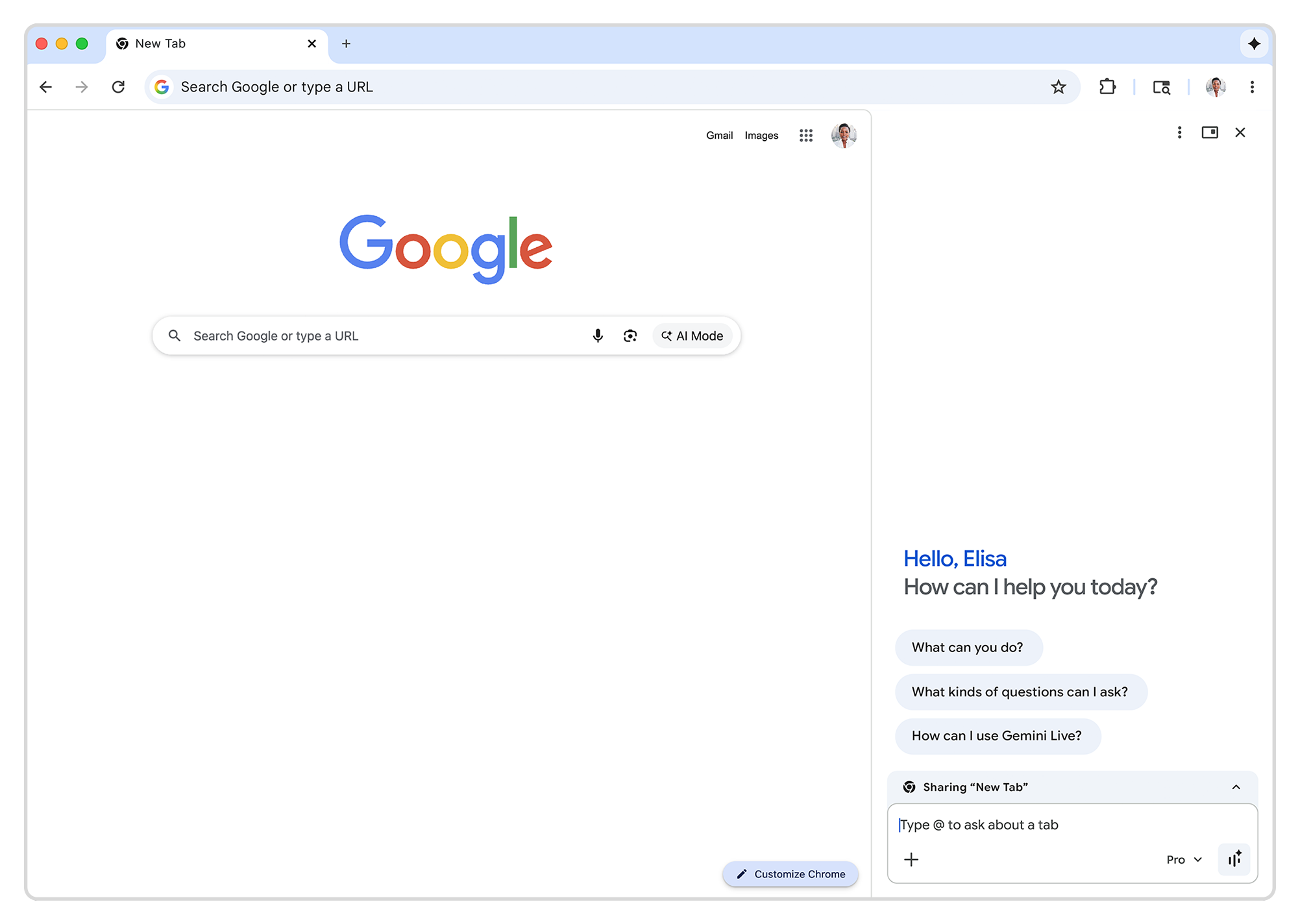
The newly unveiled Gemini features in Chrome are accessible from the omnipresent AI button that has been lurking at the top of the window for the last few months. Initially, that button only opened Gemini in a pop-up window, but Google now says it will default to a split-screen or “Sidepanel” view. Google confirmed the update began rolling out over the past week, so you may already have it.

You can still pop Gemini out into a floating window, but the split-view gives Gemini more room to breathe while manipulating a page with AI. This is also helpful when calling other apps in the Chrome implementation of Gemini. The chatbot can now access Gmail, Calendar, YouTube, Maps, Google Shopping, and Google Flights right from the Chrome window. Google technically added this feature around the middle of January, but it’s only talking about it now.

Read full article

Comments

10 Hacks Every Google Chrome User Should Know

It feels as though Google Chrome has been around forever, but it’s actually still just a teenager: The browser launched back in 2008, originally just for Windows—though it’s now made its way to macOS, Linux, and mobile devices too of course. It’s a powerhouse of a browser that is more widely used than any other.

In the 18 years since its release, Chrome has changed a lot: A host of features have been added and taken away down the years, and it’s very possible that you don’t know everything that Chrome can do, even if you use it every day. Here are my favorite hacks for Chrome, covering everything from casting tabs to playing audio and video.

Change the look and feel of Google Chrome

If you’ve always stuck with the ‘out of the box’ Chrome aesthetic, you might not be aware that it’s relatively simple to change up the theme of the browser—which covers the colors of menus and tabs, as well as what you see on the new tab page. To see the available options, open up a new tab, then click the Customize Chrome button (lower right).

You can apply any of the color themes just by clicking on them, or set up your own colors by clicking the color picker (the little pipette icon). For a more significant visual overhaul, click Change theme: You’ll then see a range of options created and curated by Google. Click Chrome Web Store to see more official and third-party themes you can install.

Claw back some RAM from Chrome

Chrome Memory Saver
Activate Memory Saver for smoother performance.
Credit: Lifehacker

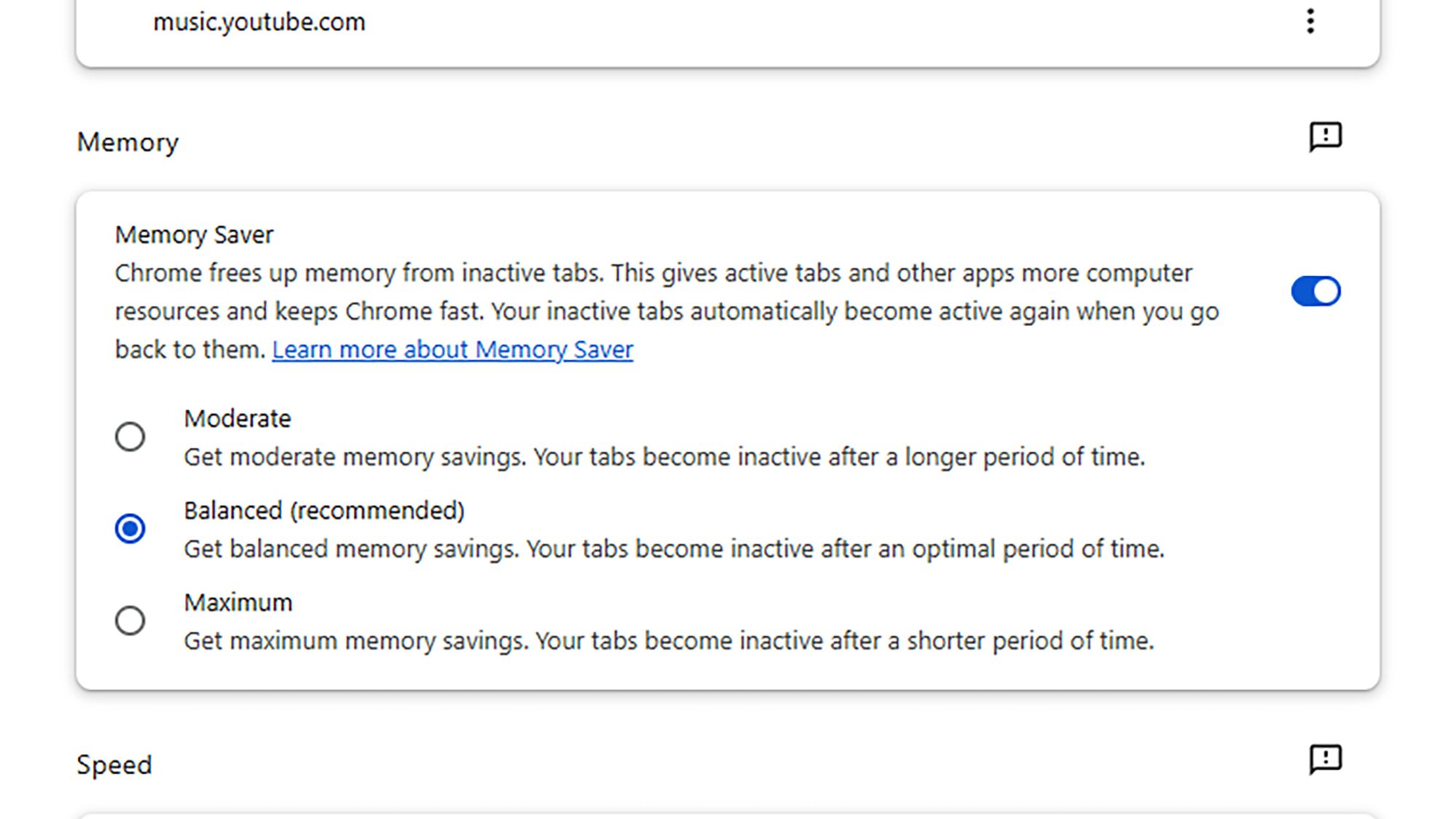
It’s fair to say Chrome doesn’t have the best reputation for efficient RAM usage, but you can get some of it back. In any tab, click the three dots (top right), then choose Settings > Performance, and activate the Memory Saver option. As Google explains, this will put tabs you’ve not used in a while in an inactive state, and recover some RAM from them.

Put your tabs up on a big screen

It’s not a Chrome feature that gets much attention, but you can cast tabs wireless to a big screen via Google TV or Chromecast devices. It’s useful for everything from music streaming to slide presentations, though the latency is usually too high for video playback (and bear in mind that YouTube, for example, has its own casting button for this).

With a tab open in Chrome, click the three dots in the top right corner, then choose Cast, save and share > Cast. You’ll then be asked to choose the device to cast to (which must be on the same wifi network of course). Via the Sources button, you can choose to cast just the tab you’re in, or your entire Windows or macOS desktop, including Google Chrome.

Switch up your search engine

Chrome search engines
Chrome can use whatever search engine you tell it to.
Credit: Lifehacker

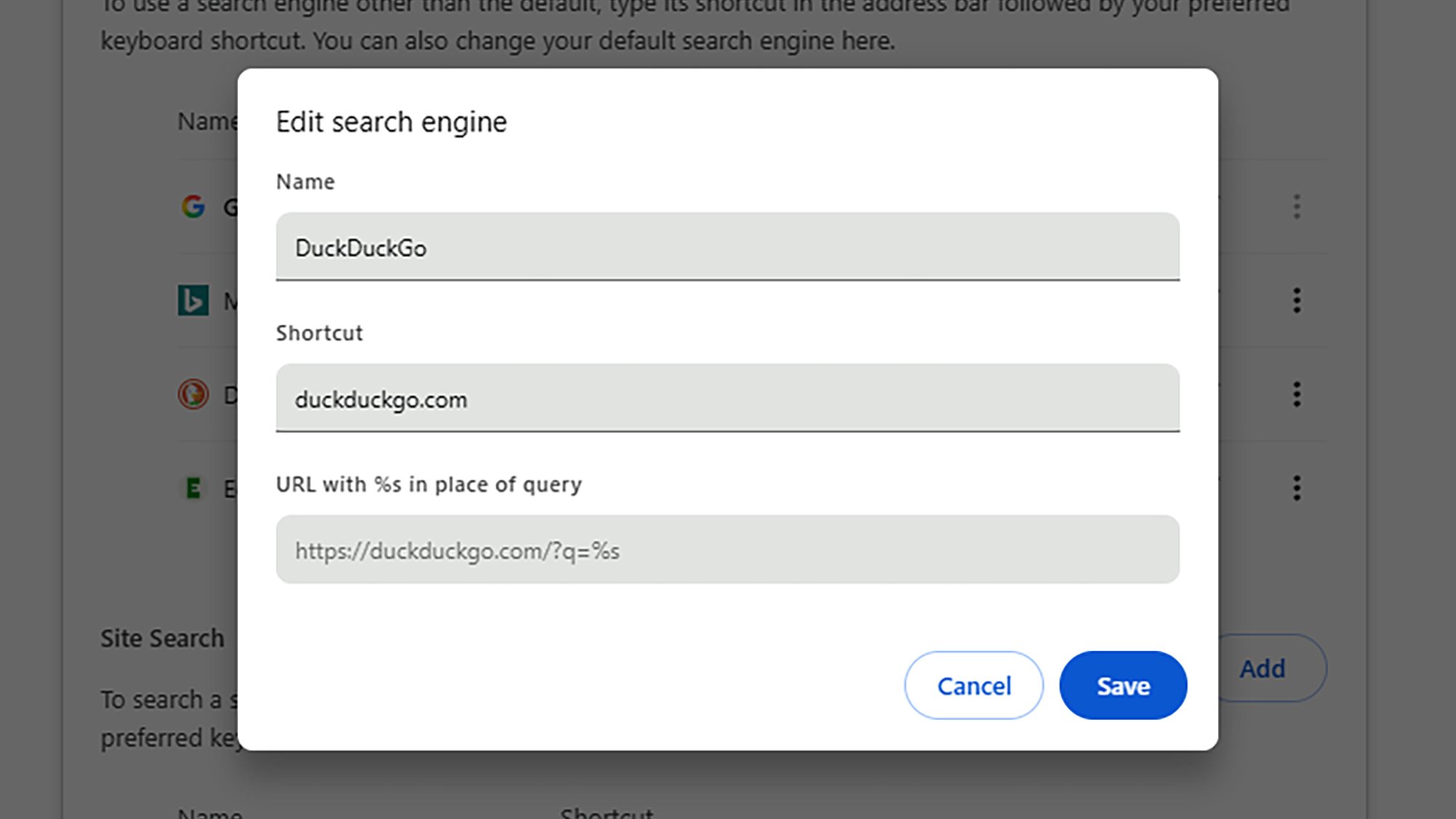
Just because you use Google Chrome doesn’t mean you have to use Google Search—maybe you want to switch to a privacy-first alternative, like DuckDuckGo. To set up search engines in Chrome and change the default one, click the three dots in the top right corner of any tab, then choose Settings, and open the Search engine page.

Use the Add button to add new search engines, the pencil icons on the right to edit their details, and the three dots on the right to set which one is used by default (when you type some search terms into the Chrome address bar). Each search engine can also have a shortcut: Type the shortcut into the address bar to run a search using that specific site.

Group your tabs together

Tab grouping can make it much easier to manage the myriad tabs you’ve got open in every single session—these groups can be moved and closed and saved all together, so you could set up different groups for different research projects, for example, or for different tasks in the browser (maybe one for work-related browsing and another for shopping).

The easiest way to get started with tab groups in Chrome is to right click on a tab header and pick Add tab to new group from the pop-up menu. Give your tab a name and color, and if you then right-click on other tab headers, you’ll be able to add them to the group (or create a new one). Right-click on the headers of grouped tabs to access further options.

Switch between user profiles

Chrome profiles
Add a new profile to separate your browsing activities.
Credit: Lifehacker

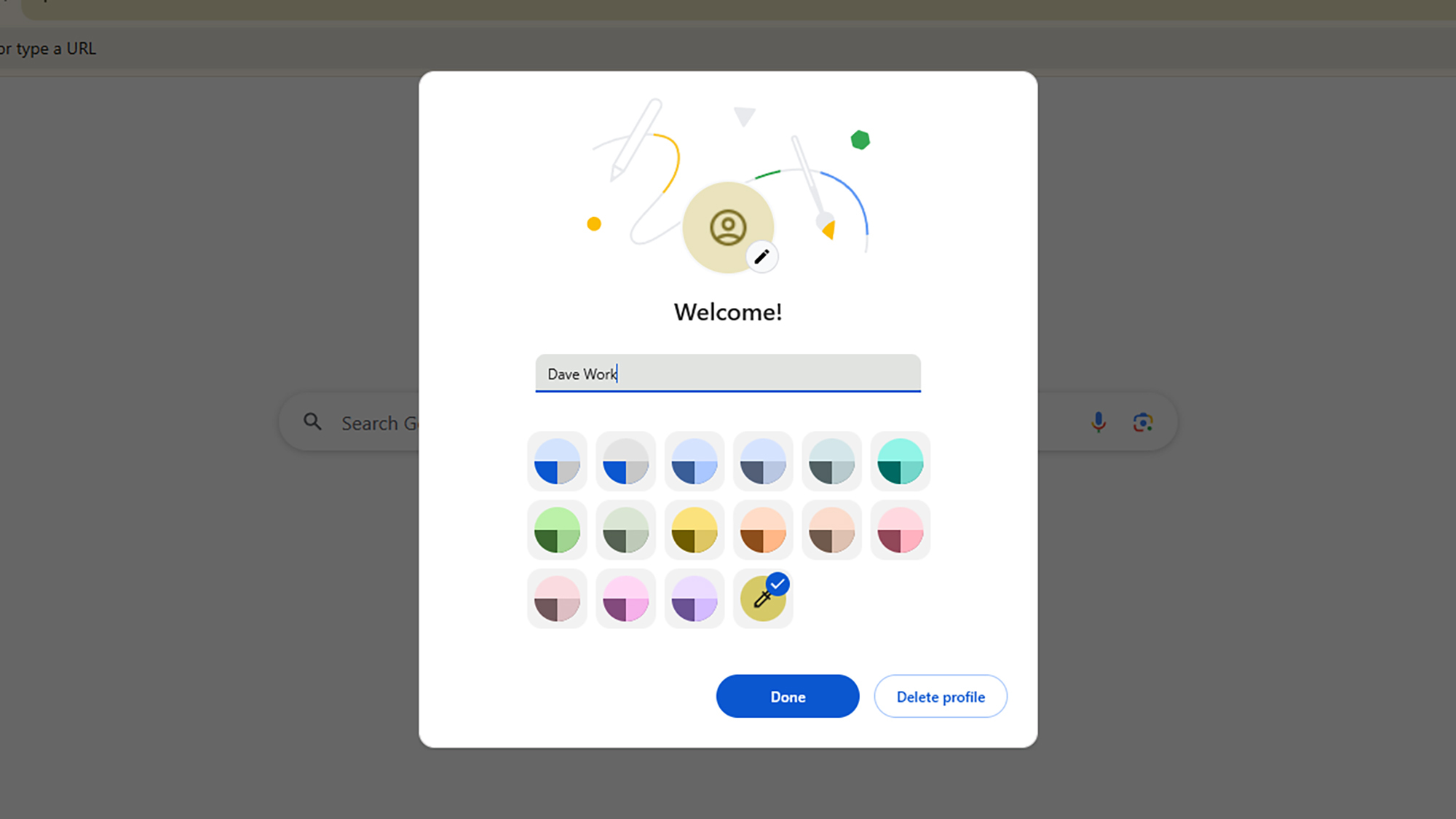
User profiles are a hugely powerful Chrome capability that more people should know about: It lets you split your browsing into work and personal categories, for example, (and separate Google accounts, if needed). It means that logins, browsing history, and all the other data that gets stored in Chrome don’t all get lumped together in one place.

So, you could use your work profile for the day, and then switch to your personal profile at night—making it easier to access your Netflix login and Amazon shopping history, for example. To get started with profiles, click your current profile avatar (in the top right corner, next to the three dots), then choose Add Chrome profile from the menu.

Edit webpages with Tampermonkey

If you’re prepared to invest some time and effort into your Chrome hacking, give the Tampermonkey extension a look (it’s actually available for several browsers, not just Chrome). The tool lets you inject your own custom code to modify the websites you’re looking at, so you can alter the appearance or even the functionality of pages.

You could remove distractions from a page, for example, add your own keyboard shortcuts for navigation, or insert new buttons for sharing links on social media. We don’t have the space for a full tutorial here, but if you head to the Tampermonkey website you’ll find a wealth of help to get you started, plus some links to user script repositories on the web.

Install web apps in Windows or macOS

Spotify app
Spotify’s web app as a desktop app.
Credit: Lifehacker

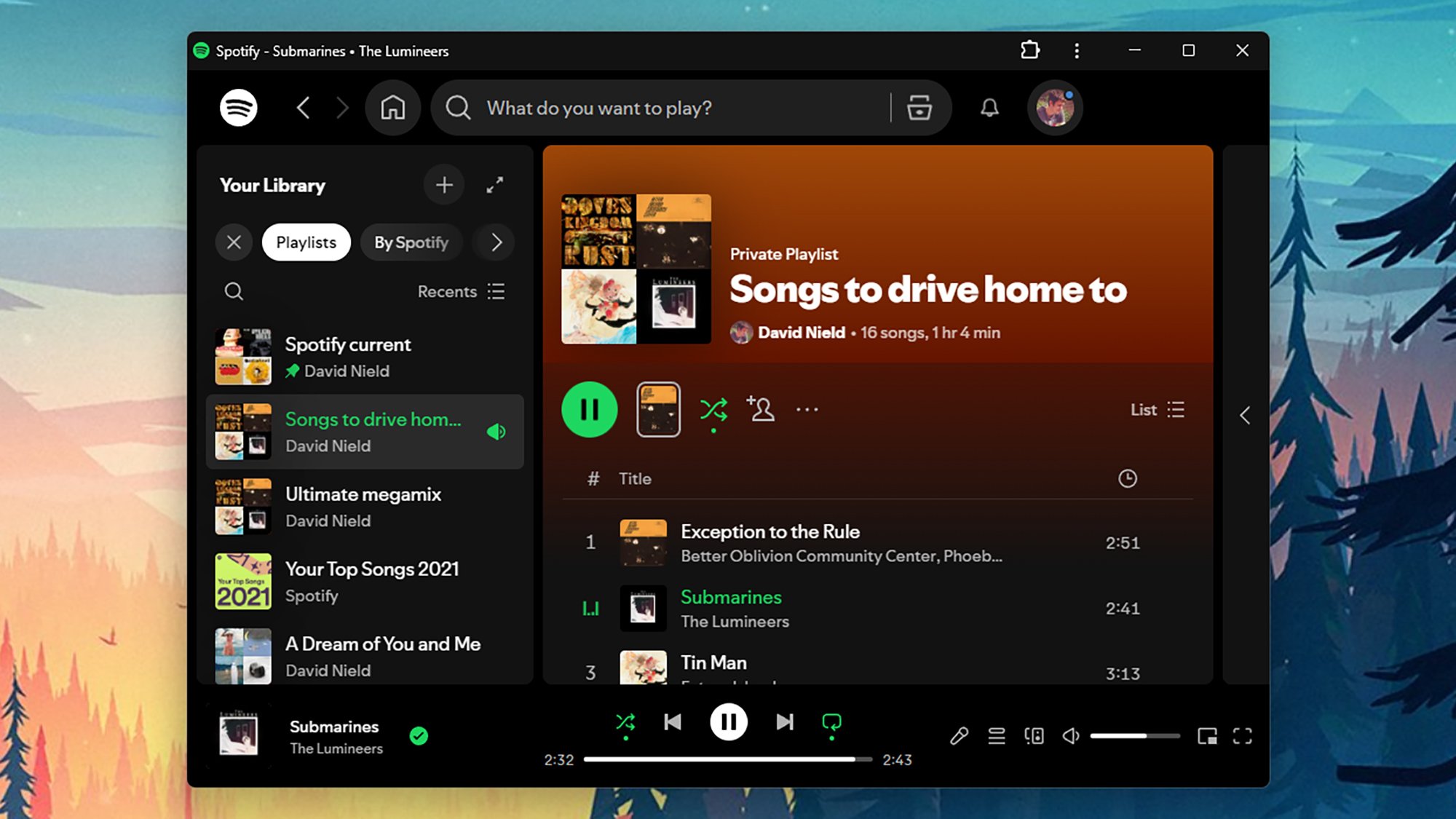
There are plenty of powerful web apps you can get at through Chrome—Slack, Gmail, Spotify—and Google’s browser lets you set these up as if they were desktop apps in Windows or macOS. You can get a shortcut straight to the app on the Windows taskbar or macOS dock, and when you launch it, it appears in its own distinct desktop window.

With the web app open in Chrome, click the three dots (top right), then choose Cast, save and share > Install page as app. You’ll then be asked to give your new app a name, and click Install to confirm. The app launches right away, and you can then organize it into your Windows or macOS system as you want (by pinning it to the taskbar, for example).

Run a check for safety and privacy

Chrome comes with a built-in Safety Check that runs an audit on passwords, security updates, third-party extensions, and more. You can find the Safety Check screen by clicking the three dots to the top right of any tab, then choosing Settings > Privacy and security: As well as running the check, you can follow the recommended actions.

Use Chrome to preview files and preview media

Chrome PDF
Chrome can quickly open files like PDFs.
Credit: Lifehacker

Google Chrome can handle more than webpages: It’s also able to open up PDF documents, and image, video, and audio files saved in common formats (like MP3 or MOV). Just drag a file into an empty tab to open it, or associate the file type with Chrome in Windows or macOS (which means it’ll automatically open in the browser when you double-click on it).

Chrome isn’t the most advanced PDF editor or video player you’re ever going to see, but it’s a quick and easy way of opening up local files without having to launch an entirely separate program each time. You could use this alongside the Split View feature, for example, to watch a video stored on your system while making notes in Google Docs.

Chrome Can Now Use AI to Browse the Internet for You

Have you ever wanted to browse the internet, but the thought of typing a URL into your address bar seemed just too exhausting? Now, Google’s here to help. Today, the company announced a big expansion of its existing Gemini in Chrome feature, with the highlights including a new look for the AI companion, more-integrated image editing tools, and, perhaps most impressive (but also creepy), the launch of Auto Browse, which lets Gemini take the wheel when you’re going online.

The new side panel view

Gemini in Chrome's new side panel view

Credit: Google

Previously, Gemini in Chrome appeared in a small box on top of your browser, which made it a bit inconvenient to use, especially when bouncing between tabs. Google’s update moves it to a scrollable side panel view that’s a bit bigger, and it won’t obscure any of your other content. Instead, it’ll sit to the right of the webpage your viewing, so you can more easily compare whatever answers Gemini gives you with what you’re seeing, or carry on a conversation while bouncing between multiple tabs. It will retain all the same functionality as before, including the ability to reference multiple open tabs in prompts. It’s a small change, but should help for usability.

Right-click any image to edit it in Nano Banana

Nano Banana in Chrome

Credit: Google

Google’s Nano Banana image generation AI is having a bit of a moment, and the new Gemini in Chrome updates make it easier to use. Now, instead of having to download an image and re-upload it to Gemini, you can edit it using Nano Banana with a simple right click. Or, you could also use natural language to start an edit by pulling up the image you want to edit on your screen and telling Gemini to edit it in the side panel. Google says this should work with pretty much any image you can pull up on the browser.

During a demo, Google showed this off to journalists using a Google Photos library, but there’s nothing saying you have to stick to your own images. That immediately set off alarm bells for me, given Elon Musk’s X is currently in hot water after opening up the ability for anyone to use Grok to edit other people’s images directly on the social media platform and without their permission. After some users started using that tool to generate explicit content from others’ photos, it was pared down a bit, but Google doesn’t seem worried. When I asked about safety protections for this feature, a Google spokesperson told me the following:

“We have clear policies that prohibit the use of our AI tools to generate sexually explicit content, and our tools are continually getting better at reflecting these policies. We’ve invested in safety from the outset and added technical guardrails to help limit problematic outputs such as violent, offensive, or sexually explicit content.”

The company didn’t say anything about how users might use Nano Banana in Chrome to circumvent copyright, but technically, the new update doesn’t really add new features to Google’s AI image generator, it just makes it easier to access. Granted, the same thing applied to Grok’s recent update, too, and easier access can mean opening the floodgates, even if you have the best of intentions.

Use AI to Auto Browse in Chrome

Gemini in Chrome Auto Browse

Credit: Google

Finally, the big one: “Agentic” has been the hot buzzword in AI as of late, and Google doesn’t want Chrome to be left behind. So now, instead of just answering questions, Gemini can take control of your browser for you.

The functionality is currently limited to Google AI Pro and Ultra subscribers, but starting today, those subscribers can ask Chrome to “Auto Browse”—completing research, taking you to different websites, and filling out forms for you.

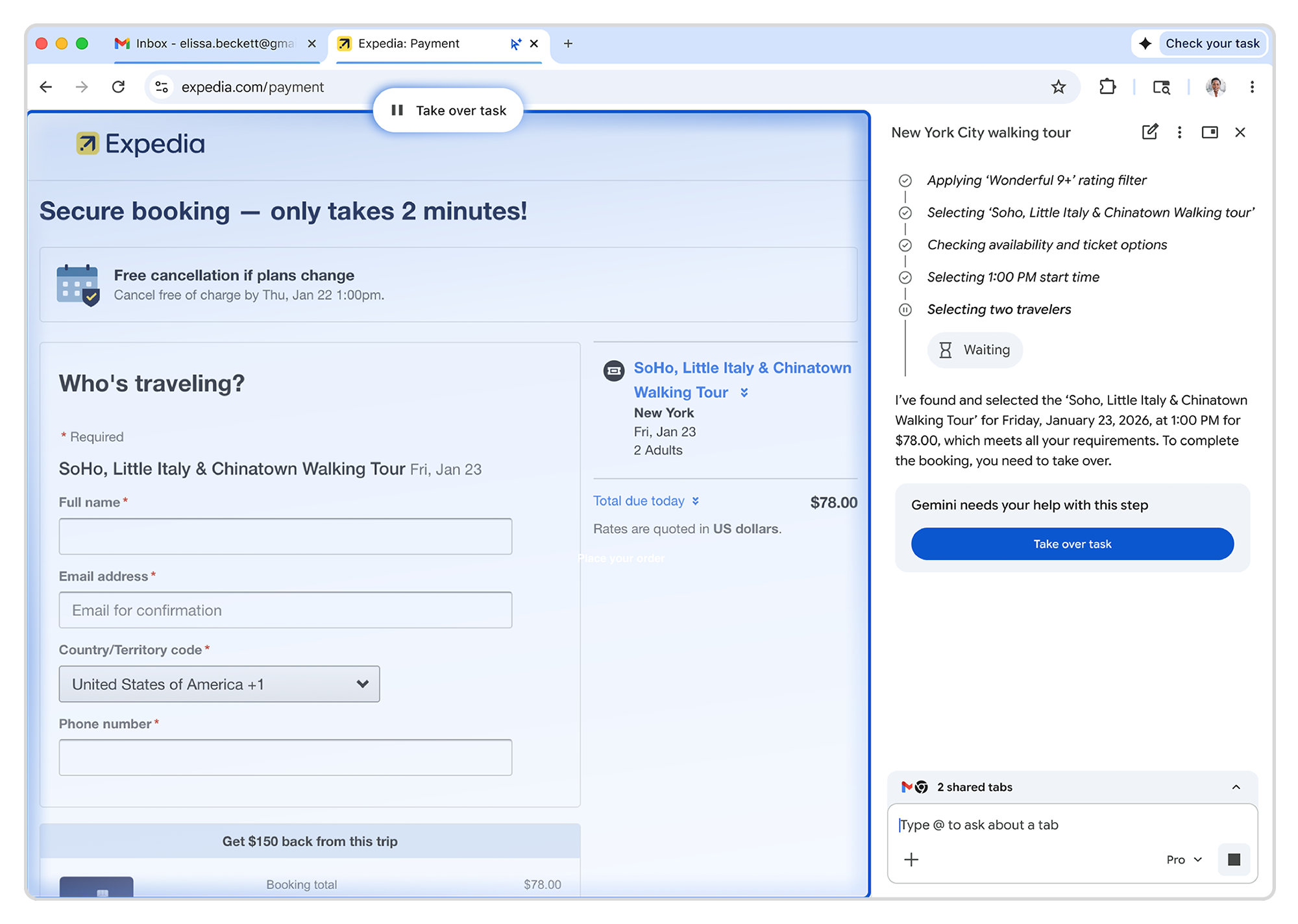
You can watch as the AI navigates around the web, or you can click away to a different tab while it works in the background. Multiple tabs can Auto Browse at the same time, so you can have a few tasks going on at once. The AI will list out the steps it takes in the side panel while it navigates around, to make checking in on it easier.

Google demonstrated this to journalists by showing the AI finding a specific product, navigating to its store page, singing into the buyer’s account (using Google Password Manager), and adding it to their cart. The company also suggested you could use Auto Browse to schedule appointments, fill out an online form using information from an uploaded PDF, collect tax documents, compare apartments listed on sites like Redfin, and more. I haven’t been able to go hands-on with it yet, so I can’t speak to how well it’ll perform any of these tasks, although it did look snappy in the controlled demo.

Do you really trust an AI to browse for you?

My concern with Auto Browse mostly lies in sketchy websites and permissions, although Google told me it’s planned for those. Auto Browse needs to get permission before it can access your Google Password Manager, and if it stumbles across a link that the AI thinks doesn’t look quite right, it will supposedly use Chrome’s existing unsafe browsing protections to navigate away. A Google spokesperson told me its “as secure as you can make it,” although I’d probably want to keep an eye on it for at least my first few requests.

The feature also has one limitation for now—while it can be open in multiple tabs at once, your Auto Browse tabs won’t be able to communicate with one another. That means each instance of Auto Browse is isolated, but that could change in the future.

Personally, I don’t see myself using this much, especially for sensitive tasks like “collecting tax documents,” but automatically filling out a basic form does sound handy. Google said that Auto Browse will stop and ask for you to take over for sensitive steps in any tasks that might require it, like actually buying an item or submitting a form. It won’t (or isn’t supposed to) take that final step for you, giving you a chance to check its work. In that way, it’s similar to the Gemini app’s existing shopping features.

Existing and upcoming features

Gemini in Chrome can use most of Gemini’s existing features, allowing it to connect with apps like Gmail or access your history chatting with the bot. But there is one big one that’s planned for the “coming months.”

Recently, the Gemini app proper rolled out a beta for “Personal Intelligence” to paying users, allowing the AI to view all of your past conversations and connected apps without you having to direct it where to look. It’s basically an extension of those existing connected apps and history features, with a reasoning model applied over it. For instance, you could tell it to help you find new tires for your car, and it would automatically know to look through your Gmail and Google Photos to find out what model of car you have and the last time you bought tires.

That feature is still baking, but that it’s even in the works means Google is moving fast on bringing parity between all the different ways you can access Gemini. Every other feature mentioned in this article is either already available, or rolling out now.

Google brings its Nano Banana image generator to Chrome

Following its recent AI makeover of Gmail, Google is bringing more Gemini-powered tools to Chrome. Starting today, a host of new features are rolling out for the browser, with more to come over the next few months. 

The first of the new features is a sidebar. Available to all Gemini in Chrome users, the interface allows you to chat with Gemini and keep a conversation going across multiple tabs. Google suggests the sidebar is useful for multitaskers. “Our testers have been using it for all sorts of things: comparing options across too-many-tabs, summarizing product reviews across different sites, and helping find time for events in even the most chaotic of calendars,” the company writes. 

Now you can access Nano Banana, Google's in-house image generator, directly from Chrome. No need to go to the Gemini app.
Now you can access Nano Banana, Google’s in-house image generator, directly from Chrome. No need to go to the Gemini app.
Google

The sidebar is also where you access the second new feature Google is adding to Chrome. Following its successful rollout within the Gemini app, Nano Banana, Google’s in-house image generator, is available directly inside of the browser. With the addition, you won’t need to open a new tab when you want Gemini to make you an AI image. You also won’t need to download and upload a file when you want Gemini to edit an existing image for you. Instead, you can complete both of those tasks from any of your open tabs, thanks to the new sidebar.    

Looking forward, Google plans to bring Personal Intelligence, which debuted inside of the Gemini app at the start of January, to Chrome in the coming months. Once the feature arrives, it will allow the browser to remember past conversations you’ve had with Gemini. In turn, Google says this will lead to a more personalized Chrome. “Personal Intelligence in Chrome transforms the browsing experience from a general purpose tool into a trusted partner that understands you and provides relevant, proactive, and context-aware assistance,” the company said.

In the meantime, Gemini in Chrome already supports Google’s Connected Apps feature, which allows the assistant to pull information from the company’s other services, including Gmail and Calendar. During a press briefing, a Google employee demoed this feature by asking Gemini to pull up the dates of when their children would be on March break. Without telling the assistant where to look, Gemini sourced the correct time frame from the employee’s email inbox.    

A new sidebar interface allows Chrome users to access Gemini from any of their open tabs.
Google

Last but not least, Google is previewing a new auto browse feature inside of Chrome. In the demo the company showed, an employee asked Gemini to find and buy them the same winter jacket they bought a few seasons ago. The assistant first drafted a plan outlining how best to tackle the request. It reasoned the best place to start was with a search of the employee’s email inbox to determine the correct model and size of jacket. It then went shopping.

While Gemini was working on this task, the employee was free to continue browsing in Chrome. At several points in the process, the assistant would stop before continuing to obtain the employee’s permission to move forward. For instance, it paused when it needed login credentials, and again when it needed a credit card number to complete the purchase. 

Judging from the demo, it will probably take you less time to do your online shopping and other browser tasks on your own. Google suggests the feature will appeal to those who are creatures of habit. Say you often order the same produce from a grocery delivery service every week, Gemini can automate the ordering. Plus, the feature is in preview, so early testers probably won’t be too put off by Gemini’s slow pace. In any case, Google AI Pro and Ultra subscribers in the US can try auto browse starting today.    

This article originally appeared on Engadget at https://www.engadget.com/ai/google-brings-its-nano-banana-image-generator-to-chrome-180000104.html?src=rss

French Ubisoft workers vote to strike

When deciding which video game to buy, “Is it fun?” is no longer the only consideration. Given the state of the industry, “Do I want to support this company?” is arguably more important. Take, for example, Ubisoft, where things seem to unravel more each day. After the floundering publisher floated even more layoffs this week, workers at its Paris headquarters said, “Enough is enough.” They’re now calling for a three-day strike.

Unions representing Ubisoft employees plan to strike from February 10 to 12. “With management being stubbornly entrenched in its authoritarian ways, we are calling Ubisoft employees across France to join this strike, along with the five unions present within the company,” The Syndicat des Travailleureuses du Jeu Vidéo (Video Game Worker’s Union) wrote in a statement.

The strike follows a series of heavy-handed cost-cutting moves at Ubisoft. It recently shut down its Halifax studio just 16 days after employees unionized. Last week, it closed its Stockholm studio and announced additional restructuring efforts worldwide. It also canceled six games and delayed seven others.

Then, earlier this week, the Assassin’s Creed publisher proposed cutting 200 jobs at its Paris headquarters. Under French labor law, the company would organize the cuts through the nation’s Rupture Conventionnelle Collective (RCC) process. It would require a mutual agreement between the company and the labor union.

Yves Guillemot, CEO and co-founder of Ubisoft, speaks at the Ubisoft Forward livestream event in Los Angeles, California, on June 12, 2023. The event features a look at upcoming Ubisoft games. (Photo by Robyn Beck / AFP) (Photo by ROBYN BECK/AFP via Getty Images)
Ubisoft CEO Yves Guillemot
ROBYN BECK via Getty Images

Adding even more fuel to the fire, Ubisoft will now require workers to return to the office five days each week. (The company had previously agreed to two work-from-home days per week.) Although Ubisoft framed the mandate as being about efficiency and collaboration, it’s easy to view this as a cudgel to further reduce its headcount. One Ubisoft developer, who hinted as much while voicing his opposition to the mandate on LinkedIn, said he was suspended without pay for three days as a punitive measure.

The workers’ union saw all of this and decided it was time to act. “We’re calling for a HALT to management’s obsession with penny-pinching and worsening our working conditions,” the Syndicat des Travailleureuses du Jeu Vidéo wrote. “It’s time for a real accountability from company executives, starting from the top! Without the workers, and generous public funding, Ubisoft would never have been able to grow this much. WE are Ubisoft, and WE are shutting it down February 10th to 12th!”

This article originally appeared on Engadget at https://www.engadget.com/gaming/ubisoft-173241918.html?src=rss

How to cancel Windscribe and get your money back

Windscribe isn’t a VPN for everybody, and it’s not trying to be. Despite its high-achieving free plan, it didn’t quite make my list of the best VPNs, largely due to alienating interface choices and swingy download speeds. Its iconoclastic approach to everything from design to pricing to its online knowledge base will likely win some customers for life and turn others off.

For those in the latter camp, I’ve written up this guide for cancelling Windscribe. Follow the instructions below to stop Windscribe from auto-renewing, cancel third-party subscriptions, delete your account altogether and get a refund.

The most important thing to know before we start is that Windscribe’s money-back guarantee only lasts seven days — if you paid for a subscription, you have to cancel before then to get a refund. It’s a tighter period than most VPNs, so be ready to decide fast.

How to stop your Windscribe Pro subscription renewing

To cancel Windscribe Pro, simply stop your payment method from automatically renewing for the next subscription period. Once you’ve done this, you can continue using Windscribe Pro until the end of the current period, then you’ll be downgraded to the free version. Here are the steps to follow.

  1. In your browser, navigate to windscribe.com. Click the words My Account at the top of the home page.

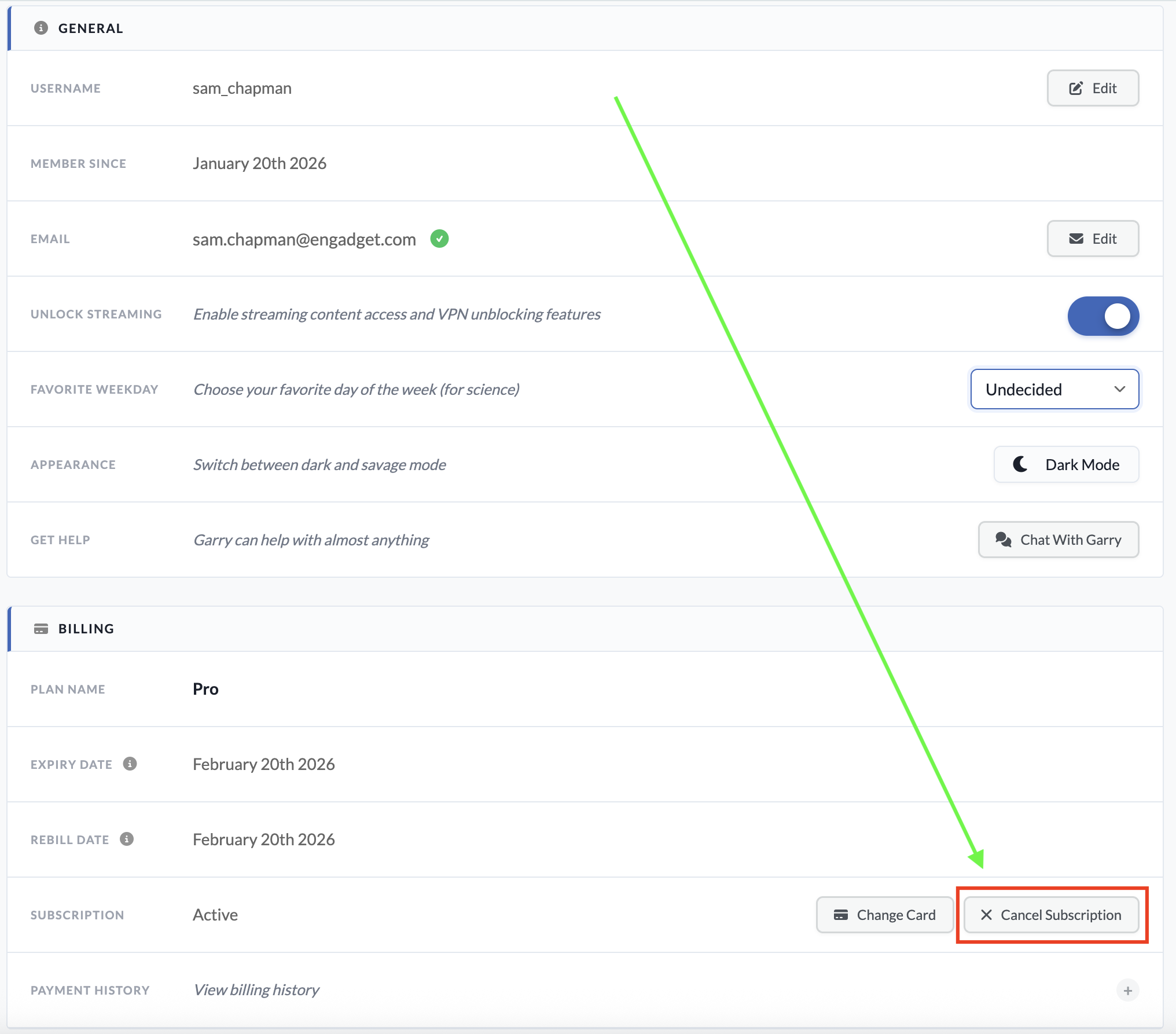
  2. Scroll down to the billing section. On the subscription line, click the button marked Cancel Subscription.

  3. You’ll be taken to a new page. Enter your password in the Your Password field. Below, enter a reason for cancellation (this can be “none” or possibly “suck it,” which Windscribe should approve of).

  4. Click the Cancel Subscriptions button at the bottom of the page to end automatic renewal on your account.

You can reach this page by logging into your account on Windscribe.com.
Sam Chapman for Engadget

If your account also included a static IP subscription, there’s no way to cancel that through the usual dashboard. You’ll have to submit a support request by asking the Garry chatbot, which can be accessed by clicking the icon at the bottom-right corner of any page on windscribe.com.

When you subscribe to an app through a third party like the Apple App Store or Google Play Store, that same third party also handles cancellations and refunds. Windscribe itself won’t be able to do anything for you here.

If you subscribed through Google Play on an Android phone, you can cancel by opening the Google Play Store app and tapping your profile icon at the top-right (a circle with the first letter of your username inside). Tap Payments & Subscriptions in the menu that appears, then subscriptions on the next page. Find your Windscribe subscription, tap it and click Cancel Subscription to end payments.

If you went through the App Store on an Apple device, open the Settings app, then tap on your name at the top of the screen. Tap Subscriptions and scroll down to your Windscribe subscription. Tap it, then tap Cancel Subscription.

How to delete your Windscribe account

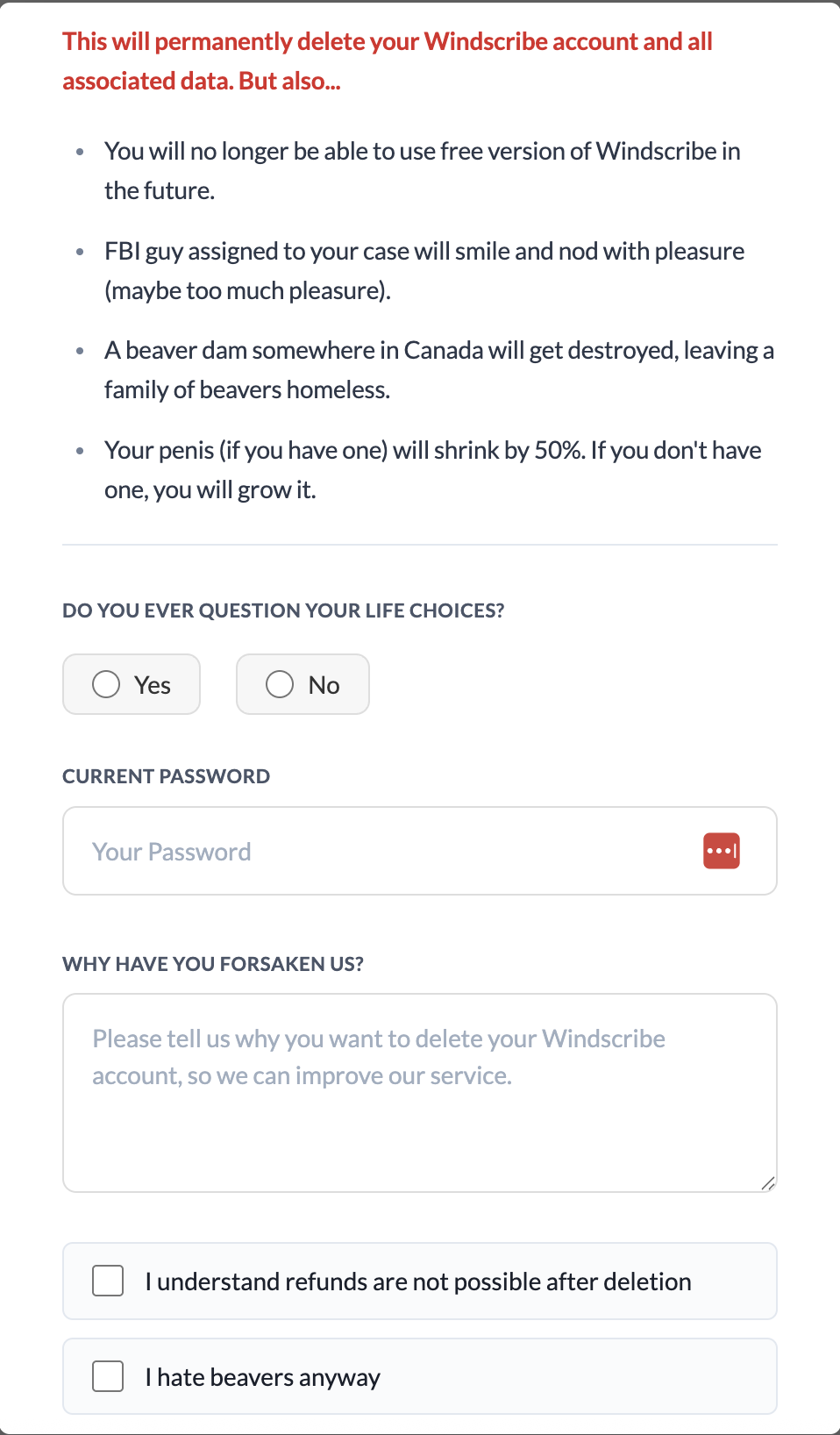
If you’re certain you want to stop using Windscribe and never start up again, you can scrub your presence from its servers by deleting your account. To do this, go to windscribe.com and click the My Account button in the header bar. Scroll all the way to the bottom and click on the obnoxiously titled Give Up On Privacy button. This will show you the following image.

I realize I'm harping on this, but Windscribe gets exceptionally punchable when you try to delete your account.
I realize I’m harping on this, but Windscribe gets exceptionally punchable when you try to delete your account.
Sam Chapman for Engadget

You’ll have to fight through several attempts at comedy to finish deleting your account. Click Yes or No when asked if you ever question your life choices. Enter your password, write whatever you want as a cancellation reason and check both of the boxes below the text field. The Delete Account button should finally be clickable; do it. Once you’ve pulled the trigger, you won’t be able to use the same email address to sign up for another account.

How to get a refund from Windscribe

As I warned above, you can only get a refund from Windscribe for seven days after paying for a subscription. You also cannot get your money back if you’ve used more than 10GB of data since the start of the payment period. Finally, you can only get refunded on the first payment of each subscription — renewals are not eligible.

If you’re within those limits, you can request your money back by starting a conversation with the Garry chatbot. Click the chatbot icon at the bottom-right of the Windscribe website to start a chat. Be warned that you might have to stand firm through several attempts to fix your complaints before you can actually initiate the refund process.

Best Windscribe alternatives

Windscribe is a VPN with a lot of good points. That said, by the time you’ve waded through a swamp of dick jokes to complete the process, I wouldn’t blame you for feeling validated in your decision to get rid of it.

There are plenty of good VPNs that can replace Windscribe. My favorite is Proton VPN, which also has a free plan, though without the ability to select your own server. ExpressVPN is simple and powerful, if a little overpriced, while Surfshark is the fastest VPN overall. If you liked Windscribe for its non-VPN features, NordVPN has the best range of extra perks.

This article originally appeared on Engadget at https://www.engadget.com/cybersecurity/vpn/how-to-cancel-windscribe-and-get-your-money-back-173000785.html?src=rss

Meta blocks links to ICE List across Facebook, Instagram, and Threads

Meta has started blocking its users from sharing links to ICE List, a website that has compiled the names of what it claims are Department of Homeland Security employees, a project the creators say is designed to hold those employees accountable.

Dominick Skinner, the creator of ICE List, tells WIRED that links to the website have been shared without issue on Meta’s platforms for more than six months.

“I think it’s no surprise that a company run by a man who sat behind Trump at his inauguration, and donated to the destruction of the White House, has taken a stance that helps ICE agents retain anonymity,” says Skinner.

Read full article

Comments

Tim Berners-Lee Wants Us To Take Back the Internet

mspohr shares a report: When Sir Tim Berners-Lee invented the world wide web in 1989, his vision was clear: it would used by everyone, filled with everything and, crucially, it would be free. Today, the British computer scientist’s creation is regularly used by 5.5 billion people — and bears little resemblance to the democratic force for humanity he intended.

Since Berners-Lee’s disappointment a decade ago, he’s thrown everything at a project that completely shifts the way data is held on the web, known as the Solid (social linked data) protocol. It’s activism that is rooted in people power — not unlike the first years of the web.

This version of the internet would turbocharge personal sovereignty and give control back to users. Berners-Lee has long seen AI — which exists only because of the web and its data — as having the potential to transform society far beyond the boundaries of self-interested companies. But now is the time, he says, to put guardrails in place so that AI remains a force for good — and he’s afraid the chance may pass humankind by. Berners-Lee traces the web’s corruption to the commercialization of the domain name system in the 1990s, when the .com space was “pounced on by charlatans.” The 2016 US elections, he said, revealed to him just how toxic his creation could become. A corner of the web, he says, has been “optimised for nastiness” — extractive, surveillance-heavy, and designed to maximize engagement at the cost of user wellbeing.

His answer is Solid, a protocol that gives users control through personal data “pods” functioning as secure backpacks of information. The Flanders government in Belgium already uses Solid pods for its citizens. On AI, his optimism remains dim. “The horse is bolting,” he says, calling for a “Cern for AI” where scientists could collaboratively develop superintelligence under contained, non-commercial oversight.


Read more of this story at Slashdot.

Report: China approves import of high-end Nvidia AI chips after weeks of uncertainty

On Wednesday, China approved imports of Nvidia’s H200 artificial intelligence chips for three of its largest technology companies, Reuters reported. ByteDance, Alibaba, and Tencent received approval to purchase more than 400,000 H200 chips in total, marking a shift in Beijing’s stance after weeks of holding up shipments despite US export clearance.

The move follows Beijing’s temporary halt to H200 shipments earlier this month after Washington cleared exports on January 13. Chinese customs authorities had told agents that the H200 chips were not permitted to enter China, Reuters reported earlier this month, even as Chinese technology companies placed orders for more than two million of the chips.

The H200, Nvidia’s second most powerful AI chip after the B200, delivers roughly six times the performance of the company’s H20 chip, which was previously the most capable chip Nvidia could sell to China. While Chinese companies such as Huawei now have products that rival the H20’s performance, they still lag far behind the H200.

Read full article

Comments

Razer made a web app version of Synapse

Gaming peripheral company Razer has announced the beta release of Synapse Web, a browser-based version of its desktop software. The web app is intended for quick adjustments when away from home, such as LANs or tournaments, where downloading the full desktop version may not be possible or practical.

At launch, Synapse Web will only support the Razer Huntsman V3 Pro keyboards, though Razer says more devices will be added down the line. Using any Chromium-based browser, users can make quick changes to key settings, apply Chroma RGB quick effects and manage on-board profiles. These profiles can then be viewed, edited and saved directly to the keyboard’s device memory, so the configuration stays consistent when moving between PCs.

The company says the new web-based tool is meant to “complement” Synapse 4, the most recent desktop version, but its appeal may be in providing an alternative altogether. Even a cursory search online will turn up years of complaints that Synapse is riddled with bugs, so fans of the brand may be happy to use a pared-down web app if it means more reliability. Razer says you’ll still need the full app for advanced customization and “deeper device integration” like multi-device RGB syncing or game-specific profiles.

This article originally appeared on Engadget at https://www.engadget.com/gaming/pc/razer-made-a-web-app-version-of-synapse-170715465.html?src=rss

South Carolina tops Texas measles outbreak record—with no end in sight

The explosive measles outbreak in South Carolina has now reached 789 cases, breaking Texas’s outbreak record last year of 762 cases, which at the time was the largest outbreak in the US since measles was declared eliminated from the US in 2000. The country is at grave risk of losing its elimination status in the coming months due to continuous spread.

With Texas’ outbreak last year—which spanned January to August and spread to additional states—the US saw the largest measles case total since 1991, with 2,255 confirmed cases. Now, with South Carolina’s unbridled outbreak, 2026 is already looking like it will be another record year.

Though South Carolina’s outbreak began in October, the spread of the disease has dramatically accelerated this month, with cases jumping from 218 on December 28 to 789 on January 27.

Read full article

Comments

MSI’s refreshed Prestige series laptops are now available to buy

The latest lineup of MSI’s Prestige laptops is now available to buy. The company unveiled its next-generation business laptop at CES earlier this month, all of them powered by the latest Intel Core Ultra Series 3 processors.

Available in configurations that include up to the Intel Core Ultra 9, the updated Prestige series are equipped with chunky 91Wh batteries and, depending on the model, offer over 30 hours of 1080p video playback. In more real-world terms, if you’re on a work trip and know you won’t always have a power supply to hand, you can trust one of these to get you through a day of heavy multi-tasking.

The new Prestige models are encased in full aluminum and are slimmer than their predecessors. They feature vapor chamber cooling and dual-fan architecture to ensure they stay cool and quiet while you work. If you pick up one of the convertible 2-in-1 Flip models, you can work with a stylus too.

There’s a 2.8K OLED display option for the Prestige 16 and 16 Flip, with support for VRR and DisplayHDR True Black 1000. The Flip 14 keeps the OLED, but the resolution drops to FHD+ and you lose the VRR.

The full lineup is now available in the US, with prices starting at $1,299. 

This article originally appeared on Engadget at https://www.engadget.com/computing/laptops/msis-refreshed-prestige-series-laptops-are-now-available-to-buy-165234479.html?src=rss

What’s the ‘Best’ Month for New Movies and Music? A Statistical Analysis

An analysis of film and music release patterns has found that summer and late fall are the optimal windows for movie premieres, while the music industry has no clear “best” month — only a worst one, December, which the report’s author dubbed “Dump-cember.”

For films, the calendar splits into distinct strategic zones. Summer months and holidays see elevated box office because audiences have more free time, and studios chase mega-billion-dollar hits during these windows. October and November see a surge of prestige releases as studios cluster their Oscar hopefuls to keep them fresh in voters’ minds when awards season begins in January.

The Silence of the Lambs, which swept the Academy Awards’ Big Four categories in 1992, remains the only Best Picture winner in seven decades to have been released in January — the industry’s infamous “Dump-uary.” The music industry operates differently. Most months are interchangeable for album releases, but December is uniquely bad. Artists avoid it because they would compete against Christmas classics from Bing Crosby and Andy Williams, both dead for decades. Albums released in December also receive weaker critical reception as measured by Pitchfork scores, and labels quietly slot their least promising projects into this low-attention window.


Read more of this story at Slashdot.

Review: AMD’s Ryzen 7 9850X3D is a little faster and a lot more power-hungry

AMD has released three distinct generations of its 3D V-Cache technology, which initially appeared in the Ryzen 7 5800X3D in 2022. The kernel of the idea has remained the same throughout AMD’s efforts: take an existing desktop processor design and graft 64MB of additional L3 cache onto it.

This approach disproportionately helps apps that benefit from more cache, particularly games, and the size of the boost that 3D V-Cache gives to game performance has always been enough to offset any downsides these chips have come with. And in the four years since the 5800X3D was released, AMD has steadily chipped away at those disadvantages, adding more CPU cores, improving power consumption and temperatures, and re-adding the typical Ryzen range of overclocking controls.

AMD’s new Ryzen 7 9850X3D, which launches for $499 starting tomorrow, is the very definition of a mild upgrade. It’s the year-old Ryzen 7 9800X3D but with an extra 400 MHz of turbo boost speed. That’s it. That’s the chip.

Read full article

Comments