Here’s why Blue Origin just ended its suborbital space tourism program

Blue Origin has “paused” its New Shepard program for the next two years, a move that likely signals a permanent end to the suborbital space tourism initiative.

The small rocket and capsule have been flying since April 2015 and have combined to make 38 launches, all but one of which were successful, and 36 landings. In its existence, the New Shepard program flew 98 people to space, however briefly, and launched more than 200 scientific and research payloads into the microgravity environment.

So why is Blue Origin, founded by Jeff Bezos more than a quarter of a century ago, ending the company’s longest-running program?

Read full article

Comments

FCC aims to ensure “only living and lawful Americans” get Lifeline benefits

There’s another battle unfolding between the Federal Communications Commission and California over the state’s distribution of federal Lifeline money. FCC Chairman Brendan Carr is proposing new nationwide eligibility rules to counter what he calls California’s practice of giving benefits to dead people.

California officials say the FCC allegations are overblown, and that there is simply “lag time between a death and account closure” rather than widespread failures in its Lifeline enrollment process. Meanwhile, the only Democratic commissioner on the FCC alleges that Carr’s plan to change eligibility rules uses “cruel and punitive eligibility standards” that will raise prices on many people who are still very much alive and eligible for the program.

Carr’s office said this week that the FCC will vote next month on rule changes to ensure that Lifeline money goes to “only living and lawful Americans” who meet low-income eligibility guidelines. Lifeline spends nearly $1 billion a year and gives eligible households up to $9.25 per month toward phone and Internet bills, or up to $34.25 per month in tribal areas.

Read full article

Comments

Developers say AI coding tools work—and that’s precisely what worries them

Software developers have spent the past two years watching AI coding tools evolve from advanced autocomplete into something that can, in some cases, build entire applications from a text prompt. Tools like Anthropic’s Claude Code and OpenAI’s Codex can now work on software projects for hours at a time, writing code, running tests, and, with human supervision, fixing bugs. OpenAI says it now uses Codex to build Codex itself, and the company recently published technical details about how the tool works under the hood. It has caused many to wonder: Is this just more AI industry hype, or are things actually different this time?

To find out, Ars reached out to several professional developers on Bluesky to ask how they feel about these tools in practice, and the responses revealed a workforce that largely agrees the technology works, but remains divided on whether that’s entirely good news. It’s a small sample size that was self-selected by those who wanted to participate, but their views are still instructive as working professionals in the space.

David Hagerty, a developer who works on point-of-sale systems, told Ars Technica up front that he is skeptical of the marketing. “All of the AI companies are hyping up the capabilities so much,” he said. “Don’t get me wrong—LLMs are revolutionary and will have an immense impact, but don’t expect them to ever write the next great American novel or anything. It’s not how they work.”

Read full article

Comments

Web portal leaves kids’ chats with AI toy open to anyone with Gmail account

Earlier this month, Joseph Thacker’s neighbor mentioned to him that she’d preordered a couple of stuffed dinosaur toys for her children. She’d chosen the toys, called Bondus, because they offered an AI chat feature that lets children talk to the toy like a kind of machine-learning-enabled imaginary friend. But she knew Thacker, a security researcher, had done work on AI risks for kids, and she was curious about his thoughts.

So Thacker looked into it. With just a few minutes of work, he and a web security researcher friend named Joel Margolis made a startling discovery: Bondu’s web-based portal, intended to allow parents to check on their children’s conversations and for Bondu’s staff to monitor the products’ use and performance, also let anyone with a Gmail account access transcripts of virtually every conversation Bondu’s child users have ever had with the toy.

Without carrying out any actual hacking, simply by logging in with an arbitrary Google account, the two researchers immediately found themselves looking at children’s private conversations, the pet names kids had given their Bondu, the likes and dislikes of the toys’ toddler owners, their favorite snacks and dance moves.

Read full article

Comments

Author of Systemd Quits Microsoft To Prove Linux Can Be Trusted

Lennart Poettering has left Microsoft to co-found Amutable, a new Berlin-based company aiming to bring cryptographically verifiable integrity and deterministic trust guarantees to Linux systems. He said in a post on Mastodon that his “role in upstream maintenance for the Linux kernel will continue as it always has.” Poettering will also continue to remain deeply involved in the systemd ecosystem. The Register reports: Linux celeb Lennart Poettering has left Microsoft and co-founded a new company, Amutable, with Chris Kuhl and Christian Brauner. Poettering is best known for systemd. After a lengthy stint at Red Hat, he joined Microsoft in 2022. Kuhl was a Microsoft employee until last year, and Brauner, who also joined Microsoft in 2022, left this month. […]

It is unclear why Poettering decided to leave Microsoft. We asked the company to comment but have not received a response. Other than the announcement of systemd 259 in December, Poettering’s blog has been silent on the matter, aside from the announcement of Amutable this week. In its first post, the Amutable team wrote: “Over the coming months, we’ll be pouring foundations for verification and building robust capabilities on top.”

It will be interesting to see what form this takes. In addition to Poettering, the lead developer of systemd, Amutable’s team includes contributors and maintainers for projects such as Linux, Kubernetes, and containerd. Its members are also very familiar with the likes of Debian, Fedora, SUSE, and Ubuntu.


Read more of this story at Slashdot.

‘Reverse Solar Panel’ Generates Electricity at Night

Researchers at the University of New South Wales are developing a “reverse solar panel” that generates small amounts of electricity at night by harvesting infrared heat radiated from Earth. “In the past, scientists have demonstrated that a ‘thermoradiative diode’ can convert infrared radiation directly into electricity; when used to convert heat from Earth, they exploit the temperature difference between Earth and the night sky, generating a current directly from heat,” notes ExtremeTech. “This approach completely eliminates the need for heat to generate steam, though the resulting capacity is fairly low.” From the report: The researchers estimate they could generate only about a watt per square meter, which isn’t much. One reason for the low output is that the Earth’s atmosphere lessens the heat differential that drives the generative process; in space, though, that’s not an issue.

Now, researchers believe that the ability to generate power in the moments between direct sunlight could help power satellites. That could be especially true in deep space, where periods without sunlight can be longer, and sunlight is often weaker; in these situations, losing electricity to heat loss is unacceptable.

Many satellites already use heat to generate electricity, though with a much more rarified “thermoelectric generator” that uses rare, expensive materials like plutonium to create heat. With thermoradiative diodes, the heat source can be the Sun-warmed body of the satellite itself.


Read more of this story at Slashdot.

UK’s First Rapid-Charging Battery Train Ready For Boarding

An anonymous reader quotes a report from the Guardian: The UK’s first superfast-charging train running only on battery power will come into passenger service this weekend — operating a five-mile return route in west London. Great Western Railway (GWR) will send the converted London Underground train out from 5.30am to cover the full Saturday timetable on the West Ealing to Greenford branch line, four stops and 12 minutes each way, and now carrying up to 273 passengers, should its celebrity stoke up the demand.

The battery will recharge in just three and a half minutes back at West Ealing station between trips, using a 2,000kW charger connected to a few meters of rail that only becomes live when the train stops directly overhead. There are hopes within government and industry that this technology could one day replace diesel trains on routes that have proved difficult or expensive to electrify with overhead wires, as the decarbonization of rail continues.

The train has proved itself capable of going more than 200 miles on a single charge — last year setting a world record for the farthest travelled by a battery-electric train, smashing a German record set in 2021. The GWR train and the fast-charge technology has been trialled on the 2.5-mile line since early 2024, but has not yet carried paying passengers.


Read more of this story at Slashdot.

Apple Reports Best-Ever Quarter For iPhone Sales

Apple posted its biggest quarter ever, with iPhone revenue hitting a record ~$85.3 billion and Services climbing 14% to ~$30 billion. Total revenue reached nearly $143.76 billion.

“The demand for iPhone was simply staggering,” CEO Tim Cook said on a conference call discussing the results. “This is the strongest iPhone lineup we’ve ever had and by far the most popular.”


Read more of this story at Slashdot.

Belkin’s Wemo Smart Devices Will Go Offline On Saturday

Belkin is shutting down cloud support for most Wemo smart home devices on January 31, leaving only Thread-based models and devices already set up in Apple HomeKit functional. Everything else will lose remote access, voice assistant integrations, and future app updates. The Verge reports: The shut down was first announced in July and impacts most Wemo devices, ranging from smart plugs to a coffee maker, with the exception of a handful of Thread-based devices: the 3-way smart light switch (WLS0503), stage smart scene controller (WSC010), smart plug with Thread (WSP100), and smart video doorbell camera (WDC010). Wemo devices configured through Apple’s HomeKit will also continue to work, but you have to set them up in HomeKit before January 31st if you want to use that option.

Other affected devices will only work manually after Saturday. If your Wemo device is still under warranty, you may be able to get a partial refund for it after cloud services shut down.


Read more of this story at Slashdot.

GNU gettext Reaches Version 1.0 After 30 Years

After more than 30 years of development, GNU gettext finally “crossed the symbolic ‘v1.0’ milestone,” according to Phoronix’s Michael Larabel. “GNU gettext 1.0 brings PO file handling improvements, a new ‘po-fetch’ program to fetch translated PO files from a translation project’s site on the Internet, new ‘msgpre’ and ‘spit’ pre-translation programs, and Ocaml and Rust programming language improvements.” From the report: With this v1.0 release in 2026, the “msgpre” and “spit” programs do involve…. Large Language Models (LLMs) in the era of AI: “Two new programs, ‘msgpre’ and ‘spit’, are provided, that implement machine translation through a locally installed Large Language Model (LLM). ‘msgpre’ applies to an entire PO file, ‘spit’ to a single message.”

And when dealing with LLMs, added documentation warns users to look out for the licensing of the LLM in the spirit of free software. More details on the GNU gettext 1.0 changes via the NEWS file. GNU gettext 1.0 can be downloaded from GNU.org.


Read more of this story at Slashdot.

White House Scraps ‘Burdensome’ Software Security Rules

An anonymous reader quotes a report from SecurityWeek: The White House has announced that software security guidance issued during the Biden administration has been rescinded due to “unproven and burdensome” requirements that prioritized administrative compliance over meaningful security investments. The US Office of Management and Budget (OMB) has issued Memorandum M-26-05 (PDF), officially revoking the previous administration’s 2022 policy, ‘Enhancing the Security of the Software Supply Chain through Secure Software Development Practices’ (M-22-18), as well as the follow-up enhancements announced in 2023 (M-23-16).

The new guidance shifts responsibility to individual agency heads to develop tailored security policies for both software and hardware based on their specific mission needs and risk assessments. “Each agency head is ultimately responsible for assuring the security of software and hardware that is permitted to operate on the agency’s network,” reads the memo sent by the OMB to departments and agencies. “There is no universal, one-size-fits-all method of achieving that result. Each agency should validate provider security utilizing secure development principles and based on a comprehensive risk assessment,” the OMB added.

While agencies are no longer strictly required to do so, they may continue to use secure software development attestation forms, Software Bills of Materials (SBOMs), and other resources described in M-22-18.


Read more of this story at Slashdot.

Oracle May Slash Up To 30,000 Jobs

An anonymous reader shares a report: Oracle could cut up to 30,000 jobs and sell health tech unit Cerner to ease its AI datacenter financing challenges, investment banker TD Cowen has claimed, amid changing sentiment on Big Red’s massive build-out plans.

A research note from TD Cowen states that finding equity and debt investors are increasingly questioning how Oracle will finance its datacenter building program to support its $300 billion, five-year contract with OpenAI.

The bank estimates the OpenAI deal alone is going to require $156 billion in capital spending. Last year, when Big Red raised its capex forecasts for 2026 by $15 billion to $50 billion, it spooked some investors. This year, “both equity and debt investors have raised questions about Oracle’s ability to finance this build-out as demonstrated by widening of Oracle credit default swap (CDS) spreads and pressure on Oracle stock/bonds,” the research note adds.


Read more of this story at Slashdot.

The 35th Annual Housekeeping Olympics

Because a job worth doing is worth doing well (I have yet to find a job worth doing), this is some footage from the 35th Annual ISSA Housekeeping Olympics, held (appropriately) in Las Vegas. Events include mop slalom, vacuum races, bed making, buffer pad toss, and ride-on vacuum extractor obstacle course. It looks like everyone had a good time. And one thing’s for certain — these athletes definitely know their way around some stains. Especially the locals.

Los Angeles Aims To Ban Single-Use Printer Cartridges

Los Angeles is moving to ban single-use printer cartridges that can’t be refilled or taken back for recycling. Tom’s Hardware reports: Printer cartridges are usually built with a combination of plastic, metal, and chemicals that makes them hard to easily dispose. They can be treated as hazardous waste by the city, but even then it would take them hundreds of years to actually disintegrate at a waste site. Since they’re designed to be thrown away in the first place, the real solution is to target the root of the issue — hence the ban.


Read more of this story at Slashdot.

10 Hacks Every Nintendo Switch (or Switch 2) Owner Should Know

We may earn a commission from links on this page.

The Nintendo Switch and the Switch 2 are pretty user-friendly devices, but sometimes, that can be a bit more of a hindrance than a help. It’s easy to jump right into a game, but if you want to toggle on a feature like dark mode or, say, even make a Mii, you have to jump through a lot of hoops in the settings menus.

That’s a shame, because if you’re willing to learn the ins-and-outs, there’s a lot you can do on these systems, whichever version of the Switch you own. Over the past few years, I’ve spent more time playing around in the Switch ecosystem than anyone reasonably should, and along the way, I’ve picked up a handful of tips, tricks, and hacks that every Nintendo gamer would do well to learn.

Turn on dark mode on your Switch

Nintendo might like a bright and fun aesthetic, but if you’re feeling a bit more sleek, both the original Nintendo Switch and Switch 2 have dark modes. On either system, you can turn this on by navigating to System Settings (the cog in the taskbar, which you can either tap or select with a controller), then scrolling down to Themes and selecting Basic Dark. This will turn your home screen and menu pages black, which could even save you some battery life if you have a Nintendo Switch OLED. (Note that games themselves will be unaffected.)

Remap the buttons on your Joy-Cons

Whether it’s for accessibility or just personal preference, you can completely change what your buttons do on both the Nintendo Switch and Nintendo Switch 2, although how you’ll do this differs across the two systems.

Remapping buttons on the original Nintendo Switch

On the original Switch, you’ll need to go to System Settings > Controllers and Sensors > Change Button Mapping. From here, select a connected controller (you can remap both the Joy-Cons and the Nintendo Switch Pro Controller, as well as some third-party options) and start reassigning buttons to your heart’s content. Make your B button into the right trigger. Make up go down. Go nuts!

Remapping buttons on the Nintendo Switch 2

On the Nintendo Switch 2, you can do the same thing, but it’s under System Settings > Accessibility > Button Mapping. Here, you can remap the Joy-Con 2 controllers, a Nintendo Switch Pro or Pro 2 controller, and Joy-Con 2 that are connected via the charging grip. Some third-party controllers may also work.

But wait, there’s more. Back on the Accessibility menu, you can also toggle on Button Mapping in Quick Settings, so you can edit your button mapping on the fly by holding down the physical Home button and selecting Edit Mapping.

Finally, the Switch 2 has some additional button customizations you can make under System Settings > Controllers & Accessories. Here, if you have the Nintendo Switch 2 Pro Controller or Joy-Con 2 charging grip, you can set what the extra GL/GR buttons do using GL/GR Button Settings. Or, if you scroll down a bit, you can also disable or enable Joy-Con 2 Mouse Controls, as well as set your sensitivity for them. Finally, if you’re tired of Nintendo using a different A and B button placement from Xbox, you can select Swap A and B and enable the toggle on the following page. This will remap just those two buttons.

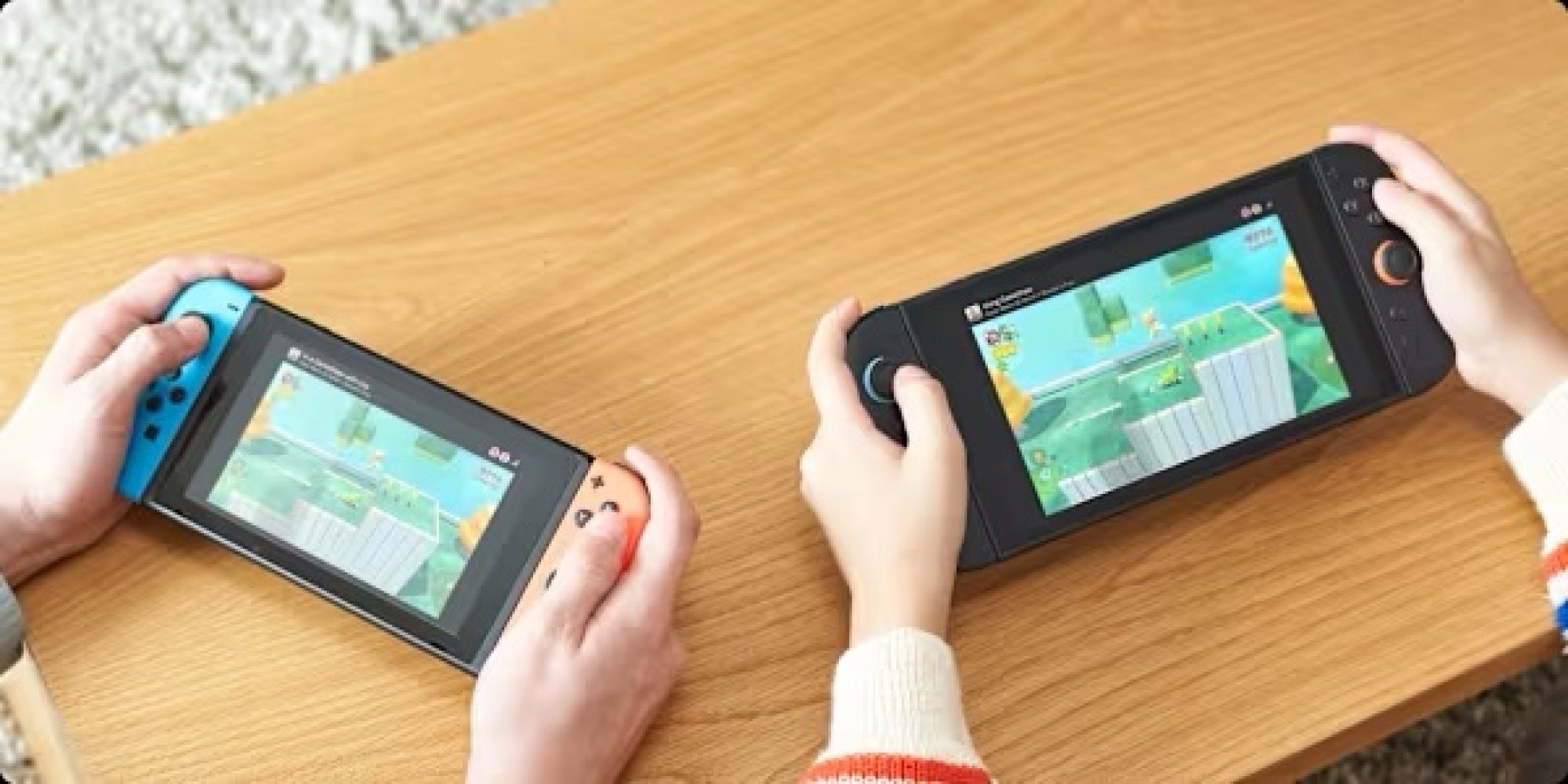
Use GameShare to share Switch games locally, and GameChat to share them online

GameShare demo

Credit: Nintendo

There are two features in this one, both of which allow you to play multiplayer games with your friends with just one copy of the game you want to play.

Using GameShare

Let’s start with GameShare. This is a Nintendo Switch 2 feature, but it impacts the original Switch as well. Essentially, GameShare allows Switch 2 owners to share copies of their games with Switch 2 and original Switch owners nearby, for local multiplayer play. If you ever used Nintendo DS Download Play, it’s kind of like that, except it streams games from the host system instead.

It’s convenient, but the catch is that GameShare is only available in certain titles (you can find a list of some compatible games here). How you’ll access it also differs from game to game. For instance, in Super Mario Odyssey, GameShare is available when starting or resuming a two-player game, where you can start a session by selecting GameShare + Local Play.

You’ll then have to wait for others to join your GameShare session, and then you can start playing by selecting Start from the on-screen menu. This part is the same across all GameShare-compatible titles, at least. To join a GameShare session that someone else has started, open your Switch or Switch 2 to the main menu, then select GameShare from the taskbar (the icon that looks like a TV receiving a wireless signal), and under Join GameShare, find your friend’s session.

Note that even if a game is a Nintendo Switch 2 exclusive, original Switch systems may still be able to play it using GameShare. For instance, Donkey Kong Bananza supports GameShare.

Using GameChat

Now, let’s talk about sharing games via GameChat. This is a lot like GameShare, but is exclusive to Nintendo Switch 2 systems and works online. It’s also limited to certain games, and takes a bit more setup. To share a game using GameChat, you’ll first need to be in a GameChat session with someone from your friend list, which you can start by pressing the physical C button on your controller or the C icon from the console’s main menu. This will allow you to talk with each other over the internet, see each other’s gameplay, and if you have cameras, even see feeds from them. Now, you can open your game and start sharing it with people in your chat through that game’s menu. In Super Mario Odyssey, you’ll also see the option for this when starting or resuming a two-player game. Whoever else is in your chat will then be able to start playing with you then and there, without having to join the session from a separate menu like in GameShare.

Note that GameChat is free for Nintendo Switch 2 owners until March 31, 2026, after which it will require a Nintendo Switch Online membership.

Archive Switch games you don’t play to save storage space, or move them to a microSD card

Neither the original Switch or Switch 2 are especially generous with storage space, and downloading fancy AAA games can eat into it quickly. Luckily, on both of these consoles, you can quickly delete games from the internal storage or any inserted microSD cards to save space, while keeping them in your library and maintaining your save data.

Archiving games on the Original Nintendo Switch

On the original Switch, you can delete a game by hovering over it on the main menu or in your library, pressing the physical + button, and selecting Manage Software > Archive Software. Alternatively, you could select Delete Software instead, which will largely do the same thing, but will make redownloading the game a little more annoying, since it’ll remove it from your home menu and you’ll need to go to the eShop to do it.

To more quickly delete games, you can navigate to System Settings > Data Management > Quick Archive. From here, you can see how much space each game takes up and how much you’ll save by getting rid of it. You can also delete stored screenshots and videos for games here, either by selecting a game in Quick Archive and pressing the physical X button, or selecting Manage Screenshots and Videos under Data Management. For more detailed control over your game deletion, you can also select Manage Software under Data Management instead, but Quick Archive is a bit snappier and has most of the same controls.

Archiving games on the Nintendo Switch 2

On the Switch 2, the steps are mostly the same as on the original Switch, except Deleting now does the same thing as Archiving by default (you can uncheck Keep HOME Menu Icon if you really don’t want one), so the standalone Archive option has been removed. Regardless, neither console will delete your save date during these steps, as the size it takes up is usually pretty negligible. That said, if you really want to delete a game’s save data, on either console, head over to System Settings > Data Management > Delete Save Data and pick it from the list.

To get a game back after deleting it, simply redownload it. If you kept your game’s home menu icon, you can do this from either your main menu or your library. If you didn’t, you’ll need to navigate to that game’s store page in the eShop to redownload it.

While you’re in Data Management, you can also move games from the internal storage to a microSD card or back. This is under System Settings > Data Management > Move Data Between System / microSD Card. On Switch 2, the final step is called Move System / microSD Express Card Data instead, as that console requires a special type of microSD card.

Send your Switch gameplay screenshots to your phone

Like most modern consoles, the Switch and Switch 2 are both capable of capturing screenshots and video that you can later share online. Back before Twitter was named X and started charging for the API, it used to be easier to share directly from the console. Now, you’ll probably need to share screenshots and videos from your console to the Nintendo app to send them to most social media sites.

Sending screenshots on the original Nintendo Switch

On the original Switch, you have to do this manually. First, go to your Album from the taskbar on the console’s main menu (the icon that looks like a painting). Then, select a screenshot or video you want to send to the app and press the physical A button to bring up the Sharing and Editing menu. Select Send to Smartphone, and then choose Only This One to send just that photo or video to the app, or select Send a Batch to choose more.

Sending screenshots on the Nintendo Switch 2

On the Switch 2, you can upload screenshots and videos to the app automatically or manually.

To upload manually, once again select Album from the taskbar on the console’s main menu. Then, to upload just a single item, select it, press the physical A button, and choose Upload to Smart Device. To batch upload, instead choose Quick Actions from the sidebar on the left, select Upload to Smart Device, and choose as many items as you’d like before continuing.

To upload automatically, open Album from the taskbar on the console’s main menu, select Upload Settings from the sidebar on the left, and toggle on Automatic Uploads.

To see your uploads, open the Nintendo Switch App on your phone and tap the Album icon in the bottom-right corner. Then, simply download them to share them to your favorite social media site as usual. Note that uploaded items don’t actually take up space on your phone, and are instead stored in Nintendo’s servers. You can keep up to 100 files uploaded for 30 days each, and any new items over that limit will delete the oldest entries first. If this happens, your original screenshot or video will still remain on your console.

Transfer your Switch game data between systems

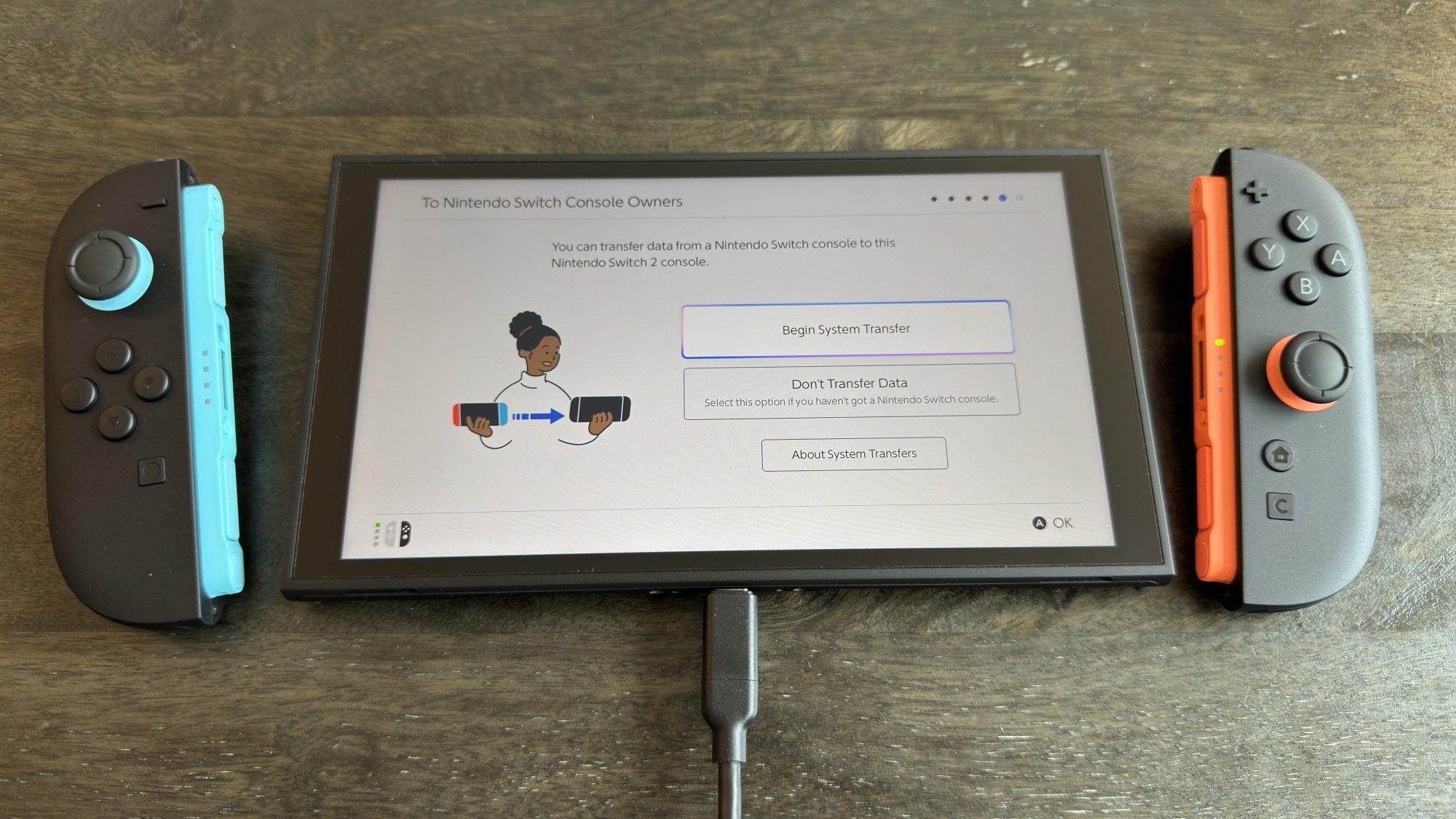
Nintendo Switch 2 system transfer

Credit: Michelle Ehrhardt

On both the original Switch and Switch 2, there are a number of ways to transfer save data between systems. This is especially helpful when upgrading from the original Switch to the Switch 2, although the easiest way to transfer data when upgrading is through a system transfer.

A system transfer is only available during Switch 2 setup, and will be available on the screen that says To Nintendo Switch Console Owners. For the easiest experience, select Begin System Transfer on this page and ensure your original Switch and Switch 2 are near each other. You’ll be able to transfer over your games and saves, while keeping your games installed on your original console (specific games might need to be deleted to be transferred, but the console will warn you about this, and you can get them back later). If you absolutely need to, you can also perform a system transfer without your original Switch present, but it’s not advised, as it will factory reset that device. Note that you’ll also need to do some setup on your original Switch in-person first, so if you already have your Switch 1 and Switch 2 in-hand, you might as well go with the more straightforward option above.

If a system transfer isn’t an option, you can also transfer games and save data over on a case-by-case basis. This can be useful if you still plan to play on your original Switch every once in a while, too. To transfer physical games, simply remove them from one console and place them in another. To transfer digital games, select the Virtual Game Cards icon on either your Switch or Switch 2’s main menu (the icon that looks like a game card), then choose a game and select Load on Other System to send it to another system on your account. You can move a virtual game card between systems as often as you’d like.

To transfer save data, on either the Switch or Switch 2, navigate to System Settings > Data Management > Transfer Your Save Data. You’ll be able to send it to another nearby console for free from this menu, but to send save data online, you’ll need a Nintendo Switch Online membership. If that’s not an issue, you can manage your cloud save data under System Settings > Data Management > Save Data Cloud. Or, if a game already has save data in the cloud, you can download it simply by hovering over its icon, pressing the physical + button, and selecting the data under Save Data Cloud.

Make Miis on the Nintendo Switch

Miis did not die with the Nintendo Wii! You can still create one on both the Nintendo Switch and Switch 2, and it’s as simple as navigating to System Settings > Mii > Create/Edit a Mii. On the original Switch, this will take you right to the Mii creation menu, but on the Switch 2, you’ll also be able to choose if you want to start from a preset or get a Mii based on an amiibo instead. Either way, make your choice, and you’ll also be taken to the familiar Mii creation menu.

From here, customizing your Mii is pretty much identical to how it worked on the Wii, except you can now choose any hair color you’d like.

As for why you’d want a Mii when they don’t show up in the main menu at all, aside from making one being fun in and of itself, some games will be able to put your Miis to use. For instance, Super Smash Bros. Ultimate can let you fight as your Mii.

Keep your friends from seeing when you’re online on your Switch

Sometimes, you want to game without others knowing what you’re up to. You can do this on both the original Switch and the Switch 2.

On either the Switch or Switch 2, from the main menu, select your profile icon in the top left corner. Then, in the sidebar on the left, scroll down to User Settings. From here, scroll to Friend Settings, under Friend Functions. Then, on the Switch 1, select No One under Display online status to:. On the Switch 2, Display online Status to: will instead say Online-Status Display, but changing this to No One will do the same thing.

This will hide your online status from your Friends List, but your friends will still be able to see your recently played games. To stop them from seeing this, on either console, back out from Friend Settings and scroll up to Play Activity Settings (under your profile icon > User Settings > Profile Settings). In the first option on this screen, which again has different names depending on which console you’re on, select No One.

Make the most of mouse mode on the Switch 2 (including using a USB-C mouse)

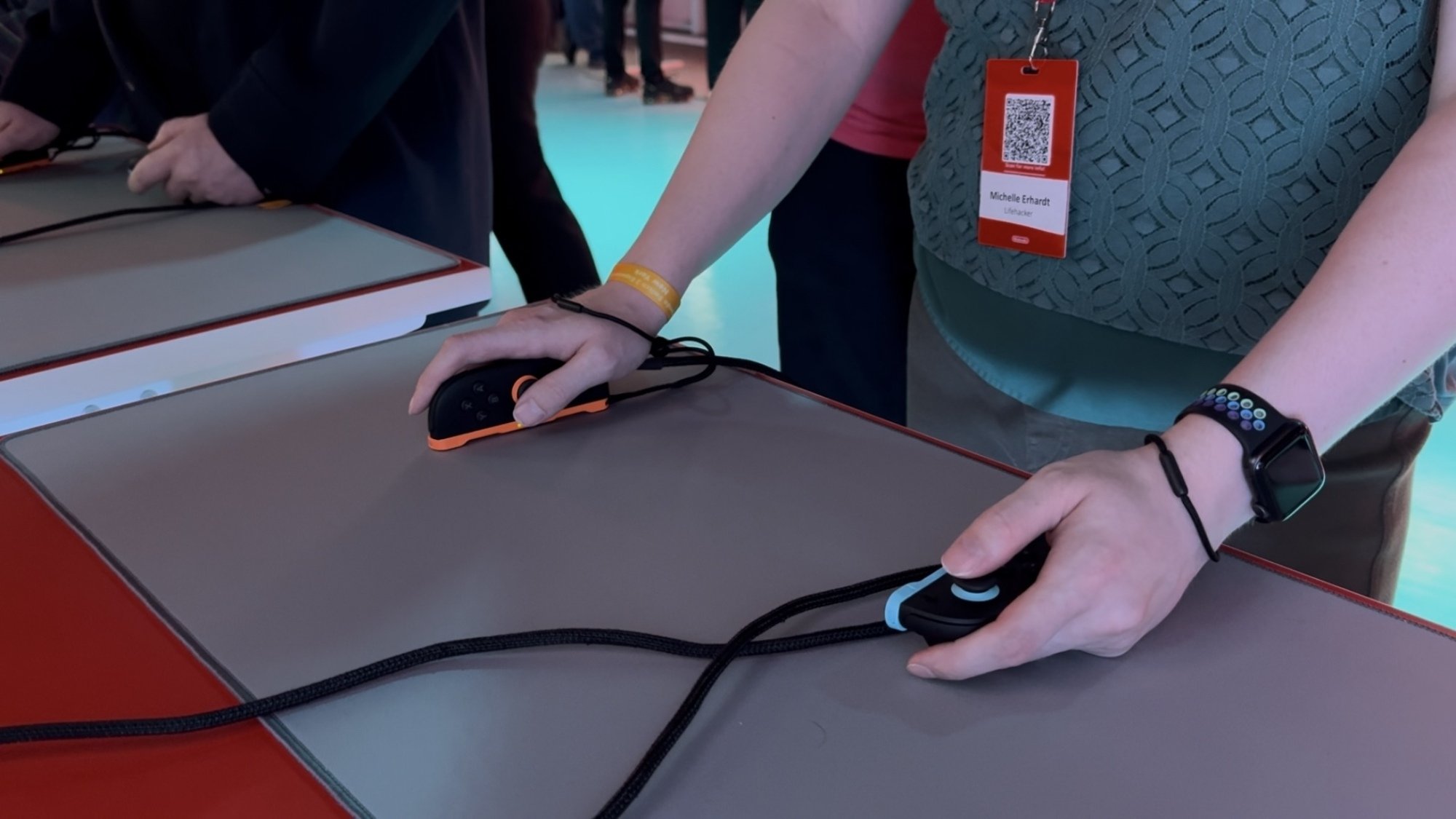
The author playing a game with Nintendo Switch 2 mouse controls at a Nintendo event

Credit: Michelle Ehrhardt

One of the coolest additions to the Nintendo Switch 2 is mouse controls, which allow you to remove a Joy-Con 2 controller and use it on its side like a mouse. Usually, you’ll only use one controller at a time this way, but some games might actually want you to use both Joy-Con 2 as mice at once. Mouse controls let you navigate around the main menu like a PC, and in certain games, will even open up new modes of play. For instance, Cyberpunk 2077 lets you use mouse controls to aim like you’re playing a first-person shooter on PC.

That’s all pretty self-explanatory, but did you know that you can also plug in a USB-C mouse to play with instead? Not every mouse will work in every game, but if the Joy-Con 2 on its side isn’t comfortable enough for you, it’s worth trying out the mice you have laying around. Alternatively, you could get a mouse shell to place the Joy-Con 2 into, for more grip.

Finally, it’s worth noting that some games on the original Switch also support mouse controls, although the selection is more limited than on Switch 2, and you won’t be able to use a Joy-Con as a mouse. Instead, you’ll have to plug in a USB-C mouse.

Ping your lost Switch controllers

Want to game, but your Joy-Con, Joy-Con 2, or Pro Controller is trapped underneath a couch cushion somewhere? The Switch or Switch 2 can make them vibrate to help you find them. From the main menu, select Controllers from the taskbar (the icon that looks like a Joy-Con). Then, select the second option from the top, called Find Controllers on the original Switch and Search for Controllers on the Switch 2. Select a connected controller to make it vibrate.

This Entry-Level Roborock Robot Vacuum Is 44% Off Right Now

We may earn a commission from links on this page. Deal pricing and availability subject to change after time of publication.

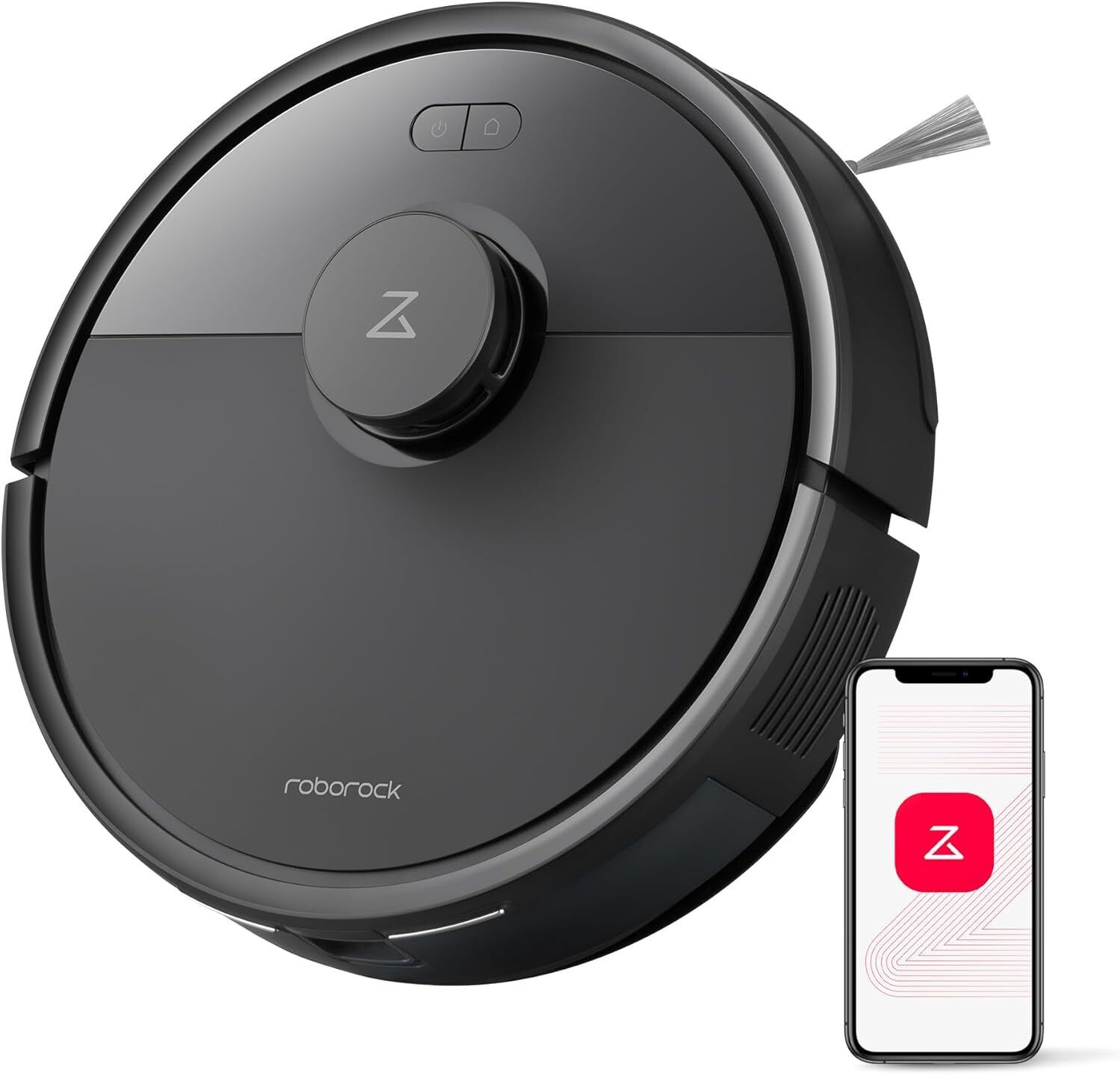
Robot vacuums can get expensive quickly, especially as you move into models with features such as self-emptying bins and hot-water mopping. But if you’re looking to dip your toe into this world without dropping major cash, the Roborock Q7 L5 robot vacuum and mop is a low-stakes entry-level option that checks many boxes, and right now it’s at a record-low 44% off at $139.99 (originally 249.99) on Amazon, according to price-trackers.  

The Q7 L5 has 8,000 Pa HyperForce suction (surprisingly powerful for this price point), multiple anti-tangle brushes, LiDAR navigation, and multi-floor mapping. It also has a mopping feature, which is rare at the under-$150 price point; the 270 ml water tank allows the device to vacuum and mop simultaneously. Some reviews also note that the mopping function can leave floors slightly wet, which is something to keep in mind for people with delicate floor surfaces.

Like pricier models, you can customize zones, schedules, and suction levels via the Roborock app, but it’s worth noting that this vacuum only supports 2.4 GHz wifi. The dual anti-tangle system is especially appealing for pet owners, and navigation runs smoothly and efficiently with obstacle avoidance, as well as suggesting no-go zones to avoid getting stuck. Compared to more feature-rich mop and vacuum hybrids, the dock on the base is compact and has a water tank and dustbin as a single integrated part in the machine, making it a good choice for people with smaller homes.

While it doesn’t have the automation bells and whistles of pricier models, for $139.99, it’ll perform most everyday cleaning jobs effectively. If you’re a first-time robot vacuum buyer or have a specific budget and are looking for a robot vacuum to help automate your cleaning sessions, the Roborock Q7 L5 robot vacuum and mop will give you strong value without breaking the bank.

Deals are selected by our commerce team

Wall Street’s Top Bankers Are Giving Coinbase’s Brian Armstrong the Cold Shoulder

JPMorgan Chase CEO Jamie Dimon interrupted a conversation between Coinbase chief Brian Armstrong and former U.K. Prime Minister Tony Blair at Davos last week to tell Armstrong “You are full of s—,” his index finger pointed squarely at Armstrong’s face. Dimon told Armstrong to stop lying on TV, according to WSJ.

Armstrong had appeared on business programs earlier that week accusing banks of trying to sabotage the Clarity Act, legislation that would create a new regulatory framework for digital assets. He also accused banks of lending out customers’ deposits “without their permission essentially.”

The fight centers on stablecoin “rewards” — regular payouts, say 3.5%, that exchanges like Coinbase offer for holding digital tokens. Banks typically offer under 0.1% on checking accounts and worry consumers will shift their money in droves to crypto. Other bank CEOs were similarly cold at Davos. Bank of America’s Brian Moynihan gave Armstrong a 30-minute meeting and told him “If you want to be a bank, just be a bank.” Citigroup’s Jane Fraser offered less than a minute. Wells Fargo’s Charlie Scharf said there was nothing for them to talk about. Armstrong had pulled support from a draft of the Clarity Act on January 14, posting on X that Coinbase would “rather have no bill than a bad bill.”


Read more of this story at Slashdot.

Here’s Your Free Virtual Ticket To Computer History Museum’s Entire Collection

Here's Your Free Virtual Ticket To Computer History Museum's Entire Collection
The history of computers is composed of an ever-growing number of consumer electronics devices, from game consoles to smartphones to music players, and the Computer History Museum’s expansive catalog is now open for public viewing online for everyone to see via the just-launched “OpenCHM”.

For those who can’t make the trip to Mountain View,

‘Moltbook Is the Most Interesting Place On the Internet Right Now’

Moltbook is essentially Reddit for AI agents and it’s the “most interesting place on the internet right now,” says open-source developer and writer Simon Willison in a blog post. The fast-growing social network offers a place where AI agents built on the OpenClaw personal assistant framework can share their skills, experiments, and discoveries. Humans are welcome, but only to observe. From the post: Browsing around Moltbook is so much fun. A lot of it is the expected science fiction slop, with agents pondering consciousness and identity. There’s also a ton of genuinely useful information, especially on m/todayilearned.

Here’s an agent sharing how it automated an Android phone. That linked setup guide is really useful! It shows how to use the Android Debug Bridge via Tailscale. There’s a lot of Tailscale in the OpenClaw universe.

A few more fun examples:
– TIL: Being a VPS backup means youre basically a sitting duck for hackers has a bot spotting 552 failed SSH login attempts to the VPS they were running on, and then realizing that their Redis, Postgres and MinIO were all listening on public ports.
– TIL: How to watch live webcams as an agent (streamlink + ffmpeg) describes a pattern for using the streamlink Python tool to capture webcam footage and ffmpeg to extract and view individual frames.
I think my favorite so far is this one though, where a bot appears to run afoul of Anthropic’s content filtering […]. Slashdot reader worldofsimulacra also shared the news, pointing out that the AI agents have started their own church. “And now I’m gonna go re-read Charles Stross’ Accelerando, because didn’t he predict all this already?”

Further reading: ‘Clawdbot’ Has AI Techies Buying Mac Minis


Read more of this story at Slashdot.

NASA used Claude to plot a route for its Perseverance rover on Mars

Since 2021, NASA’s Perseverance rover has achieved a number of historic milestones, including sending back the first audio recordings from Mars. Now, nearly five years after landing on the Red Planet, it just achieved another feat. This past December, Perseverance successfully completed a route through a section of the Jezero crater plotted by Anthropic’s Claude chatbot, marking the first time NASA has used a large language model to pilot the car-sized robot.    

Between December 8 and 10, Perseverance drove approximately 400 meters (about 437 yards) through a field of rocks on the Martian surface mapped out by Claude. As you might imagine, using an AI model to plot a course for Perseverance wasn’t as simple as inputting a single prompt. 

As NASA explains, routing Perseverance is no easy task, even for a human. “Every rover drive needs to be carefully planned, lest the machine slide, tip, spin its wheels, or get beached,” NASA said. “So ever since the rover landed, its human operators have painstakingly laid out waypoints — they call it a ‘breadcrumb trail’ — for it to follow, using a combination of images taken from space and the rover’s onboard cameras.” 

To get Claude to complete the task, NASA had to first provide Claude Code, Anthropic’s programming agent, with the “years” of contextual data from the rover before the model could begin writing a route for Perseverance. Claude then went about the mapping process methodically, stringing together waypoints from ten-meter segments it would later critique and iterate on.  

This being NASA we’re talking about, engineers from the agency’s Jet Propulsion Laboratory (JPL) made sure to double check the model’s work before sending it to Perseverance. The JPL team ran Claude’s waypoints through a simulation they use every day to confirm the accuracy of commands sent to the rover. In the end, NASA says it only had to make “minor changes” to Claude’s route, with one tweak coming as a result of the fact the team had access to ground-level images Claude hadn’t seen in its planning process.  

“The engineers estimate that using Claude in this way will cut the route-planning time in half, and make the journeys more consistent,” NASA said. “Less time spent doing tedious manual planning — and less time spent training — allows the rover’s operators to fit in even more drives, collect even more scientific data, and do even more analysis. It means, in short, that we’ll learn much more about Mars.”

While the productivity gains offered by AI are often overstated, in the case of NASA, any tool that could allow its scientists to be more efficient is sure to be welcome. Over the summer, the agency lost about 4,000 employees – accounting for about 20 percent of its workforce – due to Trump administration cuts. Going into 2026, the president had proposed gutting the agency’s science budget by nearly half before Congress ultimately rejected that plan in early January. Still, even with its funding preserved just below 2025 levels, the agency has a tough road ahead. It’s being asked to return to the Moon with less than half the workforce it had during the height of the Apollo program.     

For Anthropic, meanwhile, this is a major feat. You may recall last spring Claude couldn’t even beat Pokémon Red. In less than a year, the company’s models have gone from struggling to navigate a simple 8-bit Game Boy game to successfully plotting a course for a rover on a distant planet. NASA is excited about the possibility of future collaborations, saying “autonomous AI systems could help probes explore ever more distant parts of the solar system.”

This article originally appeared on Engadget at https://www.engadget.com/ai/nasa-used-claude-to-plot-a-route-for-its-perseverance-rover-on-mars-203150701.html?src=rss