8 Super Bowl TV Picks: Quality QLED & Mini LED Models That Won’t Break The Bank

8 Super Bowl TV Picks: Quality QLED & Mini LED Models That Won’t Break The Bank
You’re here for our Super Bowl TV picks, but do you want to know my favorite Super Bowl pick of all time? It’s when Malcolm Butler intercepted a goalline pass in Super Bowl XLIX to secure the victory for the New England Patriots. Now more than a decade later, the Seahawks are getting a rematch, and you can catch the big game on a new TV. The

Ayaneo Konkr Fit 144Hz OLED Handheld With Ryzen AI 9 HX 470 Is Up For Preorder

Ayaneo Konkr Fit 144Hz OLED Handheld With Ryzen AI 9 HX 470 Is Up For Preorder
Ayaneo is expanding its growing range of PC gaming handhelds by opening up preorder availability of its Konkr Kit, a premium handheld console with a 7-inch OLED display sporting a 1920×1080 resolution and fast 144Hz refresh rate, powered by a choice between AMD’s Ryzen AI 9 HX 470 (Gorgon Point) or Ryzen AI 9 HX 370 (Strix Point) processor.

How to track your sleep and view your sleep data in Apple Health

Apple Health brings sleep tracking, scheduling and long-term analysis into one place, with your iPhone acting as the hub and the Apple Watch doing the overnight monitoring. Once everything is set up, Apple Health can show how long you slept each night, how consistent your sleep schedule is and how much time you spend in different sleep stages. Here is how to get started, track your sleep and review your data.

Sleep tracking in Apple Health relies on two things: You need to set up Sleep in the Health app on your iPhone, and you need a compatible Apple Watch to wear to bed. While you can set sleep schedules without a watch, detailed sleep data — including sleep stages — requires an Apple Watch.

How to set up Sleep in Apple Health

Sleep tracking is available on all watchOS 8 (or later) models and setup starts in the Health app on your iPhone. Open Health, tap Browse and then tap Sleep. If this is your first time setting it up, you will see an option to get started. Apple Health will guide you through choosing a sleep goal, setting a bedtime and wake-up time and deciding whether you want one sleep schedule for every day or different schedules for weekdays and weekends.

During setup, you can also enable sleep reminders and a wind-down period. Wind Down reduces distractions before bedtime by activating features like Focus mode and dimming notifications at a set time before sleep. These settings are optional but they help keep your schedule consistent, which improves the quality of the data Apple Health collects over time.

Once Sleep is configured, Apple Health automatically syncs those settings to your Apple Watch. You can adjust your sleep schedule later by returning to the Sleep section in Health and tapping Full Schedule and Options. Any changes you make here update on both your iPhone and Apple Watch.

How to prepare your Apple Watch for sleep tracking

To track sleep, your Apple Watch needs to be worn overnight and have enough battery to last until morning. If the battery drops below 30 percent before bedtime, your watch will prompt you to charge it first. Sleep tracking also relies on Sleep Focus which activates automatically based on your sleep schedule. Once Sleep Focus has been set, open the Settings app on your Apple Watch, tap Sleep and ensure that Track Sleep with Apple Watch is turned on. With both features enabled your watch can monitor sleep automatically without any manual start or stop each night. 

Comfort matters when wearing a watch to bed, so many people prefer a softer band for sleep. As long as the watch fits securely and stays in contact with your wrist, it can track sleep without issue.

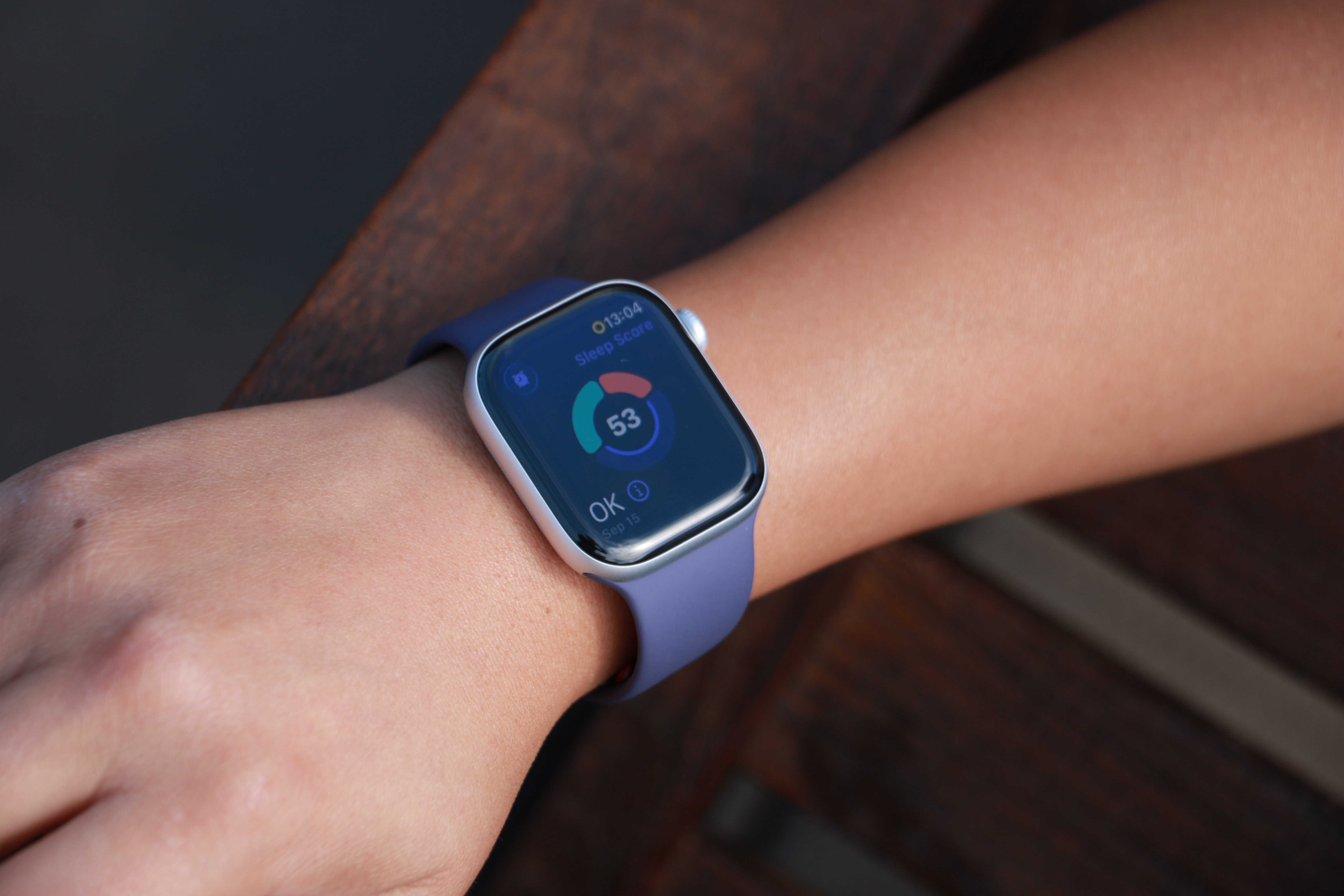
The Apple Watch Series 11 on a person's wrist, showing a ring with three segmented arcs encircling a Sleep Score of 53 and the description "OK" in the bottom left.
The Apple Watch Series 11 on a person’s wrist, showing a ring with three segmented arcs encircling a Sleep Score of 53 and the description “OK” in the bottom left.
Cherlynn Low for Engadget

How Apple Watch tracks your sleep

When Sleep Focus is active, the Apple Watch uses its accelerometer and heart rate sensor to detect when you are asleep and awake. Newer models also track sleep stages, including time spent in REM, core and deep sleep. Apple Health combines this information into a single overnight record that appears in the Sleep section the next morning.

You do not need to start or stop sleep tracking manually. As long as you follow your sleep schedule or enable Sleep Focus before bed, the Apple Watch automatically does everything else. If you wake up early or go to bed later than planned, Apple Health adjusts the data based on actual movement and heart rate rather than just your scheduled times. In addition, some Apple Watch models (SE 3 or higher) support on-device Siri, enabling you to ask questions such as “how much sleep did I have last night?” for a more immediate response.   

How to view your sleep data in Apple Health

To see your sleep data, open the Health app on your iPhone and tap Browse, then Sleep. At the top of the screen, you will see a chart showing how long you slept the previous night. Tapping this chart reveals a detailed breakdown, including time asleep, time in bed and sleep stages (if available).

Scrolling down shows trends over longer periods. You can switch between daily, weekly, monthly and six-month views to see patterns in your sleep duration and consistency. Apple Health also highlights whether you are meeting your sleep goal and how regular your schedule has been.

Under Highlights, Apple Health may surface insights such as changes in average sleep time, variations in sleep stages or your nightly sleep score. Sleep scores provide a simplified summary of how well you slept, and is based on factors such as duration, consistency and restfulness. These summaries update automatically as more data is collected over time.

Understanding sleep stages and trends

If your Apple Watch supports sleep stages, Apple Health displays how much time you spent in REM, core and deep sleep. These stages give context to your overall sleep quality, though Apple emphasizes trends over individual nights. Occasional short nights or unusual stage distributions are normal.

Over time, Apple Health makes it easier to spot patterns. Consistently short sleep durations, irregular bedtimes or frequent awakenings become clearer when viewing weekly or monthly summaries. This makes the Sleep section useful not just for nightly check-ins but for understanding longer-term habits.

Editing and managing sleep data

Apple Health allows you to add or edit sleep data if needed manually. In the Sleep section, tap Add Data to log sleep that was not recorded automatically. This can be useful if you forget to wear your watch or take a nap without it.

You can also manage which devices contribute sleep data by scrolling to the bottom of the Sleep screen and tapping Data Sources and Access. This is helpful if you use third-party sleep apps or multiple devices.

Once set up, sleep tracking in Apple Health runs quietly in the background. With a consistent schedule and a charged Apple Watch, your sleep data builds into a clear picture of your nightly rest, all stored securely within Apple’s health platform.

This article originally appeared on Engadget at https://www.engadget.com/mobile/smartphones/how-to-track-your-sleep-and-view-your-sleep-data-in-apple-health-130000023.html?src=rss

Engadget review recap: Shokz OpenFit Pro, Nex Playground, Sony A7 V and more

We’re starting to hit our stride in 2026. Now that February is here, our reviews team is flush with new devices to test, which means you’ve got a lot to catch up on if you haven’t been following along. Read on for a roundup of the most compelling new gear we’ve tested recently from gaming, PCs, cameras and more.

Nex Playground

If you still have a fondness for the Xbox Kinect, the Nex Playground might be right up your alley. Senior reporter Devindra Hardawar recently put the tiny box through its paces and found an active gaming experience that’s fun for the whole family. “While I have some concerns about the company’s subscription model, Nex has accomplished a rare feat: It developed a simple box that makes it easy for your entire family to jump into genuinely innovative games and experiences,” he wrote.

MSI’s Prestige 14 Flip AI+

Devindra also tested MSI’s latest laptop, the powerful Prestige 14 Flip AI+. While the machine got high marks for its performance, display and connectivity, he noted that the overall experience is hindered by subpar keyboard and truly awful trackpad. “As one of the earliest Panther Lake laptops on the market, the $1,299 Prestige 14 Flip AI+ is a solid machine, if you’re willing to overlook its touchpad flaws,” he explained. “More than anything though, the Prestige 14 makes me excited to see what other PC makers offer with Intel’s new chips.”

Shokz OpenFit Pro

Fresh off of its Best of CES selection, I conducted a full review of the OpenFit Pro earbuds from Shokz. I continue to be impressed by the earbuds’ ability to reduce ambient noise while keeping your ears open. And the overall sound quality is excellent for a product that sits outside of your ears.

Sony A7 V

Contributing reporter Steve Dent has been busy testing cameras to start the year. This week he added the Sony A7 V to the list, noting the excellent photo quality and accurate autofocus. “The A7 V is an incredible camera for photography, with speeds, autofocus accuracy and image quality ahead of rivals, including the Canon R6 III, Panasonic S1 II and Nikon Z6 III,” he said. “However, Sony isn’t keeping up with those models for video.”

Apple AirTag (2026)

Our first Editors’ Choice device of 2026 is Apple’s updated AirTag. All of the upgrades lead to a better overall item tracker, according to UK bureau chief Mat Smith. “There’s no doubt the second-gen AirTags are improved, and thankfully, upgrading to the new capabilities doesn’t come at too steep a cost,” he concluded.

This article originally appeared on Engadget at https://www.engadget.com/engadget-review-recap-shokz-openfit-pro-nex-playground-sony-a7-v-and-more-123400089.html?src=rss

Under Trump, EPA’s enforcement of environmental laws collapses, report finds

Enforcement against polluters in the United States plunged in the first year of President Donald Trump’s second term, a far bigger drop than in the same period of his first term, according to a new report from a watchdog group.

By analyzing a range of federal court and administrative data, the nonprofit Environmental Integrity Project found that civil lawsuits filed by the US Department of Justice in cases referred by the Environmental Protection Agency dropped to just 16 in the first 12 months after Trump’s inauguration on Jan. 20, 2025. That is 76 percent less than in the first year of the Biden administration.

Trump’s first administration filed 86 such cases in its first year, which was in turn a drop from the Obama administration’s 127 four years earlier.

Read full article

Comments

Hotline Miami meets football, the power of video editing and other new indie games worth checking out

Welcome to our latest roundup of what’s going on in the indie game space. As always, we’ve got a bunch of neat games to tell you about. Perhaps I’ll tear myself away from playing as Chappell Roan in Fortnite or Jetpack Cat in Overwatch long enough to check more of them out.

Thanks to the folks at Aftermath, I learned about a short, text-based game from Woe Industries from a while back called You Have Billions Invested In Generative AI. Surprisingly enough, you take on the role of a venture capitalist who has plowed gobs of money into genAI technology and might be starting to have doubts about that investment. Other characters warn you about the dangers of the tech and real-life headlines showing the impact of genAI hallucinations pop up. It’s tagged as a horror game, for what it’s worth. 

It’s both satirical and all too real, and it’s pretty funny. Plus, any game that allows me to yell at Noam Chomsky is A-OK in my book. You can play You Have Billions Invested In Generative AI for free on Itch.io.

New releases

Tackle for Loss had a very timely arrival this week, just ahead of a certain other big, real-life game. This is a football-themed take on action-heavy, top-down games like Hotline Miami. Developer Indifferent Penguin took some inspiration from the Taken film series as well — you take on the role of a CTE-afflicted former football player who sets out to rescue his kidnapped daughter.

The combat sounds pretty interesting here. You need to clear out all of the bad guys on each floor of a multistory building before you can progress, but you only have four offensive actions at your disposal each time (this draws from the four-down format of football). You’ll need to plan things out before you go on the attack, not least because your character and the enemies all die in a single hit.

Tackle for Loss is out now on Steam. It’ll usually run you $11, but it’s 15 percent off until February 12. 

Trust Me, I Nailed It is an intriguing turn-based strategy game from Team Afternoon and publisher Jungle Game Lab. A useless warrior hires you as a video editor to make them look like a true hero capable of slaying any beast. 

Enemy attacks and other actions appear on the edit timeline as pre-recorded footage, and the idea is to plot out the warrior’s movements around those. You have post-processing visual effects tricks at your disposal, so you can let the warrior teleport and convert low-power strikes into critical hits.

It’s a fun idea, and a reminder (as if we should need one in the current climate) not to always take videos at face value. Trust Me, I Nailed It is on Steam now and it’s free-to-play.

Tomb of the Bloodletter is a spin on the roguelike deckbuilder genre that I haven’t really seen before. Your deck consists of magic powers that are applied to letters of the alphabet. Spelling out words using these Magicks can result in powerful combinations, particularly if you use the same letter multiple times. That’s right, this is a typing game — a roguelike deckbuilder that the likes of Wordle players might be interested in.

It’s really about coming up with words that put the right letters in a specific order. For instance, certain letters are more effective if you place them at the end of a word. So, this should get your brain ticking.  

Tomb of the Bloodletter — from Ethan’s Secretions and indie.io — debuted during the Steam Typing Fest. It’ll typically cost $8, but there’s a 20 percent discount until February 19.

Upcoming 

Shadowstone is an upcoming turn-based tactical co-op roguelike for up to four players from developer Secret Door and Dreamhaven (Blizzard co-founder and ex-CEO Mike Morhaime’s company). It’s set in the same universe as Secret Door’s Sunderfolk. 

The action plays out on a hexagonal board with randomized rooms and enemies. Positioning will be key, and finding synergies between the abilities of the playable characters will put you in good stead.

Shadowstone will hit Steam in early access later this year for $15. It’s also coming to the Epic Games Store.

Meanwhile, a major update for Sunderfolk is set to go live on March 10. It will introduce a new tank-style character and two fresh sets of missions. Secret Door will also add two much-requested features to PC versions: online multiplayer and — so you don’t have to use your phone to play the game anymore — mouse and keyboard controls.

I really loved Planet of Lana and the sequel is among my most-anticipated games of this year. There’s now a release date for the upcoming puzzle platformer. Wishfully and Thunderful Publishing are bringing it to Steam, Xbox, PlayStation and Nintendo Switch on March 5. It’ll also be on Game Pass on day one.

A Planet of Lana II: Children of the Leaf demo will hit Steam, Xbox and PlayStation on February 11. It will arrive on Switch a bit later.

Is Sticker/Ball the first Ball x Pit-like? I’m not entirely sure. Still, it is now firmly on my radar. Instead of firing balls at a horde of constantly-advancing enemies, here you’ll shoot them at dice to earn points. You’ll unlock stickers that can be applied to said dice and they’ll interact with each other too. For instance, spiders can create webs and these can catch flies that are attracted to poop stickers. 

The trailer describes another interaction, “frog jumped and triggered cigarette pack.” Frogs can also hijack spaceships, apparently, and there’s a bouncing DVD (well, “VID”) logo. There are more than 100 types of stickers and dozens of different enemies.

I don’t really understand what’s going on in the trailer, but it’s somehow making my brain happy, so this is going on my wishlist. Solo dev Bilge is behind Sticker/Ball, which is coming to Steam soon through the help of publisher Future Friends Games. A demo is available now, so that’s my weekend sorted.

Skate City has long been one of the best games on Apple Arcade. Its creator, Daniel Zeller, (Zellah Games) has revealed a new project. Skate Style is billed as a “next-gen skateboarding game with high-end graphics.” You’ll be able to take to the virtual streets of Barcelona and Prague to show off your best moves. 

What could help Skate Style really stand out from the pack is the animation editor, which enables you to create completely new tricks. The game is slated to have an “advanced” character creation tool as well as mod support, so there’ll be a high level of customization available. 

A Skate Style demo is available on Steam now. The full game should land on PC later this year. Here’s hoping the soundtrack can match up to those from the Tony Hawk’s Pro Skater series.

Crimson Capes is billed as a 2D Soulslike action RPG with four playable characters, elemental magic, more than 25 bosses, swordfighting, lots of secrets, co-op, optional hunts with randomized dungeons and invasions from other players. That all sounds neat enough, but most exciting to me here is the pixel-art, rotoscoped animation work. It looks modern and retro at the same time, and I’d love to see this sort of style in more games. I also dig that you get a PDF instruction manual and game guide as well as a printable world map when you buy the game.

You (and I) won’t have to wait long to play Crimson Capes, which is from Poor Locke. It’s coming to Steam on February 12 for $15, though you’ll get 10 percent off if you pick it up within the first nine days. Console versions are in the pipeline too.

This article originally appeared on Engadget at https://www.engadget.com/gaming/hotline-miami-meets-football-the-power-of-video-editing-and-other-new-indie-games-worth-checking-out-120000628.html?src=rss

Claude Code is the Inflection Point

About 4% of all public commits on GitHub are now being authored by Anthropic’s Claude Code, a terminal-native AI coding agent that has quickly become the centerpiece of a broader argument that software engineering is being fundamentally reshaped by AI.

SemiAnalysis, a semiconductor and AI research firm, published a report on Friday projecting that figure will climb past 20% by the end of 2026. Claude Code is a command-line tool that reads codebases, plans multi-step tasks and executes them autonomously. Anthropic’s quarterly revenue additions have overtaken OpenAI’s, according to SemiAnalysis’s internal economic model, and the firm believes Anthropic’s growth is now constrained primarily by available compute.

Accenture has signed on to train 30,000 professionals on Claude, the largest enterprise deployment so far, targeting financial services, life sciences, healthcare and the public sector. On January 12, Anthropic launched Cowork, a desktop-oriented extension of the same agent architecture — four engineers built it in 10 days, and most of the code was written by Claude Code itself.


Read more of this story at Slashdot.

New Bill in New York Would Require Disclaimers on AI-Generated News Content

An anonymous reader shares a report: A new bill in the New York state legislature would require news organizations to label AI-generated material and mandate that humans review any such content before publication. On Monday, Senator Patricia Fahy (D-Albany) and Assemblymember Nily Rozic (D-NYC) introduced the bill, called The New York Fundamental Artificial Intelligence Requirements in News Act — The NY FAIR News Act for short.

“At the center of the news industry, New York has a strong interest in preserving journalism and protecting the workers who produce it,” said Rozic in a statement announcing the bill. A closer look at the bill shows a few regulations, mostly centered around AI transparency, both for the public and in the newsroom. For one, the law would demand that news organizations put disclaimers on any published content that is “substantially composed, authored, or created through the use of generative artificial intelligence.”


Read more of this story at Slashdot.

Waymo is Having a Hard Time Stopping For School Buses

Waymo’s robotaxis have racked up at least 24 safety violations involving school buses in Austin since the start of the 2025 school year, and a voluntary software recall the company issued in December after a federal investigation has not fixed the problem.

Austin Independent School District initially reported at least 19 incidents of Waymo vehicles failing to stop for buses during loading and unloading — illegal in all 50 states — prompting NHTSA to open a probe. At least four more violations have occurred since the software update, including a January 19th incident where a robotaxi drove past a bus as children waited to cross the street and the stop arm was extended.

Waymo also acknowledged that one of its vehicles struck a child outside a Santa Monica elementary school on January 23rd, causing minor injuries. Austin ISD has asked Waymo to stop operating near schools during bus hours until the issue is resolved. Waymo refused. Three federal investigations have been opened in three months.


Read more of this story at Slashdot.

Hollywood’s AI Bet Isn’t Paying Off

Hollywood’s recent attempts to build entertainment around AI have consistently underperformed or outright flopped, whether the AI in question is a plot device or a production tool. The horror sequel M3GAN 2.0, Mission: Impossible — The Final Reckoning, and Disney’s Tron: Ares all disappointed at the box office in 2025 despite centering their narratives on AI.

The latest casualty is Mercy, a January 2026 crime thriller in which Chris Pratt faces an AI judge bot played by Rebecca Ferguson; one reviewer has already called it “the worst movie of 2026,” and its ticket sales have been mediocre. AI-generated content hasn’t fared any better. Darren Aronofsky executive-produced On This Day…1776, a YouTube web series that uses Google DeepMind video generation alongside real voice actors to dramatize the American Revolution. Viewer response has been brutal — commenters mocked the uncanny faces and the fact that DeepMind rendered “America” as “Aamereedd.”

A Taika Waititi-directed Xfinity commercial set to air during this weekend’s Super Bowl, which de-ages Jurassic Park stars Sam Neill, Laura Dern and Jeff Goldblum, has already been mocked for producing what one viewer called “melting wax figures.”


Read more of this story at Slashdot.

Amazon’s Tax Bill Plunges 87% After Tax Cuts

An anonymous reader shares a report: Republicans’ tax cuts shaved billions off Amazon’s tax bill, new government filings show. The company says it ran a $1.2 billion tax bill last year, down from $9 billion the previous year, and even as its profits jumped by 45% to nearly $90 billion.

That’s largely because of the generous new depreciation breaks GOP lawmakers included in their One Big Beautiful Bill, something that’s particularly important to Amazon which — in addition to maintaining a vast infrastructure for its ubiquitous delivery business — has been spending billions to build out artificial intelligence data centers.

Also helping, though less important: The law’s expanded breaks for businesses research and development expenses. The company has long been criticized by Democrats for paying little in tax, and it appeared to be bracing for criticism in the wake of the report to the Securities and Exchange Commission.


Read more of this story at Slashdot.

The Crypto.com guy bought AI.com (and a Super Bowl ad)

Kris Marszalek, CEO and co-founder of crypto and stock trading platform Crypto.com, has bought an expensive website. In this case it’s AI.com, valued at one point at $100 million, which will serve as the online home for his new company of the same name. The website launch is being paired with a Super Bowl ad that will air this Sunday.

AI.com’s main offering is an AI agent that “operates on the user’s behalf — organizing work, sending messages, executing actions across apps, building projects, and more.” It’s a similar concept to what companies like OpenAI, Anthropic and Google are promising with their own agents and agentic features, and notably lacking in hard details. Users can make multiple agents with AI.com and have them do a variety of tasks — the company’s press release mentions trading stocks and updating a dating profile, for example — while remaining permission-based and private. It’s not clear if AI.com is offering its own AI models or licensing those offered by other companies, but clearly whatever it offers, both for free and via a planned paid subscription, will be flexible.

Like Crypto.com’s big push into the mainstream during late 2021 and early 2022, AI.com is arriving at a particularly hype-filled time in the AI industry. Anthropic’s Claude Code and Claude Cowork tools have been taken up as evidence that AI might actually make people more productive, so AI.com’s decision to push an agent of its own is timely. 

Of course, after Crypto.com’s big Matt Damon ad in 2021, and Super Bowl ad in 2022, Bitcoin prices hit an all-time low in June 2022. Ironically, Marszalek’s AI.com is also launching during a particularly nasty “crypto winter” which has lowered the price of Bitcoin to under $66,000, a steep drop from the $127,000 it cost in October 2025. That’s not to suggest the AI.com CEO is a groundhog for deflating hype balloons. More likely, it’s a sign that the future of AI could be as unpredictable and volatile as cryptocurrency. 

This article originally appeared on Engadget at https://www.engadget.com/ai/the-cryptocom-guy-bought-aicom-and-a-super-bowl-ad-234325394.html?src=rss

Sixteen Claude AI agents working together created a new C compiler

Amid a push toward AI agents, with both Anthropic and OpenAI shipping multi-agent tools this week, Anthropic is more than ready to show off some of its more daring AI coding experiments. But as usual with claims of AI-related achievement, you’ll find some key caveats ahead.

On Thursday, Anthropic researcher Nicholas Carlini published a blog post describing how he set 16 instances of the company’s Claude Opus 4.6 AI model loose on a shared codebase with minimal supervision, tasking them with building a C compiler from scratch.

Over two weeks and nearly 2,000 Claude Code sessions costing about $20,000 in API fees, the AI model agents reportedly produced a 100,000-line Rust-based compiler capable of building a bootable Linux 6.9 kernel on x86, ARM, and RISC-V architectures.

Read full article

Comments

Penisgate erupts at Olympics; scandal exposes risks of bulking your bulge

As the 2026 Olympic Winter Games begin today, news articles are swelling with juicy claims that male ski jumpers have injected their penises with fillers to gain a flight advantage.

As the rumor goes, having a bigger bulge on a required 3D body scan taken in the pre-season could earn jumpers extra centimeters of material in their jumpsuits—and a suit’s larger nether regions provide more surface area to glide to the gold. Even a small increase can make a satisfying difference in this sport. A 2025 simulation-based study published in the journal Frontiers in Sports and Active Living suggested that every 2 cm of extra fabric in a ski jumpsuit could increase drag by about 4 percent and increase lift by about 5 percent. On a jump, that extra 2 cm of fabric amounts to an extra 5.8 meters, the simulations found.

Elite ski jumpers are aware of the advantage and have already crotch-rocketed to scandal with related schemes. Last year, two Norwegian Olympic medalists, Marius Lindvik and Johann Andre Forfang, and three of their team officials were charged with cheating after an anonymous video showed the head coach and suit technician illegally restitching the crotch area of the two jumpers’ suits to make them larger. The jumpers received a three-month suspension, while the head coach, an assistant coach, and the technician faced a harsher 18-month ban.

Read full article

Comments

How EU Regulators Might Change TikTok

If you’ve ever joined me in the misfortune of downloading TikTok, you’ve probably spent at least one evening mindlessly scrolling until two or three in the morning, not even looking for anything in particular to watch. According to the EU, that needs to change, as the region has preliminarily determined that the “addictive” app is in violation of its Digital Services Act.

The decision came on Feb. 5 and followed an investigation from the European Commission into the effects that features including infinite scrolling, autoplay, push notifications, and the fabled TikTok algorithm have on the minds of users. According to the commission’s findings, “TikTok did not adequately assess how these addictive features could harm the physical and mental wellbeing of its users, including minors and vulnerable adults.” What will follow is likely a lengthy legal battle that could end up with the app having to either change how it operates and/or pay a hefty fine. And while it sounds like the effects would be limited to Europe, they could have global ramifications. Here’s what’s going on with the state of TikTok in Europe, and what you need to know about what comes next.

What is the Digital Services Act, and how did TikTok break it?

The EU’s Digital Services Act started being enforced in 2022, and generally focuses on regulating everyday online platforms, including marketplaces and social media apps. As TikTok is both of these in one, it falls under the act’s scrutiny, although it might not be the TikTok you’re thinking of. Specifically, the target here would be original TikTok owners ByteDance, rather than the new ownership for the American version of the app. That’s because ByteDance continues to operate TikTok outside of the United States, although Americans might still see some fallout from the EU’s regulation.

The Digital Services Act’s main focuses are on increased transparency, the ability to fight content moderation decisions, protections for minors, and most relevant in this case, non-algorithmic feeds and dark patterns. The EU’s investigation into the app began in 2024, with regulators being concerned about the app encouraging a “rabbit hole effect” among viewers, as well as how secure the app might be for minors. According to the investigation’s preliminary findings, the app is “constantly ‘rewarding’ users with new content,” sourcing videos that “fuel the urge to keep scrolling and shift the brain of users into ‘autopilot mode.'”

The regulators bring up scientific research to back up their claims, although specific papers are not linked. I’ve reached out to the European Commission for comment and will update this post when I hear back. Whatever the EU’s sources, however, there is no shortage of research supporting this claim. The NIH has previously “identified key addiction-related factors” in the app, and a number of universities have found that TikTok’s “seamless experience” and “reward pattern” can encourage reckless engagement. Scientists have compared the thrill of pulling up a new video to gambling, as the variable quality of the surfaced content leaves viewers seeking the next big hit, similar to a slot machine.

According to the EU, “TikTok disregarded important indicators of compulsive use of the app,” specifically regarding nighttime use from minors, as well as users frequently coming back to the app after closing it. While the Commission does acknowledge the app’s existing screen time management and parental control features, the organization also argues that these aren’t enough.

Will TikTok get rid of infinite scrolling?

According to the European Commission’s investigation, TikTok’s current tools for combatting the “rabbit hole effect” need to be changed. The regulators say that the app’s current time management tools “are easy to dismiss and introduce limited friction,” which reduces their effectiveness, while “parental controls may not be effective because they require additional time and skills from parents to introduce the controls.”

Regulators say that, if their findings are confirmed, the app must take more direct measures by changing how it operates. Examples for how to achieve this include “disabling features such as ‘infinite scroll’ over time” and “adapting its recommender system,” aka algorithm. In other words, regulators are suggesting that TikTok get rid of its bread and butter. In addition, the Commission also brings up the possibility of implementing “screen time breaks,” especially “during the night.”

Those would be some pretty major changes, but it’s worth noting that all of this is still preliminary, which means it will be a while before users see any changes stemming from this regulation. As part of the process, TikTok may now defend itself, examining the Commission’s investigation files and replying to its findings. No timeline is given here, meaning this could drag out for a good while. For instance, Apple is still fighting with the EU over supposed Digital Markets Act violations, while Meta only recently resolved a similar action from 2024.

That means any TikTok users in the EU who are worried about losing access to key features needn’t worry quite yet. However, if TikTok is found guilty of violating the Digital Services Act, it could face a fine of up to 6% of its “worldwide annual turnover,” although this is up to the discretion of regulators. That would, however, add up to billions of dollars, and continuing to act in violation of the act rather than making changes could result in further fines.

On TikTok’s end, the app told The Financial Times that “The Commission’s preliminary findings present a categorically false and entirely meritless depiction of our platform,” and that ByteDance will “take whatever steps are necessary” to fight the decision. I’ve reached out to TikTok’s European ownership, and will update this post when I hear back.

How will this affect the U.S.?

While U.S.-based readers might think that their apps will remain clear from any EU regulatory changes, that may not be the case. Designing different products for different sections of the market takes time and money, and that’s time TikTok might not be willing to spend. For instance, Apple’s global move to USB-C in its products stemmed from European regulation as well.

Granted, Apple is owned by the same parent companies worldwide, so it is possible TikTok’s new U.S. ownership might not be affected from changes elsewhere. However, it’s worth noting that one of the EU’s bigger issues is with TikTok’s algorithm, or “recommender system,” which the U.S. ownership currently licenses from Bytedance rather than owning outright. Any changes made overseas could bleed their way into our app on this side of the pond as well, especially as U.S. TikTok does maintain some parity with global TikTok, allowing American viewers to watch videos from the more than 200 million users in Europe, in addition to other areas around the world.

That said, the European Commission’s early calls for TikTok to change its operations are far from finalized. Even if TikTok is found guilty, it will likely enter a long back-and-forth while attempting to meet the Digital Services Act’s requirements, and the solution the company and regulators land on could end up looking less severe than what the Commission suggested in yesterday’s press release (I imagine TikTok will fight hard for infinite scroll). For instance, Google is still working with the EU on the specifics of ensuring its services comply with the DMA, a process that began in 2023 and is still being fine-tuned.

How to turn on TikTok’s screen time management and parental controls

From a personal perspective, I do think the EU is onto something here. I could certainly use some reminders to avoid getting sucked into a TikTok rabbit hole, especially late at night. While it might be some time until any regulation affects the TikTok app, and we don’t yet know if features like infinite scroll will still be in place (although it’s worth noting that Instagram Reels has not been targeted on this front) once the dust settles, here’s how to take advantage of TikTok’s current screen time and algorithm management features.

First, algorithmic control. This is a big part of the EU’s case against TikTok, but there do currently exist a few ways to control what pops up on your feed. While the default For You page leaves you at the app’s whims, there are three other feeds you can access by swiping right after opening the app. The first, Friends, shows you videos from your friends or from suggested accounts. The second, Following, shows you videos from accounts you follow. Pretty self-explanatory. The third one, though, needs to be turned on.

Called STEM, this feed only shows you educational videos about science, technology, engineering, and mathematics. To turn on the STEM feed, tap your profile icon at the bottom right of the app, then hit the three-lined menu icon in the top right corner. Navigate to Settings and privacy > Content preferences and toggle on STEM feed. This won’t get rid of any of your other feeds, but it’ll now be an option you can swipe to on the main menu.

Next, screen time management and parental controls. There are a number of options for each of these, with screen time management living under Settings and privacy > Time and well-being and parental controls under Settings and privacy > Family Pairing.

The Time and well-being section will show you show you your daily average screen time over the last week alongside some meditation-related activities, but the real crux of the controls are in the Screen time button, which sits right above your average screen time graph. Here, you can set daily limits, sleep hours, and reminders to take breaks, although like the European Commissions says, there are easily dismissed.

Family Pairing is a bit more powerful, although not being a parent, it’s something I haven’t toyed around with. It lets you see your child’s screen time and set limits they can’t dismiss, as well as restrict who they can message and what their privacy and safety settings are. For a more detailed guide, click here.

Finally, even if you don’t set any screen time limits and stick purely to your For You feed, there is some fine tuning you can do. Under Settings and privacy, tap Content preferences. From here, you can set the app to filer out videos or posts that contain that word in any text-based fields, tell the algorithm how interested you are in certain topics, mute specific accounts, or even refresh your For You feed to have the algorithm start over fresh. You can also turn on Restricted mode, which will hide content that TikTok deems as not “comfortable for all audiences.”

What are the best TikTok alternatives, and how do I move?

If those controls still aren’t enough for you, or the idea of regulators changing how TikTok works isn’t what you’re looking for, there are now a sizable number of TikTok alternatives you can try instead. Instagram Reels is the obvious one, although a popular recent choice is Upscrolled, which promises “every post has a fair chance to be seen,” something that’s been encouraging to users put off by the TikTok algorithm. An older alternative is RedNote, which is run by Chinese developer Xingyin Information Technology. It gained some popularity during early TikTok ban scares, although I’ll admit I haven’t heard of it as much recently.


Randomly quoting Ray Bradbury did not save lawyer from losing case over AI errors

Frustrated by fake citations and flowery prose packed with “out-of-left-field” references to ancient libraries and Ray Bradbury’s Fahrenheit 451, a New York federal judge took the rare step of terminating a case this week due to a lawyer’s repeated misuse of AI when drafting filings.

In an order on Thursday, district judge Katherine Polk Failla ruled that the extraordinary sanctions were warranted after an attorney, Steven Feldman, kept responding to requests to correct his filings with documents containing fake citations.

One of those filings was “noteworthy,” Failla said, “for its conspicuously florid prose.” Where some of Feldman’s filings contained grammatical errors and run-on sentences, this filing seemed glaringly different stylistically.

Read full article

Comments

Malicious packages for dYdX cryptocurrency exchange empties user wallets

Open source packages published on the npm and PyPI repositories were laced with code that stole wallet credentials from dYdX developers and backend systems and, in some cases, backdoored devices, researchers said.

“Every application using the compromised npm versions is at risk ….” the researchers, from security firm Socket, said Friday. “Direct impact includes complete wallet compromise and irreversible cryptocurrency theft. The attack scope includes all applications depending on the compromised versions and both developers testing with real credentials and production end-users.”

Packages that were infected were:

Read full article

Comments

A Visual Size Comparison Of Fictional Buildings From Popular Franchises

This is another size comparison video from Meta Ball Studio (previously), this time visualizing the sizes of various fictional buildings (all of which Alex Honnold plans to climb) from pop culture show, movie, and video game franchises. I learned a lot by watching it. Mostly, that my apartment isn’t larger than any of these except the first three, which were Ant Man’s mobile laboratory, the Krusty Krab, and SpongeBob’s pineapple house, just to be clear. I basically live in a shoebox. Well, if shoes were sold separately.

10 Fitness Hacks Every Apple Watch User Should Know

We may earn a commission from links on this page.

The Apple Watch is a powerful tool for following and tracking exercise. We’ve already shown you 10 hacks for all Apple Watch users, but I’m here with a follow-up on the fitness features, specifically. With these lesser-known settings, apps, and features, you can get more out of your workouts and your health data.

Give your Apple Watch rings a “rest day”

Screenshots showing how to adjust ring goals

Credit: Beth Skwarecki

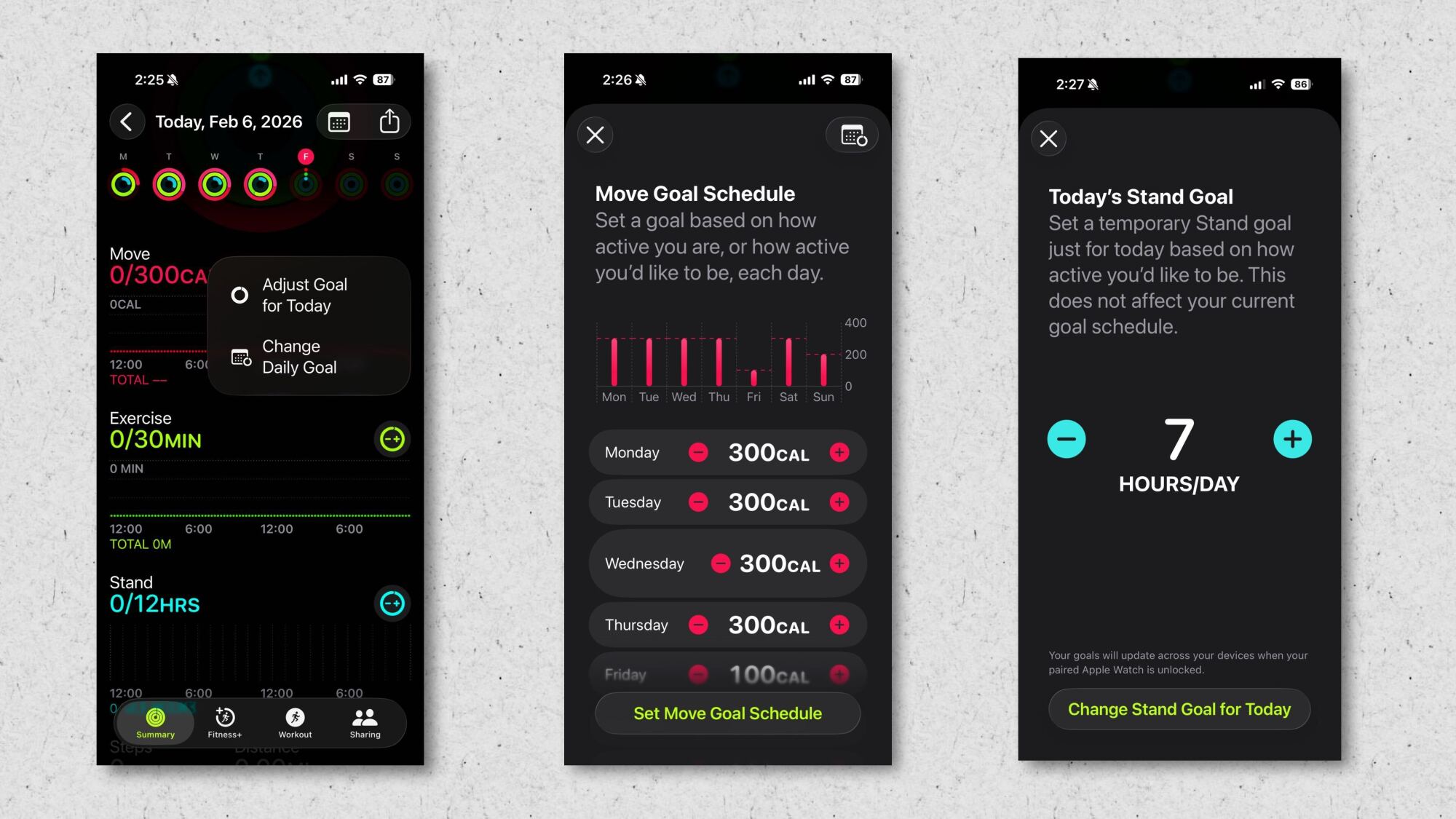
The Apple Watch’s Fitness app famously includes three rings (Move, Exercise, Stand) that you can close with activity throughout the day. Not only should you change your Move and Exercise goals to numbers that work for you (raising or lowering them as appropriate), you can also schedule in different goals for each day. 

Originally, your Move, Exercise, and Stand goals were the same every day, but these days you can change your ring-closing goals, including adding rest days. Go to the Fitness app and tap the Activity Rings card, and then tap the “+/-” icon next to each goal. You can create a weekly schedule so that you have lower targets on certain days. You can also change a goal temporarily just for today—for example, reducing your Stand hour goal on a day you’re taking a road trip. 

Wear your Apple Watch on your arm (or ankle)

The Apple Watch is meant to be worn on the wrist, but that doesn’t mean you have to wear it there. If your workout has you snatching kettlebells or bench pressing in wrist wraps, consider wearing the Watch on your upper arm. Or if you use a standing desk, your steps may not register unless you put the Watch on your ankle. Both of these locations will likely require a bigger wristband than what came with the Watch. Fortunately, you can buy an extra-long band, like this one. 

Change the Apple Watch’s app view for easier tapping during a workout

Grid view and list view

Credit: Beth Skwarecki

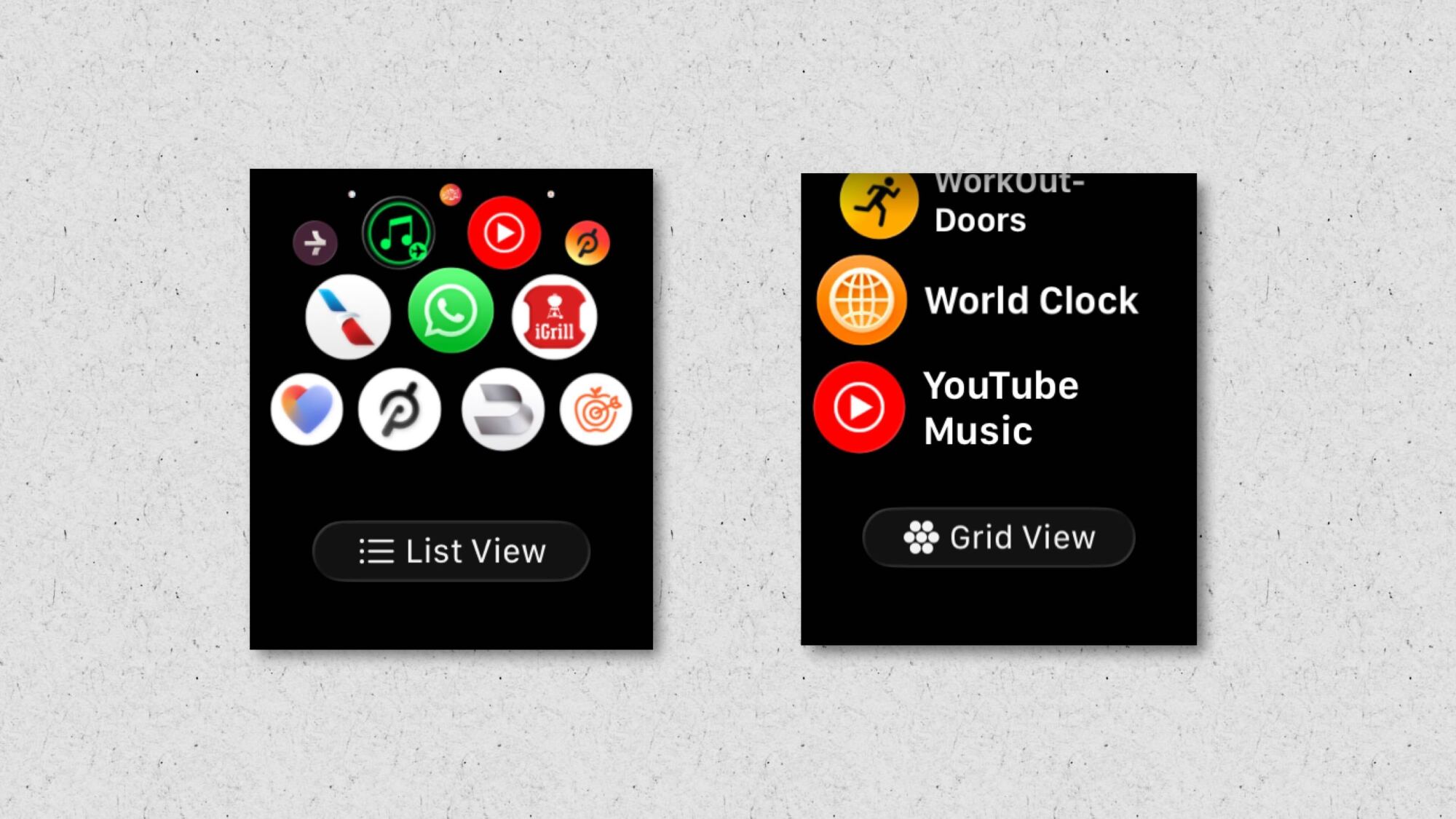
This is a tiny hack, but one that makes it so much easier to operate your watch mid-workout: Press the crown, and you’ll see all your installed apps. By default, they appear as little icons clustered together. You can rearrange them if you like, but no matter the arrangement, they’re tough to accurately tap while you’re running down the street. Make life easier on yourself by scrolling to the bottom of this screen, and tap List View. This puts your apps in an alphabetical list, with the name next to each icon. It’s now far easier to tap anything you might need during your workout.

Use Bevel to gather your Apple watch data into a convenient dashboard

Bevel on watch

Credit: Beth Skwarecki

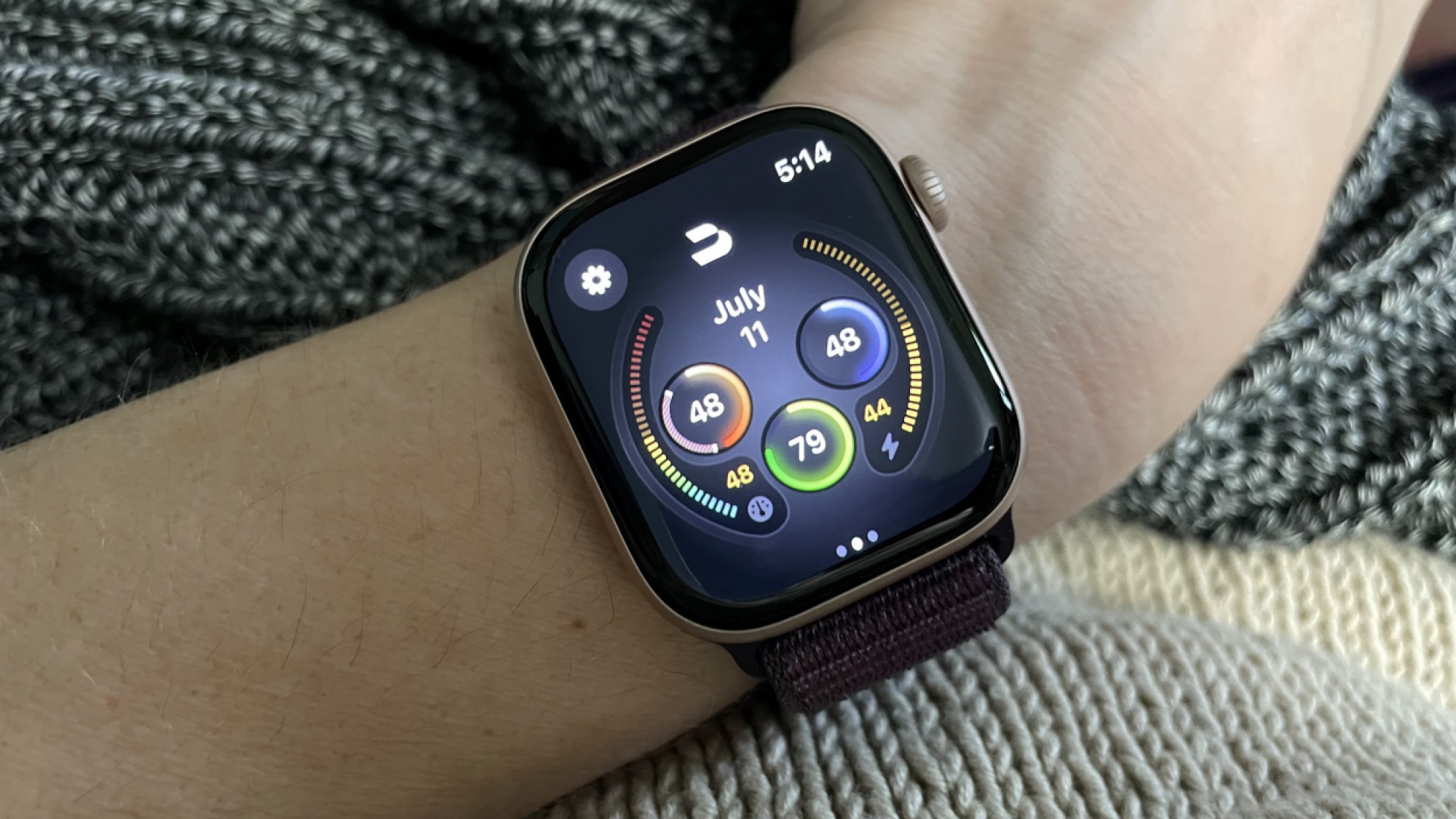
The Apple Watch collects a lot of data, but Apple doesn’t give you a convenient way to view it all in one place. The Fitness app has workout data, and the Health app stores everything else—but the Health app isn’t as user-friendly as you might wish. Third-party apps have stepped in to fill the gap. Bevel, for example, provides recovery scores and collects data in much the same way you’d see from a Whoop or Oura ring. There are other apps that do the same thing, like Athlytic, but I’m recommending Bevel because it has a free tier (and most of its functionality is on that tier). If you like the experience, consider shopping around to see if you prefer other apps.

Create custom intervals on your Apple Watch

The Workout app on Apple Watch has evolved quite a bit from its original format as a simple tracker with a start and stop button. The current version of the Fitness app has a little timer icon in the corner of each workout type, under the Workouts tab. Tap that, and you can view and edit custom workouts. Program yourself an interval workout, or a workout of a specific length. You can do this most easily from your phone—Apple has instructions here. 

Use your Apple Watch to race yourself

If you run or bike the same route often, try the Race Route feature. Routes are automatically generated after you do the same run twice. On the Watch itself, go to the Workout app and choose a Run or Cycle workout, then tap the timer icon to bring up options including race routes. You can choose to race your personal best time on that route, or just your last workout on that route. During the activity, you’ll see whether you’re keeping pace with that previous workout.

Do a workout even without the Apple Watch

Screenshots of a workout (in progress and afterward) recorded without the watch
It may look empty, but it got tracked.
Credit: Beth Skwarecki

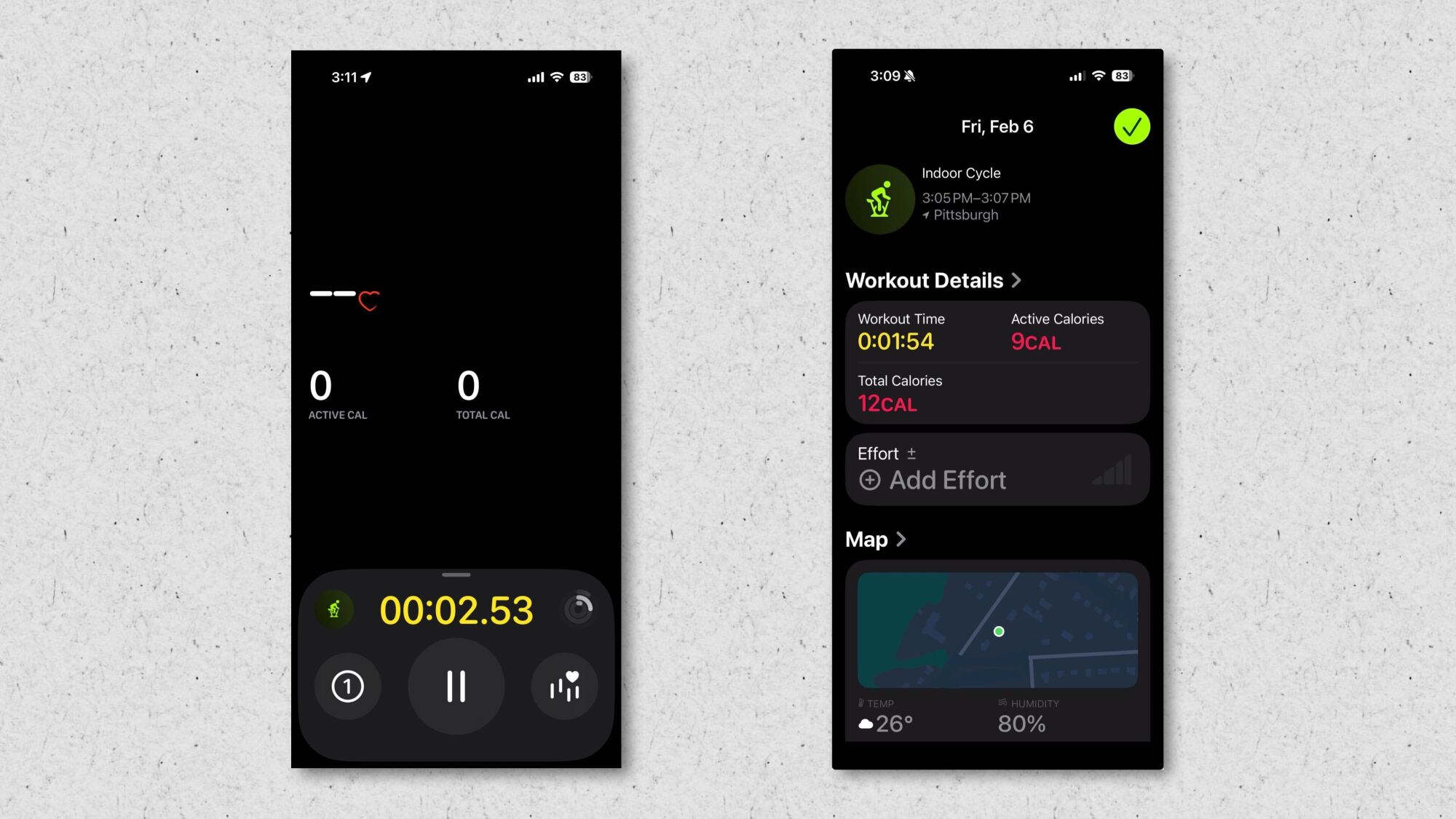
One of the best upgrades to iOS 26 is that the Fitness app can now track workouts even without the Apple Watch. If you left your watch at home but still want to get a run in, you can track it directly from your phone. Just go to the Fitness app, then Workout, and then tap whichever type of workout you’d like to do. If you choose an outdoor workout like a run, your phone will track your distance and pace with the phone’s GPS. If you choose an indoor workout, the app can still log the workout with a timer, but it won’t be able to collect any data. You’ll get a readout with the amount of time you worked out, and an estimate of your calorie burn, and you can rate your effort so the workout counts toward your training load. If you have a device that can measure your heart rate—like a chest strap or headphones like the Powerbeats Pro 2—you can pair that device directly to your iPhone, without involving the watch, and track your workout through the Fitness app with heart rate data intact.

Connect your Apple Watch to a treadmill

The Apple Watch is pretty good at judging distance and speed outdoors when you run, and your iPhone can do a good job of that, too. But once you’re indoors on a treadmill, only the treadmill knows how far you’re running. The Apple Watch’s distance estimations aren’t always very good. That is, unless you’re using a treadmill that can beam data directly to your watch. The treadmills in a lot of commercial gyms have this feature through a system called GymKit. In your Settings on the watch, go to Workout and turn on Detect Gym Equipment. When you use a compatible gym machine, there will be a spot on the console to tap your watch. You’ll hear a beep, and then the data on your watch will be synced to the data on the machine. 

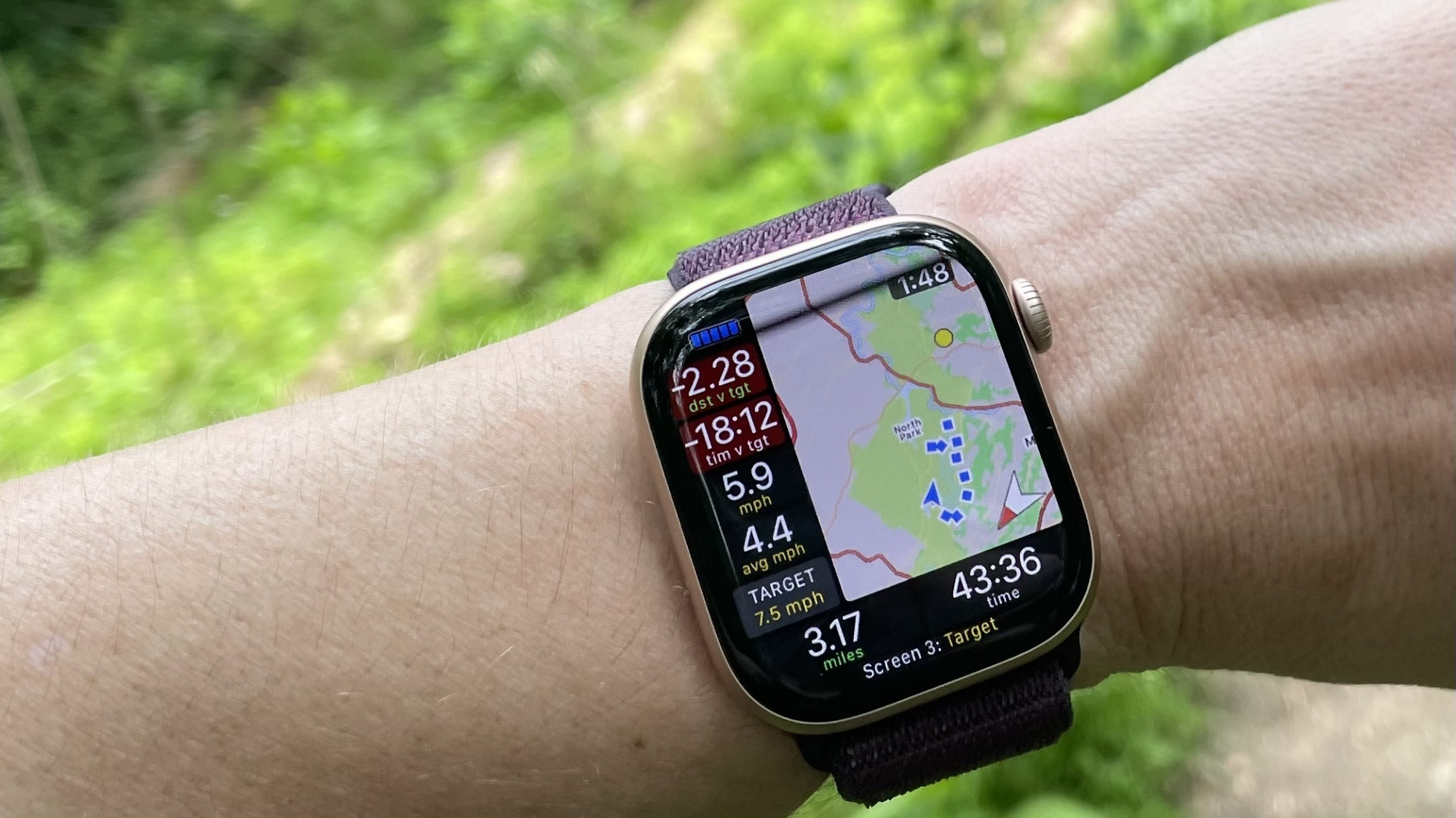
Install WorkOutDoors on your Apple Watch for more run data and mapping

WorkOutDoors app on wrist

Credit: Beth Skwarecki

We’ve seen that the stock Workout app has plenty of great features for running and other workouts, but many runners and hikers prefer a different option. The Apple Watch app WorkOutDoors gives Garmin-level mapping and data analytics during your run. It takes a bit of time to learn your way around all the features, but this is an incredibly powerful tool for just a small investment ($8.99 as a one-time charge).

Top up the Apple Watch’s battery before sleep

If you use the Apple Watch to track your sleep, you don’t have the option of charging it while you sleep. But don’t worry if it’s close to bedtime and you’re low on battery—Apple Watches, especially the most recent models, are designed to charge quickly for exactly this reason. The Apple Watch Series 11 only needs five minutes of charge time for eight hours of sleep tracking. 

Memory Prices Have Nearly Doubled Since Last Quarter

Memory prices across DRAM, NAND and HBM have surged 80 to 90% quarter-over-quarter in Q1 2026, according to Counterpoint Research’s latest Memory Price Tracker. The price of a 64GB RDIMM has jumped from a Q4 2025 contract price of $450 to over $900, and Counterpoint expects it to cross $1,000 in Q2.

NAND, relatively stable last quarter, is tracking a parallel increase. Device makers are cutting DRAM content per device, swapping TLC SSDs for cheaper QLC alternatives, and shifting orders from the now-scarce LPDDR4 to LPDDR5 as new entry-level chipsets support the newer standard. DRAM operating margins hit the 60% range in Q4 2025 — the first time conventional DRAM margins surpassed HBM — and Q1 2026 is on track to set all-time highs.


Read more of this story at Slashdot.