What People Are Getting Wrong This Week: Is Snow Fake?

We may earn a commission from links on this page.

Memphis city council members Pearl Eva Walker and Yolanda Cooper Sutton (and many other people online) say that snow is fake.

Sutton recently posted a video on her Facebook page to demonstrate the artificiality of snow. Over footage of her husband holding a snowball and a lighter, Sutton says, “So we decided to see what was really hitting the ground.” Her husband holds a flame to the snowball, and it does not melt.

“It’s not melting [it stinks] when you set fire to it OMG, Jesus Christ, what is happening!!!” Sutton asks.

In the video’s comment section, fellow council member Walker reportedly replied, “man made,” and included another video showing the same phenomenon. It looks like that specific video was taken down, but these kinds of posts are pretty common after snowstorms like the ones that just blanketed the US. Here are a couple of examples:

So: What’s happening? Has plastic snow replaced the real stuff? Is this a flurry of misinformation? Are all these people just flakes?

All available evidence suggest snow is real

First, snow is real, but I understand why the Memphis council members would be suspicious. These videos are convincing, and they’re not AI nor the result of people deliberately hoaxing with prop snow. They are documents of what happens when you hold a flame up to real, actual, fell-from-the-sky snow. You’d expect that holding fire to a snowball would make it melt into water in your hand but it just doesn’t. No shade to people running their own experiments, but they’re missing that snow can be counterintuitive.

Why it seems like snow doesn’t melt from flames

Snow is 90–95% air, so there’s a lot less water than people might expect no matter how it melts. But the main thing going on is sublimation—a solid changing directly to a gas without first becoming liquid. When you hold a flame to snow, especially packed snow, much of it will become water vapor without becoming liquid water first. Sublimation is also why snow can seem to disappear without the temperature going above freezing. You can see sublimation in action in the video below.

Snow is also porous. When a snowball melts, water is sucked to the center of the mass through capillary action, and it fills up the spaces that were once air. The video below shows unpacked snow on the ground being hit with a torch. Some of the snow is sublimating in response to the heat, while some of the surface snow is melting into water and being sucked into the empty spaces in the snow below it. You can see how it goes from “powdery” snow to more wet snow by the end of the video. (Also, these yahoos are going to burn down the trailer soon):

But what about the snow turning black?

The scorch marks on the “burning snow” have an explanation as well: The flame from a match or a lighter is result of fuel burning—butane from a lighter; wood or paper from matches. As the fuel burns, it produces carbon soot, which reacts to the cold snow by condensing onto its surface. The soot isn’t scorch marks from the snow burning. It’s scorch marks from the butane or wood/paper burning. You can tell the snow itself isn’t burning, because it never catches fire.

That leaves only the burning plastic smell that some report. That’s actually the smell of the butane from the lighter not fully burning and/or the smell of the mercaptans sometimes added to butane so we can smell it. The result is a chemical odor that is easy to mistake for burning plastic, especially when you hold a flame up to soot you’ve already deposited on a cold surface. In this video, the conspiracy theorist used a candle instead of a lighter, and notes that it doesn’t smell like burning plastic. That’s because butane was absent.

How to do the “burning snow” illusion yourself

You can try all this yourself to amaze your friends with the wonders of sublimation and/or trick a bunch of people on social media. It’s easy:

  • Grab some snow and pack it into a tight snowball. A more solid surface will help soot stick to it.

  • Apply flame from a standard butane lighter for a few seconds. If you use matches, you won’t get the same burning plastic smell.

  • Cool scorch mark, right? Note how little water is dripping and how the snow is “disappearing.”

  • Note the edges of the scorch mark. Here’s where water that did melt was pulled toward the center of the snowball.

  • If you want to debunk the snow-burn conspiracy, simply hold the snow in your hand instead, and you will find that it melts into water.

Is it possible to make fake snow?

What if the government wanted to create a fake snow storm for some reason? It’s possible—you can see fake snow at ski resorts during bad winters; you can buy your own snow-maker on Amazon for less than $100. The problem would be the scale. All “they control the weather” conspiracies fall apart when you consider the scale.

Artificial snow is produced by spraying a mist of pressurized water into air that’s below freezing. You could cover some trails at a ski resort without a problem, but a whole city or state would require a lot of snow. Industrial snow-making-machines use about 160,000 gallons of water to create one-acre-foot of snow. To cover a town that’s 25 square miles with six inches of snow, you’d need about 1.28 billion gallons of water pumping through thousands of snow-guns. It would cost a lot, use a ton a fuel, and it wouldn’t fool anyone anyway—those machines are loud as hell, and the snow wouldn’t fall from the sky; it would shoot out of snow guns. You’d end up like, “What am I even doing with my life?”

You could also try seeding existing clouds with silver iodide to try to make it snow, but that’s expensive too, and no one really one knows if it works at all.

Bottom line: We can’t control the weather

Humankind can collectively alter weather patterns—global climate change and all that—but we can’t control weather. We can’t make it snow on command in Memphis without anyone noticing thousands of roaring machines shooting artificial snow into the air any more than we can control hurricanes. The snow falling from the sky is real and it’s made of frozen water crystals, just like it always has been.


Meta, TikTok and Snap are participating in an online safety ratings system

Numerous major social platforms including Meta, YouTube, TikTok and Snap say they will submit to a new external grading process that scores social platforms on how well they protect adolescent mental health. The program comes from the Mental Health Coalition’s Safe Online Standards (SOS) initiative, which comprises about two dozen standards covering areas like platform policy, functionality, governance and transparency, content oversight and more. The SOS initiative is led by Dr. Dan Reidenberg, Managing Director of the National Council for Suicide Prevention.

In announcing these companies’ participation, the Mental Health Coalition writes “SOS establishes clear, user-informed data for how social media, gaming, and digital platforms design products, protect users ages 13–19, and address exposure to suicide and self-harm content. Participating companies will voluntarily submit documentation on their policies, tools, and product features, which will be evaluated by an independent panel of global experts.”

After evaluation, the platforms will be given one of three ratings. The highest achievable safety rating is “use carefully,” which comes with a blue badge that compliant platforms can display. Despite being the highest rating, the requirements seem fairly run-of-the-mill. The description includes things like “reporting tools are accessible and easy to use,” and “privacy, default and safety functions are clear and easy to set for parents.” As for what actions the standards ask of the companies being rated, the “use carefully” rating says “platforms and filters help reduce exposure to harmful or inappropriate content.”

The other ratings include “partial protection” which is described in part as “some safety tools exist on the platforms, but can be hard to find or use,” and “does not meet standards” which would be given if “filters and content moderation do not reliably block harmful or unsafe content.”

The Mental Health Coalition, founded in 2020, has mentioned Facebook and Meta as partners since the early days of the organization. In 2021 the organization said it would bring together “leading mental health experts partner with Facebook and Instagram to destigmatize mental health and connect people to resources” during the COVID-19 pandemic.

In 2022 the nonprofit published a case study with “support from Meta” that found “mental health content on social media can reduce stigma while increasing individuals’ likelihood to seek resources, therefore positively impacting mental health.”

In 2024, the MHC “in partnership with Meta” launched a campaign called the Time Well Spent Challenge. In it, the group urged parents to have “meaningful conversations” with teens about “healthy” social media use, focusing less on whether teens should be on these apps at all and more on keeping them on-platform in a “time well spent” way, from reduced screen time to “using social media for good” and reviewing their feeds together.

That same year it partnered with Meta again to establish “Thrive,” a program that allows tech companies to share data regarding materials that violate self-harm or suicide content guidelines. The Mental Health Coalition lists Meta as a “creative partner” on its website.

Last year it was alleged that Meta buried internal data showing the ill effects of its products on users’ mental health. The internal research, dubbed “Project Mercury,” began in 2020. Since then the company has introduced some bare-minimum attempts at addressing mental health concerns, such as Instagram teen accounts. Meta is now on trial in California facing allegations over child harm from addictive products, the first in a series of upcoming lawsuits against the social media giant.

Other companies participating in the rating program include Roblox, which has recently faced stiff accusations over the wellbeing of children on the platform, and Discord which has beefed up its age-verification processes in response to its own serious child endangerment concerns.

This article originally appeared on Engadget at https://www.engadget.com/social-media/meta-tiktok-and-snap-are-participating-in-an-online-safety-ratings-system-162921333.html?src=rss

Apple AirPods Pro 4 May Get IR Cameras To See And Track Gestures Like VR

Apple AirPods Pro 4 May Get IR Cameras To See And Track Gestures Like VR
Apple is once again (reportedly) preparing to equip the upcoming AirPods Pro 4 with infrared cameras designed to let the earbuds “see” the world around you. Most likely, and assuming if this rumor holds out, this could enable hand gestures and enhanced spatial audio capabilities with VR integration being a possibility.

Next AirPods Pro

The Kia PV5 electric van combines futuristic looks and thoughtful design

Vans are something most of us don’t think about much, since we rarely interact with them directly in our day-to-day lives. But the van is an unseen hero that keeps the world moving, delivering packages all over the country and transporting food from farm to stores. They haven’t changed much in decades, though. A van is generally a big box with a gas or diesel engine (depending on where you are in the world), and that’s… kinda it, bar a dent or two in the bodywork. Kia’s engineers, riding high on the success of their recent electric vehicles, took notice and did some new things with the PV5, the company’s first electric van.

You can spec your PV5 in a number of configurations, and the company already has conversion partners lined up to turn them into just about anything. Of course, camper converters are eyeing them as well, eager to create electric “vanlife” setups. Off the shelf, you can choose between a PV5 Passenger for moving people, a PV5 Cargo for moving things, a PV5 Crew for moving things and people, and a PV5 Chassis Cab to do with as you please.

Beneath its modular cabin is the Electric Global Modular For Service, which is part of Kia’s rather fancy-sounding “PBV” strategy. “PBV” means “Platform Beyond Vehicle,” a potential hint at where the brand sees itself going. In this case, it can house a range of battery sizes.

Read full article

Comments

Apple and Google Agree To Change App Stores After ‘Effective Duopoly’ Claim

Apple and Google have agreed to a set of commitments to the UK’s Competition and Markets Authority that will prevent them from giving preferential treatment to their own apps and require greater transparency around how third-party apps are approved for sale.

The CMA announced the measures on Tuesday, seven months after it declared that the two companies held an “effective duopoly” over the UK’s mobile app ecosystem. Both companies also committed to not using data gathered from third-party developers in ways the regulator deems unfair. The CMA granted both app stores “strategic market status” in October 2025, a designation that gave it the authority to demand changes.

CMA head Sarah Cardell called the commitments “important first steps” and said the regulator would “closely monitor” implementation. Technology analyst Paolo Pescatore described the announcement as a “pragmatic first step” but noted some may see it as “addressing the low-hanging fruit.” The UK’s app economy is the largest in Europe by revenue and number of developers, generating an estimated 1.5% of the country’s GDP.


Read more of this story at Slashdot.

This New iOS 26 Feature Helps Eliminate Text Spam

With iOS 26, Apple made it easier for users to reduce spam and overall clutter in their Messages inbox. Your iPhone will detect and hide spam messages, and with the Screen Unknown Senders feature, you can filter out texts from anyone you don’t know. You can also disable push notifications for these conversations to reduce how often you’re alerted for messages you don’t need to see.

Note that this feature works only on iOS, so if you have Messages synced on your Mac, you’ll see everything and receive notifications for all messages unless you mute specific conversations.

How to reduce clutter in Messages on iOS

To send messages from numbers you don’t know to a separate folder, go to Settings > Apps > Messages and toggle on Screen Unknown Senders. You can also get here through the Messages app on your iPhone by tapping the three horizontal menu lines in the top-right corner and selecting Manage Filtering. Enabling Screen Unknown Senders will hide notifications and move messages to your Unknown Senders list. If you want to allow (or disallow) certain types of notifications, tap Allow Notifications and toggle categories on or off:

  • Time Sensitive includes alerts, verification codes, and urgent requests.

  • Personal includes messages identified as not sent by a business or organization.

  • Transactions include order updates, receipts, and confirmations.

  • Promotions include general offers and updates sent to multiple recipients.

Most users will want to enable time-sensitive notifications to receive messages that include time-based one-time passwords (TOTPs) and other urgent alerts. You may also want to allow personal notifications so you don’t miss messages directed to you individually from real people who aren’t saved in your contacts.

When you allow notifications, texts identified in those categories will appear in your Messages list for only 12 hours before being moved to Unknown Senders—a behavior that keeps your primary inbox streamlined. If you want to make an unknown sender a known sender to prevent future messages from being filtered out, open the conversation and tap Mark as Known at the bottom or add the number to your contacts. A known sender is anyone you’ve added to your Contacts, sent a message to, or marked as known in the conversation.

Finally, if you enable Filter Spam under the same menu in your device settings, Apple will send messages identified as spam to a separate Spam list and hide notifications. You can view these and conversations from unknown senders at any time via Messages > Menu.

Google’s new tool helps you remove non-consensual explicit images from Search

The internet is ripe with horrible violations of people’s privacy, including non-consensual explicit images. A new tool from Google won’t do much in the way of prevention, but can help you remove this media from Search. 

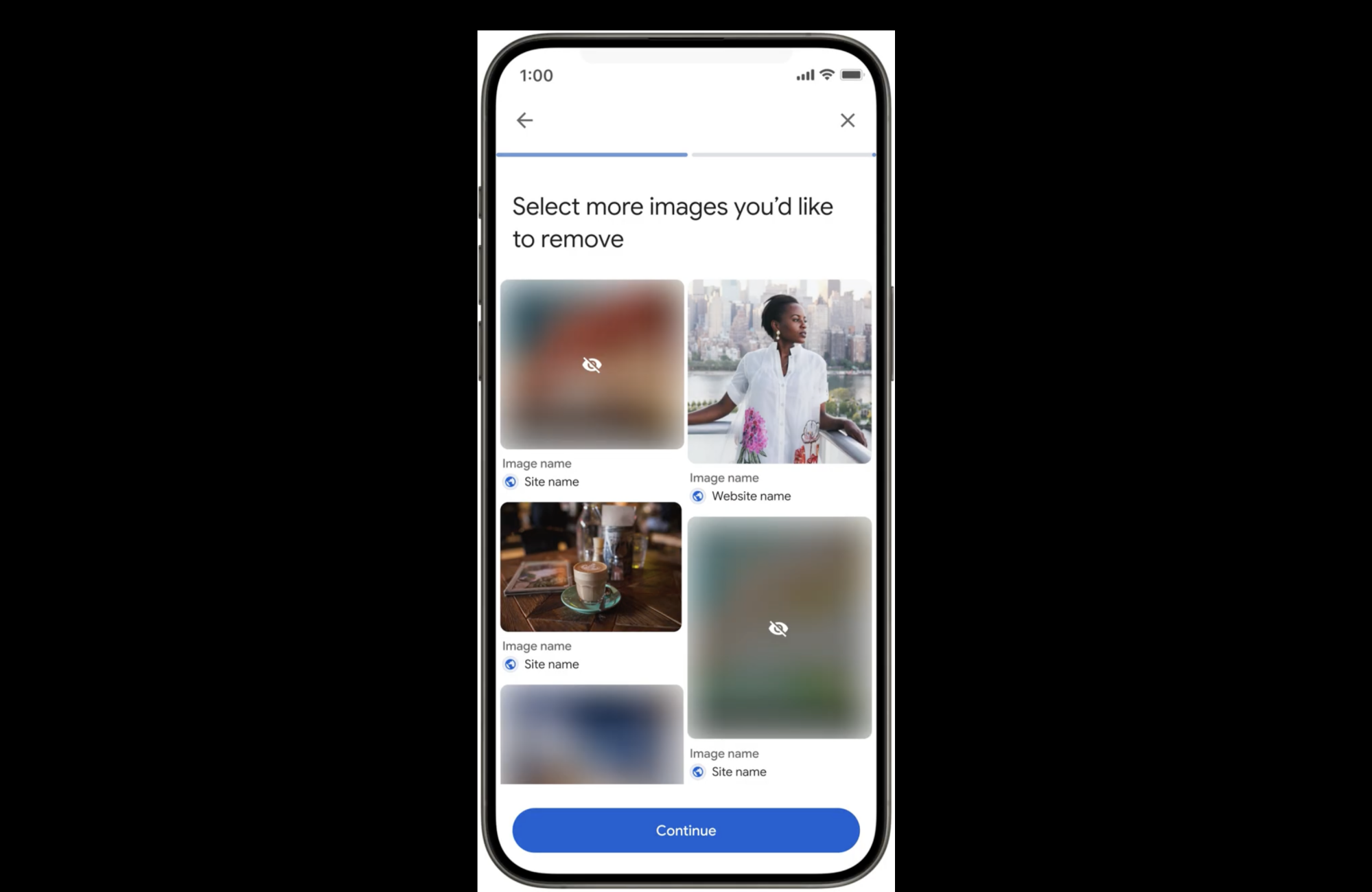
Now, you can choose an image and quickly request its deletion. Just click on the three dots that appear on the image. From there, choose “remove result” and then “It shows a sexual image of me.” Other choices include the picture shows a person under 18 and that it has your personal information. If you choose the initial option then you will also be asked whether it contains a real image or deepfake. There’s also an option to submit multiple photos at once. 

Google claims that, upon submitting your request, you will “immediately” see links to emotional and legal support organizations. Plus, you can opt-in to safeguards that filter out similar results in Search — though it seems these unreported images will still be available for other users to see. This feature should be available in most countries over the coming days. 

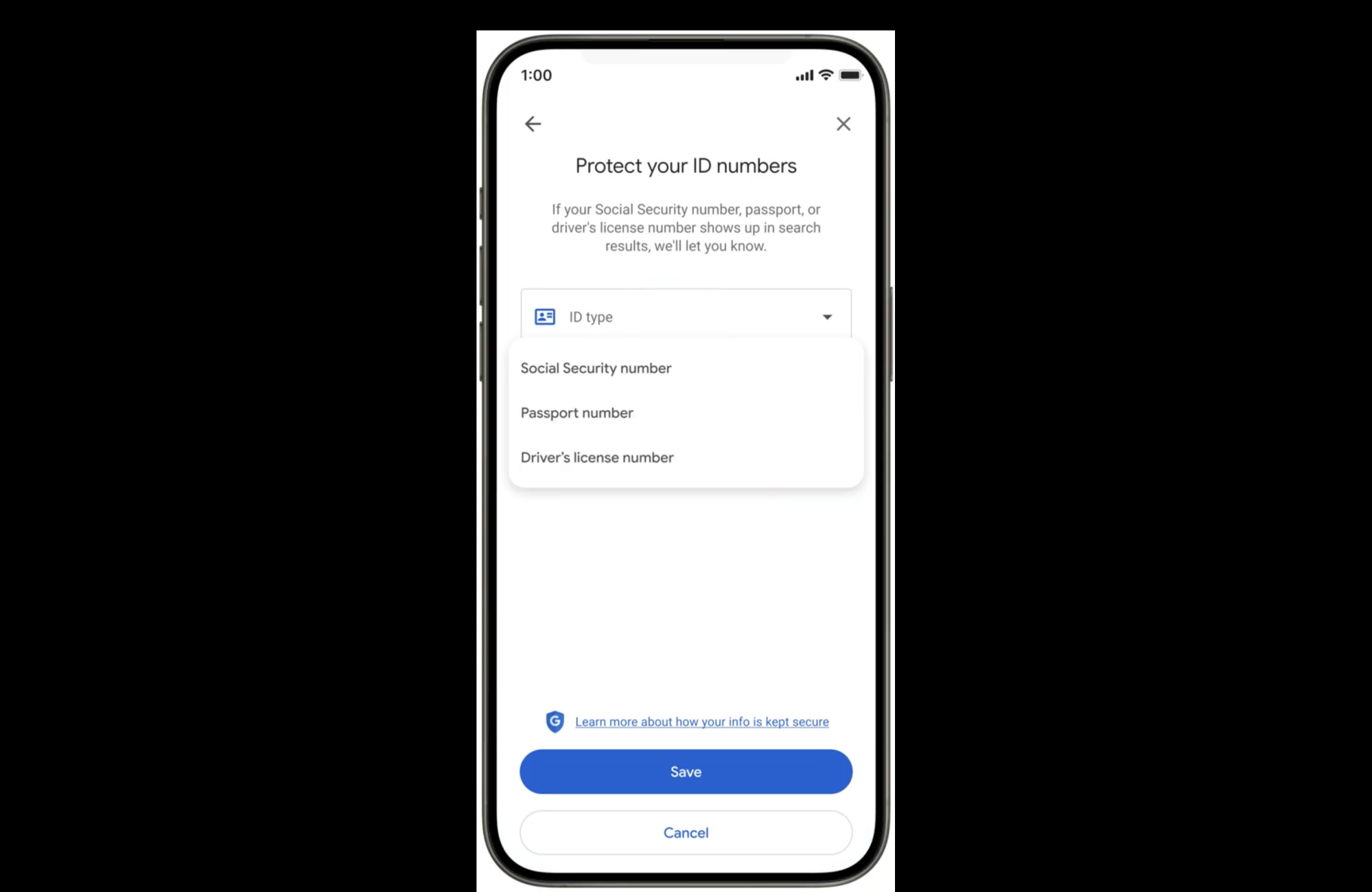
You can go on Google’s “Results about you” hub to track your request. To use the tool, you will have to add in your personal contact information and government ID numbers. Google already had the hub to track if any of that information appears on Search, but now it will also look for your social security number, drivers license and passport information. The company should notify you if any of that information comes up in Search results and allow you to take removal steps. 

Results about you’s updates should roll out to US users in the coming days. Notably, it arrives as Google shutters its dark web reports. They would alert you if your name, number, or email address appeared on the internet — typically because of a data breach. However, Google found it didn’t help users take next steps to fix the problem, something these new features will hopefully do. 

This article originally appeared on Engadget at https://www.engadget.com/cybersecurity/googles-new-tool-helps-you-remove-non-consensual-explicit-images-from-search-155352248.html?src=rss

Venus Is Hiding A Massive Underground Tunnel Carved By Ancient Volcanoes

Venus Is Hiding A Massive Underground Tunnel Carved By Ancient Volcanoes
Scientists at the University of Trento have uncovered the first direct evidence of a subsurface feature beneath Venus: a massive underground lava tube on the most volcanically active planet in the Solar System.

Published this week in the Nature journal, the finding was actually made by re-analyzing archival radar data from NASA’s Magellan

Toyota Built It’s Own Game Engine For Cars Claiming Console-Grade Graphics

Toyota Built It's Own Game Engine For Cars Claiming Console-Grade Graphics
In an unexpected bit of news, Toyota has unveiled a proprietary game engine called Fluorite. Nope, this doesn’t mean the company is entering the game development any time soon, but rather, is something we could likely see powering its future cars. 

Developed by Very Good Ventures and Toyota Connected North America, Fluorite was introduced

This Eero Pro Mesh Wifi System Is $100 Off Right Now

We may earn a commission from links on this page. Deal pricing and availability subject to change after time of publication.

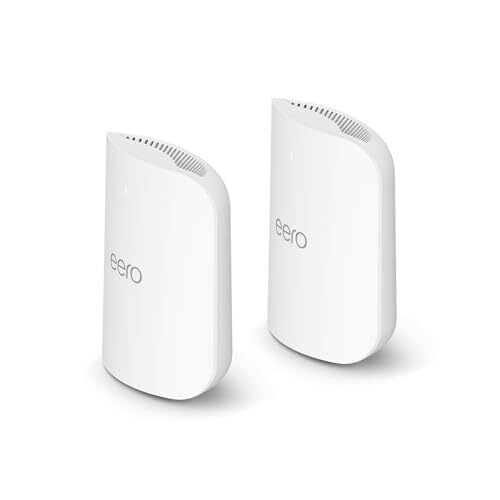
Wifi problems tend to reveal themselves at the worst times—laggy Zoom calls, buffering mid-binge, or a smart device that refuses to connect. The Eero Pro 7, named the best mesh wifi system of 2025 by PCMag, is built to solve exactly that. Right now, the two-pack is down to $449.99 on Amazon from its usual $549.99, its lowest price to date according to price trackers.

This is a tri-band mesh system, which means it uses three separate frequencies (2.4GHz, 5GHz, and the newer 6GHz band) to keep your internet fast and stable across multiple rooms. Setup is handled through the Eero app, which guides you through everything with a QR code and a few simple steps, notes this PCMag review.

This pack covers up to 4,000 square feet. You get two identical routers in the box, each with two 5-gigabit Ethernet ports and support for wired backhaul—useful if you want to hardwire specific devices or connect the routers directly for stronger performance. Inside, you’ll find five antennas and hardware that supports Wi-Fi 7 tech like MU-MIMO, beamforming, and 320MHz channels, all of which work behind the scenes to reduce lag and keep multiple devices running smoothly. It’s also smart-home-ready, with support for Thread, Matter, and Zigbee, so you can use it as a hub for devices like lights, locks, or sensors without needing extra gear.

That said, it’s not without its limitations. For one, there are no USB ports, if you were hoping to plug in storage or a printer directly. And while it supports parental controls and network security features, you’ll need to pay extra for those—about $10 a month via the Eero+ subscription. That plan adds tools like VPN access, malware blocking, ad filtering, and a password manager, but it does feel like a bit of a nickel-and-dime moment after shelling out nearly $450. Still, if your wifi struggles are more than a minor annoyance, the Eero Pro 7 is a serious upgrade, and with this price drop, a bit easier to justify.


Elevation Lab’s 10-year extended battery case for AirTag is back on sale for $16

If you’re an iPhone user who likes to keep tabs on where your stuff is, you can’t go far wrong with an AirTag. The second-gen model that Apple just released outpaces the original in every way (aside from the galling lack of a keyring hole, that is). While it’s easy enough to replace the battery in both versions of the AirTag, you might not want to have to worry about the device’s battery life for a very long time. Enter Elevation Lab’s extended battery case for the AirTag, which is currently on sale at Amazon for $16.

The case usually sells for $23, so that’s a 30 percent discount. It’s not the first time we’ve seen this deal, but it’s a pretty decent one all the same.

This is arguably one of the more useful AirTag accessories around for certain use cases. It won’t exactly be helpful for an AirTag that you put in a wallet or attach to your keys, as it’s too bulky for such a purpose — and it doesn’t have a hole for a keyring anyway. Still, if you’re looking for an AirTag case that you can place in a suitcase or backpack and not have to touch for years, this could be the ticket.

Elevation Lab says that, when you place a couple of AA batteries in the case, it can extend the tracker’s battery life to as much as 10 years (the brand recommends using Energizer Ultimate Lithium batteries for best results). The AirTag is slated to run for over a year on its standard CR2032 button cell. 

The case gives the AirTag more protection as well. It’s sealed with four screws and it has a IP69 waterproof rating. What’s more, it doesn’t ostensibly look like an AirTag case, so someone who steals an item with one inside is perhaps less likely to realize that the object they pilfered is being tracked.

There are some other downsides, though. Since the AirTag is locked inside a case, the sound it emits will be muffled. Elevation Lab says the device’s volume will be about two-thirds the level of a case-free AirTag. However, the second-gen AirTag is louder than its predecessor, which should mitigate that issue somewhat.

Follow @EngadgetDeals on X for the latest tech deals and buying advice.

This article originally appeared on Engadget at https://www.engadget.com/deals/elevation-labs-10-year-extended-battery-case-for-airtag-is-back-on-sale-for-16-151215952.html?src=rss

YouTube TV Rolls Out Lower‑Cost Plans And A Standalone Sports Tier

YouTube TV Rolls Out Lower‑Cost Plans And A Standalone Sports Tier
There was a time when cutting the cord could save you big money versus paying for a satellite or traditional cable TV package. Those days are gone, perhaps for good, though one of the best streaming services is rolling out more affordable plans. That would be YouTube TV, and streaming subscribers now have several new tiers to choose from,

This Blink Mini Indoor Camera Two-Pack Is on Sale for $45 Right Now

We may earn a commission from links on this page. Deal pricing and availability subject to change after time of publication.

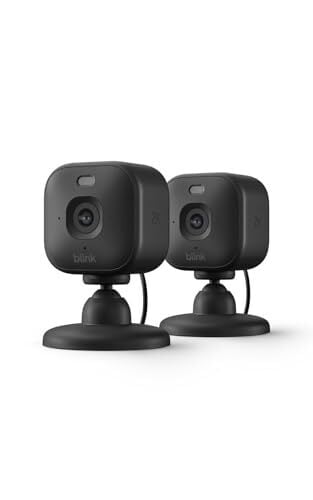
The Blink Mini 2K+ (2-pack) is currently down to $44.99 on Amazon, half off its usual $89.99 price and the lowest it has ever been, according to price-trackers. That makes it one of the cheapest ways right now to add basic indoor security with sharper video than the older 1080p models. Blink, which is owned by Amazon, has always leaned toward simple and affordable cameras, and this one follows that formula closely. It records in 2K resolution, so faces and fine details come through more clearly than on earlier Minis. It also adds a built-in spotlight, which allows for color night footage instead of grainy black-and-white clips when motion is detected.

This is a wired camera, so it needs to live close to a power outlet. The upside is size. The Mini 2K+ is tiny at roughly two inches wide and about three inches tall with the stand attached. It is light enough to move around easily if you want to keep an eye on different rooms at different times. Set-up is straightforward through the Blink app. That said, it only works on a 2.4GHz network, which is worth noting if your home is set up around 5GHz. Video quality is solid for the price, and two-way audio is clearer than before thanks to better noise filtering.

There is also a built-in siren and support for Amazon Alexa, letting you view the camera feed on Fire TV devices or get alerts on Echo speakers. As for its storage and smart features, live viewing is free, but recorded clips, smart alerts like person detection, and cloud storage require a Blink subscription. That starts at $4 per month for one device or $12 per month for unlimited devices. You can avoid cloud storage by adding the Blink Sync Module 2 ($49.99) and a USB drive, but that is another piece of hardware to buy and manage. And while the Mini 2K+ is meant for indoor use, you can place it outdoors with a weather-resistant power adapter ($9.99), which is also sold separately.


The Big Money in Today’s Economy Is Going To Capital, Not Labor

The American economy’s most valuable companies are now worth trillions of dollars more than their predecessors were a generation ago, yet they employ a fraction of the workers — and a new analysis by the Wall Street Journal argues that this widening gap between capital and labor is the defining economic story of our time.

Labor received 58% of gross domestic income in 1980; by the third quarter of 2025, that figure had fallen to 51.4%. Corporate profits’ share rose from 7% to 11.7% over the same period. Nvidia, the most valuable US company in 2026, is nearly 20 times as valuable as IBM was in 1985 in inflation-adjusted terms and employs roughly a tenth as many people. Since the end of 2019, real average hourly wages have risen 3% while corporate profits have climbed 43%.

Household stock wealth now equals almost 300% of annual disposable income, up from 200% in 2019. Yale economist Pascual Restrepo predicted that AI integration will shrink labor’s share of revenue further, just as factory automation did for blue-collar workers in decades past.


Read more of this story at Slashdot.

Alphabet selling very rare 100-year bonds to help fund AI investment

Alphabet has lined up banks to sell a rare 100-year bond, stepping up a borrowing spree by Big Tech companies racing to fund their vast investments in AI this year.

The so-called century bond will form part of a debut sterling issuance this week by Google’s parent company, said people familiar with the matter.

Alphabet was also selling $20 billion of dollar bonds on Monday and lining up a Swiss franc bond sale, the people said. The dollar portion of the deal was upsized from $15 billion because of strong demand, they added.

Read full article

Comments

G.Skill Settles DDR5/DDR4 Memory Speed Lawsuit For $2.4M, How To Submit A Claim

G.Skill Settles DDR5/DDR4 Memory Speed Lawsuit For $2.4M, How To Submit A Claim
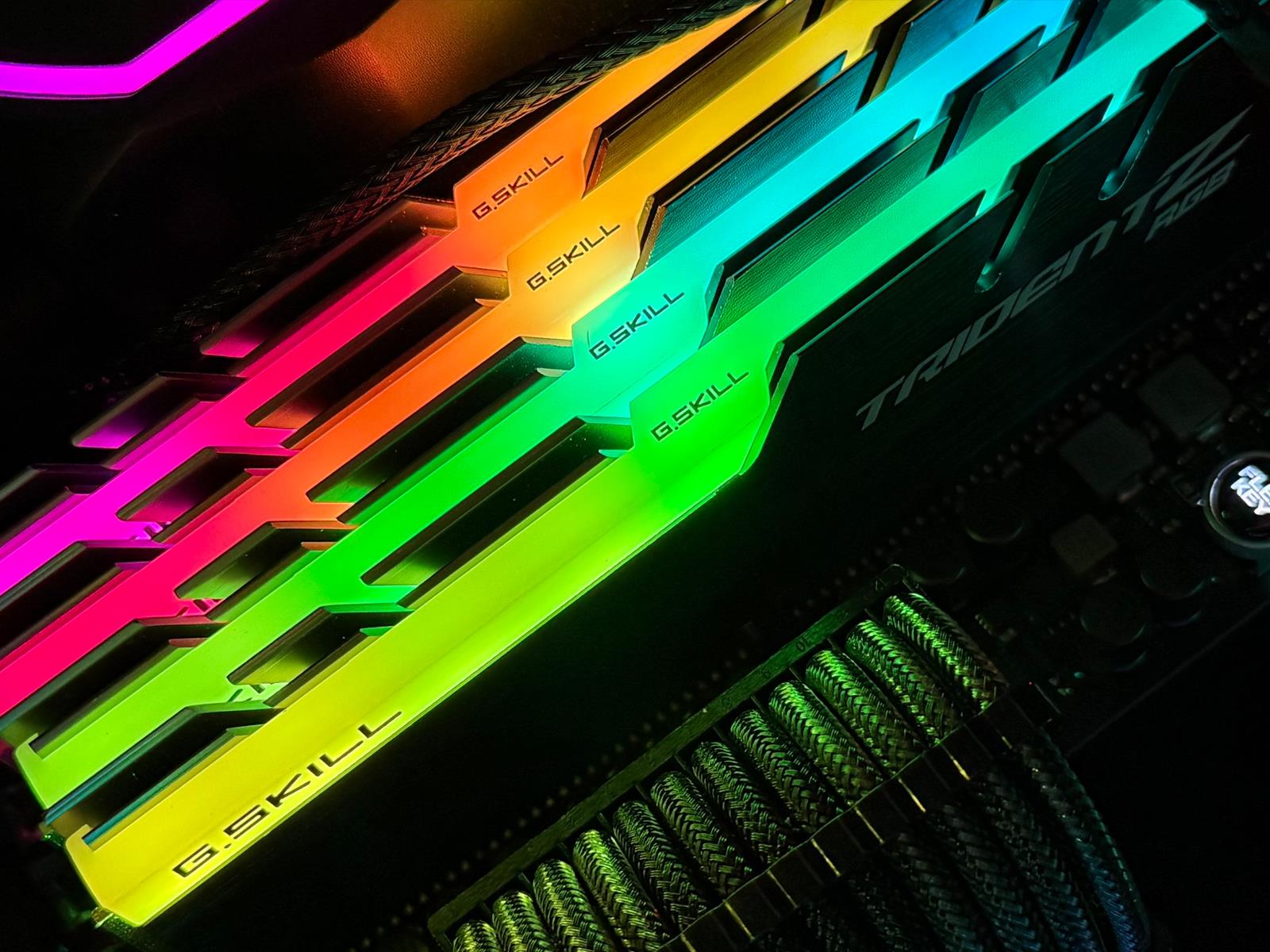
G.Skill has agreed to pay $2.4 million to settle a class action lawsuit alleging it “deceptively advertised and labeled” the speed of its DDR5 and DDR4 desktop memory modules. The settlement allows G.Skill to put the matter to rest without admitting any wrongdoing, and it avoids having a court decide of G.Skill’s memory speed labels violated

NYC Private School Tuition Breaks $70,000 Milestone for Fall

The top private schools in New York City plan to charge more than $70,000 this year for tuition, an amount exceeding that of many elite colleges, as they pass on the costs of soaring expenses including teacher salaries. From a report: Spence School, Dalton School and Nightingale-Bamford School on Manhattan’s Upper East Side are among at least seven schools where the fees now exceed that threshold, according to school disclosures and Bloomberg reporting

Fees among 15 private schools across the city rose a median of 4.7%, outpacing inflation. Sending a kid to New York private school has always been expensive, but the cost now is so high that even those with well-above-average salaries are feeling squeezed. Prices have risen dramatically in the past decade, up from a median of $39,900 in 2014.


Read more of this story at Slashdot.

ASUS Zenbook Duo (2026) review: Two screens really are better than one

It takes time for novel designs to catch on. But even so, I am still wondering why the Zenbook Duo hasn’t had a bigger impact on the market after ASUS released its first true dual-screen laptop two years ago. Notebooks like these provide the kind of screen space you’d typically only get from a dual monitor setup, but in a much more compact form factor that you can easily take on the road. It could be that people were wary of an unfamiliar design, shorter battery life or buying a first-gen product — all of which are understandable concerns. However, now that ASUS has given the ZenBook Duo a total redesign for 2026, the company has addressed practically all of those barriers to entry while making it an even more convincing machine for anyone who could use more display space. Which, in my experience, is pretty much everyone.

Editor’s note: The 2026 ASUS Zenbook Duo is expected to be available for pre-order sometime in late February, with general availability slated for March.

Design

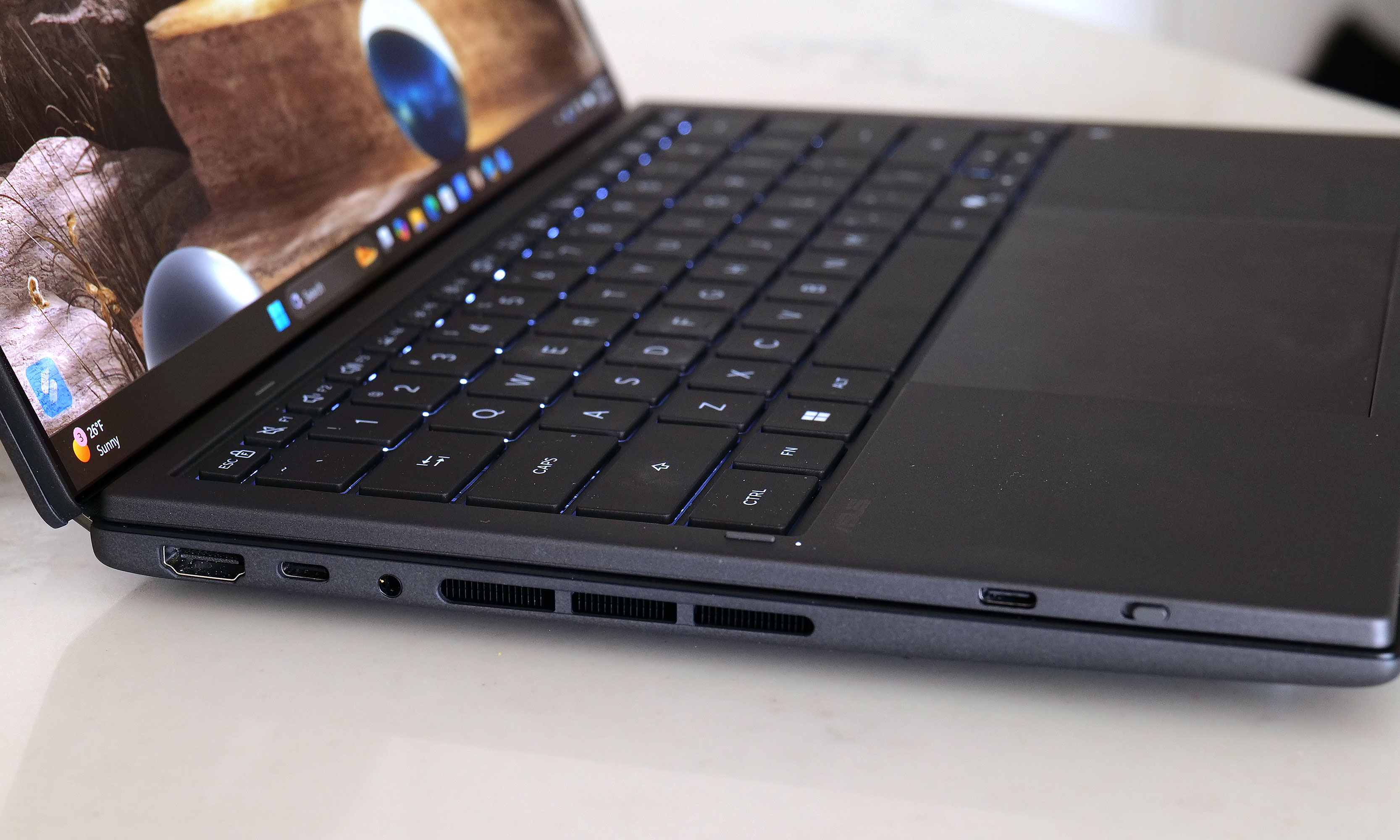
For the new model, ASUS didn’t mess with the laptop’s basic layout too much. Instead, the company polished and tightened everything up, resulting in a system that weighs about the same (3.6 pounds) while reducing its overall size (12.1 x 8.2 x 0.77 to 0.92 inches) by five percent. Critically, you still get a built-in kickstand on the bottom and a detachable keyboard that you move wherever you want. There’s also a decent number of ports, including two USB-C with Thunderbolt 4, one USB-A 3.2 jack, HDMI 2.1 and a combo audio port. That said, I do wish ASUS had found room for an SD card reader of some kind, though given the Zenbook Duo’s unique design, I get why that didn’t make it. 

The Zenbook Duo's detachable keyboard gives users a ton of flexibility when it comes to utilizing both of the laptop's displays.
The Zenbook Duo’s detachable keyboard gives users a ton of flexibility when it comes to utilizing both of the laptop’s displays.
Sam Rutherford for Engadget

One of the Zenbook Duo’s most important design upgrades is a new “hideaway” hinge that reduces the gap between the laptop’s two screens. Not only does this make the laptop easier and more pleasant to use in dual-screen mode, it also allows the entire system to lay flat on a table, which is nice for drawing or sharing your screen with someone sitting opposite you. Unfortunately, while my review unit didn’t come with one, ASUS says its forthcoming Pen 3.0 will come bundled with the Zenbook Duo in the US, so you won’t need to pay extra for it.

Another small but appreciated improvement is the new pogo pins below the lower display, which provides a more secure and reliable way of keeping the laptop’s detachable keyboard topped up. In my experience, even after running multiple rundown tests that completely drained the Duo’s battery, I never had to charge up the keyboard on its own. It was always smart enough to sip electricity from the main system in the background, though it also has a built-in USB-C port for power just in case. On the flipside, if you’re not scared of typing on glass, you can still use the lower screen as a keyboard and touchpad, or as a place to display widgets for news, the weather, performance and more. 

Displays

As someone who loves a desktop with dual monitors, I can't overstate how nice it is to have similar built-in functionality on a laptop.
As someone who loves a desktop with dual monitors, I can’t overstate how nice it is to have similar built-in functionality on a laptop.
Sam Rutherford for Engadget

The standout feature on the Zenbook Duo continues to be its dual displays, and now for 2026, they look better than ever. Both OLED panels have a 144Hz refresh rate with a 2,880 x 1,800 resolution while also covering 100 percent of the DCI-P3 spectrum. And while its nominal brightness of 500 nits for SDR content is just OK, ASUS makes up for that with peaks of up to 1,000 nits in HDR. And to make both screens even more enjoyable, ASUS managed to shrink the size of their bezels down to just 8.28mm. That’s a reduction of 70 percent compared to the previous model, so now there’s even less getting in the way of you utilizing these screens to their fullest.

Performance

The Zenbook Duo can be configured with a range of new Intel Core Ultra 7 and Core Ultra 9 processors, including the X9 388H chip used on our review unit. For general use and productivity, the laptop is super smooth and responsive, though that shouldn’t be a surprise coming from Intel’s latest top-of-the-line mobile CPU. However, for those seeking max performance, some of the benchmark numbers aren’t quite as impressive as you might expect. That’s because ASUS has limited the Duo’s TDP (thermal design power) to 45 watts — which is shy of the chip’s 80-watt turbo power limit.

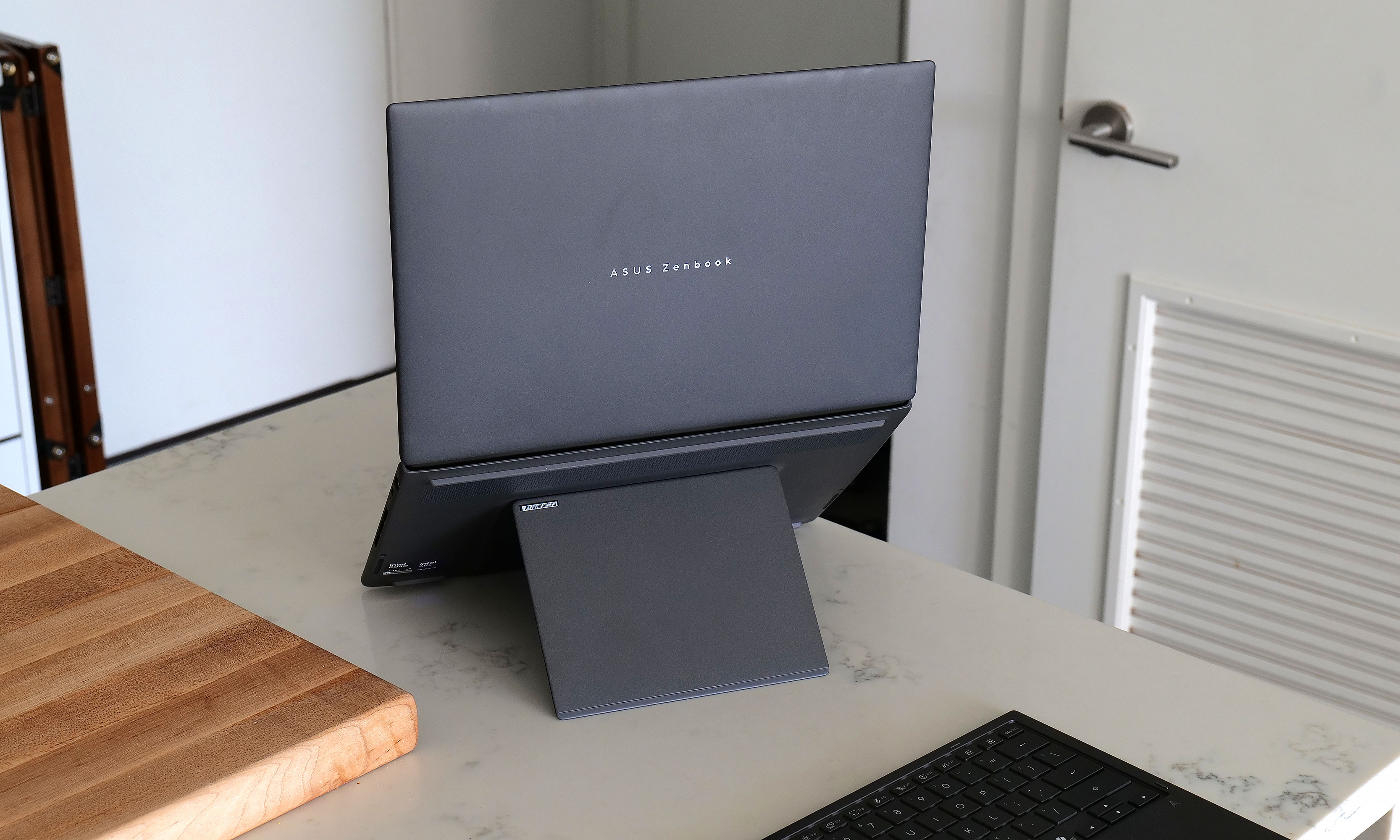
The kickstand in back adds a bit a bulk, but it's better than not having one at all like with Lenovo's Yoga Book.
The kickstand in back adds a bit a bulk, but it’s better than not having one at all like with Lenovo’s Yoga Book.
Sam Rutherford for Engadget

In PCMark 10, the Zenbook Duo only managed a score of 7,153 compared to 9,651 from a Dell XPS 14, despite the latter having a lower-tier Intel Core Ultra X7 358H processor. That said, in other tests like Geekbench 6, the Duo had no trouble staying on top with a multicore score of 17,095 versus 9,651 for the Dell. 

Another pleasant surprise is that because the Duo’s chip comes with Intel’s upgraded Arc B390 integrated GPU, this thing has plenty of oomph to game on, let alone edit videos or other similar tasks. In Elden Ring at 1,920 x 1,200, the Zenbook maintained a relatively stable framerate between 55 and 60 fps on high settings, which is great considering this thing doesn’t have discrete graphics. This means as long as you don’t mind fiddling with game options a bit, you should be able to play newer AAA games without too much trouble. 

Battery life

The left side of the Zenbook Duo features a full-size HDMI connector along with a USB-C port, plus a backup USB-C jack for charging the detachable keyboard.
Sam Rutherford for Engadget

You’d think a laptop with two displays would be super power hungry. However, by increasing the capacity of its cell from 75WHrs to 99WHrs, ASUS has made the Zenbook Duo’s endurance (or lack thereof) a complete non-issue. On PCMark 10’s Modern Office rundown test, the laptop lasted 18 hours and 33 minutes in single-screen mode. Granted, that’s nearly four hours less than what we got from MSI’s Prestige 14 Flip AI+, but considering that’s the longest-lasting notebook we’ve ever tested, I’m not bothered. When compared to ASUS’ own Zenbook A14 (18:16), things are basically a wash, which I think is a win for the Duo, as the A14 is meant to be an ultralight system with an emphasis on portability and longevity. 

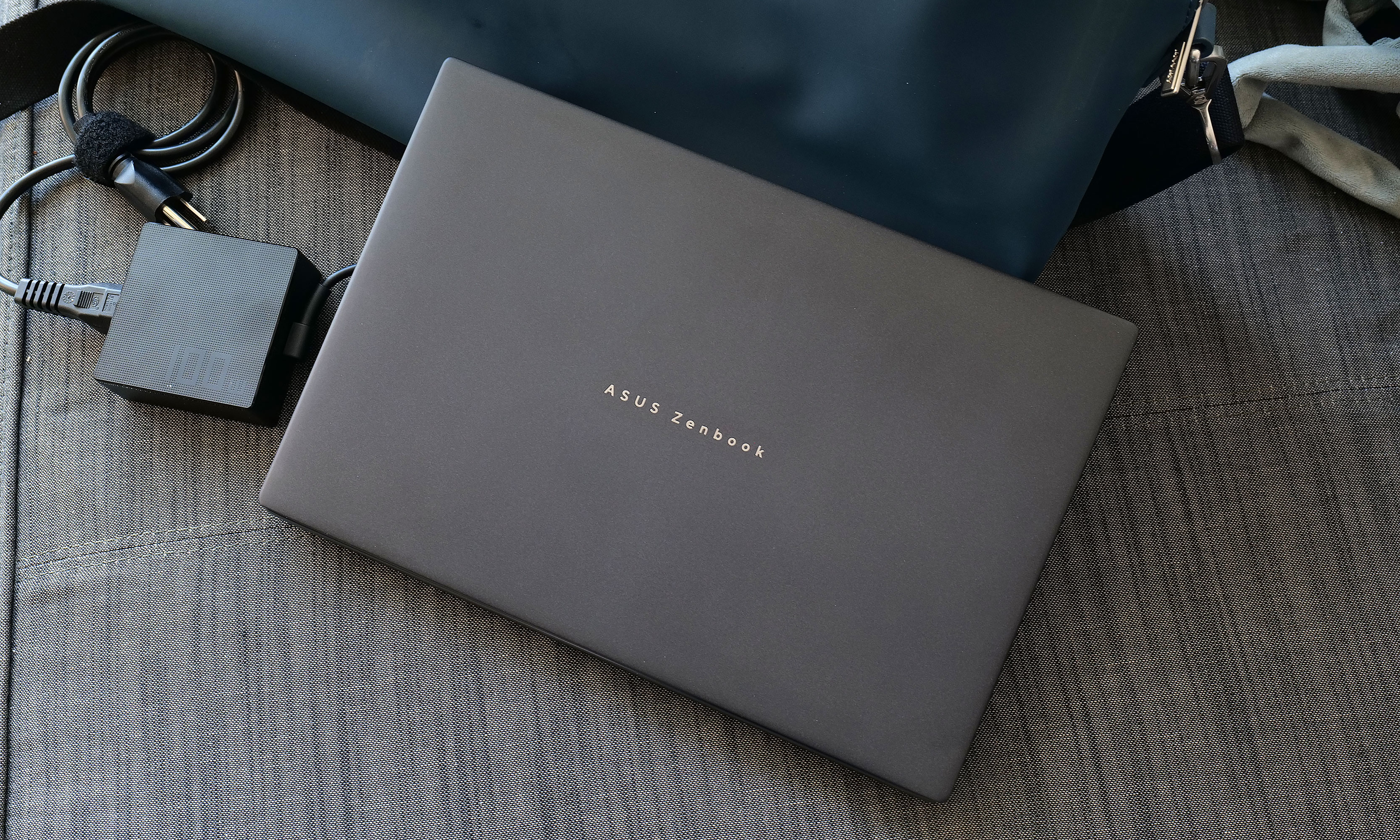
Obviously, battery life takes a hit when you’re using both displays. However, when I re-ran our battery test with its two displays turned on, the Duo still impressed with a time of 14:23. This is more than enough to give you the confidence to set this thing up in dual-screen mode even when an outlet isn’t close at hand. Thankfully, for times when you do need a power adapter, the charging brick on ASUS’ cable is rather compact, so it’s not a chore to lug it around. 

Wrap-up

The Zenbook Duo's battery life is good enough you won't always need its power brick. Thankfully, when you do, ASUS' 100-watt adapter is relatively compact.
The Zenbook Duo’s battery life is good enough you won’t always need its power brick. Thankfully, when you do, ASUS’ 100-watt adapter is relatively compact.
Sam Rutherford for Engadget

I’m a believer that one day people will eventually embrace typing on screens with laptops just like they have for smartphones. However, even if you’re not willing to make that jump just yet, the Zenbook Duo still has all of its bases covered. Its detachable keyboard gives you a pleasant experience while freeing up the bottom of the notebook to be a second display. This allows you to have something similar to a traditional dual-monitor desktop but in a chassis that you can easily take on the road without any major compromises. 

The 2026 Zenbook Duo combines a compact design with strong performance, plenty of ports and surprisingly good battery life. Sure, it’s a touch heavier than a typical 14-inch laptop, but its two screens more than make up for a little added weight and thickness. That leaves price as the Duo’s remaining drawback, and starting at $2,100 (or $2,300 as reviewed), it certainly isn’t cheap. 

However, when you consider that a similarly equipped rival like a Dell XPS 14 costs just $50 less for a single screen, that price difference is rather negligible. Alternatively, if you opt for a more affordable ultraportable and then tack on a decent third-party portable monitor, you’re still likely looking at a package that costs between $1,500 and $1,800. Plus, that setup is significantly bulkier and more annoying to carry around. So while the Zenbook Duo might be an unconventional pick right now, it has all the tools to deliver unmatched portable productivity and I don’t think it will be too much longer until the masses catch on.

This article originally appeared on Engadget at https://www.engadget.com/computing/laptops/asus-zenbook-duo-2026-review-two-screens-really-are-better-than-one-140000982.html?src=rss

Google Is Rolling Out Two New Ways to Remove Your Sensitive Data From Search

Google announced two new ways for users to remove their sensitive information from the web Tuesday morning—or, at least, remove that data from Google Search. The first lets users request that Google remove sensitive government ID information from Search, while the second gives users new tools to request the same for non-consensual explicit images.

Google’s “Results about you” tool is getting an update

google tool

Credit: Google

First, Google is updating its existing “Results about you” tool, which helps users scour the internet for their personal information. Before today, this tool could already locate data points like your name, phone number, email addresses, and home addresses. Following the update, you can now find and request the deletion of search results containing highly sensitive information, including your driver’s license, passport, or Social Security number.

To launch this tool, click here. If you’ve never used “Results about you” before, you’ll need to set it up to tell Google what to look out for. Once you do, you’ll be able to add government ID numbers, such as your driver’s license, passport, and Social Security number. If Google finds a match, the company will let you know. You can receive an alert from the Google app on your smartphone, which takes you to a summary of what data was found and where. From here, you can choose from “Request to remove,” or “Mark as reviewed.”

Unfortunately, this tool won’t remove the data from the websites that are hosting it, but it will eventually remove the search results—sharply reducing the chance that someone will find your data on their own.

Google says these changes will roll out in the U.S. over the “coming days,” while it is working on bringing them to other countries in the future.

Google’s simpler way to remove explicit images from Search

google tool

Credit: Google

In addition to these changes, Google is now rolling out a simpler tool for users to request the remove of non-consensual explicit images (NCEI) from Search. If you find such an image on Search, you can tap the three dots on that image, choose “remove result,” then “it shows a sexual image of me.” You’ll have the choice to report whether the photo is real, or is artificially generated, as well, and you can report multiple images at once, if needed. Your requests will all appear in the Results about you hub, so you can track the progress of each.

The tool lets you opt-in to an option that will filter additional explicit results in other searches. Google says it will also share links to “emotional and legal support” after you submit a request.