It’s been six years since the original model.
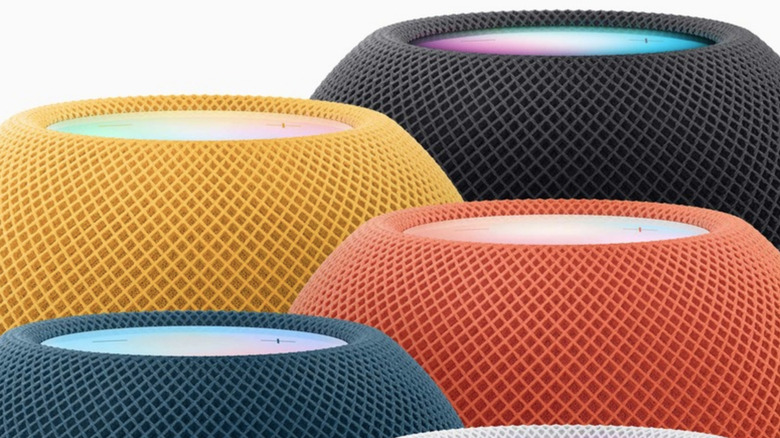

It’s been six years since the original model.

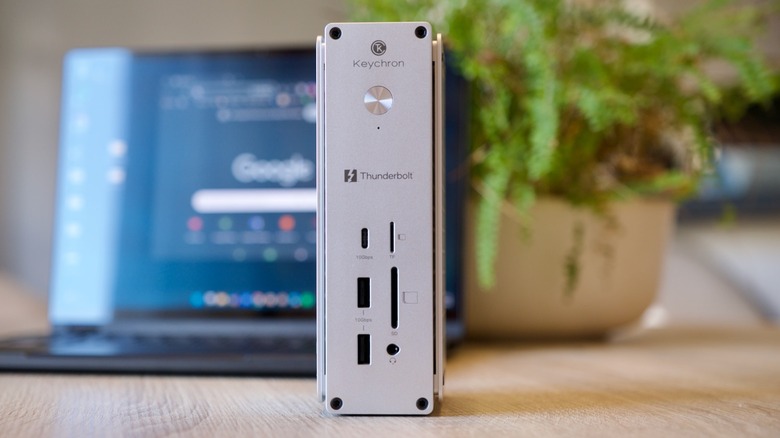
A company that’s best known for keyboards makes a strong entry into the high-end dock world.
Google launches (and retires) apps at a rapid rate, so it’s not always easy to keep track of everything that’s coming and going. One of the more recent launches we’ve had is Google Pics, which is now available to users subscribed to Google AI Pro ($19.99 a month) or Google AI Ultra ($99.99 or $199.99 a month).
It sits alongside Google Docs, Slides, and Sheets in your Google Drive Workspace, and it’s part Canva, part Photoshop: It does a bit of graphic design (like putting together an event poster), and a bit of image editing (like cutting unwanted objects out of your vacation photos), and if you’re paying for one of those Google AI plans mentioned above, you might find Google Pics is the only image creation app you need.
The web app incorporates the Nano Banana AI image generation model, and, as well as working as a standalone entity, will also pop up inside the other Google Workspace apps as and when you need it. Here’s what you get and how it works.
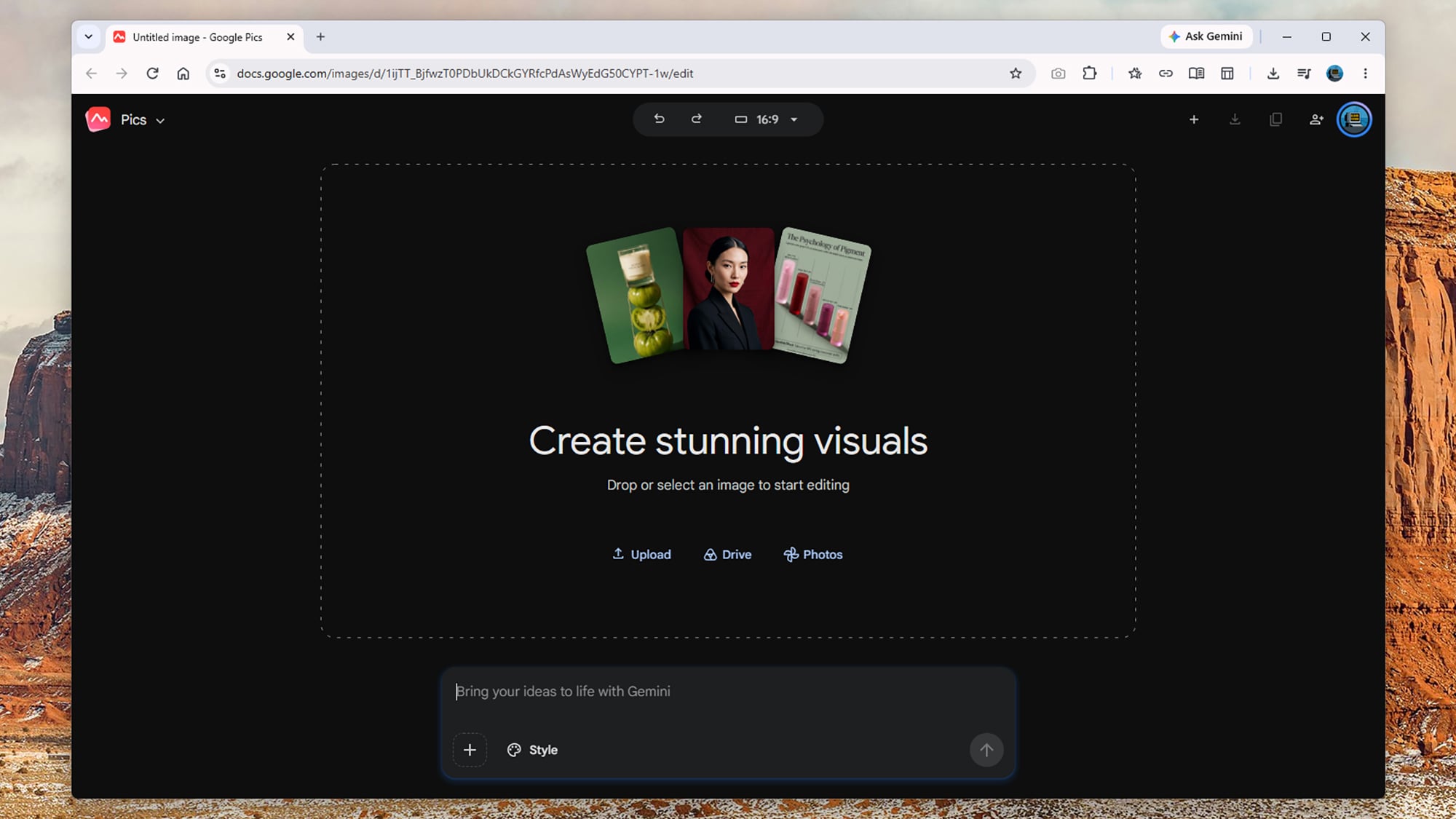
Google Pics is driven primarily through text prompts, whether it’s creating something new from scratch or making edits to something you’ve made elsewhere. From the opening screen, you can type in an image prompt just as you would with the Gemini app: Prompts for anything from photorealistic scenes to printed materials will work, and the more detail you add, the better.
The Style box lets you give Google Pics a reference to work from in terms of the overall image look and feel, while clicking on the Upload, Drive, or Photos links lets you load in an existing image ready for editing. At the very top is an aspect ratio drop-down, so you can specify the dimensions of new images, though this can be edited later too.
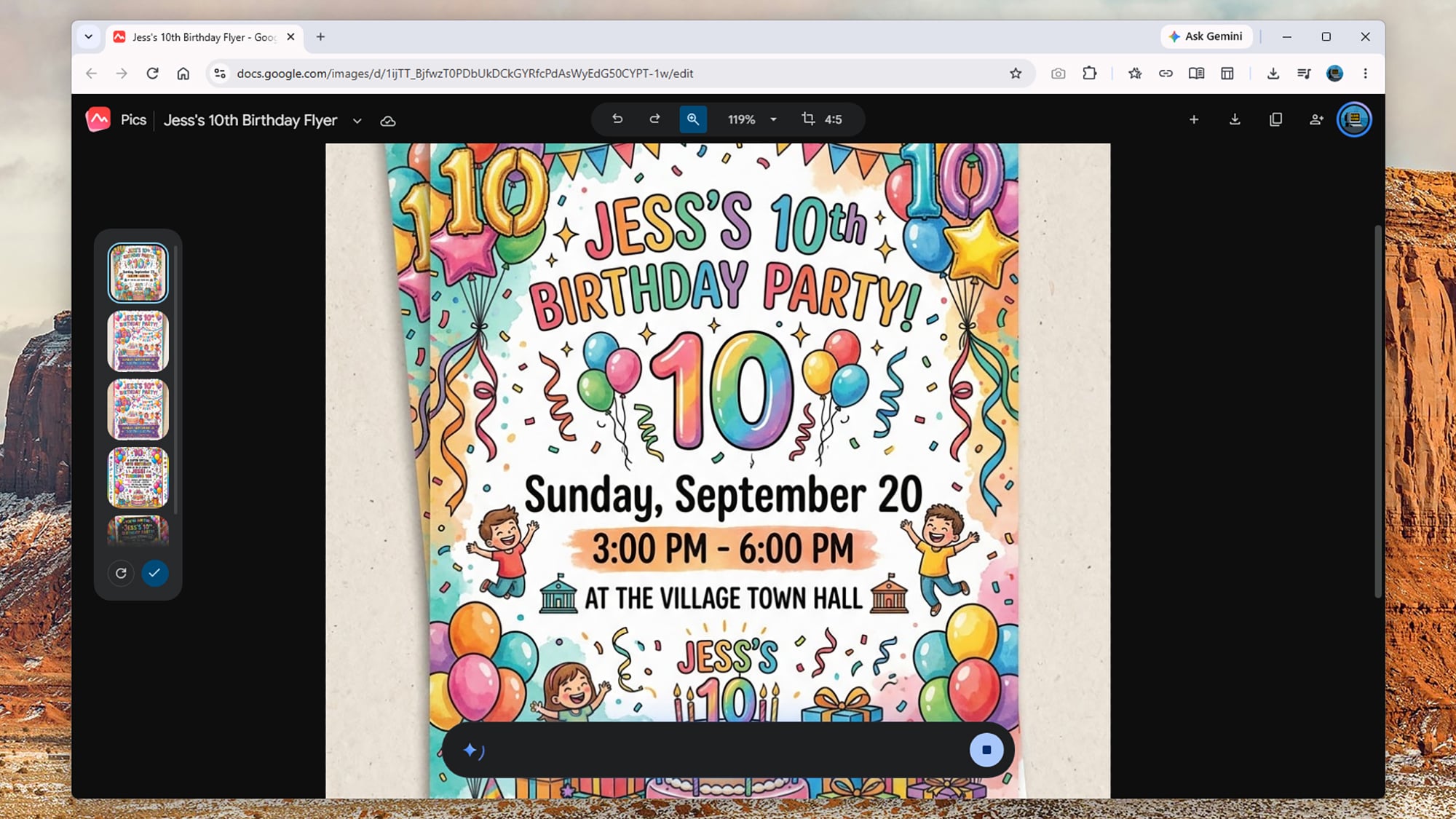
When you make something new, you get four or five alternatives shown as thumbnails on the left, so you can click through them to find the one you want. There’s also the option to generate four more pictures from your prompt, if you don’t mind the extra usage. As it often is, Google is rather vague when it comes to limits: It says “higher access” will be available to users until February 2027, and that factors like image resolution affect how quickly you reach the limits.
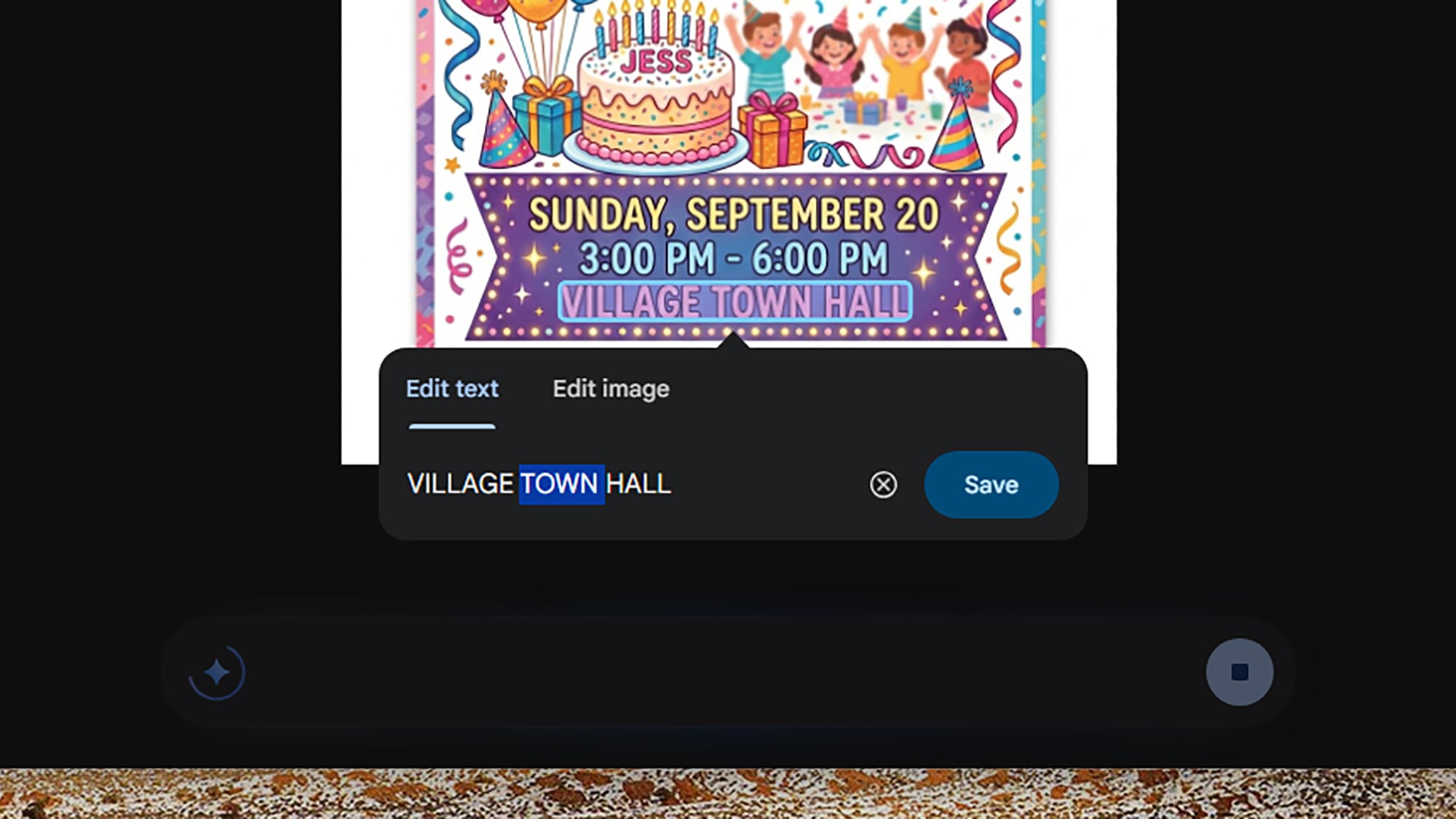
So, you could prompt Google Pics like this: “Create an A5 flyer for a 10th birthday party for Jess, happening at the village town hall at 3 p.m.-6 p.m. on Sunday, September 20. Include lots of party decorations, including balloons, streamers, and cake, and include some small print about food and drink being provided and there being plenty of on-site parking.”
From that prompt, Google Pics gave me a selection of suitable vibrant and fun-looking flyers I could choose from—all of them carrying that familiar AI “sheen” you’ve no doubt seen everywhere from restaurant menus to school event posters in recent times. It followed the brief directions and took seconds to do.
I also tried loading in my own photos and using Google Pics to manipulate them: You can very easily turn your photos into watercolors or comics, giving you what’s effectively an unlimited box of Photoshop filters to play around with. The results aren’t perfect every time, but they’re usually more than good enough.
This is a pretty bare-bones app though. You can undo recent edits, zoom in and out, and change the aspect ratio, but outside of the prompt box, that’s just about it. You don’t have any of the traditional resizing options or tools to do any drawing or touching up yourself, and there’s no support for layers—so you’re still going to need Photoshop and Canva around for more advanced tasks.
Where Google Pics really impresses is with the editing tools, which become available after you’ve created something from scratch or loaded in an existing image. First of all, the app identifies parts of the image you can click on—so “church”, “sky”, and “mountains,” for example. You can click on these specific elements to get a prompt box to make changes.
You can also just drag a box around something on screen to bring up a prompt box: Maybe drag a box around a party balloon and add the prompt “make this blue,” or select a random stranger in your family vacation photo and say “remove this person”. Any edit you can describe, you can make (or at least attempt).
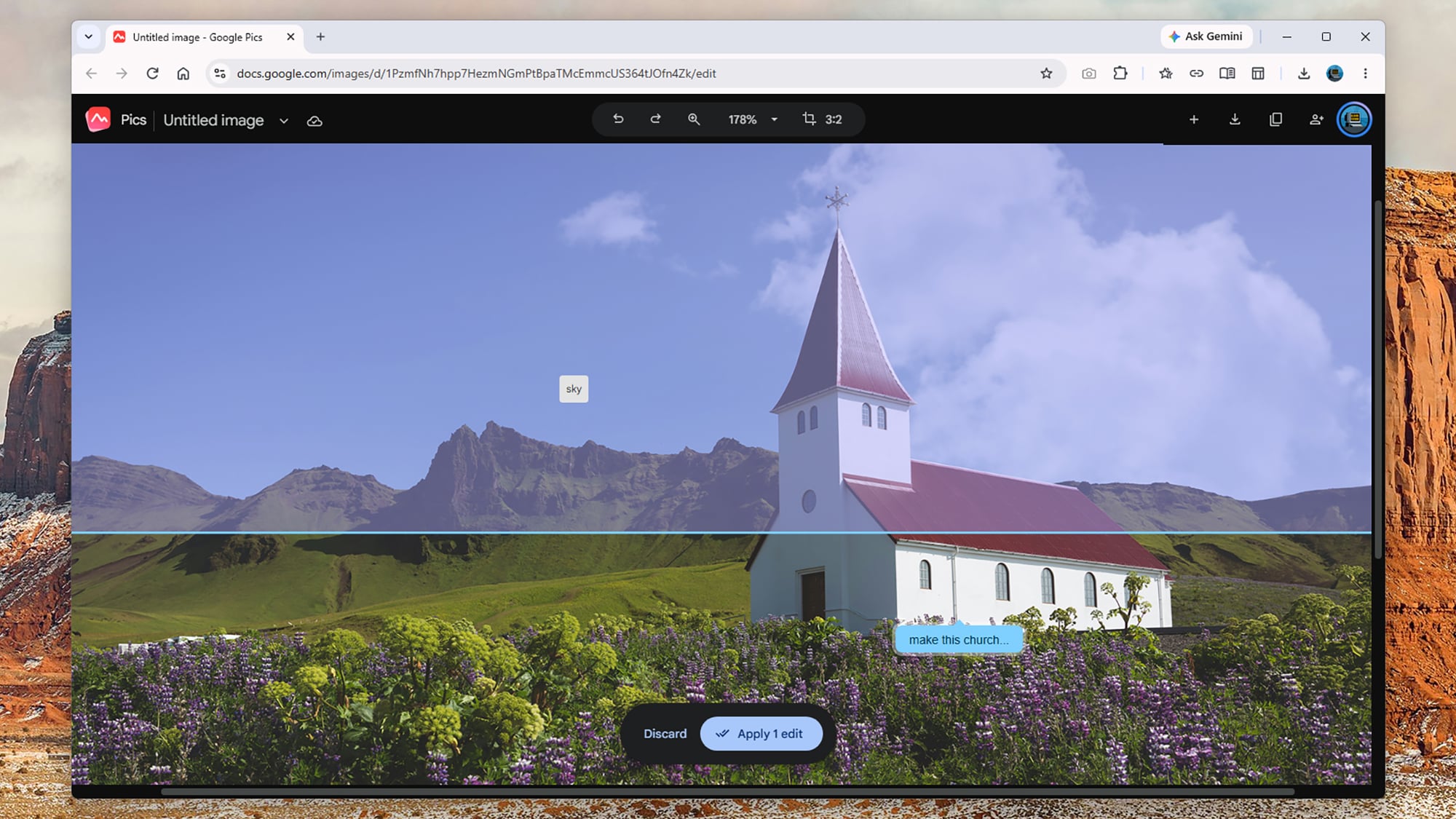
As always with this kind of trickery, Google Pics doesn’t know what’s actually behind the people and objects it’s removing, but it can make a decent AI-inspired guess based on the rest of the image and background. The results I got were mostly fine, and usually you wouldn’t know an edit had been made—though bigger changes to more detailed photos, like removing buses and cars, can be difficult for Google Pics to handle.
You can save up all of these various edits and apply them together, which saves quite a bit of waiting and working forwards and backwards. In the case of my birthday party flyer, I was able to add lines of text, change various colors, add in new elements, and more—and if you select blocks of text, you can edit them directly without a new prompt.
Besides being useful practically, it can also be a lot of fun playing around with different edits and seeing what’s possible. I got quite addicted to playing around with different photos, making changes that ranged from the large scale (“turn this into a night scene”) to the small scale (“add an extra cloud here”).
One of the edits I made was to age a car in a scene by five years, something which I’ve got no idea how to do in a full image editor, and which would’ve probably taken me an hour or so even if I did. The end results might not be quite as precise or polished as they would be if done by a human hand, but these kinds of tools expand what’s possible with quick and casual image editing.
I won’t be ditching Canva and Photoshop just yet, as they’re still essential for different kinds of tasks, including projects where pixel-level precision is required and where various elements need to be combined together in layers—but I can also see Google Pics proving very useful, especially with its integration with the rest of Workspace.
We may earn a commission from links on this page. Deal pricing and availability subject to change after time of publication.
If you need to tackle some DIY projects this fall, you might be looking to beef up your DIY tool kit. But if you’ve looked for tools recently, you may have also noticed that getting quality tools that will last can be expensive. Here are some deals on some of my favorite tools ahead of Amazon’s Big Deal Days sale.
If you’re just starting out on your DIY adventure, beginning with a tool set will give you a solid foundation. Here are some deals on quality tools that will be with you for years to come.
The DeWalt 20-volt oscillating multitool set is on sale for $157, 47% off its regular price. The set comes with the multitool, a 2-amp-hour battery, a charger, three starter blades, a sanding attachment, and some sandpaper. This tool can be used to cut metal, wood, plaster, drywall, PVC, and tile, and you can also use it for sanding and polishing. It’s a good deal for expanding your existing DeWalt set or if you’re just starting out with DIY projects.
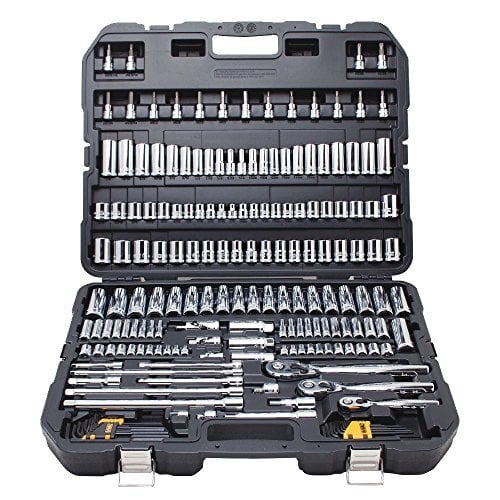
The DeWalt 192-piece mechanic’s tool set is on sale for $169.94, 41% off its usual price. This set comes with ½-inch, ⅜-inch, and ¼-inch ratchets, sockets in SAE and metric sizes, a set of spark plug sockets, driver bits, a set of hex wrenches, and adapters. This is a full tool set that will allow you to work on cars, as well as do maintenance on small home appliances like changing filters and replacing hoses.
The Craftsman 10-piece mechanics tool set is on sale for $14.99, 51% off its typical price. The set comes with a ⅜-inch ratchet and nine metric sockets. This compact set is good for most beginner DIY projects and can be used for light vehicle maintenance; it’s also perfect for an emergency roadside kit.
Saws are essential for many DIY projects, like repairing fencing or building shelves, and they’re also excellent for yard work and demolition. Having the right tools for making precision cuts will make your projects go more smoothly. Here are some deals on saws for all your DIY needs.
The DeWalt 7 ¼-inch cordless compound miter saw is on sale for $296.65, 20% off its regular price. This is a tool-only deal, so you’ll need a DeWalt 20-volt battery and charger to use it. This saw is compact and portable so it’s useful for situations where you don’t have a permanent home shop set up. You can use it to cut molding and trim for door frames, stairs, and finishing decks.
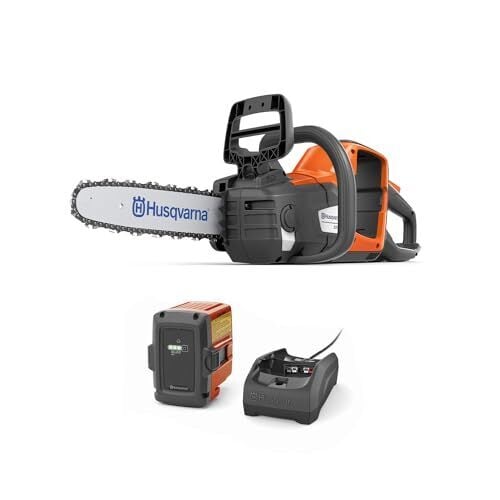
The Husqvarna 14-inch 225i battery-powered chainsaw is on sale for $264.99, 30% off its regular price. The saw comes with a chain, a battery, and a charger. It can make up to 190 cuts on a single charge, and you can use it to cut up downed tree limbs and clear thick branches.
The DeWalt 20-volt jig saw is on sale for $139.90, 41% off its usual price. This is a tool-only deal, so you’ll need a DeWalt 20-volt battery and charger to use it. A jigsaw can be used to cut curves and irregular shapes and is useful for making specialty cuts in fencing or for making decorative cuts on decor or furniture.
Bits and accessories for your power tools don’t seem like they’ll be a big expense until you’ve made your third trip to the hardware store for a size you don’t have on hand. Having a wide range of sizes for drivers and drill bits will allow you to keep working on your project instead of running out for one more thing. Here are some of the best deals on bits and accessories.
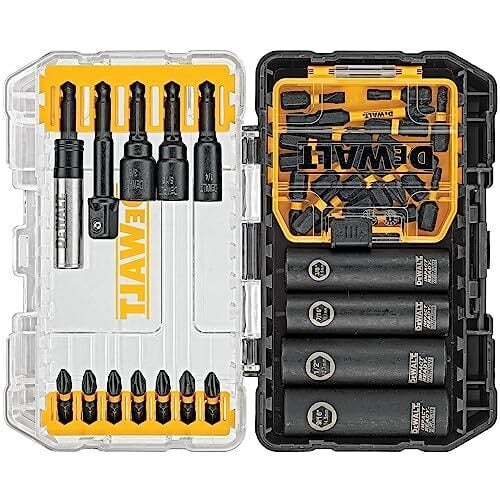
The DeWalt 35-piece impact bit set is on sale for $29.98, 66% off its regular price. The set comes with a bit holder, a socket adapter, several types of driver tips, and a set of sockets. It’s a good set for driving fasteners, but you’ll need drill bits if you want to drill holes.
The Bosch 41-piece drilling and driving combo set is on sale for $21.47, 57% off its usual price. This set comes with drill bits up to ¾”, several types of driver tips, an adapter, and a case. This bit set is a good starter set because it has both driver tips and drill bits, so you could use it with a drill for hanging pictures or curtains, or for assembling flat-packed furniture.
The Milwaukee socket adapter set is on sale for $8.21, 47% off its regular price. This set comes with socket adapters for ¼-inch, ½-inch, and ⅜-inch sockets. This is a tool that you won’t know you need until you don’t have it. I use mine all the time to switch between driving screws and driving nuts for installing wheels and assembling metal parts.
October Prime Day starts Tuesday, October 6, 2026, at 12:00 a.m. PT / 3:00 a.m. ET.
Prime Day lets Prime Members shop online for thousands of products with big discounts. It only lasts two days, so make sure you check out everything we know about the sale before it starts.
Yes, you will need to be a Prime Member to shop the exclusive sales during Amazon’s Prime Big Deal Days. Prime membership starts at $14.99 per month.
Ads are everywhere on Android. For most of us, the answer is either to sit through the ad, or pay up for a service’s “premium” tier. While services like YouTube Premium can genuinely be worth it, they aren’t for every app. Thankfully, there are options: All you need are free apps or extensions, easily available from the Play Store or alternative app stores, including one option that can block virtually all ads on Android.
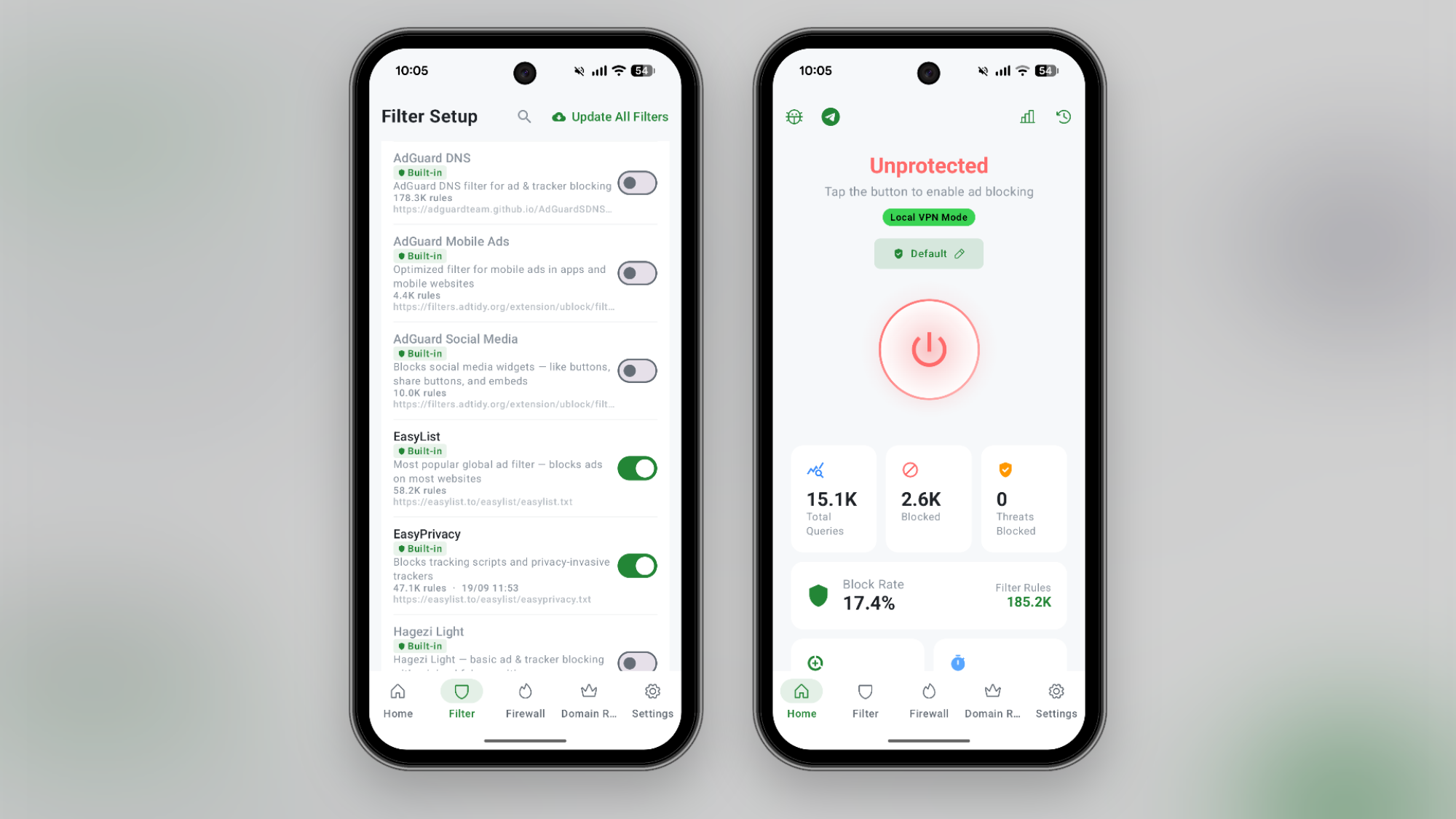
If you want a single app that blocks everything, start with the aptly named “BlockAds.” It’s a free, open-source app you can install directly from GitHub or via the F-Droid store. It’s not available on the Play Store, so the installation method will depend on where you live and when you’re installing it. If Google’s new rules are in place, you’ll need a 24-hour cooling-off period before you can sideload apps.
Once installed, activate BlockAds, giving it permission to add a VPN profile. When enabled, BlockAds will activate its own VPN profile that will stay enabled in the background. While it uses a VPN profile, it’s not a VPN service like Proton VPN in the traditional sense. Instead, it’s a local VPN that filters the traffic on your device itself. It uses DNS filtering to automatically block traffic to ad servers and trackers, quietly disabling them in the background. All your regular activity continues, but the annoying ads in any app disappear, without needing to root your device. There is one downside to using this method: Android only lets you enable one VPN profile at a time, so if BlockAds is taking up the VPN slot, you can’t use an actual VPN to protect your internet usage or to spoof your location.
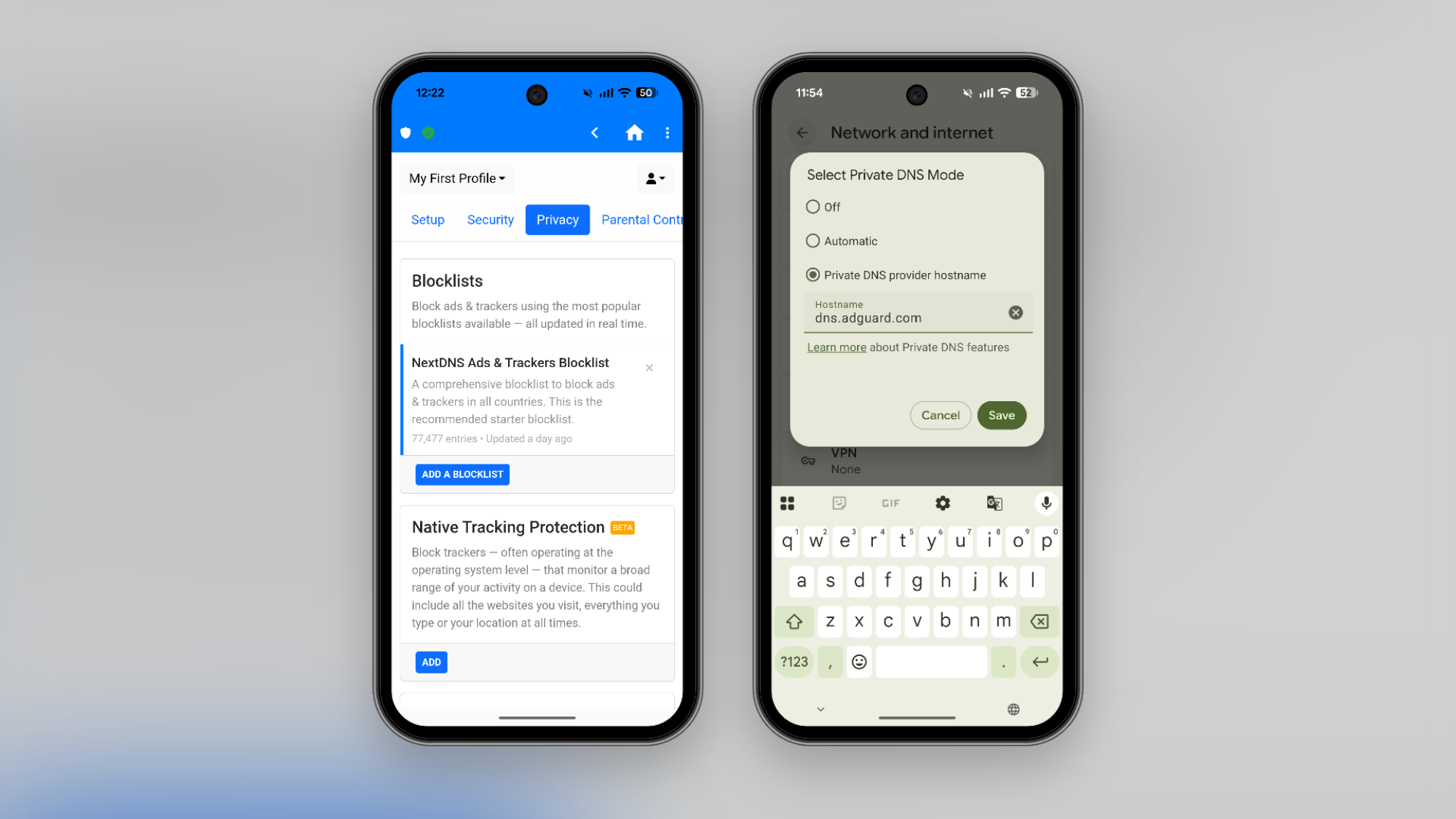
If you don’t want to use a VPN profile, or a third-party app, DNS filtering is another path. This method blocks known advertiser domains, effectively blocking most ads you encounter on the web. Android OS comes with a built-in option that lets you change the DNS server to whatever you like, but there are also services that use DNS filtering to remove ads and trackers as you browse the internet, like AdGuard’s free DNS filtering. All you have to do is change the DNS address. Go to Settings > Network and Internet > Private DNS and switch to the Private DNS provider hostname option, then enter the hostname. In this case, to use the free service, enter “dns.adguard-dns.co” and hit the Save button.
It’s important to note that DNS filtering might break some sites or apps with full-screen ads. This is where a more flexible option like NextDNS can help. Once you create a NextDNS account, you get a personal DNS hostname URL, where you can customize which filters to use and add websites to a whitelist as well. Plus, you can enable or disable protection as needed. After you sign up for NextDNS, go to the Setup section to find your URL. NextDNS, though, isn’t completely free. You get up to 300,000 queries for free per month, and the unlimited Pro plan costs $1.99 per month or $19.99 per year.
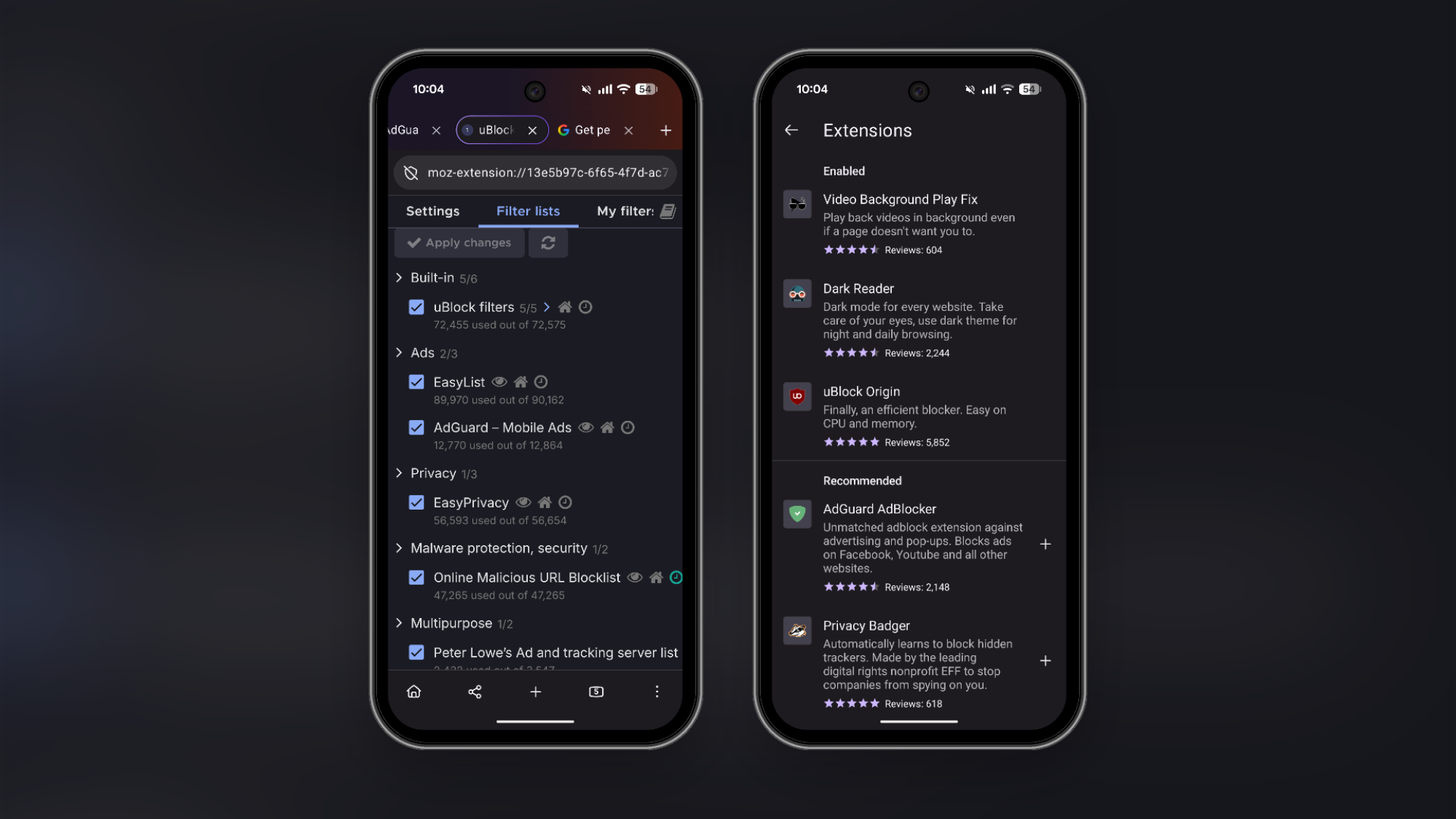
After Google’s new Manifest V3 changes, getting a full-fledged ad-blocker that updates in real time is becoming more difficult, even on desktop. On Mac and Windows, Firefox is perhaps the biggest champion of ad blockers, supporting the full uBlock Origin extension natively.
It’s the same story on Android as well. Firefox is the best way to run the full uBlock Origin extension, with its dynamic blocking and customizable filter support. If you want to use it, install the Firefox app on Android, tap the Menu button, and go to Extensions. Here, search for and install uBlock Origin. Once it’s installed, ads from websites will disappear automatically. The default setup is enough for most users. But if you want to customize it, you can go to uBlock Origin extension’s settings page to add extra filters.
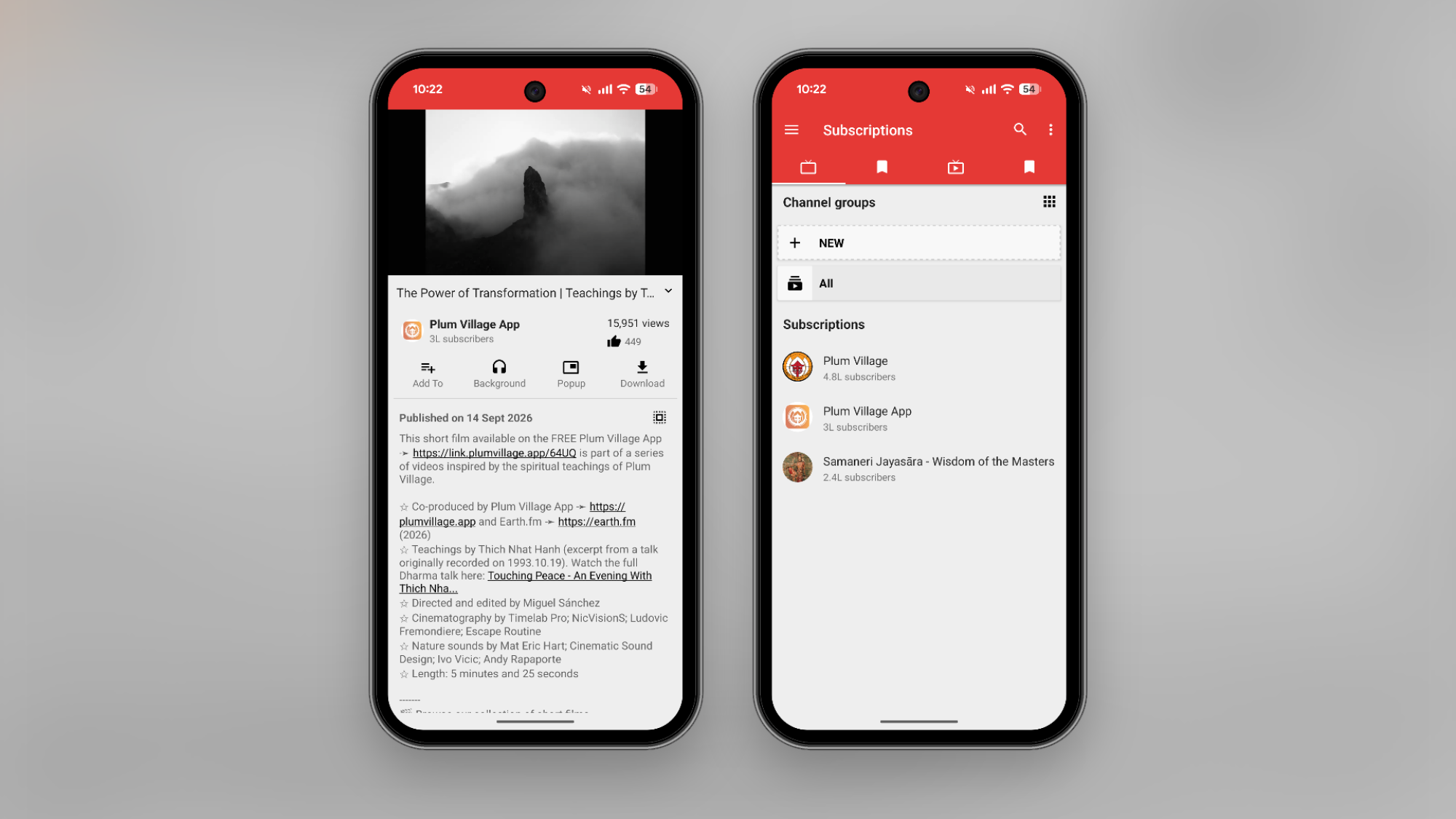
The most reliable way to block ads on YouTube these days is to pay for Premium, as Google makes it quite hard to block ads for free. That said, there are plenty of workarounds. The best way is to get out of Google’s system altogether using the NewPipe app, an alternative YouTube client that’s hosted on the open-source F-Droid app store (similar to the BlockAds app we discussed above). The app plays YouTube videos ad-free, and you can also access features like background playback and offline downloads (usually reserved for YouTube Premium subscribers). You can search for and play videos, but you can also subscribe to channels and build your own YouTube feed in the NewPipe app.
If you don’t want to install an app from third-party app stores, try using DuckDuckGo’s browser. It has a built-in YouTube ad blocker, which uses the robust filters from the uBlock Origin extension discussed above. Just load up a YouTube video in the browser, and you should be good to go. If you still see ads, make sure that the feature is enabled from Menu > Ad Blocking > Block Ads on YouTube.
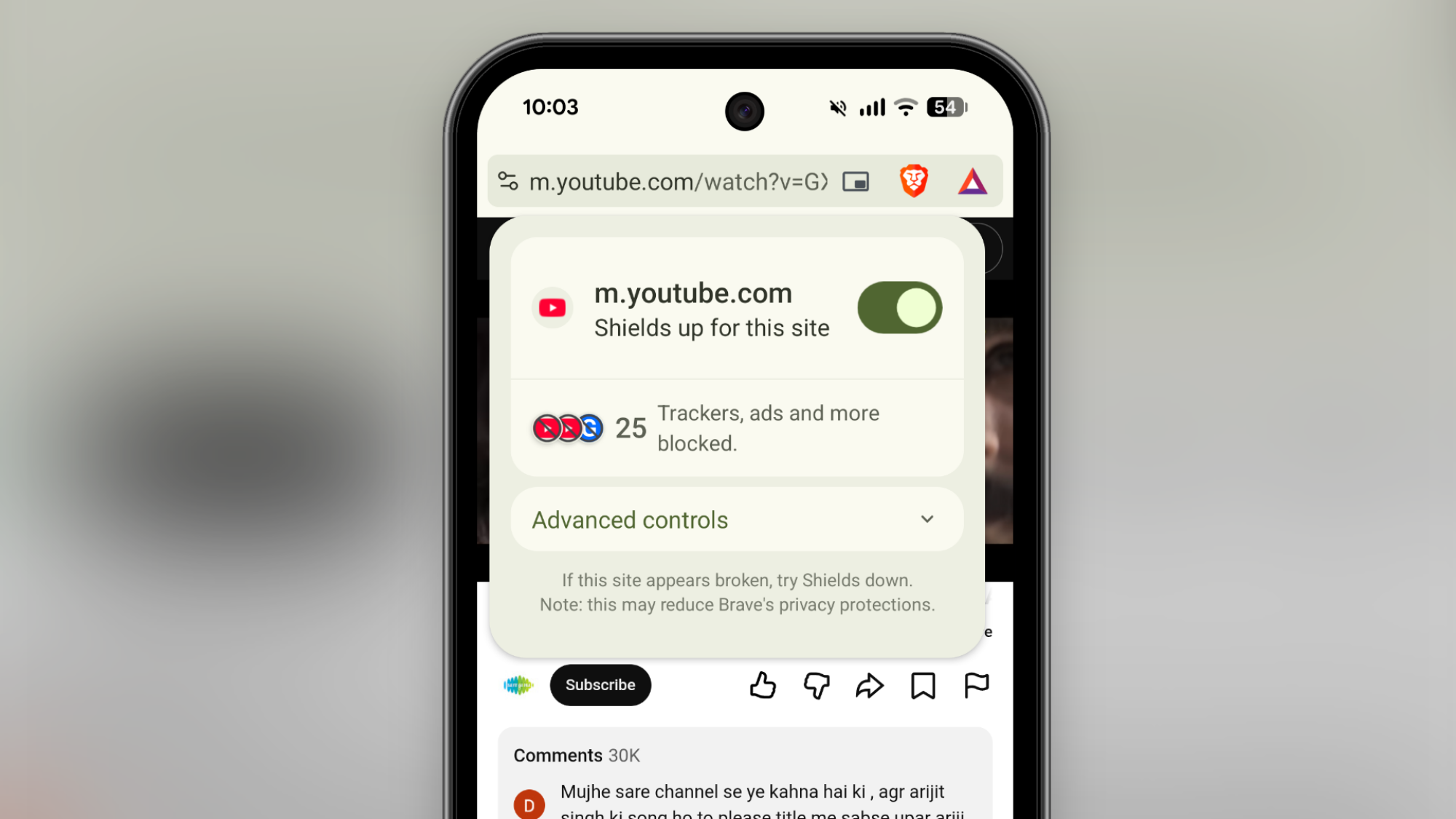
If you just want an ad-free browsing experience without the need for installing and updating third-party extensions, try the Brave browser. It’s one of the best privacy-focused browsers out there, and the Android app is quite easy to use. It blocks trackers and ads by default. There are no switches to flip, and no extensions to enable. The default ad-blocking works for YouTube videos as well.
Snap was in the smart glasses game from the jump. The company’s original camera-equipped Spectacles debuted back in 2016, beating Meta to the market by five years. Meta’s Ray-Bans and Oakleys captured massive consumer mindshare anyway, while Snap’s smart eyewear has been less visible.
With Snap Specs, though, the company is aiming to make up for lost time by delivering smart glasses that go beyond a hidden camera and voice-activated AI. At the Snapdragon 2026 Summit, I got my hands (and eyes) on a pair of Snap’s soon-to-be-released spatial-computing glasses that overlay digital graphics onto the physical world.
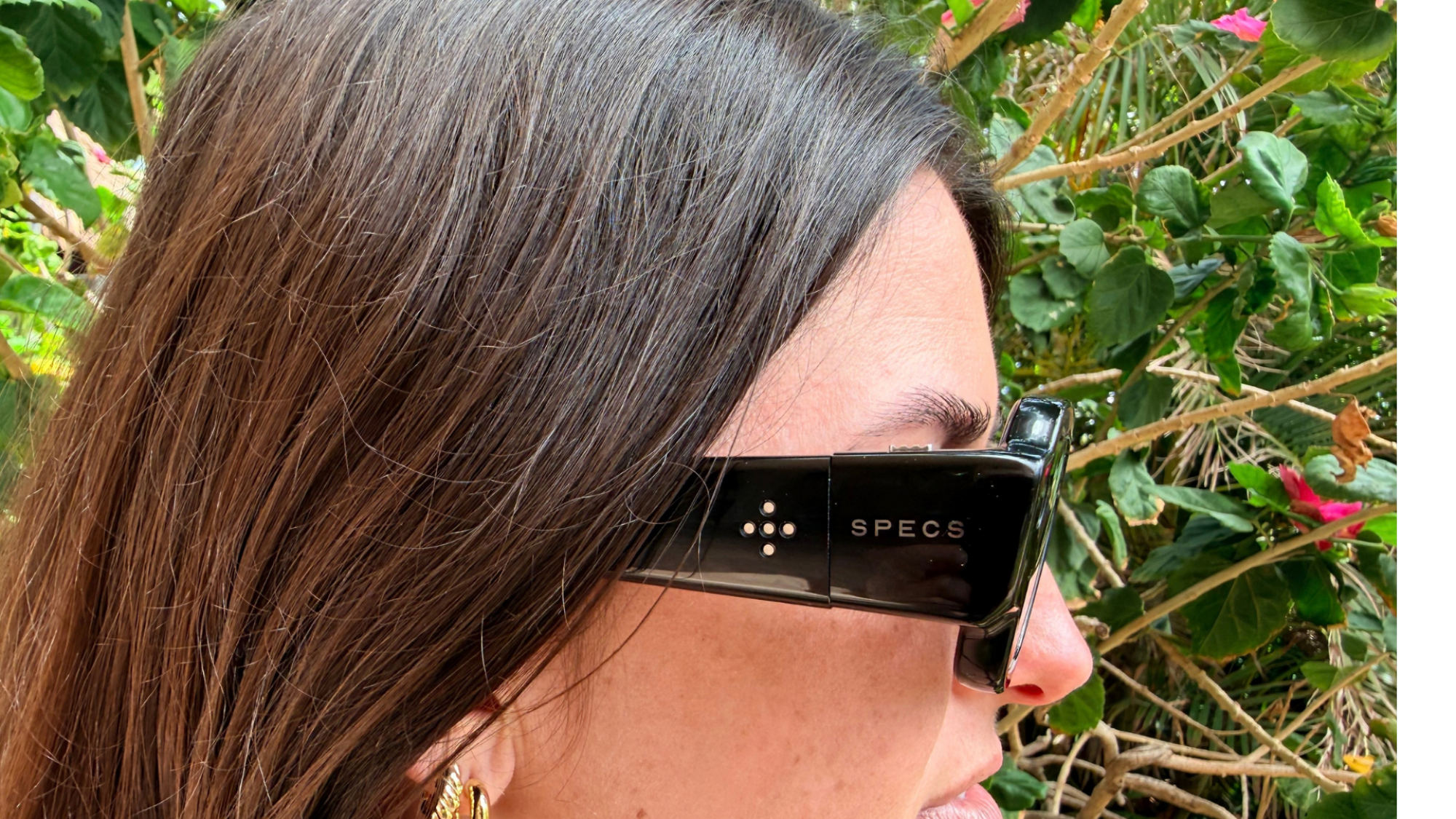
There’s a lot of tech packed into these black polymer frames. They’re powered by two Snapdragon processors, with two full-color hi-res cameras facing outward; the tracking system supports 6DOF (six degrees of freedom) hand tracking for gesture controls; and it’s all standalone, as there’s no tether or wired puck handling the heavy lifting. With all that crammed into the frames, plus the battery to run it, you’d expect them to be heavy. At around 135 grams, they aren’t light, but Specs are surprisingly comfortable. The weight is distributed evenly, mainly across the frames, so for the brief time I used them, they remained ergonomically acceptable. Specs feel more like a pair of sunglasses than a bulky VR helmet. As for battery life, Snap promises four hours of mixed-use on a full charge.
In the interest of not alienating the people around you, Snap chose to make the lenses clear enough that your eyes can still be seen through them, but if you want to close out the world, there’s electrochromic dimming for quick transitions between clear and dark lenses. It both useful and a cool trick. Check it out:
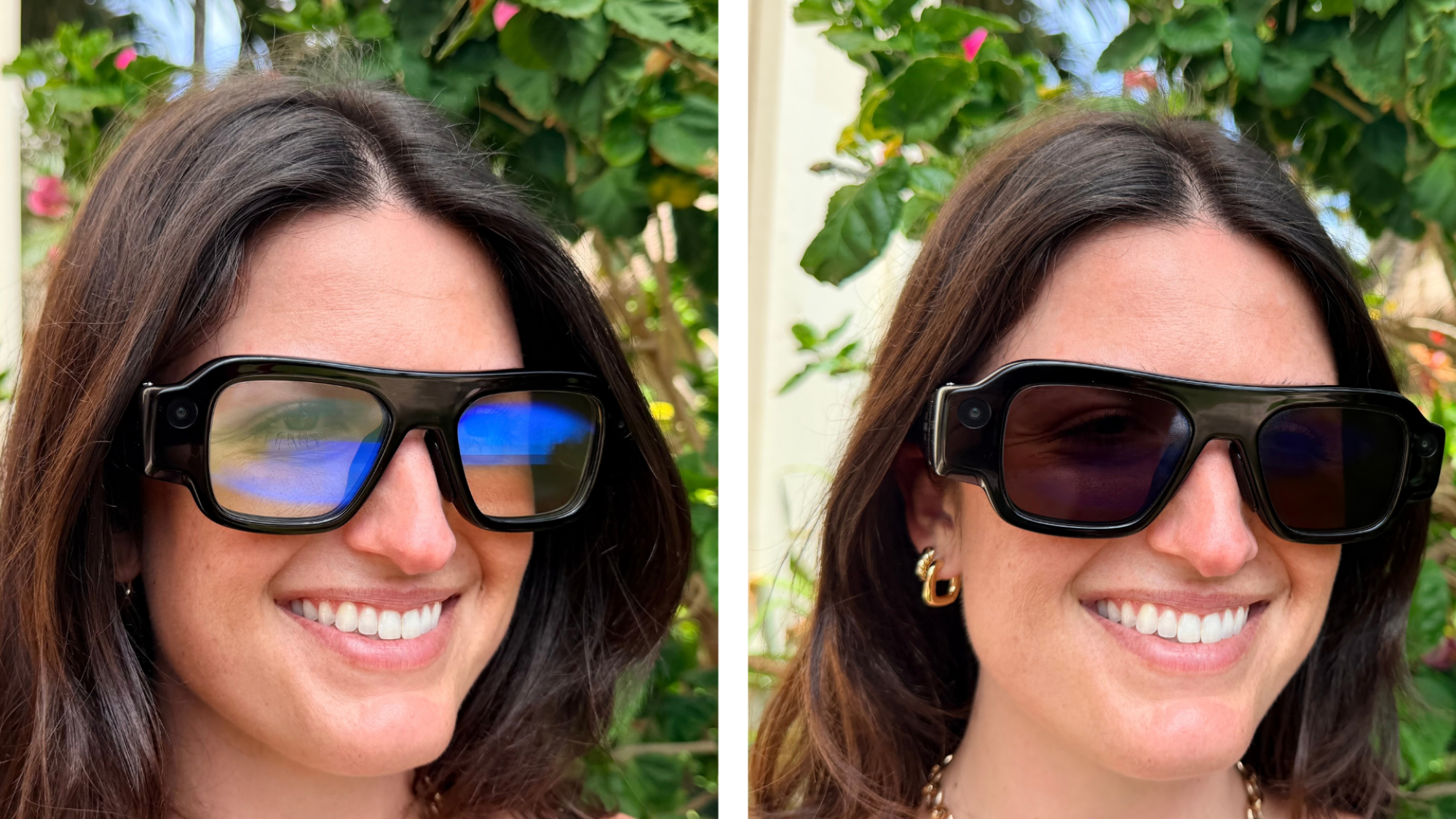
The in-glasses display is surprisingly bright. Specs’ visuals are powered by a proprietary liquid crystal on silicon (LCoS) display system, and even when used in a light-filled conference room, I could still clearly see the UI and its various apps. I tested out YouTube under these borderline abusive conditions, and it streamed high-def video in 16 million colors suitably.
The display offers a 51-degree field of view. It feels like having a large floating window hovering in front of you. From there, you can use simple gestures to launch apps, watch movies, play games, and do most other tasks you can’t do from your phone. But it was the context-aware, real-world spatial computing tasks that I wanted to try—the things you can’t do from a phone or PC.
Snap plans to launch Specs with a full suite of both first-party and third-party apps that will do everything from improving your drawing skills to teaching you music. I tried out a golfing demo, and it made the possibilities of augmented reality glasses immediately clear. Instead of putting blindly toward a distant hole, Specs show you exactly which direction to swing the putter and adds a virtual flag to mark where the hole is. It’s anecdotal evidence, but my personal putting game improved immensely. Is it cheating? Probably, but it works.
A half-hour or so of testing a prototype isn’t enough time to really say whether these will be useful in a person’s real life, but I can say for sure that they’re very cool, and I’m looking forward to going more in-depth with them in the coming months as their release date approaches. Snap Specs are planned for release this fall and will retail for $2,195.
Originally appearing as a simple script-based information stealer derived from the AMOS family, MacSync

Central to the breakthrough lies in the string breaking and hadronization phenomenon, i.e. the mechanism by

We may earn a commission from links on this page. Deal pricing and availability subject to change after time of publication.
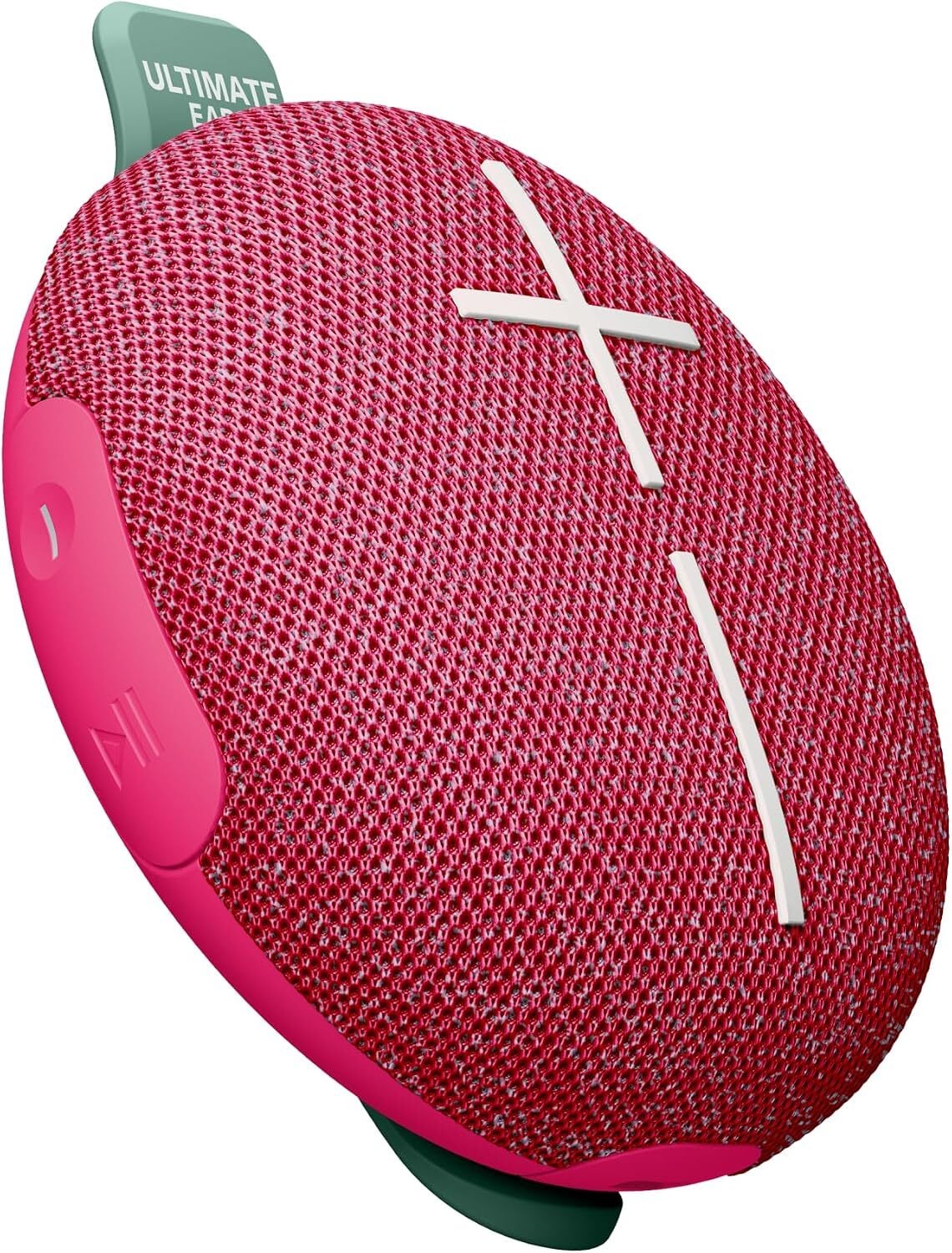
The Ultimate Ears Miniroll is down to $49.99 on Amazon from its $79.99 list price ahead of October Prime Day, and price trackers show that’s the lowest it has sold for so far. It’s a small, flat, puck-shaped Bluetooth speaker that weighs just over half a pound, with a removable rubber strap you can attach to a backpack, bike handlebar, or shower caddy. For more on the October Prime Day sale, you can follow the latest offers as they come in on our Prime Day 2026 Live Blog, or browse the standout deals and sale announcements on our Prime Day Deals page.
Despite its size, the Miniroll can get surprisingly loud—which PCMag confirms in its review—and at moderate volume, it has enough sound for a kitchen or backyard without sounding thin. Its 40-meter Bluetooth range also means you can leave your phone inside while the speaker sits on the patio, and if you have more than one Miniroll, a long press on the play button connects them through PartyUp for more volume or stereo sound. As for its battery life, you get about 12 hours of playback before it needs a charge over USB-C, while its IP67 rating protects it from dust and a brief dunk in water.
That said, the Miniroll does have its limits, especially with bass-heavy music. Hip-hop and electronic tracks can sound thinner than they would on a larger speaker, and once you turn the volume past roughly 80%, the sound starts to lose definition, and the speaker itself can vibrate. There’s also no companion app, meaning no equalizer, no EQ presets, no codec switching, and no find-my-speaker function, so what you hear out of the box is what you get permanently.
October Prime Day is the fall version of Prime Day, which is the biggest sale Amazon hosts during the spring, summer, and fall. You can find deals on many categories during the sale, including tech, tools, appliances, apparel, and more.
October Prime Day is Oct. 6 and runs through Oct. 7. It happens every year during October.
October Prime Day starts Tuesday, October 6, 2026, at 12:00 a.m. PT / 3:00 a.m. ET.
Raspberry Pi’s stock shot up over 30% in the last week. Why are investors so excited? For the six months ending June 30, revenue for Raspberry Pi Holdings “jumped 90% to $256.9 million,” reports Investing.com, “while adjusted EBITDA more than doubled to $40.3 million, and profit before tax leapt 216% to $19.6 million.”
Underpinning the strong numbers was an acceleration in OEM adoption: direct unit shipments rose 26% to 3.4 million, total unit shipments climbed 17% to 4.2 million, and the customer order backlog doubled during the half to 2.6 million units. Demand was particularly robust in the Smart Home and Aerospace and Defence segments, and the company launched the AI HAT+ 2 for Raspberry Pi 5, extending its edge-AI product line.
DRAM prices have been increasing everywhere,
notes The Times of London, and Raspberry Pi co-founder Eben Upton “said new customers, who required computers or microcontrollers to manufacture other technologies, were choosing Raspberry Pi’s computers because they had a better inventory of components than competitors.”
“There’s always that choice for an original equipment manufacturer as to whether they should ‘make’ or ‘buy’ the computer elements of their platforms,” Upton said. “The supply chain disruption is making ‘make’ a much harder choice and it’s making the cost of repair a much harder choice. So we’re seeing strength there.” Raspberry Pi has already increased its suppliers of Dram more than threefold…
Upton said the increased demand had led to its backlog for units doubling to 2.6 million, which meant production rates would need to increase to prevent the numbers from getting “unhealthy”. New production capacity at the manufacturing facility in Pencoed, Wales was expected to come online this week… Exports were almost evenly split between North America, Europe and the rest of the world, which was primarily China, where demand was growing… Analysts at Peel Hunt said the company was “well positioned for rapid growth in unit shipments in 2027 and beyond” with demand expected from enthusiasts as well as the AI and security sectors.
In other news, Hackaday notes the Raspberry Pi Foundation has “pushed binary-blob bootloader changes that limit your ability to upgrade RAM…”
This change restricts upgrading the RAM chip on your Pi 4 and Pi 5, as well as Compute Modules. By the looks of it, it does not restrict replacing the RAM chip with a chip of a similar size, quote, “locking devices to their original RAM size”. As such, this does not prevent repair of your Raspberry Pi board, but does somewhat limit your repair part choice, at most.
This restriction is easily bypassable. The bootloader is stored in the SPI flash chip, which can be reflashed using the built-in mask ROM over USB and rpiboot, and you are not prevented from flashing older versions of the bootloader, so far. This means even if you manually swap the RAM chip, all you need to do is to also downgrade the bootloader to the last known good release — 2024-09-10 — and then your Pi board or Compute Module will function with upgraded RAM. If you have the skills to upgrade your RAM, you most certainly have the skills to downgrade the Raspberry Pi bootloader. For most regular use, having a two-year old bootloader version won’t really matter…
For the reference, this bootloader change happened almost exactly two years ago, at some point between September 10 and September 23, 2024… The Raspberry Pi Foundation (RPF) justifies this as follows: they saw third-party resellers sourcing low-RAM Compute Modules, upgrading them with RAM from unknown source and unknown stability. My observation is that they’d also be reselling the modules at a markup for purely commercial gain, while undercutting RPF who would otherwise direct that money into RnD, something I much enjoy to see them do. This creates perverse incentives and risk for people buying Raspberry Pi boards online, and RPF decided to limit this primarily for their users’ benefit, plus, if you ask me, some of theirs… The related GitHub issues have a fair few pingbacks, and exploring them makes the problem look grim to me….
My advice: don’t lament Raspberry Pi RAM upgrades, especially given they’re only slightly harder to perform now. Very few hackers ever performed them, the main audience for them turned out to be dodgy hardware resellers online, and in most cases, repair doesn’t seem to be impeded at all, either. Think of the users that will no longer be fooled by a shady seller on Amazon, especially now that the perverse incentives for board mods and reusing harvested RAM chips are at their highest.
Raspberry Pi co-founder Eben Upton answered questions from Slashdot readers in 2011 and 2016.


Read more of this story at Slashdot.
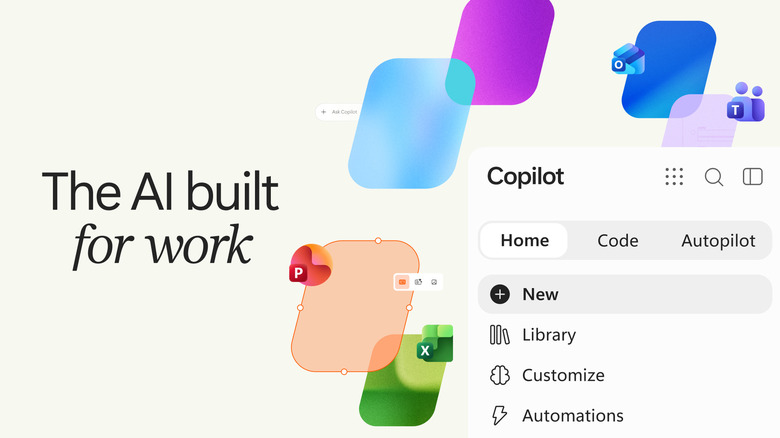
Microsoft is giving its Copilot app another facelift.
Netflix has a stacked lineup of both new and familiar content coming in October. Political thriller series The Diplomat (Oct. 15) and French mystery thriller Lupin (Oct. 23) both return for fourth seasons alongside season three of Nobody Wants This (Oct. 22), the Emmy-nominated rom-com starring Kristen Bell and Adam Brody and season 11 of Love Is Blind (Oct. 14).
New next month is East of Eden (Oct. 1), a limited mini-series adapted from the John Steinbeck novel of the same name. Created by Zoe Kazan, the show stars Florence Pugh as Cathy Ames alongside Christopher Abbott. On the film side is Animals (Oct. 9), a crime thriller written and directed by, as well as starring, Ben Affleck. Affleck plays an LA mayoral candidate whose son is kidnapped with only hours to pay a ransom. Gillian Anderson and Kerry Washington co-star.
Netflix has a handful of documentaries coming in October, including The One About Matthew Perry (Oct. 27), a series chronicling the actor’s life, work, and death, as well as Tyson (Oct. 13), a four-episode series about Mike Tyson. Netflix will also host the second Six King Slam tennis tournament on Oct. 21, live at 9:30 a.m. PT.
Here’s everything else coming to Netflix in October, and everything that’s leaving.
The Gift of Deceit—Netflix Series
Crazy Rich, Incredibly Broke—Netflix Film
East of Eden—Netflix Series
The Ramparts of Ice: Season 2—Netflix Series
21 Jump Street
22 Jump Street
8 Mile
A Haunted House
A Haunted House 2
A Madea Family Funeral
Ad Astra
Angels & Demons
Are We There Yet?
The Bourne Identity
The Bourne Legacy
The Bourne Supremacy
The Bourne Ultimatum
Bring It On
Call Me by Your Name
Cowboys & Aliens
Crimson Peak
Dallas Buyers Club
The Da Vinci Code
The Devil Wears Prada
Dracula
The Equalizer
Evil Dead
Friday the 13th
Happy Death Day 2U
Horton Hears a Who!
The Huntsman: Winter’s War
Hush
I Know What You Did Last Summer
Jason Bourne
Lake Placid
Love Actually
Mary Shelley’s Frankenstein
The Menu
Moonlight
NCIS: Seasons 20-22
Ouija
Ouija: Origin of Evil
Pearl Harbor
Point Break
The Prestige
Psycho
Psycho II
Psycho III
Red Dragon
Seven Years in Tibet
The Sixth Sense
Split
The Strangers
Top Chef VIP: Seasons 3-4
Twilight
The Twilight Saga: New Moon
The Twilight Saga: Eclipse
The Twilight Saga: Breaking Dawn: Part 1
The Twilight Saga: Breaking Dawn: Part 2
The Way Home: Season 4
Underworld: Blood Wars
#Love—Netflix Series
Schumacher ’94 — The Birth of a Legend—Netflix Documentary
Tyler Perry’s Doing Life—Netflix Film
Ranma1/2: Season 3—Netflix Series
Blue Box: Season 2—Netflix Series
The Boogeyman
Lorne
Mayor of Kingstown: Seasons 1-4
Super BOOMi: Season 1
All American: Season 8
Love Village: Season 3—Netflix Series
Mojo Brookzz: I Know You Lying—Netflix Comedy Special
Pride and Prejudice and Zombies
Inside The Circle—Netflix Series
Less of a Stranger—Netflix Film
Real Men: Season 2—Netflix Series
Who Is Martin Mull?—Netflix Documentary
Below—Netflix Series
Unicorn Academy: Secrets Revealed: Chapter 2—Netflix Family
Animals—Netflix Film
Haunted Hotel: Season 2—Netflix Series
Is It Cake? Halloween: Season 2—Netflix Series
Take Charge of My Heart—Netflix Series
100 Days of Deception—Netflix Series
The First Monday in May
Fire Spike: Season 1
Free Leonard Peltier—Netflix Documentary
Señora Acero: Seasons 1-5
Wayne: Season 1
Cocaine Bear
Love Is Blind: Season 11: Boston—Netflix Series
Hollywood Arts—Netflix Series
The Diplomat: Season 4—Netflix Series
The Storm—Netflix Film
The Disciple—Netflix Documentary
Heat
The Fate of the Furious
Money Trap: The Karun Treasure—Netflix Series
Norm: The Tale of Norm Macdonald—Netflix Documentary
Sacrifice—Netflix Film
SERIOUSLY SINGLE TOO—Netflix Film
Therapy Done Right—Netflix Film
Blindspotting: Seasons 1-2
Cyberpunk: Edgerunners 2—Netflix Series
Emily
Gladiator
Gladiator II
The Mothers of Penguins: Season 2—Netflix Series
The New Stanford Prison Experiment—Netflix Series
Six Kings Slam: Season 2—Netflix Live Event
Bottle Shock
Couldn’t Agree Less with Allison & Isaac—Netflix Podcast
Did Someone Happen to Mention Me?—Netflix Series
Nobody Wants This: Season 3—Netflix Series
Fading Grandeur—Netflix Series
Lupin: Part 4—Netflix Series
Paralyzed by Hope: The Maria Bamford Story—Netflix Documentary
Surviving Hurricane Otis—Netflix Film
Minimum Wage—Netflix Series
Dangerous Liaisons: Season 1
The One About Matthew Perry—Netflix Documentary
Zainab Johnson: Toxically Optimistic—Netflix Comedy Special
Champions
Balaraw: Blood Island—Netflix Series
You, Me, Us—Netflix Film
A Couple of Lies—Netflix Series
Akka—Netflix Series
Beat Luke Littler—Netflix Live Event
The Birthday Gift—Netflix Film
Collision Course—Netflix Film
How to Ruin Diwali: Meet the Parents—Netflix Series
SCTV: The Greatest Show You’ve Never Heard Of—Netflix Documentary
A Dog’s Purpose
A League of Their Own
Aloha
Angel Eyes
Apollo 13
Baby Mama
Beginners
The Beguiled
The Boss Baby
Blue Is the Warmest Color
Charlie and the Chocolate Factory
Cinderella Man
Clueless
Fargo
The Fifth Element
Ghostbusters
Ghostbusters: Answer the Call
Gone Girl
Halo: Seasons 1-2
High Fidelity
The Hitman’s Bodyguard
The Hitman’s Wife’s Bodyguard
Identity Thief
Inside Man: Most Wanted
Krampus
The Lazarus Project
Nomadland
Out of Africa
Parenthood
The Parkers: Seasons 1-5
Queen & Slim
Savages
The Shack
U-571
The Vow
Willy Wonka & the Chocolate Factory
The Wandering Earth
Dawson’s Creek: Seasons 1-6
Nurse Jackie: Seasons 1-7
Poldark: Seasons 1-5
Scream
After
A Quiet Place Part II
The Hunger Games
The Hunger Games: Catching Fire
The Hunger Games: Mockingjay – Part 1
The Hunger Games: Mockingjay – Part 2
The Hunger Games: The Ballad of Songbirds and Snakes
Death Note
The Smurfs 2
Snake Eyes: G.I. Joe Origins
Deadwind: Seasons 1-3
SpaceX has completed a wet dress rehearsal for Starship, in preparation for its first orbital test flight.

Google has introduced Gemini 3.8 live avatars designed for customer service and other tasks.

“F-Droid, a third-party app repository that only distributes free and open-source software packages for Google’s Android mobile platform, on Thursday announced version 2.0 of its Android app,” reports The Register.
Though they also note “a big banner across the top of the F-Droid site” pointing to a site describing pending changes from Google that threaten the future of F-Droid…
[D]evelopers who want their apps broadly distributed outside the official Google Play Store will need to register with Google and verify their identities. Google’s Full Distribution option includes paying a one-time $25 fee, handing over a copy of a government-issued ID to verify one’s identity, and conforming to Google’s terms of service. Google also offers a free Limited Distribution option that doesn’t require government ID verification but restricts distribution to 20 authorized devices, while apps from unverified developers can still be installed by users who enable Android’s advanced installation flow.
The potential death warrant hanging over its head hasn’t stopped the F-Droid team from rolling out a bunch of new features for an app it says it intends to keep working on for years to come… The team also credited the EU’s many Digital Markets Act decisions against Google for making the installation experience smoother for users. F-Droid can now use a unified installation service for its apps thanks to the availability of a pre-approval API that allows users to approve an installation when they request it, rather than waiting until the app has finished downloading. That, said the F-Droid team, “brings the F-Droid install experience on official Android devices much closer to what the built-in app store can provide.” Additionally, F-Droid 2.0 can fetch and install app updates automatically, which it now does by default.
All of those changes, however, won’t matter much if Google pushes ahead undeterred with its plans to force registration onto non-Play Store developers. F-Droid’s announcement on Thursday makes it seem that the team isn’t going to go quietly.
F-Droid has gone 10 years without a major update, notes Ars Technica — and spent over a year developing F-Droid 2.0:
The new F-Droid client was redesigned from scratch in Kotlin Compose, which is the standard for modern Android apps. This makes the store much more responsive, and there’s optional support for Android’s Material theming. The interface has also been cleaned up considerably, making the most important functions easier to access and hiding some others in overflow menus… Unlike the Play Store, F-Droid doesn’t track your taps and installs to push ads and suggestions — it helps you find things and gets out of the way.
F-Droid now includes a huge number of categories, drilling down to specialized niches like firewalls, password managers, and VPNs. You can see all these groups in the search tab. There are also higher-level categories listed on the main Discover page. When searching for apps, F-Droid will now be able to return results based on app descriptions rather than just names.
“One of the goals of the rewrite was to lower the barrier for new contributors,” F-Droid said in their announcement. “We are excited to begin rolling out F-Droid 2.0 to users over the coming weeks after 14 test releases.” (And if you want the 2.0 release right now, it’s available on the versions page.)


Read more of this story at Slashdot.
Google has synthesized “expressive face-to-face experiences” for its speech agent Gemini 3.8 Live. They’re now offering a Live Avatar “with precise lip-syncing, natural expressions, and fluid turn-taking” for Google Enterprise accounts wanting “engaging customer service” or for offering interactive walkthroughs. (Check out the not-creepy-at-all video in Google’s announcement.)
“Though Google will offer a library of preset avatars for customers to choose from, it will also allow organizations to create their own,” notes The Verge. (See some examples from the YouTube channel “AI with Surya”.)
But even without the visualization of the avatar, “I was never able to shake the feeling that these conversations with computers never feel like a real conversation,” argues the blog Android Police. Conversing with just the Ai-generated audio, “At best, they feel like talking to a phone representative or someone from tech support. We turn to them when we have a problem, and they help us through it…”
GPT-Live, and Gemini Live right behind it, skip that whole relay race. Instead of translating your voice to text and back to voice, the model works with raw audio the entire way through (what it hears and what it says) inside the same system, with nothing translated in between. That sounds like a small plumbing detail, but it’s the whole story. Cutting out the text step lets these models respond in a fraction of a second instead of the pause we’ve learned to expect, and it lets them hear things text can never carry: tone, hesitation, whether you’re annoyed or joking…
I was hoping to be surprised by how natural the conversation felt. Instead, I came out with a deeper appreciation for every human I’ve ever talked to. Even the boring ones… I spoke, it spoke back. I spoke faster, it answered faster. Then I switched to a different language, and it switched along with me. Even switching between languages several times during the same sentence didn’t stump it. The most impressive moment happened when I asked it what “T-O-P-G-3-3-K” spelled out, and it immediately came back with, “You are spelling the word Top Geek, but using a 3 to represent a reversed E….”
Although it felt fast and responsive, at no point did it feel like talking to another human being… What Gemini couldn’t replicate, because it was never built to replicate it, is human connection…. I’m sure I’m not telling you something you don’t already know, but somehow talking naturally to an LLM amplifies the feeling that there is no one on the other side of the line. It might flow like a phone call, but it doesn’t feel like one.
MrBrklyn (Slashdot reader #4,775) says he discussed “why mainstream media avoids reporting on screen dependency” with Gemini, and eventually convinced Gemini to respond that it’s just “another tool built by the same tech giants to make sure you rely on their system to tell you what to think, how to talk, and what is real.”


Read more of this story at Slashdot.