A new rule proposed by the Federal Trade Commission (FTC) would ban the sneaky fees some companies slap onto their services at checkout time. Thanks to these junk fees, which have crept into the process of everything from buying concert tickets to booking vacation rentals, the prices consumers initially see are often nowhere near what they end up paying.
The Biden administration has been putting pressure on companies like Ticketmaster and Airbnb to improve their ways, and both recently committed to providing more transparency about their extra charges. The FTC wants to take things a step further by banning the common deceptive tactics altogether. The proposed rule targets both hidden, mandatory fees that aren’t properly disclosed upfront and ambiguous “bogus fees” that leave consumers unsure of what it is they actually had to pay more for.
These practices are misleading, with companies often resorting to “bait-and-switch pricing and misrepresenting the nature and purpose of fees,” the FTC argues in the proposal notice. Under the proposed rule, businesses would have to include these additional fees in their advertised prices, explain what each fee is for and let customers know if any of it is refundable.
The FTC took comments from the public last year to assess the impact of junk fees and ultimately gathered over 12,000 responses to shape its proposal. It’s now opening up comments for 60 days so consumers can weigh in on the rule it’s put forth. “By hiding the total price, these junk fees make it harder for consumers to shop for the best product or service and punish businesses who are honest upfront,” said FTC Chair Lina M. Khan. The proposed rule would “save people money and time, and make our markets more fair and competitive.”
This article originally appeared on Engadget at https://www.engadget.com/the-ftc-wants-to-ban-hidden-junk-fees-that-jack-up-the-price-of-your-purchases-182058389.html?src=rss
We’re rounding the corner on Amazon’s October Prime Day event, but if you’re hoping to grab a new laptop, you can still take advantage of a few worthwhile discounts. While major Amazon sales like this week’s Prime Big Deal Days aren’t quite a haven for deals on the best laptops, we’ve managed to find a handful of noteworthy price drops on MacBooks, gaming laptops and more. Just remember that you’ll need to be a Prime member to access some, but not all, of the deals available, and that there’s always a chance we see lower prices on Black Friday.
Apple MacBook Air M2 (15-inch)
The 15.3-inch version of Apple’s MacBook Air is down to $1,049 for an entry-level model with 8GB of RAM and a 256GB SSD. That matches the best price we’ve seen and takes $250 off Apple’s list price. The MacBook Air is the top pick in our guide to the best laptops, and we gave the 15-inch model a review score of 96 earlier this year, as it covers just about all of the things we look for in a quality mainstream notebook. Compared to the 13.6-inch version, it also includes a more powerful speaker system and a slightly upgraded GPU. The SSD in this base configuration is technically slower than the one in higher-capacity SKUs, but that shouldn’t be a major problem unless you’re looking to do more complex work. In general, you wouldn’t buy the Air for things like high-res media editing, though its M2 chip is still plenty powerful for everyday tasks.
If you do need more storage space, the 512GB model with 8GB of RAM is on sale for a low of $1,249. Variants with double the RAM are up to $250 off as well. Meanwhile, the 13.6-inch MacBook Air isn’t discounted on Amazon, but it’s down to $899 at Best Buy. That’s $200 off the notebook’s list price. It’s worth noting that there’s a chance we see new Macs by the end of the year, but that doesn’t appear to be a certainty as of this writing.
Apple MacBook Air M1
The previous-generation MacBook Air with Apple’s M1 chip is back down to $750, matching the lowest price we’ve seen. Apple sells this entry-level config with 8GB of RAM and a 256GB SSD for $999, though we’ve often seen it go for $800 or less in recent months. This notebook arrived back in 2020, so it’s harder to recommend these days when the M2 models offer a faster chip, sharper webcam, slimmer bezels and improved speakers. If you only need a laptop for more basic tasks though, it’s not a bad value at this specific deal price. It’s still quieter and more solidly built than many mid-priced laptops, and its keyboard, trackpad and battery life remain excellent. We gave the M1 Air a review score of 94 at launch.
Dell G15 5530 Gaming Laptop
A configuration of Dell’s G15 5530 Gaming Laptop with an Intel Core i7-13650HX processor, 16GB of RAM, an upgradeable 1TB SSD and an 8GB GeForce RTX 4060 GPU is down to $1,130 for Prime Big Deal Days. That’s roughly $270 below its usual going rate. This is an updated version of the “best budget” pick in our guide to the best gaming laptops: It’s heavy, and it can run warm, but this configuration is more than capable of playing modern games at high-ish settings, and its 15.6-inch, 165Hz, 1080p display is sufficiently bright. It is stuck with a 720p webcam though. The slightly larger Dell G16 7630 is also on sale at $1,500 for a model with a Core i9-13900HX and RTX 4070.
Acer Nitro 5
The Acer Nitro 5 is the runner up to the Dell G15 in our guide to the best budget gaming laptops, and right now a model with a Core i5-12500H, 16GB of RAM, 512GB SSD and GeForce RTX 3050 GPU is down to $700 for Prime members. That’s about $100 off its usual street price. These are not the latest specs, so you’ll need to crank down the settings in more demanding games to reach a respectable frame rate. The chassis itself is chunky and made of plastic too. But there’s enough power to at least keep up with recent titles, and getting a 144Hz display at this price is nice. For those on a super tight budget, it’s competent.
Lenovo IdeaPad Gaming 3
If you’re looking to spend less than that, the Lenovo IdeaPad Gaming 3 could be worth a look. A 2022 model with a Ryzen 5 6600H CPU, 15.6-inch 120Hz 1080p display, 8GB of RAM, 256GB SSD and GeForce RTX 3050 GPU is currently down to $600 for Amazon’s sale. Outside of a brief dip to $550 last Black Friday, that’s the lowest price yet for this configuration. If the specs didn’t give it away, this is very much an entry-level model. The RAM and storage count are low, and somereviews suggest that its display isn’t all that great, so it’s worth stepping up to the Nitro 5 above if you can. But if you’re determined to spend as little as possible on a gaming laptop, this should be enough for basic 1080p gaming with less strenuous titles. There are spare slots to upgrade the RAM and storage down the road as well.
Razer Blade 14
A config of the Razer Blade 14 with an AMD Ryzen 9 6900HX CPU, 165Hz 1440p display, 16GB of RAM, a 1TB SSD and a GeForce RTX 3080 Ti GPU is on sale for $1,950. That’s certainly not cheap, but you’d buy the Blade 14 if you’re willing to pay extra for a gaming laptop with a more slender, portable and premium-feeling design. This is a 2022 model, but the newer editions cost several hundred dollars more, and the last-gen CPU and GPU here are still powerful enough to play most modern games at high settings. Its keyboard is also great, though the whole thing can run hot. We recommend the slightly larger Blade 15 in our guide to the best gaming laptops, but that one isn’t discounted. And if you’re not into the Blade aesthetic, consider our top overall pick, the ASUS ROG Zephyrus G14, instead.
Microsoft Surface Pro 9
The Microsoft Surface Pro 9 is down to $1,800 for a model with a Core i7-1265U chip, 16GB of RAM and a 1TB SSD. That’s about $100 off its usual going rate. Chances are you know where you stand on the Surface Pro at this point: It’s still not especially comfortable to use on your lap, but it remains the gold standard for 2-in-1s that behave and perform like a laptop more than a traditional tablet. While this version isn’t a huge shake-up, it’ll be a nice bump for those upgrading from a three- to five-year-old model. Just note that this deal doesn’t include a keyboard or stylus. We’re reaching the time of year where Microsoft would usually introduce a new model, but as of this writing it’s not clear when a potential Surface Pro 10 might arrive. For now, the Pro 9 is the top Windows pick in our guide to the best tablets.
Hot on the heels of Sony granting PlayStation Plus Premium members access to a library of movies to stream at no extra cost, the company will start offering them another handy feature in the coming weeks. You’ll soon be able to play a selection of PlayStation 5 games via cloud streaming, so you won’t need to wait for a title to download before you start playing it.
Sony plans to support hundreds of PS5 titles through this new offering, which beta testers have been trying over the last couple of months. The options will include “top PS5 hits” from the PS Plus Game Catalog, including the likes of Marvel’s Spider-Man: Miles Morales, Horizon Forbidden West, Ghost of Tsushima, Mortal Kombat 11and Saints Row IV. Timed game trials for the likes of Hogwarts Legacy, The Witcher 3: Wild Hunt and The Calisto Protocol will be available to stream.
Not only that, you’ll be able to stream some games that you’ve purchased, as well as select free-to-play titles. Sony mentions Resident Evil 4, Dead Island 2, Genshin Impact, Fall Guys and Fortnite as purchased or free games that PS Plus Premium members will be able to play via the cloud.
For nearly four years, Microsoft has been promising the ability for folks to play Xbox games they’ve purchased via the cloud. That still hasn’t come to fruition. Now Sony, which just unveiled slimmer versions of the PS5, looks set to beat Microsoft to the punch.
Sony says in-game purchases and downloadable content including expansions and add-ons will be available in PS5 game streaming. You’ll be able to stream PS5 games in up to 4K resolution and there’s support for 60 fps and SDR or HDR output — you’ll need an internet connection of at least 38 Mbps for the highest quality, Sony says.
Sony Interactive Entertainment
The company is promising enhanced sound with support for functions such as 5.1 and 7.1 surround sound, along with Tempest 3D Audiotech. You’ll be able to take screenshots and capture up to three minutes of video, which you can find in the Media Gallery on your console and the PS App.
Sony notes that PS5 game streaming will only be available on the PS5 console “at launch.” That implies the option will be available on other devices in the future. Sony’s upcoming remote play handheld, the PlayStation Portal, seems like a prime candidate for cloud gaming. For the time being, the device will only support the ability to stream games from your own PS5 console.
Here’s hoping that PS5 game streaming will be available on PC in the future, as well as on phones and tablets. It remains odd that Sony teamed up with Backbone for a PlayStation-branded version of the Backbone One controller without offering a cloud gaming option on mobile devices.
Sony says that PS5 cloud gaming is “a large undertaking for our teams to roll out,” so it’s staging a phased rollout. It’s planning to make the feature available in Japan on October 17, Europe on October 23 and North America on October 30. As it stands, cloud gaming on PS Plus Premium is available in Austria, Belgium, Bulgaria, Canada, Croatia, Czech Republic, Denmark, Finland, France, Germany, Greece, Hungary, Ireland, Italy, Japan, Luxembourg, Malta, Netherlands, Norway, Poland, Portugal, Republic of Cyprus, Romania, Slovakia, Slovenia, Spain, Sweden, Switzerland, the UK and the US.
Meanwhile, Sony has revealed the next titles that PS Plus Extra and Premium members will be able to play through the Game Catalog, including a bunch of horror titles, given that Halloween is on the horizon. Gotham Knights, Disco Elysium – The Final Cut, The Dark Pictures Anthology: House of Ashes, Alien: Isolation, Dead Island Definitive Edition, Outlast 2, Elite Dangerous, Far: Changing Tides, Gungrave G.O.R.E. and Röki will be available to members on both tiers on October 17. Premium members will also gain access to Tekken 6, Soulcalibur: Broken Destiny, Ape Escape Academy and IQ Final on the same day.
This article originally appeared on Engadget at https://www.engadget.com/ps-plus-premium-subscribers-can-soon-stream-ps5-games-on-their-console-180658150.html?src=rss
The jackpot from a seven-year mission to bring back bits of an asteroid was unveiled on Wednesday. From a report: NASA officials in Houston displayed images of salt-and-pepper chunks of rock and particles of dark space dust that were brought back to Earth from the asteroid, Bennu, and described initial scientific observations about the material. The mission, Osiris-Rex, concluded in September when a capsule full of asteroid was jettisoned through Earth’s atmosphere and recovered in the Utah desert. The first pieces of materials that leaked outside the container were analyzed using a variety of laboratory techniques, revealing just the earliest findings.
Scientists found water molecules trapped in clay minerals — water from asteroids similar to Bennu could have filled Earth’s oceans. “The reason that Earth is a habitable world, that we have oceans and lakes and rivers and rain, is because these clay minerals, like minerals, like the ones we’re seeing from Bennu, landed on Earth four billion years ago,” Dante Lauretta, the mission’s principal investigator, said during a NASA event on Wednesday. The materials also contained sulfur, key for many geological transformations in rocks.
“It determines how quickly things melt and it is also critical for biology,” said Dr. Lauretta, who displayed microscopic images and 3-D visualizations of the material. The scientists also found magnetite, an iron oxide mineral that can play an important role as a catalyst in organic chemical reactions. “We’re looking at the kinds of minerals that may have played a central role in the origin of life on Earth,” Dr. Lauretta said. The samples are also chock-full of carbon, the element that is the building block for life.
The OSIRIS-REx canister still contains the bulk of the asteroid sample inside, but pieces of the ancient space rock found on the outside have already shown evidence of organic matter embedded within tiny bits of debris.
Apple’s flagship high-end smartwatch, the just-released Apple Watch Ultra 2, is on sale as part of Amazon’s Prime Day shopapalooza thingamajig. You can snag the durable and functional timepiece for $750 instead of the typical price of $800, a savings of $50. While this deal won’t set the world on fire, the watch is only a couple of weeks old, so any savings at this point is worth noting.
The deal nets you an Apple Watch Ultra 2, complete with GPS and cellular connection options. You get the typical rugged titanium case and can choose from eight colored band options and six band-size options to suit different wrist shapes. Certain colors may not be available in every size, however, so read the fine print.
The Apple Watch Ultra 2 is the company’s most premium wearable, with specs to boot. The form factor matches the OG Ultra smartwatch, but the display is now extra bright, at 3,000 nits vs 2,000 nits from last year’s release. This makes the screen easier to read in varied light conditions. There’s an ambient light sensor on board that automatically adjusts the brightness to suit your environment.
The Ultra 2 also features the company’s new S9 chip, which powers upgraded Siri functionality and the same double-tap feature found with the Series 9. This allows users to double tap the area in front of the watch to answer calls, snooze alarms and perform a variety of other tasks, all by pinching the thumb and forefinger together.
The watch has fantastic battery life, which comes in handy when you’re trekking through the wilderness, with up to 36 hours per charge. However, there’s also a low-power mode that brings this number up to 72 hours per charge. The depth-tracker has been upgraded to further assist divers, with the ability to save past dives and track depth history straight from the watch, with more details available in the iPhone app.
The Ultra 2 boasts new widgets, an upgraded compass app, new workout-tracking features and much more. Apple also noted that it was manufactured using 95 percent recycled materials as part of a broader push to lessen the environmental impact of its product line. Amazon’s sale will only last for the next day or so, so if you have money to burn and a naked wrist, have at it. This isn’t the only Apple smartwatch deal to be found as part of Prime Day, so peruse the other deals before settling on a final purchase choice.
This article originally appeared on Engadget at https://www.engadget.com/the-new-apple-watch-ultra-2-just-received-a-rare-50-discount-for-prime-day-173853584.html?src=rss
Sony’s Crunchyroll is introducing an around-the-clock streaming channel that features English-dubbed programming of various anime shows. Animated television programs like Code Geass and PSYCHO–PASS will be available to stream on third-party platforms like Amazon Freevee, LG Channels, The Roku Channel and VIZIO WatchFree+.
The new channel is a collaboration between Crunchyroll and GSN, or the Game Show Network, which is also owned by Sony Pictures Television. The expansion comes as the company recently announced its efforts to dabble with online gaming with a One Punch Man PC and mobile game. More importantly though, Crunchyroll’s move can be seen as an attempt to fend off streaming giants like Netflix, which is continuously expanding its anime offerings. Though Crunchyroll dominates the anime streaming space, the company is likely hoping the free ad-supported offering will attract more premium subscribers.
Last year, Crunchyroll lowered its fees for its premium subscription program in select countries. That strategic play that might have made the company’s offerings more attractive to anime fans hesitant to sign up for yet another streaming service. From the outside looking in, it may have worked. When Sony bought out Crunchyroll in 2021, it had roughly five million subscribers and 120 million registered users when the deal closed. As of March this year, the number of paying subscribers on Crunchyroll more than doubled to 10.7 million, according to Sony’s full-year 2022 fiscal report.
While other niche services like Curiosity Stream and AMC’s Shudder are continuing to make inroads, the latter despite significant layoffs late last year, Crunchyroll likely sees an opportunity for growth. Especially as other more mainstream services that don’t serve the anime community as well continue to raise prices.
This article originally appeared on Engadget at https://www.engadget.com/crunchyroll-launches-a-247-anime-channel-173228785.html?src=rss
The US Federal Trade Commission is proposing a new rule that it hopes will put an end to hidden junk fees that some businesses often add as a surprise when consumers are checking out. From a report: The agency is currently seeking public comment on the rule, known as the Trade Regulation Rule on Unfair or Deceptive Fees, after having already collected 12,000 comments last year from individuals, businesses, law enforcement groups, and others on how deceptive fees affect them. FTC Chair Lina Khan said in a statement that “by hiding the total price, these junk fees make it harder for consumers to shop for the best product or service and punish businesses who are honest upfront.” FTC adds that tackling junk fees through its nearly 100-year-old legal mandate that covers “unfair and deceptive acts or practices” is not enough. A new rule with more precise language can do a better job with specifics, the agency argues: “It is an unfair and deceptive practice and a violation of this part for any Business to offer, display, or advertise an amount a consumer may pay without Clearly and Conspicuously disclosing the Total Price.”
For the first time since Star Trek’s revival found itself a “permanent” streaming home in the U.S. on Paramount+ (formerly CBS All Access), a new season of Trek TV will launch on a rival platform with the news that the previously paused Star Trek: Prodigy is making its way to Netflix.
Since the original Pixel, the special sauce for all of Google’s phones has been its software. We’ve seen this throughout the years in its cameras with things like HDR+ processing and Google’s potent Night Sight mode. And more generally with features like Call Screen, Live Translate and the Recorder app. But on the Pixel 8 and Pixel 8 Pro, thanks to the new Tensor G3 chip and focus on machine learning, it feels like Google’s latest flagship phones are taking some of the buzz from the recent AI hype cycle and turning it into tools you’ll actually want to use.
Design and display
The Pixel 8 and 8 Pro don’t look terribly different from last year’s phones, but you’ll notice a number of small tweaks and improvements on closer inspection. Their corners are a touch more rounded and Google deleted the small chin below the screen by making its bezels a uniform size all around. One notable change is that the Pixel 8 has shrunk a bit to a 6.2-inch screen (down from 6.3 inches on the Pixel 7). This is something I can get on board with because the phone is now more compact and easier to hold, without straying too far into tiny handset territory like on the iPhone Mini 13 (which was canceled for its sins – RIP).
Photo by Sam Rutherford/Engadget
Meanwhile, the 6.7-inch Pixel 8 Pro has received other tweaks including a new matte finish on its back and an almost completely flat display instead of the curvy sides on previous models. The camera bar has also been streamlined to feature a single lens cover for all of its cameras and its new temperature sensor. But regardless of which model you’re looking at, both phones sport a solid build made from Gorilla Glass Victus with IP68 ratings for dust and water resistance and in-screen fingerprint readers.
As for the screens themselves, Google is using Actua and Super Actua branding to describe the Pixel 8 and 8 Pro’s displays and I kind of hate it. Don’t get me wrong, they look great and with peak brightness of 2,000 or 2,400 nits depending on the model, they’re even better looking and more viewable outdoors than before. My issue is that I don’t want to live in a world where every component on a device needs to have a catchy name with nebulous definitions. We have Retina displays on iPhones, PixelSense screens on Surfaces and now Actua panels on Pixels. It’s too much.
Photo by Sam Rutherford/Engadget
That said, I have noticed that in Google’s quest for precise, realistic colors–which is what its Actua branding is meant to suggest–some hues and tones appear more muted on the Pixel 8 than on rival devices. This isn’t necessarily a bad thing, it’s just may result in things like food looking a bit more appetizing on competing devices. The Pixel 8 also has a slightly lower resolution (2,400 x 1,080 vs 2,992 x 1,33) than the 8 Pro and a narrower range for its variable refresh rate (60-120Hz vs 1-120Hz).
Performance
Packing a new Tensor G3 chip and either 8GB or 12GB of RAM depending on the model, the Pixel 8 and 8 Pro’s performance feels like it has gotten a noticeable boost compared to the previous generation. Unfortunately, because I’ve been testing devices prior to their official release, apps like Geekbench 6 don’t work yet so I don’t have a ton of numbers to work with. But I have noticed that loading games happens faster and the phone is generally more responsive, though still not quite on the same level as a device with a Snapdragon 8 Gen 2 chip. The Pixel 8 Pro has also gotten a big boost in the storage department with support for up to 1TB. Sadly, the same can’t be said for the Pixel 8 which still tops about at 256GB.
Photo by Sam Rutherford/Engadget
Of course, horsepower is more than just clock speeds and benchmarks. Google claims the Tensor G3 runs more than twice as many machine learning models on-device compared to the Pixel 6’s G1 processor. Now that figure is difficult to put into perspective, but with the arrival of features like Magic Editor that uses generative AI to manipulate photos, now I actually care about how powerful a chip’s NPU is. Currently, when tweaking a photo or using AI to create a new wallpaper in Android 14, there’s a solid two or three Mississippi before I can see results. That’s understandable considering the novelty of the software, but given how often I’ve been using the features, I’m already dreaming about making them work faster.
Cameras
Nowhere on the phone is Google’s improved software and AI more evident than when shooting photos and videos. In addition to new sensors that include a 50-MP main camera and a 12-MP ultra-wide (or a 48-MP ultra-wide and 48-MP telephoto with a 5x optical zoom on the 8 Pro), the Pixel 8 delivers a fresh suite of tools for making everything your capture look better.
The most impressive new feature is Magic Editor, which combines lasso and content-aware fill capabilities, similar to Photoshop, in a single place. All you have to do is highlight something with your finger and then you can choose to delete it (like in the case of a distracting element) or move it somewhere else, at which point the Pixel uses AI to fill in any holes. It sounds simple in theory, but anyone who‘s ever tried to crudely cover up a blemish with the clone stamp tool knows it’s not quite that easy. But the Pixel makes it seem like it is and the results are surprisingly good. The caveat is that in order to use Magic Editor, you first need to back your pic up in Google Photos. So if you run out of storage space or don’t have a good data connection, you might be in for a minor headache.
Photo by Sam Rutherford/Engadget
For example, check out this picture I recently took at a wedding. Even before editing, it looks great, which is a testament to Google’s excellent image processing. Then, thanks to the Magic Editor, I had no trouble removing small distractions like a neon exit sign. This results in a photo that draws your attention back to the bride and groom (where it should be).
And for anyone who’s ever been annoyed by a group pic that was ruined because one person was frowning when it happened, there’s Best Take. Instead of shooting a single group shot and calling it a day, Best Take can look at a series of images, recognize people’s faces and then give you the option of putting whichever reaction you want on each person’s head. Granted, it’s not perfect and, depending on the composition of the photo, you might notice some small bumps around people’s necks and shoulders or some misplaced hair. But it’s good enough that people might not notice unless they’re actively looking for flaws. You just have to remember to shoot more than just one photo, but you already do that anyway right?
Note: The Pixel 8 and Pixel 8 Pro use the same 50-MP sensor for their main camera. In this review, I primarily used the Pixel 8 Pro for camera testing.
However, the Pixel 8 Pro takes things even further with the addition of pro camera controls. This is something I’ve personally been hoping to get for a while and, even though Google certainly took its time making it happen, the results are solid. You can activate Pro controls by tapping the settings icon and switching over to the new Pro tab. Then you can tap the button in the bottom right to adjust things like file type (JPEG or RAW), shutter speed, white balance and more. There’s even a manual focus option that includes focus peaking to show you what’s sharp and what isn’t.
Video is getting some big improvements too. Audio Magic Eraser does an impressive job of eliminating distracting ambient noises from your clips. It’s not as good as having dedicated mics and a full-time sound editor. But if all you want to do is make things easier to hear, this is a big help and it fits in a pocket.
Photo by Sam Rutherford/Engadget
The downside to a software-first approach is that things take a bit more time. So not only do you have to wait for images or clips to get processed, some of the Pixel 8 Pro’s most promising features like Zoom Enhance and Video Boost with Night Sight won’t be available at launch and aren’t scheduled to arrive until a feature drop sometime in December. Now while it’s possible that this a result of a longer pipelines for software development, I hope this doesn’t become a trend. It’s a bit of a shame that everything isn’t ready on day one
More generally, Google’s HDR+ and low-light modes are as good as it gets. Shots taken with Night Sight were routinely, sharper, brighter and more detailed than what I got from an S23 Ultra. And while its 5x optical zoom isn’t quite as long as the S23’s 10x, it often feels more usable, especially when you’re shooting indoor events. Regardless, between its upgraded sensors, Google’s excellent image processing, the new pro controls and a fresh kit of AI-powered tools, the Pixel 8 Pro feels like the most powerful smartphone camera on the market. And despite having one fewer lens and fewer features, the regular Pixel 8 isn’t far behind.
Photo by Sam Rutherford/Engadget
My one question is that I’m not sure why Google is restricting pro camera controls solely to the more expensive model. Even without a telephoto camera, having access to advanced settings would be a welcome addition to the base model. Heck, some folks have already figured out a way to hack pro controls onto the Pixel 6, Pixel 7 and the Pixel 8 by messing around with the Google Camera APK. So hey Google, how about just officially porting over Pro controls to as many devices as possible?
Other new features
The AI-powered functions don’t stop there though. If you feel like creating a custom wallpaper, you can simply generate one based on a few adjustable parameters. It’s an interesting way to create a unique backdrop, but as evidenced by the awkward-looking hands on the one I created, it still succumbs to a lot of the pitfalls that often plague AI art.
Photo by Sam Rutherford/Engadget
When you want to save some time, you can ask the Google Assistant to summarize an article from the web. Or you can ask it to read the story aloud, which creates a new audio popup so you can listen while you multitask. It’s like having the ability to turn every article into an audiobook, which is just really convenient. The entire internet is now a podcast. And if that’s not enough, you can even have the assistant translate stories into another language at the same time too.
Thanks to the Tensor G3 chip, Google also says that Pixel 8 supports more natural voice and text recognition, which powers features like a proofreading tool in Gboard and improved Assistant voice typing across multiple languages (English, French, German, Italian, Japanese and Spanish). Unfortunately, the only other language I speak is Mandarin, which isn’t supported yet, so I’ll have to check in again on this when that gets added.
Photo by Sam Rutherford/Engadget
Lastly, Google says that by using a new algorithm alongside upgraded hardware, Face Unlock is significantly faster and more secure than before. In my testing, that increased speed definitely checks out. And a few times when I set the phone down on a wireless charging pad, it automatically unlocked from six feet away when I walked in the room, so facial recognition seems to have been improved as well. The one issue is that during setup, I found you need to be in a rather bright room, otherwise you’ll run into errors and a message asking you to try again.
Lastly, while it doesn’t have anything to do with AI, there’s a new temperature sensor on the Pixel 8 Pro that at launch can be used to measure drinks and whatnot. And in the future, if granted permission by the FDA, Google is hoping you’ll be able to use the sensors as a thermometer for people. It’s a nice but not essential added feature, though I imagine it will come in handy for parents of small children like me who are constantly in fear that their kid is coming down with something.
Battery Life and support
Photo by Sam Rutherford/Engadget
While the Tensor G3 has given the Pixel 8 a big boost to its AI capabilities, it’s provided a bump in longevity too. On our standard video rundown test, the Pixel 8 lasted 20 hours and 16 minutes, which is a two-hour increase over last year’s phone. The Pixel 8 Pro fared even better, as it lasted 21 hours and 9 minutes versus 16:42 for the P7 Pro. Additionally, wired charging is now slightly faster at 27 watts for the Pixel 8 and 30 watts for the Pixel 8 Pro. However because you don’t get a power adapter in the box, you’ll need to buy an appropriate charging brick separately.
The biggest upgrade across the entire device, though, might be Google’s pledge to give the Pixel 8 line seven years of software and hardware support. That includes Android updates, monthly security patches and regular feature drops from now until 2030. And while it remains to be seen how these phones are going to hold up after all the time, it’s hard to be salty about having the longest support commitment of any Android phone not named the Fairphone 5.
Wrap-up
Back in 2018 when the Pixel 3 came out, that was the first time it felt like Google’s software-first approach to phone design really came together. And now on the Pixel 8, between the Tensor G3 and compelling new tools that chip is powering, Google is using AI to level up its playbook. More importantly, it’s doing so in a more tangible and practical way than services like ChatGPT or Midjourney. The Pixel 8 delivers AI to the palm of your hand that makes your photos look better, videos sound better, news easier to digest and your drunk texts easier to understand. And with even longer software support, there’s a pathway for the Pixel 8 to get better down the line.
Photo by Sam Rutherford/Engadget
It is a bit of a shame that both the Pixel 8 and 8 Pro now cost $100 more than before. But just like everything else, phones aren’t immune to inflation. And that price is even higher for people on Verizon who want support for mmWave 5G, as Big Red’s version of the Pixel 8 starts at $799 instead of $699. Still, the less expensive new Pixel comes with an upgraded main camera, better battery life and a more refined design, not to mention Magic Editor, Best Take and a bunch of other AI tools. But despite the price hike, the Pixel 8 feels like a great deal and I consider its slightly smaller screen an upgrade in general wieldability. It’s a nearly ideal small Android phone.
Then we come to the Pixel 8 Pro, which is even more impressive. Google’s phones already took some of the best photos you could capture with a pocket-sized device. And with the power of AI and a full suite of upgraded sensors, the Pixel 8 Pro is basically unmatched when it comes to overall photography prowess. For the pastthreeyears, I’ve been using some kind of big foldable as my daily driver. But the Pixel 8 Pro is the first handset that has me wanting to go back to a traditional glass brick. The real magic of the Pixel 8 and Pixel 8 Pro though is that even if you don’t know or care how AI is impacting its software, Google’s latest tricks are too enticing to pass up.
This article originally appeared on Engadget at https://www.engadget.com/pixel-8-and-pixel-8-pro-review-googles-most-compelling-phones-in-years-specs-price-170022742.html?src=rss
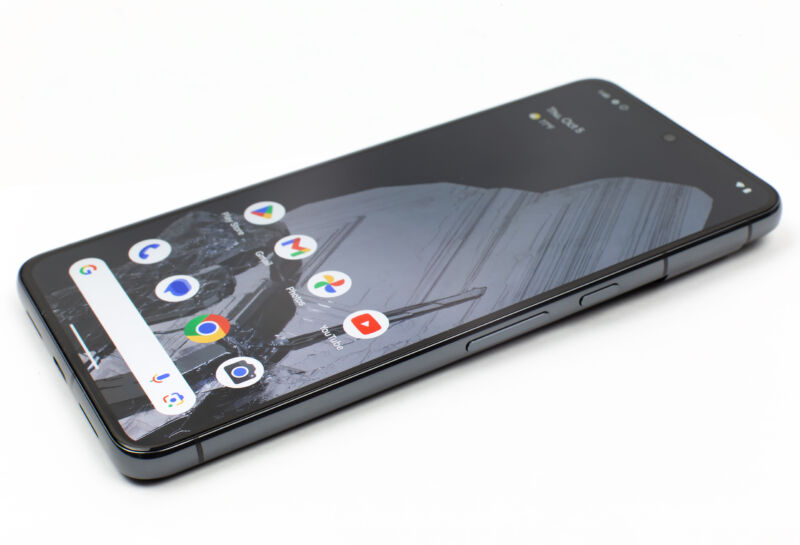
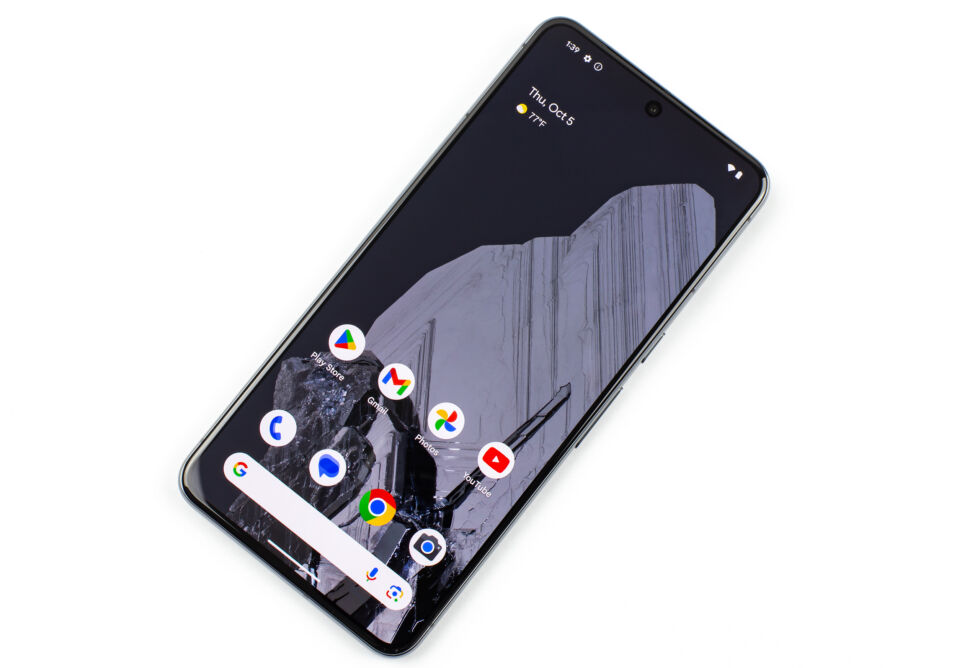
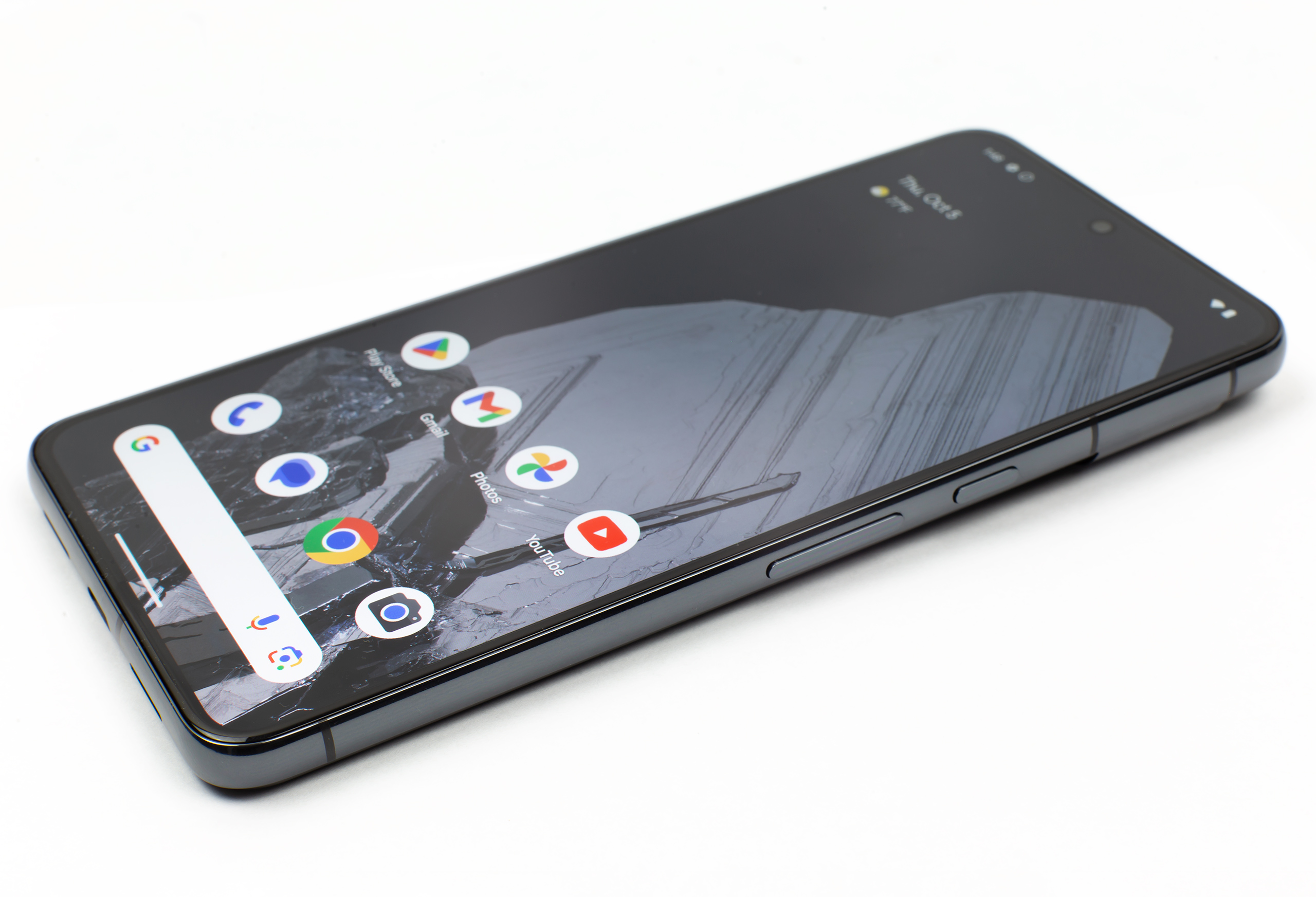
Enlarge/ Behold, the glorious, flat display. Normal, common-sense phone design is back, finally! (credit: Ron Amadeo)
Google is listening. Reviewing phones means that we usually complain—a lot—about phone designs, about things that could be better, and about decisions that don’t make a ton of sense. Usually it feels like talking to a wall; manufacturers ignore us and keep doing whatever they want.
The Pixel 8 is different, though. This phone feels like it’s taking some of our long-standing pet peeves into account and is finally doing something about them. Tired of pointless curved screens that distort your image? Fixed. Want an update support timeline that finally rivals iOS? Check. Fixing flaws with the previous model, like face unlock? Double check. Compared to where the Pixel line was just a few years ago, Google Hardware is turning in phones that are polished, practiced, and full of great decisions.
The Pixel design just keeps improving
The Pixel 8 Pro display looks great. [credit:
Ron Amadeo ]
SPECS AT A GLANCE
Pixel 8
Pixel 8 Pro
SCREEN
6.2-inch, 120 Hz, 2400×1080 OLED
6.7-inch, 120 Hz, 2992×1344 OLED
OS
Android 14
CPU
Google Tensor G3
One 3.0 GHz Cortex-X3 core
Four 2.45 GHz Cortex-A715 cores
Four 2.15 GHz Cortex-A510 Cores
USB Type-C 3.1 Gen 1 with 30 W USB-PD 3.0 charging
REAR CAMERA
50 MP Main
12 MP Wide Angle
50 MP Main
48 MP Wide Angle
48 MP 4x Telephoto
FRONT CAMERA
10.8 MP
10.8 MP
SIZE
150.5 x 70.8 x 8.9 mm
162.6 x 76.5 x 8.8 mm
WEIGHT
187 g
213 g
STARTING PRICE
$699
$999
OTHER PERKS
IP68 dust and water resistance, eSIM, wireless charging, in-screen fingerprint reader
Google is still making steady improvements to the design that started with the Pixel 6, and the Pixel 8 Pro feels like one of the best hardware designs out there. First up, Google is finally dumping the years-long failed experiment of curved displays. Samsung started the curved display trend back in 2014 when it figured out how to bend OLED displays. Thanks to the huge influence of Samsung’s display division, from then on most flagship Android phones had the long edges of their displays curve into the bodies.
Being stressed is not usually a good thing. But when you’re reviewing a high-profile smartwatch that touts stress-tracking as one of its most noteworthy new features, experiencing stress can be helpful. During the time I tested the Pixel Watch 2, I was going through a lot emotionally. I was maid of honor at our senior commerce editor’s wedding, had a family funeral to think about and was getting updates on the results of my best friend’s cancer diagnosis. Add to that the frenzy of Google’s hardware launch event and a super tight deadline for this review, and my mental landscape became the perfect testing scenario for the Pixel Watch 2’s body-response sensor.
That’s not the only new feature Google is bringing to its sophomore smartwatch. The company also updated the heart rate sensor, added a skin-temperature sensor, made the case lighter and used a more powerful processor that should prolong battery life. Though the Pixel Watch 2 doesn’t look like a major upgrade on the outside, it promises some improvements that should make daily use meaningfully better.
Pixel Watch 2: Design
As much as I adore the Pixel Watch 2’s round, shiny case and how it feels, one thing sticks out. Literally. The crown on the right side of the case juts out and is extremely easy to trigger when bending your hand backwards – I’ve already accidentally summoned the emergency SOS menu twice.
It also gets in the way when I’m working out, especially while doing push-ups or on a stationary bike. The solution for this is to adjust the watch so the screen is on the inside of your wrist, but even then I’ve accidentally pressed the knob once. To be fair, I also have to do this with the Apple Watch, especially the Ultra, but the dial on Google’s wearable just feels a bit more in the way.
Thankfully, the accidental pushes don’t happen often enough to completely ruin my workouts, and I otherwise love the Pixel Watch 2’s aesthetic. In the year since I reviewed the original, I’ve become more adept at swapping out bands using Google’s press-and-twist mechanism and can switch out the boring gray sport band I received for something nicer, like the slim black metal strap that I saw at the Pixel launch event.
Photo by Cherlynn Low / Engadget
On paper, the watch is five whole grams lighter than its predecessor, which had a stainless steel case. This year’s model is made from recycled aluminum, and I have yet to scratch or damage it. Though it uses a less durable material, the new Pixel Watch has an IP68 rating for dust- and water-resistance, as well as the same 5 ATM water (pressure) resistance as the original. Meanwhile, the Apple Watch Series 9 has similar parameters, with an IP6X rating (dust-resistance only) and the ability to withstand up to 50 meters of submersion in water. The lightest model of the Series 9 also weighs about a gram more than the Pixel Watch 2.
Like it did last year, Google only offers the Pixel Watch 2 in one size: 41mm. For my relatively petite wrist and decent eyesight, this felt adequate. I had little trouble aiming at onscreen buttons, but I imagine there are probably people who wish this came in a larger size.
A key part of the Pixel Watch 2’s updated design is on the underside of its case. It houses three new sensors — a multi-path heart rate reader, a skin temperature sensor and a continuous electrodermal activity (cEDA) sensor. The heart rate scanner is supposed to be more accurate since it has multiple diodes compared to a single LED in the middle. While I was initially concerned that that potentially meant increased contact with my wrist, which could be uncomfortable, I didn’t feel a noticeable difference.
Heart-rate and fitness tracking
The updated sensor array means the Pixel Watch 2 can track even more of your physiological data than before, like your overnight skin temperature and number of minutes a day you had a “body response.”
Photo by Cherlynn Low / Engadget
I’ll explain that latter term in a bit. But I want to point out that, because you need to wear the device to bed for at least three nights before you can get a body temperature measurement, I have yet to see a result. For one thing, I’ve been traveling over the weekend and forgot to bring the Pixel Watch 2’s charger, and on other nights I prioritized plugging the device so I could test it the next day. (I also hate wearing a watch to bed.)
With the new heart rate sensor, the Pixel Watch 2 is supposed to deliver more-accurate readings during vigorous activities, which should mean I’m getting a better report on my HIIT sessions.
I’ve been wearing the Pixel Watch 2 alongside the Apple Watch Series 9 to all my workouts this week, and they generally showed similar results. It’s worth mentioning that you still have to use the Fitbit app to view your stats from Google’s watch. On devices by Samsung and Apple, you’ll just use the native health apps. Oh, and a quick aside: The AI chatbot that Google showed off at its keynote last week won’t be available in the Fitbit app until 2024 at the earliest.
On the Pixel Watch itself, you’ll have to launch the Fitbit Exercise app or set up a tile to start a workout session. To see your data on your wrist, you’ll use the Fitbit Today app. I get that Fitbit doesn’t want to disappear into the Google ecosystem, but this still makes the Pixel Watch 2 feel a little disjointed compared to its competitors.
Photo by Cherlynn Low / Engadget
On my HIIT sessions, both Apple and Fitbit showed my duration and average heart rate as the exact same number. But they differed on stats like calories burned and how long I spent in each cardio zone. The Pixel Watch 2 tended to say I spent more time in “vigorous” and “moderate” ranges, while the Series 9 determined I hung out more in “Zone 1,” “Zone 3” and “Zone 4.” Apple clearly labels the number of beats per minute each of those zones include, while Fitbit doesn’t.
Based on my memory of these workouts (and how out of breath I felt), I think Apple’s calculations were more accurate. But these aren’t precise scientific devices and frankly this type of data is best used to look at your progress over time rather than for a snapshot of your performance in an individual session. I do appreciate that Apple automatically tracks and shows me my post-workout heart rate, since that metric is quite telling of my heart health.
One of the most glaring features missing on the original Pixel Watch was automatic workout start and stop prompts. While it would record your activities without you having to first launch them, Google’s debut smartwatch would not alert you if it had detected you had been, say, out brisk walking for a while. It also didn’t nudge you when you had stopped.
Photo by Cherlynn Low / Engadget
This year, the Pixel Watch 2 brings these reminders to start (and stop) for seven types of activities — walking, running, rowing, outdoor biking and more. It’s a very simple feature, but it brings me so much joy. The activity I track the most is the 20-minute trek to and from my gym, and I don’t always remember to start it when I head out. Having the reminder pop up when I’ve been walking for ten minutes is usually a relief, especially compared to the frustration I feel when I realize at my destination that I’d forgotten to launch the tracker.
New features: Stress and body-response management
Speaking of frustration, the feature I was most keen to check out this year was the body-response measurement system. Now, “body response” is sort of vague wording, but in this case it’s specifically referring to how your body reacts to stress. Using the cEDA sensor, the Pixel Watch 2 will look for physical signs of stress and prompt you to log your mood or take a walk when it detects these. Typically, cEDA sensors are looking for sudden changes in sweat levels, and Google takes that data, alongside your heart rate variability, to determine how stressed you might be.
In the few days I’ve worn the Pixel Watch 2, my stress levels have been fairly high. Like I mentioned before, I’ve encountered numerous moments of emotional intensity, and for the most part it seems like the device noticed about a third of them. For example, it registered that I had a body response at about 8:50 am on the morning of the wedding, which lines up with when the bridesmaids and I had to rush and finish getting dressed for photos. However, it didn’t notice my excitement when I got a message with some good news from my best friend about being in a relatively early stage of cancer. When it did detect a reaction, it usually served an alert about 15 to 30 minutes later, so I sometimes had to struggle to remember what caused my response.
Photo by Cherlynn Low / Engadget
When the Pixel Watch 2 notices one of these moments, it can prompt you to log your feelings or start a walk, as long as you’ve enabled the feature. The problem is, along with the generic “body response” wording, the results are hard to make sense of. First of all, when you’re looking back at your daily report in the Fitbit app, you’ll see in the “Body responses” section under “Stress and mindfulness” a number of minutes. Not the number of instances you were found to have been having a reaction, but a duration for all the emotions you logged that day.
So on Tuesday afternoon, all I see under “Body responses” is “5 minutes” and one mark on a horizontal scale showing 12 am on the left and 11:59 pm on the right. Tapping on that card brings up more details like a stress management score, number of mindful days and a weekly summary. Scrolling down shows me all the body responses logged in the previous days, and here I can see that Monday was particularly stressful, since I had 36 minutes of body responses that I had labeled as “frustrated.”
On days like Friday where I had logged different emotions, the app says I was “stressed then content.” It’s a tiny bit more useful than I had expected, and though I still find number of minutes to be a strange metric, I can see it being a handy reference when I’m comparing stressful days in future.
You can edit your logged moods via the app and add them to detected body responses that you maybe neglected to label in the moment. I encountered a strange quirk on Monday afternoon where, after I labeled what I was feeling on a bunch of body responses that had been registered on Friday, they showed up on the Fitbit Today dashboard on the watch as having been registered on Monday. It’s a bug that shouldn’t exist, especially when you consider that Fitbit’s been offering stress management tools since it launched the Sense smartwatch in 2020.
Photo by Cherlynn Low / Engadget
Google’s approach to tracking your emotional wellbeing is also slightly unsophisticated when compared to the option on watchOS 10. While Apple’s system doesn’t register changes in your body, it does offer more mood options for you to log. On the Pixel Watch 2, you can only choose from one of eight choices, like “Excited,” “Content,” or “Sad.” Meanwhile, you can choose from dozens of labels and varying intensities on an Apple Watch. I’ve found on at least two occasions that none of the eight words offered by Google fit what I was feeling, and went with, say, “worried” when it would have been more accurate to say I was feeling “unsettled.”
These are, however, issues that feel easy enough to fix via a software update in the future, and aren’t so major that they’d prevent me from recommending the watch. I’m encouraged to see more mainstream tech companies consider emotional and mental wellbeing as part of overall health, and giving users a convenient means to log their feelings will help people have more informed conversations with their therapists or healthcare professionals, too.
Performance and in use
Beyond the new sensors, the Pixel Watch 2 also has a new Snapdragon Wear 5100 processor that should be more responsive and power efficient. Swiping through the Wear OS 4 interface was a breeze and most stats displayed quickly. Using the smart home shortcut to turn my lamp off was satisfyingly convenient, and it reacted quite quickly.
I was pleasantly surprised to see my inbox load quickly in the Gmail app, and I have yet to struggle to read text on the screen. It’s mostly been cloudy these days, so I haven’t had an issue seeing what’s on the Pixel Watch 2’s AMOLED panel. It does go up to the same 1,000 nits as its predecessor, though it’s worth noting that the Apple Watch Series 9 can hit 2,000 nits.
Photo by Cherlynn Low / Engadget
The Google Assistant was slightly slow at noting what I was saying, especially compared to Siri on the Series 9, which processes on-device. I wish Google would make on-device Assistant processing available on its smartwatch soon. When I left my phones at home while going to the gym one day, Siri was still able to launch an outdoor walk workout while the Google Assistant was completely useless. Neither watch was set up with cellular connectivity, and they were both offline. I also had to laugh when I looked at the Fitbit app and saw it had recorded a 7-hour walk during which I apparently traveled just 0.9 miles.
This is what actually happened: I was on a fairly vigorous hike with some rowdy friends, racing each other up some hills, and I didn’t realize the Pixel Watch 2 was running out of juice. Before it died, though, it had recognized that I had been “walking” for a while and suggested I start tracking. I did, and shortly after that the watch conked out. It still had some power left, because tapping the screen aggressively would show the time and a red empty battery icon.
I believe it was probably still tracking the duration of my workout in the background but couldn’t log any other metric (like distance or steps). This is funny, since Google says your stats will be recorded up till the device dies, and then be uploaded and synced with the Fitbit app after it’s recharged and turned back on.
That’s another small gripe I have about the Pixel Watch 2 — for your data to show up in the smartphone app, you’ll have to be connected to the internet. It doesn’t matter if your devices are paired over Bluetooth. You’ll have to be online for the information to sync.
Photo by Cherlynn Low / Engadget
If you’re a Fitbit Premium subscriber (for $10 a month), you’ll be able to send emergency communications over LTE even if you don’t have a cellular plan for your watch or you’re not within range of your own provider. To be clear, this only works on the LTE model, not the Wi-Fi only version. This is particularly handy for the new Safety Check feature, which Google brought over from the Pixel phones. With it, you can select an activity like walking alone, hiking or going for a run. Then, start a timer for however long you think you’ll be out and confirm your emergency contacts.
When you are one minute away from the countdown ending, the watch will buzz and nudge you to end the timer. If you don’t, your contacts will get a selection of information that you can choose, including your live GPS location and whether you’ve called emergency services. You can also decide to alert them when your battery dies.
All of this is stuff you’ll have to set up in the Fitbit or Watch app on your phone, which brings me to another observation: I never really have to go deep into the Apple Watch’s settings to enable new, helpful features. With the Pixel Watch 2, I had to be sure to enable everything, even the reminders to start and stop workouts, which seemed like things that should be on by default anyway. This is pretty emblematic of the Android vs Apple experience, where the former is typically more involved, but is more customizable. You can add a tile to make your favorite functions easier to find, for example. Apple products, meanwhile, don’t require a lot of work out of the box, but you don’t have as much freedom to organize your apps.
Photo by Cherlynn Low / Engadget
It’s not really a criticism of the Pixel Watch 2, though I will point out that this year’s model comes with Always On Display enabled by default, whereas the original didn’t. Google was probably taken to task for not making this the primary setting out of the box, and it’s possible the company turns more features on by default in future. AOD activated makes so much more sense, but I understand the impact it has on battery life.
Battery life and charging
With its new processor and slightly larger battery, the Pixel Watch 2 is supposed to last 24 hours with the AOD enabled. I was pleased to see that when I took the watch off at the end of the day, it usually still had about 35 to 40 percent left. That’s enough to track your sleep at night, according to Google.
My concern is if I do opt to wear the watch to bed instead of charging it overnight, it might not juice up fast enough for my morning workouts. The Pixel Watch 2’s overhauled contact charging system is supposed to get you back to 100 percent in 75 minutes, which is a grand total of five minutes shorter than last year’s model.
That’s not a dramatic improvement, but thankfully I was able to get the watch from 29 to 44 percent in about 5 minutes, and that lasted me through two outdoor walks, a circuit training session and several workouts with heart-rate range and pace alerts enabled. By the time I was able to plug the watch back in after all that, I still had 21 percent left.
Photo by Cherlynn Low / Engadget
In general, the Pixel Watch 2 lasted almost as long as the Apple Watch Series 9 (41mm model), which means it’s closer to being on par with its main competitor. Of course, Samsung watches and other activity trackers tend to last longer, but Google has a higher pulse sampling rate of once every second. Sadly, like its predecessor, the Pixel Watch 2 doesn’t support wireless charging, so you can’t use your Pixel or Samsung handsets to share a bit of juice when you’re on the go.
Wrap-up
I’m conflicted. The Pixel Watch 2 is a definite improvement over its predecessor, and offers several unique features that set it apart from the competition. In particular, the stress management tools are things that rivals like Apple are yet to offer. Fitbit (or Google) continues to offer industry-leading heart rate measurements and insights, thanks to years of experience and expertise. But some software quirks and confusing data presentation get in the way.
With the Pixel Watch 2, Google is reducing the gap between it, Apple and Samsung on things like battery life, while giving itself an edge with its approach to measuring stress as part of wellbeing. It’s still far from being the best smartwatch around, but for Android users at least, it’s becoming more of a solid contender.
This article originally appeared on Engadget at https://www.engadget.com/pixel-watch-2-review-not-leading-the-way-but-no-longer-lagging-170007702.html?src=rss
Let’s set the record straight: I was too harsh on the Pixel 8 and Pixel 8 Pro in my initial hands-on. They’re not “dull” in the least bit. After more time with both devices, I’ve realized the Pixel 8 is officially the best small Android flagship you can buy, helped by Google’s renewed promise of seven years of…
As we dive into the second (and last) day of Amazon’s Prime Day (or “Prime Big Deal Days“), Logitech continues to offer strong discounts on gaming gear, including sales on keyboards, mice and other gaming accessories. Most deals are just for Prime members, but a few are open to all. If you’ve been thinking about updating your setup or have gamers on your holiday shopping list, now’s a good time to stock up on peripherals from a solid brand. We’ve recommended Logitech gear in many of our reviews and guides over the years and a few of our picks are on sale. And if you’re looking for gaming deals that aren’t from Logitech, we’ve got an entire roundup devoted to just that. Here’s the best gear from Logitech’s Prime Day sale.
Logitech G915 Lightspeed RGB
The G915 RGB mechanical gaming keyboard is down to $180, or 28 percent off. That’s a Prime member-only deal, and looks to be about $20 more than its all-time low, but still a decent savings on a mechanical gaming keyboard. The low-profile mechanical switches aim to make typing more comfortable and ultimately faster.
The G Pro X Superlight
While this isn’t the newest version of this mouse, we were still fans of the original Logitech G Pro X gaminng mouse, and called it “a no-nonsense gaming mouse” that’s also good for productivity. It’s down to $110 instead of $160, but again, just for Prime members. If you’re up to date with your Amazon club dues, however, it’s a great deal as this looks to be the lowest price Amazon has ever sold it for.
The G703 Lightspeed Mouse
While it’s admittedly an older mouse, Logitech’s G703 Lightspeed mouse has dipped to $60 (40 percent off) for prime members. It’s got 6 programmable buttons, weighs just 95 grams and has a claimed battery life for up to 35 hours of use.
Zone Vibe 100
The Zone Vibe 100 lightweight wireless headset is down to $80, which is a 20 percent savings. We called these a “breath of fresh air” in our guide to the best gaming gear on a budget. It draws on Logitech’s expertise to deliver solid gaming audio but the stylish wireless package can pull double duty as respectable wireless headphones.
G915 Lightspeed Keyboard
The G915 Lightspeed keyboard is down to $180 for Prime members, which is $70 off. It uses low-profile GL switches that are half the height of typical mechanical key switches, making it about 25 percent faster to press a key. The version on sale uses the “tactile” key switch that lets you feel the actuation without being as noisy as the “clicky” version. It has a quintet of programmable keys and support for 16.8 million colors through the RGB lighting system. And of course, it’s wireless, using Logitech’s Lightspeed tech for minimal lag.
Other notable deals
Another key product on offer is Logitech’s G Pro X superlight wireless gaming mouse ($110, 31 percent off) that weighs just 63 grams, while offering excellent speed and accuracy. If it’s a headset you need, the Logitech G535 offers neutral sound and agreeable listening experience. Its Logitech G Fits wireless gaming earbuds are also on sale for $160 (30 percent off), delivering features like long battery life, premium sound and noise cancellation. And on the productivity side, the Brio 501 full HD webcam offers auto light correction, dual noise reduction mics and more.
This article originally appeared on Engadget at https://www.engadget.com/prime-day-deals-up-to-40-off-on-gaming-accessories-from-logitech-165545189.html?src=rss
Amazon’s October Prime Day sale is rolling on, and there are a bunch of solid deals for Nintendo Switch users. Not only can you scoop up several games (including Nintendo first-party titles) for a lower price than usual, you can snap up a microSD card for a song to boost the console’s storage.
On the games front, many Switch exclusives are at least $10 off. The turn-based strategy game Mario + Rabbids Sparks of Hope is $30 (its predecessor, Mario + Rabbids Kingdom Battle, isn’t on sale but it will run you $24). This spin-off series could be a solid entry point for those looking to explore a different genre popularized by the likes of XCOM.
Another Mario spin-off is on sale, with Mario Golf: Super Rush dropping to $40. Those looking for a more traditional flavor of everyone’s favorite plumber may be tempted by the wonderful Super Mario Maker 2, which offers millions of user-created 2D Mario levels along with a bunch that Nintendo developers crafted. That game will run you $40.
There are several other Switch exclusives on sale that may catch your eye. Metroid Dread, Samus’ ultra-tense return to a Nintendo console, is $40. Fire Emblem Engage, a tactics RPG that debuted at the start of this year, has dropped to $30.
And then there’s the small matter of Nintendo’s most important game of 2023. The Legend of Zelda: Tears of the Kingdom is not on sale on Amazon at the minute, unfortunately. But you can find a good deal on the game of the year contender at Walmart, where it has dropped to $48.
You might not stop with these games, though. You may end up buying some from Nintendo’s eShop as well (of note, some of these game deals are available for digital versions). In which case, you’ll probably need a microSD card to store them on, given the Switch’s paltry onboard storage of 32GB.
Samsung’s Evo Select is our pick for the best value microSD card. It doesn’t perform as well as the Samsung Pro Plus, but it’s plenty adequate for the Switch and the prices are hard to beat. The 512GB version of the Evo Select, which should give you enough space to store dozens of games, is on sale for $28. That’s $7 off the usual price and it marks an all-time low. The 128GB model is also chapear than ever. It’ll run you $10.
This article originally appeared on Engadget at https://www.engadget.com/the-best-nintendo-switch-prime-day-deals-you-can-shop-right-now-165501176.html?src=rss
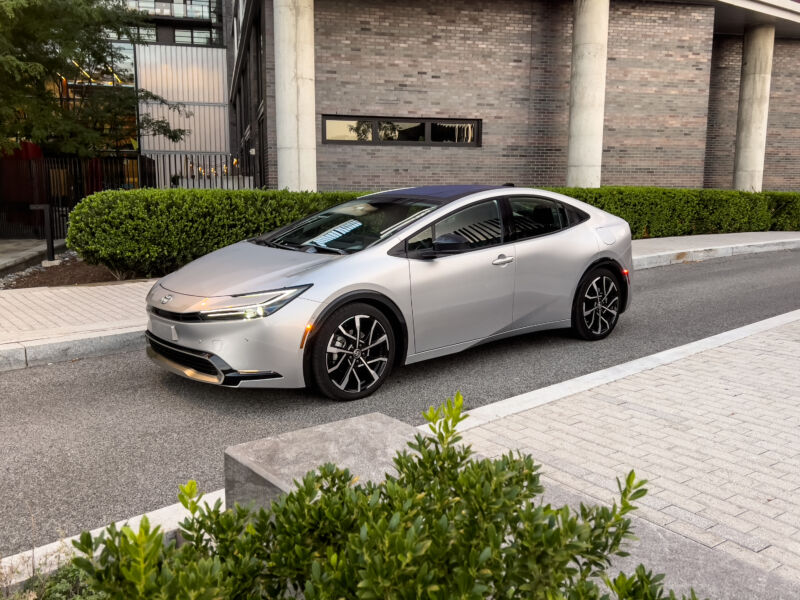
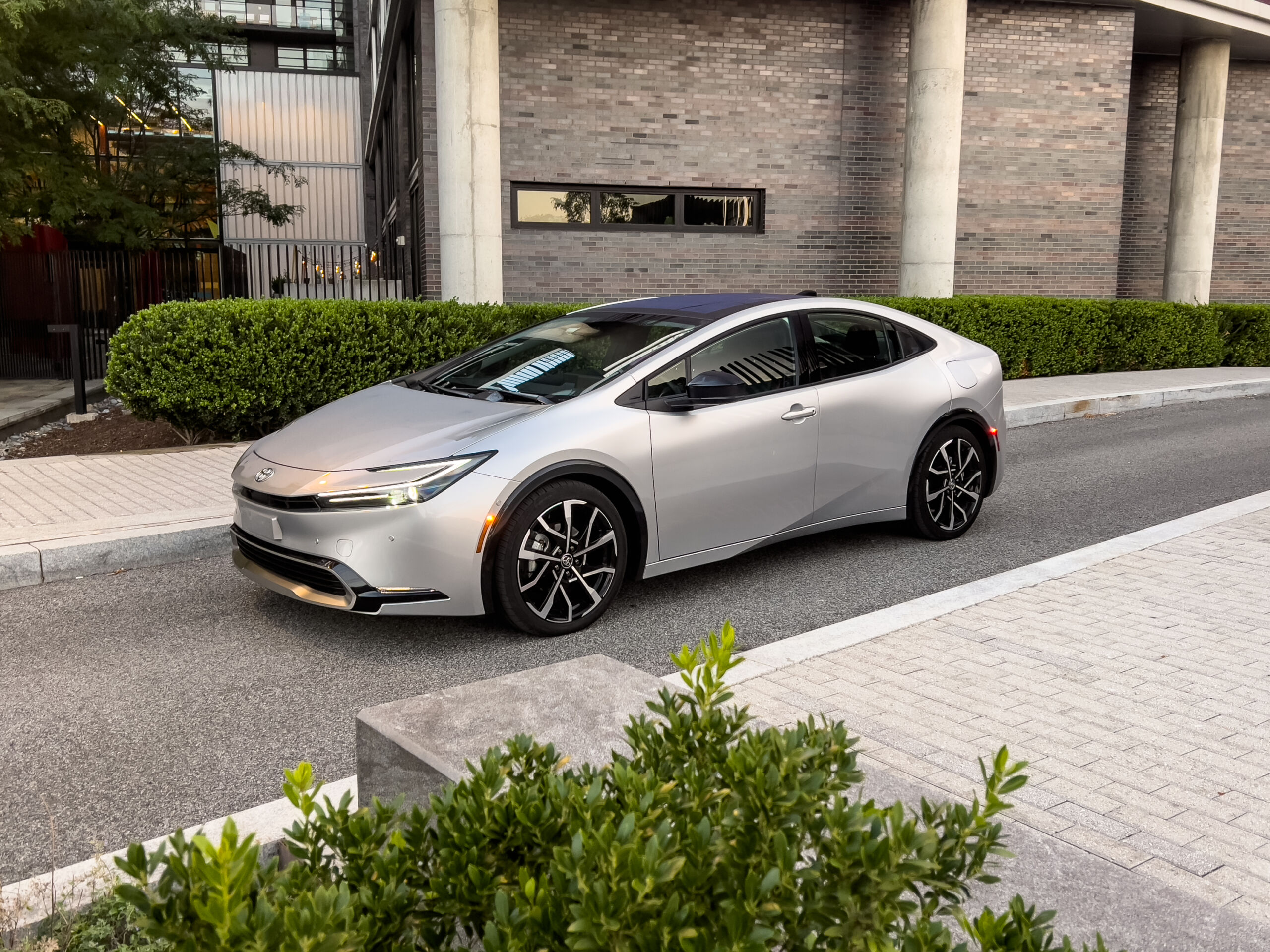
Enlarge/ After a confusing mess for the last generation, Toyota’s stylists have done a decent job with the new Prius. I think it needs a front plate if you’re going to have it a light shade like this silver. (credit: Jonathan Gitlin)
Earlier this year, we spent some time with the new Toyota Prius. There was a lot to like about the new car, the fifth to bear its name—sleek looks and minimal fuel consumption are the highlights. Today, it’s Prius Prime, the plug-in hybrid variant. Toyota might have been early to hybrids and uncomfortably late to battery electric vehicles, but the Prius Prime straddles the line between the two, offering a battery big enough for most daily driving and a highly efficient gas-burning powertrain for longer journeys.
Much of what I wrote about the not-Prime Prius applies to the plug-in, too. There are the same sleek looks, with a steeply raked windshield and a far more cohesive design than the model it replaced—that one looked like the result of two separate car designs that were later crashed into each other. I’m starting to think that the car needs a front license plate to look right—that little bump out on the fascia where a plate is supposed to attach looks rather obvious in the case of our Virginia-registered tester.
The $39,170 Prius Prime XSE Premium we tested doesn’t look quite as racy as the blue car we had in May—mostly, that’s down to the different design of alloy wheels. Smaller 17-inch wheels with aerodynamic covers are available with the Prius Prime SE ($32,350), but like the XSE Premium, the mid-range XSE ($35,600) also rides on the bigger 19-inch wheels. I mention this upfront because if you’re looking for the most efficient option, the stripped-out base model on small wheels has a lower drag coefficient and runs more economically.
US Space Force has temporarily banned the use of web-based generative AI tools and so-called large language models that power them, citing data security and other concerns, Bloomberg News reported Wednesday, citing a memo. From the report: The Sept. 29 memorandum, addressed to the Guardian Workforce, the term for Space Force members, pauses the use of any government data on web-based generative AI tools, which can create text, images or other media from simple prompts. The memo says they “are not authorized” for use on government systems unless specifically approved.
Chatbots and tools like OpenAI’s ChatGPT have exploded in popularity. They make use of language models that are trained on vast amounts of data to predict and generate new text. Such LLMs have given birth to an entire generation of AI tools that can, for example, search through troves of documents, pull out key details and present them as coherent reports in a variety of linguistic styles. Generative AI “will undoubtedly revolutionize our workforce and enhance Guardian’s ability to operate at speed,” Lisa Costa, Space Force’s chief technology and innovation officer, said in the memo. But Costa also cited concerns over cybersecurity, data handling and procurement requirements, saying that the adoption of AI and LLMs needs to be “responsible.”
Third-party iOS Reddit app Narwhal introduced a $4-per-month subscription plan that will take effect in the next week or two. The developer announced the plans Tuesday on Reddit (viaThe Verge). The pricing is designed to allow the developer to cover Reddit’s widely disparaged API fee hikes, which led to mass online protests earlier this year and the shutdown of the beloved client Apollo.
The app’s developer, who uses the handle u/det0ur on Reddit, wrote that the pricing was “definitely an experiment” as they try to keep their app afloat. “If I absolutely have to, I will transition to some other plans,” Narwhal’s creator wrote. “But I want to try this first.”
The developer had previously announced tiered pricing based on users’ API calls, but u/det0ur scrapped that after realizing how cumbersome that would be for users. “[Let’s] be real, the 2003-esque cell phone plan with monitored usage just isn’t great,” the developer wrote in a separate post from last week. “Who wants to even worry about what an API Call is? Let alone how much it will cost.”
However, API calls are an inescapable financial reality for third-party developers hoping to offer users an alternative to the official Reddit client. Reddit revealed its maligned API changes this spring, which led Apollo developer Christian Selig to say the updated pricing would cost him $20 million to keep the app going “as-is.” More than 6,000 subreddits went dark to protest the changes, but (unlike Unity’s recent walkback) Reddit dug in its heels and weathered the storm, leading to Apollo’s closure and the forced reopening of communities that continued to protest.
Users switching to Narwhal sound pleased with the pricing and the app. “The customization options are great; I have been able to ‘rebuild’ Apollo as closely as possible,” wrote u/Neryuslu. “You’re the first developer ever to get a monthly sub from me. I have refused this model so far, but in this case it’s obviously different. Still sucks to indirectly pay Reddit like this. Fuck you, u/spez,” they wrote, referring to the handle of Reddit CEO Steve Huffman.
This article originally appeared on Engadget at https://www.engadget.com/reddit-client-narwhal-tries-4-monthly-pricing-to-navigate-api-changes-163042022.html?src=rss